


Managing access to critical systems isn’t just an IT task anymore. Choosing the best privileged access management software directly impacts how well your organization secures sensitive data, controls user activity, and responds to threats in real time.
When the fit is off, the impact isn’t always immediate, but it builds over time. Teams end up dealing with fragmented access controls, slower incident response, and growing access debt that quietly increases risk across identity and infrastructure.
If you’re here, you’re likely trying to avoid exactly that. Whether you’re tightening security controls, preparing for audits, or scaling access across cloud and on-prem environments, the right PAM solution can make the difference between controlled access and constant firefighting.
So I dug into verified G2 reviews and real-world implementation patterns to understand how these tools actually perform in production environments. Instead of just listing features, this guide focuses on what matters most: which tools solve which problems best, and how to choose the right fit for your team.
*These privileged access management tools are consistently top-rated in their category based on user review patterns reflected in G2’s Winter 2026 Grid Report. I’ve highlighted their strengths and available pricing to help you choose the right platform.
I don’t think of privileged access management software as just a security add-on anymore. It’s what brings control to how elevated access is granted, monitored, and revoked across your systems.
Without it, access tends to sprawl, shared credentials, unmanaged admin rights, and limited visibility into who can do what. Over time, that creates risk that’s difficult to track and even harder to fix.
The urgency is only increasing. The global PAM market is expected to grow from about $3.3 billion in 2023 to more than $20 billion by 2033 as organizations face credential sprawl and hybrid environments. Privileged access management tools help address gaps like unmanaged access, limited audit visibility, and drifting credentials across security and cloud teams.
With the right PAM tool, you get clear visibility into privileged access, tighter controls, and audit trails that make compliance and incident response easier.
G2 Data shows adoption across companies of all sizes. Smaller teams often prioritize quick setup and reduced manual work, while larger organizations focus on scaling access controls, supporting compliance, and managing vendor access without slowing operations.
At a minimum, good privileged access management software makes access visible, enforces control, and reduces the risk of unchecked permissions.
I started by using G2’s Winter Grid Reports to shortlist leading privileged access management platforms based on verified user satisfaction scores and market presence across small teams, mid-market organizations, and enterprise environments.
Next, I analyzed hundreds of verified G2 reviews to identify recurring patterns around what matters most in real-world access control and security workflows. That included how well tools handle privileged credential management, just-in-time access, session monitoring, audit readiness, third-party access, and integrations with identity providers, cloud platforms, and infrastructure tools. This made it easier to separate platforms that genuinely reduce access risk from those that introduce friction or blind spots as environments scale.
Since I haven’t personally used all these platforms listed, I cross-checked these review-driven insights against workflow perspectives from IT, security, and platform teams that actively manage privileged access.
The visuals and product references included in this article are sourced from G2 vendor listings and publicly available product documentation.
After reviewing thousands of G2 user reviews, studying real-world access control workflows, and speaking with IT administrators, security leaders, and platform teams, the same themes showed up repeatedly.
Here’s what I prioritized when evaluating the best privileged access management software:
Based on these criteria, I filtered down the platforms that consistently deliver control without unnecessary friction. Not every solution excels in every area, so the right choice depends on whether your priority is speed, audit depth, cloud-native access, or enterprise governance. What matters most is choosing a tool that aligns with how privileged access actually flows through your organization.
Below, you’ll find authentic user feedback from the Privilege Access Management Software category. To appear in this category, a tool must:
This data was pulled from G2 in 2025. Some reviews may have been edited for clarity.
JumpCloud differentiates itself in PAM by unifying identity, device, and access control. It centralizes privileged access policies, authentication methods, and device trust signals within a single cloud directory platform, giving teams a consistent way to govern access across users, applications, and endpoints early in deployment.
What resonates with security teams about JumpCloud is how approachable it is to deploy and operate. Many G2 reviewers describe it as one of the easiest platforms they’ve rolled out in a real IT environment, from demo through implementation. In PAM workflows, that approachability matters because access controls only reduce risk when they’re widely adopted and correctly enforced.
Single sign-on (93%) is JumpCloud's highest-rated feature, and teams describe it as the practical mechanism behind how access stays consistent across a growing application and endpoint estate. For teams managing SaaS tools, administrative systems, and devices under one directory, SSO reduces the friction of maintaining separate credentials per system while keeping privilege boundaries intact as environments scale.
JumpCloud’s approach to privileged access is closely tied to how identity and device policies are managed together. G2 reviewers describe using a single directory to apply authentication and access rules across users and endpoints without splitting policy management across tools. This unified structure helps teams maintain consistent access rules across users and endpoints as environments grow more distributed.
From a business impact perspective, G2 users consistently point to operational simplification as a core benefit. Centralized management, rated at 93%, makes that simplification tangible. Managing identity, authentication, and device policies in one place makes it easier to apply least-privilege principles. For IT teams and MSPs supporting multiple environments, that consolidation reduces the number of tools involved in privileged access workflows.
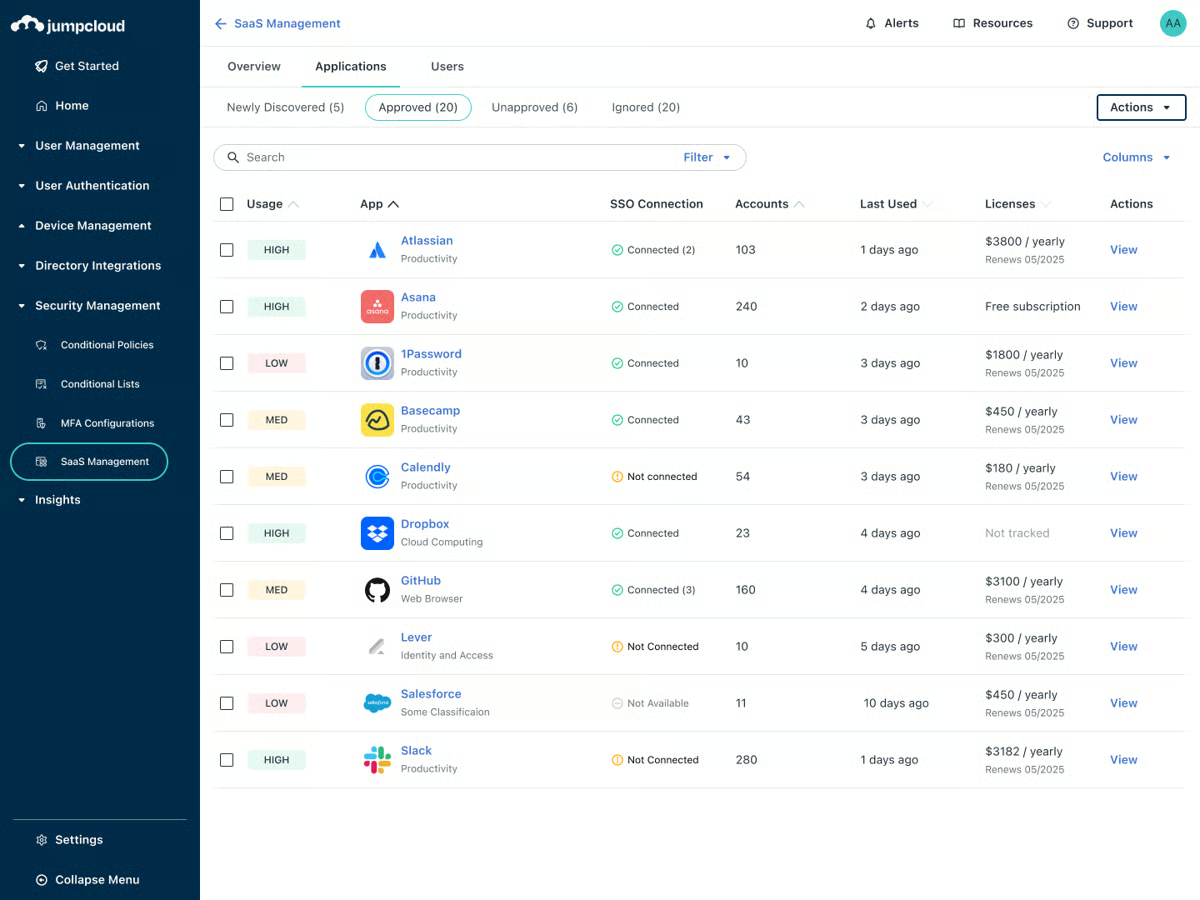
JumpCloud manages all device types from a single console as a primary reason they selected it over separate MDM and IAM tools. Multiple G2 reviews highlight that it handles both Windows and macOS devices within the same portal, removing the need to switch between management systems. For IT teams supporting mixed-device environments, that management layer reduces overhead and keeps policy enforcement consistent across endpoints.
Old accounts and stale permissions become visible and manageable within JumpCloud's directory. G2 reviews note that HR-adjacent workflows, like offboarding and access cleanup, become more predictable when identity state is centralized. For IT teams and MSPs coordinating access changes across growing organizations, that reliability reduces the risk of dormant credentials accumulating unnoticed.
JumpCloud fits more advanced PAM requirements, with reporting and session-level capabilities aligning more closely with teams focused on enforcing access rather than performing deep forensic audits. Organizations that require extensive session recording or highly granular audit trails may find these areas more complementary than core. For IT and MSP environments centered on day-to-day access governance, the platform’s operational clarity aligns well with how privileged access is typically managed.
The platform’s breadth across identity, device management, and access control reflects a multi-layered approach to policy management. This is more noticeable in highly complex or customized environments, where interactions between policy layers become more prominent. Teams operating across identity, device, and access domains align well with this consolidation, as the platform brings these controls into a unified management model.
JumpCloud stands out as a strong PAM choice for organizations that want privileged access governed through a unified identity and device control plane. JumpCloud is a reliable and well-aligned fit based on how G2 users consistently describe their experience.
“I use JumpCloud as part of our IT infrastructure, mainly for password storage and two-factor authentication on our mobile phones and laptops. I think it's a very good product with a simple and intuitive user interface. The overall user experience is straightforward, simple, and clear. Most of the tools we use within the organization, like Slack, Gmail, and HubSpot, are integrated with JumpCloud, which I find really convenient..”
- JumpCloud review, Ashwath S.
“I think there's a little bit of disconnectedness between the MDM policy delivery and some of the commands functionality. We had implemented Cortex XDR installs for Cortex XDR via MDM with Apple. And we also created a command to do that as well. I think that there could be a little bit more on a coherent connectedness between the commands and the MDM policy that are set up.”
- JumpCloud review, Andrew H.
If your priority is simplifying login experiences across apps, check out the best single sign-on (SSO) software for centralized authentication.
Microsoft Entra ID approaches privileged access from an identity-first perspective, which is where it most clearly differentiates itself. Privileged access decisions are built directly into identity verification, using conditions, context, and policy enforcement during sign-in and application access. This reduces reliance on static credentials and aligns privileged access with how G2 users interact with systems in real-world environments.
Entra ID excels at access enforcement in PAM. Multi-factor authentication (96%) is the strongest-rated feature, and it forms the backbone of how privileged access is secured. Instead of relying on static credentials, access is continuously verified through MFA, conditional policies, and identity context. G2 reviews repeatedly highlight how this approach strengthens security while keeping day-to-day access straightforward for users.
G2 reviews show strong appreciation for how centralized the platform is. With centralized management rated at 94%, Entra ID gives security teams one place to define and enforce access policies across internal systems and third-party applications.
The tight integration with Microsoft services, combined with broad third-party SSO support, reduces fragmentation and helps maintain consistent privileged access rules as environments scale. Security teams who are managing access across a growing mix of internal tools and external applications, where integration depth means policy enforcement doesn't break at the boundary between Microsoft and non-Microsoft systems.
Entra ID's conditional access is a practical zero-trust control layer that operates without requiring separate PAM tooling. G2 reviews highlight how teams use it to block risky sign-ins and enforce MFA only when conditions justify it, such as access from outside the corporate network. That selective enforcement keeps security tight while reducing friction for users working inside expected patterns. For organizations standardizing on Microsoft, this becomes the primary access control mechanism rather than a secondary layer.
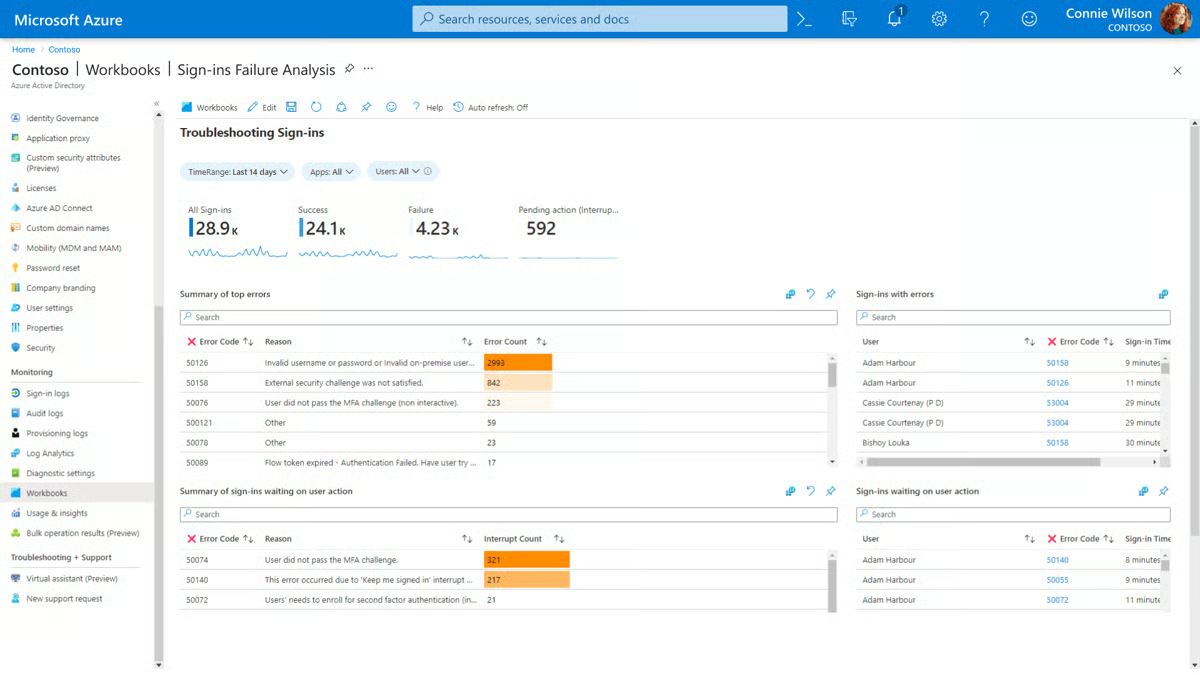
G2 reviewers working in hybrid environments consistently highlight Entra ID's compatibility with on-premise Active Directory via AD Connect. G2 users note that the sync allows organizations to extend cloud-based conditional access and MFA to identities that still originate on-premise, which is a common requirement in mid-market and enterprise environments that haven't fully migrated. For teams managing a mixed identity estate, that bridge reduces fragmentation without forcing a full infrastructure replacement.
G2 reviewers highlight privileged identity management as a distinct capability worth selecting Entra ID for. PIM grants time-bound, on-demand access to sensitive roles instead of leaving standing privileges active indefinitely. For teams managing elevated admin roles across Azure and Microsoft 365, that just-in-time model cuts exposure without adding separate tooling. Each activation also generates an approval and audit record, which feeds compliance workflows without extra manual steps.
Entra ID is designed around policy-driven access governance, so workflows involving frequent, high-volume privilege changes or layered approval chains reflect a more structured model than lighter remote access tools. This is most noticeable in environments requiring rapid privilege adjustments across large user populations, while teams prioritizing centralized control and compliance align well with the platform’s governance approach.
Advanced governance features, including Privileged Identity Management and granular conditional access controls, are available at the P1 and P2 licensing tiers. Teams with straightforward privileged access needs align well with the baseline tier’s MFA and SSO capabilities, while higher tiers become relevant as governance requirements grow more complex. This tiered structure supports scaling security capabilities in line with organizational maturity.
Microsoft Entra ID is a strong PAM option for organizations that want privileged access governed through identity, context, and policy rather than isolated credential silos. For Microsoft-centric environments where identity already anchors security strategy, Entra ID remains a dependable and well-aligned choice based on how G2 users consistently describe their experience.
"Microsoft Entra ID has all the features required to build a successful end-to-end solution that can scale with the increase in our product demand. The implementation is super simple and works seamlessly with other Microsoft products.”
- Microsoft Entra ID review, Parth P.
"Using Azure IaaS requires ongoing patching and diligent server monitoring, which is different from SaaS solutions, where much of this maintenance is managed for you. It also demands a certain level of expertise, as all the various components must operate smoothly together. One frequent error is over-provisioning resources, which functions well on local servers may not be suitable for the cloud, potentially resulting in avoidable expenses. Without sufficient knowledge, businesses risk spending thousands more than necessary.”
- Microsoft Entra ID review, Syed M.
PAM is just one part of access security. To stay fully protected, you also need to manage passwords properly. Check out the 8 best password managers to keep your logins safe and secure.
AWS Secrets Manager is Amazon’s native control layer for high-risk credentials, designed to keep database passwords, API keys, and private keys out of source code and under strict access governance, while handling rotation quietly in the background so credentials stay protected without becoming operational friction.
It effectively removes privileged secrets from places they shouldn’t live. G2 reviewers describe moving sensitive values like DB endpoints, passwords, and app configuration variables out of GitHub and into AWS-managed storage, then referencing them securely during build or runtime. In a PAM context, that matters because it turns “who can see credentials” into a controlled access policy decision, rather than an accidental byproduct of how code is shared. It also supports strict privilege definitions through IAM policies, which is central to PAM-style governance in AWS environments.
Rotation is where AWS Secrets Manager is especially aligned to privileged access needs. Teams use it to rotate credentials on a defined schedule, and G2 reviewers repeatedly call out how the Lambda-based custom rotation capability supports renewal without constant manual intervention. In environments where privileged database access is common, RDS credentials, production API keys, private keys, and the ability to rotate without turning every update into a coordinated fire drill are practical advantages.
The service also supports controlled transitions through versioned secrets. Multiple versions can be staged and labeled, allowing teams to rotate or update credentials while preserving access continuity. For environments where privileged credentials are consumed by multiple applications or services, this helps reduce breakage during updates and reinforces reliable access governance.
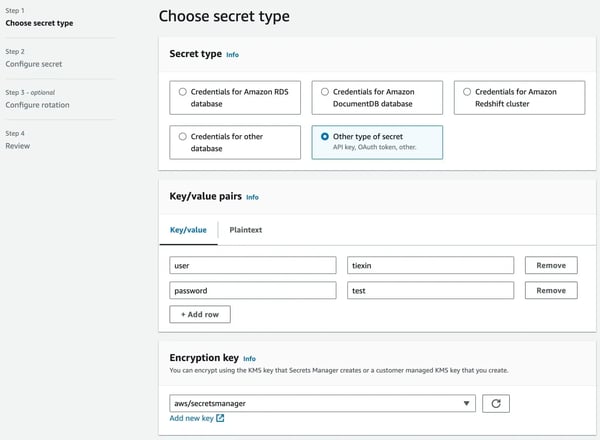
IAM-integrated access control is a core PAM-relevant strength: access to secrets is governed through explicit permission policies rather than shared knowledge. Users mention how this turns credential access into a deliberate, auditable decision. In environments where multiple applications and services consume the same credentials, that policy layer enforces accountability without adding manual steps to every access event.
AWS Secrets Manager is a low-friction addition to existing AWS pipelines. Once permissions are configured, secrets are fetched programmatically during build or runtime without developers needing direct credential access. For cloud-native teams where AWS is already the primary infrastructure layer, that integration reduces the gap between security requirements and operational workflows.
G2 users note that every access to a secret is logged, giving teams a traceable record of which service or identity retrieved which credential and when. For organizations where privileged credential access needs to be defensible during audits, that audit trail is generated automatically rather than requiring manual logging or separate tooling alongside the secrets service.
Ease of admin, rated at 97%, reflects what G2 reviewers consistently describe about operating AWS Secrets Manager at scale: once it's configured, it runs as a stable part of the platform layer without constant attention. Secrets are stored centrally, fetched programmatically, and governed through an access policy rather than tribal knowledge; the high admin rating signals that maintaining that state doesn't require dedicated effort.
Using secrets in build and deployment pipelines reflects a configuration-driven model, with IAM permissions and CI/CD integration defined at the infrastructure level. This aligns well with teams operating within established AWS environments, while organizations newer to IAM-based workflows may find the setup more structured than plug-and-play alternatives.
Automated credential rotation performs most consistently in standardized production environments where infrastructure is uniform. In environments where configurations differ across dev, QA, and production, rotation behavior can be more noticeable, while teams with mature infrastructure practices align well with the platform’s consistency-driven model.
AWS Secrets Manager is a strong fit for AWS-centric teams that want privileged credentials treated as governed assets rather than scattered configurations. It offers a focused, dependable way to tighten credential control and lifecycle management.
“Earlier, we used to store our secret variables in GitHub, such as database endpoints and passwords, which was not secure. We then started storing them in AWS Systems Manager (SSM) Parameter Store and Secrets Manager. During build time, we replace the values from SSM parameters into the application code, which makes our secrets more secure and inaccessible from the outside world.”
- AWS Secrets Manager review, Rahul S.
"AWS Secrets Manager gives me the convenience to holding multiple versions of my credentials through its staged labels. It also allows me to maintain access privileges when I define my IAM policies. No dislike with anything related to its service in our AWS environment.”
- AWS Secrets Manager review, Ravi C.
Even with strong access controls, unverified users can create risk. Check out the 7 best identity verification tools to make sure only the right people get in.
BeyondTrust Remote Support is used where remote access is required, but must remain tightly governed. It enables teams to help users and systems without ever losing sight of who is connected, what they can touch, and why that access exists in the first place.
BeyondTrust supports endpoints and servers spanning on-prem systems and cloud platforms such as AWS, Azure, and GCP, allowing teams to apply consistent access controls regardless of location. Adoption skews toward larger organizations, with 45% enterprise, 35% mid-market, and 20% small business usage, reflecting PAM-driven buying patterns.
Role-based Security, rated at 92%, is where BeyondTrust Remote Support's access governance approach becomes most visible. Teams mention access that is tightly scoped, granted only when needed, observed during use, and revoked cleanly afterward. Several specifically mention catching and resolving unintended privilege elevation early, which positions BeyondTrust as a preventative access control rather than a reactive support tool.
It supports real-world IT workflows without undermining security posture. Teams can initiate secure sessions through a web-based console, a full desktop client, or mobile access, which G2 reviewers associate with faster response times and fewer on-site visits. The ability to support users across locations and devices without loosening access policies is a recurring theme in positive feedback.
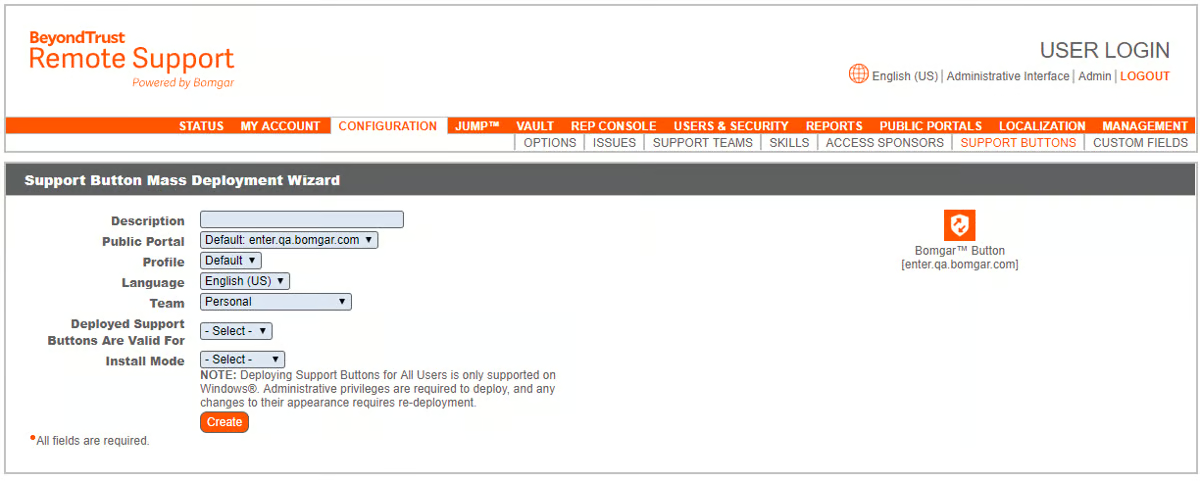
The platform’s ability to observe, control, and document support sessions in real time is a key differentiator. Reviews note that technicians can view and take over user screens directly with full logging of each session, which supports both quality assurance and post-incident review. For helpdesk and IT teams operating under compliance requirements, the built-in visibility removes the need to reconstruct what happened during a session from memory or notes.
G2 reviews highlight that BeyondTrust Remote Support is approachable to deploy, with strong onboarding team support flagged as a differentiator. Users describe setup as manageable even in complex environments, and the platform's support team receives consistent praise for responsiveness during rollout. For IT teams adopting a governed remote support tool without dedicated implementation resources, that onboarding experience reduces time to productive use.
BeyondTrust Remote Support's ability to reach endpoints across Windows, Mac, Linux, Android, and iOS as a practical operational advantage. G2 reviews describe supporting any user device regardless of network or operating system, without requiring a VPN connection. For IT teams supporting diverse devices, this reduces the need for separate tools and keeps support workflows consistent.
Endpoint organization in BeyondTrust Remote Support relies on a structured administrative setup rather than automatic user-based grouping. This aligns well with teams that prioritize controlled, policy-driven endpoint management, while environments expecting dynamic or self-organizing views may find the structure more defined. That same model supports audit clarity and governance traceability in compliance-sensitive IT environments.
Access requests and approvals route through administrator-controlled workflows, reflecting a governance-first approach. For support teams handling frequent, low-risk access requests, this can introduce additional steps compared to self-service-oriented tools, while organizations prioritizing controlled access flows benefit from cleaner audit records and reduced risk of unintended privilege elevation.
BeyondTrust Remote Support fits teams that treat privileged access as an ongoing risk surface requiring constant control and visibility. While governance workflows add some structure, policy-driven access, cross-environment coverage, and strong role-based security make it a good fit for mid-market and enterprise PAM programs.
“The product is feature-rich and easy to use. The onboarding team was super helpful, and support is great.”
- BeyondTrust Remote Support review, Josh G.
“Aside from occasional network issues on the user’s end, which can affect the remote session and hinder troubleshooting, BeyondTrust Remote Support has been perfect for my needs. I haven’t encountered any issues with the platform itself.”
- BeyondTrust Remote Support review, Rowena Joy R.
Segura 360 Privilege Platform positions itself as an enterprise-grade PAM system. It’s built to bring privileged credentials, access policies, and controls into a single, governed layer, one that supports scale without turning everyday access into friction.
Segura comes across as a control framework designed for organizations where privileged access is continuous, distributed, and tightly regulated.
Much of the satisfaction ties back to how well it executes core PAM functions. Its password vault is rated at 98%, which reflects consistent feedback around secure credential storage and reduced access sprawl. Multi-factor authentication (97%) reinforces that control by adding strong verification without complicating routine access.
Centralized management (97%) gives security teams a single operational view across systems, roles, and policies. This is particularly valuable in environments where privileged accounts span multiple systems and teams, visibility stays consistent without requiring manual reconciliation across separate tools.
G2 users often describe Segura as practical and intuitive. Training requirements tend to be lower than expected for an enterprise PAM tool, and the ease of onboarding supports broader adoption beyond just security administrators. The support experience contributes to this perception, with users frequently calling out responsive communication and helpful guidance during rollout and ongoing use.
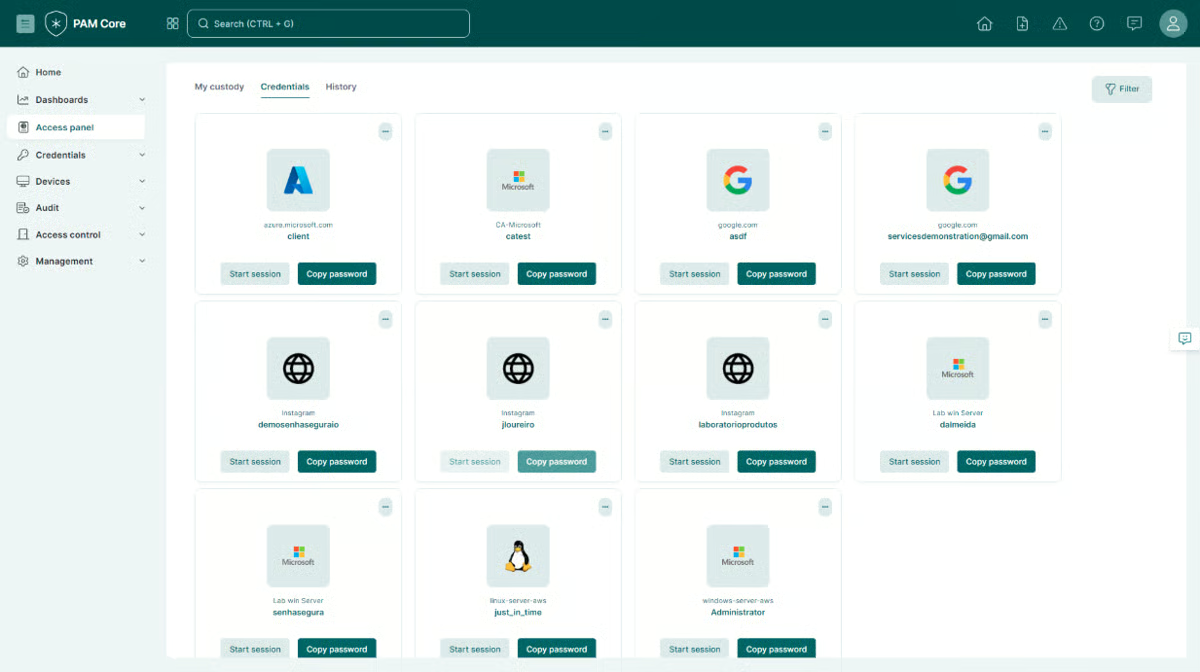
Teams mention using Segura to centralize privileged access, reduce administrative effort, and strengthen protection for sensitive systems and data. Several organizations reference multi-year deployments, which suggests the platform scales alongside evolving security standards and internal governance requirements rather than being a short-term compliance fix.
Communication with support is excellent, with responsive guidance during both rollout and ongoing use. For enterprise security teams deploying PAM in complex environments, supporting reliability reduces the risk of extended implementation delays and gives teams more confidence in resolving issues without extended downtime.
Segura is a platform that scales alongside evolving governance requirements rather than requiring replacement as programs mature. G2 reviews reference multi-year deployments where the platform has continued to meet needs as audit standards and regulatory requirements changed. For compliance-driven organizations that treat PAM as a long-term program rather than a point solution, that stability reduces platform risk over time.
Segura’s reporting is structured around standardized audit views, which align well with compliance-driven visibility. Teams that want highly customized risk dashboards or exploratory analysis may find the reporting model more defined compared to analytics-focused platforms. For organizations whose compliance needs align with Segura’s built-in formats, the structured approach supports consistent audit readiness.
Bulk configuration changes, such as applying policy updates across large numbers of assets, reflect a more controlled administrative model than platforms optimized for high-volume automation. This is more noticeable for teams managing large or rapidly changing privileged account inventories, while organizations prioritizing consistency and governance align well with the platform’s approach to administrative control.
Taken together, Segura 360 Privilege Platform remains a strong choice for enterprise security teams that want dependable PAM fundamentals, high-confidence vaulting, MFA-backed access, and centralized oversight, delivered in a way that supports scale and long-term governance, which is why it continues to earn trust in mature privileged access programs.
“It's a great platform, it makes our day-to-day work much easier, centralizing multiple accesses in one place and with great security.”
- Segura 360° Privilege Platform review, Gabriel D.
“It could offer more reporting options and allow for greater user customization. This would help increase visibility into risks.”
- Segura 360° Privilege Platform review, Diego S.
Agentforce 360 Platform is a system where access control, permissions, and governance are built into the core of everyday enterprise operations. Identity, roles, workflows, and data access are managed inside the same environment that runs CRM and operational processes, instead of being handled through a separate security layer.
It gives teams precise control over who can access what and under which conditions. Agentforce 360 Platform lets teams define roles and permissions with a high level of precision, which matters in environments where access needs to mirror real responsibilities and approvals, not just basic logins.
G2 reviewers highlight how unified and highly customized it is, and how easily it integrates with third-party systems to bring data in or push it out. That integration depth is important in access-sensitive environments, because policies and governance don’t stop at Salesforce; they extend across connected tools and data flows.
Ease of use comes up more often than expected for a platform with this much surface area. Ease of setup, rated at 90%, backs that up. G2 reviewers mention Salesforce as straightforward to understand and quicker to implement relative to its scope than comparable enterprise platforms. That accessibility is part of why it functions as a backbone system for mid-market and enterprise teams rather than a specialist edge tool.
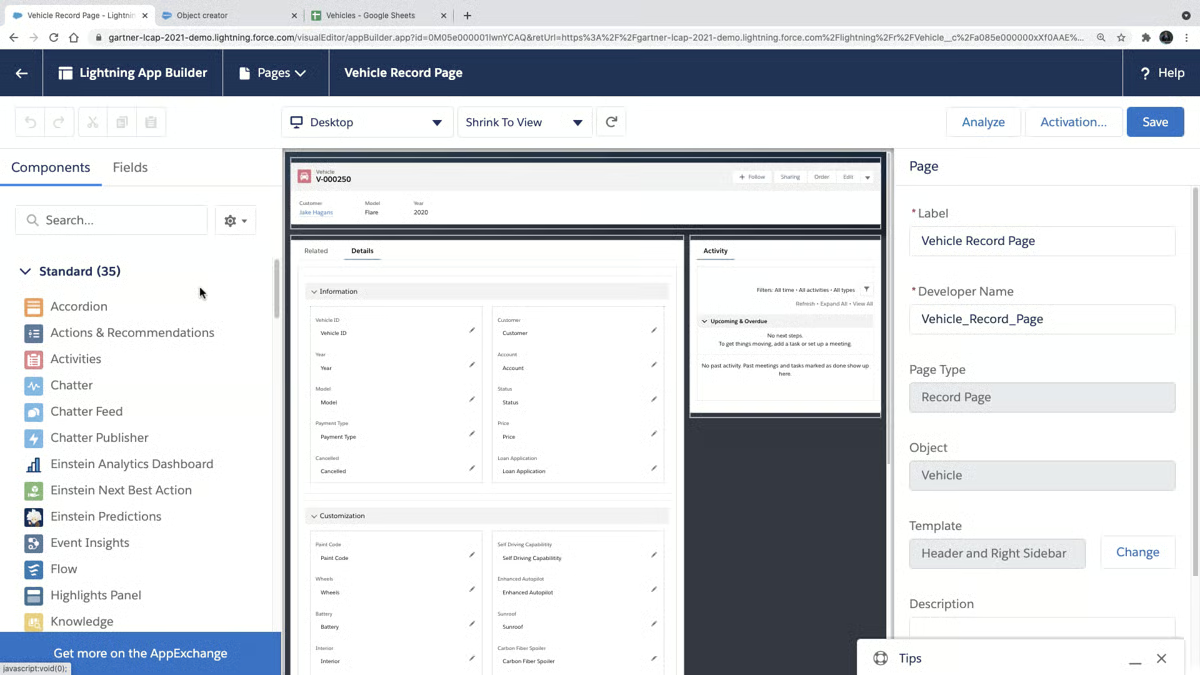
There is strong praise for how Agentforce 360 supports operational discipline. Multiple G2 reviews highlight professional-level IT administration and management, automation of technical processes, and a more structured way to run day-to-day operations. This structure helps teams maintain consistency and control as environments and responsibilities grow.
The AI layer in Agentforce 360 shows up in G2 reviews as a practical productivity addition rather than a standalone capability. Reviewers describe it as built on top of an already integrated platform, adding operational intelligence to workflows that teams are already running daily. For organizations where Salesforce already anchors core business operations, that capability extends existing value without requiring a separate toolset.
G2 reviews cite automation of technical processes and the ability to enforce operational discipline across teams as concrete benefits. For organizations where access governance is tied to business workflows rather than standalone security tooling, Salesforce's built-in automation reduces the manual coordination typically required to maintain correct permissions across changing roles.
Agentforce 360 supports multiple secure authentication methods, including OAuth, JWT, Bearer, and Client Credentials flows. G2 reviews note that this flexibility allows organizations to match their authentication model to their security and automation requirements without being locked into a single approach. For security-conscious teams managing API-connected environments, that authentication range supports both human and machine access governance within the same platform.
Agentforce 360 is easier to understand than its scope would suggest, with ease of use rated at 89%. G2 reviews describe it as straightforward to navigate and quick to implement relative to comparable enterprise platforms. For mid-market teams without large dedicated IT staff, accessibility supports broader adoption of access controls beyond the core security team.
Agentforce 360 Platform’s access control and permission model reflects complex, customizable organizational structures rather than quick, predefined setups. Teams without prior CRM or enterprise platform experience may find the model more structured, while organizations managing detailed role hierarchies align well with its ability to mirror real operational responsibilities.
Agentforce 360 pricing reflects its position as a full enterprise platform, with security and governance capabilities embedded at the platform level rather than offered as a standalone tool. For smaller teams evaluating PAM needs in isolation, the cost-to-value balance may feel weighted toward broader capabilities, while organizations already running business operations on Salesforce align more naturally with the integrated governance model.
Taken together, the Salesforce Platform fits best for mid-market and enterprise organizations that want governance, automation, and access control embedded into the operational system they already run the business on, especially when customization and integration breadth matter more than having a standalone PAM tool.
“Unified and highly customized. It gives you ease of access and is customer-centric. It easily integrates with third-party systems to bring in data or send data. It is very easy to understand as well. Now it's powered by AI, which is an icing on the cake as per today's market.”
- Agentforce 360 Platform review, Ankur S.
"It can be quite daunting at the beginning as there are a lot of elements that come into play if you don't have any CRM experience.”
- Agentforce 360 Platform review, Artyom C.
BeyondTrust Privileged Remote Access replaces broad, always-on remote access with session-based, purpose-driven control. It is primarily a PAM solution designed to grant privileged access only when needed, to specific systems, for a limited time. It enforces scoped access with full visibility into each session, which aligns well with how modern teams manage remote administrative and vendor access.
BeyondTrust PRA keeps privileged remote access scoped and time-bound. This avoids opening up a broad network path just to let an engineer or vendor complete a task. Access is granted to a specific destination, for a defined window, with tight controls around what happens inside the session. That aligns with core PAM principles: reduce standing access, reduce exposure, and make every privileged session accountable.
Live session recording and playback is rated 96% on G2, reinforcing its visibility-first design. Teams consistently describe this capability as critical for auditability, oversight, and post-session review in sensitive access scenarios.
Credential protection and authentication controls further strengthen its PAM posture. Multi-factor authentication is rated 95%, and the ability to hide passwords is also rated 95%, allowing remote work without exposing credentials. These features reinforce PRA’s focus on protecting privileged identities while still enabling access when required.
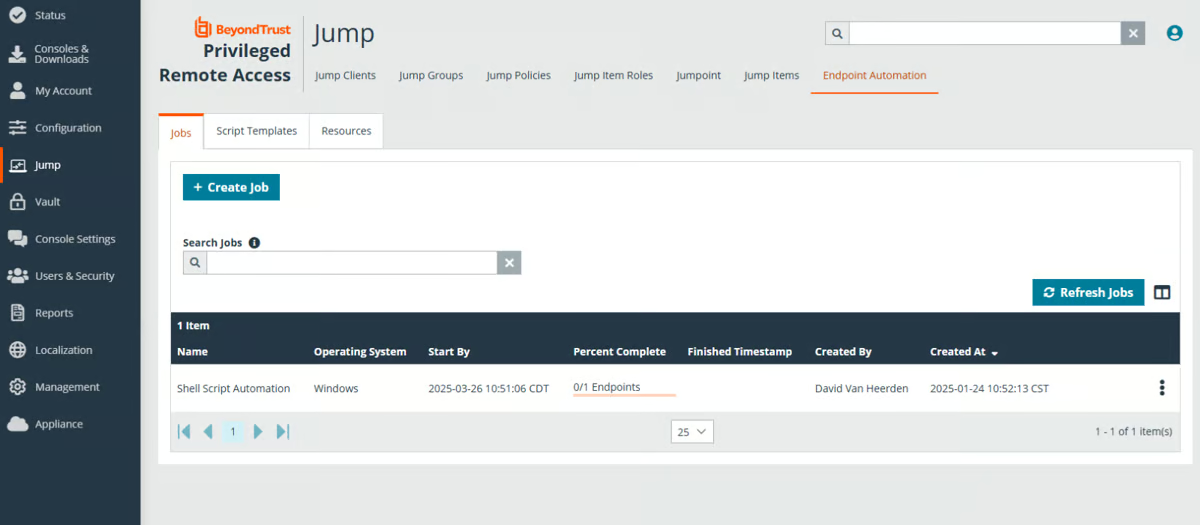
G2 review patterns show that PRA is best suited for teams that prioritize governance over simplicity. Security, approvals, vaulting, and session oversight appear repeatedly in feedback, pointing to a platform built for structured access rather than convenience-driven connectivity. This aligns with organizations that treat remote access as a risk surface requiring continuous control.
The G2 scoring suggests it performs best as a structured PAM solution for teams that value controlled access over simplicity. PRA is capable and security-focused, but it may require more operational maturity to get the most out of it.
Integration between BeyondTrust PRA and Password Safe is a meaningful advantage. G2 reviews note that this pairing simplifies credential management by linking session access directly to the credential vault, enforcing least-privilege without requiring technicians to handle passwords manually. The integration reduces the gap between session control and credential governance for security teams managing vendor or admin access across complex environments
G2 reviewers describe PRA as fundamentally changing their risk posture around remote access. Reviews note that replacing broad network paths with scoped, session-based entry points removes a significant category of standing exposure. For security teams where vendor and third-party access historically introduced uncontrolled network risk, that reduction in attack surface is a measurable outcome rather than a theoretical benefit.
BeyondTrust PRA’s policy and approval architecture is built for structured, governed access rather than high-frequency configuration changes. Teams that need to adjust access policies frequently or make rapid changes across many endpoints may find the workflow more structured compared to lighter remote access tools. For organizations where privileged access policies change infrequently and governance consistency is the priority, this model aligns well with controlled access management.
Access decisions in PRA are centrally governed, which means individual technicians and engineers operate within defined boundaries rather than broad self-service access. Teams that rely heavily on autonomous workflows may find the model more administrator-driven, while security teams align closely with the platform’s emphasis on accountability and auditability across the session lifecycle.
BeyondTrust PRA is a PAM-first platform built for organizations that want remote privileged access to be auditable, scoped, and tightly governed, and its 96% session recording strength is a clear differentiator for teams where oversight and compliance aren’t optional.
“What I like best about BeyondTrust Privileged Remote Access is its ability to provide secure, audited remote access without requiring a VPN. It enables administrators and vendors to connect to critical systems safely while maintaining full session recording, granular access control, and accountability.
The solution also integrates seamlessly with password safe and directory services, which simplifies credential management and enforces least-privilege access. Overall, it enhances operational efficiency while maintaining a very strong security and compliance posture."
- BeyondTrust Privileged Remote Access review, Mostafa G.
“It can get heavy on resources on the older units of servers. Also, some of its features require extra efforts of configuration.”
- BeyondTrust Privileged Remote Access review, Julie K.
SSH PrivX is built around one core idea: secure server access without touching the servers themselves. The agentless approach and certificate-based authentication shape almost every part of the experience. It’s clearly designed for security teams that want tighter control over privileged access while minimizing operational disruption across their infrastructure.
Enterprise users account for 50% of adoption, alongside 30% mid-market and 20% small business usage, per G2 Data and the broader PAM landscape, which aligns with its role as a more specialized access platform rather than a mass-market PAM solution competing on breadth alone.
Activity logging, rated at 91%, reflects what G2 users describe when managing third-party and vendor access through PrivX. Teams highlight that every session is fully traceable, giving security teams confidence that privileged access is not only controlled but auditable after the fact. For organizations reducing reliance on shared credentials, that logging foundation is what makes the shift to certificate-based access defensible under scrutiny.
It tends to become stable once embedded into regular operational workflows. G2 reviewers often describe the UI and reporting as intuitive once configured, with server access, session recording, and monitoring becoming routine rather than disruptive. Teams using PrivX generally find value once it’s embedded into their access model, even if it’s not positioned as a plug-and-play tool.
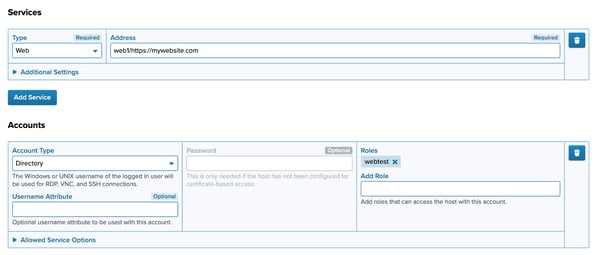
Teams use PrivX to manage vendor and third-party access, centralize session monitoring, and simplify credential lifecycles through certificate-based trust models. For organizations hosting multiple customer environments, role-based sign-ins help keep access separated without adding operational friction.
Role-based security, rated at 94%, keeps access separated across teams, vendors, and customer environments without adding operational friction. For organizations managing multiple workloads alongside third-party access, role separation prevents privilege boundaries from drifting as environments grow.
G2 reviews note that the platform is adopted quickly by customers due to its improved security model and that routine server access becomes straightforward after initial setup. Security teams managing access across multiple customer environments, where reliability reduces the operational burden associated with ongoing access maintenance.
G2 reviewers highlight PrivX's use of short-lived certificates as a distinct security advantage. Recent reviews describe credentials that are generated per session and expire immediately after use, which eliminates the risk of credential reuse or theft over time. For infrastructure and DevOps teams managing access to sensitive servers, the ephemeral model removes a class of standing credential risk without requiring agents or password vaults on target systems.
Advanced configuration in SSH PrivX, particularly around legacy system integrations and identity provider connections, reflects a security model built on certificate-based access and structured environments. Teams expecting a plug-and-play deployment may find the setup more configuration-driven, while organizations operating within mature security frameworks align well with this approach to access control.
PrivX’s documentation, particularly around troubleshooting and complex integration scenarios, is described by G2 reviewers as more focused on standard use cases. Teams working through edge cases or non-standard integrations may find the guidance less direct, while environments aligned with typical deployment patterns tend to navigate the documentation more easily. Customer support is consistently noted as responsive, reinforcing the platform’s alignment with structured, enterprise-focused environments.
SSH PrivX is a security-first PAM platform focused on controlled, auditable access rather than rapid onboarding or heavy automation. For enterprise and security-led teams that value agentless deployment, strong role-based controls, and reduced credential risk, PrivX remains a focused and differentiated option in the PAM category.
“I really enjoyed SSH PrivX because it's not agent-based on the target servers, which simplifies deployment and eliminates overhead on their servers. It still uses certificates for more secure access. This feature simplifies migration and deployment since we don't need to install anything on the target servers, making the migration from our previous solution faster and easier. It also allows for frictionless setup and avoids compatibility issues with different operating systems, even vintage ones.”
- SSH PrivX review, Xavier L.
“Users frequently face challenges when trying to integrate PrivX with legacy systems and some identity providers. The initial setup process can be particularly complicated, especially when working with older infrastructure or more advanced configuration requirements. Furthermore, integration with platforms such as G Suite does not always work seamlessly on the first try, although later login attempts usually proceed without issues.”
- SSH PrivX review, Vivek M.
|
Software
|
G2 rating
|
Free plan
|
Ideal for
|
|
JumpCloud
|
4.5/5
|
No free plan (Free trial available)
|
Teams that want unified identity, device trust, and privileged access control across cloud and on-prem environments
|
|
Microsoft Entra ID
|
4.5/5
|
No free plan (Free trial available)
|
Organizations standardized on Microsoft identity are looking for privileged identity management with conditional access
|
|
AWS Secrets Manager
|
4.5/5
|
Yes. Free plan available
|
Cloud-native teams managing application secrets and credentials inside AWS environments
|
|
BeyondTrust Remote Support
|
4.7/5
|
No free plan (Free trial available)
|
IT support and helpdesk teams needing secure, audited privileged remote access
|
|
Segura 360° Privilege Platform
|
4.8/5
|
No
|
Compliance-driven organizations need end-to-end privileged access governance
|
|
Salesforce Platform
|
4.5/5
|
No free plan (Free trial available)
|
Enterprises managing privileged roles and access governance within complex Salesforce orgs
|
|
BeyondTrust Privileged Remote Access
|
4.5/5
|
No free plan (Free trial available)
|
Organizations controlling vendor and third-party privileged remote sessions
|
|
SSH PrivX
|
4.4/5
|
Yes. Free version available
|
DevOps and infrastructure teams are replacing static SSH keys with modern, certificate-based access
|
*These privileged access management software products are top-rated in their category, based on G2’s Winter Grid® Report. All offer custom pricing tiers and demos on request.
Got more questions? G2 has the answers!
Based on aggregated G2 review patterns and satisfaction scores, Segura 360° Privilege Platform and BeyondTrust Remote Support rank highest. Segura stands out for compliance-driven, end-to-end PAM, while BeyondTrust Remote Support consistently ranks highly for secure, audited privileged remote access.
BeyondTrust Privileged Remote Access provide the clearest visibility into privileged access usage. These platforms emphasize detailed audit logs, session records, and access histories that help teams understand who accessed what, when, and under which conditions.
JumpCloud, BeyondTrust Remote Support, and BeyondTrust Privileged Remote Access support hybrid environments spanning cloud and on-prem systems. JumpCloud unifies identity and device access across environments, while BeyondTrust tools focus on controlled, policy-driven remote access to both on-prem and cloud infrastructure.
For small and growing teams, AWS Secrets Manager and SSH PrivX are the most cost-accessible options. AWS Secrets Manager offers usage-based pricing suitable for cloud-native workloads, while SSH PrivX provides a free version and avoids per-endpoint agent costs, making it approachable for SMBs with focused access needs.
BeyondTrust Privileged Remote Access and BeyondTrust Remote Support are strongest in real-time session monitoring. These platforms emphasize live session visibility, recording, and oversight to help security teams observe privileged activity as it happens.
Microsoft Entra ID is most closely associated with just-in-time access. Entra ID enables time-bound privileged roles through identity policies.
JumpCloud and Microsoft Entra ID integrate PAM tightly with identity systems. JumpCloud combines identity, device trust, and access control in one directory. Entra ID embeds privileged access directly into identity workflows.
For security-first environments, Segura 360° Privilege Platform and BeyondTrust Privileged Remote Access provide the strongest control. These platforms emphasize credential protection, session recording, approval workflows, and centralized governance designed for audit-heavy and risk-sensitive organizations.
JumpCloud and Microsoft Entra ID are the most practical choices for managing administrative access at scale. JumpCloud works well when admin access is tied closely to identity and device posture, while Entra ID is ideal for organizations standardizing on Microsoft ecosystems and identity-driven privilege control.
Within this list, Salesforce Platform is the only solution that explicitly incorporates AI as part of its broader governance and operational framework. However, its AI capabilities are positioned more as productivity and operational intelligence rather than dedicated, standalone PAM risk detection.
Privileged access management decisions don’t stay static for long. The way you manage access today directly impacts how smoothly work moves, how easily audits are handled, and how quickly teams can respond to incidents.
The difference usually comes down to fit. When access is granted just in time, reviewed without friction, and revoked cleanly, teams spend less time managing risk and more time getting work done.
When the fit is off, the issues are harder to spot. Approval bottlenecks, lingering credentials, and weak audit trails create “access debt” that builds quietly, often showing up only when audits fail or incident response slows down.
If you’re evaluating your next step, start by mapping how access actually flows today and where it breaks. The right solution should fix those gaps, not introduce new ones.
Want stronger access control? Start at the identity layer. Explore leading IAM software on G2 to manage identities, enforce access policies, and support secure privileged access.

In my years writing about cybersecurity, I've learned one universal truth: no one wakes up...
 by Soundarya Jayaraman

Managing access across different apps can get complicated fast. Strong passwords help, but...
 by Washija Kazim

I evaluated 40+ tools before narrowing it down to the 6 best SSO providers I trust most: Okta,...
.png) by Shreya Mattoo
by Shreya Mattoo