


Our data lives everywhere. ERP systems, legacy databases, CRM platforms, internal applications, and industry-specific tools generate critical business information every day, and when those systems operate in isolation, finding the best on-premise data integration software quickly becomes an operational priority. If you're responsible for managing that infrastructure, whether as a data engineer, integration architect, or IT leader, fragmented systems can turn routine reporting into a manual exercise and make it harder for teams to trust the data moving between platforms.
In on-premise environments, integration carries additional operational and governance responsibility. Data movement must remain controlled, traceable, and resilient under high-volume workloads. Transformation logic needs clarity. Access controls require structure, and lineage must withstand audit scrutiny.
To identify the best options, I analyzed G2 reviews, feature ratings, satisfaction scores, and enterprise feedback patterns, focusing on how users describe scalability, transformation depth, monitoring visibility, and long-term maintainability inside secure internal environments. Based on that evaluation, six platforms stood out: Microsoft SQL Server, SnapLogic Intelligent Integration Platform, IBM webMethods Integration, Cleo Integration Cloud, Omatic Software, and Flowgear.
*These on-premise data integration tools are top-rated in their category, according to G2 Winter 2026 Grid Reports, and each has at least 100 reviews from G2 users. I’ve added their monthly pricing to make comparisons easier for you.
On-premise data integration software connects, transforms, and moves data across systems running within your own infrastructure. It acts as the operational layer that keeps ERP platforms, legacy databases, internal applications, and analytics environments aligned within controlled environments. It supports structured ETL and ELT workflows, API-based integrations, batch processing, real-time data synchronization, and governed data transformation.
Continued investment in internal infrastructure reinforces the importance of these platforms. Industry estimates suggest the global data center market is projected to reach approximately USD 902.19 billion by 2033, growing at a CAGR of around 11.3%, driven largely by the rapid expansion of data generation, AI workloads, and enterprise digital infrastructure. This scale of infrastructure growth highlights why many organizations continue to rely on internal systems to manage and integrate critical data.
As I analyzed G2 reviews and Grid data for this category, one pattern stood out. Enterprise buyers prioritize control, scalability, and visibility. Satisfaction trends improved for tools that offer strong monitoring, connector breadth, and reliable performance at scale.
Reviewers consistently highlighted lineage tracking, workload stability, and role-based access controls as key decision factors. In regulated environments, audit readiness and governance also play a critical role.
The best on-premise data integration software supports complex architectures with stable performance, clear monitoring, and structured transformations. The tools below stand out based on G2 ratings, enterprise feedback trends, and feature depth across transformation, orchestration, and governance.
I began by analyzing the best data integration platforms on G2 and reviewing Grid® Reports to identify tools most trusted by enterprise IT, data engineering, and infrastructure teams. From there, I narrowed the list to six platforms that consistently surfaced in enterprise environments requiring secure, high-control data movement and transformation.
In my evaluation, I focused on ETL and ELT capabilities, connector breadth, workload scalability, governance controls, lineage visibility, monitoring reliability, deployment flexibility, and overall user satisfaction. I examined G2 scores, satisfaction ratings, market presence data, and detailed reviewer feedback to understand how these platforms perform under complex architectural demands.
To deepen the analysis, I used AI-assisted review synthesis to identify recurring themes across G2 feedback, including consistent strengths, limitations, and operational pain points mentioned by users. This surfaced patterns around implementation complexity, transformation depth, performance at scale, and long-term maintainability.
The screenshots included throughout this article are sourced from vendor listings on G2 or the software providers’ official websites.
When I narrowed this list down to six platforms, I focused on what determines long-term success in controlled enterprise environments. I analyzed 20+ data integration solutions on G2 before finalizing six tools. My goal was to identify platforms that deliver operational reliability, governance strength, and architectural compatibility at scale.
Here are the key factors that shaped my recommendations:
To qualify for inclusion in the G2 On-Premise Data Integration category, a solution must:
*This data was pulled from G2 in 2026. Some reviews may have been edited for clarity.
Microsoft SQL Server stands out for one reason in G2 reviews: consistent stability within Microsoft-driven environments. Teams running SQL Server databases, Power BI, and broader Microsoft infrastructure rely on SSIS as the backbone of their ETL workflows. The tight integration reduces friction on compatibility and keeps data pipelines aligned with existing reporting systems.
That alignment is reflected in Microsoft SQL Server’s positioning as a Leader in G2’s Winter 2026 Grid® Report, supported by a 4.4 out of 5 rating from 2,200+ G2 user reviews. G2 Data shows 89% users indicating they would recommend the platform. Reviewers frequently highlight how dependable the platform feels once integrated into reporting infrastructure, especially in environments built around Microsoft technologies.
SSIS stands out for its transformation engine. It supports cleansing, merging, aggregating, sorting, and complex data manipulation before loading into data warehouses or operational databases. For enterprises managing structured reporting cycles, this level of transformation control strengthens consistency across analytics layers.
The visual, drag-and-drop design experience inside SQL Server Data Tools also plays an important role. Teams can build packages, configure control flows, and debug processes within a centralized interface. G2 reviewers often mention that once the architecture is understood, package management becomes predictable and repeatable across long-term deployments.
.png?width=600&height=326&name=Microsoft%20SQL%20Server%20(SSIS).png)
Another strength is its ability to orchestrate more than simple data movement. SSIS can execute SQL tasks, manage file transfers, automate notifications, and coordinate operational workflows tied to reporting deadlines. That broader orchestration layer allows teams to treat integration as part of infrastructure, not just a pipeline task.
Security integration is deeply embedded. Windows authentication, role-based permissions, and encryption controls align natively with SQL Server governance frameworks. G2 Data shows 87% satisfaction for ease of administration, reflecting how teams manage access and control within existing Microsoft environments. For organizations operating in regulated environments, this internal structure supports audit readiness and access oversight.
Performance scalability is also a recurring advantage in G2 feedback. Parallel execution and incremental loading reduce processing time for large datasets, helping teams maintain reporting schedules under high data volumes. At the same time, reviewers note that performance tuning becomes critical in complex enterprise deployments, especially when workflows grow in size and interdependencies.
For teams evaluating long-term scalability, it is important to account for operational complexity as deployments grow. G2 reviewers indicate that in highly interdependent environments, performance tuning and resource management require dedicated configuration to maintain efficiency. This aligns most naturally with organizations that operate structured, resource-managed data environments rather than lightweight or loosely coupled systems.
Because SSIS is closely aligned with Windows and the Microsoft ecosystem, organizations operating across diverse, cloud-native, or multi-platform environments may find integration more configuration-oriented. For teams already invested in Microsoft infrastructure, this alignment supports tighter integration, stronger governance, and more predictable performance.
Overall, Microsoft SQL Server earns its place among the best on-premise data integration software by delivering robust ETL capabilities, strong governance alignment, and reliable performance at enterprise scale within Microsoft-driven infrastructures.
"The truth is, what I like most about Microsoft SQL Server is how practical and intuitive it is to use. I think the performance panel is wonderful, as it shows real-time metrics about the server's status. I also greatly value the SQL Agent, which allows me to run preconfigured tasks such as table backups. I use the activity monitor a lot, as it helps me detect when there is a query that is stuck and causing slowness for users.”
- Microsoft SQL review, Victor M.
“The main thing I don't like about Microsoft SQL Server is that it can feel heavy and resource-hungry, especially on smaller systems. Sometimes licensing costs are high, making it hard for small businesses. A few advanced features can be tricky to learn if you are new, and upgrades or migrations take time and planning. It's a great tool overall, but it's not the budget-friendly or lightweight option out there.”
- Microsoft SQL Server review, Divi K.
When I analyzed G2 reviews for SnapLogic Intelligent Integration Platform (IIP), the most consistent theme was how accessible the platform feels for building integrations. Many users highlight the visual pipeline builder, which allows teams to design workflows without writing extensive code. This low-code approach makes complex integrations easier to implement and manage over time.
SnapLogic Intelligent Integration Platform's strong adoption is reflected in G2 Data, where it holds a 4.3 out of 5 rating across 366 reviews. A majority of users report positive experiences, with 97% rating it 4 or 5 stars and 90% indicating they would recommend the platform. Its recognition as a Leader in G2’s Grid® Report for on-premise data integration further reinforces its position among enterprise integration tools.
Ease of integration is one of the strongest advantages I observed while reviewing SnapLogic IIP. It provides a large library of pre-built connectors, called Snaps, that allow teams to connect applications, databases, APIs, and on-premise systems quickly. Because these connectors are ready to use out of the box, organizations can avoid building custom integrations and accelerate deployment timelines.
Reviewers highlight that the visual pipeline layout makes it easier to manage integrations at scale by clearly showing how data flows between systems. This visibility simplifies troubleshooting and ongoing maintenance, especially for teams working across multiple pipelines. As a result, it reduces operational complexity and helps maintain consistency across integrations.
.png?width=600&height=338&name=SnapLogic%20Intelligent%20Integration%20Platform%20(IIP).png)
Automation capabilities stood out consistently in G2 feedback, with users highlighting how SnapLogic reduces manual effort across recurring integration tasks. Users found that pipelines can run automatically with defined triggers, which helps teams maintain consistency without constant monitoring. This becomes especially useful for organizations managing high-volume data workflows.
SnapLogic IIP also supports both real-time and batch data processing, which teams found useful for managing operational pipelines alongside scheduled analytics workflows within the same system. This flexibility helps organizations balance transactional data movement with reporting requirements more effectively. For teams working across different data environments, this dual capability supports a wider range of integration use cases without needing separate tools.
The platform is also designed for hybrid environments, which stood out during my evaluation as a key strength. It enables integration across cloud applications, APIs, and on-premise systems within a single architecture. This makes it especially relevant for organizations transitioning between infrastructure models, while reducing fragmentation in how integrations are managed.
According to G2 reviews, performance can require additional optimization when handling very large datasets or highly complex pipelines, particularly as processing demands increase at scale. This is more noticeable in data-heavy environments where integrations become more resource-intensive over time. For teams working with structured pipelines or moderate workloads, performance remains consistent once the pipelines are appropriately tuned.
G2 feedback also highlights that troubleshooting can require additional effort in advanced integration scenarios, especially when debugging errors or managing incremental loads. Some users note limited error visibility, which can slow down issue resolution in more complex workflows. For teams with defined workflows or prior experience in data integration, these challenges become more manageable over time.
Overall, SnapLogic IIP earns its place among the best on-premise data integration software because it combines low-code accessibility, strong connector support, and automation capabilities that simplify integration development. Its ability to support hybrid environments and scale across different data workloads makes it a practical choice for enterprise integration needs.
“I love how the SnapLogic Intelligent Integration Platform (IIP) makes building integrations so easy with its AI-powered and low-code interface, which significantly streamlines design and maintenance for both technical and non-technical users. This platform guides pipeline design, reduces manual effort, aligns with its AI-driven workflow approach, and has been instrumental in helping me automate workflows, improve data flow efficiency, and significantly reduce integration effort.”
- SnapLogic Intelligent Integration Platform review, Sanket N.
“I am dissatisfied with the inability to assign tasks to specific nodes in SnapLogic Intelligent Integration Platform (IIP). When a node exceeds CPU or memory limits, I cannot easily reroute tasks to a node with less usage, sometimes leading to tasks running on overburdened nodes again. Additionally, I would find it helpful if the platform allowed me to set scheduled tasks to run on designated nodes, improving resource allocation and utilization.”
- SnapLogic Intelligent Integration Platform review, David J.
If you’re exploring broader ETL strategies alongside integration platforms, my team also reviewed the 6 best ETL tools for data transfer efficiency to help teams compare solutions designed specifically for large-scale data movement and transformation.
IBM webMethods Hybrid Integration is commonly used by enterprise teams that need to connect legacy systems with modern cloud applications. In G2 reviews, users frequently highlight how the platform supports complex integration environments where multiple applications, APIs, and services must communicate reliably across large organizations. Its ability to operate across distributed systems makes it particularly relevant for enterprises managing long-standing infrastructure alongside newer technologies.
One strength that consistently appears in G2 feedback is the platform’s ability to connect a wide range of enterprise systems. IBM webMethods Hybrid Integration supports integrations across applications, databases, messaging systems, and APIs, allowing organizations to unify systems built years apart. For enterprises managing distributed infrastructure, this reduces reliance on custom-built integrations and simplifies how systems interact across environments.
Ease of integration is another area reviewers frequently mention. The platform provides a visual, drag-and-drop interface that allows teams to design integration workflows without heavy manual coding. With an 85% ease-of-use score in G2 Data, users indicate that once they become familiar with the interface, managing integrations across multiple systems becomes more efficient and easier to scale.
Hybrid deployment flexibility is another reason organizations adopt IBM webMethods Hybrid Integration. The platform supports on-premises, private cloud, public cloud, and hybrid environments, allowing companies to modernize gradually while maintaining control over critical systems. This makes it especially relevant for organizations with compliance requirements or evolving infrastructure strategies.
Reliability is another theme that appears consistently in G2 reviews. Once integrations are established, users frequently describe the platform as stable for running ongoing workflows that support business operations. With a 4.3 out of 5 rating across 250+ G2 reviews and 91% of users rating it 4 or 5 stars, this level of dependability reflects strong performance in enterprise environments handling high volumes of system communication.
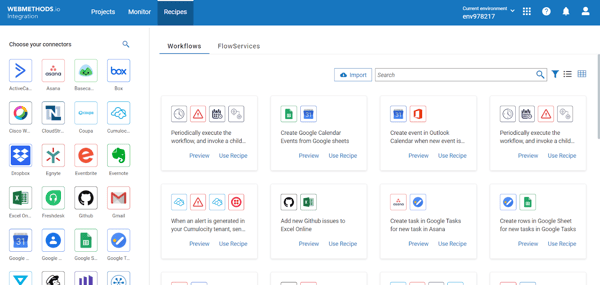
IBM webMethods Hybrid Integration also supports B2B and EDI integration scenarios. Organizations exchanging data with suppliers, logistics partners, or external business networks can manage those partner integrations alongside internal workflows. This allows enterprises to centralize both internal system connectivity and external partner communication within a single platform, improving coordination across ecosystems.
Beyond its technical capabilities, G2 Data shows that 87% of users are likely to recommend the platform, reflecting strong satisfaction among enterprise users. This indicates that while the platform is built for complex environments, teams that align with its use case continue to see long-term value. For organizations managing large-scale integration strategies, this balance of capability and usability supports sustained adoption.
Because the platform is designed for complex enterprise environments, implementation can require dedicated expertise when configuring integrations across multiple systems and environments. This is more noticeable for organizations managing large-scale or highly customized architectures. For teams with established integration practices or technical resources, this aligns with the platform’s enterprise-focused capabilities.
The platform’s enterprise-level capabilities also come with a broader investment scope, which may be more suitable for organizations with complex integration needs. Teams with simpler requirements may need to evaluate whether their scale aligns with their operational goals. For large enterprises, this depth provides flexibility to support long-term integration strategies.
For organizations operating in complex, distributed environments, IBM webMethods Hybrid Integration provides a centralized platform that supports connectivity, reliability, and hybrid deployment at scale. Its ability to handle both internal system integration and external partner communication makes it particularly valuable for enterprise workflows. For teams that require structured, large-scale integration capabilities, it remains a strong fit.
“The best thing about IBM webMethods Integration, in my opinion, is how much easier it is to link various platforms. In the past, I've used technologies that seemed too complex, but once you get the feel of webMethods, things become easier. Particularly when working with older systems that typically don't work well together, the adapters and integrated functions save a ton of time. ”
- IBM WebMethods Hybrid Integration review, Adnan A.
“The only thing I dislike about IBM webMethods Integration is that the initial setup can feel a bit heavy, especially if you’re new to the platform. Some configurations take longer than expected, and the interface could be more intuitive in a few areas. Once everything is in place, it works well, but the learning curve is definitely noticeable.”
- IBM WebMethods Hybrid Integration review, Praneeth M.
Cleo Integration Cloud (CIC) is designed for organizations that rely on secure, high-volume B2B and EDI workflows. It is widely used in supply chain, logistics, and manufacturing environments where partner communication and data exchange are central to operations. Its focus on structured integration makes it particularly relevant for enterprises managing complex partner ecosystems.
Cleo Integration Cloud holds a 4.4 out of 5 rating on G2, based on 533 reviews, and is recognized as a Leader in the Winter 2026 Grid® Report for on-premises data integration. G2 Data shows that 92% of users rated it 4 or 5 stars, 90% believe it is headed in the right direction, and 88% say they would recommend it, reflecting strong confidence among organizations managing mission-critical integrations.
When I analyzed G2 feedback, B2B and EDI capability surfaced as a defining strength. Cleo Integration Cloud is widely adopted in supply chain, logistics, and manufacturing environments where secure partner communication is central to daily operations. Its structured support for EDI standards and partner management reduces friction in high-volume trading networks.
Hybrid deployment flexibility also plays a major role in its positioning. Cleo supports on-prem agents alongside its cloud-based management console, allowing organizations to maintain local control while centralizing monitoring and orchestration. For enterprises operating across legacy systems and modern cloud services, this flexibility supports gradual modernization without architectural disruption.
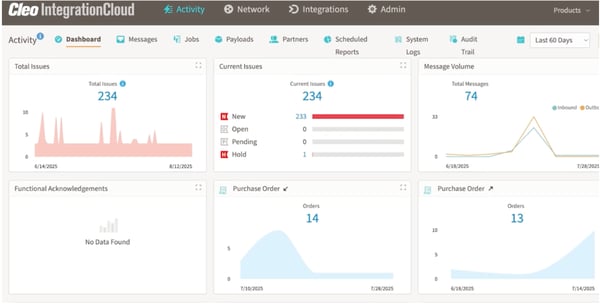
The platform’s data transformation tools provide strong mapping support across EDI, XML, flat files, JSON, and other formats. G2 reviewers frequently reference its ability to validate and adapt data in transit, which strengthens reliability when exchanging structured business documents between partners or internal systems.
Workflow automation capabilities extend beyond simple file transfers. The visual design environment allows teams to build conditional logic, schedule processes, and coordinate batch or real-time data flows. This orchestration layer enables integration to function as an operational backbone within enterprise workflows.
Secure managed file transfer remains another core advantage. Encryption, authentication controls, audit logging, and granular permissions support compliance across industries with strict regulatory standards. In heavily regulated sectors, visibility into transaction history improves audit readiness and governance alignment.
Monitoring and operational visibility also receive consistent praise in G2 reviews. Real-time dashboards, alerts, and transaction tracking provide transparency across integration pipelines. This reduces manual troubleshooting and helps teams detect disruptions before they affect downstream business operations.
Because Cleo Integration Cloud is positioned for enterprise-grade B2B and hybrid complexity, pricing often reflects transaction volume and deployment scale. This is more relevant for organizations managing large partner ecosystems or high-volume integrations. Smaller teams may need to evaluate cost alignment based on their operational needs.
G2 feedback suggests that while the visual tools simplify common workflows, advanced mapping and highly customized integrations benefit from experienced integration resources. This becomes more noticeable in environments where integration logic is complex or requires precise data transformation across systems. Teams working with large-scale or highly tailored workflows may need additional expertise during setup and configuration. For organizations with established integration practices, this aligns with the platform’s enterprise-focused capabilities and supports more structured implementation over time.
Overall, Cleo Integration Cloud earns its place among the best on-premise data integration software because it combines strong EDI depth, hybrid deployment flexibility, and enterprise-grade security within a unified platform.
“At our company, we use Cleo in our day-to-day operations. We have had them assist us with setting up EDI connections with several companies, making it very easy to integrate into our logistics environment. Their service allows us to use a variety of EDI files as needed, to manage/create our own in-house connections, and saves us a lot of money compared to other solutions. When we need to contact customer support, we normally get a response back within the first couple of hours of an issue.”
- Cleo Integration Cloud review, Alexander B.
“One of the main downsides is the platform’s learning curve when exploring advanced configuration options or custom scripting; some features aren’t as intuitive as the basic workflows. Customizations occasionally require additional steps or support intervention, which can slow down rapid deployment. Pricing may also be a concern for smaller businesses due to tiered packaging and cost for additional integrations. Lastly, while the system is robust, occasional delays in syncing new features or updates can impact agility during rapid growth or changes in business requirements.”
- Cleo Integration Cloud review, Mounib R.
Omatic Software is most widely used by nonprofit organizations that need to connect fundraising, donor management, and operational systems. G2 reviewers frequently highlight how the platform improves donor data management by streamlining information flow between CRM systems and reporting tools. Its focus on nonprofit workflows makes it particularly relevant for organizations managing donor records across multiple platforms.
Ease of use and integration are closely connected strengths highlighted in G2 feedback. With an 86% ease-of-use score and 84% ease-of-admin score, users describe the platform as accessible for non-technical teams managing integration workflows. The ability to configure connections across CRM systems and operational tools without heavy custom development allows fundraising and operations teams to manage integrations independently. This reduces reliance on IT while supporting faster implementation.
Automation capabilities also stand out in G2 reviews, where users highlight how Omatic reduces manual effort in recurring data tasks. Tasks like syncing records, updating fields, and transferring data between systems can be handled automatically, which helps maintain consistency across platforms. For teams managing high volumes of donor data, this reduces duplication and keeps records aligned across systems.
Customer support is another strong differentiator. G2 reviewers frequently mention responsive assistance and helpful onboarding, which makes it easier for teams to implement integrations and troubleshoot issues. With a 90% quality-of-support score, Omatic demonstrates strong service reliability during both setup and ongoing use. This level of support is particularly valuable for nonprofit teams with limited technical resources.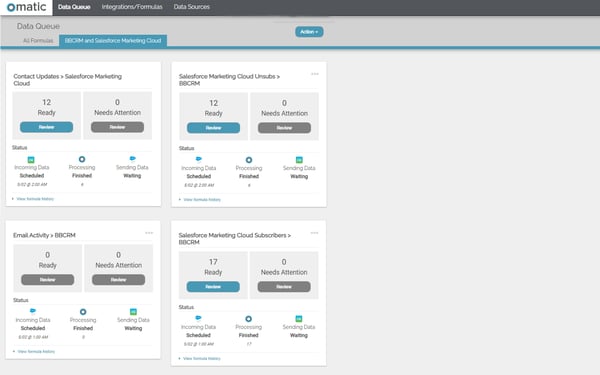
Data management capabilities also receive positive feedback from users. G2 reviewers highlight how the platform simplifies handling donor records and maintaining data consistency across systems. By reducing mismatched data and improving how records move between platforms, teams can generate more reliable reports. For organizations managing large donor datasets, this supports better operational accuracy.
According to G2 reviews, setting up integrations and handling data migrations can require careful configuration, particularly when transitioning to Omatic Cloud or working with complex data structures. This is more noticeable for organizations managing large datasets or multiple systems. For teams with defined data processes, this setup effort supports more accurate and reliable data transfers over time.
G2 feedback also highlights challenges when importing specific data types, such as fund information, or managing system migrations. These scenarios may require additional validation and testing to ensure data integrity across systems. For organizations with strong data governance practices, this aligns with the need for precision in donor and financial data workflows.
Overall, Omatic earns its place among the best on-premise data integration software for nonprofits because it simplifies donor data management, improves integration efficiency, and supports CRM-driven fundraising operations. Its combination of automation, accessibility, and nonprofit specialization makes it a strong fit for organizations prioritizing data accuracy and operational consistency.
“I really appreciate how much customization this tool offers when importing data from various sources. Setting up the imports is straightforward, and once they're configured, using them is incredibly simple. It has saved our team countless hours every week!
I also really love the onboarding process, it's VERY thorough for users of any experience, and the support desk is always very quick to respond.”
- Omatic review, Tania V.
“The learning curve was a little bit of a struggle, but that was our fault since we were unable to fully utilize the available training, which I highly recommend taking full advantage of, but the support is also very active and has solved nearly all of our issues. Some issues are not the fault of Omatic since the source of data has not allowed all needed fields to be API, which can create challenges, but still doable.”
- Omatic review, Frank O.
Flowgear is used by teams that need to connect applications, data, and APIs across cloud and on-premise environments without building everything from scratch. In G2 reviews, users consistently describe how the platform helps simplify integration workflows while still supporting more advanced use cases. Its combination of visual design and system connectivity makes it especially relevant for organizations managing distributed systems and hybrid infrastructure.
Ease of integration is one of the most consistently mentioned strengths in G2 feedback. Users highlight how quickly they can connect systems and get integrations running without relying heavily on custom development. This reduces the time required to move from setup to execution and contributes to strong user satisfaction, reflected in 98% of users rating it 4 or 5 stars. For organizations managing multiple applications, this helps accelerate implementation and shortens delivery timelines.
The visual workflow builder provides a clear way to design and understand integrations. By arranging nodes and defining connections visually, teams can map how data flows across systems without relying on abstract logic. This makes it easier to adjust workflows and troubleshoot issues when they arise. For teams managing multiple integrations, this improves visibility into how processes operate and reduces confusion during changes.
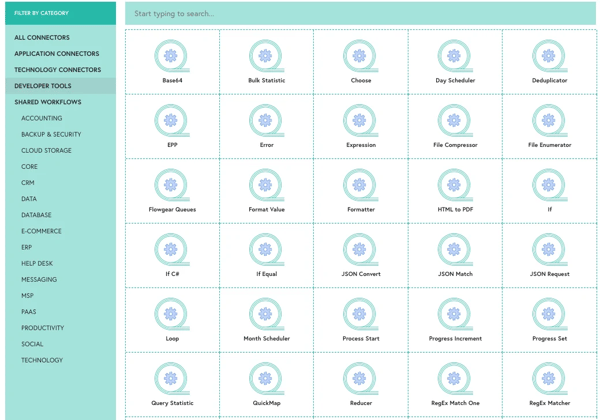
Automation capabilities are another area frequently highlighted in G2 reviews. Flowgear allows teams to automate repetitive integration tasks and coordinate workflows across systems without constant oversight. This reduces manual effort while ensuring consistent data movement between applications. For organizations running recurring workflows, this becomes a key driver of operational efficiency.
Users also point to the availability of prebuilt connectors as a practical advantage. Instead of configuring every integration from scratch, teams can use existing connectors to link common systems more quickly. This reduces setup effort and removes repetitive configuration work. For organizations with standard integration needs, this makes adoption more straightforward.
Flowgear supports integration across cloud and on-premise environments within a single platform, which is especially relevant for teams working with mixed infrastructure. This allows organizations to connect modern applications with legacy systems without splitting workflows across tools. For teams managing both environments, this reduces fragmentation and keeps integrations centralized.
Ease of use supports adoption across teams with different levels of technical experience. With a 93% ease-of-use score in G2 Data, users describe the interface as accessible while still supporting more advanced configurations. This allows both technical and non-technical teams to work within the same system. For organizations scaling integration efforts, this improves collaboration across teams.
According to G2 reviews, building more complex workflows can take time, especially when working with advanced configurations or selecting the right nodes for specific use cases. This tends to show up more in scenarios where integrations are layered or highly customized. For teams with clear integration requirements, this flexibility still supports more tailored workflows once everything is set up.
G2 feedback also highlights that documentation can be limited in certain advanced scenarios. Some users mention needing additional time to understand how specific features behave during implementation. For teams with prior integration experience or well-defined workflows, this becomes easier to navigate as they work more with the platform.
Overall, Flowgear earns its place among the best on-premise data integration software because it combines visual workflow design, strong connector support, and automation capabilities within a scalable integration platform. Its ability to unify cloud and on-premise systems makes it a practical choice for organizations managing hybrid environments.
“Flowgear is user-friendly and makes it easy to build integrations without heavy coding knowledge. The drag-and-drop workflow design is straightforward, which really reduces the learning curve. I appreciate the wide range of connectors available; it saves a lot of time when setting up common integrations. It’s also easy to test and adjust workflows as needed, which makes the implementation process smooth. I use it whenever I need to test or demonstrate integration projects.”
- Flowgear review, Ntombifuthi M.
“The main area for improvement is training and documentation. While the product itself is capable, the available training materials are limited and could be more comprehensive. More structured learning resources, examples, and up-to-date documentation would help reduce the learning curve, especially for new users.”
- Flowgear review, Joshua S.
If you’re still weighing your options, this comparison table pulls together the key differences at a glance.
| On-premise data integration software | Best for | G2 rating | Architecture fit | Likelihood to recommend |
| Microsoft SQL Server (SSIS) | Enterprise ETL within Microsoft ecosystems | 4.4/5 | Windows-based on-prem ETL tightly integrated with SQL Server environments | 89% |
| SnapLogic IIP |
AI-powered hybrid integration automation | 4.3/5 | Cloud-managed with secure on-prem runtime (Groundplex) for hybrid orchestration |
90% |
| IBM WebMethods Integration |
Enterprise-scale hybrid & B2B integration | 4.3/5 | Businesses unifying HR, payroll, and training in one system | 87% |
| Cleo Integration Cloud | Secure B2B, EDI & managed file transfer | 4.4/5 | Individuals and teams building practical data and analytics skills | 88% |
| Omatic Software | Nonprofit CRM-centered data integration | 4.6/5 | Designers and product teams measuring and showcasing UX expertise | 93% |
| Flowgear | Visual hybrid integration with secure on-prem connectivity | 4.5/5 | Organizations needing broad, cross-functional upskilling coverage | 91% |
Have more questions? These are the ones I see come up most often!
Among the tools evaluated in this list, Omatic Software and Flowgear currently show some of the highest G2 satisfaction ratings. However, large enterprises managing complex hybrid environments often rely on platforms such as IBM WebMethods Integration and Microsoft SQL Server (SSIS), which are widely used for enterprise-scale integration and governance.
IBM WebMethods Integration and Cleo Integration Cloud are frequently used in ERP-heavy environments because they support broad enterprise application ecosystems and B2B data exchanges. Microsoft SQL Server (SSIS) is also commonly used in organizations running ERP systems within Microsoft-based infrastructures.
Microsoft SQL Server (SSIS) is widely known for its mature ETL capabilities, supporting structured data cleansing, aggregation, and complex transformation workflows. SnapLogic also provides flexible transformation tools through its low-code pipelines and AI-assisted mapping features.
Enterprise-focused platforms such as IBM WebMethods Integration, Cleo Integration Cloud, and Microsoft SQL Server (SSIS) emphasize security through role-based access controls, encryption, audit logging, and governance features designed for regulated environments.
Cost efficiency often depends on existing infrastructure. Microsoft SQL Server (SSIS) can be cost-effective for organizations already using the Microsoft ecosystem, while Flowgear may appeal to mid-sized teams looking for scalable integration automation without full enterprise licensing models.
SnapLogic Intelligent Integration Platform and IBM WebMethods Integration support broad connector ecosystems that integrate enterprise applications, APIs, and databases across hybrid environments.
Cleo Integration Cloud is frequently recognized for its monitoring capabilities, including transaction tracking, alerts, and visibility across B2B data exchanges. Microsoft SQL Server (SSIS) also provides structured logging and error-handling features within SQL Server environments.
Most integration challenges do not come from a lack of features. They surface when the platform does not align with the architecture it is meant to support. On-premise data integration tools operate at the core of reporting, compliance, and operational continuity. Once they are embedded into daily workflows, their stability, governance controls, and scalability directly influence how confidently teams rely on their data.
I would use this list to evaluate architectural fit before anything else. Identify the workload that reflects your environment, whether that is enterprise ETL, B2B exchanges, CRM synchronization, or hybrid orchestration. Then assess how consistently G2 users describe performance, monitoring visibility, and governance strength in those scenarios. That alignment often determines long-term success more than connector counts or surface-level capabilities.
If you want to explore how AI is actively reshaping integration strategies, review the insights in G2’s AI in Data Integration Report to understand how enterprises are evolving their data architectures.


As a marketing professional, I am best friends with data. If we zoom in to the absolute core...
.png) by Shreya Mattoo
by Shreya Mattoo
If you’re a small- to mid-sized business selling into big-box retailers or major partners, you...
 by Soundarya Jayaraman
As a cloud architect, IT director, infrastructure manager, or migration lead, by the time...
 by Disha G