


The best free customer self-service software for tech startups in 2027 includes Agentforce Service Cloud, Fin, Freshdesk, Jotform AI Agents, HubSpot Service Hub, Zendesk for Customer Service, and Zoho Desk. I selected these tools by analyzing G2 reviews from software and IT professionals, focusing on self-service capabilities, ease of setup, free plan limitations, and suitability for growing support teams.
If you've ever tried to scale customer support at a startup without scaling headcount, you already know the trap. The free plan looks generous until your user base doubles and you're hitting limits on every feature that actually matters, such as knowledge base articles capped, AI responses locked behind a paywall, or integrations that only work if you upgrade. And the tools built for enterprise support orgs? They'll either ovewhelm a five-person team or charge you for seats you don't need.
For this guide, I evaluated the top free products on G2's customer self-service software category page and assessed each one through the lens of a tech startup: how quickly can a lean team deploy it, what does the free plan realistically cover, where does it start to crack under growth, and what's the moment it pushes you toward a paid tier? Here's what I found.
Agentforce Service Cloud: Best for tech startups already using Salesforce
For tech startups that manage customer data in Salesforce and want AI-powered self-service, knowledge management, and case resolution without moving customer data into another platform.
Fin: Best for startups that want AI-first customer self-service
For product-led startups with an existing help center that want an AI agent to resolve customer questions autonomously and escalate conversations to human agents when needed.
*Tools are listed alphabetically. These tools offer free trials, free forever options, or freemium models.
Here's a side-by-side look at free plan limits and pricing before diving into the full reviews.
| Tool | G2 rating | What the free plan covers | Paid starts at |
| Agentforce Service Cloud | 4.4/5⭐ |
|
Service Cloud: $25/user/month Agentforce for Service AI Agent: $2/conversation |
| Fin | 4.5/5⭐ |
|
$0.99/outcome + Intercom seat from $19/seat/month |
| Freshdesk | 4.4/5⭐ |
|
$19/agent/month billed annually |
| HubSpot Service Hub | 4.4/5⭐ |
|
$15/seat/month billed annually |
| Jotform AI Agents | 4.5/5⭐ |
|
$34/month billed annually |
| Zendesk for Customer Service | 4.3/5⭐ |
|
$19/agent/month billed annually |
| Zoho Desk | 4.4/5⭐ |
|
$7/user/month billed annually |
*This research was conducted in October 2026. Free plans, trial availability, pricing, and included features may change, so I recommend checking each vendor's official pricing page for the latest details.
Zendesk's 2026 CX Trends research found that 85% of CX leaders say customers will drop a brand over an issue left unresolved, even on first contact. For tech startups where every early customer relationship counts, a self-service tool that fails at the last mile is not just an efficiency problem, but a retention risk.
For tech startups, that trajectory matters more than it might seem. When your support team is two or three people, a self-service layer that deflects even a fraction of repetitive queries buys back hours that go toward building, not answering the same onboarding question for the fifth time that week. The problem is that most free plans are designed to look capable without actually being capable — a knowledge base with no search worth trusting, an AI chatbot that escalates everything, or a customer portal that takes a full sprint to set up.
I started with G2's free customer self-service software category page, which lists tools that offer free plans, free trials, or freemium models. From there, I took the top products as they appear on the page and evaluated each one specifically from a tech startup perspective: how quickly a small team can deploy and configure it, what the free plan genuinely covers in terms of knowledge base, AI capabilities, and customer-facing self-service, where each free tier starts to show its limits under real usage, and what the trigger is that pushes a growing tech startup toward a paid plan.
I cross-referenced verified G2 user reviews, filtered to small businesses in the computer software and IT services industries, to understand real-world patterns beyond my own evaluation: what tech teams rely on, what frustrates them over time, and how each tool holds up as customer volume grows.
The screenshots featured in this article may be a mix of those taken from the vendor's G2 page or from publicly available materials.
Testing these tools in a tech startup context made certain things obvious fast. Here's what I actually paid attention to:
To qualify for inclusion in the Customer Self-Service Software category, a product must:
*This data was pulled from G2 in 2026. Some reviews may have been edited for clarity.
Agentforce Service Cloud (formerly Salesforce Service Cloud) makes the most sense for tech startups that already run their customer operations on Salesforce and want AI-powered self-service without creating another customer data source. The 30-day free trial gives you enough time to evaluate the platform's AI, case management, and service workflows before committing. Existing Salesforce Enterprise Edition customers can also use Salesforce Foundations, which includes 1,000 Agentforce AI conversations at no additional cost, making it easier to test AI-powered support inside an environment you're already using.
What impressed me most during testing wasn't the AI itself. It was the context behind every response. Instead of relying solely on a knowledge base, Agentforce could reference customer records, previous cases, account history, and other Salesforce data to build a more complete picture before suggesting the next action. For B2B tech startups managing a smaller number of high-value customer relationships, that level of context feels much more valuable than simply answering FAQs. It's also reflected in G2 Fall 2026 Grid® Report for Customer Self-Service, where the platform earns 89% for proactive assistance and 90% for cross-system integration, both well above the category average.
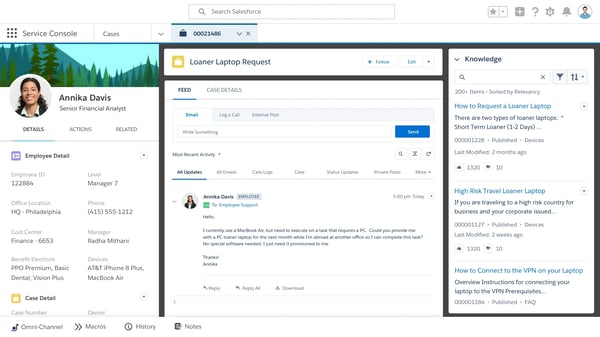
also found the AI especially useful for reducing repetitive support work without removing the human element. Case summaries, suggested responses, and intelligent routing all helped shorten the path to resolution while keeping agents in control of customer conversations. G2 reviewers echoed this experience, highlighting the platform's contextual AI, 360-degree customer view, and ability to surface relevant information without switching between systems.
I would upgrade Agentforce Service Cloud when my team needs automated case routing, SLA tracking, and AI-assisted responses at scale beyond what the free evaluation provides. The 30-day trial lets me test these capabilities, but it isn't a permanent free plan. I'd also account for AI usage costs alongside the Service Cloud license, since conversation-based billing can increase expenses as support volume grows.
“What I like best is the transition from static bots to autonomous AI agents. With Agentforce, the ability to ground generative AI in our specific Salesforce data (Data Cloud) makes the service truly contextual. It doesn't just provide scripted answers; it understands the customer's history and can perform actions directly within the workflow without constant human hand-offs.”
- Agentforce Service Cloud review, Naampreet K.
“It requires complex implementation, as per the requirements, so the implementation side is somewhat tough. It is not easy to configure. Sometimes the pricing is high when there are fewer queries from consumers, but the cost is the same, so at that time it costs us more; something like dynamic pricing will help”
- Agentforce Service Cloud review, Kshitij T.
Confused between self-service and help desk? Read this G2 guide on self-service and help desk to know which one you need.
Fin stood out to me because it isn't trying to be another help desk, but to resolve customer conversations before they ever reach one. I looked at the 14-day free trial, which includes full access to both the Intercom help desk and Fin AI Agent. When I tested it, the setup was genuinely fast. Fin pulls from your existing help center articles and starts answering questions almost immediately.
I really liked how conversational the testing experience felt. Instead of directing customers to a list of help articles, Fin understood the question, pulled the relevant information from the knowledge base, and responded naturally while maintaining context throughout the conversation. Follow-up questions felt like part of the same interaction rather than a fresh search each time. For tech startups with a well-maintained help center, this creates a self-service experience that's much closer to talking with a support agent than browsing documentation.
.png?width=600&height=462&name=Fin%20customer%20guidance%20dashboard%20(1).png)
The G2 Data backs up that knowledge-first experience: Fin scores 91% for knowledge base and 91% for searchable articles, above the category averages of 89% and 88%, respectively. G2 reviewers echoed this, praising Fin's natural-language responses, fast setup, and ability to accurately resolve a large share of repetitive customer questions.
I also appreciate how little effort it took to get started. Fin immediately began using my existing help center content, so I didn't need to migrate articles or build complex decision trees before seeing useful results. When a conversation required human intervention, the handoff preserved the full context instead of forcing customers to repeat themselves.
Ownership update (September 2026): Salesforce completed its acquisition of Fin in September 2026. Fin now operates within Salesforce AI Labs and continues serving existing customers, expanding Salesforce's AI-powered customer service portfolio alongside Agentforce.
Important: “One year free” does not mean unlimited usage. Additional Fin outcomes and certain communication charges are billed separately. The Early Stage program also has a discounted help desk component rather than an entirely free Intercom subscription.
I would upgrade Fin when my team needs to handle higher conversation volumes, improve AI resolution rates, or introduce more advanced workflows across customer support channels. Fin's usage-based pricing starts at $0.99 per outcome, so I'd estimate monthly resolution volume before committing. If I also need the Intercom help desk, I'd budget for its separate seat subscription.
“Fin is a platform that I have been working with for years since it was known as Intercom. At first, it functioned as a direct chat with your customers, allowing you to resolve their queries easily. Fin has been reinventing itself for years, adding more features without compromising the ease of navigating its platform or the product's overall configuration. What I like the most is that a large part of the success of our SaaS has been due to the efficient technical support, and we have managed to provide it thanks to Fin.”
- Fin review, Ricardo M.
“Our primary concern is that FIN workflows do not always perform as intended. We follow the instructions given, but we usually have to dig deeper to get FIN to respond the way we want. We have also received steps from FIN indicating that we do not have the level at which the feature is available. That should be part of the information.”
- Fin review, Kristen B.
If you’re looking for agentic AI to take over your customer support workflows, explore top-rated AI agents on G2 and compare verified reviews to find the right fit.
Freshdesk stood out to me because it combines customer self-service and ticket management in a single platform, making it easy to support customers before and after they submit a request. For a tech startup that needs to stop losing customer issues in email and start tracking them properly, the free plan is a genuinely useful starting point.
I evaluated Freshdesk through its free access options, using the trial to explore the more advanced capabilities. The knowledge base was the strongest self-service feature for me. I could organize articles into categories and folders, publish them to a customer-facing help center, and make the content searchable without involving a developer. I also liked that the same articles could support both customers and agents, reducing the need to maintain separate internal and external documentation. That strength is reflected in G2's Fall 2026 Grid data, where the knowledge base is Freshdesk's highest-rated feature, with an 89% rating.
.png?width=600&height=749&name=Freshdesk%20help%20and%20support%20(1).png)
I also checked how the customer portal connected self-service with ticket submission and follow-up. Customers could search for an answer first, then raise and track a request when the documentation did not solve the issue. The trial also let me explore the Freddy AI Agent, which used the knowledge base to answer routine questions in a conversational way. Its performance depended on the quality of the underlying articles, but for startups with reliable documentation, it added a useful first layer of support before a ticket reached the team.
I would upgrade from Freshdesk's free plan when my team needs Freddy AI for intelligent ticket routing and automated customer responses, advanced workflow automations, SLA management, or omnichannel support across chat, phone, and social channels. The free plan works well for early-stage support operations. Still, once ticket volume outgrows a two-agent setup, or self-service requires more than basic knowledge-base functionality, a paid plan becomes the practical next step. Freshdesk's paid plans start at $19 per agent per month, billed annually, giving startups a relatively affordable path to expand their support capabilities as they grow.
“Freshdesk is easy to use and has extensive tutorials that help you through it. You have a lot of options for automations and settings to really customize your own experience.”
- Freshdesk review, Joni L.
“It does the job, but when it comes to whitelabelling and making the tool feel like it’s part of our product, we found the customization options to be limited. We had to work around those limitations in both customization and whitelabelling. Also, the knowledge base feels more like a Q&A or FAQ, and we can’t really set it up in a documentation-style format.”
- Freshdesk review, Ganapathi K.
Based on what I observed, HubSpot Service Hub is great for a tech startup that's already using HubSpot for sales or marketing and wants customer support and self-service to live in the same ecosystem. The CRM integration was immediately apparent during my analysis. Every support interaction, including tickets, live chat, and knowledge base article views, is linked to the customer's full HubSpot contact record, so there's no guessing about what a customer has already seen or done before they reach out.
The knowledge base is straightforward to build out, with articles published to a branded help center that customers can search without opening a ticket. What I found particularly useful is that the same content powers the AI chatbot, which can surface relevant articles in conversation before escalating to a human agent. That AI-assisted experience stands out in G2's Grid data too: Service Hub scores 90% for proactive assistance, compared with the 81% category average, and 88% for natural language interaction, five points above the 83% average.
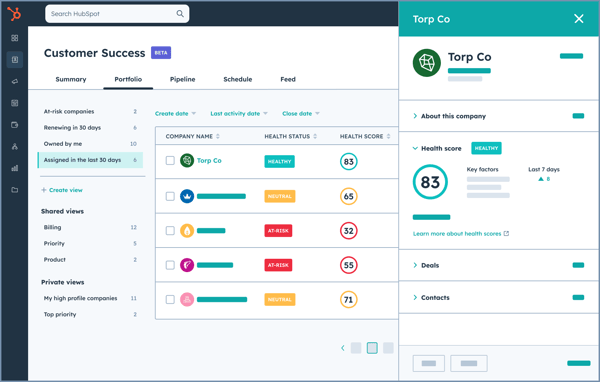
HubSpot Service Hub also offers a free trial of its Customer Agent AI feature when you purchase at least one Service Professional or Enterprise seat. During that window, there are no message or feature restrictions, giving you a detailed look at what the AI layer can do before committing. G2 reviewers from small businesses in computer software and IT services highlight the centralized customer view and reporting capabilities as the platform's strongest points.
The 2-user limit is the most immediate constraint for a growing startup; once your support team expands beyond 2 people, the free plan becomes unviable. I would upgrade from HubSpot Service Hub's free plan when my team needs Customer Agent AI, advanced automation, or custom reporting as self-service scales. The Starter plan at $15/seat/month is the practical first step once the support team grows beyond two people or removing HubSpot branding from customer-facing assets becomes a priority. If I'm already using HubSpot for CRM, the upgrade is easier to justify since it consolidates rather than adds a new tool.
“What I like most is having all the tools I need in one environment. I can manage everything in HubSpot without needing to look for additional software. It covers CRM, marketing, ticket management, and more.”
- HubSpot Service Hub review, Paola V.
"The free version works well for daily use, but there are some limits. You can only have a certain number of contacts, dashboards, reports, and email templates. Some advanced features and integrations are only available on paid plans. For now, it’s fine, but it could feel limiting as your needs grow."
- HubSpot Service Hub review, Tarun K.
Rather than building a knowledge base for customers to search through, Jotform AI Agents let you deploy a conversational AI agent directly on your website. The workflow integration is where Jotform's broader platform adds value. Because it connects natively to Jotform's form ecosystem and integrates with external tools, an AI agent can guide a user through a process, collect structured data, and automatically route it to the right place. For a startup that's handling a mix of support queries and intake workflows, that combination reduces the need for custom backend logic to manage repetitive tasks.
When I tested it, the setup was the first thing that stood out. You can point Jotform AI Agents to your domain, and they automatically scrape your pages, read your product information, and start building their knowledge base from your existing content. From there, you can train it further by chatting with it directly, correcting its responses, adding context, and refining its behavior through conversation rather than a configuration panel. G2's Grid data reinforces that no-code experience: Jotform AI Agents scores 92% for ease of admin, two points above the category average. Its knowledge base is also one of its highest-rated features at 91%, compared with the 89% category average.
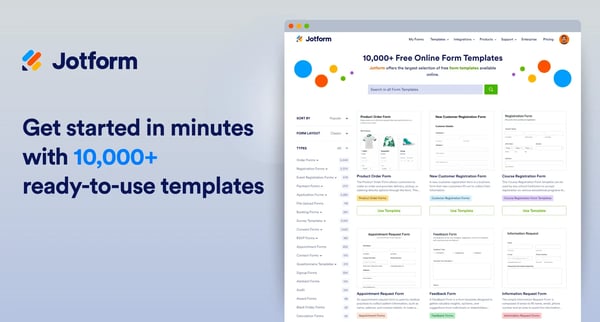
I also tested the human-escalation and form-guidance features. The agent could collect information in a conversational manner, guide users through a form, and hand off unanswered questions via email, WhatsApp, or mobile notifications. That makes it more useful than a basic FAQ bot for startups that want self-service to lead into an actual workflow. The main caveat is that accuracy still depends on the quality of the training content, but the free plan provides enough capacity for teams to validate the experience before upgrading.
The 100 monthly conversations limit is the most likely trigger for a growing startup.
I would upgrade from Jotform AI Agents' free plan when my team needs to handle conversation volumes beyond what the Starter plan supports, run the AI agent across multiple channels simultaneously, or scale voice and SMS interactions as part of a broader self-service strategy. The first paid tier at $34/month is a next step once the free plan has proven the tool's value for your use case.
“I like that you can just give Jotform AI Agents your domain and it automatically scrapes the pages, reads your product-related information, and that you can literally train it through chat. It makes it really smart, and the best part is how affordable the feature is. You can start for free and get 10,000 sessions and 100 full conversations. Pricing starts at $39, $49, and so on. It's truly economical, simple, and straightforward for a small business like us.”
- Jotform AI Agents review, Ash P.
“One thing I didn’t like is that the AI responses aren’t always perfectly accurate, especially for more specific or complex queries. Sometimes you still need to step in and fine-tune the answers, which kind of defeats the purpose of full automation. Also, the customization options, while useful, can feel a bit limited in certain cases. If you want very specific workflows or advanced logic, it takes some trial and error to get things right. It’s not difficult, but it’s not completely straightforward either. Another small issue is performance — occasionally, there’s a slight delay in responses, which can affect the user experience in real-time interactions. Overall, it’s a solid tool, but there’s definitely room for improvement in accuracy and flexibility."
- Jotform AI Agents review, Sangita R.
For teams pairing self-service with AI chat and human handoffs, this guide compares conversational support platforms for customer service.
Zendesk for Customer Service is the platform I'd choose if I expected my support operation to grow significantly over the next few years rather than needing to replace it later. The standard 14-day free trial gives you full access to the Customer Service Suite Professional plan, including Copilot and AI features for evaluation. For eligible startups under 10 years old, with fewer than 250 employees, and no later than Series B funding, the Zendesk for Startups program extends that value considerably by offering up to 2 years of free access for up to 50 agents.
What impressed me most during testing was how mature Zendesk's AI-powered self-service experience felt. According to Zendesk, its AI can learn from customer interactions to improve future responses. I found that the platform could handle follow-up questions in a conversational way rather than simply directing customers to help articles. G2's Fall 2026 Grid data adds useful context: Zendesk earns 87% for knowledge base functionality and 85% for automation, reflecting positive reviewer satisfaction with the underlying tools that support self-service and ticket resolution.
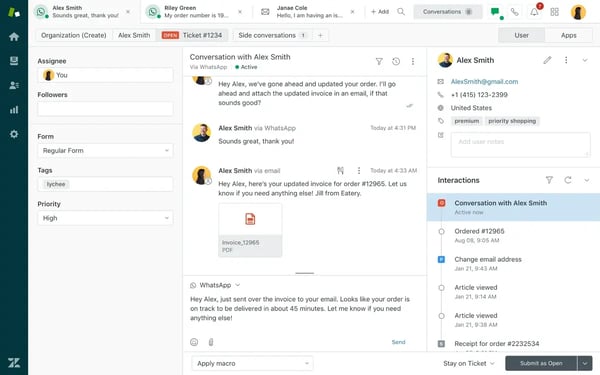
I also really liked the depth of Zendesk's automation engine. Building routing rules, SLA policies, and multi-condition workflows didn't require code, yet the platform offered enough flexibility to support much more sophisticated support operations than most startup-focused tools. Combined with its marketplace of more than 1,000 integrations, Zendesk feels less like a standalone help desk and more like long-term support infrastructure that can evolve alongside a growing business.
I would upgrade from Zendesk's startup program when my team needs omnichannel support, AI-powered automation, or advanced reporting as ticket volume and complexity grow. The Support Team plan at $19/agent/month is where most growth-stage teams land when they need those capabilities in one package. Since the cost jump from the free program to a paid subscription is significant, I'd model the post-program budget early, before building workflows that become hard to migrate.
"Agent interface is clear and easy to use. Robust reporting across hundreds of metrics. Easy to customize for different business cases; I've used it for both 24/7 global support across 12 languages and as a jumping-off point for a small 2-person team. Responsive customer support and account management."
- Zendesk for Customer Service review, Emily I. G.
"Zendesk can feel a bit overwhelming at first because there are so many features and configuration options. It takes time to set up properly and can be confusing for new users. Another thing is pricing; many useful features and integrations are locked behind higher plans, which can be tough for smaller teams. Also, when ticket volume is high, the interface can feel slightly cluttered."
- Zendesk for Customer Service review, Radhika R.
Interested in Zendesk? Read my peer’s in-depth review of Zendesk, informed by 6,000+ real users on G2.
Zoho Desk stands out for offering one of the most generous forever-free plans on this list, after Jotform AI Agents. It supports up to three agents with email ticketing and core support features, making it a practical starting point for early-stage startups that aren't ready to commit to a paid help desk. When the team outgrows the free plan, paid pricing starts at $7 per user/month (billed annually), making it one of the lowest-cost upgrade paths in the category. That value proposition is backed by strong user sentiment: Zoho Desk earns a Satisfaction score of 99, the highest among the seven tools I evaluated, and a G2 Score of 96, tied with Zendesk for the highest on my list.
When I explored it, the integration between Desk and Zoho CRM was the feature that stood out most, including tickets linking directly to contact records, deal timelines updating automatically, and support context being visible across teams without manual data entry. For a startup where the same small team handles both customer support and account management, this removes coordination overhead that most standalone tools can't address. The connection extends to Zoho Books, Zoho Analytics, and SalesIQ, which means a startup already building on Zoho One gets a genuinely unified operational picture without additional integration work.
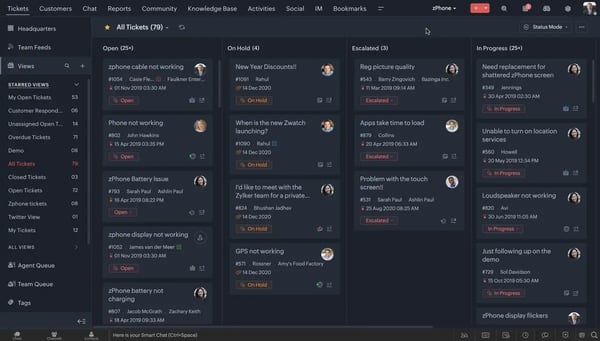
The setup speed is also worth noting. During testing, configuring the first inbox, connecting a custom domain, and enabling the customer-facing portal took under 20 minutes. G2 reviewers from small IT businesses confirm this, with several noting they were up and running the same day without documentation or training.
I would upgrade from Zoho Desk's free plan when my team needs workflow automations, CSAT surveys, SLA management, or a customer-facing knowledge base as self-service becomes a bigger priority. The three-agent cap is also a practical trigger as the support team grows. With plans starting at $7/user/month, Zoho Desk has one of the most affordable upgrade paths on this list, making it easy to scale support capabilities incrementally as the business grows.
"What I like best about Zoho Desk is how easy it is to use. The interface is clean and intuitive, which makes it simple to manage support tickets, track customer conversations, and keep the team organized. The browsing experience is smooth, and the platform helps improve the support workflow without making the process complicated."
- Zoho Desk review, Bruno N.
"Where Zoho Desk can fall short is in usability and polish compared to higher-end platforms like ServiceNow or even more MSP-focused tools like ConnectWise. The UI can feel a bit cluttered or unintuitive, especially for new technicians."
- Zoho Desk review, Rudy C.
Honestly, most early-stage tech startups should start for free. When you're a five-person team handling support over a shared inbox, the hard part isn't picking the most sophisticated self-service platform; it's getting a knowledge base live and reducing the volume of repetitive questions before they eat into engineering time. A free plan is the right fit if you're:
Where it gets thin is when self-service stops being a deflection tool and becomes the primary layer your customers rely on. The moment your help center is generating real traffic, your AI agent is handling volume daily, or your support team is routing escalations at scale, the free tier starts quietly holding you back, usually right when customer growth is accelerating, and you can least afford the friction.
For a tech startup, the wall tends to show up in one of three ways:
Got more questions? G2 has the answers!
Fin and Jotform AI Agents are the strongest options on this list for teams whose primary problem is repetitive ticket volume. Fin serves as a front-line triage layer, resolving routine queries autonomously before they become tickets. Jotform AI Agents takes a similar approach, deploying a conversational AI agent on your website that handles incoming customer queries before they reach the support queue.
Freshdesk and Zoho Desk are the most reliable options for self-directed answer-finding. Freshdesk's three-tier knowledge base hierarchy makes large content libraries navigable without support involvement. Zoho Desk's customer-facing portal provides a structured destination for customers to search for answers independently, though the knowledge base is locked behind a paid plan.
Fin and Agentforce Service Cloud are built specifically to answer questions from your own documentation rather than generic training data. Fin pulls directly from your existing help center articles and answers in a conversational tone without surfacing a list of links. Agentforce grounds its AI responses in live Salesforce data and knowledge articles, so answers reflect your actual product context rather than a general model's best guess.
Freshdesk, Service Hub, and Zendesk for Customer Service offer branded, searchable customer portals that go beyond a static FAQ page. Zendesk's help center integrates tightly with its ticketing system, surfacing relevant articles in context. Service Hub's portal connects directly to HubSpot CRM data, so the content customers see can reflect their specific account history. Freshdesk's portal is straightforward to build and maintain, with clean navigation and built-in search from the start.
Fin is designed to sit atop a help desk you already run, connecting to your existing system rather than replacing it. Jotform AI Agents integrates with tools like Jira and Asana, routing cross-team queries without requiring a full platform migration. Agentforce Service Cloud also connects to third-party help desks through its API ecosystem for teams that aren't fully on Salesforce.
Jotform AI Agents and Fin are the fastest to deploy on this list. Jotform AI Agents automatically scrape your domain and build their knowledge base from existing website content. Most teams have a working agent embedded on their site within a few hours. Fin pulls from your existing help center articles and starts answering questions almost immediately after setup, with no content migration or manual training required to reach a useful baseline.
Most tools place the responsibility for content quality on the team rather than the platform. Agentforce Service Cloud is the most explicit about this risk. Outdated or duplicate records in Salesforce directly cause the AI to confidently return incorrect answers, making a content audit a prerequisite for a reliable deployment. Fin tends to flag low-confidence answers rather than fabricate responses when documentation is thin, which reduces the risk of confident misinformation reaching customers.
Zendesk for Customer Service and Fin are the strongest options on this list for reducing measurable agent workload. Zendesk's Adaptive Learning feature continuously improves resolution quality based on real interactions, compounding deflection over time without manual retraining. Fin's per-resolution pricing model means you only pay when a query is successfully closed
without human involvement.
Zendesk for Customer Service, Zoho Desk, and Agentforce Service are strong options based on G2's Fall 2026 Customer Self-Service Grid. Zendesk and Zoho Desk share the highest G2 Score (96) among the seven tools I evaluated, while Zoho Desk leads in Satisfaction score (99). Agentforce follows with a G2 Score of 91. These scores reflect overall satisfaction and market presence, not trust specifically among support leaders.
Most tech startups overthink this decision. The best free customer self-service platform isn't the one with the most AI features. It's the one that helps customers find answers on their own and reduces the number of support requests your team has to handle.
I always tell startups: start with the problem, not the product.
Most importantly, my advice is to treat the free plan or trial like a real pilot. Publish your actual help content, test the AI against real customer questions, and follow the escalation journey from self-service to human support. Measure how many tickets are resolved before they reach your team, where customers drop off, and which limitations genuinely slow you down. By the end of the trial, or after a few weeks on a free plan, you'll know whether the platform supports your current needs or whether it's time to invest in more advanced automation, AI, or reporting. The right upgrade isn't about unlocking more features; it's about helping more customers solve problems without needing to contact your team.
Want to compare more comprehensive customer self-service software tools? Read our guide to the seven best customer self-service software tools, including the top-rated paid options, all evaluated against G2 Data and verified user reviews.