


Running a one-person show or a small business means you’re constantly switching roles. One minute you’re handling client work, the next you’re chasing invoices, and somewhere in between you’re expected to magically keep your calendar under control too. And honestly? With everything already on your plate, the last thing you want is to waste time juggling endless emails or phone calls just to lock in a meeting.
That’s exactly where free appointment scheduling software steps in. These tools take over the repetitive stuff, sending booking confirmations, managing cancellations, and updating your calendar, all without costing you a dime.
So whether you’re a freelance writer trying to simplify client calls, a virtual assistant managing multiple calendars, or a small business owner looking to keep things organized, there’s a free scheduling tool that’ll fit right into your workflow.

In this list, I’ll walk you through some of the best free appointment scheduling apps, breaking down their features, pros, and cons so you can find the one that actually makes your day easier.
*The software list is arranged alphabetically. These tools offer free trials, free forever options, or freemium models.
Need help comparing the best free appointment scheduling software? This table gives you a quick overview.
|
Best free appointment scheduling software |
G2 Rating |
Free plan |
Paid plan |
|
Acuity Scheduling |
4.7/5 ⭐ |
Free-trial available |
$16 per month |
|
Boomerang for Gmail |
4.6/5 ⭐ |
Yes, feature-limited |
Starting at $4.98 per month |
|
Calendly |
4.7/5 ⭐ |
Yes, feature-limited |
Starting at $10 per seat per month |
|
GReminders |
4.7/5 ⭐ |
Yes, feature-limited |
Starting at $8 per user per month |
|
Setmore |
4.5/5 ⭐ |
Yes, feature-limited |
Starting at $9 per user per month |
|
Waitwhile |
4.9/5 ⭐ |
Yes, feature-limited |
Starting at $31 per month |
|
YouCanBookMe |
4.7/5 ⭐ |
Yes, feature-limited |
Starting at $7.20 per month |
*All pricing details mentioned in the article are based on publicly available data at the time of publication and are subject to change.
Appointment scheduling software takes the chaos out of managing bookings by automating confirmations, syncing calendars, sending reminders, and keeping your availability organized, all without the back-and-forth emails. After speaking with freelancers, service providers, virtual assistants, and small business owners, one thing became clear: the right scheduling tool can save hours each week and drastically reduce no-shows.
And it’s no surprise the market is booming. The global appointment scheduling software market is projected to grow from $546.1 million in 2025 to $1,518.4 million by 2032, accelerating at a powerful 15.7% CAGR.
While evaluating these platforms, I prioritized tools that were easy to use, automation-friendly, and flexible enough to support different types of professionals, from consultants to salons to small agencies. I dug through reviews on booking workflows, reminder automation, payment integrations, calendar syncing, and how well each tool fits into existing workflows. Some platforms felt incredibly smooth and intuitive, while others struggled with customization, reliability, or feature limitations in their free plans.
The best free appointment scheduling software should reduce manual work, eliminate scheduling friction, and give clients a seamless booking experience, making it a must-have for anyone juggling a busy calendar.
I started by reviewing G2 Grid Reports to shortlist top-performing tools and then spent weeks digging through reviews for appointment scheduling software to understand what real users rely on most. I explored use cases across freelancers, service-based businesses, virtual assistants, and small teams, paying close attention to online booking workflows, calendar syncing, reminders, payment handling, and client communication to see how each tool performs in everyday scenarios.
After gathering insights from professionals who actively use these tools, I validated their feedback against verified G2 reviews to ensure accuracy and reliability. The screenshots featured in this article may be a mix of those sourced from each vendor’s G2 page or publicly available materials.
The goal was to understand whether these tools actually simplify scheduling, what each one is best suited for, and whether their free plans offer enough value to get started without any risk.
Appointment scheduling app automates the tedious task of booking, rescheduling, and canceling appointments without the hassle of back-and-forth emails or phone calls.
The list below features free appointment scheduling software, as rated by real users. It’s important to note that vendors offering a free trial are also considered free. To be included in this category, a solution must:
*This data was pulled from G2 in 2025. Some reviews may have been edited for clarity.
Acuity Scheduling is a powerful tool for service-based businesses, such as salons, health practitioners, and personal trainers. It not only handles appointment scheduling but also allows clients to fill out intake forms, pay for services, and even book recurring appointments. With Acuity Scheduling, you have a virtual receptionist who works 24/7.
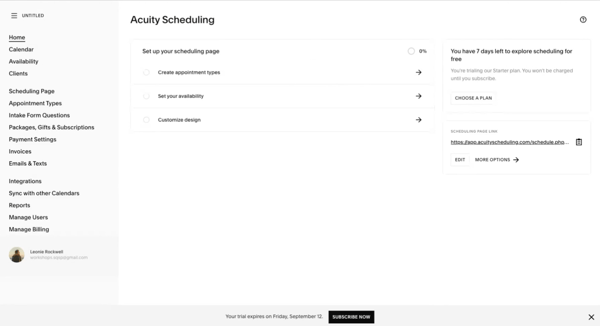
| Pros of Acuity Scheduling | Cons of Acuity Scheduling |
| Comprehensive client management features | Steeper learning curve |
| Accepts payments through integrations | Downfall of customer service |
| Zoom integration | Very limited API |
“Hands down, the integration with other software is the best feature here! The ease of use and user-friendly interface are a close second. It makes your life easier if you are a customer-facing business that relies on a schedule to operate. We really love this product! We use this tool for everyday client booking, business meetings, and online scheduling through our website.”
- Acuity Scheduling Review, Michelle M.
“I want the general landing page to be a bit more customizable. I would also like it if clients could add one or more additional email addresses (attendees) when scheduling an appointment. This would help me know when clients want to add the person to a Zoom call instead of them passing on the link and me finding out during the appointment that someone else is joining the call.”
- Acuity Scheduling Review, Shawniece E.
Tip: Want bookings to reach your books automatically? See appointment scheduling software that integrates with QuickBooks to sync clients and payments into QuickBooks Online.
More than just scheduling, Boomerang for Gmail is a fantastic tool for managing your email-based appointments. Business professionals who live in their inbox will benefit from its ability to schedule emails, set reminders, and even pause the inbox to focus on important tasks.
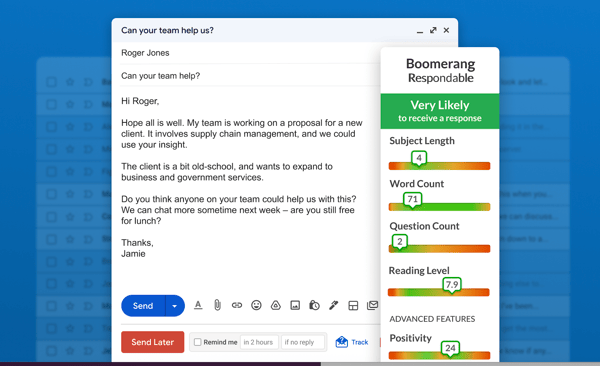
|
Pros of Boomerang for Gmail |
Cons of Boomerang for Gmail |
|
Gmail integration |
Not available within Gmail on mobile |
|
Quick implementation |
The free version has restricted functionality |
|
Easy scheduling of meetings |
No admin functionality |
“I love how easy it is to schedule meetings with multiple clients without worrying about double booking. Plus, it adds the meeting to their calendar as well, so everyone stays informed.”
- Boomerang for Gmail Review, Kirsten G.
“I wish I could import the entirety of my calendar contacts at once. I currently have to add people's calendars one by one, and in a large company, that can be time-consuming.”
- Boomerang for Gmail Review, Janelle G.
Calendly is a favorite among professionals for its sleek design and ease of use. Anyone who needs to eliminate the hassle of finding mutual availability for meetings will appreciate this tool. Just send a link, and clients or colleagues can pick a time that works for both of you. What’s more, Calendly integrates with a wide array of other tools, making it a powerhouse for productivity.
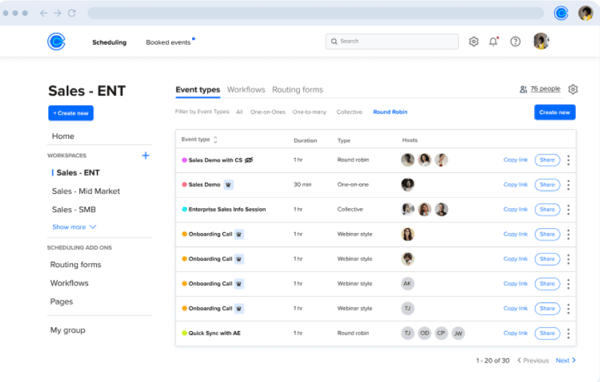
|
Pros of Calendly |
Cons of Calendly |
|
Intuitive user interface |
Little customization |
|
Automatic notification alerts |
Lack of flexibility in branding |
|
Robust automated scheduling platform |
Limited features in the free version |
“I love how intuitive and simple Calendly is. The automated processes save time, energy, and a lot of back-and-forth. The system allows me to manage my calendar and avoid time negotiations. I love how it integrates seamlessly with multiple platforms and apps, and that editing and updating services and availability are so easy.”
- Calendly Review, Colette A.
“One of the downsides for me has been the inability to override my own schedule when attempting to reschedule phone interviews. I'll typically have to make a lot of adjustments to my Outlook calendar just to make a specific space appear as available.”
- Calendly Review, Morgan M.
If you're exploring options beyond basic free plans, we have also reviewed the best business scheduling software to help teams compare platforms designed for client bookings, sales meetings, and growing scheduling needs.
GReminders is a nifty tool for anyone who wants to make sure appointments are never missed. It works with Google Calendar and Outlook to send automated SMS and email reminders to clients, reducing no-shows. It’s especially useful for professionals who rely on a tight schedule.
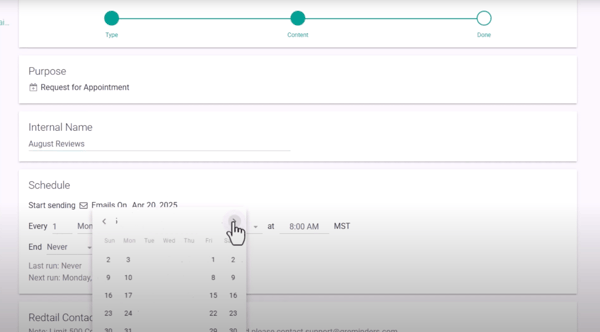
|
Pros of GReminders |
Cons of GReminders |
|
Automated reminders |
Separate SMS fee |
|
Easy integration with calendars |
Interface can be clunky |
|
Very flexible |
The texting plan is a bit pricey |
“This has been invaluable in maximizing productivity and reducing cancellations with meetings. It allows me to link appointments to the invitee's calendars, emails, and texts. I use it daily for all my business and personal appointments. Additionally, whenever I've needed to speak with customer support, they’ve always been very helpful. Though I rarely reach out to them because the app is very easy to use.”
- GReminders Review, Maria G.
“The only thing I would change is that if I switch a calendar event to a different employee's name after the reminder has been sent, and the customer replies ‘Yes’ or ‘No’, it sends a message saying the event has been canceled. I understand why this happens, but I would change the verbiage to 'Some details have been changed or canceled, please call for clarification.' Just so they don't call me panicked!”
- GReminders Review, Sarah C.
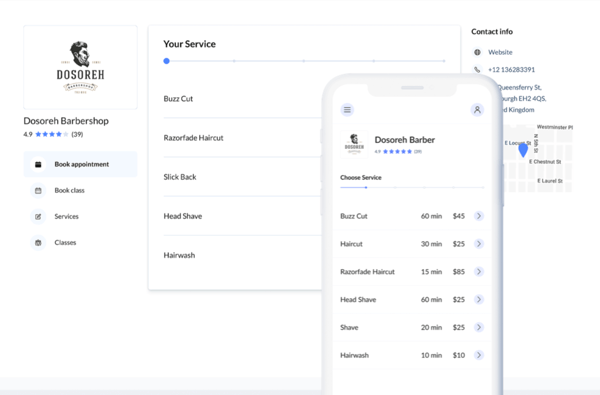
Setmore offers a great balance between simplicity and functionality. It provides a straightforward way to schedule appointments, with the added bonus of staff and resource management. Plus, it integrates with social media platforms, allowing the clients to book directly from your Facebook page.
|
Pros of Setmore |
Cons of Setmore |
|
Easy setup |
Payment reports have only a name to distinguish a client |
|
Time zone management |
Technical issues |
|
Easy to tailor to specific needs |
No option for add-ons in services |
“I enjoy Setmore's simplicity and flexibility. As a large tutoring center on campus, we needed a straightforward tool to schedule a large team with hundreds of courses in our catalog. Setmore is quick to set up, and their support team is always available to resolve questions within just a few minutes. I didn't think I could find such excellent service at an affordable price, but Setmore exceeded our expectations!”
- Setmore Review, Alex B.
“The only thing missing is setting up specific services on specific days. Such as online sessions only on Thursdays. This would make my booking system even more versatile.”
- Setmore Review, Calynn W.
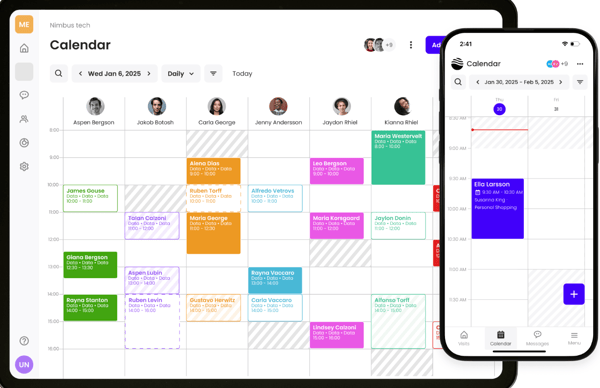
Waitwhile is the ideal solution for businesses that need to handle both appointments and walk-in traffic without the chaos. It streamlines customer flow by offering virtual waitlists, real-time queue updates, and flexible scheduling options, all in one place. Whether you're running a retail store, restaurant, clinic, or service center, Waitwhile helps you reduce wait times and keep visitors informed every step of the way.
Its customization options, intuitive interface, and powerful integrations make it especially valuable for teams that want to personalize the customer journey and keep operations moving smoothly, even during peak hours.
|
Pros of Waitwhile |
Cons of Waitwhile |
|
Very easy to use and highly user-friendly |
Occasional glitches, lag, or delays |
|
Highly customizable for any workflow or industry |
Limited customization or locked features |
|
Strong queue + appointment management with real-time updates and messaging |
Notifications can be unreliable or less flexible |
“I really enjoy the user-friendly interface. It has helped our shelter to streamline its operational processes across multiple departments, which has greatly reduced wait times and improved the customer experience. The software also provides extremely helpful metrics that help us to identify areas of improvement as well as highlight the areas in which we are doing very well.”
- Waitwhile Review, Laney N.
“I dislike the limitation on the number of patients that can be seen per month with Waitwhile. On an extremely busy day, we were required to pay to increase the monthly volume, which was an inconvenience.”
- Waitwhile Review, Christy B.
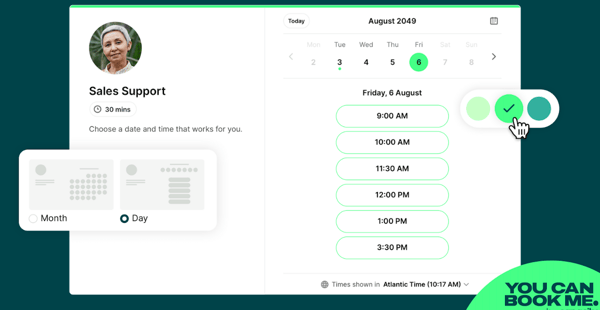
YouCanBookMe is perfect for professionals who need a straightforward way for clients to book their time. It integrates seamlessly with Google Calendar and Outlook, offering a personalized booking page where clients can schedule appointments based on their availability. The tool appeals to freelancers, consultants, and small business owners who want to look polished and professional.
|
Pros of YouCanBookMe |
Cons of YouCanBookMe |
|
Easy to set up |
Occasional glitches |
|
Useful integrations |
Unsatisfactory customer service |
|
Ease of rescheduling and canceling meetings |
Limited customization in the free version |
“YouCanBookMe proves to be an invaluable tool for streamlining client appointment booking. Its standout feature is the seamless booking process that allows clients to schedule sessions without direct communication, while simultaneously notifying me via text message immediately after a booking is made. The platform is user-friendly, and the support team provides excellent assistance during the account setup process, ensuring all configurations are accurate and tailored to your needs.”
- YouCanBookMe Review, Laura B.
“Since updating to their new-style calendar, I've had display issues with the calendar integration on my website. It worked perfectly before the upgrade. I contacted their support team on September 2nd, and as of September 27th, I have yet to receive any response. Given that this is a paid service, I expected better customer care. I'm unlikely to renew my subscription, which is a shame.”
- YouCanBookMe Review, Clare E.

While free appointment scheduling tools might have limitations compared to paid options, they can effectively manage appointments for small businesses and solopreneurs. It's essential to choose a reputable platform with positive user reviews and consider how well it meets your specific business needs.
A good free appointment booking software should at least offer basic features like online booking, calendar integration, appointment reminders, and customer management.
Yes, some limitations with free tools can include fewer customization options, limited integrations, or restrictions on the number of users or appointments you can handle. You will need to upgrade to a paid appointment scheduling software for more advanced features, such as recurring appointments, payment processing, or advanced reporting.
Yes, most reputable free appointment scheduling tools follow standard security practices, including data encryption, secure login protocols, and compliance with common privacy regulations. However, free plans may offer fewer security controls than paid versions. Tools like Calendly, Setmore, and YouCanBookMe are widely trusted and used by businesses, but it’s still important to review each provider’s privacy policy, especially if you’re handling sensitive client information.
Free scheduling tools can work for small teams or basic collaboration, but they often come with limitations like restricted user seats, fewer admin controls, or limited shared calendars. For example, Calendly and Setmore offer free plans that support team scheduling at a basic level, while growing teams may eventually need to upgrade for features like round-robin assignments or advanced reporting.
Integration support varies widely across free plans. Some tools offer core integrations, like Google Calendar or Outlook, while reserving advanced connections (CRMs, video conferencing, payment tools) for paid tiers. Calendly, YouCanBookMe, and Acuity Scheduling are known for strong integration ecosystems, though access on free plans may be limited compared to premium versions.
Most free appointment scheduling tools do support basic calendar integrations. Popular options like Calendly, Setmore, YouCanBookMe, and Boomerang for Gmail typically sync with Google Calendar and Outlook to prevent double bookings. However, syncing multiple calendars or advanced availability rules may require a paid plan.
Yes, many free scheduling tools include automatic time zone detection to avoid scheduling conflicts across regions. Calendly, YouCanBookMe, and GReminders are commonly used by global teams and freelancers for this reason. That said, advanced time zone controls or custom rules may be limited in free versions.
The “best” tool depends on your needs, but Calendly, Setmore, and Acuity Scheduling are popular choices for small businesses. Calendly is known for simplicity and ease of use, Setmore works well for service-based businesses, and Acuity Scheduling offers more customization, though some features may require upgrading as your business grows.
Remote teams often prioritize time zone support, calendar syncing, and collaboration features. Calendly, YouCanBookMe, and GReminders are commonly used by distributed teams because they integrate well with calendars and support asynchronous scheduling. Free plans usually work for small or lightweight remote setups.
Freelancers and solopreneurs often benefit most from tools that are easy to set up and client-friendly. Calendly, YouCanBookMe, Boomerang for Gmail, and Setmore are popular options for solo professionals who need simple booking links, calendar sync, and minimal maintenance without upfront costs.
Appointment scheduling software is a total lifesaver for anyone managing a busy calendar. It offers ways to automate bookings, send reminders, and keep your schedule organized. The beauty of free tools is that they provide a range of these essential features without the commitment of a paid plan.
We hope this roundup helps you find the best free online appointment scheduling software to fit your needs and keep your calendar running smoothly.
Now that you have some more time, check out digital business card software to share your contact information digitally and capture more business.


Let AI shortlist the best tool for your use case Ask AI 1 Click on the button below2...
.png) by Devyani Mehta
by Devyani Mehta

Going to the gym and working out has always been a challenge for me. But when I speak to gym...
.png) by Tanuja Bahirat
by Tanuja Bahirat

TL;DR: Which scheduling software integrates with QuickBooks? My pick is Jobber for QuickBooks...
 by Shreesh Singh