.png?width=400&height=150&name=Untitled%20design%20(56).png)


Based on verified G2 reviews and the latest Grid® placement.
*Liked and disliked highlights are summarized from verified G2 user reviews.
The tools below have also been exhaustively tested and evaluated, and continue to hold their place among the best Field Service Management Software on G2.
On a busy Tuesday morning, the office printer jammed, causing a backlog of tasks and frustration across departments. The IT team scrambled to resolve the issue, and it took hours to get the machine back online.
That got me thinking. How do field service teams, equipment managers, and businesses that rely on constant machine uptime manage maintenance and service issues more effectively? That's when I began exploring the best field service management software.
I dove into G2 reviews, researched several platforms, and evaluated different software solutions to understand how they streamline field service operations. What I discovered was more than just scheduling; it's about improving customer satisfaction, optimizing workforce efficiency, and ensuring timely responses to service requests.
If you're searching for the top-rated field service management apps, keep reading. I've selected the top 6 tools: Agentforce Field Service (formerly Salesforce Field Service), Jobber, Connecteam, Field Nation, Jotform, and Housecall Pro. I'll share insights to help you make the right choice for your business.
*These field service management tools are top-rated in their category, according to G2's Spring 2026 Grid Report. I've also added their starting monthly pricing to make comparisons easier for you.
The best field service management software simplifies job scheduling, technician dispatch, and customer communication.
While evaluating G2 reviews for these tools, I saw how they boost efficiency, reduce delays, and turn reactive service into a proactive, streamlined operation, because in the field, fixing it the first time is everything.
The demand for smarter field operations is reflected in how quickly the category is growing. The FSM market is projected to expand from $5.10 billion in 2025 to $9.17 billion by 2030, driven by AI-powered scheduling, mobile workforce enablement, and real-time data visibility across job sites.
On G2, the Field Service Management category skews heavily toward smaller organizations: 53% of reviewers are small businesses, 34% are mid-market, and 13% are enterprise. That distribution shaped how I evaluated these tools. I paid close attention to ease of adoption, value at different price points, and whether platforms genuinely serve lean teams as well as they do larger operations.
“The pattern we keep running into is that a lot of platforms are powerful but quietly assume you have someone around to configure them; for a small crew, the setup itself is often the real barrier.”
Read full thread →By analyzing G2 reviews and the Spring Grid® Report, I gained a clear understanding of what sets each field service management tool apart, from ease of use to overall impact on operations. I focused on expert reviews from real users in industries such as HVAC, plumbing, and utilities who rely on these tools daily.
I also used AI to identify patterns in user feedback, highlighting how these platforms help teams schedule jobs faster, communicate better with customers, and reduce time spent on manual tasks. Visuals in this article may include snapshots from the product profile on G2 and from publicly available materials.
Backed by user insights and expert analysis, this guide features the top field service management tools to help you find the right fit for your business.
After going through G2 Data, category requirements, and hundreds of verified user reviews, I kept seeing the same priorities come up across roles like operations managers, field supervisors, and service coordinators.
The list below contains genuine user reviews from our best Field Service Management software category page. To qualify for inclusion in the category, a product must:
*This data was pulled from G2 in 2026. Some reviews may have been edited for clarity.
G2 rating: 4.4/5
Agentforce Field Service (formerly Salesforce Field Service) is a comprehensive solution designed to streamline field operations, especially for teams managing high volumes of service appointments.
Based on my review of G2 user feedback, this tool stands out for its ability to intelligently schedule and assign tasks based on technician availability, skills, and location. I frequently see G2 reviewers highlight how this feature helps reduce delays and makes daily service coordination more efficient.
Another commonly appreciated element is the native integration with Sales Cloud and Service Cloud. From what I've seen in user reviews, this unified setup enables teams to access customer history, case details, and work orders in one place. G2 users often praise this for helping reduce miscommunication and making client interactions more informed and responsive. It's no surprise that CRM Integrations are rated at 89% by G2 reviewers, the highest-rated feature in the category for this tool.
Across multiple reviews, I've noticed users mention that the interface is intuitive and well-suited for roles ranging from dispatchers to service managers. While some initial orientation is necessary, once users become accustomed to it, many find the system easy to navigate. A number of G2 reviewers also call out the responsiveness of the support team, especially during implementation and early workflow configurations.
Another theme that comes through consistently is how well the platform supports technician management. Dispatchers and service managers can monitor field staff in real time, track progress across multiple jobs, and make reassignments on the fly when situations change. For organizations running large or complex field operations, that visibility is a significant operational advantage.
From what I've seen in recent reviews, automation is another area where the platform earns strong praise. Workflows that once required multiple manual steps, such as job assignments, status updates, and follow-up communications, are now handled automatically. G2 Data reinforces this, with Reports rated at 88% and Analytics at 88%, reflecting how well the platform turns operational activity into structured, decision-ready insight.
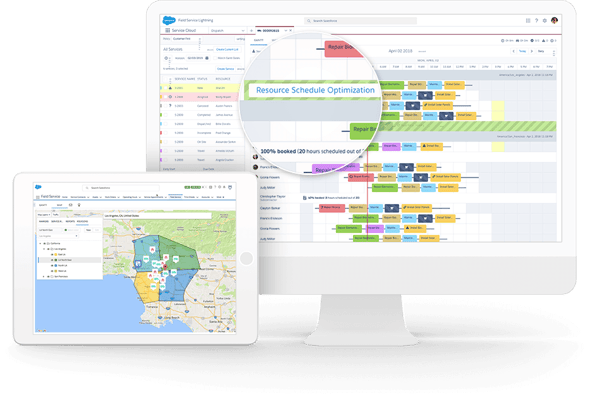
Agentforce Field Service is an enterprise-grade platform built for teams that need a comprehensive, deeply connected toolset. Some users, especially those on smaller teams or with tighter budgets, mention that costs can add up quickly as feature requirements grow. Many of the same reviewers acknowledge, however, that the platform's depth, native Salesforce integration, and automation capabilities make it a strong long-term investment for organizations ready to scale.
Notable patterns in G2 reviews also point to a learning curve, particularly for smaller businesses or teams with limited technical resources. Getting comfortable with more advanced configurations, from dispatch rules to workflow automation, can take meaningful time upfront. Most reviewers are clear that the investment pays off, though teams that push through the initial setup period consistently report stronger operational outcomes and a deeper return on the platform's full capabilities.
Even with these challenges, I'd confidently recommend Agentforce Field Service for mid-market and enterprise teams already invested in the Salesforce ecosystem. The intelligent scheduling, deep integrations, and automation capabilities make it one of the most powerful options in the category for managing field operations at scale.
"Agentforce Service is easy to use and packed with useful customer support features. It helps streamline daily operations through automation, efficient case tracking, and strong integration capabilities. While implementation can be slightly complex for advanced setups, the platform delivers reliable performance and improves overall team productivity."
- Agentforce Field Service review (formerly Salesforce Field Service), Aditya S.
"High implementation complexity, prohibitively expensive and volatile pricing, and steep learning curve for both dispatchers and technicians."
- Agentforce Field Service review Salesforce Field Service), Aryan S.
Related: Streamline your operations and protect valuable assets with the best asset-tracking software.
G2 rating: 4.6/5
Jobber is a straightforward, no-fuss field service platform built with small service businesses in mind, and that focus comes through clearly in G2 reviews.
Based on my review of G2 user feedback, Jobber's intuitive design is often praised for its ease of use. Reviewers frequently mention how minimal the learning curve is, with teams getting up and running quickly without needing extensive onboarding or technical support. That simplicity is one of the most consistent themes across the reviews I've seen.
A feature that comes up again and again is the mobile app. Field technicians can manage jobs, collect payments, access client details, and update statuses directly from their phones, making it especially practical for teams that spend most of their time on the road. Several reviewers specifically call out how reliable and responsive the mobile experience feels day to day.
Invoicing and payments are another clear strength. G2 Data shows Invoicing rated at 92%, the highest-rated feature for Jobber, and that tracks with what I've seen in reviews. Users consistently highlight how easy it is to generate professional estimates, process payments on-site, and keep billing organized without jumping between systems.
Scheduling is another area where Jobber earns strong praise. I've seen reviewers describe the visual scheduling interface as fast and intuitive, helping teams reduce no-shows and double bookings. The integration with QuickBooks also comes up frequently, with users appreciating how seamlessly financial data flows between the two platforms. Dispatch is rated at 88% by G2 reviewers, reinforcing how well the platform handles day-to-day job coordination.
Tip: Already running QuickBooks? Check out the best field service software that integrates with QuickBooks so finished jobs turn into invoices without re-keying.
From what I've seen, Jobber's automation capabilities are quietly one of its biggest time-savers. Automated reminders, follow-ups, and approval workflows reduce the manual back-and-forth that slows down small teams. And for teams that rely on forms and data capture in the field, the ability to attach checklists, photos, and job notes directly to work orders keeps everything organized and easy to reference later.
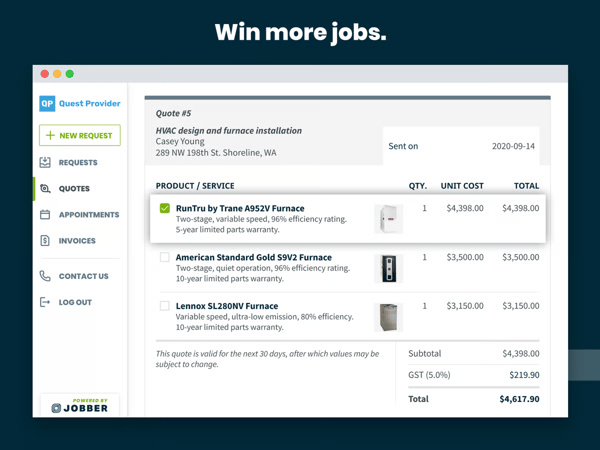
Pricing is a theme that surfaces fairly regularly in Jobber's G2 reviews, particularly among very small businesses or solo operators at an early growth stage. As teams look to unlock more advanced features or scale their usage, subscription costs can add up, and some reviewers describe the per-feature pricing structure as feeling restrictive. That said, most users are quick to acknowledge that the value Jobber delivers across scheduling, invoicing, and mobile management makes it a worthwhile investment for growing service businesses.
A pattern I've also picked up on in reviews relates to the learning curve around more advanced configurations. While day-to-day tasks feel intuitive for most users, setting up complex workflows or navigating recent interface updates can take some adjustment. Most reviewers note that once they find their footing, the platform becomes second nature and supports their operations reliably.
Even with these considerations, Jobber remains one of my top picks for small service businesses that want a clean, capable platform without the complexity of enterprise-grade tools. The combination of intuitive scheduling, reliable invoicing, and a strong mobile experience makes it easy to see why so many small teams rely on it daily to keep their operations running smoothly.
"I use Jobber for my handyman business, and I really like its simple format, which makes things straightforward. Creating legitimate professional estimates and managing invoice payments professionally are other aspects I appreciate. The estimates feature is invaluable: I can create an estimate by clicking line items saved in the system, and I can easily click and adjust pricing, which is excellent. The initial setup was also very easy, and I definitely find it convenient."
- Jobber review, Victor X. L.
"Quotes do not provide flexible options. New tests are often removed and impact our business (i.e., pipeline). Every option costs more money - feels like nickel and diming."
- Jobber review, Megan A.
Before investing in field service tools, know which fleet management software features drive the most operational value. Our breakdown covers the key features to look for, including vehicle tracking, driver behaviour, safety monitoring, and more.
G2 rating: 4.6/5
Connecteam is often described as a flexible, user-friendly workforce management platform that adapts well to different scheduling and operational needs.
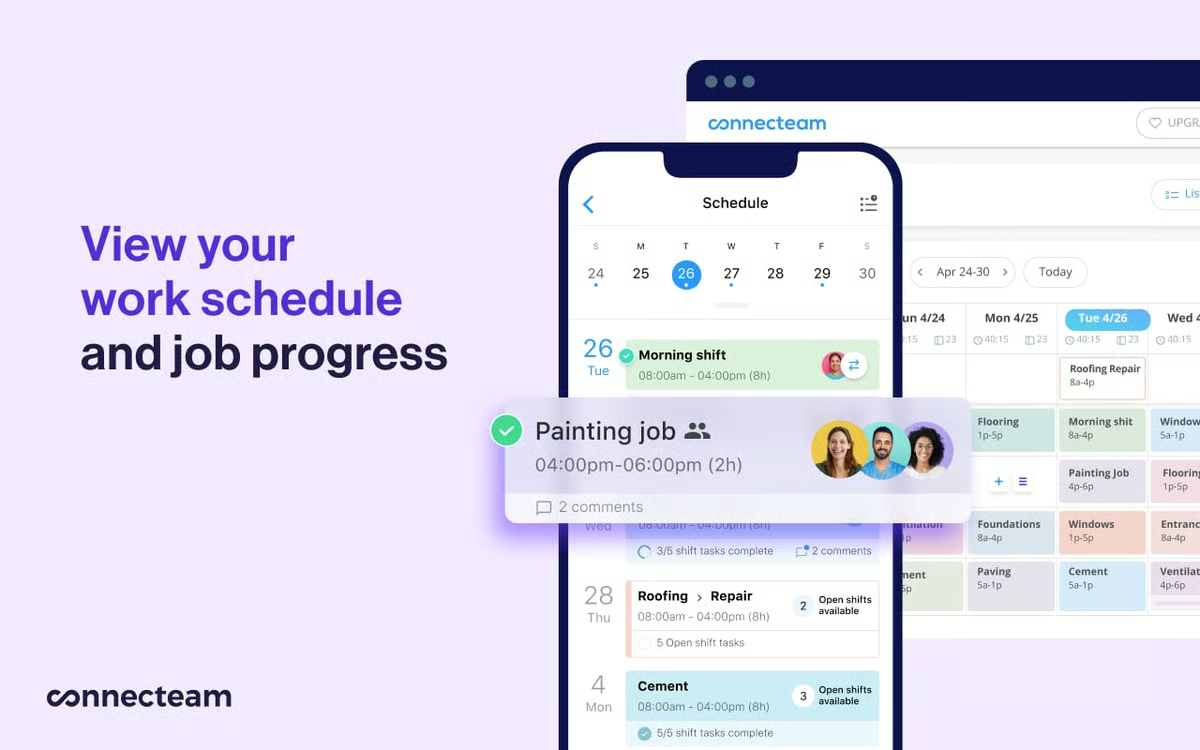
From what I've seen in G2 reviews, the mobile app is one of the most consistently praised aspects of the platform. Field teams can manage shifts, communicate with colleagues, clock in and out, and track locations entirely from their phones. For organizations with deskless workers spread across multiple sites, that mobile-first experience is a significant operational advantage.
Ease of use is another recurring theme. G2 Data shows ease of use rated at 93%, and that tracks with what I've read across hundreds of reviews. Managers and employees alike describe the platform as intuitive from day one, with minimal onboarding required even for non-technical teams. Several reviewers mention that their employees were fully up and running the same day they set up the account.
Scheduling is another area where Connecteam earns consistent praise. I've seen reviewers highlight how easy it is to build and manage shifts, even for teams with complex patterns or multiple locations. The ability to post shifts and have employees claim them directly through the app reduces the back-and-forth that typically slows down scheduling for field-based teams.
A common theme I've noticed is how much users value the GPS and location tracking capabilities. Location is rated at 89% by G2 reviewers, and the feedback reflects that. Teams can verify employee attendance in real time, track field staff across job sites, and ensure compliance, all without needing a separate tracking tool. For organizations managing large or distributed workforces, that visibility makes a meaningful difference.
Communication tools are another standout. Employee Communication is Connecteam's highest-rated feature at 93%, and it's easy to see why from the reviews. Built-in chat, announcements, and updates keep field teams and office staff aligned without relying on personal messaging apps. I've also seen strong praise for the time tracking capabilities, with reviewers appreciating how the clock-in and clock-out features integrate seamlessly with scheduling and payroll workflows.
On the other hand, a pattern that comes through in Connecteam's G2 reviews relates to connectivity, particularly for teams working in remote or low-signal areas. Because the platform relies on a stable internet connection to sync data and deliver real-time updates, field staff in areas with poor coverage can sometimes experience delays in receiving job information or updates. That said, teams operating in well-connected environments run the platform smoothly, and the real-time visibility it provides is consistently cited as one of its strongest operational advantages.
Something else I've picked up on in reviews relates to notification reliability. Some users mention that alerts can occasionally group together or fail to come through consistently, making it easy to miss updates during busy periods. Most reviewers treat this as a minor friction point rather than a deal-breaker, and many note that Connecteam's communication tools remain one of the most valued aspects of the platform overall.
For field service teams that need a mobile-first platform to manage scheduling, communication, and workforce operations in one place, I'd confidently recommend Connecteam. The combination of intuitive design, strong GPS tracking, and built-in communication tools makes it especially well-suited for organizations with deskless teams who need to stay connected and coordinated across multiple locations.
"I find Connecteam incredibly useful for chatting and updating clients and making quick announcements whenever needed. The mobile-friendly aspect of the software is amazing for our staff working in the field. The feature of clock in and clock out, along with GPS tracking, is unique and valuable for ensuring our employees' attendance is real and for tracking the field team's specific work locations. The initial setup was quite smooth and simple, which I really appreciated."
- Connecteam review, Prem L.
"One thing I have noticed is that sometimes notifications come in groups instead of one by one. If multiple tasks are updated close to each other, the alerts show together, and it is easy to miss a small detail unless I open the app and check properly."
- Connecteam review, Ishan S.
Dispatching work efficiently starts with knowing who's available. See our guide to the best employee scheduling software for managing shifts, labor costs, and workforce coverage.
G2 rating: 4.5/5
Field Nation is widely recognized as a dependable platform for managing field service operations, particularly for organizations that need to source and coordinate independent technicians at scale.
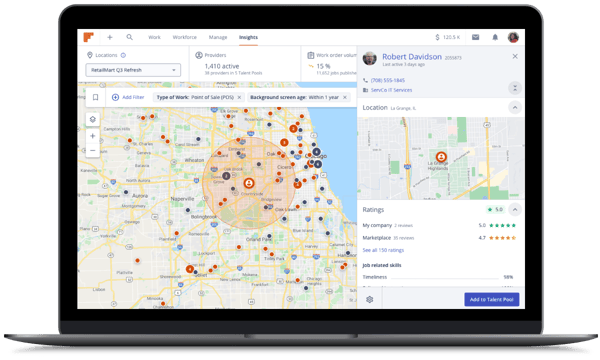
Based on my review of G2 user feedback, the platform's ability to connect businesses with a large, nationwide pool of skilled technicians is its most consistently praised strength. Reviewers frequently highlight how quickly they can find qualified providers across wide geographic areas, making it especially valuable for companies looking to expand their service footprint without building out a full internal field team.
Ease of use is another theme that comes through clearly. G2 Data shows ease of use rated at 91% and ease of setup at 91%, which aligns with what I've seen in reviews. Users describe the platform as intuitive to navigate, with a structured onboarding tour that helps new users get up to speed quickly. For teams that need to get operational fast, that low barrier to entry makes a real difference.
Customer support is a standout that I see praised again and again. Reviewers consistently highlight how responsive and helpful the support team is, whether it's resolving issues with job postings, platform navigation, or technician communication. Quality of support is rated at 90% by G2 reviewers, and the sentiment in reviews closely reflects that reliability.
Forms and data capture are another area where Field Nation earns strong feedback. I've seen reviewers mention how the platform's structured forms help define job scope clearly, making it easier to match the right technician to each assignment. That clarity reduces back-and-forth and helps both buyers and providers stay aligned throughout the job lifecycle.
From what I've seen, scheduling and booking capabilities also receive solid praise. Booking is rated at 88% by G2 reviewers, and users frequently describe how the platform streamlines posting jobs, reviewing technician availability, and confirming assignments. The ability to filter providers by skills, certifications, and location adds another layer of precision to the matching process that reviewers find genuinely useful.
One thing that surfaces in Field Nation's G2 reviews is technician quality consistency. Because the platform operates on an independent contractor model, experiences can vary depending on the provider selected, and some reviewers recommend checking individual profiles and past job history before making assignments. That said, the platform's rating system and detailed provider profiles give buyers the tools they need to make more informed decisions over time.
A pattern I've also noticed relates to navigation and search functionality. Some reviewers mention that recent interface updates have made certain workflows feel less intuitive than before, particularly around managing provider notes and work orders. Most users agree, however, that the platform continues to support efficient operations once they've adjusted to the updated layout.
All things considered, Field Nation is my go-to recommendation for organizations that need a reliable, scalable way to source and manage independent field technicians across wide geographic areas. The combination of a large technician network, an intuitive platform, and responsive support makes it a strong operational choice for companies looking to expand their service footprint without the overhead of building an internal field team.
"Field Nation provides quick access to a plethora of trained professionals that allows companies like ours to expand our footprint to nationwide status in support of our customers. Customers like the option of having a single source vendor to reach out to in a time of need."
- Field Nation review, Raymond R.
"There are certain things that can be improved, like the way that Field Nation screens their technicians. Some technicians don't perform well, so it's important to check reviews on each individual person from their previous jobs to verify if they can actually perform on a job site."
- Field Nation review, Will C.
Also read: Streamline building operations and maintenance tasks with top-rated facilities management software.
G2 rating: 4.7/5
Jotform is a versatile, form-first platform that has carved out a strong presence in field service management by making it easy for teams to capture, manage, and act on data directly from the field.
The theme I see coming up most consistently across G2 reviews is how intuitive and easy the platform is to use. G2 Data reflects this strongly, with ease of use rated at 94% and ease of setup at 93%, both among the highest in the category. Reviewers frequently describe how quickly they were able to build forms, set up workflows, and get their teams using the platform with minimal training required.
Forms and data capture are at the core of what Jotform does, and it shows in the reviews. Users across industries describe building everything from job completion forms and inspection checklists to customer registration and feedback surveys. The platform's drag-and-drop form builder and extensive template library make it accessible even for teams without technical backgrounds, and the ability to capture data offline and sync when connected is a recurring highlight for field-based teams.
Another strength that comes through clearly is customization. G2 reviewers frequently mention how flexible the platform is, allowing teams to tailor forms, workflows, and branding to fit their specific operational needs. That flexibility is especially valued by organizations managing multiple job types or serving different client segments, where one-size-fits-all forms simply don't work.
Integration capabilities are another area where Jotform earns consistent praise. Users highlight how seamlessly it connects with tools like Google Sheets, Salesforce, and other platforms they already use. Rather than replacing existing systems, Jotform slots in as a data collection layer that feeds directly into the tools teams rely on for reporting, CRM, and project management.
From what I've seen in reviews, automation and reporting are also valued highly. Reviewers describe setting up conditional logic in forms, automated submission routing, and approval workflows that reduce manual follow-up significantly. Reports are rated at 86% and Analytics at 84% by G2 reviewers, reinforcing how well the platform supports structured data visibility once forms are submitted. For field teams that need to turn captured data into actionable insight quickly, that reporting layer adds real operational value.
One thing worth noting from Jotform's G2 reviews is that the free plan comes with certain limitations that users don't always anticipate upfront. Features like payment processing have monthly caps, and teams that scale quickly or rely on more advanced functionality may find themselves needing to upgrade sooner than expected. That said, most reviewers acknowledge that even the entry-level paid plans offer strong value relative to the breadth of features Jotform delivers.
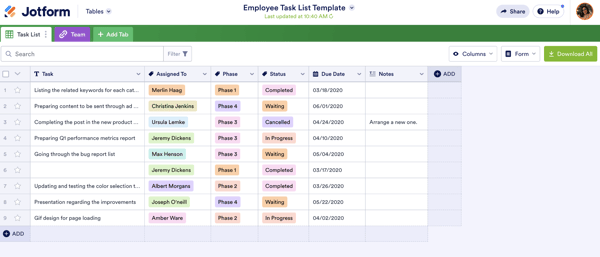
A pattern I've also picked up on in reviews relates to platform speed. Some users mention that the interface can feel sluggish at times, particularly when loading forms or checking submissions during peak usage. For teams handling high volumes of field data, that occasional lag can add friction to an otherwise smooth workflow. Most reviewers treat it as a minor inconvenience rather than a fundamental limitation, and note that overall the platform performs reliably for everyday operations.
For field service teams that need a flexible, easy-to-deploy solution for capturing and managing data in the field, Jotform is a strong addition to any tech stack. Its intuitive form builder, deep customization options, and broad integration capabilities make it especially well-suited for organizations that want to standardize data collection across jobs, sites, and teams without the complexity of a full FSM platform.
"I like using Jotform to collect feedback and applications and manage registrations. It saves me time and helps with various scenarios, which I find better than Google Forms. I really like the scenarios where I connect questions and decide based on the answer if I should show more questions. The integrations are a big plus for me, especially with Google Sheets. The integration aspect was a key reason I switched from Google Forms to Jotform. Setting up Jotform was easy for me."
- Jotform review, Oleh P.
"On the free version, I wasn't aware of the 10 max payments per month, so had to upgrade to the next plan."
- Jotform review, James R.
G2 rating: 4.3/5
Housecall Pro is often highlighted for its user-friendly interface and quick implementation, which is especially beneficial for small business owners.
From what I've seen in G2 reviews, ease of use is the theme that comes through most consistently. Reviewers describe the platform as intuitive from the start, with clear setup instructions that help teams get up and running quickly. G2 Data reflects this, with ease of use rated at 91% and ease of setup at 90%, both above category averages.
Invoicing and payments are another clear strength. Invoicing is Housecall Pro's highest-rated feature at 93%, which aligns closely with what I've read in reviews. Users consistently highlight how easy it is to generate and send invoices, collect payments on-site, and keep billing organized across multiple jobs. For home service businesses managing high transaction volumes, that reliability makes a real operational difference.
Scheduling is another area that earns consistent praise. I've noticed reviewers appreciate how straightforward it is to book appointments, assign jobs, and manage customer details from one place. Dispatch is rated at 90% by G2 reviewers, reinforcing its ability to handle day-to-day job coordination for home service teams.
A commonly appreciated element is the mobile experience. Field technicians can access job details, update statuses, and collect payments directly from their phones, which reviewers say keeps operations running smoothly even when teams are spread across multiple locations. The mobile app is frequently described as reliable and easy to use, even for less tech-savvy team members.
From what I've seen, client notifications and automation are highly valued. Client Notifications are rated at 89% by G2 reviewers, and users frequently mention how automated appointment reminders, follow-ups, and payment requests reduce manual administrative work. Several reviewers specifically note that these features improve the customer experience and help home service businesses maintain a professional image with minimal effort.
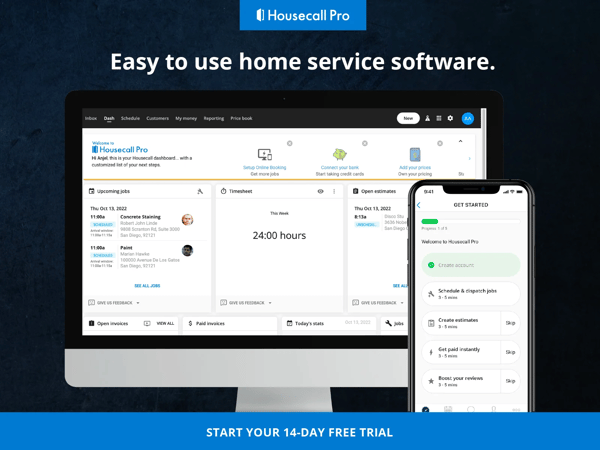
Something that comes up in Housecall Pro's G2 reviews is the platform's breadth across industries. Because it serves a wide range of home service businesses, some users feel that certain features aren't as deeply tailored to their specific trade as they'd like. That said, the platform's core scheduling, invoicing, and client management tools cover day-to-day needs reliably for most home service professionals.
A pattern I've also noticed relates to mobile app navigation. A few reviewers mention that certain menus aren't always as intuitive as expected on mobile, which can occasionally lead to errors during booking. Most users, however, find that once familiar with the layout, the mobile experience is reliable and supports smooth day-to-day field operations.
At the end of the day, Housecall Pro is a solid pick for home service professionals who want a reliable, easy-to-use platform that covers the essentials without overcomplicating things. The combination of intuitive invoicing, seamless scheduling, and built-in client notifications makes it a practical day-to-day tool for small service businesses looking to run more efficiently and deliver a more professional customer experience.
"I like how Housecall Pro helps me keep track of my customers and their invoices, which is invaluable for someone who's been in the business for over 25 years. I also appreciate that they're always expanding their services and have integrated email and text marketing along with review services and payment processing in one place, making it convenient. The initial setup was so easy. Overall, Housecall Pro is truly invaluable to me and my customers."
- Housecall Pro review, Andrew G.
"In my opinion, the product attempts to cater to too many different industries without offering enough specialized features for each. I also find that it lacks sufficient customization options."
- Housecall Pro review, Ashley F.
Related: Accurately track work hours and productivity with the best time and attendance software.
Still have questions about field service management tools? G2 has the answers!
For teams on tighter budgets, Connecteam and Jotform both offer free tiers that cover core functionality for small teams. Jobber and Housecall Pro offer competitive entry-level paid plans starting at $29/month and $59/month respectively, making them strong choices for small service businesses that need scheduling, invoicing, and mobile access without a large upfront investment.
Connecteam is consistently praised for its mobile app experience, offering scheduling, GPS tracking, time tracking, and team communication in one clean, easy-to-navigate interface. Jobber and Housecall Pro also earn strong mobile app reviews from field technicians, particularly for their ability to manage jobs, collect payments, and update statuses directly from the phone.
Jobber and Housecall Pro are purpose-built for small service businesses, offering intuitive scheduling, invoicing, and client management without the complexity of enterprise platforms. Connecteam is another strong option for small teams that need workforce coordination, time tracking, and communication tools in one affordable package.
G2 is one of the most reliable sources for verified, expert-level reviews on field service management software. The G2 Grid Report ranks platforms based on user satisfaction and market presence, while individual product pages feature detailed reviews from real users across industries like construction, HVAC, utilities, and facilities services. The tools covered in this article, including Agentforce Field Service, Jobber, Connecteam, Field Nation, Jotform, and Housecall Pro, are all top-rated on G2's Spring 2026 Grid Report.
Connecteam and Field Nation both earn strong marks for customer support on G2. Connecteam's quality of support is rated at 94%, while Field Nation scores 90%, with reviewers specifically praising the speed and responsiveness of both support teams. Agentforce Field Service also receives positive support feedback, particularly during implementation and complex workflow configurations.
Agentforce Field Service is a leading choice for technician management, offering real-time job tracking, intelligent dispatch, and mobile access for field staff. Connecteam excels at managing deskless workers across multiple sites, with GPS tracking, time clocking, and shift management built in. Field Nation is purpose-built for organizations that rely on independent contractors, making it easy to find, assign, and manage field technicians at scale.
Medium-sized businesses typically need more capability than entry-level tools provide without the cost and complexity of enterprise platforms. Connecteam and Field Nation are strong fits, offering workforce visibility, scheduling, and communication tools that scale well for growing teams. Agentforce Field Service is also a compelling option for mid-market organizations already using Salesforce that need deeper field operations functionality.
Based on G2's Spring 2026 Grid Report, the top-rated field service management apps include Agentforce Field Service (formerly Salesforce Field Service), Jobber, Connecteam, Field Nation, Jotform, and Housecall Pro. These tools consistently earn high satisfaction scores across ease of use, quality of support, and meets requirements, and are recognized as Leaders in the field service management category.
Agentforce Field Service is frequently cited as the leading platform for field technicians in enterprise environments, offering advanced dispatch, mobile job management, and deep Salesforce integration. For smaller teams, Jobber and Housecall Pro are highly rated for their mobile-first experiences, giving technicians everything they need to manage jobs, collect payments, and update statuses from the field.
Connecteam is widely regarded as one of the most user-friendly field service apps, earning a 93% ease of use rating on G2 and frequent praise for its intuitive interface and same-day adoption. Jotform also scores exceptionally high for ease of use at 94%, particularly for teams that need to build and deploy forms quickly. Jobber and Housecall Pro round out the top user-friendly options for small service businesses.
After testing and comparing today’s top field service management software, I’ve seen firsthand how much of a difference the right tool can make.
From automating dispatch to giving field technicians everything they need on their phones, these platforms are built to make service delivery smoother, faster, and more customer-friendly.
If you're looking for a way to scale your service operations without burning out your team, I hope my experience evaluating these tools helps you find the FSM tool that makes it all click. Because when your techs are empowered, and your customers are happy, everything else falls into place.
Simplify maintenance scheduling and reduce downtime with industry-leading CMMS software.
.png)

TL;DR: Which scheduling software integrates with QuickBooks? My pick is Jobber for QuickBooks...
 by Shreesh Singh

I evaluated more than 25 tools to identify the best customer service automation software for...
.png) by Shreya Mattoo
by Shreya Mattoo

Running a one-person show or a small business means you’re constantly switching roles. One...
 by Harshita Tewari