


After testing, I found ClickUp, Connecteam, Hubstaff, monday AI Work Platform, QuickBooks Time, Toggl Track, and Wrike to be the best free time tracking software for startups in 2026.
As someone who has worked in a few startups, I understand how important time tracking can be. While the workflow tools get a lot of attention, the way your team logs hours quietly shapes payroll, client invoices, and how you answer an investor asking where the engineering hours went last quarter.
I tested the best time tracking tools specifically from a startup perspective: how quickly you can get running, what the free plan genuinely covers before you hit a paywall, and whether the upgrade path makes sense at the early stage. Here is what I found about the best free time tracking software for startups in 2026.
*Tools are listed alphabetically. These tools offer free trials, free forever options, or freemium models.

Here's a side-by-side look at free plan limits and pricing before diving into the full reviews.
| Tool | G2 Rating | What the free plan covers | Paid Starts At |
| ClickUp | 4.6/5 | Free forever: unlimited members and tasks; advanced time tracking on trial, 60MB storage | $7/user/month (Unlimited, billed annually) |
| Connecteam | 4.6/5 | Free for life (Small Business plan): all hubs for up to 10 users, GPS time clock, scheduling | $29/month (Basic, first 30 users) |
| Hubstaff | 4.4/5 | 14-day free trial, full access | $4.99/seat/month (2-seat min, billed annually) |
| monday AI Work Platform | 4.7/5 | Free forever: 2 seats, 3 boards; time tracking not included in the free forever plan, but available in the Pro plan, which offers a 14-day free trial. | $19/seat/month (Pro, for time tracking) |
| QuickBooks Time | 4.5/5 | 30-day free trial, full access | $20/month base + $8/user/month (Time Premium) |
| Toggl Track | 4.6/5 | Free forever for a limited number of users: unlimited time entries, projects, and clients; 100+ tools via browser extension | $9/user/month (Starter) |
| Wrike | 4.2/5 | Free forever: task and project management; time tracking not included (Business feature) | $25/user/month (Business, for time tracking) |
*All pricing details are based on publicly available data at the time of publication and are subject to change.
84% of project management software users rate time and expense tracking as a highly important feature, according to Capterra's 2026 research. As per the latest G2 Grid Report for time tracking software, small and medium-sized businesses make up 55% of reviewers, making it one of the most SMB-dominant categories on the platform.
I started with G2's free time tracking software category page, which lists tools that offer free plans, free trials, or freemium models. From there, I took the top products as they appear on the page and evaluated each one specifically from a startup perspective: how quickly a small team can get running, what the free plan genuinely covers before you hit a paywall, and whether the upgrade path makes sense at the early stage.
I cross-referenced verified G2 user reviews filtered by the Small Business segment from January 2025 onward. For Toggl Track and QuickBooks Time, the Small Business review pool within this period was thin, so the date range was extended to January 2025 to reach a workable sample. G2 review data referenced throughout was pulled in 2026. Some reviews have been lightly edited for clarity.
The screenshots featured in this article may be a mix of those taken from the vendor's G2 page or from publicly available materials.
Running these tools back to back with a startup lens makes certain things stand out that a generic feature list won't catch:
To be included on this list, a tool must:
*This data was pulled from G2 in 2026. Some reviews may have been edited for clarity.
ClickUp is one of those tools that keeps coming up in startup conversations, not because of any single feature, but because it replaces several tools at once. Task management, docs, time tracking, dashboards, and automations all live inside the same workspace, which, for a small team with no IT budget, is a genuinely different value proposition from a standalone time tracker.
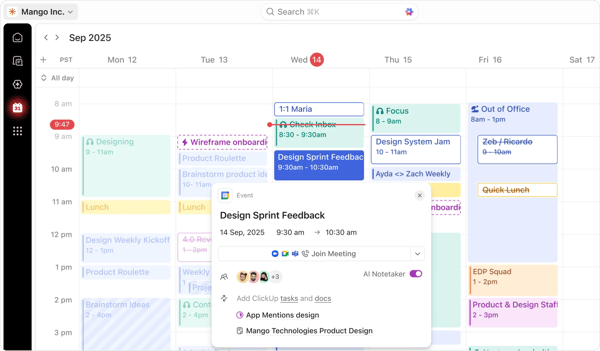
I tested ClickUp specifically on the Free Forever plan, which is more capable than most free tiers in this category. Unlimited members and unlimited tasks mean you can onboard your whole early team without hitting a paywall. Time tracking is the one nuance worth understanding upfront: the Free Forever plan gives you a trial of the advanced time tracking features rather than them being permanently free, and full native time tracking lands on the Unlimited plan.
What struck me most during testing was how naturally time logging fits into the task workflow. Once it is on, you track time directly on the task you are working on, so your hours are tied to project context without any manual tagging.
The free plan's main constraint is the 60MB shared storage limit, which is tight for any team storing files or assets inside ClickUp. There is also a cap of 100 automation actions per month on the free plan, which most startups will hit faster than expected as soon as they start building workflows. Both limits are real upgrade triggers, but for a startup that primarily needs task management with time tracking close at hand, the free plan runs surprisingly long before becoming genuinely restrictive.
The free plan holds up well for a startup in its first few months. The upgrade trigger is usually one of three things: you need time tracking running permanently rather than on a trial, your team hits the 60MB storage ceiling, or your automations exceed 100 actions per month. The Unlimited plan unlocks native time tracking, removes storage limits, and adds integrations. And if you have raised up to Series B and are under five years old, the ClickUp for Startups program offers credits toward an upgraded workspace, the cheapest route to full-time tracking of any tool here.
"I use ClickUp for task management, project planning, and tracking deadlines. I like how everything is centralized in one place, making it easy to track tasks, manage deadlines, and stay organized without needing multiple apps. I also like how flexible and customizable ClickUp is; it works well for different kinds of projects."
- ClickUp review, Inasse H.
Best for: Early-stage startups that want task management and time tracking in a single workspace without paying for multiple tools, particularly those with growing teams that would hit per-seat limits on other free plans.
Not ideal for: Startups that only need a simple timer with no project management overhead, or teams that store large files and will hit the 100MB free storage cap quickly.
"The main downside is that the large number of features and customization options can make the platform feel overwhelming at first. It takes some time to learn how everything works and to build an efficient workflow. In larger workspaces, certain pages can also feel slower than expected."
- ClickUp review, Mostafa A.
Connecteam takes a different angle on time tracking than most tools in this category. It is built for teams whose work happens away from a desk: shift workers, contractors, field staff, and any startup that has employees clocking in and out rather than logging hours in a browser.
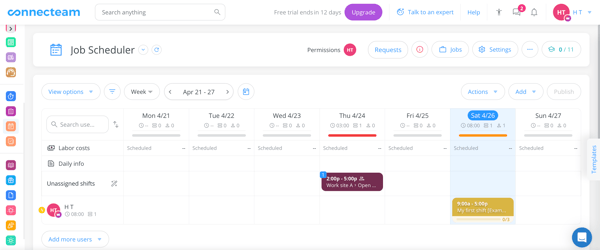
I set up Connecteam as if I were running a small operations-heavy startup with a mix of in-office and field staff. The GPS-enabled time clock is the headline feature, and it delivers: employees clock in from their phone, their location is verified, and the timestamp is clean and defensible. For a startup that needs to manage hourly workers without an HR department, this removes a category of administrative overhead entirely.
The free plan, called the "Small Business plan", covers up to 10 users with access to all the core hubs, which is genuinely useful at the early stage. The ceiling, though, is real: once you cross 10 people, the pricing moves to $29/month for the first 30 users, which is a reasonable cost but a meaningful step change for a very lean startup.
The free plan is legitimate for a startup of under 10 people. The upgrade trigger is headcount: once you cross that threshold, the Basic plan starts at $29/month for the first 30 users. If your team is growing fast and you are already using Connecteam as your operational hub, that cost is easy to justify. If you are primarily using it for time tracking only, it is worth comparing against simpler tools at that point.
"I like that Connecteam makes it easy to deploy timekeeping across individuals in a company, ensuring accountability to management. The ability for users to request edits to timesheets and have individual messaging regarding timesheets keeps things organized and professional. The integration with ADP payroll is useful, and I found the initial setup easy."
- Connecteam review, Alex L.
Best for: Startups with hourly workers, field teams, or operations-heavy roles that need GPS clock-in, scheduling, and communication without multiple separate tools.
Not ideal for: Software or knowledge-work startups where time tracking is project-based rather than shift-based, or teams already above 10 people on a tight budget.
"While there is a free option, after 10 staff join, the cost is very high for small organizations with limited budgets."
- Connecteam review, Danielle P.
Hubstaff is the tool remote startups reach for when time tracking needs to double as a lightweight accountability layer. It goes beyond logging hours: it captures activity levels, takes optional screenshots, and gives managers visibility into how distributed team members are spending their day.
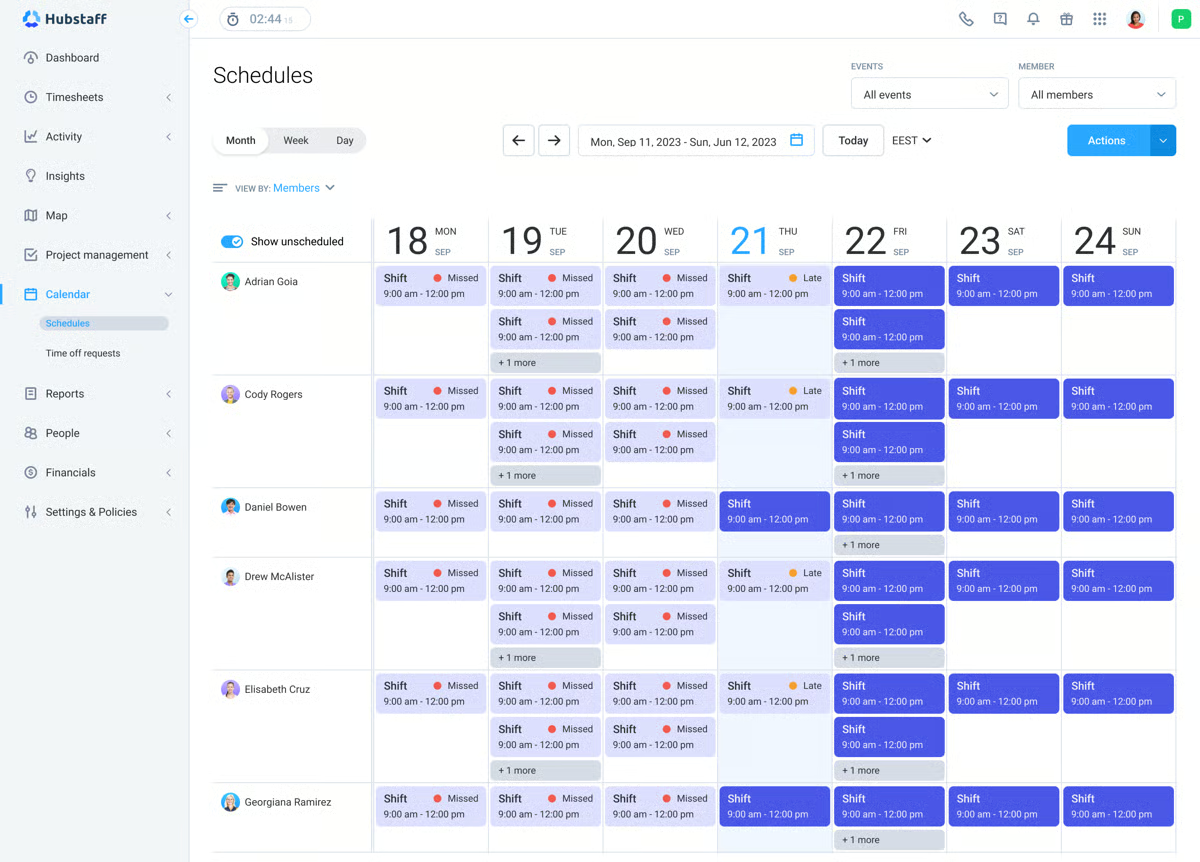
I tested Hubstaff across two weeks, specifically as a remote-first startup tool. The 14-day trial gives you access to the full platform, and the setup is fast enough to have your team tracking within the same day. The time tracking itself is accurate and runs quietly in the background, which is the baseline expectation. What makes Hubstaff distinct is the reporting layer: you can segment time by project, see activity levels across the team, and pull reports that are detailed enough for client billing or payroll without extra work.
The tension in Hubstaff is the same tension that comes with any activity monitoring tool. Screenshots and activity percentages are genuinely useful for managing a distributed team, but they can create friction if not introduced carefully to new hires. How you communicate the tool matters as much as the tool itself.
Hubstaff is built around its paid tiers, so the practical entry point for a startup is the Starter plan at $4.99/seat/month with a 2-seat minimum, billed annually. The upgrade trigger is simply having a team you want to track. Features like timesheet approvals, idle timeout, and automatic tracking policies sit on the Grow and Team tiers, and payroll integrations come further up.
"What I like most about Hubstaff is its simple and transparent time tracking. It runs quietly in the background, so I don't have to think about it once I start work. The activity tracking and screenshots help keep everyone aligned without constant follow-ups, and the reports make it easy to understand where time is actually being spent."
- Hubstaff review, Ravin L.
Best for: Remote-first startups that need time tracking combined with lightweight activity visibility, especially those paying contractors or managing distributed teams across time zones.
Not ideal for: In-office teams where activity monitoring feels unnecessary, or startups with tight budgets where the per-user cost adds up quickly at scale.
"Hubstaff monitoring features like screenshot capture can feel invasive to some employees. Its per-user pricing is manageable for a small team, but can be expensive as the team grows."
- Hubstaff review, Priya S.
Need to track attendance alongside hours? best time and attendance software. Explore tools built around clock-ins, shifts, and workforce management.
monday AI Work Platform is not a time tracking tool first. It is a project management platform with time tracking built in, and that distinction matters when you are deciding whether it belongs on your startup's stack.
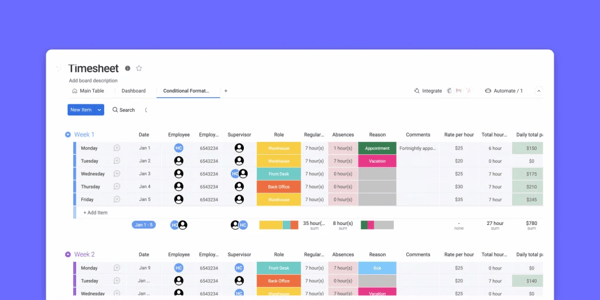
I tested monday specifically from the angle of a startup where time tracking is inseparable from project work: sprints, client deliverables, and cross-functional tasks that need to be tracked together rather than in a separate app. The boards are intuitive enough that a non-technical team member can build a workflow in an afternoon, and the automation layer saves real time once you have your processes set up.
The catch for startups is the free plan. The free tier gives you 2 seats and 3 boards, which is genuinely limited, and critically, time tracking is not available on the free plan at all. It sits on the Pro plan at $19/seat/month, though you can see it during the 14-day Pro trial. That means monday's time tracking is a paid feature, so it belongs on this list as a trial-based option rather than a free forever solution.
If time tracking is the reason you are considering monday, the relevant paid tier is Pro at $19/seat/month, and the 14-day Pro trial lets you test the time tracking widget before committing. For a startup already paying for monday to manage projects, adding time tracking at the Pro tier is an easy decision. For a startup that only needs time tracking, the cost per seat is higher than every other tool in this comparison.
"What I like best about monday AI Work Platform is how intuitive and flexible it is. The platform makes it easy to visualize tasks, track progress, and collaborate with the team in real time. I especially appreciate the customizable workflows and dashboards, because they allow me to adapt the system to different projects without losing clarity."
- monday AI Work Platform review, Jogi O.
Best for: Startups where time tracking is one layer inside a broader project management workflow, and where the team is already paying for or considering monday for project visibility.
Not ideal for: Startups that only need time tracking without the project management overhead, or early-stage teams with tight budgets where the Pro plan cost per seat is hard to justify.
"Pricing and limits on seats for the lower-priced models."
- monday AI Work Platform review, Lisa W.
QuickBooks Time makes the most sense when the rest of your financial stack is already in the QuickBooks ecosystem. Standalone, it is a capable time tracking and scheduling tool. Connected to QuickBooks Online or QuickBooks Payroll, it eliminates a category of double-entry work that eats up real hours in early-stage operations.
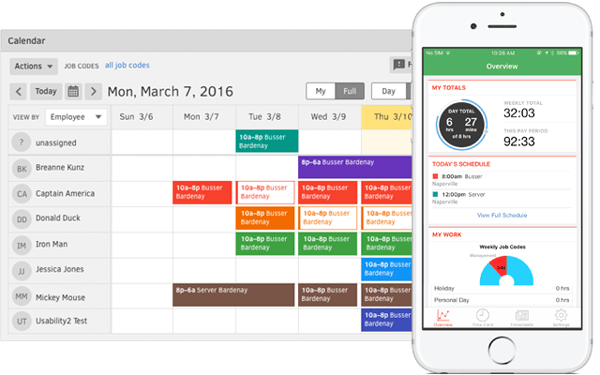 I tested QuickBooks Time as a startup that is already using QuickBooks for invoicing and payroll. The setup is fast, the interface is clean, and the mobile app handles the basics well. The GPS tracking and geofencing features are more capable than I expected at this price point, which makes it genuinely useful for startups that have field workers or hourly employees clocking in from multiple locations.
Where QuickBooks Time is harder to justify is as a standalone tool. The base fee plus per-user cost adds up faster than most alternatives in this comparison, and without the QuickBooks integration benefit, there are cheaper and simpler options for a startup that just needs to track hours.
The 30-day trial is the most generous window in this comparison and gives you real time to test the QuickBooks integration with live payroll or invoicing. After the trial, the Time Premium plan starts at $20/month base plus $8/user/month. The upgrade is clearest if you are running payroll through QuickBooks and want hours to sync automatically. Without that integration benefit, the cost is harder to justify against simpler alternatives.
"What stands out most about QuickBooks Time is how seamlessly it connects time tracking with payroll and accounting, eliminating duplicate work and reducing errors. It offers accurate, real-time tracking with GPS support, a strong mobile app for teams on the go, and useful reporting for labor costs and productivity."
- QuickBooks Time review, Merlyn M.
Best for: Startups already using QuickBooks for accounting or payroll, particularly those with field workers, hourly employees, or project-based billing that needs to flow into invoicing.
Not ideal for: Startups not in the QuickBooks ecosystem, or lean early-stage teams where the base fee plus per-user cost is harder to absorb than simpler alternatives.
"I dislike that, when I'm building the schedule, I have to select each employee individually instead of being able to add a group. I also dislike that contractors now automatically sync as users to Time when you track 1099 payments in QuickBooks."
- QuickBooks Time review, Emma B.
Connecting time tracking to payroll? best payroll software. Explore tools to pair tracked hours with pay runs, tax filing, and direct deposit.
Toggl Track does one thing exceptionally well: it makes tracking time as frictionless as possible. No mandatory project assignment before you start, no complex setup, no learning curve worth mentioning. You open it, hit start, and it runs.
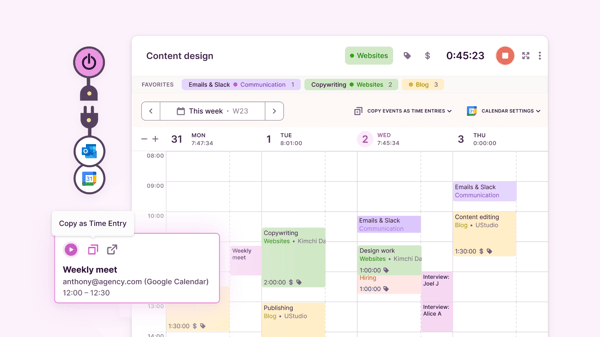
I tested Toggl Track as a solo founder and as a small team. In both contexts, the speed of entry is the defining feature. The browser extension lets you start a timer from wherever you are working without switching tabs; the desktop app is lightweight, and the mobile and desktop versions stay in sync reliably. For a startup where time tracking is a discipline problem rather than a tooling problem, Toggl removes the friction that causes people to stop doing it.
The reporting layer is better than the minimal interface suggests. The weekly and project summaries give you a clear picture of where time is going, which is exactly what a founder needs during an investor prep cycle or a billable-hours review. Where Toggl starts to feel limited is when your workflows become complex enough to need invoicing, billable rates, or integrations with project management tools.
The free plan covers what a solo founder or a small team needs for basic time tracking. The upgrade trigger is usually one of three things: you need billable rates and accurate billing, project time estimates and alerts, or revenue and profitability reporting. The Starter plan at $9/user/month with a 30-day trial unlocks those. The free plan is one of the most honest in this comparison: it does not expire, and it does not feel like a demo.
"It makes time tracking simple and easy without feeling intrusive. It's quick to use and very straightforward. The interface is the part I like most compared to other tools: it's clean, and you can start tracking in seconds. The reports are strong as well, giving you a clear, visual view of where your time is going."
- Toggl Track review, Mariana V.
Best for: Solo founders, co-founder teams, and small startups that want fast, low-friction time tracking with solid reporting and no cost at the early stage.
Not ideal for: Teams that need built-in invoicing or billing, or those requiring deep integrations with project management tools on the free plan.
"One thing I don't like is that sometimes the timer doesn't start or stop when I expect it to, especially if I switch between devices. The syncing can feel a bit slow. Also, organizing multiple projects or editing past entries takes a few extra clicks, which gets irritating when you're in a rush."
- Toggl Track review, Pratyush A.
Wrike is built for teams where time tracking is one dimension of a broader project and resource management problem. If your startup has multiple workstreams running in parallel, a mix of internal and external collaborators, and a need to report on project progress alongside hours logged, Wrike brings those things together in a way that standalone time trackers cannot.
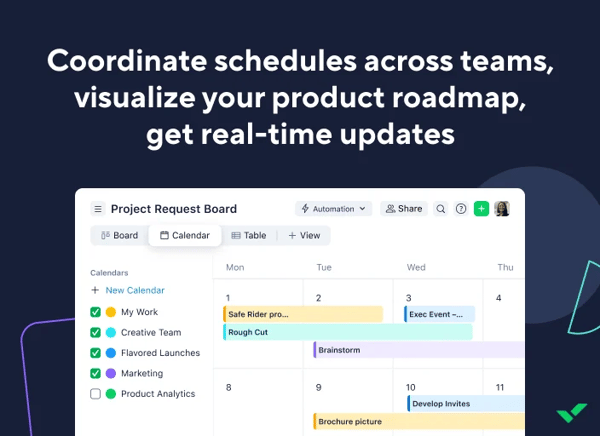
I tested Wrike from the angle of a startup that wants time tracking to live inside the project context rather than in a separate app. The important thing to understand upfront is where time tracking sits: it is not on the free plan or the entry Team plan. Time tracking and timesheets start on the Business plan, which you can test through Wrike's 14-day free trial. The free plan is still useful for task and project management, with board and table views and active task limits, but the hours-logging layer is a paid feature.
The trade-off is setup time. Wrike rewards teams that invest in configuration: custom workflows, request forms, and dashboards all require deliberate setup before they pay off. For a startup in the first 60 to 90 days, that investment may compete with other priorities.
For time tracking specifically, the relevant tier is Business at $25/user/month, and the 14-day trial lets you test it before committing. If you only need task and project management, the free plan or the $10 Team plan may be enough. But the moment you need to log hours against tasks, pull timesheets, or report on resource allocation, Business is the entry point. For a startup that needs time tracking as a core function rather than an occasional one, this makes Wrike one of the more expensive options in this comparison.
"I like that Wrike is very clear and easy to use. Time tracking is simple and straightforward, and reporting is great, allowing us to pull time reports at the end of the month and bill our clients easily. The capacity and workload management feature is important as it helps us during our weekly stand-ups to see what's on everyone's plate."
- Wrike review, Cara M.
Best for: Startups with multiple simultaneous workstreams that want time tracking to live inside the project context on a paid plan, particularly those billing clients by project or reporting on resource allocation.
Not ideal for: Solo founders or very small teams that only need a simple timer, or startups wanting free-plan time tracking, since on Wrike, that sits on the Business tier.
"The platform has a lot of functionality, which can make the initial setup and onboarding feel a bit overwhelming. Some advanced features require time to configure properly, and the interface can occasionally feel busy when managing large projects."
- Wrike review, Maria S.
Free time tracking tools are the right starting point for most startups, full stop. Here is who gets the most out of them, and where the free tier starts to run out:
While doing this exercise and evaluating different G2 users, I found that three triggers recur across all seven tools.
If you're worried about the upgrade costs, I have some good news for you. I found that many tools have reasonable costs for to what they unlock. Hubstaff starts at $4.99/seat/month and Toggl Track at $9/user/month, while tools where time tracking sits on a higher tier, like Wrike at $25/user/month for Business, cost more but bundle full project management with it. For a startup that is generating revenue or billing clients, the cost of the tool pays for itself the first time it prevents a missed invoice or a disputed timesheet.
Comparing options across the full category? Check out our best time tracking software for a broader look across free and paid tools.
We've got the answers to all your questions on the free time tracking tools!
Among small business reviewers on G2, ClickUp and monday AI Work Platform draw consistent praise from project managers who want time tracking inside the same workspace they run projects in. Wrike is also well regarded by reviewers managing multiple client workstreams, though its time tracking sits on the Business tier. For a startup PM, the most trusted option usually comes down to whether you want time tracking bundled with project management or as a standalone layer.
For startups doing client or professional services work, reliability tends to mean accurate billable capture and clean reporting. Toggl Track is frequently cited by Small Business reviewers for dependable, low-effort tracking that holds up across projects and clients. Wrike and ClickUp suit startups that want those hours tied directly to project deliverables, with the billing and reporting depth arriving on their paid tiers.
Startups focused on profitability usually need to see where hours actually go before they can protect margins. ClickUp and Wrike both connect logged time to project dashboards on their paid tiers, giving founders visibility into which projects are consuming the most hours. Toggl Track offers a lighter version of this on its free plan through project and client summaries, which is often enough at the earliest stage.
For startups billing clients by the hour, the key is accurate capture that flows into an invoice without manual cleanup. Toggl Track handles this cleanly on its paid Starter plan with billable rates, while QuickBooks Time is the natural fit if you are already invoicing through QuickBooks. Wrike and ClickUp work well for startups that want billable hours captured inside the project they belong to, on their respective paid tiers.
The tools that get used without reminders are the ones with the least friction to start a timer. Toggl Track is repeatedly singled out by Small Business reviewers for a one-click timer that becomes a habit rather than a chore. ClickUp works well when time tracking lives inside the tasks people are already working in, which removes the need to switch tools and, in turn, the need for follow-up nudges.
Low-friction tracking comes from automation and tight integration rather than manual entry. Toggl Track's browser extension and idle detection cut down on manual logging while keeping entries accurate, and Hubstaff runs in the background with activity tracking for teams that want hours captured automatically. For startups that already manage work in ClickUp or monday, tracking time on the task itself removes a separate data entry step entirely.
The least disruptive option is usually time tracking that is already built into the project tool a startup uses. ClickUp and monday AI Work Platform both fold time tracking into their own platforms, so there is nothing to integrate. For startups that prefer a dedicated tracker, Toggl Track integrates with 100+ tools through its browser extension, and Wrike keeps time tracking native to its project workspace on the Business tier.
The startups that struggle most with time tracking are the ones that wait until there is a problem: a disputed invoice, a missed deadline, or an investor asking where the engineering hours went last quarter. The tools on this list are free enough to build the habit before any of that happens.
Toggl Track is the right starting point for most early-stage teams: free for up to 5 users, fast to set up, and honest about what the paid plan adds. If you are managing a remote team with accountability needs, Hubstaff is the step up. If your work is project-heavy and time is one layer inside a broader workflow, Wrike or monday are worth the configuration investment.
Pick one, run your real work on it for two weeks, and you will know more about your team's time than any estimate could tell you.
Looking to go deeper on startup tooling? See how the right project management software keeps your team moving between the timesheets.


On a busy Tuesday morning, the office printer jammed, causing a backlog of tasks and...
.png) by Devyani Mehta
by Devyani Mehta
At a quick glance, the best free SEO tools for small businesses that I found are Semrush, SE...
by Shashank D Shastry

The scheduling software market is crowded, and most tools claim to do the same things.
 by Sagar Joshi