


This guide was last updated on May 23, 2026. A newer report has since been published. The tools below reflect the scores from G2's Summer 2026 Grid® Report.
Based on verified G2 reviews and the latest Grid® placement.
*Liked and disliked are summarized from verified G2 user reviews for each product.
The tools below have also been exhaustively tested and evaluated, and continue to hold their place among the best Data Labeling on G2.
If you’ve ever spent hours cleaning datasets, fixing inconsistent annotations, or retraining models because your labels were off, you already know this: data labeling is where AI projects either take off or quietly fail.
I talk to data scientists, ML engineers, and AI product teams all the time, and the frustration is consistent: labeling is slow, expensive, and painfully manual when it shouldn’t be.
The bottleneck isn’t the model architecture anymore; it’s the ground truth. When I talk to ML teams, the question isn’t whether they need a platform, but which of the best data labeling tools can actually handle 10k+ annotations an hour without turning the QA process into a second full-time job.
In this guide, I’ll break down the tools that actually help you label faster, maintain consistency, and plug directly into your ML pipelines, without turning your data ops into a bottleneck.
My top picks for the best data labeling tools: Roboflow, SuperAnnotate, Labelbox, Encord, Keymakr, V7 Darwin, Dataloop, and Clarifai.
*These data labeling tools are top-rated in their category based on the G2 Spring Grid® Report 2026and have at least 40 verified G2 reviews, ensuring the data reflects consistent, real-world usage.
When I think about data labeling tools, I see them as the foundation of any AI workflow. They help teams annotate and structure raw data, like text, images, video, and audio, so machine learning models can actually learn from it. What I’ve noticed over time is that they’re no longer just annotation interfaces. The better tools now handle data management, quality control, and workflow orchestration, making them a core part of the AI and MLOps lifecycle.
The best data labeling tools go far beyond basic annotation. They help you label faster, maintain consistency, and scale workflows across large, messy datasets. Data teams usually look for features like AI-assisted labeling (pre-labeling, active learning), strong collaboration and review workflows, and support for multiple data types—all paired with seamless integrations into ML pipelines through APIs and cloud infrastructure.
Where I see the biggest difference, though, is in how well these tools handle data quality and human-in-the-loop workflows. Based on G2 Data, 9 out of 10 users say data labeling software meets their requirements, with an average satisfaction rate of 91% across labeler quality, task quality, data quality, and human-in-the-loop processes. That aligns with what I hear from teams: the best tools don’t just help you annotate; they help you operationalize high-quality data at scale without slowing everything down.
I started with G2’s category Grid report to build a shortlist of the best data labeling tools based on G2 Score, user satisfaction, and market presence. I also factored in review recency and review volume to prioritize tools with consistent, up-to-date user feedback. This helped me focus on platforms that are rated highly by real users.
Next, I analyzed G2 reviews at scale to understand what actually matters to data scientists, ML engineers, and AI teams: how well each tool handles annotation quality, where workflows break down at scale, and which platforms genuinely help teams manage labeling across different data types.
I paid close attention to feedback around usability, collaboration, automation (like AI-assisted labeling), integrations with ML pipelines, and how effectively each tool supports human-in-the-loop workflows without slowing teams down.
Since I couldn’t test these tools hands-on, I relied on insights from professionals using them daily and validated those findings against verified G2 reviews.
The screenshots in this article come from G2 vendor profiles and publicly available product documentation.
I’ve seen too many AI projects stall because the 'perfect' tool turned into a manual data entry nightmare. To save you the headache, I vetted the best data labeling tools against a strict set of survival criteria, the stuff that actually matters when you're moving from a proof-of-concept to a million-row dataset.
I compared 20+ tools to find the eight best data labeling platforms here. The reality is that no single tool hits a perfect 10/10 on every one of these metrics. Some excel at specialized imaging, while others are built for raw speed in NLP. I’ve highlighted those 'sweet spots' below so you can choose based on your actual bottleneck, not just a feature list.
This list features platforms from G2’s Data Labeling Software category. To be included in this category, a product must meet the following criteria:
*This data was pulled from G2 in 2026. Some reviews may have been edited for clarity.
G2 rating: 4.8/5 ⭐
If you’re working with images or video and trying to train models for object detection, segmentation, or classification, Roboflow is the kind of tool that sits right in the middle of your workflow. Based on my research, it's more than just a data labeling software. It's a full-stack platform built specifically for computer vision teams.
Roboflow brings labeling, dataset management, and iteration into one place, which is a big part of why it’s considered one of the best data labeling tools right now.
What stands out to me immediately is how much emphasis Roboflow places on speed without compromising quality. Features like Auto Label and Label Assist use foundation and custom models to dramatically reduce manual work, and in practice can significantly cut labeling time, especially for large image datasets. The Smart Polygon tool, powered by advanced segmentation models, makes annotating complex shapes significantly faster and more precise, especially when you’re working with detailed or irregular objects.
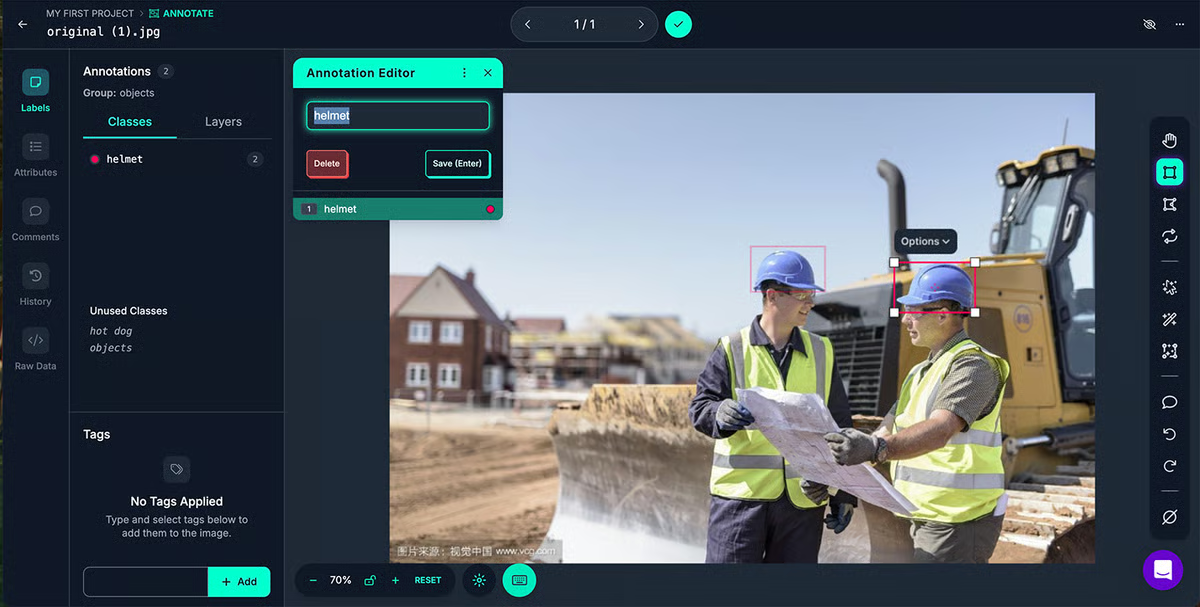
This focus on usability translates well: G2 satisfaction rating for ease of use and ease of setup both sit at 94%, which aligns with the idea that teams can get up and running quickly without a steep learning curve. That’s not always a given in this category.
Where I see Roboflow consistently delivers is dataset quality and human-in-the-loop workflows. Users rate features like human-in-the-loop, image segmentation, and object detection highly (around 92–93%), which makes sense given how tightly integrated the review and feedback cycles are.
You can manage the entire annotation lifecycle, from assigning tasks to reviewing and approving labels, within the same interface. What stood out to me here is how well Roboflow supports team-based workflows. You can divide work across annotators, track progress in real time, and keep everyone aligned without needing external tools.
Add in dataset search, analytics, and augmentation (like generating multiple variations of images), and it starts to feel less like a labeling tool and more like a system for continuously improving your training data.
It’s also worth noting that the platform is widely used in industries like computer software, research, and manufacturing, which reflects its fit for both experimental and production-grade use cases.
That said, based on user feedback, there are a couple of areas where teams might need to evaluate fit more closely. Pricing is one of themes I saw on some G2 reviews. Roboflow can get expensive for teams working with large datasets or requiring higher levels of automation and collaboration. Teams prioritizing speed, quality, and an all-in-one workflow find the investment justified.
I also noticed that while Roboflow is extremely strong for core computer vision workflows, some teams look for more advanced or specialized capabilities when working on highly complex labeling or custom pipelines. Still, for most computer vision teams, its focused feature set is more than enough to move quickly from raw data to production-ready models.
On the whole, I’d recommend Roboflow for teams that want to move quickly from raw image data to production-ready models without juggling multiple tools along the way.
"Roboflow provides an end-to-end pipeline for computer vision research, from dataset annotation and versioning to augmentation and model export. The interface is intuitive, and the dataset management features (splits, class balance visualization, augmentation control, and format conversion) significantly reduce experimental overhead. For academic research, the ability to quickly iterate on datasets, reproduce experiments, and export to multiple frameworks (YOLO, COCO, TensorFlow, ONNX, etc.) is extremely valuable."
- Roboflow review, Abdul Rahman S.
"Some advanced features are locked behind higher pricing tiers, and large datasets can become expensive. For highly custom pipelines, there can be some limitations compared to fully self-hosted solutions."
- Roboflow review, Adip D.
If you're focused on the full data science and ML workflow, the DSML platforms may be worth a look.
G2 rating: 4.9/5 ⭐
SuperAnnotate stands out to me as one of the more enterprise-ready platforms for building high-quality datasets across image, video, audio, NLP, and multimodal models. It feels built for teams that care less about quick labeling wins and more about getting consistent, production-grade data at scale.
One of the key strengths, according to me, is how polished and mature the platform feels, especially when it comes to usability. G2 Data backs this up strongly, with ease of use and ease of setup both sitting around 96–97%, which is unusually high for a tool this feature-rich. In practice, that means teams can onboard quickly without getting bogged down in configuration.
Where SuperAnnotate really differentiates itself, though, is in how seriously it takes data quality. Features like consensus scoring, multi-step review workflows, and performance tracking for annotators are all baked into the platform, which explains why G2 users rate labeler quality, human-in-the-loop workflows, and task quality so highly (around 97–98%). It feels like the platform is designed to reduce ambiguity in labeling decisions, which is something I hear data teams struggle with all the time.
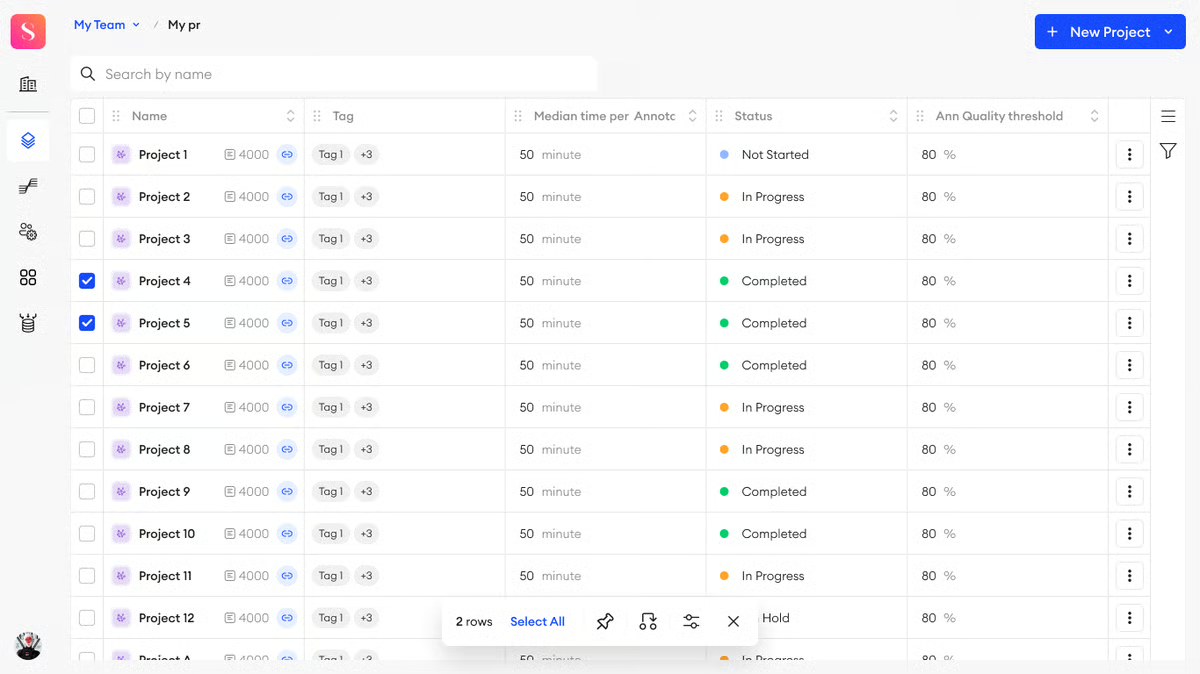
I also like how flexible it is across different data types and use cases. Whether you’re working on image segmentation, video tracking, NLP tasks like entity recognition, or even LLM fine-tuning, the platform supports it all in one place. The annotation tools themselves are highly customizable, and you can plug in your own models for pre-labeling to speed things up. Combined with AI-assisted labeling and automation, this can significantly reduce manual effort while still keeping humans in the loop for quality control.
One more thing worth calling out is how well it supports team-based workflows. You can assign tasks, track annotator performance, manage multiple projects, and even tap into external annotation teams if you need to scale quickly. That level of coordination, along with integrations into cloud storage and ML pipelines, makes it easier to turn labeling into a repeatable, scalable process rather than a one-off task.
At the same time, some users mention that because the platform is so feature-rich, it can take a bit of time to fully understand and make the most of all its advanced capabilities, especially for teams that are newer to structured data labeling workflows. Even so, once teams get familiar with the system, many find that the depth actually becomes a strength rather than a barrier.
The next theme I noticed in G2 feedback is performance at scale. Some users mention that when working with very large datasets or more complex projects, the platform can occasionally feel slower or less responsive. It’s not something that shows up in smaller workflows, but it’s worth considering if you’re handling high-volume annotation operations. For most teams, the overall functionality and depth of the platform still outweigh these occasional slowdowns.
Overall, I’d recommend SuperAnnotate to teams that are looking to move beyond basic labeling and build a scalable, quality-first data operation. If you’re managing multiple annotators, working across different data types, or need tight control over quality and workflows, this is one of the best data labeling tools to consider.
"What I like most about SuperAnnotate is how easy it is to use. The interface feels clean and straightforward, so I can focus on the actual annotation instead of figuring out tools. I also like that it makes organizing tasks and reviewing work simple, which helps me stay efficient and accurate. Overall, it makes annotation work smoother, less stressful, and more productive compared to many other platforms."
- SuperAnnotate review, Miriam O.
"There isn't much to dislike, but if I had to point out something, it would be the initial learning curve. Because there are so many advanced features, it takes a little bit of time to get fully comfortable with the workspace. Also, the browser can occasionally lag slightly if you are working with a massive batch of ultra-high-resolution images, but it's rarely a major issue."
- SuperAnnotate review, Mohammed Z
G2 rating: 4.5/5 ⭐
Labelbox sits at an interesting intersection: it's less a traditional labeling tool and more of a platform where annotation, model-assisted labeling, and data management come together in one place. Based on what I've seen in G2 reviews, it's particularly well-suited for teams building LLM training pipelines and supervised ML workflows.
What stands out most from user feedback is how clean and navigable the interface is. Reviews consistently call out the dashboard, keyboard shortcuts, and annotation workspace as genuinely easy to work with, even for newer annotators joining a project mid-stream. Features like model-assisted labeling and auto-annotation are a recurring highlight, with users noting how much time they save on repetitive tagging, particularly for large image and text datasets.
The Python SDK and GraphQL API support also come up frequently in reviews from ML engineers. The ability to plug Labelbox directly into training pipelines, uploading assets, triggering labeling tasks, and pulling annotations back out programmatically, is clearly a draw for more technical teams that don't want their data pipeline to stop at the annotation interface.

Where Labelbox has moved ahead of most tools in this category is in its GenAI and LLM evaluation capabilities. Beyond standard annotation, the platform now supports multimodal chat evaluations, side-by-side model comparisons, and LLM-as-a-judge workflows — which means teams can use the same platform to both create training data and evaluate model outputs. For teams working on RLHF, fine-tuning, or prompt optimization, that kind of end-to-end setup removes a significant handoff between tooling.
On G2, Labelbox scores above category average on data quality, labeler quality, and named entity recognition — all sitting at 91–92% against a category average of 91% — which lines up with what users describe in reviews: consistent output and reliable annotation across text-heavy workflows.
What I also like is how well Labelbox handles team coordination. You can assign tasks, track annotator progress, and monitor time spent per label from the dashboard, which removes the need for a separate project management layer.
The platform also supports active learning workflows, where model predictions feed back into the labeling queue to prioritize the most uncertain samples. In practice, that means teams get more signal out of each labeling cycle rather than annotating randomly.
There are some nuances to consider based on G2 feedback I saw. While Labelbox is built for large datasets, that scale can occasionally come at a cost. Some users mention the platform slows down when processing very large datasets, which is more noticeable in high-volume workflows than smaller projects. For most teams, the time saved through automation and model-assisted labeling still outweighs the occasional lag.
Also getting fully comfortable with Labelbox's built-in tools takes some ramp-up time, especially for annotators who are newer to structured labeling platforms. Once past the initial curve though, the depth of the toolset is exactly what makes it effective for complex, production-grade workflows.
If you're building LLM training pipelines or running active learning workflows at scale, Labelbox is worth a serious look in my opinion. It's the kind of platform that earns its place when annotation needs to connect tightly to model training, not just sit upstream of it.
"I like how Labelbox helps it's users by giving them a simple and better label data within short time. It contains a vast variety of tools that are simple and saves a lot of time while working as a team. t's organised data helps in making a better prompt while working with AI models."
- Labelbox review, Siva Kamal P.
"If you are working on a large data sets, you might feel it a bit slower as it takes time to process. And it's not a beginner user friendly, it requires bit experience to explore and work with inbuilt tools."
- Labelbox review, Ramu K
G2 rating: 4.8/5 ⭐
If you’re working with video, audio, text, any multimodal data, or even medical imaging, Encord feels like a step up from traditional labeling tools. It’s designed to manage the entire AI data lifecycle, not just annotation, but also curation, automation, and evaluation.
One thing I keep coming back to with Encord is how deeply it’s built around multimodal and AI-assisted workflows. You can work across text, video, audio, LiDAR, and even medical imaging in one environment. That’s a big advantage for teams building more advanced models. The ability to plug in foundation models like GPT, Gemini, or your own models into the labeling pipeline also changes how quickly you can move. Instead of starting from scratch, you’re layering automation on top of human review, which is where most data teams are heading.
From a usability standpoint, the G2 Data shows a strong balance between capability and accessibility. Ease of use and ease of setup both land in the low-to-mid 90s (around 93–94%), which suggests teams aren’t hitting major friction when getting started, even with the platform’s depth.
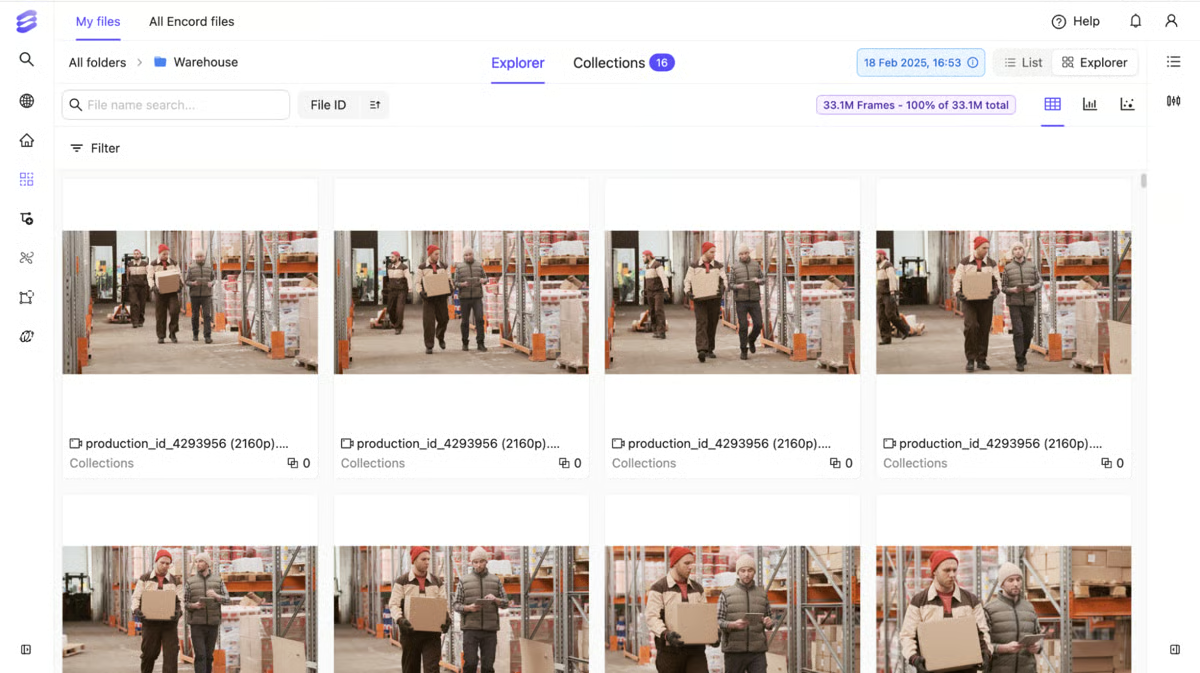
I also noticed strong scores for ease of admin, ease of doing business, and quality of support, which usually indicates that the platform works well not just technically, but also from an onboarding and ongoing support perspective. That’s especially important for teams managing larger annotation operations.
Where Encord starts to pull ahead is in how it approaches data quality and workflow customization. Features like human-in-the-loop workflows, image segmentation, and object detection are rated highly (around 92–93%), and that reflects how configurable the system is. You can build multi-stage review pipelines, define detailed ontologies, and track annotator performance in real time. Rather than forcing you into a fixed workflow, it gives you the flexibility to shape processes around your use case. With built-in analytics and dataset insights layered in, teams get much better visibility into how labeling quality evolves over time.
It’s also worth noting how broadly Encord is used across industries like computer software, research, higher education, and manufacturing. That tells me it’s flexible enough to support both experimental AI work and more operational, production-grade use cases.
In more recent G2 feedback, one theme that comes up is the pace of feature updates. Encord ships improvements frequently, which can require teams to stay more closely aligned with evolving workflows. That said, users consistently highlight the customer success team for helping them stay aligned and get the most out of new features.
I also came across feedback around video analysis capabilities. While frame-by-frame annotation is strong, there’s interest in more advanced functionality for analyzing full video clips. Even so, this hasn’t limited teams’ ability to work effectively on the platform, and it’s an area the Encord team appears to be actively improving.
All things considered, if you’re working with multimodal data or anything more complex than straightforward annotation, Encord is worth a closer look. It’s the kind of platform that starts to make sense once your workflows get messy and you need more control over how everything is labeled and reviewed. From what I’ve seen, it really clicks for teams dealing with large, complex datasets where structure, flexibility, and automation all need to work together.
"We build a lot of infrastructure in-house, but made a strategic decision to use best-in-class tools that Encord offers for training data curation and annotation. The S3 integration works really well - we connected our AWS pipeline and now data just flows where it needs to go. Our team can pull up everything in Encord to review and annotate without any problems. The interface is intuitive and AI features like SAM integration save us a lot of time. The whole workflow from ingestion to export is smooth, which matters when you move fast. When we do hit issues, their support team is quick to respond through Slack."
- Encord review, Brian E.
"It would be helpful to have more functionality for analyzing video clips, in addition to the existing tools for frame-by-frame analysis. That said, this has not hindered our ability to work on the platform and is already on the Encord team's radar."
- Encord review, Angela S.
G2 rating: 4.8/5 ⭐
Keymakr occupies a different position in this list compared to the other tools in this list. Rather than leading with a self-serve platform, it operates as a managed annotation service backed by its own proprietary tooling — an in-house team of skilled annotators paired with a four-level QA system that combines human oversight with automation. For teams that don't want to manage an annotation workforce in-house, that setup removes a significant operational burden.
The annotation work is supported by Keylabs, Keymakr's proprietary platform, which was originally built for internal use, meaning usability and quality were the primary design constraints rather than feature breadth. That origin shows up in how I see reviewers describe working with it: straightforward to get started on, with tools that feel built for annotators rather than platform architects.
What stands out most consistently across G2 reviews is the quality of communication and the partnership-oriented approach. Reviewers across small businesses, mid-market, and enterprise segments describe a team that checks in proactively, asks clarifying questions before starting batches, and course-corrects quickly based on feedback.

Several users specifically mention the pilot study model, where Keymakr runs a small sample before committing to the full project, as something that builds confidence early and catches misalignment before it compounds.
The Keylabs platform supports simultaneous work across 50+ annotators without loss of productivity, which matters when projects need to scale quickly. Annotation types span bounding boxes, polygons, semantic segmentation, keypoint annotation, LiDAR point clouds, and frame-by-frame video annotation, covering the full range of computer vision use cases from ADAS and robotics to medical imaging and industrial automation.
Where reviews get more nuanced is around two things. The platform UI comes up occasionally. Some users mention the intiial setup and navigation can take some time to get used to. That said, once teams find their footing, the review interface does what it needs to do without getting in the way of the work.
A few reviewers also note that getting to the right output requires regular feedback sessions, especially in early project stages. That's not a flaw so much as a characteristic of how the service model works and most teams find that the upfront investment in alignment pays off in fewer corrections and more consistent output down the line.
Overall, if your bottleneck is finding reliable annotators rather than building annotation infrastructure, I'd recommend Keymakr. It's one of the few tools in this list where the service is the product — and for teams that need high-quality computer vision annotations delivered rather than a platform to do it themselves, that distinction matters.
"I like the fact that Keymakr integrates seamlessly with our build process and our automated labeling pipeline. It generally fits well with all of our workflows, allowing us to streamline the labeling process efficiently. This integration capability is crucial for maintaining our overall productivity and ensuring that our data labeling tasks proceed smoothly without any interruptions. Keymakr’s compatibility with our existing systems means fewer headaches and a smoother operation overall, which is incredibly valuable for our team."
- Keymakr review, Eric V.
"Some mistakes are repetitive. Additionally, the initial setup took some time to adjust, although it became straightforward after that period."
- Keymakr review, Rinat L.
G2 rating: 4.8/5 ⭐
V7 Darwin is a purpose-built annotation platform for computer vision teams that need precision, speed, and workflow control in one place. Based on G2 reviews I saw, it's particularly well-regarded among teams working on complex segmentation tasks, medical imaging, and video annotation — and it's used broadly across research, healthcare, industrial automation, and software companies.
What comes through most consistently in reviews is how much the annotation interface itself stands out. The Auto-Annotate tool, powered by segment anything model (SAM) and other foundation models, is mentioned repeatedly as a genuine productivity multiplier.
The subtract and merge tools for pixel-perfect polygon labeling also come up frequently in reviews. Combined with keyboard shortcuts that cover almost every action, the interface feels built for annotators who are moving fast through large datasets.
Video annotation is another area where V7 Darwin consistently pulls ahead. The interpolation feature tracks objects across frames automatically, with several reviewers noting it cuts per-task time by close to half. For teams working with multi-camera views or long video sequences, that's a meaningful efficiency gain that compounds across a project.
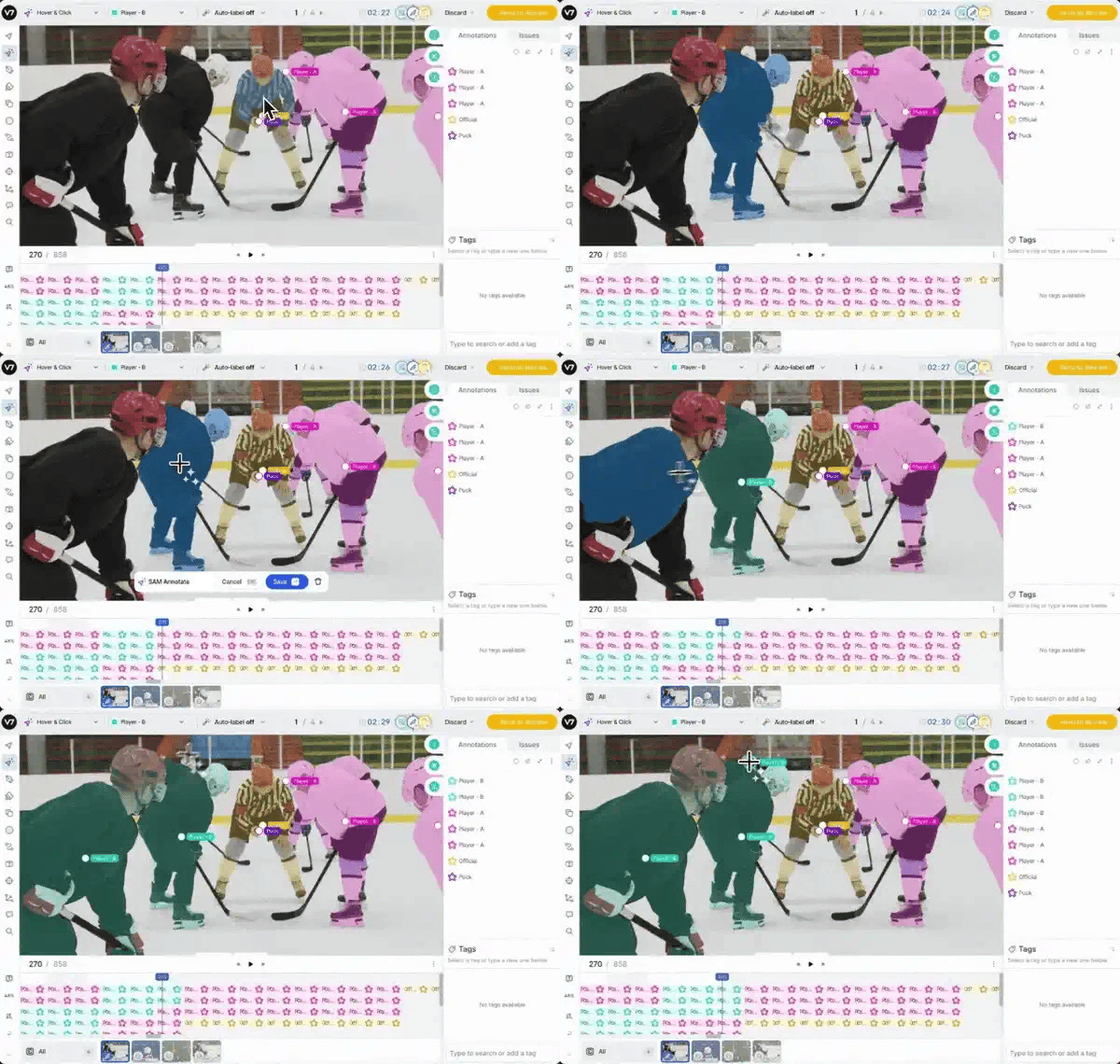
The platform also handles medical imaging well, supporting DICOM, NIfTI, and whole slide image annotation with MPR and 3D rendering, which explains the strong representation of healthcare and research users in the review base. That depth of format support makes it one of the more versatile tools in this list for specialized or domain-specific use cases.
Customer support responsiveness is a recurring highlight I saw, with multiple reviewers describing a team that ships feature requests quickly and stays engaged throughout projects.
Based on G2 reviews, teams working with large volume of datasets might see a occasional platform lag though it's worth noting this is a pattern that shows up across most data labeling platforms at scale, not specific to V7 Darwin. Multiple reviewers also note that it doesn't get in the way of the core annotation experience.
Also, teams with growing projects may find dataset navigation and filtering slightly less intuitive as file volumes increase but most users note that it remains a minor friction point rather than a blocker and many highlight that V7 actively takes feedback on board and works quickly to improve the experience.
If you're building computer vision models and need annotation tooling that keeps up with complex tasks without slowing your team down, V7 Darwin is one of the strongest options in this category in my view. It clicks especially well for teams doing segmentation, video tracking, or medical imaging work where precision and speed both matter.
"Video annotation is very easy and its predictive labeling tool is really easy to use. We are able to annotate massive datasets to train our ML models."
- V7 Darwin review, Jed D.
"While it is robust, it can sometimes feel slightly complex to navigate, especially when dealing with advanced features. Certain modules could be more intuitive and user-friendly, as new users may require extra time to adapt. Additionally, occasional lag in system responsiveness was noticeable during peak usage"
- V7 Darwin review, Shiv S.
G2 rating: 4.4/5 ⭐
Dataloop stands out for how it approaches data management across the AI lifecycle. Rather than focusing only on annotation, it’s built to organize, version, and move data through different stages of development in a structured way.
What I like about Dataloop is how it treats data as something that needs to be continuously managed and improved. It gives you more control over how datasets are structured, updated, and connected to model performance over time, which becomes increasingly important as projects scale.
Another key strength is how flexible Dataloop is when it comes to handling different data types and workflows. G2 Data reflects this pretty clearly, with data types, object detection, and image segmentation all scoring highly (around 93–94%). It’s designed to support a range of use cases, whether you’re working with images, video, or structured data, and that flexibility shows up in how you can configure pipelines.
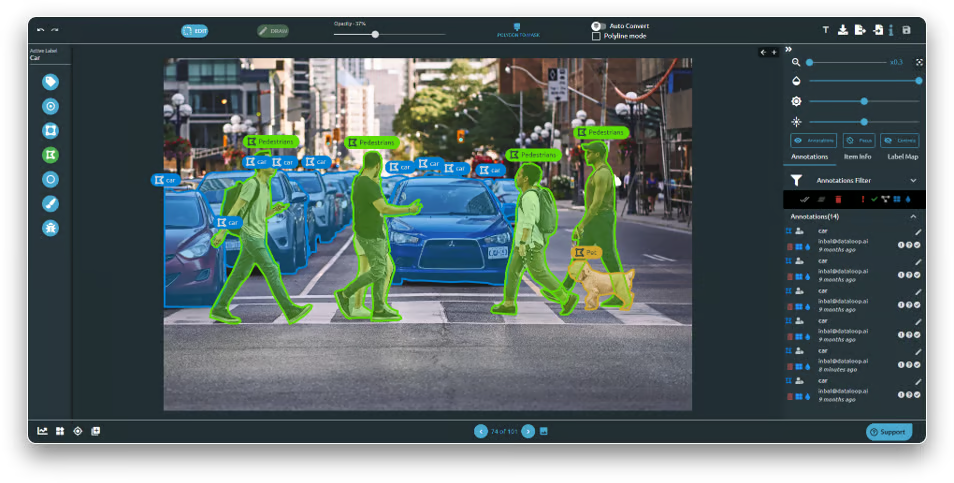
Dataloop is strong in automation too. The platform leans into AI-assisted labeling and pipeline automation, which can help reduce manual effort and speed up iteration cycles. Instead of treating labeling as a standalone task, it integrates it into a broader system where models, data, and workflows continuously interact. For teams working on production AI systems, that kind of setup can make a real difference in how quickly you move from raw data to usable outputs.
Another thing I noticed is how well Dataloop handles dataset versioning and traceability. It makes it easier to track changes over time, which is critical when you're iterating on models and need to maintain data quality.
I also like how tightly Dataloop connects data, models, and pipelines. That integration makes feedback loops faster, so teams can iterate more quickly without constantly switching between tools.
From a usability perspective, the G2 Data shows a fairly balanced picture. Ease of use and setup sit around the high 80s to 90%, which suggests the platform is accessible but still carries some depth. I see that reflected in how Dataloop is designed: it’s not overly simplified, and some users note it take time to learn but on the flip side it gives teams the ability to manage more complex workflows as they grow.
Another nuance that comes up in G2 feedback is performance at scale. Some users mention that when working with very large datasets or more complex pipelines, teams may notice differences in responsiveness depending on workload. This is more noticeable in high-volume scenarios, but for many teams, the platform’s flexibility and data management capabilities still make it a strong fit for scaling AI workflows.
Irrespective of these considerations, if your data is getting harder to manage and your projects are scaling in complexity, I'd point you to Dataloop. It's the kind of platform that gets more useful the bigger your operation gets.
"DataLoop excels at constructing quality data infrastructure for unstructured data, streamlining computer-vision pipelines, and ensuring seamless integration with robust security measures. A reliable ally in modern data management."
- Dataloop review, George M.
"Sometimes tools get stuck and need to be reopened for a smooth experience."
- Dataloop review, Deep A.
G2 rating: 4.3/5 ⭐
If there’s one thing Clarifai tries to do, it’s live up to its name — clarify how you build and scale AI data workflows. Based on my research, it leans less toward being a traditional labeling tool and more toward acting as a broader AI platform where labeling, model development, and data management all come together. It’s especially relevant for teams that want to automate as much of the data pipeline as possible rather than rely heavily on manual annotation.
A big part of that comes down to how deeply it integrates AI into the labeling process. Clarifai pushes hard on automation, with features like auto-labeling, semi-supervised annotation, and one-click model training. The idea is pretty straightforward: instead of spending weeks labeling data manually, you let models handle a significant portion of the workload and then layer human review on top. From a practical standpoint, that can drastically reduce labeling time and cost, especially for teams dealing with large-scale datasets.
It also helps that the platform supports a range of data types like images, video, and text, so you’re not locked into a single modality.In fact, its strongest capabilities are in image and video recognition, object detection, facial recognition, visual search, text and audio processing (NLP, speech). It’s particularly strong when working with unstructured data.
Looking at G2 Data, users highlight strengths in areas like data types, object detection, and image segmentation, all scoring in the 90s. That lines up with how flexible the platform feels when working across different use cases. Ease of use and ease of setup land around the high 80s to 90%. I also noticed strong scores around quality of support, which is important for a tool that sits closer to the infrastructure layer than a simple annotation interface.
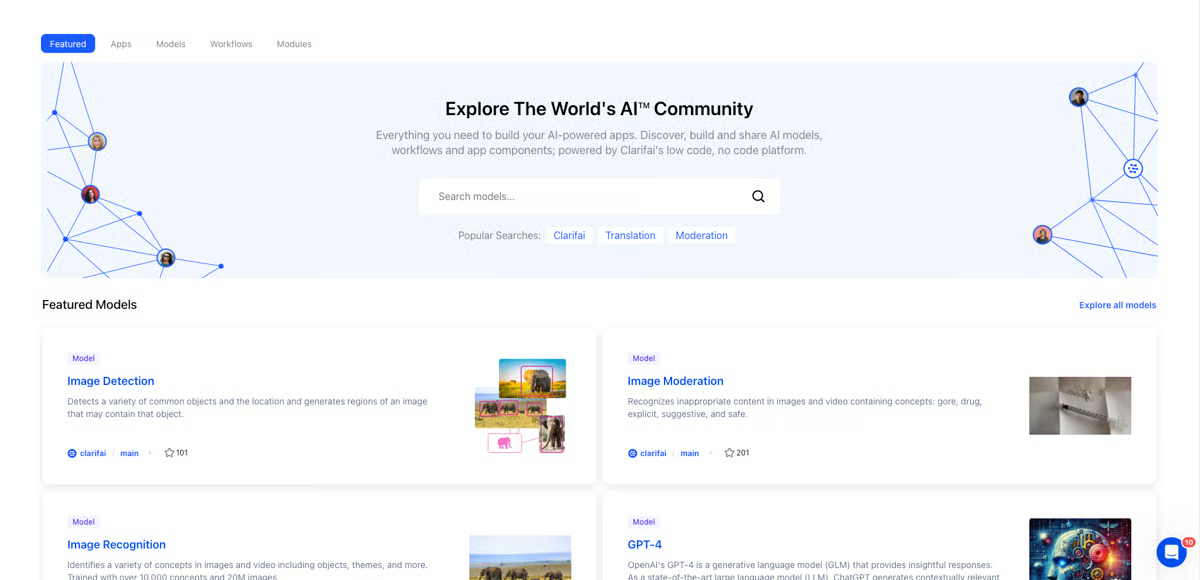
One more aspect I find interesting is how Clarifai approaches data management. Features like vector search, dataset versioning, and embedding-based indexing make it easier to organize and retrieve data as projects grow. Instead of treating datasets as static, it allows teams to continuously refine and explore them, which becomes increasingly important once you’re working with millions of data points. Combined with integrations across frameworks like PyTorch and TensorFlow, it feels well-suited for teams that want to connect labeling directly with model training and deployment.
Some G2 users note that pricing can become a consideration, especially as usage scales across larger datasets or more advanced workflows. For teams leveraging its automation and end-to-end capabilities, the overall value often aligns well with the investment.
I also came across feedback around documentation, particularly for newer users getting started with the platform. While the available resources cover the core functionality, some teams would benefit from more beginner-friendly guidance. but once familiar, many users are able to take full advantage of the platform’s depth and flexibility.
Taking everything into account, Clarifai starts to make a lot of sense if you’re trying to move fast and don’t want to juggle separate tools for labeling, training, and deployment based on what I've seen. It’s especially useful for startups and developer-led teams that want to build and ship AI features quickly, with automation doing a good chunk of the heavy lifting.
"Clarifai offers some of the most pre-built (OOTB) models for many application scenarios, which provide accurate and fast tagging results.
The creation of one's own models to recognize special requirements, on the other hand, is easily possible through an intuitive UI and can be learned by anyone. The models, also combined with workflows, can be very easily integrated and used in our Online Media Net (OMN) application so that computer vision can frequently be used with a high number of images directly from our application. We also have good experience with performance and customer support."
- Clarifai review, Oliver B.
"Despite its strengths, Clarifai does come with some challenges. The pricing structure can be prohibitive for small businesses or individual developers, as it feels more aligned with enterprise-level budgets. Furthermore, while the platform offers extensive features, the documentation can sometimes lack depth, leaving users searching for external resources or support."
- Clarifai review, Verified G2 user.
Other best data labeling software worth looking into:
Got more questions? G2 has the answers!
If you’re a small AI startup watching costs closely, Roboflow, SuperAnnotate, and V7 Darwin are some the best data labeling platform for startups to look at. These platforms tend to appeal to lean teams because they combine annotation workflows with automation features that help reduce manual effort. Roboflow is especially appealing for startups that want dataset management and computer vision workflows in one place, while SuperAnnotate and V7 Darwin can work well for teams that need room to grow without jumping into overly complex enterprise tooling on day one.
Data labeling includes the tools and workflows used to tag raw data so machine learning models can learn from it. That can mean annotating images with bounding boxes, segmenting objects in video, tagging text for NLP tasks, labeling audio, or reviewing model-generated predictions. Most modern data labeling platforms also include automation, quality assurance workflows, collaboration features, and dataset management, so it’s not just about drawing boxes anymore.
If ease of use is your top priority, Labelbox, Dataloop, and SuperAnnotate are good places to start. These tools are generally easier for non-technical teams to navigate because they offer cleaner interfaces, guided workflows, and less setup overhead than more engineering-heavy options. V7 Darwin is also worth considering if you want an annotation experience that feels modern and automation-first without requiring your team to manage a highly technical stack.
For teams that want to keep costs down without giving up automation, Roboflow, Dataloop, and SuperAnnotate stand out. These platforms can help reduce annotation time through AI-assisted labeling, pre-labeling, and workflow automation, which matters if your team is trying to do more with fewer people. The most cost-effective choice usually comes down to how much automation you actually use, since the right platform can lower labeling costs by speeding up repetitive tasks and reducing rework.
For enterprise-scale machine learning pipelines, Encord, SuperAnnotate, and Labelbox are often the strongest fits. These platforms are better suited for high-volume annotation programs because they support large datasets, team-based workflows, governance controls, and more advanced quality management. If your organization is working across multiple data types or large model training cycles, these tools tend to be better positioned to support that complexity than startup-focused platforms.
If quality assurance and workforce coordination are major priorities, SuperAnnotate, Labelbox, and Encord are strong candidates. These platforms are better equipped for structured review pipelines, role-based workflows, and performance oversight, which helps teams maintain label consistency at scale. They’re especially useful when multiple annotators, reviewers, and project owners need to work together without losing control over quality.
For teams building with PyTorch and TensorFlow, Roboflow, Labelbox, and Encord are common choices because they fit well into modern ML workflows. The main reason is not that they replace your framework, but that they make it easier to prepare, manage, and export training data in formats your models can use. If you want smoother handoffs between annotation and model training, these platforms are usually good starting points.
For computer vision, reliability usually comes down to annotation quality, support for complex image and video tasks, and strong review workflows. Encord, Roboflow, and V7 Darwin are all strong contenders here. Roboflow is often attractive for teams focused on end-to-end vision workflows, while Encord and V7 Darwin are well suited for teams that need more advanced annotation depth and tighter quality controls for production-grade datasets.
For autonomous driving use cases, Encord, SuperAnnotate, and Labelbox are among the strongest all-in-one platforms to evaluate. These projects usually demand support for large-scale image and video annotation, complex object tracking, and tightly managed QA workflows. If your team is working with autonomous driving datasets, you’ll usually want a platform that can handle scale, precision, and collaboration rather than a lightweight point solution.
For NLP projects, Labelbox, Dataloop, Taskmonk, and Clarifai are worth considering. High-quality NLP labeling depends a lot on workflow design, reviewer oversight, and consistency across annotators, so the best tools are the ones that make those controls easier to manage. If your use case involves text classification, entity extraction, or more nuanced language tasks, these platforms can be strong options depending on how much human review and process control your team needs.
After looking at all these tools side by side, one thing became pretty clear to me: data labeling is no longer just about annotation nowadays. It’s about how well you manage, scale, and trust your data over time. The best tools are competing on how well they help you build systems around your data, whether that’s automation, quality control, or integrating directly into your ML workflows.
What also stood out to me is that there’s no single “best” tool for everyone. Some platforms are built for speed and computer vision workflows, others for enterprise-grade quality control, and some for managing complex, multimodal datasets. The right choice really comes down to where you are in your AI journey, whether you’re just getting started with labeling or trying to operationalize data at scale.
If there’s one takeaway I’d leave you with, it’s this: the quality of your model will never outpace the quality of your data, and your tooling plays a huge role in that. Choosing the right data labeling platform isn’t just a tooling decision; it’s a foundation for everything you build on top of it.
If you’re exploring the next step beyond labeling, I’d also recommend checking out my guide on the best machine learning tools to see how these platforms fit into the broader AI stack.


Businesses spend a lot of time, revenue and manpower on collating raw data.
.png) by Tanuja Bahirat
by Tanuja Bahirat

Recently updatedSummer 2026 Grid® Report · Published May 26, 2026 This guide was last...
 by Krithika Sathyamoorthy

Recently updatedSummer 2026 Grid® Report · Published May 26, 2026 The 10 best Data...
 by Sagar Joshi