


Paying one contractor is easy. Paying 25 across five countries, in three currencies, with different tax forms and payment terms? That’s where things start to break.
If you’re a founder, finance lead, or ops manager juggling invoices in your inbox and approvals in Slack, you already know the stress. One late payment and your best freelancer starts looking elsewhere. One missing W-9 and tax season turns into a scramble. I’ve seen how quickly “we’ll just handle it manually” turns into spreadsheets, duplicate payouts, and compliance anxiety.
That’s exactly why I researched the best contractor payment software on the market today.
I compared 20+ tools using G2 Data, user reviews, feature breakdowns, and pricing insights to understand which platforms actually help scaling teams automate payouts, stay compliant, and manage global contractors without friction. Instead of testing casually, I analyzed what real finance teams, HR leaders, and founders say about reliability, integrations, reporting, and tax handling.
If you’re trying to move beyond manual transfers and disconnected systems, or you’re worried your current setup won’t scale, this guide is built for you. I’ll break down the tools that stand out, who they’re best for, and where they fall short so you can choose with confidence.
*These contractor payment software are top-rated in their category, according to the G2's Winter 2026 Grid® Report for contractor payment software. I’ve also added their starting price for the monthly plans to make comparisons easier for you.
At its core, contractor payment software is a category of financial or payroll software designed to pay independent contractors, freelancers, consultants, and vendors without treating them as traditional employees. It helps businesses manage non-payroll workforce compensation in a compliant, scalable, and automated way.
What separates average tools from the best ones, in my opinion, is operational depth: automated W-9 and W-8 collection, 1099 generation, approval workflows, bulk payments, FX transparency, and native integrations with systems like QuickBooks or NetSuite. The strongest platforms also provide audit trails and role-based permissions, which matter once finance teams need tighter controls.
The business impact is tangible. On average, contractor payment software sees 71% user adoption, which tells me these tools don’t just get purchased — they get used. G2 Data also shows an average time to ROI of eight months, largely driven by reduced manual reconciliation, fewer payment errors, and time saved during tax season.
Perhaps most telling, 94% of users say the software meets their requirements. That level of satisfaction usually signals that the platforms are delivering on core needs: automation, compliance support, and scalability.
To start, I turned to G2's Grid Report for contractor payment software, its category page, and product reviews to create an initial list of contenders.
From there, I used AI-assisted analysis to comb through thousands of verified G2 reviews, looking specifically for feedback around payment reliability, tax form automation, global payout coverage, FX transparency, onboarding workflows, accounting integrations, reporting depth, and measurable impact on finance efficiency and compliance.
I consulted a professional with hands-on experience and validated their insights using verified G2 reviews. The screenshots featured in this article may be a mix of those obtained from the vendor’s G2 page or from publicly available materials.
When I evaluate contractor payment software, I’m not just looking at who can process payments the fastest. I assess which platforms reduce compliance risk, improve finance efficiency, and scale cleanly as contractor volume grows. Based on research, expert conversations, and patterns in verified G2 reviews, these are the criteria I use to determine which tools truly stand out.
These criteria reflect what finance leaders, founders, and People Ops teams consistently prioritize when selecting contractor payment software.
But here’s the nuance: this category overlaps with accounts payable, global payroll, freelancer management systems, and even EOR platforms. Tools like Deel and Remote support global workforce management, while Gusto focuses more on U.S.-based contractor payments. So as you go through this list, I'd suggest that you to evaluate each platform based on how your team hires, pays, and manages contractors.
The list below contains genuine user reviews from our Contractor Payment Software category page. To qualify for inclusion in the category, a product must:
* This data was pulled from G2 in 2026. Some reviews may have been edited for clarity.
If you’re looking for multi-country payroll software, explore my guide on the best multi-country payroll platforms to find the right fit.
I’m pretty sure you know Deel. It’s hard to miss in the global payroll and HR software space, and for good reason. It's one of the go-to tools for companies managing contractors and employees around the world.
Honestly, Deel didn’t start as a full-blown global HR platform. It began as a solution for paying independent contractors across borders. That contractor-first focus helped it grow quickly in the global workforce space, and makes it one of the best contractor payments software. Today, it’s expanded into payroll, EOR, and broader HR tools, but at its core, Deel is still built to simplify international hiring, payments, and compliance for distributed teams.
With a broad mix of customers — 51% small businesses, 40% mid-market, and 9% enterprise — it’s clear that Deel isn’t just appealing to early-stage startups. It’s being adopted by growing and mature organizations that need structure, compliance, and global reach.
What stands out to me about Deel is the depth of its global infrastructure. It manages automated onboarding, local contracts, documentation creation and verifications, compliance, misclassification safeguards, and payments across 150+ countries and 120+ currencies.
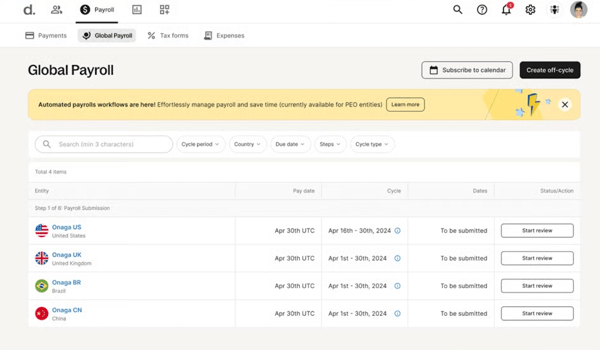
From my research, I’ve seen how valuable it is to generate locally compliant contracts, run classification assessments based on local labor laws, and rely on ongoing monitoring to flag risks early. Finance teams can approve earnings and run bulk global payouts, while contractors choose from 15+ payout methods, including Wise, Revolut, crypto, or the Deel Card.
According to the G2 reviews I analyzed, ease of use and setup are major reasons teams choose Deel. Users consistently rate it highly for usability, with ease of use at 96% and ease of setup at 95%, both above category averages. That matters because contractor payments often involve finance, HR, and operations working together, and a complicated rollout can stall adoption.
Many reviewers specifically call out how straightforward onboarding contractors is, how intuitive the dashboard feels, and how quickly they were able to move from manual processes to automated payment runs. Performance, portal experience, and wage access are also among the highest-rated features, which align with Deel’s positioning as more than just a payout tool. It’s a structured workforce platform.
What I see users appreciate a lot is how it centralizes tax documentation, supports multi-country compliance, automates localized contracts, and offersEOR capabilities if you eventually convert contractors to full-time employees abroad. That flexibility is particularly valuable for tech companies and SaaS teams that are heavily represented in its customer base, alongside IT services and financial services.
That said, teams wanting a lightweight, low-cost solution for managing just a few domestic contractors might need to plan for Deel’s broader pricing structure, since it’s built around global compliance coverage, classification safeguards, and optional Agent of Record services. The added infrastructure delivers value for scaling and international teams, but it can feel more comprehensive than necessary for simpler use cases.
Similarly, overall feedback on customer support is positive; some reviewers note that teams operating on tight timelines or high-volume payment cycles may want to factor in occasional support delays during peak periods. Planning around peak periods helps maintain smooth operations while still benefiting from knowledgeable support.
Overall, Deel delivers where it matters most in my opinion: usability, compliance coverage, and global scalability. If you’re a scaling startup, mid-market company, or globally distributed team looking to streamline contractor payments while staying compliant across jurisdictions, Deel Payroll is one of the most comprehensive and future-proof options in this category.
"I appreciate how Deel simplifies global hiring by taking care of the legal and compliance aspects in the background. The platform itself is straightforward and user-friendly, which makes onboarding employees from various countries much less daunting. Payments are processed smoothly and consistently, allowing teams to pay anyone, anywhere, without any complications. All in all, Deel provides clarity and reassurance when it comes to managing a distributed workforce."
- Deel review, Danish L
"While the platform is great, the exchange rates and FX fees can sometimes be slightly higher than dedicated money transfer services. It isn't a dealbreaker, but it is something to watch out for when processing large multi-currency payrolls. Also, while customer support is generally good, response times can occasionally be slower during peak periods or end-of-month cycles."
- Deel review, Omer Y.
Want to look at more payroll software? Read my colleague's in-depth review of top payroll software.
G2 rating: 4.6/5⭐
Gusto is one of those platforms that almost every small business owner in the U.S. has heard of, and when I look at the data, it’s easy to see why. It’s long been known for payroll, but it has quietly become one of the best contractor payment software options for U.S.-based teams that want simplicity without sacrificing structure.
The customer breakdown on G2 tells the story: 91% small businesses, 9% mid-market, and virtually no enterprise footprint. This is a platform built first and foremost for growing SMBs that need payroll and contractor payments in one place.
What consistently stands out to me in G2 feedback is usability. Users rate ease of use at 95% and ease of setup at 94%, both above category averages, and that tracks with what I’ve seen in reviews. Small business owners and finance managers often mention how intuitive the dashboard feels and how quickly they’re able to get contractors onboarded and paid.
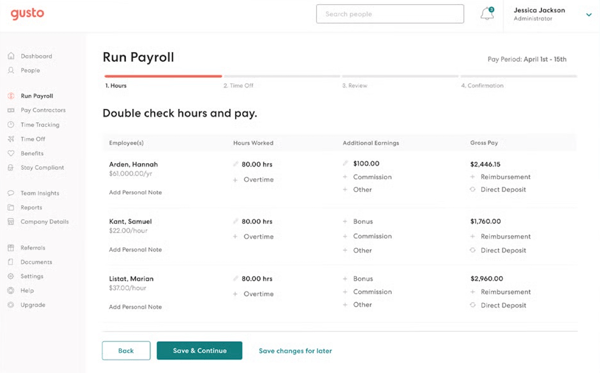
The portal experience and overall performance are also among the highest-rated features in the Grid Report, alongside compliance support. For teams that don’t have a dedicated payroll administrator, that simplicity matters. Contractors can self-onboard, submit information, and get paid on recurring schedules, while finance teams automate payments without needing additional tools or manual spreadsheets.
Another strength I see repeatedly in reviews is how well Gusto consolidates workforce management. Contractors and employees live in the same system, which reduces data silos and manual reconciliation. Automated payment schedules ensure contractors are paid on time, and self-onboarding reduces back-and-forth for tax forms and bank details.
For industries like accounting, consulting, non-profits, and professional services — all strongly represented in the user base — having onboarding, payroll, benefits, and contractor payments centralized streamlines day-to-day admin work in a meaningful way.
At the same time, some reviewers on G2 mention that teams wanting deeper customization around reporting or payroll configurations may want to evaluate how much flexibility they’ll need long term. Creating highly tailored or complex reports may not offer the same level of flexibility as some enterprise-focused systems. Nonetheless, Gusto’s standard reports cover most core use cases well.
Similarly, teams with more complex shift logic or advanced scheduling need to plan for how Gusto’s built-in time tools fit into their process. Although the time-tracking structure works well for straightforward use cases.
My recommendation? If you’re running a small business and want contractor payments tightly integrated with payroll in the U.S, without layering on unnecessary operational overhead, Gusto is one of the most practical and dependable choices in this category.
"What I like most about Gusto is how effortless and intuitive it makes HR and payroll tasks. The platform is clean, modern, and easy for both admins and employees to navigate. Onboarding new hires is especially smooth — from sending offer letters to collecting tax forms and setting up direct deposit, everything is organized in one place and automated. I also love that Gusto handles all the tax filings and compliance behind the scenes. It removes so much stress from payroll processing, and I never have to worry about missing deadlines or making manual calculations.
The employee self‑service features are another huge win. Team members can update their info, access pay stubs, review benefits, and manage documents without having to ask HR for help — which saves everyone time.
Overall, Gusto combines simplicity, automation, and great design in a way that makes HR tasks feel easy instead of overwhelming
- Gusto review, David P.
"While Gusto is generally user-friendly, there are a few areas that could be improved. One limitation is flexibility—certain workflows (such as contractor classifications, time tracking nuances, or benefit eligibility rules) can feel somewhat rigid and not fully customizable to more complex organizational needs. Reporting, while functional, can sometimes require building custom reports to extract specific data, and advanced reporting capabilities are not as robust as some larger HRIS platforms.
For growing companies with increasingly complex HR, compliance, or multi-state requirements, Gusto may lack some of the deeper functionality offered by enterprise-level systems."
- Gusto review, Nicole N.
Managing freelancers? Read about the top-rated freelancer management platforms for 2026.
G2 rating: 4.5/5⭐
Remote is another popular and top-rated global payroll software I'd suggest for an integrated contractor management platform. It's built to help companies onboard, manage, and pay contractors in 200+ countries while keeping compliance front and center.
From localized contracts to automated invoicing and bulk payments in local currencies, it’s designed to handle contractor management extremely well.
What stands out to me in the data is how consistently strong it performs across both satisfaction and adoption. With a customer mix that spans 53% small businesses, 41% mid-market, and 5% enterprise, Remote’s being used by scaling and more operationally mature teams.
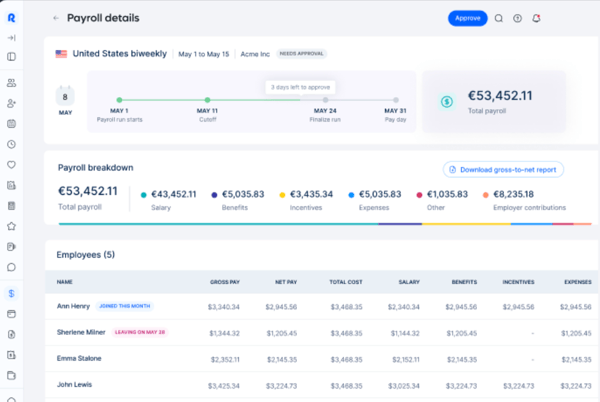
In the G2 Grid data I saw, ease of use scores 95% and ease of setup 94%, both above category averages. Users also rate performance, the contractor portal, and invoicing tools highly, which makes sense given how central those features are to global contractor management.
From a feature standpoint, Remote covers all the fundamentals you’d expect from strong contractor payment software. You can generate locally compliant contracts, onboard contractors digitally, centralize invoicing, and run international payments in multiple currencies. Contractors get a self-serve portal to submit invoices and track payments, which reduces back-and-forth with finance.
Remote also offers EOR services, meaning you can convert contractors to employees without setting up your own entity. For tech companies and distributed teams, particularly in computer software, IT services, and marketing, which are heavily represented in its user base, that flexibility removes a significant barrier to international hiring.
One of the things I see users appreciate most about Remote is how structured and compliance-driven the platform is. That rigor is exactly what gives globally distributed teams confidence, especially when hiring contractors in countries with complex labor laws. The built-in safeguards and documentation checks are designed to reduce risk, not just process payments.
Because of that compliance-first approach, some G2 users mention occasional delays tied to documentation verification or payment processing, particularly when onboarding contractors in new jurisdictions or navigating changes in local regulations. For teams expanding into multiple countries at once, it’s worth aligning internal timelines and expectations around those review steps.
In addition, while overall sentiment toward support is positive, a noticeable number of reviewers reference slower response times or longer back-and-forth when handling detailed compliance or country-specific questions. For globally distributed teams, this often reflects the complexity of cross-border employment rather than a lack of capability.
These didn’t really take away from what I liked about Remote. They just felt like part of the reality of managing a global workforce. When I looked at the bigger picture, especially around compliance, structured onboarding, and paying contractors across different countries, Remote still stood out as one of the most complete solutions I came across in this space.
"It offers an easy solution for EOR services and covers a huge portfolio of countries. It’s easy to use, and the support team responds super quickly for all kinds of cases, even the most complicated ones."
- Remote review, Ludmila P.
"Response time may sometimes take a bit longer, or it would be better to have a local point of contact to always refer to."
- Remote review, Radu P.
G2 rating: 4.8/5⭐
If you work in ops, HR, or finance, you’ve probably heard Rippling described as the platform that connects HR, IT, and payroll in one system. That reputation carries into contractor management, too. When I look at Rippling in the context of the best contractor management software, what stands out is how tightly it links onboarding, payments, app provisioning, and workforce controls, instead of treating contractors as an afterthought.
The data I saw reflects that broader appeal. Rippling holds a 4.8/5 rating on G2, with a nearly even split between small businesses (45%) and mid-market companies (50%), plus a growing enterprise presence.
In the Grid insights, ease of use and ease of setup both score highly, and users frequently praise how intuitive the system feels once configured. I also found that reviewers also rate performance, payroll processing, and workforce management capabilities among its strongest areas, which aligns with Rippling’s positioning as a unified workforce platform rather than a standalone contractor payout tool.
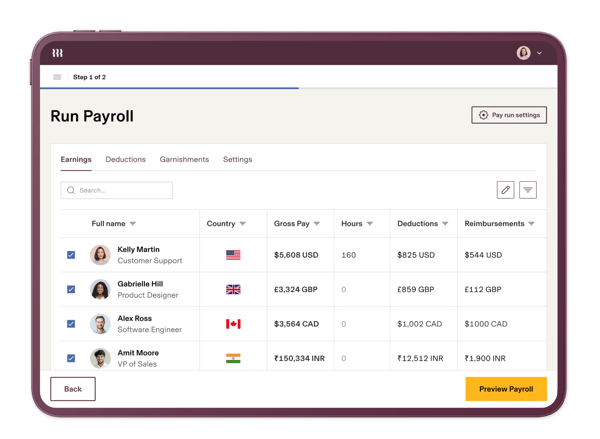
From a contractor management standpoint, I like how Rippling embeds contractors into the same operational ecosystem as employees. You can onboard contractors in 185+ countries, collect agreements and KYC verification, provision company email accounts, and automate invoice approvals, all within one workflow. Payments can be sent in 50+ currencies, and invoice approvals can auto-trigger based on timesheets, contract terms, or custom criteria.
What I see repeatedly in G2 feedback is appreciation for that automation layer. Teams mention that once workflows are configured, the system reduces manual reviews and keeps payroll cycles predictable. For industries like technology, IT services, and professional services — which are heavily represented in Rippling’s user base — that consolidation across HR, IT, and finance makes a measurable operational difference.
Because Rippling is such a powerful and configurable workforce platform, some G2 reviewers mention there can be an intial ramp up time. That said, many users find that the time invested upfront pays off, as it enables teams to fully leverage connected workflows, unlocking much greater long-term efficiency than more plug-and-play tools.
Separately, a few users note that the platform’s depth means there are multiple layers of menus and settings to support its wide range of use cases. While navigating across modules can take some getting used to, this structure ultimately enables teams to manage payroll, HR, and IT workflows in one centralized system, reducing the need to switch between multiple tools.
What ultimately makes Rippling compelling to me is the level of control it gives growing teams. Contractor payments are governed by the same approval rules, permissions, and system logic as the rest of your organization. That consistency matters when finance, HR, and IT all need visibility into who has access to what, who’s getting paid, and under which terms. If you’re building a process-driven organization and want contractor management to follow the same operational discipline as employee management, Rippling is a strong fit.
"What I like best about Rippling is how everything is centralized and easy to manage in one place. Payroll, benefits, onboarding, and employee data are all connected, which saves a lot of time and reduces errors. It’s intuitive to use, and tasks that usually require back-and-forth or multiple systems feel much more streamlined."
- Rippling review, Satyam P.
"Some areas of improvement for Rippling include the arrangement of menus, which are staggered in one place and can be overwhelming for new users. Additionally, the absence of a user guide or walkthrough video makes it less user-friendly for first-time users."
- Rippling review, Asif R.
G2 rating: 4.6/5⭐
I am pretty sure you already know ADP as a big payroll brand. RUN Powered by ADP feels like that same reliability crammed into something designed for small business owners who want payroll and HR without a ton of headaches. At its core, RUN is a full payroll + HR platform, and that does include basic support for paying independent contractors (like U.S. 1099 workers), but in a slightly different way than pure contractor platforms like Remote or Deel.
With RUN, I see contractor payments as part of one unified payroll system. You run payroll for W-2 employees and 1099 contractors together, and the platform handles direct deposit, totals, and year-end forms like 1099-NEC. There’s no separate contractor module. You’re simply using the same payroll engine to pay everyone. For many small businesses, that consolidation keeps things simple and predictable.
The user base reinforces that positioning. Around 98% of its customers are small businesses, with just a small percentage in the mid-market. This isn’t a tool trying to stretch across every segment — it’s purpose-built for SMBs. The satisfaction scores reflect that focus, with a 4.6/5 rating on G2.
Ease of use and ease of setup are strong themes in Grid data and user feedback, and that aligns with what reviewers consistently mention: payroll and contractor payments feel straightforward, structured, and dependable. Industries like retail, healthcare, construction, and professional services — all heavily SMB-driven — show up prominently in its customer mix.
Users talk about accuracy, timely payments, and confidence that taxes and filings are handled correctly. For small business owners who don’t want to navigate federal and state compliance manually, that’s a major differentiator. It’s not trying to reinvent payroll — it’s trying to make it predictable and compliant.
It’s also worth noting that ADP also offers other contractor-centric solutions (like WorkMarket by ADP) that are more tailored to onboarding, managing, and automating 1099 work at scale, particularly for larger contractor workforces, but RUN itself is the simpler payroll route.
Now, while many G2 users value ADP’s reliability and compliance support, some mention that teams operating on tight budgets may want to review pricing carefully. For businesses prioritizing stability and established infrastructure, that trade-off may be worthwhile — but it’s important to factor into long-term budgeting.
Additionally, teams that frequently need to make historical payroll changes or manage less common payroll scenarios may want to plan for a few extra steps in the workflow. Some reviewers note that edits, corrections, or adjustments can require additional navigation. For straightforward payroll cycles, this isn’t typically an issue, but businesses with more complex adjustments may want to familiarize themselves with the process early on.
On the whole, I'd say RUN is best for small businesses that want to pay 1099 contractors alongside employees without adding another tool to their stack. If your contractors are domestic and you primarily need reliable payments, direct deposit, and automated 1099 filing wrapped into your existing payroll workflow, RUN keeps it simple and centralized.
"I really like that ADP is a user-friendly platform. Everything is very organized and intuitive. Even if someone who has never used it before logs in, it's not very difficult to figure out. It's very comprehensive. I've used other platforms, and so far, ADP is my favorite. Customer support is good. Although sometimes there is a long queue, the agents always help to resolve all questions and concerns. My team uses it for all payroll in North America, and it has been a very satisfactory experience."
- RUN Powered by ADP review, Eric,
"While the program is great overall, there are still certain features that can be difficult to understand at times. In particular, the settings and notification options could be more intuitive. Additionally, changes made to these settings do not always take effect as quickly as expected, which can be confusing. Improving the speed and clarity of how these settings and notifications update would make the platform even more user-friendly and efficient."
- RUN Powered by ADP review, Karen K.
G2 rating: 4.7/5⭐
Most of us know Fiverr as the place you go to hire a freelancer for a quick project. But when I started looking at Fiverr Enterprise through the lens of contractor management software, it became clear that it's built for companies that want the flexibility of freelance talent — without the chaos of managing dozens (or hundreds) of independent contractors manually.
The customer mix reinforces that positioning. Around 69% of users are small businesses, 24% mid-market, and 7% enterprise, which tells me this isn’t just for solo founders posting one-off gigs.
It’s being used by growing teams that need structure around freelance sourcing, onboarding, compliance, and payments. The overall satisfaction is strong at 4.7/5 on G2, and the Grid data highlights high scores in quality of support, meeting requirements, and ease of doing business. Industries like computer software, marketing and advertising, and IT services show up prominently — which makes sense given how frequently those teams rely on freelance talent.
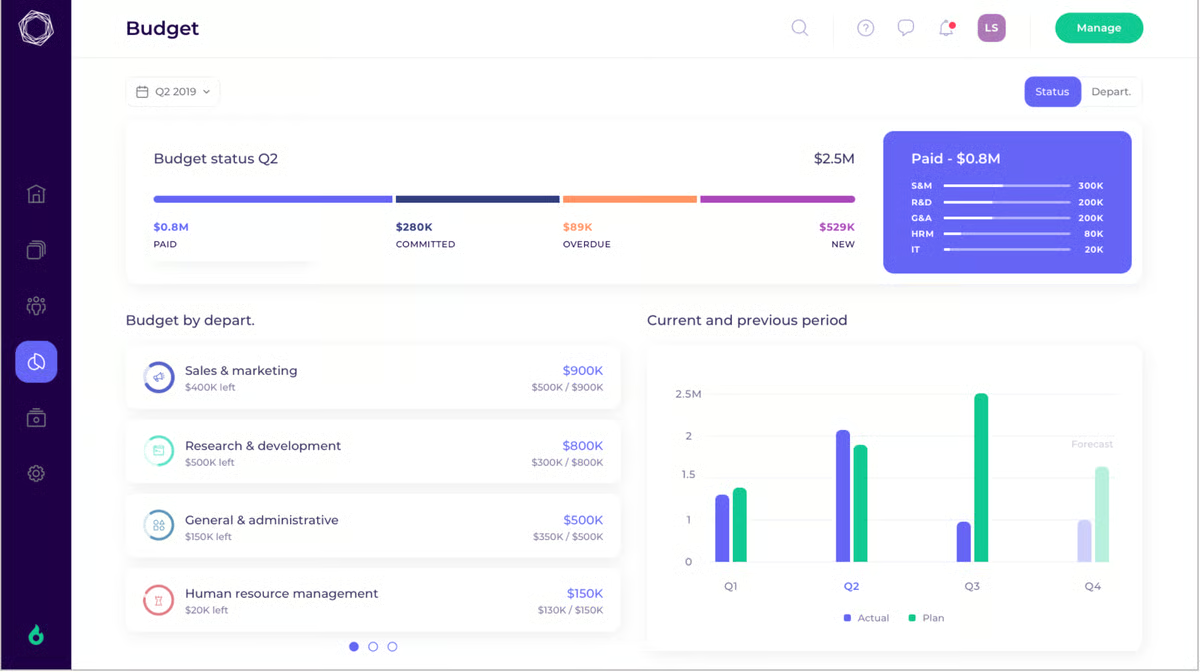
What stood out to me is how it centralizes everything. Instead of managers across departments hiring freelancers independently, tracking contracts in email threads, and processing payments manually, Fiverr Enterprise brings sourcing, onboarding, compliance, project tracking, and payments into one place. That visibility alone makes a big difference if you’re working with dozens or hundreds of contractors.
From a payments perspective, I like that it consolidates freelancer payouts into a single invoice for the company and supports payments across 160 countries. That simplifies accounting and avoids the chaos of paying individual contractors individually. It’s built more like a freelancer management system (FMS) than a payroll tool, which means the focus is on controlling freelance spend and standardizing engagement processes across teams.
Based on G2 feedback, users consistently appreciate the invoicing tools and performance capabilities, along with strong wage access features — all signals that payment processing and freelancer experience are handled smoothly.
At the same time, teams with highly specific needs around internal reporting or complex dashboard customization may want to evaluate how Fiverr Enterprise fits into their existing workflows. While its core management and reporting capabilities cover standard use cases effectively, some G2 reviewers note that more tailored reporting or specialized approval structures may involve additional coordination, allowing teams to align outputs more closely with their internal processes.
While support quality is rated highly overall in G2 Data, some users note that more proactive, strategic check-ins could further enhance long-term project outcomes. That said, the platform’s strong support foundation ensures teams have reliable assistance in place, providing a solid base to build and optimize freelance engagements over time.
All things considered, I'd say if you’re a growing marketing team, tech company, or services organization that relies heavily on freelance contributors and wants visibility into sourcing, compliance, and spend — without building those systems from scratch — Fiverr Enterprise is one of the strongest contractor management solutions in this category.
"The app is really good when it comes to managing interns that are internally associated, as well as when you want to on-board a new freelancer. The payments are done smoothly without any hassle. The support team is really good and provides good help to understand the app. We managed around a lot of different freelancers across the globe and interns using Fiverr. We also liked the pricing structure of Fiverr."
- Fiverr Enterprise review, Lakshmikanth K.
"I would like to better understand how to use some features."
- Fiverr Enterprise review, Letitia H.
G2 rating: 4.6/5
When I think about Payoneer, I don’t immediately think “HR platform” — I think global payments. That’s exactly why Payoneer Workforce Management caught my attention. It takes Payoneer’s strength in cross-border payouts and wraps it into a contractor management system that handles onboarding, contracts, compliance, invoicing, and payments in one place.
The customer base shows me it’s not limited to freelancers or micro-businesses. About 55% of users are small businesses, 38% mid-market, and 7% enterprise, which tells me it’s being used by teams that are managing contractor volume at scale.
I could see strong performance in quality of support, ease of use, and meeting requirements from the G2 grid data. Industries like computer software, IT services, marketing, accounting, and financial services are well represented — all sectors that regularly work with distributed contractors across borders.
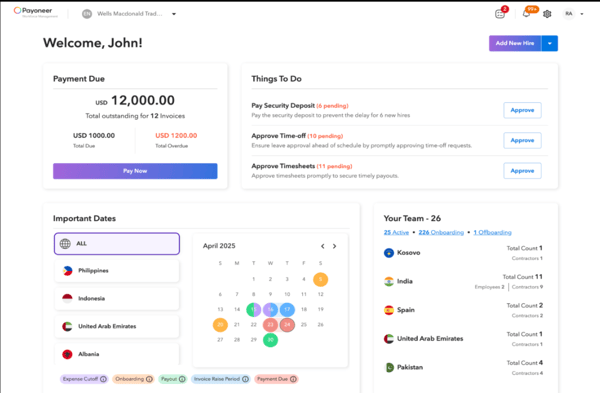
From a functionality standpoint, what stands out to me is how payment-first the system feels — in a good way. You can onboard contractors in 160+ countries, manage contracts and documents, automate invoicing, and pay in 70 currencies without manually handling FX or local disbursement. The centralized dashboard keeps contracts, invoices, and payment statuses visible in one place, which reduces the spreadsheet juggling that many teams default to.
G2 feedback consistently highlights the invoicing tool and compliance capabilities as strong areas, along with overall performance. For finance teams managing high contractor volume, that combination of visibility and payout reliability makes a real operational difference.
That said, teams operating on tight payroll or reimbursement timelines may want to account for occasional processing time, especially when adjustments are involved. Some G2 reviewers note that approvals or reimbursements can take a bit longer in certain scenarios. This measured approach helps ensure accuracy and compliance across transactions, which can be particularly important for teams managing cross-border payments and financial workflows.
Additionally, organizations wanting more advanced analytics or deeper dashboard customization may find the reporting experience somewhat structured. A few users note that clearer status trackers, more interactive reporting, or enhanced visibility into breakdowns would improve the experience.
Even with those considerations, I'd say Payoneer remains a strong option for companies prioritizing cross-border contractor payments and compliance at scale. The core workflows — onboarding, invoicing, currency conversion, and payouts in multiple currencies across countries — are consistently rated well. For finance and operations teams focused on simplifying global contractor management without stitching together multiple systems, the platform delivers dependable value.
"We use Payoneer for managing our employees who are based out of other countries (ones where we do not have a physical entity). Payoneer has made it hassle-free for us to manage their payroll without breaking a sweat. It's an automated system, so the invoices for our employees in concern get to our inbox on time for us to process. It is also reliable for the employees, as they too receive their salaries on time - something that is very essential for us, so that it is fair for them too. Additionally, it also helps us to manage the time for the employees - meaning no additional HRIS headcount.
The account manager for us is very responsive, so it is easier to address any challenge."
- Payoneer Workforce Management (Formerly Skuad) review, Rosy R.
"What I dislike is that sometimes updates or changes aren’t communicated right away. It’s not a big issue, but it can be a bit confusing when you're expecting one thing, and the process suddenly shifts. Also, there are moments when the dashboard feels a bit limited, like I wish there were clearer trackers or status indicators. But overall, nothing deal-breaking, just areas that can still be improved."
- Payoneer Workforce Management (Formerly Skuad) review, Ronila V.
Got questions? G2 has the answers.
Top-rated contractor management platforms for enterprises include Deel, Remote, and Rippling. These platforms offer structured onboarding, global compliance safeguards, audit trails, role-based permissions, and multi-country payment capabilities required by large, distributed organizations.
Contractor management software with strong reporting includes Rippling for workforce-wide analytics and Deel or Remote for compliance and payment reporting. Platforms that integrate directly with HR and payroll systems typically provide deeper reporting visibility.
The best contractor management platform for large projects supports centralized invoicing, structured approval workflows, and contractor performance visibility. Fiverr Enterprise works well for managing large freelance pools, while Rippling and Remote are strong for compliance-heavy, multi-team projects.
Top platforms for contractor safety compliance are those that support document management, certification tracking, and compliance monitoring. Deel and Remote handle labor law compliance, while regulated industries may pair contractor tools with dedicated safety management software.
Top tools for tracking contractor compliance include Deel and Remote, which embed classification assessments, localized contracts, and ongoing compliance monitoring into onboarding workflows. Payoneer also centralizes documentation and cross-border compliance processes.
The best platforms for integrating contractor data with HR systems include Rippling and RUN Powered by ADP. Rippling connects contractors into HR, payroll, and IT workflows, while RUN manages contractors within the same payroll system as employees.
The best software for monitoring contractor performance depends on the use case. Fiverr Enterprise provides visibility into freelancer performance and spend, while Rippling supports tracking contractor activity within broader workforce management workflows.
The best tools for managing multi-site contractor operations include Deel, Remote, and Payoneer. These platforms offer centralized dashboards, global payout capabilities, and multi-country compliance support to manage contractors across locations.
The best platforms for onboarding contractors quickly include Deel, Remote, and Rippling. These tools provide digital onboarding flows where contractors can sign agreements, submit tax documents, and enter payment details in a streamlined process.
Contractor management tools offering mobile access include Payoneer and Fiverr, both of which provide mobile-friendly payment and contractor management experiences. Mobile capabilities for other platforms vary depending on the modules used.
After digging into all these platforms, one thing became clear to me: the “best” contractor payment software isn’t really about sending money — it’s about reducing uncertainty. Uncertainty around compliance, around timelines, around who approved what, and around whether your contractors will get paid correctly and on time. The tools that stand out aren’t just payment processors; they create clarity.
My biggest takeaway? The right choice depends less on features and more on your operating model. If you’re global-first, compliance depth matters. If you’re SMB-focused, simplicity and reliability win. If you’re managing high contractor volume, automation and visibility become non-negotiable. The real question isn’t “Which tool is best?” It’s “Where is your biggest friction today?”
If contractor management is just one part of your workflow and you’re also juggling hours, approvals, and project billing, you might want to explore tools that connect time and payments more tightly with the best time tracking tools on G2.

HR leaders, People Ops managers, CFOs, and business owners evaluating best PEO providers are...
 by Disha C

The first international hire is exciting. The paperwork that follows isn’t. I speak regularly...
 by Shreesh Singh

After watching an HR team juggle onboarding paperwork, payroll runs, performance reviews, and...
.png) by Shreya Mattoo
by Shreya Mattoo