If there’s one thing I’ve learned from working with product, engineering, and QA teams, it’s that no two teams experience bugs the same way, but everyone feels the pain when things slip. Some teams get overwhelmed by UI defects that keep bouncing between QA and dev. Others struggle with root-cause debugging that eats up entire sprints. And for security-mature teams, a single missed vulnerability can trigger a completely different level of urgency.
That’s why choosing the right bug tracking software isn’t just about logging issues. It’s about finding a system that actually matches how your team builds software.
I’ve spent a lot of time evaluating tools across different workflows, and what stands out isn’t how shiny the dashboards are: it’s how consistently a platform helps a team stay ahead of the chaos.
Some teams need the rigor of a full Agile setup. Others want fast visual debugging to understand what actually broke. Plenty prefer an all-in-one workspace that adapts to their workflow, while developer-heavy teams gravitate toward tools that sit naturally inside their version control. And then there are security-focused teams that treat bug tracking as part of a broader vulnerability and disclosure process.
But here’s what I’ve seen firsthand: when a team picks a tool that fits their real workflow, everything downstream gets clearer — prioritization, communication, even release confidence.
In this guide, I’ve broken down the tools that actually help teams solve different kinds of “bug problems.” Whether you’re tightening Agile delivery with Jira, hunting down elusive visual issues in LogRocket, managing cross-team workflows in ClickUp, or formalizing security programs with HackerOne or Bugcrowd, you’ll find an option here built for your specific reality.
By the end, you’ll know exactly which platform aligns with how your team works today, and what will help you ship cleaner releases, faster, and with far fewer surprises.
*These bug tracking and security testing tools are top-rated in their category based on G2’s Fall 2025 Grid Report. I’ve included their strengths and pricing details to help you choose the right platform for your team’s development and QA workflows.
At its core, bug tracking software helps one turn scattered reports, user feedback, and unpredictable defects into a clear, organized workflow that the whole team can act on. The right tool doesn’t just record issues; it helps one understand their impact, trace their root cause, and keep development moving without the usual chaos.
What I’ve found is that the best bug tracking platforms go beyond simple ticketing. They show me why a bug happened, who it affects, how severe it is, and what needs to happen next. Whether it’s surfacing patterns in recurring defects, connecting issues to specific releases, or using automation to clean up triage, great tools give me clarity instead of noise.
And it’s not only large engineering orgs that benefit. G2 Data shows that adoption is pretty evenly spread: small teams, mid-market companies, and enterprises all rely on these tools to keep their products stable and their customers happy. Most teams can get up and running quickly, which means fewer fire drills and faster impact.
Ultimately, good bug tracking software gives me what every product or engineering workflow needs: visibility into what’s breaking, predictability in how we fix it, and the confidence that nothing critical is slipping through the cracks.
I used G2’s Grid Reports to shortlist the top bug tracking and security testing tools based on real user satisfaction scores and market presence across small, mid-market, and enterprise teams.
I then used AI to analyze hundreds of verified G2 reviews and extracted recurring feedback patterns around what matters most in real-world engineering workflows, like sprint visibility, UI learning curve, automation depth, issue traceability, integrations with code repositories, and the quality of collaboration between QA, dev, and security teams. This helped me identify which platforms actually improve delivery speed and which become bottlenecks at scale.
Since I haven’t personally used all of these platforms, I cross-checked my findings with insights from software engineering, QA, and product teams who actively use them. The visuals and product references included in this article are sourced from G2 vendor listings and publicly available product documentation.
After reviewing thousands of G2 user reviews, studying engineering team workflows, and speaking with developers, QA leads, and engineering managers, the same themes showed up repeatedly. Here’s what I prioritized when evaluating the best bug tracking tools:
Based on these criteria, I filtered down the tools that consistently deliver on developer experience, visibility, and long-term scalability. Not every platform excels at every feature, so choose based on your team’s workflow whether you need simplicity, automation, deep integrations, or enterprise-grade controls.
Below, you’ll find authentic user reviews from the Bug Tracking Tools category. To appear in this category, a tool must:
This data was pulled from G2 in 2025. Some reviews may have been edited for clarity.
I’ve seen Jira show up in almost every engineering, product, and IT setup I’ve worked with. When I dug into its G2 profile, the numbers made it obvious why. With extremely high category scores (99 for Market Presence, Satisfaction, and Overall Score) and a 4.3/5 rating on G2, Jira isn’t just widely adopted; it’s a tool teams rely on at every scale. The user breakdown is 23% small business, 43% mid-market, and 34% enterprise which really reflects how flexible the platform is once you configure it correctly.
When I looked at what Jira scores highest for, it wasn’t surprising: Bug History (91%), Team Reports & Comments (90%), and user feedback workflows. These are the foundations of strong project tracking, and Jira gets them right. It lags slightly in adaptive learning, proactive assistance, and natural language interaction — areas where AI-native tools have an edge, but after going through dozens of reviews, it’s clear most users still prioritize Jira’s structure, depth, and reliability over its AI layer.
What stood out most to me is how consistently G2 users praise Jira’s Agile support. Scrum and Kanban boards feel native, not bolted on. Reviewers repeatedly mention clearer sprint visibility, cleaner backlog management, and smoother iterative delivery. Jira’s flexible issue hierarchy, Epics, Stories, Tasks, Sub-tasks, custom fields, and custom workflows, also come up often. Teams get granularity without being forced into a rigid model.
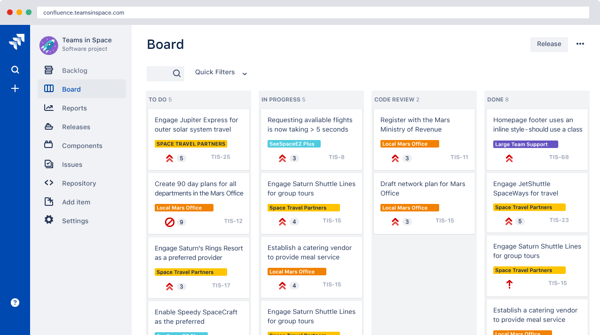
The integration ecosystem is another major strength. I’ve personally seen how powerful Jira becomes when connected with GitHub, Bitbucket, Confluence, or Azure DevOps. Reviewers say the same: commits linking to tickets automatically, docs syncing across teams, and automation rules removing tons of manual work. Several long-time admins point out that once you invest in setup and use Atlassian University and the broader community, the tool becomes dramatically smoother.
Jira’s flexibility can introduce complexity, especially in teams without clear ownership or governance. Environments with heavily customized workflows may feel slower or harder to navigate, which makes Jira a stronger fit for teams that value structure and process discipline over plug-and-play simplicity.
Most reviewers offer similar advice: use the desktop version for stability, appoint “super users,” keep workflows lean, pair it with Confluence, and provide basic training so teams don’t get lost. Internal documentation and clear project ownership go a long way toward keeping Jira manageable.
Where Jira truly proves itself is in business outcomes. I came across multiple reviews describing the same shift: scattered tasks becoming a single source of truth, predictable sprint cycles replacing guesswork, better bug tracking, full traceability from requirement to commit, and stakeholders finally getting real-time dashboards instead of chasing updates. For many teams, Jira becomes the operating system for work.
Overall, I’d recommend Jira to teams that want structure, scalability, and transparency, not just a place to store tasks. It’s especially strong for mid-market and enterprise setups running complex, multi-team initiatives, though smaller teams can thrive with the right setup. Jira remains the most complete solution for teams that want to run Agile with discipline, clarity, and long-term scalability.
“I love Jira’s impressive UI. It feels so modern and minimal. It has been more than two years using Jira, but it still feels like a fresh design. It allows us to break down massive, complex ETL/ELT projects into manageable, trackable nuts. We can create custom issue types and custom workflows, and ticketing is crucial for managing dependencies. It gives my manager and me instant, clear visibility. The integration with GitHub is best, as I commit changes, the commits are automatically visible in the Jira ticket. We use this process daily on Jira.”
- Jira review, Sahil M.
“Overall, the biggest challenge with Jira is managing the tool’s inherent complexity and ensuring that workflows stay practical rather than bloated. Without dedicated admins to keep things streamlined, Jira can become a source of frustration rather than a productivity enhancement. Despite this, it remains widely used because of its powerful capabilities and integrations, but those downsides do impact the day-to-day user experience.”
- Jira review, Mrudul P.
Fixing bugs is reactive, automation helps catch them earlier. See the best automation testing tools to improve software quality from the start.
When I first looked into LogRocket, what stood out to me right away was how widely it’s adopted by smaller teams. Around 63% of its users come from small businesses, which aligns with how the product feels in practice. It delivers deep visibility into real user behavior without the operational overhead you’d typically expect from tools in this category. While its overall G2 Score sits at 85 and Market Presence at 71, the 100% Satisfaction score suggests that teams who adopt LogRocket tend to find clear, ongoing value in it.
What really resonated with me is how visual the entire debugging experience feels. LogRocket doesn’t treat user behavior as abstract data points, it lets you see it unfold. Session replay is the core of that experience, and it fundamentally changes how issues are understood.
Instead of interpreting logs or trying to recreate a bug from memory, you’re watching exactly what the user saw and did. Multiple reviewers echoed this, noting how it removes the need for repeated follow-ups like screenshots or screen recordings, because the full context is already there.
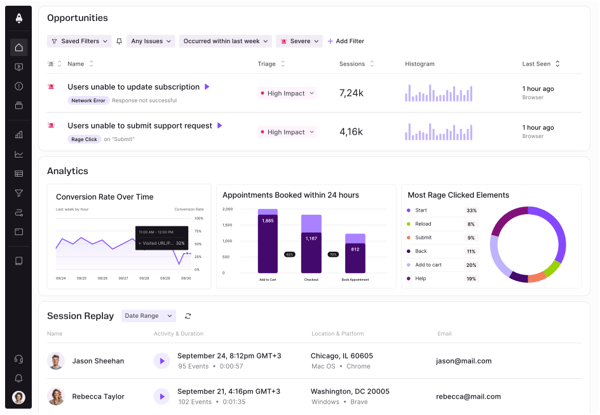
From a developer perspective, the technical depth embedded into those sessions is especially compelling. HTTP requests, responses, console logs, and errors appear directly within playback, making it easy to connect a UI action to the underlying system behavior. It feels similar to having DevTools layered over real customer journeys. Features like Bug History (87%) and Analytics (86%) support this workflow by helping teams understand how often issues occur and whether they’re isolated or systemic.
I also noticed consistent praise for LogRocket’s automated issue detection and AI-based classification. These capabilities help surface recurring problems and patterns across sessions, which is useful when you’re dealing with more than just one-off bugs. Combined with its User Feedback capabilities (83%), the platform makes it easier to link what users report with what actually happens in the product, reducing guesswork when prioritizing fixes or UX improvements.
Usability is another area where LogRocket earns strong feedback. Many users describe the interface as clean and approachable, which matters when you’re reviewing multiple sessions in a short period of time. Integrations with tools like Slack and Jira also come up frequently, largely because they allow teams to share sessions with full context attached, rather than summarizing issues manually. That shared visibility seems to support smoother collaboration across engineering, product, and support teams.
The interface exposes a wide range of controls and options, which can take some time to get familiar with early on. To ensure security, session access is time-bound, meaning older recordings aren’t always available for long-term reference.
Even with those points in mind, the overall sentiment remains strongly positive. Reviewers consistently talk about faster bug resolution, clearer insight into user behavior, and better alignment across teams. Many describe LogRocket as a key part of how they identify friction points, validate UX decisions, and resolve issues that would otherwise be difficult to reproduce.
For teams building web applications, LogRocket offers a clear, practical way to understand how users experience the product and why things break when they do. I see it as particularly well-suited for small and mid-sized teams that need to move quickly, collaborate effectively, and make product decisions grounded in real user behavior. Its ability to turn complex problems into visible, shareable context is what makes it a tool I continue to value.
"I use LogRocket to see what the customer actually experienced when they encounter errors, which used to feel almost impossible when just looking at raw logs. As a product-oriented engineer at a company in a complex domain, I also enjoy watching the customer experience and using the places where they encounter errors to drive product decisions. We can make updates to error patterns and really back the decisions we ultimately make with customer data. We're able to easily jump from error logs into the user's session. My favorite feature is being able to toggle the timestamp display, no matter what other log source is driving me to LogRocket, I can match up the logs to the user experience exactly.”
- LogRocket review, Shannon B.
"I think the layout and UX could be improved a bit. It takes a while for a new user to get accustomed to the lay of the land, with too many controls visible at all times. There should be a way to hide some controls that I don't use/need and save that setting for my login.
Also, I absolutely don't like the fact that we can't extend our session retention without upgrading our plan to a much higher level. That has been a huge pain point for us, because often, from when an issue occurs to when a developer gets to work on that, it has been >30 days, and the session is lost. This gets us back to the Stone Age way of trying to replicate the issue by calling the customer or keep trying ourselves.”
- LogRocket review, Abhinav B.
When I first explored ClickUp, what stood out immediately was how well it aligns with the way small and mid-sized teams actually operate. According to G2, 77% of its users come from small businesses and another 19% from mid-market companies, which tracks with ClickUp’s core promise: replacing a patchwork of disconnected tools with a single, flexible workspace for tasks, docs, goals, reporting, and collaboration.
What I appreciate most is how ClickUp supports different workstyles without imposing a rigid operating model. Teams aren’t forced into a predefined structure. Instead, collaboration features, reporting, automations, and AI-powered tools give each function room to shape workflows around how they already work. That flexibility is reflected in its G2 performance as well, with a 91 Satisfaction score and an overall G2 Score of 84, signaling broad approval across varied use cases.
Using ClickUp firsthand, the value of centralization shows up clearly in how bugs move from discovery to resolution. Bug reports, reproduction steps, screenshots, comments, and status updates live in one place instead of being split across chat threads, docs, and task tools. Automations help route issues through triage by updating statuses, assigning owners, or notifying the right stakeholders when a bug changes state, which reduces manual coordination and keeps fixes from stalling during handoffs.
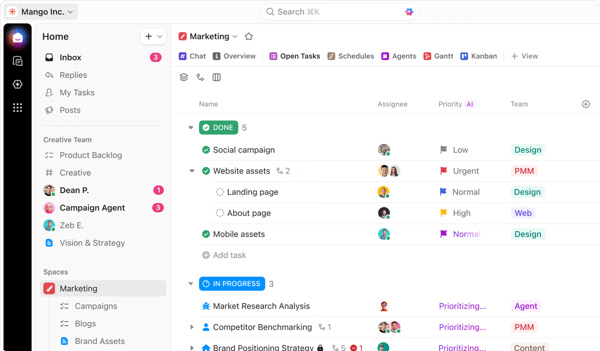
ClickUp also supports different bug-tracking workflows without forcing a single methodology. Teams can log bugs as tasks, group them by severity or component, and visualize progress through Kanban boards, lists, or dashboards. AI features like Brain AI and the AI Notetaker extend into this flow by turning QA reviews, standups, or incident discussions into structured bug items with clear next steps, which helps reduce the gap between identification and action.
That flexibility comes with some considerations. Because ClickUp exposes many configuration options early, bug-tracking setups can feel busy until fields, views, and statuses reflect how a team prefers to triage issues. This reflects how adaptable the system is rather than any inherent complexity. Teams familiar with purpose-built tools like Jira may notice that issue-type hierarchies are less opinionated by default.
Even with those considerations, the core value for bug tracking remains compelling. Housing defects, related documentation, sprint work, and release notes in one workspace creates a shared source of truth for engineering, QA, and product. Cross-functional teams benefit from having visibility into bug status without switching tools or relying on status updates passed through meetings.
Many describe ClickUp as the system that connects bug tracking to the broader delivery workflow, rather than isolating defects in a separate tool.
Overall, ClickUp works best for teams that want bug tracking tightly integrated with planning, documentation, and execution. While it doesn’t impose a rigid issue model, that flexibility makes it especially relevant for teams that manage bugs alongside broader product and operational work.
“ClickUp’s ability to simplify complex, cross-functional project management into easily digestible views is truly transformative. I rely on it daily, and the brain AI feature allows me to add numerous tasks effortlessly when used correctly. The platform enables me to develop repeatable project templates and a structured implementation methodology, which greatly improves consistency and efficiency across our diverse teams. Its robust customization options also support detailed workload forecasting and capacity tracking, both essential for managing my team’s limited resources in the face of operational challenges."
- ClickUp review, Nicole Nina N.
"It's still pretty noisy. Too many apps, too many places, too many features, so it's now Slack, Docs, Jira, Trello, Monday, etc, and it feels too much, when we just want to handle some simple projects, it feels like we are going in a labyrinth of buttons and clicks. Honestly, I think I would switch to 4 instead of 6, but what I decided to go up is because in the enterprise grade, this could be a more complete tool and don't have to jump between multiple apps. (it could be "multiple apps" inside the same one, and not literally different UIs/pages, so that would make it easier, like for example what Atlassian is doing, that Jira, Confluence, Goals and others are different apps but inside the same place with almost the same UI, so it feels better that way).”
- ClickUp review, Cesar Daniel Z.
When I think about platforms that have shaped how modern software teams work, GitHub is always near the top of the list. Its combination of version control, collaboration, and workflow automation has turned it into a central hub for development across company sizes.
The adoption data reflects that breadth well: usage is spread across small businesses (49%), mid-market teams (29%), and enterprises (22%). Its G2 metrics, including Satisfaction at 72, Market Presence at 82, and an overall score of 77, say that the platform is deeply embedded in day-to-day development work rather than optimized for any single segment.
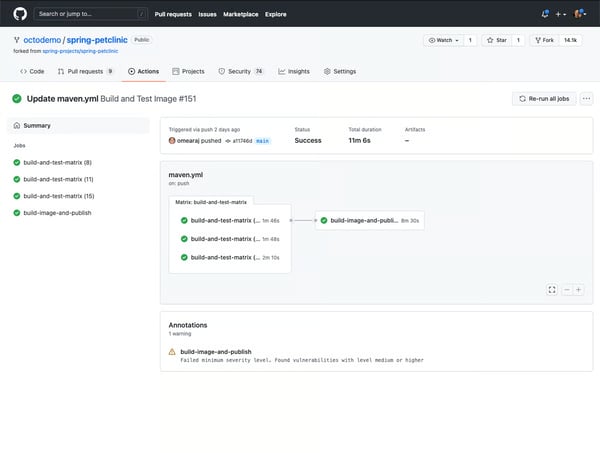
What stands out most to me is how naturally GitHub supports structured collaboration. Core workflows like commits, branches, pull requests, and reviews create a shared language that teams rely on as projects grow. Highly rated capabilities such as Data Retention (91%), Team Reports & Comments (91%), and User Feedback (90%) reinforce that sense of transparency. Whether you’re reviewing a small change or coordinating across a large codebase, the platform makes it easy to understand what changed, why it changed, and who was involved.
GitHub’s ecosystem plays a big role in that experience. GitHub Actions brings automation directly into the repository, allowing teams to connect testing, deployment, and other workflows to the code itself. Issues and pull request discussions keep technical conversations close to the work, while Projects adds a lightweight layer of planning without pulling teams into a separate system. Combined with the scale of the open-source community where patterns, libraries and templates are widely shared, GitHub often becomes the place where entire development workflows live, not just the code.
That depth does mean there’s a lot happening under the surface. Teams working with advanced Git patterns, complex permission structures, or large repositories may find that some aspects of setup and management require familiarity with Git’s underlying concepts. For many teams, though, this reflects the platform’s breadth.
Across reviews, the business impact comes through clearly. Teams describe clearer version history, fewer ambiguities around changes, and stronger code quality driven by consistent review practices. Built-in tools like Dependabot, vulnerability alerts, and automated checks help maintain stability and security as teams scale, particularly for distributed or asynchronous environments where visibility matters.
Overall, GitHub feels like a foundational platform rather than a point solution. I’d recommend it to any development organization that values transparency, reliable version control, and workflows that can grow alongside the product. From solo developers to global engineering teams, it adapts well to different scales while remaining a dependable source of truth for code, documentation, and delivery processes.
“GitHub delivers a user-friendly experience with an intuitive interface that makes version control and collaboration straightforward, even for newcomers. Its comprehensive feature set covers everything from pull requests and code reviews to CI/CD integrations and project boards, meeting nearly all the needs a developer could have. Setting up GitHub is simple, and it integrates seamlessly with tools like VS Code, Jira, and Slack. Thanks to these smooth integrations, I find myself relying on GitHub regularly in my daily development work.”
- GitHub review, Gaurang A.
“There are a couple of useful features I'm missing, but they aren't necessarily present elsewhere. Tracking the actual time taken to do a task according to the assignee would help it bridge the gap towards a full timing solution. I've also noticed the odd data sync issue, with text or assignees, and lastly, sometimes if you make a task, it'll vanish because your board is filtering it out, it'd be nice if this stuck around until you can fill in more fields.”
- Github review, John M.
I’d come across Backlog mostly in smaller engineering and QA-heavy teams, and the feedback was always consistent: it’s simple, reliable, and more capable than it looks. It’s not trying to be an all-in-one enterprise platform, and that focus shows in how quickly teams can get value from it. The user base leans heavily toward small and mid-market companies, which aligns well with how the product is designed.
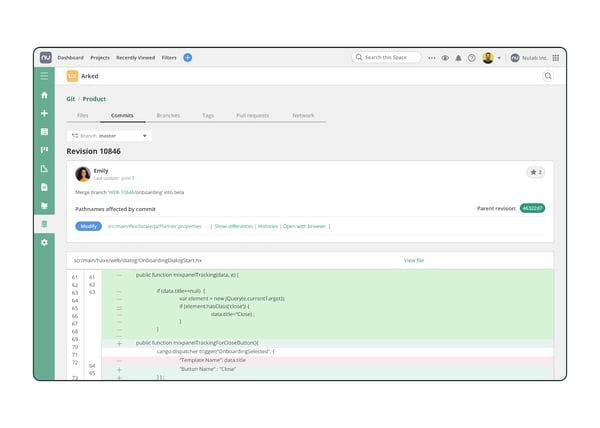
What stood out to me early on was how much attention Backlog puts into keeping everyday workflows clean. Creating bugs or tasks is fast, attachments feel natural, and prioritization stays straightforward. QA teams value having issues, comments, and history centralized, while features like issue templates add structure without turning day-to-day work into a process-heavy exercise.
Backlog’s Git integration is another strong point, especially for smaller development teams. Commits, pull requests, and issues stay connected, which reduces the need to jump between systems. For teams without dedicated DevOps support, that simplicity translates into fewer handoffs and clearer accountability during bug fixes and releases.
Backlog performs particularly well in AI-related areas. Its G2 Data shows proactive assistance, natural language interaction, and adaptive learning scoring well above category averages. For a lightweight tool, that’s notable. Reviews suggest the AI features feel supportive rather than intrusive, helping surface tasks and actions without forcing teams into unfamiliar workflows.
From a metrics standpoint, its G2 profile reflects that — 4.6/5 rating with strong Satisfaction (83), despite a modest Market Presence (55) and overall G2 Score (69). The user mix is telling too: nearly all small and mid-market teams. Backlog clearly thrives where clarity and structure matter more than enterprise-level depth.
Backlog’s design reflects a conscious consideration toward simplicity and focus. By keeping the interface lightweight and uncluttered, it prioritizes day-to-day execution, with some capabilities becoming more visible as teams spend time working in the product. Support engagement aligns with plan tiers, consistent with its positioning for teams that prefer a straightforward setup. Reporting emphasizes operational visibility and progress tracking, reinforcing Backlog’s role as a task and bug management tool rather than a platform built for enterprise-scale governance.
Teams talk about moving from reactive, manual tracking to calmer workflows with clearer ownership, reliable notifications, and faster QA cycles, even when handling dozens of bugs daily. That reduction in noise makes collaboration smoother and keeps progress visible without adding process overhead.
Overall, Backlog fits teams that value clarity, speed, and reliability over extensive customization. Despite its lighter footprint, the combination of solid fundamentals and well-rated AI features makes it a tool I consistently see succeed in small to mid-sized, QA-driven environments where getting work done cleanly matters more than managing complexity.
“The best thing I like about Backlog is that if a user is not an expert in computers, they can also use this tool without any confusion. I can create tasks and bugs very quickly. The bug tracking feature is very helpful because I can report a bug, assign it to a developer, and track their status in one place. We can talk and share ideas in the comments of any task and bug without using other chat. I also like the Gantt chart because it show the project timeline and helps me plan work accordingly. Reports and charts help me see project progress and team performance.”
- Backlog review, Mahadevan M.
"While Backlog is useful, there are a few things that can be better. Some parts of the tool are not easy to find, so the ease of use could be improved, especially for new or non-technical users. Even though the implementation was not too hard, it still took time for everyone on the team to get used to it. There are many features, but sometimes it feels like too much when you only need the basics, so the number of features can feel overwhelming. We use it frequently, but wish there were more options to customise it to our workflow. The integration with Git is great, but there are not enough built-in connections with other tools we use. Lastly, customer support is helpful, but the response time can be slow at times.”
- Backlog review, Ayush M.
I’ve seen many teams adopt monday dev as a natural extension of monday Work Management, and the ease of onboarding is one thing that consistently stands out. With a 4.7/5 G2 rating and a user base largely made up of small and mid-market teams, it’s designed for organizations that want structure without the complexity of heavyweight development tools. While its G2 Score (66) and Satisfaction score (65) appear modest, real-world reviews tell a stronger story around usability and the speed at which teams get up and running.
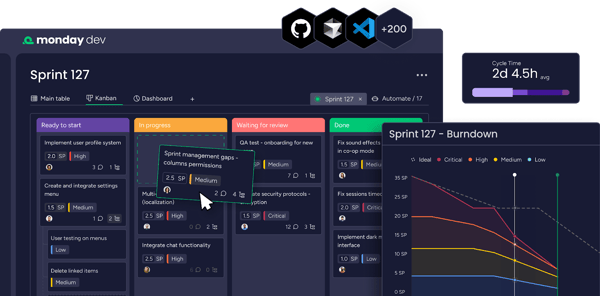
The platform’s top-rated features are Data Retention (93%), Team Reports & Comments (92%), and User Feedback workflows (92%) which reflect how well it supports visibility and cross-functional collaboration. Boards, updates, and automations feel intuitive from day one, and teams often report smoother standups, sprint planning, and handoffs. Real-time notifications and shared views help product, design, dev, and QA stay aligned without losing context.
What I find particularly effective is the way monday dev balances structure with flexibility. Teams can adapt workflows using customizable boards, dependency tracking, status columns, and automation rules that match how they plan, execute, and coordinate work across roles. Visual boards reduce friction in tracking progress, automations handle repetitive coordination tasks, and stakeholders always have a clear picture of what’s moving and what’s blocked.
Implementation is another area where monday dev fits well with growing teams. Because it builds on an interface many teams are already familiar with, setup tends to feel accessible rather than technical. Support resources and guided assistance for more advanced workflows help teams scale their usage over time without needing a dedicated administrator from day one.
Some aspects of the platform reflect its breadth and flexibility. With a wide range of features available, advanced configurations can take additional time to explore, which aligns with its goal of supporting many different working styles. As teams scale their use of automations or enterprise-level capabilities, pricing may become a consideration, particularly for smaller organizations. As a cloud-first platform, its experience is strongest for teams with reliable connectivity.
Areas such as Analytics and Bug History (close to 91%) score well above category averages. This suggests users are often looking for deeper reporting rather than a fundamentally different approach. monday dev favors collaborative execution and shared visibility over highly specialized engineering metrics, which matches the needs of its core audience.
The overall business impact is clear in how teams describe using the platform day to day. Communication becomes more centralized, progress is easier to track, and momentum improves across departments. Many teams end up treating monday dev as an operational hub, bringing together roadmaps, sprints, testing workflows, and status updates in a single workspace.
I’d recommend monday dev to small and mid-sized teams looking for a modern, visual development platform that supports collaboration across functions. For organizations that value clarity, flexibility, and shared ownership over deeply technical configuration, monday dev offers a scalable and approachable environment that grows with the team.
“Before using monday, we were using a kanban view, and projects just never moved. Since switching to Monday, first the normal work management platform and then going to Dev workspace has increased productivity in leaps and bounds. Real-time views of how projects are tracking and makes sprint planning so much easier. We use this platform on a daily basis and has become the foundation of the team. It was so easy to implement and to understand - really a very user friendly experience and could easily integrate with our other platforms like outlook mail and calendar. The customer support is phenomenal and they have never not been able to assist me with a query.”
- Monday dev review, Carina D.
“I think sometimes monday dev can feel a bit unintuitive when you’re trying to find specific settings or features. There’s so many options that it takes a bit to get used to it, and some things could be more intuitive.”
- Monday dev review, Raúl N.
HackerOne stands out to me as a platform designed for security teams that want access to a global ethical hacker community without the operational burden of managing a bounty program in-house. Its adoption profile signals that level of maturity clearly, with strong usage among mid-market companies (44%), meaningful enterprise penetration (39%), and a smaller but security-serious SMB segment (17%). That mix aligns well with its 4.5/5 rating on G2, which reflects consistent satisfaction from teams that treat vulnerability discovery as an ongoing, structured process rather than a one-off exercise.
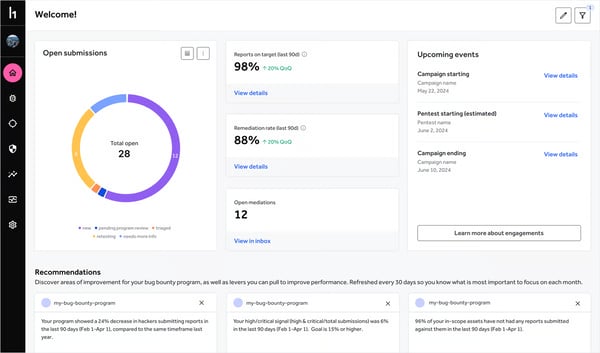
Where HackerOne really delivers is in how it operationalizes scale. Reviewers consistently rate Analytics (89%), Bug History tracking (86%), and Tester Reports and Feedback (86%) as standout capabilities. From my perspective, these features work together to create a clean, auditable vulnerability intake pipeline.
Submissions are centralized, context is preserved over time, and security teams can quickly understand patterns rather than reacting to isolated reports. The triage and payout infrastructure further reduces friction, filtering out low-signal submissions and ensuring researchers are rewarded efficiently, which in turn sustains engagement on both sides of the platform.
The ethical hacker community itself is the strongest differentiator. Users repeatedly point to the depth of expertise and diversity of skill sets within the crowd, especially when it comes to surfacing high-impact vulnerabilities early. That breadth is difficult to replicate internally and becomes even more valuable as attack surfaces grow.
Integrations and API access also earn positive mention, making it easier for security and engineering teams to stay aligned as issues move from discovery to remediation. Even HackerOne’s newer AI assistant, Hai, is already seeing encouraging feedback for accelerating assessment workflows, which suggests a product roadmap that is actively evolving rather than standing still.
Because the strength of the platform depends heavily on its community, some teams express interest in greater visibility into how new researchers are onboarded and developed over time. The interface offers a wide range of controls and configuration options, which supports complex security programs but can feel heavy when visual or workflow changes are introduced. Triage quality is generally trusted, though turnaround times for highly complex findings can vary depending on scope and severity. Collaboration features such as commenting and feedback are reliable, even if they are not the primary reason most teams choose the platform.
What stands out most in reviews is the tangible business impact. HackerOne enables continuous security coverage that replaces infrequent, high-cost penetration tests. Vulnerability intake becomes structured, measurable, and repeatable. Security engineers spend less time sorting through noise and more time addressing issues that materially reduce risk. For many teams, it evolves into a single source of truth for submissions, triage decisions, and reward management.
Overall, I’d recommend HackerOne for for mid-market and enterprise security teams, as well as smaller organizations that place a high strategic value on security. Despite the depth and operational rigor the platform demands, the combination of a skilled global researcher community and mature triage infrastructure makes it a solution I consistently associate with serious, long-term vulnerability management.
“Extremely easy to get starting. I like the community aspect of the platform, and had extremely positive interactions with some hackers that went above and beyond what was requested from them. Some hackers are too imaginative for their own good and found the weirdest bugs in our application or platform. In my opinion, a good bug bounty program is way more valuable to us than regular pen testing.”
- HackerOne review, Clement D.
“At times, the triage process might struggle to reproduce an issue, which can require additional clarification. Additionally, if your systems are highly locked down, setting up access and accounts for hackers can be time-consuming and require extra effort. This step is not inherently problematic but does demand proper planning to ensure the process runs smoothly and you can reap the benefits of using the program as soon as possible.”
- HackerOne review, Algirdas B.
I’ve consistently seen Bugcrowd surface in serious security conversations, especially when teams want a bug bounty program that feels professionally run without having to build and manage the entire operation internally. While its G2 category scores are more modest (63 overall, 65 market presence, 61 satisfaction), the 4.4/5 user rating tells a more nuanced story: this is a platform that works very well for a specific type of organization.
What stands out most to me is Bugcrowd’s emphasis on disciplined vulnerability workflows. Its highest-rated features are User Reports and Feedback (90%), Tester Reports and Feedback (89%), and Data Retention (89%) which reflect a consistent theme across reviews: clarity. Programs are well-scoped, expectations are explicit, and communication between organizations and researchers follows a predictable cadence. Given that more than half of Bugcrowd’s users operate in enterprise environments, this focus on process maturity aligns naturally with the needs of larger security teams.
Onboarding speed and program readiness also come up repeatedly. Researchers appreciate that rules, scope boundaries, and bounty models are defined upfront, which allows them to move directly into testing rather than interpreting ambiguity. From the organization’s perspective, Bugcrowd’s managed approach to triage, payouts, and researcher coordination removes much of the operational complexity that can otherwise slow down disclosure programs. That level of hands-on program management is a recurring reason teams choose the platform.
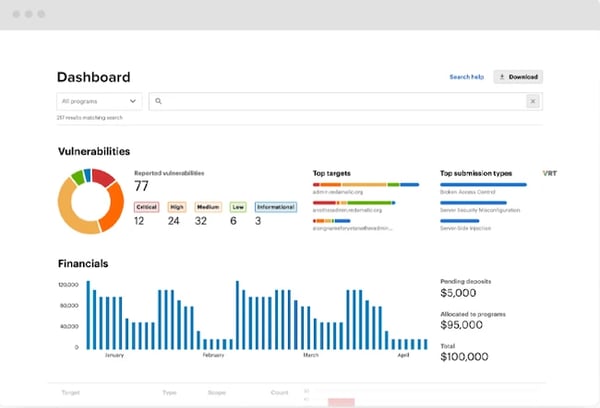
Triage professionalism is another frequently cited strength. Reviewers describe consistent validation, actionable feedback, and clear mediation between researchers and internal security teams. When paired with strong integrations and detailed target documentation, the platform creates an environment where researchers can focus on discovery rather than follow-ups or administrative back-and-forth. That reliability tends to resonate most with teams running large or compliance-sensitive programs.
There are a few considerations to keep in mind. Analytics, while functional, receives requests for deeper performance and trend-level insights. Triage responsiveness can also vary across programs, particularly where scope definitions or validation timelines are more complex. These considerations appear closely tied to how individual programs are configured and governed, rather than indicating limitations in the underlying platform.
Even with those considerations, the value described by users is clear. Bugcrowd brings order to the vulnerability intake lifecycle by centralizing submissions, enforcing process consistency, and removing legal and coordination ambiguity. Researchers gain access to well-run programs, and organizations benefit from scalable coverage without having to expand internal teams.
Taken together, Bugcrowd is a strong fit for enterprises and mature security teams that prioritize governance, predictability, and managed execution in their crowdsourced testing efforts. I recommend it for organizations that want structure and reliability over experimentation, and for teams that value a well-governed program model that supports steady, repeatable security outcomes without added operational overhead.
“I find Bugcrowd exceptionally helpful as it provides well-structured and legitimate security research opportunities, connecting me with programs that truly value detailed vulnerability reports. This platform offers clear program instructions, scope, and bounty structures, which eliminate guesswork and allow me to focus on discovering real, in-scope vulnerabilities. The explicit bounty structures enable me to prioritize findings based on their impact, saving me time and enhancing my efficiency. Transitioning to Bugcrowd was easy and quick, simplifying the setup process and getting me started almost immediately. This streamlined setup and organized approach make Bugcrowd a highly efficient platform for my work. Additionally, compared to our previous platform, HackerOne, Bugcrowd is more cost-effective, offering substantial financial benefits.”
- Bugcrowd review, Abhijeet S.
“Some programs still suffer from poor response times or unclear scoping, and rewards can vary drastically between targets with similar risk. I’d like to see better transparency around disclosure timelines and program-side SLAs. Additionally, the analytics or reporting dashboard for researchers could use a revamp for clearer visibility into submission trends and reward patterns.”
- Bugcrowd review, Ads D.
I’d been hearing about Kualitee from mid-sized teams looking for a cleaner QA process, so when I checked its G2 metrics — 61 overall score, 54 market presence, 68 satisfaction, and a strong 4.6/5 rating, I wanted to understand the appeal. The user breakdown made sense: 59% mid-market, 37% small business. Kualitee is clearly aimed at teams that want structure without an enterprise-scale learning curve.
The standout capabilities are reflected directly in the ratings: Bug History (92%), Analytics (92%), and Tester Reports & Feedback (91%). Version traceability came up again and again. One reviewer working in LMS development mentioned constant mid-cycle changes to test cases, something I’ve seen many teams struggle to document cleanly, so the praise for historical tracking felt deserved.
I also appreciated that Kualitee supports both cloud and on-prem deployments. Many QA tools quietly push cloud-only adoption, but reviewers mentioned how easy it was to meet internal security policies while onboarding smoothly. That flexibility matters more than teams admit when compliance is a blocker.
A key takeaway from reviews was alignment between QA and dev during fast sprint cycles. Instead of constantly asking “Where is this bug now?” teams benefit from real-time visibility into progress. That shared context is often the difference between clean releases and last-minute scrambles.
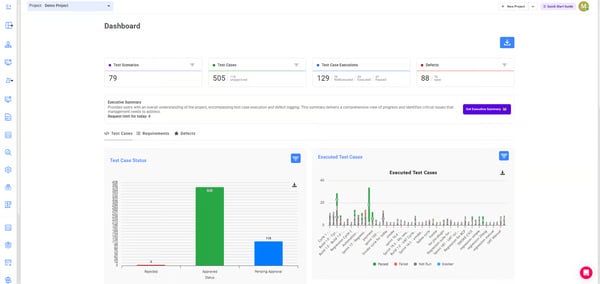
There are a few considerations depending on how large and complex your testing footprint is. Dashboards can feel dense if multiple complex projects run in parallel, though filters help keep things focused. Categorization structure requires upfront discipline to avoid clutter. Some teams mentioned wanting finer control over notifications during overlapping test cycles.
The business outcomes are where Kualitee’s value becomes clearest. Teams no longer dig through folders or chase missing test cases; everything lives in one traceable system. Mobile access also came up as surprisingly useful for checking cycles or bug updates on the go.
For organizations pushing constant updates like bug fixes, version rollouts, rapid releases, especially in EdTech, where requirements evolve frequently, strong version control and testing clarity stand out. Kualitee helps teams keep momentum without losing historical context.
I’d recommend Kualitee to teams that want a reliable, centralized QA environment that supports fast development without unnecessary complexity. It’s a solid fit for mid-sized organizations that need both structure and flexibility to keep QA and dev tightly aligned.
“We build learning management systems for schools and universities. Test cases change often, especially when modules get new updates. Kualitee's version control helps us keep track of test case history without accidentally losing older versions. That’s important when updates roll out mid-semester, and we need to trace back.”
- Kualitee review, Kiran S.
“The platform can lag with large datasets and its automation integrations aren’t as seamless as some competitors. Advanced configurations have a learning curve, and the mobile experience could be better. Pricing might also be high for smaller teams.”
- Kualitee review, Muneeb S.
I’ve revisited GitLab many times over the years, and each time I’m reminded why engineering teams choose to run so much of their development lifecycle on it. What stands out to me isn’t just the breadth of features, but how deliberately everything is connected. Even with moderate category-level G2 scores, GitLab still holds a strong 4.5/5 user rating, which suggests that teams who commit to the platform tend to find long-term value in it. Its user distribution with 41% small business, 36% mid-market, and 23% enterprise, mirrors that positioning well.
From a workflow perspective, GitLab feels built for teams that want structure without fragmentation. Merge requests support detailed, technically sound reviews, inline conflict resolution keeps collaboration moving, and built-in runners paired with the interactive CI editor make pipeline changes feel integrated rather than bolted on. Once teams get comfortable with the model, the workflow becomes predictable and repeatable in a way that supports consistent delivery.
What I continue to see as GitLab’s defining strength is its all-in-one design. Repositories, CI/CD, issue tracking, documentation, security scans, and planning all live inside a single platform, connected by a shared data model. YAML-based pipeline configuration gives teams deep control over how work moves through environments, while reusable templates help standardize practices across projects. Many reviewers describe GitLab as their “everyday tool” because it removes the need to constantly switch between disconnected services.
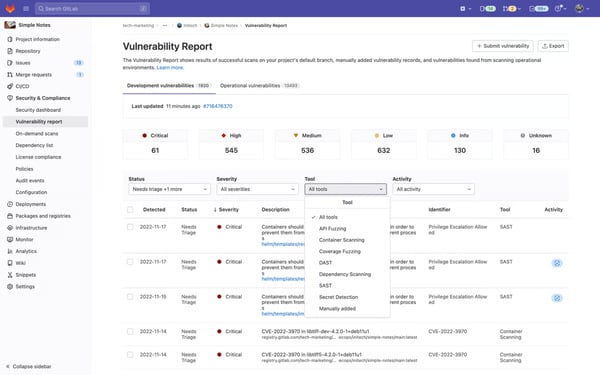
That same depth shapes how GitLab fits different teams. For very small or lightweight projects, it can feel more substantial than simpler code-hosting tools, reflecting its focus on end-to-end workflows. Advanced configuration, such as custom runners, permissions, or self-managed environments, assumes a level of operational awareness that suits teams comfortable owning their DevOps setup. In larger projects with extensive issue or merge request lists, the interface surfaces a high volume of information at once, prioritizing visibility and control over minimalism.
Administrative feedback follows a similar pattern. GitLab offers broad control over users, policies, and workspaces, which benefits growing organizations that need consistency and governance across teams. That level of control naturally assumes intentional management as environments scale and workflows become more complex.
Where GitLab consistently delivers is in how well it preserves context across the entire development lifecycle. Traceability is one of its strongest through-lines. Its highest-rated capabilities, Bug History (89%), Data Retention (89%), and User Feedback tools (88%), reinforce how rarely information gets lost across repositories, issues, and pipelines. Reviews consistently reflect this: GitLab isn’t just a place to store code, but a shared system of record that supports planning, execution, and delivery without breaking continuity.
After weighing both user feedback and my own experience, I’d recommend GitLab to teams that want a single platform to manage code, pipelines, security, and collaboration without compromise. It’s especially well-suited for small and mid-sized teams that want enterprise-grade DevOps discipline without excessive tooling overhead, and for engineering organizations that value structure, visibility, and confidence from commit through production.
"The all-in-one setup is probably its biggest win. You get Git repos, CI/CD, issue tracking, and project management in one place. No jumping between tools. The CI/CD pipeline system is solid once you get it running. The YAML config gives you good control, and the built-in runners work well for most projects. Issue tracking integrates nicely with merge requests. You can link branches to issues automatically, which keeps things organized. GitLab's pretty straightforward to get running. The community edition has good forum support, and paid tiers get direct help. Once your team gets used to it, GitLab becomes the everyday tool for everything."
- Gitlab review, Sujal S.
“While GitLab is powerful, it can feel heavy for smaller projects. The initial setup for CI/CD runners and permissions can be a bit complex, especially for new users. Occasionally, pipeline execution speed slows down for larger repos, and the pricing for premium tiers can be high for startups. Also, the UI could load faster when dealing with large numbers of issues or merge requests.”
- Gitlab review, Sumeet S.
| Bug tracking software | G2 rating | Free plan | Ideal for |
| Jira | 4.3/5 | Yes. Free plan (up to 10 users, 2GB storage) | Agile teams managing complex engineering work |
| LogRocket | 4.6/5 | Yes. Free plan (1,000 sessions/month, 1-month retention) | Visual debugging and real user insight |
| ClickUp | 4.7/5 | Yes. Free forever plan | Customizable work management across teams |
| GitHub | 4.7/5 | Yes. Free plan | Collaborative version-controlled software development |
| Backlog | 4.6/5 | Yes. Free plan (1 project, 10 users) | Simple, structured bug tracking workflows |
| monday dev | 4.7/5 | No | Flexible, visual software delivery alignment |
| HackerOne Platform | 4.5/5 | Yes. Free for open-source projects (Community edition) | Security-focused teams running bug bounty & vulnerability disclosure programs |
| Bugcrowd | 4.4/5 | No | Enterprise organizations outsourcing crowdsourced security testing |
| Kualitee | 4.6/5 | Yes. Free “Growth” plan | QA teams wanting structured defect lifecycle management & integrations |
| GitLab | 4.5/5 | Yes. Free plan | DevOps teams looking for an all-in-one platform from code to CI/CD |
*These bug tracking software products are top-rated in their category, based on G2’s 2025 Grid® Report. All offer custom pricing tiers and demos on request.
Got more questions? G2 has the answers!
If development happens deeply inside Git workflows, GitHub or GitLab will feel more natural. For teams running Agile programs with complex delivery workflows and reporting needs, Jira remains the strongest choice for structured planning and enterprise visibility.
Backlog and monday dev offer quicker onboarding and automation without heavy setup. They’re ideal if you want to move away from spreadsheets and Slack-driven bug tracking without the overhead of enterprise admin work.
Yes, platforms like HackerOne and Bugcrowd include structured triage, reward programs, and enterprise governance for vulnerability reports. They’re better for teams prioritizing penetration testing and responsible disclosure rather than standard QA bugs.
Jira, ClickUp, and GitLab provide deeper automation across CI/CD, release pipelines, sprint changes, and ownership SLA tracking. Teams with heavy delivery pipelines benefit most from these automation models.
Most modern platforms connect with Git services, CI/CD tools, session replay tools, and collaboration systems like Slack. Jira, GitHub, and GitLab offer the deepest, developer-native integrations with code commits, branches, and release metadata.
Developer-centric tools (GitHub, GitLab) optimize for code traceability and CI alignment. QA-centric tools (Kualitee, Backlog, monday dev) focus on test cycles, version traceability, and visible defect workflows for cross-functional teams.
All major tools support CSV/Excel imports and Jira migration templates. Platforms like ClickUp and Backlog are easier to migrate into because they require less upfront configuration before teams get productive.
Governance, SSO/SAML, role-based access, audit logs, data residency options, performance at scale, and structured workflows. Jira and GitLab consistently meet these enterprise evaluation requirements.
Tools like LogRocket integrate directly with Jira, GitHub, and others to attach session context, UI actions, and network logs to issues, helping teams eliminate “can’t reproduce” bugs and reduce resolution times.
If cross-functional teams collaborate closely (product + QA + engineering), ClickUp and monday dev provide stronger alignment. If teams prefer specialized tools, Jira + GitHub/GitLab is a powerful modular stack.
If there’s one takeaway from comparing the best bug tracking software, it’s that the right tool doesn’t just help you log problems. It helps you solve them faster, communicate more clearly, and ship with far more confidence. The strongest platforms don’t drown you in data; they give you visibility into what’s breaking, why it’s breaking, and how to prevent it from breaking again.
Whether you’re a small team juggling rapid releases, a growing product org trying to bring order to scaling complexity, or an enterprise running large-scale QA processes, there’s a solution built for your workflow. And as software becomes more distributed and user expectations rise, relying on ad-hoc spreadsheets or scattered bug reports isn’t sustainable anymore. Modern teams need systems that keep defects traceable, priorities aligned, and release cycles predictable.
So choose the tool that fits your team’s rhythm, your tech stack, and the kind of software you want to ship. Because in today’s development world, product quality isn’t just about writing good code; it’s about catching issues early, learning from them quickly, and building a process that scales as fast as your ambition.
Looking to level up your QA program? Explore leading test management tools on G2 to improve test coverage, streamline execution, and ship releases with confidence.

Tired of lost bug reports and endless email threads?
 by Washija Kazim

Recently updatedFall 2026 Grid® Report · August 25, 2026 This guide was last updated on...
 by Keerthi Rangan
After testing, I found ClickUp, Connecteam, Hubstaff, monday AI Work Platform, QuickBooks Time...
 by Shashank D Shastry