/DarshayitaThakur-OrangeBG.webp?width=400&height=150&name=DarshayitaThakur-OrangeBG.webp)


This guide was last updated on January 18, 2026. A newer report has since been published. The tools below reflect the scores from G2's Summer 2026 Grid® Report.
Based on verified G2 reviews and the latest Grid® placement.
The tools below have also been exhaustively tested and evaluated, and continue to hold their place among the best Applicant Tracking Systems (ATS) on G2.
I’ve worked closely with marketing, research, and growth teams that rely on target audience intelligence to shape campaigns, make product decisions, and justify big budgets. They often struggle with surface-level insights that fail to explain why customers behave the way they do.
That’s why I evaluated more than 20 best audience intelligence platforms based on verified G2 reviews and user feedback. I looked for platforms that go beyond basic demographics to offer rich behavioral and psychographic insights, strong audience segmentation, and the ability to connect insights across channels.
According to G2 reviewers, the best audience intelligence software have flexible dashboards, intuitive interfaces, predictive insights, and AI-assisted analysis that help recognize patterns without requiring constant manual intervention.
Whether you’re building personas, monitoring audience shifts, activating real-time segments, or defending strategy and budgets with data, this guide is designed to help you the best audience intelligence solutions that truly fits how you work and the decisions you need to make.
GWI: Best for global consumer insights at mid-market scale
Offers survey data from over 3 billion people across 53 markets, ideal for quick profiling based on audience attitudes, habits, and interests. ($1500 /user/year)
Brandwatch Consumer Intelligence: Best for social listening and brand mention tracking
Delivers AI-enriched data from over 100 million sources with dashboards, Boolean search, and real-time trend tracking. (Custom pricing)
Adobe Analytics: Best for customer journey analysis and custom reporting
Captures real-time behavioral data and uses AI to uncover audience patterns, friction points, and customer journey insights. (Custom pricing)
Meltwater: Best for global media and social media coverage analysis
Tracks millions of online sources in real time for sentiment analysis, share of voice reporting, influencer identification, and brand mention tracking. (Custom pricing)
YouScan: Best for visual social listening and image recognition
Uses conversational AI for social listening and visual analysis to interpret consumer behavior in images. (Pricing from $499/mo)
Adobe Real-Time CDP: Best for real-time customer data unification
Unifies customer data in real time, enabling precise segmentation, instant activation, and personalized experiences at scale. (Custom pricing)
Salesforce Data 360: Best for real-time personalization at enterprise scale
Improves responsiveness with real-time data processing, enhances personalization with advanced segmentation, and 360° customer profiles. (Consumption-based credit model pricing)OMNA from Stirista: Best for real-time identity resolution and omnichannel targeting
Offers privacy-compliant audience insights, cross-device tracking, and strong connected TV (CTV) match rates. (Custom pricing)
* These audience intelligence platforms are top-rated in their category, according to G2's Winter 2026 Grid Reports. I have included pricing information for tools that publicly share their pricing plans.
I’ve seen firsthand how fragmented data, outdated surveys, and disconnected dashboards can slow down teams. That’s why I focused on platforms that help teams move faster without sacrificing depth of insights into audience behavior.
Users expect their audience intelligence platforms to help them understand who their audiences are, how they behave, what motivates them, and how those insights translate into action, often in real time. Advanced teams also look for predictive segmentation and analysis coupled with AI-assistance.
According to Future Market Insights, the audience intelligence platform market is valued at $8.2 billion in 2025 and is projected to reach $34 billion by 2035, growing at a strong 15.3% CAGR, highlighting how quickly these tools are becoming essential for data-driven marketing and customer understanding.
The eight audience intelligence platforms I recommend for 2026 consistently stood out for their ability to turn complex data into easy-to-visualize dashboards and actionable insights. Each one serves a slightly different need, but all of them help teams move beyond surface-level metrics and build a clearer, more confident understanding of their audiences.
These platforms demonstrate strong real-world traction, with an average user adoption rate of around 63%, underscoring their practical value across marketing, research, PR, and analytics teams.
To identify the best audience intelligence systems, I analyzed real user reviews on G2 to see how marketing, research, and PR teams use them in practice. This helped clarify which platforms consistently deliver value and which tend to fall short.
I evaluated how each platform supports key use cases, whether it's tracking brand mentions in real time, analyzing sentiment, identifying visual and textual trends, or setting competitor benchmarks.
To dig deeper, I used AI to comb through the latest G2’s Grid Report and user feedback to compare customer segments served, dashboard quality, visualization details, advanced filtering options, and overall satisfaction across these platforms.
This guide includes screenshots from vendor G2 pages to show what these audience intelligence platforms actually look like in use.
As I combed through G2 reviews for the best audience intelligence tools, a few themes kept surfacing. Users want depth over vanity metrics, real-time over static dashboards, and tools that are actually usable across teams.
These criteria shaped how I evaluated each audience intelligence platform in this list.
The list below contains genuine user reviews from our Audience Intelligence Platforms category page. To qualify for inclusion in the category, a product must:
*This data was pulled from G2 in 2026. Some reviews may have been edited for clarity.
According to G2 Data, I found that Global Web Index (GWI) is used by 45% of mid-market and 31% of enterprise teams to quickly analyze consumer audiences, uncover market trends, and inform their marketing strategies.
As an audience intelligence platform, GWI provides access to a massive global consumer survey, covering almost 3 billion people across 50+ markets. This makes it feasible for marketers like me to analyze rich audience data on one platform.
GWI’s data depth and breadth are another big theme in the reviews. Users love that they can pull extensive and granular demographic and psychographic data on any audience. These resources have become a go-to for building personas and backing up sales pitches.
One aspect that stood out to me from G2 reviews is how intuitive and user-friendly the interface is for such a powerful tool. Many reviewers noted that everything is laid out clearly, with drag-and-drop filters, logical menus, and customizable dashboards, making it easy to build target segments.
As users explore the platform more deeply, the strength of its analysis tools becomes more apparent. GWI makes it easy to cross-tabulate behaviors, beliefs, and attitudes or compare one audience segment against another.
Users appreciated GWI’s new AI-powered Spark assistant, where you can simply ask questions and get insights. One highlighted how the AI-assistant will add a whole new layer of ease when it comes to research.
Personally, I find it reassuring when a software company invests in customer support, and GWI seems to deliver on that. Users frequently praise the team's helpful guidance and responsive support. Additionally, the platform offers webinars that feature trends and insights specifically designed to assist users.
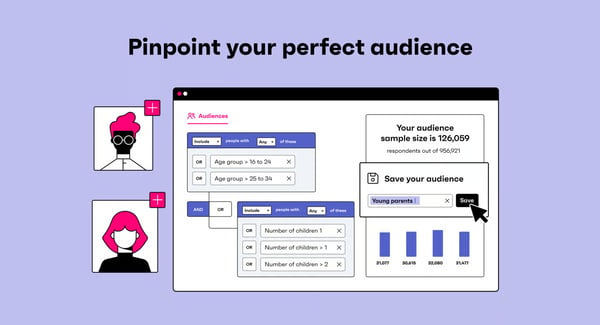
GWI packs a lot of data and features, which is ideal for teams that want to explore deep audience research. That said, some G2 reviewers mention that if you’re newer to research platforms or only need quick, lightweight insights, the amount of information can feel like a lot at first, so it helps to plan a little onboarding time upfront. Once you’re oriented, navigation gets easier and the depth of insights becomes a clear advantage.
Some users note opportunities for expanded insights in more niche topics or smaller markets.
Overall, GWI is widely regarded for its intuitive interface, comprehensive global consumer data, quick audience insights with the help of AI, and responsive customer support, making it an ideal platform for agencies, researchers, and marketing teams who need to deeply understand their audiences and plan data-driven campaigns.
"GWI shines with its extensive and in-depth consumer data, offering a truly global perspective that's invaluable for understanding diverse audiences. The platform's strength lies in its ability to provide rich, granular insights into consumer behavior, attitudes, and demographics, which empowers businesses to move beyond assumptions and make data-driven decisions. I particularly appreciate its user-friendly interface and customizable dashboards, which streamline the process of segmenting audiences and extracting actionable intelligence for marketing strategies."
- GWI review, Jodie C.
"I do not like how most questions are the same for every country that GWI operates in. Because of this, some questions do not really work as well for the country I operate in. It would be better to make questions different for every country with answer options that are relevant for that specific market."
- GWI review, Jan B.
Leading an enterprise marketing or insights team? GWI, Adobe Analytics, and Demandbase One top the rankings when it comes to audience intelligence at enterprise scale. See the full breakdown by satisfaction, support, and ease of use in G2's enterprise audience intelligence rankings for 2026.
Brandwatch Consumer Intelligence is widely adopted by larger organizations. 35% of its users are mid-market teams, and another 35% are enterprises. Based on my evaluation, the platform excels at capturing brand mentions in real time, which is invaluable for understanding how people feel about your brand or campaign at the moment.
Users love that they can collect conversations from virtually the entire social web and analyze them in one hub. They prefer using the platform to gain a 360° view of consumer sentiment and spot emerging trends.
I found that reviewers frequently highlight how powerful the tool feels while remaining easy to use once they become familiar with it. Brandwatch’s intuitive dashboards and flexible query builder allow users to navigate the platform confidently and customize views to their specific needs.
The query builder’s support for advanced Boolean logic and detailed filters makes it simple to refine datasets and uncover precise audience segments. This strength is reflected in Brandwatch Consumer Intelligence, earning an 89% score for advanced filtering and visualisations, underscoring how central these capabilities are for users.
I found teams leveraging Brandwatch to compare their brand’s share of voice and sentiment against competitors side-by-side. It can generate charts and trend lines that make it simple to see where you stand in the market and how consumer perception differs between brands.
As someone who often needs to craft data-driven reports, being able to pull a quick chart on how we stack up against a rival, in terms of buzz or sentiment, is incredibly valuable. Brandwatch has also been investing in AI capabilities to make insights more accessible.
Another aspect users frequently appreciate is the comprehensive and flexible nature of the analysis. People are using it for everything from brand monitoring and PR crisis management to market research and competitor analysis.
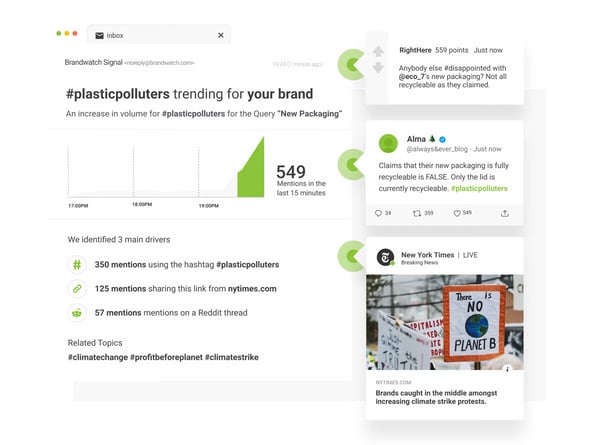
Brandwatch offers a broad set of analysis tools, which can require a higher level of familiarity with advanced queries and filters for teams new to social listening platforms.
Brandwatch delivers broad media and social coverage, which works well for teams tracking large-scale conversations across major platforms. That said, some G2 reviewers mention that niche or region-specific sources may not always be covered out of the box, requiring coordination with Brandwatch to add them.
Overall, based on my evaluation, Brandwatch Consumer Intelligence’s blend of real-time monitoring, historical data, and AI-driven analysis makes it an invaluable platform for anyone who needs to stay on top of public opinion and online trends.
Its strengths lie in its comprehensive global data coverage, the ability to quickly surface actionable insights from millions of online conversations, and a feature set that balances powerful analytics with approachable usability.
"The Brandwatch Consumer Intelligence platform is very comprehensive, offering a wide range of features that meet various needs, not leading me to look for other providers. The tool stands out for its intuitiveness, making configuration and use uncomplicated. It is highly useful for monitoring social networks, brands, and competitors, as well as helping in crisis management and providing better results and insights to clients. I value the tool's ability to consume and build complex queries using Boolean logic, which enhances the collection of valuable information in the world of social networks. The tool has remarkable power and is ideal for various contexts, being both powerful and versatile."
- Brandwatch Consumer Intelligence review, Bianca Cristina O.
"One challenge I’ve encountered with Brandwatch Consumer Intelligence is the steep learning curve that comes with its wide range of features. Although the platform is quite powerful, it can take a while to become comfortable with its advanced tools and to tailor dashboards to specific needs. I’ve also noticed that some reports can feel overwhelming when working with particularly large datasets, which means it takes additional effort to filter and pinpoint the most relevant insights. However, after getting used to the system, I find that the platform’s robust capabilities more than make up for these initial hurdles."
- Brandwatch Consumer Intelligence review, Nilesh P.
Explore the 10 best social media listening tools for 2026
Adobe Analytics is used by 46% of enterprises and 32% of mid-market companies to dig deep into customer journeys and drive data-driven decision-making.
As an enterprise-level digital analytics platform, Adobe Analytics empowers marketing and product teams to collect and analyze vast amounts of web and app data across multiple channels.
I found users leveraging the platform to understand how customers navigate their digital properties, from first touchpoints to conversion, and to generate flexible, detailed reports on consumer journeys that inform marketing strategies and optimize user experience.
Many reviewers appreciate the balance Adobe Analytics strikes between advanced capabilities, like real-time reporting and segmentation, and an interface that supports a drag-and-drop canvas to build queries, custom dashboards, and visualizations.
This combination allows teams to make smarter, faster decisions while still benefiting from enterprise-grade analytics, backed by strong documentation and customer support.
I have seen users highlighting how easy it is to track customer behavior and journey in real time, organize and categorize data, and build custom dashboards that focus on the metrics that matter most. The ability to analyze data across devices, such as desktop, tablet, and mobile, helps teams get a complete view of user journeys.
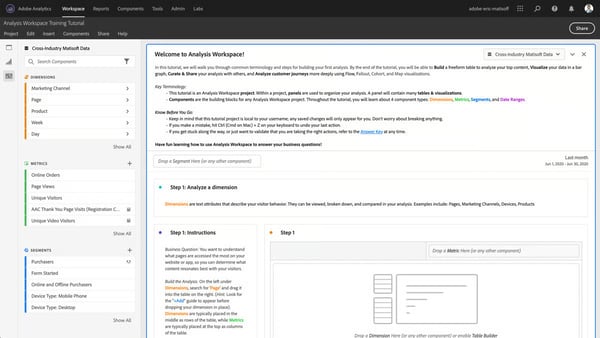
Adobe Analytics offers deep visibility into data, which is ideal for teams that want granular control over tracking and reporting. Some users mention that the volume of available properties and custom conversion variables, or eVars, can make it harder to quickly find specific details. With experience and better configuration, teams are able to navigate this depth more efficiently.
The platform is built to handle large volumes of complex data, but reviewers observe occasional lag or slower load times when working with large datasets or dashboards with many visualizations. This performance impact typically appears in more advanced, data-dense use cases rather than everyday analysis.
Based on G2 reviews, Adobe Analytics excels at providing enterprises with a complete picture of digital customer behavior and the tools to act on that information. This makes it an ideal platform for large marketing and analytics teams that want to understand their customers, attribute marketing impact across channels, and continually refine the user experience.
"It is one of the most powerful data analytics and reporting tools I have come across. I love how easy it is to track user behavior and see what’s working on my website. The real-time reports are super helpful, and I can easily create custom dashboards to focus on what matters most. It helps me make smarter decisions quickly.”
- Adobe Analytics review, Gurunath J.
"The learning, especially for non-technical users or those transitioning from simpler analytics platforms like Google Analytics. Initial setup and configuration require substantial planning and expertise. Documentation, while extensive, can feel overwhelming or slightly outdated in parts. Additionally, the cost may be prohibitive for smaller teams or organizations without a clear data strategy."
- Adobe Analytics review, Abhishek G.
Pair your audience intelligence platform with the best customer journey mapping tools tools to understand a customer’s full experience using dynamic visualizations.
Meltwater is a G2 leader in PR and Marketing, helping teams monitor, manage, and enhance their reputation more effectively. What stands out to me immediately is that Meltwater positions itself as an all-in-one solution, bringing media monitoring, social listening, analytics, engagement, and influencer management into a single platform.
Users value being able to monitor brand mentions across both traditional media and social media without switching tools. It has partnerships for print and broadcast monitoring, and can listen to conversations in real time across social platforms like X (formerly Twitter), Facebook, Instagram, YouTube, as well as forums, review sites, message boards, comments, and hundreds of millions of blogs.
Besides monitoring coverage, Meltwater helps PR teams identify relevant journalists, outlets, and media contacts tied to specific topics or beats. Users value having media intelligence and outreach capabilities connected, since it streamlines pitching and relationship-building efforts with the right journalists.
I found users appreciating how the dashboards are sleek, intuitive, and easy to navigate, and help them visualize media impact and measure ROI for PR and marketing campaigns. Reviewers like the ability to monitor competitor activity, and quickly share reports with leadership.
Influencer marketing is another area where Meltwater differentiates itself, thanks to Klear, its influencer management solution. Many users like being able to have influencer marketing and social listening in one place. Users highlight the ability to discover and vet influencers from a global database of 35+ million creator profiles across major social platforms.
Meltwater consistently earns praise for its excellent customer support. Users love the prompt responsiveness and the availability of self-explanatory content. Many mentioned their appreciation for the quick onboarding, seamless integration, and frequent implementation of new features and enhancements.
Users frequently highlight Meltwater’s AI-driven capabilities, especially Mira AI, as a major value-add. They appreciate how AI helps surface patterns, summarize coverage, and speed up analysis that would otherwise be manual and time-consuming.
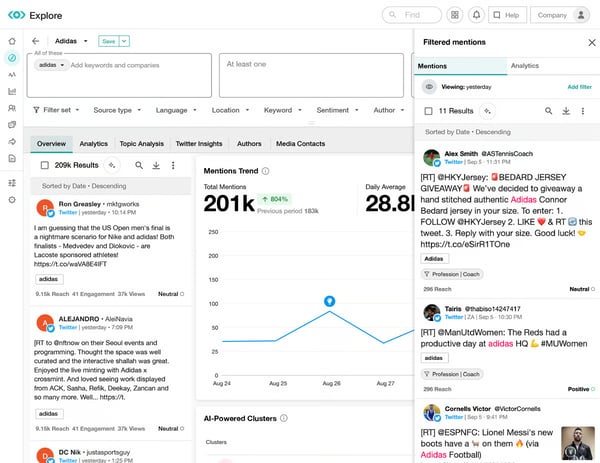
Mira AI adds an intelligent layer to the platform, but some reviewers mention that its value isn’t always immediately clear and teams might have to invest time in exploring the AI assistant to fully understand or apply it in day-to-day workflows.
Another area users talk about is data refinement and reporting flexibility. Meltwater does a strong job capturing large volumes of media and social data, but some reviewers mention that refining results, such as filtering out irrelevant mentions or customizing reports, can require manual oversight.
Overall, Meltwater is widely appreciated for its massive media and social coverage, integrated journalist outreach, AI-powered insights, and influencer management capabilities. It’s especially well-suited for organizations that want a single platform to manage brand intelligence, while maintaining the ability to report on impact and act on insights quickly.
"What we value most about Meltwater is its ability to give us a comprehensive, real-time view of our media presence. Their platform allows us to easily track earned media mentions, monitor key conversations through customized keyword searches and social listening, and distribute press releases directly to targeted journalists. The ability to export clear, usable data for campaign, event, and reporting purposes is a major asset for our communications work."
- Meltwater review, Lucas D.
"There are almost too many places where tools can live. It feels like monitoring, exploring, analyzing, media relations, etc, each has so many features within them, that sometimes it can be hard to remember where to perform a task or where a certain saved search or report is housed. I find myself toggling around a lot within the platform."
- Meltwater review, Emily B.
Related: If you’re looking for tools to track PR performance, here's our list of the best PR analytics software on G2.
According to G2 reviews, YouScan is a leading social and visual listening platform with 49% of users from mid-market organizations. I especially like its brand logo detection and visual content reporting capabilities that make YouScan stand out from its competitors in the audience intelligence platform space. With YouScan, users are uncovering insights that text-only audience intelligence platforms often miss.
A frequent mention among users is YouScan’s broad source coverage, particularly across visual-first platforms like TikTok, Instagram, and Facebook, which can be harder to access consistently in other social listening tools.
Users repeatedly highlight the platform’s intuitiveness and ease of use. YouScan gives them a clear view of conversation trends and brand presence without needing to manually sift through posts. YouScan makes analysis faster and more structured, largely due to its AI-assisted Insights Co-pilot, clean interface, and visual layout.
Reviewers also appreciate the variety of filtering options, especially around sentiment and visual content, which let teams drill into specific data segments with high precision. The automatic segmentation feature is applauded as a major time-saver, since it speeds up the process of reading and interpreting insights.
I observed users highlighting that charts are easy to understand, simple to adjust, and quick to export in different formats, which makes reporting more efficient than with other tools. Users appreciate that YouScan fits into existing workflows without needing a full rebuild because of its extensive integration capabilities.
Reviewers consistently praise YouScan’s customer support and onboarding experience. They state that the onboarding feels white-glove, with hands-on guidance and rich supporting materials that help teams adopt the platform more confidently.
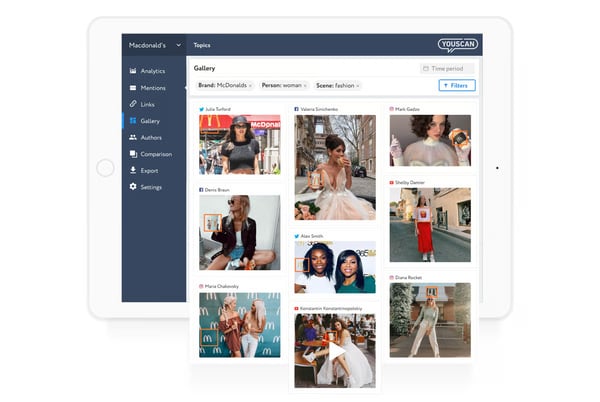
YouScan offers advanced configuration options that give teams a high level of control over analysis. However, some users mention that features like Boolean queries, topic setup, and historical time-range controls aren’t always intuitive at first and can require extra setup. Once users get familiar with the workflow, these tools become much easier to use and highly effective for deeper analysis.
The platform delivers strong value through its depth of features and capabilities, but pricing and access can be a consideration, particularly for smaller teams or more advanced use cases. However, many users share that the value they get over time makes the investment feel justified as adoption grows.
Overall, according to G2 reviews, YouScan is a visual-first social listening platform that goes beyond text to capture how brands appear in images and videos. Its strengths lie in image recognition, visual social media coverage, broad geographic sourcing, and cross-channel analysis. The platform is best used for brand monitoring, competitor analysis, crisis detection, and market research.
"I really like how fast and easy it is to work with YouScan. It helps us quickly analyze our brand, market, and competitors, and we always get clear and detailed results. The custom dashboards are super useful; we can easily display any data in a clean, ready-to-share format. The Visual Insights add-on is another great feature. It helps us detect important posts that include our logo in images, even when we aren’t mentioned directly in the text."
- YouScan review, Ksusha R.
"It would be great if the system worked faster when analyzing large amounts of data and offered more customization options."
- YouScan review, Daria A.
The audience intelligence platform features that teams rely on most perform differently across tools. Compare Adobe Analytics, YouScan, and more on G2 review data.
According to G2 Data, I found that Adobe Real-Time CDP is used by about 36% of enterprises and 43% of small businesses to unify customer data across systems, including websites, mobile apps, and CRMs, enabling real-time personalization at scale.
Users highlight that having online and offline data unified in one place makes it much easier to understand customer behavior holistically and tailor campaigns accordingly. As per my evaluation, this unified view supports more accurate segmentation, clearer insights, and consistent personalized messaging across channels.
I observed that reviewers also emphasize the platform’s real-time segmentation and activation capabilities, noting how quickly they can build targeted audiences and act on insights without delays between analysis and execution.
Powered by Adobe Sensei AI, Adobe Real-Time CDP further enhances this process through predictive segmentation and intelligent audience targeting, helping teams personalize experiences in the moment while operating at enterprise scale.
Adobe Real-Time CDP feels intuitive and easy to use, especially once teams become familiar with the interface. The segmentation options are described as strong and flexible, enabling marketers to create nuanced audiences without excessive manual effort. Pre-built connectors and automation reduce the burden of data handling, which reviewers say speeds up adoption and day-to-day workflows.
I found users consistently highlight how seamlessly Adobe Real-Time CDP integrates with the broader Adobe Experience Cloud. For teams already using Adobe Analytics, Target, or other Adobe tools, this tight integration makes insights immediately actionable and reduces friction across the marketing stack.
The platform maintains strong privacy, consent, and compliance controls, giving teams confidence that customer data is governed responsibly while still being used effectively for marketing and engagement.
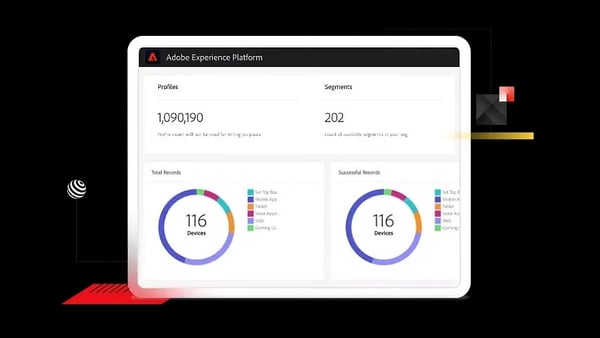
Adobe Real-Time CDP is positioned as a premium, enterprise-grade platform, and users note that licensing costs can add up as data volumes grow or additional channels and capabilities are enabled. For organizations with mature data strategies, the value justifies the investment, but teams with tighter budgets may need to carefully assess scope and rollout plans.
While integrations within the Adobe Experience Cloud are described as seamless, connecting Adobe Real-Time CDP with third-party platforms can require additional configuration or workarounds.
To summarize my evaluation, Adobe Real-Time CDP is widely regarded for its real-time customer data unification, robust segmentation and personalization tools, and its seamless integration with the Adobe Experience Cloud. It excels at giving companies a holistic, up-to-date view of their customers and the means to act on those insights instantly.
"Adobe Real-Time CDP makes it incredibly easy to unify data from multiple sources and create a single, reliable customer profile. The real-time capabilities are impressive, letting me activate audiences instantly and deliver personalized experiences across channels without delays. I also like how well it integrates with the broader Adobe Experience Cloud, which helps streamline marketing workflows and gives our team better insights into customer behavior. The interface is fairly intuitive, and the pre-built connectors save a lot of time compared to manual data handling."
- Adobe Real-time CDP review, Elizabeth W.
"The main drawbacks of Adobe Real-Time CDP are its high cost, steep learning curve, and heavy reliance on the broader Adobe ecosystem. It can be complex to set up, requiring significant technical expertise and data engineering resources, which might slow down time-to-value for smaller teams. Licensing fees can quickly escalate, especially when scaling to large data volumes or multiple channels, and full functionality often depends on integrating other Adobe products — making it less flexible if you want a more standalone solution."
- Adobe Real-time CDP review, Sankalp S.
While Salesforce is best known for its leadership in CRM, Salesforce Data 360 (formerly Salesforce Data Cloud) extends that strength into audience intelligence by bringing together real-time customer data for unified analysis and segmentation.
55% of the Salesforce Data 360 user base comes from enterprise organizations, reflecting its role as a foundational data platform for companies managing large volumes of customer data.
I observed that reviewers frequently describe using Salesforce Data 360 to unify audience data from multiple systems, gain a real-time 360° view of customer behavior, and support more personalized and data-driven marketing strategies across channels.
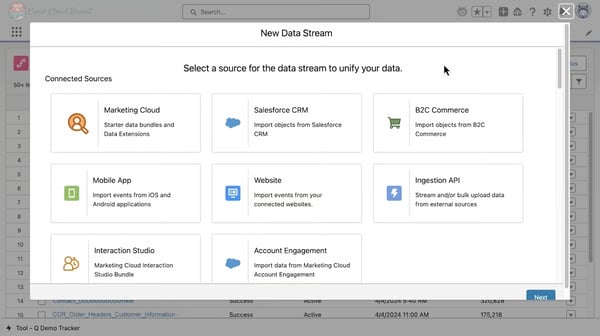
A commonly praised area is Salesforce Data 360’s integration and scalability. The platform’s zero-ETL architecture and out-of-the-box connectors make zero-copy data migration seamless.
The ease of integration allows users to bring together customer data from disparate sources, including CRM, digital touchpoints, and external systems, into unified customer profiles.
I appreciate that this unification makes it possible to analyze audiences in real time, rather than relying on static or delayed data. For teams already operating within the Salesforce ecosystem, Data 360 becomes the system that connects fragmented data into a single, consistent view of the audience.
Reviewers frequently highlight Salesforce Data 360’s real-time segmentation and audience activation capabilities as its core strength. Users note that the platform makes it easier to create dynamic segments using a wide range of data points and criteria. The identity resolution engine reduces duplicate records and improves personalization across channels.
Users mention that AI-powered analytics help them better understand customer behavior, forecast outcomes, and support more efficient, data-driven decision-making. Salesforce Data 360’s built-in AI capabilities, particularly its use of Salesforce Einstein AI to support predictive insights and next-best action, are favored by many reviewers.
Salesforce Data 360 is positioned for enterprise use, and reviewers note that cost and implementation effort are important considerations.
Usage-based pricing, add-ons, and the need for technical expertise mean the platform is best suited for teams with dedicated data and marketing operations resources.
Overall, based on my evaluation, Salesforce Data 360 is widely regarded as a robust audience intelligence platform for enterprises that need real-time, unified customer data at scale. Its strengths lie in data unification, dynamic segmentation, AI-assisted insights, and tight integration within the Salesforce ecosystem as well as with external systems.
"What stands out most about Salesforce Data Cloud is its ability to unify diverse customer data sources into a single, real-time customer profile. This comprehensive 360-degree view enables personalized marketing, sales, and service experiences driven by AI and analytics. Key strengths include:
- Seamless integration of data from multiple systems, including CRM, marketing, commerce, and more.
- Powerful real-time segmentation and audience activation for targeted campaigns.
- Built-in Einstein AI capabilities for predictive insights and next-best actions.
- Scalability and flexibility to tailor data models and workflows to unique business needs."
- Salesforce Data 360 review, Jasjit S.
"Initial Learning Curve: The platform has a steep learning curve, especially for teams unfamiliar with data lakehouse concepts or Salesforce-native data architecture.
Cost Management: Usage-based pricing can be difficult to predict, especially when data volumes scale rapidly. Organizations need to monitor usage closely to avoid unexpected costs."
- Salesforce Data 360 review, Pramod P.
According to G2 Data, I found that approximately 61% of OMNA’s user base consists of small businesses, with the remaining users primarily coming from mid-market companies. This suggests OMNA from Stirista is especially popular among leaner marketing teams and agencies.
OMNA is primarily used to identify and reach target audiences across digital channels quickly and utilizes data-driven insights to inform campaigns.
OMNA sets itself apart with the OMNA Identity Graph, its extensive real-time data engine. This graph provides a comprehensive, up-to-the-second view of nearly everything marketers might want to know about their audience.
The Identity Graph captures who consumers are, where they work, how they spend money, what devices they use, and even where they go throughout the day, with data updates happening every second.
OMNA’s constantly refreshed data means users can base marketing strategies on the most current audience information available, instead of relying on guesswork and outdated insights.
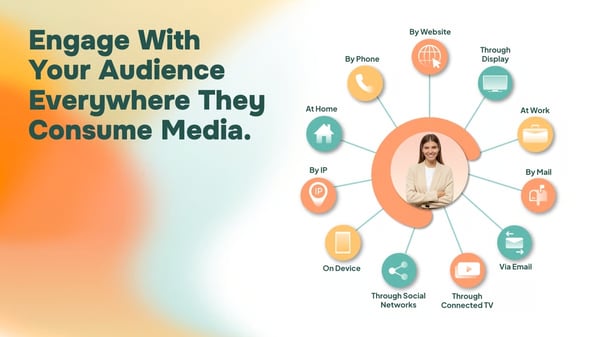
The Viewership Graph connects CTV viewership data across all devices within a household and matches it to IP addresses alongside linear TV data, giving teams a more complete picture of how audiences consume content.
The IP/Device Graph ties together webs of connected devices back to an individual, helping marketers understand how people move across screens and platforms throughout the day.
Together, these graphs support more accurate household-level and individual-level audience intelligence, which is especially valuable for omnichannel planning and TV-connected campaigns.
Another standout aspect of OMNA is the service and support that come with the platform. Numerous reviews praise the Stirista team for being responsive, knowledgeable, and truly invested in client success.
From G2 reviews, OMNA appears to meet user expectations well, with minimal friction. The limited feedback that does surface tends to center on potential enhancements such as added context or visibility in automated workflows, rather than core functionality gaps
G2 reviewers appreciate OMNA’s niche audience targeting and find the niche search areas useful. A small number of reviewers mention that teams seeking a higher volume of niche records might want broader search results. But from what I saw in recent reviews, OMNA appears to be improving the experience as the product matures.
Overall, based on my evaluation, OMNA combines an unparalleled real-time identity graph with powerful yet accessible analytics, all supported by a responsive team that helps ensure client success.
This makes OMNA an ideal platform for brands, agencies, and marketing teams who need to accurately understand and reach their audiences through digital ads, email, CTV, and other similar channels.
"The team was excellent in assisting us to identify our target audience and connect with the people essential to our campaign's success."
- OMNA from Stirista review, Verified User in Marketing and Advertising.
"I'm not a huge fan of the count process, with respect to the automation. It's impersonal & not super helpful when it removes the original request & or any interactions thereafter."
- OMNA from Stirista review, Verified User in Marketing and Advertising.
Got more questions? G2 has got the answers.
Adobe Analytics uses advanced analytics and AI-driven insights to optimize marketing strategies. Brandwatch provides AI-enriched consumer intelligence from social and online sources for campaign decisions. Meltwater is an all-in-one platform for media, news, and social analytics to monitor and analyze audience engagement.
Adobe Analytics, GWI, and Brandwatch Consumer Intelligence consistently rank high for deep market and competitor audience analysis.
Adobe Analytics allows in-depth audience segmentation and journey mapping. It also provides psychographic insights that help understand audience interests and affinities.
Adobe Analytics provides powerful real-time segmentation and predictive analytics across web and mobile for detailed demographic and behavioral insights. GWI enables global, deep profiling to segment and analyze audience demographics and behaviors in 50+ markets.
Adobe Analytics, GWI, and Brandwatch Consumer Intelligence get top scores for identifying high-value audience segments. They offer advanced real-time analytics, AI-driven social and consumer insights, and global research capabilities for in-depth, high-value audience segmentation.
Top-rated B2B audience intelligence solutions include GWI for B2B buying insights, Adobe Real-Time CDP for unified actionable profiles, and Omna by Stirista, which enables access to high-value audiences via its ABM graph.
You Scan uses AI-powered social listening, demographic and psychographic analysis, image recognition for visual listening, and the Insights Copilot conversational AI for extracting key findings.
Meltwater, Brandwatch Consumer Intelligence, Adobe Analytics, and Adobe Real-Time CDP all offer real-time insights into audience behavior and interests.
For market research, GWI stands out as the best audience intelligence platform, thanks to its global consumer data coverage, flexible custom survey tools, and instant AI-powered insights.
Brandwatch integrates with advertising systems like TikTok and LinkedIn, while Adobe Analytics enables cross-platform targeting within the Adobe ecosystem.
You no longer have to collate reports or manually monitor trends to keep up with your audience. The audience intelligence platforms covered here bring clarity to complexity, helping teams move from scattered data points to a connected, real-time understanding of who their audiences are and how their tastes are evolving.
What stood out to me most is how differently these platforms support insight-driven teams. Some excel at global consumer research, others shine in social and visual listening or real-time identity resolution, and several focus on unifying data from different sources or personalization at scale.
I evaluated their strengths and trade-offs so you can skip the guesswork. Now it’s time to compare options that align with your research and marketing goals, and choose an audience intelligence platform that helps you stay ahead of your audience instead of chasing them.
Looking to protect and grow brand trust? Explore the best online reputation management tools.
/DarshayitaThakur-OrangeBG.webp)
GWI, Adobe Analytics, and Adobe Real-Time CDP are the best audience intelligence platforms for...
 by Krithika Sathyamoorthy
The best audience intelligence platforms come with features such as audience insights, buyer...
by Krithika Sathyamoorthy

Recently updatedSummer 2026 Grid® Report · Published May 26, 2026 This guide was last...
.png) by Shreya Mattoo
by Shreya Mattoo