.png?width=400&height=150&name=Copy%20of%20G2%20Image%20(1).png)


Based on verified G2 reviews and the latest Grid® placement.
*Liked and disliked highlights are summarized from verified G2 user reviews. The tools below have also been exhaustively tested and evaluated, and continue to hold their place among the best Accounts Receivable on G2.
I evaluated 20+ tools to find the 7 best accounts receivable software for 2026. These include BILL AP/AR, Billtrust, PayPal Invoicing, DualEntry, HighRadius Accounts Receivables, Nickel, and Anchor.
I often imagine building a bootstrapped brand. And one of the first things I think about is how I'd make sure customers pay on time, because a product can be good and still run out of cash waiting on invoices.
That worry sits squarely with the finance side of a business: keeping money moving, protecting margin, staying solvent.
So I went looking for the tools I'd actually lean on if it were my money on the line. I explored accounts receivable software that chases outstanding payments, sends reminders, and keeps customer credit in check, so DSO stays low and cash keeps flowing.
From there, I reviewed and evaluated the seven best accounts receivable tools using G2 Data and thousands of real user reviews. Let's see the tools it all led me to.
*These accounts receivable software are rated as top solutions in G2's Summer 2026 Grid Reports. I have included their standout features and starting pricing of paid plans for easy comparison.
My time in the business world put me close to the challenges finance teams face. I know the daily grind of managing subscriptions, credit bills, invoices, general ledgers, and customer installments that can pile up fast and make you lose track of your revenue.
That's where I'd point a finance team to the best accounts receivable software. It tracks daily sales outstanding (DSO) and then automates reminders so payments arrive on time.
My worry about customers paying on time wasn't unfounded, and here's the proof. 56% of US small businesses are owed money on unpaid invoices, an average of $17,500 each, and nearly half have invoices more than 30 days overdue. The fear is the median experience. That gap between work delivered and cash collected is exactly what this software exists to close.
Accounts receivable tools track what's owed, who owes it, and how long it's gone unpaid, and make sure cash keeps moving. My exploration centered on the features and integrations that handle that automatically.
I shortlisted seven top tools using G2's Grid Report for Accounts Receivable. From there I spent weeks analyzing the reviews behind each one, all built to help companies automate financial transactions, log cash transactions, and maintain digital ledgers to improve accuracy and collect payments faster.
Below, I lay out a balanced read on each tool's key features, pros and cons, market relevance, user satisfaction, and cost-effectiveness, so you can make an informed decision.
To get there, I drew on AI to summarize recurring themes, surface user sentiment, and compare how pricing lines up for small, mid-market, and enterprise buyers. I also cross-referenced each tool's G2 scores for satisfaction and market presence against the review patterns.
My read on each tool is built from G2 reviews, G2 Data and vendor documentation, so it reflects how a broad set of real users rate these products.
The screenshots used in this listicle come from each vendor's G2 page and public product pages.
When evaluating an accounts receivable tool, there are a few key features I prioritize to ensure it suits the needs:
Initially, I researched around 20+ accounts receivable software and narrowed my findings based on the above parameters to reach this shortlist.
The list below contains genuine reviews from the G2 Accounts Receivable Software category page. To be included in this category, software must:
*This data was pulled from G2 in 2026. Some reviews may have been edited for clarity.
BILL AP/AR is the platform a finance team reaches for when bills and invoices have outgrown a spreadsheet and a shared inbox. It's an accounts payable (AP) and receivable (AR) tool built for small and midsize teams and accounting firms, capturing what comes in, routing it for approval, and moving the money so the books stay current without manual rekeying.
On G2, it holds 4.4 out of 5 rating across 1,800+ reviews, with 91% rating it four or five stars. What stood out to me is where those reviewers sit. BILL's base clusters in accounting firms and small businesses (66%), and G2 Data puts its invoice approval feature above the category average, right at the center of what those teams use it for.
I kept seeing reviewers describe the same relief: the data gets captured automatically. You forward a bill to your BILL inbox or snap a photo, and it pulls the amount, the due date, and the line items, then suggests the GL account to code it to.
A majority of the reviews I read call it simple and intuitive, with G2 reviewers noting it's easy enough for less tech-comfortable staff to pick up. You upload bills, add vendors, and schedule payments without hunting through menus.
Approvals are where I think BILL pulls its weight for larger teams. You route each bill to the right approver and set who can enter, approve, or pay, so no one person touches every step. Several reviewers running multi-person finance teams point to this separation of duties as the reason invoices stop getting stuck, and G2 Data rates its approvals at the top of the features people actually use.
For bills that repeat, I'd point straight to the scheduling. You set a recurring payment once and BILL runs it each month on its own, which reviewers tie directly to saved hours and fewer missed due dates. A property manager paying the same 40 vendors every month stops re-creating the same payments and just checks that they went out.
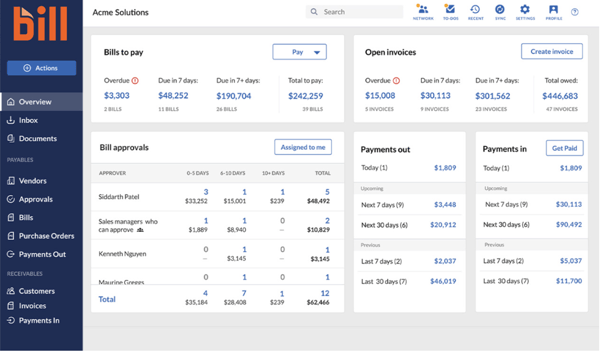
For distributed teams, the payoff I keep seeing is the shared record. Every action lands in one place, so the audit trail (who approved what, when a payment went out, proof it cleared) is visible without a phone call. G2 reviewers managing remote or multi-location books point to this as what keeps everyone on the same page.
Where BILL is strongest, to me, is having money-out and money-in under one roof. You can pay vendors, even ones who don't use BILL, send and track customer invoices, and watch cash move from one dashboard. Reviewers value being able to add any vendor and still pay electronically, and for a finance lead tired of switching between a bill-pay tool and a separate invoicing app, that consolidation is the point.
BILL's accounting sync runs cleanly for most teams, and for plenty of QuickBooks users it just works in the background. A few reviewers describe the sync occasionally creating duplicate vendors, or leaving an invoice open in BILL after it's marked paid in accounting software, usually when a vendor's details change or an entity switches from sole proprietor to LLC. If you process a lot of vendor changes, it's worth a periodic sync check; if your vendor list is stable, you may never run into it.
Day to day, most reviewers don't need to contact support, and when the product is working, it stays out of the way. The complaints I take see cluster from reviewers is when something breaks. Users on lower-tier plans describe slow responses and too many prompts before reaching a person, and G2's own satisfaction data puts BILL's quality-of-support score below the category average. For a time-sensitive payment, that lag is real, so if your team leans on fast help, weigh the plan tier that includes it.
BILL AP/AR fits the buyer I'd expect it to serve best: the accounting-first small or midsize finance team, or the firm keeping books for a roster of clients, that wants money-out and money-in on one reviewable rail.
"I like how BILL AP/AR captures all vendor invoices and credit card charges to route for approval, enter into our ERP, and process payments electronically. It has removed all the paper processes and manual steps that required in-person interaction. I find it easy to use and a great value for the services provided. The combination of website access and App access makes it easy to manage our business while traveling or away from my desk. The initial setup was so easy."
- BILL AP/AR review, P J A.
"I dislike that the accounts receivable integration sometimes fails for two-way sync. It leaves invoices open in BILL AP/AR even after they have been marked paid in QuickBooks."
- BILL AP/AR review, Alissa J.
For a broader view of how businesses manage purchasing alongside payments, you might also explore the best procure-to-pay platforms my colleague compared.
Billtrust is an accounts receivable platform built around a self-service customer portal, aimed at B2B finance teams that send a high volume of invoices and statements and want customers to pay without the back-and-forth. It runs invoicing, payment collection, and cash application from one place, so money owed turns into money received with less manual chasing.
On G2, it holds one of the highest customer satisfaction scores (98 out of 100), and across 500+ reviews, it sits at a 4.4 out of 5 rating. It has among the highest enterprise reviewers (44%) in this roundup and a heavy B2B base: accounting firms, construction, wholesale, and building-materials distributors, that lean on it to get invoices out and payments in.
The problem I'd say Billtrust is built to kill is the copy-request treadmill. Its customer portal lets your clients log in to view their invoices and statements, see what's paid and what's open, and pay, without emailing your team for a copy. G2 reviewers describe customers self-serving the answers that used to fill an AR inbox. For a team fielding constant "can you resend that invoice" requests, that shift is the whole point.
The first thing I noticed across the reviews is how easily people move around it. A majority call it easy to navigate, hopping between customers and their invoices without a manual.
Getting bills out the door is where it goes deeper. Billtrust sends invoices and statements automatically instead of one-by-one, which reviewers tie to far less manual send-and-track work. For a business billing hundreds of customers a month, scheduled presentment replaces a recurring chore.
Once payments arrive, the cash application is what saves the most time. Billtrust matches incoming payments to open invoices on its own, and reviewers running high check volume point to this as the reconciliation they no longer do by hand. When a customer pays five invoices with one payment, the software splits and applies it instead of an analyst untangling it.
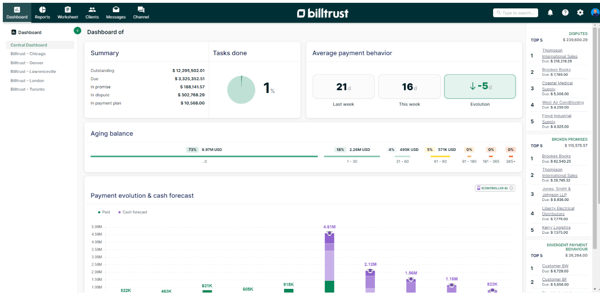
For the collections side, the payoff I keep seeing is status at a glance: what's paid, what's overdue, and how far past due. Reviewers on collections teams use that view to decide who to chase first, so the day starts with the oldest, largest balances instead of a guess.
Where it fits an enterprise stack is the ERP sync. Reviewers on NetSuite connect it so invoices and payments flow both ways without re-keying, and for a finance org standardized on an ERP, that keeps Billtrust from turning into another data island.
Pulling up a customer's invoices and statements is one of Billtrust's real strengths, so this is a narrow gripe. Some reviewers say searching for one specific invoice by its number can be clunky, and they often fall back to looking it up by customer name. If your team retrieves invoices by number all day, that friction is real; if you work account by account, you'll rarely bump into it.
While the built-in reporting covers day-to-day AR fine, a few G2 reviewers on smaller teams note that deeper dashboards and custom analytics sit on higher-tier plans, and G2's feature data shows analytics among Billtrust's softer areas. If you want rich out-of-the-box dashboards on an entry plan, weigh that; if you're on an upper tier or already run a BI tool, it won't be a problem.
Among others, the buyer I'd send first to Billtrust: a B2B finance team that bills at volume and wants customers to self-serve invoices, statements, and payments instead of filling the AR inbox. If your receivables run on high invoice counts and repeat customers, Billtrust is built for exactly that rhythm.
"The automatic transmission of invoices and statements makes my AR work much less complicated. I don’t have to manually send invoices to customers anymore; it sends them automatically, along with the statements."
- Billtrust review, German R.
"Sometimes searching for a client's name is tricky, and you have to use a few different ways to find someone. It would be helpful if the search feature was more intuitive and didn't necessarily require specific details like a person's middle initial."
- Billtrust review, Brian I.
Related: Check out the 9 best accounting software programs that my peers reviewed and evaluated for managing multiple accounts for internal and external clients and partners.
PayPal Invoicing is the fastest way for a freelancer or very small business to turn an agreed price into a paid invoice. It's the invoicing layer on top of the PayPal account you and your clients probably already have, so you can build a clean, itemized invoice, send it, and collect by card or PayPal without setting up anything new.
Across more than 180 G2 reviews, it holds a 4.4 out of 5 rating, with 88% likely to recommend it, and G2 Data rates its invoices and payments features above the category average. And it has the largest market presence of any product in the Accounts Receivable category, which for an invoicing tool means a payment method clients already trust. What I read behind those scores is a tool freelancers, consultants, and small agencies reach for because it's instant to start and familiar to whoever is paying.
What issue I'd say PayPal solves fastest is getting a professional invoice out the door. G2 reviewers describe building an itemized invoice and sending it in minutes, several noting their first one went out within 10 minutes of signing up. For a freelancer who just agreed on a price over email, that speed is the appeal: agree, invoice, done.
What I noticed next is how little there is to learn. A majority of reviewers call it simple enough to use with no tutorials or documentation, and G2 Data puts its ease of use right at the category average (92%). For someone who invoices a few times a month and has no interest in learning software, that low friction is why they stay.
The paying side is easy too, which is the payoff I'd flag next. Your client clicks a link and pays by card or PayPal balance without creating an account, and reviewers tie that low-friction checkout to getting paid faster. When the buyer doesn't have to sign up for anything, invoices clear quicker.
Once an invoice is out, you can see exactly where it stands, sent, viewed, paid, or overdue, without emailing to ask. Reviewers lean on that status view to know who actually owes them, and I'd point a solo operator to it as the thing that replaces a mental checklist of open invoices.
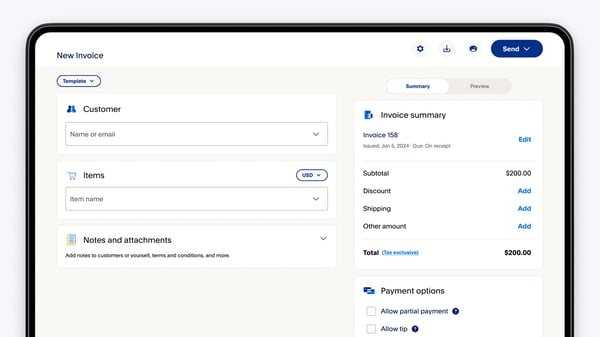
Where I'd say PayPal quietly wins is trust. Because nearly everyone already has an account, G2 reviewers say clients pay without hesitating at an unfamiliar checkout, and PayPal's category-leading market presence backs that up. For a small business with no brand recognition of its own, borrowing PayPal's is worth more than it looks.
For the follow-up nobody enjoys, PayPal sends payment reminders on its own, and it's the feature I'd point a reluctant chaser to. Reviewers use the automatic reminders to nudge late payers without the awkward personal email, so the money comes in without the uncomfortable part.
PayPal costs nothing to start, so the tradeoff I'd weigh shows up per payment. Reviewers billing smaller invoices say the per-transaction fee, plus extra for currency conversion on cross-border payments, takes a real bite, and it isn't returned if you refund the sale. If you send large or occasional invoices with healthy margins, that cut is a fair price for the convenience; if you run a high volume of small invoices, it adds up fast enough to compare alternatives.
The default invoice looks clean and professional, so most freelancers never miss this, but I'd flag it if your brand does real work in the sale. A few reviewers who want a heavily branded, customized invoice find the template options thin, and the PayPal look shows through. If a polished, on-brand bill is part of how you sell, that limit matters; if you just need a clear invoice that gets paid, it won't register.
PayPal Invoicing is the tool I'd hand a freelancer, consultant, or small agency that bills a few clients a month and wants the money in without overhead. It's instant to start, easy for anyone to pay, and backed by a name every client already trusts.
"It’s one of the easiest invoicing tools I’ve ever used. I didn’t have to watch tutorials or read through documentation to get started. The interface is clearly designed so you can create and send an invoice within minutes. The PayPal ecosystem is already well known, and most clients already trust the platform, so they don’t have to learn a new system or wonder whether the payment link is legitimate. Recurring invoices have been a great feature for me, the system handles everything automatically, and I just check that everything has been processed correctly, which saves me a lot of time and follow-up work. I think what really sets PayPal Invoicing apart isn’t the invoice creation itself. The real advantage is the direct connection between the invoice and the payment."
- PayPal Invoicing review, Phil J.
"The biggest downsides are high processing and cross border fees which aren’t refunded on returns limited invoice customization and accounting features and occasional account holds or slow support that can disrupt cash flow For larger or repeat billing needs I’ve found it less flexible than dedicated billing platforms and refunds can be costly because you don’t get the original processing fees back International clients also increase costs due to conversion and cross border charges."
- PayPal Invoicing review, Anna B.
Related: Need a no-cost starting point for simple billing? Compare the best free invoicing software for freelancers and small businesses.
DualEntry is an accounting and ERP platform aimed at mid-market finance teams that have outgrown entry-level accounting software but don't want the weight of a legacy ERP. It runs the general ledger, reconciliations, and financial reporting in one system, built to close the books faster while keeping the numbers accurate.
It posts the highest ratings in this roundup, with a 4.9 out of 5 rating on G2 across 120+ reviews, and reviewers rate its accounting, invoices, and payments features several points above the category. Over 55% of reviewers come from mid-market companies between 50 and 1000 employees.
The thing I keep seeing reviewers marvel at is that it doesn't feel like an ERP. A majority call it clean and easy to navigate, and G2 Data rates its ease of setup and use well above the category, rare for accounting software this capable. For a mid-market team dreading a legacy-ERP rollout, that approachability is the first relief.
On the receivables side, which is where I'd steer an AR buyer first, DualEntry runs invoicing and customer payments in the same system as the ledger. G2 reviewers raise invoices, collect, and watch it post to the books with no separate AR tool in between, and G2 Data rates its invoices and payments features at the top of the category. For a team stitching a standalone invoicing app onto their accounting, folding both into one place is the receivables payoff.
The reporting I'd point a receivables owner to is the AR aging view. G2 reviewers use DualEntry's dashboards to see what's outstanding and how overdue, not just a P&L, and its reporting rates well above the category. It's useful for an owner who's been tracking who owes what in a side spreadsheet; having receivables aging in the same reports that drive decisions is the point.
On the money-in side, the automation reviewers value most is matching. DualEntry applies incoming customer payments against open invoices and reconciles the accounts on its own, which reviewers tie to far less manual matching at close. When a customer settles several invoices with one payment, the software sorts it instead of an analyst.
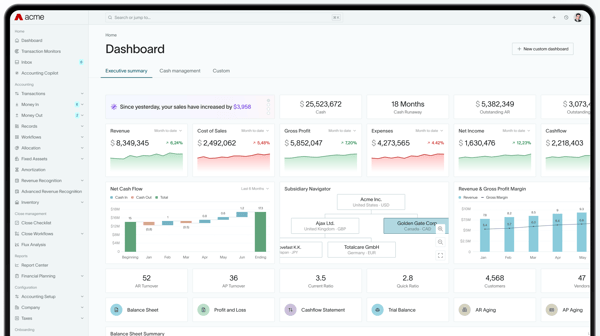
All of that lands on a faster close, the payoff accountants name most. Many G2 reviewers tie DualEntry's in-sync data and reconciliations to closing quicker, and for AR, that means less time chasing unapplied payments and unreconciled receivables at month-end.
Underneath it, reviewers keep reaching for one word: accurate. They describe entries, customer payments, and invoices included, staying in sync so the receivables numbers tie out without re-checking. For a team that's been burned by AR balances that didn't match the ledger, I'd argue that reliability matters more than any single feature.
DualEntry connects to the mainstream systems most finance teams already run, so this is a growing-pains point rather than a gap. As a newer platform (founded in 2024), its integration library is still catching up to legacy ERPs that have spent a decade building one. The friction I'd check for is at the edges. A few G2 reviewers who lean on a CRM or project tool mention wanting a wider connector set. If your stack is mainstream you likely won't feel it, but it's worth matching your must-have integrations to its current list before you commit.
Because it's early in its life, a few capabilities are still filling in. Some reviewers running complex, multi-entity structures point to specific gaps, like an intercompany matching report and deeper customization, that they'd like to see, even while rating the core highly. If your accounting is straightforward, you may never reach these edges; if you're a multi-entity group, list your non-negotiables and confirm them before switching.
DualEntry is the pick I'd put in front of a mid-market finance team, especially an accounting firm or a growing company that's outgrown QuickBooks but doesn't want a legacy-ERP project, and wants receivables, reporting, and a monthly close that feel modern.
"DualEntry provides detailed and accurate financial insights that inform our decisions. The reporting features in DualEntry give us a clear picture of our financial performance.
Dual-Entry delivers precise and reliable financial data, providing a clear picture of our performance through detailed reporting and intuitive features, revolutionizing our accounting process and financial management."
- DualEntry review, Mahlet M.
"One thing I dislike is that the platform can sometimes feel a bit limited when it comes to integration with other tools I regularly use, like CRM or project management software. While it handles accounting well, having more seamless integrations would improve workflow efficiency. That said, I still find it very effective for core bookkeeping tasks."
- DualEntry review, Jeane Venn C.
Related: Tired of keeping track of employee pay caps? Check out the best expense management software to set a budget restraint and ensure smooth expense approvals to manage revenue.
HighRadius Accounts Receivables is an enterprise, AI-driven AR platform built for high-volume finance teams. It pulls remittance from banks and customer portals, matches payments to invoices on its own, and hands collections teams a prioritized worklist, so a large receivables operation moves without a matching headcount.
With a G2 rating of 4.3 out of 5 across 200+ reviews and high autonomous task execution (92%) and predictive analytics (89%) scores well above the category averages, the AI muscle of Highradius is evident. Its reviewer base on G2 skews toward enterprises (44%) in manufacturing, consumer goods, and logistics, the transaction-heavy operations.
The problem I'd put first is the one that eats analyst hours: cash application. HighRadius runs it on machine learning rather than fixed rules, matching payments to open invoices and processing them straight through, and reviewers describe payments posting no-touch with teams stepping in only on exceptions. For a business reconciling thousands of receipts a month, that is the difference between a full-time matching desk and a review queue.
Collections is where it goes deeper. The worklist ranks accounts by priority, tracks correspondence, and shows team workload, so reviewers on collections teams work the highest-risk balances first instead of top-to-bottom. When one analyst covers hundreds of accounts, that prioritization keeps the right invoices from slipping.
The payoff I keep seeing is real-time visibility. HighRadius's dashboards give a live view across accounts, and reviewers pull reports by aging, reason code, and account rep to see exactly where cash is stuck. That current picture is useful for a controller who used to wait on a month-end spreadsheet.
A quieter strength is how it gathers remittance. G2 reviewers describe its bots logging into customer portals and bank feeds to pull payment and check data automatically, which removes the manual step of chasing remittance across a dozen sites. For a team drowning in portal logins, that retrieval alone saves hours a week.
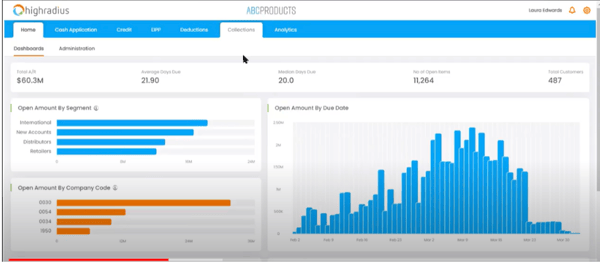
Looking forward, I'd point to the predictive analytics, not usually a big strength for AR tools. G2 Data rates this among HighRadius's top features, and reviewers use its forecasting to see likely payment dates and cash position before the month closes. For a treasury team planning liquidity, that forward view beats reacting to what already landed.
For disputes-heavy businesses, the deduction module is where it earns its place. Reviewers attach all backup in one spot, code deductions by reason, and pull audit support on demand, so a chargeback investigation becomes a lookup instead of a hunt.
The depth that makes HighRadius powerful is also why it takes real work to stand up. G2 reviewers with multiple ERPs and legacy workflows describe the implementation and configuration as complex, with a learning curve and setup time to match, and G2's own ease-of-setup data for HighRadius sits below the category. An enterprise with an implementation team absorbs this; a lean team should budget for the ramp and the training before expecting the payoff.
Once it's running, HighRadius mostly runs itself, so support comes up only when something needs a fix, and that's where reviewers point. A few say case resolution can lag. If your operation depends on fast turnaround, it's worth lining up a dedicated support or CSM arrangement rather than leaning on standard ticketing.
HighRadius is the platform I'd hand a large, transaction-heavy finance team, the manufacturer, distributor, or CPG operation clearing thousands of payments and deductions a month, that wants AI doing the matching and prioritizing instead of a room of analysts.
"I like the automation features the most. It reduces manual work in cash application, collections, and deductions. The dashboards give clear visibility into outstanding invoices and help improve cash flow. It makes daily AR tasks more organized and efficient."
- HighRadius Accounts Receivables review, Sowjanya P.
"One downside of the HighRadius Accounts Receivables platform is that the implementation and customization can be quite complex, especially for large enterprises with multiple ERP systems and legacy workflows. It usually requires significant onboarding effort, process alignment, and training before teams fully adopt it.
Another challenge is that some users feel the UI and reporting experience can become overwhelming because of the number of modules, dashboards, and configurations available. For smaller teams, the platform may feel heavier than necessary for basic AR operations."
- HighRadius Accounts Receivables review, Niranjan T.
Related: Managing collections at scale? Compare the best credit and collections software for prioritizing overdue accounts and reducing DSO.
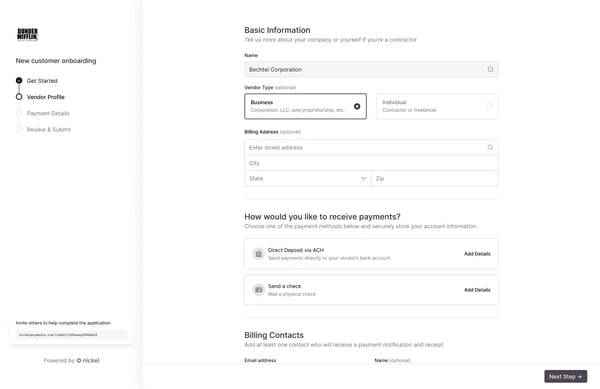
Nickel is a B2B payments tool built for small businesses that want to collect on invoices without handing a cut to a processor. It runs on fee-free ACH, connects to QuickBooks natively, and lets customers pay by bank transfer or card from a simple payment link, so getting paid costs you as close to nothing as it can.
On G2, it holds a 4.9 out of 5 rating across more than 150 reviews, with 97% likely to recommend it. Moreover, 96% of these reviewers come from small businesses with fewer than 50 employees. What I read behind that is a small team of accountants, contractors, or agencies that choose Nickel because it does the unglamorous part: collecting payments cheaply.
Getting paid shouldn't cost you, and that's the problem I saw most reviews describing Nickel solves well. It collects payments by ACH bank transfer for free, with no percentage skimmed off each invoice, and many describe it as the rare tool that doesn't take a cut just for moving money.
It's also easy to start. A majority of reviewers call the setup fast and the tool simple, several up and collecting the same day, and G2 Data rates its ease of setup near the top of the category. That low friction is why it actually gets used.
Asking to get paid takes only a couple of clicks, which is the payoff I'd point to next. Reviewers create an invoice and a payment link, and their customer pays by bank or card without an account, which they invoices to clear sooner. For a contractor chasing net-30 balances, the easier you make paying, the faster the cash lands.
Where Nickel gets clever is with card fees. If a customer insists on paying by credit card, it lets you pass that processing fee to them rather than absorb it, and reviewers like that it calculates the surcharge into the invoice automatically. For a small business, that's the difference between eating roughly 3% and keeping it.
For a tool this small, the customer support genuinely surprised me, and it surprised G2 reviewers too. They describe a real, responsive team that actually answers, and G2 Data rates Nickel's quality of support above that of much larger competitors.
For the accounting side, Nickel syncs with QuickBooks Online so payments land where your books already live. Reviewers connect it and skip the manual reconciliation afterward, and I'd note that for a small firm that closes in QuickBooks, that link keeps Nickel from creating a second set of work.
Nickel does the core job, getting invoices out and paid, simply and well, so this matters mostly as you grow. Some reviewers who want a fuller receivables toolkit (easy recurring invoices, custom-branded payment pages, and deeper reporting) find those pieces thin for now, and G2 Data shows its automation and credit features below the category. The limit I'd weigh is fit: if you need a payment tool, it's plenty; if you need a full AR and collections platform, it isn't that yet.
Free ACH is the whole appeal, and the honest tradeoff is speed. Reviewers say those bank payments can take a few business days to settle, one clocking more than three, and several add that it's manageable once you plan around it. If your cash flow can absorb a short wait, it's a fair price for paying no fees; if you need the money fast, faster settlement sits on a paid tier, so factor that in.
Nickel is the tool I'd hand a small business, a contractor, an accountant, an agency, that wants to collect what it's owed without paying a processor for the privilege. It's cheap to run, quick to start, and backed by support that punches well above the product's size.
"Nickel makes everything super simple to use, and nothing feels over-engineered. It syncs with QuickBooks, and in the seven months we’ve been using it—after switching from Melio and Bill.com—the syncing has been flawless. The pricing/fees are reasonable, and they don’t nickel-and-dime you when you’re trying to get paid or pay vendors. Pun intended.
We haven’t had to use support yet, so I can’t speak to how quick or helpful they are, but with most other platforms we’ve tried, we usually end up having to raise a support ticket within a few weeks."
- Nickel review, Stephen W.
"My only real knock here is that I still can’t set a recurring invoice to run indefinitely. I’m required to choose an end date, which means I then have to set my own reminders for when each invoice period ends so I can go back in and extend it. It’s a minor issue, but it creates what feels like unnecessary extra tri-annual setup on my end."
- Nickel review, Daniel K.
Anchor is an autonomous billing platform built for accounting, bookkeeping, and professional-service firms that bill clients on retainers or fixed-scope engagements. You turn an agreed scope into a proposal the client signs, and from there Anchor generates the invoices, charges the client, and syncs it all to your books on its own.
It posts some of the best numbers here, a 4.9 out of 5 rating on G2. Across 115+ reviews, its base is overwhelmingly accounting and bookkeeping firms, the deepest single-industry concentration in this roundup. That's a crowd that lives in billing, and they're near-unanimous, 99% would recommend it.
What they keep describing is a tool that took the most tedious part of running a practice, chasing clients to pay, off their plate entirely, and does it without charging the firm a subscription.
The front of Anchor is the proposal. Many reviewers say they build a professional proposal or engagement letter, complete with services, scope, and pricing, and send it for the client to e-sign in minutes, some right after a discovery call.
Once the client signs, the billing runs itself, which is the part I'd say is the biggest draw. Anchor generates the agreed invoices on schedule, including automatic price increases if you set them, without anyone re-creating them each month. For a practice carrying dozens of monthly retainers, that hands-off billing is admin that simply disappears.
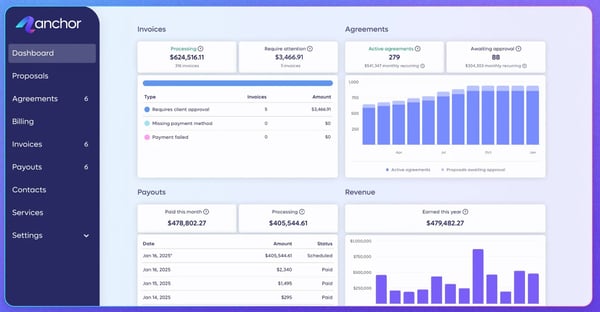
The payoff that matters for cash flow is collection. Anchor charges the client's bank or card on the agreed date, so you stop chasing payment, and G2 reviewers describe money arriving on their chosen schedule without a single follow-up email.
Setup is easier than the automation suggests. Several reviewers consistently mention it's easy to navigate and quick to configure, from building a services library to going live, and G2 Data rates its ease of doing business among the highest in the category. For a small firm without an operations person, that low setup burden is why it sticks.
For the books, Anchor syncs to QuickBooks so every invoice and payment lands in ledger on its own. G2 reviewers on QuickBooks Online connect it and skip the re-keying, and I'd note that for an accounting firm that closes in QuickBooks, keeping billing and books in step is what makes the automation trustworthy.
For a tool handling client money, the support reassures people, and G2 reviewers say so repeatedly. They describe a responsive team and hands-on onboarding, and G2 Data rates Anchor's quality of support near the top of the category.
Anchor is built around signed agreements, so quick one-off billing is where I'd flag it straining. A few reviewers say that when a client, or a walk-in, needs a fast, out-of-scope invoice, the proposal-first flow gets in the way of just dashing one off. If your work is retainers and fixed-scope engagements, you're in its sweet spot; if a real share of your billing is ad-hoc, that friction is worth weighing during demo and trial and it's a fit question than a flaw.
Anchor's proposals look clean out of the box, so customization is where I'd set expectations rather than a dealbreaker. A few reviewers want to brand proposals with their own logo, fonts, and custom sections, and several wish they could personalize the default reminder emails instead of sending Anchor's stock text. If a polished, on-brand client experience is central to how you sell, weigh that; but if you care more that billing runs itself than exactly how it looks, it won't slow you down.
Anchor is the tool I'd put in front of an accounting, bookkeeping, or professional-service firm that bills clients on retainers and is tired of doing it by hand.
"The software is intuitive and makes it very easy to build proposals, email them, and track their progress with the signer. I learned how to use the software in less than an hour and had my first proposal sent out within 2 hours of signing up. I love how you can create an invoice and bill right from the proposal as well."
- Anchor review, Jennifer H.
"A more customizable proposal so that my brand and the particular sections I want are included. It'd be nice to just build a document with my logo and even font. I'd like to have an intro, maybe a section where there are different levels and the client can select what services they want, then pop in with timeline to get started, terms and conditions, etc. Some steps can be a little confusing as far as editing services or editing agreements and ensuring the agreement is signed but then billing can start immediately or at a certain date."
- Anchor review, Emily H.
Billtrust holds the highest customer satisfaction score in G2's Accounts Receivable category, which is why finance leaders managing high B2B invoice volumes trust it. BILL AP/AR, a Leader with an 86% recommend rate, suits smaller finance teams, while HighRadius fits enterprise controllers automating cash application at scale.
Billtrust rates highest for complex B2B billing, handling custom invoicing, statements, and a self-service customer portal for buyers with detailed payment terms. HighRadius suits the largest operations, automating cash application and deductions across high invoice volumes, while DualEntry brings ERP-grade accounting for mid-market firms needing rules-based billing.
HighRadius reduces revenue recognition errors by managing deductions and disputes in one place, matching payments accurately so adjustments post correctly. DualEntry keeps the general ledger in sync during changes, and reviewers credit its accuracy for tying out receivables. Billtrust's cash application also limits misapplied payments that distort recognized revenue.
PayPal Invoicing handles multi-currency billing best for freelancers and small firms, letting clients pay in their own currency through PayPal's global network. For enterprises, HighRadius manages currency and exchange-rate variation across high-volume, cross-border receivables, while DualEntry consolidates exchange rates inside its ledger for mid-market teams closing multi-entity books.
HighRadius and Billtrust lead for real-time ERP integration, syncing invoices and payments with systems like NetSuite so finance teams see live cash positions without manual entry. HighRadius adds predictive cash forecasting for treasury planning, while DualEntry, an ERP in its own right, keeps receivables and the ledger continuously in sync.
HighRadius is built for this, pairing aging dashboards with a collections worklist that ranks overdue accounts by risk so teams chase the highest-value delinquencies first. Billtrust also surfaces what is paid, overdue, and how far past due, giving collections teams the visibility to prioritize outreach across large customer bases.
DualEntry is the standout, posting customer payments straight to the general ledger and reconciling automatically, which reviewers tie to closing the books days faster. Anchor auto-syncs invoices and payments to QuickBooks so billing and books stay aligned, and BILL AP/AR posts AP and AR activity to your accounting system without rekeying.
HighRadius leads here: its machine-learning cash application matches partial and lump-sum payments to the right open invoices automatically, so a single check covering five invoices splits itself. Billtrust's cash application applies incoming payments to open invoices without manual matching, and DualEntry reconciles customer payments against invoices on its own.
HighRadius triggers the smartest sequences, prioritizing and timing collections outreach by each customer's payment behavior and risk. Billtrust automates invoice and statement reminders on a schedule so follow-ups happen without manual work. Anchor auto-charges clients on the agreed date, removing dunning entirely for firms billing on recurring agreements.
Billtrust automates invoice and statement generation and delivers them by each customer's preferred channel, replacing manual sends. Anchor generates invoices automatically from a signed proposal and bills on schedule, ideal for recurring engagements. PayPal Invoicing and Nickel let smaller firms create and send professional invoices in minutes with payment links built in.
Nickel fits small businesses that want fee-free ACH collection and simple invoicing, while BILL AP/AR adds approval workflows and QuickBooks sync for slightly larger teams. PayPal Invoicing suits freelancers sending quick invoices, and Anchor works for small accounting and service firms billing clients on recurring retainers.
Nickel collects ACH payments for free with no subscription, making it the lowest-cost pick for small businesses. Anchor charges no subscription either, taking a flat $5 per payment instead. PayPal Invoicing has no monthly fee, charging only a per-transaction rate when a customer pays, so all three start at little upfront cost.
DualEntry is built for mid-market finance teams, pairing ERP-grade reporting and a fast month-end close with receivables in one system. Billtrust suits midsize B2B billers wanting a customer payment portal and cash application, while HighRadius fits those scaling toward enterprise volumes who need AI-driven collections and deductions.
Yes. HighRadius and Billtrust are built for enterprise scale, handling high invoice volumes with the access controls larger finance organizations expect. HighRadius automates cash application and collections across thousands of accounts, while Billtrust runs enterprise customer portals and ERP-integrated billing, both proven with large, transaction-heavy B2B operations.
Anchor and Nickel earn the highest support marks among these tools, with reviewers crediting responsive teams and hands-on onboarding, and both rate customer support well above the category average. DualEntry also scores high on support and setup. Enterprise platform Billtrust assigns onboarding specialists, though HighRadius reviewers report slower case resolution.
AR software lowers days sales outstanding by automating invoicing, payment reminders, and cash application, so money is collected and matched faster with less manual chasing. Aging dashboards show what is outstanding and overdue in real time. Tools like HighRadius and Billtrust add collections prioritization and portals that speed payment.
PayPal Invoicing is the most mobile-friendly option, letting you create, send, and track invoices and get paid from your phone. BILL AP/AR offers reliable mobile access for reviewing and approving payments on the move. Both suit owners who manage receivables between meetings rather than from a desk.
Before you start evaluating and shortlisting AR software, take a step back and look at your own numbers. Your invoicing process, client sizes, deal sizes, and transaction volume. The right tool depends on those.
From my analysis, the clearest payoff of AR software is the same across the category: it cuts manual errors, automates the invoice-to-payment workflow, and gets cash in faster, so your team spends less time chasing money and more on the work that grows the business.
The best fit, though, is the one that matches your situation, so weigh my analysis against your own process before you commit for your accounting and finance team.
If you want to see where the category is heading, I'd look at how businesses are using AI in accounting to automate bookkeeping and bank reconciliation.
.png)
Managing receivables doesn’t usually break all at once. It starts with small gaps, missed...
 by Disha C
.png?width=400&name=7%20Best%20Accounting%20Firms%20I%20Recommend%20(2026).png)
You're down to two accounting firms. Both checked out on paper. Both interviewed well. And...
 by Disha G

Billtrust, HighRadius Accounts Receivables, and Tesorio are the best credit and collections...
 by Krithika Sathyamoorthy