


I no longer treat AI content creation platforms as new or experimental, and most teams I work with are the same way. What is new is the friction that shows up once these tools move from testing into daily production, when they’re expected to support real workflows at scale.
Writing SEO-driven content creates different tradeoffs than generating ad copy at scale. Social posts break in ways long-form articles don’t. Templates that speed up one workflow can quietly slow another.
I built this list by use case because that’s how these tools actually show their strengths. Some platforms consistently perform well when the goal is SEO alignment. Others stand out when volume matters more than nuance, or when content needs to be tailored to specific audiences. Lumping them together under a single ranking hides those differences and makes it harder to choose with confidence.
If you already use AI content creation software, this guide is perfect for matching the kind of content you’re producing with the platforms that are most likely to support that work well.
| AI-powered content creation platforms | Best for | G2 Rating | Pricing | Likelihood to recommend |
| Canva | Templates and customization | 4.7/5 ⭐ | Starts at $15/month/user | 94% |
| Birdeye | Personalized marketing content | 4.7/5 ⭐ | Available on request | 95% |
| Creatify AI | Producing ad copy at scale | 4.7/5 ⭐ | Starts at $19/month | 94% |
| IBM watsonx.ai | Most natural language output | 4.4/5 ⭐ | Pay-as-you-go plan available | 90% |
| AKOOL | Creating long-form articles | 4.7/5 ⭐ | Starts at $21/month/seat | 95% |
| SOCi | Social media posts | 4.5/5 ⭐ | Available on request | 89% |
| Jasper | Scaling blog production | 4.7/5 ⭐ | Starts at $59/month/seat | 93% |
| Creaitor | Producing SEO-optimized content | 4.6/5 ⭐ | Starts at $19/month/user | 92% |
*These are the leading AI content creation platforms on G2 as per our Winter 2026 Grid Report.
When I choose the best tools for each use case, I start with G2 Data. I look at a product’s category performance, including its G2 Score, satisfaction ratings, and feature-level strengths. This helps me understand which tools consistently perform well before I narrow them down to more specific scenarios, like small teams, nonprofits, or industry-focused workflows.
From there, I delve into review insights to see what real users have to say. I look for patterns in pain points, frequently praised features, and feedback from people in the same roles or industries that the use case targets. The recommendations you see reflect that mix of quantitative scoring and qualitative sentiment, focused on the tools that repeatedly show up as the strongest fit for that specific need.
When I think about templates, I’m actually thinking about momentum. The best ones help teams start faster and keep moving, especially once content creation becomes routine rather than occasional.
Canva stands out in G2 reviews with a 94% satisfaction score, which tells me users aren’t just experimenting with templates, they’re sticking with them. Reviewers consistently point to how easy it is to take a starting layout and adapt it across different content types without slowing down production. It also has a high ease-of-setup score (95%), reinforcing that teams can get value quickly without extensive configuration.

What makes this interesting is how often Canva shows up as a shared workspace. Users rate it highly for ease of administration (96%), which is important when templates need to remain consistent across contributors and campaigns. That combination of strong satisfaction and low operational friction explains why Canva templates tend to scale cleanly rather than becoming cluttered or ignored over time.
If your content workflows depend on repeatable formats and fast handoffs, Canva’s template-first approach lines up well with how users say they actually work.
| Pros | Cons |
| Easy-to-use templates help teams get from idea to finished content quickly. | Templates can feel limiting when deeper customization is required. |
| Reusable layouts make it easier to keep content consistent across campaigns and teams. | Some advanced template features are gated behind paid plans. |
| Template management stays manageable even with multiple contributors involved. | Heavy reliance on templates can result in similar-looking outputs over time. |
I believe personalized marketing content only works if it reflects real customer context. Generic copy dressed up with tokens doesn’t hold up for long, especially when teams are managing content across locations or audiences.
Birdeye is the ideal choice here based on how users rate its ability to support customer-specific content at scale. On G2, Birdeye holds a 95% satisfaction score, which signals that teams are strongly relying on its personalization features. Reviewers also rate Birdeye highly for meeting requirements (95%), which matters when content needs to reflect customer context rather than generic templates.
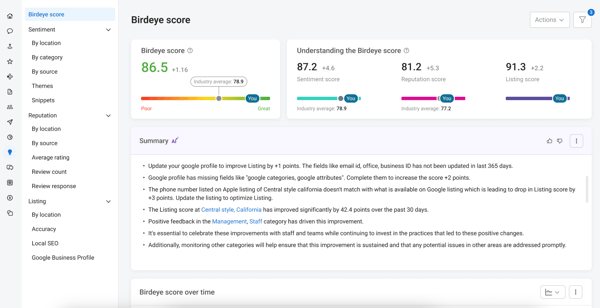
What really reinforces Birdeye’s fit for this use case is its ease of doing business score (96%). Personalization tends to break down when tools are hard to operate across teams or locations. Reviews suggest Birdeye avoids that problem by making it easier to manage tailored content workflows without constant oversight. Strong ease of setup (93%) further supports that teams can get personalized campaigns running without a long ramp-up.
For teams focused on marketing content that adapts to customer feedback, reviews, or location-specific needs, Birdeye aligns well with how users say they actually execute personalization in practice.
| Pros | Cons |
| Review-based content tools make it easier to tailor messaging to specific customers or locations. | Personalization works best when tied to reviews, not all content types. |
| Centralized management helps keep personalized content organized at scale. | Customization options can feel constrained outside predefined flows. |
| Built-in workflows support consistent messaging across locations and teams. | Some advanced personalization features require navigating multiple modules. |
Ad copy workflows tend to live or die by speed and consistency. When teams run multiple campaigns at once, the tool needs to keep up without adding friction or requiring excessive manual cleanup.
I include Creatify AI here because users consistently describe it as reliable for high-volume copy generation. On G2, Creatify AI has a 94% satisfaction score, indicating teams feel comfortable using it as part of ongoing campaign work rather than treating it as a one-off tool. Reviewers also rate it at 93% for meeting requirements, suggesting the output generally fits real ad use cases without constant rewrites.
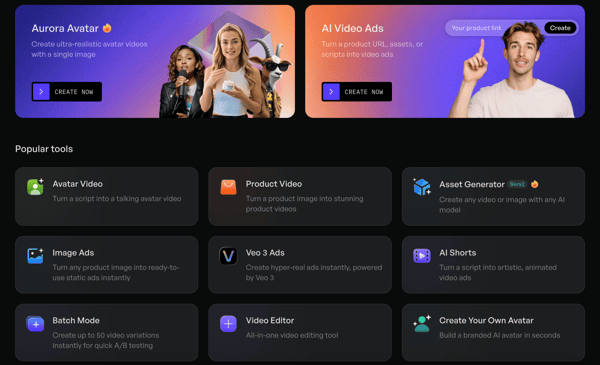
Operationally, Creatify AI performs well where scale matters. It scores 95% for ease of setup, which supports fast adoption when campaigns move quickly. Strong ease-of-use scores (94%) reinforce that teams can generate and iterate on ad variations without spending time managing the tool itself.
For marketing teams producing large volumes of short-form copy across channels, Creatify AI aligns with how users actually execute campaigns.
| Pros | Cons |
| Fast copy generation supports producing multiple ad variations at once. | Output may need light refinement for brand-specific tone. |
| Setup is straightforward, making it easy to start using for campaigns. | Focus remains on short-form copy rather than longer narratives. |
| The workflow fits repeatable, campaign-driven production cycles. | Creative control can feel limited for highly customized messaging. |
Natural language quality is one of those things teams notice immediately. When it works, the output reads clean and intentional. When it doesn’t, it creates more editing work than it saves.
I point to IBM watsonx.ai for this use case because G2 reviewers focus on language quality, control, and reliability in production environments. Satisfaction scores for watsonx.ai sit above 90%, which signals sustained confidence in the output rather than short-term experimentation. Reviewers also rate the platform highly for meeting requirements, reinforcing that the language it generates aligns well with real business and enterprise use cases.
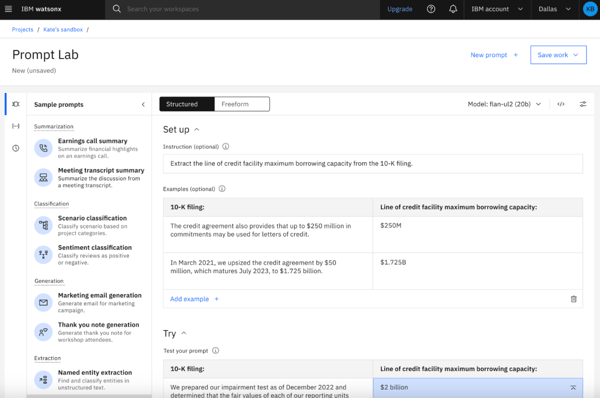
What stands out to me is how often users describe trust in the output itself. Strong scores around ease of administration and platform reliability show up in the data, which matters when natural language quality needs to stay consistent across teams, use cases, and governance requirements. This is less about rapid experimentation and more about dependable language generation at scale.
For teams that care about clarity, precision, and consistency in AI-generated language, watsonx.ai fits how users say they deploy AI in real production workflows.
| Pros | Cons |
| Language output is described as clear, controlled, and consistent across use cases. | Setup and onboarding can take longer than lightweight writing tools. |
| Enterprise-grade controls support consistent language use across teams. | The interface can feel complex for smaller or less technical teams. |
| Strong reliability and administration scores support long-term production use. | Best value appears when teams fully adopt the broader IBM ecosystem. |
Long-form writing asks more from an AI tool than speed alone. Structure matters. So does the ability to maintain coherence across sections without forcing writers to constantly step in and correct direction.
I pick AKOOL for long-form articles because reviewers consistently describe using it for more structured, end-to-end content creation. On G2, AKOOL posts a 95% satisfaction score, which suggests teams aren’t just experimenting with longer pieces, they’re finishing and reusing them. That confidence shows up again in its 97% “meets requirements” score, a strong indicator that the output aligns with what teams expect from longer-form content workflows.

Another standout here is the ease of use score (93%). Long-form tools tend to lose value quickly if they feel cumbersome over time. Reviews suggest AKOOL stays approachable even as articles grow in length, which helps teams focus on shaping ideas rather than managing the tool.
AKOOL fits best for teams producing articles that need more structure and continuity than short-form content, without adding unnecessary friction to the writing process.
| Pros | Cons |
| Supports structured article creation from start to finish. | Long-form workflows may require some upfront experimentation. |
| Output stays coherent across longer pieces. | Less emphasis on short-form or campaign-style writing. |
| Easy to work with, even as articles grow in length. | Teams seeking heavy SEO tooling may need complementary tools. |
Social content lives on repetition. Posts go out daily, often across multiple accounts, and usually with more than one person involved. When I assess tools for this use case, I’m paying attention to whether they support that cadence without creating extra coordination work.
SOCi fits this role based on how reviewers describe using it in practice. On G2, SOCi holds an 89% satisfaction score, which reflects steady, ongoing use rather than novelty-driven adoption. Reviewers also rate it at 90% for meeting requirements, a strong signal that it covers the essentials social teams depend on, even if it isn’t trying to be an all-purpose AI writing platform.
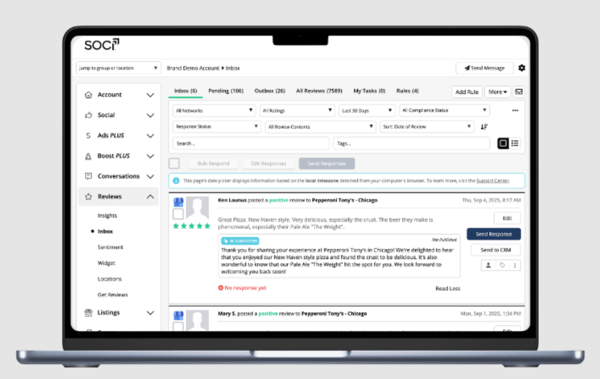
The third metric that matters here is ease of administration (89%). Social workflows tend to break down when managing accounts, contributors, and posting schedules becomes harder than publishing itself. Reviews suggest SOCi stays manageable as posting volume increases, which explains why it shows up most often in multi-location or multi-brand environments.
SOCi works best when social publishing is routine, distributed, and built around consistency rather than experimentation. That lines up closely with how users say they rely on it day to day.
| Pros | Cons |
| Supports repeatable social posting across multiple accounts and locations. | Content creation features are narrower than general-purpose AI writing tools. |
| Administration stays manageable as posting volume increases. | Creative flexibility may feel limited for highly customized posts. |
| Setup and ongoing use fit well into daily social workflows. | Best value shows up for teams managing multiple locations or brands. |
Blog production changes once volume becomes the goal. Drafting is only part of the work. Teams need consistency, momentum, and a tool that doesn’t fall apart after the tenth or twentieth article.
I associate Jasper with this use case because reviewers consistently describe it as part of an ongoing content operation, not a one-off writing assistant. On G2, Jasper carries a 93% satisfaction score, which tells me teams are comfortable using it repeatedly over time. That matters for blogs, where adoption tends to fade quickly if the tool creates more cleanup than progress.
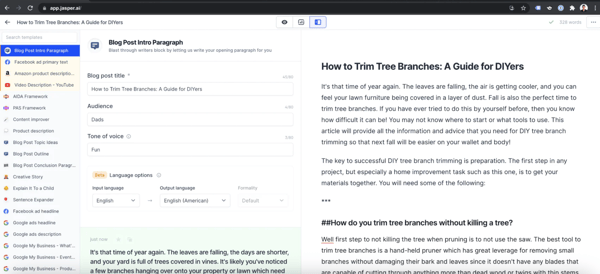
The second signal I pay attention to is ease of use (93%). Scaling blog content usually involves multiple contributors, editors, or subject-matter experts. Reviews suggest Jasper stays approachable across those roles, which helps teams maintain output without slowing down to retrain or reconfigure workflows. A 92% “meets requirements” score reinforces that the platform supports the practical needs of long-form writing, from drafting through iteration.
Jasper fits best for teams treating blog content as a system rather than a series of isolated pieces. That aligns with how users describe relying on it week after week.
| Pros | Cons |
| Supports repeatable long-form writing across ongoing blog programs. | Output often benefits from editorial review before publishing. |
| Easy for multiple contributors to adopt without heavy onboarding. | Advanced workflows may require time to fully configure. |
| Covers core blog-writing needs consistently over time. | Teams seeking rigid structure may want more guided frameworks. |
SEO writing has a tell. You can usually spot when content is optimized for a tool instead of for search intent. The structure looks right, but the flow feels mechanical. When I look at AI platforms for SEO work, I pay attention to whether they help shape content around intent without flattening it.
Creaitor stands out here in a quieter way. In G2 Data, it carries a 92% satisfaction score, which tells me teams are comfortable using it repeatedly for search-driven content, not just testing it once. That confidence shows up again in its 92% “meets requirements” score, a solid signal that the output aligns with real SEO expectations rather than generic article templates.
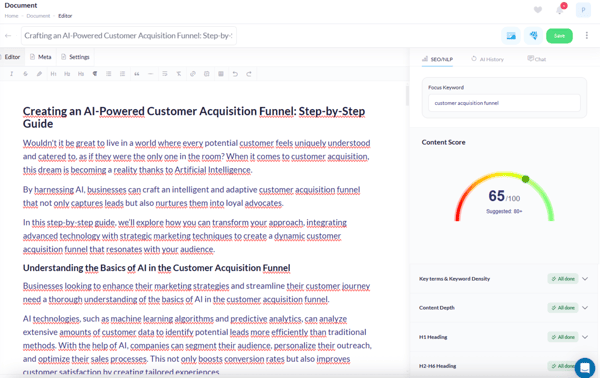
What matters most for this use case is how quickly teams can plug the tool into existing workflows. Creaitor scores 96% for ease of setup, which explains why reviewers often describe it as easy to adopt alongside other SEO tools. It doesn’t try to replace the entire workflow. It supports the writing layer without getting in the way.
Creaitor works best when SEO content is treated as a system: outlines, intent alignment, and repeatable structure, with room left for editorial judgment before publishing.
| Pros | Cons |
| Structured writing flows support search-aligned content creation. | Drafts often need editorial refinement before publishing. |
| Setup is quick and fits easily into existing SEO workflows. | Interface can take time to get comfortable with. |
| Covers core SEO writing needs without heavy configuration. | Less emphasis on visual or multi-format content. |
If you want a clearer view of how these tools perform in real production environments, check out hype vs. reality in AI content creation, which explores where AI content platforms deliver value and where expectations still outpace reality.
There’s no single best option for every marketer. Jasper works well for scaling blog and campaign content, Canva is a strong fit for template-driven assets, and Birdeye stands out when marketing content needs to be personalized using customer feedback.
Agencies often favor tools that support repeatable workflows across clients. Based on G2 satisfaction data, Canva, AKOOL, and Jasper are commonly used for agency-style content production, with SOCi fitting well for agencies managing social content at scale.
For teams publishing content every day, tools like Jasper and Creatify AI are frequently used for ongoing writing and campaign copy, while Canva supports high-volume production through reusable templates.
Most teams struggle because they picked the right tool for the wrong job. AI-powered content creation platforms behave very differently once they’re used every day, and that’s where the gaps start to show.
I’d use this list as a way to pressure-test fit. Look at the use case that mirrors your day-to-day work, then pay attention to how consistently users say the platform supports that workflow. That signal tends to matter more than feature breadth once the tool is in regular use.
If you wish to go deeper on how you can scale content creation and evaluation, check out how AI-generated content fits in real workflows in this G2 guide.

.png?width=400&name=dark%20(15).png)
TL;DR: What G2 Data tells about the state of conversational AI survey platforms in 2026? ...
 by Subhransu Sahu

Why trust G2 on AI G2 doesn't just index AI tools. We use AI to power our own platform, and...
 by Harshita Tewari