


Outlook is indispensable inside Microsoft-heavy orgs — reviewers describe it as the connective tissue between Teams, SharePoint, and Exchange. Google Workspace wins where collaboration speed matters more: "multiple people in the same doc without version conflicts" appears across nearly every positive review. Switching only makes sense when the whole infrastructure shifts.
Use Outlook if:
Use Gmail / Google Workspace if:
Like anyone who grew up with the internet, I’ve used Gmail and Outlook for formal communications for many years. While I’ve noticed many differences among them, I’ve often wanted to stack them up and compare them to see which is the better email software on the market.
When I started this exercise, one thing became very clear. Both are mature, reliable tools backed by powerful ecosystems: Microsoft and Google Workspace. Both serve millions of users worldwide, ranging from individual professionals to global enterprises. And both consistently rank highest in market presence among all email software on G2, with Gmail at #1 and Outlook at #2.
In this blog, I’ll share how these two platforms measure up and where each of them stands apart.
| Feature | Microsoft Outlook | Gmail |
| G2 rating | 4.5/5 ⭐ | 4.6/5 ⭐ |
| Best for | Enterprise and Microsoft-centric teams. | Cloud-first teams and Workspace users, mainly startups and SMBs. |
| Interface | Feature-rich and structured. | Clean and minimalist, which makes it easy for beginners. |
| Organization | Allows you to neatly sort into folders, categories, and rules. Also has extensive rule automation and views. | Has a flexible label system and smart features. |
| Integrations | Microsoft 365 ecosystem (Teams, Word, OneDrive, etc). | Google Workspace ecosystem (Docs, Sheets, Drive, Meet, etc). |
| Search | Advanced filters and query tools. | Fast, intuitive search. |
| Security | Strong enterprise controls and compliance. | Powerful spam & phishing protection; evolving encryption features. |
| Mobile experience | Unified mail, calendar, and files. | Lightweight, cloud-centric apps. |
| Collaboration tools | Built-in calendar and task management with deep Microsoft app links. | Real-time collaboration across Google apps in the Google suite and Gemini AI email integration. |
| Free plans | Yes, basic plan with advertisements. | Yes, standard Gmail without advanced features. |
| Storage on the free plan | Up to 15 GB email storage. | Up to 15 GB shared via Google Drive across Gmail and other G Suite products. |
| Learning curve | Moderate to steep (more features). | Gentle (intuitive UI). |
| AI features | Powerful AI features powered by Copilot that help you draft and polish email copy, schedule messages, summarize emails, and enhance email search capabilities. | Powered by Gemini AI, it lets you draft, ideate, summarize, filter, and more. |
| Support for advanced workflows | Strong for businesses using Microsoft Teams and 365 apps. | Strong for collaborative workflows and tied into Google Workspace. |
| Pricing (Business) | Microsoft 365 plans with desktop apps. Outlook: Free Microsoft 365 Personal (starting plan for individuals): $9.99/month Microsoft 365 Business Basic (starting plan for businesses): $6/user/month, paid yearly Microsoft 365 F3 (starting plan for enterprises): $8/user/month, paid yearly |
Google Workspace: Free Business Starter: $6/user/month Business Standard: $12/month Business Plus: $18/month |
I’m sure you’re aware that Outlook and Gmail both power modern email workflows. They, however, seemed to be built with different priorities in mind. I found that Outlook focuses on structure, control, and deep integration with Microsoft 365, while Gmail emphasizes simplicity, intuitiveness, speed, and cloud-first collaboration within Google Workspace. Both are mature, widely adopted platforms, but they serve different working styles and organizational needs.
While Gmail and Outlook are both email platforms, one is built for convenience, and the other for structure and scale. Some of the main differences I noticed were:
Despite the above differences, I think at the core, both platforms run on making the absurd world of email communications easy to use. Some of the most common similarities are:
To compare Outlook and Gmail fairly, I tested both platforms using real-world scenarios that reflect how people actually use email at work and in everyday life. I used the free versions of these tools first and relied on G2 Data to obtain reliable and trusted information on how these platforms perform for businesses of different sizes.
I’ve also focused on both desktop and mobile experiences to understand how each platform performs across devices.
Use cases include:
Evaluation criteria:
To balance hands-on testing with a real-world perspective, I also considered verified user feedback and common themes surfaced across business and individual users on G2.
Disclaimer: I shared my experience testing the two tools as of February 2026. If you read this after a few months, some features and functionality might have evolved.
The best way to test both these email tools is to sign up and use them as a general user would, and that’s exactly what I did. Despite using these tools for a while, many surprises were in store for me, as they might be for you. Here is how each of them performed in my tests.
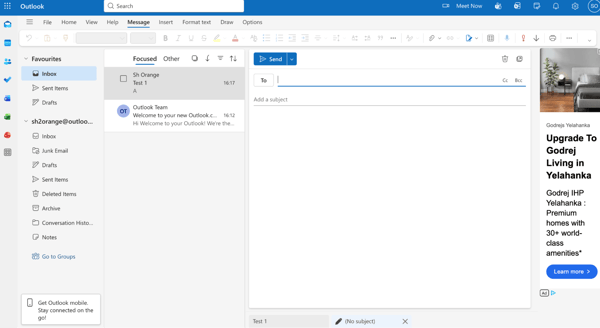
As soon as I created my account and logged into Outlook, I felt the interface was information-rich. On the left-hand panel, I found Microsoft apps such as Calendar, Tasks, Contacts, Word, and Excel all in one place. For power users who switch between interfaces, this creates great efficiency and context. As a new user, I found the setup quite intimidating.
Further, there is a large advertisement banner on the right-hand side in the free version, which users might feel is more obtrusive. This is in addition to the promotional emails that I received in my inbox. Advertisements like this are new to me while using email, since Gmail has only promo and ad emails on the free version. While I do understand the need for ads, I have to give the point to Gmail here, as I feel these ads could overwhelm and distract new users with too much information.
Tip: I would recommend trying to clear the cache or using the Chrome browser in case you are having trouble with bot verification.
Gmail, on the other hand, takes the opposite approach. I liked the clean, minimal interface and found it easy to navigate. Most features stay out of the way until you need them. The primary focus of the free account is helping users get started with sending their first email.
I feel the interface is remarkably intuitive, especially with how easy it is to navigate around and get used to new features and settings. Sending an email opens a pop-up with multiple options to intuitive symbols for drafting and attaching items. I liked that it has an option to attach an email signature while you draft the email, and that it takes you to the settings page if you haven’t added one yet.
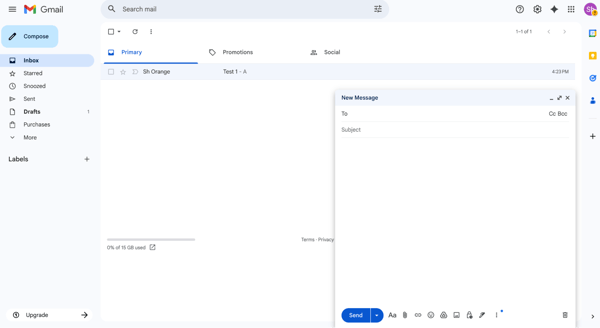
For most users, especially those new to business email platforms, Gmail’s simplicity makes it easier to adopt and use day to day.
Winner: Gmail
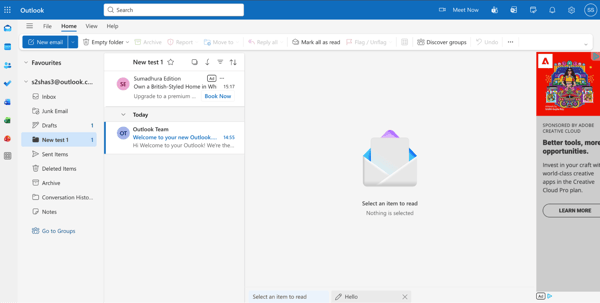
Once I started testing for organization, Outlook genuinely impressed me. I found that it lets you organize by folders and rules to create a structured inbox. This approach will work well for users who like clear hierarchies and automated routing.
Gmail uses the labels approach, which allows a single message to exist in multiple categories at once. I found this to be a flexible but confusing system, since emails can tend to appear in multiple labels. Also, having used Gmail to create rules and filters, I found it could seem daunting and confusing at first, due to the auto-segmentation section.
However, once you cross this hurdle, Gmail performs item segregation very well based on the rules you’ve set.
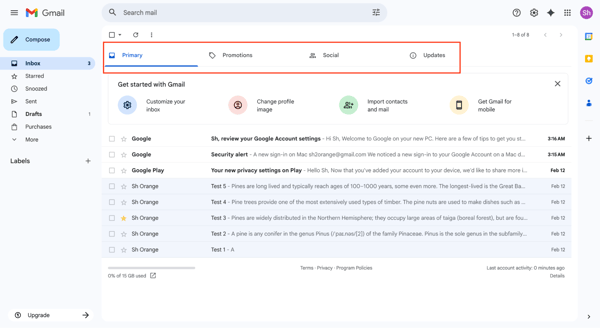
I will give the result to Outlook as it wins for its strict structure and automation, which makes it easy to segregate. While Gmail offers great flexibility and search-based organization, the confusion can work against it.
Winner: Outlook
Need more help in managing your inbox, but want to avoid unnecessary spending? Find the most relevant tools in our list of the best free email client platforms.
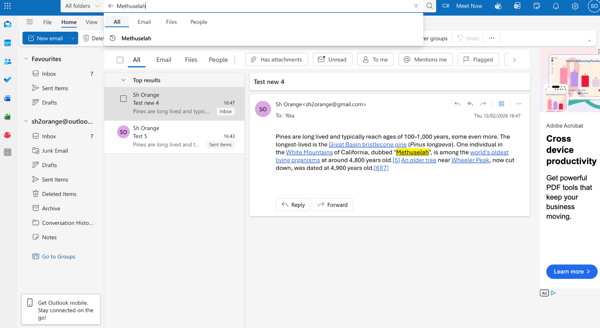
To test the search features of both tools, I conducted a casual search for emails without any specific parameters, just by searching for the words in the subject, body, or the user's name. I then carried out a refined search by filling in specific fields such as the sender's and receiver’s email address, email subject, attachment name and confirmation, and exact text mentioned in the body to assess the accuracy of search results.
Outlook offers advanced search filters that are effective for users who know exactly what they’re looking for. In the basic searches, the keywords I searched for consistently surfaced the email I was looking for. Outlook’s AI-enabled search was able to instantly look up emails containing the string I searched. The refined search also consistently showed results I was looking for.
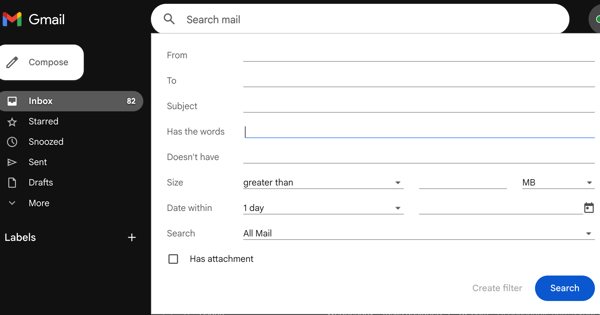
I found Gmail’s search to be just as intuitive to use, and results pop up quite quickly. However, on the free plans, I did feel that finding exactly what you need might need a more refined search with specific fields, such as the “from”, “to”, “time period”, or “subject”. Adding these details tended to improve the search results, allowing me to find what I was looking for more efficiently.
While Outlook does provide fast, efficient searches, Gmail’s search experience is more intuitive and allows for more thorough searches.
Winner: Gmail
If you’re curious how Gmail compares to other popular email providers, check out our detailed Yahoo vs. Gmail comparison to see how it performs across everyday workflows like organization, search, and spam filtering.
Both Gmail and Outlook come with the perks of being attached to larger ecosystems with many helpful features.
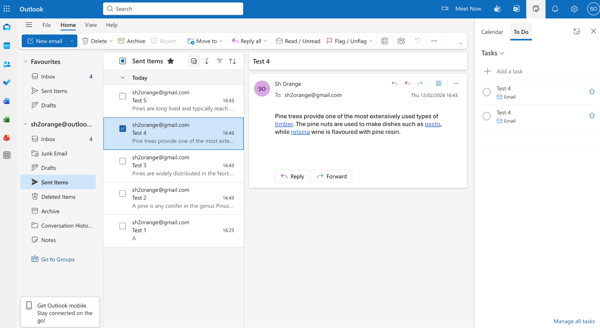
I was expecting Outlook to integrate well with Microsoft tools like Word, Excel, PowerPoint, Teams, and OneDrive, but was surprised at how easy and fluid it is to move between these apps. I must note that, as a non-native Microsoft ecosystem user, turning email threads into meetings or tasks required additional learning time across all the apps. For someone familiar with the ecosystem, this should be a breeze, making Outlook especially strong for structured office workflows.
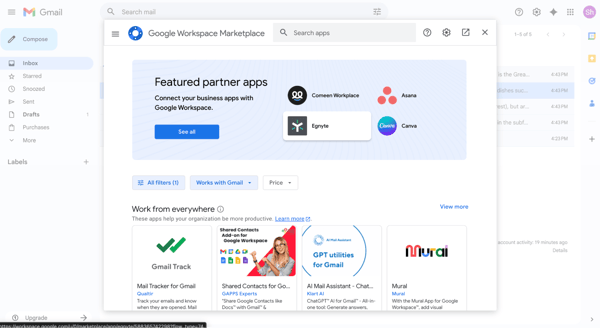
Coming to Gmail, I found that even for a new user, it integrates tightly with Google Workspace tools like Docs, Sheets, Drive, and Meet, but also connects very well to third-party apps such as Zoom, Canva, and more. These integrations allowed me to collaborate with my team much more easily in real time when sharing files. Something I loved is how well Google Meet and Calendar integrate with my email, making it a one-stop shop for viewing all my tasks, document changes, events, and calls. I feel there really is no other ecosystem as well synced for productivity.
Both of them win for their respective ecosystems. Outlook is better for Microsoft 365-enabled workflows, and Gmail shines in its cloud native Google Workspace environment.
Winner: Split; depends on the ecosystem
Related: We’ve compared Google, Outlook, and other calendar tools to find the best calendar apps on G2.
In security, both platforms offer strong baseline email security features, including spam filtering, encryption, and multi-factor authentication, backed by enterprise-grade security.
Right from the time I created an account, I found that Outlook and Gmail have bot checks and prompted me to add multi-factor authentication. Gmail takes the bot verification a step further by asking me to verify my device to reduce the chances of bot signups. While this didn’t cause me any issues, those without devices can face quite a hurdle.
In terms of spam filtering, I found that, on a basic level, both Outlook and Gmail perform well enough. I did see that many legitimate emails were categorized as spam on both platforms.
I will have to caveat this by saying that if you’re looking for enterprise-grade security, Outlook offers a bigger advantage with its enterprise-grade controls and compliance features available through Microsoft 365 plans. These are especially important for regulated industries.
Gmail provides excellent built-in protection against spam and phishing and continues to improve enterprise security features for Workspace customers.
Outlook has the edge for organizations that need advanced admin and compliance controls.
Winner: Outlook (enterprise)
Related: The best IAM software for effective and easy MFA protection.
To test the mobile app interface, I mainly wanted to see how well they performs in terms of usability, space, and how intuitive it is to use with your hand. I must mention from the get-go that the app's sign-up process is quite intuitive for both Outlook and Gmail, and both allow you to use other platforms in the app. That being said, I tested with the accounts I had created for each ecosystem to ensure I could make the most out of collaborative tools.
I also wanted to see how much control I actually had as a host. If things go off the rails, someone gets noisy, shares the wrong screen, or I suddenly need to lock the room for a sensitive discussion, how quickly can I fix it without turning the meeting into chaos?
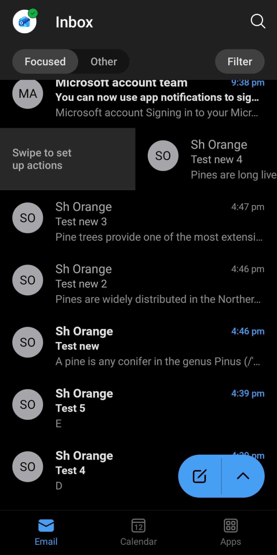
I found Outlook’s mobile app to be much simpler to use for sending emails, and shifting between email, calendar, contacts, and files into one experience was possible with a finger tap. I would say business users who are tied to the Microsoft ecosystem will find this convenient. It also allows for finger actions, which are quite convenient.
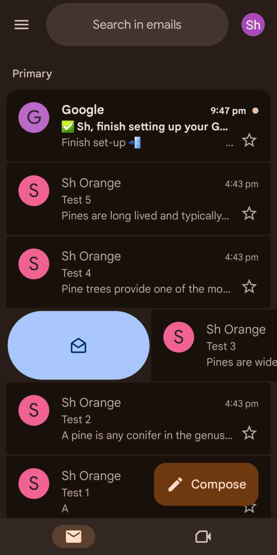
On the other hand, I’ve used the Gmail mobile app, and I’ve found it to be quite lightweight, fast, and easy to use. Logging in or creating an account is quite simple from the app interface as well. One thing I loved about how they adapt for mobile applications is the ability to left-swipe to mark something as unread or right-swipe to archive an email. However, most other applications, such as calendar and contacts, redirect to separate applications, requiring a larger app ecosystem for smoother business collaboration.
One thing I noticed was the fact that notifications had to be specifically set up in the right way, since not all emails seemed to show up in notifications, and only direct replies. This can be changed in the settings eventually.
The best mobile app depends on your purpose. Gmail excels in simple email tasks, while Outlook works better for productivity and business-centric use cases.
Winner: Split
Related: Did you know that Microsoft and Google also have two of the best chat apps for professionals? Learn more from our list of the best team chat apps in 2026.
I looked at the pricing of Outlook and Gmail, both of which offer free entry points and tiered paid plans, but their pricing models differ due to their target audience.
Here is a quick overview of Outlook’s pricing plan, which is tied to Microsoft 365 and bundles email with the other desktop productivity apps.
Just a note on what I observed, the free plans do come with advertisements and promotional emails. This strongly recommends the priced plans, especially for medium-sized businesses and enterprises that require an email platform tied to Microsoft infrastructure, with storage and productivity tools.
Gmail pricing is bundled through Google Workspace, which is built for teams from the start:
Workspace plans scale cleanly as teams grow, with collaboration, admin controls, and storage included at each tier.
For small and growing teams, Gmail is generally more cost-effective and easier to scale, thanks to clear per-user pricing and business-focused plans. Outlook becomes more compelling at higher tiers, particularly when teams that rely on Microsoft desktop apps and advanced productivity tools are given top priority.
Winner: Split
Here’s a table summarizing all my tests with the winner and the reason.
| Task |
Winner | Why it won |
| Interface and user experience | Gmail 🏆 | Gmail’s clean, minimal interface makes onboarding simple and intuitive. Features stay out of the way until needed, making it easier for new and non-technical users to adopt quickly. |
| Email organization | Outlook 🏆 | Outlook’s folder-and-rule-based system provides structured automation and a clearer hierarchy. It’s better suited for users who prefer strict segmentation and inbox control. |
| Search and smart tools | Gmail 🏆 | Gmail’s search is more intuitive and flexible. Advanced field filtering (from, to, subject, time) allows more precise results with less friction. |
| Integrations and productivity | Split | Outlook excels within Microsoft 365 workflows (Teams, Word, Excel). Gmail shines in real-time collaboration across Google Workspace and third-party apps. The best choice depends on the ecosystem. |
| Security and spam filtering | Outlook (Enterprise) 🏆 | Both offer strong baseline security, but Outlook provides stronger enterprise-grade compliance and admin controls through Microsoft 365. |
| Mobile experience | Split | Gmail offers a lightweight, fast email experience. Outlook delivers a more unified productivity hub that brings mail, calendar, contacts, and files into one app. |
| Pricing and value | Split | Gmail scales cost-effectively for SMBs with clear per-user pricing. Outlook becomes more compelling for teams heavily invested in Microsoft desktop apps and enterprise workflows. |
Picking between Google and Microsoft tools across the board? Check out my colleague's comparison of Google Sheets vs. Excel across nine real tasks, from formulas and collaboration to AI and mobile. Here's where each one actually wins.
As I mentioned, my testing was limited to introductory features that are available on the free plans. To go beyond and understand how other users and businesses rate Outlook and Gmail, I also reviewed G2 product data. This helped me understand and present how users with different use cases adopt Outlook and Gmail. Here’s what stood out to me:
Got questions? G2 has the answers.
Both Outlook and Gmail offer strong security, including encryption, spam and phishing protection, and multi-factor authentication.
Outlook often has an edge in enterprise-grade compliance through Microsoft 365 features like data loss prevention and advanced admin controls. Gmail is widely praised for its AI-powered spam and phishing detection and offers strong security through Google Workspace plans.
For most users, both are highly secure.
Yes, both are widely used by professionals. Outlook is common in mid-market (36%) and enterprise organizations (39%) that rely on Microsoft 365 tools like Teams, Excel, and SharePoint, especially in healthcare, finance, and education.
Gmail is popular among startups and small businesses (44%), marketing teams, and cloud-first organizations. Adoption typically reflects the broader productivity ecosystem a company uses.
The best email service depends on your needs. Outlook is ideal for structured workflows and enterprise integrations. Gmail excels in usability, collaboration, and powerful search.
Both rank among the best email platforms available; the right choice depends on your ecosystem and workflow preferences.
Gmail and Outlook are two of the most widely used free email services. Both offer 15GB of free storage and strong spam filtering. Gmail is often chosen for its ease of use and search capabilities, while Outlook appeals to users who prefer a more structured interface and integration into Microsoft products.
On G2, small businesses that are likely to use free email services use Gmail (42%) more than Microsoft Outlook (25%). Overall, I would say the free versions of both Gmail and Outlook perform equally well and are the best in the industry.
For personal use, G2 Data cites Gmail as the top choice for personal use, due to its intuitive design and integration with Google services. G2 Data reinforces this, and Gmail gets a 93% score for ease of use and 95% for ease of setup, while having the highest market presence for any email service (99%).
That said, Outlook is the runner-up for personal use and a strong alternative for users who prefer folders and tighter integration with Microsoft services. This gives it the second-highest market presence among all email services (86%).
Ultimately, I feel the best choice largely depends on whether you prefer the Google or Microsoft ecosystem and which tool you are habituated to.
Among mainstream providers, both Gmail and Outlook offer robust security protections. Outlook may provide stronger enterprise compliance tools through Microsoft 365. Gmail offers excellent built-in spam and phishing protection powered by AI.
For most individuals and businesses, both are secure enough for everyday use.
Outlook emphasizes structure and enterprise productivity, with deep integration into Microsoft 365 and folder-based organization. Gmail focuses on simplicity and cloud collaboration, with labels and powerful search in Google Workspace.
The main difference lies in the ecosystem and workflow style.
It depends on your tech stack. Outlook works best for Microsoft-centric organizations needing advanced admin controls. Gmail suits cloud-first teams that value ease of use and real-time collaboration. Both are strong business email solutions.
Most users find Gmail easier to learn due to its clean interface and powerful search. Outlook offers more advanced features, though it may require more setup time.
Yes. Gmail accounts can be accessed through Outlook using IMAP or Exchange configurations. However, each platform performs best within its native ecosystem.
The better option depends on whether you prefer structure or flexibility. Outlook uses folders and rule-based automation for structured inbox control. On the other hand, Gmail uses labels and smart filters, combined with powerful and intuitive search, for flexible organization.
Choose Outlook if you need a clean and structured system that organizes by files. Choose Gmail if you need a flexible email service that is more intuitive to use.
Even before reaching a verdict, my comparison of Outlook and Gmail reinforced the fact that these are the best email platforms out there for a reason.
After testing them for usability, integrations, security, and pricing, I have one main takeaway: The best platform depends on what you will use it for.
Outlook continues to remain the more structured and enterprise-ready solution. It performs especially well in environments that rely on Microsoft 365, advanced automation rules, and centralized admin control. For large organizations and regulated industries, it delivers the depth and governance many teams need.
On the other hand, Gmail stands out for its simplicity and scalability. It consistently stands out for ease of use, intuitive to learn, fast onboarding, and seamless collaboration inside Google Workspace. For SMBs, startups, and cloud-first teams, it often feels lighter, faster, and easier to manage day to day.
If you need tight integration with desktop productivity tools and strong compliance controls, Outlook is a smart choice. But if you prioritize intuitive workflows, real-time collaboration, and flexible growth, Gmail has the edge.
Looking for the best tools to help you market via email and tap into the vast userbase? Check out G2’s best free email marketing software and find the right one for your business!


Ever bought a new phone, plugged in an old charger, and it just worked? That’s backwards...
 by Samudyata Bhat

If you’ve seen the movie “27 Dresses,” you remember the scene where Jane realizes she’s lost...
 by Grace Pinegar

I have used Google Forms for a range of use cases: internal surveys, quick lead capture, and...
 by Aishwarya Pillai