

Choosing between Klaviyo and Mailchimp usually starts with a practical question: how complex is your email marketing getting?
Some teams just need to build newsletters, import contacts, and launch campaigns without much setup. Others need cleaner customer data, more precise segments, automated flows, and messaging that stretches beyond email.
That is where the decision gets harder, and I can see why. Mailchimp keeps the campaign workflow simple and approachable. Klaviyo gives marketers more control over audience logic, e-commerce data, and multi-channel lifecycle messaging, but it takes more time to set up well. That sounds simple on paper, but the real test is what happens when campaigns get more demanding, and the setup has to keep up.
So I tested both email marketing tools across setup, contact imports, segmentation, templates, and campaign building to see where each adds friction, where each gives me more control, and which is better suited to the way a team actually scales.
If you are an e-commerce marketer, growth lead, or founder trying to choose between Klaviyo and Mailchimp, this breakdown will help you decide based on the kind of campaigns, segmentation, and automation your team actually needs.
Here's the head-to-head comparison between Klaviyo and Mailchimp:
| Feature | Klaviyo | Mailchimp |
| G2 rating | 4.6/5 | 4.4/5 |
| Best for | E-commerce, segmentation, multi-channel campaigns | Simple email campaigns, newsletters, and small teams |
| Ease of use | Easy, with a learning curve | Very easy |
| Setup speed | Slower, more guided, and detailed setup | Fast onboarding, minimal steps |
| UI and navigation | Clean but layered, takes time to get used to | Clean, intuitive, and everything is easy to find |
| Contact import | Slightly hidden, more structured, better mapping | Very straightforward, visible on the dashboard, guided steps |
| Segmentation | Deeper segmentation with behavior and predictive data | Flexible, filter-based, easy to create |
| Templates | 160+ templates (more free access) | 300+ templates (limited free access) |
| Campaign building | Strong campaign setup, more control over targeting | Strong editor, more design flexibility |
| Channels supported | Email, SMS, push, WhatsApp (multi-channel) | Primarily email (plus add-ons) |
| Integrations | 300+ integrations, stronger e-commerce focus | 330+ integrations |
| A/B testing | Built-in and more campaign-focused | Available (more options in higher plans) |
| Pricing model | Usage-based and modular pricing Starting price: $45/month (Email plan) |
Tiered plans (Essentials, Standard, Premium) Starting price: $4.04/month (Essentials, 12-month pricing) |
| Overall fit | Better for data-driven, targeted marketing workflows | Better for quick campaigns and ease of use |
Note: These details are based on the capabilities as of May 2026 and are subject to change with new rollouts.
Both tools let me import contacts, build segments, pick templates, and create email campaigns without code. The split shows up when the work gets more specific. Mailchimp keeps the job lighter. Klaviyo gives me more control, but it asks for more setup and more attention.
Here are some differences I came across while exploring the two software:
In my experience, Mailchimp simplifies the campaign creation process by keeping everything visible and easy to access, from templates to audience segmentation and scheduling. However, Klaviyo takes a more structured approach, giving you more control over targeting, channels, and campaign settings before you even start designing the email.
No matter the differences, the two platforms also share a good number of similarities, such as:
I tested the tools across the jobs a newsletter team actually has to do before a send goes out. I also used the free versions of these tools first and relied on G2 Data to obtain reliable and trusted information on how these platforms perform for businesses of different sizes.
Tasks I performed:
I judged each step on four things:
Disclaimer: Product screens, limits, and plan details are subject to change. These results reflect what I tested in May 2026. I did not send a live campaign because the final send step required domain verification, but all pre-send functionality was fully evaluated.
This is where the differences become clearer. Each task exposed a different strength or limitation. Being free tools, both are free to use and can be easily evaluated. And that’s exactly what I did. Here is how each of them performed in my tests.
To start, I went through the onboarding process for both tools to see how quickly I could get inside the platform and how much setup each one required.
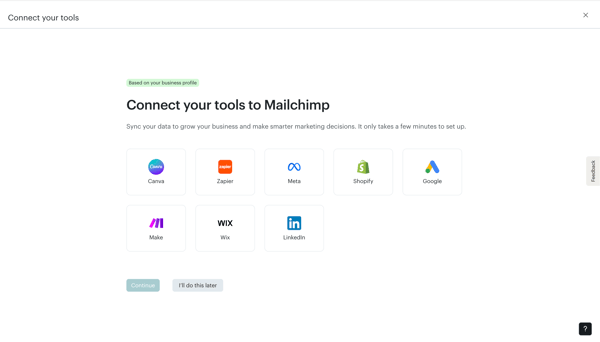
Mailchimp keeps things simple from the beginning. It asks for the basics like your email, business name, and address, then moves you forward quickly. What stood out to me was how it tries to guide you without slowing you down. During setup, it asked what marketing channels matter most to my business. Based on that, it tailors the dashboard once you are in.
It also gives you the option to import contacts, with an estimate of the contact list size, right there. But you can skip it and do it later, which I liked. Nothing felt forced. Another useful touch was the option to add your website URL. Mailchimp can automatically pull in details like your logo, colors, and brand assets. If you don’t have a website, you can skip that too.
Then it nudges you to connect tools like Shopify, Wix, Canva, and Meta Leads. One interesting detail I noticed is that Klaviyo itself appears as a migration option. So, Mailchimp is clearly built to help you move data during setup itself.
Within a few steps, I was inside the platform and ready to start working.
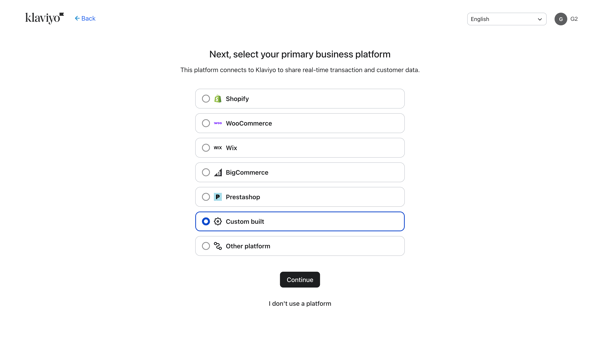
Klaviyo starts in a similar way but goes deeper. It asks for your name, company, and website first. One thing I noticed right away was that a phone number is required here. In Mailchimp, it was optional.
Then it walks you through more detailed questions about your business. You are asked about your industry, your main goals, and what platform you run your business on. It includes options like Shopify, WooCommerce, Wix, BigCommerce, and even custom setups. It also asks how many contacts you have, with clear ranges from zero to over a million. That part felt structured.
What made Klaviyo different was how it brings everything into one flow. It doesn’t just stop at basics. It also asks how you plan to use the platform. Email, SMS, WhatsApp, push notifications. You choose upfront. There’s also an option to book a walkthrough or live consultation during setup. I didn’t see that in Mailchimp.
Another thing I noticed was that branding is part of the onboarding itself. Instead of leaving it for later, Klaviyo tries to set things up properly from the start.
That said, this also made the process feel longer. Not complicated, but heavier.
Both platforms have their own take on profile setup. While Mailchimp kept the process simple and straightforward, Klaviyo made it more nuanced by delving into the details.
Verdict: Split; Mailchimp wins on speed, while Klaviyo sets a stronger foundation upfront.
Next, I tested how easy it was to import contacts into both platforms. This mattered because contact setup is one of the first workflows new users encounter, and it quickly shapes how approachable the platform feels.
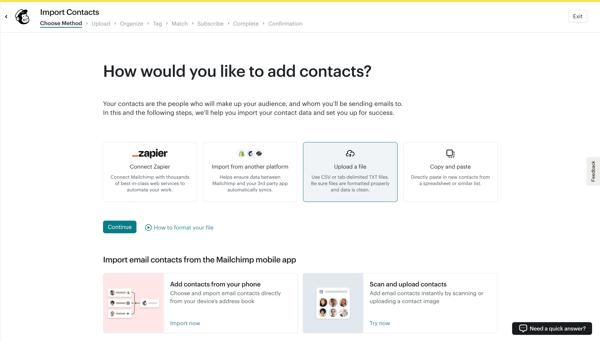
Mailchimp made a stronger first impression here. The add contacts option was visible from the home screen, so I did not have to search through the platform to begin. The import flow also offered several options, including app connections, copy-paste from a spreadsheet, CSV or TXT upload, and mobile contact import.
I liked how guided the CSV upload process felt. Mailchimp showed help resources inside the workflow, including step-specific guidance, file formatting support, and a sample CSV template. The process moved quickly without leaving me to guess what came next.
The main drawback was field mapping. Mailchimp handled obvious fields well, but CSVs with more columns still required manual fixes. That added a little friction to an otherwise simple workflow. I did like the final review step, which summarized the audience, tags, contact count, and whether existing contacts would be updated. Mailchimp also flagged invalid email domains before import, which helped keep the list clean.
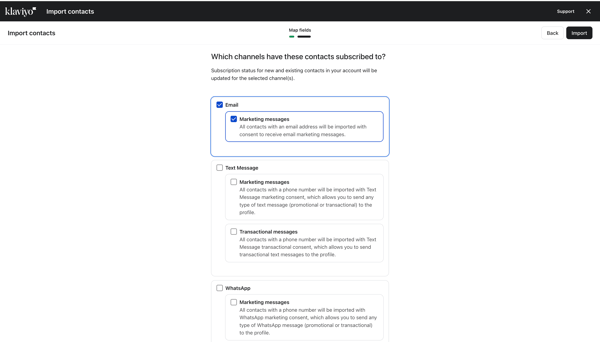
Klaviyo was less intuitive at the start. I did not find a clear add contacts option right away, and the import path took more navigation. I had to go through Audience, then Lists and Segments, before reaching the create/import flow.
Once I found it, Klaviyo’s process felt more structured than Mailchimp’s. It built the workflow around lists and segments from the start, which made sense for a platform focused on customer data and audience behavior. I also liked that Klaviyo gave options for users who do not have contacts yet, such as building a signup form or subscriber page.
It also gives you the option to create your own CSV template. You can choose predefined identifiers and objects before importing, which makes the upload cleaner. I saw support resources on the right-hand side throughout the process, so help was available there as well.
Klaviyo stood out most in field mapping and consent setup. It handled column matching more cleanly than Mailchimp and gave me more control over profile properties. It also asked for messaging consent and subscribed channels, including email, text, transactional messages, and WhatsApp. That made the import process feel more detailed and better aligned with audience management.
Overall, both platforms handled contact import well. Mailchimp was easier to start with and felt more beginner-friendly. Klaviyo took longer to find, but once inside the workflow, it offered stronger mapping, consent, and list-building controls.
Verdict: Split; Mailchimp is fast, but Klaviyo provides depth in the process.
Related: Starting out with marketing automation? Read about tried-and-tested marketing automation software with G2.
After importing contacts, I moved on to segmentation. This is where email tools start to feel either basic or powerful, depending on how much control they give you.
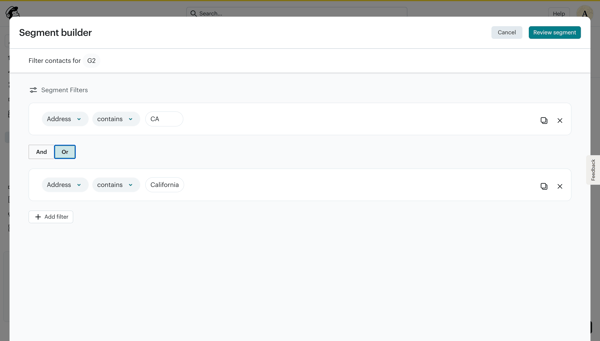
Mailchimp keeps segmentation easy to find and easy to use. There’s a dedicated option to create segments, and you don’t have to start from scratch every time.
It comes with pre-built segments out of the box. I saw options like new subscribers, engaged subscribers, repeat customers, lapsed customers, and more. There are around nine of these, and they cover most common use cases. If you want something quick, these are helpful.
When I created my own segment, the builder worked with filters. You can segment based on tags, contact details, email activity, or SMS activity.
For example, I could filter by location using conditions like “address is,” “address is not,” “contains,” or “starts with.” So if I set “address contains California,” it pulled all contacts with that value in their address. You can stack multiple filters to narrow things down further.
The options felt flexible. Even though most filters are based on contact data or activity, the way they’re structured makes it easy to combine them and build useful segments without much effort.
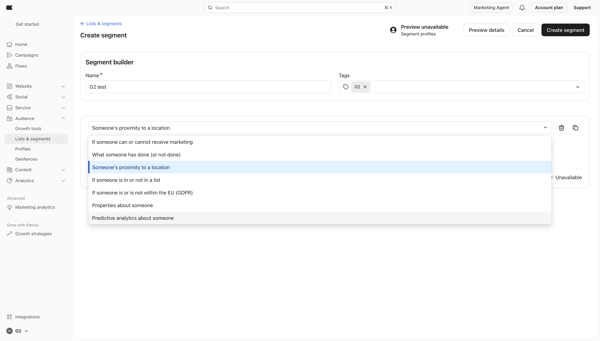
Klaviyo also gives you a clear space for segmentation, but it frames things a bit differently. Lists and segments sit in the same section, and from there, you choose what you want to create.
It also has a segment library where you can start based on goals or use cases. For example, I saw options like engaged in the last 30 days, active profiles, subscribers, or unsubscribed users. That helped speed things up.
Once I started building a segment, the difference became clear.
Klaviyo goes beyond basic filters. It lets you segment based on things like:
This added a layer that I did not see in Mailchimp. It’s not limited to static data like location or tags. You can build segments around behavior and future likelihood as well.
Another thing I noticed was that segmentation isn’t limited to email. It also includes channels like SMS and push notifications, which makes sense given how Klaviyo positions itself.
That said, the structure felt slightly more rigid at first. The options are deep, but you need a bit more time to understand how they fit together.
Mailchimp does a good job with flexibility. It’s easy to build segments quickly, and the pre-built options save time.
Klaviyo goes further. It adds depth with behavioral data, predictive signals, and more detailed conditions. If you want to create segments that go beyond basic targeting, Klaviyo gives you more to work with.
Verdict: Klaviyo
For this test, I had two motives. First, to explore the template library, and second, to see what templates are available in the free version.
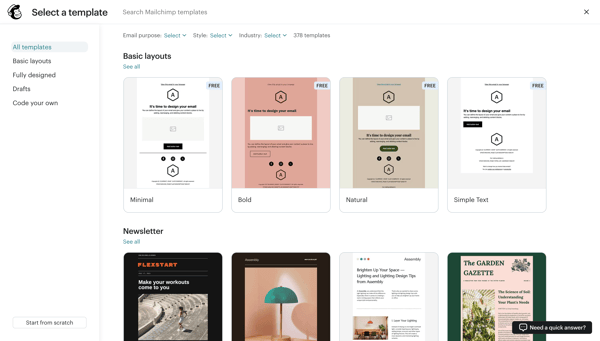
Mailchimp makes templates hard to miss. You can access them right from the homepage, which I liked. While there are 378 templates available in the library, only 7 basic layouts can be used under the free plan.
Mailchimp also gives you different ways to start:
The “code your own” option stood out. You can paste HTML, upload a ZIP file, or import from a hosted URL. There’s even an option to create HTML emails directly inside the editor. But sending those emails requires a paid plan.
What I liked was how the templates are organized. You can filter them based on:
This made it easy to narrow things down quickly. Even though the free options are limited, the browsing experience itself felt well thought out.
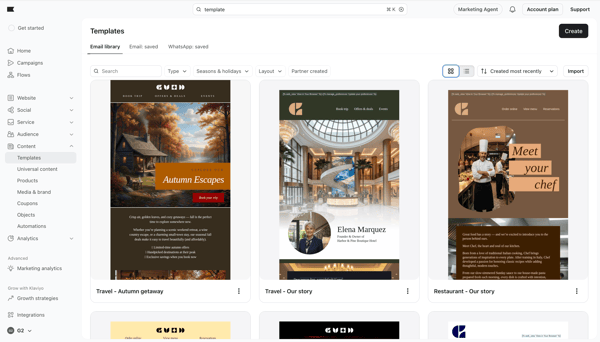
Compared to Mailchimp, it takes an extra click or two to access the templates in Klaviyo. But that didn’t slow me down. However, once I got there, the difference showed up.
Klaviyo has a smaller library in terms of total numbers, but a large portion of it is available for free. I came across a wide range of templates that I could use without upgrading, which made a big difference.
The filtering options were also more detailed. I could sort templates based on:
What stood out most was the seasonal filter. I could directly pick templates for events like Black Friday, Christmas, Valentine’s Day, or events like back-to-school campaigns. That saved time because I didn’t have to adapt a generic template for a seasonal campaign.
This is where Klaviyo’s style comes into play again. It provides more depth, plenty of options, and more structure.
Mailchimp has a larger library and makes templates easy to access. But the free plan feels restricted.
Klaviyo offers fewer templates overall, but more of them are usable without upgrading. The filters, especially for seasons and campaigns, made it easier for me to find something relevant without having to start from scratch.
Verdict: Klaviyo
This was where the difference between Mailchimp and Klaviyo became clearest. Mailchimp felt stronger for building the actual email, while Klaviyo offered more control around campaign setup.
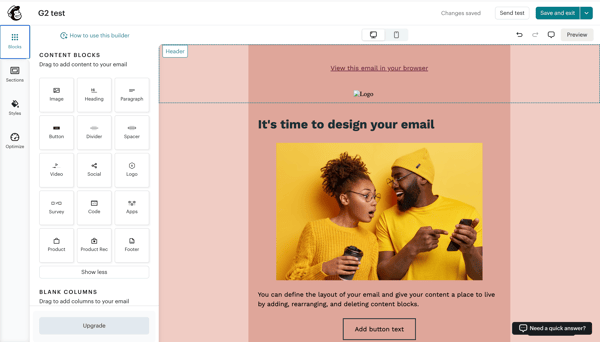
Mailchimp keeps campaign building simple. I could choose to build from scratch, use a template, or add HTML code. Once inside the builder, the layout was easy to follow, with the email preview and editing options close together.
The editor felt rich without being overwhelming. Mailchimp offered a wide range of drag-and-drop blocks, including buttons, images, video, social icons, products, recommendations, surveys, headers, footers, and code. It also gave me several layout options, from simple one-column emails to more flexible multi-column structures.
What stood out most was the level of design control. I could adjust background colors, text styles, button shape, link colors, spacing, image alignment, logo placement, and mobile-specific settings in some areas. The builder also included optimization tips while I worked, which made the experience feel helpful without slowing me down.
Mailchimp’s main strength was speed and creative ease. It felt like the better option for building a polished email quickly, especially from scratch.
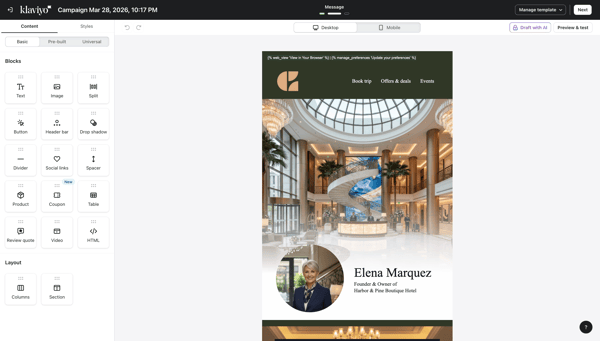
Klaviyo takes a more layered approach. Before I reached the email editor, it asked for campaign details such as campaign name, type, channel, tags, audience, and exclusions. I could also choose between email, SMS, WhatsApp, and push notifications, which made the setup feel broader than a standard email campaign flow.
I liked that Klaviyo gave more control before the email was built. Features like smart sending, list or segment exclusions, and customizable UTM tracking made the campaign setup feel more advanced. It treated the campaign less like a standalone email and more like part of a larger customer messaging strategy.
The email editor itself covered the basics well. Klaviyo offered drag-and-drop blocks for text, images, buttons, dividers, social links, tables, and video, along with prebuilt headers and footers. It also included styling controls for padding, background, borders, and mobile optimization. I could also build the email using the template library, a blank template, a text-only editor, or an HTML editor.
Klaviyo also offers a brand voice feature tied to subject lines, though that becomes more useful once your account has enough history.
That said, the editor felt lighter than Mailchimp’s, especially on the free plan. I could still build a solid email, but I did not feel the same level of creative flexibility or design depth. Klaviyo’s strengths were more visible in campaign logic, audience control, A/B testing, tracking, and channel setup.
Mailchimp was better for actually designing the email. The editor felt richer, easier to use, and more complete, especially if I wanted to build the campaign from scratch. Klaviyo was better for campaign setup depth. It gave me more control over channels, exclusions, tracking, and campaign logic before the email even went out.
Verdict: Split; if the goal is to build an email fast and shape the design easily, I’d pick Mailchimp. If the goal is to set up a more structured campaign with tighter controls, Klaviyo makes more sense.
This test was less about feature count and more about what I could still do without paying.
|
Category |
Mailchimp free plan |
Klaviyo free plan |
|
Contact limit |
250 contacts |
250 active profiles |
|
Monthly send limit |
500 emails/month |
500 emails/month |
|
Daily send limit |
250 emails/day |
- |
| Forms/pop-ups | Pop-up forms, forms, landing pages | Core signup forms available, but less broad on side tools |
| Segmentation/audience tools | Tags and audience management tools included, but advanced targeting is gated | Basic segmentation remained usable |
| Reporting | Limited reporting | Built-in reporting dashboards |
| SMS | Not included as part of the core free-plan value | 150 monthly SMS/MMS credits |
| Support | Limited support window | Email support for the first 60 days |
Mailchimp felt broader on free. It gave me more tools to explore, but some core email functions quickly hit limits, especially scheduling, branding, and deeper targeting.
Klaviyo felt narrower but more focused. The free tier kept the main email-and-SMS workflow intact, along with reporting and basic segmentation, so it felt more useful for testing the core use case.
Verdict: Split; Mailchimp gives a broader starter kit, but Klaviyo gives a stronger core kit if your main use case is targeted email and SMS.
The G2 reviews echoed this split. Mailchimp reviews kept circling back to easy starts and rising costs as the list grew. Klaviyo reviews kept praising segmentation, integrations, and email-plus-SMS in one place, while still calling out price jumps and plan friction. That pattern also shows up on G2’s comparison page, where “Expensive” appears more often in Klaviyo review themes (69 mentions) than in Mailchimp ones (45). That is close to what I saw in the free-plan screens.
I looked at the pricing of Mailchimp and Klaviyo, and while both offer free entry points, their pricing structures reflect very different use cases and audiences.
The key difference is simple: Mailchimp uses plan tiers, and your price scales with your contact tier. Klaviyo is more modular. You pay for the core marketing plan, then add analytics, reviews, or service products separately, with pricing tied to active profiles, orders, tickets, or conversations.
| Mailchimp pricing | Starts at | Best for | What you get |
| Essentials | $4.04/month for 12 months, then $8.08/month | Small teams moving beyond the free plan | Up to 5,000 monthly email sends, basic automation flows, templates, landing pages, scheduling, 24/7 email and chat support, and up to 3 users and audiences |
| Standard | $6.03/month for 12 months, then $11.90/month | Growing teams that need better targeting and reporting | Around 6,000 monthly email sends, up to 200 marketing automation flows, up to 100,000 contacts, generative AI features, dynamic content, custom reports, time-based delivery, better segmentation, behavioral targeting, and customer lifetime value tracking |
| Premium | $119/month for 12 months, then $238.01/month | Large teams running higher-volume campaigns | Up to 150,000 monthly email sends, unlimited users and audiences, priority phone support, premium migration services, onboarding sessions, and more scale and flexibility on top of Standard-tier capabilities |
Note: The pricing has been taken from Mailchimp’s website.
Mailchimp is easier to understand because the plans follow a familiar tier structure. The trade-off is that more advanced targeting, reporting, and automation features are pushed into the higher plans.
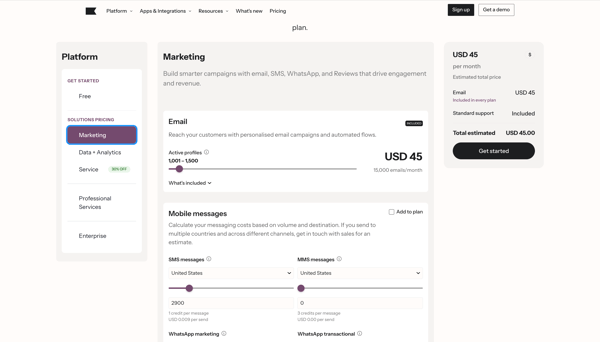
Klaviyo doesn’t follow fixed tiers the same way. It splits pricing into Email, Email plus Mobile, and additional data and service layers.
|
Klaviyo Pricing |
Starts at |
Best for |
What you get |
| $45/month | Teams focused on email marketing with stronger customer data | Around 15,000 emails per month based on setup, full customer profile data, 300+ integrations, built-in reporting, and content tools | |
| Email + mobile | $80/month | Brands that want email and SMS in one workflow | Everything in Email, plus mobile messaging credits, multi-channel segmentation, A/B testing, and attribution |
|
Reviews (email included) |
$70/month |
E-commerce teams collecting social proof |
Review collection and display, plus the ability to use review data in campaigns |
|
Marketing Analytics |
$100/month |
Teams that want deeper campaign and purchase insights |
Purchase-based targeting, cross-sell opportunities using product data, and stronger campaign performance tracking |
|
Advanced data platform |
$500/month |
Teams that need a more centralized customer data layer |
Warehouse sync, no-code data transformations, and a centralized data layer |
|
Customer agent |
$140/month for 200 conversations |
Teams that are adding automated customer conversations |
AI-powered customer interaction support |
|
Help desk |
$185/month |
Teams that want support channels in one place |
Shared inbox for email, chat, SMS, and other customer communication channels |
Note: The pricing has been taken from Klaviyo’s website.
Klaviyo gives you more flexibility because you can build around email first and add products as needed. The trade-off is that pricing is less predictable, since costs rise with active profiles and can increase quickly if your list is not well-maintained.
Verdict: Split; Mailchimp is a better fit if you want predictable pricing and a simple setup. Klaviyo is a better fit if you already know your requirements and want more control over how you pay and what you use.
Here’s a table summarizing all my tests with the winner and the reason.
|
Task |
Winner |
Why it won |
|
Profile setup |
Split |
Mailchimp is faster and gets you inside the platform quickly. Klaviyo is more guided and thorough, covering branding, channels, and business setup upfront. |
|
Contact import process |
Split |
Mailchimp is easier to access and faster to start. Klaviyo takes more steps initially but offers better mapping, consent handling, and structured data import. |
|
Segment builder |
Klaviyo 🏆 |
Mailchimp is flexible for basic filtering, but Klaviyo adds behavioral, predictive, and consent-based segmentation, enabling much deeper targeting. |
|
Template library |
Klaviyo 🏆 |
Mailchimp has a larger library, but most templates are paid. Klaviyo offers more free templates with better filters, such as use cases and seasonal campaigns. |
|
Email campaign building |
Split |
Mailchimp is better for fast, design-focused campaign creation. Klaviyo offers stronger control over targeting, channels, and campaign logic. |
|
Free plan |
Split |
Mailchimp offers a broader set of starter tools. Klaviyo focuses on core email and SMS capabilities with stronger segmentation, even on the free plan. |
|
Pricing and value |
Split |
Mailchimp is easier to understand and cheaper at the entry level. Klaviyo is more flexible and powerful, but requires clearer use-case planning. |
As I mentioned, my hands-on testing was limited to introductory features and the free experience. To get a broader picture of how these tools perform in real business settings, I also reviewed G2 product data user reviews. That helped me understand not just feature differences, but also how different teams experience each tool in practice. Here’s what stood out to me:
Both tools perform well in terms of user satisfaction, but they stand out for different reasons. Mailchimp holds a 4.4/5 rating, with 94% of users rating it 4 or 5 stars. It scores high on ease-related metrics, including ease of use (89%), ease of setup (89%), and ease of admin (90%). From what I have seen and what users say, Mailchimp works well because it’s easy to get started and doesn’t require much effort to manage day to day.
Klaviyo has a slightly higher rating of 4.6/5, with 96% of users rating it 4 or 5 stars. It scores strongly on meeting requirements (92%) and ease of doing business (91%). This lines up with how the platform feels in practice. It’s built for more advanced use cases, and users seem to value that added depth.
Mailchimp has 76% of its users from small businesses, 19% from mid-market, and 5% from enterprise. This suggests it’s widely used by smaller teams that want something simple and easy to manage.
Klaviyo shows an even stronger skew toward small businesses, with 82% of users coming from that segment, followed by 17% from the mid-market and only 2% from the enterprise. That makes sense given how popular it is among e-commerce brands and lean marketing teams that need more control without building custom systems.
Mailchimp shows a broader industry spread. Its strongest presence is in marketing and advertising, followed by information technology, non-profits, computer software, and retail. This reflects its position as a general-purpose email tool used across different types of teams.
Klaviyo’s industry mix is more focused. It shows strong adoption across retail, apparel, consumer goods, and marketing and health-related sectors. This lines up with how the platform is used. It’s more common in e-commerce setups where segmentation and customer data play a bigger role.
Mailchimp’s top-rated features are tied to core email functionality. Users rate sending outbound emails (93%), building and personalizing emails (92%), and managing deliverability (90%) highly. These scores reflect what Mailchimp does best. It makes campaign creation and execution simple.
Klaviyo’s strengths go a step further. Along with sending outbound emails (93%), users rate segmentation (92%) and email personalization (91%) highly. This reinforces what I saw during testing. Klaviyo gives you more control over how you target and personalize campaigns.
Mailchimp’s lowest-rated areas include multi-step planning (74%), autonomous task execution (75%), and adaptive learning (77%). This suggests that while it works well for basic campaigns, it may fall short when workflows get more complex.
Klaviyo shows a similar pattern in a few areas. Its lowest-rated features include proactive assistance (74%), multi-step planning (74%), and autonomous task execution (75%). Even though it offers more depth, users still see room for improvement when it comes to advanced automation handling.
Got more questions? G2 has the answers.
Klaviyo’s main competitors include Mailchimp, Omnisend, ActiveCampaign, and Brevo. In this comparison, Mailchimp stands out for ease of use and faster campaign setup, while Klaviyo stands out for e-commerce-focused segmentation, automation, and multi-channel marketing.
Mailchimp is easier to get started with. Its list management, navigation, and campaign workflow felt more straightforward in my testing. Klaviyo offers deeper automation and segmentation, but it takes more effort to learn and set up well.
Mailchimp is the better fit for beginners. It was easier to navigate, faster to set up, and simpler to use day to day. Klaviyo gives more control, but it comes with a more noticeable learning curve.
Mailchimp is a better fit if you want a simpler, all-in-one marketing setup. It felt more approachable for straightforward email campaigns and supporting assets, while Klaviyo felt more specialized toward segmentation, automation, and e-commerce journeys.
Klaviyo is the better fit for most e-commerce businesses. In my testing, it felt more closely built around customer data, segmentation, Shopify use cases, and multi-channel campaigns across email, SMS, and other touchpoints.
It depends on what kind of small business you are running. Mailchimp is a better fit for small teams that want quick setup, simple newsletters, and an easier interface. Klaviyo is better for small e-commerce brands or growth-focused teams that need more advanced targeting and automation.
Mailchimp covers core reporting well, but Klaviyo is the stronger option if your campaigns depend on deeper customer data and more advanced performance analysis. It felt more built for marketers who want reporting tied closely to segmentation, behavior, and revenue-focused workflows.
Klaviyo can be better than Mailchimp for teams that need deeper segmentation, stronger customer data, and multi-channel campaigns. Mailchimp is better for teams that want a simpler setup, easier navigation, and faster email delivery. The better choice depends on your marketing needs.
After testing both platforms, I came away with the sense that Klaviyo and Mailchimp are not trying to solve the exact same problem in the same way. Mailchimp makes the early work easier. It is faster to learn, simpler to navigate, and better suited for teams that want to launch campaigns without spending too much time setting up segments, channels, or campaign logic.
Klaviyo, on the other hand, asks for more upfront attention, but it gives back more control in return, especially if your marketing depends on customer data, tighter targeting, Shopify integration, and multi-channel workflows.
In the end, the better choice comes down to the kind of marketing you plan to run. If your priority is ease, speed, and straightforward email execution, Mailchimp is the easier fit.
If you are building a more data-driven lifecycle strategy and want room to grow into deeper segmentation and e-commerce-focused automation, Klaviyo is the stronger long-term pick. Both platforms can get the job done, but they feel very different once your campaigns become more targeted and your needs become more complex.
Still comparing your options? Continue on Learn G2 with our roundup of free email marketing software to explore more tools, pricing, and features before you commit.


Whether it’s a flash sale, a limited-time discount, or a personalized offer, SMS marketing...
 by Harshita Tewari

I evaluated 20+ tools to find the 10 best marketing automation software in 2026. These are ...
/DarshayitaThakur-OrangeBG.webp) by Darshayita Thakur
by Darshayita Thakur

I evaluated 20+ free tools using G2 Data and reviews to finalize the 8 best free marketing...
 by Mahima Chavan