


GitHub Copilot vs. ChatGPT: if you're exploring the best AI code generation software, chances are these two are at the top of your list. Think of GitHub Copilot as a travel guide that already knows the shortcuts, ideal when you know where you're going and want to get there faster. ChatGPT is more like a GPS, giving you step-by-step directions and explaining the road ahead.
As a non-coder and productivity geek, I put both tools through seven real coding tasks, from building a to-do list app to fixing JavaScript bugs to designing a color palette creator, using the same prompts, with no changes. Here's what I found: GitHub Copilot shines at speeding up active development with smart autocomplete directly in your editor, while ChatGPT excels at generating structured code and teaching you the how and why along the way.
|
Feature |
GitHub Copilot |
ChatGPT |
|
G2 rating |
4.5/5 |
4.7/5 |
|
AI model |
GPT-4.1, GPT-5, GPT-5 mini, GPT-5.1, GPT-5.2, Claude Haiku 4.5, Claude Sonnet 4/4.5, Claude Opus 4.1/4.5, Gemini 2.5 Pro, Gemini 3 Pro/Flash, xAI Grok Code Fast 1, Raptor mini |
GPT-5.3 Instant (default), GPT-5.4 Thinking, GPT-5.4 Pro
|
|
Best for |
Code generation, completion, suggestion, documentation, and productivity |
Conversational AI, creative writing, task automation, learning, coding (Codex), image generation, deep research |
|
Coding workflow |
Inline completions in IDEs + Copilot Chat + agent mode + coding agent (issue→PR) + code review + Copilot CLI |
Conversational chat for planning, coding, debugging + Codex (agentic coding agent for autonomous multi-step tasks) |
|
Pricing |
Free: $0 (2,000 completions + 50 premium requests/mo) Pro: $10/mo or $100/yr Pro+: $39/mo or $390/yr Business: $19/user/mo Enterprise: $39/user/mo |
Free: $0 (includes ads in US) Go: $8/mo (includes ads) Plus: $20/mo (ad-free) Pro 5x: $100/mo Pro 20x: $200/mo Business: $25/user/mo
|
|
IDE integration |
VS Code, Visual Studio, JetBrains IDEs, Neovim, Xcode, Eclipse, Azure Data Studio, Raycast + natively on GitHub |
No native IDE integration; available via desktop app (macOS, Windows), web, mobile, and API |
|
Multimodal support |
Code input/output only |
Text, image input/output, file uploads, voice, video, and computer use |
|
Code explanation |
Full code explanations via Copilot Chat in IDEs and on GitHub.com |
Logic breakdown teaches concepts |
|
Language supported |
All languages in public repos; best for Python, JS, TS, C++, C#, Java, Go, Ruby, PHP, Swift, Rust, Kotlin, etc. |
Python, JavaScript, C++, C#, Ruby, PHP, Swift, Go, TypeScript, HTML/CSS, SQL, MATLAB, R, Shell scripting languages (Bash, PowerShell), and more. |
Note: Both GitHub (a Microsoft subsidiary) and OpenAI frequently roll out new updates to these AI coding assistants. The details below reflect the most current capabilities as of April 2026, but may change over time.
GitHub Copilot and ChatGPT are both some of the best AI coding assistants out there, but they serve very different roles in how you write, debug, and ship code. GitHub Copilot whispers suggestions directly into your IDE, while ChatGPT is your brainstorming partner in the chat window.
Recently, GitHub Copilot’s chatbot has expanded beyond OpenAI models to include other AI models, making it even more powerful. Let’s dig into how they compare and their shared strengths.
So, should developers use GitHub Copilot or ChatGPT for writing code? GitHub Copilot is a dedicated coding tool embedded in your editor that completes, reviews, and refactors code as you type. ChatGPT is a flexible AI assistant that helps with coding, planning, learning, research, and more. GitHub Copilot speeds up active development, whereas ChatGPT explains, guides, and handles end-to-end tasks. Both are powerful, but built for different kinds of workflows.
Despite their different styles, these tools have a lot in common, and when used together, they can be surprisingly complementary.
To thoroughly compare, I run the same prompts independently on both tools in coding scenarios, using their paid versions (Copilot Pro and ChatGPT Plus). I tested them using the following tasks.
I evaluated their response based on
To add other user perspectives, I also cross-checked my findings with G2 reviews to see how other users experience these models.
Disclaimer: AI responses may vary based on phrasing, session history, and system updates for the same prompts. These results reflect the models' capabilities at the time of testing.
If you are all the way here, I am guessing you are just as curious as I was to find out which tool came out on top. I will walk you through how I tested both tools, what the experience was like, and how I have broken down my verdict to make it easy (and hopefully fun) to follow.
Ready? Let’s go!
I wanted to build a simple to-do list web app to test how GitHub Copilot and ChatGPT handled everyday coding tasks.
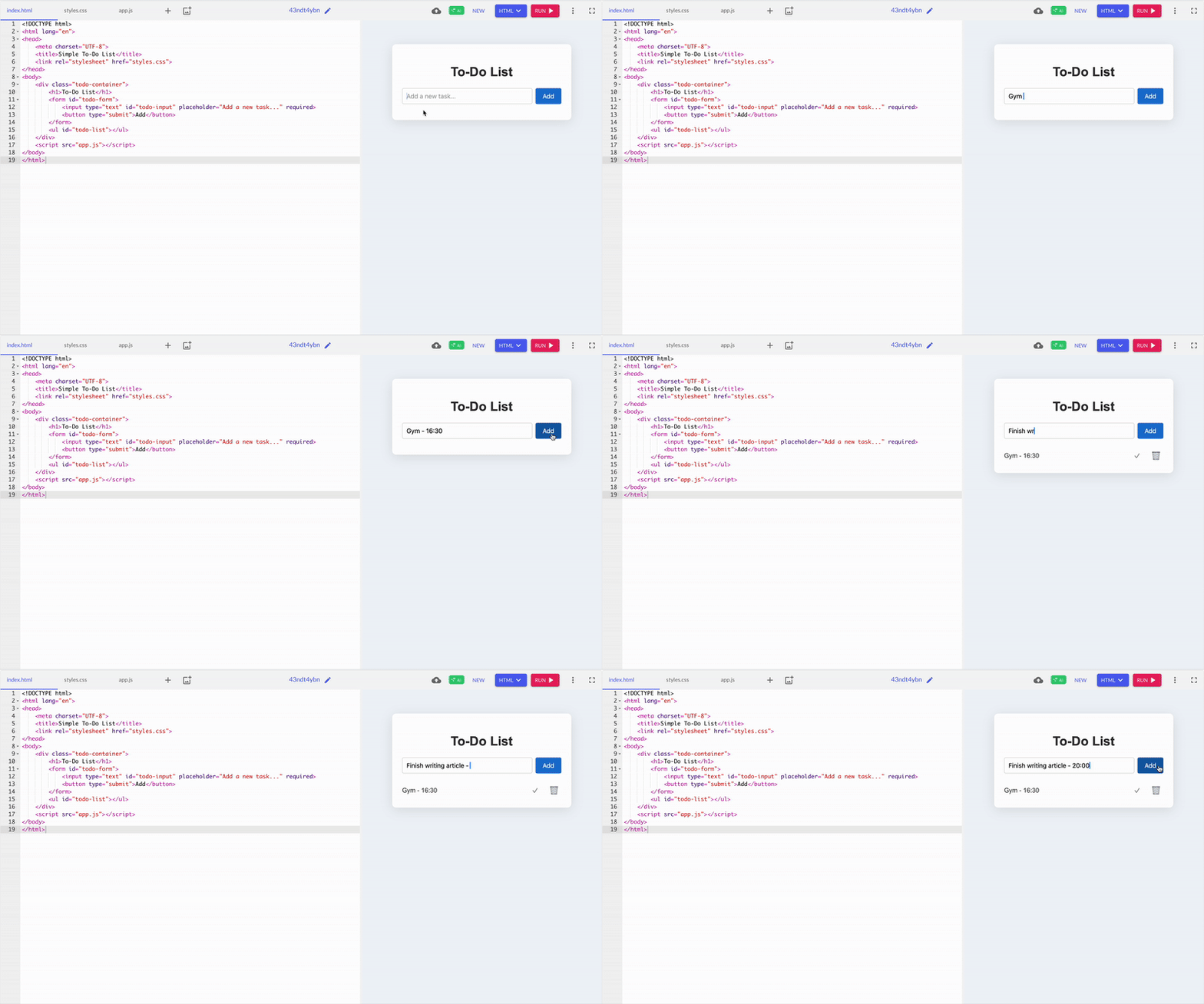
GitHub Copilot surprised me with a sleek, minimal design. It automatically split the code into separate HTML, CSS, and JS files, making things much cleaner and easier to manage. The structured layout felt more maintainable in the long run.

ChatGPT returned a neat single-file demo with colorful buttons and a friendly interface. However, I felt ChatGPT’s response, having all the HTML, CSS, and JavaScript bundled together, was a bit cluttered once I thought about extending the app later.
Winner: GitHub Copilot
Not everyone wants to write code, and that's okay! For those who prefer drag-and-drop magic over typing commands, check out these top no-code platforms that make building apps a breeze.
Creating a portfolio is common for beginners who are working on real-world projects. I have wanted to build a portfolio site for myself, so this was a perfect opportunity to put my skills to the test.
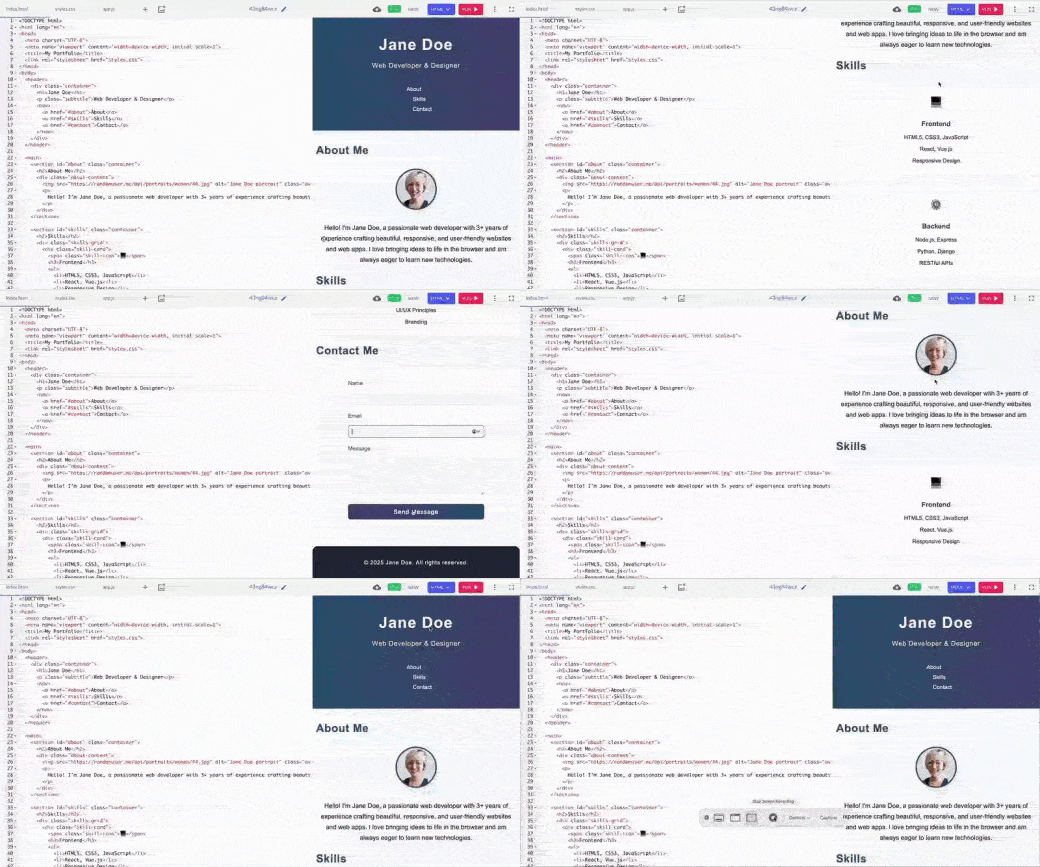
GitHub started strong, especially with CSS separated into its file for easier future updates. But compared to ChatGPT, Copilot's design felt simpler and lacked important features, like project cards and detailed navigation, elements that make a portfolio truly showcase your work and engage visitors.
.webp?width=600&height=334&name=VersionA2-ezgif.com-speed-1%20(1).webp)
ChatGPT's solution, on the other hand, felt smooth right from the start. Everything came out well, like displaying all sections, navigation, project cards, and the contact form — exactly as expected, without errors. Having project cards included was particularly helpful since portfolios typically need this feature.
Winner: ChatGPT
For this test, I gave both tools a common JS bug, using the assignment operator (=) instead of the equality check (===) inside a conditional statement. This bug trips up many beginners, so I wanted to see not just if they could fix it but also how they explained the solution.
.png?width=600&height=437&name=VERSION%20B%20(3).png)
GitHub Copilot’s fix was equally effective in solving the problem, but it just spotted the error and rectified it. I found the explanation a bit repetitive. As a beginner, I still wouldn’t have understood why the error happened without more context.
So, in my case, I felt GitHub Copilot's explanation fell short. There was nothing technically wrong, but these minor distractions stood out.
.png?width=600&height=380&name=Version%20A%20(3).png)
ChatGPT’s correction felt smooth and concise. It quickly pinpointed the error and clearly explained why the bug happened, and immediately showed the corrected code. Then, it wrapped everything up with a one-line summary that even someone new to coding could follow. ChatGPT gave me both the what and why without overwhelming me.
ChatGPT's more precise explanation and straightforward presentation made it feel slightly easier to follow, especially for beginners looking for a straightforward answer.
Winner: ChatGPT
GitHub Copilot: 87%
ChatGPT: 86%
GitHub Copilot edges out ChatGPT on G2's accuracy rating, reflecting its strength as a purpose-built coding tool that delivers precise, context-aware suggestions directly in the editor.
I asked both GitHub Copilot and ChatGPT to compare the implementation of the JavaScript binary search function to see which felt easier and more practical to use. Binary search is one of those foundational algorithms that every coder runs into at some point.
It's a fast way to find a specific item in a sorted list, something that comes up often in technical interviews and real-world projects. I wanted to see if they could write it correctly and how clearly they explained it.
.png?width=600&height=450&name=VERSION%20B%20(4).png)
GitHub Copilot offered a concise and efficient take on iterative binary search. The function was well-structured, and its brief inline comments conveyed its purpose. I liked how it delivered just what was needed, no extra content or prolonged explanations.
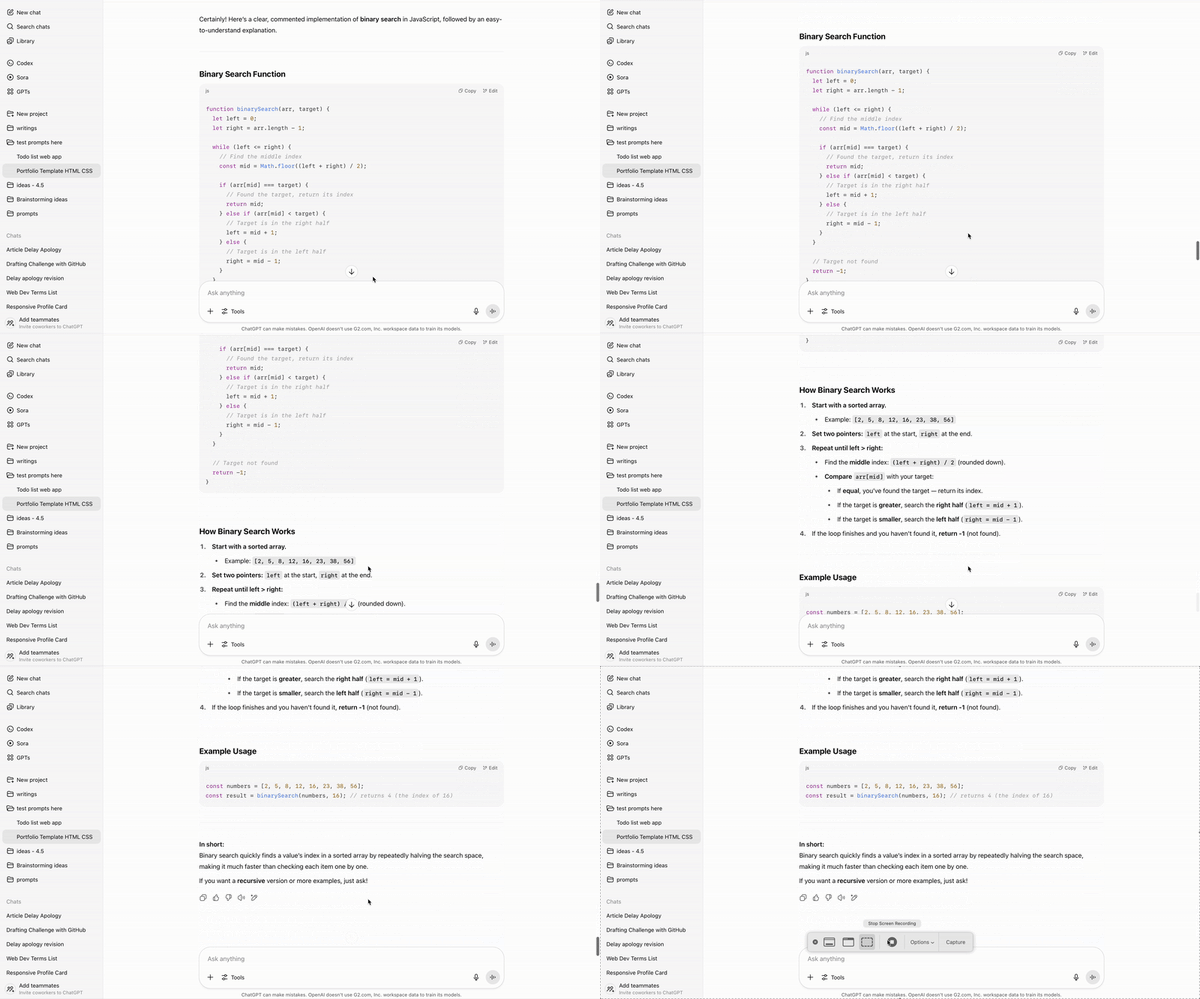
In contrast, the ChatGPT solution was also correct and easy to follow. The inline comments were helpful, making the logic easy to understand quickly. However, I felt the explanation was overly extensive and created unnecessary scrolling when I just wanted a quick reference.
Winner: GitHub Copilot
GitHub Copilot: 8.5/10
ChatGPT: 8.5/10
Both GitHub Copilot and ChatGPT score identically on G2 for code quality, showing that users find both tools equally capable of generating clean, reliable, and maintainable code.
Take a look at the best AI code generators, my colleague Sudipto Paul personally tested and reviewed.
I wanted to build a small weather-themed UI as a beginner project, something simple, visual, and easy to customize later. I specified that the dashboard should show weather data for global locations, and asked for basic features like temperature, weather condition, and an icon representing the current weather.

Like all the other responses, GitHub Copilot put HTML, CSS, and JS in separate files. It felt way cleaner, especially when I wanted to change colors or fonts. The design also has a gradient background, and weather emojis make it feel more polished.
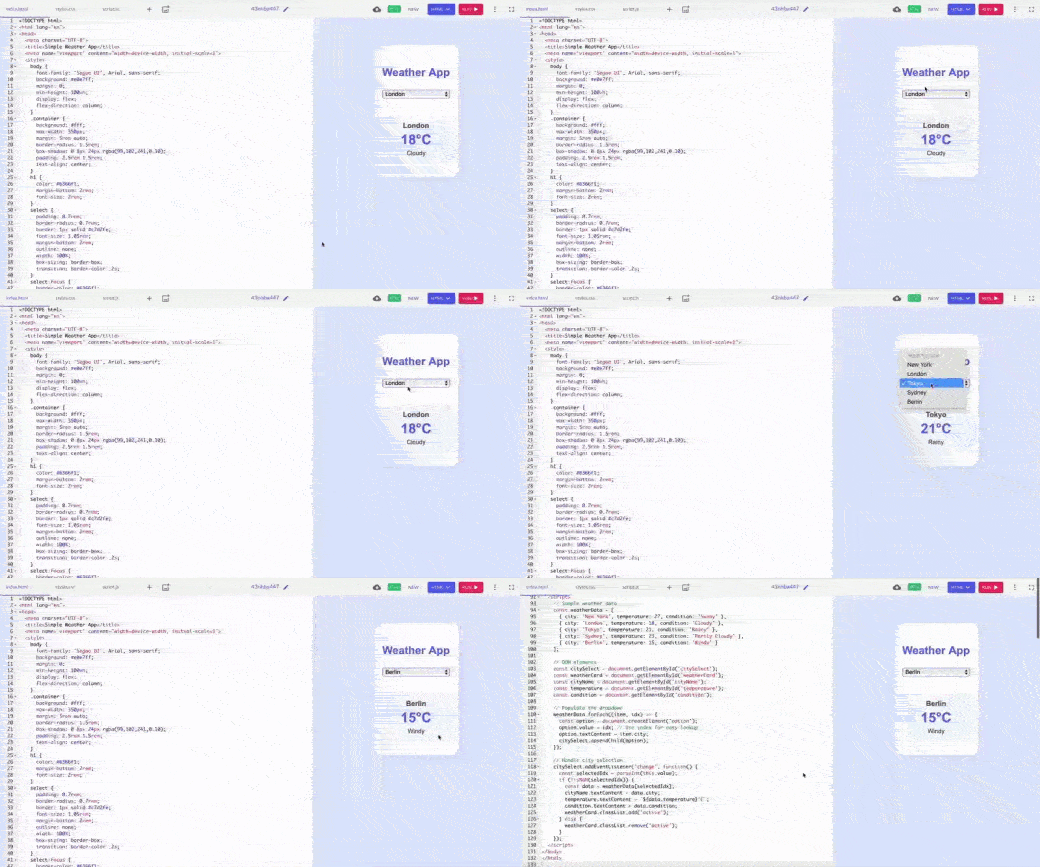
ChatGPT felt like opening a snack pack, just one HTML file to copy and open. It was easy to tweak, but finding style rules buried in the HTML was challenging. Still, it worked out of the box and didn’t break. The design was nice enough, with a pastel card layout that, while basic, looked decent.
Winner: Split; GitHub Copilot made future edits way easier, while ChatGPT made it easy to set up with just one code.
This time, I just wanted the tools to say nice things to me! Testing quote generators sounded like a chill way to explore tools. One nailed the vibe; the other one needed a pep talk.
.webp?width=600&height=334&name=VersionB6-ezgif.com-speed-1%20(1).webp)
GitHub Copilot looked good with an orange gradient and strong shadows. Clicking worked well and added a nice fade effect, but sometimes, it repeated the exact quotes, which broke the experience a bit. So, for a beginner, ChatGPT made me smile faster.
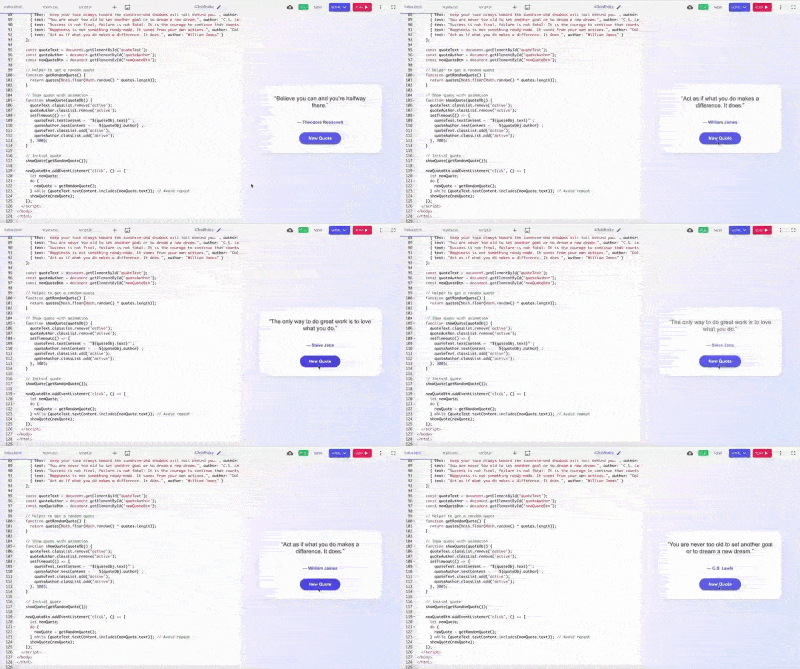
ChatGPT was ready to go the moment I entered the prompt. There are no missing links or blank screens; it works immediately. I liked the styling; it was clean, with soft colors, round edges, and smooth transitions. Also, there is no repetition of quotes.
Winner: ChatGPT
After testing to-do lists, portfolios, and quote generation, I wanted to end with a little more fun: a color palette generator. I asked GitHub Copilot and ChatGPT to design a webpage that generates random aesthetic color palettes.
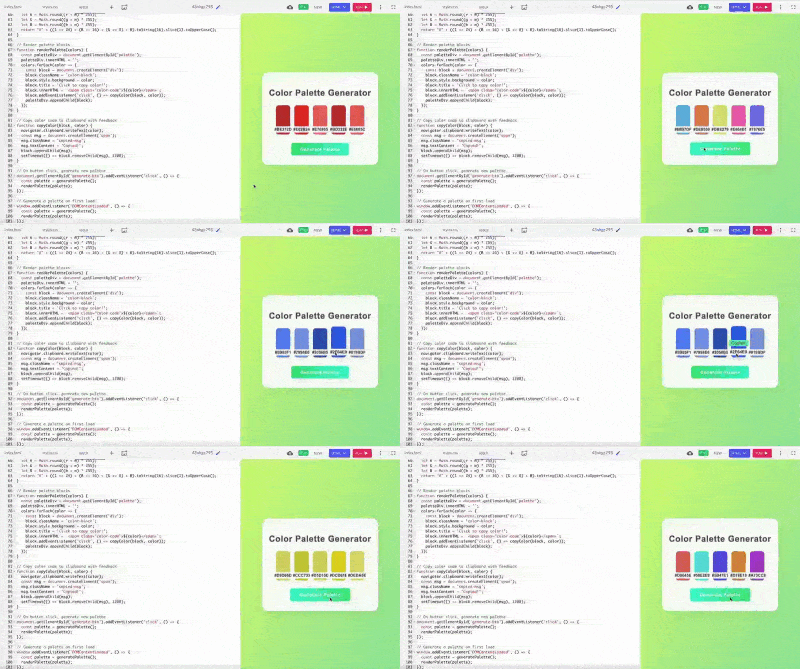
GitHub Copilot's color palette was more monochrome than just random colors. This gave its output a sense of harmony as if the colors belonged to a theme or brand board rather than a truly random set. The background was also a calming green; the extra details made it feel more like a finished tool than a demo.
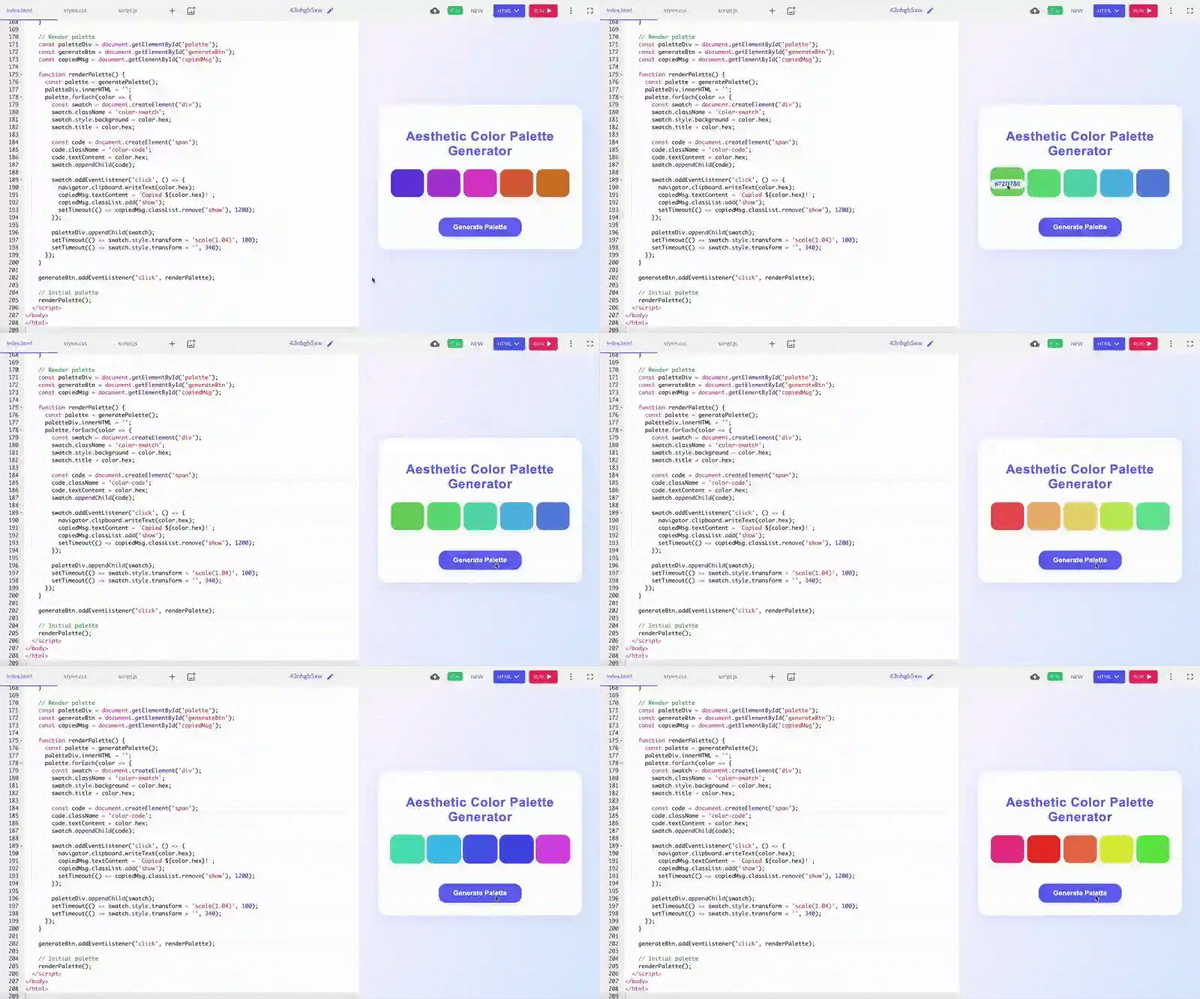
ChatGPT's five color swatches looked nice. Each swatch had its HEX code clearly displayed, and clicking one instantly triggered a slick confirmation message, “#HEX copied!” that appeared at the center of the page. It is great for quick use or showing a friend.
Winner: GitHub Copilot
Here’s a summary of which chatbot won each task.
| Task | Winner | Why it won |
| To-do list web app | GitHub Copilot | Clear structure with separate files made it easier to manage and scale. |
|
Personal portfolio |
ChatGPT | ChatGPT included all key sections like project cards and worked perfectly out of the box. |
| JavaScript logical error | ChatGPT | ChatGPT's clear and concise explanations made the fix easy for a beginner to understand. |
| Search algorithm | Github Copilot | GitHub Copilot has the same correct logic but is more compact and easier to reference. |
| Weather dashboard | Split | ChatGPT was quick to set up and worked instantly; GitHub Copilot offered a cleaner structure and a more polished design for future edits. |
| Inspirational quote generator | ChatGPT | ChatGPT showed a quote instantly with no repeats, and it felt more polished and satisfying. |
| Color palette creator | Github Copilot | GitHub Copilot's monochrome color palette has a professional layout that feels more like a finished tool. |
I also looked at review data on G2 to find strengths and adoption patterns for GitHub Copilot and ChatGPT. Here's what stood out:
| User role/need | Recommended tool | Why |
| Developers working inside an IDE | GitHub Copilot | Provides real-time code suggestions and autocomplete directly within IDEs like VS Code |
| Developers learning or debugging code | ChatGPT | Better at explaining code, identifying errors, and walking through logic step by step |
| Engineers working on repetitive coding tasks | GitHub Copilot | Speeds up boilerplate code, syntax completion, and routine development work |
| Beginners and students learning to code | ChatGPT | Offers clearer explanations, examples, and conversational guidance |
| Developers building features from scratch | ChatGPT | Helps generate full scripts, logic, and architecture ideas from prompts |
| Teams focused on coding speed and productivity | GitHub Copilot | Optimized for fast, in-context coding without leaving the development environment |
Got more questions? Get the answers here!
It boils down to what you need. If you spend most of your time writing code inside an editor and want instant inline suggestions, then GitHub Copilot is your tool. But if you are juggling everything from brainstorming to documentation to debugging explanations, ChatGPT is more of an all-rounder.
GitHub Copilot Pro is $10/month and gives unlimited code completions, chat features, and access to models from OpenAI, Anthropic, and Google. It works natively with VS Code, JetBrains, Visual Studio, Neovim, Xcode, Eclipse, and more. ChatGPT Plus costs $20/month and unlocks GPT-5.4 Thinking, Codex for agentic coding, and Deep Research, along with higher limits for image generation, file uploads, and voice.
Yes! GitHub Copilot can suggest comments and documentation based on your code or prompts, helping you write more precise explanations and improve code readability.
GitHub Copilot shines with one-line or whole-function suggestions as you type. ChatGPT's conversational style lets you paste error messages or snippets and get step-by-step explanations or rewrite suggestions.
Yes, GitHub Copilot offers a free tier with 2,000 code completions and 50 premium requests per month. There are also free Pro plans for verified students, teachers, and maintainers of popular open-source projects.
Install the GitHub Copilot extension in your code editor (like Visual Studio Code), sign in with your GitHub account, and start coding. Copilot will suggest completions and snippets as you type.
GitHub Copilot is native to major IDEs like VS Code, Visual Studio, JetBrains, Neovim, Xcode, Eclipse, and Azure Data Studio. Suggestions drop right into your editor with no extra setup once you install the extension. ChatGPT hooks in via the desktop app or community extensions, but it feels more like a side-panel chat than a built-in coding tool.
Absolutely. Many developers keep Copilot in the editor for live completions and open ChatGPT for more profound questions.
Copilot assumes that you already know what you are doing, and it knows where to drop code and what you want next, which can be opaque if you are still learning the ropes. Beginners often find ChatGPT more approachable because of its natural language Q&A style, which feels like asking a tutor.
To use GitHub Copilot in Visual Studio, first, install the GitHub Copilot extension from the Visual Studio Marketplace. Then, sign in with your GitHub Copilot account, and you will start getting AI-powered code suggestions as you type. You can accept, reject, or modify the suggestions easily within your editor.
No, not entirely. GitHub Copilot focuses on code generation, code review, and agentic coding workflows inside your editor. ChatGPT offers broader conversational abilities, including explaining concepts, debugging help, deep research, image generation, and general problem-solving. They complement rather than replace each other.
GitHub Copilot is AI-driven code completion, code review, and agentic coding inside your IDE, think autocomplete on steroids, plus agent mode that can turn issues into pull requests. ChatGPT is a conversational AI that can generate and explain code, draft emails, write tests, analyze data, create images, perform deep research, and handle anything text-oriented, not just code.
Is GitHub Copilot better than ChatGPT for software development? After testing seven real-world samples, I found that GitHub Copilot excelled at three tasks, while ChatGPT excelled at three others. One task showed mixed results, with both tools performing comparably. These tools excel in different ways for different types of coders. GitHub Copilot stood out when it came to tasks that require clean file separation, a modular code structure, and developer-friendliness. If you are coding inside an IDE and looking for a quiet, sharp AI partner that complements your workflow, GitHub Copilot is your tool.
ChatGPT, on the other hand, shone in quick wins, especially for beginners. It often felt more immediately rewarding. It delivered satisfying results with minimal setup, which made it feel more approachable. Use ChatGPT if you are early in your coding journey and want something quickly that works now with no setup stress.
And honestly? The real power comes from using both together. Because in this AI-ruling world, the best coder is not the one who just picks one tool, but the one who knows how to wield the strengths of both.
Whether you're debugging code or brainstorming product ideas, the right AI chatbot can transform how you work. Explore the best free AI chatbot software on G2.

While everyone was busy talking about OpenAI’s new o3 and o4-mini models, the company quietly...
 by Sudipto Paul

I’m not a developer. I don’t work inside an integrated development environment (IDE) or ship...
 by Harshita Tewari

I never wanted to be a coder.
by Sudipto Paul