


Ask any developer what their day looks like, and they'll tell you the same thing. It's not just typing code, it's the thinking before it, the testing after it, and the revising that never quite ends. The writing part is actually the smallest piece.
I went through 1000+ G2 reviews to find the best AI coding assistants software that speed up the whole cycle, not just one part.
I looked at platforms that go beyond simple autocomplete: tools that understand your codebase, reduce context switching, accelerate debugging, and actually help you ship faster. Whether you're a solo developer, part of an enterprise team, or someone building apps without deep coding experience, the right AI coding assistant can change the way you work.
What I found is that fit matters more than features. The needs of a cloud engineer deeply embedded in the AWS ecosystem look very different from those of a frontend developer working inside their IDE, or a non-technical founder building an MVP. So I approached this as a fit-based evaluation focusing on tools in the AI coding assistants category that rank highly on G2 and show strong performance across G2 Score, satisfaction, market presence, and verified review volume.
Here are my top picks for the best AI coding assistants for 2026: GitHub Copilot, Replit, Gemini, Amazon Q Developer, IBM watsonx Code Assistant, Claude, Cursor, and SoftSpell.
*These AI coding assistant tools are top-rated in their category, according to the G2 Spring 2026 Grid Report, and each has at least 30 reviews from G2 users. I’ve added their monthly pricing to make comparisons easier for you.
AI-assisted development has moved far beyond simple autocomplete. Today’s leading tools can analyze entire codebases, generate multi-file edits, run autonomous agents, debug in real time, and even deploy applications all from within the developer’s existing workflow.
This shift is happening fast. Most developers already rely on AI in some form, with 84% using or planning to use AI tools, and over half using them every day in their workflow. At the same time, there’s still some hesitation. Only 29% of developers fully trust AI-generated code, which means these tools need to do more than just generate suggestions. They need to get closer to production-ready output that developers can actually rely on.
As I evaluated these tools, I noticed a clear pattern. The strongest platforms support the full development cycle instead of focusing only on code generation. This aligns with broader usage trends. 62% of developers already rely on at least one AI coding assistant or AI-powered editor, which shows how deeply these tools are embedded into everyday workflows.
I also saw consistent emphasis on context awareness, IDE integration, and reducing repetitive work, especially when I reviewed G2 feedback and tested workflows myself. G2 Data further reinforces this, with contextual code completion and real-time error detection emerging as two of the most valued capabilities across this category.
Another pattern that stood out is how differently these tools are being used. Some platforms are built for enterprise teams working with complex systems and legacy code. Others focus on fast prototyping and agent-driven development, where speed matters most. A few tools lower the barrier to entry and make it easier to build applications without deep coding experience.
This variation shaped how I approached my evaluation. Each tool solves a specific problem, and I focused on how well it delivers within that context, especially in workflows where developers expect both speed and reliability.
To build this list, I started with the G2 Spring 2026 Grid Report for AI coding assistants to identify platforms that consistently perform well across G2 Score, satisfaction, and market presence. From there, I analyzed verified G2 reviews across 20+ tools to identify patterns in context awareness, IDE integration, code quality, accuracy, and overall workflow impact.
I also evaluated how each platform performs across different developer profiles. I considered use cases ranging from senior engineers working in complex enterprise environments to non-technical founders building their first application. Some tools stand out for fast inline suggestions, while others focus on agent-driven development or cloud-specific capabilities.
I also used AI to analyze G2 product reviews, gaining insights into real users' needs, motivations, and pain points. The screenshots featured in this article come from G2 vendor listings and publicly available product documentation.
The screenshots included throughout this article are sourced from vendor listings on G2 or the software providers’ official websites.
As I narrowed this list, a few consistent patterns emerged across G2 Data and user reviews. The strongest tools reduce manual effort while still giving developers full control over how code is written, refined, and shipped. Here’s what I prioritized when finalizing my picks.
Here are the key factors that shaped my recommendations:
To be included in the AI Coding Assistants category on G2, a solution must:
*This data was pulled from G2 in 2026. Some reviews may have been edited for clarity.
GitHub Copilot fits directly into modern development workflows and works as an always-on coding assistant inside the IDE. It supports how teams already write, review, and ship code, making it easier to integrate into existing development processes.
One of its strongest advantages is how seamlessly it integrates with widely used development environments like VS Code, JetBrains, Visual Studio, and GitHub. This allows developers to access suggestions and workflows without leaving their coding environment. G2 Data reinforces this with strong performance in ease of setup, where it scores 94%, showing how quickly teams can get started.
The inline autocomplete is one of its most praised features across G2 reviews. Based on G2 reviews, I found that as developers type, GitHub Copilot analyzes the surrounding code context and suggests relevant completions, from single lines to entire functions. It anticipates intent based on function names, comments, and the existing codebase structure, which makes it feel more like a pair programmer that already understands the project.
Another strength that stood out in my analysis of G2 reviews is how well GitHub Copilot maintains workflow continuity. Suggestions appear in real time inside the editor, which allows developers to keep momentum without breaking focus. This becomes especially valuable during repetitive tasks like writing boilerplate, handling API calls, or working through standard patterns. From what I gathered in G2 feedback, the reduction in small interruptions adds up to meaningful productivity gains across projects.
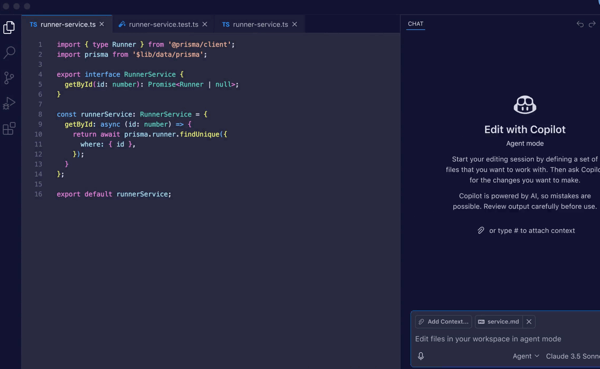
GitHub Copilot also offers chat-based assistance directly within the development environment, allowing developers to ask questions, generate explanations, and troubleshoot issues without leaving their IDE. This supports a more interactive workflow where outputs can be refined, alternatives explored, and unfamiliar code understood more easily. G2 reviewers highlight this as a key strength, especially for maintaining flow during active development.
Agent mode adds another layer of functionality by supporting multi-step tasks across files, including implementing features, fixing issues, and handling structured workflows that go beyond a single prompt. This becomes especially useful in larger projects where tasks span multiple components and require a broader context. It moves GitHub Copilot closer to an execution-oriented assistant rather than just a suggestion tool.
GitHub Copilot also benefits from strong language and framework coverage, supporting a wide range of programming languages across different environments. You can easily access multiple projects without switching tools, which is especially valuable for full-stack teams working across diverse tech stacks. G2 performance data in areas like integration, interface, and ease of setup further supports smoother adoption.
Suggestions can feel less aligned when working with highly specific business logic or custom implementation patterns. It’s more noticeable in projects with complex edge cases or tightly defined internal conventions, where outputs may require additional refinement. That being said, G2 reviews mention that outputs tend to integrate more smoothly within more standardized development workflows and common coding patterns.
Pricing can feel higher for individual developers or smaller teams, especially when scaling usage across multiple users. This becomes more noticeable for teams evaluating multiple tools or working within tighter budget constraints. For organizations already aligned with GitHub-based workflows, the overall value tends to align more closely with the cost.
GitHub Copilot is a strong fit for developers who want AI assistance embedded directly into their coding environment. It works especially well for teams that prioritize speed, workflow continuity, and broad language support. For organizations looking to improve productivity without changing existing workflows, it delivers consistent day-to-day value.
"I find GitHub Copilot incredibly easy to use, and I love how it integrates seamlessly with many of my editors, like Visual Studio Code and IntelliJ. That's definitely a great point about it. It plays a very important role in my day-to-day activities by helping me reduce my workload and complete tasks much quicker."
- GitHub Copilot review, Uttam M.
“Sometimes GitHub Copilot suggestions are not fully accurate for complex business logic and may generate code that needs manual validation. It can also suggest outdated or unnecessary code patterns, and occasionally, the recommendations are repetitive. For large projects, it may not always be possible to understand the complete application context, so developers still need to review security, performance, and coding standards before using the generated code.”
- GitHub Copilot review, Devi T.
Replit approaches AI coding from a unique angle by combining development, deployment, and infrastructure into a single browser-based environment. This makes it easier to move from writing code to running and sharing applications without switching environments.
The AI agent is one of Replit’s most distinctive capabilities. It can take a plain-language prompt and generate a functional application that handles planning, code generation, and initial setup. G2 Data highlights ease of use and intuitive experience as key strengths, supported by a 90% ease of use score, which reflects how accessible the platform feels for users building from scratch.
Replit also reduces friction in getting projects live by building deployment and hosting directly into the platform. Infrastructure, databases, and runtime environments are managed automatically, allowing applications to be published without configuring servers or external services. This is especially valuable for quick iterations and early-stage builds.
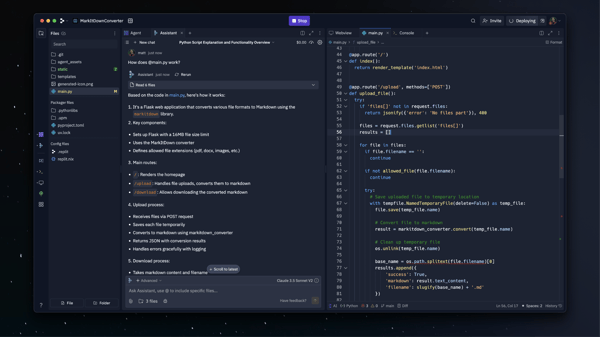
The platform supports a wide range of integrations through its connector system, including services like Stripe, GitHub, and analytics tools. Based on G2 reviewer feedback, this makes it easier to extend applications without manually wiring APIs or managing separate services. This also reduces setup time for common use cases and helps keep development more centralized.
Replit maintains strong accessibility across different user types. G2 feedback highlights that its ease of use and straightforward onboarding make it approachable for beginners while still supporting more experienced developers. This balance allows teams to collaborate across skill levels without relying heavily on specialized tooling.
The browser-based environment also enables faster iteration cycles. Based on my analysis of G2 feedback, changes can be tested, refined, and deployed within the same workspace, which supports rapid experimentation. This is particularly useful for prototyping and MVP development, where speed and flexibility are critical.
According to G2 reviews, pricing and credit consumption can feel less predictable, especially when projects scale or involve repeated iterations. Although it can be a factor for users working within defined budgets or building multiple applications, usage often remains easier to manage for simpler projects or early-stage builds.
Some G2 feedback points to performance variability when working with larger files or more complex applications. This becomes more apparent in production-oriented use cases or workloads that require sustained performance. However, performance generally aligns well with expectations for lightweight applications and early development stages.
Replit is a strong fit for non-technical founders, solo developers, and small teams looking to build and deploy applications quickly without managing infrastructure. It works especially well for rapid prototyping, MVP development, and experimentation, where speed and accessibility matter most.
"Replit is easy to use. Lots of features: coding, vibe coding, website design, app creations, server storage with different configurations depending on the amount needed, and domain name creation. Still a new user, but I've created 3 app websites in a month and have about 4 more ideas to build! Beautiful creations! My 2nd app was kind of complicated with lots of moving parts to the program, and it made changes pretty effortlessly."
- Replit review, Chris M.
"The billing system is confusing and feels designed to generate extra charges rather than help users. When I ran out of credits, I upgraded to Teams to avoid overages. Replit never told me that my existing projects would stay in a separate workspace with separate billing. I kept working on the same project, assuming the upgrade had fixed the problem. I was charged $114 in overages that my upgrade was meant to prevent. Support acknowledged the confusion but refused a refund, offering $30 on a $114 problem. Canceling subscriptions was equally frustrating; there's no clear path in the dashboard.”
- Replit review, Filippo C.
If you’re looking to build apps faster without starting from scratch, check out our picks for the 5 best AI app builders to find tools that can take you from idea to a working product in minutes.
Gemini fits into workflows built around Google Cloud and related tools, connecting services like BigQuery, Vertex AI, Colab, and Google Workspace in one environment. This makes it easier to work across code, data, and documentation without switching tools. With a 4.4-star rating on G2, it reflects broad adoption across development and data workflows.
One of the strongest capabilities of Gemini is how well it handles large inputs without losing context early. Developers working with long documentation, datasets, or extended code blocks highlight their ability to stay coherent across multi-step interactions. G2 Data shows strong performance in code optimization at 89% and contextual relevance at 85%, making it particularly useful for workflows that involve analyzing or generating code alongside large volumes of data.
Speed is another area where Gemini performs well. It processes longer prompts and layered queries quickly, which helps maintain momentum during debugging, research, and iterative development. G2 Data supports this with a 91% rating for speed, highlighting its ability to handle more complex, multi-step tasks without slowing down the workflow.
The interface also supports how easily Gemini adapts across different use cases. Whether working within Google Cloud tools or using it independently, the layout remains consistent when moving between coding, analysis, and documentation. G2 Data reflects this with a 92% interface rating, indicating a stable and predictable interaction model even as the type of work changes.
Gemini supports a range of tasks beyond code generation, including documentation, summarization, and technical explanations within the same interaction. Users mention that this makes it useful for workflows that involve both development and analysis. It allows teams to move from writing code to understanding outputs or refining ideas without switching tools or breaking continuity.
Gemini’s integration within the Google ecosystem creates a more connected development workflow. Data, queries, and outputs remain within the same environment, reducing the need to switch between tools. For teams already working with Google Cloud services where continuity across systems plays a bigger role in day-to-day work, this is extremely valuable.
As the complexity of tasks increases, response accuracy can vary, particularly when working with advanced logic or highly specific technical queries. G2 reviewers note that this is more noticeable in scenarios that require precise outputs or deeper reasoning. In more structured workflows or general development tasks, responses tend to remain more consistent and easier to rely on.
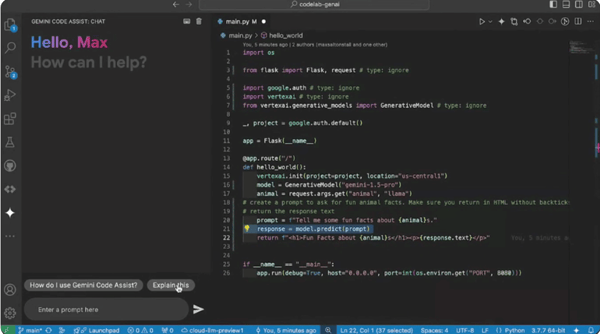
G2 reviewers highlight that Gemini performs well for shorter, focused tasks, where responses remain stable and easy to act on. In more extended, multi-step workflows, maintaining context can become less consistent, especially in scenarios that rely on sustained back-and-forth, like debugging or iterative architecture discussions. This makes it better suited for targeted queries and defined tasks rather than long-running sessions.
Overall, Gemini works best for teams already operating within the Google ecosystem who want AI assistance that fits into their existing tools. It’s particularly useful for workflows that combine code, data, and documentation within a single environment. For teams that prioritize speed, large context handling, and ecosystem continuity, Gemini is a great, practical, and well-integrated option.
“I like Gemini a lot because it's so fast for my day-to-day coding. I'm feeding it complex architectural diagrams, and it's getting the hang of everything. As a tool, it is good for Python and ML logic. The Vertex AI integration I have been putting into practice and loving it."
- Gemini review, Santosh M.
"The biggest issue is inconsistency in accuracy. While Gemini performs well in many cases, it can still generate incorrect or poorly grounded answers, especially in factual queries. It's not that good at back-end coding tasks, even though it excels at frontend."
- Gemini review, Himanshu J.
Trying to decide if Gemini is the right fit for your workflow? Explore Gemini vs ChatGPT to make a more informed choice.
Amazon Q Developer fits most effectively into workflows built around AWS, where development and infrastructure are closely connected. It supports tasks like writing application code, managing cloud resources, and working with services such as Lambda, S3, and CloudFormation within the same environment.
Amazon Q Developer performs well in workflows that involve both code and cloud operations. It handles code suggestions, configuration tasks, and service-related queries quickly, helping maintain momentum when moving between development and deployment. G2 Data supports this with a 94% speed rating, highlighting its ability to keep interactions responsive across both application logic and infrastructure work.
Integration across AWS services is where Amazon Q Developer becomes more impactful. It connects directly with services like Lambda, S3, and CloudFormation, allowing developers to work with code and cloud resources in the same flow. G2 Data reflects this with a 93% rating for integration, highlighting how well it fits into AWS-native environments without requiring constant context switching.
Amazon Q Developer also supports infrastructure-focused workflows, especially when working with configuration and automation. This helps generate and refine infrastructure-as-code templates, including CloudFormation and related setups, which reduces the effort required to manage cloud resources manually. This becomes particularly useful for teams handling deployment pipelines or scaling environments, where infrastructure and application logic need to stay closely aligned.
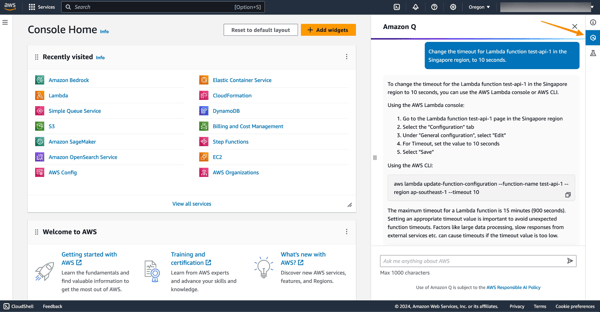
Amazon Q Developer also understands how different AWS services connect within a project, which adds more context to its suggestions. It factors in how resources like storage, compute, and permissions interact within the same environment instead of responding to isolated prompts. G2 Data reflects this with a 92% rating for contextual relevance, indicating that responses remain aligned with the broader cloud setup rather than just the immediate task.
Amazon Q Developer is well-suited for cloud-native development patterns, particularly in environments built around serverless and distributed architectures. It supports tasks like defining event-driven workflows, working with managed services, and structuring applications that rely on multiple AWS components. G2 feedback also highlights its usefulness in AWS-based workflows, where development and infrastructure are closely connected.
Amazon Q Developer is easier to adopt for teams already working within AWS, since it aligns with familiar services and workflows rather than introducing a separate system to learn. This reduces onboarding friction, especially for developers who are already managing cloud resources alongside application code. G2 Data supports this with 90% for ease of use and 89% for ease of setup, which indicate that teams can get started without significant configuration overhead.
Response accuracy can vary as workflows become more complex, particularly when working across multiple AWS services or tightly coupled resources. G2 reviewers note that this is more noticeable in advanced configurations, where responses may require additional validation or refinement before use. In more standard setups and core AWS services, outputs tend to remain more consistent and easier to apply, making it better suited for well-defined cloud workflows rather than highly complex or edge-case-heavy environments.
G2 feedback also shows that the tool performs smoothly during typical development and configuration tasks. In more demanding workflows or extended sessions, response speed can slow down slightly, which may interrupt flow during active development. For lighter workloads and focused tasks, performance remains more responsive and easier to work with.
Response speed can slow down in more demanding workflows or extended sessions, which may interrupt flow during active development. However, this is more noticeable in heavier workloads or sustained interactions. In lighter workloads and focused tasks, performance tends to remain more responsive and easier to work with, making it better suited for shorter or less resource-intensive workflows.
Amazon Q Developer works best for teams operating within AWS environments. It performs well in cloud-native workflows where code, configuration, and deployment are closely connected. If your development stack is already built on AWS, it fits naturally into your workflow and helps streamline execution.
"Amazon Q Developer makes it much easier to get coding assistance and troubleshoot AWS-related issues quickly. I like how it integrates directly with the AWS Management Console and IDEs, giving context-aware suggestions, code snippets, and documentation references. It saves a lot of time when writing infrastructure code or debugging cloud configurations. The accuracy of responses and ability to understand AWS services in depth are huge advantages."
- Amazon Q Developer review, Indra K.
"Amazon Q Developer is less helpful outside the AWS ecosystem and offers limited value for non-AWS or frontend-heavy projects. Its suggestions can be overly AWS-specific, sometimes verbose, or require manual validation. Advanced customization and fine-grained control are limited compared to open AI coding tools. It also depends heavily on AWS context and permissions, which can reduce usefulness in small or offline projects."
- Amazon Q Developer review, Muhammad Zeeshan S.
If you’re just getting started with AWS, this beginner-friendly guide on AWS fundamentals can help you better understand how these services fit into your development workflow.
IBM watsonx Code Assistant focuses on modernizing legacy systems without requiring full rebuilds. It supports translating, refactoring, and improving older codebases, including COBOL and other enterprise languages, into more maintainable formats. It is widely used by organizations managing long-standing systems that need to evolve without disrupting existing operations.
Modernizing legacy systems is where IBM watsonx Code Assistant delivers the most value. It helps translate and refactor older codebases into more maintainable formats, reducing the effort required to update long-standing systems. G2 reviewers consistently highlight reliable coding assistance and strong problem-solving capabilities, particularly in projects focused on modernization rather than new development.
Working with large, structured codebases requires strong context awareness, which is an area where IBM watsonx Code Assistant performs well. It maintains alignment across different parts of a codebase, supporting more accurate suggestions during refactoring and transformation tasks. G2 Data reflects this with scores of 85% for contextual relevance and 84% for code optimization, highlighting its ability to handle complex enterprise code with consistency.
Enterprise environments often involve multiple systems and long-standing dependencies, and the tool fits into these setups without requiring major workflow changes. G2 Data shows an 83% rating for integration, which aligns with its use in industries like computer software, financial services, and IT services, where systems are deeply interconnected and modernization needs to happen incrementally.
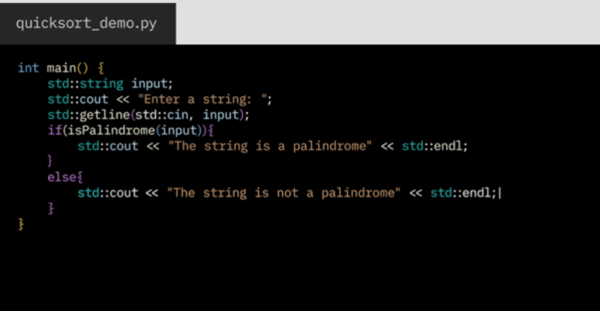
It also supports a range of use cases within enterprise development, from improving existing code quality to assisting with system-level transformations. This flexibility makes it useful for teams working across different stages of modernization, whether they are maintaining legacy systems or gradually transitioning to newer architectures.
Adoption tends to be more straightforward for teams already working within structured enterprise environments. Teams can start integrating it into existing workflows without significant disruption, even when working with complex codebases. G2 Data shows 82% for ease of use and 79% for ease of setup, which highlights how it fits into established enterprise workflows.
Efficiency gains come through in how it reduces manual effort in understanding and updating legacy code. G2 reviewers frequently highlight improvements in productivity and reduced time spent on repetitive coding tasks, especially when working on large, older systems that require careful handling.
G2 reviewers note that response accuracy can vary when working with more complex logic or nuanced transformation tasks, where outputs may require additional validation or refinement. This is more noticeable in scenarios involving less predictable code patterns or deeper system dependencies. In structured modernization workflows, results tend to be more reliable, especially when working within defined code patterns and established transformation rules.
Working with legacy systems often comes with added complexity, particularly when navigating advanced features or customization options, which can require additional time and effort during implementation. G2 reviewers note that this is more noticeable in complex enterprise setups. For teams with dedicated engineering or modernization efforts, this depth becomes easier to manage over time.
IBM watsonx Code Assistant works best for organizations modernizing legacy systems without full rewrites. It fits well in industries like financial services, IT, and enterprise software, where long-standing codebases require careful updates and changes need to be handled incrementally. For teams focused on code transformation and maintaining system stability, it helps evolve existing applications while minimizing disruption to existing workflows and infrastructure.
"I love IBM watsonx Code Assistant for its impressive engineering, which truly stands out to me. The tool significantly aids in understanding legacy codes, especially those that are poorly documented, which is a vital benefit for developers like myself. I also appreciate its ability to handle global codes efficiently on mainframes without being CPU-intensive. These features make it a valuable asset for my projects."
- IBM watsonx Code Assistant review, Pradipta B.
“Customization is extremely limited that is why many developers avoid using it because of the complexity of the project and IBM Watsonx Code Assistant lacks it a lot. Users also experience inaccuracy on a few occasions, which is avoidable, but IBM needs to rectify it in the next update.”
- IBM watsonx Code Assistant review, Waqas F.
Claude supports workflows that involve longer context and more complex problem-solving, where understanding the full picture matters alongside generating code. It handles extended inputs, multi-step reasoning, and detailed explanations, making it useful for full-stack development and debugging tasks. It also sees growing adoption among developers working on more complex coding scenarios beyond simple code completion.
Handling complex coding tasks is one of Claude’s stronger capabilities. G2 reviewers highlight that it performs well in scenarios requiring multi-step reasoning, such as debugging, system design, and working through layered logic. Its ability to simplify complex problems makes it easier to break down and resolve issues beyond basic code generation.
Working with longer inputs is another area where Claude performs consistently well. It can process extended code blocks, documentation, and multi-step queries without losing context early in a session. G2 Data reflects this with a 93% score for contextual relevance, supporting its ability to stay aligned across longer and more detailed interactions.
Claude also maintains strong code quality across different tasks, particularly when refining or improving existing code. It focuses on clarity and structure, which makes outputs easier to understand and implement in real workflows. G2 Data supports this with a 95% rating for code optimization, which, in my evaluation, stands among the highest in this category.
Adoption is relatively straightforward, especially for developers using Claude across different stages of development. Teams can start using it quickly without heavy configuration, which helps reduce setup time and onboarding effort. G2 Data supports this with 93% scores for both ease of use and ease of setup. This makes it easier to integrate into existing workflows without requiring major process changes. It remains practical for both experienced developers and teams introducing AI assistance into their daily development cycles.
Claude supports a wide range of development tasks, including writing and debugging code, explaining logic, and generating documentation. It works as an all-purpose assistant in workflows that require both coding and reasoning. This flexibility allows it to move between tasks without breaking context or requiring separate tools. It is particularly useful in scenarios where understanding and implementation happen in parallel. G2 feedback highlights its effectiveness across these mixed workflows.
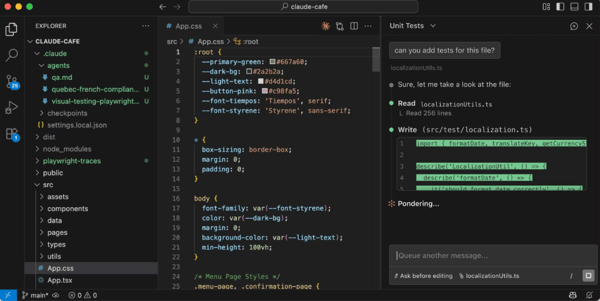
Its conversational style adds another layer of value, especially when working through problems step by step. G2 users mention that it explains reasoning clearly instead of just generating code, which helps developers understand the underlying logic behind each output. This makes it easier to debug issues, validate approaches, and refine solutions during development. It is particularly useful in workflows that involve learning, experimentation, or iterative problem-solving.
G2 reviewers highlight that Claude works well for complex reasoning and exploratory tasks, where its structured approach adds clarity. In more straightforward coding scenarios, it can be overly cautious, sometimes requiring additional prompts to reach a usable solution or producing less direct outputs. This makes it a better fit for multi-step problem-solving rather than quick, execution-focused tasks.
G2 feedback shows that Claude performs well in shorter, focused interactions. In extended sessions or high-frequency use, response speed and consistency can vary, which may interrupt workflows that rely on continuous back-and-forth. For targeted queries and shorter coding tasks, performance remains more reliable.
Claude works best for developers handling complex logic, debugging, and tasks that require sustained reasoning across longer inputs. It is particularly useful in full-stack workflows where understanding context and breaking down problems step by step is as important as generating code. For teams that prioritize clarity and structured problem-solving, it supports more effective handling of multi-layered development tasks.
“Although it's possible to code with many different libraries, using Cluade has significantly simplified the process for me. The support from agents enables you to develop new applications or modify your current ones, which lets you concentrate on problem-solving at the same time.”
- Claude review, Deniz G.
"What I dislike about Claude is that it can sometimes be overly cautious or verbose, which can slow things down when I’m looking for a more direct or concise answer. In some cases, it may also avoid taking a clear stance, requiring extra prompts to get a more actionable or decisive response."
- Claude review, Marian C.
Cursor takes a unique approach by building AI directly into the coding environment. It focuses on real-time collaboration between the developer and the model, where code suggestions, edits, and debugging happen within the same interface.
Context awareness is one of the most important aspects of how Cursor works in practice. It operates across files and understands how different parts of a codebase connect, which helps generate more relevant suggestions during development. This becomes especially useful in larger projects, where changes in one file often depend on logic spread across multiple components. G2 reviewers frequently highlight its ability to simplify complex coding tasks, particularly when working across multi-file workflows or more interconnected codebases.
The interface plays a major role in how smoothly Cursor fits into development workflows. Instead of switching between tools, coding and AI interaction happen in the same space. G2 Data reflects this with a 96% rating for interface, reinforcing how intuitive and responsive the experience feels during active development.
Cursor integrates directly into the development environment, which changes how coding and iteration happen in practice. Developers can edit, refactor, and generate code within the same interface while the model stays aware of the surrounding context. This allows changes to be applied continuously without breaking flow, especially during iterative development. G2 Data shows a 95% integration rating, highlighting how seamlessly it fits into day-to-day workflows without disrupting existing processes.
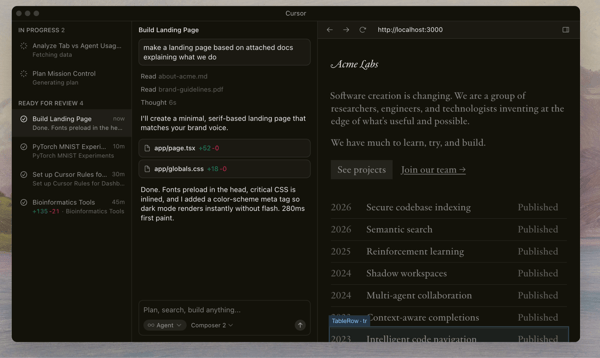
Development becomes more collaborative with Cursor, even when working individually. It supports a back-and-forth interaction style where developers can refine code iteratively instead of treating suggestions as one-off outputs. This makes it easier to test changes, adjust logic, and build on previous outputs without restarting the process. G2 Data supports this with a 91% score for collaboration, highlighting its role in improving workflow efficiency.
Cursor maintains consistent responsiveness during active development, particularly when working through iterative edits and multi-step changes. It responds quickly to prompts, code updates, and inline modifications, helping maintain flow when refining logic or debugging across multiple files. This becomes especially useful in longer coding sessions where frequent back-and-forth is required. G2 Data reports an 85% speed rating, highlighting its ability to keep interactions smooth without interrupting development momentum.
Cursor feels easier to pick up because the AI is embedded directly into the coding workflow rather than introduced as a separate tool. Developers can edit files, ask for changes, and apply suggestions inline, which reduces the need to switch context or learn new interaction patterns. This makes it easier to integrate into existing habits, especially for those already comfortable with modern IDEs. G2 Data shows 94% for ease of use and 93% for ease of setup, which indicates that teams can start using it with minimal disruption to their current development setup.
G2 reviewers highlight that Cursor works especially well for iterative edits and context-aware coding across multiple files. From what I gathered in G2 feedback, I found that in more complex tasks, suggestion quality can be inconsistent at times, particularly when the model overreaches or introduces changes that need manual correction. In my evaluation, this becomes easier to manage in workflows where code is actively reviewed and refined.
While Cursor performs well in iterative workflows, suggestion quality can be inconsistent in more complex tasks, particularly when the model overreaches or introduces changes that require manual correction. G2 reviewers note that this is more noticeable in workflows involving multi-file edits or deeper context handling. In setups where code is actively reviewed and refined, these issues tend to be easier to manage.
Performance can slow down in larger projects or more demanding sessions, which may interrupt flow during extended coding work. G2 feedback shows that this is more noticeable in heavier workloads or sustained interactions. In smaller projects or faster iteration cycles, performance generally remains more consistent.
Cursor works great for developers who want a more interactive, AI-first coding experience within their existing workflow. It is particularly useful for projects that involve multi-file changes, iterative edits, and real-time refinement, where maintaining context across the codebase makes a noticeable difference. For teams that value continuous back-and-forth with the model, it supports a more hands-on approach to development without relying on one-off suggestions.
"Cursor is amazing for coding! The AI autocomplete actually understands context way better than other tools. Sometimes it writes whole functions that just work. My favorite feature is Cmd+K, where you can highlight code and ask it to refactor stuff - so much faster than switching tabs. It can be slow when servers are busy tho and occasionally suggests weird things, but overall it's a huge timesaver. Definitely worth trying if you're a developer!”
- Cursor review, Hariom H.
"Some AI edits can be inconsistent or over-ambitious, requiring manual fixes and breaking my flow more than helping. Integration is great, but it lacks some enterprise-grade team features like advanced governance or security guardrails. I still use it frequently because the pros outweigh these cons for me, but these pain points prevent it from feeling perfect."
- Cursor review, Ayush A.
Previously called Codespell.ai, SoftSpell focuses on improving code quality and reducing manual effort through automation rather than acting as a full-scale coding assistant. It supports tasks such as code refinement, code suggestions, and streamlined repetitive workflows, making it useful for developers looking to improve efficiency without changing their core development setup.
Saving time across repetitive coding tasks is one of the most consistent advantages highlighted in G2 feedback. It helps automate routine edits, corrections, and structured updates, which reduces the need for manual intervention in everyday workflows. This becomes especially useful in projects where similar patterns repeat across files or modules. Instead of reworking the same logic repeatedly, developers can rely on automation to handle smaller tasks while focusing on more complex problem-solving.
SoftSpell also plays a strong role in improving overall code quality by refining outputs and suggesting cleaner implementations. It helps standardize formatting, optimize structure, and reduce inconsistencies across the codebase. G2 Data reflects this with a 94% rating for code optimization, reinforcing its ability to support more maintainable and efficient code. Over time, this contributes to better readability and fewer issues during review or deployment.
Automation is central to how the tool fits into development workflows, particularly in environments with repetitive or process-driven tasks. It handles smaller coding actions in the background, which helps reduce cognitive load during development. This allows developers to spend less time on routine updates and more time on implementing core logic. In teams working with structured workflows, this can lead to more consistent output and smoother iteration cycles.
SoftSpell integrates smoothly into existing workflows, which makes it easier to adopt without disrupting current tools or processes. It works alongside development environments rather than requiring a separate system or major workflow changes. G2 Data shows a 95% rating for integration, highlighting how well it fits into day-to-day development setups. This allows teams to introduce automation gradually without needing to reconfigure their entire environment.
Adoption is relatively straightforward, particularly for teams looking to improve efficiency without adding complexity. The tool does not require extensive configuration or onboarding, which makes it accessible even in fast-moving development environments. G2 Data supports this with 94% for ease of use and 99% for ease of setup, indicating that teams can get started quickly. This makes it a practical option for incremental improvements rather than full workflow changes.
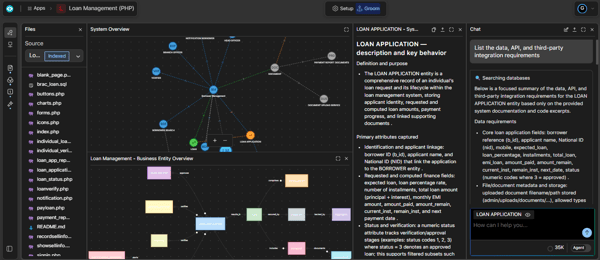
SoftSpell performs most effectively in smaller or more focused tasks where automation can have an immediate impact. It helps maintain consistency across repetitive coding patterns, which reduces variation in outputs and improves overall quality. This is particularly useful in environments where multiple developers are contributing to the same codebase. By standardizing smaller tasks, it supports more predictable and consistent results over time.
G2 reviewers highlight that SoftSpell performs smoothly in smaller tasks and focused workflows, where automation can be applied quickly and consistently. When working with larger code inputs or more complex tasks, performance can slow down, particularly in workflows that involve heavier processing and sustained interaction, which makes it more suitable for lighter workloads and faster iteration cycles than extended, resource-intensive sessions.
G2 feedback also shows that the tool is effective for routine automation and incremental improvements, where suggestions are easier to apply and integrate into existing workflows. In more advanced or highly specific use cases, outputs can feel less detailed or require additional prompting to reach the desired result, which makes it more suitable for structured or repeatable workflows than complex, highly specialized development tasks.
SoftSpell works best in setups where the goal is to make everyday coding a bit faster and more consistent without changing how teams already work. It fits well in workflows that involve repeated updates or smaller refinements across the codebase, where automation can quietly take care of routine tasks. For teams that want to improve efficiency without adding another heavy tool into the mix, it offers a simple way to clean up and speed up day-to-day development.
“It reduces the efforts of developers in optimizing the code and adding docstrings to code. It is very useful in explaining the already written code. The explanation it provides is very helpful. The inline chat feature helps us to directly ask about a particular piece of code instead of sending the entire code. It provides unit test cases even for a particular method as well as the entire file, so it reduces our time in writing the unit test cases. Overall its a master of coding assistants.”
- SoftSpell review, Sugu M.
"Just like any other progressive learning technique, it takes time to understand the pattern of questions being asked by the user/developer. Sometimes it's slow, and sometimes it also fails (server error, please try again later)."
- SoftSpell review, Deepa A.
If you’re still weighing your options, this comparison table pulls together the key differences at a glance.
| Software | IDE/environment |
Agentic capabilities |
| GitHub Copilot | VS Code, Visual Studio, JetBrains IDEs, Vim/Neovim, Azure Data Studio, GitHub, CLI/terminal | Handles multi-step tasks like planning, editing code, and creating pull requests |
| Replit | Cloud-based IDE | Handles app generation, debugging, and deployment from natural language prompts |
| Gemini |
VS Code, JetBrains, Android Studio, Firebase, GitHub, CLI/terminal, Google Cloud | Handles multi-file edits, full project context, and integrates with ecosystem tools while supporting human oversight |
| Amazon Q Developer |
AWS Console, IDEs, CLI, CodeCatalyst, SageMaker, Slack/Teams | Plans and executes multi-step workflows, generates code and tests, and implements features across files |
| IBM watsonx Code Assistant |
VS Code, Eclipse IDE, IBM Cloud, on-premises deployment | Plans, analyzes, and implements code with multi-step workflows and task orchestration |
| Claude | Terminal (CLI), VS Code, JetBrains, desktop app, web, CI/CD (GitHub Actions, GitLab), Slack, browser, multi-cloud (Bedrock, Vertex AI, Foundry) | Autonomous multi-step agent (plans, executes, tests, iterates), multi-file code edits, CLI/tool execution, CI/CD automation, agent teams, parallel agents |
| Cursor |
AI-native IDE (VS Code–based), Windows, macOS, Linux | Goal-driven agents (tools-in-a-loop), codebase search and understanding, autonomous planning and execution, multi-step workflows with testing and iteration, parallel agent tasks |
| SoftSpell | VS Code, IntelliJ, Eclipse (plugin-based IDE integrations) | Plans and executes multi-step workflows, generates code, tests, and docs, with SDLC-wide automation and self-correcting execution |
Have more questions? These are the ones I see come up most often!
GitHub Copilot and Amazon Q Developer are strong choices for enterprise-grade autocomplete. GitHub Copilot provides accurate inline suggestions across large codebases and multiple languages, making it reliable for teams working inside IDEs like VS Code and JetBrains. Amazon Q Developer adds deeper context awareness, especially in AWS environments, where it can align suggestions with infrastructure, APIs, and internal code patterns. For enterprise teams, the smartest autocomplete comes from tools that understand your codebase and maintain consistency across projects.
The best AI coding assistants depend on your workflow. GitHub Copilot works well for everyday coding inside IDEs, Cursor offers deeper context-aware editing, and Claude supports complex reasoning tasks. For enterprise environments, SoftSpell and IBM watsonx Code Assistant provide broader SDLC coverage.
GitHub Copilot is the strongest fit for GitHub-native workflows, with deep integration into repositories and pull request flows. Tools like Claude and Amazon Q Developer also support multi-step tasks and can assist with code changes and reviews across repositories, making them useful for teams working with CI/CD pipelines.
Replit offers strong value for startups by combining AI coding, deployment, and infrastructure in one environment. Codeium and GitHub Copilot are also popular for smaller teams looking for affordable, high-impact coding assistance without complex setup.
For solo developers, tools with free tiers or low-cost plans like GitHub Copilot (individual plan), Replit, and Gemini provide solid performance. These tools balance affordability with practical features like autocomplete, debugging help, and code generation.
Amazon Q Developer and GitHub Copilot both support backend-heavy workflows and multiple programming languages, including Java and Go. They work well in structured environments where developers need help with APIs, infrastructure, and multi-file changes.
Replit is one of the easiest tools for beginners, thanks to its browser-based environment and ability to generate full applications from prompts. GitHub Copilot is also beginner-friendly for those already using VS Code, as it provides inline suggestions that help users learn patterns quickly.
Claude performs well for debugging tasks that require deeper reasoning and step-by-step explanations. GitHub Copilot is also effective for common debugging scenarios in Python and JavaScript, especially within familiar IDE workflows.
GitHub Copilot remains the most widely used option inside VS Code due to its seamless integration and real-time suggestions. Cursor is another strong choice for developers who want a more AI-native editing experience with deeper context awareness.
Tools like GitHub Copilot, Claude, and Amazon Q Developer consistently generate code that is closer to production-ready, especially when used within their ideal workflows. However, all outputs still require review, particularly for complex logic and edge cases.
Choosing the right AI coding assistant depends on where you work, what you build, and how you prefer to receive assistance.
Across the tools I evaluated, the clearest pattern is that each one solves a different part of the development cycle. Some focus on inline coding and speed, while others are better suited for complex reasoning, cloud-native workflows, or improving code quality over time.
The strongest results come from aligning the tool with your environment and workflow. If your day revolves around writing and iterating inside an IDE, look for tools that integrate directly into that experience. If you’re working across cloud services, large codebases, or structured enterprise systems, tools with deeper context awareness and system-level support will be more effective.
Start with your primary use case, then choose the tool that fits naturally into how you already build.
If you're exploring AI-powered development beyond assistants, take a look at this roundup of the best AI code generators to see how these tools compare across different use cases.


I’m not a developer. I don’t work inside an integrated development environment (IDE) or ship...
 by Harshita Tewari

While everyone was busy talking about OpenAI’s new o3 and o4-mini models, the company quietly...
 by Sudipto Paul

I never wanted to be a coder.
by Sudipto Paul