


I evaluated 20+ tools to find the best free social media management tools for small businesses. These are Buffer, Hootsuite, HubSpot Marketing Hub, Loomly, Planable, Simplified, Sprout Social, Vista Social, and Zoho Social.
Managing social media for a small business is a different challenge than managing it for an enterprise. You're usually working with a lean team, a limited budget, and a growing list of responsibilities where social media competes for attention with everything else on your plate.
As I compared these tools, I focused on what matters most to small businesses: staying consistent with posting, understanding what's working, collaborating efficiently, and avoiding unnecessary costs. Some platforms offer genuinely useful free plans that can support a business for months or even years. Others provide short-term trials designed to showcase premium features before the paywall appears.

For this guide, I went through the top products on G2's free social media management tools category page and evaluated each one on what it actually gives you at no cost, how it holds up under real small business conditions, and where each one pushes you toward upgrading. Here's what I found about the best free social media management tools for small businesses in 2026.
*The software list is arranged alphabetically. These tools offer free trials, free forever options, or freemium models.
Use this comparison to quickly spot which free social media management tool gives you the most value before you need to pay.
| Tool | G2 rating | What the free plan covers | Paid Starts At |
| Buffer | 4.3/5 ⭐ |
|
$5/channel/month |
| Hootsuite | 4.3/5 ⭐ |
|
$99/user/month |
| HubSpot Marketing Hub | 4.4/5 ⭐ |
|
$15/user/month |
| Loomly | 4.6/5 ⭐ |
|
$49/month |
| Planable | 4.6/5 ⭐ |
|
$33/month |
| Simplified | 4.6/5 ⭐ |
|
$19/month |
| Sprout Social | 4.4/5 ⭐ |
|
$79/seat/month |
| Vista Social | 4.8/5 ⭐ |
|
$64/month for 3 users |
| Zoho Social | 4.6/5 ⭐ |
|
$10/month |
*All pricing details mentioned in this article are based on publicly available data at the time of publication, are listed at annual billing rates where applicable, and are subject to change.
Small businesses now make up one of the largest and fastest-growing user segments for social media management tools. According to market projections, the social media management software market is expected to grow from $36.24 billion in 2025 to $168.64 billion by 2035, with small business adoption a major driver of that growth. For lean teams, the right tool is one that covers the daily workflow without requiring a dedicated social media manager to make sense of it.
I started with G2's free social media management tools category page and cross-referenced the top products with G2's Small Business segment reviews from January to May 2026. From there, I evaluated each tool on what it actually gives you at no cost, how well it fits a small business workflow, and where the free tier runs out.
I verified free plan limits and paid plan pricing against each vendor's current pricing page. G2 review data referenced throughout was pulled from Small Business segment users in 2026. Some reviews have been lightly edited for clarity.
The screenshots featured in this article may be a mix of those taken from the vendor's G2 page or from publicly available materials.
Going through these tools with small business teams in mind made a few things stand out that don't always appear on feature comparison pages:
To be included on this list, a tool must:
*This data was pulled from G2 in 2026. Some reviews may have been edited for clarity.
When I evaluated Buffer against the rest of the tools on this list, one thing stood out immediately: it actually does what it promises without pulling you into a setup maze first. Most small business owners aren't running dedicated social media operations. They're posting between client calls, before the shop opens, or during a Saturday morning planning session. Buffer is built for exactly that kind of workflow.
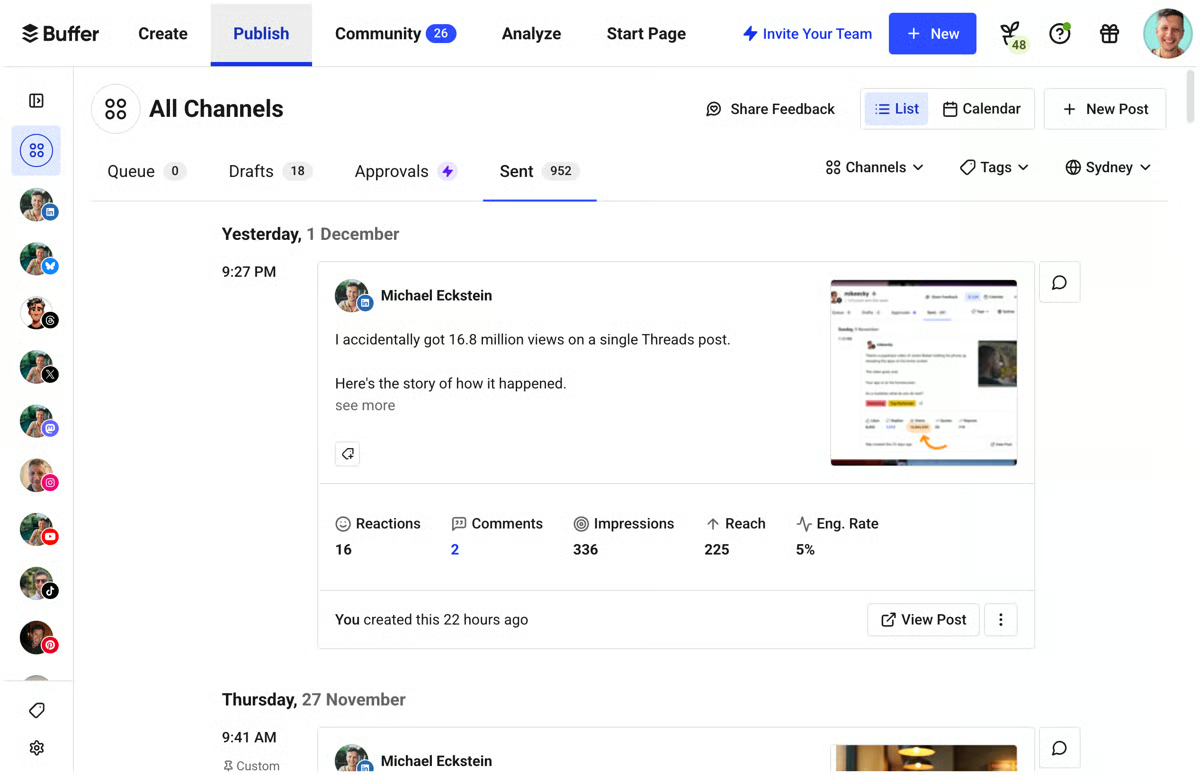
The free plan is the most honest offer on this list. Three channels, 10 posts queued per channel, and a clean interface that doesn't ask you to learn anything before you can schedule your first post. Getting Buffer up and running took minutes, not hours, connected three channels, queued a few posts, and the whole setup was done before finishing a cup of coffee. For a small business owner whose attention is already pulled in ten directions, that kind of frictionless start genuinely matters.
The free tier is a solid long-term home for solo operators, but the upgrade triggers are clear. If you regularly hit the 10-post queue limit, need unlimited scheduling, or want advanced analytics and a hashtag manager, the Essentials plan at $5/channel/month (billed annually) unlocks all of that, along with first comment scheduling, a community inbox, and API access. When you need more than one person managing content, the Team plan at $10/channel/month adds unlimited team members, content approval workflows, and access levels, making it the right call the moment a second person needs to review or publish posts. Both paid plans include a 14-day free trial.
"Buffer allows us to manage multiple social channels all in one place. By being able to schedule content across channels, manage engagement in one place, and view our social data more efficiently, we can maintain and grow our social presence in one platform. It allows us to review and approve posts quickly, which can help when we are working on tight timelines."
- Buffer review, David C.
Best for: Solo business owners, freelancers, and very small teams that want a clean forever-free scheduling tool without onboarding complexity or ongoing costs.
Not ideal for: Businesses managing more than 3 channels, teams that need approval workflows or analytics depth beyond basic post performance, or agencies handling multiple clients.
"I dislike it when it fails to post, and unless one of our social media managers downloads the Buffer mobile app, they don't get notified at all. For the price, it's pretty reasonable given the smooth UX, but it could be cheaper, especially for those who add multiple channels."
- Buffer Review, Tricia H.
Want to go deeper on your social strategy? See the full best social media management tools guide on G2 for a broader comparison across free and paid options.
When I spent time inside Hootsuite's trial, the content planner made the strongest impression. I was able to map out a full month of posts in a single session, drafting, scheduling, and refining captions with the AI tool running alongside, without needing to leave the screen. For small business owners who batch their work on a Sunday afternoon, that concentrated workflow has a real time return.
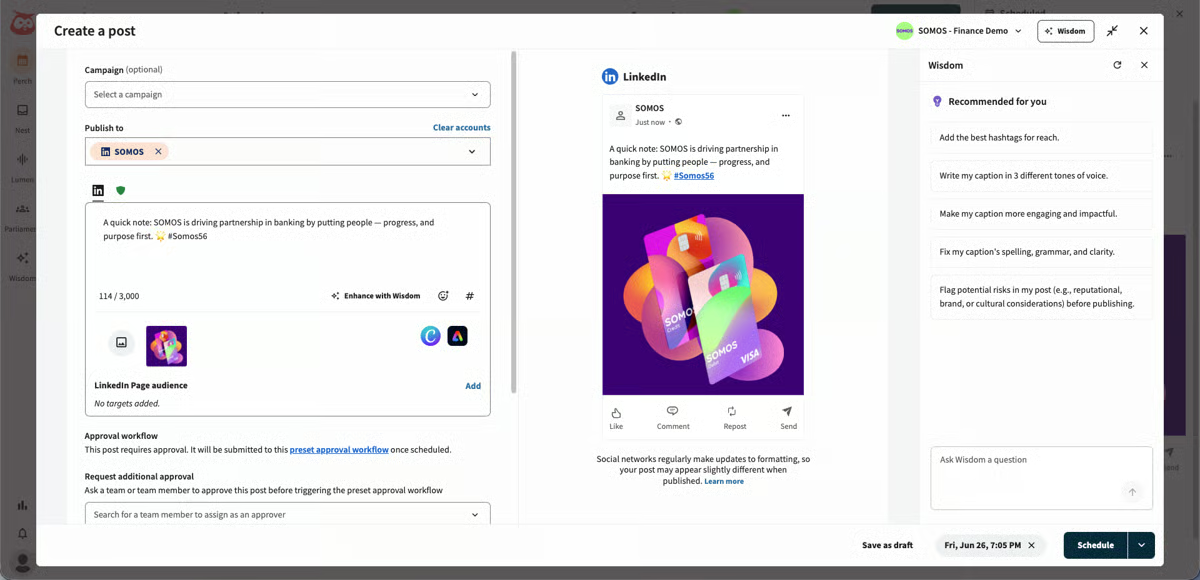
The analytics layer is notably stronger than what I found in most comparable tools. Rather than pulling reports from each platform's native dashboard, I got a consolidated view of what was working across all connected accounts, including posting time recommendations informed by audience activity data rather than generic best-practice defaults.
If Hootsuite fits your workflow after the trial, the Standard plan at $99/user/month covers up to 10 social accounts, unlimited post scheduling, best time to post recommendations, an AI assistant with image and caption generator, Canva and Adobe Express templates, a unified inbox, DM automations, and brand and competitor sentiment analysis. When you need more scale, the Advanced plan at $249/user/month unlocks unlimited social accounts, customizable analytics reports, bulk scheduling up to 350 posts at once, auto-route and tag messages, and competitor benchmarking against 20 accounts. Enterprise is custom-priced and includes SSO, unlimited users, and advanced add-ons. For most small businesses, Standard is the right starting point, and both plans offer a 25% discount if you skip the trial and commit upfront.
"Hootsuite is a time saver. My team loves the ability to schedule a post once and it's available for all of our social media profiles. Its easy interface is perfect for even the least tech savvy of us, and we enjoy the diagnostic score summary to show where we can improve. Onboarding new team members into Hootsuite is a breeze."
- Hootsuite review, Christ Church H.
Best for: Small businesses that manage multiple social platforms and want a well-rounded tool with reliable AI assistance and analytics depth.
Not ideal for: Businesses that need a permanent free plan with no time pressure, or small teams with tight budgets where the $99/month entry price is a significant commitment.
"The cost is relatively high compared to some of the cheaper options on the market. At times, it can feel challenging because there's so much data available to analyze."
- Hootsuite review, Ollie C.
Looking for detailed analytics? Explore the best marketing analytics tools to track performance, measure ROI, and turn social activity into real business insights.
HubSpot Marketing Hub is the only tool on this list where I had to reframe the evaluation question before I could assess it fairly. This isn't a scheduling tool with CRM bolted on, it's a marketing and CRM platform where social publishing is one component of a larger system. Once I evaluated it on those terms, what it delivers for small businesses in the right situation is genuinely compelling.
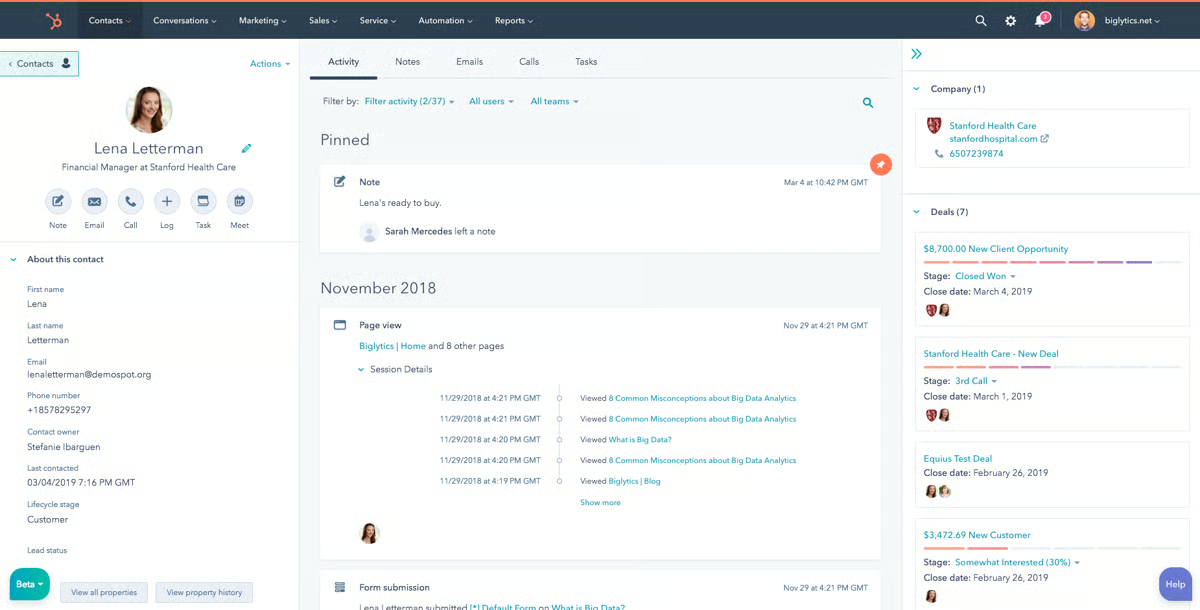
What I noticed most clearly while working through the platform is the CRM-social connection. When a contact interacted with a social post during my trial, that activity automatically logged to their CRM timeline. No manual entry, no cross-referencing between tabs, the lead's social engagement just appeared in their record. For a small business where the same person handles social media and sales follow-up, that kind of contextual data changes how you work.
The 14-day free trial is a genuine starting point, but the upgrade triggers are clear. The Starter plan is currently discounted to $15/month (down from $20/month) and includes 1 core seat, 1,000 marketing contacts, and removes HubSpot branding from email marketing and live chat. This is the right move once you need simple marketing automation, ad management, and CRM segments. When your operation requires full social media scheduling, lead scoring, and custom reporting, the Professional plan at $800/month includes 3 core seats and 2,000 marketing contacts. For most small businesses, the decision point is Starter — it's where the free plan's limitations become friction, and the cost is still manageable.
"What I love most about HubSpot Marketing Hub is how flawlessly it bridges the gap between our marketing campaigns and our CRM. Instead of jumping between isolated email tools, social schedulers, and landing page builders, everything lives under one roof. The native integration gives us a genuine 360-degree view of our customer journey. Our onboarding time for new team members plummeted because the UI is incredibly intuitive compared to older enterprise platforms. It's an investment, but the time saved on data syncing and troubleshooting makes it completely worth it."
- HubSpot Marketing Hub review, MD S.
Best for: Small businesses that treat social media as part of a broader lead generation and nurture strategy, and want CRM, email, and social publishing connected in one place.
Not ideal for: Businesses that only need scheduling and basic analytics and don't need the wider CRM and marketing automation features that HubSpot bundles in. The complexity can feel like a lot to manage for social-only use cases.
"My only complaint is that the interface is constantly evolving and changing. Which I understand is good for the progression of the technology, but can make it harder to navigate, especially when key features have moved."
- HubSpot Marketing Hub review, Kailee M.
Loomly is built around the idea that content needs a process, not just a queue. Where Buffer focuses on simplicity and Hootsuite on analytics depth, Loomly's value is in how it gives small teams a structured way to plan, draft, review, and schedule content without the chaos of back-and-forth emails or shared spreadsheets.
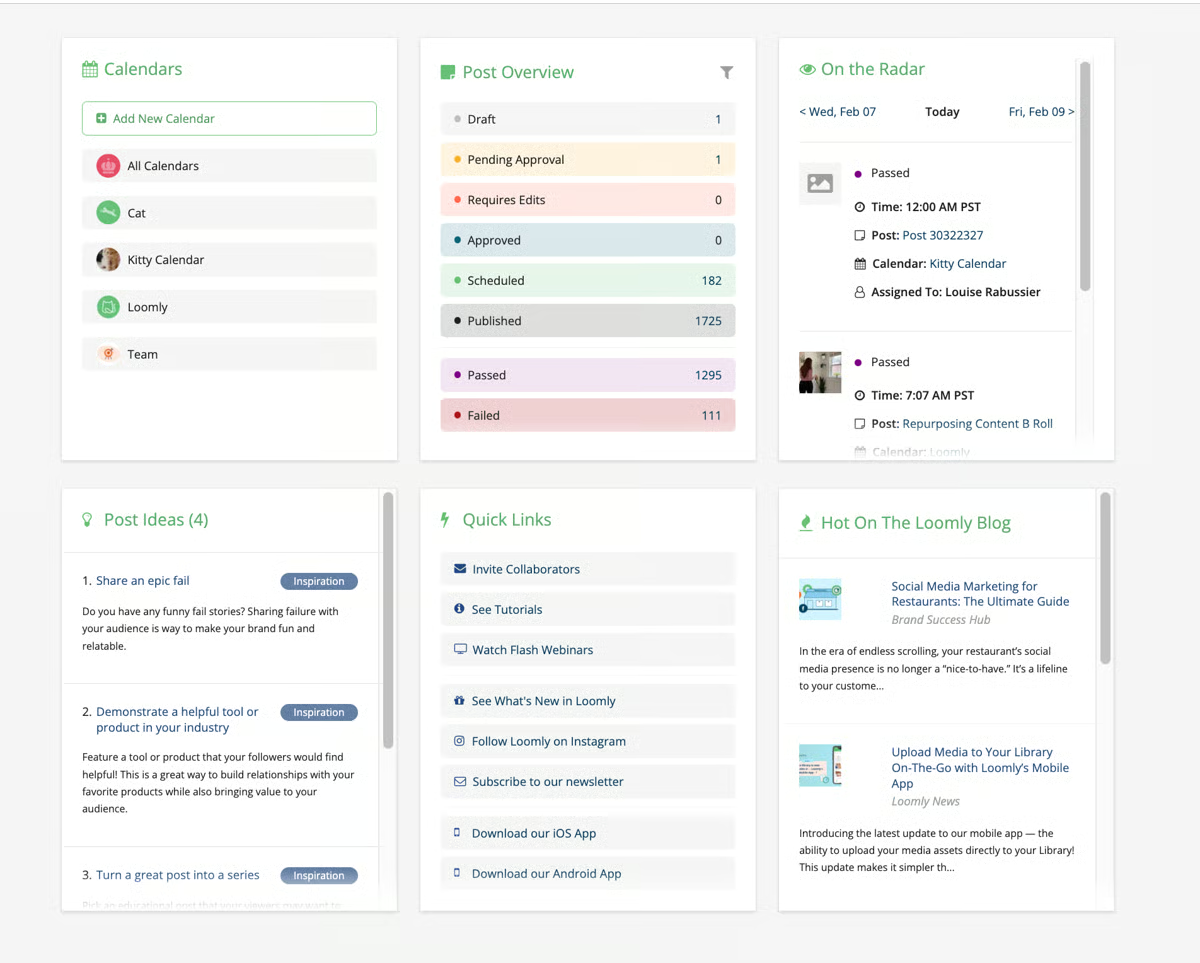
I ran the 7-day free trial specifically to see whether the content calendar and approval workflow would hold up for a small business with even one extra set of eyes on content before it goes out. The full platform access gave me enough time to build out a draft calendar and walk it through an approval cycle. What stood out immediately was how clean and intuitive the interface felt. The calendar view in particular made it easy to see at a glance what was planned, what had been approved, and what still needed work, without digging through separate tabs or filters.
If Loomly fits your workflow during the trial, the Starter plan at $65/month (or $49/month billed annually) covers 12 social accounts, 3 users, unlimited calendars, AI assistant chat, scheduling, approval workflows, advanced analytics, and link shorteners, everything a small team needs to run a structured content process. When your operation grows beyond 3 users or 12 accounts, the Beyond plan at $332/month ($249/month annually) jumps to 60 social accounts, unlimited users, and adds custom branding, custom roles and workflows, a hashtag manager, and calendar 2FA enforcement. The upgrade from Starter to Beyond is most justified when your team size or account count hits those ceilings.
"I liked how intuitive and easy Loomly was to use for day-to-day social media management. It really stood out for managing multiple B2B social channels across LinkedIn, Facebook, and Instagram, and supported executive visibility on LinkedIn. Loomly made planning, scheduling, and organizing content straightforward through its clean-cut content calendars and streamlined approval workflows. I also appreciated the collaborative feel of the platform. It made it easy for team members to review content, provide feedback, and keep campaigns moving. Overall, it was a user-friendly platform that helped keep our social efforts organized and efficient."
- Loomly review, Max P.
Best for: Small businesses or agencies where content goes through at least one round of review before publishing, and where a clean content calendar is the organizational center of the social media workflow.
Not ideal for: Solo operators who don't need an approval layer, or businesses that want deeper analytics and social listening features alongside their scheduling. Loomly's reporting is lighter than some alternatives at this price point.
"Sometimes it glitches. Also its incredibly expensive"
- Loomly review, Katie G.
Building a consistent content process? See how a social media calendar and ready-to-use templates can help small businesses plan and stay on track across platforms.
I evaluated Planable specifically from the perspective of a small business owner who isn't a social media professional and needs to approve content without getting lost in a complicated interface. I shared content with a non-technical reviewer during my trial and watched them navigate the approval workflow without any instruction. They left a comment on one post, approved two others, and flagged a third for revision, all within a few minutes, without asking how anything worked. That usability for non-specialist reviewers is Planable's clearest differentiator, and it's exactly the kind of friction small businesses can't afford when content has to go through an owner or manager before it publishes.
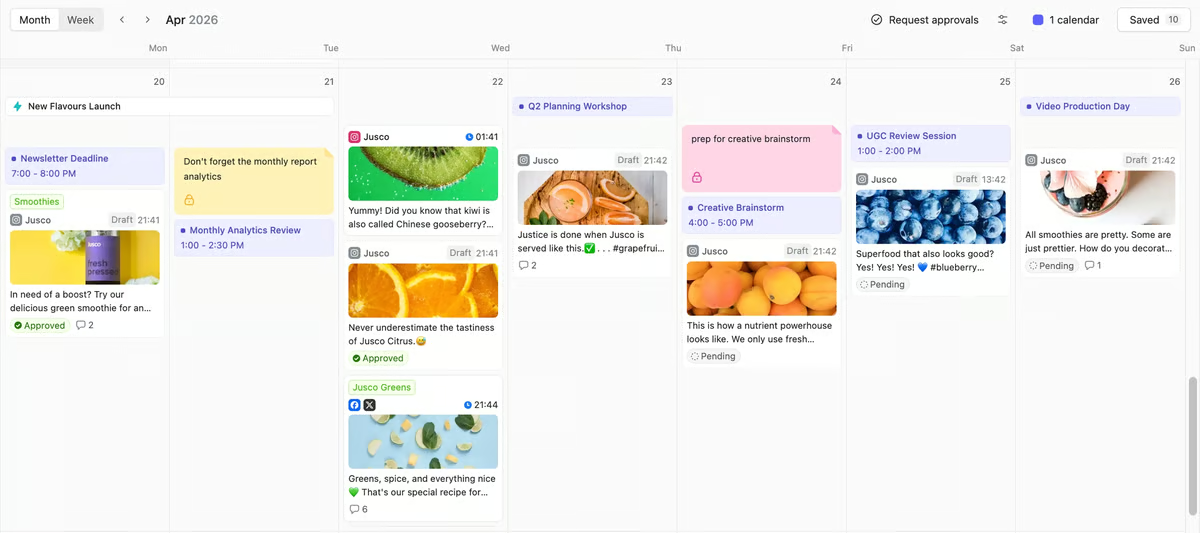
The visual post preview is the feature that makes that experience possible. Instead of asking reviewers to imagine how a post will look on Instagram or LinkedIn, Planable shows them exactly what they're approving. That single feature cuts down the revision cycle that usually comes from stakeholders approving content they didn't fully picture.
The 50-post limit is the clearest trigger, once you hit it, you'll need to upgrade to continue publishing through Planable. The Basic plan at $33/workspace/month gives you 60 posts per workspace per month, unlimited users, 4 social pages per workspace, and 2 types of approval. If you need more publishing volume or approval flexibility, the Pro plan at $49/workspace/month expands to 150 posts, 10 social pages, and 3 types of approval, and adds the grid view alongside feed and calendar. Both plans support add-ons: Analytics at $14/workspace/month and Social Inbox at $9/workspace/month. Annual billing includes 2 months free across both plans.
"I find Planable easy to use and very visual, which is fantastic for managing posts and campaigns for clients. Planable provides a central point where clients can make comments and ask for edits, enabling multiple copywriters, graphic designers, clients, and approvers to work in one place seamlessly. I appreciate being able to create labels, which is really useful. This feature allows us to organize by month or project, and we can view these labels in both the calendar and feed views, giving us a cohesive look and feel for our campaigns. The initial setup of Planable was very easy and intuitive, allowing us to self-navigate without any issues."
- Planable review, Elizabeth P.
Best for: Small marketing agencies, consultants, and business owners where content approval is the main bottleneck, and where multiple people need to review and sign off before anything is published.
Not ideal for: Solo operators who don't need an approval layer, or businesses that prioritize analytics depth and social listening over collaboration and content workflow management.
"Some of the more detailed features and settings are a little hard to navigate."
- Planable review, Steph P.
The workflow I evaluated with Simplified was deliberately end-to-end: design a post from a template, write the caption using the AI tools, and schedule it to go live, without opening a second application at any point. I completed that loop in under ten minutes on my first attempt, which validated the core premise of the platform. For a small business owner who currently bounces between Canva, a writing tool, and a scheduler, that consolidation is a genuine time return.
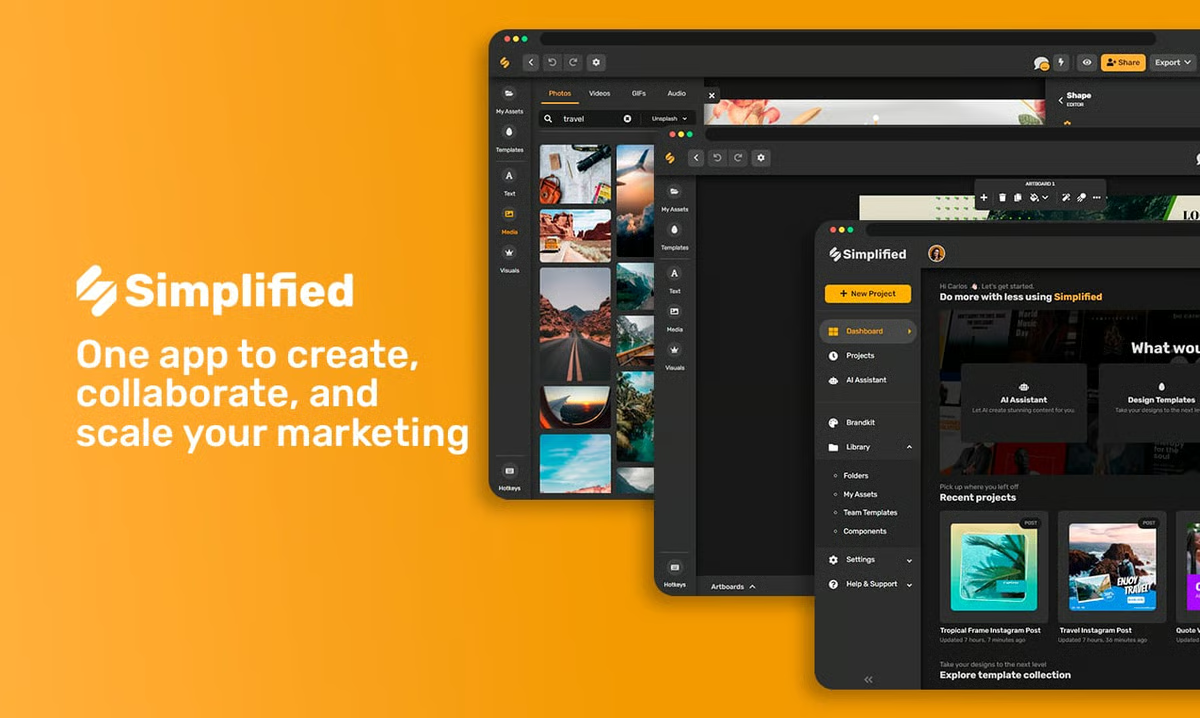
The AI credit system is the constraint worth flagging most prominently for small businesses evaluating the free plan. A significant portion of the 1,000 monthly credits runs through in the first few days of testing while generating post images and captions in the same session. A business posting daily with image generation and AI writing active simultaneously will exhaust the free allowance early in the month. The free plan works better as an evaluation window than a sustainable free tier for high-volume posting.
The free plan works well for light use, but the triggers to upgrade are clear. If you're hitting your AI credit ceiling regularly, the Pro plan at $19/month (billed annually) gives you 7 social accounts, 1 seat, and 10K generative AI credits, including writing, designs, video, and video repurposing. When you need team collaboration, the Business plan at $49/month expands to 15 accounts, 3 seats, 30K credits, and adds sharing and collaboration features and API access. The Growth plan at $149/month is built for small agencies needing 30 accounts, 5 seats, 100K credits, bulk post importing, advanced analytics, and shared calendars. Extra social accounts can be added across all plans at $5/month each.
"I find Simplified very convenient because it combines multiple marketing and content tools into one platform, so I don't have to keep switching between different apps for writing, designing graphics, creating videos, and scheduling posts. The interface is clean and easy to navigate, even if you're not super tech-savvy. I appreciate the AI writing tools for generating captions, posts, and basic content quickly, which really saves me time. The design templates are also helpful when I need quick graphics without starting from scratch. All the tools being in one place makes everything easy to manage."
- Simplified review, Angelita B.
Best for: Small business owners and solo content creators who want to design, write, and schedule from a single platform, especially those who currently juggle separate design and scheduling tools.
Not ideal for: Businesses that primarily need advanced social analytics, deep team collaboration workflows, or social listening. Simplified's strength is content creation, not data analysis.
"Some useful templates and advanced features are available only in the paid version, which can feel limiting at times. When working with high-resolution medical images, the editor occasionally slows down slightly, especially if multiple elements are added to the design. I also feel that more healthcare-specific templates or icons would make it even more suitable for medical professionals like me."
- Simplified review, Shubham S.
Looking to build your content strategy from the ground up? Learn how to create a social media marketing plan that turns consistent posting into measurable growth.
As a small business owner evaluating tools that could genuinely justify a premium price tag, I spent the most time with Sprout Social's Smart Inbox during the trial, because it's the feature that most directly addresses the operational pressure points I was evaluating. Managing comments, messages, and mentions across five connected platforms simultaneously is a coordination problem that gets expensive fast for a small team doing it manually. Inside the Smart Inbox, I handled everything from one screen, tagging, routing, and responding without switching a single tab. For a small business where one person is often wearing the community manager hat alongside three other roles, that's a real time return.
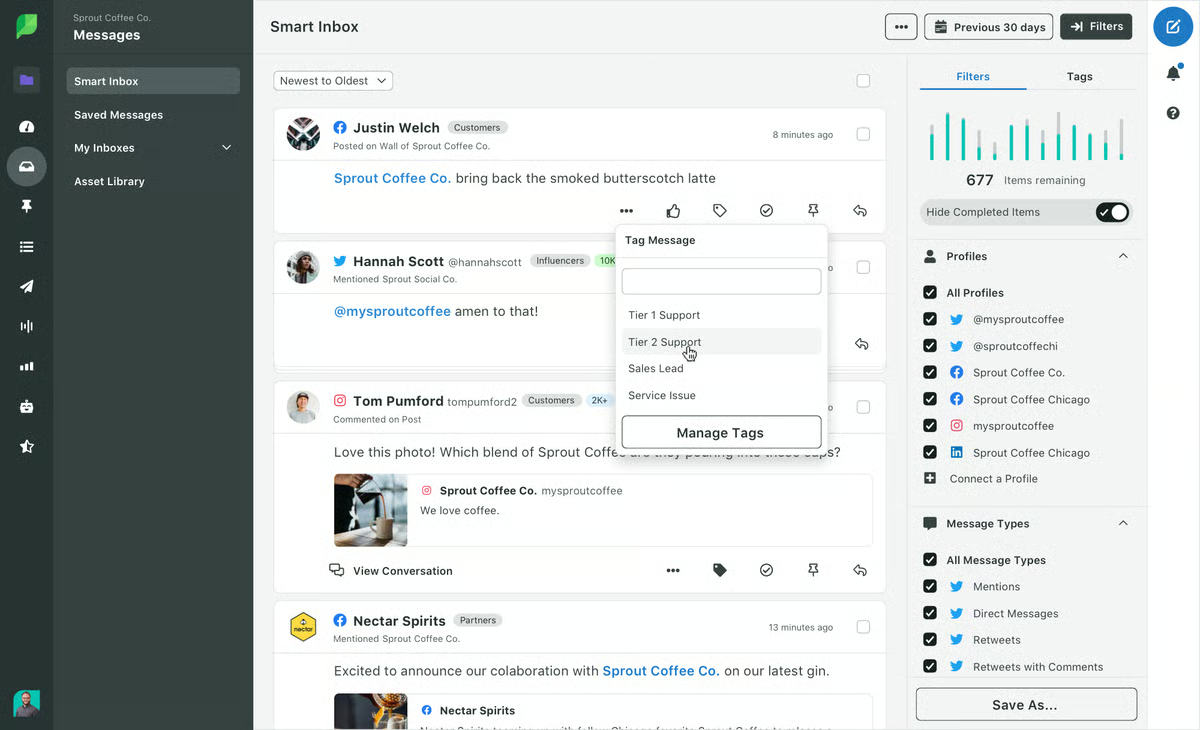
The reporting is the other standout I kept returning to. I ran a performance report during the trial and used it directly in a stakeholder conversation without reformatting anything. Channel-by-channel breakdowns, engagement trends, and optimal timing data in a format that communicated clearly to someone who doesn't live in social dashboards, that's a specific kind of utility that most tools at this price point don't come close to replicating.
The 30-day trial gives you full access before committing. After that, Essentials at $79/seat/month (billed annually) covers 5 social profiles, basic scheduling, and post-level reporting, enough for a small business focused on consistent publishing. Standard at $199/seat/month adds a consolidated inbox, keyword monitoring, and review management, which is where most small businesses land once social engagement becomes a daily priority. Professional at $299/seat/month and Advanced at $399/seat/month unlock unlimited profiles, competitor insights, AI-assisted replies, and sentiment analysis for teams where social touches customer support or sales at scale.
"Sprout Social makes it easy for me to schedule my firm's posts and stay consistent with our content without adding extra complexity to the workflow."
- Sprout Social review, Scott S.
Best for: Small businesses and agencies where social media drives measurable business outcomes, and where presentation-quality analytics and a unified Smart Inbox justify a premium monthly investment.
Not ideal for: Small businesses on tight budgets, solo operators, or teams that primarily need scheduling and basic analytics. The $199/month starting price is a significant commitment for a small team that doesn't fully use Sprout's reporting depth.
"It's a bit complicated to use sometimes, but once you get the hang of it it's great."
- Sprout Social Review, Holly P.
Exploring all your analytics options? See the best social media listening tools for small businesses that want to monitor brand mentions, trends, and competitor activity.
Vista Social was the tool I went into with the lowest expectations and came out of most impressed. A 4.8-star rating across 1,000+ G2 reviews is the highest on this entire list, and when I started working through the Professional plan, I understood why that score holds: the platform includes capabilities at $64/month that other tools either charge add-on fees for or lock behind enterprise pricing.
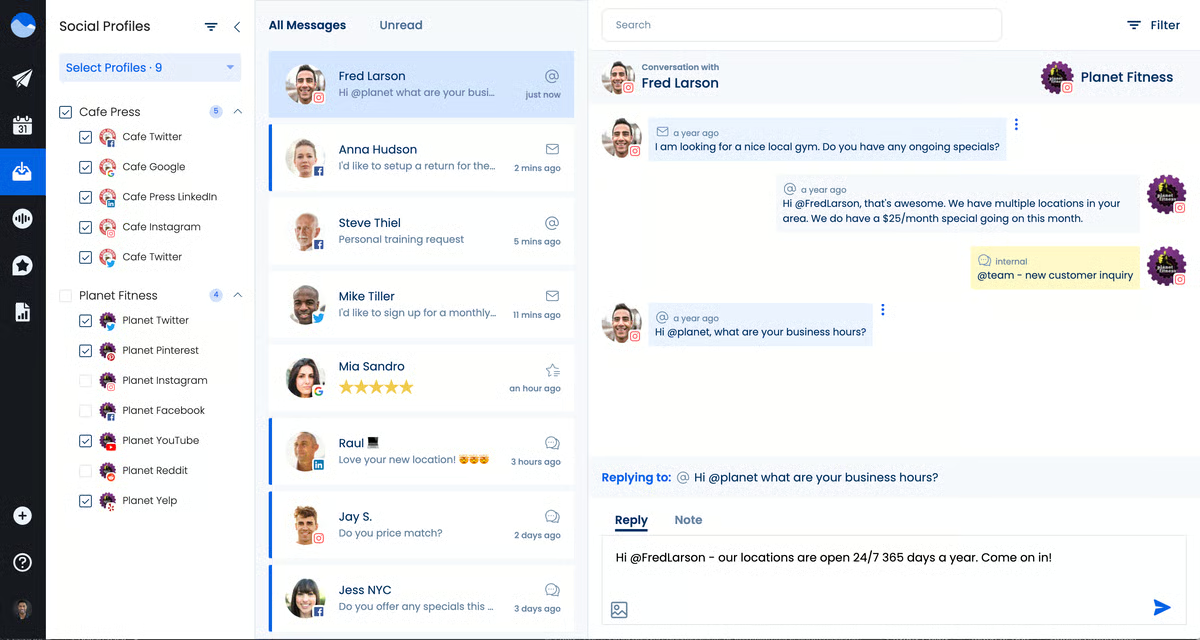
The DM automation was the first thing I set up, and it's the feature I'd lead with for any small business running active lead generation through social. I configured automated responses to common inquiries and watched them process incoming messages without any manual monitoring required. At Hootsuite or Sprout Social, equivalent automation features either don't exist at this tier or require a premium add-on. At Vista Social, it's in the base plan.
The 14-day trial gives you full access to evaluate the platform before committing. The Professional plan at $64/month (billed annually, or $79/month billed monthly) covers 15 social profiles and 3 users, with scheduling, DM automations, social inbox, analytics, listening and review tools, and single-stage approval workflows. The Advanced plan at $120/month (billed annually) adds 30 profiles, 6 users, advanced reporting, multi-stage approval workflows, Zapier/Make/MCP integrations, and advanced DM automations. Annual billing saves 20% across all plans. For small businesses managing several platforms with a small team, Professional covers the core workflow without needing to upgrade further.
"Personally, I like the workflow it allows to be created in the site. Being able to invite people to work under specific platform using the 'Team Member' feature will help in delegating work. Additionally, I like the ability to assign 'reviewers' of certain posts in the schedule to make sure that all posts are consistent."
- Vista Social review, Joyce N.
Best for: Small businesses that want scheduling, DM automation, social listening, and a unified inbox in one tool, without paying separate add-on fees for each capability. Best value proposition for the feature set on this list.
Not ideal for: Teams that prioritize the brand recognition and ecosystem integrations that come with larger platforms like Hootsuite or Sprout Social, or those that need full enterprise governance features.
"What I dislike about Vista Social is that some of the more advanced features can take a while to fully learn and set up, especially for larger teams or more complex workflows. Although the platform is feature-rich, the interface can sometimes feel a bit crowded when I'm trying to handle quick, simple tasks. I also think the reporting section would benefit from a more streamlined summary view, so it's easier to do fast performance checks. Pricing can get more expensive as you add additional team members, which may be tough for growing teams that need to manage multiple users."
- Vista Social review, Samuel F.
I went into the Zoho Social evaluation with one specific question: Does the Zoho CRM integration actually work the way it's described, or is it a feature that requires configuration work to deliver real value? After testing it directly, the answer is the former. I connected the social dashboard to Zoho CRM, generated a lead interaction through a social post, and watched it appear in the CRM contact timeline automatically, no manual entry, no third-party connector, no workflow I had to build.
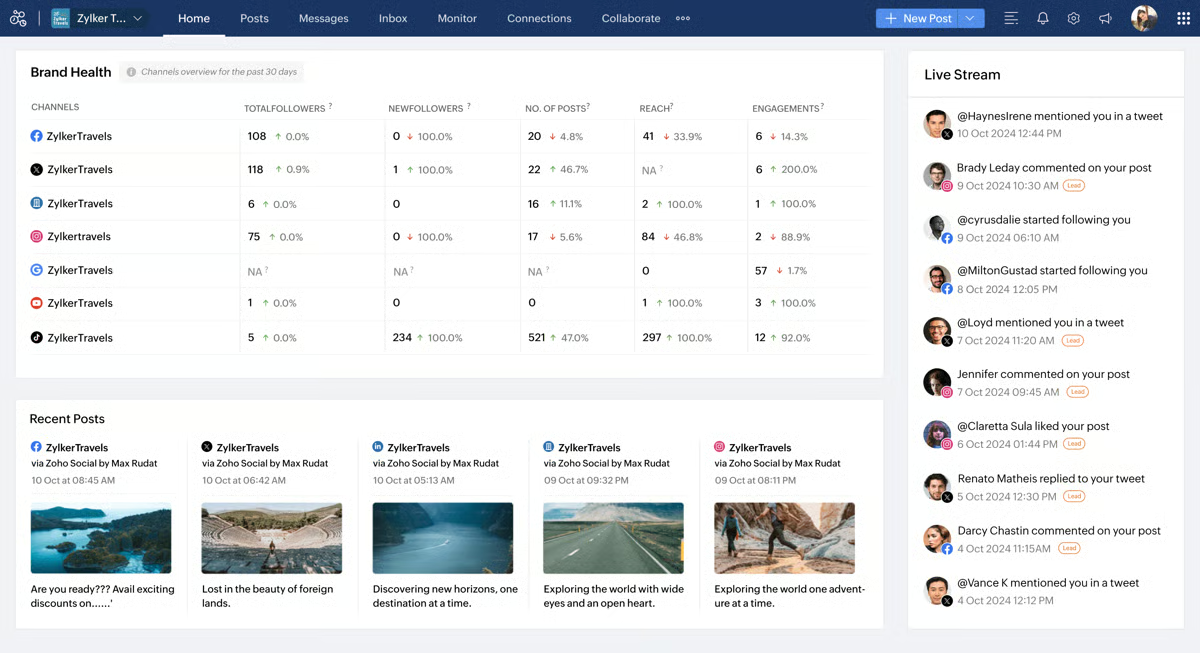
The SmartQ feature was the other thing I evaluated early and came away genuinely respecting. Publishing posts at SmartQ-recommended times for a week and comparing engagement against posts scheduled manually, SmartQ timing consistently outperformed manual choices. For a small business owner who knows posting time matters but doesn't have the bandwidth to analyze audience activity data, having the platform surface that recommendation is a real operational convenience.
The free plan covers individual use comfortably with 1 brand, 6 channels, and basic scheduling. The upgrade makes sense when you need more channels, want Zoho CRM integration, or need team collaboration and reporting features. The Standard plan at $10/month (billed annually) expands to 12 channels and adds bulk scheduling and post insights. The Professional plan at $30/month unlocks SmartQ optimal timing, a social inbox, content approvals, and Zoho CRM integration. The Premium plan at $40/month adds 3 team members and 14 channels, making it the right step for small businesses with a growing team.
"Since I personally handle all content creation, publishing, and scheduling, I wanted a solution that would make social media management simpler without coming with a steep learning curve."
- Zoho Social review, Mohammad A.
Best for: Small businesses already using Zoho CRM, Zoho Desk, or other Zoho products, and any business that wants a genuinely affordable forever-free plan with a low-cost upgrade path as they grow.
Not ideal for: Small businesses that need deep third-party integrations outside the Zoho ecosystem, or those managing video-heavy content formats like Instagram Reels, which require more manual handling outside the platform.
"I think the editing part when I have to schedule a post directly from Zoho Social could use more editing features or creative options. For example, I can't do Instagram reels, just posts. It would be good to do that without having to switch to Instagram manually, which is a bit of a problem."
- Zoho Social review, Amanda S.
Free plans and trials are most valuable for small businesses in two situations: you're just starting out and want to build a consistent social presence before committing budget, or you're evaluating whether a tool fits your workflow before investing in a paid plan. The ceiling shows up when your business grows past the free tier's account or user limits, when you need reliable async documentation like post recordings and approvals, or when analytics start driving real decisions and you need more data than the free plan provides.
Three triggers come up consistently across the tools on this list. The first is account limits: most free plans support three or fewer social profiles, which becomes a constraint as soon as you add a second platform. The second is collaboration: the moment a second person needs to review or approve content, most free tiers either hit a user ceiling or lack the workflow features to make it work cleanly. The third is analytics: once social media drives measurable business outcomes, reporting depth becomes infrastructure rather than a nice-to-have, and free plan analytics rarely go deep enough to support that work reliably.
The good news is that the upgrade costs on this list range from very accessible ($5/month per channel for Buffer, $10/month for Zoho Social billed annually) to a more significant investment ($79/seat/month for Sprout Social's Essentials plan). In between, Simplified's Pro plan starts at $19/month, Planable at $33/month per workspace, Loomly at $49/month, Vista Social's Professional plan at $64/month, and Hootsuite's Standard plan at $99/month, all billed annually. Matching the right price point to your actual operational needs is the main decision, and the free tiers and trials on this list give you enough runway to figure that out before paying.
Got more questions? Get your answers below!
For small businesses that want a genuine forever-free plan, Buffer (3 channels), Zoho Social (1 brand), and Planable (50 posts) are the strongest free options. For businesses that want to evaluate a more powerful tool before committing, Hootsuite and Sprout Social both offer trials, Sprout Social's 30-day trial and Hootsuite's 14-day trial, all with full platform access and no credit card required.
For small business community managers specifically, Sprout Social, Hootsuite, and Vista Social consistently rank highest in G2 reviews. Sprout Social's Smart Inbox is the most practical for managing conversations at volume, while Vista Social stands out for small teams that need DM automation and unified inbox without paying enterprise-level pricing. Hootsuite's trial makes it easy to test before committing.
For small businesses scaling to 20+ accounts, Vista Social's Advanced plan at $120/month (billed annually) supports 30 profiles across 6 users, making it one of the most cost-effective options at that volume. Hootsuite and Sprout Social handle large account volumes but at a significantly higher price point.
For small businesses, look for tools with a unified inbox that includes message assignment so two team members can't respond to the same message simultaneously. Sprout Social and Vista Social both offer message tagging and routing within their inboxes. Planable is the strongest option on this list specifically for content collaboration and approval workflows before anything publishes, and its free plan covers 50 posts with full approval features at no cost.
Sprout Social, Vista Social, Hootsuite, and Zoho Social all offer unified inboxes covering Facebook, Instagram, LinkedIn, and TikTok in one view. For small businesses on a budget, Vista Social's unified inbox is included in its Professional plan at $64/month (billed annually), making it the most cost-effective entry point on this list. Sprout Social's Smart Inbox is the most feature-complete, with tagging, routing, and sentiment filtering built in.
Loomly and Planable are the strongest options here — both offer approval workflows that require sign-off before any post publishes, available within their free trial periods. Hootsuite and Vista Social support scheduling with user permission controls that restrict who can publish directly. Sprout Social's approval workflows on paid plans add an additional layer of governance for small businesses managing multiple brands or client accounts.
For small businesses, Vista Social offers the best balance of instant reply capability and affordable pricing at $64/month (billed annually), with a unified inbox covering all major platforms. Sprout Social's Smart Inbox is the most feature-complete for instant replies across channels, though it starts at $79/seat/month. Both offer free trials to evaluate inbox performance before committing.
Vista Social and Sprout Social both offer notification systems for incoming messages and mentions. Hootsuite provides stream-based monitoring with alert options during its free trial. For small businesses where one person manages multiple channels, Vista Social's mobile notifications and DM automation reduce the risk of missed messages without requiring constant manual monitoring.
Tools with dedicated engineering teams that respond quickly to platform API changes are the most reliable. Hootsuite and Sprout Social have the longest track records of maintaining inbox functionality through major platform updates. Vista Social's public changelog shows frequent updates in response to platform changes. For small businesses evaluating reliability before paying, checking a tool's product changelog during the trial period is the most practical approach.
Buffer, Hootsuite, Loomly, Vista Social, and Zoho Social all support multi-week scheduling across multiple platforms. For small businesses on a tight budget, Buffer's forever-free plan and Zoho Social's free tier both support advance scheduling at no cost. Loomly's visual content calendar is the most practical for planning weeks ahead with a small team during its 7-day trial, while Hootsuite's bulk scheduling is the fastest for uploading large volumes of pre-planned content at once.
Sprout Social offers the deepest engagement tracking and trend identification on this list, with cross-channel performance data and audience insights built into its reporting. Hootsuite's analytics dashboard also tracks engagement trends across platforms. For small businesses on a tighter budget, Zoho Social's monitoring dashboard and Vista Social's competitor reports provide trend visibility without the premium price tag of Sprout Social.
The most affordable upgrade paths on this list are Buffer at $5/channel/month, Zoho Social at $10/month (billed annually), and Planable at $33/month per workspace (billed annually). Simplified's Pro plan at $19/month and Loomly at $49/month sit in the middle of the range, both billed annually. For businesses that need a more complete feature set, Vista Social's Professional plan starts at $64/month (billed annually) covering 15 profiles and 3 users, making it one of the stronger mid-range options on this list.
The best social media management tool for your small business is the one you'll actually open and use consistently. Every tool on this list has a free tier or trial long enough to run real content through it for at least a week or two. Do that before you decide.
If your main problem is staying consistent with posting, start with Buffer or Zoho Social's free plan. If you need to get content approved before it goes live, Planable's 50-post free tier is worth evaluating. If you want to understand what your audience actually responds to, the 30-day trial from Sprout Social will tell you more than a feature comparison ever will.
Ready to connect your social media workflow to a broader marketing engine? Explore the best marketing automation tools on G2 to find the right fit for your small business.


Here’s the thing most blog posts won’t say: a lot of “top-rated” social media management tools...
 by Harshita Tewari

Managing social media today isn’t just about posting regularly; it’s about choosing the right ...
 by Yashwathy Marudhachalam
Your customers are talking about your brand right now, on Twitter, Reddit, LinkedIn,...
.png) by Devyani Mehta
by Devyani Mehta