


I evaluated 15+ tools to find the six best free live chat software solutions for startups. These are Agentforce Service (formerly Salesforce Service Cloud), Fin, HubSpot Service Hub, Tidio, Zendesk for Customer Service, and Zoho Desk.
I've been on both sides of the live chat window, managing a startup support inbox that never seemed to shrink, and waiting endlessly as a customer while a generic "we'll be with you shortly" placeholder sat there, doing nothing. For a growing startup, that gap between a great chat experience and a disappointed customer usually comes down to one thing: whether the tool behind it actually fits a lean, multi-tasking team without a dedicated IT admin.
Free live chat software is where most startups start, and for good reason. You shouldn't need a budget approval to find out whether live chat is right for your team. But not every free plan is created equal; some cap you at 50 conversations, others hide the features that actually matter behind a paywall, and a few genuinely deliver enough to run real support operations at no cost.

For this guide, I went through the top products on G2's free live chat software category page and evaluated each one on what it actually gives you at no cost, how it holds up under real startup conditions, and where each one pushes you toward upgrading. Here's what I found about the best free live chat software solutions for startups in 2026.
*Tools are listed alphabetically. These tools offer free trials, free forever options, or freemium models.
Here's a side-by-side look at free plan specifics and paid starting prices before diving into the full reviews.
| Tool | G2 Rating | What the free plan covers | Paid Starts At |
| Agentforce Service | 4.4/5 ⭐ |
|
$2/conversation |
| Fin | 4.5/5 ⭐ |
|
$0.99/outcome + Intercom plan from $29/seat/month |
| HubSpot Service Hub | 4.4/5 ⭐ |
|
$15/seat/month |
| Tidio | 4.6/5 ⭐ |
|
$24.17/mo. billed annually |
| Zendesk for Customer Service | 4.3/5 ⭐ |
|
$19/agent/month |
| Zoho Desk | 4.4/5 ⭐ |
|
$7/agent/month (Express) |
*All pricing details mentioned in this article are based on publicly available data at the time of publication (June 2026) and are subject to change.
Live chat has become one of the most expected touchpoints in customer service, and for startups, the stakes are especially high. Companies integrating live chat see a 20% increase in conversion rates, with customers who use live chat being 2.8 times more likely to convert. For startups with limited resources, the payoff is even sharper; live chat delivers a retention rate of up to 63% and a 48% increase in average revenue per chat hour. For lean teams where every customer interaction counts, having the right live chat tool in place is less a nice-to-have and more a baseline for staying competitive.
I started with G2's free live chat software category page, focusing on tools with a genuine free tier, freemium model, or substantive free trial. From there, I observed each one specifically on what the free plan or trial actually covers, not just what the marketing says, including conversation limits, agent seat caps, AI feature access, and where the free experience runs out.
I cross-referenced verified G2 user reviews for each tool to understand real-world patterns beyond my own testing, what startup business owners consistently praise, what wears on them over time, and how the free plan holds up in practice. G2 review data referenced throughout was pulled from the small business user segment in 2026. Some reviews have been lightly edited for clarity.
The screenshots featured in this article may be a mix of those taken from the vendor's G2 page or from publicly available materials.
Going through six tools back to back makes certain things obvious that don't always show up in feature comparisons. Here's what I actually paid attention to:
To be included in this category, a solution must:
*This data was pulled from G2 in 2026. Some reviews may have been edited for clarity.
Agentforce Service is the only tool on this list that was built around a CRM first, and customer service second, and for teams already living inside Salesforce, that architecture changes how support actually works. Rather than a standalone chat widget, it's a full-service operation layer that happens to include live chat as one piece of a much larger picture.
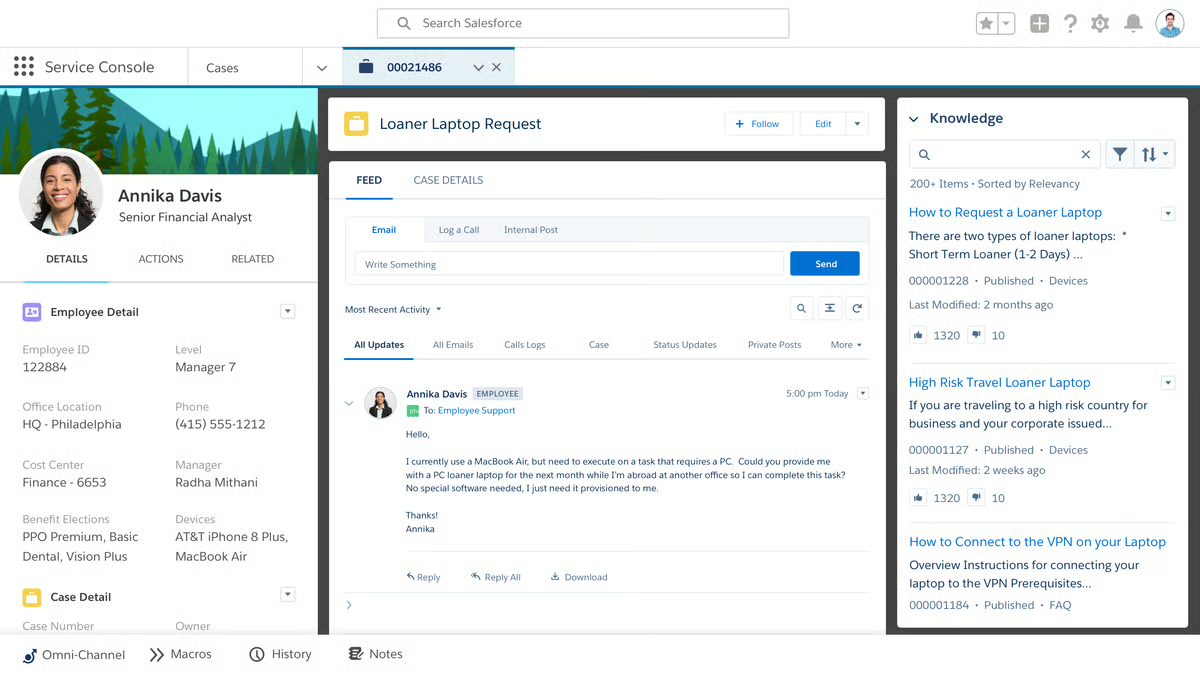
What distinguishes Agentforce from the other tools here is its shift from scripted bots to reasoning-based AI agents. These agents don't follow fixed decision trees, they access Salesforce data in real time, understand customer context, and perform actions like updating cases, modifying orders, and routing escalations without a human stepping in at every turn. Startups already embedded in the Salesforce ecosystem get disproportionate value from this setup, as the AI agents handle the repetitive volume that would otherwise require hiring additional support staff, which matters when headcount is tight.
The 30-day trial gives you a meaningful window to evaluate the platform before committing. After the trial ends, the Salesforce Foundations free tier provides a limited ongoing option for lighter usage. For teams that need full production capacity, paid plans start at $25/user/month (Starter Suite), with AI agent usage billed separately at $2/conversation on top of the base license. It's worth reviewing Salesforce's current pricing page directly before committing, as plan structures can vary.
"What I like most about Agentforce Service is how it helps me manage customer support workflows more efficiently. The platform makes it easier to track cases, automate repetitive tasks, and streamline day-to-day support work, which can help improve response times. I also appreciate its integration with the Salesforce ecosystem, since it keeps customer data and communication organized in one place and makes it simpler to stay on top of ongoing conversations."
- Agentforce Service review, Muhammad O.
Best for: Startups already using Salesforce CRM who want AI agents to automate frontline support and a single platform to connect sales, service, and customer data without managing separate tools.
Not ideal for: Lean teams without a Salesforce infrastructure or dedicated admin, where the setup complexity and consumption-based pricing introduce more friction than value at low volumes.
"It can feel a bit complicated for beginners, and it's also fairly expensive for what you get."
- Agentforce Service review, Manutosh B.
Fin takes a different approach from most of the tools on this list. Where others offer live chat with AI as a feature, Fin is fundamentally an AI agent first, one that learns from your knowledge base, handles incoming conversations across channels, and only surfaces a human agent when the query genuinely needs one. For lean teams drowning in repetitive questions, that distinction changes the math on headcount.
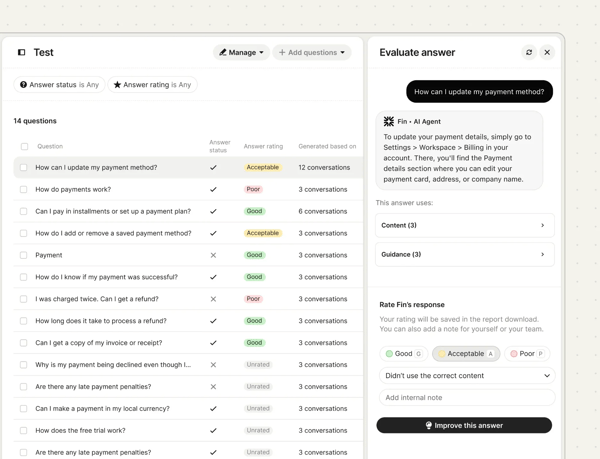
The setup moves quickly from onboarding to something functional. You point Fin at your existing help content, articles, previous conversations, and documentation, and it starts generating on-brand responses without hours of configuration. Startup teams in 2026 G2 reviews consistently describe significant drops in frontline query volume after deployment, with agents freed up to focus on cases that actually need them. For a lean team where every person wears multiple hats, that kind of AI coverage is a practical force multiplier.
The 14-day trial gives you a genuine sense of resolution volume and fit before any commitment. After the trial, Fin is priced at $0.99 per resolved outcome, meaning you only pay when Fin actually solves something, not for every conversation it touches. For teams with an Intercom Helpdesk, base plans start at $29/seat/month with Fin resolutions billed on top. The upgrade makes sense when you want to keep Fin running permanently rather than just evaluating it.
"I really like how Fin by Intercom allows us to personalize the experience, such as setting guidance on tone of voice, making it more professional or empathetic. We can customize easily, and it's great for segmenting and targeting specific groups, allowing us to set expectations for different user tiers. The ease with which we can tailor the platform to our needs enables us to handle repetitive questions efficiently, freeing up time for our small team. This enables us to focus on tasks that require a human touch and create more content for our help desk. The simple, plug-and-play setup was also a plus, making it easy for us to adapt and improve as we go."
- Fin review, Daniel R.
Best for: Growing startups with a solid knowledge base who want AI handling first-line queries around the clock, with human agents reserved for complex escalations.
Not ideal for: Teams looking for a traditional live chat widget without AI involvement, or those that want predictable flat-rate billing rather than per-resolution pricing that scales with volume.
"One thing that concerns me is that Fin tends to loop, it keeps repeating the same answer even when the customer has indicated that the answer was not helpful. Fin doesn't ask for clarification when the answer misses the mark. Fin doesn't have context memory, it seems. It can forget sometimes if the answer was already provided."
- Fin review, Ahmed M.
Looking to unify all your customer communication channels? Check out the best customer communications management software to build a more consistent, connected messaging strategy.
The case for HubSpot Service Hub is strongest for teams that are already inside HubSpot's broader ecosystem. If your sales team uses HubSpot CRM and your marketing uses HubSpot for campaigns, adding Service Hub doesn't feel like adopting a new tool; it feels like turning on a room you already own. Every ticket connects to the full customer record, and agents stop asking questions that the system already knows the answer to.
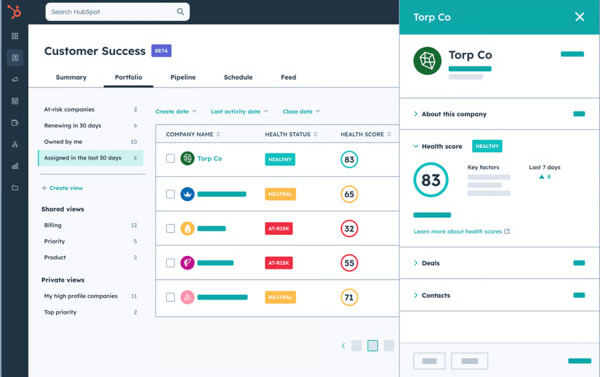
The ticketing and shared inbox setup is highly effective for lean startup support workflows, it covers the essentials without a payment wall. The conversational bots let you automate first responses and route incoming chats before a human picks them up, and the free live chat widget installs cleanly without technical help. For a lean team of one or two people managing support alongside other responsibilities, the free tier covers a surprising amount of ground before you ever need to open your wallet.
The free tier handles low to moderate volume for lean teams well. The upgrade triggers are: more than two agents, needing automated ticket workflows beyond basic routing, more detailed reporting across team performance, or removing HubSpot branding from customer-facing communications. Service Hub Starter begins at $15/seat/month and opens up more pipeline stages, automation, and calling minutes without a major jump in cost.
"I like that HubSpot Service Hub is really customizable. Previous CRM systems we used were rigid, and we needed a third-party coder to make changes. With HubSpot Service Hub, we can handle customizations in-house without a lot of external assistance. It's really user-friendly, making it easy for new and existing staff to adapt when we implemented it. I also appreciate that the setup process was seamless, with the ability to import contacts being really useful. It's been the best CRM system we've used to date, and we love it."
- HubSpot Service Hub review, Emily B.
Best for: Teams already using HubSpot CRM who want support, live chat, and customer history in a single workspace without stitching together separate tools.
Not ideal for: Teams outside the HubSpot ecosystem, where the CRM integration advantage largely disappears, and the free plan's two-user cap becomes a constraint faster than expected.
"The high cost of advanced features and the steep learning curve required to master complex automation and reporting tools."
- HubSpot Service Hub review, Ayesha N.
Want to elevate the customer journey beyond live chat? Explore the best experience management software to see which tools help you analyze feedback and improve every interaction.
No tool on this list gets you to a live chat widget faster than Tidio. The setup process takes under an hour, even for someone with no technical background. Embedding the widget, connecting email, and configuring a basic flow are all straightforward steps that don't need technical help. For startups or website owners that want to catch visitor questions in real time without committing to a paid platform, this is where the evaluation starts.
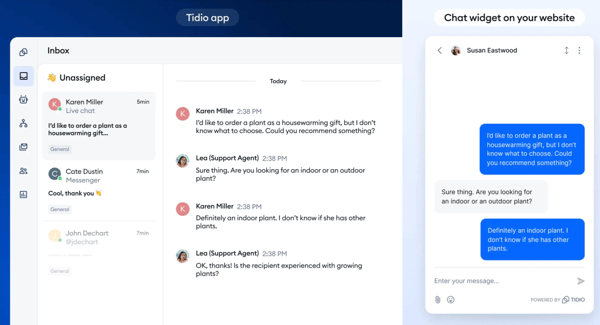
Tidio's free plan handles the basics without artificially limiting core functionality. You get live chat, a simple ticketing system, and a chatbot builder with 100 Flow triggers per month, all free and accessible from a clean dashboard that doesn't require training to navigate. The Lyro AI Agent includes a one-off bonus of 50 conversations on the free plan, giving you a real taste of what the AI can do before deciding whether to add it as a paid feature.
The upgrade triggers to watch for are the Flow trigger cap (100/month fills quickly on an active site) and the one-off Lyro AI bonus (50 conversations, non-renewing). When those ceilings hit consistently, Starter at $24.17/month (billed annually) covers 100 billable conversations with full live chat access. Growth at $49.17/month adds advanced analytics, automatic chat assignment, and macros for 250 conversations. Plus starts at $749/month for custom limits, dedicated support, and custom branding.
"I like that Tidio integrates with all my social media channels and emails, which is a great feature. It allows me to manage all customer messages from my Instagram, Facebook, and Pinterest pages in one place without having to monitor each channel individually. Using it along with my Shopify Plus store has been seamless. The initial setup of Tidio was very easy."
- Tidio review, Prahlad K.
Best for: E-commerce startups, solo operators, and website teams that need live chat up and running quickly with multi-channel integrations, and want to evaluate the full feature set before committing to a paid plan.
Not ideal for: Teams with consistent high-volume traffic that will regularly exceed the 50-conversation free plan limit, or those that want Lyro AI as a permanent ongoing capability without moving to a higher-tier plan.
"The knowledge base for complicated issues is a little sparse, so we had to rely heavily on their customer support to fix some starting issues. If they can improve their knowledge base for common errors encountered, then the large majority of everyday issues can be solved quickly by customers."
- Tidio review, Ollie M.
Need stronger ticketing and support workflows alongside live chat? Browse the best help desk software to find platforms that streamline cases and automate tasks.
If any tool on this list has earned its place through repetition, it's Zendesk for Customer Service. It's the platform that support professionals tend to migrate toward when they need something that won't break under real load. The 14-day free trial lets you explore the platform before committing, no credit card required, which means startups growing fast can validate fit before any spend is on the table.
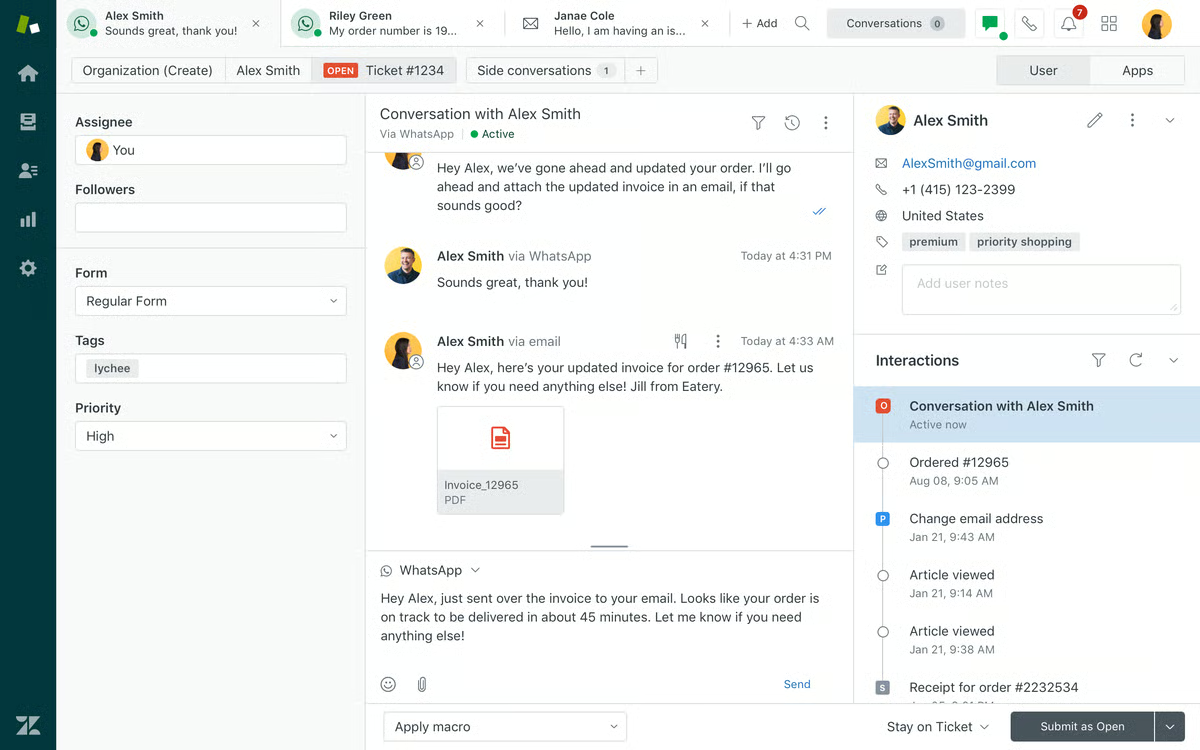
The platform handles a busy support queue with clear efficiency: multiple channels coming in simultaneously, tickets being routed to the right agents, macros cutting repetitive responses, and reporting surfacing what's working and what isn't. All of it is accessible and functional within the first day of the trial period. AI features like AI Agents and Knowledge Base are available from the Suite Team tier onward, while more advanced capabilities, Copilot, Intelligent Triage, and Auto Assist, are part of the Suite Enterprise + Copilot plan.
The 14-day window is enough to know whether Zendesk fits your workflows, but it ends. After the trial, four paid tiers are available. Support Team ($19/agent/month) covers email, ticketing, routing, prebuilt dashboards, and automations, the right starting point for startups that need structured ticket management. Suite Team ($55/agent/month) is where live chat, AI Agents, and omnichannel first appear. Suite Professional ($115/agent/month) adds skills-based routing, IVR, and Admin Copilot. Suite Enterprise + Copilot (contact sales) brings Intelligent Triage and Auto Assist. The upgrade decision usually comes down to how many channels the team needs to manage and how much AI automation is required.
"Ease of use. Training times are short for new agents."
- Zendesk for Customer Service review, Jill P.
Best for: Startups that need a proven, scalable platform for managing high-volume, multi-channel support, and want to evaluate the platform before committing rather than deciding based on a limited demo.
Not ideal for: Lean teams that need a free-forever plan with no time pressure, or very small operations where Zendesk's depth and per-agent pricing make it harder to justify against simpler alternatives.
"I would say that our phone system that we currently use through Zendesk could be improved. It took us about two hundred and eighty hours to set up everything when we initially did."
- Zendesk for Customer Service review, Dream F.
Zoho Desk earns a different kind of trust than the other tools here. It doesn't have the AI sophistication of Agentforce or the resolution-rate headlines of Fin, but it offers something that genuinely matters for lean teams on a tight budget: a free plan with no time limit, no credit card required, and real ticketing functionality that doesn't expire.
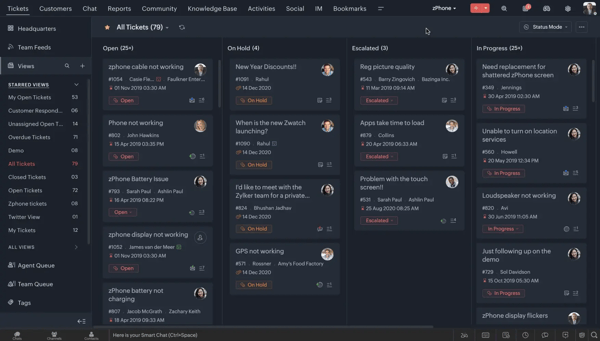
The free tier covers up to three agents with email ticketing, a basic help center, customer management, and predefined SLA rules, more than most tools offer for free. It holds up well as a starting point for startup founders who aren't sure yet whether they need a paid plan. The Zoho ecosystem integration is the strongest differentiator: if your business already uses Zoho CRM, Zoho Books, or other Zoho apps, Desk connects natively in ways that competing tools can't replicate without third-party connectors.
The key gaps on the free plan are: no live chat, no social media channels, and no messaging, all absent until you upgrade. Express at $7/user/month adds social media, web forms, AI Agents, and workflows. Standard at $14/user/month unlocks business messaging, knowledge base, and generative AI. Professional at $23/user/month adds telephony, blueprints, and multi-department support. Enterprise at $40/user/month brings the full Zoho SalesIQ live chat, Answer Bot, and AI support assistant. All prices billed annually.
"I found Zoho Desk super useful for the fact that it's integrable with third-party vendors like my Yeastar PBX system."
- Zoho Desk review, Gibril B.
Best for: Lean teams that want a genuine free forever plan with no expiration, or those already in the Zoho ecosystem who want support, CRM, and billing connected without extra connectors.
Not ideal for: Teams that need live chat on their website without upgrading to Standard or above, or those that need the full Zoho SalesIQ live chat and AI support assistant, those are Enterprise-tier features.
"The trial period can be a bit longer, but besides that, everything works like a charm."
- Zoho Desk review, Delicio D.
Going through six tools for this list, the free tiers that actually work for startups are the ones where you can handle a real customer conversation end to end, not just install a widget and watch it sit there. Tidio and HubSpot Service Hub are the clearest examples of that. The startups that get the most out of free plans are:
It usually comes down to one of three things, and most startup teams hit at least one within the first few weeks:
1. Conversation or user limits
2. AI access
3. Channel coverage
The upgrade costs are reasonable once you know what you need: Tidio Starter at $24.17/month, HubSpot Service Hub Starter at $15/seat/month, and Zoho Desk Express at $7/agent/month. Running real customer conversations on the free tier first is the most reliable way to find out which limits you'll actually hit before committing to a plan.
Got more questions? Get your answers below!
Tidio offers the best balance of features, ease of use, and affordable pricing for startups. Its free forever plan includes live chat, ticketing, and 50 Lyro AI conversations, with paid plans starting at $24.17/month. Setup takes under an hour with no technical background required.
Fin by Intercom is the best live chat platform for a startup SaaS company that needs omnichannel support and AI automation. It handles tickets, emails, live chat, WhatsApp, and SMS in one platform, with a 14-day free trial and no credit card required.
Zendesk for Customer Service is the most reliable live chat software based on startup reviews. It holds nearly 7,000 G2 reviews at 4.2 stars, with reviewers consistently citing call stability, ticket routing accuracy, and uptime as strengths.
Zendesk for Customer Service and Zoho Desk are the live chat tools with the best reliability and uptime for businesses that can't afford missed conversations. Both platforms are built on enterprise-grade infrastructure and are consistently rated for stability in startup G2 reviews from 2026.
Zoho Desk is the most affordable live chat software with per-seat pricing that scales for growing teams. It offers a free forever plan for up to 3 agents, with paid plans starting at $7/agent/month (Express, billed annually), making it the lowest per-seat entry point on this list.
Fin by Intercom offers the best omnichannel coverage for lean customer support teams, handling live chat, email, tickets, WhatsApp, and SMS from a single platform. Zendesk for Customer Service is also strong, covering email, chat, voice, and social channels within its 14-day free trial.
Fin by Intercom and Agentforce Service are the best live chat platforms with AI automation for handling routine customer queries. Fin uses an AI agent that resolves queries autonomously across channels. Agentforce uses reasoning-based AI agents that access Salesforce data in real time to handle cases, updates, and routing without human intervention.
Tidio has the best agent usability and lowest learning curve for startup support teams. Its dashboard requires no training to navigate, setup takes under an hour, and the interface is consistently praised in 2026 G2 startup reviews for being intuitive from day one.
HubSpot Service Hub and Zoho Desk are the best live chat tools for centralizing customer conversations across chat, email, and messaging in one inbox. HubSpot's shared inbox connects live chat, email, and bots to a single CRM-linked view. Zoho Desk consolidates email, chat, and social channels into one unified dashboard starting on the Express plan.
Live chat connects customers with human agents in real time, while chatbot software automates conversations using scripts or AI. Most modern live chat platforms combine both: bots handle simple queries, and agents take over when human expertise is needed.
Choosing a free live chat software can be simple if you know what to look for. Here are some key features to consider:
For startup SaaS businesses, Fin by Intercom is the strongest option due to its AI-first approach and omnichannel coverage. For startup e-commerce businesses, Tidio is the best choice, with a free forever plan, Shopify integration, abandoned cart flows, and Lyro AI built specifically for e-commerce support workflows.
Implementing live chat is simple. Most tools give you a small code snippet to paste into your website, which instantly adds a chat widget for visitors. From there, your team can manage conversations through a backend dashboard, receive notifications, and use automation or chatbots to handle common questions. Many platforms also integrate with CRMs and help desk systems, making it easy to track customer info and streamline support.
After going through all six tools on this list, the most useful thing I can tell you is this: the right free live chat software isn't the one with the longest feature list, it's the one that fits the support workflow you actually have right now.
If you're a solo founder or early-stage e-commerce startup that wants live chat running on your site today with no technical setup, start with Tidio. The free forever plan gets you there in under an hour. If your business already runs on HubSpot CRM and you want chat, ticketing, and contact records in one place without paying anything, HubSpot Service Hub's free plan is the obvious fit for teams of two. If you're a growing SaaS startup that needs AI to handle routine queries across multiple channels so your team can focus on complex cases, Fin's 14-day trial is worth evaluating seriously. If you're on Salesforce and want AI agents handling frontline support rather than scripted bots, Agentforce Service is the only tool here built for that. If you need reliable multi-channel ticketing that scales and want a full product trial before committing, Zendesk's 14-day Suite Professional access is the most complete evaluation window on this list. And if budget is the primary constraint and you need a genuinely free ticketing system with room to grow, Zoho Desk's free plan for three agents is where to start.
The tools in this list are genuinely free to try. Start with the one that fits where your business is right now, and let your actual support volume tell you when it's time to upgrade.
Want to manage and respond to service-related requests as well? Explore the best free help desk tools on G2.


G2 Grid® Report · Summer 2026 Best Live Chat Software Updated May 26, 2026 View full...
by Sudipto Paul

Recently updatedSummer 2026 Grid® Report · Published May 26, 2026 This guide was last...
 by Soundarya Jayaraman

To cut to the chase, Agentforce Service, Atera, Fin, Freshdesk, Front, Hiver in Gmail, Jira...
 by Shashank D Shastry