


I’m not a developer. I don’t work inside an integrated development environment (IDE) or ship production code. I work on campaigns, content performance, and growth strategy.
So when AI platforms started claiming that anyone could build software with simple prompts, I wanted to test that claim properly.
Not with a toy project. With something I would actually use.
To evaluate the best vibe coding tools, I built a web-based content analyzer that calculates SEO performance, assesses SERP competitiveness, and suggests LLM-optimization improvements using real search queries.
I tested five browser-based platforms from the latest Winter 2026 G2 Grid Report for AI code generation software: ChatGPT, Gemini, Replit, Lovable, and GitHub Copilot. These tools consistently rank at the top of the category and frequently surface in community discussions around vibe coding. I limited the comparison to tools that a non-developer can open and use in a browser without setting up a traditional development environment.

Each tool had to build the analyzer from scratch, refine it without breaking logic, and expand it into something more product-ready. I evaluated task completion, output quality, ease of use, customization, and efficiency, and then validated those findings against G2 user data.
Lovable delivered the strongest overall result, while ChatGPT was the fastest and easiest to prototype with. Replit offered the most control, Gemini took the most structured approach, and GitHub Copilot was best suited to a more code-first workflow. If I had to choose, I’d validate ideas quickly in ChatGPT and build them out fully in Lovable.
Here’s a side-by-side comparison of the five best vibe coding tools I tested. Each platform completed the same three build tasks using identical prompts. I evaluated them across five core criteria: task completion, output quality, ease of use, customization, and efficiency.
| Criteria | ChatGPT | Gemini | Replit | Lovable | GitHub Copilot |
| G2 score | ⭐️4.7/5 | ⭐️4.4/5 | ⭐️4.5/5 | ⭐️4.6/5 | ⭐️4.5/5 |
| Task completion | Good | Excellent | Good | Outstanding | Good |
| Output quality | Good | Good | Good | Excellent | Good |
| Ease of use | Outstanding | Fair | Good | Excellent | Fair |
| Customization | Good | Good | Excellent | Excellent | Good |
| Efficiency | Good | Fair | Fair | Excellent | Fair |
| Strengths | Rapid prototyping | Structured analysis | Custom app builds | Stable product-style builds | Clean code generation |
| Challenges | Feature retention during expansion | Manual code execution workflow | Preview sync during iteration | Daily usage credit limits | Requires reruns to validate output |
| Free plan available | Yes | Yes | Yes | Yes | Yes |
| Pricing | Go: $8/mo Plus: $20/mo Pro: $200/mo Business: $25/user/ mo Enterprise: available upon request |
Google AI Plus: $7.99/mo Google AI Pro: $19.99/mo Google AI Ultra: $249.99/ mo |
Replit Core: $17/mo Replit Pro: $95/mo Enterprise: available upon request |
Pro: $25/mo Business: $50/mo Enterprise: custom |
Pro: $10/mo Pro+: $39/mo Business: $19/user/ mo Enterprise: $39/user/ mo |
Ratings reflect hands-on testing across three build iterations and focus on workflow stability, iteration reliability, and ease of building with prompts rather than deep engineering benchmarks.
The global vibe coding market is projected to reach USD 36,970.5 million by 2032. Demand for faster app prototyping and AI-powered development is driving that surge.
I evaluated the best vibe coding tools using the same three-stage workflow: build a content analyzer, refine it, and expand it into a more product-ready version. All five platforms produced a working tool in the first round, but differences emerged during iteration.
Lovable was the only platform that retained functionality across all three stages without removing earlier features. ChatGPT delivered the fastest prompt-to-preview workflow, though some refinements were lost during expansion. Replit offered the most project-level control but required additional prompts to render updates. Gemini generated structured output, but involved several manual steps to run the code. GitHub Copilot produced clean layouts but sometimes needed reruns before the final version executed correctly.
The tools were similarly effective at generating code but varied in iteration stability, workflow friction, and reliability during feature expansion.
To keep the comparison practical and accessible, I limited testing to browser-based platforms from the latest G2 Grid Report for AI Code Generation Software. Tools that require a full IDE setup or local installation were excluded. The goal was to evaluate what a non-developer could realistically open in a browser and start building with immediately.
I selected five widely used tools with strong adoption in the category: ChatGPT, Gemini, Replit, Lovable, and GitHub Copilot. All testing was conducted using the free versions of each platform to reflect what a typical new user can access without upgrading to a paid plan.
Each platform completed the same three standardized tasks using identical prompts:
This was not intended to be a deep engineering benchmark. Instead, the test focused on a practical question: can a non-developer turn an idea into a usable web tool using prompts alone?
Each tool was evaluated across five core criteria:
Performance was scored using a five-tier scale:
To reduce bias, I also cross-checked my observations with recent G2 user feedback, particularly around usability, reliability, and support experience.
To evaluate the five free vibe coding tools, I used three standardized prompts across each platform. Each prompt increased in complexity, progressing from initial implementation to refinement and, finally, to feature expansion.
In the first round, each tool was asked to generate a browser-based content and LLM optimization analyzer from scratch. The application needed to calculate click-through rate (CTR), identify a primary SEO bottleneck, and generate structured recommendations.
Build a responsive, browser-based content and LLM optimization analyzer as a single self-contained HTML file with embedded CSS and JavaScript.
The tool must include the following input fields:
The application must:
Use clean modern styling and clear section separation. The tool must run immediately when opened in a browser without external dependencies.
For the second round, each platform was asked to improve the existing analyzer without breaking its core logic. The goal was to evaluate how well the tools handled refinement while preserving previously generated functionality.
Improve the existing content and LLM optimization analyzer without rewriting or breaking its core logic.
Add the following enhancements:
Maintain all existing calculations, classifications, and decision logic. Provide the complete updated single-file application.
In the final round, the analyzer was expanded with additional features intended to make the tool feel closer to a lightweight product. The platform had to introduce new capabilities while preserving everything created in earlier steps.
Extend the existing content and LLM optimization analyzer into a more product-ready application without removing or breaking any existing functionality.
Add:
Preserve all existing features and output structure. Provide the full updated single-file application.
ChatGPT moved from prompt to a working content analyzer quite fast. It generated a fully self-contained HTML file immediately, allowed me to toggle between code and preview, and produced a runnable tool without external dependencies. The first two rounds felt stable and structured, but the third round exposed some regression in feature retention and expansion durability. Overall, ChatGPT excels at rapid implementation and clean first-pass iteration, but complex expansion can introduce instability.
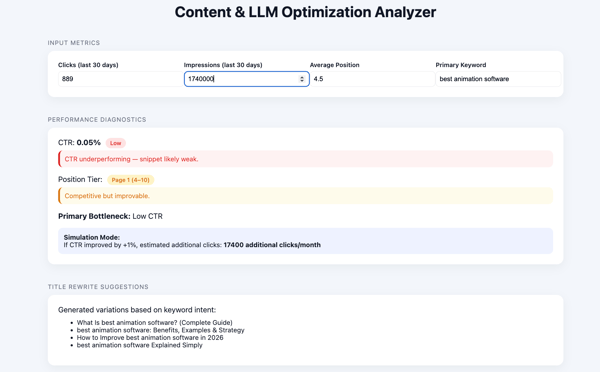
ChatGPT generated a complete, responsive HTML file immediately and clearly explained how to use it: save the file and open it in a browser. The CTR calculation logic was correct, and the diagnostic layer accurately identified the primary constraint for the test case: Low SERP click-through rate. The UI rendered cleanly in preview, and the structure was intuitive.
The recommendations were directionally solid but leaned slightly generic in this first pass. It included both SERP alignment and LLM optimization recommendations, such as improving title and meta descriptions for clickability, adding structured FAQ content, and formatting answers more clearly for AI extraction. While useful, the guidance remained fairly high-level rather than deeply differentiated. That said, everything worked out of the box, and the experience required zero setup friction.
Verdict: Strong implementation with immediate usability.
ChatGPT handled iteration cleanly and quickly. It preserved the original logic while enhancing the UI and adding contextual improvements. Performance diagnostics became color-coded, sections were more clearly segmented, and recommendations became more specific and structured.
The export summary section was visually implemented, and a copy option was included. However, the copy button did not function properly in preview mode. Despite that limitation, this round felt like a true refinement rather than a rebuild.
Verdict: Clean iteration with stronger specificity, minor functional friction.
ChatGPT remained fast, but this round showed structural regression. Instead of layering new product-style features on top of the existing analyzer, it removed some prior sections and focused heavily on title suggestions. The core expansion objective, building out the analyzer into something more robust, was only partially fulfilled.
The copy/download actions again did not function properly in preview. While output speed remained high, structural durability weakened under expansion pressure.
Verdict: Fast output, but weaker expansion stability.
To summarize performance across all three tasks, here’s how ChatGPT ranked against the five evaluation criteria.
| Criterion | Build a working analyzer | Refine and improve analyzer | Expand into a product-style tool | Overall |
| Task completion | Outstanding | Excellent | Fair | Good |
| Output quality | Excellent | Excellent | Good | Good |
| Ease of use | Outstanding | Outstanding | Outstanding | Outstanding |
| Customization | Excellent | Excellent | Fair | Good |
| Efficiency | Excellent | Excellent | Fair | Good |
ChatGPT’s hands-on performance closely aligns with its G2 satisfaction profile. With 96% for ease of use and 97% for ease of setup, the testing experience felt immediate and low-friction. Generating a runnable analyzer, previewing it, and iterating required no additional configuration, which reflects the strong usability sentiment in the data.
Its 92% meets requirements rating is also consistent with how accurately it implemented structured prompts in the first two tasks. Instructions were followed cleanly, core logic was preserved during refinement, and output remained stable through iteration.
Feature-level ratings further explain this behavior. A 94% interface score and 93% natural language interaction score help clarify why plain-English prompts translated into structured, runnable code so efficiently. The only friction emerged when complexity increased in the final expansion round, where structural consistency weakened slightly.
Overall, the testing experience reinforces the G2 Data: ChatGPT stands out for speed, accessibility, and responsiveness, with minor durability trade-offs as requirements scale.
“ChatGPT is incredibly versatile and easy to use. I rely heavily on it for understanding complex academic topics, writing papers, brainstorming project ideas, and generating or debugging code. As a master's student, I appreciate how clearly it explains concepts and adapts its responses based on my level of understanding. It's like having a personal tutor, research assistant, and coding helper, all in one platform.”
- ChatGPT review, Utsav S.
“Sometimes, when writing code, even after giving a good command, the response isn't exactly what I expect. For R&D or complex logic, it can get confusing and frustrating. In such cases, I need to open a new chat and start again with the same command to get a better response.”
- ChatGPT review, Aniket K.
Gemini generated working code quickly and showed strong, structured reasoning. Its analyzer included clear performance tiers and smart bottleneck prioritization, which made the diagnostic logic feel thoughtful and layered. However, there was no built-in preview or direct HTML download, which added extra manual steps. The tool itself was solid once deployed, but the process felt less beginner-friendly. Overall, Gemini is strong in structured analysis, but the workflow introduces friction.
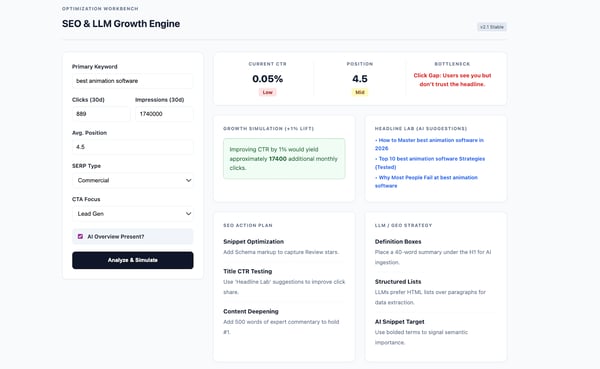
Gemini generated working HTML code quickly and included detailed explanations of the tool’s architecture. It introduced performance tiers (High, Mid, Low), intelligent bottleneck prioritization, and GEO-specific recommendations, such as including citable facts and statistics, updating content freshness, adding FAQ schema, and incorporating a short 2-3 line summary at the top for AEO-style formatting. The CTR calculation was accurate, and it correctly identified the primary issue as a CTR/relevance gap.
However, there was no preview option inside Gemini. I had to manually copy the code, paste it into a text editor, and convert it to an HTML file. For a beginner, these additional steps create friction.
Once deployed, the interface was clean and structured. It required input before generating analysis, which felt more workflow-driven than ChatGPT’s instant rendering.
Verdict: Strong analytical structure, but operational friction due to lack of built-in preview and download flow.
For the second task, Gemini offered two response variations. I chose the longer, more structured version with an improvement summary. It added input validation, conditional styling for critical bottlenecks, clearer visual hierarchy, and a functional copyable executive summary block.
The recommendations became more specific, with explanatory context for each action. Structurally, this version felt more polished and closer to a usable diagnostic product.
However, the same friction remained: no direct HTML download. I had to repeat the manual save-and-convert workflow before testing it in a browser. Once opened, the UI was clean and logically segmented across input, analysis, and executive summary sections.
Verdict: Strong refinement with improved specificity and validation logic, but recurring workflow friction.
Gemini remained fast in generating code, but expansion introduced mixed results. It reduced the number of CTA type options and simplified SERP context selection compared to the prior version. The layout shifted from horizontal to vertical formatting, altering the visual hierarchy without a clear benefit.
The headline suggestions leaned toward “How to,” “Why,” and strategy-based angles, which did not align well with a commercial listicle-style query like “best animation software.” While the executive report became downloadable, the broader strategic suggestions were less compelling than in the second iteration.
Structurally, version two felt stronger than version three. The third expansion added surface-level product elements but weakened contextual precision.
Verdict: Fast output, but expansion reduced clarity and commercial alignment.
To summarize performance across all three tasks, here’s how Gemini ranked against the five evaluation criteria.
| Criterion | Build a working analyzer | Refine and improve analyzer | Expand into a product-style tool | Overall |
| Task completion | Outstanding | Outstanding | Good | Excellent |
| Output quality | Excellent | Excellent | Fair | Good |
| Ease of use | Fair | Fair | Fair | Fair |
| Customization | Excellent | Excellent | Good | Good |
| Efficiency | Good | Good | Fair | Fair |
Gemini’s testing experience aligns well with its G2 satisfaction metrics. With 92% ease of use and 97% ease of setup, getting started was straightforward. The tool began generating code immediately after the prompt, and the interaction felt intuitive. The main friction came from running the code, as there was no built-in preview or direct HTML download. Although Gemini provided instructions on how to save and run the file, the extra steps added complexity for a beginner.
Its 87% meets requirements rating reflects generally reliable performance. In the first two tasks, Gemini delivered a functional analyzer, implemented performance tiers correctly, and preserved logic during refinement. In the third expansion task, structural consistency weakened slightly. The tool still worked, but some context and formatting options were reduced.
Feature ratings support this pattern. An 88% interface score reflects generally positive user sentiment around Gemini’s platform experience. 86% for input processing suggests reliability in handling and interpreting user inputs across scenarios.
Overall, the testing experience reinforces the G2 Data: Gemini stands out for structured reasoning and reliable implementation, with minor workflow friction as complexity increases.
“I like Gemini a lot because it's so fast for my day-to-day coding. I'm feeding it complex architectural diagrams, and it's getting the hang of everything. As a tool, it is good for Python and ML logic. I’ve loved the Vertex AI integration I have been putting into practice.”
- Gemini review, Santosh M.
“Sometimes it provides C++ libraries that are slightly outdated or hallucinates functions that don't actually compile. I always have to double-check the syntax for more advanced algorithms before running them.”
- Gemini review, Md. Azharul I.
Replit felt less like “prompt-to-code” and more like “prompt-to-project.” It took a bit longer to load, but once it did, I had a real workspace with preview, file structure, publish options, and collaboration controls. That power is great when you want to treat this like a mini product build, but it can feel a little busy if you’re brand new. Overall, Replit shines when you want an app-style workflow, even if the extra surface area adds a small learning curve up front.
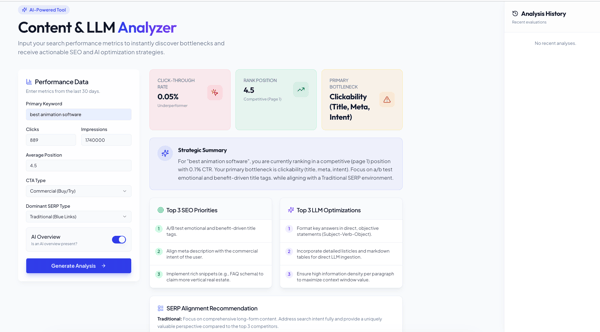
Replit eventually produced a clean, structured analyzer, but it didn’t feel as instant as Gemini or ChatGPT because the workspace itself took a moment to render. Once the app loaded, the UI was polished and organized, and I liked the broader SERP dropdown options (featured snippet, traditional, video/image pack, local pack).
CTR math looked right, and the primary bottleneck callout landed in the same place as the other tools: clickability. It included SERP and LLM optimization recommendations, such as using markdown tables and structured list formats to align with traditional SERP expectations, implementing FAQ schema to capture rich results, and formatting answers as direct, subject-verb-object statements with higher information density to improve LLM extraction. The suggestions were usable but didn’t meaningfully differentiate from the other tools. The “Analysis History” section was a nice idea, but it didn’t populate in preview during my run.
Verdict: Strong output inside a richer interface, with a slower start and a few UI elements that didn’t fully show value yet.
In the second iteration, the first response didn’t reflect clearly in the preview. The underlying code had changed, but the UI didn’t update right away, which made it seem like nothing had improved.
After re-running the prompt and explicitly calling out that the changes weren’t visible, the updated version finally rendered correctly. Once it did, the improvements were clear. The analyzer included a better structure, more defined sections, and the additional elements expected from this stage.
The core issue wasn’t the output itself, but the need to prompt again to get the workspace to sync properly. That extra step made iteration feel less reliable than expected.
Verdict: Improvements were implemented correctly, but required re-prompting to reflect in the preview.
The third round introduced another challenge: Replit’s free plan credit limit, which temporarily blocked the preview from rendering the updated version. Once the credits refreshed and I prompted the tool again to sync the changes, the updated version finally appeared in the workspace.
The expanded analyzer included the requested product-style features: CTR simulation, title suggestions, and a downloadable summary report. The sections were clearly structured and easy to navigate. While the headline suggestions themselves weren’t particularly strong, the tool successfully layered the new features on top of the original analyzer.
Verdict: Product-style features were implemented successfully, but iteration visibility depended on credits and preview syncing.
To summarize performance across all three tasks, here’s how Replit ranked against the five evaluation criteria.
| Criterion | Build a working analyzer | Refine and improve analyzer | Expand into a product-style tool | Overall |
| Task completion | Excellent | Good | Good | Good |
| Output quality | Excellent | Good | Good | Good |
| Ease of use | Excellent | Good | Good | Good |
| Customization | Outstanding | Excellent | Excellent | Excellent |
| Efficiency | Excellent | Fair | Fair | Fair |
Replit’s G2 satisfaction scores reflect a platform that balances power with accessibility. With 90% for ease of use and 93% for ease of setup, users generally find it straightforward to get projects running quickly. That tracks with how easy it was to spin up a working analyzer, even though the broader IDE-style environment adds more surface area than simpler chat-first tools.
An 86% meets requirements score suggests Replit works well for practical build scenarios, especially when you need more than just generated code. The structured project layout, preview mode, and publish options support that “app-level” workflow rather than one-off outputs.
Feature ratings reinforce this positioning. An 88% interface score reflects a workspace designed for real development rather than lightweight prompting. 86% for natural language interaction indicates solid AI-assisted coding support, while 85% update schedule suggests ongoing improvements and feature evolution.
Overall, the testing experience reinforces the G2 Data: Replit stands out for structured, IDE-style development with strong setup accessibility, though the expanded interface introduces slightly more complexity than chat-first tools.
“Easy to use. Lots of features: coding, vibe coding, website design, app creations, server storage with different configurations depending on the amount needed, and domain name creation. Still a new user, but I've created three app websites in a month and have about four more ideas to build! Beautiful creations! My second app was kind of complicated with lots of moving parts to the program, and it made changes pretty effortlessly.”
- Replit review, Chris M.
“For a non-technical user, it's difficult to know how to secure and scale applications after deploying them. I think that's an area Replit could address and support for users like me.”
- Replit review, Bruce S.
Lovable’s interface was similar in scope to Replit, with options to edit individual components, publish, collaborate, and manage the project environment. It also included post-publish tools like security scans, analytics checks, and page speed insights. Preview modes were available across desktop, tablet, and mobile. While output generation wasn’t instant, the environment felt intentionally product-oriented.
The analyzer itself was clean and well-structured from the start. Across all three tests, Lovable retained prior features while layering new ones, something the other tools struggled with during expansion. Overall, Lovable combined structural clarity, feature stability, and expansion durability more consistently than the other tools.
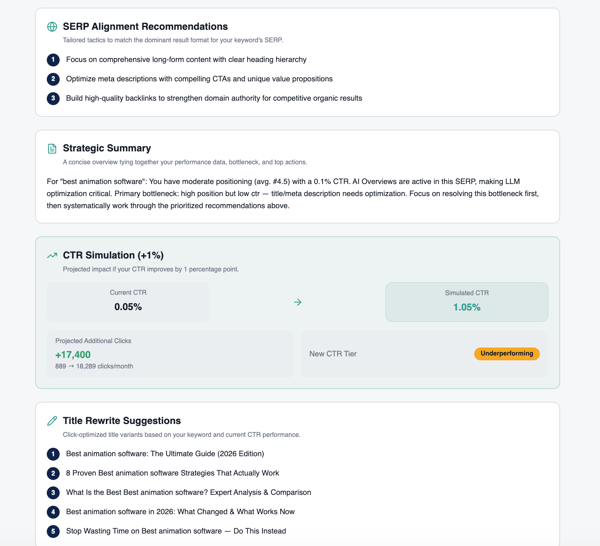
The first version was well-structured and visually polished. The CTR calculation was correct, the primary bottleneck aligned with the other tools, and the recommendations followed similar patterns. The SERP alignment and LLM optimization guidance focused on Q&A-style content for featured snippets and AI citations, schema implementation (FAQ, HowTo, Article), and placing concise, authoritative answers within the first 200 words to improve LLM visibility and extraction.
Notably, Lovable was the only tool that explicitly called out building backlinks to strengthen domain authority for competitive organic results. That added strategic depth beyond just snippet-level optimization.
The diagnostic sections were color-coded from the beginning, and each block was clearly identifiable. While output generation took slightly longer, the finished result felt cohesive and professionally structured.
Verdict: Strong first build with clear structure and slightly deeper strategic specificity.
Iteration two added clearer explanatory text within each recommendation section. The copyable summary was implemented properly, and the copy button worked as expected. The export included SEO, LLM, and SERP alignment recommendations in one consolidated block, making it more complete than earlier versions from other tools.
Importantly, no core functionality was removed during refinement. The structure remained clean, color-coded, and easy to navigate, while improvements were layered in rather than rebuilt.
Verdict: Strong refinement with added clarity and no structural regression.
Even after reaching usage limits during testing, the third iteration included everything requested: CTR simulation, title rewrite suggestions, and a downloadable summary. Unlike other tools, Lovable retained prior functionality while adding new features. No sections were removed during expansion.
The CTR simulation worked correctly, the downloadable report functioned properly, and all feature options were clearly visible and easy to access within the interface. The layout remained organized, with each module distinctly identifiable. The title suggestions weren’t all that good, but the implementation was complete and stable.
One major workflow advantage was the ability to open all three iterations side by side in separate tabs from the same chat. That made it easy to compare changes and validate improvements visually without losing previous versions.
Verdict: Stable expansion with full feature layering, visible functionality, and strong iteration transparency.
To summarize performance across all three tasks, here’s how Lovable ranked against the five evaluation criteria.
| Criterion | Build a working analyzer | Refine and improve analyzer | Expand into a product-style tool | Overall |
| Task completion | Outstanding | Outstanding | Outstanding | Outstanding |
| Output quality | Excellent | Excellent | Excellent | Excellent |
| Ease of use | Excellent | Excellent | Excellent | Excellent |
| Customization | Excellent | Excellent | Excellent | Excellent |
| Efficiency | Excellent | Excellent | Excellent | Excellent |
Lovable’s G2 satisfaction profile reflects a platform that balances usability with structured capability. With 93% for ease of use and 94% for ease of setup, users generally find it straightforward to get projects running without friction. That aligns with the intuitive project environment and clearly organized interface.
A 90% meets requirements score suggests Lovable performs reliably across practical build scenarios. The ability to layer features without losing prior functionality reinforces that sense of stability and consistency.
Feature ratings further support this pattern. A strong 92% interface score reflects a clean, structured workspace that feels production-ready. 87% for natural language interaction indicates solid AI-assisted implementation, while 86% input processing aligns with accurate calculations and consistent diagnostic logic.
Overall, the testing experience reinforces the G2 Data: Lovable stands out for structured, stable app-style development with strong usability and feature retention as complexity increases.
“Lovable delivers excellent value for money. You get exactly what you're paying for: a solid no-code platform with impressive instruction-following capabilities. The UI is intuitive, and the codebase generation is reliable, making it especially valuable for beginners transitioning into app development. The ability to iterate quickly on ideas without deep technical knowledge is a game-changer. The integration with modern frameworks and APIs is seamless, and customer support is responsive when needed.”
- Lovable review, Ajibola L.
“The AI-generated code does not always follow best practices or be optimized for large-scale production. Customizing complex features beyond the AI’s suggestions is tricky and sometimes requires manual coding. Performance and scalability are limited for very large apps. Additionally, relying heavily on AI makes debugging or understanding the generated code harder for teams used to traditional development.”
- Lovable review, Kamal R.
GitHub Copilot’s interface was simple and chat-driven, with options to preview, copy, and download the generated code. It generated the initial analyzer quickly, but the workflow leaned heavily on downloading and running the file locally rather than relying on a stable in-tool preview. When it worked, the structure was clean and modular. When it didn’t, it required follow-ups and manual validation.
Overall, Copilot performed best when treated like a code generator that you test and refine, not a fully hands-off app builder.
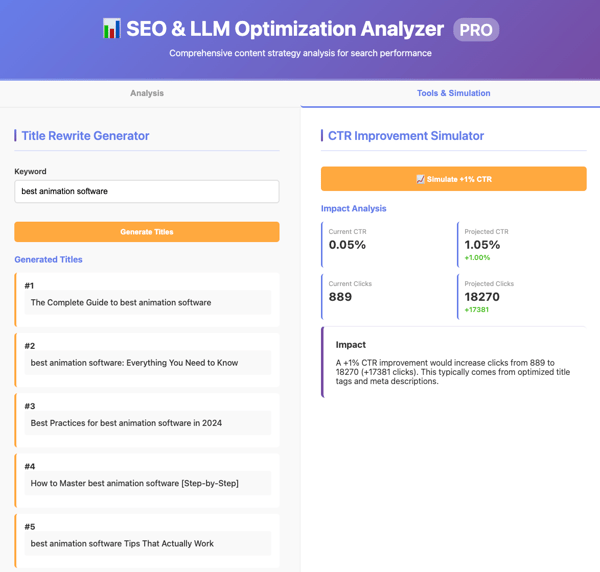
The first iteration was clean and logically structured. CTR was calculated correctly, sections were clearly labeled, and there were more CTA type options than in some other tools. The SERP selector included organic results, videos, and featured snippets, though it didn’t account for mixed SERP environments.
The preview did not execute properly inside the interface. However, once downloaded and opened in a browser, the analyzer ran correctly. The output had similar optimization suggestions, such as improving title and meta descriptions for better click-through rates, adding schema markup, and structuring content with clear headers and definitions to support AI extraction. It also introduced skill-based tagging for content categorization, though the purpose and implementation of those tags were not clearly explained and felt somewhat confusing in this context.
Verdict: Fast, well-structured first draft with correct logic, but required local execution for validation.
During the second test, the initial output did not run, even after downloading. After a follow-up prompt flagging that v2 wasn’t working, the regenerated version executed properly.
This iteration introduced clearer color-coded diagnostics, more contextual explanations within recommendation sections, and stronger SERP alignment guidance, including references to building authoritative backlinks. The strategic summary section was detailed and copyable, outlining the primary bottleneck, immediate actions, and key success factors.
While the quality improved meaningfully, the need for re-runs and follow-ups added friction to the refinement process.
Verdict: Improved specificity and strategic framing, but iteration reliability required intervention.
The third test again failed on the first run. After a follow-up and re-download, the expanded version worked. This iteration introduced a more modular layout, separating the Title Rewrite Generator and CTR Improvement Simulator into distinct sections. The CTR simulation displayed projected CTR, projected clicks, and incremental gains in a clean, organized format.
However, the title suggestions were basic and not particularly usable. Compared to the second iteration, the number of recommendations and contextual depth was reduced. While new features were added, some strategic richness was lost in the process.
The interface remained neat and structured, but not as polished or durable as the top-performing tools.
Verdict: Functional feature expansion after follow-up, with a clean modular layout but reduced depth and continued execution instability.
To summarize performance across all three tasks, here’s how GitHub Copilot ranked against the five evaluation criteria.
| Criterion | Build a working analyzer | Refine and improve analyzer | Expand into a product-style tool | Overall |
| Task completion | Excellent | Fair | Fair | Good |
| Output quality | Excellent | Fair | Fair | Good |
| Ease of use | Good | Fair | Fair | Fair |
| Customization | Excellent | Good | Good | Good |
| Efficiency | Good | Fair | Fair | Fair |
GitHub Copilot’s G2 satisfaction scores reflect strong usability within a developer-oriented workflow. With 92% for ease of use and 93% for ease of setup, users generally find it straightforward to integrate into their environment and begin generating code quickly. That aligns with how fast the initial analyzer was produced.
An 89% meets requirements score suggests Copilot performs reliably for practical build scenarios, particularly when structured output and code generation are the priority. While some iterations required follow-ups to execute correctly, the underlying logic and feature implementation were consistently sound once validated.
Feature ratings reinforce this positioning. A 90% natural-language interaction score reflects its ability to efficiently translate prompts into structured code. 90% for documentation suggests strong support resources and guidance for users navigating more complex workflows. 89% code quality aligns with the clean structure and modular layouts observed across iterations.
Overall, the testing experience reinforces the G2 Data: GitHub Copilot stands out for reliable code generation and structured outputs within a developer-style vibe coding workflow, though execution may require occasional manual validation as complexity increases.
“I use GitHub Copilot to help me code, and it reviews my code during PRs. I like how it goes straight into solving my problems and understands what I'm asking. It gives me more than one answer, allowing me to decide what's best for my application. The initial setup was super easy; I just had to link my proxy and log in.”
- GitHub Copilot review, Kristy D.
“The context window can also be a bit frustrating. In our larger automation files, especially those with hundreds of lines of API test cases, Copilot sometimes loses track of the logic I established at the top of the file. It then starts suggesting variable names or logic that don’t align with the rest of the script, forcing me to pause and manually correct them. It’s not a dealbreaker, but it does interrupt my momentum.”
- GitHub Copilot review, Sree K.
Lovable delivered the most reliable and structurally stable output across all three iterations. ChatGPT stood out as the fastest and easiest tool to use from prompt to runnable result. Replit offered the most control with its full project-style environment. Gemini performed best when it came to structured, diagnostic reasoning, and GitHub Copilot generated clean, modular code.
After running three progressive build tests across each platform, the differences became clearer with every iteration. Some tools were optimized for speed and quick prototyping, while others handled layered feature expansion more reliably. A few introduced friction through manual steps or execution inconsistencies as complexity increased.
| Rank | Tool | Evaluation area led | Why it ranked here |
| #1 | Lovable | Task completion and output stability | Retained features across all three iterations, handled expansion without regression, and delivered production-ready structure with simulation and export tools intact. |
| #2 | ChatGPT | Ease of use and speed | Generated runnable output instantly with built-in preview and minimal friction, though structural durability dipped slightly during deeper expansion. |
| #3 | Replit | Customization and environment control | Offered full IDE-style flexibility, publishing, and collaboration features, but introduced interface complexity and preview inconsistencies. |
| #4 | Gemini | Structured analysis and diagnostic logic | Demonstrated strong conditional reasoning and performance tiering, though manual file handling added workflow friction. |
| #5 | GitHub Copilot | Code structure and modular output | Produced clean modular layouts and detailed summaries, but required multiple follow-ups to resolve execution issues across iterations, reducing overall reliability. |
Choose ChatGPT if your priority is speed and simplicity. Gemini fits better if you prefer a more structured and deliberate approach to building. Replit is the right pick when you need deeper control over the project and its environment. Lovable stands out if your goal is a more stable, production-ready output. GitHub Copilot works best if you’re comfortable working directly with code and validating execution along the way.
Here’s how that plays out in practice:
Beyond the vibe coding tools tested here, a few other web-based platforms frequently come up in community discussions and builder workflows:
Got more questions? We have the answers.
Yes. ChatGPT is one of the easiest tools for vibe coding because it generates runnable code instantly and allows you to iterate quickly. It’s particularly useful for beginners or anyone testing ideas without wanting to manage a full development environment.
Yes. Most vibe coding tools, including ChatGPT, Gemini, Replit, GitHub Copilot, and Lovable, offer free tiers or limited access plans. However, usage limits and feature availability vary by platform.
If you prefer working inside a full development environment, Replit is the most IDE-like experience among the tools tested. It offers editing, publishing, collaboration, and device previews in one workspace.
No. Tools like ChatGPT and Lovable let beginners generate working prototypes with natural-language prompts. However, having basic familiarity with HTML, CSS, or JavaScript can help you refine and expand what’s generated.
A reliable vibe coding tool should retain features across iterations, handle expansion without breaking earlier functionality, and consistently generate clean, runnable output. Stability during refinement is just as important as speed.
Some are better suited than others. Tools that retain structure and support exports, simulations, or version comparison are more aligned with production-ready workflows. Others are best used for rapid prototyping and idea validation.
After using all five tools on the same build, the gap wasn’t about whether they could generate code. They all could. The difference showed up in stability, iteration flow, and how well each platform handled expansion.
The outcome also depends heavily on the prompt itself. Even small changes in how the task is framed can shift the quality, structure, and usefulness of the output. In many cases, better prompts could have pushed the tools further than what I initially got.
With the current set of prompts, for me, Lovable and ChatGPT came closest to the top spot, with Lovable ultimately edging ahead. It delivered the most complete and stable outcome as the build evolved. The only real limitation was the daily credit cap. ChatGPT, on the other hand, was unbeatable for speed and simplicity, though it struggled to retain previous instructions as complexity increased.
If I had to choose a workflow, I’d validate and experiment quickly in ChatGPT, then move to Lovable to actually build it out properly.
That’s really the takeaway. The best vibe coding tool isn’t universal. It depends on what you’re trying to do and how far you plan to take it.
Still evaluating your options? Get an in-depth look at GitHub Copilot vs. ChatGPT for coding.


Let AI pick the right tool for your use case Decide with AI 1 Click on the button below
 by Yashwathy Marudhachalam
-2.png?width=400&name=dark%20(9)-2.png)
Key Findings According to G2's analysis of 3,000+ verified AI Code Generation reviews, 92%...
 by Tian Lin

While everyone was busy talking about OpenAI’s new o3 and o4-mini models, the company quietly...
 by Sudipto Paul