Compliance doesn't fail all at once. It builds over time due to missed attestations, outdated policies, and small gaps that only become visible during audits. The best policy management software stops that drift before it compounds.
If you’re evaluating options, the challenge is managing documents and ensuring policies are distributed, acknowledged, updated, and audit-ready without relying on manual tracking. As policies grow across teams and regions, maintaining that consistency becomes harder to manage without the right structure in place.
The better platforms make it easier to track ownership, automate reviews, and maintain clear records. To help with that, I analyzed patterns across verified G2 reviews, Winter Grid Reports, and feedback from compliance and risk teams managing policy programs in real-world environments.
This guide focuses on what matters most: which tools solve specific policy management challenges and how to find the right fit for your organization.
*These policy management platforms are top-rated according to G2’s Winter Grid Report. They are commonly used by compliance, risk, and governance teams to centralize policies, enforce accountability, and maintain audit readiness.
A policy sitting in a shared drive isn’t a managed policy. Someone has to own it, keep it current, and make sure the right people can find it and confirm they understand it. That chain of accountability is what policy management software is built to maintain, and from what I gathered across G2 reviews, it's precisely where unstructured approaches tend to break down first.
The tools worth using treat that chain as a workflow with enforced steps, not a collection of documents with hoped-for behaviors. Ownership is assigned, not implied. Review cycles are scheduled rather than triggered by when someone remembers. Acknowledgment records accumulate automatically, so teams have clear records when questions come up.
G2 Data shows this category is adopted across team sizes and industries for a reason. Once the number of active policies grows past what a single person can track manually, the cost of gaps rises faster than the cost of the software.
Most platforms are straightforward to deploy, so teams can move away from spreadsheets and shared folders without treating them as an IT project.
The evaluation began with G2's Winter 2026 Grid Report for the policy management software category. Platforms were shortlisted based on G2 satisfaction scores and market presence, covering the full range of company sizes from small businesses to enterprises.
AI-assisted review analysis across hundreds of verified G2 submissions helped identify what compliance and risk professionals consistently flag in day-to-day use: where approval workflows stall, how version control holds up when policies change frequently, whether acknowledgment tracking stays reliable at scale, and how much friction non-technical teams encounter during setup and ongoing use.
Direct experience with every platform on this list wasn't feasible, so findings were validated against input from practitioners in compliance, governance, and risk roles who use these tools regularly. Product visuals and feature references are drawn from G2 vendor listings and publicly available documentation.
As I reviewed G2 reviews and looked at how teams actually handle policy creation, approvals, and ongoing updates, a few recurring themes emerged. Those themes guided my evaluation of the best policy management software.
Below are the criteria I used:
Using this evaluation framework, I narrowed the list to policy management platforms that reliably help organizations keep policies accurate, visible, and under control as teams expand and regulations evolve.
Below, you’ll find authentic user feedback from the Policy Management Software category. To be included in this category, a platform must:
This data was sourced from G2 in 2026. Some reviews may have been edited for clarity.
Scrut Automation is designed for organizations where compliance is part of daily operations rather than an occasional requirement. It connects policies, controls, and evidence into a single system, helping teams maintain ongoing compliance without relying on periodic reviews.
The platform is straightforward to set up and navigate, and what I noticed across G2 reviews is that implementation is smooth, even for teams new to structured compliance systems. Workflow management, rated at 85%, reflects how consistently teams move through defining controls, assigning ownership, and mapping requirements without operational drag.
Connecting cloud accounts, code repositories, and IT resources keeps compliance visibility continuous instead of periodic checks. Reports, rated at 81%, support centralized evidence histories and framework-aligned documentation that external auditors can follow without extensive manual preparation. G2 reviews describe this combination as reducing last-minute scrambles before audit submissions.
Policy templates covering nearly every compliance requirement type reduce drafting effort across recurring frameworks. AI text generation, rated at 73%, supports policy drafting and evidence documentation without starting from scratch each cycle. Having templates available for both policies and evidence stands out as one of the platform's most practical day-to-day advantages.
Framework mapping keeps compliance requirements directly connected to controls, infrastructure, and teams rather than living as separate documentation. Across G2 reviews, the process of defining controls, monitoring status, and mapping requirements to frameworks such as ISO 27001, PCI, and SEBI consistently reads as clearly structured and easy to follow. What became clear across the reviews is that this approach turns policy compliance into an ongoing operational process rather than a periodic review.
Hands-on support is a recurring theme across G2 reviews, with teams describing guidance through every phase of the audit process, including dry runs and evidence verification before submission. This level of involvement keeps audit cycles on track for teams without dedicated specialists and builds consistent readiness across every review period.
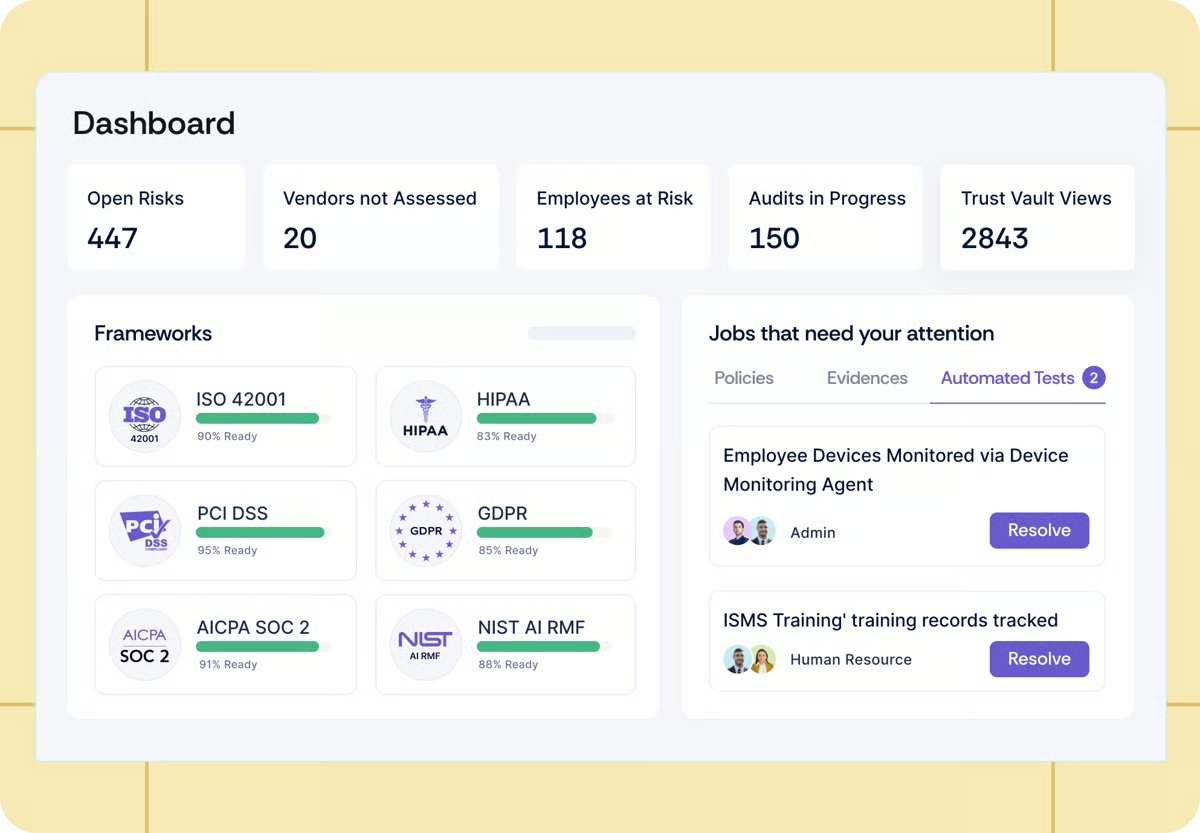
Built-in learning and training components extend compliance practices beyond security and IT teams to broader organizational functions. G2 reviews describe getting entire companies through compulsory learning modules as straightforward, supporting policy adoption across departments without requiring manual coordination or external training programs.
G2 reviews note that certain compliance tests are run manually rather than through automated checks, which is most noticeable for teams managing large control libraries across multiple frameworks. The platform’s automated scanning model aligns well with day-to-day controls and maintains overall visibility into compliance. This balance supports consistent monitoring while preserving oversight for higher-risk controls.
When account managers change mid-engagement, continuity can feel more dependent on structured knowledge transfer, particularly during active audit phases. The platform’s structured support model aligns well with ongoing compliance programs where consistency and operational continuity remain a priority.
Overall, Scrut Automation aligns well with regulated, fast-growing organizations that need structure, audit-readiness, and continuous compliance without the enterprise-level complexity. Teams operating under PCI, ISO, and similar frameworks frequently describe clearer visibility into requirements, reduced audit pressure, and stronger long-term control over policies and documentation.
“This is truly one of the best tools if you work in the banking sector or any other field where certifications, compliance, security, data management, and policies are crucial. It is very easy to use and implement, and connecting your organization's resources is straightforward. Their support is excellent; they guide you through every phase of the audit process. If you have multiple accounts, such as cloud services or code repositories, you can connect them all seamlessly. You can also create an evidence history according to your requirements. They provide templates for nearly every policy or type of evidence you might need.”
- Scrut Automation review, Ranu S.
“The transition between their account managers could be improved. It would be helpful if the new team were already familiar with the work that has been done, so I wouldn't have to explain everything again each time a new team takes over. Reducing the need to repeat information would make the process much smoother.”
- Scrut Automation review, Latha L.
Keeping policies current as regulations change? Read about the best regulatory change management software for 2026.
Workiva is built for organizations where policy management is inseparable from compliance, reporting, and audit execution. G2 reviews consistently describe it as a structured, documentation-heavy platform designed for regulated environments rather than teams managing a limited set of internal policies.
From what I picked up across G2 reviews, the linked data structure is what teams point to first. Changes made in one document automatically update across connected reports, disclosures, and references, keeping policies and compliance documentation aligned without manual reconciliation. Version drift drops, manual validation shrinks, and teams consistently describe it as their single source of truth.
Multiple contributors can work in the same document simultaneously without creating version conflicts or overwriting work. Ease of use, rated at 90%, reflects how consistently teams move through collaborative policy and compliance work without friction. Audit trails, permission settings, and real-time editing prove particularly valuable when finance, legal, and compliance teams work in parallel rather than in sequential handoffs.
The interface feels familiar to anyone accustomed to Word or Excel, reducing resistance during adoption across non-specialist teams. G2 reviews describe a 20-minute training as sufficient to prepare data providers and approvers for their first assigned tasks. This familiarity makes it easier to extend governance processes beyond core compliance teams without extended onboarding programs.
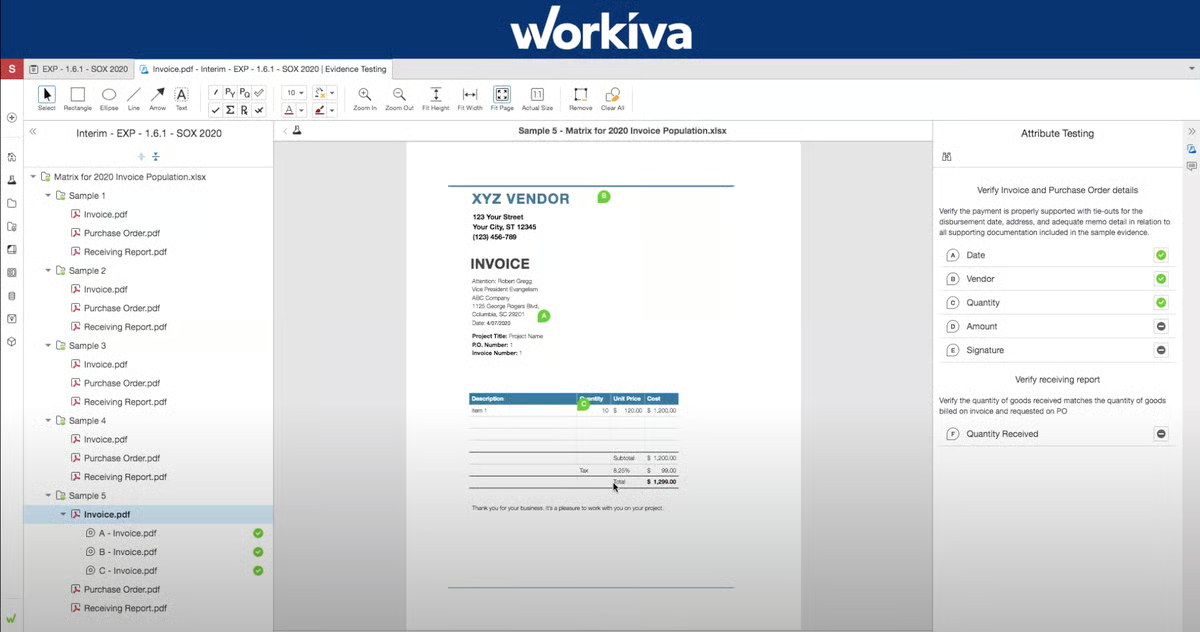
Workiva supports SOX controls, SEC filings, ESG disclosures, and internal governance frameworks within a single environment. AI text summarization, rated at 70%, supports documentation across multiple compliance frameworks without switching systems. G2 reviews describe greater confidence in document accuracy throughout reporting cycles and shorter close timelines as direct outcomes of this multi-framework support.
Version control keeps policy history clear and traceable, with cell-level auditing allowing teams to trace changes to specific users without manual reconstruction. AI text generation, rated at 70%, supports drafting updated policy versions and access-restricted documents as governance requirements evolve. G2 reviews describe well-defined access restrictions and permissions as giving teams confidence that the right content reaches the right people at the right time.
Customer support is consistently described as responsive and reliable in high-stakes environments. G2 reviews highlight assistance during audits and reporting deadlines where delays carry regulatory consequences. This support presence reinforces confidence when Workiva is embedded into ongoing compliance and disclosure workflows.
Real-time editing can feel slower than desktop applications when working with large, complex documents, according to G2 reviews. This is most noticeable for teams managing extensive policy libraries or multi-section compliance reports, while smaller, contained documents align more naturally with the platform’s editing model. Governance workflows and collaboration controls continue to support structured audit and compliance processes regardless of document scale.
Pricing sits toward the higher end of the category, with advanced automation capabilities tied to additional modules rather than included in base plans. This is more noticeable for smaller teams with narrower compliance programs evaluating full functionality, while organizations using the platform across broader governance workflows align well with its modular structure and scalability.
Enterprises that need policy management embedded into audit readiness, regulatory reporting, and cross-functional governance will find Workiva's linked data model and controlled collaboration difficult to replace.
"I appreciate that Workiva significantly enhances our risk management process, making it far more efficient. I also find it highly beneficial for our compliance framework control mapping, which promises to simplify future audit preparations. The automation and data linking features stand out as particularly useful, streamlining our tasks and processes substantially. Overall, while I am still discovering its full potential as a fairly new user, I am quite satisfied with the capabilities offered by Workiva.”
- Workiva review, Elizabeth W.
"Some parts of the UI could be a bit more intuitive, especially when navigating across documents or switching views.”
- Workiva review, Sumit P.
Keeping policies current as regulations change? Read about the best regulatory change management software for 2026.
NAVEX One is built for organizations that treat policies as an operational system, not just a document library. The product prioritizes consistency, accessibility, and control across large employee bases, which shapes its experience in everyday use. NAVEX One focuses on making policies easy to distribute, reference, and manage in a structured way.
Navigating the platform feels immediate for employees who primarily need to locate and read documents as part of their role. Ease of use, rated at 90%, reflects how consistently teams move through policy access, review, and acknowledgment without repeated guidance or training. What consistently surfaces in G2 reviews is how clear layouts and intuitive navigation support adoption across large, distributed workforces without friction.
Policies can be opened, reviewed, and exported to PDF without technical assistance, keeping access straightforward for non-specialist employees across HR, operations, and compliance programs. Meets requirements, rated at 91%, reflects how reliably the platform covers core policy access and distribution needs across varied organizational functions.
Revised policies can be distributed to employees, access tracked, and alignment confirmed automatically. What stood out to me across G2 reviews is how well this holds up in large workforces where manual tracking breaks down quickly, and acknowledgment matters more than deep document editing.

What I noticed across reviewer feedback is that teams build and maintain policies incrementally, manage versions, and keep content organized as libraries expand without workflows becoming difficult to navigate. The interface prioritizes clarity over visual complexity, so access remains consistent even as governance scope grows across departments.
Support quality becomes more important once NAVEX One is embedded into compliance workflows. Quality of support, rated at 86%, reflects consistent assistance during setup, migration, and ongoing use. What surfaced repeatedly across G2 reviews is how much teams value smooth transitions from legacy tools and responsive guidance when policy management becomes part of a long-term governance strategy.
NAVEX One extends policy management into employee compliance training through built-in course formats spanning video, audio, and readable content. Exam-style checkpoints let employees advance once they demonstrate understanding, keeping training structured without unnecessary repetition. Rated at 88% for ease of doing business with, the platform helps compliance and HR teams connect policy distribution to verified employee comprehension without switching environments.
According to a few G2 reviews, the search engine relies on exact policy titles to return results, which is most noticeable for teams managing large or inconsistently named libraries under time-sensitive conditions. Environments with standardized naming conventions align well with the platform’s search model, supporting predictable and efficient document retrieval across day-to-day compliance workflows.
A few recurring themes in G2 reviews suggest that reporting output and dashboard customization are more structured than some compliance teams require. This is most noticeable for teams tracking policy acknowledgment across complex governance structures, while programs centered on policy distribution and acknowledgment tracking align well with the platform’s core workflow design. The structured reporting model supports clear visibility across standard compliance operations.
Overall, NAVEX One fits organizations running mature, enterprise-scale policy and compliance programs. For teams focused on clarity, employee access, and audit-ready governance across large workforces, it remains a reliable and structured choice.
“Easy to use, very user-friendly. Having to set up all these new accounts upon hire has been confusing at times, not sure what each site is used for, for example. But everything is starting to fall into place."
- NAVEX One review, Christina G.
"The only thing to dislike about NAVEX is that the policies themselves are often tedious to go through. NAVEX has done all they can to make it as painless as possible, but often still a drag.”
- NAVEX One review, Andrew B.
Want broader risk visibility beyond policy controls? Explore the best enterprise risk management software on G2.
Protecht stands out as a platform designed to operationalize governance, risk, and compliance. The focus isn’t on flashy visuals or heavy automation layers; it’s on giving policy, risk, and compliance teams a consistent system they can actually use every day. Protecht’s modular structure plays a big role here.
The platform feels immediately navigable once teams complete an initial workflow. Ease of use, rated at 88%, reflects how consistently users move between policy, risk, and incident modules without repeated retraining. G2 reviews describe registers, fields, and dashboards following the same structural logic across modules, building confidence quickly as teams expand their governance programs.
Organizations can start with core policy or risk workflows and add incident management, controls, and assurance modules as requirements grow. Meets requirements, rated at 89%, reflects how well the platform adapts to expanding governance needs without re-platforming or redesigning existing structures. Teams describe rolling out additional modules smoothly without disrupting workflows already in place.
Policies, risks, incidents, and actions stay aligned in a single system of record across multiple business units. This structure supports clearer ownership and reduces fragmentation that typically comes from spreadsheet-based or disconnected governance tools. G2 reviews describe the platform as enabling risk management from new starters to leavers, from audits to assessments, and from policies to procedures within one environment.
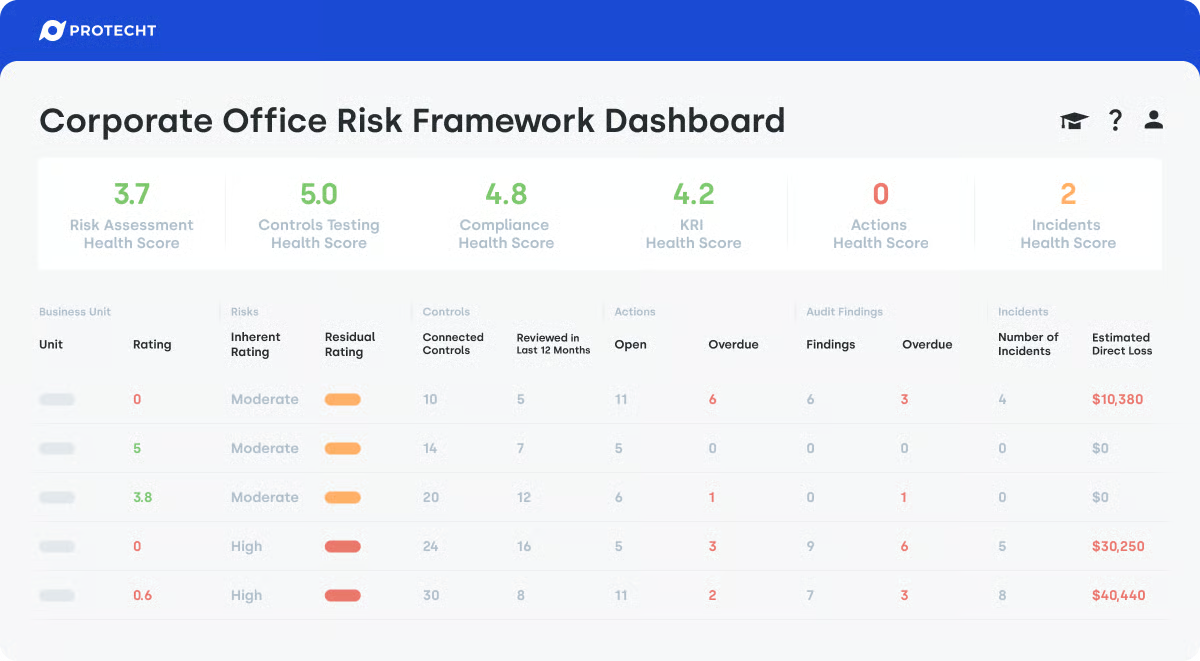
Policy structures, risk registers, dashboards, and reports can be tailored without programming, using predefined components as a starting point. Ease of doing business with, rated at 93%, reflects how smoothly teams configure and maintain the platform without ongoing external dependence. G2 reviews describe being able to change register fields on the fly and link risks, controls, and obligations in a format that stays practical under daily use.
Support and training are consistently described as responsive and structured across G2 reviews. Quality of support, rated at 92%, reflects reliable assistance during setup, configuration, and ongoing governance work. Teams describe the Protecht Academy as practical for spreading platform capabilities across internal staff, reducing reliance on consultants as programs mature.
Board-level dashboards support executive reporting while operational views surface overdue actions, control gaps, and emerging risks. Teams describe both predesigned dashboards and the ability to build custom views that align reporting with specific business needs. This dual layer keeps governance visible at leadership and operational levels without requiring separate reporting tools.
According to G2 reviews, some field formats and wording are fixed within the platform, so certain elements cannot be personalized to match specific business terminology. Teams with precise governance language requirements feel this most. Across the broader configuration experience, registers, dashboards, and workflows remain highly adaptable to most organizational needs.
G2 reviews describe API connectivity challenges when linking Protecht to external tools, particularly for teams operating in heavily integrated technology ecosystems. Organizations with complex integration requirements should factor this in during implementation planning. Outside of those scenarios, the core platform handles day-to-day governance needs without this friction arising.
Operationally, Protecht works best for mid-market organizations that need governance, risk, and compliance running from a single system rather than across disconnected tools. Ownership is explicit, review cycles are automated, and reporting surfaces control gaps before they reach the audit stage.
“ I really like how user-friendly Protecht is. Once you've done one thing in it, you then have the confidence and knowledge to fill out any tab, register, or field because it's just all exactly the same, making for a great user experience. The initial setup was super easy, thanks to Emily, who guided us through every step, making the whole experience very simple.”
- Protecht review, Caroline P.
“I can't think of any particular drawbacks. While the help desk being located in Australia can sometimes result in slightly longer response times due to the time difference, issues with the platform are so infrequent that this rarely becomes a problem once you're aware of the time zone difference.”
- Protecht review, Laura V.
Strike Graph is described as a platform designed to make compliance feel structured. What G2 reviews consistently point to is how clearly the platform breaks down what is required to meet each control. Expectations are easy to understand, which matters for teams approaching SOC 2 or similar frameworks for the first time and trying to avoid misinterpretation.
The interface is intuitive and immediately navigable, with controls, evidence, and templates connected in a way that makes the compliance path easy to follow from the first login. Ease of use, rated at 93%, reflects how consistently teams move through documentation, evidence upload, and task completion without friction.
Built-in policy libraries and ready-to-use templates reduce drafting effort significantly across recurring compliance requirements. Teams describe downloading and applying templates as saving hours of work that would otherwise go toward writing documentation from scratch. Reading across G2 reviews, these libraries come across as practical starting points, covering policies and compliance emails teams actually need
The customer success layer is a recurring theme in G2 reviews, with teams describing Strike Graph as a combination of software and an engaged support partner. Quality of support, rated at 96%, reflects how consistently teams receive hands-on guidance through audits, documentation, and evidence collection. From what I gathered across G2 reviews, customer success members actively guide teams through prioritization decisions and the clearest path to certification.
Reusable answers and AI-assisted questionnaire responses reduce repetitive work when extending compliance into additional frameworks. AI text summarization, rated at 88%, supports faster responses to customer security questionnaires without restarting documentation work from scratch. Teams describe this as a meaningful time saver when compliance scope expands beyond the initial framework.
Policies can be pulled directly from Microsoft 365 SharePoint, and evidence can be uploaded through drag-and-drop actions across common file formats. Completed documentation carries across frameworks, reducing duplication as compliance programs grow. G2 reviews describe these integrations and upload features as reducing repetitive effort rather than serving as optional enhancements.
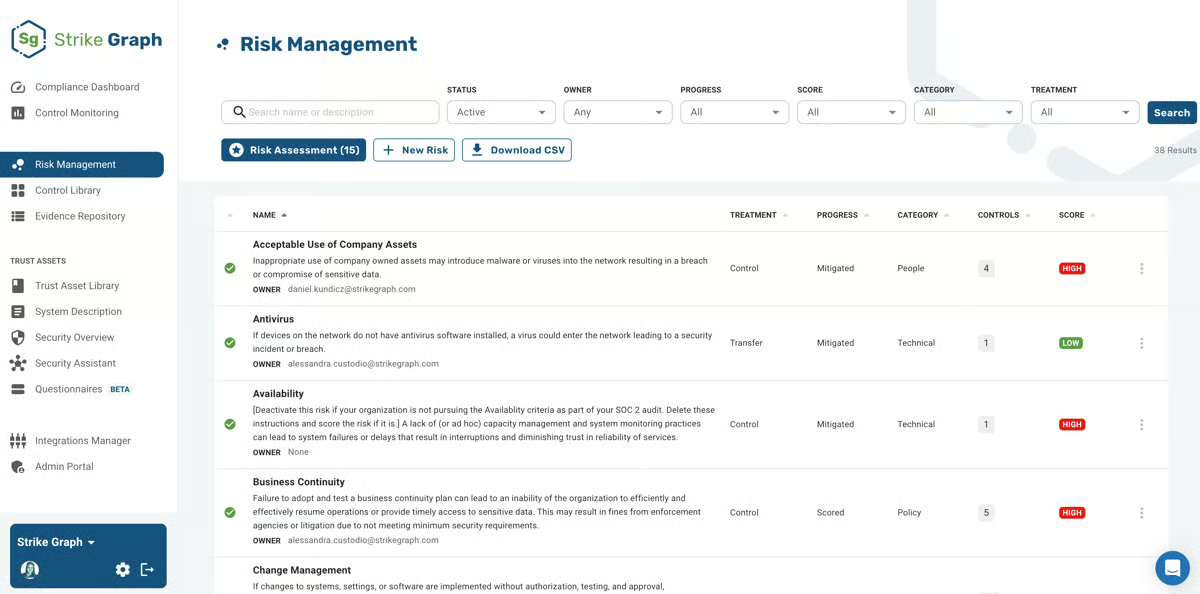
Outstanding tasks, expiring evidence, and assigned issues stay visible from a centralized compliance dashboard. Workflow management, rated at 79%, supports structured progress tracking across active compliance programs. Reading through G2 reviews, email notifications for expiring evidence and user-level issue assignment are what keep compliance organized without manual calendar tracking.
Reporting covers compliance progress and audit visibility, with a focus on operational tracking rather than deep analytics, according to G2 reviews. Teams seeking advanced, audit-grade reporting depth feel this more than those using reports primarily to track outstanding tasks and framework progress. Core compliance tracking and task visibility remain clear and dependable throughout active certification programs.
Control descriptions can vary in how the implementation context is represented, with G2 reviews noting differences between documented guidance and real-world application in some cases. Teams encountering specific technical controls for the first time notice this more. The platform's structured guidance and customer success support help teams work through unclear controls without significant delays.
Strike Graph is built for teams where compliance is a new territory. Structured templates, clear controls, and a hands-on customer success layer remove the ambiguity that typically stalls first-time SOC and HIPAA certification programs, making structured compliance achievable without a dedicated GRC function.
"While SOC 2 compliance takes a lot of work, Strike Graph eased our load by providing an easy-to-use system that organizes and reports on our data clearly so that it is easy to find outstanding tasks and to collaborate. The Strike Graph team is always helpful and quickly answers our questions. Topping this off, if we decide to add more compliance frameworks, the Strike Graph system can use our current answers to give us a head start. We've also been using the new feature where we upload security compliance forms from our customers to get initial results filled in based on the info we already have in Strike Graph. This feature saves a lot of time! ”
- Strike Graph review, Bonnie S.
“I do feel that the reporting could be better. I do rely on it much because I do believe it is as accurate as it could be. Improvement is needed there.”
- Strike Graph review, Roberto D.
OneTrust Tech Risk & Compliance brings privacy, risk, and compliance workflows into a single configurable environment. G2 reviews describe a platform built around automation, global regulatory coverage, and modular flexibility that lets organizations manage compliance without relying heavily on manual processes.
OneTrust Tech Risk & Compliance draws its strongest adoption from smaller and growing organizations. From what I observed across G2 reviews, this makes sense: 80% of reviews come from small and mid-market businesses, typically teams managing compliance across multiple global regulations without the resources to maintain separate frameworks for each.
Coverage spans more than 50 global regulations, giving compliance teams a single system to manage requirements across jurisdictions without maintaining separate frameworks. Meets requirements, rated at 88%, reflects how consistently the platform addresses varied regulatory needs. G2 reviews describe this breadth as a practical advantage for organizations operating across multiple geographies.
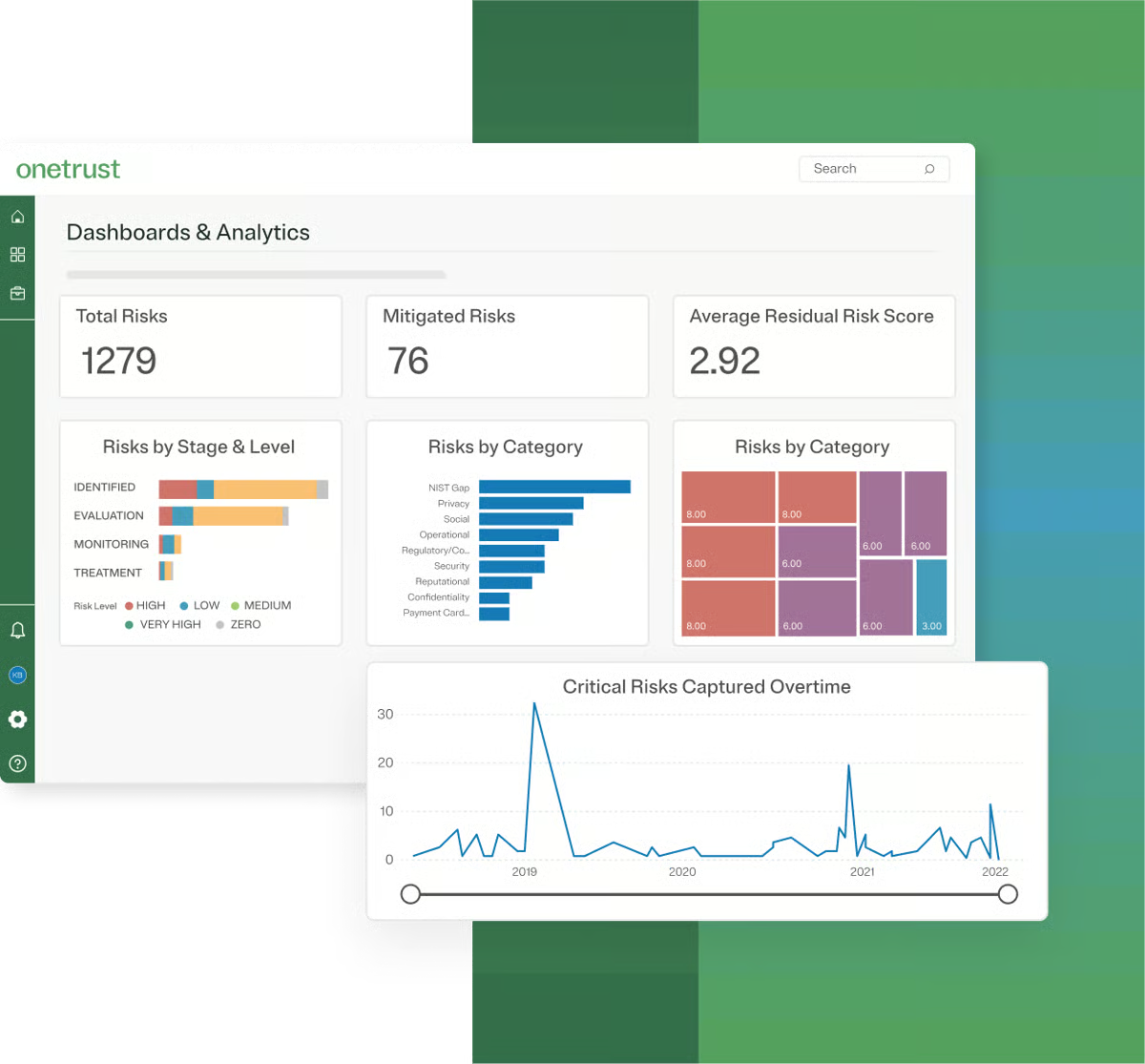
Automated workflows reduce manual intervention across recurring compliance tasks, keeping programs moving without constant oversight. Ease of admin, rated at 87%, reflects how reliably teams configure and maintain compliance workflows without deep technical involvement. G2 reviews describe audit processes that previously required significant manual effort as running efficiently once workflows are properly configured.
The platform is highly customizable, allowing teams to tailor modules, navigation, and workflows to match specific organizational needs. Ease of use, rated at 83%, reflects usability once teams are oriented within the platform's modular structure. G2 reviews describe the UI as making it straightforward to move between different modules once the initial configuration is in place.
Boilerplate policies, draft revision workflows, approval processes, and commenting on drafts keep policy management structured without building documentation from scratch. Evidence collection integrations connect directly to active compliance programs, reducing the gap between policy documentation and proof of compliance. G2 reviews describe these features as practical starting points that accelerate policy development across recurring frameworks.
GRC task automation covers third-party risk management, asset management, and broader compliance operations within a single modular environment. Pre-built workstreams make configuration straightforward, so compliance processes can be stood up quickly even when dedicated technical resources are limited. Recurring G2 feedback describes the platform as supporting a cloud-first approach with flexibility to implement custom requirements alongside standard workflows
SOC 2 certification journeys are well-supported through the platform's policy building, controls management, and compliance guidance. Quality of support, rated at 90%, reflects consistent assistance during implementation and ongoing compliance work. G2 reviews describe the support layer as acting as a sounding board throughout certification, helping teams determine what is needed and what is not for their specific implementation.
Navigating OneTrust for the first time can take longer than expected, particularly for teams without prior compliance software experience. G2 reviews mention that the initial orientation period is a real-time investment and should be factored into implementation planning. Once that phase passes, the structured workflows and modular design support ongoing compliance without any ramp-up friction. For most teams, this upfront investment pays off with more consistent execution over time.
Teams activating multiple modules at once often find that each compliance area needs to be configured separately, which takes more coordination than expected. Even though this is largely a setup-phase consideration, once configured, day-to-day compliance workflows run without disruption. This approach helps keep each compliance area clearly defined and easier to manage at scale.
All in all, OneTrust Tech Risk & Compliance suits organizations managing compliance across multiple global regulations and GRC functions within a single platform. For teams prioritizing automation, regulatory breadth, and modular flexibility, it remains a structured and capable choice.
“It covers majorly all global regulations, more than 50 + regulations, and automated workflows reduce manual intervention.”
- OneTrust Tech Risk & Compliance review, Amita M.
“The only downside I have about the product is the fact that in many cases, when generating reports, the reports really seem to lack depth when it comes to showcasing the full scope of your project, and the platform itself doesn't often allow much room to customize reports to display the intended data that was collected.”
- OneTrust Tech Risk & Compliance review, Gerald P.
Here’s a quick comparison of the best policy management software, including ratings, free plans, and ideal use cases.
|
Software
|
G2 Rating
|
Free plan
|
Ideal for
|
|
Scrut Automation
|
4.9/5 ⭐️
|
No
|
Regulated startups and mid-market teams running continuous compliance
|
|
Workiva
|
4.5/5 ⭐️
|
No
|
Enterprises managing audit-ready policies and compliance reporting
|
|
NAVEX One
|
3.8/5 ⭐️
|
No
|
Enterprises running centralized policy and compliance programs
|
|
Protecht
|
4.5/5 ⭐️
|
No
|
Mid-market organizations managing structured policy and risk programs
|
|
Strike Graph
|
4.7/5 ⭐️
|
No
|
Small teams managing compliance without a GRC function
|
|
OneTrust Tech Risk & Compliance
|
4.5/5 ⭐️
|
No
|
Teams managing compliance across multiple global regulations and GRC functions
|
*These policy management software products are top-rated in their category, based on G2’s 2026 Winter Grid Report. Most offer custom pricing tiers and product demos on request.
Got more questions? G2 has the answers!
Strike Graph is often the most accessible option for smaller teams, offering structured policy workflows and guided compliance tracking without the complexity of enterprise-focused platforms. It suits organizations pursuing SOC 2 or similar certifications without a dedicated GRC function.
Workiva and Scrut Automation both stand out for secure version control. Workiva offers detailed audit trails and cell-level visibility into policy changes, while Scrut Automation keeps policy records audit-ready through centralized evidence histories and continuous control monitoring across frameworks like ISO and PCI.
NAVEX One and Workiva both provide strong reporting on policy acknowledgments. NAVEX One's dashboards track who has read and accepted policies and flag gaps needing follow-up, while Workiva's linked data structure and granular permissions give teams a clear record of policy access across reporting cycles.
OneTrust Tech Risk & Compliance and Scrut Automation both support automated policy update notifications. OneTrust ties workflows directly to policy changes to alert stakeholders, while Scrut Automation surfaces updates through continuous scanning and automated reminders without manual follow-up.
OneTrust Tech Risk & Compliance supports automated workflows tied to policy changes, helping ensure stakeholders are alerted when policies are updated or require action across compliance programs.
NAVEX One and Scrut Automation both connect policy management to broader organizational functions. NAVEX One integrates with training, ethics, and HR workflows, while Scrut Automation extends compliance practices across departments through built-in learning and training modules.
NAVEX One and Workiva both perform well for policy creation and distribution at scale. NAVEX One suits large workforces needing straightforward access and acknowledgment tracking, while Workiva fits enterprises requiring linked documentation and audit-ready governance.
Workiva and OneTrust Tech Risk & Compliance both support global organizations with multi-language policy needs. Workiva centralizes governance across regions, while OneTrust focuses on policy lifecycle management across frameworks such as GDPR, NIST, and SOC 2. Its compliance automation also maps controls across multiple standards within a single platform.
Strike Graph and Scrut Automation both combine policy management with continuous compliance tracking. Strike Graph is particularly strong for SOC 2, ISO, and HIPAA, while Scrut Automation keeps tracking continuously between audit cycles through automated evidence collection and real-time cloud scanning.
NAVEX One is consistently favored by large enterprises for scalability, governance depth, and the ability to manage complex policy ecosystems across departments. OneTrust Tech Risk & Compliance suits enterprises managing compliance across multiple global regulatory frameworks simultaneously.
Regulatory expectations are moving in one direction. Frameworks like ISO 42001, DORA, and NIS2 are raising the bar on documented, auditable policy programs, and that pressure isn’t easing.
Teams with structured ownership and attestation workflows will absorb new requirements with less disruption. Teams still managing policies manually will find compliance complexity growing faster than they can keep up with.
Before finalizing a platform, get specific about three things: which departments beyond compliance will need to participate, what audit evidence your frameworks require, and whether your policy volume is likely to grow in the next 18 months. Most vendors offer demos or trial access. Use that time to test approval and acknowledgment workflows against your actual policy structure, not sample data. That’s usually where workflow gaps become obvious.
Looking to connect policy management with broader governance efforts? Explore the leading GRC software on G2 to see how teams align policies, risk, and compliance in one system.


Recently, I underwent a critical customer escalation. I mentioned their product in a different...
.png) by Shreya Mattoo
by Shreya Mattoo

I’m the kind of person who loves a well-organized system.
.png) by Tanuja Bahirat
by Tanuja Bahirat

Recently updatedSummer 2026 Grid® Report · Published May 26, 2026 This guide was last...
 by Harshita Tewari