.png?width=400&height=150&name=My%20project-1%20(1).png)

This guide was last updated on April 28, 2026. A newer report has since been published. The tools below reflect the scores from G2's Summer 2026 Grid® Report.
Based on verified G2 reviews and the latest Grid® placement.
*Liked and disliked highlights are summarized from verified G2 user reviews.
The tools below have also been exhaustively tested and evaluated, and continue to hold their place among the best Low-Code Development Platforms on G2.
When I first heard about low-code development, I assumed it was just another buzzword, something built for startups without dev teams or enterprises chasing speed.
However, once I started digging into how teams actually use these platforms, it became clear: the best low-code development platform does a lot more than cut down on coding. These tools have become the go-to for teams that need to launch fast, pivot quickly, and reduce reliance on overbooked dev resources.
In fact, low-code platforms are projected to scale from $48.91B (2026) to $376.92B by 2034 at a 29.10% CAGR, and that growth makes sense because when you look at how teams are actually solving problems, low-code isn't about replacing developers. It's about getting ideas into production without waiting months in a backlog.
I kept running into the same questions on Reddit and forums: "Is low-code actually production-ready for enterprise use?" "What is the best low-code environment for startups?", and "Can non-developers really build something useful without breaking things?" Those questions shaped how I approached evaluating each tool on this list.
The best low-code platform can empower everyone, from building internal dashboards to launching customer-facing apps in record time. But with so many tools available, choosing the right one takes more than comparing feature lists.
In this guide, I've evaluated 20+ tools and narrowed them down to six best low-code platforms: Microsoft Power Apps, Salesforce Headless 360 Platform, OutSystems, UiPath Agentic Automation, ServiceNow App Engine, and Quickbase, based on real G2 user reviews, standout features, and scalability. These are the tools helping teams build without bottlenecks in 2026.
Salesforce Headless 360 Platform: Best for highly customizable business apps
Build deeply tailored apps atop Salesforce data and automation, with robust security, workflows, and an extensive ecosystem of integrations. ($300/user/year, free plan available)
ServiceNow App Engine: Best for enterprise-grade workflow and process automation
Rapidly design, govern, and scale workflow apps with role-based access, catalog items, and end-to-end process orchestration across IT, HR, and operations. (Pricing available on request)
These best low-code development platforms are top-rated in their category, according to G2's Spring 2026 Grid Reports. I’ve also added their annual pricing to make comparisons easier for you.
Without the right platform, even the simplest ideas can get stuck in a backlog.
Low-code development tools promise a faster, more accessible way to bring those ideas to life. They let you design workflows, build dashboards, and launch functional apps with minimal coding, and in some cases, no code at all. Whether you're streamlining internal operations or prototyping a customer-facing tool, these platforms meet teams where they are.
Some shine for enterprise-grade complexity, others for how approachable they are for business users, especially if you're wondering what's the best low-code platform for custom app creation when you don't have full-stack developers on hand.
Let’s break down the platforms I’d actually recommend.
“We keep running into the same tension in the reviews: the anyone-can-build-apps pitch versus what actually happens when someone without a dev background tries to ship something real.”
Read full thread →I started by analyzing 20+ low-code development platforms on G2, reviewing the Spring 2026 Grid Report to identify tools that consistently perform well across G2 Score, satisfaction, and market presence. From there, I used AI-assisted analysis to comb through hundreds of verified G2 reviews, focusing on ease of use, integration flexibility, scalability, workflow automation, and real-world app-building outcomes.
Each platform was evaluated based on how well it supports its intended use case, whether that's enterprise-grade process automation, citizen development, or rapid internal app creation, rather than feature breadth alone. My research and analysis are grounded in real-time buyer sentiments and the proprietary G2 scores each low code platform holds.
The screenshots featured in this article are obtained from the vendor's G2 page or from publicly available materials.
As I evaluated different low-code development platforms, I realized that building apps isn’t just about dragging and dropping a few user interface (UI) elements.
Some platforms truly empowered teams to create scalable, functional tools without writing much code, while others felt more like restricted form builders dressed up in tech jargon. I learned that the best low-code tools don’t just simplify development. They unlock real agility.
Here are the features I paid close attention to while evaluating these platforms:
Over the span of several weeks, I researched and evaluated close to 20+ low-code development software. I narrowed down the best six based on their features and ease of use.
To be included in the Low-Code Development Platforms category, a solution must:
*This data was pulled from G2's Spring Grid Report in 2026. Some reviews may have been edited for clarity.
Pairing low-code platforms with AI-powered developer tools? Explore our guide to AI tools for developers to compare solutions that support faster software delivery.
Microsoft Power Apps is like a fast track to building apps, especially if you already live in the Microsoft world. It’s not trying to replace full-stack development, but for business users and technical folks who want to build fast, automate quickly, and connect everything in the Microsoft 365 ecosystem, it’s a powerful tool.
What people consistently highlight is how low-code development really delivers here. Users appreciate the drag-and-drop interface, the simplicity of the logic setup, and the way built-in templates and themes help you spin up functional apps without starting from scratch. It’s not just for IT. Many users say Power Apps empowered teams across departments to prototype apps without needing a developer every time. In my testing, it stood out as a leading low-code tool for developing office apps, especially for companies already operating heavily inside Microsoft 365.
The integration with Microsoft services is one of its biggest strengths. You can connect your app directly to SharePoint, Excel, Microsoft Teams, Dataverse, and even bring in Power BI for visualizations. People loved how seamless it felt, pulling in data from OneDrive, triggering flows through Power Automate, or even setting up custom approvals right in Outlook. If you're already using Microsoft products, Power Apps fits right into your workflow without any extra configuration.
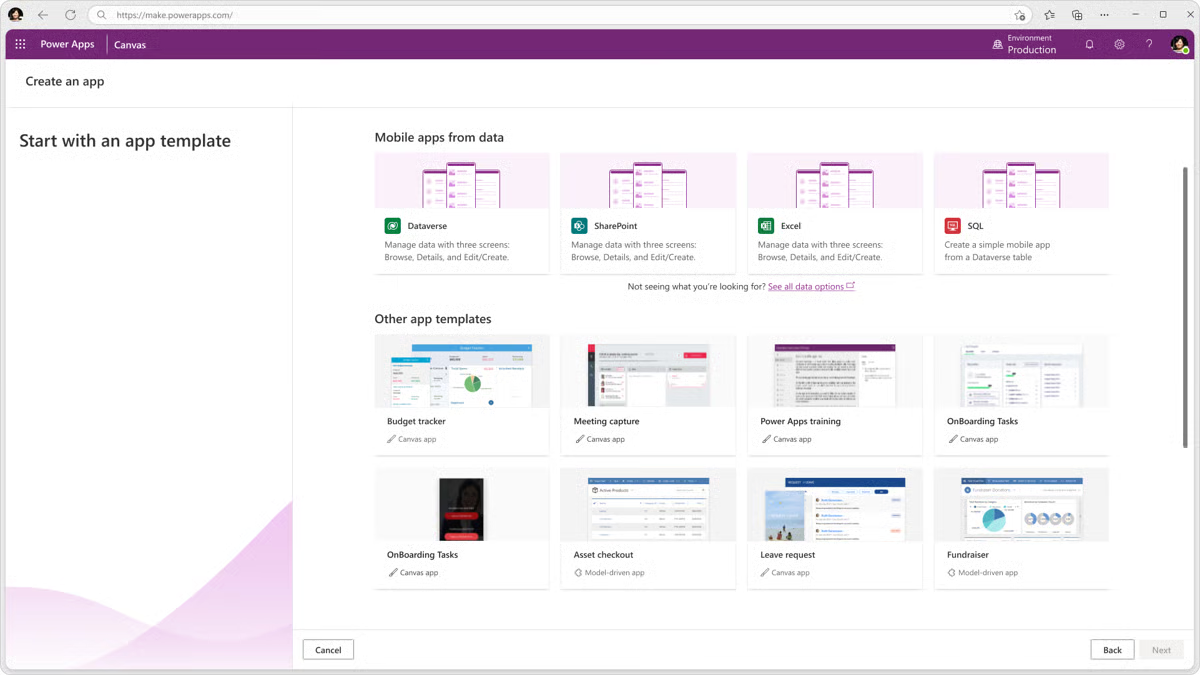
Speed is another big win. Many users said they were able to go from idea to live prototype in a matter of hours. That speed doesn’t just come from templates, it comes from how the platform supports reusability of components and the simplicity of data bindings and UI logic. According to G2 data, Workflows is the highest-rated feature at 88%, which lines up with how consistently users call out automation as a core reason they keep coming back to Power Apps.
Documentation and community support also came up positively in multiple reviews. Whether it's using official Microsoft docs or leaning on forums, users appreciated having resources to turn to, especially when they hit a snag during automation or formula creation.
What's also worth calling out is how significantly Copilot has changed the building experience in 2026. Power Apps now lets makers describe what they want to build in plain language, and Copilot generates app layouts, data connections, and formula suggestions from that prompt. Several users specifically called out how helpful Copilot is when they're stuck on canvas app logic or don't know how to structure a query — being able to just ask and get a working suggestion removes one of the biggest friction points for non-technical builders. It doesn't replace the need for configuration skills on complex builds, but it dramatically lowers the barrier on the first working version.
G2 users mention that licensing costs can escalate quickly once teams move beyond the basics. Premium connectors, additional environments, Dataverse usage, and Power Automate licenses all add up, and the total cost of ownership isn't always obvious from the entry-level price. For organizations with tighter budgets or simpler use cases, it's worth mapping out the full cost picture before committing. The silver lining for many teams is that a meaningful portion of Power Apps functionality is already bundled into Microsoft 365 enterprise plans, which can significantly offset what you'd otherwise pay separately.
Several G2 users also flagged performance issues when working with large datasets or loading screens on mobile, which can affect the user experience in data-heavy apps. Debugging errors compounds this frustration — when something breaks, the platform doesn't always make it obvious where to look, which means troubleshooting can take longer than it should. Teams that design lean data models, use delegation-aware queries, and paginate large lists typically see a noticeably smoother experience, and it's a challenge that thoughtful architecture can largely address.
From what I've seen across G2 reviews, Power Apps rewards teams that come in with a clear plan, whether it's a defined use case, a governance strategy, or a solid data model. Organizations already invested in the Microsoft ecosystem and willing to work within its framework tend to get the most out of it, shipping real apps fast and scaling them without needing to bolt on entirely separate tools.
"What I like best about Microsoft Power Apps is how easy it is to build functional apps without deep programming knowledge. The drag-and-drop interface and ready-made templates make development much faster, and it integrates really well with other Microsoft tools like Excel, SharePoint, and Teams. It’s especially useful for quickly turning ideas into working solutions."
- Microsoft Power Apps Review, Matteo P.
"One thing I dislike about Microsoft Power Apps is that performance can sometimes lag when apps become complex or handle large datasets. Customization beyond a certain level can also feel limiting compared to full-code development. Additionally, managing governance and licensing across environments can get confusing for larger teams."
- Microsoft Power Apps Review, Arkajit D.
Salesforce Headless 360 Platform (formerly Salesforce Platform) has earned its reputation as one of the most powerful platforms in this space, and the sheer volume of teams that build their entire operations around it says a lot. Whether you're a growing mid-market company or a large enterprise with complex, multi-department workflows, it's a platform that has consistently proven it can handle the weight.
What stood out across hundreds of reviews is Salesforce Headless 360 Platform’s ability to be shaped around your business, your clients, and your workflows. Users love the flexibility to build custom objects, tailor page layouts, and create automated workflows that reflect how their teams actually operate. Whether it’s setting up approval flows using Flow Builder, automating lead qualification through Process Builder, or going deeper with Apex triggers, the platform gives users a wide toolkit to streamline work and scale up. That’s one of the reasons I often hear Salesforce Headless 360 Platform recommended to those asking which low-code development platform is the best for enterprise solutions, since it’s built to support deep customization at scale.
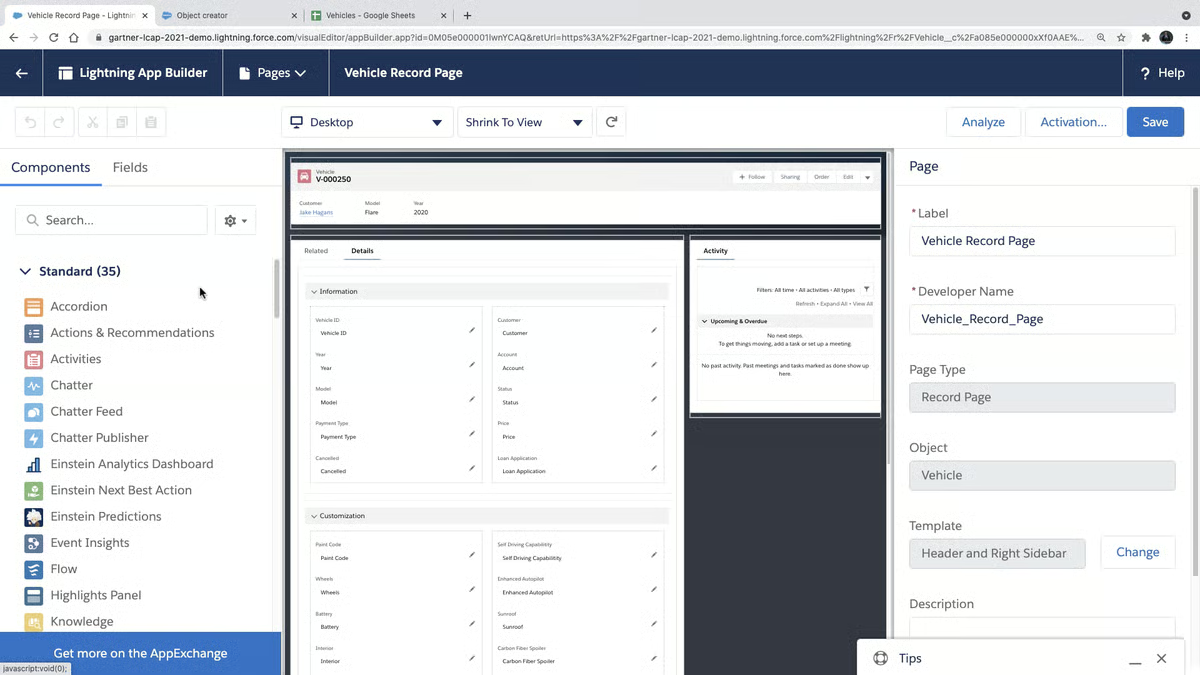
The automation capabilities are a big win. I saw multiple users call out how Salesforce Headless 360 reduces repetitive work and lets their teams focus on higher-impact tasks. Flows, in particular, were frequently mentioned as a go-to for creating multi-step processes without writing much code. And for teams with technical chops, Apex allows for deeper customization when needed.
Integration is another standout strength. Users spoke highly of how easy it is to connect Salesforce Headless 360 Platform with other systems. Whether that’s through native API integrations, middleware, or apps from the AppExchange. This makes it a solid option for organizations with an existing tech stack they don’t want to disrupt. 90% users rate its platform compatibility highly.
Another recurring theme? Scalability. From startups to enterprises, users felt confident that Salesforce Headless 360 could grow with them. The platform’s structures support multi-team, multi-department use cases and can handle complex setups over time.
The Trailhead learning platform and community ecosystem also came up consistently. Users across industries pointed to the depth of documentation, certification paths, and community forums as a genuine advantage, especially when onboarding new admins or troubleshooting complex configurations.
What makes Salesforce Headless 360 Platform particularly compelling in 2026 is what the platform has evolved into beyond traditional low-code building. Users can now deploy autonomous agents that don't just assist — they actually complete tasks like processing returns, qualifying leads, and handling complex admin configurations using natural language. The Data 360 capability takes this further by letting agents read live data directly from external sources like SAP or Snowflake without moving it, which means AI outputs stay grounded in real-time facts rather than stale snapshots. Natural Language Interaction scores 93% on G2, well above the category average, which reflects how meaningfully these capabilities have landed with verified users.
That said, there are trade-offs to plan for. Verified reviews on G2 consistently flag the learning curve as one of the platform's most significant friction points, especially for teams new to the platform or low code in general. Parts of Lightning can feel less intuitive, occasional UI changes add confusion, and more advanced configurations often require a dedicated admin or developer to get right. The complexity isn't a dealbreaker for teams that invest in enablement — those that lean into Trailhead, establish a Center of Excellence, and map workflows to real processes before building tend to navigate this much more smoothly.
G2 users also flag the total cost of ownership as something worth planning for carefully. Beyond the base licensing, line items like data storage, API usage, add-ons, and AppExchange apps can add up quickly as an org scales. Several recent reviews also note that performance can slow in large orgs with heavy automation or complex flows if not properly optimized, which sometimes means additional investment in technical resources. Organizations that negotiate multi-year contracts, audit AppExchange usage regularly, and design flows with governor limits in mind typically keep costs far more predictable.
"I find a lot of features on the Salesforce Platform really beneficial, especially because it supports clean integration with different tools like HubSpot. I like how customizable and scalable the platform is, which allows us to structure data in a way that suits our processes instead of being locked into a rigid setup. The reporting and automation capabilities are particularly beneficial. Being able to build custom reports, manage campaigns, and integrate with external tools makes it easier to maintain clean data and support both sales and marketing efficiently."
- Salesforce Headless 360 Platform Review, Riya A.
"The learning curve can be steep, especially for new users or administrators. Some configurations and automations require careful planning to prevent performance issues down the line. Licensing costs can also be high for smaller teams. Even with these drawbacks, the platform’s capabilities still outweigh the challenges."
- Salesforce Headless 360 Platform Review, Vishal H.
Looking to go beyond app building? Explore the top workplace innovation platforms driving real change inside companies.
From the reviews I went through, OutSystems has earned its reputation as one of the most powerful platforms in this space. Whether you're a mid-market company or a large enterprise with complex workflows, it's a platform that teams consistently grow into rather than out of. The feedback I kept seeing pointed to one consistent theme: organizations that commit to it tend to stay with it for the long haul.
The overall sentiment is that this platform helps teams build full-stack applications dramatically faster than traditional development. And not just simple apps. We’re talking about enterprise-grade, integrated, scalable solutions with real logic behind them.
The low-code/no-code environment is the backbone of that speed. Users kept highlighting how intuitive the drag-and-drop interface, pre-built widgets, and web development tools are. Even folks without deep coding knowledge were able to contribute, while seasoned developers appreciated the productivity gains from skipping boilerplate tasks and jumping straight into higher-value logic. According to G2 data, OutSystems scores 93% for ease of use, above the category average, which reflects how consistently usability comes up as a reason teams choose it.
One of the things people really seem to love is the ease of integration. Whether it's hooking up to a REST API, adding SSO or Active Directory connectors, or leveraging SOAP services, OutSystems handles it with minimal hassle. That’s huge when you’re trying to connect to older systems or work across multiple apps.
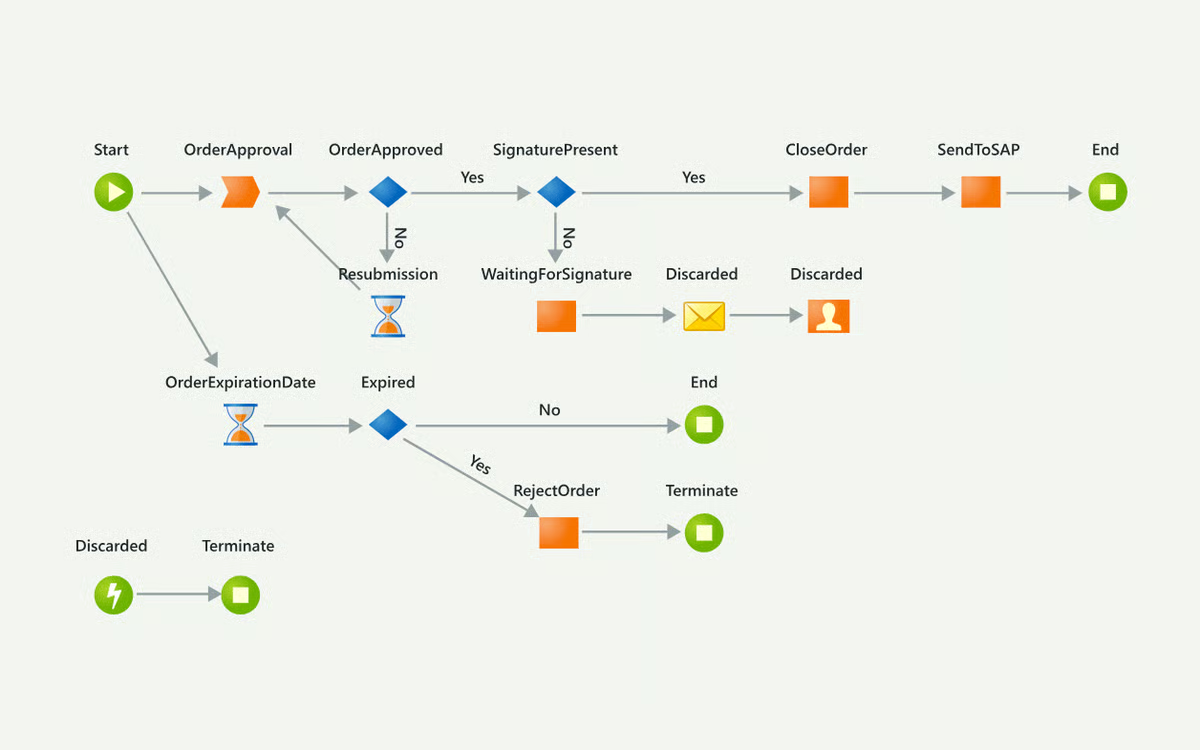
I also noticed consistent appreciation for the built-in features. Things like accelerators, scaffolding tools, and reusable components in the Forge. These make setting up CRUD operations, workflows, and even more complex BPT processes way faster. Plus, features such as CI/CD pipeline support and modular deployment give it real development cred.
Another strong point was agility. Teams loved how quickly they could adjust to new requirements, rebuild modules, or spin up proofs of concept. The AI Mentor, used to catch quality issues early, also got a few nods for helping with architectural integrity.
OutSystems in 2026 is a fundamentally different platform than it was even a year ago, and the AI layer is where that shift is most visible. The new Mentor conversational app generation lets builders describe what they need in plain language. Mentor asks clarifying questions and iteratively builds the data model, logic, and UI from that conversation. Alongside this, Agent Workbench is now generally available, giving teams a unified platform to build, manage, and scale AI agents directly within their low-code environment. The new Agents Console adds portfolio-wide visibility across all deployed agents, which makes governance at scale significantly more manageable. OutSystems also earned the highest satisfaction score in the Low-Code Development Platforms category on G2's Grid, which says a lot about where the product is right now.
One thing users flag consistently is that ODC hasn't fully caught up with the original O11 environment in terms of feature parity. Teams migrating from O11 to ODC note that the process needs a more robust migration tooling, and some advanced capabilities available in O11 aren't yet available in ODC. It's a real consideration for teams evaluating the platform today, though OutSystems has been shipping updates at a steady pace and the gap has been narrowing with each release.
The other trade-off is cost. OutSystems is positioned at the enterprise end of the pricing spectrum, and multiple G2 users flag that licensing can feel steep, particularly for smaller teams or projects that don't fully utilize the platform's depth. The platform's value tends to be clearest for organizations building multiple complex applications where the speed and governance advantages compound over time. Teams that right-size their licensing tier from the start and leverage the Forge community components aggressively tend to see a much stronger return on the investment.
From what I've seen, OutSystems is best suited for teams that need to move fast without sacrificing enterprise-grade quality. If you're building mission-critical applications at scale and want a platform that grows with you, it's one of the strongest options in this category.
"I appreciate OutSystems for its fast time to production, which makes it easy to create, test, and deploy applications quickly. I love that it's a full-stack solution that allows me to work within one environment to build and complete applications, as well as write mobile and reactive websites and processes. I find the drag and drop widgets particularly helpful because they build complexity into them, making complex tasks easy. Access to the Forge is another feature I value, as it provides almost anything needed for specialty projects."
- OutSystems Review, Ron R.
"Making the UI feel custom is really difficult. It feels outdated compared to other modern web frameworks, and our marketers always complain that it doesn't exactly match the brand image. The licensing cost is pretty high for what it does, and also I find that debugging can be frustrating when the error message is vague."
- OutSystems Review, Olga G.
Curious how no-code compares? Check out my colleague's hands-on review of 10 no-code platforms built for non-developers.
From the reviews I dug into, it’s clear that UiPath Agentic Automation has built something pretty special. For anyone looking to automate business processes, this platform offers a toolkit that’s as deep as it is powerful. And what I kept seeing across the board? It’s built to make automation accessible to a wider range of users, not just seasoned developers.
Let’s start with the user experience, because that’s where a lot of people seem to fall in love with UiPath. The interface is clean, intuitive, and honestly, even welcoming if you’re new to the automation world. UiPath Studio, with its drag-and-drop workflows and rich library of pre-built activities, makes it easy to get started. You don’t need to know code to build something meaningful and for business users or analysts, that’s a game-changer. 94% of G2 users rate the application templates highly since it provides templates that users can build atop.
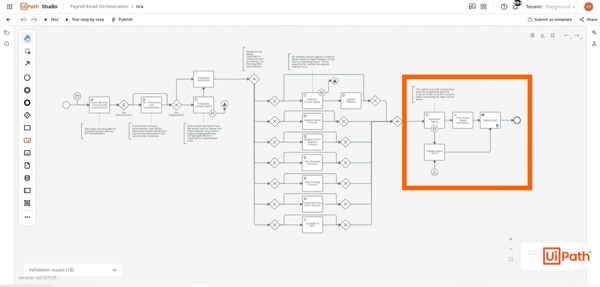
Beyond ease of use, the automation capabilities are where UiPath really shines. Users praised how effortlessly it handles repetitive workflows, manages background processes, and scales to enterprise-level complexity. Workflows score 96% on G2, well above the category average, which lines up with how consistently automation depth comes up as the primary reason teams choose and stay with UiPath.
The Agentic Automation, AI Center, and Document Understanding capabilities take things further. You can weave in machine learning models, handle unstructured data, and delegate nuanced decisions to software agents powered by LLMs and Gen AI. For buyers asking what low-code service to use for business automation, this combination of deep automation layers with flexible low-code design is exactly why UiPath consistently lands at the top.
Another big highlight is the UiPath Academy and community. People leaned heavily on the training modules, forum support, and documentation to ramp up their skills. The learning resources were consistently called out as a major advantage, particularly for teams adopting automation for the first time or expanding into more advanced agentic use cases.
The Action Center also deserves a mention. The ability to set up software agents that run independently and escalate to humans when needed adds a new level of agility to automation strategies, especially in high-volume workflows where constant human oversight isn't practical.
The platform has made a significant leap in 2026 with UiPath Maestro stepping into the spotlight as the orchestration layer at the heart of the platform. Maestro coordinates AI agents, robots, and people across long-running, adaptive processes — with case management, process apps, and unified governance now built in.
On usability, the interface earns praise, but reports mention Studio freezes, slower Excel activities, and performance dips with large datasets or VDI runs. The good news is that tuning bots (e.g., background execution, queue-based chunking, modern Excel activities, and VDI resource policies) often smooths these rough edges without re-architecting flows.
Integration is broadly a strength, though some teams run into hiccups with Git workflows, error visibility in integration services, or syncing with external platforms. Adopting branching standards, pull-request gates, and orchestrator logs/alerts, as well as using official connectors where possible, tends to stabilize pipelines and shorten debug time.
From what I've seen across G2 reviews, UiPath suits builders aiming for more than task automation — teams designing adaptive, AI-powered systems that evolve with the business. Organizations that invest in proper bot tuning, adopt disciplined DevOps practices around their integration pipelines, and phase their agentic rollout thoughtfully tend to get the most out of the platform while keeping operational overhead in check.
"What I appreciate most is that it can interpret unstructured content intelligently without relying on fixed templates. As a tech event coordinator who manages registration forms and vendor documents, it consistently saves me around 2–3 hours of manual data entry each event cycle."
- UiPath Agentic Automation Review, Satvik D.
"One downside is the learning curve, especially for teams that are new to AI-driven automation concepts. Setting up agentic workflows and tuning them for optimal performance can require more expertise compared to traditional RPA. Additionally, debugging and monitoring can sometimes feel less transparent when AI-driven decisions are involved. Cost and infrastructure requirements may also be a concern for smaller teams or organizations."
- UiPath Agentic Automation Review, Anurag T.
From the reviews I evaluated, one thing is clear. ServiceNow App Engine is helping teams move fast. Whether you're a developer or a business user with no coding background, users consistently say this platform makes it easier to build and launch applications across the organization, and its 4.5/5 rating on G2 is a testament to this.
At the heart of the praise is the low-code/no-code experience. Tools like App Engine Studio and Flow Designer come up again and again. Users love being able to drag and drop components, set up automation, and design interfaces without needing to dive into JavaScript, though it’s there if you need it. The platform’s focus on citizen development really shows, and teams appreciate that business users can roll up their sleeves and build things themselves.
I saw a lot of positive sentiment around ease of use, too. People highlighted the guided templates, prebuilt components, and UI wizards that help simplify the learning curve. And once you get going, the speed and efficiency factor kicks in. Users say they’re delivering apps faster than ever, thanks to how well everything is laid out and integrated.
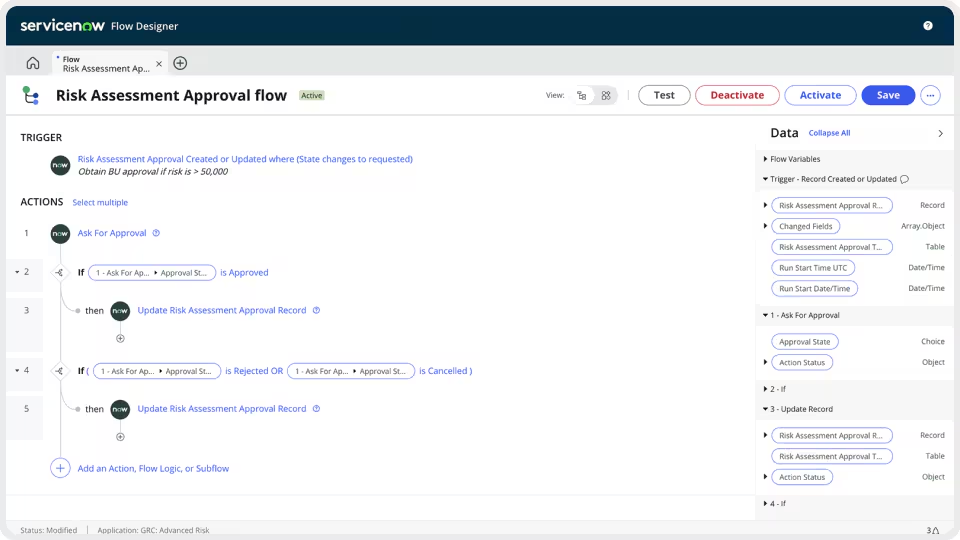
Speaking of integration, that’s another area where ServiceNow App Engine shines. The tight alignment with the rest of the ServiceNow platform makes it easy to connect with ITSM, HR, and security workflows. And because of that, it often comes up when IT teams are evaluating the best-reviewed low-code platforms for IT departments that need cross-department visibility and secure governance. Data Security scores 88% on G2, which lines up with how frequently enterprise-grade compliance and role-based access come up as reasons teams choose and trust the platform.
On the customization front, users love how they can create custom tables, scoped apps, UI policies, and scripts to tailor the experience to their exact needs. Some also called out update sets and version control as helpful tools for moving customizations across environments, especially in larger orgs.
ServiceNow has made a meaningful push in 2026 with Now Assist for App Engine and the new Build Agent SDK. Using text-to-app capabilities, teams can now describe a workflow in plain language and have the platform automatically generate the data tables, flow logic, and UI. The Build Agent SDK goes a step further, letting developers build and modify ServiceNow applications from whatever coding environment they already work in, whether that's GitHub Copilot, Cursor, or other natural-language tools, without switching context.
Debugging in Flow Designer is the most consistent friction point across recent G2 reviews. Error messages don't always provide enough context to move quickly, and troubleshooting deeply nested workflows or integrations can take significantly longer than it should. Teams that lean into structured naming conventions, use subflows to isolate logic, and enable orchestrator logs for traceability tend to shorten their debug cycles considerably, and the experience does improve meaningfully once you've built familiarity with how the platform surfaces errors.
The other trade-off worth planning for is the custom table licensing model, which catches many teams off guard. Every custom app typically creates custom tables, and ServiceNow charges for these separately. If roles aren't assigned carefully, teams can accidentally trigger higher-cost fulfiller-level charges. Organizations that map their data model and user roles before building, and audit table usage regularly, tend to keep costs far more predictable as their App Engine footprint grows.
From what I've seen across G2 reviews, ServiceNow App Engine delivers its best value for organizations already invested in the ServiceNow ecosystem. Teams that take time to understand the platform's data model upfront, lean into governed citizen development, and approach building as an IT-business partnership rather than a shadow IT exercise consistently get the most out of it.
"Its seamless integration with the Now Platform lets developers build, test, and deploy custom applications without having to leave the ecosystem. The intuitive drag-and-drop interface, reusable components, and built-in workflows make collaboration straightforward for both citizen developers and professional developers. In addition, being able to leverage existing ServiceNow data models and APIs helps reduce development effort considerably while keeping everything consistent within the platform."
- ServiceNow App Engine Review, Antapu J.
"For teams that simply need small, lightweight apps, the platform can feel too heavy and too powerful. Its comprehensive enterprise toolset and governance can make it more complex than needed for smaller or simpler applications. The learning curve is lower than traditional development, but not necessarily low compared to simpler low‑code competitors."
- ServiceNow App Engine Review, Hardit S.
Still on the fence? These low-code development stats might help you decide if it's the right move for your team.
Quickbase stands out as a platform built for teams that want control without the coding burden. It has carved out a strong following among operations-heavy teams such as construction, healthcare, logistics, and manufacturing, who need practical tools that work in the real world, not just in demos. The feedback I kept seeing was consistent: once teams find their footing on Quickbase, they tend to stay on it for years.
What users love most is how flexible it is when it comes to building custom workflows, organizing data, and adapting apps to match the way their business actually operates. Whether you're tracking inventory, managing projects, handling vendor onboarding, or all of the above, Quickbase gives you the tools to build it your way. That's exactly why Quickbase often gets recommended as the best low-code platform for small business apps where internal teams need control but can't dedicate full developer resources.
The low code/no-code approach is another big win. Users talked about how empowering it feels to build functioning apps without deep technical knowledge. Users talked about how empowering it feels to build functioning apps without deep technical knowledge. The interface is approachable, especially for folks who've dabbled in Excel, and the platform makes it easy to prototype fast and get things up and running.
Data organization is another strength. I kept seeing feedback about how Quickbase helps teams centralize messy, siloed data into a single source of truth. Paired with its strong relational database structure, users can link tables, roll up metrics, and create dynamic relationships with minimal scripting.
The reporting and dashboard tools were also a highlight. People loved how easy it is to build real-time views that surface what matters most. Whether it’s a progress tracker, performance metrics, or a filtered project view, the reporting engine helps teams make informed decisions quickly.
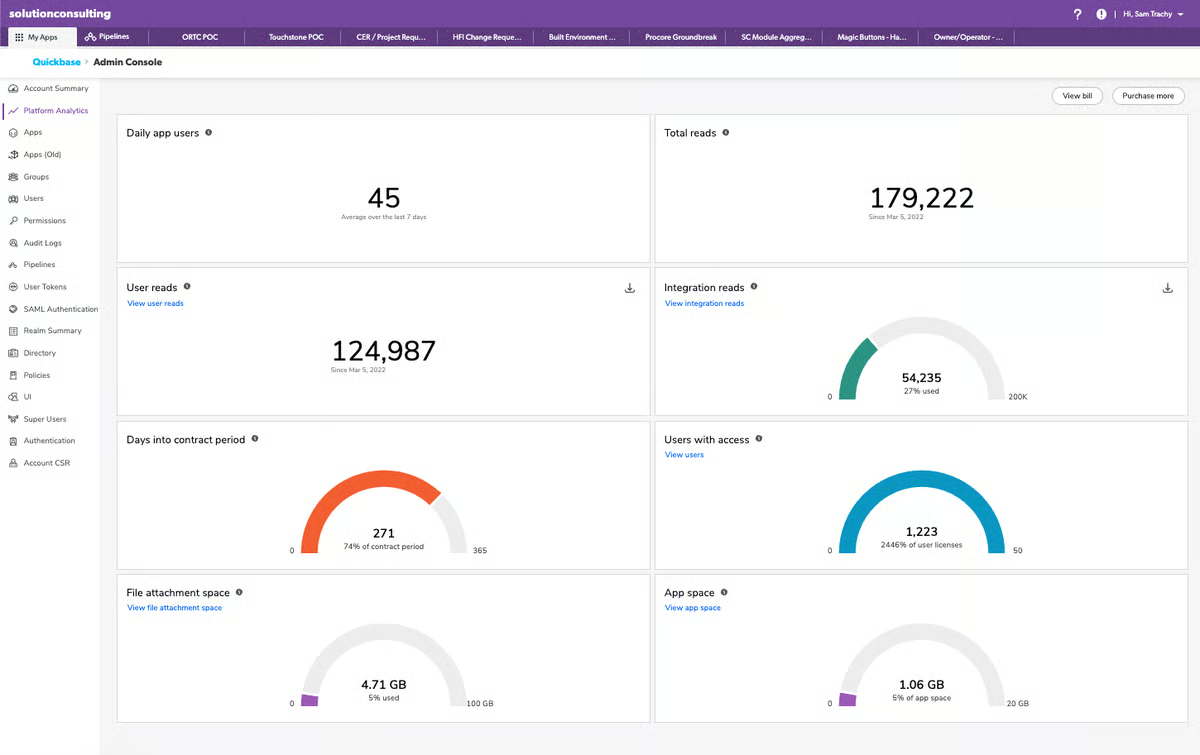
And when it comes to workflow automation, the platform really clicks. The Pipelines feature is mentioned as a go-to for integrating with tools like Salesforce, cloud databases, and APIs. Workflows score 86% on G2, reflecting how reliably teams lean on automation as the backbone of their day-to-day Quickbase use.
That said, there are caveats to plan for. Some G2 user reviews mention slow response times or support that doesn’t fully resolve edge cases. Documentation exists, but several reviewers felt it skews either too technical for beginners or too light on advanced topics (formulas, Pipelines).
Quickbase has been building out its AI layer meaningfully in 2026. The new AI bundle brings together Ask Quickbase AI, a conversational interface that lets users query their data in plain language without building reports from scratch, alongside AI App Intelligence, Data Analyzer, and AI Actions. The AI Control Center gives admins visibility into which AI features are active and who has access, which is a genuinely useful governance addition for teams managing multiple apps and user groups. For operations teams that have historically relied on manual reporting, these tools represent a real step forward.
Performance with large datasets is the most consistent friction point in recent G2 reviews. Reports can slow down, dashboards with heavy filters take longer to load, and calculated fields in particular tend to compound the issue. For teams managing moderate data volumes, the experience remains smooth, but organizations scaling into larger datasets should factor performance optimization into their build approach from the start. Keeping calculated fields lean, limiting report complexity where possible, and archiving historical data regularly tends to make a noticeable difference.
The other trade-off is the UI, which users frequently describe as functional but dated compared to more modern platforms. It gets the job done, and the core experience is intuitive enough that new users tend to pick it up quickly.
From what I've seen, Quickbase works best for operations teams that need a practical, flexible platform they can shape around their processes without waiting on IT. If your priority is speed, data centralization, and workflow control over pixel-perfect design or enterprise-scale performance, it delivers real value, and it does so without requiring a team of developers to maintain it.
"What I like most about Quickbase is how it helps our team keep work organized in one place instead of managing everything across different tools. We use it to track project progress, monitor task updates, and manage different stages such as not started, in progress, and review. The dashboards and reports give a clear breakdown of the current status, making it easy to identify pending work and follow up quickly. It has made coordination smoother and improved overall visibility across the team."
- Quickbase Review, Tanya M.
"One of the main drawbacks of Quickbase is its limited UI/UX customization, which can make applications feel less modern and restrict flexibility for end-user experience. In our implementation, where we manage multiple related tables and complex workflows, performance can sometimes slow down, especially when working with large datasets or detailed reports."
- Quickbase Review, Sachin S.
Have more questions? Find more answers below.
Microsoft Power Apps is a strong pick, with its drag-and-drop interface, guided templates, and Copilot-assisted app creation that lets users describe what they need in plain language. Quickbase is another solid option for teams outside the Microsoft ecosystem, with an approachable interface that doesn't require coding experience to get started.
Quickbase is purpose-built for business teams that need to move fast without dedicated developer resources. Its point-and-click builders, relational database structure, and flexible reporting make it easy to build workflow and data apps quickly, and it grows with your processes as needs change.
OutSystems is a strong pick, offering full-stack visual development, reusable components, and robust CI/CD support for production-ready web apps. The 2026 Mentor conversational app generation also makes it faster to go from idea to a working app structure without manually configuring every element.
ServiceNow App Engine consistently earns strong marks from IT teams for its governance, role-based access controls, and end-to-end workflow orchestration. It lets IT standardize request flows, deploy compliant apps, and support citizen development without losing visibility or control.
ServiceNow pairs visual development with reusable UI patterns and strong performance, making it great for enterprise-grade web apps. Built-in testing, monitoring, and governance keep complex projects maintainable as they grow.
OutSystems offers mature mobile tooling with offline support, native device access, and responsive deployment across iOS and Android from a single codebase, making it a reliable choice for teams shipping mobile apps quickly without sacrificing quality.
Quickbase is a practical choice for lean teams that need to launch fast and iterate without waiting on engineering backlogs. Microsoft Power Apps is also worth considering for startups already on Microsoft 365, since much of the functionality is bundled into existing licenses.
UiPath Agentic Automation is purpose-built for automating complex, rules-based tasks across systems, combining RPA, AI document processing, and agentic orchestration through Maestro. It handles multi-step processes spanning multiple systems, AI agents, robots, and human decision points.
Agentforce 360 Platform is ideal for organizations needing deeply tailored apps on a secure CRM data layer. Custom objects, Flow Builder automation, and the ability to extend with Apex when low code isn't enough make it one of the most flexible platforms for custom app development at scale.
OutSystems and Agentforce 360 Platform are both strong contenders. OutSystems excels in complex, scalable applications with AI-assisted development. Agentforce 360 Platform is the better fit when the enterprise environment revolves around CRM data and autonomous AI agents operating across the business.
Based on user reviews, OutSystems and Agentforce 360 Platform are the most trusted at enterprise scale. OutSystems holds the highest satisfaction score in the category on G2's Grid and 93% for ease of use, while Agentforce 360 is consistently chosen for deep customization and scalability across complex, multi-department enterprise workflows.
For smaller teams optimizing operational workflows, Quickbase and Microsoft Power Apps stand out. Quickbase is built for operations-heavy teams that need workflow and reporting apps without dedicated developers, and Power Apps lets departments automate processes through Power Automate, its highest-rated feature on G2 at 88%.
OutSystems and ServiceNow App Engine rate highly on both counts. OutSystems earns the category's highest satisfaction score and is praised for fast time to production, and ServiceNow App Engine holds a 4.5/5 rating on G2, with reviewers citing guided templates and prebuilt components that speed successful rollouts.
OutSystems, Agentforce 360 Platform, and ServiceNow App Engine are built for enterprise-grade workloads. Reviewers highlight OutSystems for mission-critical scalability, Agentforce for handling multi-team, multi-department complexity over time, and ServiceNow for end-to-end orchestration, though teams note large automations should be optimized to keep performance smooth.
Microsoft Power Apps and Quickbase deliver value without heavy customization work. Much of Power Apps' functionality is already bundled into Microsoft 365 enterprise plans, offsetting cost, and Quickbase lets business teams build workflow and reporting apps themselves without a dedicated developer or outside services.
Microsoft Power Apps and Quickbase are the most approachable for non-technical teams. Power Apps pairs drag-and-drop building with Copilot, which generates layouts and logic from plain-language prompts, and Quickbase offers an Excel-familiar interface that lets teams prototype and go live quickly without coding.
Microsoft Power Apps, Agentforce 360 Platform, and OutSystems lead on integration. Power Apps connects natively across SharePoint, Teams, Dataverse, and Azure; Agentforce 360 rates 90% on platform compatibility with API and AppExchange connections; and OutSystems handles REST, SOAP, SSO, and legacy-system integrations with minimal friction.
For fast time-to-value, Microsoft Power Apps, Quickbase, and OutSystems stand out. Reviewers describe going from idea to a live Power Apps prototype in hours, Quickbase teams getting apps running quickly without IT, and OutSystems' fast time to production. Actual payback depends on use-case scope and team readiness.
UiPath Agentic Automation, Microsoft Power Apps, and ServiceNow App Engine reduce manual work most directly. UiPath automates repetitive, rule-based tasks (one reviewer cited saving 2–3 hours per cycle) with Workflows rated 96% on G2, Power Apps eliminates repetitive steps through Power Automate, and ServiceNow orchestrates approvals and requests end to end.
Quickbase and Microsoft Power Apps are strongest for teams without dedicated IT. Quickbase lets operations teams build and connect workflow apps without heavy IT lift, and Power Apps supports citizen development so departments can prototype apps themselves. ServiceNow App Engine also enables governed citizen development for more complex, cross-department workflows.
Let’s take the complexity out of app development. These low-code platforms empower your team to solve problems, test ideas, and scale solutions without getting stuck in technical bottlenecks. Whether you’re aiming to reduce developer dependency, speed up internal tool creation, or empower business users to build with confidence, there’s a platform here that fits the bill.
For me, evaluating these tools in 2026 felt different from evaluating them even a year ago. The conversation has shifted. It's no longer just about drag-and-drop interfaces and workflow builders — every platform on this list is now investing heavily in AI agents, natural language development, and autonomous orchestration. The best low-code platforms today don't just reduce the amount of code you write. They're actively changing what's possible for teams that don't have a full engineering department behind them.
Now it’s your turn. Explore the platforms, try a few out, and see which one fits your workflows, your users, and your goals. Because once you’ve built with the right low code tool, going back to traditional dev timelines might feel like writing in the dark.
If you’re curious about how AI tools can take things a step further, automating code generation, debugging, and even full app prototypes, explore the best AI code generators that complement low-code platforms perfectly.
.png)

After evaluating and testing, I found Appian, Claris FileMaker, Jitterbit, Mendix, Microsoft...
 by Shashank D Shastry

Recently updatedSummer 2026 Grid® Report · Published May 26, 2026 The 10 best...
 by Shubham Gupta

Recently updatedSummer 2026 Grid® Report · Published May 26, 2026 This guide was last...
 by Yashwathy Marudhachalam