


If you own event operations, marketing execution, or venue coordination, the best event planning software is already a requirement. Spreadsheets fracture, timelines drift, handoffs leak, and onsite changes compound quickly.
My conclusions in this article are based on analyzing aggregated patterns across large volumes of G2 reviews and on staying close to teams deploying event planning tools in real workflows. I used G2 Grid Reports to shortlist platforms and identify recurring feedback patterns around timeline management, task accountability, vendor coordination, and execution reliability.
Across reviews, monday Work Management stands out for cross-functional planning and visibility. ClickUp is commonly chosen by organizations consolidating task execution across multiple event programs. Tripleseat is ideal for hospitality and venue teams managing complex bookings, while RSVPify is preferred for registration management and guest communication. Cvent Event Marketing & Management appears most often in complex, compliance-driven corporate events and multi-session programs.
The goal is to provide clear fit signals grounded in real user feedback, so you can confidently choose the best event planning software for your workflows.
*These event planning tools are top‑rated in their category based on the G2’s Winter Grid Report. I’ve included their strengths and pricing details (where available) to help you choose the right platform for your event planning workflows.
At its core, event planning software helps one turn scattered schedules, vendor notes, and last-minute changes into a clear, coordinated workflow that the whole team can follow. A great event planning tool helps one see dependencies, understand priorities, and keep events moving without the usual last-minute chaos.
What I’ve found is that the best event planning software go beyond basic task lists. They show me who is responsible for each action, which deadlines matter most, how changes ripple across teams, and what needs attention next. Whether it’s surfacing patterns in recurring bottlenecks, linking approvals to key milestones, or automating manual follow-ups, strong tools give me clarity rather than scattered notes.
It’s not only large event teams that benefit. G2 review patterns suggest adoption spans small planning groups, mid-market organizations, and larger enterprises alike. Teams can get up and running quickly, which means fewer urgent catch-ups and smoother execution. Ultimately, visibility into what’s happening, predictability in how tasks are completed, and the confidence that nothing critical will slip through the cracks are key.
I used G2’s Winter 2026 Grid Reports to shortlist the top event planning tools based on real user satisfaction scores and market presence across small, mid-market, and enterprise teams.
I then leveraged AI to analyze hundreds of verified G2 reviews, extracting recurring feedback patterns around what matters most in real-world event workflows. These included timeline management, task assignment clarity, vendor coordination, automation for reminders and approvals, attendee engagement features, and the quality of collaboration between internal teams, external vendors, and stakeholders. This approach helped me identify which platforms actually streamline planning and execution versus those that create friction as events scale.
Since I haven’t personally used every platform, I cross-checked my conclusions with insights from marketing, operations, and event teams who actively rely on these tools. All visuals and product references included in this article come from G2 vendor listings and publicly available product documentation.
When evaluating event planning software, I look at patterns in user reviews and how teams actually plan, coordinate, and run events at scale. Rather than relying on personal use of every tool, I focus on how each platform shapes day-to-day operations. This approach highlights which platforms genuinely streamline planning versus those that quietly create extra overhead. Strong software consistently improves visibility, accountability, and responsiveness across multiple event types.
These are the criteria I focused on:
Ultimately, choosing the best event planning software involves trade-offs. No tool will be perfect in every scenario. Teams must weigh priorities, such as automation versus flexibility, integration depth versus simplicity, or attendee management versus internal coordination. The ideal platform aligns with the team’s scale, workflow complexity, and the stakes of the events they manage.
To be included in the Event Planning Software category, the tool must:
*This data was pulled from G2 in 2026. Some reviews may have been edited for clarity.
monday Work Management approaches event planning through visual coordination rather than fixed, event-specific workflows. Teams use it as a central planning environment where timelines, owners, and dependencies remain visible as plans evolve.
Visual clarity shapes how teams manage day-to-day planning. Boards, status columns, and color indicators provide an immediate view of progress across vendors, tasks, and internal owners. Event teams rely on this visibility to understand readiness without opening individual tasks or reports. This reduces time spent validating status and helps teams react quickly as priorities shift. For multi-phase events, this clarity keeps momentum intact across planning stages.
G2 reviewers describe spotting blockers and adjusting timelines directly from live views. Changes made in one place reflect instantly across connected boards, reducing lag between insight and action. This matters when approvals, logistics, or speaker availability change late in the process. Teams use the platform to keep decisions grounded in the current status rather than assumptions.
Cross-system integration supports alignment beyond the planning board. Teams connect monday to email, calendars, CRM systems, and marketing tools. Cross-system integration scores above the category average on G2, reflecting how consistently teams rely on these connections to keep event planning tied to outreach and registrations. By reducing duplication across systems, teams maintain consistency as execution ramps up. monday shows strong enterprise adoption alongside SMB and mid-market use.
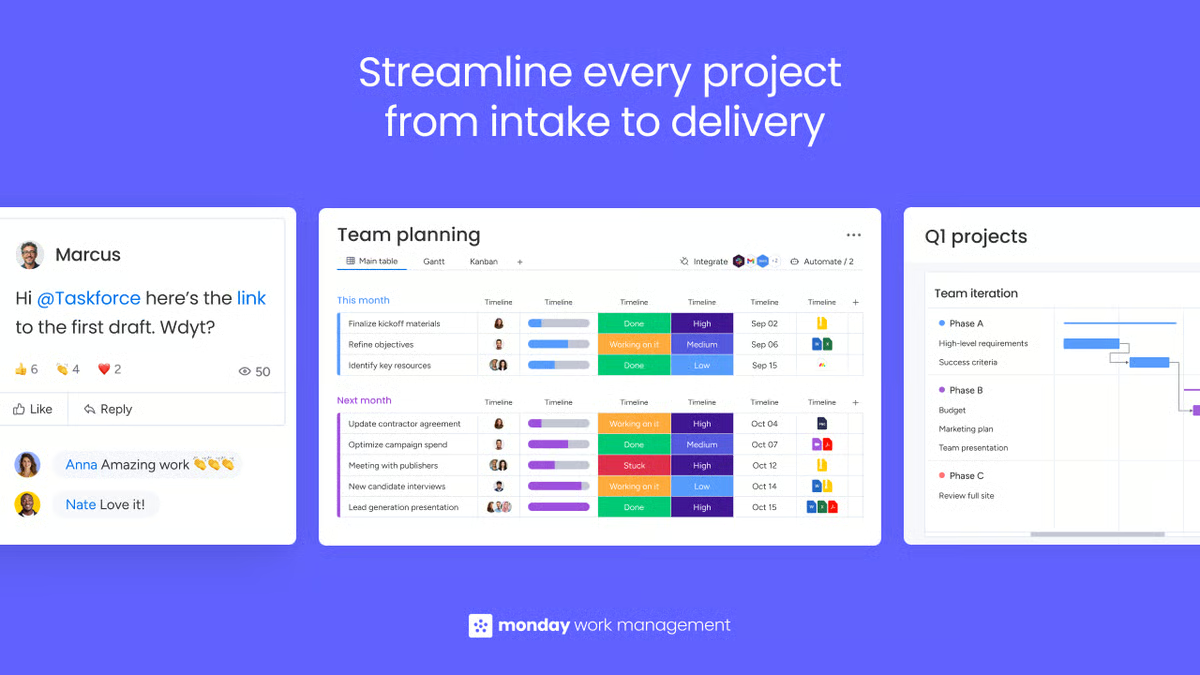
Onboarding speed contributes to how quickly teams become operational. Templates for marketing and event workflows allow teams to move from setup to execution in days. G2 reviewers describe starting with structured layouts and adapting them as needs become clearer. Communication remains attached to work items through updates, activity logs, and mentions. This shared context reduces reliance on meetings and side channels during active planning periods. G2 reviewers rate monday's ease of use above most category peers, which supports fast onboarding across teams with varying technical backgrounds.
Features like automation and task tracking support scale over time. Feedback shows that teams use automations to handle status changes, reminders, and recurring actions across large task volumes. This helps manage long-running programs without manual follow-up dominating attention. As events repeat, preserved workflows and documentation support smoother handoffs between team members. That continuity becomes increasingly valuable for organizations running multiple events per year.
G2 reviewers describe using forms to manage event registrations and eliminate paper-based processes entirely. Teams use forms for multiple simultaneous events, with real-time collaboration supporting smooth data capture.
Automation tools handle status updates, email reminders, and task assignments without manual intervention. This reduces administrative overhead during active registration periods and keeps teams proactive rather than reactive. For event coordinators managing recurring programs, this form-to-workflow connection supports cleaner intake and faster response times.
The platform’s flexibility introduces a highly configurable workflow model, where structure reflects how boards and processes are designed. This aligns well with teams that prefer shaping their own planning systems, while organizations looking for a narrowly scoped or template-driven event tool may find the structure more open-ended as complexity grows.
Value realization is strongest when monday.com serves as a central workspace across planning, communication, and execution. This model works well for teams consolidating workflows into a single system, while organizations maintaining overlapping tools may experience a more distributed set of benefits. The platform is designed to function as a primary workspace rather than a supplemental layer.
monday Work Management fits event teams that value visibility, coordination speed, and adaptable workflows. For marketing and event teams managing complex programs with shifting priorities and multiple stakeholders, it serves as a flexible planning hub that scales with execution demands. A 95% likelihood to recommend on G2 reflects the consistency of that experience across team sizes.
“I find monday Work Management essential for managing client projects and employee tasks. It allows me to divide projects into client tables and easily track the stages of different tasks. I particularly like the stage feature, which shows how far along a task is and indicates when it's completed. Assigning tasks to employees is straightforward, and they receive direct email notifications, which streamlines communication significantly. Switching from Microsoft Excel, I appreciate the much more organized format that monday Work Management offers. The initial setup was easy; once I created my first table, everything was a breeze. Overall, it's easy to use, aesthetically pleasing, and excellent for organizing and tracking tasks.”
- monday Work Management review, Maria T.
“Cross-board updates are limited without paid third-party add-ons. Updating a task in one board and seeing the update on another board should be a basic feature. Adding users to boards and assigning roles can be confusing and difficult to access.”
- monday Work Management review, Jessica W.
Need stronger control over timelines and team execution? Explore the best project management software to see how teams manage complex workflows beyond event planning.
ClickUp helps with planning that spans months. Vendors and internal teams often live entirely inside ClickUp instead of being split across tools. Teams describe it as a workspace where planning, documentation, and execution stay connected. This positioning supports events with layered dependencies and long preparation cycles.
G2 Data places features like multi-step planning well above the category average, which aligns with how organizers describe mapping full event plans. Whiteboards, docs, tasks, and dashboards are combined to outline strategy, convert it into execution, and monitor progress in one flow. This reduces context switching and keeps planning logic visible as work advances.
About 63% of ClickUp users are small businesses, followed by 29% mid-market teams and 7% enterprise organizations. This mix reflects adoption among lean teams running complex operations without large ops departments. G2 reviewers frequently mention replacing multiple tools with ClickUp to simplify coordination. That consolidation reduces overhead across planning, collaboration, and documentation.
Task ownership, priorities, and statuses are visible at a glance, reducing the need for clarification messages. Checklists, comments, and shared docs allow work to continue smoothly even when responsibilities rotate. This is especially useful for events that rely on temporary contributors or external partners. Shared visibility helps maintain pace as deadlines approach.
G2 reviews consistently highlight smoother execution, with teams maintaining pace and spending less time on back-and-forth clarification. Cross-system integration scores 83% on G2, above the 68% category average, reflecting how reliably ClickUp connects with the tools event teams already use.
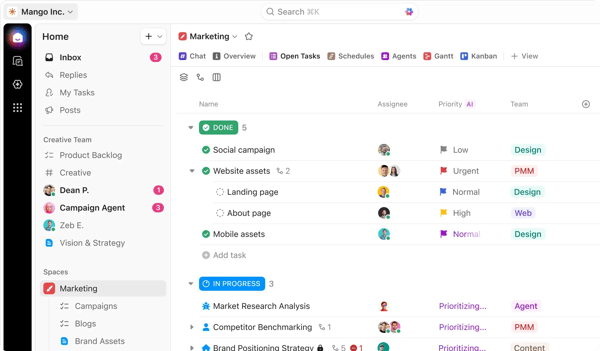
Managers have to track parallel workstreams, identifying risks early, and rebalancing workloads before issues escalate. Task prioritization and centralized views support alignment as timelines tighten. Over time, stored workflows and documentation become references for future events. This supports repeatability without rebuilding processes from scratch.
G2 reviewers describe using rules to handle recurring updates, reminders, and status transitions across large task volumes. This reduces manual follow-ups as event complexity grows. Teams running recurring conferences or multi-event programs rely on these automations to keep execution predictable. The result is less operational drag during peak planning periods.
G2 reviews highlight AI features that summarize meeting notes, convert comments into subtasks, and streamline documentation without manual rework. Users describe the AI summarizer as helpful for condensing workweeks and surfacing key actions. The AI layer complements ClickUp's depth without adding operational complexity. G2 reviewers rate ease of use at 87%, consistent with descriptions of automations that reduce manual work without adding configuration complexity.
Users mention quick formatting, fast access to AI tools, and seamless transitions between simple edits and advanced actions. This command-based interface helps event teams maintain flow during active planning without context-switching.
Because ClickUp offers many ways to structure work, teams starting from a blank setup may find the platform more open-ended when defining standards. Users who prefer highly prescriptive interfaces may find the flexibility more demanding early on. This tradeoff favors teams that prioritize customizable workflows and long-term control.
Some reviewers mention slower experiences with large Whiteboards or heavier mobile usage, depending on configuration. These tend to surface in more complex setups rather than lightweight use. This aligns most naturally with teams operating structured, high-volume programs, where workspace organization supports performance at scale.
Overall, ClickUp fits event organizers who want one system to handle planning, documentation, collaboration, and execution. G2 reviewers recommend ClickUp at a 94% rate, reflecting its sustained value across diverse team sizes and event complexity levels. Its broad adoption reinforces its appeal as an all-in-one hub for teams comfortable trading simplicity for depth and control.
“I really like that ClickUp is cross-platform, so I can use it on my computer or my phone while on the go. It's also very customizable, which is great for creating special fields needed to keep track of important company indicators. The initial setup was easy for me since I've worked with similar platforms before.”
- ClickUp review, Darwin C.
“Being able to adjust subtask dates in bulk from the Timeline view would be amazing. Our projects are several months long with dozens of little subtasks and if the timeline is delayed one week, it's very time-consuming to move every single task manually. I'd love to be able to batch select and move, then tweak after that as needed.”
- ClickUp review, Liz R.
Hosting virtual or hybrid events? Check out the best virtual event platforms to see which tools excel at engagement, streaming, and online experiences.
Cvent is built to manage the full event lifecycle rather than a single phase of it. Registration, email marketing, attendee engagement, onsite check-in, and post-event reporting sit inside one connected system.
G2 review patterns show Cvent being selected for high-complexity events where compliance requirements are strict, and teams need a single source of truth across planning and execution. This is reflected in its enterprise adoption, with 27% of users coming from enterprise teams, the highest in this lineup, signaling use beyond departmental events into organization-wide programs.
G2 reviewers describe using Cvent for roadshows, product launches, compliance-driven seminars, and multi-track conferences. The platform supports in-person, virtual, and hybrid formats within a single system, reducing the need for separate tools as event programs scale.
Registration workflows cover everything from basic attendee intake to complex multi-session, multi-track programs. Custom registration paths, conditional logic, and attendee-specific fields are described as core to how teams handle varied audiences. G2 reviews reference drag-and-drop builders for registration sites and email invitations that reduce dependency on design or development resources. Ease of setup scores 80% on G2, which aligns with reviewer descriptions of a setup process that rewards familiarity.
CRM and marketing tool integrations sit at the center of how event teams connect Cvent to broader revenue workflows. G2 reviewers frequently describe Salesforce, Eloqua, and iCapture integrations as central to their event data strategy.
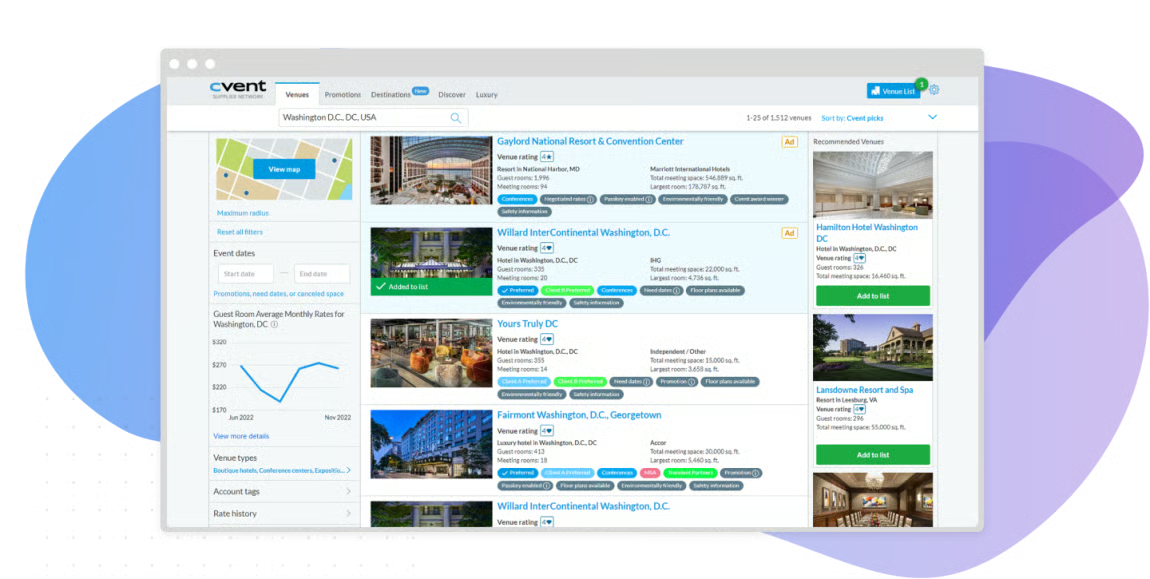
Attendee behavior, session participation, and engagement scores flow into CRM systems without manual export. For teams where event ROI is measured in pipeline influence rather than headcount, this integration layer is described as a primary reason for adoption.
On-site execution tools handle check-in, badge printing, and session tracking under the same platform account. G2 reviewers describe the on-arrival kiosk experience as fast and well-received by attendees. Real-time check-in data feeds directly into post-event reporting without reconciliation. For large events where onsite execution is operationally complex, this removes the need for a separate event-day tool. Quality of support scores 90% on G2, consistent with reviewer descriptions of responsive 24/7 assistance during live event periods.
Reporting and analytics are described as a practical strength across G2 reviews. Users reference customizable reports that cover attendance, engagement, session participation, and budget variance. Post-event data is described as accessible without requiring manual export across systems.
G2 reviewers mention the attendee hub engagement score reports as particularly useful for data-driven follow-up. For teams presenting event performance to senior stakeholders, this reporting depth reduces preparation time.
G2 reviewers describe Cvent's training resources, community forums, and knowledge base as strong support layers for teams building platform fluency. Free e-courses and structured onboarding are cited by multiple reviewers as accelerating ramp-up. Teams describe reaching operational confidence faster when those resources are used actively. Ease of use scores 83% on G2, which reflects the platform's depth and the investment required to navigate it fully.
The platform’s feature density means new users and less technical team members may find the interface more involved than lighter tools. Teams using Cvent for simpler events often describe the feature set as broader than required, while organizations managing high-stakes, data-heavy events with compliance needs consistently value the platform’s depth of functionality.
Pricing reflects the platform’s enterprise positioning. G2 reviewers note that the cost can be a barrier for smaller organizations or teams without a dedicated event technology budget. Per-registrant pricing on certain modules introduces variability as event volumes grow. Teams running frequent, high-volume programs align that the investment helps with the platform’s full capabilities, while organizations with simpler needs may find the cost-to-value balance less favorable.
Taken together, Cvent fits organizations where event programs are strategic, compliance-aware, and tied directly to revenue or stakeholder outcomes. Its depth of registration, engagement, CRM integration, and reporting capabilities support teams that need one platform to handle everything from planning through post-event analysis.
"Feature set that covers the full event lifecycle in one platform. We like that it can handle registration, event websites, attendee communications, reporting, and on-site management without needing a patchwork of separate tools. It’s especially valuable for organizations running more complex events, because the platform is robust, scalable, and built to support detailed workflows, branding, and operational control."
- Cvent Event Marketing & Management review, Elsworth L.
"There's a learning curve. Although they've greatly improved their reporting in the last couple of years, there's still room to grow in this area."
- Cvent Event Marketing & Management review, Kyla P.
Looking to streamline sign-ups and attendee tracking? Compare the best event registration tools to find platforms built specifically for RSVP and ticketing workflows.
Tripleseat is built around restaurant, hotel, and venue workflows rather than generic project planning. Its customer mix reflects that focus, with 47% small businesses, 47% mid-market organizations, and 5% enterprise users. Teams managing steady volumes of private dining, banquets, and group events rely on it as a dedicated venue system. This positioning supports operations where events are frequent and repeatable.
G2 reviews describe keeping leads, contacts, accounts, BEOs, contracts, proposals, photos, and decks in one environment. Custom forms and configurable event fields allow teams to reflect specific spaces, menus, and packages. This reduces fragmentation across tools and supports consistency across similar events. For hospitality teams, that structure matters when volume is high.
G2 reviews often describe the interface as approachable, with multiple paths to complete common tasks. This flexibility helps sales, operations, and event staff work comfortably within the same system. Guest portals and document-sharing workflows allow clients to review proposals and details, then return as plans evolve. G2 review patterns reflect dependable day-to-day use when focused on venue workflows. Shared access keeps information aligned without repeated follow-ups.
G2 reviewers describe moving from inquiry to contract to confirmed booking without losing context. Calendar views make it easier to see what is booked, tentative, or still available across spaces. This clarity supports capacity planning and reduces scheduling conflicts. Teams use the calendar as a live operational reference.
Operational impact is often described in terms of time saved and reduced confusion. Users mention replacing disconnected tools for leads, email, and payments with a single system tracking bookings and communications together. This helps teams stay aligned on event status as volumes grow. For venues with multiple rooms and overlapping events, this organization supports smoother execution.
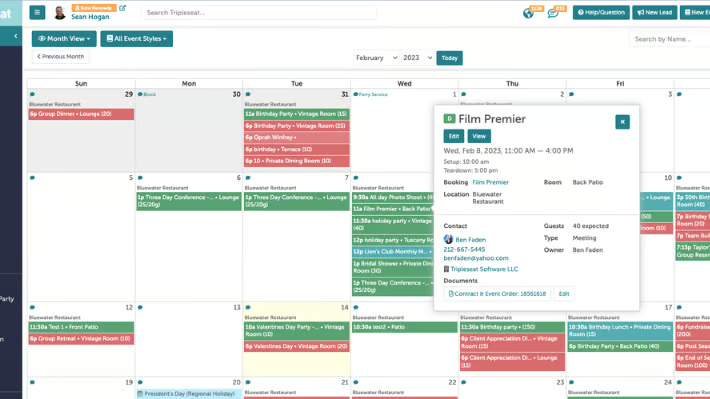
G2 reviewers describe Tripleseat as helpful for tracking financials via reports. Users reference monitoring revenue, deposits, and payments in one system rather than reconciling across tools. The reporting layer ties directly to bookings, reducing lag between event execution and financial review. 98% of G2 reviewers say the product is going in the right direction, signaling strong confidence in its ongoing development.
G2 review patterns reflect an established role within hospitality event planning. G2 reviews consistently frame it as a system aligned with venue workflows rather than general project management.
G2 reviews highlight Tripleseat’s integration with EventUp as improving visibility and driving more leads, especially for off-strip or non-resort venues competing with larger properties. This integration expands booking pipelines without requiring separate marketing efforts. Users describe it as a useful way to reach audiences beyond direct outreach.
Communication tools follow a structure that differs from standard inbox workflows, with built-in discussions and email flows integrated directly into bookings and BEOs. This approach aligns well with teams that prioritize centralized communication tied to event operations, while those accustomed to traditional inbox-style tools may find the model more workflow-driven.
While flexible forms and fields support venue-specific configurations, the platform’s structure reflects a process-oriented approach to managing event data. This aligns most naturally with hospitality teams operating repeatable event formats, while more ad-hoc planning workflows may find the structure more defined than lightweight tools. Tripleseat’s ease of use and support quality both score above 93% on G2, reinforcing its strong adoption across structured event environments.
Overall, Tripleseat fits restaurants, hotels, and dedicated venues managing frequent, space-driven events. For teams that want CRM, bookings, BEOs, and calendars tightly connected, it supports consistent execution across high-volume hospitality operations.
“I love the fact that tripleseat is easy to use due to the tripleseat university, as well as the yearly classroom conference. It gives us a chance to connect with other individuals and share best practices to make my daily workload manageable! Also, thank you for considering our feedbacks from last year and improving the system!!"
- Tripleseat review, Wincy W.
“How the discussions or email system works is a little clunky. They have improved it over time, but it is still not as easy or intuitive as a traditional email platform. Exporting event data to a third-party calendar like Google takes a random amount of time to update. They say it has to do with how often Google scrubs for new data, but I feel like this should be automatic."
- Tripleseat review, Danny B.
Wrike is used by event teams when planning becomes a coordinated system rather than a checklist. Multi-month timelines, layered approvals, shared assets, and dependencies are managed in one structured environment.
Outcomes vary based on configuration depth and team investment. G2 review patterns show it being adopted when teams need consistency across recurring or complex programs. This supports events that involve multiple contributors and long lead times.
Stakeholders get the context they need without noise. G2 review patterns suggest that value realization depends heavily on setup quality and workflow alignment.
G2 reviews describe notifications and reminders keeping owners aligned with milestones, while comments and tagging reduce the need for side conversations. Projects are often structured into phases and task sequences that mirror run-of-show planning and vendor coordination. Commenting directly on screenshots supports review of creative assets, signage, and landing pages. This keeps feedback attached to work.
G2 reviews reference blueprints, custom item types, request forms, dashboards, calendars, and automations that reflect how teams operate. For quarterly or multi-region events, these features help maintain consistent planning structures. External collaborators, such as agencies and freelancers, can be added without disrupting internal workflows. This supports coordination across extended teams.
Managers describe tracking parallel workstreams, identifying risks early, and redistributing workloads before timelines slip. Centralized views make it easier to see dependencies across teams. Stored workflows and documentation become reference points for future events. This supports scale without rebuilding processes each time.
G2 reviews highlight Wrike's ability to work effectively with contractors and external collaborators. Users describe adding temporary contributors without disrupting internal workflows. Permission controls and guest access keep external partners aligned without exposing internal planning details.
Users reference keeping old workflows and tasks for historical reference, which helps teams see changes over time. This supports process refinement and onboarding by providing clear records of past approaches. For recurring event programs, this documentation reduces dependency on individual knowledge and supports continuity across team transitions.
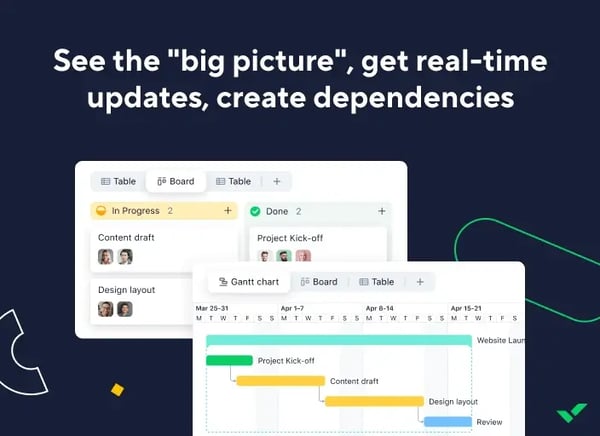
G2 reviews frequently mention responsive customer service and helpful support during setup. Users describe the team as attentive to detail and helpful when navigating complex configurations. For teams investing in structured event workflows, this support presence reduces friction during early adoption and helps teams realize value faster.
Wrike shows strong adoption among mid-market and enterprise organizations running structured event programs. G2 reviews suggest outcomes vary based on setup depth. Teams that invest in configuration tend to see stronger returns than those using it as a lightweight task tool.
G2 reviews highlight that the platform offers multiple views and configuration options, reflecting a structured approach to project management. Ease of setup scores 81% on G2, which aligns with reviewer feedback describing a more configuration-forward experience for teams new to structured project systems. Teams seeking prescriptive, event-specific templates may find the setup more open-ended, while organizations comfortable designing their own workflows tend to align well with this flexibility.
Some G2 reviews also note that reporting and search experiences are more structured than analytics-focused tools. Reporting capabilities reflect a configuration-driven approach for dashboard-heavy use, and search behavior becomes more noticeable in complex workspaces. These considerations are most relevant for teams relying heavily on analytics views, while standard project views and milestone tracking remain clear and accessible across most team sizes.
Overall, Wrike fits teams managing complex, cross-functional event programs that require structured coordination. For mid-market and enterprise organizations running repeatable workflows, its phased planning and collaboration controls help maintain order as scope and stakeholder count grow. An 86% likelihood to recommend on G2 reflects outcomes that vary based on how deeply teams invest in configuration.
“I find Wrike's features very good, especially the ability to create sub-tasks and assign labels. This makes things very visual and helps when a task is bigger, with multiple developers working on it. We can create sub-tasks and tackle them one by one, and assign a single sub-task to multiple developers. It's very useful for teamwork. Additionally, I appreciate that the initial setup of Wrike was very easy and we can use it easily.”
- Wrike review, Shailesh M L.
“What I dislike most is that some views and automations feel less intuitive than I’d expect, especially when I’m managing multiple spaces or trying to centralize control. As a result, both the initial setup and ongoing administration can take more time than necessary. It would be helpful to have simpler cross-space reporting, along with more flexible automation triggers to make managing everything across spaces smoother.”
- Wrike review, Dresler Z.
RSVPify is typically used when the primary challenge is collecting accurate RSVPs and managing guest details rather than building complex project plans.
G2 review patterns show it being selected as a guest-facing layer that’s easier to brand and operate than CRM add-ons. Teams rely on it to launch registration experiences quickly without heavy setup. This supports recurring events that need consistent intake with minimal overhead.
Users describe creating polished, on-brand event pages and collecting responses without long email chains. Built-in email and text messaging support outreach directly from the platform. This keeps invitations, reminders, and updates tied to registration data. For teams running frequent events, this reduces coordination effort before the event even begins.
Guest data handling is a central reason teams adopt RSVPify. G2 review patterns support dependable day-to-day use when focused on guest management tasks. G2 reviews reference managing plus-ones, tracking attendee-specific fields, and capturing preferences as lists grow. Importing guest lists and assigning seating are described as straightforward, avoiding separate spreadsheet workflows.
This keeps guest information structured as complexity increases. Reporting views help teams understand who is attending and what details have been collected. RSVPify scores 95% on ease of use on G2, consistent with reviewer descriptions of straightforward guest list management and seating workflows.
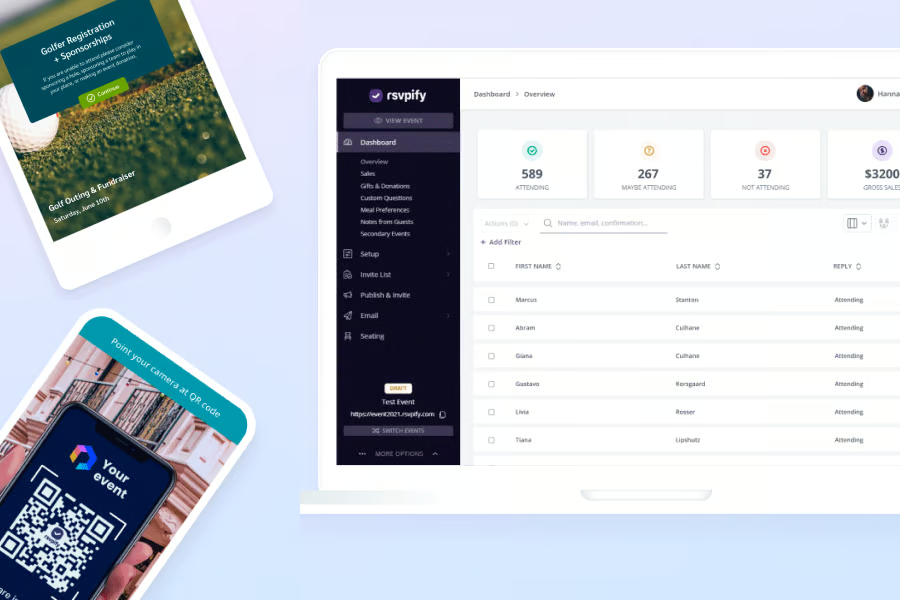
Users describe exporting attendee lists and syncing them into CRM or donor systems after events. This makes RSVPify useful beyond the event day itself. Post-event data flow supports continuity. For nonprofits and small organizations, this “capture to export” loop keeps follow-up work organized. Structured data reduces cleanup effort once the event concludes. Ease of setup scores 94% on G2, reflecting how quickly teams move from account creation to live registration pages.
G2 market adoption skews toward mid-market organizations at 54%, followed by 36% small businesses and 11% enterprise users. This mix aligns with teams running ongoing initiatives rather than one-off social events.
G2 reviews highlight QR code check-in functionality as particularly useful for onsite event management. Users describe the check-in process as fast and stress-free for attendees. This shifts RSVP data from planning-only to execution-ready, supporting smoother event-day operations. Quality of support scores 97% on G2, which gives teams added confidence during live event execution when issues need fast resolution.
G2 reviewers mention choosing colors, images, fonts, and design accents to match event branding. Users describe the platform as allowing personalization without requiring design skills. This visual control helps events feel cohesive and professional, especially for donor-facing or client events. Customization supports brand consistency across multiple event types.
Users describe sending invitations, reminders, and updates via both email and text from within RSVPify. This centralized outreach reduces reliance on external communication tools. For events with distributed audiences or varying communication preferences, this dual-channel approach improves reach and response rates.
G2 reviews frame it as effective within its intended scope rather than broad event operations. Teams use it alongside planning tools rather than as a replacement for them. This clarity supports predictable outcomes.
Branding controls can feel limited for teams seeking precise visual control. G2 reviews mention constraints around image sizing and font options when presentation detail is a priority. Larger events also bring pricing tiers into focus as advanced capabilities become relevant, making this more noticeable as guest counts increase. For most event types, the branding controls support professional, on-brand pages without requiring design expertise.
Financial and operational reporting are less central within the platform. G2 reviews suggest the platform focuses on RSVP and attendee tracking rather than revenue metrics or profitability analysis. Teams focused on attendee intake and post-event exports find the platform well-suited to that scope, reinforcing its role as a registration layer rather than a full event management platform.
Overall, RSVPify fits teams that want a clean, repeatable way to manage RSVPs and guest data. For organizations prioritizing branded registration pages, seating management, and reliable exports into their systems, it delivers focused value without adding operational complexity.
“The Platform and UI is good. I did not have any needs for integration to other SAAS´s. The platform was fast and remarkable in the experience I had. BUT where it shined beyond any expectations is THE support team. I was searching for a registration solution for a dinner event. RSVPify was overkill, but still very affordable. The solution was great, but the human side of their support team is outstanding. It made me wish that I only have to manage a dinner event every year, and not every week or month. Really awesome support. Many platforms could learn from the team behind RSVPify. Thats it! I did not use any AI or other. A simple booking management need."
- RSVPify review, Jesper Faber S.
“While RSVPify is a wonderful platform, I do wish the event page offered separate pages instead of one continuous scroll. For a sizeable event with lots of speakers and details, the page becomes VERY long to navigate. It would also be helpful to be able to email everyone who has registered when there’s an update to the event. I also found it difficult to locate where to add team members when it was time to bring in helpers. Overall, these are minor complaints, and my company would absolutely use RSVPify again.”
- RSVPify review, Bekah S.
EventCreate shows a clear small-team orientation in its adoption data. G2 Data reports 81% small-business usage, 19% mid-market usage, and no enterprise representation. This distribution aligns with teams that prioritize speed and simplicity over layered operations. EventCreate is typically used when launching events, and it matters more quickly than managing complex programs.
G2 reviews describe creating branded event pages, sending invitations, and opening registration within minutes. Users do not need web design skills to publish professional-looking pages. This supports internal events, client meetups, and community programs with short lead times. G2 review patterns indicate low-friction day-to-day use. Ease of launch reduces friction during early promotion.
The eventCreate platform makes it easy to track RSVPs and ticket responses from a single dashboard. Personalized invitations and bulk attendee uploads support faster outreach. These features help teams avoid manual tracking through spreadsheets or email threads. Clean intake improves attendance visibility early in the process. EventCreate scores 98% on ease of use on G2, consistent with reviewer descriptions of dashboards that require no training to navigate.
G2 reviews point to keeping event information, invitations, and attendance data in one place. For distributed teams or audiences without shared communication tools, a single event link replaces fragmented updates. Over time, this improves planning accuracy without adding administrative work. The platform functions as a lightweight source of truth.
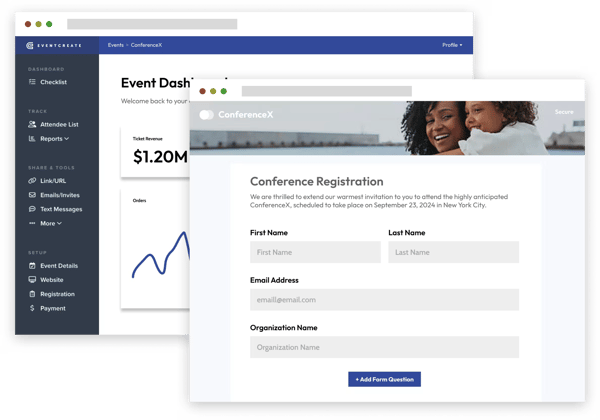
Editable pages even after publishing, allowing teams to adjust details as plans evolve, as highlighted in G2 feedback. Templates balance structure with flexibility, helping teams reuse layouts across events. This consistency supports recurring internal or client-facing programs. Small teams benefit from predictable workflows. Ease of administration scores 99% on G2, reflecting how little overhead teams carry when managing recurring event structures.
G2 reviews highlight the ability to create and schedule personalized email invitations directly from EventCreate. Users describe this as convenient and efficient, eliminating the need for external email marketing tools. Invitations stay connected to RSVP tracking, supporting cleaner follow-up workflows.
Users mention templates that help maintain consistency across recurring events while still allowing customization. Reviews describe being able to quickly replicate event structures and adjust details without starting from scratch. This supports efficiency for teams running monthly or quarterly programs, with templates balancing speed and flexibility.
EventCreate shows more focused adoption rather than broad enterprise penetration, aligning most naturally with small to mid-sized event teams operating within standardized workflows.
G2 reviews mention attendee caps on free tiers and lighter options for check-in sorting or data exports. These constraints are more noticeable for larger or onsite-heavy events. Teams planning complex check-in workflows may find the platform more streamlined than tools designed for advanced event operations. Standard check-in and RSVP tracking remain smooth within the platform’s intended scope.
Overall, EventCreate fits small teams that need to launch clean, professional event pages quickly. Its strong usability is balanced by a narrower operational scope. For organizations prioritizing fast registration, simple ticketing, and minimal setup effort, it provides reliable execution without the overhead of more complex event systems.
“I have to say that I have been extremely impressed by how easy it has been to create and manage my event using EventCreate. No need to watch long, drawn-out tutorial videos to immediately begin implementing and using. Within an hour, my event website was posted for me to share with my prospective attendees to start signing up. EventCreate's partnership with Stripe made accepting payments easy to integrate and use. I would highly recommend the use of EventCreate for your next event!”
- EventCreate review, Quincy B.
“The main downside I’ve run into so far is that email notifications to registrants often end up in their spam folder. This has caused issues with people not receiving the event invitation.”
- EventCreate review, Kristie M.
Eventcombo is positioned as a unified system that brings event operations and marketing workflows together. Teams use it to manage registration, engagement, and reporting without relying on multiple disconnected tools.
G2 reviews frame it as a single environment supporting both planning and promotion. This setup suits teams running programs where marketing and execution are tightly linked.
G2 reviews describe replacing manual registration, ticketing, and fragmented reporting with automated workflows. Keeping these processes in one system helps reduce data inconsistencies between teams. Post-event analysis becomes faster when metrics are already centralized. Over time, this supports clearer visibility into event performance and outcomes.
G2 reviewers frequently reference real-time analytics dashboards and customizable reports. Attendee-level insights tied to behavior and preferences help teams understand engagement patterns. These reporting capabilities support both operational review and marketing follow-up. G2 review patterns indicate consistent day-to-day usability once active. The emphasis goes beyond attendance counts into actionable insights. 97% of G2 reviewers say Eventcombo meets their requirements, reflecting strong alignment between platform capabilities and real event team needs.
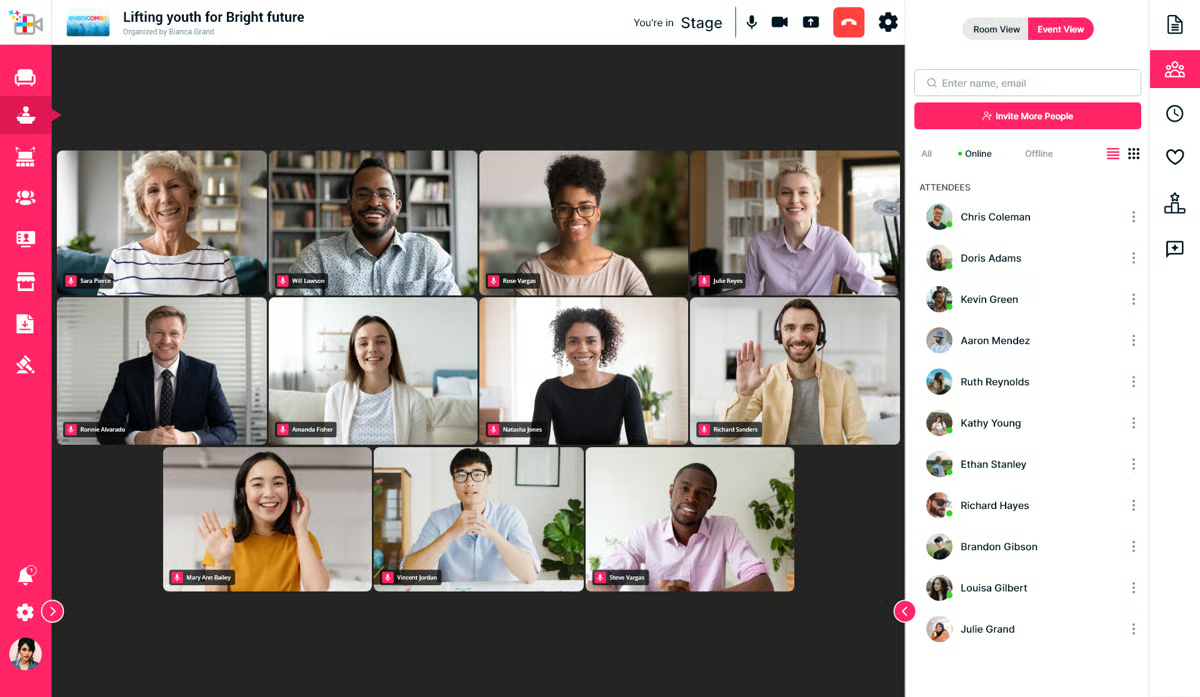
G2 reviews mention interactive features such as polls, surveys, Q&A, and community networking. These tools support participation before, during, and after events. Teams use them to keep audiences active beyond check-in. This engagement layer complements registration and reporting within the same system. Ease of use scores 97% on G2, consistent with reviewer descriptions of interactive tools that teams adopt quickly without dedicated training.
There is a centralized dashboard combining ticketing, branded registration pages, email campaigns, and attendee profiles. This reduces the need to jump between systems during live events. G2 reviews also mention access to 24/7 human support and dedicated account management. This support presence helps teams stay confident during execution.
G2 reviewers describe QR code check-in and onsite badge printing as standout features for in-person event management. Users mention that these tools make entry processes faster and more professional. For large events, this reduces bottlenecks at registration and improves attendee experience. Check-in data flows directly into reporting without manual entry.
Reviews frequently reference the Event Website Builder as intuitive and fast. Users describe creating fully designed event websites in minutes without web development skills. Customization options support brand alignment while maintaining ease of use. For teams managing branded corporate events, this builder reduces dependency on external design resources.
For teams without prior experience in unified platforms, workflow structure can feel more open-ended compared to tools with predefined templates. This aligns well with teams that value flexibility over prescriptive setup. Some users also note that reporting and configuration reflect a more customizable model, which works best for teams with established event processes, where the platform adapts well to existing workflows.
Eventcombo fits teams that want to manage event operations and marketing in one system. Eventcombo shows stronger uptake among small and mid-market teams, while enterprise penetration remains lighter. For organizations prioritizing unified workflows, real-time reporting, and built-in engagement tools, it supports end-to-end execution without stitching together multiple platforms.
"Everything is in a single dashboard and easy to navigate. Our use case requires attendee profiles management and the attendee dashboard in particular is private labeled and highly customized. We also use surveys, polls, and a suite of attendee engagement tools."
- Eventcombo review, Olivia C.
“The initial setup and learning how to use all the reporting tools can take some time. However, once you get used to it, the platform becomes incredibly beneficial.”
- Eventcombo review, Moumita R.
Momentus Technologies is designed to operate as a system of record for complex venue environments rather than a lightweight planning layer. G2 Data highlights decision-making and cross-system integration as its strongest-rated capabilities, supporting coordination across departments. Teams rely on it to keep schedules, resources, and approvals aligned as event volume increases. This positioning fits organizations managing many events in parallel.
Venue and space management sit at the core of daily use. G2 reviews most often reference large venues, convention centers, and multi-space calendars that require precise layering of bookings. Users describe managing sales activity, contracts, staffing, and run-of-show details in one system. This consolidation helps teams avoid conflicts across overlapping events. It supports environments where capacity planning is constant.
Centralized calendars and CRM-linked records help reduce drift between sales, operations, and production teams. Updates made in one area reflect across schedules and resource views. Reporting supports shared understanding of what is booked, tentative, or available.G2 review patterns reflect steady performance for venue-specific workflows. This visibility helps teams coordinate without relying on manual reconciliation.
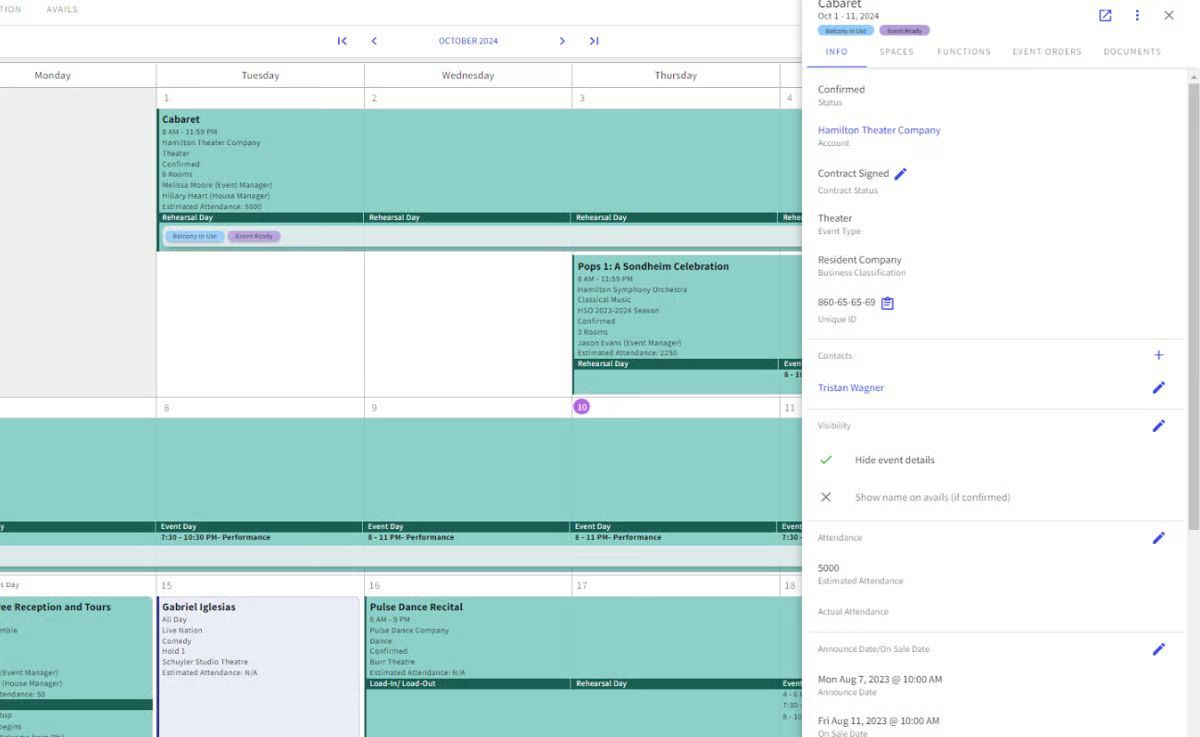
G2 reviews describe paperless processes, embedded invoicing, and visual booking calendars used to layer events efficiently. These workflows support recurring programs and complex space utilization. Over time, teams use shared data to make more confident decisions about staffing and scheduling. Consistency matters more than speed alone in these environments.
Users reference management-ready outputs that help track utilization, revenue, and operational load. These reports support planning discussions and financial review without exporting data into multiple systems. For venues running high event volumes, this reduces fragmentation across tools. Reporting becomes part of routine decision-making.
G2 reviews reference the ability to apply detailed filters when searching for events, teams, locations, or specific criteria. Users describe this as saving time and ensuring accuracy when pulling event data or generating reports. For venues managing overlapping bookings across multiple spaces, this search precision reduces errors and supports faster decision-making.
Reviews mention that Momentus supports billing workflows and reduces manual invoicing effort. Users describe this as helpful for maintaining financial accuracy and reducing administrative load during high-volume periods. For venues where billing cycles align with event execution, this automation keeps financial operations aligned with operations.
With a G2 Market Presence Score of 58, Momentus shows confidence among established venue operators rather than broad enterprise standardization. The user mix skews mid-market at 52%, with limited enterprise representation at 7%. This suggests confidence among established venue operators rather than broad enterprise standardization.
Navigation reflects a structured workflow model, as G2 reviews note the platform surfaces multiple steps and dependencies across the event lifecycle. This aligns well with teams that prioritize operational oversight and coordination over lightweight, automation-first workflows.
Some reviews suggest configuration changes follow a more guided support model rather than fully self-service customization. This approach suits venues with stable, repeatable processes, while teams seeking highly automated or flexible workflows may find the system more structured than needed.
Momentus Technologies fits venues that need a centralized operating system for large-scale event logistics. An 88% likelihood to recommend on G2 reflects steady confidence among venue operators who rely on it as a primary operating system.
“I like Momentus Technologies for its flexibility and ease of use. It gives me more control over how I use it, and it's simple to explain or teach. It's a great system overall."
- Momentus Technologies review, Jessica W.
“The thing I don't like about it is that you have to switch to the specific building in order to get to the correct information.“
- Momentus Technologies review, Cindy H.
|
Software
|
G2 rating
|
Free Plan
|
Ideal For
|
|
4.7/5
|
Yes
|
Flexible, visual event planning and work management
|
|
|
4.7/5
|
Yes
|
All-in-one event planning hub
|
|
|
4.3/5
|
No
|
Enterprise-grade, end-to-end event program management
|
|
|
4.5/5
|
N/A
|
Hospitality-centric event planning (restaurants, hotels, venues)
|
|
|
4.2/5
|
Yes
|
Scalable event project coordination
|
|
|
4.7/5
|
Yes
|
RSVP, registration, and guest management
|
|
|
4.9/5
|
N/A
|
Simple event pages, registration, and ticketing
|
|
|
4.9/5
|
N/A
|
Comprehensive event managing and marketing workflows
|
|
|
4.4/5
|
N/A
|
Enterprise-grade venue and large event operations
|
*These event planning software products are top-rated in their category, based on the G2 Winter 2026 Grid Report.
Got more questions? G2 has the answers!
For corporate events that involve cross-functional teams, approvals, and long timelines, monday Work Management, ClickUp, and Wrike are the strongest fits. G2 Review patterns show these platforms handle shared ownership, shifting priorities, and executive visibility more reliably than single-purpose event tools.
If automation is a priority, monday Work Management, ClickUp, and Wrike lead the category. G2 reviews consistently highlight automated reminders, status-based triggers, approvals, and workflow rules that reduce manual follow-ups as event complexity increases.
For ease of setup and day-to-day use, EventCreate and RSVPify stand out. G2 users frequently cite fast onboarding, intuitive interfaces, and minimal training requirements, especially for teams launching events quickly or with limited technical support.
Platforms like Eventcombo, Wrike, and Momentus Technologies offer stronger reporting and operational oversight that support budget visibility. G2 reviews indicate these tools are better suited for teams that need to monitor spend, reconcile costs, and report on event performance over time.
For venue-centric workflows, Tripleseat and Momentus Technologies integrate most tightly with booking calendars, contracts, and space management. G2 Reviews show these tools are commonly used as systems of record for venues managing overlapping events and resources.
If attendee data is the main focus, RSVPify, Eventcombo, and EventCreate are frequently chosen. G2 reviews highlight clean RSVP capture, attendee attributes, exports, and post-event reporting without requiring a full project management platform.
For mobile-accessible event management, Eventcombo and Cvent Event Marketing & Management are the strongest options on this list. G2 reviews highlight mobile check-in, real-time updates, and attendee engagement tools as consistent strengths in both platforms.
monday Work Management, ClickUp, and Wrike are most often cited in reviews for handling multi-day agendas, multiple tracks, and evolving logistics without losing visibility.
For logistics-heavy execution, Wrike, Momentus Technologies, and Tripleseat perform best. G2 reviews highlight milestone tracking, approvals, resource coordination, and calendar clarity as key strengths when operational detail matters more than surface-level planning.
When collaboration is the primary requirement, monday Work Management, ClickUp, and Wrike consistently rank highest. G2 users point to shared timelines, real-time updates, role-based visibility, and reduced coordination friction across internal teams and external partners.
If there’s one consistent signal across event planning software reviews, it’s that these tools succeed or fail based on how well they reduce coordination friction under pressure. Event work is dynamic by nature. Dependencies shift, stakeholders change, and last-minute updates are unavoidable. The right platform absorbs that volatility. The wrong one amplifies it, forcing teams to spend energy reconciling information instead of executing with confidence.
What matters most isn’t the breadth of features, but how cleanly work moves from intent to action. Strong software lowers cognitive load by making ownership, timing, and status obvious without constant follow-ups. Over time, that clarity compounds. Teams stop firefighting, decisions become easier to trust, and execution becomes more predictable even as event complexity grows.
This is why choosing event planning software is ultimately an operating model decision. Once workflows, approvals, and reporting settle into a system, switching becomes costly, not just financially, but operationally. Misalignment hardens into a habit. Alignment, on the other hand, creates momentum that carries from one event to the next.
So the goal isn’t to find the most powerful tool on paper. It’s to choose the platform that fits how your team actually plans, communicates, and adapts when plans change. When that fit is right, event software fades into the background, and execution starts to feel controlled, resilient, and repeatable.
Want to go beyond planning alone? Explore G2’s event management software category to see how teams manage registration and execution


I evaluated 40+ tools to find the six best event registration and ticketing software. These...
.png) by Shreya Mattoo
by Shreya Mattoo

Jotform, Cvent Event Marketing & Management, and Eventbrite are the best event registration...
/DarshayitaThakur-OrangeBG.webp) by Darshayita Thakur
by Darshayita Thakur

Digital marketing is noisy. Algorithms change weekly. And good leads? They’re getting harder...
 by Holly Landis