



I evaluated 20+ platforms using the G2 Data, focusing on how quickly each tool pinpoints a problem’s cause and guides the fix. 10 best email deliverability tools held up where it counts: Constant Contact, Instantly, Apollo.io, lemlist, Warmy, Brevo Marketing Platform, Klaviyo, Dotdigital, Intuit Mailchimp, and ZeroBounce.
There is a moment every email marketer dreads: when a campaign goes out, and delivery rates are inexplicably half of what they were last quarter. When your content and list haven’t changed, a sudden drop means something went wrong between send and inbox. To stop guessing and start diagnosing, you need a dedicated deliverability tool.
The best email deliverability tools tell you what changed and where. Sender reputation, authentication issues, blacklist status, and inbox placement across providers are all visible before the next campaign is released. Brands can generate $36 for every $1 spent on email marketing when messages reach the inbox, which means deliverability problems aren’t technical issues. They are revenue problems.
By the end of this article, you’ll have a clear picture of which platform fits your sending volume, ESP setup, and the level of technical oversight your team can realistically maintain.
* According to the G2 Fall 2026 Grid® Report and real users’ reviews, these email deliverability tools are top-rated in their category.
I built this list by looking past the feature page of every product. Every platform here promises to monitor inbox placement and track reputation. The real difference is how quickly each one gets to the actual cause of a problem and whether it helps you fix it.
The strongest platforms connect sender reputation, authentication status, inbox placement across major providers, and list quality into a single view. The ones that get all of that right aren’t always the most recognizable names in the category.
My recommendations reflect the different ways buyers approach this category. Small senders need fast setup and clear diagnostics. Mid-market teams need monitoring of inbox placement and clean ESP integration. Enterprise senders need dedicated IP management, advanced authentication support, and reporting that scales across multiple domains.
I started with the G2 Fall 2026 Grid® Report for email deliverability, which gave me a structured view of where each platform stands on user satisfaction and market presence across small senders, mid-market marketing teams, and enterprise sending environments.
From there, I ran AI-assisted analysis across hundreds of verified G2 reviews, looking for patterns in how email marketers and marketing ops teams describe real use: diagnostic accuracy when inbox placement drops, blacklist monitoring reliability, authentication setup support, and how each platform communicates the cause of a problem.
I cross-checked those findings with email marketing managers and CRM leads managing active sending programs across e-commerce, SaaS, and enterprise environments. Visuals and product references are sourced from G2 vendor listings and publicly available product documentation.
Picking an email deliverability platform is one of those decisions that determines whether your marketing team finds out about a sending problem before a campaign goes out or after it has already gone out. These are the five criteria I weighted in my evaluation.
To be included in this list, each platform had to meet the following requirements:
This data was pulled from G2 in 2026. Some G2 reviews may have been edited for clarity.
A small marketing team sends campaigns every week with no deliverability specialist and no time to troubleshoot. Constant Contact gives non-technical users a builder they trust, automation that runs without supervision, and deliverability that holds without anyone managing it. Small business owners and lean marketing functions are the dominant reviewers.
The drag-and-drop builder is one of the most appreciated features across the review set. Reviewers note it is clean and predictable across skill levels, with prebuilt templates that eliminate the blank-canvas problem. No design background is required to get something polished out the door. Content clocks 87% on G2 Data, and that number holds across campaign types and account sizes.
If you have ever spent hours manually following up with contacts who didn’t open the first send, the automation layer in Constant Contact removes that entirely. Onboarding journeys, event reminders, and re-engagement sequences are the use cases that come up most in G2 reviews. The trigger logic is simple enough that non-technical users can configure it without outside help. At 90% for open rate on G2, automated sends regularly reach engaged recipients, which adds up to real time savings across a full campaign calendar.
List segmentation and contact management give senders active control over who receives what across every campaign. Reviewers managing large contact bases describe the platform handling multiple audience segments without manual cross-checking before each send. Campaign performance scores 90% on G2, and the targeting precision behind that figure keeps this platform on shortlists for anyone running multiple audiences at once.
Open rates, click rates, bounce flags, and unsubscribe activity are all available immediately after each send, without exports or manual reporting. What stood out to me in the analytics feedback was how little effort it takes to manage large lists. Reviewers handling more than 10,000 contacts frequently cited invalid address detection as a feature that significantly reduces list maintenance workload.
If your team needs help at the deadline instead of a ticket resolved days later, live chat is the support route worth testing. Business-hours access connects users directly with a team that reviewers describe as responsive and capable of resolving issues quickly. Quality of support scores 86% on G2 against a 91% category average, so I’d check that coverage against your own send schedule before relying on it.
Spam law compliance and engagement monitoring run passively within the workflow, which most senders only notice when they switch to a platform that makes them do it manually. I found myself agreeing with reviewers who highlighted automatic opt-out management and built-in frequency controls as features that reduce administrative work while helping teams stay compliant. Policy compliance scores 87% on G2, and the review feedback closely reflects that performance across different company sizes and sending volumes.
While going through user comments on G2, I noticed many reviewers complaining about the tool’s rising prices. Nonprofit and small-business accounts running entry-level tiers cited disappointment, saying plan costs have climbed faster than the value delivered at basic usage levels. Despite cost concerns, reviewers say the core campaign experience and deliverability performance hold at every plan level.
The template design boundary is the area brand-focused reviewers most often flag as where the platform limits creative control. Fully custom or modern branded layouts need manual adjustments that go beyond what the drag-and-drop system offers by default, and certain design elements behave unpredictably mid-edit. For campaigns where exact visual consistency is a hard requirement, that ceiling is a real constraint. That said, campaigns still render cleanly across devices and reach inboxes reliably within those boundaries.
Constant Contact earns its place as the most dependable option for small teams running email without internal expertise to lean on. It holds the highest G2 Score on the Fall 2026 Grid at 97, built on a Market Presence score of 98 and a 4.1 rating across 1,998 reviews. Its NPS of 48 sits well below the 75 category average, which tells me reviewers rely on it more than they rave about it. I’d back it for any organization where campaigns need to go out reliably every week without a specialist watching over them.
“I like that Constant Contact has an automation system set up. The automation is great because I don’t have to send emails manually, and I can have triggers set up to send certain prospects emails based on our interactions or the last thing we talked about, which makes it really easy.”
- Constant Contact review, Christopher H.
“There have been a lot of price increases, but this seems to be happening everywhere.”
- Constant Contact review, Tammy P.
If deliverability is solid but your automation workflows aren’t converting, the best marketing automation software covers the next layer of your email program.
An agency adds mailboxes to hit its volume target, and inbox placement starts slipping with every new sender. Instantly is built around the idea that protecting placement shouldn’t get harder as outbound volume grows. The warm-up engine, unlimited mailbox connections, and rotation logic combine into something agency operators describe as changing the economics of cold email at scale.
New domains reaching inbox-ready status within weeks of connection is the outcome reviewers most often describe when talking about the warm-up network. The network runs passively once configured, cycling domains in and out of active campaigns as a repeatable process. What strikes me most about the review data is how reviewers attribute improvements in inbox placement to the warm-up layer. Several people note that the engine works quietly in the background, with little need for manual oversight. Domain reputation stands at 94% on G2, which backs that up.
I’ll single out one detail that keeps the unlimited mailbox connection story credible: the cost structure doesn’t move as volume grows. Scaling mailbox volume to distribute send load does not trigger proportional cost increases, and reviewers running agency-scale operations describe this as the feature that made growth feel financially viable. For serious outbound operations where per-user fees stack up fast on other platforms, that structural advantage is not a minor footnote.
As I dug into G2 reviews, I noticed that the tool’s Unibox feature is what reviewers reach for most when describing day-to-day operations, particularly those managing outreach across multiple clients at once. Handling replies across dozens of active mailboxes from a single interface removes the extra work that slows response handling during live campaigns. If you are building an agency-scale outbound operation where multi-mailbox management is a daily reality, this capability makes the workload tractable at volume.
Several reviewers mention campaign setup speed as something that’s hard to dismiss. Functional campaigns go live within minutes of account connection, across experience levels, with no documentation or guided onboarding required. Ease of setup scores 94% and processing time 93% on G2. That detail stood out to me as one of the more meaningful differentiators in the set, because the speed from connection to active outbound often determines whether a platform feels ready for execution or still needs significant setup.
If you are managing inbox load across a high volume of connected mailboxes, the rotation logic keeps individual sender scores from degrading under sustained pressure. Sends are automatically distributed across connected mailboxes, working alongside sending limits to keep the overall deliverability picture clean. Campaign performance scores 94% on G2, reflecting output that holds steady over extended runs, even as volume accumulates.
AI reply categorization cuts the manual sorting that quickly compounds across dozens of active mailboxes. Sorting interested responses from auto-replies and negative responses happens automatically. My sense is that Instantly attracts operators who have already felt the cost of doing this sorting by hand, so the time saved is not abstract to them. It shows up immediately in the number of live conversations they can actually manage.
According to several G2 reviewers, granular per-step campaign analytics are missing from Instantly’s reporting layer. For anyone running sequences at volume, that gap adds meaningful manual work back into a workflow the platform otherwise automates cleanly. Notwithstanding this, the warm-up engine and campaign execution layer perform at a high level, even where reporting depth falls short.
Unpredictable deliverability appears across Instantly’s G2 reviews despite the warm-up infrastructure in place. Campaigns appear healthy inside the platform while still seeing reply rate drops when emails land in spam. High-stakes outbound operators are hit hardest when inbox placement shifts without a clear signal inside the platform. For what it’s worth, users note that inbox placement tests and blacklist monitoring let them check where emails land and catch problems before results decline.
Instantly is the platform cold outbound operations reach for when inbox placement and cost predictability need to work together at scale. It holds a G2 Score of 86 on the Fall 2026 Grid, with the highest Satisfaction score on this list at 98 and an NPS of 91 across 2,619 reviews. The warm-up network, unlimited mailbox connections, and Unibox combine into something agencies won’t find replicated at this price point elsewhere, and I’d back high-volume cold email operations in putting this one at the top of their list without hesitation.
“I use Instantly for lead generation for my marketing agency and it saves me a lot of time. I don’t have to juggle many tools at the same time, which is a huge plus. The email warm-up feature is a must and the pre-warmed emails are incredibly helpful. I can kickstart a campaign for a new service or with a new angle literally in 5 minutes without having to worry about deliverability. Also, I use the email warm-up feature to keep my main email addresses healthy, which is great. The fact that it is an all-in-one power station for your cold email campaigns is extraordinary. The initial setup was excellent and very easy.”
- Instantly review, Apostolos A.
“What I dislike most is that domains purchased through Instantly do not feel fully under my control, while connecting domains I buy elsewhere seems more complicated than simply buying them inside the platform. I also find mailbox performance too unpredictable. Sometimes accounts seem properly warmed up and set up according to the instructions, but later something still goes wrong without a clear explanation. When managing a large number of mailboxes, I need the system to be reliable and predictable, because I do not have time to constantly investigate technical details. There have also been cases where mailboxes had to be replaced, which makes planning harder and creates uncertainty.”
- Instantly review, Konstantīns S.
Pair your warm-up setup with the best email verification software to keep bad addresses from undoing your sender reputation.
Prospecting time disappears fast when the data tool, the verification platform, and the sequencing tool all run on separate contact layers. Apollo.io closes that gap for B2B sales teams, with sourcing, verification, sequencing, and CRM sync running from one place and every handoff staying within a single contact layer instead of routing through a manual export.
Based on my assessment of the reviews, users cite automated sequencing with built-in follow-up schedules as the reason Apollo earns its place. Targeted lists and full multi-step sequences go live in under thirty minutes, with follow-ups running independently after that. Open rate is rated 86% on G2. If your team is still managing follow-up timing independently for each contact in the sequence, this workflow changes that entirely.
I want to call out something the review set makes hard to ignore: the CRM integration quality. Salesforce and HubSpot connections keep contact and company data accurate without any reconciliation on the sender’s side, eliminating duplicate records across connected systems. Campaign performance scores 84% on G2, and reviewers highlight that connection as reliable enough to function as a single source of truth.
Search filters covering technographics, intent signals, recent funding rounds, and job titles are where Apollo’s targeting precision becomes clear. Reviewers describe narrowing prospect lists to contacts worth reaching before outreach begins, reducing the wasted effort that accumulates in high-volume operations running against unfiltered sets. The filter depth removes a layer of noise that most platforms leave senders to manage on their own. That registered with me as one of the stronger differentiators in the set.
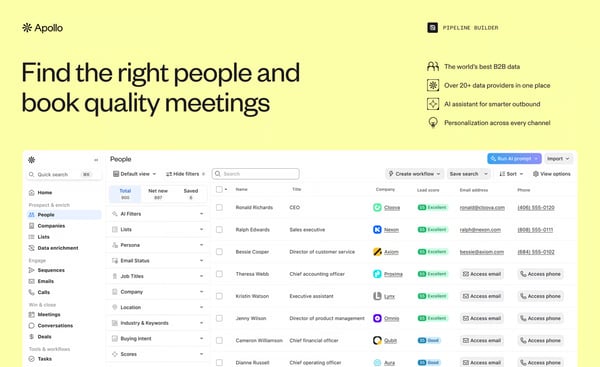
Platform consolidation removes the tool sprawl that fragments outbound workflows across sourcing, verification, and campaign management. G2 members point to an obvious gain, too: contacts verified during sourcing move straight into sequences, with no export step to introduce errors. It also saves meaningful weekly time that was previously spent on manual data entry, list management, and coordination across disconnected platforms.
Switching between LinkedIn and a sequencing tool quietly drains an hour from a prospecting session, and the Chrome extension closes that gap entirely. Reviewers describe adding prospects to active sequences directly from a LinkedIn profile, staying inside the same browser tab. The extension sits inside a daily workflow that keeps coming up in G2 feedback as one of the quieter but valuable parts of the platform. Lead enrichment also automatically finds alternative contacts when emails bounce, keeping sequences active. The engine scans for replacement contacts at the same account the moment a primary email fails, and reviewers mention sequences staying live through failures that would have stalled campaigns on other platforms.
Bounce rates of 10 to 15% for contacts marked as verified are among the commonly raised concerns by Apollo reviewers on G2. Coverage is thinnest outside the US, particularly across APAC and the Middle East, and sustained bounce rates accumulate into real domain reputation damage. For teams operating primarily in supported US and European markets, verified contact accuracy remains at the level that active sequencing depends on. Even so, the verification gap is worth testing before committing to high-volume sends.
Navigation becomes effortful, and the dashboard grows cluttered as campaigns, sequences, and contact lists scale simultaneously. G2 reviewers flag this as a specific issue where the platform slows prospecting momentum during active sessions, hitting hardest for operators managing multiple simultaneous sequences at once. Ease of use scores 87% on G2 against a 92% category average, which lines up with the complaint. Notwithstanding this, the clutter is a surface-level condition, and the underlying workflow functions keep running cleanly beneath it.
Apollo.io is the platform sales teams graduate into when the cost of fragmented outbound tooling finally shows up in pipeline data. It holds a G2 Score of 83 on the Fall 2026 Grid, with a 4.7 rating across 792 reviews, though its NPS of 70 sits below the 75 category average. The targeting depth, CRM sync reliability, and Chrome extension combine into a prospecting operation that is materially different from running those workflows across separate tools. For any team still splitting data sourcing and sequencing across platforms, the consolidation here is more impactful than the feature list makes it look.
“Apollo stands out for how quickly it turns prospecting into action. Instead of spending time jumping between tools for data, enrichment, and outreach, everything sits in one workflow. The ability to filter prospects by very specific criteria and immediately push them into sequences makes outbound efforts faster and more focused, especially for B2B teams.”
- Apollo.io review, Aman S.
“I found that many contacts and their details weren’t always accurate or up to date. The feature that connects to LinkedIn often didn’t refresh when people changed roles or companies, which made parts of my prospecting process take a bit longer. I also ran into a few email bounces when using the email information for certain contacts, which suggested that the email domain Apollo pulled for those contacts wasn’t correct.”
- Apollo.io review, Emilia G.
An SDR team has squeezed everything it can out of email-only sequences, and reply rates have stopped climbing. lemlist is where outbound teams land after that point, with email, LinkedIn, WhatsApp, and phone steps running from one place instead of four separate tools. The reviewer pool is unusually specific: operators who have deliberately moved beyond single-channel outreach.
Multi-channel sequencing across email, LinkedIn, WhatsApp, and phone is where lemlist’s core promise becomes evident in the G2 Data. Reviewers describe building complete outbound flows with conditional branches across channels, all inside a visual builder. Moving a prospect from a LinkedIn connection request to an email follow-up keeps the full sequence inside one tool instead of coordinating across separate platforms. For me, that combination of channel breadth and conditional logic inside a single builder is lemlist’s clearest strength.
I came across a lot of praise for lemlist’s AI personalization feature, and that made me double-check the product features. Reviewers say AI personalization makes each message feel written for that specific lead, not part of a mass blast. Custom images and tailored icebreakers generated automatically per lead remove the manual personalization work that bottlenecks high-volume outreach. Content is rated 83% on G2, showing the message quality that AI personalization produces at scale, including dynamic images, custom variables, and AI-generated icebreakers.
Lemwarm, lemlist’s built-in email warm-up tool, runs quietly in the background, so you only notice its value if it stops working. It maintains sender reputation between campaigns, keeping domains healthy across sustained sending periods. Domain reputation scores 87% on G2. If your sending operation depends on consistent inbox placement across a broad domain set, the passive maintenance here keeps reputation stable and cuts down on regular checks.
The campaign builder is where reviewers describe taking full ownership of sequence logic without engineering support. Switching subject lines automatically when emails go unopened and routing leads between channels based on behavior are the kind of configuration reviewers describe setting up independently through a visual interface. Users point to that self-service configurability as what makes complex sequence management accessible to sales teams building their own outbound motion. It makes me rethink what counts as a sequence builder, because what lemlist delivers here goes considerably further than the category name suggests.
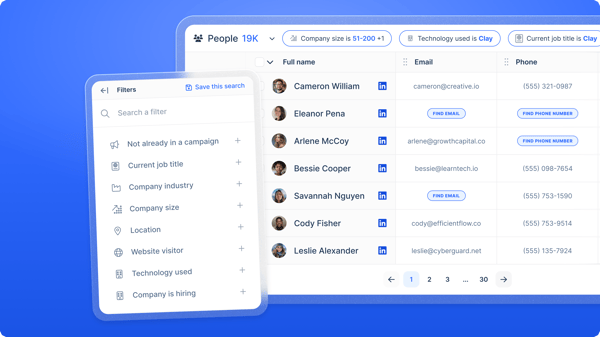
If your outbound stack currently runs prospecting and sequencing as separate operations, lemlist’s built-in people database is the detail that changes that equation. Profile enrichment and email finder sit inside the same platform as sequencing and campaign management, removing the import-export cycle between sourcing and outreach. G2 reviewers appreciate the ability to source, enrich, and sequence contacts within the platform at any stage of the outbound workflow.
A/B testing across subject lines, copy variants, and full sequence steps is where lemlist’s tracking quality is clearest across G2 reviews. Reviewers describe split-testing without difficulty and accessing granular open, click, and reply data at the step level. I’ve rarely seen testing capability this granular sitting inside a multi-channel outbound tool at this price point. Campaign performance scores 88% on G2, suggesting consistent engagement outcomes across actively optimized sequence variants.
Seat count and contact volume both drive costs up quickly, and G2 reviewers flag that credit consumption accelerates during high-volume months. This impacts growing teams that add seats while running data enrichment and multi-channel features at full capacity. Across all of this, the sequencing and personalization output that drives reply rates holds steady, unaffected by the cost structure.
Duplicate contacts are not tracked across simultaneously active sequences. This adds up fast for teams running multiple campaigns against the same contact pool, including old leads from previous outreach cycles. Manual list cleanup becomes a recurring task in an otherwise automated workflow. What carries forward is that the gap is in contact management, and sequence execution moves through it once campaigns are live.
lemlist’s multi-channel sequencing, AI personalization, and conditional campaign logic combine to form something materially hard to replicate with single-channel tools or a stack of disconnected outreach platforms. It holds a G2 Score of 79 on the Fall 2026 Grid, with a Satisfaction score of 88, a 4.6 rating across 388 reviews, and an NPS of 73 that sits just under the 75 category average. For teams that have hit the ceiling of email-only outreach and need a platform built for what comes next, this is the one I’d evaluate first.
“What stands out most to me is how the platform removes technical hurdles without losing that human touch. The lemwarm feature is a real lifesaver for maintaining deliverability, and being able to weave LinkedIn steps directly into my email sequences makes campaign management feel smooth and effortless.”
- lemlist review, Alisha H.
“All of this comes at a price: the credit consumption is very high. Especially when actively using data enrichment and complex multi-channel sequences, credits burn through much faster than expected. This can make budget management and scaling plans quite challenging during high-volume campaigns.”
- lemlist review, Göksu Ü.
An outreach team spins up a dozen secondary domains and has no time to babysit each one through warm-up. Warmy decided that passive, automated warm-up should do the heavy lifting in domain reputation management, and I’ve rarely seen a tool in this category commit to that premise so fully. Cold email operators and agency owners managing large domain sets describe a platform that maintains sender standing on its own between campaigns.
I’ll open with what the review set makes impossible to overlook: the Adeline engine adjusts send volume automatically based on real-time mailbox feedback, and reviewers are specific about this being the detail that matters most. The engine reads signals from major email service providers and scales activity accordingly, keeping warm-up progression natural. Domain reputation scores 93% on G2 Data, reflecting what passive, self-adjusting maintenance produces at scale.
The inbox placement dashboard consolidates Gmail and Microsoft 365 performance into one view. Placement rates, spam risk indicators, and provider-level data all land in a single interface. What drew me to this capability first was how precisely reviewers describe catching deliverability issues at the provider level before they escalate into domain damage. That early identification window separates proactive reputation management from reactive recovery. Placement earns 93% on G2, and reviewers mention that the visibility enables early action.
Multi-domain warm-up runs simultaneously across all connected inboxes, with no additional configuration per domain. This is usually where the manual approach breaks down entirely at agency scale. Reviewers managing secondary domains describe parallel warm-up cycles staying organized without anyone touching a setting. Blacklist and whitelist is rated 94% on G2, capturing a clean sender standing maintained across multiple active domains running concurrently. For operations managing a large roster of client domains, that simultaneous coverage makes the workload tractable without adding headcount.
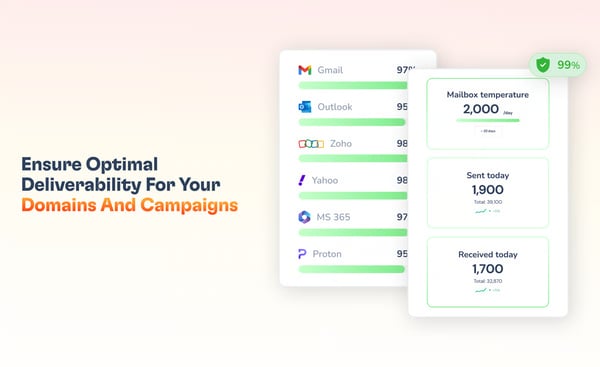
I was drawn to the onboarding speed early in the Warmy review data on G2. Inbox connection, DNS verification, and warm-up initialization take under fifteen minutes without dedicated IT involvement. Reviewers from clinical, legal, and founder backgrounds note that reaching operational readiness quickly and independently is possible. Ease of setup scores 95% and processing time 90% on G2, a sign of how little friction stands between account connection and active warm-up.
If your organization already manages warm-up across a large inbox roster as a daily operational requirement, the dashboard here is built for exactly that workload. Multiple G2 reviewers across clinical, founder, and agency backgrounds describe navigating between inboxes, checking key metrics, and monitoring warm-up status without digging through complex menus or toggling between views. You miss that kind of operational detail only after you have worked without it once. Across a full working week, users say the reclaimed time goes back into product launches, research, and big-picture strategy.
Weekly check-ins with a dedicated account manager show up across Warmy’s G2 reviews more than almost any other capability on this list. Managers share deliverability best practices, interpret mailbox health trends, and provide guidance that the platform interface alone doesn’t. For businesses without in-house deliverability expertise, that human layer adds meaningful value on top of the automation for operations running email at serious scale.
Per-inbox pricing climbs fast for agencies and managed service providers running warm-up across large client rosters, and G2 reviewers name this as a major financial constraint. Anyone operating ten or more active inboxes will find that this accumulates faster than the per-inbox model makes obvious at signup. What stays consistent is the per-inbox value the platform delivers, which holds firm as the roster grows.
The dashboard flags deliverability issues at the provider level but offers no guidance on corrective steps. This hits hardest during active campaigns, when support isn’t immediately available. What holds steady is warm-up output, which carries through unchanged regardless of what the guidance layer shows.
I’ll wrap Warmy up with one clear statement: it is the strongest domain warm-up option on this list for operations where inbox placement is a revenue variable and manual reputation management has already proven it doesn’t scale. It holds a G2 Score of 78 on the Fall 2026 Grid, with a Satisfaction score of 93, a 4.8 rating across 523 reviews, and the highest NPS on this list at 96. A Market Presence score of 64 is what holds the overall score back, not satisfaction. For teams where deliverability is the infrastructure that makes every other part of the outbound stack worth running, I wouldn’t hesitate to back it.
“Managing multiple client domains has become much easier with Warmy. The platform keeps our warm-up activity organized and largely automated, which makes it simpler to stay on top of everything. I also appreciate the clear visibility into sender health and spam risk. Overall, it saves our team from having to constantly monitor deliverability manually.”
- Warmy review, Kareem K.
“What I dislike is not about the core value of Warmy, which is strong, but mainly about the need for more detailed explanations and clearer action recommendations when deliverability issues appear. Sometimes the results show that there is a problem with a specific provider, such as Microsoft 365, but it is not always immediately clear what exact steps should be taken to improve the situation. More detailed diagnostics, clearer historical comparisons, and more practical recommendations inside the dashboard would make the platform even stronger. There were also occasional technical issues, but the support team was responsive and helpful in addressing them. Overall, Warmy is a valuable tool, but I would appreciate more transparency and deeper provider-specific insights. Besides, Warmy is a bit too expensive.”
- Warmy review, Eyal I.
A growing list pushes a small team toward per-contact pricing it can’t afford, just as email, SMS, and WhatsApp all need to run from one account. Brevo Marketing Platform makes multi-channel marketing affordable without cutting corners on the channels that matter. SMB owners and nonprofit teams describe a platform where per-email billing changes how list growth feels financially, and that structural difference is why it belongs on this list.
Per-email billing is the pricing detail reviewers return to most, especially those managing large contact lists on tighter budgets. What the review data handed me was a picture of a platform where the pricing model itself is the differentiator, the commercial logic that makes list growth feel safe and predictable. The ability to maintain large contact bases without paying per contact keeps Brevo viable as lists scale beyond what competitors charge per contact. Reviewers cite this as the reason Brevo holds up financially across growing SMB and nonprofit operations running consistent email volumes.
Brevo consolidates email, SMS, and CRM in one place, removing the back-and-forth that builds up across disconnected tools. A single dashboard manages transactional emails, marketing campaigns, and contact management simultaneously. Campaign performance clocks in at 91% on G2, indicating consistent cross-channel results across email and SMS sends from a single account.
The drag-and-drop builder gets praised in specific time terms across the review set. Campaign builds take half the time of other tools, and clean rendering across devices holds without manual formatting corrections after each send. Content posts 90% on G2, and reviewers point to professional output as a consistent outcome regardless of design background or technical skill level. Speed-to-send claims are common in this category. Reviewer-level specificity behind them is not.

Transactional email reliability is the strength that shows up most credibly across the Brevo data. At 91% for open rate on G2, critical sends land in primary inboxes consistently across transactional send types. Reviewers running WordPress sites and SaaS products report that confirmations, password resets, and download links reach recipients without deliverability intervention, even at high send frequencies.
API and SMTP documentation quality merits specific mention throughout the review set, with reviewers noting clean integrations with WordPress, Zoho, and Google Sheets without developer involvement. Domain reputation scores 89% on G2, reflecting a stable sender standing maintained across integrated outbound operations running at consistent volume. If your stack already connects to those tools, the integration layer here removes the last friction point between setup and active sending.
Brevo’s automation for lifecycle campaigns and segmented sends is where non-technical users configure campaigns entirely on their own. Welcome sequences and re-engagement flows go live via a visual builder that requires no expertise in conditional logic to operate effectively. I’d describe this as the automation layer that closes the gap between what a small team can set up itself and what it would otherwise need a specialist to configure. Placement earns 89% on G2, which shows that reliable inbox delivery holds for automated sends built without technical involvement.
Multi-condition workflow branching is where Brevo’s automation builder runs out of depth. G2 reviewers who encounter this are building B2B nurture sequences that depend on lead score, CRM stage, and engagement data operating in combination. For programs where branched logic drives meaningful conversion outcomes at scale, the visual builder doesn’t go far enough to support the complexity involved. Welcome sequences and re-engagement flows within the builder’s range run cleanly and deliver to the inbox reliably.
Reporting stops at campaign-level metrics and doesn’t extend to granular per-step or journey-level data. G2 reviewers raise this when trying to diagnose where engagement drops off inside automated sequences. Data-driven marketers optimizing at the step level will need external analytics tools to fill that gap before each iteration cycle. For what it’s worth, campaign-level open, click, and bounce data is still readily available, which covers the reporting needs of simpler, single-path programs.
Taking stock, Brevo belongs on this list on the strength of per-email billing, transactional reliability, and a multi-channel stack that holds together at a price point competitors cannot match. It holds a G2 Score of 78 on the Fall 2026 Grid, built on a Market Presence score of 81 and a Satisfaction score of 75, with a 4.5 rating across 1,089 reviews. Its NPS of 77 sits just above the 75 category average. For teams that have been priced out of multi-channel marketing by per-contact models elsewhere, I’d put this near the top of the shortlist.
“I like that the Brevo Marketing Platform is user-friendly and affordable. It helps me reach customers’ inboxes effectively and is cost-effective, which is crucial for my marketing efforts. I also appreciate the seamless API integration, which allows me to connect SMTP with third-party apps without hassle, keeping my emails from getting flagged and reducing the need to warm up my accounts. Additionally, the initial setup was easy, which made the transition smooth.”
- Brevo Marketing Platform review, Amer H.
“First, the marketing automation builder is solid for simple journeys but becomes restrictive for complex, multi-condition workflows. For example, we can’t easily create branched automation based on multiple triggers like lead score, CRM deal stage, past event attendance, and email engagement all at once. More advanced if/then logic, delay customization, and nested automation steps would help us run more precise B2B nurture sequences. Second, CRM integrations, including with our SalesBabu CRM, are functional but not deeply real-time. We can sync contacts and basic engagement data, but changes like lead status updates, unsubscribe events, or meeting outcomes don’t flow back and forth instantly. Having true two-way sync would eliminate manual exports/imports and let sales follow up faster on hot leads.”
- Brevo Marketing Platform review, Dulude W.
A Shopify merchant outgrows a generic email platform and needs one built around how its customers actually behave. Klaviyo is where e-commerce teams land, and what merchants describe is a platform where customer behavior feeds directly into every segmentation and flow decision automatically. The difference that makes to performance becomes visible from the first send.
The Shopify integration depth caught me off guard in the G2 reviews, automatically syncing purchase history, browsing behavior, and engagement data without manual configuration. G2 reviewers highlight this as the foundation that makes every downstream segmentation and flow decision more precise and reliable. The data flowing in from Shopify removes the manual enrichment step that typically sits between commerce platforms and marketing tools across e-commerce operations.
After evaluating multiple email deliverability tools, I’m fairly skeptical of segmentation claims by now, but the precision Klaviyo delivers here earns its praise. Reviewers note they can build audience cuts by lifecycle stage, purchase behavior, and engagement signals all at once, which reduces the wasted send volume that builds up when targeting stays broad. Open rate is rated 91% on G2 Data, and reviewers point to that precision as the reason engagement outpaces broader send strategies at comparable volume.
Abandoned cart, welcome, and re-engagement flows go live faster than reviewers anticipate, a notable payoff given how much conditional logic is running underneath. The flow library removes the blank-canvas problem, and sequences run reliably once configured without ongoing attention to maintain performance. Campaign performance clocks in at 92% on G2, demonstrating engagement outcomes across automated flows. If your team already runs Shopify, you get a flow engine that draws directly from live store data, with customer behavior feeding into trigger logic the moment it happens.
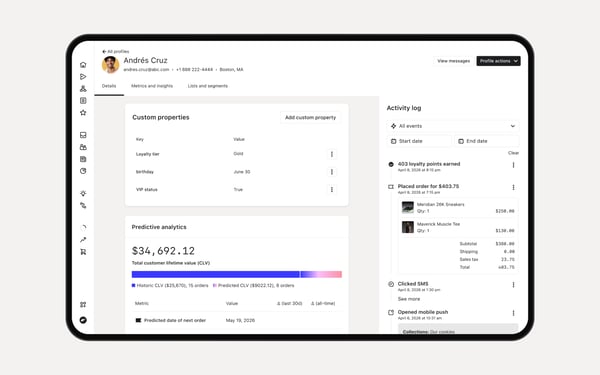
The email builder produces polished mobile and desktop output without design expertise, and reviewers describe professional rendering as a consistent outcome across campaign types and account sizes. Content posts an 86% score on G2, and I take that as an operational win. Accessible build quality paired with precise segmentation is a combination this category rarely delivers without asking teams to compromise somewhere.
Analytics dashboards surface campaign and flow performance with enough clarity that G2 reviewers lean on them daily, which tells me the reporting architecture here is well thought through. G2 reviewers note the ability to pull actionable campaign and flow insights without digging through layered menus or exporting data to external tools. Visibility into open rates, click rates, and revenue attribution supports meaningful optimization decisions directly from the platform’s surface.
Unified email and SMS, running off the same audience data, is something G2 reviewers describe as transformative for retention operations that manage multiple customer segments. Coordinated send logic keeps customer communications coherent across both channels without maintaining separate audience lists or duplicating audience management work. That consolidation came up repeatedly across the data I worked through, and the recurring operational burden it removes for anyone managing both channels is what makes it more than a convenience feature.
Active profile count and sending volume both feed into Klaviyo’s pricing simultaneously. The G2 review base describes costs climbing faster than anticipated as lists grow beyond initial projections. The combination hits growing e-commerce brands hardest, where expanding the contact base is a core growth objective. A fair point, but behavioral segmentation and automated flows run at full depth across all paid plan tiers.
Multi-condition logic, nested flows, and complex trigger configurations take significant time to master. Several G2 reviewers flag this ramp-up as the steepest part of onboarding, particularly for anyone without a prior background in behavioral email marketing, and ease of setup scores 85% on G2 against a 91% category average. The gap between expectation and operational readiness is widest in the first week of account setup. Even then, the flow library and pre-built sequences are fully operational from the moment the platform goes live.
I’d put Klaviyo in a specific bracket: platforms that reward e-commerce teams that invest in setting up the data layer correctly. It holds a G2 Score of 76 on the Fall 2026 Grid, driven by a Market Presence score of 94 while Satisfaction sits at 57, and only 164 reviews are counted in this category. Its NPS of 70 and 4.6 rating tell a warmer story among the reviewers who are there. The depth of the Shopify integration, segmentation precision, and flow automation form an engine that becomes more valuable as the customer database grows, which is why I’d reserve it for e-commerce operations on Shopify where behavioral data should drive campaign logic.
“What I like most about Klaviyo is how well it connects with the rest of an e-commerce stack, especially Shopify. The integration is seamless, and it pulls in customer behavior, purchase history, and engagement data automatically. That consolidated data makes it much easier to build meaningful segments and customer journeys. The platform itself is also very intuitive. Building campaigns and automated flows is straightforward, and the flow library gives you frameworks to work with so you can quickly customize for your brand. On top of that, Klaviyo’s revenue attribution and analytics make it very clear what your emails and flows are generating, which helps you understand exactly how email is impacting store revenue.”
- Klaviyo review, dorothy N.
“One thing I don’t like about klaviyo is that the pricing can get expensive as your contact list grows. Some advanced features also take time to fully understand, especially when setting up more complex flows. The UI can feel a bit overwhelming at first. Also reporting is good but can be slightly confusing in the beginning.”
- Klaviyo review, Tejas K.
Segmentation is only as sharp as the customer data behind it. Explore the best customer data platforms to unify behavioral signals into richer profiles for every send.
A multi-channel program owner has been on the same platform for years and still finds it getting more capable. Dotdigital does something most enterprise marketing platforms talk about but few deliver over years of use: it keeps getting better the further a team goes into it. Marketing directors and program owners describe segmentation depth, automation flexibility, and support quality compounding in value well past the onboarding phase.
I’m reading Dotdigital differently from the rest of this list: the reviews lead with automation flexibility and program depth, with design and templates coming up later. The drag-and-drop program interface maps customer journeys across email, SMS, and push. Built-in decision points and timing rules handle complex trigger-based flows that non-technical marketers can configure directly. Open rate comes in at 89% on G2 Data, capturing what coordinated channel delivery produces when the underlying journey logic is built correctly.
The email builder is where the tool earns its daily value. G2 reviewers describe Dotdigital’s email builder as fast to use day to day, with dynamic content blocks and drag-and-drop speed combining into a workflow that moves quickly. Nifty Images integration adds creative visual elements without code, and the output holds cleanly regardless of who is building the campaign. Content is rated 85% on G2 Data, reflecting the quality of what reaches inboxes across campaign types. If your campaigns require on-brand visual precision at volume, the builder here handles it without the manual correction overhead that slows production on less capable editors.
Behavioral data, contact attributes, and campaign engagement history combine to form audience segments that sharpen as the database grows. I’ll call out segmentation specifically because G2 reviewers describe it as one of the platform’s most powerful capabilities. Campaign performance sits at 89% on G2, and reviewers tie that to messaging tailored to specific groups instead of one generic send.
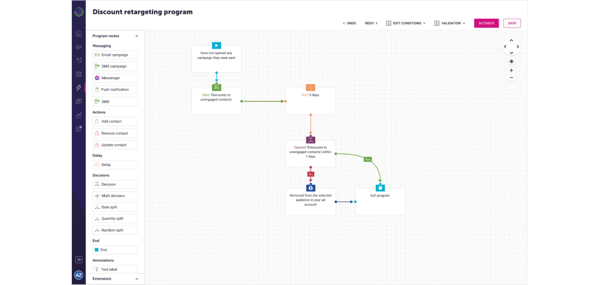
Support runs three layers deep across live chat, Winston AI, and dedicated account managers, and reviewers note issues resolved within hours across all three channels. Account managers proactively share optimization recommendations without waiting for problems to appear first. Quality of support scores 93% on G2, above the 91% category average. Digging through the reviews, it was not lost on me that proactive vendor engagement at this level is rare in a category where most support models are reactive by design. For marketing teams without specialist backup, that responsiveness changes how confidently campaigns are executed under pressure.
If you are managing a database of significant scale where inbox placement at volume is a daily operational concern, the deliverability track record is the detail worth examining most closely. Reviewers return to it with real conviction across long platform tenures, and that tells me the infrastructure here is solid. Domain reputation is rated 87% on G2, and reviewers managing large databases report steady inbox placement.
Adobe Commerce and Magento integrations keep contact and behavioral data synced automatically, with commerce activity, including browse behavior and transaction history, flowing into segmentation and journey logic. I found myself thinking about how many reconciliation cycles this removes for teams managing commerce data across separate systems. Reviewers describe the integration as something that saves real time, and the way they say it suggests they’ve been relying on it for a while.
Multiple G2 reviewers have noted that segmentation updates lag in real time and campaign duplication stalls during production builds. Deadline-driven marketing functions with campaigns already in flight absorb this most directly, particularly when multiple campaigns are running simultaneously. Through all of this, the lag is a processing speed condition, and segmentation accuracy comes through every cycle intact.
Missing revenue tracking, inconsistent analytics on automated email activity, and restricted download options on certain report types are the clearest shortfalls G2 users point to when measuring program performance in detail. Analytics-heavy marketing functions run into this boundary when building cases for budget or optimization decisions. Despite this, the gap lives in the analytics layer, and campaign execution runs at full capacity regardless.
On the whole, Dotdigital’s program builder, segmentation depth, and three-layer support model are a combination that enterprise marketing teams won’t find replicated at this level elsewhere on this list. It holds a G2 Score of 73 on the Fall 2026 Grid, with a Satisfaction score of 68, a 4.4 rating across 474 reviews, and an NPS of 69 that sits below the 75 category average. The platform delivers more the further a team goes into it, and it’s the one I’d shortlist for teams running complex multi-channel programs.
“I like the possibility of creating great segmentation to send more targeted emails to my database, plus the design element Dotdigital has to offer, it has enabled us to create on brand engaging emails that have generated a much better response. The updated AI features have also had an improvement on email campaigns that have been sent and we have seen an increase in the performance of Dotdigital.”
- Dotdigital review, Liam M.
“The two main areas for improvement are background processing speeds. Program segmentation updates can be slow to process, meaning changes don’t always reflect in real-time. Additionally, copying existing email campaigns frequently hangs or takes a bit too long to duplicate, which adds minor friction to an otherwise smooth daily workflow.”
- Dotdigital review, Mathias B.
A small team needs its email tool to talk to a dozen other apps without anyone writing code. Intuit Mailchimp has survived two decades of category disruption by doing one thing better than almost any competitor: it connects to everything without making connectivity feel like a project. None of it requires a developer or a dedicated email specialist, and that combination is why nothing in the category has displaced it.
The tool integrates with Zapier, Planning Center, e-commerce platforms, and hundreds of other tools with no need for custom development. Connections run cleanly across tools without extended configuration at any stage of setup. G2 reviewers note how this integration removes manual data transfer from the marketing workflow entirely. If you have ever lost hours to copy-pasting contact data between platforms before a campaign goes out, the ecosystem here keeps that data in sync automatically.
What I find most refreshing about Intuit Mailchimp’s builder across the reviews is how users describe getting a polished campaign live in fewer steps than most tools require, with no design background needed. Content scoring 86% on G2 Data reflects the email quality G2 reviewers point to as a reliable output across campaign types. Pre-built templates provide a clean starting point, and the drag-and-drop interface handles layout, images, and content blocks without requiring code or design expertise.
Automation ease is a serious strength here, and the volume of review feedback on this point surprised me. Reviewers describe welcome emails, sales sequences, and re-engagement flows going live through a visual builder without needing documentation or outside guidance at any stage. Processing time clocks 90% on G2 Data, and non-technical users describe setting up functional automated journeys on their own from first login without pulling in a specialist.
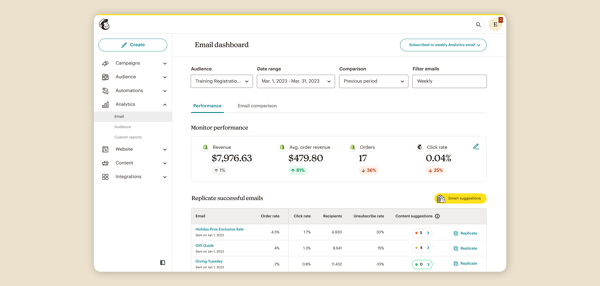
I’d normally roll my eyes at AI campaign-generation claims, but the asset-pulling capability in Intuit Mailchimp keeps getting called out as useful within the workflow. The AI automatically pulls brand assets from a website and suggests campaign optimizations to sharpen send decisions across active campaign cycles. Open rate gets 88% on G2 Data, demonstrating strong inbox engagement across AI-assisted sends. If your team runs frequent campaign cycles in which optimization decisions slow production, the tool’s AI feature removes the deliberation step that typically sits between draft and send.
Segmentation and tagging across overlapping contact groups are daily operational necessities for G2 reviewers, and the platform handles them cleanly. Importing contacts, building segments, and targeting specific groups run without pre-campaign list work slowing production. Campaign performance sits at 90% on G2 Data, and that figure reflects how directly audience precision drives engagement outcomes for teams running varied send programs.
Intuit Mailchimp’s reporting capabilities come through clearly in the analytics feedback, and my view hardened considerably after going through the G2 review data on this platform. Opens, clicks, and performance data land clearly in one place, giving senders enough visibility to iterate on subject lines, send times, and audience segments directly inside the platform. That feedback loop builds into measurable performance improvements across sustained campaign operations.
Costs scale with both contact list size and send volume, and this draws the loudest criticism in recent Mailchimp G2 reviews. Lower-tier plans feel thin compared to competitors at similar price points, and bills climb faster than anticipated as lists grow past entry-level thresholds. Nonprofits and small businesses working toward list growth goals bear this burden in every billing cycle. What the record shows is that campaign deliverability and automation reliability hold at the entry-level tiers regardless.
As I dug into G2 reviews, I noticed that formatting images and text together in complex layouts is difficult in this tool. G2 reviewers producing brand-sensitive campaigns describe the builder as behaving inconsistently when pushed beyond standard template structures, and more manual intervention than most users expect is required before a campaign is ready to go out. What remains steady is that the inconsistency is specific to complex layout builds, and standard template sends perform well.
Mailchimp sits in a specific bracket: the most reliably invisible email marketing platform in this category. It holds a G2 Score of 71 on the Fall 2026 Grid, built on a Market Presence score of 81 and 2,428 reviews, while Satisfaction sits at 61 and the NPS of 52 is well below the 75 category average. The integration ecosystem, AI-assisted campaign generation, and deliverability infrastructure all do their jobs on their own, with no dedicated management required. For small teams where email needs to run independently, this is the platform I’d back before looking anywhere else.
“I love how easy Mailchimp makes our email marketing, especially with the workflows you can build. We’re currently using those workflows for our welcome emails as well as our sales emails, and they’ve been simple to set up and manage. I also appreciate the AI suggestions for optimizing our marketing campaigns, since they help guide improvements without adding extra work. On top of that, support has been helpful the few times I’ve needed to reach out.”
- Intuit Mailchimp review, Madison M.
“Pricing can scale up quickly as your list grows, and sometimes it feels like key features are locked behind higher tiers. A few parts of the UI are not as intuitive as they should be (especially automations), and the editor can be a little limiting if you want pixel-perfect layouts. Support can also feel slow depending on the plan, so when something breaks, you end up troubleshooting more than you want.”
- Intuit Mailchimp review, Diego A.
A sending program depends on consistent inbox placement, and one unverified list can undo months of reputation work. ZeroBounce handles accuracy, speed, and deliverability management in one place, which is harder to find than it sounds. Cold email operators and marketing teams describe a platform that processes large lists fast enough to fit inside an active campaign workflow.
Based on my evaluation of several email deliverability tools, ZeroBounce’s verification accuracy is what sets it apart in this category. Invalid, risky, disposable, and spam-trap addresses are identified before campaigns are sent, and reviewers report noticeable improvements in bounce rates and deliverability after implementation. Domain reputation scores 94% on G2 Data, showing what consistent pre-send verification produces across high-frequency sending programs.
Bulk verification runs complete quickly across large contact databases, with clear removal insights landing immediately after each run. Processing time scores 94% on G2, a number that matters most for campaigns on tight timelines where list validation can’t sit in a queue for hours. Cleaned lists move directly into active campaign use after each verification run.
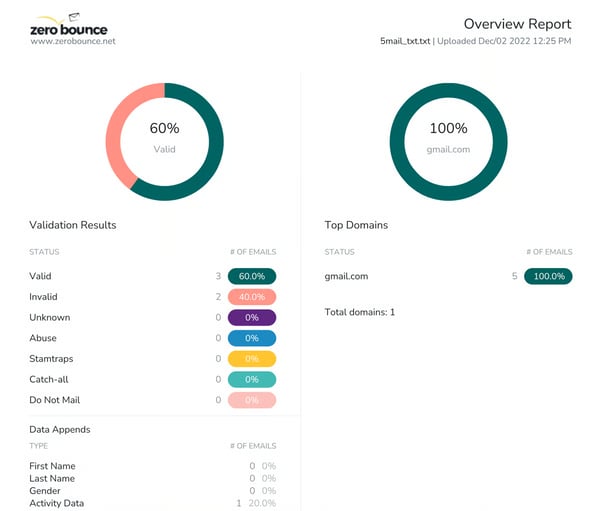
API connectivity with HubSpot, Clay, and Klaviyo handles real-time validation at form submission and CRM update points, keeping data clean inside the CRM throughout. Lists stay clean at the point of entry, and invalid contacts never reach the sending queue. Open rate scores 92% on G2, aligning with strong inbox engagement across campaigns running on API-validated lists. The API connectivity stood out most to me in this batch. Validation happening automatically at the point of data entry is a fundamentally different operational posture from running periodic bulk cleans.
Warm-up, domain health, and list verification sitting under one subscription is where ZeroBounce changes the economics of deliverability management. Managing sender reputation, inbox placement monitoring, and list hygiene from one platform keeps deliverability operations consolidated, with one vendor, one billing relationship, and one dashboard. Blacklist and whitelist earned 94% on G2, signaling a clean sender standing maintained inside a single platform.
If you are running email at serious scale without a dedicated deliverability function, ZeroBounce’s support access is a standout. G2 reviewers highlight live chat with real agents who respond quickly and resolve questions directly, and requests are not routed through automated tiers. Quality of support scores 97% on G2. For operations where list validation is tied to a campaign deadline, that responsiveness reduces the risk of a support bottleneck holding up a time-sensitive send.
Now to my favorite part: ease of onboarding. The interface handles uploading, verification, and result downloads without technical configuration, and reviewers report completing full verification runs independently on first use. Ease of setup scores 96% on G2. For marketing and sales operations where tool adoption is a recurring friction point, this simplicity removes the implementation overhead that typically delays time to value.
Credit pricing builds quickly for high-volume users, with catch-all addresses consuming double credits without guaranteed results. Large database runs deplete monthly allocations faster than anticipated, and ZeroBounce G2 reviewers see this most in high-volume verification. High-frequency verifiers are impacted the most, since monthly credit consumption directly affects unit economics. What doesn’t shift is that API validation and clean list output hold across every standard list run.
Verified contacts can still produce bounces after a list run completes. Several G2 reviewers highlight addresses that return clean verification results but fail on send, adding a manual spot-check layer before campaigns go out. B2B outbound functions in domain-sensitive campaigns carry the heaviest exposure when residual bounces accumulate, creating reputation risk. What’s dependable is that the issue affects only a subset of addresses, and the list as a whole clears at the level campaigns depend on.
If your operation treats email deliverability as a revenue variable and not a background infrastructure problem, ZeroBounce is where this list ends for me. It holds a G2 Score of 69 on the Fall 2026 Grid, the lowest of the ten, but that reflects a Market Presence score of 59 rather than weak satisfaction, with a Satisfaction score of 78, a 4.7 rating across 240 reviews, and an NPS of 81. Verification accuracy, processing speed, and the consolidated deliverability stack are the combination that makes the difference when a single send to an unverified list can undo months of domain reputation work.
“The email verification accuracy is very strong, and the platform consistently identifies invalid, risky, or disposable email addresses before campaigns go out. Since implementing it, we’ve seen noticeable improvements in bounce rates and overall deliverability. The interface is clean and easy to navigate, so bulk verifications are simple even for non-technical users. The API integration has also been smooth, making it straightforward to automate validation workflows across forms and CRM systems. Another major advantage is the added data insights, such as spam trap detection and email activity scoring. These features help us make better decisions around list hygiene and engagement.”
- ZeroBounce review, Rene M.
“Catch-all results still need manual judgment, meaning it isn’t always a fully automated decision engine. At scale, credit usage can add up quickly, so admins must monitor usage closely, especially with multiple teams uploading lists. The UI is functional but not very modern or fast. Some non-technical stakeholders think validation alone ensures inboxing, but that isn’t true.”
- ZeroBounce review, Daniel R.
|
Software |
G2 rating |
Free plan |
Ideal for |
|
Constant Contact |
4.1/5 |
No |
Small businesses looking for an easy-to-use email marketing platform with automation, social posting, and 300+ integrations |
|
Instantly |
4.8/5 |
No |
Sales teams scaling cold email outreach with unlimited sending accounts, built-in warm-up, and AI sequencing |
|
Apollo.io |
4.7/5 |
Yes |
B2B sales teams that need a combined prospecting database, email sequencing, and CRM integration in one platform |
|
lemlist |
4.6/5 |
No |
Sales teams running personalized multi-channel outreach across email, LinkedIn, and calls with a built-in warm-up included |
|
Warmy |
4.8/5 |
No |
Marketers and outreach teams looking to automate inbox warm-up and protect sender reputation across major email providers |
|
Brevo Marketing Platform |
4.5/5 |
Yes |
Budget-conscious teams running multi-channel campaigns across email, SMS, and WhatsApp without paying per contact |
|
Klaviyo |
4.6/5 |
Yes |
E-commerce brands that need deep segmentation, predictive analytics, and automated flows tied to customer purchase behavior |
|
Dotdigital |
4.4/5 |
No |
Enterprise and mid-market teams running personalized cross-channel marketing across email, SMS, and paid media |
|
Intuit Mailchimp |
4.3/5 |
Yes |
Growing businesses that need a reliable, straightforward email marketing tool with built-in templates and audience insights |
|
ZeroBounce |
4.7/5 |
Yes |
Marketers and outreach teams that need accurate email list verification, deliverability testing, and blacklist monitoring |
* These email deliverability tools are top-rated in their category, based on G2’s Fall 2026 Grid® Report and market reputation.
Got more questions? G2 has the answers!
Painless setup means reaching active sending without IT involvement. Warmy and Brevo Marketing Platform lead here. Warmy reviewers describe inbox connection, DNS verification, and warm-up initialization finishing in under fifteen minutes, and it scores 95% for ease of setup on the Fall 2026 Grid. Brevo Marketing Platform scores 92% for ease of setup, and reviewers describe clean API and SMTP connections to WordPress and Zoho without developer help. Intuit Mailchimp adds automations that go live from first login without outside guidance.
Campaigns usually stop when bounce or spam signals cross a limit that nobody was alerted to. ZeroBounce reviewers describe validating lists to keep cold campaigns from auto-pausing at a 7% bounce rate, and it scores 93% for alerts on the Fall 2026 Grid, the highest of the ten. Apollo.io reviewers report bounce rates of 10 to 15% on contacts marked as verified, which is worth testing before high-volume sends. Dotdigital reviewers describe slow background processing where changes do not always reflect in real time.
Adoption follows interfaces that non-technical marketers can use without training. Brevo Marketing Platform and Dotdigital lead, scoring 93% and 90% for ease of use on the Fall 2026 Grid. Brevo Marketing Platform reviewers describe campaign builds taking half the time of other tools, and Dotdigital reviewers describe an email builder that is fast to use day to day. Constant Contact and Intuit Mailchimp both add drag-and-drop builders with pre-built templates that need no design background.
Instantly leads, with the highest satisfaction score of the ten at 98, a 4.8 rating, and an NPS of 91 across 2,619 reviews on the Fall 2026 Grid. Reviewers describe warm-up and mailbox rotation that keep sender scores steady at volume, and it scores 94% for campaign performance. Apollo.io adds a 4.7 rating and combines sourcing, verification, and sequencing for B2B teams building their own prospect lists.
Trust shows up in advocacy scores. Warmy posts an NPS of 96 on the Fall 2026 Grid, the highest of the ten. ZeroBounce reaches 81 and Brevo Marketing Platform 77, both above the 75 category average. Constant Contact holds the highest G2 Score at 97 on the strength of market presence, though its NPS of 48 shows more mixed advocacy among reviewers.
Founders running outreach themselves need tools that work without a specialist. lemlist and Apollo.io fit best. lemlist reviewers describe building multi-channel sequences with conditional logic across email, LinkedIn, WhatsApp, and phone without engineering support. Apollo.io reviewers describe full outbound campaigns going from list build to first send in under thirty minutes. Klaviyo suits founders of Shopify stores, where purchase history and browsing behavior sync into automated flows without manual setup.
Warmy, Instantly, and ZeroBounce cover both warm-up and placement checks. Warmy automates warm-up through its Adeline engine and shows Gmail and Microsoft 365 placement in one dashboard, scoring 93% for placement on the Fall 2026 Grid. Instantly pairs an automated warm-up network with inbox placement tests and blacklist monitoring. ZeroBounce runs warm-up, domain health, and list verification under one subscription. lemlist covers warm-up through Lemwarm, which maintains sender reputation between campaigns.
Weekly volume across accounts depends on how mailboxes connect and how send load is distributed. Instantly leads, with unlimited mailbox connections without per-user fees and rotation logic that spreads sends across connected accounts. lemlist adds multi-channel sequences across email, LinkedIn, WhatsApp, and phone, though reviewers flag high credit consumption in heavy months. Apollo.io builds and enriches the contact list inside the same platform, with 792 reviews on the Fall 2026 Grid.
Placement scores among these ten top out at 93% on the Fall 2026 Grid, so reliable inbox delivery comes from combining monitoring, warm-up, and clean lists. Warmy leads at 93%, and reviewers describe provider-level spam risk indicators that surface problems before they escalate. ZeroBounce scores 92% and cleans lists before sends, with reviewers reporting noticeable improvements in bounce rates. Brevo Marketing Platform scores 89%, with transactional sends landing in primary inboxes across WordPress and SaaS setups.
Cold email at that volume needs costs that stay flat and a sender reputation that holds. Instantly and lemlist fit best. Instantly scores 94% for domain reputation, and reviewers running agency-scale operations describe volume growing without proportional cost increases. lemlist scores 87% for domain reputation, and reviewers describe Lemwarm maintaining sender reputation between campaigns while AI personalization keeps messages from reading like a mass blast.
You have seen how each platform handles authentication, list hygiene, and inbox placement visibility, and where each one leaves gaps. What matters now is whether your domain reputation can survive filtering rules that change faster than sending practices are updated.
Email remains the highest-ROI channel in most marketing stacks, but that position isn’t guaranteed. Inbox placement rates are tightening. Gmail, Outlook, and Yahoo are all raising their filtering thresholds. Authentication requirements that were optional two years ago are now baseline expectations.
The shift worth watching over the next 12 to 24 months is reputation-based filtering at both the domain and IP levels. Shared infrastructure that worked in 2023 is a liability heading into 2027. Teams that have not completed DMARC enforcement or tightened their list hygiene cadence are carrying more risk than their current open rates indicate.
The tools on this list cover that range. Pick the one that matches where your biggest exposure sits right now, whether that’s list hygiene, authentication gaps, inbox placement visibility, or warm-up at scale.
Ready to measure what better deliverability is actually earning you? Explore the best email tracking software to see how recipients open, click, and reply.