When evaluating the best cloud management platforms, the decision is not about feature breadth. It’s about whether your teams can maintain control as cloud usage scales.
Differences between tools become clear in daily operations. Can teams trust cost data, enforce policies without manual work, and clearly understand usage across accounts and providers? Once environments span multiple teams, the wrong platform creates blind spots that lead to higher costs, inconsistent governance, and increased security risk. This is reflected in the market, projected to grow from roughly $21 billion in 2024 to about $54.8 billion by 2030 as demand for unified control increases.
After reviewing large volumes of user feedback and working with teams managing cloud operations under real constraints, a clear pattern emerges. The right platform depends on reliable cost visibility, enforceable policy controls, and automation that reduces operational effort without adding complexity. Strong platforms help teams act on accurate data and standardize workflows. Others rely on partial integrations and manual follow-ups.
In this guide, you’ll see which cloud management platforms fit specific use cases, so you can choose the right tool based on how your team manages cost, governance, and multi-cloud complexity.
*These cloud management platforms are top-rated in their category based on G2’s Winter 2026 Grid® Report. I’ve included their strengths and use cases to help you choose based on cloud governance, cost, security, and operations.
Cloud management platforms help turn fragmented cloud environments and scattered controls into a clear operating model that teams can effectively govern. The right platform helps organizations understand how cost, security, compliance, and performance connect and keep cloud operations from drifting as environments scale.
The strongest cloud management platforms go beyond basic visibility or monitoring. They show where spending is accumulating, how policies are applied, who owns each environment, and what actions need to be taken next. Whether it’s enforcing governance across multiple clouds, surfacing risky configurations, or automating controls that would otherwise rely on manual checks, strong platforms bring clarity.
It’s not only large enterprises that rely on these tools. G2 Data shows adoption across small teams, mid-market companies, and large organizations alike. While the scope of use differs, the underlying need is the same: managing cloud complexity without slowing teams down. Many platforms support gradual adoption, helping teams gain control without introducing operational overhead.
Ultimately, the best cloud management tools provide what modern cloud operations depend on: visibility into what’s running, predictability in how environments are governed, and confidence that cost, security, and compliance aren’t quietly slipping out of alignment.
I used G2’s Grid Reports to shortlist the top cloud management platforms based on real user satisfaction scores and market presence across small teams, mid-market organizations, and enterprise environments.
I then used AI to analyze hundreds of verified G2 reviews and extracted recurring feedback patterns around what matters most in real-world cloud operations, such as cost visibility, governance and policy enforcement, multi-cloud support, automation depth, security and compliance controls, integrations with cloud providers and monitoring tools, and the quality of coordination between infrastructure, finance, and security teams. This helped me identify which platforms genuinely improve cloud control and which tend to create friction as environments scale.
Since I haven’t personally used all of these platforms, I cross-checked my findings with insights from cloud architects, FinOps teams, security practitioners, and IT operations leaders who actively work with them. The visuals and product references included in this article are sourced from G2 vendor listings and publicly available product documentation.
After analyzing hundreds of verified G2 user reviews, studying real-world cloud operating models, and speaking with cloud architects, FinOps leaders, security teams, and IT operations professionals, the same themes kept recurring. Here’s what I prioritized when evaluating the best cloud management software:
Based on these criteria, I narrowed the list to platforms that reliably support cloud teams with clarity, control, and long-term reliability. No single platform excels in every area, so the right choice depends on whether your organization prioritizes cost governance, security enforcement, operational visibility, or hybrid control.
Below, you’ll find authentic user reviews from the Cloud Management Platforms category. To appear in this category, a tool must:
This data was pulled from G2 in 2026. Some reviews may have been edited for clarity.
Google Compute Engine is built for teams that need flexibility and scale while retaining direct control over virtual machines within the Google Cloud ecosystem. Instead of hiding infrastructure behind preset layers, it gives teams direct control over how workloads behave. This design supports a wide range of use cases, from small application environments to complex, distributed systems running at scale.
Security and recovery are built into how teams operate the platform. Cloud security and cloud backup and recovery both score 91% on G2, placing them above category averages. G2 feedback references snapshot management, disk-level backups, and recovery workflows that allow teams to restore services without redesigning infrastructure or introducing external dependencies.
Virtual machine configuration is frequently discussed in user feedback. Teams describe the ability to adjust CPU, memory, and storage independently as workloads evolve, rather than re-architecting instances. This flexibility supports environments with changing demand, including seasonal traffic, batch processing, and mixed-performance workloads.
Integration across Google Cloud services shapes daily usage. Cross-system integration scores 90% on G2, reflecting how Google Compute Engine connects with networking, monitoring, logging, and identity services. Reviewers note that this reduces operational handoffs when managing systems that span multiple services or regions.
Reviews consistently highlight operational efficiency at scale. Teams mention spinning up virtual machines quickly, expanding capacity without physical hardware, and relying on built-in monitoring and logging to maintain application stability. These workflows are often linked to shorter deployment cycles and fewer interruptions during growth.
This flexibility is reflected in who uses these platforms. According to G2 Data, about 35% of users come from small businesses, 33% from mid-market organizations, and 32% from enterprises.
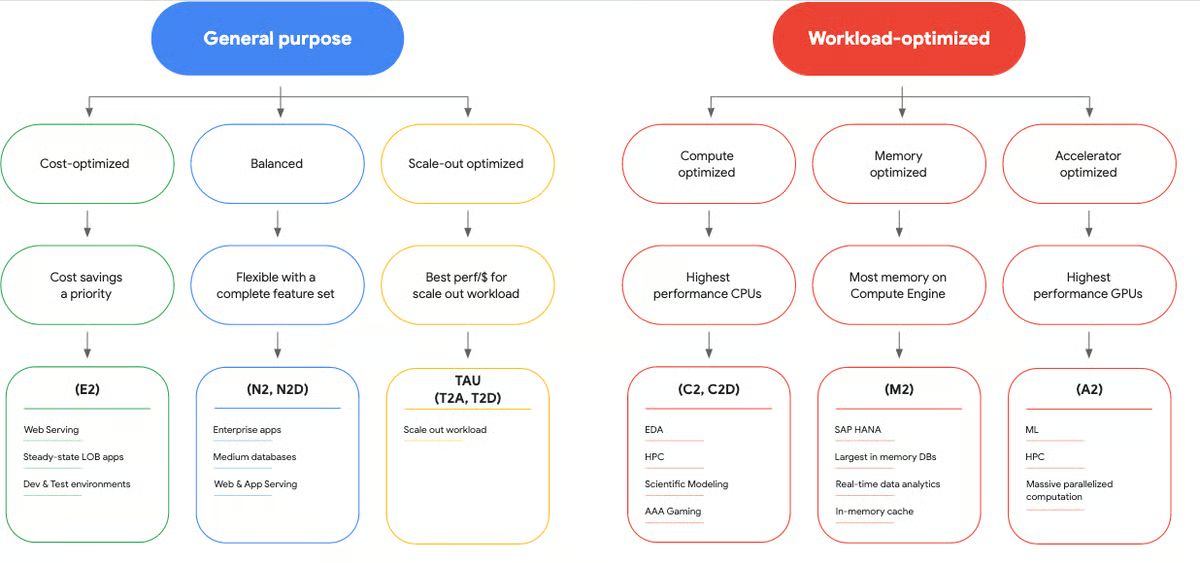
Google Compute Engine's networking configuration, including firewall rules and VPC setups, requires deliberate hands-on setup that can increase coordination overhead when managing multiple projects or regions. For those who invest in understanding the platform's structure, this same depth of control becomes a reliable foundation for designing infrastructure precisely to their operational requirements.
Autonomous task execution and cloud cost analytics score closer to category averages, meaning costs can grow quickly if high-performance VMs and resource allocation aren’t actively monitored. Organizations running large or variable workloads across multiple accounts are most likely to feel this as environments scale. Building familiarity with the billing structure makes this model a stronger tool for resource-level cost management over time.
Overall, Google Compute Engine fits teams that want to design infrastructure on their own terms while operating within a mature cloud ecosystem. For organizations prioritizing performance consistency, scalability, and tight integration across Google Cloud services, it remains a dependable option supported by G2 satisfaction and adoption patterns.
“What I like most about Google Compute Engine is its flexibility and performance. Creating and managing virtual machines is straightforward once you get familiar with it. It integrates well with other Google Cloud services, which makes deployment and scaling easier. The platform is reliable, offers many configuration options, and works well for both small and large workloads.”
- Google Compute Engine review, Rahul A.
“The biggest challenge with GCE is that cost can grow quickly if resources aren’t carefully managed, especially with high-performance VMs. Some of the networking configurations, like firewall rules and VPC setups, are powerful but can be a bit confusing for new team members. Also, while the console is comprehensive, there’s a learning curve when managing multiple projects or regions.”
- Google Compute Engine review, Mayank M.
Need deeper visibility into network performance? Explore the best network monitoring software to complement your cloud management strategy.
Ubuntu is primarily an infrastructure-focused operating system rather than a desktop-centric platform.
Instead of relying on heavy abstraction, Ubuntu emphasizes simplicity and consistency at the OS level, allowing teams to build and manage environments with clear visibility into how resources behave. This has made it a long-standing choice across cloud, DevOps, and production environments.
Cloud security, cloud consolidation, and cloud cost analytics are each rated at 90%, aligning closely with category averages. Reviewers describe Ubuntu as a lightweight and secure operating system used across Azure virtual machines, Docker-based deployments, and scalable production systems. Its compatibility with container tooling supports predictable application deployment and lifecycle management without introducing unnecessary overhead.
Reviews point to reliability in daily use rather than reliance on bundled features. Teams that adopt Ubuntu tend to do so intentionally, and feedback indicates that the operating system performs consistently across long-running workloads and production environments.
System-level efficiency shapes how teams use Ubuntu. Native access to Bash, SSH, Git, Docker, and the broader GNU toolchain supports backend development and infrastructure automation without additional layers.
Reviewers frequently mention system responsiveness and stability during sustained workloads, particularly when Ubuntu is used on servers or cloud-hosted instances. These characteristics help teams to maintain consistent performance over time.
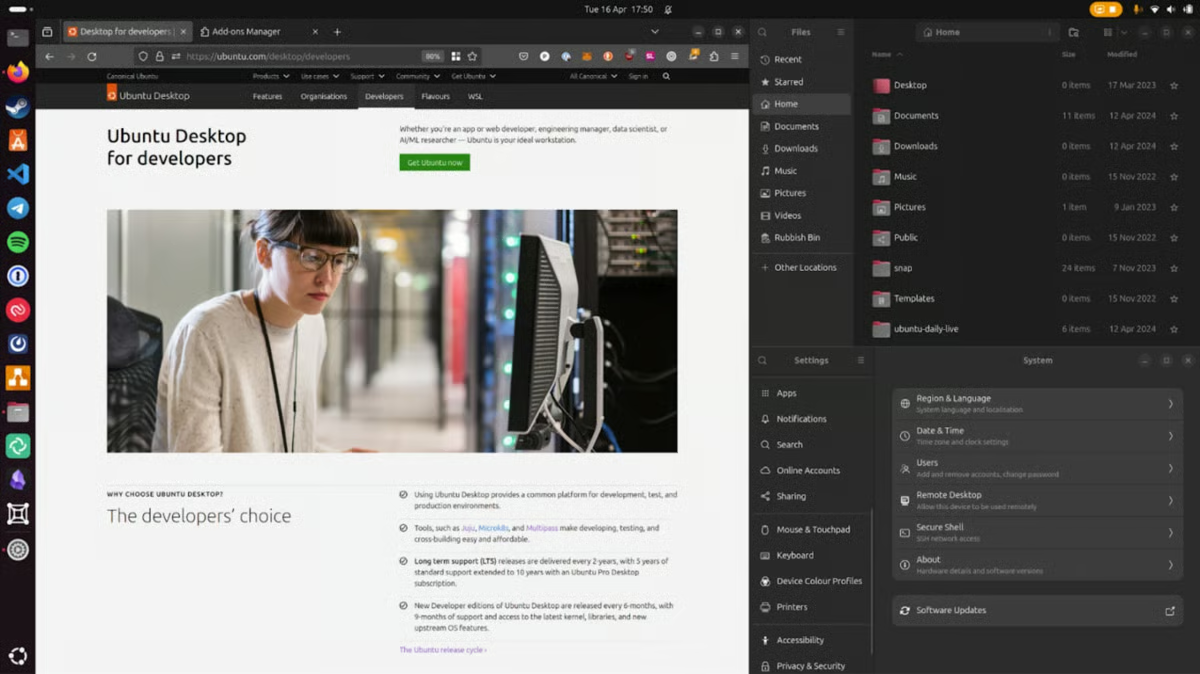
Long-term support releases provide extended stability windows, while regular security updates help teams maintain hardened environments. Backward compatibility allows organizations to standardize environments across development, staging, and production without frequent disruption. This structure supports teams managing infrastructure over multi-year lifecycles.
Ubuntu's workflows are built around command-line interaction, meaning the platform does not offer graphical configuration tools for setup and troubleshooting. Teams that require GUI-based administration for server configuration and system management are most likely to notice this as a consideration. For those already oriented toward Linux environments, this direct terminal access enables deeper customization and faster execution across development, deployment, and infrastructure operations.
Differences between packaging formats can affect application behavior across environments, requiring internal standards to maintain consistency across development, staging, and production. Teams managing large numbers of third-party systems or frequent update cycles are most likely to encounter this coordination need.
Ubuntu serves as a dependable operating system for teams managing infrastructure directly. For cloud teams and developers prioritizing performance, openness, and cost efficiency over abstraction, Ubuntu remains a reliable, production-ready foundation.
“I like how simple and user-friendly Ubuntu is. It’s stable, secure, and easy to implement and integrate with different tools and workflows. The strong community support makes solving issues easy, and I use it frequently for both development and daily tasks.”
- Ubuntu review, Sonu A.
“Ubuntu is great, but you have to learn how to use it, both desktop and server versions, if you are not use to Linux. Much better than it was, but maintaining updates on third-party systems can be a pain.”
- Ubuntu review, Daniel L.
If performance is a priority, check out the top application performance monitoring tools for diagnosing issues across distributed systems.
Flexera One is a cloud management platform designed for organizations operating across complex IT estates where visibility, governance, and accountability matter.
It brings cloud infrastructure, software assets, and license compliance into a single operational system, shaping how teams manage cost exposure, operational risk, and regulatory obligations.
Flexera One holds a G2 rating of 4.3/5, pointing to steady adoption among organizations that value disciplined asset management and long-term oversight.
Based on what I’ve seen, G2 reviewers frequently describe dashboards as straightforward and comprehensive when tracking assets across multiple cloud providers and software portfolios. Instead of moving between systems to understand usage, spend, or entitlement status, teams rely on a consolidated view to identify underutilized resources and outdated software that may introduce security or compliance risk.
Optimization workflows are tightly integrated into daily operations. Cloud consolidation is rated at 87% on G2, while cloud optimization and cloud resource management both score 85%.
Reviewers describe using these capabilities to identify unused software and cloud services, reduce unnecessary spend, and maintain license compliance without relying on manual audits. Reporting supports planning by connecting usage data directly to cost and risk exposure.
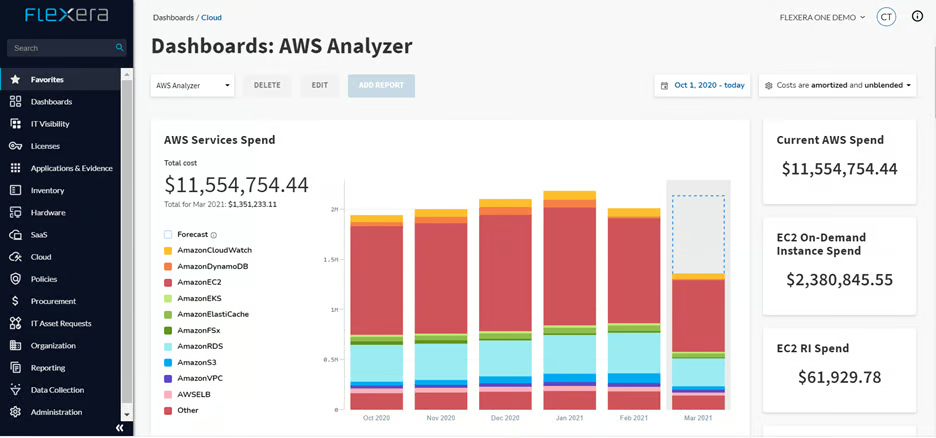
License management is treated as an ongoing operational function rather than a periodic task. Flexera One is commonly used to track entitlements, renewal timelines, and usage patterns across large software estates.
Based on my evaluation, G2 feedback references clear audit preparation and improved understanding of licensing risk, especially in organizations managing multiple vendors, contracts, and deployment models simultaneously.
This is reinforced by user distribution data, where around 70% of users come from enterprise environments, with 18% from mid-market teams and 11% from small businesses. This distribution reflects usage in organizations where scale, regulatory requirements, and financial oversight are already complex. The platform is often positioned as a single system for managing software and cloud services together, reducing fragmentation across teams.
Reviewers note that the breadth of features can take time to fully understand, particularly for first-time users navigating multiple modules. For teams willing to invest time upfront, this depth supports more comprehensive workflows and greater control over asset and brand management.
Some users mention longer report loading times when working with large asset inventories, and support responsiveness that varies depending on request complexity and volume. These factors reflect a platform built for coverage and detail, where value increases as teams become familiar with its structure.
All in all, Flexera One aligns closely with enterprise-scale IT governance and cost management needs. For organizations focused on reducing waste, managing compliance risk, and maintaining clear oversight across cloud and software estates, it offers a practical and disciplined approach to cloud management.
“Flexera One is a tool used by different companies for automation and cost optimization. It helps to save money and time by showing which software is not being used. It works well with different cloud platform in a single screen.”
- Flexera One review, Tripti K.
"Flexera One has many useful features, but is complex for its first-time users. I feel that customer support from Flexera can be more faster."
- Flexera One review, Tejasav G.
Want better visibility into your cloud stack? Compare the best cloud infrastructure monitoring tools for tracking performance and usage in real time.
SAP Business Data Cloud is positioned as a shared data infrastructure platform built to support analytics across teams without fragmenting ownership or definitions.
It operates as a control layer that centralizes how data is accessed, governed, and analyzed across cloud environments. Rather than functioning as a lightweight analytics add-on, the platform reflects a structured approach to how enterprise data is organized and operated.
Usage is evenly distributed, with 37% of users coming from small businesses, 32% from mid-market organizations, and 32% from enterprises. This balance indicates a platform designed to grow alongside data complexity, supporting both organizations consolidating systems and larger teams coordinating analytics across departments and environments.
Reviews consistently reference the ability to bring SAP and non-SAP data into a single governed environment. By establishing a shared semantic layer, the platform reduces fragmentation and allows teams to work from consistent business definitions, which becomes essential when analytics and reporting span multiple business units.
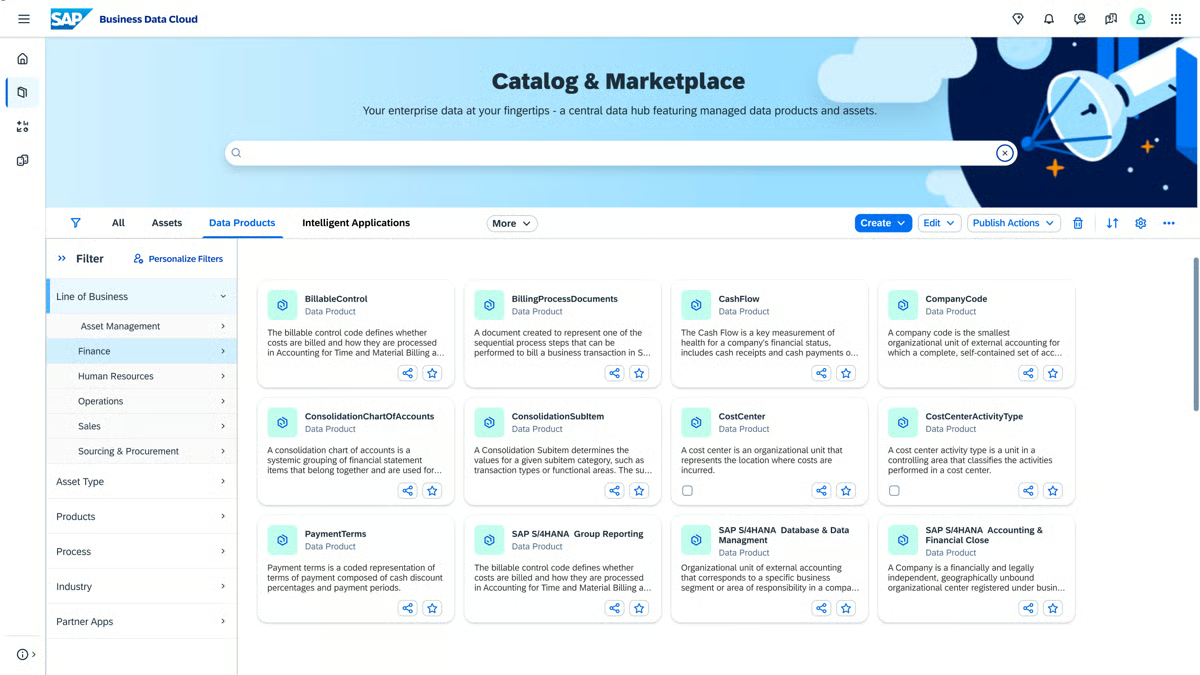
G2 reviews frequently reference cloud optimization, security, and cost analytics as part of daily workflows. The platform supports visibility into usage, spend, and risk from a unified data foundation, helping teams make operational and financial decisions without separating analytics across disconnected systems.
Analytics and AI initiatives benefit from the way data is prepared and governed. Automated ingestion, managed data products, and built-in governance make it easier to surface patterns across large datasets. Instead of layering AI on top of loosely structured data, the platform provides a foundation where machine learning and advanced analytics rely on business-ready information.
Day-to-day interaction is shaped by an interface focused on clarity. Users often describe the environment as intuitive once familiar, with visualizations that help teams understand metrics across systems. This reduces the manual effort involved in reconciling reports and supports alignment across departments working from the same data sources.
The platform handles large data volumes reliably, which matters for organizations operating complex workloads across cloud environments. Integration with the broader SAP ecosystem further supports continuity by allowing teams to manage analytics without moving between disconnected platforms.
SAP Business Data Cloud is built around a centralized, governance-first operating model, which shapes how teams adopt it. Reviews note that effective use assumes clearly defined data ownership, shared business definitions, and coordinated operating standards. Organizations with decentralized or ad-hoc data practices may find adoption progresses more gradually, as the platform favors alignment and control over informal experimentation..
Connecting non-SAP and legacy systems is not always straightforward, and documentation across integration scenarios can be inconsistent. Those working in hybrid environments or managing diverse data sources outside the SAP ecosystem are most likely to encounter this during setup. For organizations where core infrastructure is SAP-native, this complexity is considerably reduced.
SAP Business Data Cloud fits organizations that treat data as shared infrastructure rather than isolated assets. For teams operating within the SAP ecosystem and managing analytics across multiple systems, it provides a structured way to maintain governance, consistency, and scale. It is best suited for data, IT, and operations teams responsible for sustaining trust and alignment across complex cloud environments.
“I find SAP Business Data Cloud to be very intuitive, which simplifies many of our processes. Its automatic functionalities streamline our data operations, allowing us to efficiently pull in data from our SAP system as well as third-party sources. This capability is crucial as it makes data integration straightforward and enhances the quality of data we receive. I appreciate how the platform gathers extensive information, functioning as a key driver to identify patterns and links in data. This not only suggests improvements but also maximizes the potential of AI and machine learning applications across our systems. Overall, the platform's ability to automatically manage substantial data influx is impressive and adds significant value to our operations.”
- SAP Business Data Cloud review, Adam M.
“I dislike that SAP Business Data Cloud can be complex to set up and manage initially. Integrating diverse data sources and ensuring data quality can be time-consuming.”
- SAP Business Data Cloud review, Veer S.
CloudKeeper is built for teams under pressure to bring cloud costs under control without slowing down day-to-day operations.
The platform is designed to help organizations actively manage cloud spend, resources, and operational issues with an emphasis on hands-on expertise rather than passive monitoring. This approach aligns with teams that need visibility and action without introducing unnecessary complexity into cloud workflows.
G2 reviews consistently describe strong performance in cloud cost analytics, where CloudKeeper scores above category averages. Users point to clear identification of cost drivers, unused services, and inefficient resource usage, helping teams move from reactive cost reviews toward more consistent financial control.
Optimization workflows are closely tied to that visibility. Reviewers mention structured recommendations and guided optimization exercises that support concrete actions rather than static reporting. These workflows help teams reduce waste, manage underutilized services, and maintain control as cloud usage grows across accounts and environments.
Many users emphasize the team’s responsiveness and technical depth, particularly around AWS services such as IAM, RDS, and infrastructure configuration. Issues are often identified early and addressed quickly, reducing operational disruption and internal troubleshooting effort.
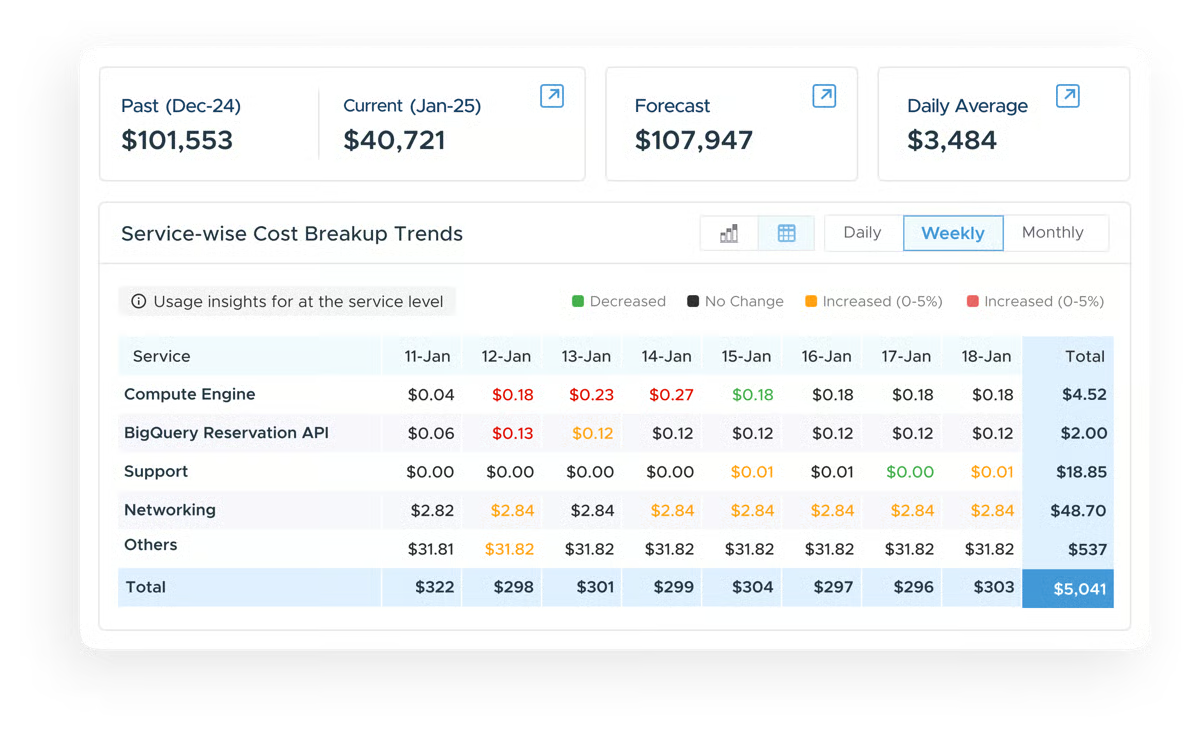
Collaboration between tooling and service is frequently highlighted. Users describe CloudKeeper as functioning more like an extension of their internal cloud operations team than a standalone product. This combination allows internal teams to spend less time diagnosing cost and infrastructure issues and more time focusing on delivery and system improvement.
Around 70% of CloudKeeper users come from mid-market organizations, according to G2 Data, where cost optimization and responsive support tend to have an immediate impact.
CloudKeeper's cost-related insights, including how savings are calculated and how costs are segmented, are not always presented at the granular level that detailed internal reporting workflows require. Those needing itemized cost attribution for financial reporting or chargeback processes are most likely to notice this. For those primarily focused on identifying unused services and stabilizing cloud spend, the platform's optimization recommendations address the most material cost drivers effectively.
Response times can vary by request type and volume, with occasional delays during busier periods. Those managing time-sensitive infrastructure issues or high-frequency optimization requests are most likely to encounter this variability. Across G2 reviews, overall sentiment toward support remains strong, reflecting a hands-on service model that many mid-market users describe as an extension of their own cloud operations.
CloudKeeper fits organizations seeking stronger control over cloud spend paired with expert-backed operational support. Its focus on cost analytics, guided optimization, and hands-on service aligns well with mid-market teams managing growing cloud environments. For organizations aiming to reduce waste, stabilize cloud costs, and operate with greater financial confidence, CloudKeeper presents a practical and service-oriented approach.
"Great support and experienced resources. Last time we have encountered major security incident. CloudKeeper involved senior resources and even brought AWS resources to mitigate the Hack attempt. We were successfully secured. Post incident follow up also really awesome as we have received the best practices advises on securing our accounts and its services."
- CloudKeeper review, Mohd B.
“Overall, the experience is positive, but the cost-related insights on the CloudKeeper console could be clearer. Having more detailed visibility into how savings are calculated and how costs are broken down would make the platform even more helpful.”
- CloudKeeper review, Pradeep G.
Cloudshot is designed as a unified control layer for multi-cloud environments. Adoption skews toward specific use cases rather than broad market penetration, with 66% of usage coming from enterprise teams, which highlights where the platform delivers its strongest value.
Operationally, Cloudshot is used by teams managing complexity across AWS, Azure, and GCP at the same time. It consolidates resource visibility, security oversight, and cost monitoring into a single interface. This reduces reliance on native cloud consoles and supports clearer ownership across engineering, finance, and security workflows.
Cloudshot automatically generates infrastructure diagrams that reflect live cloud states, allowing teams to see dependencies and resource relationships at a glance. Reviews describe this shared visual context as useful for identifying unused servers, understanding system impact, and supporting infrastructure planning.
That visual model connects directly to execution workflows. Teams use the platform to move from infrastructure mapping to actions such as optimization planning and Terraform script generation. This link between visibility and execution helps reduce manual translation between planning tools and deployment workflows.
Cloud resource management, Cloud security, and cloud cost analytics each score 100% on G2, well above category averages. Reviewers consistently reference the ability to spot idle resources, detect misconfigurations, and track spend from one dashboard without switching contexts.
Reviews mention reduced cloud waste, fewer unexpected cost spikes, improved security posture through automated misconfiguration detection, and time savings from centralized oversight. These results are often tied to replacing fragmented dashboards and alerts with a single, continuously updated infrastructure map.
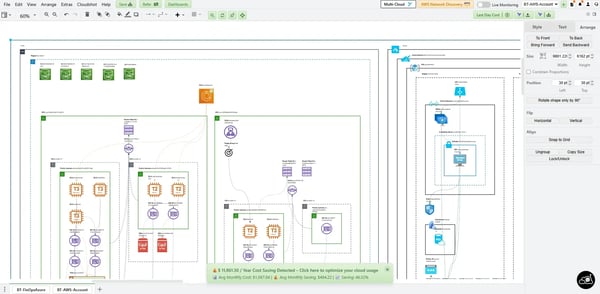
Cloudshot's map-first design assumes centralized oversight and cross-functional coordination, meaning those in environments with limited infrastructure complexity or siloed workflows are most likely to find that the depth of visibility takes time to translate into full operational value. Once infrastructure complexity grows, the platform's real-time mapping and unified oversight become significantly more impactful.
The platform's full value increases when engineering, finance, and security actively engage around a shared infrastructure view. Those that do not coordinate across these functions are most likely to underutilize their capabilities until processes align. Setup is described as fast, and the interface is accessible, making that cross-functional alignment easier to establish early.
Overall, Cloudshot fits organizations running complex multi-cloud environments where visibility and coordination matter as much as cost control. Its strengths in real-time mapping, unified oversight, and cost intelligence support enterprise teams managing scale across providers. For organizations looking to replace fragmented cloud monitoring with a shared operational view, Cloudshot offers a focused and confidence-building approach.
"The visual diagramming is brilliant. It automatically creates accurate infrastructure maps and helps us generate Terraform scripts."
- Cloudshot review, Linda F.
“The overall platform is great, but the number of features felt a bit overwhelming at first. A more guided onboarding process would be helpful for new users to get started quickly without feeling complex by the number of features.”
- Cloudshot review, Prachi J.
Built into the Google Cloud ecosystem, Google Cloud Trace is a distributed tracing tool designed to help teams understand where latency originates across applications and services. It works natively alongside Google Cloud services, making it a natural fit for teams already operating within GCP.
G2 reviewers describe it as a practical tool for diagnosing performance issues and tracking application behavior across cloud-hosted services without adding unnecessary tooling overhead.
Log analysis and troubleshooting are central to how teams use Google Cloud Trace in daily operations. G2 reviewers reference the Logs Viewer and real-time log access as practical tools for identifying issues across applications and services without extended investigation cycles.
The ability to access logs in real time or retrieve stored data supports both active incident response and longer-term pattern analysis. Meets Requirements is rated at 86% on G2, reflecting how well these diagnostic capabilities align with what development and operations teams need.
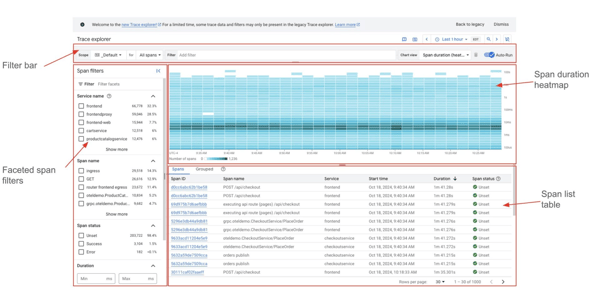
The platform's latency inspection is a direct path to resolving performance issues. Rather than presenting raw metrics that require further interpretation, the tool surfaces findings that teams can act on during active troubleshooting. This reduces the cognitive effort involved in diagnosing where slowdowns originate across distributed services. Ease of Use is rated at 85% on G2, pointing to a workflow that supports fast diagnosis without requiring deep platform expertise.
API connectivity is a consistent theme across G2 feedback. Reviewers describe the platform's API compatibility as user-friendly, supporting straightforward integration with existing services and workflows. OpenAPI support further simplifies API gateway management, and G2 reviewers note that this reduces configuration overhead when connecting services across the GCP environment.
Integration across Google Cloud services shapes how teams get value from the platform day to day. G2 reviewers reference connections to BigQuery, Cloud Functions, Google Kubernetes Engine, Google Workspace, and Firebase as part of how they manage sophisticated workloads, data analysis, and serverless computing. Cross-system integration supports a unified operational picture without requiring manual data alignment across tools.
Configuration flexibility supports teams with varying operational preferences. G2 reviewers note that services can be managed from either the web console or the command line, allowing teams to choose the approach that fits their workflow. Ease of Admin is rated at 85% on G2, reflecting how this dual-access model reduces friction for both developers working interactively and teams running automated infrastructure operations.
Customer support and documentation are frequently cited as reliable resources across G2 feedback. G2 Reviewers describe high-level documentation and a customer support model that is responsive and oriented around helping teams resolve issues. Quality of support is rated at 84% on G2, which sits close to category averages and reflects consistent availability when teams need guidance.
Google Cloud Trace requires a separate agent installation for each non-GCP component, meaning mixed or legacy environments accumulate setup and maintenance overhead that native GCP services do not. Those running mixed or non-GCP environments are most likely to notice this boundary. For teams operating primarily within GCP, this scope aligns naturally with existing infrastructure and keeps monitoring consistent without additional tooling.
External resources beyond official documentation are limited, with fewer community answers available on developer forums compared to broader cloud monitoring tools. Teams that rely on community-sourced guidance during onboarding or troubleshooting are most likely to feel this gap. Google Cloud's own documentation is thorough and actively maintained, providing a reliable reference for teams willing to work within official channels.
Overall, Google Cloud Trace fits development and operations teams managing performance and reliability within Google Cloud environments. Its native integration, latency inspection capabilities, and flexible access model support teams that need clear diagnostic signals without introducing external monitoring complexity. For GCP-native teams focused on application performance and service reliability, it provides a focused and dependable tracing foundation.
“Google Cloud stands "tall" & proximity for the cutting-edge strong innovation enterprise integration with various services in Artificial Intelligence & Machine Learning intricacies, & data analytics capabilities with the services spanning across BigQuery, Cloud Functions, Google Kubernetes Engine, Google Workspace, and Firebase, etc.”
- Google Cloud Trace review, Opeyemi O.
“There are very less resources outside of official documentation that you can refer. Very few questions in Stack Overflow and other developer communities are answered.”
- Google Cloud Trace review, Musadiq P.
Azure Arc is designed to extend Azure’s management and governance model beyond Azure itself. It functions as a control plane for organizations operating infrastructure across on-premises environments, multiple clouds, and edge locations.
This approach aligns with teams that want consistent operational standards without re-architecting existing environments.
Hybrid and multi-cloud support defines how the platform is used day to day. Azure Arc enables centralized management of Kubernetes clusters, servers, and data services running outside Azure while maintaining a single governance framework. Reviews frequently describe this as a practical way to manage real-world infrastructure estates that span datacenters, public clouds, and edge locations.
G2 reviewers mention that teams apply uniform security policies, configurations, and deployment standards across environments using Azure-native tools. This reduces drift between environments and supports continuity as infrastructure becomes more distributed and harder to manage through isolated systems.
Azure Arc's integration with native Azure services draws consistent mention across G2 reviews. Reviewers describe applying Azure Monitor, Azure Security Center, and Azure Policy across hybrid environments from a single platform. For organizations already invested in the Azure ecosystem, this keeps security, compliance, and observability consistent without adding tool sprawl.
Cloud resource management is rated at 93%, cloud orchestration at 92%, and cloud optimization at 89% on G2. Reviewers reference centralized administration, structured deployments, and the ability to extend Azure’s compliance and security controls beyond the public cloud as key operational benefits.
About 44% of users come from mid-market organizations, with small businesses and enterprises each accounting for 28%. This mix reflects teams that already operate hybrid or multi-cloud environments and are looking to unify management, rather than those seeking a standalone or entry-level cloud management tool.
G2 reviews note that managing heterogeneous environments introduces setup and coordination overhead, especially when applying policies across multiple providers and on-premises systems. This flexibility supports unified governance across complex infrastructures.
Cost visibility and integration behavior can vary depending on deployment scope, requiring closer oversight as environments scale. This allows teams to tailor integrations and cost management to their specific architecture.
Azure Arc fits organizations managing infrastructure beyond a single cloud. Its ability to extend Azure’s governance and management framework across hybrid, multi-cloud, and edge environments supports long-term operational control. For platform and IT teams focused on policy consistency, centralized administration, and structured governance across complex estates, it remains a relevant and purposeful option.
“The power of Azure Arc is in expanding Azure's capabilities outside of the cloud. Imagine being able to manage your Kubernetes clusters, servers, and even data services from anywhere, including other clouds, on-premises, and at the edge! It's a multi-cloud and hybrid dream come true, streamlining processes, increasing adaptability, and opening up fresh avenues for creativity.”
- Azure Arc review, Sandipan R.
“As it is a highly powerful & complex tool, some of the options are not easily understandable. Have to spend more time in learning for better usage.”
- Azure Arc review, Durga Praveen Kumar D.
Utho is positioned as a practical cloud management platform built to simplify deployment, hosting, and everyday infrastructure operations.
It is commonly described as reducing the execution complexity that slows smaller teams down. Reviews frequently reference smooth deployments, a clean interface, and dependable performance that make routine cloud tasks feel manageable rather than heavy.
Speed from setup to production is a recurring theme in user feedback. Reviews describe how quickly teams can provision servers, configure environments, and deploy applications without extended setup cycles. This is especially relevant for teams managing web applications with limited operational bandwidth, where time-to-launch directly affects delivery and revenue.
Core cloud capabilities support that execution-focused experience. Utho’s cloud resource management, cloud optimization, and cloud cost analytics are frequently mentioned as practical tools for controlling infrastructure and monitoring spend. Users describe having enough visibility to manage usage efficiently without navigating complex dashboards or layered tooling.
Many users describe the platform as intuitive and easy to navigate, lowering the barrier for teams without deep cloud expertise. Routine actions such as scaling resources, managing instances, and monitoring usage are described as straightforward, which helps teams operate independently as workloads evolve.
Business impact shows up in both speed and cost control. Reviewers reference faster deployment cycles, consistent environments built from templates, and centralized infrastructure management. Utho is often described as cost-effective compared with larger providers, particularly for teams operating under tighter budgets that still need reliable cloud performance.
/Utho.webp?width=600&height=432&name=Utho.webp)
Utho's integration and automation ecosystem is more streamlined, with workflows that prioritize clarity over advanced customization. Those requiring deeper integrations or more complex automation capabilities are most likely to notice this boundary. For those prioritizing straightforward deployment and operational clarity, this focused approach fits how cloud infrastructure is typically used at that scale.
Certain operational features are still maturing as the platform scales, something those pushing into more advanced workflows are most likely to encounter. Issues are typically acknowledged quickly and addressed without extended disruption, reflecting a platform that actively responds to user needs as it grows.
Utho fits small and mid-sized teams that want dependable cloud infrastructure without unnecessary complexity. Its focus on fast deployment, approachable management, and well-rated core cloud capabilities supports execution-focused environments. For teams looking to run and scale applications confidently within a focused cloud management platform, Utho remains a practical and accessible option.
"The infrastructure is maintained very nicely. It was a wonderful experience to use utho cloud platform. Although a few enhancements are pretty much needed."
- Utho review, Abhishek M.
“Uptime may not be at par with global giants like AWS/GCP.”
- Utho review, Rakesh Kumar T.
|
Software
|
G2 Rating
|
Free Plan
|
Ideal For
|
|
Google Compute Engine
|
4.5/5
|
No
|
Scalable cloud compute infrastructure with flexible VM configurations
|
|
Ubuntu
|
4.5/5
|
Yes. Open source; paid enterprise support available
|
Open-source cloud operating system foundations with long-term support
|
|
Flexera One
|
4.3/5
|
No
|
Enterprise cloud and IT asset cost governance with software license visibility
|
|
SAP Business Data Cloud
|
4.3/5
|
No
|
Cloud governance aligned with enterprise data platforms and SAP ecosystems
|
|
CloudKeeper
|
4.7/5
|
No
|
Automated cloud cost governance and savings management
|
|
Cloudshot
|
4.9/5
|
No
|
Lightweight cloud operations visibility and environment snapshots
|
|
Google Cloud Trace
|
4.3/5
|
No
|
Distributed tracing and latency analysis for GCP-native environments
|
|
Azure Arc
|
4.4/5
|
No
|
Hybrid and multi-cloud governance within Microsoft-centric environments
|
|
Utho
|
4.8/5
|
No
|
Affordable cloud infrastructure and hosting management for SMBs
|
*These cloud management platforms are top-rated in their category based on aggregated user feedback reflected in G2’s 2026 Grid Report. Most offer usage-based pricing or custom enterprise contracts, with demos or quotes available on request.
Got more questions? G2 has the answers!
Google Compute Engine is typically chosen when teams want infrastructure-level control within Google Cloud and prefer managing compute resources directly. Azure Arc is more commonly selected when organizations need centralized governance across hybrid and multi-cloud environments within a Microsoft ecosystem. Flexera One is usually preferred when license visibility, asset management, and enterprise-scale cost governance are the primary drivers.
Azure Arc and Cloudshot are frequently evaluated for hybrid and multi-cloud use cases. Azure Arc is commonly used to extend policy enforcement and governance across on-prem, Azure, and third-party clouds. Cloudshot tends to be chosen when teams want unified visibility and visual mapping across AWS, Azure, and GCP from a single interface.
FinOps-focused platform like CloudKeeper is often selected when cost accountability and spend optimization are the main concerns. It is especially useful for teams that already understand their infrastructure but need clearer ownership, allocation, and optimization of cloud spend across teams.
No. Review patterns suggest teams that adopt cloud management platforms early tend to avoid reactive cost control later. Smaller teams often use these platforms to establish guardrails early, while larger organizations rely on them to prevent governance and cost issues from scaling out of control.
Native consoles are designed for managing resources within a single cloud. Cloud management platforms are chosen when teams need cross-account, cross-team, or cross-cloud visibility and governance. They help unify cost, policy, and ownership data that would otherwise remain fragmented across consoles.
Google Cloud Trace is commonly selected when application performance visibility and distributed tracing are central to cloud operations. It is frequently used by development and operations teams that want latency inspection and diagnostic clarity within GCP environments without adding external monitoring tooling.
Enterprise platforms tend to emphasize governance depth, audit readiness, and integration across large, complex environments. SMB-focused platforms prioritize faster onboarding, simpler interfaces, and lower operational overhead. Both approaches are effective, but they serve different organizational maturity levels.
Automation becomes more valuable as environments scale. Reviews suggest that early-stage teams prioritize visibility first, while mature organizations look for automated policy enforcement, cost controls, and remediation to reduce manual coordination between teams.
No. Cloud management platforms focus on governance, cost, security, and operational control rather than deep telemetry analysis. They often integrate with monitoring and observability tools rather than replacing them, helping teams act on insights instead of just observing them.
Teams usually reach this point when spreadsheets, manual checks, or disconnected tools become part of daily cloud operations. If validating cost, compliance, or ownership takes more time than acting on it, reviews suggest a cloud management platform can restore clarity and confidence.
At this stage, the decision comes down to whether the platform strengthens or weakens how cloud teams operate day to day. The most effective cloud management systems don’t force operators to constantly cross-check data or compensate with manual controls. They reduce ambiguity around cost, policy, and ownership, surface clear signals, and let teams act with shared confidence, lowering cognitive load across operations.
The biggest gains appear when cloud management is treated as an operating layer, not a reporting tool. Strong choices embed directly into governance, cost controls, and intervention workflows. Weaker ones reveal themselves later through manual audits, spreadsheet reconciliation, and recurring debates over accuracy or responsibility. Those issues rarely stay contained; they compound into slower response times and drifting control.
Over time, this creates a structural divide. Good decisions reinforce trust in cloud data and execution discipline. Poor ones train teams to work around the system and accumulate operational debt. The most reliable way to choose is to focus on how environments are governed under pressure, not how dashboards look at setup. If the platform consistently sharpens control and reduces rework, it will support confident cloud operations well beyond rollout.
Want to look beyond cloud management platforms? Explore G2’s Best IT Infrastructure Software Products covering compute, monitoring, and operations for modern IT teams.

Rome wasn’t built in a day and neither is a reliable virtual infrastructure.
 by Harshita Tewari

We have moved past the age of bulky computers and messy networks.
 by Dibyani Das

Cloud costs have a sneaky way of ballooning. One month, the bill looks normal, and the next,...
 by Soundarya Jayaraman