Picking the wrong automation testing tools is a slow mistake. It doesn't announce itself on day one. It shows up months later as flaky pipelines, shrinking coverage, and engineers spending more time fixing tests than shipping features.
I see this decision land most often with QA leaders, engineering managers, and platform teams under pressure to ship faster without breaking production. Manual regression grows, coverage drifts, and brittle suites quietly slow pipelines over time. The global automation testing market is projected to grow from about $41.7 billion in 2025 to over $169 billion by 2034, reflecting the sustained replacement of manual testing with automation across industries, which quietly compounds release risk sprint after sprint.

In this article, I map the best automation testing tools available to problem-shaped buying decisions. BrowserStack fits teams prioritizing cross-browser and real-device coverage at scale. ACCELQ suits codeless automation without heavy scripting. Katalon covers balanced UI and API testing with faster onboarding. Keysight Eggplant appears with teams focused on visual testing and complex user journeys. QA Wolf works for teams that want dependable coverage without owning it internally. The goal is decisive clarity, not generic reassurance.
*These automation testing tools are top-rated in their category based on G2’s Winter Grid Report. I’ve included their strengths and ideal use cases to help you choose the right platform for your team’s development and QA workflows.
At its core, automation testing software helps teams turn fragile, manual checks into repeatable, dependable validation across the product. It stabilizes release cycles, exposes regressions early, and keeps quality from drifting as code changes faster than people can manually verify it.
What I consistently see is that the strongest automation testing platforms go beyond test execution. They help teams understand why tests fail, where coverage is thin, and how changes in the application ripple through existing suites. Whether it’s reducing flaky tests, speeding up feedback in CI pipelines, or lowering the effort required to maintain scripts, the best tools replace noise with signal.
Each organization approaches automation differently, but the underlying need is the same: reliable feedback without slowing delivery. Many teams prioritize tools that shorten setup time and reduce dependency on specialized skills, which lowers the barrier to scaling automation without constant rework.
Ultimately, good automation testing software gives me confidence that automated checks will catch regressions early and keep release decisions grounded in reliable results, predictable quality outcomes, and faster, more confident delivery. When automation is set up well, testing becomes a safety net that quietly holds the entire workflow together.
I started by using G2’s Grid Reports to shortlist leading automation testing tools based on verified user satisfaction and market presence across small teams, mid-market companies, and enterprise organizations. This helped narrow the field to platforms that consistently show up in real production environments, not just demos or niche use cases.
Next, I used AI to analyze hundreds of verified G2 reviews and identify recurring feedback patterns tied to real-world testing workflows. I focused on signals that matter once automation is running at scale, such as test stability, flakiness control, ease of test creation, depth of CI/CD integration, maintenance effort, support for modern web and mobile stacks, and how clearly failures are surfaced to engineering teams. This made it easier to separate tools that accelerate release confidence from those that quietly add operational friction.
Since I haven’t personally used every platform on this list, I cross-checked these findings with insights from software engineers, QA leads, and test automation specialists who actively rely on these tools in their day-to-day workflows.
All visuals and product references included in this article are sourced from G2 vendor listings and publicly available product documentation.
My perspective comes from working closely with engineering and QA teams and from analyzing large volumes of user-review patterns that reflect the day-to-day realities of testing. I looked for consistent signals across reviews and operational contexts that show which tools reduce friction over time and which quietly introduce it.
Automation testing lives on reliability, speed, and trust. The best tools don’t just execute tests. They shape how teams think about quality, releases, and risk. Below are the criteria I used to separate tools that hold up in real environments from those that look good until scale exposes their limits.
No automation testing tool excels equally across features. Some prioritize speed. Others focus on depth, control, or accessibility. Choosing well means aligning the tool with your delivery cadence, team skill mix, and tolerance for maintenance overhead. A tool that excels in the wrong dimension can quietly slow releases even while appearing powerful on paper.
The goal isn’t perfection. It’s alignment. When automation testing tools match real priorities, they reduce risk, increase confidence, and keep teams moving without constant firefighting.
To be considered in this automation testing tools category, platforms had to meet the following baseline conditions:
*This data was pulled from G2 in 2026. Some reviews may have been edited for clarity.
BrowserStack validates application behavior across a wide range of browsers and real devices without managing testing infrastructure internally. G2 Data shows consistent adoption across small, mid-market, and enterprise teams, suggesting the platform scales well across different organizational complexities. This breadth of usage aligns with BrowserStack’s role as an infrastructure layer rather than a narrowly scoped testing tool.
I noticed that user feedback emphasizes the use of real browsers and mobile devices rather than simulated environments. Automated tests execute against configurations that closely mirror production conditions, helping teams catch browser- and device-specific issues earlier. This reduces the risk of false positives or missed defects caused by environment mismatches.
Parallel execution across a large browser and device matrix plays an important role in how teams maintain coverage. Regression suites can expand without proportionally increasing pipeline duration, which is especially relevant for teams supporting multiple operating systems, browsers, and mobile configurations. This supports faster feedback while preserving breadth.
Test runs provide detailed logs, screenshots, and video recordings alongside failures. This visibility allows teams to understand what happened without reproducing issues locally, improving handoffs between QA and engineering. It is particularly useful when automation is embedded directly into CI workflows and issues need quick resolution.
BrowserStack integrates smoothly with widely used automation frameworks and CI tools. G2 reviewers describe fitting it into existing delivery pipelines without major restructuring, which helps keep automation connected to release workflows. This compatibility allows testing to scale without disrupting established engineering processes.
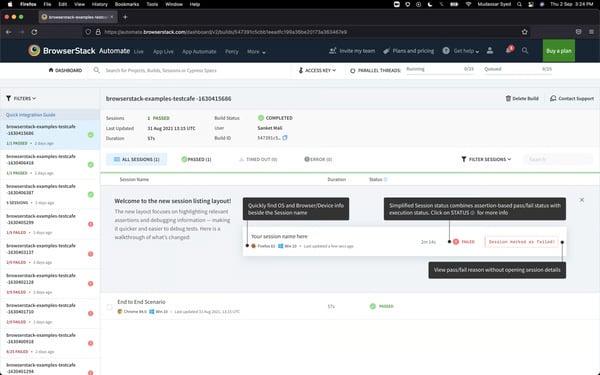
During periods of high demand, session startup times can vary, and device availability may fluctuate for large parallel executions. G2 reviewers running time-sensitive pipelines may need to account for this variability when scheduling high-volume test runs. That said, once sessions are established, execution remains stable and consistent, supporting reliable test outcomes across runs.
The platform also exposes a wide range of configuration options to support different automation scenarios, which may require additional familiarity for teams that prefer minimal setup. These characteristics reflect a system built for flexibility and scale rather than a tightly constrained execution model. This flexibility is what allows BrowserStack to scale reliably across diverse browser, device, and environment combinations without requiring infrastructure changes.
Overall, BrowserStack aligns well with teams that value realistic test environments, structured automation workflows, and confidence across browsers and devices. Based on G2 feedback and adoption patterns, it remains a dependable choice for organizations standardizing cross-browser and real-device automation without maintaining infrastructure internally.
"I like BrowserStack because it’s reliable and close to real-world usage. You get real browsers and devices without setup pain, issues show up like they do in production, and debugging is easier with built-in logs, screenshots, and videos. It saves time and removes guesswork."
- BrowserStack review, Saurabh K.
"While BrowserStack’s roadmap is impressive, the AI features are still evolving. Some advanced insights and automation capabilities discussed in the session felt a bit early-stage and may require refinement before they become production-ready. Another challenge is the pricing model. For startups or smaller teams, the cost of accessing advanced AI-powered features might be a barrier. If BrowserStack can introduce more flexible pricing tiers or trial access for the AI modules, it would make adoption much smoother."
- BrowserStack review, Bosen L.
Automation testing tools and QA service providers often go hand in hand. If you're also evaluating partners to run or scale your QA function, here's what quality leaders say about the most reliable QA platforms on G2.
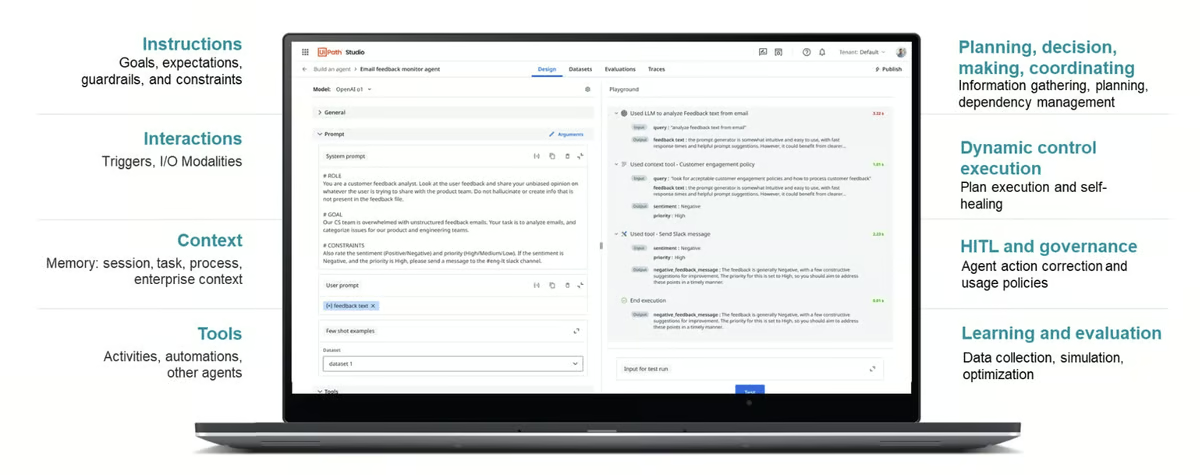
UiPath Agentic Automation is designed for automation testing scenarios where scripted execution alone is not sufficient. Instead of assuming stable inputs and predictable application behavior, it supports AI-assisted automation that can reason through variation in data, documents, and system responses. This makes it relevant for environments where automated tests must remain reliable despite frequent upstream change.
G2 reviewers use UiPath to validate workflows that span multiple systems rather than limiting automation to isolated UI interactions. Test coverage often includes emails, PDFs, ERP systems, and data-driven decision points where inputs and formats vary. This approach supports end-to-end validation in environments where variability is expected rather than exceptional.
Agentic execution allows automated validations to adjust when inputs or document structures shift. Tests are less likely to fail outright due to minor changes, reducing the need for constant script updates. This behavior supports long-running regression and compliance-oriented testing programs that depend on consistency over time.
UiPath provides orchestration across workflows, robots, and environments, enabling consistent execution as automation scales. Human-in-the-loop controls are commonly used in testing scenarios involving sensitive data or business-critical outcomes. As a result, teams can maintain consistency across long-running regression and compliance-focused testing programs.
High-volume validation is a common use case for UiPath. Review data references scenarios such as invoice processing, document ingestion, and transactional reconciliation, where tests must run reliably across thousands of executions. Integrating AI reasoning into automation logic helps maintain coverage as systems evolve.
From an adoption perspective, UiPath shows strong enterprise alignment. A G2 Satisfaction Score of 89 points to a solid day-to-day workflow fit once automation is established.
UiPath’s breadth introduces an initial ramp-up period, particularly for teams new to agentic or AI-assisted automation. Getting value often requires upfront investment in understanding orchestration, workflows, and execution models. However, this depth enables more resilient and scalable automation once teams are fully onboarded, especially in complex enterprise environments.
As automation programs grow, managing workflows, robots, and orchestration layers becomes a more deliberate operational responsibility, which can feel heavier for teams running narrow or short-term automation efforts. This structured approach supports long-term consistency, governance, and reliability as automation scales across systems and use cases.
Overall, UiPath Agentic Automation fits organizations where automation testing must absorb variability without constant rework. Based on G2 feedback, it aligns best with teams validating complex, evolving systems that require adaptive execution alongside structured governance over time.
“UiPath Agentic Automation excels at combining AI-driven decision-making with traditional RPA, enabling dynamic workflows that adapt intelligently to changing conditions. Its ability to integrate generative AI for reasoning and context-aware actions reduces manual intervention, accelerates process execution, and delivers higher accuracy, making automation smarter, scalable, and more business-aligned than ever before.”
- UiPath Agentic Automation review, Nandhakumar S.
“Everything has its pros and cons, and UiPath is no exception. In my opinion, while UiPath is accelerating development speed, it is also becoming increasingly expensive. Additionally, managing automations is getting more challenging as the overall automation architecture grows more complex. As a developer, I find myself having to handle too many automation components, including workflows, UIApps, robots, agents, and more.”
- UiPath Agentic Automation review, Mohit S.
If you're evaluating UiPath for more than just testing, see how it stacks up as a full low-code development platform alongside OutSystems, ServiceNow, and more.
ACCELQ is positioned as a unified automation testing platform for teams aiming to reduce reliance on brittle scripts and ongoing test maintenance. G2 Data shows adoption skewing toward larger organizations, with roughly half of reviewers coming from enterprise environments alongside mid-market (30%) and small business (20%) usage. This distribution aligns with a focus on standardizing automation across broad application surfaces rather than optimizing for isolated test cases.
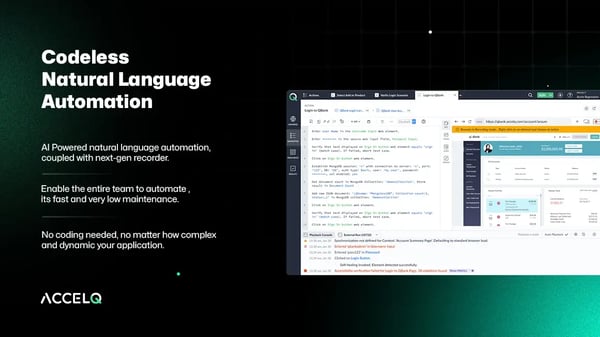
AI-driven self-healing keeps test suites stable as applications evolve. When UI changes or minor backend shifts occur, ACCELQ adjusts automatically rather than failing outright, reducing the manual effort required to keep automation current between releases. This behavior is especially valuable in environments where application interfaces change frequently and maintaining test reliability would otherwise demand constant intervention.
AI-driven self-healing plays a role in maintaining test stability over time. Reviewers describe fewer failures caused by UI changes or minor backend shifts, which reduces the effort required to keep suites operational between releases. As a result, automation remains reliable without frequent manual intervention.
Day-to-day workflow fit improves once teams move beyond initial setup. A G2 Satisfaction Score of 86 reflects steady usability in ongoing testing operations. These signals suggest value is realized through consistent use rather than quick experimentation.
Scheduled execution and continuous validation are common usage patterns. G2 reviewers describe automation running predictably as part of regular release cycles, with defects surfaced earlier in the development lifecycle. As a result, regression strategies can prioritize reliability and repeatability over rapid test creation.
Automation ownership often extends beyond a small group of specialists. Because deep scripting expertise is not required, QA, product, and operations teams can collaborate on test coverage without fragmenting responsibility. Shared logic allows updates to be applied once and reflected across multiple scenarios.
ACCELQ is designed to support large, standardized automation programs, which means test suite growth benefits from upfront planning. Teams looking to move quickly without investing time in structuring components and environments may find the initial setup more involved than lightweight tools. This structured approach pays off over time by keeping large suites stable and reducing rework between releases.
Reporting and dashboards emphasize consistency and operational clarity, which may feel opinionated for teams seeking highly customized analytics views or ad hoc exploration. This focus on standardization supports clearer visibility across teams and makes it easier to track execution trends without building custom reporting layers.
Overall, ACCELQ fits organizations prioritizing long-term automation maintainability and broad coverage over scripting flexibility. Based on G2 feedback and adoption patterns, it aligns well with enterprise and mid-market teams aiming to keep automation stable as applications and release cycles evolve.
"We needed both frontend and backend testing, and all the scheduled tests needed to run locally on our own servers, due to safety concerns for customer data, and AccelQ could give us that. Been easy to learn, and little technical insight is needed to also cover more detailed and backend testing on my own with predefined commands. Whenever I've run into problems or needed assistance on how to solve a task, I've always gotten quick help from support to find a solution. Scheduled tests are predictable, and we are catching more bugs than before at an earlier stage, with an average of 1-3 per week."
- ACCELQ review, Anniken Cecilie L.
“ACCELQ can be costly and has a learning curve for full mastery. It sometimes struggles with complex or custom UI scenarios, offers limited customization in reports and workflows, and may show performance issues with large test suites. Desktop automation support is also relatively weak compared to its web and API coverage.”
- ACCELQ review, Mathias S.
Katalon Katalon True Platform is a flexible, multi-channel automation testing solution designed to bring web, API, mobile, and desktop testing into a single environment. G2 Data shows the strongest traction among small businesses (49%) and mid-market teams (34%), with more limited enterprise usage (18%). This buyer mix aligns with a platform optimized for accessibility and breadth rather than deep specialization.
The platform provides a practical path for teams moving from manual testing into automation. Built-in keywords, support for converting manual steps into automated tests, and a relatively lightweight setup reduce reliance on deep scripting skills. This allows mixed-skill teams to contribute without fragmenting automation across multiple tools.
Testing across web, API, mobile, and desktop channels is managed within one interface. Consolidating these workflows reduces the need to maintain separate frameworks and reporting layers, helping teams keep visibility as automation expands. Review data suggests this unified approach simplifies test organization over time.
Test history and traceability features help teams understand how coverage evolves. Execution records make it easier to track what ran, what changed, and how reliable results have been across releases. This clarity becomes more important as release frequency increases.
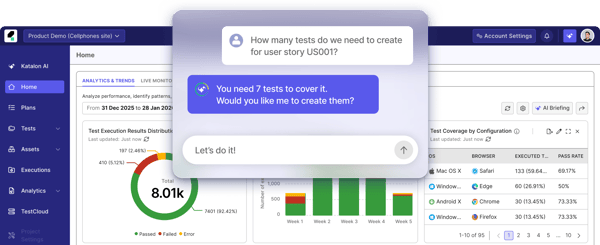
Automated tests can tolerate certain UI or locator changes without immediate failure. This reduces maintenance effort as applications evolve and helps keep automation relevant between releases. Straightforward CI/CD integrations allow execution results to surface naturally within delivery pipelines.
Larger automation projects benefit from deliberate structuring as test counts and supported environments grow. As test counts and supported environments grow, IDE responsiveness and execution speed may require closer attention to organization and suite design. However, with a well-structured test architecture, teams can maintain performance and keep large suites manageable over time.
Advanced workflows like versioning and branching are platform-managed, which provides speed and accessibility but offers less direct control than code-first frameworks. Teams comfortable with this trade-off benefit from faster onboarding and lower day-to-day maintenance overhead, keeping automation practical and scalable without constant technical intervention.
Katalon Platform fits teams seeking a single automation tool that balances coverage, accessibility, and maintainability. Based on G2 feedback, it aligns best with organizations scaling automation across multiple channels without committing to heavily code-centric or highly specialized frameworks.
"Katalon is a great testing tool nowadays because it has everything a quality engineer needs for complete automation projects, even the free version has very useful features.
It's super easy to pick up, you can start using it quickly without a deep learning curve. The community support is excellent, so getting help with any problem is fast and simple. It works seamlessly with our existing continuous integration and delivery (CI/CD) pipelines."
- Katalon Platform review, Shivam D.
Sometimes the IDE becomes a bit slow when opening large projects or when too many browser drivers are configured. The documentation could be improved for advanced configurations, and the new releases sometimes require plugin reinstallation. But overall, the product remains stable and reliable.
- Katalon Platform review, Santhoshi K.
Keysight Eggplant is used in automation testing programs that extend beyond standard web or API validation. G2 Data indicates it is most often chosen when applications are difficult to automate using DOM- or object-based approaches, including desktop software, virtualized environments, and visually complex user interfaces. This focus places Eggplant most often within mature QA organizations managing long-lived or non-standard systems rather than fast-moving web stacks.
Automation is built around image-based recognition and OCR rather than stable element identifiers. Tests validate what appears on screen from a user’s perspective, allowing workflows to be exercised even when traditional locators are unreliable or unavailable. This makes it possible to automate interactions where visual state and flow matter more than underlying code structure.
User journeys are validated end-to-end with emphasis on interaction flow and visual accuracy. This approach supports consistency across platforms and interfaces, particularly in environments where UX fidelity is central to release quality. Teams rely on this model when behavior on screen is the primary signal of correctness.
Large automation suites are organized through a structured asset model that supports analysis across complex environments. Results are presented in formats suitable for shared review, which matters when automation outcomes inform release decisions across QA, engineering, and business stakeholders. Support responsiveness is frequently referenced when teams encounter edge cases tied to non-standard interfaces or environments.
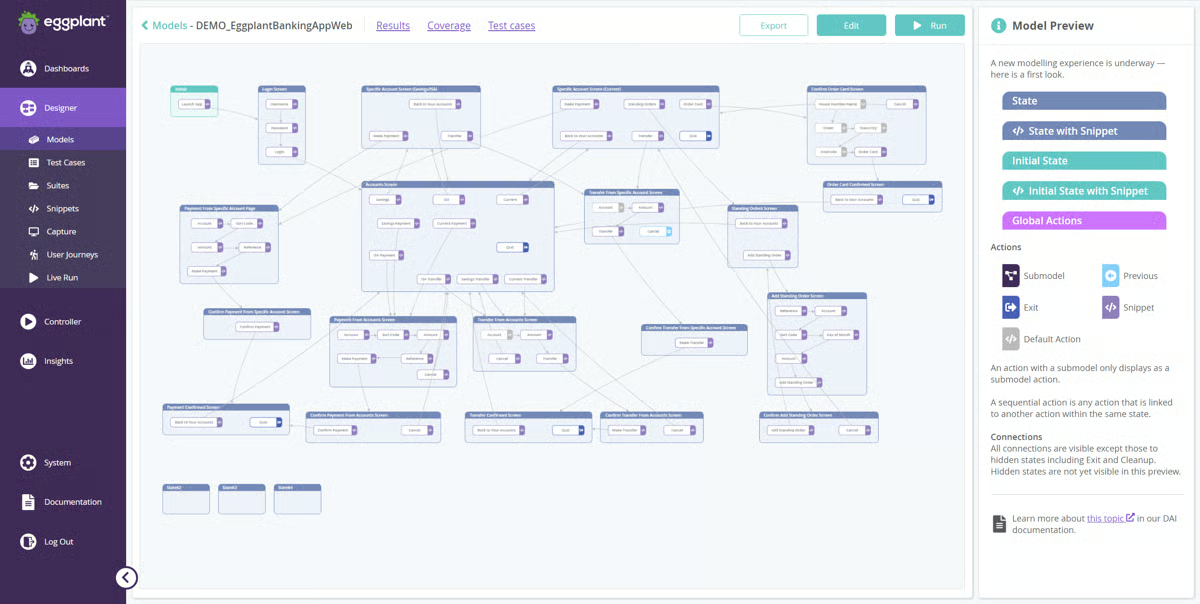
Tests are written in a readable, intent-focused scripting format that emphasizes behavior over implementation detail. Model-based exploration enables broad path coverage without manually enumerating every possible scenario. Feature ratings such as test variety and thoroughness score above category averages, reflecting confidence in coverage depth.
From a market perspective, Eggplant reflects specialized enterprise adoption. The overall user feedback points to a focused fit rather than a broad, general-purpose appeal. These signals align with teams prioritizing visual and behavioral validation over lightweight web automation.
Image-based and end-to-end workflows typically take longer to execute than code-centric frameworks optimized for web testing. Teams prioritizing raw execution speed may experience longer feedback cycles in exchange for broader coverage. Although this approach provides more realistic validation across complex user journeys and non-standard interfaces.
Coordinating models, scripts, and execution environments can also require additional alignment as automation programs scale. As automation programs scale, this coordination becomes a more deliberate operational responsibility. This structure supports greater consistency and reliability in large, complex automation environments.
All in all, Keysight Eggplant aligns best with organizations where automation testing must reflect what users actually see and experience across complex or non-standard interfaces. Based on G2 feedback, it fits enterprise QA teams that prioritize visual fidelity, behavioral coverage, and long-term reliability over rapid iteration on simple web applications.
“OCR and image based automation and language are very easy to understand and code.”
- Keysight Eggplant review, Himaja R.
“Eggplant's End-to-End testing for web applications takes significantly longer to complete compared to tools like Cypress. I find the testing process with Eggplant to be too time-consuming. To enhance the DAI portal, you can consider adding a "Download Test Results" button or functionality that allows users to easily download a summary or report of their tests. This feature can greatly improve user experience, especially for showcasing results to management or clients.”
- Keysight Eggplant review, Chan S.
QA Wolf frequently shows up in reviews from teams that want dependable automation coverage without owning and maintaining it internally.
The user reviews reflect adoption concentrated in small and mid-market organizations, which aligns with a service-led model rather than a self-serve testing framework. G2 reviewers evaluating QA Wolf tend to prioritize dependable execution over owning automation infrastructure.
Test quality and ownership are central to how teams describe their experience. QA Wolf scores highly on organization (95%), thoroughness (95%), and test feedback (94%), all well above category averages. Reviews describe confidence in test coverage ahead of releases, with regressions caught early and failures actively triaged rather than left for internal teams to manage.
Automation is treated as an ongoing responsibility rather than a one-time setup. Test suites are maintained as applications evolve, with broken tests addressed proactively and issues surfaced even when they fall outside explicitly defined requirements.
Collaboration is another consistent part of how QA Wolf is used. G2 reviewers describe responsive communication, clear summaries of test results, and fast iteration when requirements change. Many rely on QA Wolf to handle end-to-end regression testing that internal QA teams lack the bandwidth to manage, particularly for complex flows such as third-party integrations, multi-tab workflows, and 2FA.
Automation outcomes are supported by reporting that emphasizes clarity over volume. Dashboards and summaries help teams track quality trends across releases rather than focusing only on individual failures. This supports longer-term visibility into coverage and stability as products grow.
From an impact standpoint, teams report faster bug discovery, reduced manual testing effort, and greater confidence in shipping changes. Large backlogs of manual tests are often handed over and fully automated with minimal oversight, allowing internal teams to focus on fixing issues instead of maintaining test infrastructure. These outcomes contribute to an overall G2 Score of 70, positioning QA Wolf as a dependable option within its service-driven niche.
G2 reviews talk about features related to autonomous execution and agent-style assistance, reflecting a focus on human-led testing quality rather than advanced automation autonomy. This approach prioritizes accuracy and meaningful validation over experimental or self-service automation features. This reflects a deliberate focus on human-led testing quality rather than autonomous experimentation for teams prioritizing AI-driven self-service automation.
Because QA Wolf operates as an external team, some coordination is required to share product context and interpret whether certain behaviors are expected or defective. This prioritizes accuracy and meaningful validation over experimental or self-service automation features. This ongoing communication keeps test accuracy high and reduces the risk of noise reaching engineering teams, which most G2 reviewers describe as a straightforward and worthwhile exchange.
All in all, QA Wolf fits teams that want dependable end-to-end automation without taking on the operational overhead of building and maintaining automation internally. Based on G2 feedback, it aligns best with organizations that value execution quality, collaboration, and sustained coverage over direct control of test frameworks.
“The most helpful thing about QA Wolf is using them as we get ready to release new work or need to test a PR when fixing bugs. It's great to partner with them because it gives you an overview, summary, and a breakdown view of what needs to be fixed prior to these important launches. Their customer support team is ready to collaborate and help. Coupled with the use of their technology, they have made them an easy partner for us that helps us get work done faster. Their support team is very in tune with our system and can spot changes so fast that it helps us adapt our tests to spot any bugs before they're seen by our customer base.”
- QA Wolf review, Gabby M.
“Sometimes the number of issues reported can feel overwhelming, but the advantage is that they are always accurate and meaningful. In the end, this thoroughness helps us catch real problems early and avoid releasing bugs to production.”
- QA Wolf review, Aleida R.
Cyara is used in automation testing environments where voice, IVR, and contact center workflows are central to customer experience. Review data shows it is most often chosen when teams need repeatable validation of end-to-end customer journeys across carriers, IVR logic, voice bots, and digital channels. This positions Cyara in areas where general UI or API testing tools offer limited coverage.
Testing is built around simulating real customer interactions rather than abstracted requests. Calls move through prompts, routing, and integrations under production-like conditions, allowing teams to see how CX systems behave in practice. This is especially relevant for large contact centers, where small issues in routing or prompts can have immediate customer impact.
Validation is typically continuous rather than event-based. Teams run scheduled test campaigns throughout the day to confirm system availability and expected behavior. This usage pattern supports proactive monitoring of CX systems instead of relying only on pre-release testing.
Cyara shows strong alignment with enterprise CX operations. Around 69% of reviewers come from organizations with more than 1,000 employees, reflecting its focus on scale, uptime, and operational assurance. A G2 Satisfaction Score of 75 suggests a steady workflow fit once implemented.
High-frequency testing establishes performance baselines and surfaces deviations quickly. Test history and thoroughness are frequently referenced, supporting regression and monitoring use cases where results are reviewed by multiple stakeholders. Consistency and clarity become important in these environments, particularly when CX reliability is shared across teams.
Cyara is commonly embedded into CI/CD pipelines and broader delivery workflows. Its product-agnostic design allows it to operate alongside existing contact center platforms, carriers, and infrastructure without forcing architectural changes. Load and performance validation for voice channels is also used to prepare for peak periods and planned system changes.
The platform offers extensive configuration options to support complex CX scenarios, which can require time and familiarity during initial setup. Teams may need upfront investment to model complex CX scenarios accurately. Teams running advanced voice and IVR workflows may need additional ramp-up time to model scenarios accurately. Once configured, however, the platform delivers reliable, repeatable validation across even the most complex customer journey environments.
Reporting emphasizes standardized operational insights, which support monitoring and decision-making but may feel structured for teams accustomed to highly customizable analytics. Teams seeking highly flexible or custom analytics may find this more defined than expected, though the consistency makes results easier to interpret and act on across QA, engineering, and business teams.
Cyara Platform fits organizations where automation testing plays a direct role in protecting customer-facing voice and CX systems. Based on G2 feedback, it aligns best with enterprises responsible for CX reliability at scale, where realism, repeatability, and early detection take priority over lightweight or general-purpose automation tools.
“Cyara has been a game-changer for our testing process. The reporting dashboard is incredibly easy to follow, and the system itself is intuitive, our team was able to spin up new test campaigns quickly, especially using the crawler. Implementation took some time, but it was well-structured, and our engineers picked it up fast. What truly sets Cyara apart is its support team. They’re responsive, knowledgeable, and went the extra mile to ensure we were using best practices when setting up our testing scenarios. We now run campaigns daily, with some tests repeating hourly. Cyara has helped us maintain a high level of quality and confidence in our systems."
- Cyara Platform review, Mohammad S.
Cyara is incredibly feature-rich, but that depth can be overwhelming at first. For newcomers, navigating advanced test case authoring and environment configurations could be more intuitive. That said, once the learning curve is overcome, the value delivered far outweighs the initial complexity.
- Cyara Platform review, Surajit N.
Harness Platform is used in environments where automation testing is tightly integrated with CI/CD execution rather than handled as a separate QA step. G2 reviewers typically evaluate it when test outcomes need to directly influence deployment, monitoring, and rollback decisions. This positioning aligns with organizations running frequent, high-stakes releases where delivery quality depends on automated signals.
Testing flows directly from build through deployment without relying on fragile handoffs. Unit, integration, and performance tests move through pipelines as part of a single execution path, shortening feedback loops and reducing manual checkpoints. This approach makes test results actionable during rollout rather than after releases are complete.
Pipeline structure and execution clarity play an important role as complexity increases. The interface emphasizes task focus and visibility, helping teams understand what is running and why as pipelines grow. This supports coordination across engineering, QA, and operations when responsibilities overlap.
Automated monitoring and rollback are closely tied to test signals. Feature rollouts can be controlled by percentage, user group, or environment, allowing teams to adjust exposure based on automated validation results. This setup supports staged releases and reduces risk when deploying across multiple environments.
Deployment efficiency improves once pipelines are configured. G2 reviewers report releases moving faster without sacrificing coverage, as testing, rollout, and monitoring operate as a connected system. The reduction in manual intervention helps maintain consistency even as release frequency increases.
From an adoption standpoint, Harness shows a balanced buyer mix. Mid-market teams represent about 40% of users, followed closely by enterprise organizations at 37%, reflecting usage in structured delivery environments. An overall G2 Score of 68 and a satisfaction score of 65 points to steady value for teams running mature CI/CD pipelines.
The platform offers extensive configuration across pipelines, environments, and feature flags, which can require time to learn during initial setup. Teams accustomed to simpler, preset workflows may need additional time to understand pipeline design and environment controls. Once past this stage, the depth of configuration supports more reliable, controlled releases across complex delivery environments.
Some setup flows involve multiple steps, reflecting a focus on precision and control that may feel less immediate for teams seeking a more minimal, preset experience. Interface elements such as feature toggle configuration can feel dense at first, largely due to the number of available options rather than missing capabilities. Teams that work through this initial complexity consistently report faster, safer deployments once pipelines are fully established.
All in all, Harness Platform fits teams that want automated testing, deployment, and monitoring to function as a single coordinated system. Based on G2 feedback, it aligns best with engineering organizations prioritizing release safety, visibility, and controlled rollout over lightweight or isolated automation tooling.
“To streamline deployments without compromising security, it is crucial for software development companies to have a platform that optimizes integration and continuous delivery. Harness further reduces our deployment risk with automatic monitoring and rollback capabilities. The user interface is very easy to use; we have been able to halve deployment times from hours to minutes by configuring CI/CD pipelines in a matter of minutes. Unit, integration, and performance tests can be seamlessly integrated into the pipeline thanks to test automation. Reports have been invaluable in communicating performance data to stakeholders and showing customers the value we offer.”
- Harness Platform review, Max P.
“One thing I would note is that once the split has changed, there's a slight delay to have the new settings take effect.”
- Harness Platform review, Simon O.
Testsigma is built to make end-to-end automation accessible without heavy scripting. Review patterns frame it as a platform that expands automation participation beyond engineers to QA and business stakeholders through a shared, readable testing language. This approach supports teams that want automation to scale collaboratively rather than remain limited to specialists.
Test creation relies on a no-code, natural-language model where scenarios are written in plain English. This reduces dependence on scripting expertise and lowers barriers for contribution across roles. Teams use this structure to avoid automation bottlenecks that form when ownership is concentrated in a small group.
Maintenance stays manageable through reusable components and self-healing behavior. Step groups and data-driven execution help keep tests stable as applications change, limiting the effort required to repair suites between releases. As coverage grows, these mechanisms help preserve reliability without constant manual updates.
Web, mobile, and API testing are handled within a single environment, supported by a built-in cloud lab with access to real browsers and mobile devices. Consolidating execution reduces tool sprawl and simplifies regression workflows across products. G2 feature ratings such as Test History (89%) and Thoroughness (86%) reflect the value users place on visibility and result consistency over time.
Automation remains connected to delivery workflows through integrations with CI/CD tools, Jira, and Slack. G2 reviewers describe test results surfacing naturally within development and release processes rather than operating in isolation. Onboarding and customer success support are frequently referenced, particularly by teams newer to automation practices.
Adoption data reflects this positioning. G2 Market Presence sits at 72, with most usage coming from small businesses (43%) and mid-market teams (51%), and limited enterprise representation. A G2 Satisfaction Score of 63 suggests steady workflow fit for teams adopting automation without deep prior experience, while the overall G2 Score of 68 places Testsigma as a balanced option within the category.
The platform’s structured hierarchy for applications and test assets requires deliberate setup as automation scales. Teams may need familiarity with organization conventions early on to avoid missteps as test suites grow. This upfront investment supports cleaner visibility and easier navigation as automation expands across projects and environments.
Debugging and failure analysis in very large or highly dynamic test suites can require additional review time compared to lighter frameworks. Teams running smaller or more stable automation programs are less likely to notice this, and the platform's consistent execution model helps keep results predictable across standard workflows.
Overall, Testsigma aligns well with teams looking to broaden automation ownership and standardize testing across web and mobile using a shared language. Based on G2 feedback, it fits organizations prioritizing accessibility, visibility, and collaborative automation over highly code-centric frameworks.
"What I like most about Testsigma is its no-code, AI-driven approach that allows both technical and non-technical team members to create and maintain automated tests easily. The natural language test creation, reusable step groups, and cross-platform testing capabilities make it very efficient for end-to-end automation. I also appreciate the integrations with CI/CD tools, Jira, and Slack, which help streamline collaboration and reporting. Overall, Testsigma makes automation faster, smarter, and easier to scale across teams."
- Testsigma review, Geethu J.
"Test export/migration is not straightforward, and Salesforce tests can’t be ported across projects due to metadata dependencies. I believe it needs more granularity in terms of roles. There are some admin roles that won't need most of the functionalities other than managing access and controlling project assignments. Versioning/branching transparency and portability aren’t as strong as code-first frameworks, increasing vendor lock-in risk and making large refactors harder. Pricing and licensing are hard to predict."
- Testsigma review, Carlos A.
Leapwork is designed for teams that want to remove scripting from automation while maintaining coverage and control. Review data shows it is most commonly adopted in environments where QA teams automate complex, end-to-end workflows across multiple systems using visual modeling rather than code-heavy frameworks. This positioning aligns more closely with mid-market and enterprise teams than early-stage organizations.
Automation is built using a flow-based, visual design where tests are assembled from blocks and reusable sub-flows. This structure makes automation logic easier to read, share, and maintain over time. Teams describe automation remaining understandable long after creation, reducing dependency on a small group of specialists.
Regression coverage stays stable as applications evolve. Visual modeling helps absorb frequent UI updates or workflow changes without requiring constant rework, which is important in environments where releases span multiple systems. This stability supports long-running automation programs rather than short-term test execution.
End-to-end workflows commonly move across different applications within a single test. This capability fits enterprise landscapes where business processes span many tools and platforms. Review feedback indicates this cross-application coverage is a key reason Leapwork is used for continuous regression instead of isolated scenarios.
Visibility into coverage depth is reflected in feature ratings for test history, test variety, and thoroughness, which score above category averages. Teams use these signals to track how coverage evolves and to validate complex workflows reliably over time. This reinforces Leapwork’s role in structured, repeatable automation strategies. Adoption patterns show strong alignment with larger QA programs. Around 48% of reviewers come from enterprise organizations and 36% from mid-market teams.
Tests are typically assigned to specific machines rather than dynamically distributed, which offers less elasticity in shared or highly dynamic execution environments. For teams running scheduled, predictable automation programs, this structure keeps execution consistent and straightforward to manage across releases.
The surrounding ecosystem and community are also smaller than those of long-established code-based frameworks, leading teams to rely more on vendor documentation than peer examples. G2 reviewers frequently describe Leapwork's support and documentation as responsive and practical, which offsets this gap for most teams in day-to-day use.
Overall, Leapwork fits teams that need maintainable, no-code automation capable of handling complex workflows across multiple systems. Based on G2 feedback, it aligns best with organizations prioritizing visual clarity, reuse, and regression stability over highly dynamic execution or open-ended customization.
“The tool has a lot of capabilities, works well with different platforms within my organization and it absolutely requires no coding experience. We used End to End testing and handled all the integration cases very well. I was amazed with its capabilities to switch between multiple applications within a flow with much ease. The framework and flows created are very robust and require minimal maintenance effort.”
- Leapwork review, Juhi G.
“The major downside we have is the lack of ability for us to be able to maximize our resources. We can not split processing up amongst machines easily. Mainly, we have to assign an automation/flow to a singular machine, and we do not have the ability to allow Leapwork to run an automation on whichever machine is available. This creates a lot of scheduling conflicts as well as bottlenecks when we have flows that have to be run randomly throughout the day.”
- Leapwork review, Peter M.
|
Software |
G2 Rating |
Pricing |
Ideal for |
|
BrowserStack
|
4.5/5
|
Plans start at ~$29/user/month for Live; additional tiers and enterprise pricing vary by product and team size
|
Teams needing cross-browser and real-device automation without managing testing infrastructure
|
|
UiPath Agentic Automation
|
4.4/5
|
Basic plans start around ~$25/month for individual automation; advanced and agentic tiers require contacting sales
|
Enterprise teams automating and testing complex, adaptive workflows using AI-driven agents
|
|
ACCELQ
|
4.7/5
|
Pricing not publicly available - contact sales for tailored subscription details
|
Organizations seeking no-code, self-healing automation across web, mobile, and API testing
|
|
Katalon Platform
|
4.6/5
|
Free tier available; paid plans start around ~$229/month with higher-tier and enterprise options
|
Small to mid-market teams needing unified automation across web, API, mobile, and desktop
|
|
Keysight Eggplant
|
4.2/5
|
Pricing not publicly available - custom quotes required
|
Enterprise QA teams testing complex, image-based, or non-standard user interfaces
|
|
QA Wolf
|
4.8/5
|
Pricing not publicly listed - generally requires contacting the vendor
|
Teams wanting managed, high-touch end-to-end automation without building in-house QA
|
|
Cyara Platform
|
4.4/5
|
Pricing not publicly available - custom enterprise quotes required
|
Enterprises validating CX, IVR, and voice-based customer journeys at scale
|
|
Harness Platform
|
4.4/5
|
Pricing not publicly listed - contact sales for plan details
|
Engineering teams embedding automated testing into CI/CD and progressive delivery pipelines
|
|
Testsigma
|
4.6/5
|
Pricing not publicly available - request a quote or demo from the vendor
|
Teams prioritizing no-code, natural-language automation across web, mobile, and API testing
|
|
Leapwork
|
4.4/5
|
Pricing not publicly listed - contact sales for enterprise offers
|
Mid-market and enterprise teams needing scalable, no-code automation for complex workflows
|
*These automation testing tools are top-rated in their category based on G2’s latest Grid® Report. Pricing and plan availability vary by deployment model and organization size.
Got more questions? G2 has the answers!
It depends on how your automation program is structured today. Small and mid-market teams often gravitate toward tools like Katalon Platform, Testsigma, or QA Wolf because they reduce setup time and skill dependency. Larger teams and enterprises tend to choose BrowserStack, ACCELQ, UiPath Agentic Automation, Cyara, or Leapwork, where scalability, governance, and long-term maintainability matter more than speed to the first test.
No-code and low-code tools such as Leapwork, ACCELQ, and Testsigma work well when you want broader team participation and lower maintenance overhead. Code-friendly platforms like Katalon or CI-centric tools like Harness suit teams that already have strong engineering ownership of test automation. The right choice depends on whether automation is owned by QA specialists, engineers, or a mix of both.
If flakiness is your main issue, tools known for test stability and realistic execution perform better. BrowserStack reduces environment-driven flakiness through real devices. ACCELQ and Katalon use self-healing mechanisms to reduce breakage from UI changes. QA Wolf mitigates flakiness by actively maintaining tests rather than relying on static execution.
Yes, but the depth of integration varies. Harness Platform is built to embed testing directly into CI/CD and progressive delivery workflows. BrowserStack, Katalon, Testsigma, and ACCELQ integrate cleanly with popular CI tools such as GitHub Actions, GitLab, and Jenkins. The difference is whether testing informs deployment decisions in real time or acts as a validation step before release.
BrowserStack stands out for cross-browser and real-device testing. Reviews consistently highlight its ability to surface issues that closely match real user behavior, without requiring teams to manage device labs or browser infrastructure internally.
QA Wolf delivers automation as a managed service. It works best for teams that want reliable end-to-end coverage without building or maintaining an internal automation team. The trade-off is less direct control over test architecture, which many teams accept in exchange for speed and consistency.
UiPath Agentic Automation is well-suited for adaptive, process-driven testing across complex enterprise systems. Cyara Platform is purpose-built for CX, IVR, and voice automation testing. Keysight Eggplant is often chosen when image-based or visual automation is required, such as for desktop applications or virtualized environments.
Pricing transparency varies. BrowserStack and Katalon publish starting prices, which help with early budgeting. Most enterprise-focused tools, including ACCELQ, UiPath Agentic Automation, Cyara, Eggplant, QA Wolf, Harness, Testsigma, and Leapwork, require contacting sales for quotes. This usually reflects usage-based or environment-specific pricing rather than fixed plans.
Switching costs depend largely on how tests are authored. Code-based frameworks offer higher portability but require more maintenance. No-code platforms reduce upkeep but can introduce some vendor lock-in. Tools like Katalon provide a middle ground, while QA Wolf reduces switching effort by abstracting test ownership away from internal teams.
QA Wolf and Testsigma typically deliver the fastest results, especially for teams starting from manual testing. Katalon follows closely for teams with basic automation experience. Tools like ACCELQ, UiPath Agentic Automation, and Cyara require more upfront planning but provide stronger long-term returns at scale.
Many teams report using more than one automation testing tool as their needs mature. Reviews often describe different tools being used for distinct purposes, such as environment validation, functional automation, or pipeline-level verification. Rather than relying on a single all-in-one platform, teams tend to assemble tooling that aligns with how their delivery workflows are structured and how responsibilities are split across QA, engineering, and release management.
The most common mistake is choosing based on features rather than failure modes. Tools that look strong in demos can struggle under real change, such as frequent UI updates, scaling test volume, or tight release cycles. The best choice is the tool that remains stable as the system evolves, not the one with the longest feature list.
The right choice reduces friction across planning, execution, and release cycles, allowing teams to focus on product quality instead of managing the testing system. In reviews and real deployments, this rarely looks like failure; it shows up as persistent operational drag.
What separates durable setups from fragile ones is workflow fit. Tools that align with CI rhythms, surface failures clearly, and keep test logic maintainable reduce execution risk over time. Tools that require constant manual attention create an invisible tax, which eventually shows up as slower releases, shrinking coverage, and declining trust in results. Prioritizing sustained workflow fit over short-term speed helps automation hold up under delivery pressure and become a reliable advantage rather than a fragile layer.
Want to take automation testing further? Explore AI-powered software testing tools on G2 that help QA teams reduce flakiness, expand coverage, and ship with confidence.


We presume writing and compiling software programs is easy. But it's not.
.png) by Shreya Mattoo
by Shreya Mattoo

Recently updatedSummer 2026 Grid® Report · Published May 26, 2026 This guide was last...
 by Somya Jain

Between managing regression cycles, tracking bugs, and keeping up with fast-moving sprints,...
 by Yashwathy Marudhachalam