Confidence in releases is rarely lost overnight. It fades through failed pipelines, inconsistent environments, and approvals that replace automation.
Once teams begin treating deployments as risky events instead of routine operations, delivery systems quietly become bottlenecks. If you are a VP of Engineering, Head of DevOps, or a platform lead, continuous delivery tools are table stakes. I see this decision surface when release velocity slows, environments drift, and manual approvals start bending deployment discipline. It shows up across SaaS product teams, regulated enterprises, and platform groups supporting dozens of services. The market signals are unambiguous.
The Continuous Delivery Tools category on G2 aggregates thousands of verified reviews, reflecting broad, sustained adoption rather than experimentation. When the tool choice is wrong, the damage is operational drag. Pipelines slow. Confidence leaks. Incidents compound instead of resolving.
My conclusions here come from analyzing large-scale review patterns alongside ongoing exposure to teams operating real delivery workflows. I am not benchmarking features in isolation. I look for repeat signals around pipeline reliability, change control, rollback confidence, and how well tools fit existing engineering habits. Strong tools reduce cognitive load and enforce consistency under pressure. Weak ones create hidden queues and fragile workarounds. Choosing poorly does not just slow releases. It hardens bad processes. Replatforming later is expensive, political, and rarely clean.
In this guide, I separate continuous delivery tools by the problems teams are actually trying to solve. Across reviews, GitHub is commonly picked for teams that want delivery tightly coupled to version control workflows. GitLab shows up for organizations seeking a single system to govern the entire DevOps lifecycle. LaunchDarkly is repeatedly chosen when progressive delivery and release safety matter more than pipeline mechanics. Harness appears in enterprise contexts, prioritizing controlled rollout strategies at scale. Vercel is commonly selected by frontend teams optimizing for fast, preview-driven deployments. The goal here is decisive clarity, not surface comparison.
*These continuous delivery tools are top-rated in their category based on G2’s latest Spring 2026 Grid Report. I’ve included their strengths and ideal use cases to help you choose the right platform for your team’s development and QA workflows.
Continuous delivery tools help teams turn code changes, tests, approvals, and deployments into a repeatable flow that can run without constant supervision.
The right tool makes the path from commit to production visible, controlled, and reliable, even as change volume increases. Instead of relying on tribal knowledge or heroics, teams get a system that keeps delivery moving with fewer surprises.
The strongest continuous delivery platforms help teams understand where releases slow down, why failures happen, and what risk looks like before code reaches users. Whether it is connecting deployments to commits, enforcing gates and policies, or automating rollbacks and verifications, good tools reduce ambiguity.
This category is not limited to large enterprises running complex release trains. User feedback shows adoption spread across startups, mid-market teams, and global organizations. Smaller teams value speed and fast setup. Larger teams emphasize control, auditability, and coordination across services. In both cases, the common theme is reducing friction between development and release, without adding process overhead that slows everyone down.
Ultimately, strong continuous delivery tools provide what modern engineering teams need to ship consistently. Clear visibility into what is deploying, predictable release behavior under pressure, and confidence that changes can move fast without breaking trust.
I started by using G2’s Grid Report to shortlist leading continuous delivery platforms based on verified user satisfaction and market presence across small teams, mid-market companies, and enterprises.
Next, I used AI to analyze hundreds of verified user reviews and extract recurring patterns around what actually matters in production delivery workflows. That included pipeline reliability, setup and maintenance effort, visibility into failures, approval and governance controls, rollback handling, and how well tools integrate with source control, CI systems, cloud platforms, and monitoring stacks. This made it easier to separate tools that genuinely reduce release friction from those that add hidden operational overhead as teams scale.
Since I have not personally used every platform covered, I cross-checked these signals with feedback from engineering, platform, and DevOps teams who work with these tools day to day. The product visuals and references included here are sourced from G2 vendor listings and publicly available documentation, not private implementations.
I evaluated continuous delivery tools based on how they hold up under release pressure. My conclusions come from analyzing user reviews alongside how engineering and platform teams actually ship software. I looked for repeat patterns in what slows teams down, what restores confidence during releases, and what quietly compounds friction over time.
At the end of the day, there’s no correct choice. Some teams prioritize speed above all else. Others prioritize control, auditability, or resilience. Choosing well means understanding which constraints matter most and which will matter once scale arrives.
The list below contains genuine user reviews from the Continuous Delivery Tools software category page. To qualify for inclusion in the category, a product must:
This data was pulled from G2 in 2026. Some reviews have been edited for clarity.
GitHub functions less like a standalone tool and more like shared infrastructure for modern software teams. On G2, it holds a Satisfaction Score of 99, a Market Presence Score of 97, and an overall G2 Score of 98. Usage spans company sizes evenly, with 42% small businesses, 31% mid-market teams, and 26% enterprises, showing that the platform adapts well across different operating models.
Collaboration around code is deeply embedded in everyday workflows. Pull requests, branching, reviews, and version history are integrated directly into how teams ship software. Reviewers often point to clear commit trails, inline discussions, and visibility into code changes as factors that help teams stay aligned as work moves toward production.
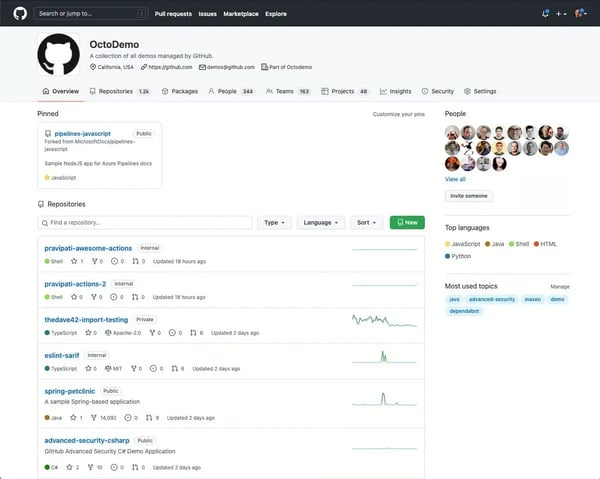
Version control reliability plays a direct role in delivery speed and stability. GitHub’s source code management and branching workflows are consistently rated highly for clarity and dependability. These capabilities support CI/CD pipelines by keeping changes traceable, reviewable, and easier to roll back when issues arise.
Security feedback fits naturally into the development process. Alerts and notifications surface potential risks early without forcing teams to rely on separate security tools. Integration capabilities score 93% on G2, reflecting how security checks, CI/CD workflows, and automation connect smoothly within the same environment.
Based on G2 reviews, many teams describe using GitHub as the central layer that ties delivery workflows together. Version control, CI/CD triggers, security checks, and automation often live in one place after teams move away from older ALM platforms such as Team Foundation Server (TFS), now evolved into Azure DevOps Server. Keeping discussions, metrics, and activity close to the code reduces fragmentation and makes progress easier to follow over time.
The surrounding ecosystem extends that experience without pulling teams out of the platform. Native connections to tools such as VS Code, Jira, Azure, AWS, and Copilot, along with a large marketplace, expand GitHub’s role across the delivery lifecycle. Users rate deployment staging at 92% and autonomous task execution at 91%, aligning closely with how automation is applied in practice.
GitHub’s reporting capabilities focus primarily on core engineering activity and delivery metrics rather than broader organizational analytics. For engineering teams, this focused reporting keeps insights closely tied to commits, pull requests, and deployment activity, making day-to-day development workflows easier to monitor without adding unnecessary reporting complexity.
GitHub can occasionally feel slower when navigating very large logs or activity-dense pages during periods of heavy usage. This tends to be most noticeable for teams reviewing extensive build logs or managing high-volume repositories with constant commit activity. Despite this, the platform continues to support reliable collaboration and delivery workflows at scale, reflecting how widely adopted infrastructure like GitHub prioritizes stability and consistent developer experience even as usage grows.
Overall, GitHub earns its place by staying dependable, extensible, and closely aligned with how developers work. Integrations, automation, and deployment workflows are the areas users rely on most, and they are also the platform’s highest-rated capabilities. For engineering-led organizations that want collaboration and delivery to live in one system rather than across disconnected tools, GitHub continues to fit naturally into daily workflows.
“GitHub addresses the challenge of managing code, conducting reviews, and collaborating by bringing everything together in a single platform. It simplifies version control, keeps our team coordinated with pull requests, and offers smooth integration with CI/CD tools. As a result, I can work more efficiently, monitor changes with clarity, and uphold high code quality while reducing the amount of manual work required.”
- Github review, Eashan M.
“While GitHub provides a strong set of features, I feel that its customer support could be more responsive, especially for users who are not on enterprise plans. The learning curve for advanced workflows (like managing complex Git operations or configuring Actions pipelines) can be quite steep, and I believe more thorough guided onboarding would be helpful. Additionally, the interface for managing large organizations and permissions is rather complicated, which can affect how easily GitHub is implemented in enterprise settings.”
- Github review, Gaurang A.
Continuous delivery depends on reliable testing at every stage. Explore the best automation testing tools that help catch issues before deployment.
GitLab is better understood as a full DevOps operating system than a simple code repository. Looking at G2 Data, it carries an overall G2 Score of 89, with Satisfaction at 91 and Market Presence at 88. Reviews describe it as the platform teams rely on once delivery workflows move beyond basic version control and into structured automation.
CI/CD, issue tracking, code review, and security are designed to function as one connected workflow. Instead of stitching together separate tools, teams manage planning, execution, and release activity inside a single system. This approach reduces handoffs and keeps the delivery context visible from start to finish.
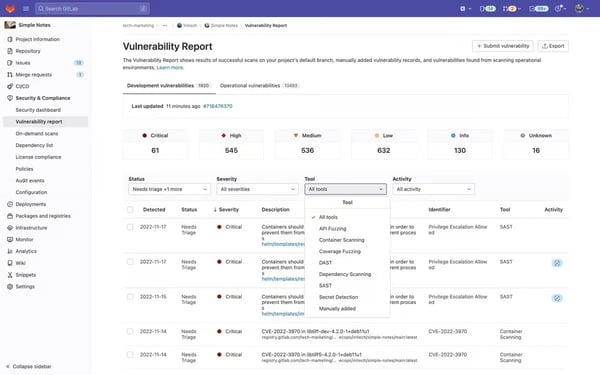
Based on my evaluation, I see that built-in CI/CD pipelines play a central role in how teams use GitLab. Automation defined through .gitlab-ci.yml and executed with GitLab Runner gives teams control without depending on external CI platforms. G2 ratings reflect this focus, with implementation scoring 91% and automation at 90%.
Deployment workflows are handled directly alongside code changes. Pipelines, environments, and staging setups are managed within the same interface, supporting production-oriented delivery. Deployment-ready staging scores 90% on G2, matching how teams describe their ability to move changes toward release with fewer surprises.
The organizational model supports structured delivery at scale. Groups and subgroups allow teams to manage permissions, security policies, and visibility with fine-grained control. For organizations running multiple products or environments, this structure helps maintain governance without breaking delivery flow.
Work tracking stays closely tied to code and releases. Issues, merge requests, and pipelines connect planning decisions directly to deployed changes. Reviewers often describe GitLab as covering everything they need in one place, especially when reducing reliance on fragmented DevOps tooling.
Usage spans company sizes with a slight lean toward more complex environments. About 35% of users come from small businesses, 37% from mid-market teams, and 28% from enterprises. Smaller teams benefit from consolidation, while larger organizations rely on the platform’s depth, security controls, and automation as workflows grow.
GitLab’s group and permission model introduces a more layered organizational hierarchy. This may require some adjustment for teams transitioning from flatter repository tools or simpler version control setups. At the same time, this structure enables stronger governance, clearer access control, and better organization across multiple projects, which supports scalable DevOps operations as teams grow.
GitLab brings planning, CI/CD, security, and monitoring into a single workspace, which can make the interface feel dense for users who only rely on a small subset of features. The unified environment allows teams to manage the entire DevSecOps lifecycle without switching platforms, helping maintain visibility and coordination across development workflows.
Overall, GitLab fits engineering-led organizations that prioritize automation, traceability, and deployment readiness. Its highest-rated capabilities align closely with teams running structured CI/CD workflows at scale. For organizations willing to invest in configuration and process, it provides a unified DevOps platform that grows with delivery complexity.
"I appreciate how GitLab brings the entire DevSecOps lifecycle into a single unified platform, reducing tool sprawl and making my workflow more efficient. GitLab's built-in CI/CD pipelines are one of its strongest features. They are easy to configure using .gitlab-ci.yml, provide powerful automation, and eliminate the need for separate CI tools, making environment deployment easy. The initial setup was moderately easy, and I found GitLab's documentation very helpful in making the installation straightforward.”
- Gitlab review, Vedhavyas R.
"The sheer number of features and options can feel overwhelming, particularly for teams that are new to GitLab or DevOps. Additionally, GitLab offers limited built-in granularity when it comes to permission settings, especially in comparison to tools like GitHub Enterprise or Bitbucket.”
- Gitlab review, Jannatul H.
Shipping faster only works if performance holds up. Compare application performance monitoring tools that help track stability after every release.
LaunchDarkly is used by teams that treat feature flags as a core part of how software is shipped. On G2, it holds a 100% Satisfaction Score, alongside a Market Presence Score of 68 and an overall G2 Score of 64. Reviews reflect a platform that delivers very high satisfaction for teams that rely on controlled releases, even though it is not positioned as a broad DevOps suite.
Release control sits at the center of how teams work with LaunchDarkly. Code can be deployed to production while features remain gated until teams choose to expose them. This separation allows engineering teams to ship continuously without immediately impacting users.
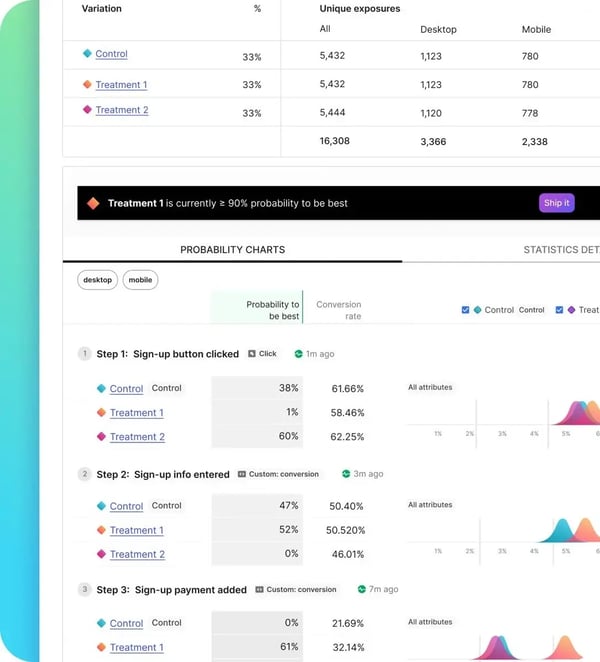
Rollout mechanics are built directly into everyday workflows. Percentage-based releases, targeting by user or organization, and immediate kill switches are used as standard controls rather than advanced configurations. Deployment-ready staging scores 91% on G2, aligning with how teams manage safer production releases.
Feature flags integrate cleanly into CI/CD pipelines. Reviewers describe using LaunchDarkly alongside build and deployment automation without disrupting existing processes. Integration capabilities score 87% on G2, reflecting how the platform fits into established delivery environments rather than replacing them.
Operational resilience shapes many use cases. Teams rely on flags to manage beta programs, reduce blast radius during regressions, and roll back behavior instantly without redeploying code. This approach supports higher release frequency while keeping risk contained.
Flag management at scale is supported through tagging, usage tracking, and lifecycle indicators. These tools help teams maintain visibility into active and unused flags as systems evolve. Reviewers frequently mention avoiding long-term accumulation of unused flags in complex environments.
Only 12% of users come from small businesses, while 44% are mid-market teams and another 44% are enterprises. This distribution matches teams managing multiple environments, user segments, and coordinated releases.
G2 reviewers note that managing a growing number of feature flags can take ongoing organization and lifecycle discipline, but that structure helps teams maintain clarity and control as release complexity increases. Feedback also highlights that advanced flag targeting and JSON-based configurations may take time to get comfortable with, yet this flexibility enables precise rollouts and safer experimentation across environments.
Overall, LaunchDarkly supports predictable releases and safer experimentation under continuous delivery. Its satisfaction scores and deployment-related ratings reflect how well it serves teams that prioritize release control. For mid-market and enterprise organizations practicing progressive delivery at scale, it remains a dependable part of the delivery stack.
“I absolutely love LaunchDarkly for its excellent capability to facilitate the rollout of new features and manage configurations efficiently. The flexibility it provides by allowing me to easily tweak and play around with configurations for different users is invaluable. I adore the feature of building targeting rules, which is immensely useful in addressing various user bases with precision. The feature rollout by percentage is particularly impressive, offering a smooth and calculated deployment. Having previously attempted to build a similar yet basic feature rollout system from scratch, I truly appreciate the advanced and user-friendly solutions that LaunchDarkly provides at a whole new level. It's also very intuitive to use, which made my experience as a new joiner incredibly positive and seamless. LaunchDarkly has significantly simplified feature management, making it an essential part of my toolkit."
- LaunchDarkly review, Bhavesh S.
"I experienced some challenges with the initial setup of LaunchDarkly, particularly around the initialization configurations, which were somewhat confusing. Choosing between connection methods like streaming versus polling was not straightforward. Additionally, I encountered a significant downtime issue tied to an AWS us-east-1 outage, which, although not directly caused by LaunchDarkly, affected its service. Furthermore, I find the cost for service connections to be high, and I would appreciate a reduction in those costs.”
- LaunchDarkly review, Sagar C.
Continuous delivery doesn’t stop at deployment, monitoring is key. See which APM tools help teams maintain performance across frequent releases.
Bitrise is designed specifically around mobile development. On G2, it posts a Satisfaction Score of 95%, reflecting how closely the product aligns with the needs of mobile engineering teams. Reviews describe it as tooling that fits naturally into day-to-day iOS and Android delivery workflows.
Teams often describe getting reliable mobile CI/CD pipelines running quickly without managing build infrastructure themselves. This is especially relevant for macOS-based builds, where maintaining environments can become an operational burden. Bitrise handles much of that complexity, allowing teams to focus on development rather than build systems.
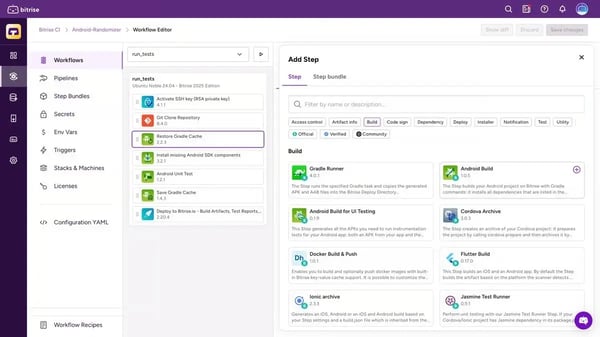
Workflow automation plays a central role in how Bitrise is used. The visual workflow editor and extensive step library support pipelines covering builds, tests, code signing, distribution, and store deployments. Once workflows are configured, builds trigger predictably on commits, artifacts are shared automatically, and releases progress with minimal manual involvement.
Mobile-specific build environments reduce friction across common pain points. Certificate management, provisioning profiles, and environment setup are handled in a way that avoids many of the failures teams encounter with self-managed systems. This allows pipelines to remain stable even as apps and dependencies evolve.
User feedback often references how approachable the platform feels. The interface is described as clean and easy to navigate, making complex pipelines easier to understand. Documentation, recipes, and third-party steps are easy to find, and support is commonly described as responsive and knowledgeable.
Delivery workflows extend beyond builds alone. Artifact sharing, notifications, and app store integrations support a smooth path from commit to release. Teams describe replacing in-house build servers or fragmented release processes with a single, consistent system.
Bitrise’s workflow customization relies on step-based pipeline configuration rather than one-click automation. This can require some initial learning for teams that are newer to CI/CD concepts or mobile delivery pipelines. At the same time, this flexibility allows teams to support both native and cross-platform stacks while tailoring workflows to match their mobile development processes.
As build volume increases, areas such as pricing management and deeper debugging scenarios may require closer planning. This is most noticeable for teams running high-frequency mobile builds across multiple apps. However, the platform’s extensible design and managed infrastructure help teams maintain consistent mobile CI/CD pipelines without needing to operate their own build environments.
Overall, Bitrise fits teams where mobile is a core product surface and release cadence matters. Its high satisfaction ratings, workflow tooling, and mobile-first design support reliable delivery for iOS and Android applications. For teams that want mobile CI/CD built specifically for their workflows, it remains a practical and focused choice.
“I've used Bitrise at several companies and on multiple projects. For mobile CI/CD, it's simply the easiest to set up and maintain. The customer support is top-notch, and any questions I've ever had were answered quickly.”
- Bitrise Mobile DevOps Platform review, Derek E.
"If you need to install a particular tool, you'll have to spend time doing so every time you start a build, as you can't save the installation for future use. However, this approach ensures that each build begins with a fresh and clean environment. Occasionally, snapshot tests produce different results on Bitrise compared to your laptop, even when using the same stack. Still, this difference is manageable."
- Bitrise Mobile DevOps Platform review, Mickael M.
Continuous delivery depends on reliable testing at every stage. Check out the best automation testing tools to keep your pipelines running smoothly.
Google Cloud Build is typically used by teams running cloud-first development workflows that prioritize managed infrastructure. On G2, it posts a Satisfaction Score of 67, a Market Presence Score of 78, and an overall G2 Score of 73. These scores align with a platform positioned around reliability and operational simplicity rather than extensive customization.
Build and deployment workflows run in fully managed, serverless environments. Teams describe not having to provision or maintain build servers, which removes a common source of operational overhead. Builds, tests, and deployments execute in ephemeral environments that Google manages end-to-end, keeping attention on code rather than infrastructure.
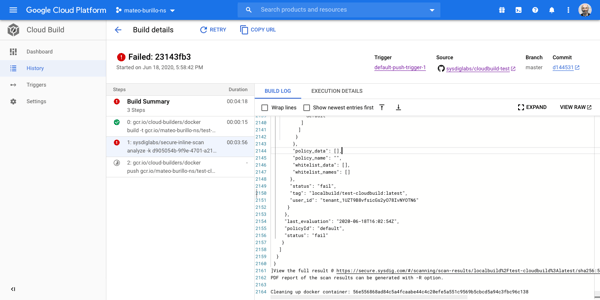
Pipeline definition and execution are handled through clear, YAML-based configurations. Processes and workflow score 95% on G2, with users noting how easily it builds triggers from GitHub, GitLab, or Cloud Source Repositories. This setup supports consistent execution without manual steps.
Automation and integration play a central role in daily usage. Both are rated at 94% on G2, reflecting how smoothly Cloud Build fits into delivery pipelines. Native connections to services such as Cloud Run, GKE, Artifact Registry, and Container Registry support a direct path from build to deployment.
Parallel execution and reproducibility support projects of different sizes. Teams reference running multiple builds concurrently and maintaining consistent environments across services and repositories. This helps manage growing workloads without redesigning pipelines.
Workflow flexibility allows teams to support varied development styles. Multiple languages and frameworks, customizable steps, and event-driven triggers make it possible to adapt pipelines without breaking standardization. Users describe balancing shared build logic with project-specific needs.
About 42% of users come from small businesses, with mid-market teams at 31% and enterprises at 28%, according to G2 Adoption Data. Smaller teams value quick setup with minimal overhead, while larger teams rely on consistency across projects.
Google Cloud Build runs builds in fully managed environments, which means teams have less direct visibility into the underlying infrastructure. This can be more noticeable for organizations accustomed to managing their own build servers or customizing low-level environments. The managed model reduces operational overhead and allows teams to run consistent builds without maintaining CI infrastructure.
The platform uses usage-based pricing tied to build minutes and resources. Teams running very high build volumes across multiple projects may need to monitor costs more closely as activity grows. This model allows organizations to scale CI/CD workloads flexibly and pay based on actual usage rather than maintaining fixed infrastructure capacity.
Overall, Google Cloud Build fits teams that want fast, scalable CI/CD without managing infrastructure. Its strengths around workflows, automation, and integration support cloud-native delivery models. For organizations already invested in Google Cloud and focused on speed and operational simplicity, it remains a practical CI/CD choice.
“With Google Cloud Build, I don't need to manage servers, their configuration, and maintenance. It is easy to deploy and takes no time at all. Traditionally, to deploy my code, I had to create a server, install dependencies, configure the network, and whatnot, but with Google Cloud Build, I focus on my code while it handles all the deployment-related things.”
- Google Cloud Build review, Bishal D.
“In the case of Google Cloud Build, managing bills is difficult. You don't get combined bills. Also, due to complicated networking, it is difficult to manage on-premises data.”
- Google Cloud Build review, Ramdas J.
Red Hat Ansible Automation Platform is used by teams that treat infrastructure automation as part of their operating model rather than a surface-level productivity layer. On G2, it carries a Market Presence Score of 82, with more than half of its users coming from enterprises with over 1,000 employees. That profile aligns with environments where scale, consistency, and governance are core requirements.
Automation depth shapes how the platform is applied in practice. Core automation capabilities are rated at 96% on G2, well above category averages. Teams use it for OS patching, server provisioning, compliance enforcement, CI/CD infrastructure workflows, and large-scale configuration changes across hundreds of systems.
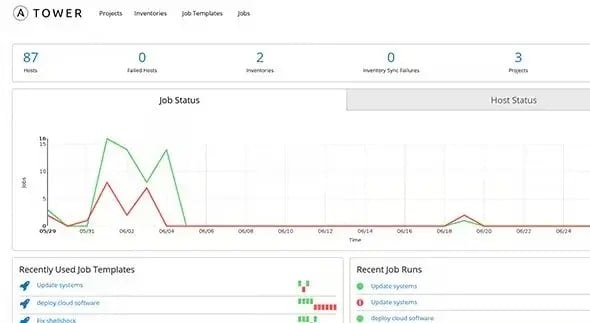
The agentless architecture reduces ongoing operational overhead. By avoiding agents, teams simplify maintenance and upgrades across diverse environments. Reviewers often describe running automation across operating systems, clouds, and on-prem infrastructure without needing to rework playbooks.
Workflow orchestration supports consistent execution. Processes and workflow score 93% on G2, while deployment-ready staging scores 92%. These capabilities allow teams to design, test, and promote automation in a controlled way before broad rollout.
Security-conscious execution is reflected in how jobs run. Containerized execution environments allow credentials to exist only for the duration of a task and are destroyed afterward. This approach aligns with modern security and compliance expectations in regulated environments.
Usability appears frequently in G2 user feedback. The interface is described as approachable for less experienced users while still supporting advanced automation scenarios. Integrations with tools such as GitLab, ServiceNow, and CyberArk are often mentioned as fitting naturally into existing enterprise workflows.
Organization and reuse support large automation programs. Inventories, templates, and credential management make it easier to standardize automation across teams and environments. This structure helps maintain consistency as automation footprints grow.
Managing automation across multiple templates, inventories, and credentials can require additional orientation within the platform. This structured organization supports governance, repeatability, and clear control over automation assets, which is especially valuable for enterprise teams operating large-scale infrastructure environments.
Job templates are typically designed around a single machine credential model, which works best in standardized infrastructure setups. Teams running highly heterogeneous environments with diverse credential requirements may need additional coordination when managing automation workflows. However, this model promotes consistency and controlled execution, helping teams maintain predictable and secure automation across systems.
Overall, Red Hat Ansible Automation Platform fits organizations that view automation as foundational infrastructure. Its highest-rated capabilities around automation and workflow control explain its continued use in complex, security-conscious environments. For mid-market and enterprise teams managing large-scale systems, it remains a dependable automation backbone.
“The thing that I love most about AAP is its seamless integration capabilities. We were about to set up a full integration with our ServiceNow platform for automation request intake, as well as CyberArk for secure secret management. Both of which were done with OOB functionality provided by the platform and only took a few days to get operational.”
- Red Hat Ansible Automation Platform review, Jamison W.
“Missing service catalog, missing dynamic forms, we have to rebuild images on collection update, and need to test custom filter plugins and filters. We also have to rebuild images every time.”
- Red Hat Ansible Automation Platform review, Oleksii I.
Vercel is commonly used by teams building and shipping modern frontend applications at a fast pace. User feedback on G2 consistently frames it as infrastructure that stays out of the way once configured, allowing teams to focus on product work rather than deployment mechanics.
Code moves to live environments with minimal friction. Commits pushed to GitHub trigger builds, preview deployments, and production releases automatically. Automation is rated at 97% on G2, with deployment-ready staging close behind at 96%, reflecting how reliably changes progress through delivery without manual steps.
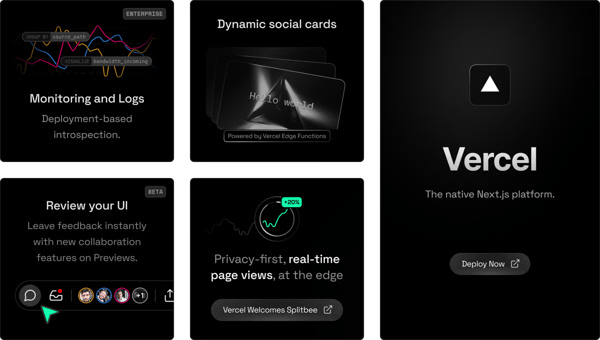
Developer experience shapes much of how teams interact with the platform. Reviews describe deploying JavaScript and Node.js applications without managing servers, CI pipelines, or CDNs. For teams using Next.js, the experience feels cohesive, as the framework and platform are designed to work together.
A range of built-in services supports more complex frontend applications. Serverless functions, edge deployments, preview links, logging, analytics, Postgres, and blob storage allow teams to extend functionality without relying on multiple vendors. This setup keeps workflows centralized and reduces integration overhead.
Feedback and collaboration fit naturally into delivery cycles. Preview deployments and private links make it easy to share work with designers, clients, and non-technical stakeholders before releases go live. Teams describe smoother review cycles and clearer feedback during iteration.
Usage is concentrated among smaller organizations. About 83% of users come from small businesses, startups, freelancers, and student projects, according to G2 Data. This aligns with teams that want to move quickly without dedicated DevOps support while still maintaining production-quality delivery.
Because the platform is designed primarily for frontend delivery, teams needing deeper backend orchestration or infrastructure-level control may pair it with additional services. This focus works best for frontend-heavy teams prioritizing speed and developer experience.
As application traffic and usage grow, pricing tiers and plan limits can require closer monitoring compared with self-managed hosting models. At the same time, the managed environment helps maintain consistent performance and reduces operational overhead as teams scale.
Overall, Vercel fits teams that prioritize speed, simplicity, and frontend developer experience over low-level infrastructure control. Its strongest G2 ratings around automation and staging align with how teams ship modern web applications. For product teams focused on shipping quickly and collaborating efficiently, it continues to fit naturally into frontend delivery workflows.
“I like Vercel for its ease of use and simple implementation—deploying is as easy as pushing to Git. Its integrations with frameworks and tools are seamless, and it offers a rich set of features without feeling overwhelming. I use it frequently because it reliably handles hosting, serverless functions, and edge features, and the customer support and documentation make it easy to get help when needed.”
- Vercel review, Sachin P.
“We have seen a lot of issues with a large cache.”
- Vercel review, Pratik S.
Azure Pipelines is most often used by teams running parts of their workflow inside Azure DevOps. On G2, it holds a Market Presence Score of 91, reflecting broad adoption among mid-market and enterprise organizations. Its usage profile aligns with teams focused on standardizing CI/CD rather than experimenting with lightweight tooling.
Pipeline automation sits at the center of how teams use Azure Pipelines. Support for both classic visual pipelines and YAML-based definitions allows teams to choose how they design and maintain workflows. Reviewers describe moving from manual builds and deployments to automated pipelines that behave consistently across environments.
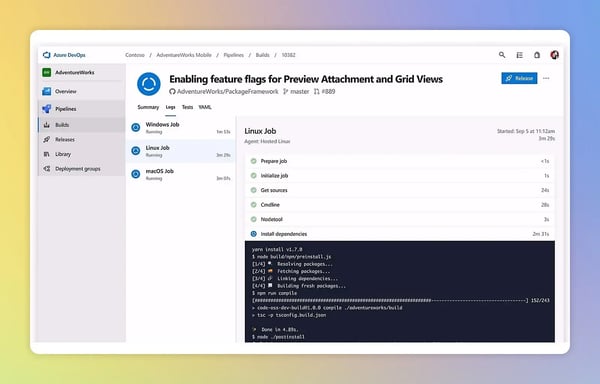
Connections within the Microsoft ecosystem shape much of the day-to-day experience. Azure Pipelines earns a 93% satisfaction rating for integrations, reflecting how tightly it connects with Azure DevOps components such as Boards and Repos. Teams also describe smooth interoperability with GitHub, GitHub Actions, and other third-party tools.
Automation supports scale across diverse workloads. Parallel jobs, reusable steps, detailed execution logs, and support for multiple languages and frameworks allow teams to manage frequent deployments efficiently. This setup reduces manual effort and improves release reliability.
Workflow visibility helps teams understand pipeline behavior. Visual execution views and clear stage-level feedback make it easier to track progress and identify failures, particularly in multi-stage or approval-driven delivery flows.
Agent flexibility adds operational control. Teams can choose between Microsoft-hosted and self-hosted agents, which support compliance, network restrictions, and custom-built environments without redesigning pipelines.
Usage spans organization sizes. Around 39% of users come from large enterprises, 34% from mid-market teams, and 28% from small businesses, according to G2 Data. This mix reflects a platform that scales alongside organizational complexity.
Azure Pipelines relies heavily on YAML-based configuration for defining workflows and automation. This model provides strong flexibility and version-controlled pipeline definitions, which align well with engineering teams managing structured automation environments.
As pipelines expand across multiple stages and environments, troubleshooting and administration can require more hands-on investigation. This is most noticeable in large delivery setups with complex workflows. The detailed logs and execution visibility help teams diagnose issues effectively and maintain reliable pipeline performance at scale.
Overall, Azure Pipelines fits teams already invested in Azure and Microsoft tooling. Its strengths in automation, integration, and workflow visibility support standardized delivery at scale. For organizations that prioritize consistency and governance over minimal setup, it remains a reliable CI/CD foundation.
“As a software developer, it is quite common for us to work with various pipeline tools for CI/CD, and Azure Pipeline is one of those available through Azure DevOps. The dashboard is straightforward, easy to navigate and implement, making it simple to understand the overall process. Configuring pipelines is also very user-friendly, and writing YAML scripts is both easy and intuitive. The tool offers the option to select each step, and it will automatically generate the script for you. Adding global or environment variables is also a straightforward process.”
- Azure Pipelines review, Abhishek B.
“When the software doesn't function as expected, it would be helpful to have more information available to assist with troubleshooting. For example, access to logs or more detailed error outputs would make it easier to identify and resolve issues.”
- Azure Pipelines review, Dave C.
| Best continuous delivery tools | G2 Rating | Free plan | Ideal for |
| GitHub | 4.7/5 | Yes (free tier with basic CI/CD via Actions) | Engineering teams that want version control and delivery pipelines tightly coupled to code collaboration. |
| GitLab | 4.5/5 | Yes (free tier with basic CI/CD) | Cross-functional DevOps teams seeking an integrated delivery surface under one platform. |
| LaunchDarkly | 4.5/5 | Free trial (no permanent free tier) | Teams focused on progressive delivery and risk-managed releases with feature flag controls. |
| Bitrise Mobile DevOps Platform | 4.8/5 | Yes (free tier) | Mobile development teams prioritize streamlined mobile CI/CD workflows. |
| Google Cloud Build | 4.5/5 | Yes (generous free tier) | Cloud-native teams that want serverless CI/CD integrated with GCP resources. |
| Red Hat Ansible Automation Platform | 4.6/5 | No free plan (trial available) | Enterprise automation and platform teams need infrastructure-driven delivery orchestration. |
| Vercel | 4.7/5 | Yes (free hobby tier) | Frontend and Jamstack delivery teams need ultra-fast preview and deployment loops. |
| Azure Pipelines | 4.3/5 | Yes (free tier with parallel jobs) | Teams invested in Microsoft/Azure ecosystems who want scalable automation tied to cloud services. |
*These continuous delivery tools are top-rated in their category, based on G2’s Spring 2026 Grid Report. All offer custom pricing tiers and demos on request.
Got more questions? G2 has the answers!
If your team already lives inside GitHub, GitHub Actions feels frictionless and keeps CI/CD close to code. GitLab is better suited for teams that want an all-in-one DevOps platform with built-in security, runners, and release controls. Azure Pipelines makes the most sense for teams deeply invested in the Azure ecosystem and Microsoft tooling.
GitHub Actions, Vercel, and Bitrise tend to show faster time-to-value due to minimal setup and opinionated defaults. They are ideal for teams that want reliable deployments without managing infrastructure or complex governance early on.
LaunchDarkly stands out here. LaunchDarkly specializes in feature flag–driven releases and progressive delivery with strong risk isolation.
Yes, but depth varies. GitLab and Red Hat Ansible Automation Platform offer stronger governance controls, role-based access, audit logs, and policy enforcement. These are better suited for regulated or compliance-heavy environments.
GitHub, GitLab, Azure Pipelines, and Google Cloud Build provide deep native integrations with source control, cloud services, and observability tools. These integrations reduce manual glue work and keep delivery decisions tied to real system state.
Infrastructure-driven tools like Red Hat Ansible Automation Platform focus on environment consistency, configuration management, and policy enforcement. Application-focused tools like GitHub Actions and GitLab center on code-to-production workflows and deployment behavior.
Most platforms support incremental migration rather than full rewrites. Teams typically run parallel pipelines during transition. GitHub Actions and GitLab tend to be easier migrations for Git-native teams, while enterprise platforms require more upfront planning.
Vercel is commonly chosen for frontend teams prioritizing fast builds, preview environments, and edge deployments. It works best when frontend delivery speed matters more than deep backend orchestration.
Yes. Continuous delivery is most relevant when paired with CI, infrastructure automation, and release management, because delivery depends on all three to move code safely into production.
The most relevant tools here are GitHub or GitLab for CI and pipeline orchestration, Red Hat Ansible Automation Platform for infrastructure automation, and LaunchDarkly for release management and controlled rollouts. Together, they support a complete path from code change to production release.
Scalability under load, permission models, auditability, rollback safety, and long-term maintenance cost. GitLab and Red Hat Ansible Automation Platform consistently meet enterprise evaluation criteria for production-grade delivery.
If there’s one thing that stands out while evaluating the best continuous delivery tools, it’s that they are no longer just about moving code from one environment to another. They define how teams handle change. The right platform reduces hesitation, shortens recovery time, and makes releases feel routine instead of risky. When delivery systems are well designed, teams stop bracing for deployments and start trusting them.
Whether you’re a small team trying to ship faster without breaking things, a scaling organization managing multiple services and contributors, or an enterprise balancing speed with governance, there is a delivery model that matches your reality. As release frequency increases and systems become more interconnected, relying on manual coordination or fragile pipelines becomes a liability, not a shortcut.
The real decision isn’t about features or pricing. It’s about choosing a tool that aligns with how your team builds, reviews, and deploys software, while still holding up when complexity arrives. In modern engineering, consistent delivery is not about working harder at release time. It’s about building a system that lets teams move fast, recover quickly, and ship with confidence.
Want tighter control over how product changes are communicated? Explore the best release notes management software on G2 that help engineering teams track updates, document decisions, and ship changes without losing context.


With more and more businesses employing rapid application development (RAD) workflows,...
 by Holly Landis

Software update pop-ups always seem to appear at the worst possible time. I’ve lost count of...
 by Harshita Tewari
If there’s one thing I’ve learned from working with product, engineering, and QA teams, it’s...
by Gunisha