

This guide was last updated on March 31, 2026. A newer report has since been published. The tools below reflect the scores from G2's Summer 2026 Grid® Report.
Based on verified G2 reviews and the latest Grid® placement.
The tools below have also been exhaustively tested and evaluated, and continue to hold their place among the best Asset Tracking Software on G2.
For many organizations, asset tracking starts out simply. A shared spreadsheet. A basic log. Maybe a legacy system that worked fine when the business was smaller. But as assets move across locations, teams, or job sites, those systems start to break down. Information lives in different places, updates lag behind reality, and it becomes harder to trust what’s actually accurate. That’s usually when teams begin researching to find the best asset tracking software.
I dug into asset tracking tools after seeing the same challenges surface across operations, maintenance, facilities, and fleet teams. I focused on how these systems hold up in day-to-day use. Some teams needed real-time GPS visibility to track assets in motion. Others cared more about maintenance schedules, inspections, and asset history. Many were simply looking for software their teams would actually adopt.
Tools like Samsara, MaintainX, Limble, eMaint, EZO, and Tenna approach these problems differently. Some prioritize fleet and telematics. Others focus on maintenance workflows or mobile-first asset tracking.
In this guide, I break down the best asset tracking software based on hands-on product analysis and patterns across real G2 user reviews, so you can identify which tool fits your team’s operational needs.
Let’s get into it.
Here's a comparison table that gives you a quick, side-by-side view of how the top asset tracking tools stack up across G2 ratings, pricing, and ideal use cases. Use this as a starting point to narrow down options before diving into detailed product breakdowns.
| Software | G2 rating | Pricing | Ideal for |
| Samsara |
4.5/5 |
|
Large fleets needing both powered and unpowered asset tracking |
| MaintainX |
4.8/5 |
|
Teams requiring AI-driven maintenance management |
| Limble |
4.8/5 |
|
Maintenance teams wanting mobile CMMS |
| eMaint CMMS |
4.5/5 |
|
Organizations needing mature, scalable CMMS |
| EZO |
4.4/5 |
|
Large organizations needing full asset lifecycle control |
| Tenna |
4.4/5 |
Custom pricing |
Construction companies with diverse asset types |
*These asset tracking software solutions are top-rated in their category based on recent G2 Winter Grid Reports.
When I started comparing asset tracking software, it became clear that tracking assets isn’t just about knowing where something is but also about avoiding reactive asset management altogether. In practice, asset tracking means maintaining visibility into where assets are, how they’re used, and what condition they’re in, especially as they move across teams, locations, and job sites.
The tools on this list approach that problem in very different ways. Some focus heavily on real-time GPS visibility for assets that are constantly on the move. Others lean into maintenance history, inspections, and lifecycle control. And a few prioritize simplicity, aiming to replace spreadsheets with systems that teams will actually adopt.
What worked best across these tools wasn’t just feature depth, but how well each system helped teams move from reactive tracking to proactive decision-making. The best asset tracking solutions treat assets as dynamic resources — things that move, change hands, degrade over time, and require ongoing attention rather than static entries on a list.
That shift is becoming more urgent as asset complexity increases across industries. The global market for asset tracking solutions is expected to grow from $27 billion in 2025 to $71.1 billion in 2032. That context matters because the tools on this list aren’t just about visibility — they’re about helping teams move from reactive asset management to a more controlled, decision-driven approach.
These are the asset tracking platforms that stood out for how they support real-world workflows, not just how they look on a feature comparison page.
I started by reviewing asset tracking platforms in the G2 Asset Tracking category, then, using G2 Winter Grid Reports, narrowed the scope based on relevance, active user feedback, and fit for common operational use cases.
From there, I focused on how asset tracking platforms hold up once teams start using them in real-world environments, not just how they look on a feature checklist. That meant paying attention to how teams track assets across locations, how updates scale as asset counts grow, and whether the software continues to feel usable once it’s fully rolled out across operations, maintenance, facilities, IT, fleet, or construction teams.
Real user feedback played a big role in shaping this list. I analyzed patterns across G2 reviews to understand why teams chose certain tools, what continued to deliver value over time, and where frustration repeatedly surfaced. I also used artificial intelligence to surface recurring themes across reviews, which helped separate one-off complaints from limitations that tend to affect teams at scale.
In total, I reviewed more than a dozen asset tracking solutions and narrowed the list to six tools that consistently stood out for their product capabilities, user sentiment, and fit for real-world workflows.
Since I couldn’t personally test these tools, I consulted professionals with hands-on experience and validated their insights using verified G2 reviews.
The screenshots featured in this article may be a mix of those obtained from the vendor’s G2 page or from publicly available materials.
When narrowing down the best asset tracking software, a few factors consistently separate tools teams stick with from those they outgrow or abandon. These weren’t abstract feature differences they showed up in how well the software supported day-to-day work once it was fully rolled out.
In total, I reviewed and compared more than a dozen asset-tracking tools before narrowing the list to the seven solutions that stood out for real-world use.
The list below includes genuine user reviews from the G2 Asset Tracking category. To be included in this category, a solution must:
*This data was pulled from G2 in 2026. Some reviews may have been edited for clarity.
Samsara holds a 4.5 out of 5 rating on G2, based on 2,230+ reviews, and is most often used by organizations that need consistent, real-time visibility into assets moving across locations, routes, or job sites. Its asset tracking capabilities rely on GPS and Bluetooth technology, making it especially relevant for fleet-heavy and industrial environments where knowing an asset’s exact location is critical to daily operations.
A defining aspect of Samsara’s approach is its emphasis on hardware reliability. The platform uses industrial-grade tracking devices designed for long-term deployment across field and outdoor environments, with extended battery life that reduces the need for frequent maintenance or replacement. This makes Samsara a practical option for tracking non-powered assets like trailers, containers, and heavy equipment operating across distributed locations.
On the software side, Samsara brings asset data into a centralized dashboard that surfaces location history, movement patterns, and utilization trends. Features such as geofencing and movement-based alerts help teams respond quickly when assets leave designated areas or behave unexpectedly. According to G2 Data, location - asset tracking is rated 92%, reflecting strong user satisfaction with its core tracking visibility. Over time, utilization and dormancy analytics help organizations identify underused assets and make more informed allocation and procurement decisions.
Samsara extends beyond location tracking by connecting asset visibility to maintenance workflows. Preventive maintenance scheduling allows teams to plan service based on usage and operational needs rather than reacting to breakdowns. This integration is particularly valuable in industries where downtime directly impacts productivity and revenue.
Another area where Samsara stands out is integration. Asset tracking data can be combined with transport management systems and other operational tools, allowing teams to manage assets as part of a broader connected operations ecosystem. For organizations already using Samsara’s fleet or safety solutions, asset tracking fits naturally into existing workflows rather than operating as a separate system.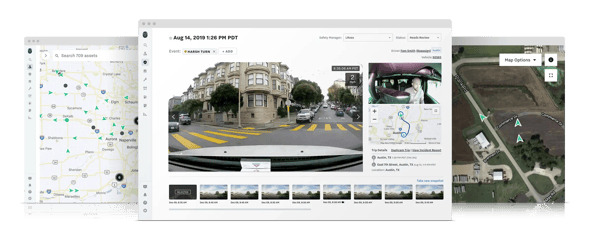
Samsara’s strength lies in how well it scales across large, distributed operations. Organizations managing fleets, equipment, and mobile assets across multiple routes or job sites can monitor activity continuously through centralized visibility and automated alerts. Real-time tracking combined with operational analytics helps teams understand how assets are actually used in the field. For industries where equipment movement directly affects productivity, this level of operational insight becomes a meaningful advantage.
That said, based on recurring themes across G2 reviews, Samsara’s pricing structure can be higher than lighter asset tracking tools, particularly because it combines hardware purchases with subscription plans. For smaller fleets or organizations with basic tracking needs, this bundled model may require closer ROI evaluation. However, many enterprise and fleet-heavy teams note that the hardware reliability, real-time visibility, and integrated safety features justify the investment at scale.
Additionally, while Samsara’s feature depth supports complex operations, some G2 reviewers mention that initial setup and configuration can take time, especially when deploying across multiple assets or locations. Teams transitioning from spreadsheets or simpler systems may need structured onboarding to fully configure alerts, integrations, and reporting. That said, once implemented, many users report that the platform aligns closely with operational requirements and supports long-term scalability.
Overall, Samsara works best for organizations that depend on real-time visibility across mobile assets and distributed operations. Teams managing fleets, equipment, or field assets benefit from its combination of durable tracking hardware, centralized analytics, and operational integrations. For companies where asset movement directly affects productivity, safety, and planning, Samsara provides a reliable platform for maintaining continuous oversight and improving asset utilization at scale.
“It's easy on both sides of the product. I can easily track any vehicle to within a few meters of its actual location, sometimes almost down to the centimeter. I can notify drivers of changes, both in-app and via other methods, if needed. I get notifications about when oil changes are due and can set up maintenance warnings. If the drivers put in their information properly, then it helps with any legal issues we have to deal with. No paper is required.”
- Samsara review, Paul D.
“Certain data points need extra configuration to provide real value, and new users might benefit from some training to navigate the platform effectively. Additionally, expenses can increase as more vehicles or modules are incorporated, which could be an important factor for smaller fleets to consider.”
- Samsara review, Avyan S.
Managing vehicles alongside other assets? Explore the best fleet management providers to dive deeper into tools designed for fleet-first operations.
Based on my analysis of G2 reviews, MaintainX is most often chosen by teams that need asset tracking and maintenance tools that their frontline workers will actually use. The platform takes a mobile-first approach, focusing on simplicity, speed, and accessibility for technicians and operators working on the ground rather than behind a desk. With 99% of users rating it 4 or 5 stars and 97% likely to recommend it, the platform demonstrates strong satisfaction across frontline teams managing day-to-day maintenance workflows.
One of MaintainX’s core strengths is ease of use. The platform scores 95% for “ease of use” and 92% for “ease of setup” on G2, reflecting its intuitive interface and fast onboarding experience. Maintenance teams can create, assign, and close work orders directly from mobile devices, reducing friction for technicians who spend most of their time in the field.
MaintainX also delivers structured asset tracking tied directly to work orders and maintenance history. On G2, “asset register — asset tracking” is rated 95%, indicating strong satisfaction with its ability to log and organize asset data. This centralized history helps teams track lifecycle performance, inspections, and service records without relying on disconnected spreadsheets.
Preventive maintenance automation further strengthens its value. Teams can schedule recurring maintenance based on time or usage triggers, reducing unplanned downtime and improving equipment reliability. G2 Data reports the platform scores 93% for “meets requirements,” indicating that its workflow automation aligns well with operational expectations.
MaintainX is particularly well-suited for manufacturing, oil and energy, automotive, and construction environments, where asset uptime and coordination directly impact output. Its mobile-first design makes it accessible for both technicians and managers, supporting adoption across multi-site operations.
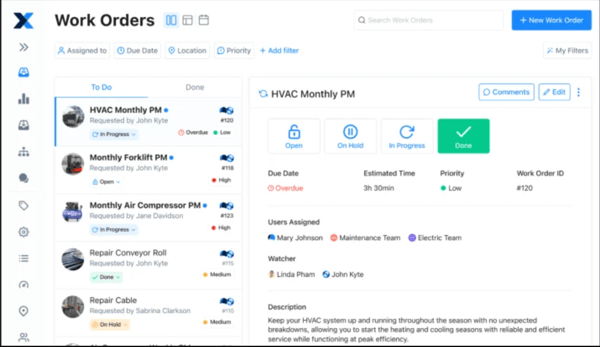
Integrations with IoT devices and ERP systems allow asset and maintenance data to connect with broader operational workflows. While MaintainX doesn’t aim to be a full enterprise EAM, it provides enough flexibility for growing organizations that need structure without heavy complexity.
That said, based on recurring themes across G2 reviews, some advanced analytics and reporting capabilities are limited to higher pricing tiers. For organizations requiring highly customized dashboards or deep data exports, this may require upgrading plans or supplementing with external reporting tools. Many small and mid-sized teams, however, note that the available reporting features meet their day-to-day operational needs.
Additionally, while the mobile experience is a core strength, some reviewers mention that certain advanced administrative or reporting functions are easier to manage on a desktop. Teams that rely heavily on complex configuration may spend more time in the web interface. That said, frontline users working primarily on mobile devices report a streamlined, efficient experience once workflows are established.
Overall, MaintainX works best for organizations that prioritize ease of adoption and mobile-first maintenance workflows. Teams managing frontline technicians, distributed facilities, or equipment-heavy operations benefit from its intuitive interface and structured maintenance tools. By combining accessible mobile workflows with preventive maintenance and asset tracking, MaintainX helps teams keep equipment running smoothly while maintaining clear operational visibility.
“Ease of use. After initial implementation, it's been very easy to navigate through the system. The platform has been extremely helpful with scheduling not just PMs but also reactive jobs for my team. Support from the MaintainX team has been phenomenal; they are super responsive. Willing to help how they can and are always friendly.
Lastly, I love how they are continuing to grow this platform and expand it to help meet the end-users' needs.”
- MaintainX review, Malcolm M.
“I'd like to see a visual mapping function. It can be difficult to describe where a specific issue is without referring to other machines, some of which the user may be unfamiliar with, in a large facility. This could be immensely useful for fire suppression systems, task lighting audits, or property damage reports.”
- MaintainX review, Timothy E.
If maintenance workflows are a big part of your asset tracking setup, this evaluation of the best CMMS software goes deeper into tools built specifically for managing work orders and preventive maintenance.
According to G2 user feedback, Limble is commonly adopted by teams that want more structure around preventive maintenance and asset lifecycle management. The platform focuses on helping maintenance teams reduce downtime by keeping asset information, work orders, and service history tightly connected.
Limble focuses on preventive maintenance automation. Teams can set up maintenance schedules based on time, usage, or equipment condition, which helps keep assets in good shape and prevents problems before they start. This approach makes it easier for facilities to plan maintenance for important equipment. Limble has a 95% “meets requirements” score on G2, showing that users are highly satisfied with how the platform handles maintenance tasks.
The software provides teams with detailed asset histories by consolidating work orders, documents, and maintenance records in one place. Limble has a 94% satisfaction score for “asset register – asset tracking” and a 92% score for “history – asset tracking,” showing users are happy with its lifecycle visibility. This central view helps teams spot recurring issues, track asset performance and decide whether to repair or replace equipment.
Mobile functionality supports technicians in the field. Teams can create, update, and close work orders directly from mobile devices, reducing delays caused by manual reporting. G2 Data reports Limble scores 95% for “ease of use”, reinforcing its reputation for intuitive workflows across frontline teams.
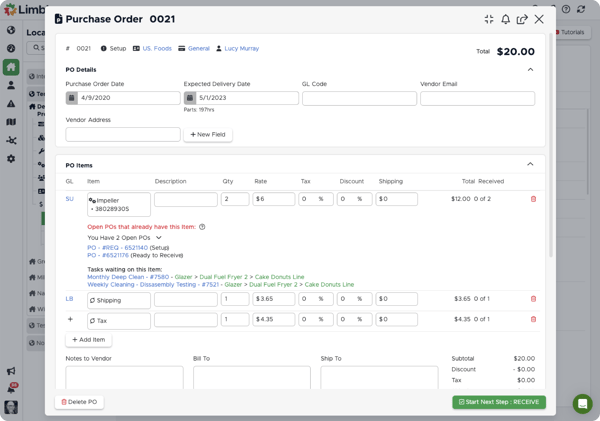
Inventory and parts management are integrated into maintenance workflows, allowing spare parts and vendor data to tie directly to assets and work orders. This improves cost visibility and helps reduce stockouts during repairs. Reporting dashboards provide insight into maintenance backlog, trends, and asset health without overwhelming teams with enterprise-level complexity.
Limble is particularly well-suited for teams with clearly defined maintenance workflows and preventive maintenance programs. Its structured approach to asset relationships and preventive scheduling helps organizations maintain consistent maintenance records as operations grow. In environments managing very large asset inventories or multiple locations, some teams note that setting up these relationships and recurring task schedules may require additional planning upfront to keep workflows organized at scale. Over time, this structure supports better visibility into inspections and maintenance history.
Based on recurring G2 feedback, some advanced analytics and customization capabilities are less robust than those found in larger enterprise EAM platforms. For organizations requiring highly complex reporting structures, this may require process adjustments or supplementary tools. Many small and mid-sized teams, however, note that the streamlined approach keeps the system easier to manage and quicker to deploy.
Limble is best suited for small to mid-sized organizations seeking a balance between usability and structured preventive maintenance. For teams formalizing maintenance programs without the overhead of full enterprise EAM systems, the platform provides a clear and scalable path to operational consistency.
“The upside of using Limble is that it offers a user-friendly, mobile-first CMMS software with comprehensive maintenance and asset management features, including preventive maintenance scheduling, real-time communication, work order automation, inventory management, and robust reporting. It streamlines workflows, reduces downtime, increases productivity, and extends asset life, all while providing excellent customer support and seamless integration with other business systems.”
- Limble review, Rick D.S.
“The software's simplicity does impose some limitations when it comes to customization. However, these are limited to very specific and detailed customizations that we thought would be nice to have, but they do not hinder our ability to use the software effectively.”
- Limble review, Jamie Y.
eMaint CMMS is commonly adopted by organizations running structured maintenance programs across multiple facilities. G2 Data shows strong representation from manufacturing, food production, automotive, chemicals, and machinery environments, where uptime, compliance, and documentation discipline are core to operations. This makes eMaint a practical fit for asset-intensive teams that treat maintenance as a reliability function rather than an ad hoc task queue.
At its core, eMaint supports structured work order management through configurable workflows. Teams can create, prioritize, assign, and track work orders with approvals, notifications, and escalation paths that reflect real operational processes. This helps keep maintenance backlogs controlled and ensures work is executed consistently across departments and shifts.
Preventive maintenance is another area where eMaint performs well for enterprise teams. The platform supports calendar-based scheduling as well as usage- or condition-driven triggers, allowing teams to plan services proactively. G2 Data shows the platform scoring 90% for “meets requirements,” suggesting that its maintenance workflows align well with operational expectations. This approach reduces reactive maintenance and extends the usable life of critical equipment, especially in regulated or production-heavy environments.
Asset tracking within eMaint emphasizes lifecycle visibility rather than real-time GPS location. Each asset record consolidates specifications, service history, warranties, documentation, and performance data in one structured profile. Assets can be grouped by location, category, or department to provide a clear view of risk, age, and condition across facilities. G2 features performance highlights, asset history, and asset register capabilities as key strengths, reinforcing its focus on detailed, audit-ready documentation.
Inventory management is tightly integrated with maintenance workflows. Spare parts and consumables can be tracked, linked to work orders, and managed with reorder points to avoid stockouts. Vendor and purchasing data further connect maintenance planning with procurement timelines, reducing delays during repairs.
eMaint’s analytics and reporting capabilities are especially valuable for enterprise teams. Custom dashboards and scheduled reports surface KPIs such as asset uptime, mean time to repair (MTTR), maintenance costs, and labor utilization. G2 Data also shows a 95% score for “ease of doing business with” and “quality of support,” reflecting strong satisfaction among organizations running maintenance programs at scale. These insights support data-driven decision-making, budget planning, and regulatory compliance.
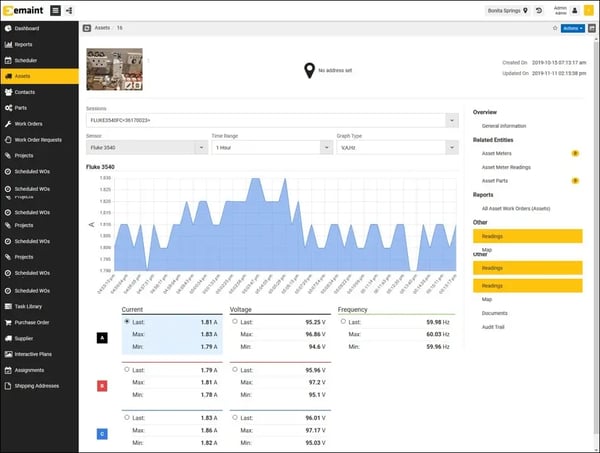
eMaint is particularly well-suited for organizations focused on asset reliability, lifecycle documentation, and structured maintenance programs. Teams primarily looking for real-time GPS-based asset location tracking may find the platform less aligned with live movement monitoring. G2 reviewers note that eMaint prioritizes asset history, condition context, and maintenance performance over continuous location visibility, making it a stronger fit for reliability-focused maintenance environments than fleet-style tracking workflows.
Additionally, eMaint’s depth can require more structured onboarding, particularly when teams want to fully leverage advanced configuration and reporting. Organizations without dedicated system owners or technical resources may need extra time to standardize workflows and dashboards during rollout. However, for teams with established reliability processes, that upfront effort often translates into more consistent, scalable maintenance execution.
Overall, eMaint CMMS works best for organizations that treat maintenance as a structured reliability program rather than a reactive task. Teams managing complex assets across multiple facilities benefit from its combination of configurable workflows, detailed asset records, and analytics-driven maintenance insights. For asset-intensive industries focused on uptime, compliance, and long-term equipment performance, eMaint provides a scalable platform for maintaining operational discipline and visibility.
“The eMaint system allows me to be able to access assets from other locations, repairs, parts inventory, and most importantly, preventative maintenance schedules. Love the notifications of when PMs are generated. It takes the guesswork and communication time out of the equation. It is very user-friendly, and my techs have no problems navigating the system. Customer support is quick, and the help center has relevant material you can access 24/7.”
- eMaint CMMS review, Gerry D.
“Building advanced reports in eMaint can be a bit of a challenge for those without JSON coding experience. The ability to close out multiple work orders at once would be a helpful feature, as it would be a major time saver when cleaning up a backlog. Similarly, the ability to delete multiple steps in a task procedure at once would be a huge time saver when implementing large changes to several procedures at one time.”
- eMaint CMMS review, Verified G2 User.
EZO is a cloud-based asset tracking and management platform built for organizations that need centralized control over large or distributed inventories. It is commonly used across enterprise, education, healthcare, and government environments where visibility, accountability, and audit readiness are essential. Based on recurring themes in G2 reviews, EZO is often adopted by teams managing high volumes of trackable assets across multiple locations.
Asset identification and tagging are core strengths of the platform. Assets can be registered individually or in bulk and tracked using barcodes, QR codes, or RFID tags generated directly within the system. This structured tagging approach helps streamline audits, inventory checks, and location verification, particularly for organizations overseeing hundreds or thousands of items.
Mobile access supports day-to-day operations in the field. Native iOS and Android apps allow teams to check assets in and out, perform audits, log incidents, and update asset details in real time. This reduces reliance on manual tracking methods and helps keep asset data accurate across distributed teams.
Asset lifecycle management is another area where EZO performs well. Assets can be assigned to employees, departments, or locations, with full visibility into transfers, retirements, and disposals. Maintenance workflows are tied directly to asset records, allowing teams to schedule preventive maintenance, track service requests, and maintain historical service logs over time.
EZO’s flexibility allows it to adapt across varied workflows and organizational structures. Role-based permissions, configurable fields, and integrations support deployment across departments with different tracking needs. This makes it suitable for institutions and enterprises managing diverse asset categories.
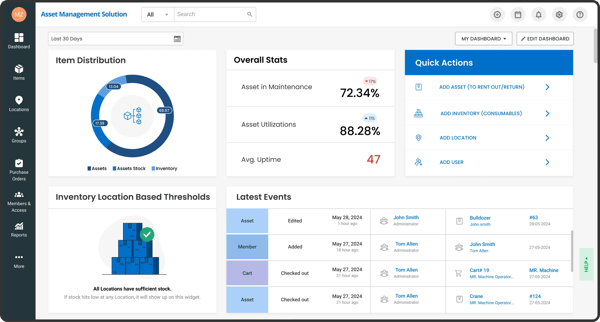
Reporting and analytics help teams move from simple tracking to operational insight. Dashboards surface utilization rates, maintenance costs, asset aging, and audit trails, helping organizations identify underused assets, plan replacements, and reduce unnecessary purchases. Scheduled reports and exports also support compliance and internal reporting requirements.
That said, because EZO is designed to accommodate a wide range of use cases, initial configuration can require planning. Teams deploying the platform across multiple departments may need time to structure asset categories, user roles, and workflows to match internal processes. G2 reviewers also note that the platform’s depth can create a learning curve, with some users mentioning navigation challenges and interface complexity when first configuring settings or locating specific tools. Organizations seeking a rigid, preconfigured system may find that adaptability requires additional setup effort.
Additionally, while EZO integrates with tools such as Zendesk, Jira, and various ERP systems, teams with highly niche or specialized workflows may need further customization before the platform feels fully tailored. For many organizations, this flexibility is a benefit. For those seeking a narrowly defined, industry-specific solution, a more opinionated system may feel simpler to adopt.
Overall, EZO is best suited for organizations that want scalable asset tracking with configurable workflows and strong tagging capabilities. Its strength lies in adaptability and structured visibility across large asset inventories. G2 Data reflects steady user satisfaction with the platform, including an 88% likelihood to recommend, 89% for meeting requirements, and 91% for ease of doing business. For organizations managing large or distributed asset inventories, this combination of flexibility, visibility, and operational control makes EZO a practical solution for long-term asset management.
“I appreciate the high level of customization and the user-friendly interface. I like that most features are editable, and if something isn’t directly changeable, there’s usually a setting or rule that allows you to enable or disable it.
The range of options, from assigning items to specific people to creating custom fields for each entry to viewing the estimated depreciated value of an item, is extremely helpful to me. These features make it much easier to track and manage everything that comes in or goes out for a tenant.”
- EZO Review, Damon R.
“The UI could use a facelift for a more modern design. The mobile app is a bit clunky, and the system could offer more integration options with other software.”
- EZO Review, Salim A.
According to G2 reviewers, Tenna is purpose-built for asset-intensive construction and field-based operations. It is designed to manage mixed fleets that include heavy machinery, on-road vehicles, unpowered equipment, and smaller tools within a single system. This industry focus makes it particularly relevant for jobsite-driven environments where equipment movement directly impacts project timelines.
One of Tenna’s defining strengths is its multi-technology tracking approach. Powered assets are tracked using GPS devices, while unpowered equipment and tools can be monitored using Bluetooth Low Energy (BLE) beacons or QR codes. This allows teams to match tracking methods to asset type rather than forcing all assets into a single tracking model.
Visibility is central to daily use. Cloud-based dashboards surface real-time asset location, status, and movement history, while jobsite-level mapping and geofencing make it easy to see which assets are assigned to specific projects. Automated alerts trigger when equipment enters or exits defined zones, helping reduce loss and unauthorized use across active job sites.
Field usability supports operations in dynamic environments. Mobile apps for iOS and Android allow crews to check availability, log inspections, submit maintenance requests, and update asset status directly from the jobsite. Offline functionality allows work to continue when connectivity drops, with data syncing once a connection is restored.
Maintenance management is built into the platform. Teams can schedule inspections, manage work orders, track repairs, and maintain historical service records for compliance and audits. Preventive maintenance alerts help extend asset lifespan and reduce downtime across active projects.
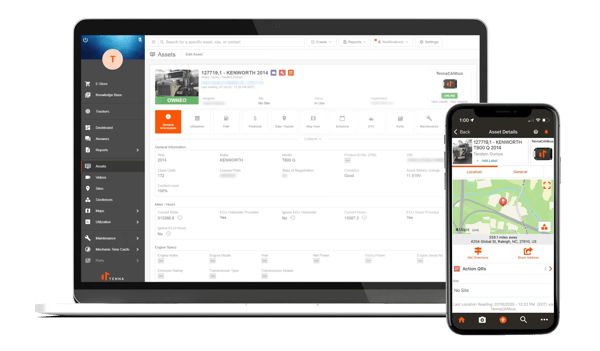
Tenna also integrates with ERP and fleet management systems, connecting asset data with broader operational reporting. Analytics covering utilization, downtime, and asset movement across projects support better planning and improved return on equipment investment.
Tenna’s structured approach to asset tracking can introduce some complexity when managing permissions and asset data across large teams. Based on recurring G2 feedback, some users note that data management and permission settings may require careful configuration to ensure assets, roles, and workflows remain organized across multiple jobsites.
Additionally, while Tenna provides strong tracking capabilities for construction equipment, G2 reviewers mention that customization options for asset categories and workflow flexibility can feel somewhat limited in highly specialized scenarios. For most construction teams, this structure helps maintain consistency, though organizations with highly unique processes may need to adapt certain workflows within the platform.
Overall, Tenna is best suited for construction and field-based organizations managing large volumes of assets across multiple job sites. G2 Data reflects steady user confidence in the platform, including an 89% likelihood to recommend and strong satisfaction scores for ease of doing business (93%) and quality of support (94%). For construction teams that rely on clear equipment visibility, jobsite coordination, and preventative maintenance planning, Tenna provides a purpose-built platform for managing mixed fleets in the field.
“I appreciate the frequent enhancements made to Tenna, which significantly improve navigation and periodic usage, especially as someone who uses it extensively throughout the day. This regular improvement in the system is valuable to my workflow and enhances my overall experience. Tenna's reporting capabilities are incredibly useful, particularly at the end of the month for reviewing equipment hours, field usage, and mechanic time cards. These features streamline my work process and help in maintaining accurate records efficiently. Additionally, the ability to manage driver scorecards and set up geofences and sites contributes greatly to managing operations effectively.”
- Tenna Review, John N.
“I wish there were an option to add certain assets, like shoring, without having to complete all the required fields. It would be helpful if the system allowed for more flexibility in cases where not all information is necessary.”
- Tenna Review, Victor M.
Need to track assets beyond the warehouse? Explore the top fleet management software features that help teams monitor vehicles, equipment, routes, maintenance, fuel usage, and driver performance from one connected system.
Have more questions? Find more answers below!
The best platforms for tracking company equipment and inventory are those that combine asset visibility with maintenance or inventory workflows. Tools like MaintainX, EZO, and Limble are commonly used because they allow teams to track physical assets, manage work orders, and maintain accurate inventory records in one place. The right choice depends on whether your priority is maintenance execution, inventory control, or lifecycle visibility.
For organizations managing assets across multiple locations, software that supports centralized dashboards and location-based grouping works best. MaintainX, eMaint, and EZO are frequently used in multi-site environments, as they allow assets to be organized by facility, department, or location while maintaining consistent workflows and reporting across sites.
Construction projects often require tracking mixed fleets across job sites, including heavy equipment, vehicles, and tools. Tenna is purpose-built for this use case, offering GPS tracking for powered assets, along with Bluetooth and QR-based tracking for unpowered equipment. Its jobsite visibility and geofencing features make it especially well-suited for construction and field operations.
Asset utilization analytics are strongest in platforms that track both usage and downtime over time. Samsara provides utilization and dormancy insights for GPS-tracked assets, while eMaint and MaintainX surface utilization trends through maintenance history, work orders, and asset performance data. The best option depends on whether utilization is tied to movement, maintenance, or operational output.
Real-time asset location monitoring is typically handled through GPS-based tracking. Samsara is widely used for real-time visibility into vehicles, trailers, and equipment that move across sites or routes. This type of monitoring is most valuable for fleet-heavy or outdoor environments where live location data is critical.
For organizations that rely on barcode, QR code, or RFID-based tracking, EZO stands out. It supports multiple tagging methods and is commonly used in environments where frequent audits, inventory checks, and asset verification are required. These tracking methods are especially effective for indoor or facility-based asset management.
Most modern asset tracking platforms offer mobile access, but usability varies. MaintainX, Limble, EZO, and Tenna all provide mobile apps that allow teams to update asset status, complete work orders, and perform audits directly from the field. Mobile-first design is particularly important for frontline and maintenance teams.
GPS-enabled asset monitoring is typically offered by platforms focused on fleet and equipment tracking. Samsara and Tenna both provide GPS tracking for powered assets, making them suitable for organizations that need real-time visibility into moving equipment or vehicles across multiple locations.
Large enterprises often need scalable platforms with advanced reporting, role-based access, and support for complex workflows. eMaint and EZO are commonly used in enterprise environments because they support large asset inventories, multi-location operations, and detailed reporting. The best fit depends on whether the organization prioritizes maintenance reliability or broad asset lifecycle management.
For vehicle fleet asset tracking, platforms that offer real-time GPS visibility and utilization analytics perform best. Samsara is widely used for fleet tracking due to its focus on live location data, movement alerts, and integration with broader operational workflows. It is especially effective in transportation, logistics, and field service environments.
Asset tracking doesn’t have to be complicated, but it does have to be intentional.
The right asset tracking system gives you greater clarity and minimizes chaos. It helps you stop reacting to problems and start staying ahead of them. And most importantly, it fits into how your team already works rather than forcing everyone to adapt to the tool.
If you’re evaluating asset tracking software now, take a step back and be honest about what you actually need: real-time location tracking, maintenance visibility, ease of use, or a balance of all three. Once you’re clear on that, choosing the right tool gets a lot easier!
Explore how inventory control software helps teams manage assets, spare parts, and equipment more effectively and see which tools stand out in practice.


I evaluated 20+ platforms to identify the bestfacility management software that consistently...
 by Harshita Tewari

I evaluated eight of the best service desk softwareplatforms to identify the solutions that...
 by Washija Kazim

When customer feedback lives in disconnected surveys, Slack threads, and support tickets,...
 by Aditi Rai