Asset performance rarely fails all at once. It slips through small gaps, missed signals, delayed maintenance, and decisions made without full context. The best asset performance management software helps teams close those gaps before they turn into downtime, safety risk, or rising costs.
The global APM market was valued at approximately USD 3.90 billion in 2025 and is growing at a double-digit rate, driven by rising pressure on uptime, safety, and cost control across asset-heavy industries.
To evaluate these tools in context, I analyzed G2 data and reviewed verified user feedback to assess how they perform in real maintenance and reliability workflows.
In this guide, I break down the APM platforms that consistently support execution at scale, from enterprise systems like IBM Maximo to fast-adopting tools like MaintainX and reliability-focused platforms like Fiix and GE Vernova APM.
*These asset performance management tools are top-rated in their category based on G2’s latest Winter 2026 Grid Report. I’ve added their standout features for easy comparison. Visit the official website to contact the sales team for pricing details.
Asset performance management software helps turn scattered asset data, maintenance signals, and operational risk into a structured system that teams can act on. The right platform does more than track assets. It helps teams understand asset health, spot degradation early, and connect performance to cost and availability without adding operational noise.
This category is not limited to large industrial enterprises. Review distribution shows adoption across smaller maintenance teams, mid-market operations, and complex asset-heavy organizations. Many teams describe being able to roll out core workflows quickly, then expand into predictive and reliability-driven use cases over time. That progression reduces unplanned downtime and helps teams stay ahead of issues instead of responding late.
At the end of the day, strong asset performance management software provides what asset-driven organizations need most. Clear visibility into asset condition, predictability in maintenance decisions, and confidence that risks are being addressed before they escalate into costly disruptions.
I started by using the G2 2026 Winter Grid Report to shortlist asset performance management platforms based on user satisfaction and market presence across small teams, mid-market organizations, and enterprise environments. This helped narrow the field to tools that consistently appear in real operational use, not just in vendor messaging.
From there, I used AI-assisted analysis to review verified user feedback and pinpoint patterns in asset-driven workflows. I focused on asset health visibility, maintenance planning, condition monitoring, analytics, integrations with CMMS or EAM systems, and how effectively insights reach key teams. This helped separate platforms that support timely decisions from those that slow teams down as they scale.
I also verified these patterns with maintenance managers, reliability engineers, and finance teams who regularly work with these systems. The product visuals and references are taken from G2 listings and publicly available documentation.
After digging into thousands of G2 user reviews, comparing real maintenance practices, and consulting with maintenance managers, operations analysts, and reliability engineers, recurring feedback trends became clear. Here’s what I prioritized when evaluating the best asset performance management software:
Not every platform emphasizes the same strengths, so the right choice depends on how your organization manages assets today, whether you prioritize fast adoption, predictive depth, tight system integration, or enterprise-level control.
The list below contains genuine user reviews from the asset performance management awareness training software category page. To be included in this category, a solution must:
*This data was pulled from aggregated user reviews in 2026. Some reviews may have been edited slightly for clarity.
IBM Maximo Application Suite targets asset-heavy enterprises where uptime, safety, and lifecycle control are non-negotiable. It performs strongest in manufacturing, utilities, and energy operations that need a platform capable of handling complex, long-term workflows without switching systems.
Teams manage asset records, work orders, maintenance history, condition monitoring, and maintenance schedules within a single operational view. Structured workflows reduce missed tasks and lower the risk of unexpected downtime. Ease of use scores 89% and reliability scores 92% on G2.
Teams link stock levels, usage history, and reorder points directly to asset and maintenance activity, helping them anticipate shortages rather than react to them. This reduces excess inventory while improving maintenance readiness across facilities.
Automated triggers, mobile access, and offline capability help field technicians stay productive without returning to a desk. Recent reviewers note the Carbon UI design as a clear improvement over earlier versions.
Maximo's containerized architecture supports deployment from a single site to hundreds of facilities without requiring platform changes. Organizations activate specific modules like EAM, safety, reliability, and monitoring to match operational scope while keeping all asset data in one system.
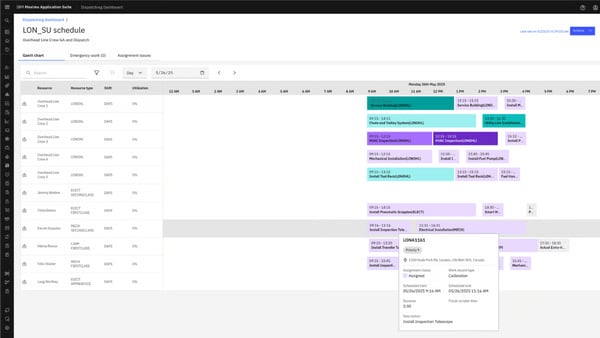
Integrations with IoT sensors, automation platforms, ERPs, and mobile applications push asset data across monitoring, planning, and execution layers, supporting coordination across engineering, operations, and maintenance teams.
Initial deployment demands Maximo specialists rather than general IT staff. teams need dedicated technical ownership to configure workflows, asset hierarchies, and data migration correctly. Once core modules go live, the system holds up well across complex, multi-site environments.
Under high-load conditions, response times slow when multiple workflows and large data volumes run concurrently. Teams running leaner or scoped deployments report more consistent day-to-day performance.
IBM Maximo Application Suite suits organizations that manage asset performance across complex, multi-site operations where switching platforms is not an option.
“ I love how the IBM Maximo Application Suite integrates everything into one place, making management and operations smoother and more efficient. I particularly appreciate the level of customization it offers, allowing me to tailor dashboards, reports, and workflows based on my team's specific needs. This level of personalization significantly enhances our day-to-day operations.”
- IBM Maximo Application Suite review, Sachin K.
“The most significant issue with IBM Maximo Application Suite is its cost, which presents a challenge. Additionally, the initial setup configuration and administration are highly complex, necessitating a dedicated, skilled operator. While the process might be considered easy for those with basic knowledge, accessibility would be significantly improved with a setup and configuration wizard or guide.”
- IBM Maximo Application Suite review, Khushivant K.
Related: Learn how to recognize and respond to common network security threats that could compromise your systems.
Frontline technicians don't need another system to learn. MaintainX is built around that reality, centering work orders and maintenance communication on mobile with minimal training required.
G2 reviewers consistently describe the interface as intuitive for technicians and operators, allowing teams to move into active use without extended training cycles. Work orders, asset records, and procedures are easy to navigate, which supports environments where consistent human execution directly affects maintenance outcomes. Ease of use is rated at 93% on G2, reflecting how consistently teams describe the interface as approachable across skill levels.
Technicians can access work orders, log updates, and attach photos or videos directly from the field, adding operational context without slowing execution. Reliability is rated at 93% on G2, aligning with how teams describe the platform holding up under daily field use. G2 reviews frequently note that this reduces back-and-forth between teams and helps issues get resolved with clearer information at the point of work.
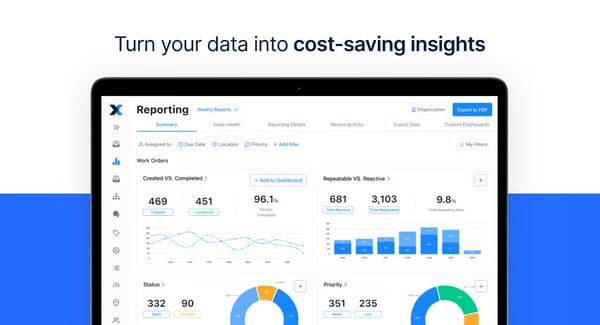
Standardization across locations is another area where G2 reviewers see value. Procedures, checklists, and asset documentation can be rolled out consistently, helping organizations align maintenance practices across sites. This is often described as improving reliability by reducing variation in how tasks are performed from one location or technician to another.
MaintainX removes paper-based and spreadsheet-dependent tracking entirely. Teams access work orders, maintenance procedures, asset histories, and parts usage from one location across sites and shifts. Several reviewers note going live weeks ahead of schedule due to structured implementation support.
Hands-on onboarding and responsive customer service support a successful rollout, particularly during early implementation. Teams replacing older systems describe migrating historical data quickly and reaching steady usage without prolonged transition periods.
Teams managing long-range forecasting or reliability engineering metrics describe needing more granular control over report outputs. Core work order, PM, and asset tracking reporting cover frontline needs consistently.
Asset filtering, location-based views, and partial-day scheduling have room to grow for teams managing large or geographically dense asset environments. For most mid-market teams running daily work order execution and PM scheduling, the current functionality covers operational needs well.
MaintainX suits fast-adopting maintenance teams that prioritize reliable daily execution, strong mobile usability, and structured support during rollout.
"I really like the reporting - it's very clear and easy to follow. It's also been extremely easy to implement. Without any training at all, our team has been able to set up assets, create and document procedures, and track work orders. We use it daily, and it's just so smooth and easy to understand. If we need it, customer support is just a click away!"
- MaintainX review, Drew B.
"As of today, the biggest shortcoming in MaintainX is the reporting tool; they have done a great job making the platform easy to use for technicians now, they need to work on providing the measures Maintenance & Reliability professionals need to improve their programs.”
- MaintainX review, John C.
Related: Explore data security best practices that help prevent breaches and keep sensitive information secure.
Fiix is the strongest choice when cost tracking matters, connecting labor, parts, and downtime costs directly to assets and work orders in a way most CMMS tools don't. What separates it from similarly positioned tools is how quickly teams get productive, logging work orders, tracking costs, and managing preventive maintenance without extended ramp-up or heavy configuration.
The platform is frequently described as approachable without sacrificing the structure needed for ongoing maintenance programs. Day-to-day maintenance execution is a central focus. Features such as a 91% performance score reflect how teams describe their daily workflows. Logging work orders, tracking preventive maintenance, and updating asset records are described as straightforward, which helps reduce reliance on side spreadsheets or manual tracking.
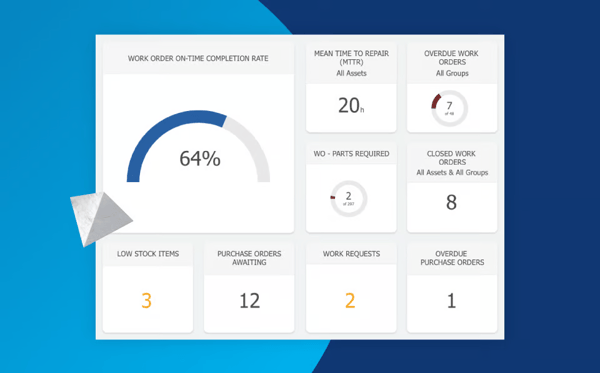
Assets, PM schedules, inventory, and work orders sit within one system, but what teams value most is how cost data connects to that view. Labor hours, parts usage, and downtime costs tie directly to individual assets, making spend visible at the asset level rather than just across departments.
Responsive customer support helps teams mature their CMMS usage rather than simply reacting to issues. G2 users point to consistent assistance when resolving configuration questions or refining workflows as the platform evolves with operational needs.
MRO inventory search and filtering work most reliably when part naming follows a consistent structure. Teams with informal or inconsistent naming across legacy systems notice this most during initial setup. Once a naming standard is in place, parts lookup and inventory management run smoothly day to day.
Teams with highly customized or informal PO approval paths need to adjust how they structure purchase order categories during setup. The predefined category structure supports better audit readiness, which compliance-focused teams describe as a clear benefit once configured.
Fiix suits maintenance teams that need cost visibility tied directly to assets, with workflows that support disciplined execution without heavy configuration.
“eMaint helps us keep track of the PMs and Spare parts over 17 plants. It is great having a system that I can go into and see all of the plants and how they are always doing. The X5 system and the mobile app are both very user-friendly. Customer Support and my CSM are both amazing and always willing to help."
- Fiix CMMS review, Lisa T.
"Some features feel slow at times, especially when loading large lists of work orders or assets. It can make you wait longer than expected."
- Fiix CMMS review, Udhay K.
Related: Check out this deep dive on AI vs. AI in cybersecurity and see how both attackers and defenders are using machine learning.
Speed to value is where Limble earns its position. Mid-sized teams get a modern CMMS running fast, without the configuration weight of enterprise platforms. Teams use it to understand how assets behave over time, where maintenance effort accumulates, and how preventive actions affect reliability. This focus supports asset performance management without introducing rigid process layers that slow execution.
Visibility into work and asset activity is another area teams rely on heavily. Dashboards and calendar-based views provide clear insight into scheduled maintenance, asset usage, and technician availability across short- and long-term horizons. This helps connect asset data with execution, and Limble’s dashboards are rated at 92% on G2, reflecting how effectively teams monitor work orders, costs, and asset health.
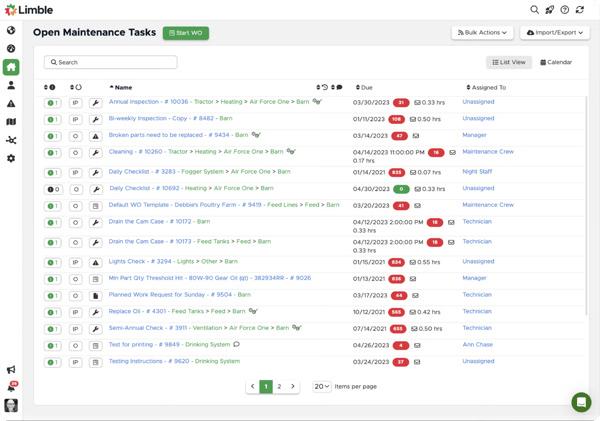
Teams set up PM schedules quickly and adjust them as asset behavior changes, keeping maintenance data tied directly to asset performance trends. This supports consistent execution across shifts and sites.
Live training, documentation, and responsive customer success managers support a smooth initial setup. For organizations formalizing asset records or preventive maintenance programs for the first time, this support drives faster returns from the platform.
About 57% of Limble users come from mid-market organizations and 34% from small businesses, pointing to strong alignment with teams that need structure and accountability without enterprise overhead.
Limble's AI-assisted manual scanning lets teams upload owner's manuals and generate PM recommendations automatically, reducing setup time and helping teams build initial maintenance programs without starting from scratch. This is especially useful when formalizing asset records for the first time.
Teams managing complex or shared asset structures need to define asset hierarchies carefully at the start. Shared PM relationships require upfront planning to scale consistently. Limble's onboarding support and CSM availability help teams work through this structuring early.
Asset reservation workflows and GIS-style mapping sit outside the platform's current core focus. Teams managing highly distributed or location-dependent field assets notice this most. For most mid-market maintenance operations focused on PM scheduling, work orders, and asset tracking, core functionality covers daily needs well.
Limble suits maintenance teams that prioritize adoption speed, execution clarity, and asset reliability without enterprise configuration overhead.
“I like the onboarding process with Limble; it's been excellent. The training is also excellent, and the resources provided are excellent as well. I'm particularly impressed with how smoothly the process of entering information goes. Creating PMs is easy, and tying them into assets is fairly simple. The ability to add pictures, owner's manuals, and documents to each asset is a big plus. I appreciate the artificial intelligence feature, which scans manuals and creates PM recommendations from the content. Additionally, the initial setup of Limble was considerably easier compared to what we used before.”
- Limble review, David L.
“Sometimes it can take a while to get enough traction to promote a design fix. That said, Alix and the Limble team are always VERY responsive to my inquiries, and we can always work toward a satisfactory solution.”
- Limble review, Jason P.
eMaint is built for regulated, multi-site operations that need configurable compliance workflows, not the fastest to adopt, but the most adaptable under audit pressure.
Within the asset performance management category, it builds stable, repeatable maintenance programs that scale across sites. Adoption skews toward mid-market organizations, with steady use in multi-site enterprise environments where consistency drives platform selection.
Teams build structured preventive maintenance programs on work orders, asset histories, and parts inventory. Centralizing this information helps teams identify recurring failures, trace maintenance costs, and shorten resolution cycles when issues arise. Performance, reliability, and ease of use each score 86% on G2, reflecting steady execution across daily maintenance workflows at scale.
Engineering documentation, maintenance history, and inventory records sit in a single repository, improving visibility into asset condition and maintenance outcomes. This reduces gaps from fragmented data sources and supports clearer accountability across teams.
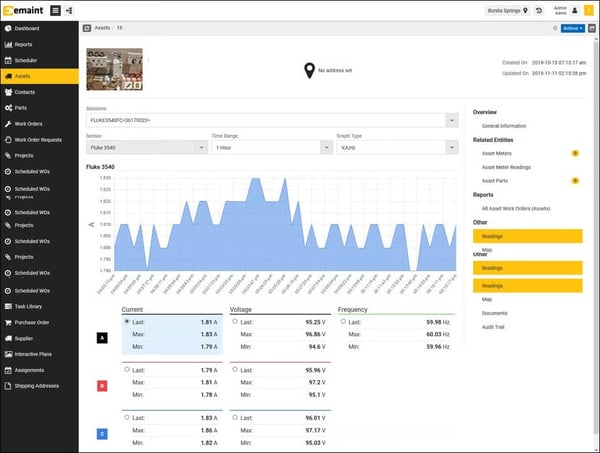
Teams tailor workflows to match site-specific maintenance processes, production requirements, and compliance needs. This configurability lets distributed operations maintain consistent execution without forcing identical workflows where operational realities differ.
Some teams configure eMaint to support inspections, training records, or incident tracking alongside core maintenance activity. Keeping these records tied to assets and work orders maintains continuity across maintenance, safety, and compliance workflows in regulated environments.
Navigating work orders, reviewing documentation, and accessing dashboards feels efficient once workflows settle in. Reporting supports maintenance performance tracking with a relatively light setup, letting managers stay informed without extensive administrative effort.
Initial setup and ongoing data discipline demand consistent ownership. Teams implementing eMaint across many sites invest meaningfully in upfront workflow mapping. Organizations with defined processes find configuration straightforward and report strong long-term returns.
Teams seeking scenario-based planning or deep risk analytics handle that layer outside the platform. Reporting and dashboard design prioritize clarity and functional maintenance tracking, which suits compliance-driven and multi-site operations where consistency matters more than predictive sophistication.
eMaint suits regulated, multi-site operations that prioritize configurable workflows, audit-ready compliance tracking, and consistent execution across distributed maintenance programs.
"You can administrate your equipment easily, and you can generate a lot of reports according to your needs. I use it every day to check the WO opened and follow up with my team.
They have a great support team; in other words, you feel accompanied. We have several sites linked, so you can consult the warehouse spare parts for those sites.”
- eMaint CMMS review, Luis L.
"There isn't a lot to gripe about. Having pre-existing connecting apps (plan builder, machine learning, etc) would be beneficial for new user implementations.”
- eMaint CMMS review, Michael R.
Cryotos works best for mid-market teams managing IT, admin, and asset requests in a shared framework, with 24/7 support as a genuine differentiator. The platform helps teams manage work requests, track asset-related activity, and maintain operational oversight in a way that is easy to adopt and sustain.
Teams across IT, admin, and facility management pick up the interface without training. Ticket creation, task tracking, and work request management feel straightforward from day one, supporting adoption across mixed-skill teams. Ease of use scores 95% on G2. Centralized dashboards score 88%, giving teams a clear view of asset status, tickets, and ongoing work without manual follow-ups or external tools.
Asset-related requests, IT tickets, and administrative issues sit within a shared framework, making prioritization and ownership visible across stakeholders. Clear stages and consistent updates reduce back-and-forth communication and support timely execution.
The support team stays available around the clock, which matters for organizations operating outside standard business hours. Reviewers describe the team as responsive to both technical queries and custom feature requests, with some noting turnaround times of one to two days for implementation-level changes.
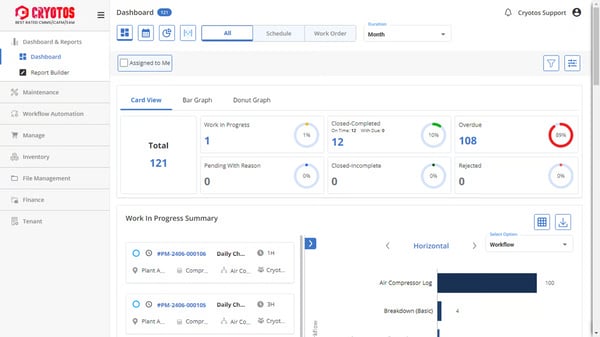
Automated logs, scheduled maintenance records, and digitized check sheets reduce the manual effort involved in maintaining audit trails. Teams that previously relied on paper-based PM records describe the shift as removing a consistent administrative burden while improving accountability across maintenance and facility workflows.
Technicians and operators handle ticket updates and task tracking efficiently through the mobile app. Actions, including detailed configuration, inventory management, and certain report views, work better through the web interface. For day-to-day field use, the mobile experience covers operational needs well.
The mobile experience centers on accessibility and quick status updates rather than full desktop parity. Detailed configuration, inventory management, and certain report views work better through the web interface. For technicians focused on ticket updates and task tracking, the mobile app covers day-to-day needs well.
Analytics and forecasting target operational monitoring and request visibility rather than advanced predictive analysis. Teams prioritizing deep risk modeling or long-range asset planning handle that outside the platform. For organizations managing day-to-day asset requests, IT tickets, and maintenance tracking, the reporting layer covers daily oversight and management decisions well.
Cryotos suits environments where asset performance relies on clear ownership, request traceability, and dependable execution across IT, admin, and maintenance workflows.
“Service is good, they will give on-time service. People are using mobile services. Work order creation is excellent; it is user-friendly. Customer support is good. Support team is good, providing excellent response for the details of the software.”
- Cryotos review, Suresh C.
“I have already explored the possibilities of using NFC in Cryotos, but in my opinion, adding the facility to scan a QR code that may contain the asset code of the specified machine, and it will immediately open the meter reading input forms. The same should allow me to view the PM history also. This would be a more useful and user-friendly option.”
- Cryotos review, Anupam D.
Fracttal One is for small and mid-sized teams that want visual maintenance oversight through Kanban boards, QR access, and calendar views, without enterprise complexity. What stands out about Fracttal One is that it is a platform built around day-to-day maintenance execution and asset visibility. Its positioning within the asset performance management category reflects that focus.
Ease of use scores 91% and reliability scores 90% on G2, supporting faster uptake across technicians, planners, and operations managers without extended technical ramp-up. Maintenance plans, meters, and asset histories are easy to access and interpret, keeping maintenance activity connected to asset condition without heavy process overhead.
Dashboards score 88% on G2. Teams rely on clear KPIs, visual indicators, and transparent status tracking through QR-based asset access, Kanban boards, and calendar views, reducing dependence on spreadsheets and paper-based tracking.
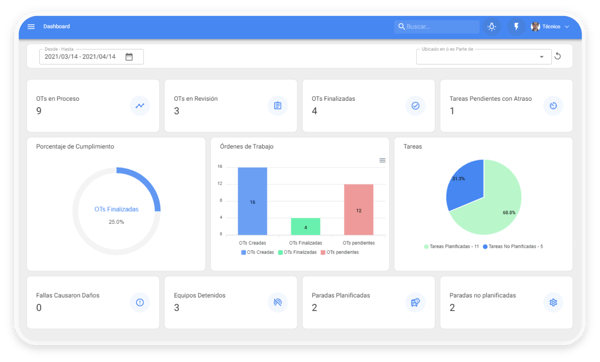
Teams describe the initial setup as straightforward, from asset onboarding to maintenance plan configuration. AI-assisted capabilities help surface predictive signals, automate routine actions, and flag potential issues while keeping planning decisions with the team.
Asset data, maintenance records, and supply chain information connect across ERP platforms, including SAP and Oracle, without manual re-entry. Teams managing multi-location operations describe this as reducing coordination overhead between maintenance and procurement teams.
Parts, suppliers, and warehouse resources sit within the same system as work orders and asset records. This eliminates parallel spreadsheets and separate inventory tools, helping teams reduce procurement delays and parts shortages across multiple locations.
Reporting covers core maintenance metrics and operational tracking well. Teams seeking deeply customizable analytics or advanced performance modeling find the out-of-the-box reporting less flexible than they need. For standard maintenance execution and PM tracking, the reporting layer covers daily operational needs well.
Detailed man-hour comparisons and time-based downtime indicators require consistent work order discipline to produce reliable outputs. The platform's core execution workflows suit operations that prioritize clarity and speed over formal approval chains.
Fracttal One suits teams prioritizing usability, visual oversight, and dependable maintenance execution without enterprise configuration overhead.
“I use Fracttal One for the company's asset management and I find it amazing how agile and reliable it is. I really like the maintenance plan and the meters because I can reliably control the preventive and predictive maintenance of the assets. The initial setup was smooth, which also contributes to a good experience with the tool.”
- Fracttal One review, Erick S.
“In my business, I have many assets that move from location to location, and this can alter the equipment counter when placing it with other equipment. I would have to lose the accumulator, and that's something I don't want. This was a query that could not be resolved in the Fracttal One Certificate Course in December 2025. Additionally, once the OT is closed in Fracttal One, it cannot be modified, which forces me to use Excel to check that the time indicators are correct. The initial setup was also complicated when creating the locations, equipment, and warehouse resources.”
- Fracttal One review, Carlos A.
DATOMS is the go-to for DG fleet operators who need real-time fuel monitoring and CPCB compliance in one place. It performs strongest in monitoring-heavy environments where uptime, fuel usage, and regulatory compliance stay tightly connected across distributed assets.
Dashboards score 94% on G2, surfacing fuel levels, load metrics, alerts, and operational signals in a way that minimizes interpretation effort and supports faster response across multi-site environments.
Teams maintain continuous visibility into DG parameters, including diesel levels, load behavior, and runtime status. Reliability scores 92% on G2, reflecting consistent monitoring performance across distributed asset environments. Automated alerts tied to asset health let teams intervene early, reducing unplanned downtime across geographically distributed locations.
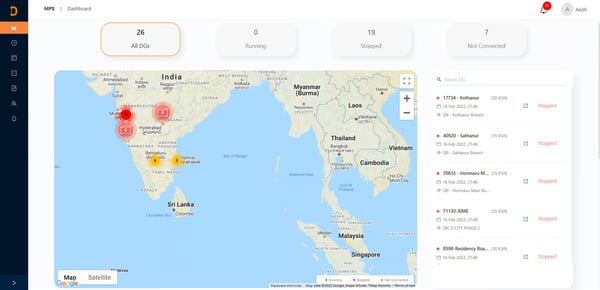
Fuel usage reports and anomaly alerts help teams identify irregular consumption and potential diesel theft. This turns monitoring data into an actionable operational layer rather than a passive reporting function, especially where fuel represents a major operating expense.
DATOMS supports CPCB and SPCB requirements, including CPCB IV norms, by integrating hardware data, managing uploads, and triggering alerts aligned with regulatory thresholds. This combination of monitoring and compliance support keeps regulated operations on the right side of audit requirements.
Setup and configuration are straightforward, supported by a cooperative and responsive support team. Ease of use scores 95% on G2, reflecting how quickly operators get up to speed without extended onboarding.
Analytics target real-time monitoring and operational visibility rather than advanced predictive modeling or scenario-based forecasting. Organizations seeking deeper performance modeling or long-range planning typically handle that outside the platform. For DG fleet operators, the monitoring layer covers the decisions that matter most day to day.
At higher asset volumes, some reviewers note variability in fuel-level accuracy and occasional inconsistencies in the mobile experience. Teams operating mid-sized fleets describe consistent, reliable performance. Larger deployments benefit from working with the DATOMS support team to tune configurations as asset counts increase.
DATOMS suits DG fleet operators and regulated asset environments where fast interpretation, stable visibility, and compliance support drive daily usage.
“DATOMS distinguishes itself with an intuitive, low-code interface that makes designing and deploying IoT applications straightforward. Users appreciate its dependable real-time monitoring, predictive maintenance features, and the flexibility of its customizable dashboards for managing assets. The platform’s strong customer support and accurate data further contribute to its reputation as a leading option for OEMs looking for scalable Industry 4.0 solutions.”
- DATOMS review, Raghavendra P.
“ There are a few bugs in the software. But that is acceptable because the datoms active support team works diligently to resolve those. But, with time, the improvements should happen.”
- DATOMS review, Mahender G.
| Sotware | G2 Ratings | Free plan | Best for |
| IBM Maximo Application Suite | 4.4/5 |
No |
Asset-intensive enterprises managing complex operations at scale |
| MaintainX | 4.8/5 |
Yes. Free Basic plan |
Maintenance teams prioritizing fast adoption and day-to-day reliability |
| Fiix CMMS |
4.6/5 |
Yes. Free plan |
Maintenance teams focused on asset reliability and cost visibility |
| Limble | 4.8/5 |
No |
Mid-market teams wanting a modern CMMS with quick onboarding |
| eMaint CMMS | 4.5/5 |
No |
Organizations needing configurable, compliance-ready asset management |
| Cryotos | 4.7/5 |
No |
Mid-market teams managing assets, requests, and service workflows |
| Fracttal One |
4.6/5 |
Yes. Free plan |
Teams that value visual oversight and preventive maintenance execution |
| DATOMS | 4.7/5 |
No |
Teams monitoring regulated physical assets with compliance needs |
*These asset performance management software products are top-rated in their category, based on G2’s 2026 Winter Grid® Report. All offer custom pricing tiers and demos on request.
Got more questions? G2 has the answers!
IBM Maximo Application Suite and eMaint CMMS are most often associated with full asset lifecycle optimization. Reviews consistently point to these platforms for handling complex asset hierarchies, governance, compliance tracking, and long-term lifecycle planning across large, multi-site enterprises.
Fiix CMMS and Amper stand out for uptime-focused use cases. Fiix is commonly selected where preventive maintenance and reliability programs drive availability, while Amper is favored in environments where live machine performance and downtime visibility directly impact production output.
Fracttal One and IBM Maximo Application Suite show up most often in predictive maintenance discussions. Review patterns suggest these platforms are chosen when organizations want to move beyond schedules and use condition data, trends, and predictive signals to anticipate failures earlier.
IBM Maximo Application Suite and eMaint CMMS are frequently mentioned in energy and utilities contexts. These tools are commonly picked for their ability to manage critical infrastructure assets, support regulatory requirements, and maintain performance visibility across long asset lifecycles.
Amper and DATOMS are most closely associated with real-time performance analytics. Amper is widely referenced for live machine monitoring in manufacturing, while DATOMS is commonly used where fleet and operational asset performance must be tracked continuously.
Manufacturing teams often compare Fiix CMMS, MaintainX, and Amper. Fiix is typically chosen for reliability-driven maintenance programs, MaintainX for fast execution on the shop floor, and Amper for real-time machine and production performance visibility.
IBM Maximo Application Suite and Fracttal One are most often linked to AI-driven maintenance capabilities. Reviews highlight these platforms for using analytics and machine learning to prioritize assets, identify risk patterns, and guide maintenance decisions.
Fracttal One, IBM Maximo Application Suite, and Tenna are commonly referenced for IoT integration. Fracttal and Maximo connect sensor data directly to asset health and maintenance workflows, while Tenna focuses on GPS and telemetry for equipment-heavy field assets.
Fiix CMMS and Cryotos are frequently cited for reliability-focused asset programs. Fiix is associated with structured preventive and reliability maintenance, while Cryotos is often chosen where lifecycle planning, compliance, and reliability governance intersect.
Amper, Fiix CMMS, and MaintainX are most often tied to downtime reduction. Amper helps identify and quantify live production losses, Fiix reduces unplanned failures through preventive programs, and MaintainX improves response speed and execution consistency on the floor.
Breakdowns in asset programs usually start as background noise. Maintenance slips, signals get ignored, and execution slowly drifts from the plan. None of it feels critical in isolation. Taken together, it changes how teams operate. Coordination overhead rises, accountability gaps widen, and reliability becomes harder to defend as operations scale.
The difference between control and chaos is visible in day-to-day behavior. When technicians have clear priorities and leaders can see emerging risks, work stays focused, and responses stay measured. When systems fail to provide that visibility, teams rely on experience and instinct. That works until it doesn’t, and the gap shows up as downtime, safety exposure, or budget overruns.
This is not a platform decision in the narrow sense. It determines how maintenance discipline is enforced, how early warnings surface, and how consistently assets perform under load. A strong fit strengthens day-to-day maintenance discipline and keeps teams aligned. The right way to choose is to look closely at how your operation actually runs, on the floor, in the field, and during failures. If the platform supports those realities without adding friction, it will remain valuable as assets age and complexity increases. That is the bar this decision needs to clear.
Want better control over asset operations? Explore leading asset tracking software on G2 to improve visibility, utilization, and equipment history.


On a scorching summer day, the office AC broke down. The maintenance team scrambled to find...
.png) by Devyani Mehta
by Devyani Mehta
I evaluated 20+ platforms to identify the bestfacility management software that consistently...
 by Harshita Tewari
Recently updatedSummer 2026 Grid® Report · Published May 26, 2026 This guide was last...
 by Alveena Ali