


Choosing an email provider sounds simple until your inbox becomes the place where everything lives. Password resets, bank alerts, work threads, newsletters, flight updates, and that one attachment you suddenly need from three years ago. That’s why a Yahoo Mail vs. Gmail comparison still matters, even in 2026.
On the surface, Yahoo Mail and Gmail handle the same basics. They send and receive emails, filter spam, support attachments, and work across devices. Yahoo Mail leans toward a simpler, inbox-first experience, while Gmail is built around search and workflow-driven use. The difference shows up when email becomes something you rely on continuously. Organization, search speed, and how easily you can act on emails start to shape the experience.
Yahoo Mail was my first email address, back when email felt lightweight and mostly personal. Over time, as my usage expanded into work, multiple accounts, and higher inbox volume, I shifted to Gmail. That transition gave me a useful lens to evaluate both tools across very different use cases.
To make this comparison practical, I tested Yahoo Mail and Gmail across the workflows that define everyday email use, including organization, search, spam handling, storage, and cross-device access. I focused on how each inbox performed under real usage, not just feature availability, and cross-checked my findings with G2 Data to validate broader user patterns.
TL;DR: Yahoo Mail generally fits simpler, personal inbox use cases where ease of use and familiarity matter most, while Gmail is built for more search-heavy and workflow-driven email, especially for users who rely on email for work or collaboration.
To get a quick sense of how Yahoo Mail and Gmail compare, I’ve broken down their key differences across features, performance, storage, and ideal use cases. This table highlights where each platform stands before diving into workflow-level testing.
| Category | Yahoo Mail | Gmail (Google Workspace) |
| G2 rating | ⭐ 3.8/5 | ⭐ 4.6/5 (based on Google Workspace reviews on G2) |
| Best for | Personal email, high free storage, simple inbox management | Work and professional email, collaboration, and Google ecosystem users |
| AI features | Inbox assistance tools (summaries, writing help, cleanup) | Smart Compose, Smart Reply, AI-powered spam filtering, Gemini-assisted features |
| Speed and responsiveness | Generally responsive, but users report occasional slow performance | Fast and consistent, optimized for high-volume and work inboxes |
| Core features | Customizable UI and themes, advanced search, travel and package tracking, multi-account inbox | Advanced search, labels and filters, undo send, Google Meet integration, custom domain email |
| Security | Spam and phishing protection | Advanced spam filtering, confidential mode, enterprise-grade security (Workspace) |
| Storage (free) | 20 GB free storage | 15 GB free, shared across Gmail, Drive, and Photos |
| Paid plans | Yahoo Mail Plus: $5/month | Business Starter: $6/month (Business Standard and Plus tiers available) |
| Free version/trial | Free version available (ad-supported) | Free Gmail is available; Google Workspace offers a free trial |
Note: Both Yahoo Mail and Gmail frequently roll out new updates. The details below reflect the current capabilities as of 2026, but may change over time.
Yahoo Mail and Gmail have shaped the modern email experience for decades. Yahoo Mail launched in 1997 and quickly became one of the earliest widely used webmail services, known for its generous storage and simple interface. Gmail arrived later in 2004 with a different approach, introducing threaded conversations and a powerful search-first model built around organizing information at scale.
At a high level, both tools solve the same core problem: sending, receiving, and organizing email. In practice, they are built around different priorities. Yahoo Mail focuses on a simpler, inbox-first experience, while Gmail is part of a broader productivity system. These differences show up most clearly in how each platform handles organization, storage, automation, and long-term scalability.
Let’s dive right in!
Below is an overview of the key differences between Yahoo Mail and Gmail. Let’s dive right in!
Yahoo Mail stays focused on an inbox-first experience. The interface centers on managing emails, with features layered in to support organization, sorting, and day-to-day communication.
Gmail operates within a broader productivity ecosystem. Email connects directly with tools like Google Docs, Drive, Calendar, and Meet, which extends the role of the inbox beyond communication into task execution.
This difference shapes how each platform fits into daily use. Yahoo Mail works well when email remains a contained activity, while Gmail supports workflows where email connects to files, scheduling, and collaboration across tools.
Yahoo Mail offers 20 GB of free storage, which provides more room to retain emails and attachments over time without immediate cleanup. The storage is dedicated to email, which makes long-term inbox management more straightforward.
Gmail provides 15 GB of free storage shared across Gmail, Google Drive, and Google Photos. This structure extends storage management beyond email, requiring users to monitor usage across multiple products, especially when handling attachments or using other Google services.
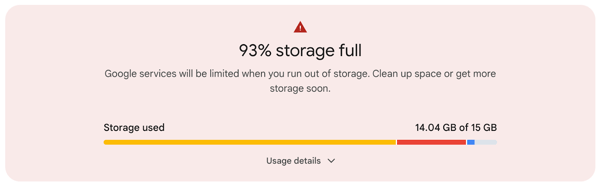
Over time, the structural difference can lead to varied usage patterns. Yahoo Mail supports an archive-style inbox with fewer storage constraints, while Gmail requires more active storage management, particularly in high-volume or multi-product use cases.
Yahoo Mail relies on folders and visual inbox views, which make organization immediately familiar. Emails can be sorted into folders without requiring changes to how the inbox is structured, and the system works effectively with minimal setup.
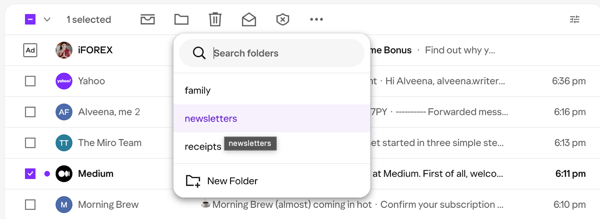
Gmail takes a different approach with labels, filters, and tabbed inbox categories. Instead of placing emails in a single location, messages can exist across multiple labels, with automation playing a larger role in organizing incoming mail. This model offers greater flexibility but requires an adjustment for users accustomed to traditional folder-based systems.
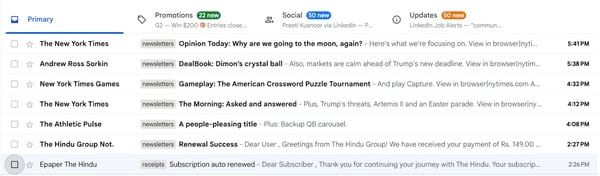
As email volume grows, these models behave differently. Yahoo Mail remains easier to manage upfront, but it depends more on ongoing manual organization. Gmail requires more initial setup, but once filters and labels are in place, it reduces manual sorting and scales more effectively for higher email volume.
Yahoo Mail and Gmail approach automation differently. Yahoo Mail positions its AI features around inbox cleanup, while Gmail integrates AI directly into everyday email actions like drafting, replying, and organizing messages.
Yahoo Mail includes features such as summaries and cleanup tools, but these were not consistently accessible during testing, which limited a full evaluation of how they perform in real workflows. G2 reviews tend to emphasize Yahoo Mail’s simplicity, folder-based organization, and ease of use rather than advanced automation, indicating that AI is not a central part of the experience for most users.
Gmail’s AI features are more visible and embedded within the inbox. Smart Compose and Smart Reply support drafting, while automatic categorization helps organize incoming messages without manual effort. These features operate within everyday tasks, making automation more practical and integrated into regular email use.
In practice, Gmail incorporates AI into routine workflows, while Yahoo Mail remains more focused on straightforward inbox management with lighter automation support.
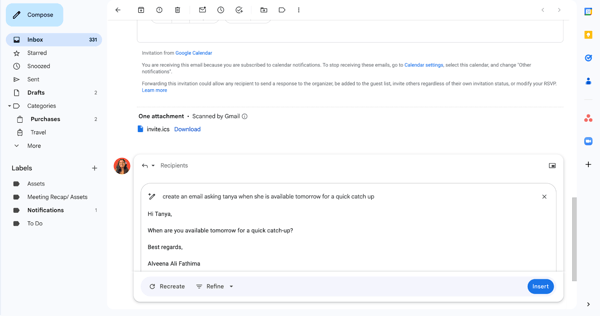
Gmail, through Google Workspace, includes business-focused features such as custom domains, admin controls, and enterprise-grade security. It is structured to support teams, shared environments, and more formal workflows.
Yahoo Mail does not position itself as a work email platform in the same way. It supports communication effectively but does not extend into collaboration, shared documents, or team-level administration.
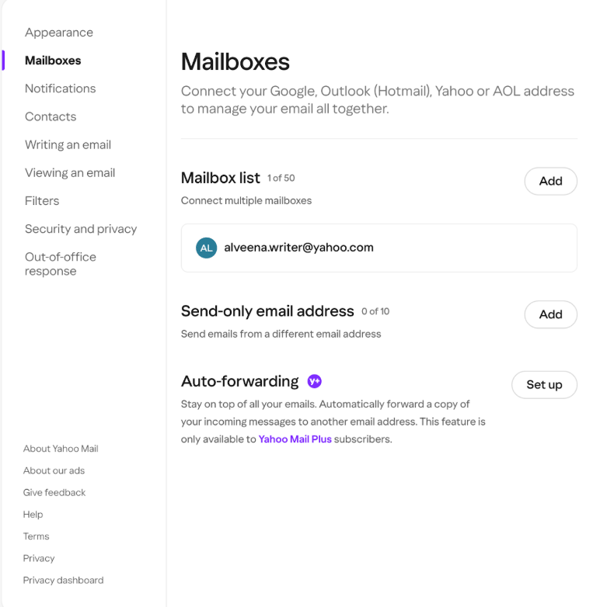
There are also smaller workflow differences that impact day-to-day use. For example, email auto-forwarding is available for free in Gmail, which simplifies managing multiple inboxes or routing emails across accounts. In Yahoo Mail, auto-forwarding is a paid feature, which adds an additional step for similar setups.
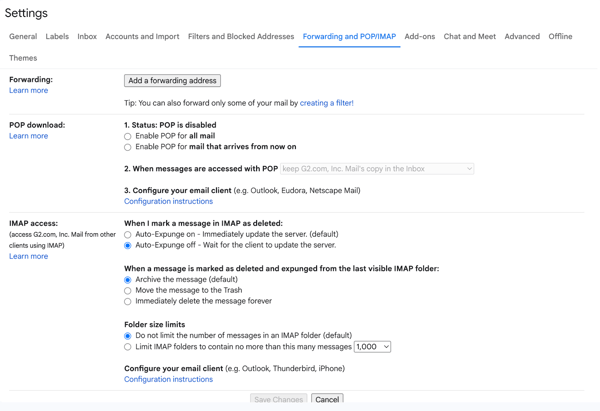
These distinctions become more relevant as email moves beyond personal use. Gmail provides a more complete and flexible setup for multi-account management and team workflows, while Yahoo Mail remains better suited for individual use cases.
After looking at where Yahoo Mail and Gmail differ, I also wanted to understand where they perform similarly. Across core email tasks, both platforms delivered consistent results, and the differences only became noticeable under heavier or more complex usage.
At a basic level, both platforms handle core email functions reliably. Sending and receiving emails, replying to threads, attaching files, flagging messages, and filtering obvious spam all work as expected. These features support everyday email use without issues. For general communication, both platforms allow users to manage inboxes, respond to messages, and handle routine tasks without friction. The experience remains consistent for basic email needs.
Yahoo Mail and Gmail support consistent syncing across desktop and mobile environments. Emails, read status, and notifications carry over quickly, enabling seamless transitions between mobile and desktop workflows without loss of context.
Both platforms offer iOS and Android apps with similar core functionality, including notifications, quick replies, and inbox management tools. Cross-device usage remains stable, with neither platform introducing friction when switching between devices.
Yahoo Mail and Gmail support advanced search with filters for senders, keywords, date ranges, and attachments, enabling users to locate older emails even without exact details. Both platforms allow filters to be combined, which helps narrow results using partial context such as a sender name or approximate timeframe.
Yahoo Mail supports natural language-style queries for common use cases, such as searching for receipts or travel-related emails, which simplifies basic retrieval. Gmail offers more flexibility through search operators and structured filters, allowing more refined results, particularly in larger inboxes. At a baseline level, both platforms provide the necessary tools to locate older emails and attachments without manually browsing folders or threads.
Both Yahoo Mail and Gmail are free to use at a basic level, which contributes to their broad adoption across different types of users. The free versions support core email functionality, including sending and receiving messages, organizing inboxes, and managing attachments without requiring an immediate upgrade.
Both platforms also offer paid plans that provide additional storage, reduced limitations, and access to more advanced features. This allows each service to scale over time as email usage increases or requirements become more complex.
Yahoo Mail and Gmail support integrations with external services, including calendar tools, productivity apps, and other workflow platforms. For example, Gmail connects closely with Google Calendar, Google Meet, Google Drive, and third-party tools like Zoom, Slack, Trello, and Asana through extensions and app connections. Yahoo Mail supports integrations such as Yahoo Calendar and can also connect with third-party apps and external email accounts for more centralized communication management.
These integrations support everyday tasks such as calendar coordination, task tracking, and managing activities beyond basic email management. As a result, both platforms can be used as part of a broader workflow rather than just for sending and receiving emails.
To keep this comparison practical, I tested Yahoo Mail and Gmail using the same day-to-day workflows I rely on, rather than edge-case features or marketing claims. My goal was to evaluate how each inbox performs once email becomes something I manage continuously, not just check occasionally. I compared both platforms across the workflows that shape everyday email use.
Core tasks I used to compare both tools:
I evaluated each task using the following criteria:
To add a broader perspective, I cross-checked my findings with G2 user reviews and used AI-assisted analysis to identify recurring patterns in user feedback. This helped surface real-world needs, frustrations, and expectations beyond my own testing. That combination of hands-on testing and G2 Data is what shapes the insights throughout this comparison.
Disclaimer: Email behavior can vary based on inbox history, settings, device, and ongoing product updates. These results reflect my experience with both tools at the time of testing.
Instead of relying on feature claims, I tested Yahoo Mail and Gmail across the workflows that shape how an inbox feels day to day. For each area, I focused on what stood out during real use, where friction showed up, and which inbox handled the workflow more naturally.
Inbox organization is usually the first place email tools start to feel overwhelming. I wanted to see how easy it was to clean up clutter and keep things organized without turning inbox management into a project of its own. This becomes especially important as inbox volume increases and manual sorting starts to break down.
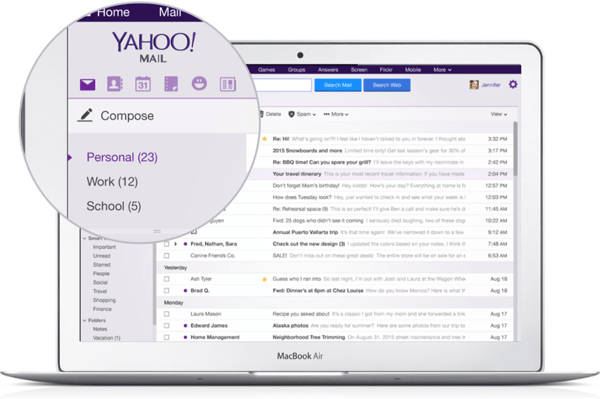
With Yahoo Mail, the organization felt immediately familiar. I could create folders, move emails around, and visually separate different types of messages without much setup. It was easy to get started, especially for a personal inbox. The trade-off showed up over time. Keeping things organized required more manual effort as new emails kept coming in.
Yahoo Mail does position AI as part of its inbox experience, with features like summaries and cleanup tools. However, in my testing, these features weren’t consistently visible or accessible. I wasn’t able to use AI-driven summaries or assistance within my account, which made the experience feel more manual than expected. As a result, organization in Yahoo Mail relied primarily on folders and user-driven cleanup rather than automation.
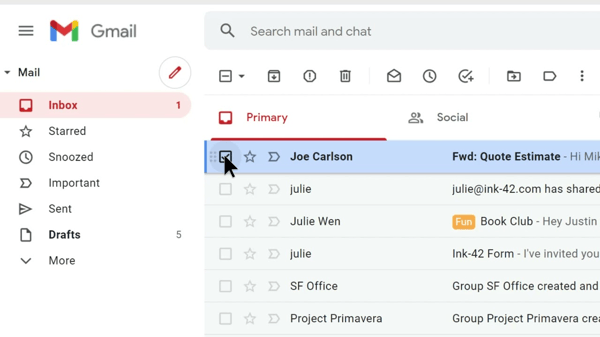
Gmail pushed me toward a more structured approach. Labels, filters, and tabs took longer to set up, and the system felt less intuitive at first. But once everything was in place, the inbox largely organized itself. New emails consistently landed where I expected them to, with far less manual sorting.
Gmail’s AI features also play a meaningful role in organization. Automatic categorization sorts incoming emails into tabs such as Primary, Social, and Promotions without manual input. On top of that, Gemini-powered features can summarize email threads and surface action items, reducing the time spent scanning long exchanges to find what matters. Where Yahoo Mail’s AI focuses on managing what’s already in the inbox, Gmail’s AI works more proactively to keep things organized before they pile up.
What this came down to for me was how much effort I wanted to put into maintaining my inbox over time. Yahoo Mail felt easier to start with because the folder-based system required almost no setup, making quick cleanup straightforward. But as inbox volume increased, that same simplicity meant more manual work to keep things organized. Gmail took longer to configure, but once filters, labels, and tabs were in place, the inbox largely managed itself. If you prefer immediate simplicity, Yahoo Mail works well. If you want a system that reduces ongoing effort as your inbox grows, Gmail is the better long-term choice.
Winner: Split; Yahoo Mail was easier to organize immediately, while Gmail handled long-term inbox organization more efficiently as email volume increased.
This is the moment every inbox gets tested: finding an email you barely remember, under time pressure, with incomplete details.
With Yahoo Mail, search worked, but it took more refinement. I often had to adjust keywords or scroll through results to find the right message, especially when attachments were involved. Yahoo’s newer search supports more natural language queries, which helped when I was looking for things like receipts or past purchases without exact keywords. However, results didn’t always feel well prioritized. Relevant emails showed up, but not consistently near the top, which meant spending more time scanning through results.
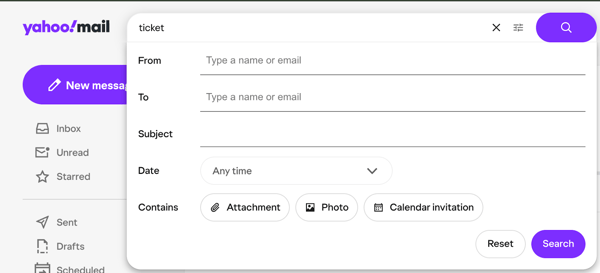
Gmail felt much more reliable in comparison. Even with vague details, it surfaced relevant threads quickly and usually ranked the most useful results first. Filters for senders, attachments, and date ranges made it easier to narrow things down when I only remembered part of the context.
I also found it helpful that Gmail surfaces entire conversations in search results, which makes it easier to understand context without opening multiple emails.
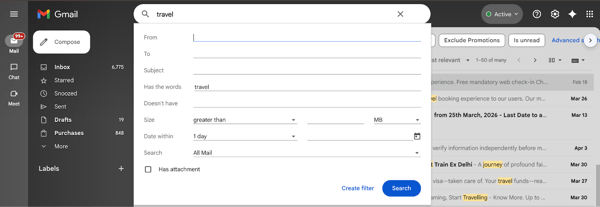
When it came to finding old emails and attachments quickly, Gmail was consistently more reliable. Its search felt more intuitive, required fewer adjustments, and prioritized the right results more effectively. Yahoo Mail could still get me there, but it took more effort. If search is something you rely on often, especially for work or high-volume inboxes, Gmail makes that process noticeably faster and less frustrating.
Winner: Gmail
Spam filtering is a balancing act: block junk without hiding important messages. I paid close attention to both false positives and inbox clutter. Whether this feels helpful or frustrating comes down to how much control you want versus how much automation you trust.
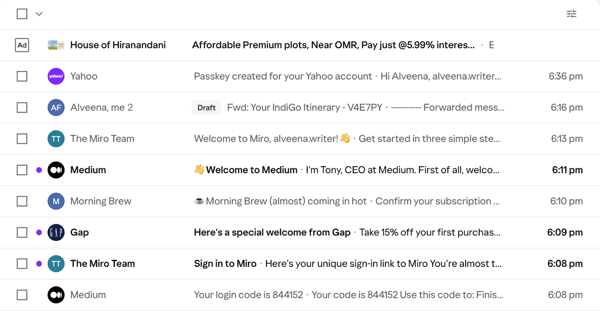
With Yahoo Mail, I noticed pretty quickly that newsletters and promotional emails often landed directly in my primary inbox rather than being filtered or separated automatically. That reduced the risk of missing something important, but it also meant my inbox filled up faster. I also came across a few legitimate emails sitting in spam, which made the filtering feel less consistent.
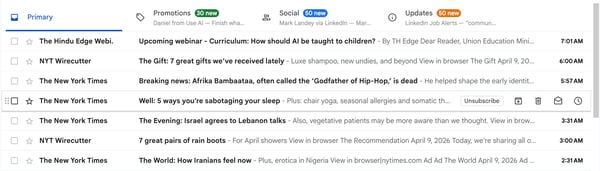
Gmail took a stricter approach from the start. Promotions were automatically sorted into a separate tab, and obvious spam rarely reached my primary inbox. This kept the main inbox cleaner, but it also meant I had to check multiple tabs, where some legitimate emails occasionally got buried.
Where Gmail clearly pulled ahead for me was spam correction. When I marked an email as spam or moved something out of spam, the filtering adjusted more reliably afterward. The system learned from those actions and became more accurate over time. With Yahoo Mail, I found myself making similar corrections more often without the same sense that the filter was improving.
Yahoo Mail’s more permissive approach does reduce the risk of missing emails, but it comes at the cost of a noisier inbox and less consistent filtering. Gmail’s stricter filtering, combined with a feedback loop that adapts over time, made it more dependable in practice. If your priority is keeping your inbox clean without constantly managing it, Gmail does a better job.
Winner: Gmail
If you have a high-volume inbox, this email management guide breaks down proven strategies to organize messages, reduce clutter, and streamline workflows.
Attachments quietly shape how stressful an inbox feels over time, especially if you regularly send files or keep emails for years. I tested how both tools handled frequent file sharing and long-term storage.
Yahoo Mail offers more breathing room with its free storage, which is dedicated entirely to email. In practice, this meant I could keep years of messages and attachments without actively managing space. For inboxes that accumulate large files over time, that extra headroom reduces the need for constant cleanup.
Gmail handled attachments well, but storage required more awareness. Because the free 15 GB is shared across Gmail, Google Drive, and Photos, I had to be more selective about what I kept. Storage management wasn’t limited to email — it extended across multiple Google services, which added an extra layer of effort.
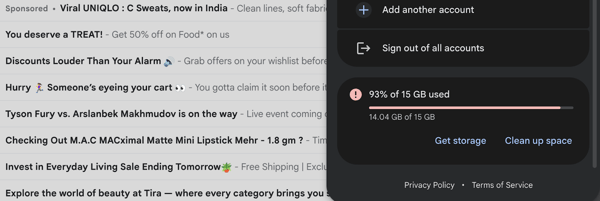
One area where Gmail stood out was attachment discovery. Filtering emails that contained attachments made it easier to locate documents quickly, even when I didn’t remember the original email.
What I appreciated most about Yahoo Mail was the simplicity. There was no need to track storage usage across apps or clean up files proactively. It worked better for treating email as a long-term archive rather than a system that needs ongoing maintenance.
Yahoo Mail’s higher, inbox-only storage makes it easier to keep emails and attachments without thinking about limits. Gmail works well if you actively manage storage across its ecosystem, but for users who prefer a low-maintenance, archive-style inbox, Yahoo Mail is the easier option.
Winner: Yahoo Mail
Since I check email just as often on my phone as on desktop, I paid close attention to how both apps handled quick triage. This became especially noticeable on days when I was clearing emails between meetings or while commuting.
With Yahoo Mail, the app was functional with a few friction points worth noting. Ads appearing directly within the inbox feed took up space that would otherwise be used for scanning messages, and on a smaller screen that visual noise made quick triage feel slower.
Notification reliability was also less consistent, with alerts occasionally arriving late or only updating after opening the app. I also noticed slower load times when the inbox had a higher volume of unread messages, which made bulk cleanup less efficient. On the plus side, Yahoo Mail's swipe gestures were intuitive and easy to pick up, making it simple to archive, delete, or flag messages without breaking stride.
Gmail’s mobile app felt more consistent and workflow-ready. Notifications arrived reliably in real time, making it easier to respond quickly without actively checking the app. Navigation across tabs like Primary, Social, and Promotions worked smoothly, even if it meant checking multiple sections.
What I liked the most was how well Gmail extended beyond just email in the app. The built-in Google Meet tab made it easy to switch from inbox to meetings, view scheduled calls, and join directly without leaving the app. In practice, this reduced the need to jump between apps when moving from email to a meeting, which made a noticeable difference on busy days.
Combined with faster inbox loading, a clean layout without ads, and a prominent search bar, Gmail felt better optimized for quick, on-the-go workflows rather than just basic inbox access.
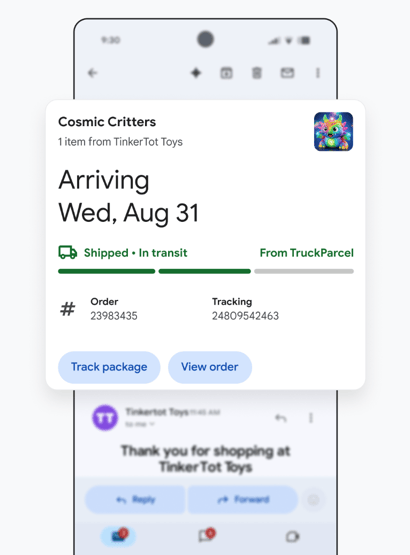
Overall, Gmail’s mobile experience felt more reliable and better suited for real-world use. Beyond a cleaner interface and faster performance, the ability to move seamlessly between email and meetings made it easier to manage work on the go. Yahoo Mail handled basic email tasks, but the added friction from ads, slower performance, and fewer integrated workflows made it harder to keep up in time-sensitive situations.
Winner: Gmail
Finally, I looked at how each inbox handled “work mode” — things like calendar invites, file sharing, scheduling, and collaboration across tools.
Both Yahoo Mail and Gmail support integrations with calendar and productivity tools to some extent. Yahoo Mail connects with calendar apps and offers some third-party compatibility, while Gmail integrates directly with Google Calendar, Meet, and Drive as part of the same ecosystem.
In practice, the difference came down to how connected those workflows felt. With Gmail, I could move from an email to a calendar event, open a shared document, or join a meeting without leaving the environment. Attaching files from Google Drive, responding to invites, and coordinating schedules all happened within the same flow, which reduced context switching.
Gmail also handled common work scenarios more smoothly. Calendar invites were easier to manage directly from the inbox, file sharing felt more integrated, and switching between conversations and related documents required fewer steps. That made a noticeable difference when I was juggling multiple threads or coordinating with others.
Yahoo Mail handled communication reliably, but again, it stayed closer to an email-only experience. Calendar access and integrations were available, but they felt more separate from the inbox rather than part of a unified workflow. When tasks involved collaboration, shared files, or scheduling across tools, I had to switch between apps more often, which added friction.
For work-style use, Gmail’s ecosystem advantage is hard to match. The ability to move seamlessly between email, documents, calendar, and meetings made it more efficient for collaboration and day-to-day coordination. Yahoo Mail works well for personal communication, but Gmail is better suited for workflows where email is just one part of getting work done.
Overall, Gmail’s mobile experience felt more reliable and better suited for real-world use. Beyond a cleaner interface and faster performance, the ability to move seamlessly between email and meetings made it easier to manage work on the go. Yahoo Mail handled basic email tasks, but the added friction from ads, slower performance, and fewer integrated workflows made it harder to keep up in time-sensitive situations.
Winner: Gmail
Here’s a quick breakdown of how Yahoo Mail and Gmail compare across key workflows.
| Workflow | Winner | Why it won |
| Inbox organization | Split | Yahoo is faster to start; Gmail scales better over time |
| Search and retrieval | Gmail 🏆 |
Faster, more reliable search with better result ranking and filtering |
| Spam handling | Gmail 🏆 | Stricter filtering, fewer misses, and a spam correction system that improves over time |
| Attachments and storage | Yahoo Mail 🏆 | Higher storage with a dedicated inbox-only model |
| Mobile experience | Gmail 🏆 | Cleaner, more consistent app |
| Work-style workflows | Gmail 🏆 | Seamless workflow across email, calendar, files, and meetings |
Key insights on Yahoo vs. Gmail from G2 Data
To balance my hands-on testing, I also looked at G2 review data to understand how a broader set of users experience Yahoo Mail and Gmail (via Google Workspace). The patterns below highlight where user sentiment aligns with or diverges from my observations during testing.
G2 satisfaction scores highlight different strengths between Yahoo Mail and Google Workspace (Gmail), particularly around setup, usability, and ongoing administration.
For Google Workspace (Gmail), G2 Data shows consistently strong performance across key usability metrics. Gmail scores 95% for ease of use, 93% for ease of setup, and 91% for both ease of admin and ease of doing business, along with 88% for quality of support. These scores reflect how well Gmail performs in structured environments where email is part of a broader workflow.
This aligns with my testing. While Gmail required more initial setup, it became more efficient over time, especially in high-volume or work-driven inboxes. Strong admin and business usability scores also reinforce its fit for teams managing email at scale.
For Yahoo Mail, G2 Data highlights strengths in ease of use and accessibility. Yahoo Mail scores 91% for ease of use and 87% for ease of setup, indicating that users can get started quickly with minimal friction. It also receives 88% for ease of admin and 82% for quality of support, reflecting a smooth day-to-day experience for individual users.
However, lower scores in ease of doing business (76%) point to limitations when scaling beyond basic use cases. This mirrors my experience, where Yahoo Mail felt simple and easy to manage for personal use, but less suited for structured or collaborative workflows.
The context behind these scores also matters. Google Workspace reviews are largely driven by teams and organizations using email for collaboration, while Yahoo Mail feedback tends to reflect individual, personal inbox usage. This difference explains why Gmail is evaluated through a productivity lens, while Yahoo Mail is more often judged on simplicity and everyday usability.
Gmail (Google Workspace) shows strong adoption across professional and business-heavy industries, including IT services, computer software, marketing and advertising, education, and financial services. The distribution is more concentrated, which reflects its role as part of a broader productivity suite used by teams and organizations.
Yahoo Mail usage appears more fragmented across industries and skews toward individual or lighter-use scenarios. While it does show presence in areas like marketing, IT services, and internet, the distribution is less concentrated and lacks the same level of enterprise clustering seen with Google Workspace.
Industry adoption reinforces how each tool is typically used. Gmail is more commonly embedded in structured, team-based environments, while Yahoo Mail is more often used for personal or standalone communication.
On the G2 product profile, Google Workspace (Gmail) receives its highest ratings for features tied to communication reliability and deep integration within the Google ecosystem. Reviewers frequently highlight capabilities such as reliable email delivery, powerful search, and seamless integration with tools like Google Drive, Calendar, Docs, and Meet. These integrations allow email to function as part of a connected workflow, where messages, files, meetings, and documents are tightly linked.
This ecosystem advantage shows up consistently in user feedback. Teams often describe Gmail as particularly effective for coordinating projects, sharing files, and managing conversations that extend beyond email. Rather than acting as a standalone inbox, Gmail becomes part of a broader system for getting work done.
For Yahoo Mail, the highest-rated features focus more on straightforward inbox management and familiar organization tools. Reviewers highlight folder-based organization, inbox customization, and built-in utilities like package or travel tracking as key strengths. These features make it easy to manage personal email without requiring much setup or ongoing configuration.
User feedback reflects this positioning. Yahoo Mail is often described as a dependable, straightforward inbox for reading, sorting, and storing emails efficiently. Instead of emphasizing integrations or workflow automation, its strengths center on providing a stable and easy-to-navigate experience for personal communication.
On the G2 product profile, Google Workspace (Gmail) tends to receive lower ratings around administrative complexity and pricing, particularly as organizations scale. Reviewers note that advanced admin controls and higher storage limits often require upgrading to more expensive Workspace plans, which can increase costs for smaller teams.
User feedback reinforces this pattern. While Gmail is widely praised for reliability and integrations, navigating the broader Google Workspace environment can introduce additional setup and management overhead, especially for teams that are new to the ecosystem.
For Yahoo Mail, the lowest-rated features are more tied to the everyday user experience. Common concerns include advertising in the free version, occasional performance slowdowns, and limited integrations with external tools. The presence of ads in the inbox, in particular, is a recurring complaint among users on the free plan.
Reviews also highlight that Yahoo Mail can feel more limited when used beyond personal email. Fewer integrations and weaker support for collaborative workflows make it less suitable for users trying to extend email into a broader productivity setup.
Have more questions? Find more answers below.
Yahoo Mail is better suited for simple, personal email use with higher free storage, while Gmail is better for search, organization, and integration with productivity tools like Google Workspace.
Gmail provides more advanced security features, including enterprise-grade protections and admin controls through Google Workspace, making it a stronger choice for business and professional use.
Yahoo Mail offers 20 GB of free storage, while Gmail provides 15 GB that is shared across Google services like Drive and Photos.
Yahoo Mail remains popular because it is simple, familiar, and requires minimal setup, making it suitable for users who want a straightforward personal email experience.
Gmail is used for both personal and professional email, though its integrations with Google Workspace make it particularly effective for work-related workflows.
Yahoo Mail displays more visible ads in its free version, while Gmail typically has fewer and less intrusive ad placements.
Yahoo Mail can be used for work communication, but it lacks built-in collaboration and productivity features available in Gmail through Google Workspace.
Yahoo Mail is easier for beginners due to its traditional folder-based layout, while Gmail requires some setup but offers more advanced organization over time.
Using both is common, with Yahoo Mail often used for personal email and Gmail used for work or high-volume communication.
Gmail is generally better long-term for scalability, organization, and integration, while Yahoo Mail remains suitable for consistent personal use.
If you’ve read this far, the takeaway should feel pretty clear: Yahoo Mail and Gmail aren’t really competing for the same kind of user, even though they look similar on the surface.
From my testing, Yahoo Mail works best when email stays personal and relatively lightweight. Its slightly higher free storage and familiar folder-based organization make it easy to manage without much setup or ongoing maintenance. If you want an inbox that “just works” and doesn’t demand attention, Yahoo Mail still holds up.
Gmail, on the other hand, is built for scale. Once email becomes something you search constantly, connect to files, or use alongside calendars and documents, Gmail’s labels, filters, and Google Workspace integrations start to matter more. It takes more upfront setup, but it pays off for work-heavy or high-volume inboxes.
My recommendation:
Both inboxes do the basics well, but they’re optimized for very different expectations. The right choice ultimately comes down to how much structure and scalability you want from your email versus how much simplicity you prefer.
If you’re curious about how businesses get more value from email today, my team recently worked on a guide about boosting email marketing ROI that explores modern email strategies and performance optimization.


Let AI pick the right tool for your use case Decide with AI 1 Click on the button below
 by Soundarya Jayaraman

Trello vs. Asana (both rated 4.4/5 on G2) Trello and Asana tie on rating but split on...
 by Aditi Rai

If you’ve seen the movie “27 Dresses,” you remember the scene where Jane realizes she’s lost...
 by Grace Pinegar