


I spent more time picking a note-taking app than I'd like to admit. Not because these tools are hard to understand, but because note-taking is personal, and most note-taking apps feel like they do the same thing until you're 200 notes deep and realize one of them was never going to scale with you.
When I finally sat down to properly compare Google Keep vs. Evernote, I found the internet already divided into firm camps: the 'just use Keep, it's free' crowd and the 'Evernote power users who'll die on this hill' crowd.
That divide isn’t random. Both tools have built strong reputations for being easy to pick up and use, which is exactly why so many people feel confident choosing one and sticking with it. In fact, G2’s Spring 2026 Grid® Report for Note-Taking Software backs that up — Google Keep scores 95% while Evernote follows closely at 91%, both well above the category average.
So at a glance, this feels like a simple decision. But in practice, ease of use is just the entry point, not the deciding factor.
I've been in both camps, and I tested both tools properly before writing this. Here's what I found.
TL;DR: What are the differences between Google Keep and Evernote?
Many serious note-takers use both: Keep as a fast capture inbox for fleeting thoughts, and Evernote (or a similar tool) for long-term storage and retrieval. If you find yourself constantly fighting your note-taking app, that two-layer approach is worth considering.
Whether you're choosing for the first time or reconsidering after Evernote's pricing changes, this Google Keep vs. Evernote comparison walks you through what each tool does well, where it falls short, and who should choose one over the other.
Before we get into the details, here's a quick feature comparison of both note-taking apps.
|
Feature |
Google Keep |
Evernote |
|
G2 rating |
4.6/5 |
4.4/5 |
|
Best for |
Quick capture, reminders, and lightweight notes in the Google ecosystem. |
Long-form notes, research, and structured knowledge management. |
|
Note formatting |
Basic (lists, checkboxes, minimal styling) |
Rich editor (tables, headers, formatting, embeds) |
|
Drawing and sketching |
Built-in drawing canvas across platforms |
Available but limited (basic sketch/annotation tools) |
|
Organization |
Labels, colors, pinning, simple search |
Notebooks, stacks, nested tags, advanced filters |
|
Web clipper |
Basic (primarily saves links) |
Advanced (full-page, article mode, annotation, tagging) |
|
OCR (image text) |
Extracts editable text from photos and in-app drawings; indexes image text for search |
Indexes text in images and PDFs for search across the full note library |
|
Collaboration |
Basic sharing, no permission controls |
Shareable notebooks with view and edit permissions |
|
AI features |
Gemini-powered list generator on Android (requires Google AI plan or Pixel); no AI search or writing tools |
AI Assistant (OpenAI integration), Semantic Search, AI Meeting Notes, AI Edit, AI Transcribe |
|
Integrations |
Google Workspace (Drive, Docs, Calendar, Gmail) |
Wide integrations (Google Workspace, Microsoft 365, Slack, Zapier, etc.) |
|
Offline access |
Available on mobile apps (Android & iOS) |
Available on paid plans only |
|
Voice recording |
Records audio and auto-transcribes; mobile only; times out on pauses; good for quick memos |
Records audio and auto-transcribes; AI Transcribe handles up to 1hr/100MB; AI Meeting Notes adds speaker recognition and meeting summaries |
|
Mobile experience |
Lightweight, widget-ready, and frictionless |
Feature-rich but heavier; can feel slower |
|
Privacy |
Not end-to-end encrypted; Google can access data under policies |
Not end-to-end encrypted; data accessible under service/admin controls |
|
Note recovery |
Restore deleted notes up to 7 days |
Indefinite version history recovery (tied to storage limits) |
|
Pricing |
Free with a Google account (storage tied to Google Drive) |
Starter: $14.99/month or $99/year Advanced: $24.99/month or $249.99/year |
|
Free plan |
|
|
Note: Both Google Keep and Evernote regularly update their features and pricing. The details above reflect the most current capabilities as of May 2026, but may change over time.
At first glance, both apps take notes. But once you spend real time in each tool, you realize they're built around completely different ideas of what note-taking is for. Google Keep treats notes as fast, disposable, and present-tense. Evernote treats them as a long-term archive worth building, searching, and revisiting for years. These philosophies shape every design decision both apps have made, right down to their pricing.
Now, this is where it gets interesting. These aren't just feature gaps — they reflect two completely different ideas about what note-taking is actually for. Here's a breakdown of the key differences between Google Keep and Evernote. Let's get into it.
Despite their differences, both tools cover a solid base of note-taking essentials — and it's worth knowing where they actually overlap:
I tested both tools across nine categories of everyday note-taking use:
I evaluated each tool on four dimensions:
To add other user perspectives, I also cross-checked my findings with G2 reviews to see how other users experience these tools.
Disclaimer: Feature availability and pricing for both Google Keep and Evernote may vary based on platform, plan tier, device, and recent product updates. The results and observations in this article reflect hands-on testing conducted as of May 2026 and represent an individual opinion. They do not reflect G2's position on the mentioned software's likes and dislikes.
Alright, enough setup. For each test, my analysis follows this structure:
Let’s get started.
The first test was the most basic one: how fast can you get a thought out of your head and into the tool on the web? I timed myself opening both from a cold start and writing the same sentence.
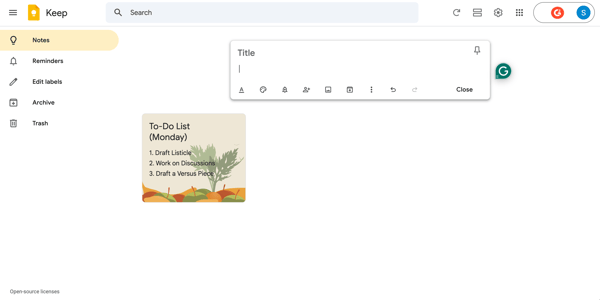
Google Keep was instant. You click, and you're already typing. There's no note type to choose, no template to dismiss, no decision to make about where this idea belongs. The web interface keeps a blank note open and ready at all times, sitting right in the center of the screen. For quick capture, it felt less like using software and more like reaching for a pen.
/save%20to%20keep%20integration%20on%20google%20keep.webp?width=600&height=338&name=save%20to%20keep%20integration%20on%20google%20keep.webp)
Google Keep’s Save to Keep integration
There's also a 'Save to Keep' button built into Google Docs, Sheets, and other Workspace tools, which means anything you're already reading or working on can be clipped to Keep without leaving the tab. Since I was already using Google's ecosystem, I found this kind of ambient capture to be genuinely useful.
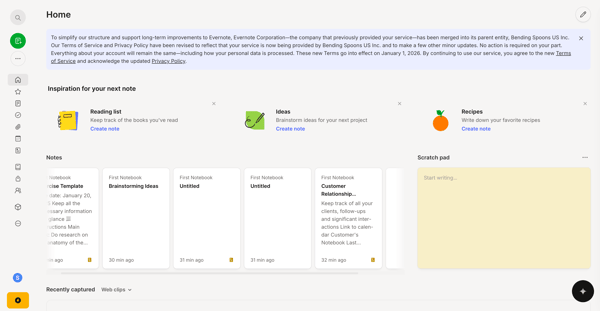
Evernote requires one extra step on the web: you click the green New Note button before you can start typing. Keep skips that entirely — the cursor is already waiting for you when the page loads. It's a small difference, but when you're mid-thought, it's just enough friction to notice. Evernote does have a workaround, though: a scratch pad that sits open at the top of the home screen on web, desktop, and mobile, always ready to type into. It mostly solves the problem. It's still a step slower than Keep, but it's a reasonable fix.
On mobile, voice should be covered separately because both tools handle it differently. Google Keep records audio and auto-transcribes in real time — tap the microphone, speak, and both the audio file and the text transcript land in the same note automatically.
It's quick and frictionless, which is in line with what Keep is built for. The catch is that it times out after a second or two of silence and is mobile only, so it's best suited to short voice memos rather than anything longer.
Evernote records and transcribes too, but its AI Transcribe feature handles files up to an hour long or 100MB, and AI Meeting Notes goes further still — recording full meetings, identifying speakers, and generating a summary automatically. If voice capture is a regular part of how you work, the depth difference here is meaningful.
In practice, both tools handle capture well, but they’re built for slightly different use cases. Google Keep is faster and more frictionless for quick capture on web and mobile, with no steps between opening the app and typing. Evernote is a bit slower to start on the web, but it offers significantly more powerful voice features, including long-form transcription and full meeting notes with summaries.
Winner: Split verdict. Keep wins on instant, low-friction capture; Evernote wins on depth and flexibility in voice recording.
I'd been using Keep for a few months before writing this, and I hit the wall that every Keep user eventually hits: somewhere around note 150, the color-coded grid stops feeling like a system and starts feeling like a pile. That's when I started paying closer attention to how each tool actually handles finding things.
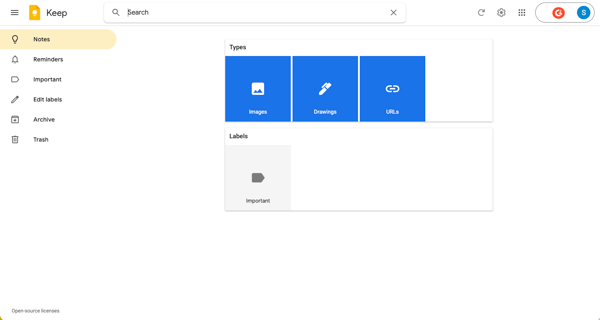
Both tools search more than most people expect. Keep can search across everything — text, labels, colors, note types, and people you've shared with. It also indexes text inside images automatically, so a word from a photographed receipt or whiteboard is just as findable as something you typed. Voice note transcriptions work the same way. Speak something, and it's searchable.
Evernote goes deeper. In addition to standard keyword search, it covers text in images, handwritten notes from photos of whiteboards and Post-its, and text in scanned PDFs. You can also get specific: Boolean operators, filters by date, tag, content type, and notebook.
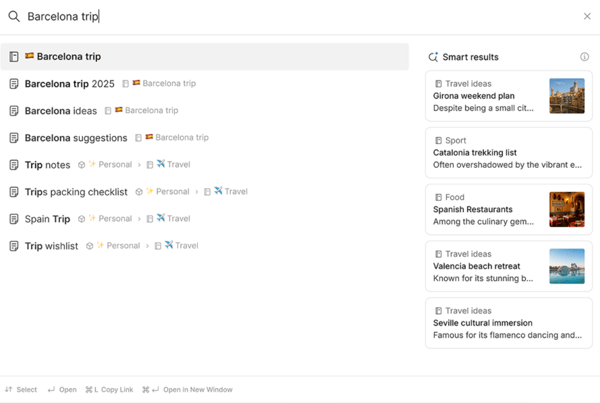
On top of this, Semantic Search is a recently launched feature I kept coming back to: instead of matching keywords, it understands the meaning behind a query, so searching "what did I decide about the budget last quarter" actually surfaces the right note even when those words don't appear in it.
On organization, the gap is wider still. Keep's labels and color-coding do the job when your note count is manageable. But a research project, a client archive, six months of meeting notes — that's where you start to feel what Keep can't do.
Evernote gives you notebooks, nested tags, stacks, and filters that let you cut your library any way you need. When I threw a hundred research notes at it, I could find anything in seconds. One smaller detail worth noting: Keep restores deleted notes for up to seven days, while Evernote keeps the trash indefinitely as long as you don’t hit your storage limits.
Keep's system is workable, but you'll feel the ceiling. It is clear that Evernote was built for a larger enterprise-based use case.
Winner: Evernote
I wanted to test this properly, so I tried to write the same structured meeting note in both tools: a header, an agenda, a few action items with owners, and a follow-up date.
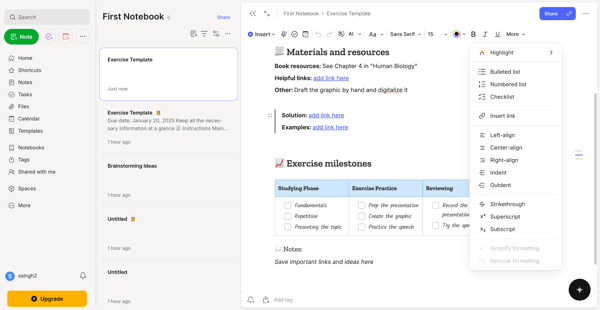
Evernote handled it well. The rich-text editor gives you headers, bold, italics, tables, checkboxes, numbered lists, and inline attachments. Building a structured note felt natural, and the result was something I'd actually want to send to a colleague. What made it even easier was the template gallery.
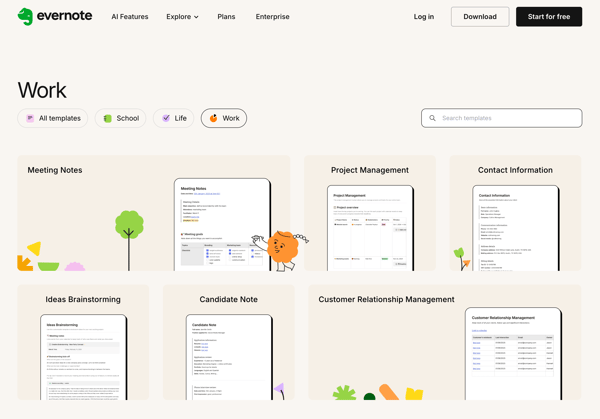
Evernote ships with a solid library of pre-built templates across work, school, and personal categories: meeting agendas, project briefs, habit trackers, and weekly planners. Instead of building a structure from scratch, you pick a template and fill it in. For recurring note types, that saves a meaningful amount of time. I also appreciated how consistently the formatting held across platforms. What I built on the web looked exactly the same when I opened it elsewhere.
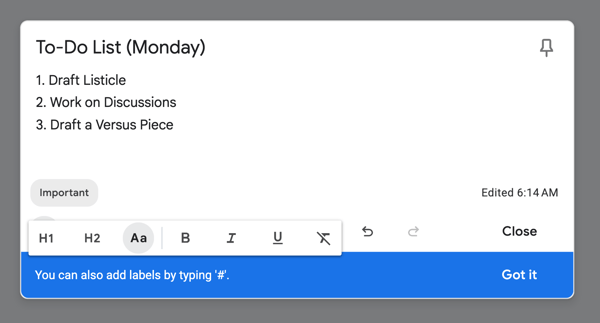
Google Keep was a different story. You get plain text, checkboxes, and some basic formatting. While Keep's philosophy is to stay lean and focused on note-taking, the absence of basic formatting options, such as font sizes and headers, quickly becomes a ceiling.
I tried building a client brief in Keep once and ended up copying the whole thing into Google Docs halfway through. That's when I stopped treating it as a formatting tool. Its checklist feature is excellent: clean, fast, and satisfying for simple to-dos. But the moment a note needs any kind of structure, Keep runs out of road quickly.
Both tools are doing different things here. If your notes are mostly lists and reminders, Keep is fine. If they need to be readable, shareable, or structured, Evernote is the more solid option.
Winner: Evernote
Explore other best note-taking apps, tried and tested by my colleague Tanuja Bahirat.
This one surprised me. Most comparisons of these two tools skip it entirely, but once I started testing, I realized the differences here are genuinely useful to know about.
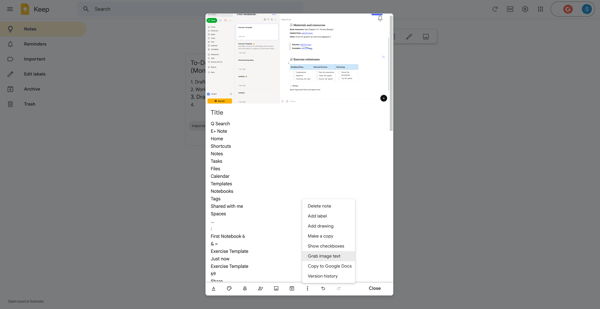
Both tools extract editable text from images and index that text so notes are searchable. Keep's 'Grab image text' works on photographed documents and on drawings you create in the app. I tested it on a printed receipt, a handwritten shopping list, and a sketch I'd drawn directly in Keep. All three produced usable text.
Evernote does the same, and goes further: its OCR covers images, PDFs, and scanned documents, so it can index text from a wider range of file types. If your archive includes many PDFs or scanned documents alongside images, Evernote's indexing is more comprehensive.
Where Keep does have a genuine edge is the drawing canvas. It's a native feature available across all platforms, and you can sketch, annotate, or handwrite directly inside a note with a finger or stylus. Evernote's drawing support is more limited, handled primarily through image attachments rather than a built-in canvas. For visual thinkers or tablet users, that's a real practical difference.
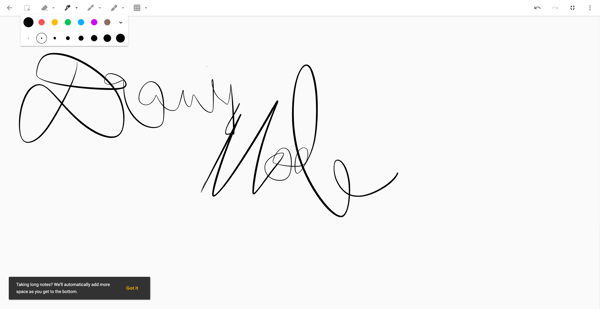
So the honest summary: both tools handle image text extraction and search. Keep has the better drawing experience. Evernote has broader file type coverage for OCR indexing.
Winner: Split verdict. Keep wins on drawing canvas; Evernote wins on OCR depth across PDFs and scanned documents.
Looking for tools that particularly excel at extracting text from images? Check out our list of the best OCR software.
I clip a lot of web content when I'm researching. Articles, product pages, documentation, competitor content. So I was curious how well each tool handled the unglamorous but important job of saving something from the web./web%20clipper%20tool%20on%20evernote.webp?width=600&height=338&name=web%20clipper%20tool%20on%20evernote.webp)
Evernote’s Web Clipper Tool
Evernote's web clipper is one of the best I've used. You can capture a full page, a simplified article version that strips ads and navigation clutter, a selected region, or just a screenshot. Before saving, you can add tags, choose which notebook it goes into, and annotate. The simplified article mode was particularly impressive: it strips everything except the actual content, which is exactly what you want when you're building a research archive.
For heavy web researchers, this feature alone may justify the cost difference between the two tools.
/chrome%20extension%20google%20keep.webp?width=600&height=338&name=chrome%20extension%20google%20keep.webp)
Google Keep’s Chrome Extension
Google Keep's Chrome extension is a simpler tool. You click it, add an optional note, and it saves the page URL as a snippet. That's bookmarking with a text field attached, which is useful for saving references but isn't the same as clipping content. If the page goes down or moves, your Keep 'clip' is just a dead link. I found myself using it for short-lived reminders but not for anything I wanted to keep long-term.
If web research is a meaningful part of your workflow, this round isn't particularly close.
Winner: Evernote
Neither tool is a modern team-first collaboration platform, so I went in with realistic expectations. The question was how much each one could do when you actually needed to share something.
Evernote gives you meaningful collaboration controls. You can share individual notes or entire notebooks, set view-only or edit permissions, and generate a shareable link to a specific note. It's not Notion or Google Docs, and it doesn’t support true real-time co-editing, but it's functional enough for distributing research, maintaining a small team wiki, or handing off a project brief with context attached.
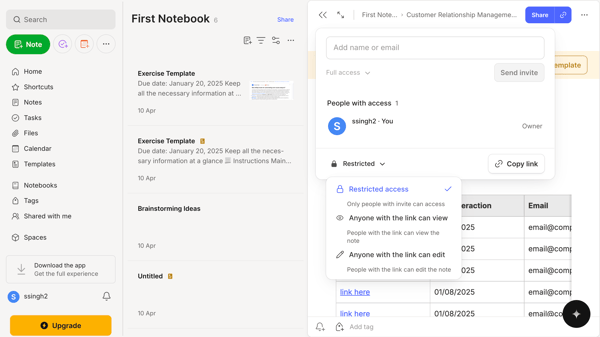
Google Keep's approach is simpler. You can share individual notes, and collaborators can edit them with near real-time syncing, which works well for shared grocery lists or quick task handoffs. What it doesn't have is permission controls or the ability to share a structured notebook.
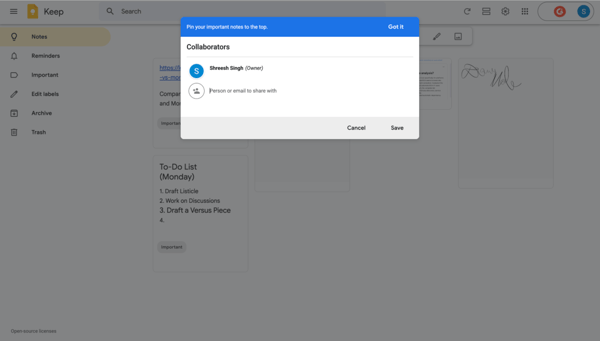
One thing Keep does have in its favor: because virtually everyone already has a Google account, sharing a note requires no signup, download, or onboarding. That zero-friction model is genuinely useful for quick, informal collaboration with people outside your usual workflow.
Both tools can share. Only one of them gives you control over what happens after.
Winner: Evernote
Full disclosure: this was the category I had the strongest feelings about going in. I'd watched Evernote's pricing change significantly since 2023, and I wanted to see whether what you get today actually justifies what you pay.
Google Keep is free. Not free with a catch, not free for 30 days, just free. It works with any Google account, stores notes alongside your Google Drive storage, and has no paywall for its features. For casual users, that's a hard offer to compete with.
Evernote's story is more complicated, and the free tier is where it starts to unravel. The current free plan caps you at 50 notes, 1 notebook, and crucially, just 1 device. That last point is easy to miss, but it's significant: on the free plan, you cannot have Evernote syncing across your phone and your laptop at the same time. You have to manually disconnect one device before you can add another, or look for a free Evernote alternative.
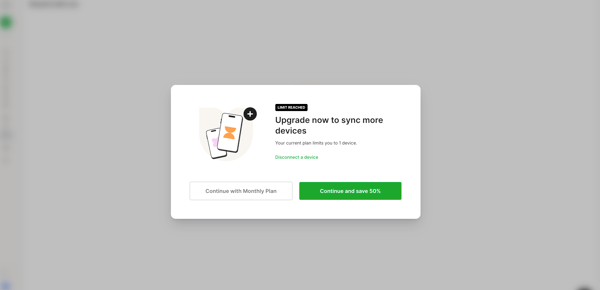
There's no seamless cross-device continuity, which is arguably the core promise of any cloud note-taking app.
Here's how the paid plans break down:
| Plan | Price (monthly) | Price (annual) | Notes | Notebooks | Devices | Best for |
| Free | $0 | $0 | 50 | 1 | 1 | Trying the app |
| Starter | $14.99/mo | $99/year | 1,000 | 20 | 3 | Light personal use |
| Advanced | $24.99/mo | $249.99/year | Unlimited | Unlimited | Unlimited | Power users and teams |
The features that justify Evernote's cost are real — especially at the Advanced tier, where AI tools, unlimited notes, and full device sync make it a genuinely capable knowledge management tool. But for someone who just wants to try it across their phone and laptop before committing, the 1-device free plan makes that harder than it should be.
Winner: Google Keep
Google Keep isn’t the only free note-taking app in the market. Check out our list of the best free note-taking software of 2026.
I tested both mobile apps the same way I actually use my phone: quickly, one-handed, often mid-conversation or mid-commute, with limited patience for anything that makes me think.
Google Keep's app felt like it was designed by someone who had done the same test. It opens fast, the interface is clean, and both tools actually offer multiple Android widget types, which is worth knowing. Keep's three widget options cover the main use cases well: a single note widget that pins one specific note to your home screen and lets you interact with it directly, a note collection widget that shows a scrollable list of your notes or a specific label, and a quick capture widget with five shortcut buttons for creating text, list, audio, drawing, and photo notes.
When you open the app and tap create, the same five options appear as a simple menu. Each one is clear, single-purpose, and takes one tap. Across a few weeks of daily use on Android 16, I didn't hit a single bug or sync issue./google%20keep%20vs%20evernote%20widget.webp?width=600&height=338&name=google%20keep%20vs%20evernote%20widget.webp) Google Keep’s widgets versus Evernote’s widgets
Google Keep’s widgets versus Evernote’s widgets
Evernote's widget offering is broader and more customizable. Beyond the action bar widget that allows for different types of notes, it includes a tasks widget, a scrollable note list widget, and a shortcuts widget, all configurable and customizable. That's a genuinely impressive range, and for users who want a highly tailored home screen dashboard, Evernote offers more flexibility. The trade-off is the same one that runs through the whole mobile experience: more options means more setup, and more decisions to make before you can use it.
I found that Evernote’s app mirrors the desktop experience faithfully, and this shows up in the create menu too: seven options, including Event, Notebook, Audio, Camera, Scan, Files, and Sketch. Each is useful in the right context, but deciding between them when you're in a hurry adds friction, unlike Google Keep. G2 reviewers have also flagged occasional bugs: notes not syncing properly, and the app slowing down with large attachment libraries.
If you spend most of your time at a desk, this gap matters less. But for mobile-first users, the difference in daily feel is hard to ignore.
Winner: Google Keep
I went into this expecting a noticeable gap, but I still wanted to test how each tool actually uses AI in day-to-day note-taking. Not just what’s listed on a features page, but whether it meaningfully changes how you capture, organize, and work with your notes.
/Google%20Keep.webp?width=600&height=338&name=Google%20Keep.webp)
Keep's built-in list generator built on Gemini
Google Keep has been cautious with AI, and it shows. The one live feature as of May 2026 is "Help me create a list," a Gemini-powered prompt available on Android that generates a structured checklist from a short description. I typed "packing list for a week in Japan in autumn" and got a genuinely useful, well-organized list back in a few seconds. For the things Keep is already good at, it works well.
There's also a Google Keep Gemini integration that lets you interact with your Keep notes from within the Gemini app itself, which is handy if you're already deep in that ecosystem. But outside of that, Keep has no AI search, no writing tools, no summarisation, and no meeting transcription.
The AI that does exist is gated behind a Google AI Pro or Ultra subscription or a Pixel device and is limited to Android. It's a start, but it's a narrow one.
/chatgpt%20based%20ai%20assistant%20on%20evernote.webp?width=600&height=314&name=chatgpt%20based%20ai%20assistant%20on%20evernote.webp)
Evernote's AI assistant built on ChatGPT
Evernote's AI story is on a different scale entirely. In January 2026, Evernote shipped v11, its first major release in five years, built around three new AI features.
AI Assistant, developed in collaboration with OpenAI, sits inside the app as a conversational interface. I used it to pull action items from a set of meeting notes, reorganize a messy research dump into a structured format, and generate a summary of a notebook I hadn't opened in months. It handled it without much prompting.
AI Meeting Notes was also very useful for recording in-person or online meetings, generating transcripts with speaker recognition, and automatically producing summaries. Semantic Search (mentioned above) was the third major AI feature that dropped with this update.
On top of these three headline features, AI Edit and AI Transcribe have been quietly improving, covering everything from paraphrasing and translation to converting audio and images into editable text.
Both tools have AI. But one of them built a suite around how people actually work with notes, and the other added a convenient list generator.
Winner: Evernote
Here’s a table showing which note-taking app won in each task.
| Test | Winner | Why |
| Ease of capture | Split | Keep is instant for typing with no friction or setup. Evernote is slightly slower on the web, but far more powerful for voice capture with long-form transcription and meeting notes. |
| Organization and search | Evernote 🏆 | Both search text inside images; Evernote adds PDF search, handwriting search, Boolean syntax, and Semantic Search. |
| Note formatting | Evernote 🏆 | Rich-text editor, tables, headers, and checklists across all platforms. |
| Drawing, sketching, and OCR | Split | Keep wins on drawing canvas; Evernote wins on OCR depth across PDFs and scanned documents. |
| Web clipping | Evernote 🏆 | Full-page clipping with annotations. Keep only saves a URL. |
| Collaboration | Evernote 🏆 | Shareable notebooks with permission controls; Keep suits quick, low-friction sharing. |
| Pricing and value | Google Keep 🏆 | Completely free with a Google account. Evernote Starter runs $14.99/month or $99/year; Advanced runs $24.99/month or $249.99/year. |
| Mobile experience | Google Keep 🏆 | Both have rich widget ecosystems. Keep's app is faster, simpler to navigate, and more stable day to day. |
| AI features | Evernote 🏆 | AI Assistant, Semantic Search, AI Meeting Notes, AI Edit, and AI Transcribe vs. Keep's single Gemini list generator. |
Based on my tests, these are the ideal user profiles for each note-taking app.
| User role/need | Recommended tool | Why |
| Google Workspace users | Google Keep | Native integration with Gmail, Docs, Drive, and Calendar — Keep lives inside the ecosystem you're already in |
| Quick capture and task lists | Google Keep | Zero setup, no cost, and a note is ready before you finish the thought |
| Researchers and knowledge builders | Evernote | Structured notebooks, PDF search, web clipping, and a library that scales over the years |
| Teams and collaborators | Evernote | Notebook-level sharing with permissions; Keep's sharing is too basic for ongoing team use |
| Heavy mobile users on a budget | Google Keep | Fast, stable, and free across all devices — no plan required |
| Power users with complex AI needs | Evernote | AI Assistant, Semantic Search, and AI Meeting Notes are tools that Keep simply doesn't have yet |
I also looked at G2’s Spring 2026 Grid® Report for Note-Taking Software to analyze the industry sentiment and adoption patterns for both tools. Here's what I found:
After spending real time in both apps, I've noticed that some users might not find either of the tools to be a great fit for them. If Keep feels too limited and Evernote feels too expensive or complex, here are the alternatives worth looking at:
If you like Keep’s speed but want more formatting options or better organization, here are some Google Keep alternatives you should consider.
If you value Evernote’s depth but want to move away from its pricing or limitations, these are some alternatives to Evernote worth exploring.
Considering moving away from Evernote? Explore how Obsidian and Notion stack up to find the right fit for your workflow.
Got more questions? We’ve got you covered!
It depends on what you need. Google Keep is better for fast, casual note-taking within the Google ecosystem: it's free, immediate, and requires no learning curve. Evernote is better for managing large note libraries, doing structured research, and building long-term knowledge systems. For most casual users, Keep is the more practical choice. For power users with complex organizational needs, Evernote still has the edge, at a meaningful cost.
Evernote offers a free plan, but it is heavily restricted. The current free plan caps users at 50 notes, 1 notebook, and 1 device at a time — you have to manually disconnect one device before adding another, which makes meaningful cross-device use impossible without a paid plan. Starter costs $14.99/month or $99/year ($8.25/month billed annually). Advanced costs $24.99/month or $249.99/year ($20.83/month billed annually).
Google Keep has a basic Chrome extension that saves a page URL and lets you add a text note. It's not a true web clipper in the same sense as Evernote's tool, which captures and formats page content. If web research is central to your workflow, Evernote's clipper is significantly more capable.
Yes, with limitations. Keep works well for personal task lists, quick meeting reminders, and shared notes within a Google Workspace environment. It integrates natively with Google Docs, Calendar, and Gmail. However, it's not built for complex project management, structured documentation, or large-scale collaboration. For those needs, Notion, Evernote, or Google Docs itself would serve better.
Evernote was acquired by the Italian software company Bending Spoons in 2023. Since then, prices have risen substantially, and the plan structure has been overhauled. The old Personal and Professional plans were retired and replaced with Starter and Advanced tiers. Some long-time users report annual costs rising from roughly $60 to $80 per year to over $250, prompting many to switch to alternatives like Notion, Obsidian, or Microsoft OneNote.
Google Keep encrypts data in transit and at rest, but Google retains access to decryption keys, meaning the company can technically access your notes. For most personal use, this is not a practical concern, but you should not store passwords, financial data, or confidential business information in Keep. Use a dedicated password manager for sensitive credentials. If privacy is a priority, local-first tools like Obsidian or Joplin offer stronger data sovereignty.
Yes, and many serious note-takers do exactly that. A popular workflow is to use Google Keep as a fast capture inbox for fleeting thoughts, quick lists, and reminders, then periodically process those notes into Evernote or another structured tool for long-term storage and retrieval. This two-layer approach takes advantage of Keep's speed and Evernote's organizational depth without forcing either tool into a role it wasn't designed for.
For most students, Google Keep is the practical starting point: free, integrated with Google Classroom and Docs, and fast for capturing lecture notes and task lists. Students who do significant research, annotate PDFs, or manage multiple projects across a semester will likely find Evernote's organizational features more useful. Evernote offers a student discount on its annual plans, which helps offset the cost.
Neither tool is purpose-built for team use, but Evernote handles it better. Its shared notebooks, permission controls, and integrations with Slack and Microsoft Teams make it more functional for team knowledge management. For teams already using Google Workspace, Keep can work for lightweight shared lists, but for structured collaboration, Notion or Confluence is a significantly stronger option.
If you're looking for apps like Google Keep that offer the same speed and simplicity, Microsoft OneNote and Apple Notes are the closest free options. For something with more structure, Notion handles both quick capture and complex organization in one place.
After running both tools through real-world tests, the choice comes down to two questions: how fast do you need to capture, and how complex does your information get over time?
Go with Google Keep if you're a Google Workspace user who needs fast, reliable note capture with no setup, no cost, and no friction. It's the right tool for personal task lists, shared reminders, quick sketches, and extracting editable text from images on the fly.
Go with Evernote if you need to build and search a large, structured knowledge base over time, and you're willing to pay for the organizational depth, advanced web clipper, and AI features that make that possible. Just be clear-eyed about the current pricing: at the Advanced tier, you're in a territory where Notion and Obsidian are directly competitive.
And if neither feels like a perfect fit, that's worth paying attention to. The best note-taking tool is the one that gets out of your way and lets you focus on the actual thinking.
Want something more future-proof and AI-focused? Explore the best AI note-taking software to find your fit.


Writing a lengthy document can be difficult to manage.
 by Emily Goorevich
Need to bring clarity to your document? Try adding a footer.
by Emily Goorevich
There are many reasons why using an internet-based phone service can be useful.
 by Izabelle Hundrev