/DarshayitaThakur-OrangeBG.webp?width=400&height=150&name=DarshayitaThakur-OrangeBG.webp)


Bitwarden edges 1Password on rating, and reviews explain why: open-source auditability and pricing come up in nearly every win. But its UI friction is equally documented — "autofill is hit or miss," onboarding non-technical staff "can be rough." 1Password costs more but reviewers consistently call the experience "it just works."
Use Bitwarden if:
Use 1Password if:
I don’t worry about forgetting a password, I worry about reusing the same one too many times just to get through the day. That’s what pushed me to seriously test a password manager instead of relying on memory or browser saves.
To see which tool actually makes day-to-day password management easier, I compared Bitwarden vs. 1Password using hands-on testing. I focused on how each password manager handled real scenarios like getting set up, importing existing logins, autofilling credentials, sharing access, and managing security settings. While both tools solve the same core problem, they do it in noticeably different ways.
If you’re dealing with password fatigue and want a tool that fits how you actually work, this breakdown should help you choose the right password manager.
| Feature | Bitwarden | 1Password |
| G2 rating | 4.7/5 | 4.6/5 |
| Platform compatibility |
Windows, macOS, Linux, iOS, Android, Chrome, Firefox, Safari, Edge, Opera, Web vault | Windows, macOS, Linux, iOS, Android, Chrome, Firefox, Safari, Edge, Web vault |
| Security model |
End-to-end zero-knowledge encryption with local vault encryption | End-to-end zero-knowledge encryption with master password and Secret Key |
| Multi-factor authentication | Supports TOTP apps, hardware keys, Duo, and email-based MFA |
Supports TOTP apps, hardware keys, passkeys, and SSO authentication |
| Password sharing |
Granular sharing (view limits, passwords, expiration, hidden text) |
Vault-based, link sharing with built-in safeguards |
| Device management |
Device visibility with session history, with no direct device unlinking |
Direct unlinking of individual apps or browser sessions |
| Free plans |
Free forever plan with core password management features | Free trial for 14 days |
| Pricing |
Personal Plans
Business Plans
|
|
Note: The details here reflect the most current capabilities as of January 2026. As the tools evolve, features and pricing may change over time.
Bitwarden and 1Password are both well-established password managers with strong security foundations and overlapping feature sets. While they solve the same core problem, they differ in how security, usability, and control are implemented. The sections below break down where the two tools diverge in approach and where they align in functionality.
Mentioned below are the major differentiators between the two password managers.
To get the full picture, I also looked at where Bitwarden and 1Password overlap. Despite their different design philosophies, both tools delivered the core functionality I expect from a modern password manager.
Now, let’s put these password managers to the test to get detailed insights on their performance and ease of use.
To keep this comparison realistic and accessible, I tested Bitwarden and 1Password using the plans available without committing to a paid subscription.
For Bitwarden, I used the Basic Free plan, since its individual premium plan does not offer a free trial. While some advanced features were unavailable, the free plan allowed me to evaluate core password management functionality such as onboarding, vault organization, autofill, password generation, text-based sharing, and multi-factor authentication.
For 1Password, I used the individual free trial, which temporarily unlocks the full feature set, including security monitoring and device management.
I then compared both tools across the same everyday scenarios, such as onboarding, password imports, autofill behavior, sharing, vault organization, and authentication, while noting where plan limitations influenced the experience. This approach ensured the comparison reflected real-world usage rather than idealized access.
I also validated my hands-on experience by evaluating G2 reviews, ensuring my observations reflected how real users describe Bitwarden and 1Password in everyday use.
Disclaimer: I shared my experience testing the two password management tools as of January 2026. If you read this after a few months, some features and functionality might have evolved. Bitwarden and 1Password’s respective teams will be able to give you the most up-to-date information.
In this detailed comparison, I put Bitwarden and 1Password through a series of real-world testing scenarios to evaluate how each password manager performs in everyday use. Rather than just listing features, I focused on how those features actually behaved and how easy they were to use in practice.
For each test or scenario, I broke the evaluation down into three parts:
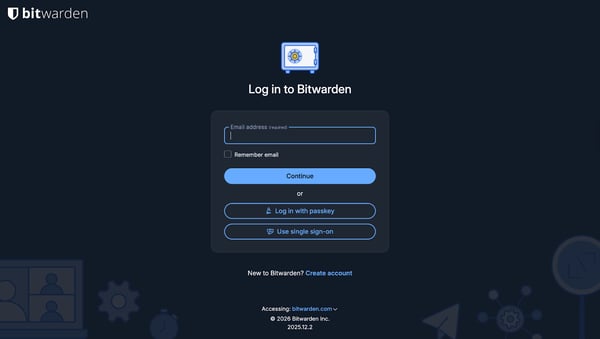
Getting started with Bitwarden felt quick and straightforward. Signing up on the website required only an email and a master password. I could choose to install the browser extension immediately or skip it and add it later.
After logging in, Bitwarden presented a short onboarding checklist that highlighted next steps like securing the account and importing passwords, without forcing me to complete them right away. I also noticed that Bitwarden offers single sign-on (SSO) options during login, which adds convenience if you prefer signing in through an identity provider rather than managing another standalone login.
While signing up for 1Password, I was guided through a multi-step onboarding flow that included creating a master password, generating a Secret Key, and downloading an Emergency Kit. Each step clearly explained its purpose, which helped set expectations around how access and recovery work. Before fully accessing my vault, I was prompted to install the browser extension and confirm billing details for after the trial.
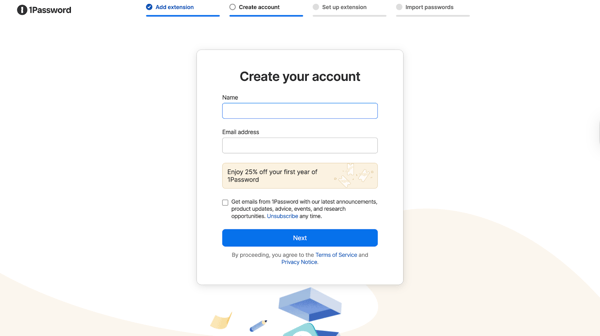
By the time I reached the dashboard, I had already been introduced to how passwords are saved, filled, and protected, making the setup feel deliberate and security-focused.
Based on my experience, Bitwarden offers more flexibility during the onboarding process, with optional extension installation, a lightweight checklist, and SSO login options. 1Password takes a more deliberate, security-first approach that emphasizes long-term account protection from the start.
The better choice depends on whether you prefer a customizable setup flow or a guided onboarding focused on security fundamentals.
Winner: Bitwarden
To replicate a real-world switch, I tested password imports in two ways: first by uploading a CSV file with sample usernames and passwords, and then by exploring imports from other sources, such as browsers and existing password managers.
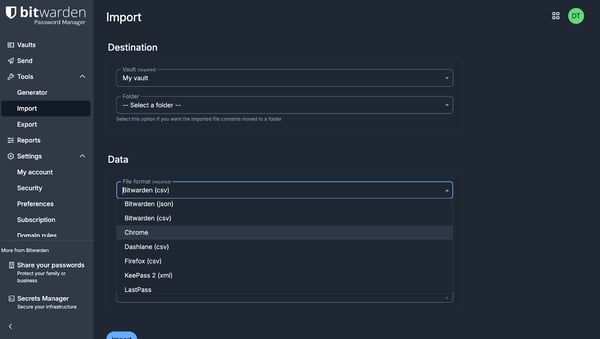
Bitwarden offers strong import capabilities, but the experience is more explicit and configuration-driven. From the import screen, I could choose the destination vault or folder, select the exact source format, and review detailed instructions for each supported browser or password manager. Bitwarden supports a wide range of import formats, making it clear that migrations are a core use case.
Using 1Password, importing passwords felt fast and guided. When uploading a CSV file, I was prompted to choose the vault where the imported data should live before proceeding. Once selected, the import itself was automatic. 1Password processed the file and added all entries to the chosen vault in one step. I wasn’t asked to review or selectively approve individual passwords during the import, which made the experience quick and hands-off. Any cleanup or reorganization had to happen afterward inside the vault.
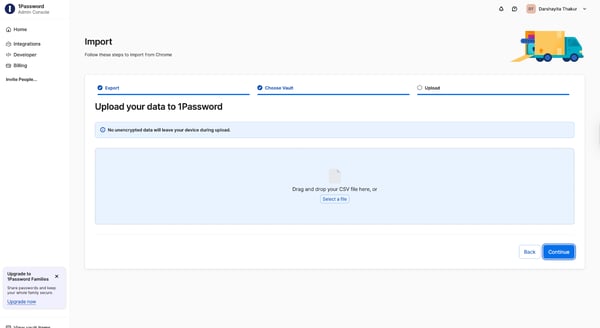
When importing from other sources, 1Password provided clear, step-by-step instructions and supported multiple browsers and password managers. The flow felt structured and reassuring, especially when switching from another dedicated password manager, with clear guidance at each step rather than a single bulk upload.
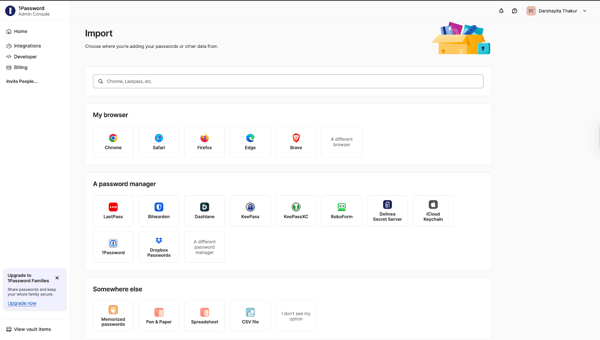
1Password optimizes for speed and simplicity, helping users move everything over quickly and providing a guided experience. Bitwarden emphasizes transparency and deliberate setup, encouraging users to think through structure and formatting before completing the import.
Winner: 1Password
For buyers deciding between Bitwarden and 1Password, the key question is how smoothly each product supports migration from an existing password manager.
The best password managers make switching easy without forcing you to redo your organization or compromise on control.
To compare sharing features, I focused on access controls, safeguards, and how flexible each tool felt for real-world use.
On the Bitwarden free trial plan I tested, I could share text-based secrets, while file sharing required an upgrade. Even with text-only sharing, Bitwarden offered strong control over how content is accessed. Before sharing passwords, I could hide the text by default, limit the number of views, set a deletion date, set a password for access, hide my email address from recipients, and add a private note for reference.
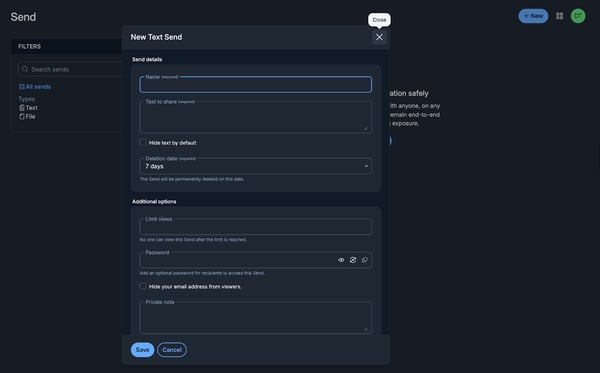
1Password approaches sharing through vault items. After selecting a password, it generates a shareable link with built-in safeguards, including view limits. 1Password focuses on a streamlined, link-based sharing experience with built-in safeguards, which works well for users who want simplicity without configuring multiple settings.
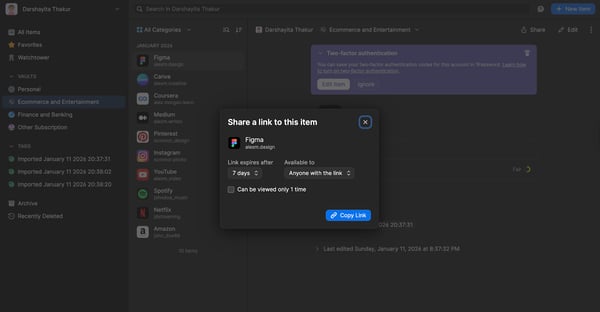
Overall, the difference comes down to flexibility versus simplicity. Bitwarden emphasizes configurable, security-first sharing, while 1Password prioritizes a streamlined, vault-based workflow.
Winner: Bitwarden
In Bitwarden, autofill worked reliably through the browser extension. When I clicked into a login field, Bitwarden surfaced the saved credentials and filled them with a single action. The interaction felt functional and predictable, relying on the extension rather than inline field suggestions. When creating a new account, Bitwarden’s password generator offered clear controls for length and character types, making it easy to customize a strong password before saving it to the vault.
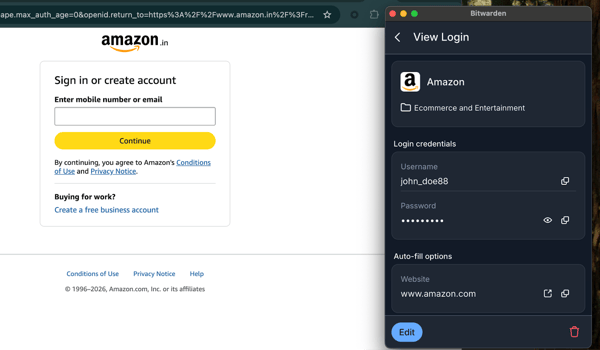
1Password took a more inline, contextual approach. Autofill suggestions appeared directly inside the login fields, clearly labeled and easy to select without opening a separate menu. During account creation, 1Password automatically suggested a generated password within the form itself, along with visible controls to adjust complexity. It was immediately clear when a password was being generated and saved, which made the experience feel smooth and tightly integrated.
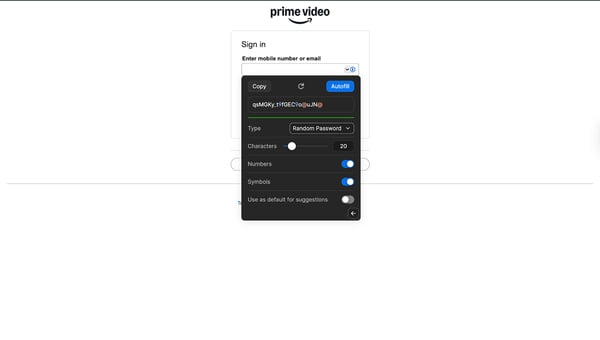
Both tools handled autofill and password generation reliably, but the difference was in presentation. Bitwarden favors a utility-first, extension-driven workflow, while 1Password emphasizes inline guidance and minimal friction during form completion.
Winner: Split
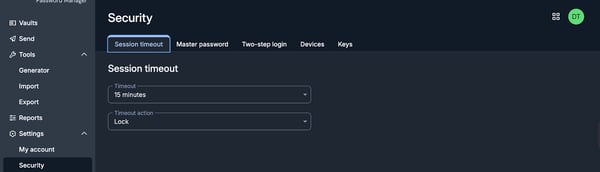
Exploring security settings in Bitwarden immediately stood out because of how explicitly everything is laid out. Instead of grouping controls into a single page, Bitwarden breaks security features into individual sections like Session Timeout, Master Password, Two-step Login, Devices, and Keys, each accessible from its own tab.
This made it easy to jump straight to a specific control without digging through layered menus. For example, session timeout settings clearly expose both the timeout duration and what action should occur once the session expires, giving me fine-grained control over how inactivity is handled.
1Password takes a noticeably different approach. Rather than surfacing each security control independently, everything lives under Manage Account. From there, I could review devices, manage sign-in methods, update authentication settings, and monitor account activity in one centralized place. While this reduced navigation felt less overwhelming at first glance, it also meant fewer explicit touchpoints for individual security features. The experience felt curated and intentional.
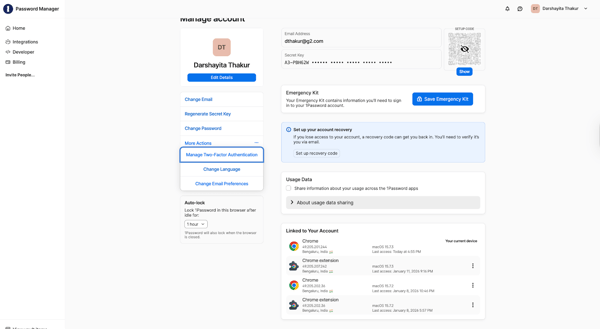
The difference here isn’t about strength, but about philosophy. Bitwarden continuously surfaces security measures so users can manage them actively. 1Password assumes users want strong protection without needing to revisit cryptographic concepts regularly.
Winner: Bitwarden
Related: Strengthen your security stack by combining your password manager with an identity and access management (IAM) tool.
Bitwarden’s Two-step Login section made it easy to understand what authentication methods were available and which ones were active. Options like email verification, authenticator apps, hardware security keys, and Duo were all listed in one place, along with clear warnings when multi-factor authentication wasn’t fully enabled. This presentation made it simple to audit account security at a glance.
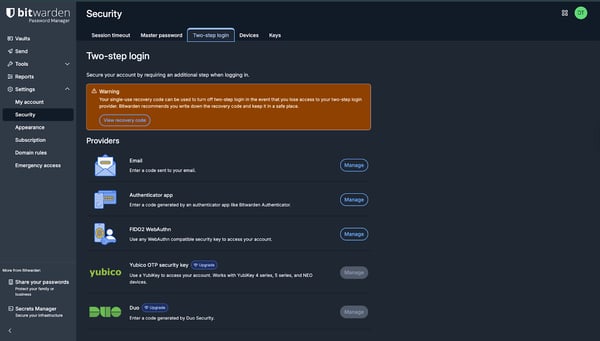
1Password handles multi-factor authentication within Manage Account, where it’s presented as part of the broader sign-in experience rather than a standalone feature. While the end result is just as secure, the setup felt more implicit. I wasn’t explicitly reminded of which methods were available unless I went looking for them.
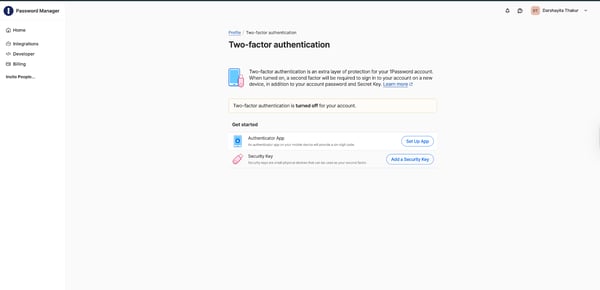
During login, Bitwarden also surfaced SSO options, even during the free trial, which stood out. This made it easier to test enterprise-style authentication early. In contrast, 1Password reserves SSO capabilities for its Extended Access Management plans, keeping them outside the core password manager experience.
Both Bitwarden and 1Password support a broad range of authentication methods, including authenticator apps, hardware security keys, and modern standards like passkeys. The difference lies in how these options are presented. Bitwarden surfaces available methods explicitly in one place, making them easy to audit. 1Password structures the setup flow more intentionally, guiding users through selecting an authentication type and then configuring supported options within that path.
Winner: Split
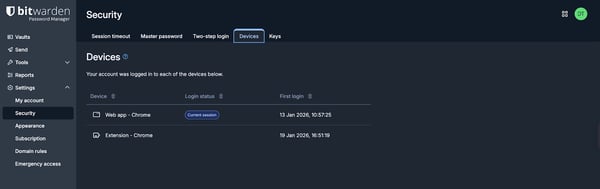
Bitwarden’s Devices tab provides a clear, read-only view of all logged-in devices, including platform details and last active timestamps. While this makes it easy to audit where the account is being accessed from, I didn’t find an option to manually revoke or log out individual devices. If something looks unfamiliar, remediation is probably handled indirectly through actions like changing the master password or adjusting session timeout settings, rather than revoking a specific session.
1Password takes a more hands-on approach to device management. From Manage Account, each linked app or browser session can be individually reviewed and explicitly unlinked using the “Unlink App or Browser” option. This makes it easy to immediately revoke access from a lost device, an old browser session, or any activity that looks suspicious, without impacting other active sessions.
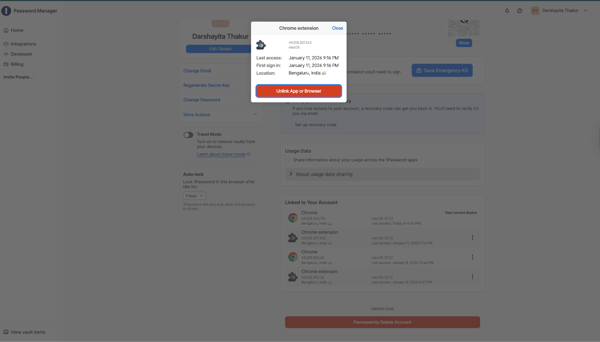
The difference here is subtle but important. Bitwarden prioritizes session visibility, while 1Password pairs visibility with direct session control.
Winner: 1Password
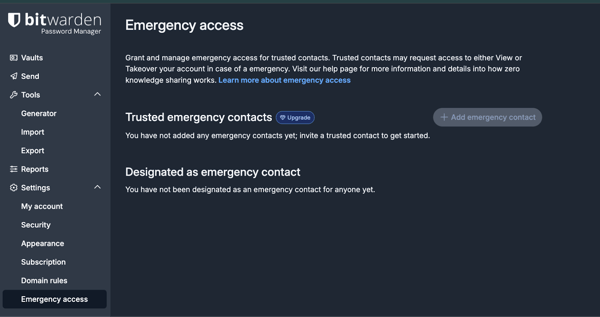
Bitwarden offers Emergency Access, which allows me to designate trusted contacts who can request access to my vault after a configurable waiting period. This model felt especially practical for shared or family use cases, where delegating recovery responsibility to another person makes sense. Everything related to emergency access lives in its own section, making the feature easy to find and manage. This feature is, however, available with an upgrade from the free trial.
1Password takes a more self-managed, offline-first approach. During account setup, users are prompted to download an Emergency Kit, which contains essential information like the account sign-in address, email, and Secret Key. Rather than granting recovery privileges to another user, 1Password assumes that access will be restored using this saved documentation.
In addition to the Emergency Kit, 1Password also allows users to set up a recovery code. If you lose access to your account, this recovery code can be used to regain entry after verifying your identity via email. This adds an extra recovery path that doesn’t rely solely on the Emergency Kit, offering some flexibility while still keeping recovery tightly controlled.
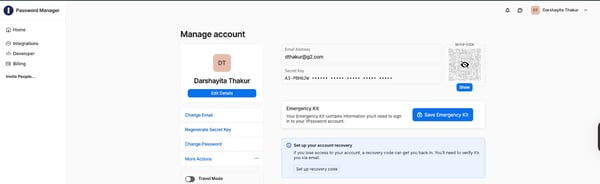
Bitwarden emphasizes delegated recovery, allowing trusted individuals to step in when needed. 1Password emphasizes personal responsibility, combining the Emergency Kit with a recovery code to help users regain access without involving third parties.
Winner: Split
Related: Take control of account recovery with self-service password reset (SSPR) tools.
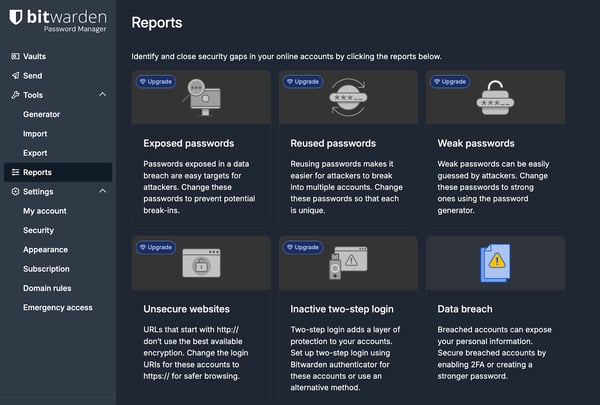
In Bitwarden, security monitoring lives under the Reports section. From the reports dashboard, I could see the full range of available reports, including exposed passwords, reused passwords, weak passwords, unsecured websites, inactive two-step login, and data breach alerts.
Each report clearly explains why the issue matters and what action should be taken, reinforcing a checklist-style approach to improving security posture. However, during testing, these reports were not accessible on the free plan.
1Password takes a more consolidated approach with Watchtower, its built-in security monitoring dashboard. Instead of separating issues into individual reports, Watchtower presents everything in a single view, highlighting weak, reused, or compromised passwords, inactive two-factor authentication, and overall security health. These insights were accessible directly within the product experience, without encountering the same kind of report-level gating during evaluation.
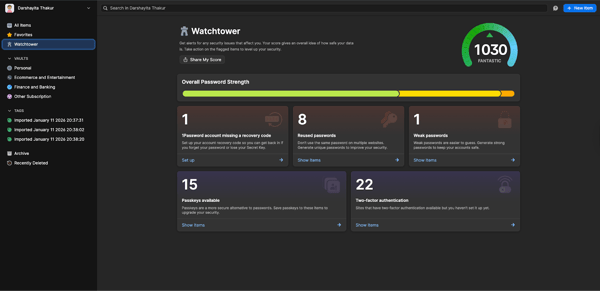
The difference ultimately comes down to both presentation and availability. Bitwarden frames security monitoring as a set of discrete, actionable reports that become fully usable after upgrading. 1Password emphasizes continuous visibility through a centralized dashboard that’s more immediately accessible.
Winner: 1Password
In Bitwarden, vault organization is built around a combination of vaults, folders, item types, and filters. From the main view, I could see all vaults at once, filter items by type, and organize entries into different folders. This structure felt flexible and familiar, especially for users who prefer to categorize credentials manually. Bitwarden also makes it easy to see everything at a glance, with filters and folders always visible in the sidebar.
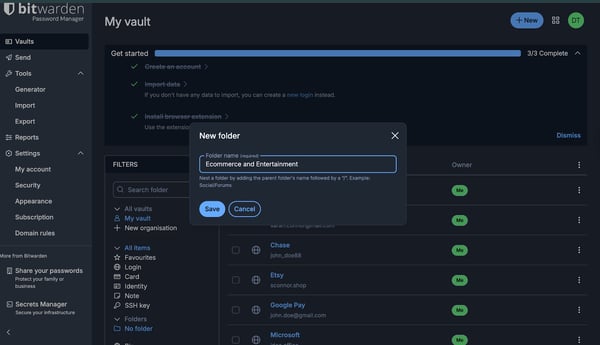
1Password takes a more streamlined approach. Vaults are the primary organizational unit, and items within a vault rely less on folders and more on search, tags, and smart organization. Instead of navigating a dense sidebar, the experience felt more search-driven, with fewer visible controls but faster access once you know what you’re looking for. The structure felt opinionated, encouraging users to rely on search and automation rather than manual categorization.
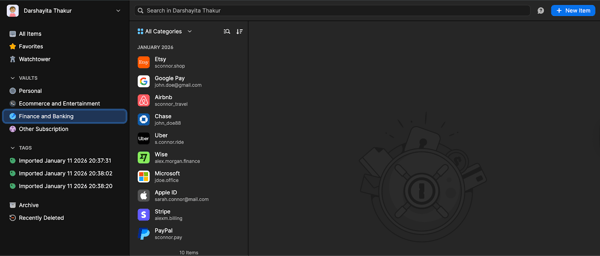
The difference isn’t about capability, but how the organization is approached. Bitwarden offers a visible, folder-based structure that works well for users who prefer manual categorization and quick browsing. 1Password uses vaults as the primary organizational unit, enabling clearer separation of access, permissions, and data ownership, especially useful for teams managing multiple projects or departments.
Winner: Split
Beyond Bitwarden vs. 1Password: Compare other free password managers and find your match. You can also read my take on LastPass vs. 1Password.
Here’s a table showing all my evaluations with the winner and the reason.
| Test | Winner | Why it won (Deciding Factor) |
| Account creation and onboarding | Bitwarden | Faster, flexible onboarding with optional extension installation and SSO availability during login. |
| Importing existing passwords from other sources | 1Password | Optimizes for speed and simplicity, helping users move everything over quickly while providing a guided experience |
| Sharing passwords |
Bitwarden | Granular sharing controls like view limits, hidden text, passwords, and expiration, even on free text sharing. |
| Autofilling login details and generating a new password |
Split | 1Password offered smoother inline autofill, while Bitwarden provided clearer, configurable password generation controls. |
| Security settings and account controls |
Bitwarden | Dedicated security sections made key controls easier to find, review, and manage. |
| Authentication methods: MFA and 2FA |
Split | Both support broad MFA; the difference lies in presentation and setup flow. |
| Device management and session awareness |
1Password | Enabled direct unlinking of individual devices or browser sessions for immediate access revocation. |
| Emergency access and recovery |
Split | Bitwarden supports delegated recovery, while 1Password relies on a self-managed Emergency Kit and recovery code. |
| Security monitoring and reporting |
1Password | The centralized Watchtower dashboard provided continuous visibility without report-level upgrade barriers. |
| Vault organization | Split |
Both support flexible organization; the difference lies in structure and workflow approach. |
I also looked at review data from G2 to find strengths and adoption patterns for Bitwarden and 1Password. Here's what I found:
Got questions? G2 has got the answers.
Bitwarden is currently rated higher on G2 for enterprise password managers, based on verified user reviews and G2's Enterprise Grid rankings.
An open-source password manager can be more secure for personal use, but security depends more on encryption, audits, and usage than openness alone.
1Password is generally considered more user-friendly on desktops due to polished UI, guided workflows, and seamless autofill, though Bitwarden remains intuitive and flexible.
Bitwarden is often the better choice for small businesses due to lower costs, flexible sharing, open-source transparency, and strong security controls.
Bitwarden suits teams needing flexible sharing and lower costs; 1Password fits teams prioritizing polished onboarding and centralized admin controls.
No, Bitwarden has not suffered a confirmed security breach in which attackers accessed Bitwarden’s servers or encrypted vault data.
Both are highly secure. Bitwarden offers open-source transparency and control, while 1Password adds a Secret Key for extra built-in protection.
After testing both tools across real-world scenarios, it’s clear that Bitwarden and 1Password solve the same problem in different ways. Neither is universally better and it comes down to how you prefer to manage security and passwords day to day.
Bitwarden stood out for its flexibility, transparency, and control. The free plan is genuinely usable, security settings are easy to find, and features like granular sharing and folder-based organization make it a strong choice for users who like to stay hands-on. If you value open-source software, configurable controls, or a cost-effective option that still covers the essentials, Bitwarden is hard to beat.
1Password, on the other hand, shines in polish and guided experience. Features like Watchtower, sharing one-time links, and direct device unlinking make it feel smoother and more opinionated. It’s especially well-suited for users who want strong security defaults without having to think through every setting themselves.
If you want visibility and flexibility, Bitwarden is likely the better fit. If you prefer a streamlined, security-first experience with fewer decisions to make, 1Password is the stronger choice. Either way, both are capable password managers and the right one depends on how much control you want versus how much guidance you prefer.
Looking for more options for password management? Check out the 8 best password managers.
/DarshayitaThakur-OrangeBG.webp)
Published: February 2026 · Last updated: April 2026 Between work tools, personal...
by Darshayita Thakur
When I was a kid, passwords were a fun little game. I’d come up with something silly, like my...
.png) by Devyani Mehta
by Devyani Mehta

Understanding the importance of strong passwords In today's digital landscape, strong...
 by Evan Sherbert