


The best VPS hosting providers in 2026 include DigitalOcean, ScalaHosting, Cloudways, GoDaddy, UltaHost, Hostinger, and Vultr, based on analysis of thousands of G2 user reviews and market research.
Your infrastructure shouldn’t be the reason your product slows down.
I’ve seen how quickly things start to break once a site or application gains traction. Pages load more slowly during peak traffic, deployments get constrained by server limits, and support suddenly matters a lot more when something goes wrong. If you’re comparing the best VPS hosting providers, you’re likely already at a point where shared hosting isn't enough, but choosing the right upgrade isn’t straightforward either.
That’s because VPS hosting decisions go beyond specs on a pricing page. From a buyer’s perspective, what actually matters is consistent performance, ease of management, scalability, reliable support, and whether the platform gives you control without adding unnecessary complexity.
To help make that decision easier, I analyzed 20+ platforms and thousands of G2 reviews to evaluate leading VPS hosting services based on what users consistently care about: performance, usability, support quality, and overall value.
Whether you’re running production workloads, managing client sites, or scaling an application, this guide is designed to help you find a VPS hosting solution that actually supports how you work and where you’re headed.
*These VPS hosting platforms are top-rated in their category, according to G2's 2026 Spring Grid Report. I’ve added their pricing details to make comparisons easier.
VPS is about getting a setup that actually holds up under real workloads. The best VPS hosting platforms deliver consistent performance, reliable uptime, flexible configurations, and the ability to scale without adding operational overhead. Features like root access, managed options, backups, and monitoring aren’t nice-to-haves anymore; they’re expected.
This is also where adoption reflects real value. VPS hosting platforms show an average adoption rate of 68% and an average ROI period of 12 months, signaling how quickly teams start seeing returns from a more stable and scalable setup.
The providers in this list stand out because they solve different problems well, whether that’s simplicity, control, support, or scalability, making it easier to find a VPS hosting solution that actually fits how your team works.
I started with G2’s Grid® Reports to build a shortlist of the best VPS hosting providers based on G2 Score, customer satisfaction, and market presence.
From there, I analyzed G2 reviews at scale to identify patterns that matter most to real-world buyers: where providers consistently deliver, where users face challenges, and which features actually make a difference once you’re managing live workloads. I paid close attention to feedback on performance, uptime reliability, ease of setup, support quality, scalability, and overall value for money.
I also looked at how these VPS hosting platforms perform across different use cases, including hosting websites, running applications, managing client projects, and scaling infrastructure over time. Since I couldn’t test each product directly, I relied on insights from professionals who use these platforms daily and validated those perspectives against verified G2 reviews.
The screenshots featured in this article may include a mix of those captured from publicly available sources and those obtained from the vendor’s G2 page.
As I went through G2 reviews of the best VPS hosting providers, a few patterns kept coming up. Buyers want performance they can rely on, control without unnecessary complexity, and support that actually helps when something goes wrong.
Those themes shaped how I evaluated every VPS hosting provider on this list.
The list below contains genuine user reviews from G2’s VPS Hosting Platforms category page. To qualify for inclusion in that category, a product must:
*This data was pulled from G2 in 2026. Some reviews may have been edited for clarity.
DigitalOcean stands out as a VPS hosting platform that keeps cloud infrastructure approachable. I see users describing it as simple to understand, quick to set up (95% rating on G2), and easy to do business with (rated 94%) without the overhead that often comes with larger cloud platforms. For teams that want to launch applications, websites, or development environments quickly, usability is one of DigitalOcean’s clearest advantages.
Users love how practical the platform feels for real deployment needs. They call out Droplets, storage, managed databases, Kubernetes, and related cloud services as flexible building blocks that make it easy to spin up projects and scale them over time. Highly rated (91%) for bandwidth allowance, DigitalOcean earns significant goodwill for providing users with the essentials they need to host and manage workloads in a single developer-friendly environment.
Scalability also comes through as a meaningful strength in the reviews. Users often describe starting with smaller deployments and gradually expanding into additional resources, managed services, or larger workloads as their needs grow. That flexibility gives DigitalOcean a practical advantage for startups and growing teams that want infrastructure they can scale over time without feeling forced into a much larger enterprise cloud environment too early.
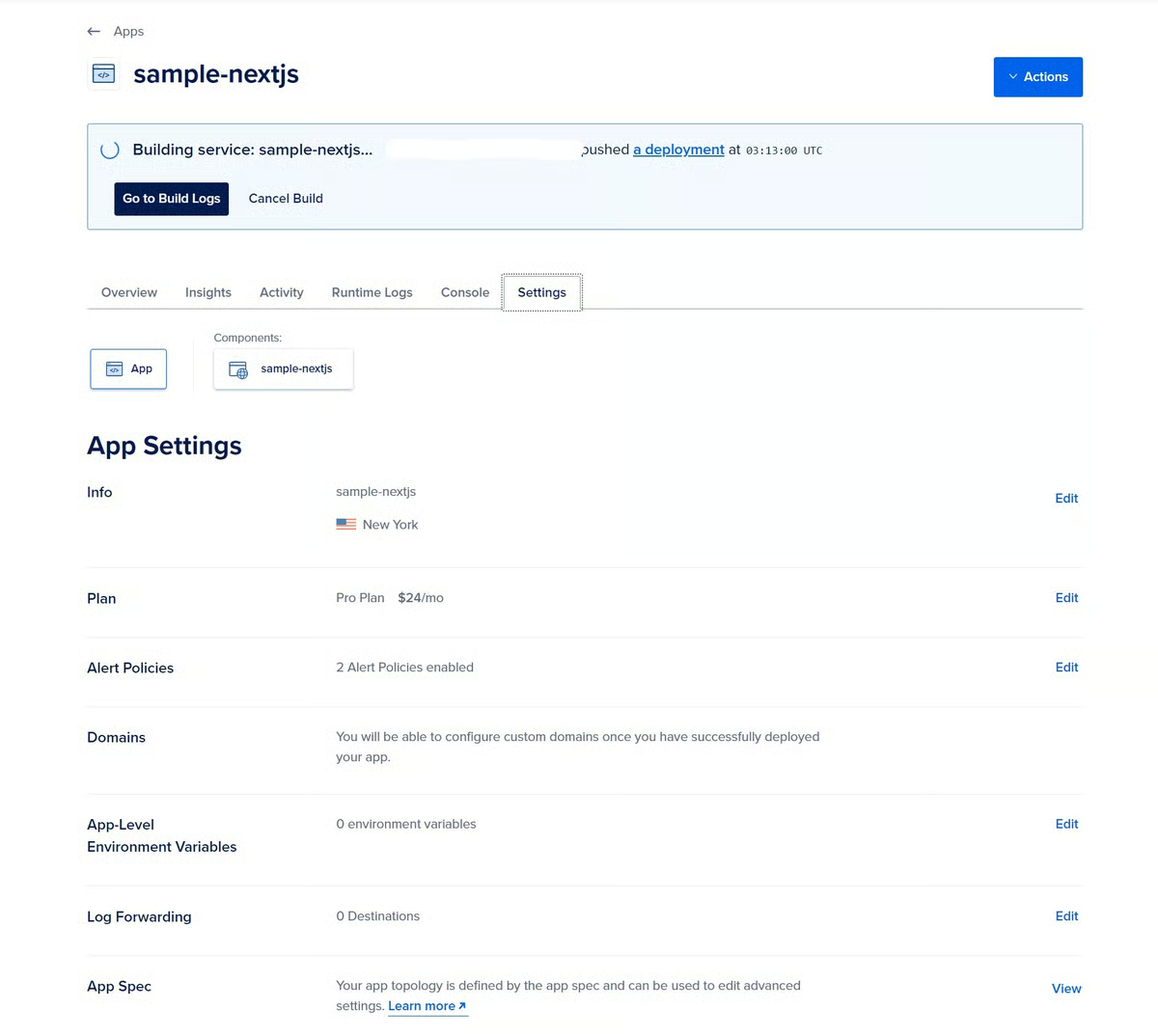
I found pricing to be another major strength. G2 users describe DigitalOcean as affordable and transparent, which matters when teams are trying to keep hosting costs under control. Instead of navigating layers of usage-based complexity, users now know what they’re paying for and are able to match plans to their actual needs.
The platform’s role of documentation and self-serve learning cannot be neglected. I noticed users do not just praise DigitalOcean for being easy to use; they also value how easy it is to learn. Tutorials, setup guides, and product documentation appear to be a major part of the experience, helping teams troubleshoot issues and move faster without always needing direct assistance. That educational aspect makes the platform feel especially strong for teams that like figuring things out as they build.
Reliability and performance also come through as important aspects. Across the reviews, users frequently mention stable uptime, dependable server performance, and a hosting experience they can trust for day-to-day operations. That reliability matters even more in VPS hosting, where buyers often balance cost and performance, and DigitalOcean seems to strike a balance that many reviewers value.
Support rounds out another positive theme in the reviews. Many users appreciate the helpful guidance they receive from the DigitalOcean team and the broader ecosystem around the platform. For buyers evaluating VPS hosting options, that combination of accessible product design and supporting resources can make a real difference in the overall experience.
Some reviewers note that DigitalOcean may feel limiting for teams that require advanced enterprise controls, highly granular team management, or deeper customization, making it important to evaluate those needs upfront. However, its streamlined, focused approach is exactly what many users appreciate, especially those who prioritize simplicity and ease of use.
Teams with highly specific integration needs might need to consider how certain features fit into their broader stack. But still, the product mix works well for common cloud hosting workflows, especially for developers who want fast deployment and manageable infrastructure.
With a rating of 4.6 out of 5 stars, DigitalOcean comes across in G2 reviews as a strong fit for developers, startups, and growing teams that want VPS hosting without unnecessary complexity. From what I’ve seen across the reviews, I’d recommend DigitalOcean if you’re looking for a VPS cloud hosting option that feels accessible from day one while still giving you enough flexibility to build, deploy, and scale over time.
“Digital Ocean stands out for how simple and straightforward it makes cloud hosting. What I like best is how easy it is to spin up servers, databases, and storage without dealing with overly complex setups or confusing pricing. The dashboard is clean and intuitive, so even if you are new to cloud infrastructure, you can get things running quickly. The predictable pricing and clear documentation also make planning and scaling much less stressful. Overall, it feels like cloud hosting that is powerful enough for real projects, yet easy enough to manage without headaches.”
“Another drawback is the lack of detailed analytics for deployment. While basic metrics are available, more in-depth insight into CPU, memory, and bandwidth usage, especially at the application or deployment level, is missing. Additionally, some advanced features that are common in other cloud providers, such as deeper networking controls or managed enterprise-level service, are limited or require extra setup.”
- DigitalOcean review, Sanket P.
Building and scaling apps? Browse top infrastructure as a service (IaaS) providers for full control over your environment.
One thing that stood out right away from UltaHost reviews is that it feels less like a bare VPS provider and more like a budget-friendly hosting package with useful built-in features already included. Users consistently highlight not just speed and uptime, but also the fact that the platform bundles features like backups, security protections, and flexible server options, making day-to-day hosting easier to manage.
I was amazed by how strongly users associate UltaHost with practical reliability for routine workloads. Reviewers frequently mention stable uptime, strong server performance, and a smooth experience running websites often supported by cloud monitoring tools that help teams track performance. What makes that feedback stand out is that it is often paired with consistency. Users are not just calling it fast in isolated moments. They are describing it as dependable enough to keep projects running without frequent interruptions.
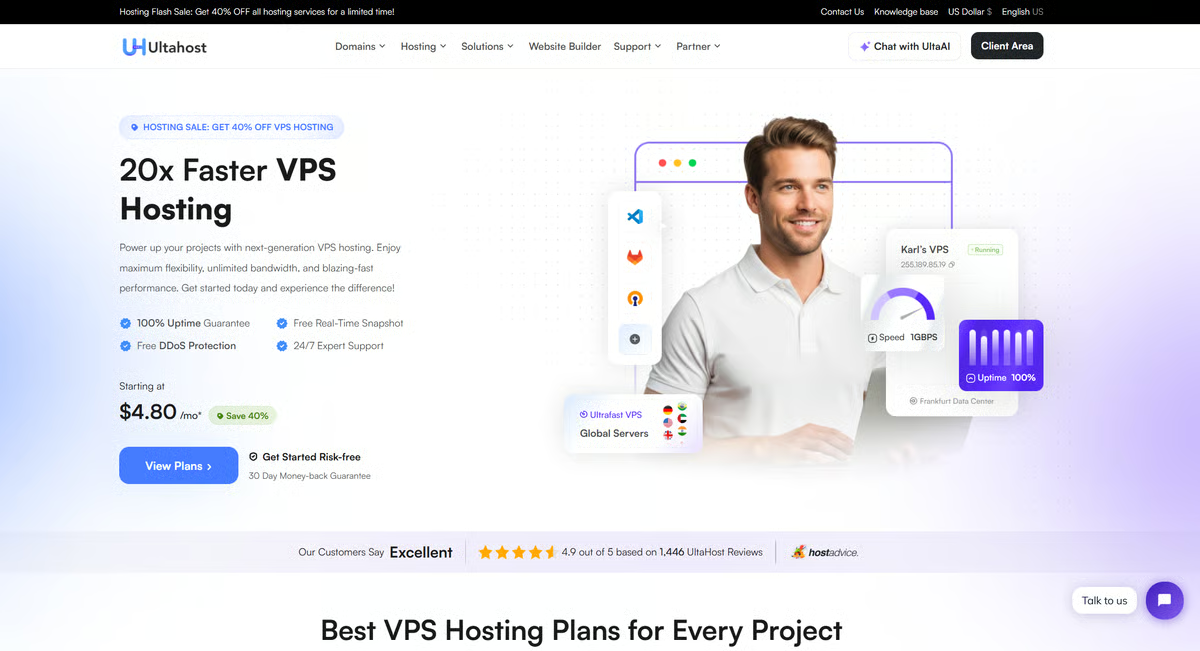
This lines up with G2 Data, where UltaHost holds a rating of 4.9 out of 5 stars, with 95% of users believing it is heading in the right direction. That consistency is evident in how users describe their day-to-day experience. Many even talk about ease of admin (99%) and ease of doing business (98%) as positive reinforcement of trust.
Customer support is another area where Ultahost earns strong marks. Many users talk about quick response times and helpful guidance when issues come up. From basic troubleshooting to more technical queries, reviewers often note that the support team is approachable and willing to walk them through solutions, which adds a layer of confidence, especially for users who may not have deep hosting expertise.
I also noticed that Ultahost’s feature set resonates well with users who want flexibility without unnecessary complexity. Reviewers frequently reference built-in security features, backup options, and overall control over their hosting environment. These capabilities make it easier to manage projects without a patchwork of third-party tools, which many users seem to value.
Pricing is another area where Ultahost stands out, particularly for teams looking to balance performance with cost. Many reviewers describe the platform as affordable or cost-effective, especially at the entry level. For startups, small businesses, or developers managing multiple projects, this accessibility makes it easier to get reliable hosting without stretching budgets.
Users love how Ultahost supports a wide range of use cases. From personal websites to more demanding applications, they often mention that the platform adapts well as their needs grow. This flexibility, combined with its performance and ease of use, makes it a practical choice for teams that want room to scale without switching providers too quickly.
Some users note that certain sections can feel a bit dense when navigating more advanced settings. But once familiar, this structure tends to work well for users who prefer having more control in one place.
Reviewers note that more advanced workflows — like migrations or deeper configuration — may require some initial setup and familiarity. But this does not undermine the fact that, once configured, the platform tends to run smoothly and reliably in ongoing use.
I had seen that Ultahost is widely recognized for its strong performance, ease of use, responsive support, and accessible pricing. I’d recommend it to individuals and teams looking for a VPS hosting platform that balances reliability with simplicity and can scale smoothly as their project needs grow.
“The VPS runs smoothly for my development and staging environments. The fast storage and flexible OS deployment make it simple to spin up new instances when I need them. Uptime has also been reliable throughout active development cycles, which helps keep work moving without interruptions.”
- UltaHost review, Taofeeq H.
"The initial server setup could be smoother, especially for non-developers. A few steps still require technical knowledge, and the UI doesn’t fully explain what’s needed or how to complete them."
- UltaHost review, Ahalya S.
Worried about data loss or downtime? Here’s a simple guide to how backups work and why they matter.
After digging through the ScalaHosting reviews, my biggest takeaway is that ScalaHosting feels like a VPS provider where support is part of the core product experience, not just a secondary service layer.
The most consistent theme I found is the quality of hands-on customer support. Reviewers regularly highlight quick response times, knowledgeable agents, and meaningful help during high-stakes moments like migrations, setup, and troubleshooting. Across the board, ScalaHosting comes across as a provider that makes VPS hosting feel more guided and far less intimidating to manage. For many users, especially those without a deep infrastructure bench, this support layer is one of the main reasons ScalaHosting stands out.
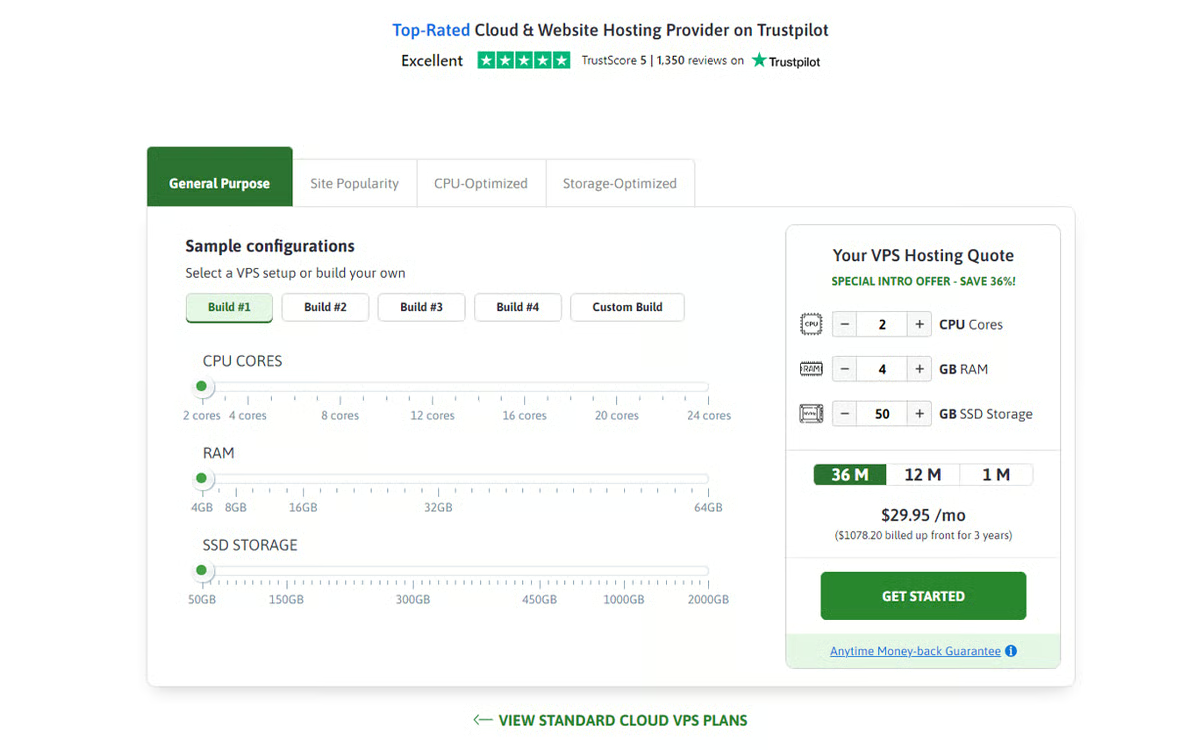
That support-first experience is reflected in G2 Data as well, where ScalaHosting scores 99% for support quality and holds an overall rating of 4.8 out of 5 stars.
Another area that feels distinctive is SPanel. Rather than relying entirely on a more familiar third-party control panel, ScalaHosting’s own management layer provides a more direct way to manage hosting environments. In the reviews, users often frame this as a strength because it gives them useful control over domains, databases, backups, and server settings without the feeling of extra bloat.
In addition, ScalaHosting earns 96% for ease of administration, reflecting how its custom control panel translates into everyday usability once users become familiar with it.
Migration and onboarding are also recurring strengths that are often talked about. I noticed that users often describe the transition into ScalaHosting as well-supported and smoother than expected. That matters because changing hosting providers can be one of the biggest friction points in this category. Reviews suggest ScalaHosting does well here not only because of the platform itself, but because the support team actively helps reduce the complexity of the move.
Performance, uptime, and reliability appear often in the feedback, too, but what stood out more to me is that these benefits are usually paired with a sense of confidence and continuity. Users talk about sites running more smoothly, fewer interruptions, and having a provider they can count on when something needs attention. In that sense, ScalaHosting seems to appeal strongly to buyers who value stability but do not want to manage every detail alone.
Security and backups add to that trust. Reviewers frequently mention built-in protections and recovery options as helpful features that make the environment feel safer without requiring extensive manual setup. That gives the product a more managed, reassurance-oriented profile than a purely infrastructure-first VPS provider.
That said, pricing can feel layered depending on how you configure your setup. While the base plans are competitive, some users note that renewals or add-ons can increase the overall cost, so it's worth planning for them upfront. For teams that fully utilize the platform’s performance and support capabilities, this structure tends to feel more justified over time.
According to G2 users, SPanel may take a bit of time to get fully comfortable with. Once users settle in, many find that the added flexibility and ownership make the time investment worthwhile.
ScalaHosting stands out to me for its responsive support, reliable performance, and balanced approach to control and usability. I’d recommend it for businesses and developers who want VPS-level flexibility without sacrificing guidance and stability, especially if you’re ready to move beyond basic hosting setups.
“They have the best support team of any company I have worked with in IT. I have had horrible experiences with most web hosting companies I have dealt with. Not so with Scalahosting. I was hesitant with it being email only. Figuring my request would end up in some queue somewhere and never be taken care of. Not so.. They respond nearly immediately and meaningfully."
- ScalaHosting review, Mark R
“I find that it takes some time to learn ScalaHosting's custom S-panel, which can be a bit challenging initially despite its user-friendliness. Additionally, I experienced some challenges with caching and emails post-migration.”
- ScalaHosting review, Tiina W.
Running into performance bottlenecks? Compare the best application performance monitoring tools for faster troubleshooting.
Hostinger VPS feels like a platform designed to make VPS hosting feel far more approachable, without removing the features teams actually rely on. Across G2 reviews, users consistently highlight an easy setup experience, responsive support, useful built-in tools, reliable performance, and pricing that feels accessible as their needs grow.
What stood out to me first was the interface itself. Reviewers frequently note that the control panel is clean, organized, and beginner-friendly, making it easier to manage hosting tasks without wading through cluttered menus. I got the sense that Hostinger VPS appeals to users who want control over their environment but do not want that control wrapped in an overly complex management experience.

I often found reviewers describing Hostinger VPS as easy to get started with. That matters because VPS hosting can easily feel intimidating, especially for smaller teams or buyers moving up from shared hosting. Instead, users consistently describe the setup process as smooth, the dashboard as straightforward, and the overall experience as simple to navigate.
That ease of use is backed by G2 Data, where Hostinger scores 93% for ease of setup and 92% for ease of use, reinforcing its positioning as a beginner-friendly VPS platform.
Another positive theme I noticed is how easily users can scale resources as their projects grow. Reviewers mention upgrading CPU, RAM, and storage without major disruption, which makes the platform feel practical for websites and applications that are gradually expanding in traffic or workload. That flexibility gives users room to grow without immediately needing to migrate to a different hosting provider.
Hostinger’s hosting performance is described as fast, stable, and reliable for their everyday needs, which is exactly what I would want to see in a VPS platform. Speed and uptime come up often enough that they feel like a real part of the product story, not just occasional praise. For teams running business sites, client projects, or growing workloads, that consistency appears to be a meaningful reason they stick with it.
Another thing I noticed is how often users appreciate not having to rely on too many external tools to get started. Reviewers highlight that essentials such as backups, security features, and basic configurations are already built in, reducing the need for additional setup. For many, this makes the overall experience feel more streamlined, especially when compared to VPS environments where you have to assemble everything yourself. That built-in convenience is evident in the feedback and makes day-to-day hosting easier to manage.
I found that users consistently frame Hostinger as a good fit for teams that want a practical upgrade path. Instead of positioning the product as heavy-duty infrastructure for complex environments, many reviews point to it being ideal for websites, smaller projects, and growing businesses that need more power than entry-level hosting but still value ease of use. That makes the platform feel like a managed step forward for users who are growing into more capable hosting.
According to G2 reviewers, there are moments when getting to the right resolution takes a bit more patience in the support flow. Even so, support remains a visible part of the overall experience, and many users view it as a meaningful advantage once they connect with the right help.
A few reviews suggest that teams with more advanced configuration needs may want to spend time matching the plan carefully to their use case. In that light, Hostinger VPS seems especially well-suited to users who want a balance of usability, features, and performance, while still leaving room to grow into more demanding setups thoughtfully.
Overall, I see Hostinger VPS as a strong fit for businesses and developers who want VPS hosting that feels accessible, well-supported, and reasonably priced, without sacrificing the core capabilities they need. If you want a platform that makes server management easier to handle and offers enough features to support real-world growth, Hostinger VPS earns its place among the best VPS hosting platforms.
“Hostinger is very easy to use, and the dashboard is clean and beginner-friendly. The implementation process is simple, so setting up hosting, connecting a domain, and launching a website can be done quickly. It also offers a good number of features like SSL, backups, and website management tools. I use Hostinger frequently to manage websites and small projects, and the platform has been reliable. Another great thing is the ease of integration with common CMS platforms and development tools. Their customer support is also responsive and helpful whenever assistance is needed.”
“One thing I don't like is that some useful features are limited on lower plans. For example, advanced backups or performance tools often require upgrading, which can feel restrictive for a growing website. Another downside is that the custom control panel, while simple, takes some time to get used to if you've worked with other hosting platforms before. It's not difficult, but the change can feel unfamiliar at first. Sometimes, customer support answers feel slightly generic, so I need to ask follow-up questions to get a more detailed solution. Also, renewal can feel expensive compared to the first-time pricing, which is something users need to plan for.”
- Hostinger review, Hardik B.
Based on G2 reviews, GoDaddy’s VPS and hosting experience stand out for how accessible it feels right from the start. I noticed users across the small business market highlight ease of use as a key factor.
That tracks with what reviewers consistently describe: a setup process that feels straightforward, guided, and approachable, even if you’re not deeply technical. For many users, getting a site or server up and running doesn’t require a steep learning curve, significantly lowering the barrier to entry.

I also noticed that reliability in basic hosting tasks comes up consistently in the reviews. Users often describe the platform as dependable for running websites without frequent disruptions, especially for standard use cases. It shows up in how reviewers talk about day-to-day usage sites staying live, core functions working as expected, and fewer interruptions once things are set up properly.
Another common theme is the benefit of having multiple business tools managed from one place. Users frequently mention domains, email, hosting, and related services as part of a bundled experience that feels easier to oversee from a central account. That ecosystem approach gives GoDaddy a very different feel from more developer-oriented VPS hosts. It is less about infrastructure building blocks and more about a practical digital-business setup.
Another detail that stood out to me is how often users mention the availability of built-in tools and add-ons that extend what they can do without needing extra setup. Reviewers frequently reference features like backups, security options, and integrated tools that are already accessible within the platform. That built-in functionality reduces the need to search for third-party solutions and makes it easier for users to handle essential tasks within the same environment, especially in the early stages of managing a website or server
I also noticed that users appreciate how quickly they can get projects live without needing extensive setup time. Several reviews point to the ability to move from purchase to a functioning website or server relatively fast, which makes the platform especially useful for time-sensitive launches or quick iterations.
Another point that comes through in the reviews is how GoDaddy helps reduce decision fatigue for less technical users. With pre-configured options and guided workflows, users don’t have to make as many low-level technical choices, which makes the experience feel more approachable and less overwhelming when compared to more infrastructure-heavy VPS platforms.
From what I saw, the platform works best when used for straightforward hosting workflows. Users often rely on it for setup, domain management, and basic configurations, where the experience feels guided and easy to follow. That makes it particularly appealing for teams that prioritize simplicity over deep customization.
Some users find the platform somewhat limiting in terms of customization, as its guided approach and pre-structured workflows can restrict advanced control and flexibility. This can be a drawback for experienced users who prefer deeper server-level access or more tailored configurations, often leading them to consider higher-tier plans or alternative solutions. However, this same structured design can be a strong advantage for beginners, offering simplicity, built-in guidance, and an easier overall management experience.
Pricing comes up frequently in the reviews as an important consideration, especially around renewals and billing clarity. While the platform makes it easy to get started, several users mention that costs can change over time or require closer attention as plans renew. For teams that value bundled services and convenience, that structure can still align well, but it’s something reviewers tend to evaluate more closely as they continue using the platform.
With this, GoDaddy comes across to me as a practical fit for small businesses, solo operators, and anyone who wants domains, hosting, and related website services managed under one roof. Its biggest strengths show up in the bundled convenience, easier onboarding, and a setup that reduces the need to juggle multiple providers.
If I were choosing based on simplicity and an all-in-one experience rather than deep infrastructure control, I’d consider GoDaddy a solid option — especially for getting a site live quickly and managing it with minimal overhead.
“I like that GoDaddy Hosting provides an easy-to-use platform with simple integration tools for hosting my website and app. I also appreciate that it's very cheap, which is probably my favorite thing about it. The flexible options to host both my app and website, along with useful email integration, are also beneficial for my business. The transition from WordPress hosting was very easy and smooth, which made the switch even better.”
- GoDaddy Hosting review, Dee W
"Sometimes, my website gets a 403 Forbidden error, and it took a lot of time with GoDaddy hosting agents, but they couldn't offer me help. Sometimes the SSL didn't load properly either, and again, they couldn't help me, so I had to figure it out myself. This was a bit difficult for me. I also asked for a refund, but they noted their refund policy, which was disappointing."
- GoDaddy Hosting review, Ankit P.
My take is that Cloudways stands out not because it provides users raw infrastructure, but because it gives them a managed operating layer on top of cloud hosting. Across the reviews, users consistently describe it as a way to get the power of cloud servers without taking on the full burden of server administration. That distinction comes through clearly in how people talk about the platform.
One of the strongest patterns I noticed is how often reviewers value operational convenience over low-level control. Users talk about being able to launch, manage, and scale websites from a single place, which makes the platform appealing to agencies, website managers, and teams handling multiple projects. Rather than spending time configuring infrastructure from scratch, they seem to appreciate having a cleaner management layer that keeps hosting tasks organized and easier to execute.
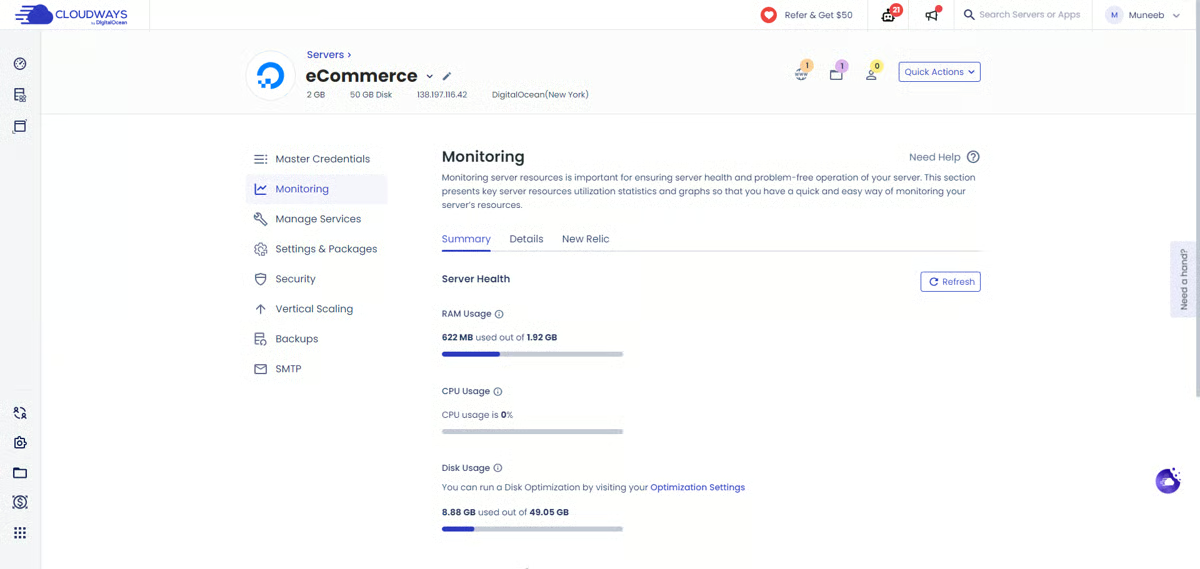
That managed experience is reflected in G2 scores, where Cloudways earns 95% for ease of doing business with and 93% for quality of support, highlighting its strength as a simplified cloud hosting layer.
The dashboard and overall experience are frequently cited as strengths. Reviewers often describe the interface as intuitive and powerful, giving them the controls they need without requiring them to handle everything manually. What stands out here is that Cloudways seems to appeal to users who still want flexibility, but do not necessarily want to live in command-line workflows or piece together every part of the hosting environment themselves.
Performance and uptime also get strong praise, particularly for live websites and business-critical projects. Users often mention reliable servers, fast loading times, and fewer operational headaches once things are running. But what feels more distinctive than the raw performance itself is the fact that Cloudways wraps that performance in a management experience that reduces day-to-day infrastructure burden.
Built-in features like backups, scaling, SSL handling, and monitoring further reinforce that managed positioning. Reviewers seem to like that many of the tasks they would otherwise have to piece together manually are available within the platform. That makes Cloudways a workflow-friendly cloud management layer.
Another theme I noticed is how much users appreciate the platform’s flexibility around cloud providers. Reviewers frequently mention being able to choose between infrastructure options like AWS, Google Cloud, and DigitalOcean while still managing everything through the same Cloudways interface. That balance between provider choice and centralized management seems to be a meaningful advantage for teams that want cloud flexibility without handling multiple environments separately.
I also found that scalability comes up regularly in the reviews. Users often describe being able to increase server resources, handle traffic spikes, or expand workloads without major operational disruption. That ability to scale more smoothly appears especially valuable for agencies, e-commerce sites, and growing businesses that expect hosting demands to change over time.
But at the same time, email hosting isn’t built into the core platform, so teams expecting an all-in-one hosting and email solution may need to rely on external providers, but this setup allows Cloudways to stay focused on performance while giving users the flexibility to choose the email service that best fits their needs.
Cloudways’ pricing can be confusing at first, especially when comparing different cloud providers and configurations, and it lacks built-in email hosting, requiring third-party integration. This may be a drawback for users seeking a fully bundled, all-in-one solution. However, for teams focused on performance and managed infrastructure, Cloudways offers strong flexibility and reliable server management.
With a rating of 4.7 out of 5 stars, Cloudways stands out to me as a strong fit for agencies, businesses, and developers who want the power of cloud hosting without taking on all the infrastructure overhead themselves. Its biggest strengths are operational convenience, strong support, useful built-in management features, reliable performance, and a hosting experience that simplifies ongoing work.
"As a Digital Marketing Specialist, I manage multiple campaigns and high-traffic sites, so server reliability is non-negotiable for me. What I love most about Cloudways is the balance between power and simplicity. It gives me the granular control of a VPS without the headache of command-line management. However, the standout feature is undoubtedly the support team. In this industry, 'support' often means reading a script, but the Cloudways team consists of actual engineers. I recently faced a tricky technical hurdle regarding a specific WordPress theme upload and database configuration that was stalling a project. Their support team didn't just send me a link to a generic article; they dove into the issue and guided me through a fix quickly. That level of technical expertise saves me hours of downtime."
- Cloudways review, Said B.
“Coming from a traditional cPanel hosting environment, it took me some time to get used to the Cloudways platform. Things like email management and server settings are handled differently, so there’s a bit of a learning curve if you're used to everything being pre-configured. That said, once you understand how it works, it's a powerful and flexible setup.”
- Cloudways review, Alain B.
As I dug into G2 reviews for Vultr, a few themes emerged consistently about why teams choose it for VPS and cloud infrastructure. From my perspective, Vultr stands out as a platform built for speed, simplicity, and cost control, especially for developers and teams that want to get infrastructure up and running without friction.
One of the strongest patterns I noticed is how easy it is to get started. Reviewers repeatedly highlight how straightforward the setup process is, with many noting that they can deploy instances quickly without deep configuration knowledge. The control panel is often described as clean and intuitive, making it easy to manage servers, monitor usage, and handle basic infrastructure tasks without feeling overwhelmed. That speed also shows up in G2 feedback, where Vultr scores 92%for ease of setup and 90% for ease of admin, making it a strong fit for teams that want to deploy quickly without friction.
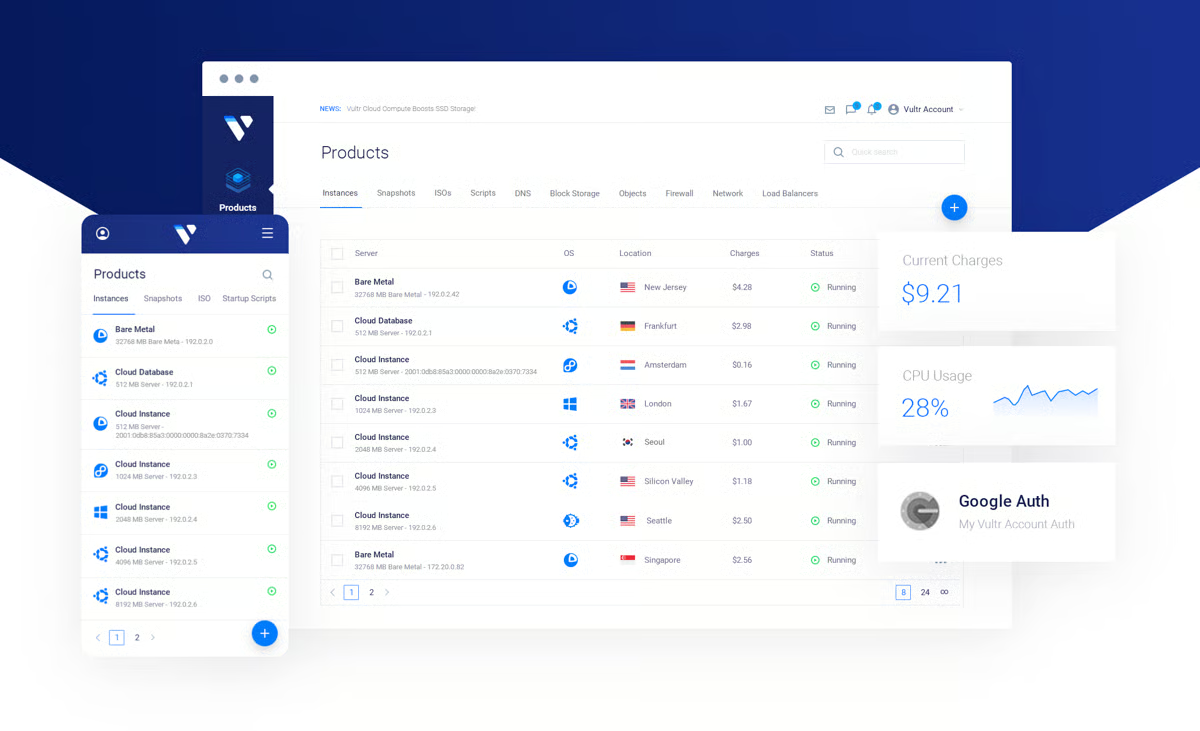
Pricing is another major reason users lean toward Vultr. Across reviews, it’s consistently described as affordable and cost-effective, especially compared to larger cloud providers. For teams that are budget-conscious or running multiple instances, that pricing flexibility becomes a meaningful advantage, allowing them to scale infrastructure without significantly increasing costs.
Besides pricing, speed and provisioning performance also come up frequently. Users like how quickly they can spin up servers and start working, with fast deployment times being a clear highlight. This immediacy makes a difference for developers who want to test environments, launch applications, or iterate quickly without waiting on infrastructure.
Another thing that stood out to me is how often reviewers mention the breadth of Vultr’s infrastructure options and geographic coverage. Users appreciate being able to choose from different instance types and deploy across multiple global data center locations, which gives them the flexibility to match resources to specific workloads. That flexibility feels like one of Vultr’s clearest differentiators. Rather than positioning itself around heavy management layers, the platform seems to appeal through access, optionality, and control over where and how infrastructure is deployed.
Documentation and support also get positive mentions in many reviews. Users often point out that the available guides and resources make it easier to troubleshoot issues or learn the platform. When support interactions go well, reviewers describe the team as helpful and responsive, which adds confidence when running production workloads.
I also noticed that many users appreciate how straightforward ongoing management feels. Tasks like scaling instances, managing snapshots, or handling server operations are described as simple and efficient, reducing operational overhead for teams that don’t want to spend excessive time on infrastructure management.
Some reviewers find the platform’s feature set somewhat limited, as its focused approach may not meet the needs of teams looking for more advanced or specialized capabilities. However, this simplicity can be a major advantage for users who prioritize ease of use and a more streamlined experience.
Users report that billing and account processes can feel a bit unclear at first, with credit systems and workflows taking time to fully understand — especially for those new to the platform. However, once familiar with it, many find the pricing competitive and the system manageable for ongoing use.
With a rating of 4.3 out of 5 stars, Vultr is consistently recognized for its ease of setup, strong pricing, fast provisioning, and flexible infrastructure options. It’s a solid fit for developers, startups, and teams that want reliable cloud infrastructure without unnecessary complexity, while still offering enough flexibility to support a wide range of deployment needs.
“What I appreciate about Vultr is that, as a user, I have robust access to my servers. The pricing is transparent, and the platform is straightforward and user-friendly, featuring a well-designed interface that makes the experience enjoyable. Additionally, installing and setting up services is very easy.”
- Vultr review, Aavinashh L.
“I think one aspect that I don't like about Vultr is that after spinning up the server, the initial wait time is a bit longer, I feel. But that's understandable considering there is so much that goes into building a new server.”
- Vultr review,Vikas V.Have more questions? Find more answers below.
For running multiple WordPress sites, reliability comes down to uptime, performance consistency, and easy management. Based on G2 feedback, ScalaHosting, Cloudways, and Hostinger stand out. ScalaHosting is known for strong uptime and support, Cloudways simplifies multi-site management with managed features, and Hostinger offers an easy-to-use setup for handling multiple projects efficiently.
Developers who want full control typically prefer DigitalOcean and Vultr. Both platforms offer root access, flexible configurations, and fast provisioning, making them ideal for custom deployments, testing environments, and scaling applications without restrictions.
If you’re looking for a strong overall balance, ScalaHosting, UltaHost, and Cloudways consistently stand out in G2 reviews. ScalaHosting excels in support and uptime, UltaHost offers strong performance at competitive pricing, and Cloudways balances managed convenience with reliable infrastructure.
It depends on your priorities. Hostinger is generally better for users who want a more modern, beginner-friendly VPS experience with better long-term flexibility and value. GoDaddy works well for users who prefer an all-in-one platform with domains, hosting, and support bundled together, especially for simpler use cases.
For small businesses in India looking for affordable and reliable VPS hosting, Hostinger, UltaHost, and Vultr are strong options. They offer competitive pricing, stable performance, and scalable infrastructure, making them suitable for web apps without requiring a large upfront investment.
For scalability, DigitalOcean, Vultr, and Cloudways are among the strongest options. DigitalOcean and Vultr provide flexible infrastructure for scaling resources quickly, while Cloudways adds a managed layer that simplifies scaling without requiring deep infrastructure management.
If you’re looking for managed VPS hosting with strong security, Cloudways and ScalaHosting stand out. Both offer features like backups, monitoring, and built-in security tools, along with support that helps reduce the operational burden of managing servers.
The best Windows VPS hosting option depends on your need for compatibility, licensing, and ease of management. Platforms like Vultr and DigitalOcean offer flexible configurations, while managed providers like Cloudways simplify setup for users who prefer less hands-on infrastructure management.
For small businesses, the best VPS hosting provider usually balances reliability, responsive support, and manageable day-to-day administration. Based on the platforms in this list, ScalaHosting, Hostinger, and GoDaddy stand out for buyers who want dependable uptime and a smoother support experience without taking on unnecessary complexity.
For game servers, low latency usually depends on server location options, provisioning speed, and how much control you have over configurations. In this list, Vultr and DigitalOcean are the strongest fits for teams looking for fast, flexible VPS infrastructure that can support performance-sensitive workloads.
Choosing a VPS hosting provider in 2026 is less about buying server space and more about deciding how much control, support, and operational responsibility your team is ready to take on.
The best choice is the one that matches your next stage of growth. If your team has developer resources and wants full infrastructure flexibility, platforms like DigitalOcean and Vultr make sense. If you want managed convenience, stronger guidance, or less time spent on server administration, Cloudways, ScalaHosting, UltaHost, Hostinger, or GoDaddy may be a better fit.
Before committing, look beyond the entry-level price. Compare renewal costs, support responsiveness, backup policies, scalability options, security controls, and how easy it will be to migrate or upgrade later. A VPS host should not just solve today’s performance problem; it should give your team a stable foundation for the next version of your product, website, or application.
Looking to go beyond hosting? Browse application monitoring tools on G2 to track uptime, troubleshoot issues, and improve reliability at scale.


The build vs. buy question on infrastructure is already closed for you. What you're deciding...
 by Disha G

Most hosting platforms look reliable at launch. The real differences appear later, during...
 by Disha C

Choosing a hosting plan is one of the first steps in building a website. The type of hosting...
 by Sagar Joshi