If you’re evaluating the best shipping software, it’s usually because your current setup isn’t keeping up. Orders are growing, but so are delays, manual work, and support tickets tied to tracking issues or missed delivery expectations.
Shipping is no longer a background operation. It directly impacts conversion, fulfillment speed, and customer trust. When shipping costs feel unpredictable or delivery timelines aren’t clear, it creates hesitation at checkout and friction after purchase. Those issues don’t stay isolated; they spill into support queues, increase refunds, and put pressure on operations teams to fix problems after the fact.
At this stage, the challenge isn’t understanding what shipping software does. It’s figuring out which platform actually fits how your team operates. The right tool brings consistency to rate management, label generation, and multi-carrier coordination. It reduces manual steps, improves visibility, and helps teams move faster without sacrificing accuracy.
To help you make that decision, I analyzed patterns across verified G2 reviews and real-world feedback from teams managing shipping at scale. Instead of focusing only on feature lists, I looked at how these tools perform inside daily workflows, where they reduce friction, where they create it, and how well they hold up as order volume grows.
This guide breaks down the best shipping software based on those insights, so you can choose a platform that supports your operations today and scales with you over time. The top shipping software include ShipStation, ShipHero, Easyship, Sendcloud, Shiptheory, parcelLab, Freightview, AfterShip, and FedEx Ship Manager.
*These shipping software platforms are top-rated in their category based on G2’s Winter Grid Report. I’ve highlighted their core strengths and ideal use cases to help you choose the right solution.
Shipping software helps teams bring structure to what can quickly become a messy fulfillment process. Instead of juggling orders, carriers, tracking updates, and exceptions across multiple systems, everything is managed in one place.
From what I’ve seen across G2 reviews, the difference between average and strong tools comes down to visibility and control. The better platforms make it easier to see where orders are in the process, which carriers are being used, and where delays or issues need attention.
The importance of getting this right is growing. The shipping software market is valued at USD 14.26 billion in 2025 and is expected to reach USD 22.23 billion by 2030, reflecting how critical efficient fulfillment has become for modern businesses.
These tools also go beyond label generation. They help teams compare carrier rates, automate repetitive tasks, manage returns, and keep tracking updates consistent for customers. That reduces manual work and makes day-to-day operations easier to manage. The goal is simple: keep orders moving smoothly from checkout to delivery, with fewer errors, better visibility, and less time spent managing exceptions.
I started by reviewing G2’s Grid Report Data to shortlist leading shipping software based on consistent user satisfaction signals and market presence across small sellers, mid-market ecommerce teams, and enterprise retailers.
From there, I analyzed patterns across a large volume of verified user reviews to understand what actually matters in day-to-day shipping operations. I focused on recurring feedback around carrier coverage, label reliability, automation depth, order and inventory syncing, exception handling, returns management, tracking visibility, and integrations with e-commerce platforms and marketplaces. These themes helped separate tools that stay reliable as order volume grows from those that introduce friction under scale.
Since I haven’t personally operated every platform in this category, I validated these findings against insights from e-commerce operators, fulfillment teams, and logistics managers who actively rely on shipping software in production workflows.
Any visuals or product references included in this article are sourced from publicly available vendor listings and documentation, ensuring accuracy without overstating firsthand usage.
After reviewing a large volume of user feedback and studying how e-commerce and fulfillment teams actually operate, the same patterns kept coming up. The best shipping software depends on how reliably it moves orders through fulfillment, absorbs exceptions, and reduces manual coordination as volume grows.
Below are the criteria I used to evaluate shipping software and distinguish platforms that remain reliable as order volume and operational complexity increase.
Based on these criteria, I narrowed the list to platforms that consistently improve shipping speed, operational consistency, and coordination across fulfillment, operations, and support teams. Not every tool excels at everything, so the right choice depends on whether your priority is automation depth, carrier flexibility, post-shipment visibility, or the ability to scale without adding manual work.
Below, you’ll find authentic user feedback from the Shipping Software category. To appear in this category, a tool must:
This data was pulled from G2 in 2026. Some reviews may have been edited for clarity.
ShipStation is widely used by e-commerce teams handling high order volumes and looking for consistency in fulfillment. What stood out to me across G2 reviews is how frequently teams highlight fast label generation, automated carrier selection, and reliable order syncing as core strengths. Its user base skews toward small teams shipping daily, where keeping workflows predictable and efficient matters most. It fits teams that need fulfillment to stay fast and accurate without adding manual steps.
From what I saw across reviewer feedback, teams tend to rely on it as an execution-focused system built for speed, carrier flexibility, and predictable throughput rather than inventory-heavy planning or strategic logistics modeling.
Features like label printing are rated at 92%, well above the category average, and G2 reviewers frequently describe producing large batches of labels quickly using thermal printers. What I noticed across reviews is how often teams managing high daily shipment volumes mention moving through label creation without slowdowns or interruptions, even during peak fulfillment periods.
Handling daily shipment volume remains manageable even during peak periods. Importing orders, validating addresses, comparing carrier rates, purchasing labels, and pushing tracking updates all happen within a single flow supported by managing orders at 91% . G2 reviews often reference fewer manual checks and reduced rework during high-volume days, helping teams maintain steady output without bottlenecks.
Connecting sales channels and carriers tends to be straightforward for most teams. Integrations with ecommerce platforms like Shopify, POS systems, and spreadsheets are commonly mentioned as easy to set up. Bulk shipping tools, Excel imports, and negotiated carrier rates reduce repetitive steps and help fulfillment teams maintain pace as order counts increase.
Customer communication stays consistent without requiring manual follow-up after each shipment. G2 reviewers mention automated confirmation updates and address validation alerts as features that reduce inbound customer queries around delivery status. What stood out to me is how frequently teams describe fewer “where is my order” contacts during busy fulfillment periods.
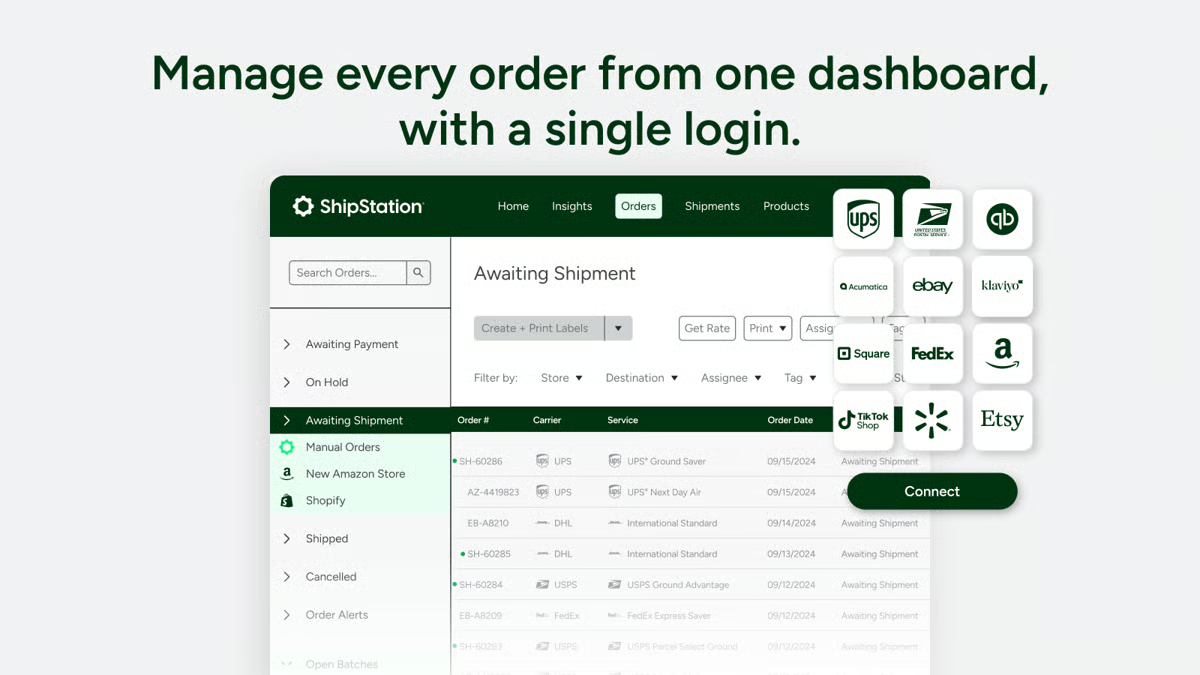
Decisions around shipping spend are supported directly within daily workflows. G2 users point to real-time rate comparisons and carrier selection at the point of label creation as helpful for managing margins. This allows teams to balance cost and delivery speed without relying on separate pricing tools or post-shipment analysis.
Order tracking is rated at 90% on G2, and once a shipment is created, status and tracking information push back to storefronts automatically. What I saw repeatedly across G2 reviews is teams describing tracking numbers syncing directly to their websites and marketplaces without manual copying, reducing post-shipment admin significantly. For businesses managing orders across Shopify, Etsy, and Amazon simultaneously, that automation removes a consistent source of daily friction.
Inventory-oriented functionality remains more limited in scope. Features such as low-stock alerts, automated inventory orders, and supplier assignment are rated in the mid-70s, slightly below category averages. This aligns with a design centered on shipping execution rather than end-to-end inventory planning, which is more noticeable for teams managing broader inventory operations, while shipping-focused workflows align well with the platform’s execution model.
Shipment reporting focuses on operational tracking rather than deep analysis. Core metrics are available, but reporting remains more transactional than customizable. As per my analysis, teams looking for advanced analytics or long-range operational reporting may find the capabilities more limited, while organizations using ShipStation to monitor throughput and fulfillment activity align well with the platform’s reporting approach.
Overall, for businesses handling large numbers of daily shipments, ShipStation functions as a dependable fulfillment engine. G2 reviews consistently reference faster label generation, predictable workflows consistently, and reduced manual handling as outcomes that matter most.
As per the G2 Data, it remains a strong fit for ecommerce and warehouse teams that need shipping to run reliably, at scale, every day.
"I have been using ShipStation for about six years and appreciate its capability to seamlessly integrate with our POS system and manage online shipping needs. One of the things I love about ShipStation is its ease of use. From setting it up initially to its day-to-day operations, it has been very smooth. The quick shipment features, the ability to create labels promptly, and the effective securing of good shipping rates effectively streamline our shipping logistics. It efficiently tracks and sends out confirmation updates, which significantly helps with customer communication."
- ShipStation review, Gayle W.
“I find the initial setup with ShipStation a bit complicated. Linking accounts like Etsy and Amazon requires customer support assistance, as doing it independently can be challenging. Additionally, ShipStation's inability to process master shipments is a significant limitation for us. With orders containing multiple boxes, we cannot provide a master tracking number for customers to view all related shipments. This forces us to process each box separately, unlike FedEx, which offers master shipment capabilities.”
- ShipStation review, Sue W.
Need to tighten daily dispatch workflows? Learn the basics of shipping and receiving.
ShipHero consistently appears as a platform built to manage fulfillment after an order is placed. It focuses on routing, inventory accuracy, and warehouse execution, areas that directly determine how reliable shipping remains as volume grows. ShipHero operates as a fulfillment control layer, helping teams manage higher order volumes, multi-location warehouses, and complex client requirements while maintaining operational visibility.
What I noticed across G2 reviews is how often teams describe ShipHero holding up once order volume increases. Order status and e-commerce integrations are both rated at 91% on G2, slightly above category averages, supporting clear tracking across orders, inventory, and fulfillment stages. Reviewers frequently mention fewer breakdowns when orders are split across locations or routed dynamically, even under high throughput.
SKU-level location tracking, structured pick-and-pack workflows, and dependable mobile and desktop applications support accuracy on the warehouse floor. From what I saw in reviewer feedback, teams often mention faster onboarding for new packers and pickers because guided workflows reduce reliance on informal knowledge or constant supervision.
Maintaining precise stock levels across multiple locations helps teams avoid mis-picks, backorders, and fulfillment delays. What became clear to me across G2 reviews is how important this level of control becomes in environments supporting multiple brands, clients, or fulfillment nodes. This is reflected in adoption, with about 84% of ShipHero users coming from small businesses, many of which operate multi-node fulfillment environments or function as 3PLs.
Teams describe scaling alongside customers experiencing rapid order volume increases while maintaining fulfillment accuracy and speed. Manage orders is rated at 90% on G2, reflecting how reliably order flow stays visible across clients and locations under high throughput. Shared visibility between warehouse operators and clients reduces follow-ups, and automation rules make complex order handling more manageable.

Support is frequently cited as a differentiator in ShipHero G2 reviews, with quality of support rated at 88%. Reviews mention on-site setup visits, responsive account managers, and fast issue resolution as reasons the platform embeds quickly into daily operations. For smaller operations without dedicated IT resources, what I saw repeatedly across reviews is that this hands-on support reduces the burden of implementing a full WMS significantly.
Carrier integrations and automation rules reduce the manual coordination typically required in complex fulfillment environments. Based on my evaluation, I saw that G2 reviews describe automation cutting error rates in daily operations and carrier connections, while also helping unlock shipping cost savings for clients. Multi-language settings and flexible configuration options support varied team setups without requiring constant IT involvement.
Configuration depth shapes the setup experience, with extensive options across inventory rules, automation, and routing logic. This is more noticeable for teams expecting a plug-and-play shipping tool, while organizations managing complex fulfillment operations align well with the platform’s flexibility and scalability.
Some G2 users note differences in carrier integrations, analytics coverage, or billing workflows depending on region or use case. This is more noticeable in environments with varied operational requirements, while teams operating within consistent fulfillment models align well with ShipHero’s structured, control-oriented approach.
Taken together, for logistics teams managing complex fulfillment operations, ShipHero aligns closely with execution-driven needs. G2 reviews consistently reference structured workflows, warehouse accuracy, and scalability as reasons it becomes embedded in daily operations. It remains especially relevant for high-volume fulfillment and 3PL environments where control and visibility matter more than ease of setup.
"ShipHero has drastically improved our fulfillment business in numerous ways. First, it's forced us to become even more organized and process-driven than ever before. Our daily use of the web app, desktop app, and iOS apps has helped us level up our warehouse operations. Second, it's allowed us to easily start charging customers for storage based on usage and accurately charge for fulfillment labor to make a profit. Lastly, any problems we've had were quickly addressed to our complete satisfaction."
- ShipHero review, Gary D.
“As a Canada-based 3PL, there are some things left to be desired. Posthero for Canada would help us track carrier performance, but it only seems to function well in the US.
There is also a lack of selection for direct carrier integrations, even with major carriers in Canada like Intelcom and Fleet Optics, forcing us to rely on webhook connections that don’t play well with key features like rate shopping and shipping containers. Would like to see more carriers added as direct integrations.”
- ShipHero review, Zaid S.
Scaling fulfillment across warehouses? Explore warehouse automation statistics
to benchmark your operations.
Easyship is built to support small e-commerce teams managing both domestic and international fulfillment.
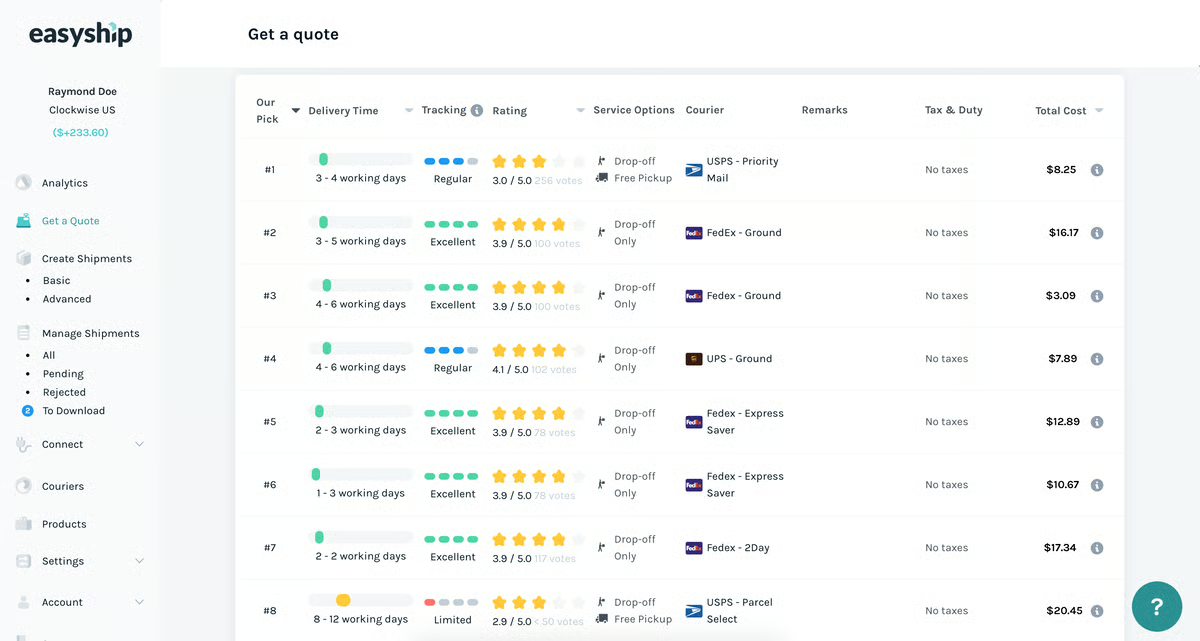
Features like label printing and rate comparison both score 89%, allowing sellers to evaluate shipping options without switching between FedEx, UPS, or postal service portals. What I noticed across G2 reviews is how frequently teams mention fewer pricing surprises and faster checkout decisions, especially when shipping internationally.
Landed shipping costs are surfaced before labels are created. Duties and taxes are calculated upfront, helping teams understand total shipping costs before a shipment is finalized. From what I saw in reviewer feedback, this reduces downstream adjustments and makes cross-border delivery easier to manage without relying on separate calculators or manual customs estimates.
Orders flow directly into shipping workflows through ecommerce integrations. Connecting Easyship to platforms like Shopify is consistently described as straightforward, and multiple carrier accounts can be managed in one place. Vendor availability is rated at 89%, giving sellers flexibility to choose carriers based on cost, speed, or destination.
Order processing becomes more consistent as volume increases. Automation rules reduce repetitive steps such as service selection and label creation, helping small teams maintain pace without adding operational overhead. What stood out to me across G2 reviews is how often teams mention handling growth without needing additional shipping tools or staff.
Support interactions influence day-to-day confidence in the platform. The quality of support is rated 85% on G2, and G2 reviews frequently mention quick responses, direct assistance, and issues resolved without prolonged back-and-forth. For teams without dedicated logistics resources, what I consistently saw in reviews is that this responsiveness plays a practical role in keeping fulfillment running smoothly.
Access to a broad carrier network removes the need to manage individual courier accounts separately. G2 reviewers describe connecting to 120+ international couriers through a single platform, with rate comparisons surfacing the most cost-effective option per shipment. What became clear to me across reviews is how often teams associate this with lowering shipping costs compared to going directly through carriers.
Performance can be more variable during heavy usage, particularly when processing large shipment batches at peak volumes. Based on my evaluation, G2 reviewers note that this is more noticeable in high-throughput environments, while small teams managing steady order volumes align well with the platform’s day-to-day shipping model. Occasional account access resets are referenced, which are more noticeable in workflows that rely on uninterrupted session continuity.
Inventory-related features are less central to the platform’s design. Automated inventory orders, low-stock alerts, and supplier assignment sit outside the core shipping execution focus, which is more noticeable for teams managing replenishment or supplier coordination. Ratings in this area reach 76%, aligning with baseline functionality for teams whose primary focus is shipping rather than supply chain management.
Overall, Easyship fits squarely within the shipping software category for small ecommerce teams managing both domestic and international orders. For businesses that want global reach, transparent costs, and shipping workflows that stay easy to manage as volume grows, Easyship remains a practical and well-aligned choice.
“One stop solution! Honestly, one of the best plugins an SME must have. It has been living on my Chrome for four years now, I believe. I've recommended it to my entrepreneurial friends, and I've even shown it to a tech dev at FedEx. This is what a shipping platform needs to be. The shipping rates are competitive, multiple integrations, warehouse linking, and the UI is easy enough to understand and extremely affordable.
Customer service and the business dev team have always been quite hands-on and fast with responses and solutions.”
- Easyship review, Calvin C.
“The platform offers a lot of flexibility and options, which can feel a bit overwhelming at first. There is a learning curve during initial setup, especially for more complex fulfillment needs. That said, strong support significantly reduces this friction.”
- Easyship review, verified user.
Managing repeat shipments? Brush up on asset tracking to improve shipment visibility.
Sendcloud is primarily used by small e-commerce teams that want to keep daily shipping execution centralized and manageable. Orders, shipments, and carrier interactions are handled within a single workflow, allowing teams to move through daily shipping tasks without switching between tools or managing parallel integrations.
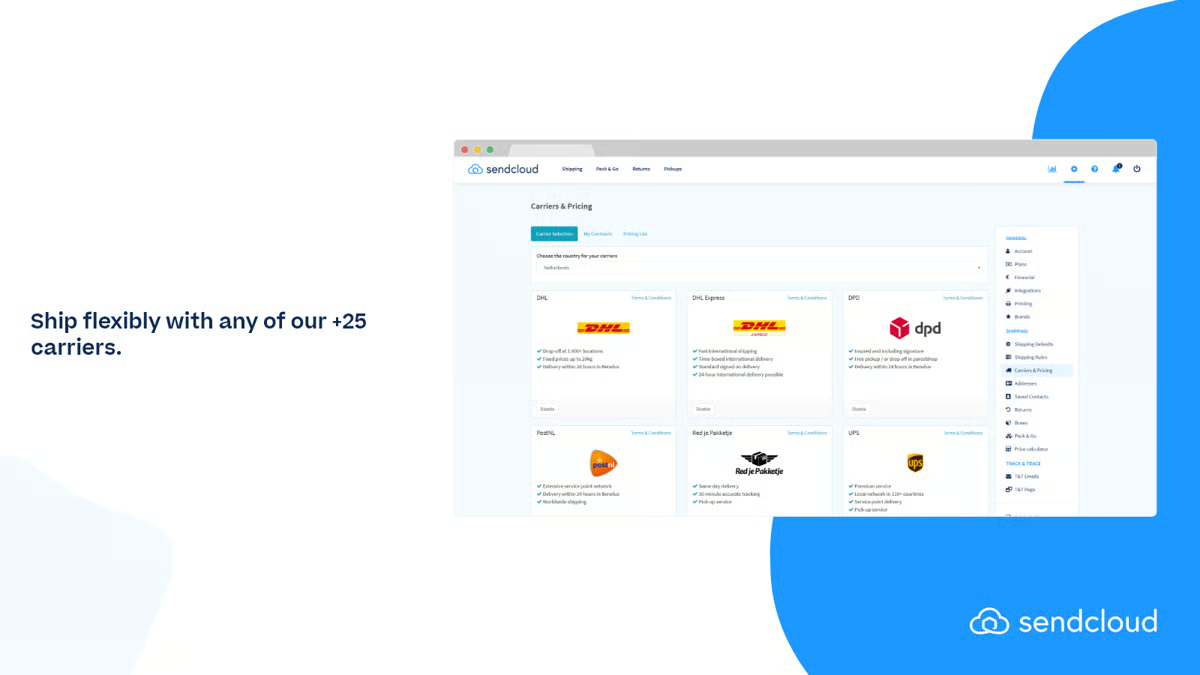
Handling multiple carriers through one interface removes much of the operational friction associated with shipping at scale. G2 reviews describe managing carrier connections through a single API and dashboard, with order tracking rated at 95%, well above category averages. What I noticed across reviewer feedback is how frequently teams mention generating labels quickly, switching carriers when needed, and maintaining shipment visibility without manual reconciliation.
Shipping activity remains predictable as order volumes increase. Creating labels on demand, updating tracking automatically, and maintaining visibility across carriers are described as routine parts of daily workflows. From what I saw in G2 reviews, this reliability matters most in environments where speed and accuracy take priority over deeper logistics customization.
Reducing repetitive steps becomes easier as rules take over common shipping decisions. Rule-based automation handles service selection and label creation, limiting manual input and reducing error rates as shipment counts grow. E-commerce integrations are rated at 93%, keeping orders, labels, and tracking data aligned across platforms such as PrestaShop and Amazon Europe.
Preparing orders stays lightweight without introducing heavier warehouse systems. Picking lists and basic warehouse features support small teams that want structure without the overhead of a full WMS. What I picked up across G2 reviews is that teams consistently describe these tools as enough to maintain order flow without adding unnecessary operational complexity.
Time savings are frequently tied to centralized carrier management. Faster processing and more predictable shipping routines allow small teams to redirect effort toward customer support, merchandising, or growth initiatives, rather than spending time reconciling shipments across systems.
Sendcloud supports white-label shipping configurations, allowing teams to offer branded shipping experiences to their own customers. G2 reviewers describe setting up shipping rules that can be presented under their own brand, with label printing rated at 95% on G2, reflecting how reliably branded labels are generated across carriers.
According to few G2 reviews, access to deeper customization varies by plan. Certain carrier-specific workflows and advanced configuration options sit within higher-tier plans, which is more noticeable as shipping requirements become more specialized. This structure aligns well with small teams whose day-to-day shipping needs are covered by the available feature set.
Users say that investigations or pickup scheduling can involve direct interaction with carriers, particularly around regional holidays or exception cases. This is more noticeable in environments with varied carrier dependencies, while routine shipping operations align well with the platform’s execution model. The platform’s focus on core workflows supports consistent day-to-day fulfillment across standard shipping scenarios.
Sendcloud fits well for small e-commerce teams that want multi-carrier shipping to remain centralized and easy to run. G2 Reviews consistently reference highly rated label printing, order tracking, and integrations as everyday benefits. It remains a strong option for retailers and consumer goods sellers that value clarity, automation, and reliable execution without adding operational drag.
“The most helpful thing about Sendcloud is looking into your analytics, choosing different carriers at any time, and easy submission of complaints handled by SendCloud. The CSM helped us throughout the process of implementing SendCloud in our business."
- Sendcloud review, Maissa E.
“It would be convenient to allow the creation of follow-up tickets for incidents related to our contract carriers. Additionally, it would be useful to be given the option to manage these cases until the final delivery.”
- Sendcloud review, Albert G.
Shiptheory stands out for its focus on automated carrier workflows and repeatable execution. What I noticed across G2 reviews is how often teams describe using it as a shipping automation layer that connects e-commerce platforms directly to carrier services, helping orders move from checkout to dispatch with minimal manual intervention.
G2 reviews describe orders flowing directly from e-commerce platforms into carrier-ready labels, reducing handling time and lowering the risk of data entry errors. Quick rate comparison is rated at 89% on G2, reflecting how efficiently teams evaluate and select carrier options without leaving the dispatch workflow. What stood out to me across reviewer feedback is how frequently faster dispatch cycles and lower operational pressure during peak shipping periods are tied back to this automation-first setup.
Features like large-scale label printing remain reliable under sustained volume. Label printing is rated at 97%, above the category average, and users regularly mention printing high volumes of labels without interruption. Flat-rate services also score highly, supporting businesses that depend on consistent shipping logic rather than configuring each shipment individually.
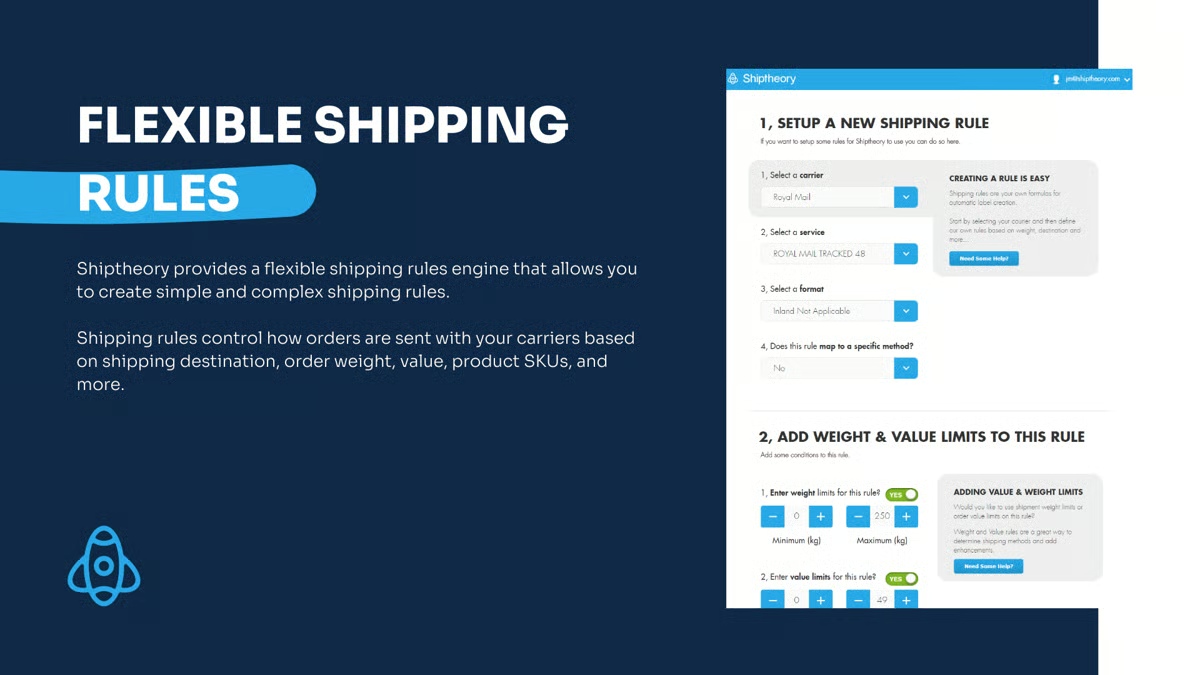
Carrier rules support repeatable execution across different order profiles. Vendor availability is rated at 89% on G2, reflecting the breadth of carrier options teams can route shipments through automatically without reviewing each order manually. From what I saw across G2 reviews, this structure works especially well for e-commerce operations prioritizing consistency and speed across daily fulfillment.
Multiple e-commerce stores can be connected and managed through a single Shiptheory setup without duplicating shipping rules or configurations. G2 reviewers describe getting all their stores linked and running within days, with shipping logic applying consistently across each channel. What became clear to me is how much teams value being able to scale shipping workflows without rebuilding configurations for every storefront.
G2 reviews reference fast response times and hands-on involvement, including situations where issues originate from third-party platforms or carrier integrations. For smaller teams without dedicated technical staff, what I consistently saw across reviews is that this level of support helps prevent shipping interruptions from cascading into broader fulfillment delays.
G2 reviewers mention the cost-to-value ratio as a reason for continued use, particularly for smaller ecommerce teams managing high shipment volumes on lean budgets. Ease of doing business with is rated 97% on G2, reflecting how straightforward it is for teams to adopt and scale the platform without friction.
G2 users say that configuration depth reflects a more setup-driven model, particularly when multiple stores, WMS platforms, or carriers are connected. This is more noticeable during onboarding, while standardized shipping environments align well with the platform’s scalable workflow design. The flexibility supports consistent execution once shipping rules are established across connected systems.
Few reviews meantion that shipment logic is scoped around core e-commerce use cases. Rules are primarily driven by weight and service selection, which aligns well with most shipping scenarios, while businesses with product-specific quantity constraints may find the model more limited. Pick-and-pack functionality remains foundational, consistent with Shiptheory’s role as an automation layer rather than a full warehouse management system. This focused approach aligns well with e-commerce teams prioritizing streamlined, reliable shipping automation.
Overall, Shiptheory fits best for ecommerce teams shipping at volume who want carrier automation to stay predictable under daily pressure.
G2 reviews consistently point to reliable label printing, reduced manual handling, and responsive support as outcomes that matter most. It remains a strong option for businesses that value execution clarity and automation over expanded logistics complexity.
“Their service makes our daily warehouse operations run so much more smoothly, as our staff doesn't have to manually type out every address when booking shipments with DHL and DX. UI is all intuitive and modern. Staff are always eager to help, quick to answer, and always resolve the issues efficiently.
For example, today I contacted support due to an issue with our API on our e-commerce platform's side, and yet Henry Forber took up the case quickly and looked into the issue straight away. Within a few hours, Henry had completely resolved the issue, and we are now back up and running again!”
- Shiptheory review, Maeve M.
“The only downside we have found is not being able to specify product quantity limits when setting shipping rules. We have specific products (liquids) that are quantity-limited through our main carrier, but we can only specify by weight, which discriminates against the non-liquid products too.”
--Shiptheory review, Kate F.
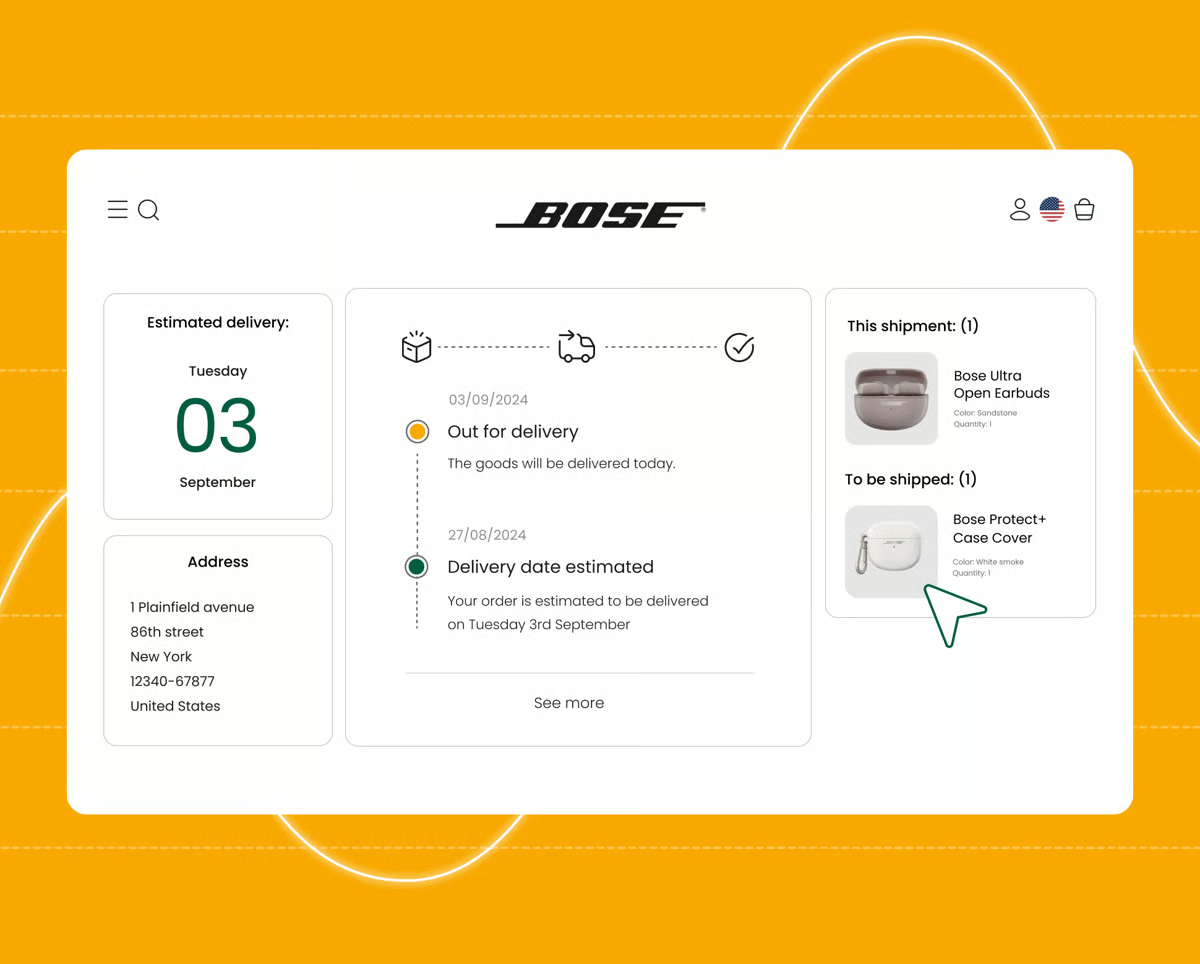
Once an order leaves the warehouse, parcelLab is most often used to manage how that shipment is communicated to customers. What stood out to me across G2 reviews is how strongly the platform focuses on post-purchase visibility rather than fulfillment or carrier execution itself. Dashboards and workflows are built around transparency during transit. Mid-market teams make up 54% of its user base, reflecting consistent adoption among organizations managing growing order volumes and customer expectations.
Support teams work from a complete communication history tied directly to each order and shipment, with order tracking rated at 95% on G2. Reviewing split shipments, handling returns or refunds, and resending tracking notifications to alternate email addresses all happen within the same order context. What I noticed across reviewer feedback is how much this reduces time spent switching between inboxes, carrier portals, and internal tools when responding to customer questions.
Delivery progress stays visible across carriers through a single interface. Order Status scores 94% on G2, allowing teams to track delays, exceptions, and completions without checking individual carrier systems. From what I saw across G2 reviews, branded tracking pages and proactive notifications are consistently associated with fewer “Where is my order?” inquiries, helping reduce repetitive support tickets.
Maintaining a consistent post-purchase experience remains central to daily use. Branded notifications, delivery updates, and exception alerts help teams control how shipping information is presented to customers, even when multiple carriers or fulfillment partners are involved. G2 reviews often connect this consistency to higher customer confidence and clearer expectations after checkout.
Dashboards are described as straightforward to navigate, and initial configuration is often completed quickly, even by teams without specialized technical resources. This accessibility allows customer support, operations, and CX teams to work from the same shipment context without extensive training or process change.
Internal coordination improves as shipment information becomes easier to reference. Centralized delivery timelines and exception visibility help teams align responses, track resolution progress, and identify recurring carrier issues. What stood out to me is how frequently reviewers associate this clarity with faster issue handling and fewer internal handoffs.
Return label generation pulls directly from existing order data, removing the need to re-enter customer or shipping details manually. Shipment reports score 92% on G2, reflecting how consistently teams access delivery summaries and carrier performance data without manual compilation. From what I saw across reviews, support teams handling large return volumes especially value the combination of accurate label generation and centralized shipment reporting because it speeds up resolution and reduces errors.
Barcode handling and label printing are secondary to parcelLab’s core focus on post-purchase communication and visibility. Some G2 users note timing differences between carrier updates and reflected tracking status, which are more noticeable in workflows requiring real-time synchronization. The platform aligns well with managing post-purchase communication and tracking visibility across multiple carriers.
Session behavior and edge-case handling reflect a more system-driven interaction model, including session timeouts during inactivity and structured error responses in less common workflows. These are more noticeable outside routine shipment monitoring, while day-to-day tracking and communication workflows align well with the platform’s core use cases.
parcelLab aligns well with e-commerce and retail teams that view shipping communication as part of the customer experience rather than a backend operation. It remains a strong fit for organizations prioritizing clarity, consistency, and transparency after checkout.
“I like the history of communications sent to a customer by order number; it makes tracking by date easy. I also like the resend to another email option for all the previously sent emails, this makes customer support a snap when they have an email typo for an order or would like confirmations sent to another email. The history of communications is great! It is also easy to change between order numbers and between separate shipments within orders, as well as review returns and refunds. I like the way it integrates the contents of the order into the carrier tracking number and provides all details for return packages.”
- parcelLab review, Emilio P.
“Some parts of the interface can feel a bit slow or slightly outdated, especially when navigating deeper tracking details. A few features could be more intuitive, and occasionally the loading time makes it harder to access information as quickly as I’d like.”
--parcelLab review, Zarya K.
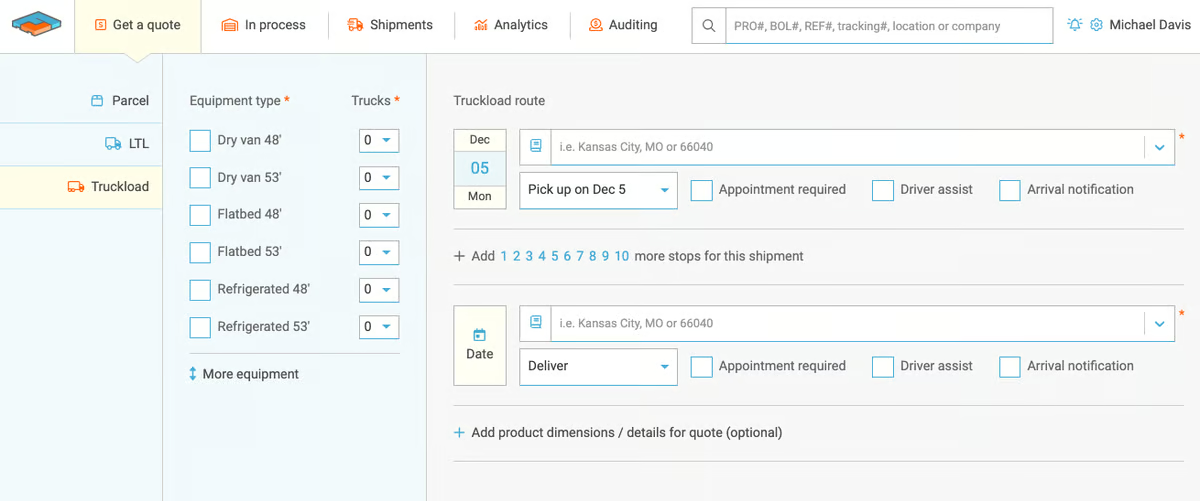
Freightview is most often used by teams booking LTL and truckload shipments on a regular basis, where quoting speed and booking accuracy directly affect daily operations. What stood out to me across G2 reviews is how frequently small and mid-market organizations describe using it to keep freight activity centralized, allowing rates, bookings, and shipment records to live within a single workflow instead of across multiple carrier portals.
Viewing carrier rates side by side changes how quickly freight decisions are made. Quick rate comparison is rated at 97% on G2, well above the category average, and users describe spending far less time re-quoting lanes or checking multiple systems. From what I saw across reviewer feedback, this setup supports faster approvals and more confident carrier selection, especially when pricing fluctuates or lanes repeat frequently.
Saved delivery addresses, frequently shipped items, and streamlined booking screens reduce repetitive input during repeat shipments. Label printing also scores highly at 94%, supporting execution once a carrier is selected without adding extra steps.
Carrier access remains a practical advantage in ongoing operations. Vendor availability is rated at 92%, reflecting the breadth of carrier options teams use for lane coverage and pricing leverage. What I noticed across reviews is how much this flexibility helps teams maintain continuity when capacity tightens or when alternatives are needed quickly.
Reporting is often described as a dependable audit trail for past bookings and carrier activity rather than an analytics-heavy environment. For many operations teams, consistent access to clean freight records matters more than complex dashboards. This positioning aligns with its user base, with 54% of users coming from small businesses and 44% from mid-market teams that prioritize speed and operational clarity over advanced analytics.
Storing frequently shipped items with their NMFC codes removes the need to re-enter commodity details for repeat lanes. G2 users describe cutting weekly freight management time significantly, with instant spot rate quotes generated from saved item profiles rather than starting from scratch each time. What became clear to me across reviewer feedback is how quickly those repetitive time savings compound for teams running the same freight lanes week after week.
Freightview’s integrations are more focused on carrier connectivity than deep storefront or ERP system linkage. What I noticed across G2 reviews is that teams expecting tighter cross-system automation describe this scope as more limited, while freight-focused operations align well with the platform’s carrier booking and rate management capabilities. For teams prioritizing fast quoting and centralized freight execution, the focused integration model keeps workflows straightforward and manageable.
Future-dated shipments are less visible in reports prior to pickup, and repeat-lane cost comparisons are not always surfaced during booking. G2 reviews suggest this is more noticeable for teams relying on forward-looking freight analysis, while execution-focused workflows align well with the platform’s clear historical records and carrier activity tracking. What stood out to me is how consistently teams still describe the platform as dependable for day-to-day freight visibility and booking operations.
From an operational standpoint, Freightview fits well for teams that prioritize fast freight quoting, reliable booking, and clear shipment records. t remains a strong option for organizations managing frequent freight shipments where time saved on each booking adds up quickly.
“FreightView makes booking freight extremely quick and easy while using an easy-to-operate interface. I use FreightView every day and book LTL shipments across multiple carriers with no issues. Being able to save and preload both delivery addresses and frequently shipped items makes booking a breeze.
Almost all of our connections are set up through integration; all we have to do is provide the key, and they figure out the rest. Also, the platform has great reporting for auditing and recording shipping records. The customer support is great, and they will help with just about anything. Overall, we have had a great experience using Freightview.
- Freightview review, Shamus O.
“It would be great if the cost of previous shipments to the same destination would pop up or compare in some form.”
--Freightview review, Angelo C.
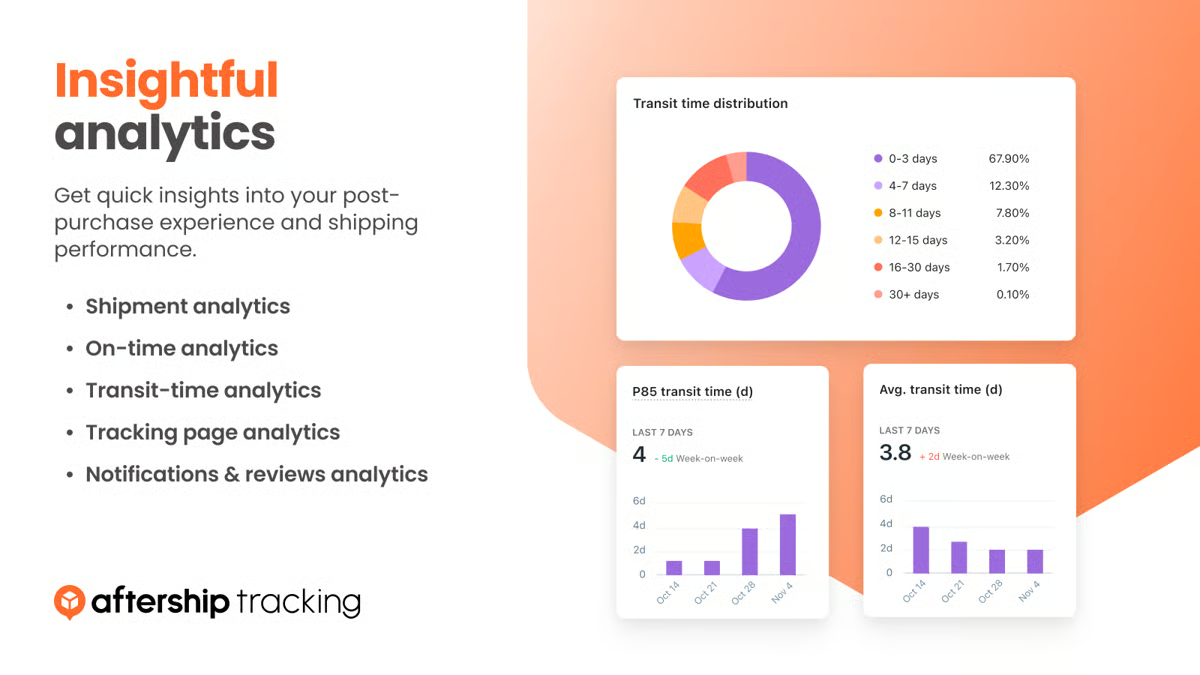
AfterShip is a platform built to make post-purchase logistics visible and easier for both teams and customers to manage. What stood out to me across G2 reviews is how consistently small ecommerce teams describe using it to centralize shipment tracking, reduce support follow-ups, and maintain visibility across multiple carriers without turning shipping into a daily operational burden. About 87% of AfterShip’s G2 user base comes from small businesses, which aligns closely with how the platform is positioned.
Shipment visibility stays consistent across carriers and orders, which is where many teams feel the immediate impact. Orders and tracking updates move through a single, continuous workflow instead of being split across tools or dashboards. Order tracking is rated at 94% on G2, reinforcing how reliably shipment status stays updated for both internal teams and customers. What I noticed across reviewer feedback is how often teams connect this consistency to fewer manual checks and repetitive support questions.
Teams can monitor order status, exceptions, and delivery progress without switching contexts, which G2 reviewers describe as a major operational relief during busy fulfillment periods. Manage orders scores 96% on G2, placing it among the platform’s strongest-rated capabilities. From what I saw across reviews, this visibility helps teams respond faster when delays or delivery issues surface.
Integration coverage allows teams to connect AfterShip into existing e-commerce stacks without extended setup. Major ecommerce platforms and a broad carrier network are supported, making centralized tracking easier to maintain. E-commerce Integrations score 95% on G2, aligning with reviewer feedback around fast onboarding and straightforward implementation. This flexibility supports varied store setups without forcing teams to redesign workflows around the platform.
Customer-facing shipment communication stays aligned with real-time tracking activity. Automated notifications and branded tracking pages keep buyers informed as deliveries progress. Feedback frequently connects this visibility to fewer inbound delivery questions. That connection helps reduce pressure on support teams during busy fulfillment cycles.
Notification customization stays accessible without requiring developer involvement. G2 reviews specifically mention SMS features and a drag-and-drop editor as tools that help brands shape post-purchase communication without technical overhead. Teams describe building and updating notification flows quickly, keeping customer-facing messaging aligned with brand tone as delivery workflows evolve.
G2 users mention quick replies and clear guidance when configuration changes or plan adjustments are needed. Quality of Support is rated at 93% on G2, and reviewers describe getting help from a real person quickly, even during plan upgrades or complex setup changes. That reliability reduces the risk of shipping workflows stalling during peak periods when teams cannot afford delays.
Feature depth reflects a broad set of tracking rules, notifications, and automation options. G2 reviews suggest this is more noticeable for new users navigating the platform’s full capabilities, while teams managing complex post-purchase workflows align well with its flexibility across use cases. Once workflows are configured, the platform supports consistent execution without requiring constant adjustment. For teams willing to invest a little more time upfront, the flexibility becomes a long-term operational advantage.
Some advanced capabilities are available through higher-tier plans, which G2 reviewers mention more often when expanding into returns handling or broader post-purchase workflows. Core tracking, notifications, and carrier visibility align well with standard use cases across plan levels. Most small ecommerce teams still find the core functionality sufficient for their day-to-day shipping operations. This keeps the platform practical and approachable for teams focused primarily on tracking and post-purchase communication.
Taken together, AfterShip fits ecommerce teams that prioritize dependable tracking and clear post-purchase updates. For brands focused on visibility and communication after checkout, it remains a solid option in the shipping software category.
“ Their support team, the sms feautures i love it, they are doing so well in helping the customers with everything a brand needs, very easy to use, helpful, easy implementation, and ease of integration.”
- AfterShip review, Evenour E.
"They can create a seamless experience where users track their high-end tech purchases directly on a page that matches the site’s aesthetic.”
-AfterShip review, SANDILE N.
FedEx Ship Manager is built for businesses shipping primarily through FedEx that need label creation, tracking, billing, and user management in one place. What stood out to me across G2 reviews is how consistently teams describe using it to keep daily FedEx operations centralized without switching between carrier portals or separate systems.
Shipping profiles and repeat shipment logic reduce manual input for teams running the same lanes regularly. Routine tasks are stored and recalled automatically, allowing teams to move through high-frequency shipments without re-entering details each time. For businesses shipping daily, that saved effort compounds quickly across the week.
Label generation stays fast and consistent even at high daily volumes. Label printing is rated at 95% on G2, and G2 reviews describe producing labels quickly without interruption across domestic and international shipments. What I noticed across reviews is how often teams connect this reliability to keeping dispatch workflows moving during peak shipping periods when manual handling becomes a bottleneck.
Return label processing stays straightforward, with existing shipment data pulling through automatically to reduce re-entry. Return labels score 93% on G2, and G2 reviews describe the process as quick and accurate, keeping reverse logistics moving without manual intervention for teams managing frequent returns.
Order tracking stays current and easy to access across active shipments. Tracking is rated at 93% on G2, above the category average of 91%, and feedback describes real-time updates surfacing quickly without needing to check carrier portals separately. From what I gathered across G2 reviews, teams managing delivery timelines and customer communication rely heavily on this visibility as part of their daily workflow.
Billing and cost visibility stay centralized within the platform. G2 reviews describe monitoring shipping spend, reviewing surcharges, and tracking in-transit times from a single view without switching between systems. For teams accountable for shipping budgets, consolidated visibility supports tighter cost control without adding reporting overhead.
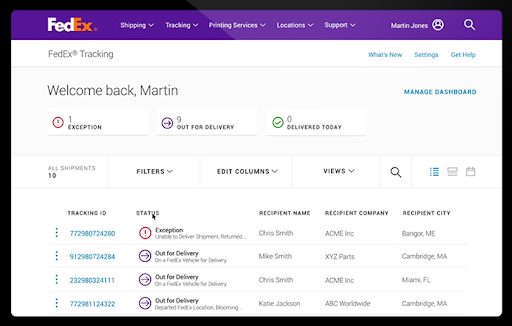
User and permission management support multi-user shipping environments without requiring IT involvement. G2 reviewers describe configuring user access, restricting shipping options by role, and running reports across the team from a single admin view. That structure suits organizations where multiple staff members process shipments and accountability needs to stay clear.
FedEx Ship Manager is scoped around FedEx carrier rates only. Teams that need to compare rates across UPS, USPS, or other carriers will find this outside the platform’s core scope, while businesses that ship exclusively through FedEx align well with its focused, single-carrier model. For FedEx-centered operations, this specialization keeps workflows simpler and more operationally consistent.
Data entry can feel more repetitive for less common shipment types, and error messages are not always specific to individual fields. This is more noticeable in edge-case shipments, while standard domestic and international workflows align well with the platform’s typical usage patterns. What I noticed across reviews is that teams handling routine shipment profiles rarely describe this as a day-to-day issue.
Overall, FedEx Ship Manager fits businesses running consistent, high-volume FedEx shipments that need label creation, tracking, billing, and user management to stay centralized. It remains a strong operational fit for teams where FedEx is the primary or exclusive carrier.
“I use FedEx Ship Manager every day, and it is one of the easiest programs to use for shipping. I have implemented its use with WooCommerce. It is so easy to use and opens the door for so many features with this integration. They also have excellent customer support; any issues I have had are handled quickly and effectively.”
- FedEx Ship Manager review, Joshua D.
“My main complaint is that it only shows FedEx rates. I can't easily compare prices with UPS or other carriers to ensure we're getting the best deal. This forces us to use other systems or do manual rate-shopping, which is a major inefficiency. It's a great tool for managing FedEx shipments, but it's not a complete solution for managing a company's entire shipping and logistics strategy.”
- FedEx Ship Manager review, Tejas K.
|
Software |
G2 rating |
Free plan |
Ideal for |
|
ShipStation |
4.3/5 |
Yes |
E-commerce teams running high-volume, multi-carrier shipping |
|
ShipHero |
4.4/5 |
No |
High-volume fulfillment and warehouse operations prioritizing accuracy |
|
Easyship |
4.3/5 |
Yes |
Small sellers managing global shipping, duties, and taxes |
|
Sendcloud |
4.6/5 |
Yes |
E-commerce teams are centralizing multi-carrier shipping |
|
Shiptheory |
4.9/5 |
Yes |
Teams automating high-volume ecommerce shipping workflows |
|
parcelLab |
4.6/5 |
No |
Brands focused on post-purchase tracking and delivery communication |
|
Freightview |
4.7/5 |
Yes |
Teams booking LTL and freight with fast rate comparison |
|
AfterShip |
4.7/5 |
Yes |
E-commerce teams are prioritizing shipment tracking and notifications |
|
FedEx Ship Manager |
4.5/5 |
Yes |
Teams managing high-volume FedEx shipments from a single platform |
*These shipping software products are top-rated in their category, based on G2’s Winter Grid® Report. Pricing tiers and demos vary by vendor.
Got more questions? G2 has the answers!
For most e-commerce stores, ShipStation is commonly seen as the strongest all-around option. Review patterns show it’s widely adopted for centralizing orders across multiple sales channels, managing carriers, and automating day-to-day shipping tasks without heavy operational overhead.
Easyship is frequently mentioned as an affordable starting point for small and mid-sized businesses. They’re often chosen for flexible pricing, quick setup, and the ability to start shipping without committing to complex workflows upfront.
G2 users often point to ShipStation, and Easyship when discounted carrier rates are a priority. Review patterns suggest these platforms help SMBs and growing brands access negotiated rates that would otherwise be difficult to secure independently.
Multi-carrier label creation is a core strength of tools like ShipStation and Sendcloud. These platforms are commonly picked by teams that need to compare services, apply routing rules, and print labels across multiple carriers from one system.
Easyship shows up most often in reviews related to international shipping compliance. Users consistently describe it as a strong option for handling duties, taxes, and cross-border requirements without forcing teams to manage customs logic manually.
Easyship is the most frequently cited platform for automated customs documentation. Review patterns highlight its ability to generate paperwork and landed cost calculations as part of the shipping workflow.
ShipStation and ShipHero are commonly referenced for tight integration with ecommerce platforms and order management systems. These tools tend to keep orders, inventory signals, and shipment data aligned across systems.
AfterShip and parcelLab are most often associated with real-time shipment tracking. Users consistently mention these tools for maintaining tracking visibility, proactive notifications, and customer-facing delivery updates.
For enterprise-scale needs, ShipHero, Sendcloud, and Freightview are frequently mentioned depending on shipping complexity. Review patterns suggest enterprises choose based on whether their focus is on warehouse operations, regional carrier coverage, or freight shipping.
AfterShip, parcelLab, and Freightview are commonly cited for shipping analytics. These platforms are often used by teams that need insight into delivery performance, carrier reliability, and exception trends rather than just label creation.
Shipping problems usually creep in quietly. A mispriced shipment here, a delayed label there, a tracking update that never lands. None of it looks critical on its own. Together, it changes how teams spend their time. Fulfillment slows, support volume rises, and attention shifts from throughput to damage control as order volume grows.
The real divider between smooth operations and constant noise is execution clarity. When rate logic is stable, labels generate reliably, and carrier behavior is easy to monitor, teams stay ahead of issues.
That is why shipping software is best viewed as part of the fulfillment operating model. The right system shapes how orders flow, how exceptions are resolved, and how responsibility is held across peak periods. The right way to choose is to anchor the decision in your day-to-day fulfillment reality. If the platform supports consistent execution without demanding constant intervention, it will remain dependable as scale, volume, and customer expectations rise. That is the bar this decision needs to meet.
Want better control over shipping operations? Explore leading transportation management systems on G2 to optimize carriers and keep deliveries moving efficiently.


The first sign that your barcode software is wrong for the job is usually a label your...
 by Disha G

When evaluating the 20+ best label printing software tools, options such as Loftware Cloud,...
.png) by Devyani Mehta
by Devyani Mehta

I evaluated 20+ tools to find the 9best inventory control software. These are Xero,...
.png) by Tanuja Bahirat
by Tanuja Bahirat