


If you're responsible for IT security in your organization, you know how important the right incident response tool can be. The right platform helps security teams detect suspicious activity early, investigate alerts quickly, and contain threats before they escalate into larger incidents that impact systems, data, and business operations.
But choosing the best incident response tool isn't always straightforward.
Many teams deal with alert fatigue, slow investigation workflows, manual remediation tasks, and limited visibility across their infrastructure. Others struggle with fragmented tools that make incident tracking difficult, or with balancing security monitoring alongside day-to-day IT operations.
I'm not an expert in IT security, but I do review software for a living. To identify the best incident response tools available today, I analyzed G2 reviews, G2 Grid® data, and category insights. One fact that immediately became clear to me as I evaluated these tools: The best incident response software for your team depends heavily on the types of incidents that you often face. Some tools focus on phishing triage, others specialize in infrastructure monitoring and anomaly detection, and many emphasize automation to reduce alert fatigue and manual investigation work.
In this guide, I'll walk through the platforms that stood out for helping security teams detect threats earlier, investigate incidents faster, and automate response workflows. Here are my top five picks for the best incident response tools: KnowBe4 PhishER / PhishER Plus, Datadog, Torq, Tines, and Dynatrace.
*I found these to be the best incident response software in their category as per the G2 2026 Winter Grid Report. I've added their standout features and the starting prices of their paid plans to make comparisons easier for you.
Security incidents rarely give teams much time to react. From what I've seen researching this category, the biggest challenge isn't just detecting threats. It's coordinating a fast, structured response once something slips past preventative defenses. Without that, businesses can tend to incur huge losses. In fact, the global average cost of a data breach in 2025 was $4.4 million.
Incident response tools help solve that problem by giving security and IT teams a centralized way to detect, investigate, and remediate threats in real time. In simple terms, these platforms monitor networks, infrastructure, and endpoints for abnormal activity, alert teams when suspicious activity occurs, and guide teams through the process of containing and resolving the issue.
The best tools go beyond basic alerting. Strong incident response and security information and event management (SIEM) platforms help teams organize response workflows, automate repetitive remediation tasks, and store incident data so analysts can investigate root causes and learn from past incidents. Many solutions also integrate with other security tools to connect alerts, threat intelligence, and remediation actions into a coordinated response process.
When you look at G2 category data, these platforms are used by organizations of all sizes, though adoption tends to lean slightly toward mid-sized companies. On average, 43% of customers fall into the mid-market segment, 32% in enterprise organizations, and 25% from small businesses. This distribution reflects how incident response tools often become critical once organizations reach a scale where manual investigation and remediation are no longer sustainable.
I started with G2's Grid® Report for the incident response category to build a shortlist of the top platforms based on G2 Score, user satisfaction, and market presence. This gave me a data-backed starting point to identify the tools that are actually performing well for security operations teams, IT teams, and cybersecurity leaders.
Next, I analyzed G2 reviews at scale to identify the patterns that matter most in real incident response workflows. I looked for consistent feedback around alert management, investigation capabilities, workflow automation, threat visibility, and how well each platform helps teams coordinate and remediate incidents quickly. Reviews also helped me understand how well each tool integrates with broader security stacks such as SIEM, XDR, and monitoring platforms, which is critical for modern security operations.
I also reviewed product documentation and vendor resources to understand each platform's incident response capabilities, automation features, and integrations.
The screenshots included in this article come from G2 profiles and publicly available product documentation.
After digging into G2 Data and layering in my own research, I kept seeing the same priorities come up across reviews and security operations discussions.
Not every tool excels in every category. But the best incident response tools perform consistently where it matters most for security teams: detecting threats quickly, coordinating investigations efficiently, and helping organizations contain and remediate incidents before they escalate.
The list below contains genuine user reviews from the Incident Response Software category. To be included in this category, a solution must:
*This data was pulled from G2 in 2026. Some reviews may have been edited for clarity.
G2 rating: 4.5/5
KnowBe4 PhishER / PhishER Plus are both incident response platforms designed to help security teams manage phishing reports efficiently. From the review patterns I analyzed, the platform's biggest strength is its ability to help organizations handle large volumes of user-reported phishing emails without overwhelming security teams.
What stood out to me most in the review dataset is how frequently users mention the simplicity of reporting suspicious emails. Employees can report phishing attempts directly from their inbox, which feeds those messages into PhishER for investigation. This significantly improves visibility into potential threats and ensures security teams don't miss incidents that might otherwise go unreported, resulting in a G2 approval rating of incident alerts at 88% and threat intelligence at 87%.
Another consistent theme across reviews is how the platform helps security teams triage and investigate reported emails faster. Users describe PhishER as a centralized place where analysts can review suspicious messages, determine whether they're malicious, and take action quickly. In environments where phishing reports can pile up quickly, this helps reduce investigation time and prevents analysts from getting buried in manual email reviews. It's no surprise that incident logs and incident reports both rated at 86%.
Automation also comes up frequently in feedback. Features like PhishRIP, which can remove malicious emails from inboxes across the organization, help teams respond to threats more quickly and reduce manual remediation. For security teams trying to reduce response time and limit the spread of phishing attacks, this capability can make a meaningful difference. G2 Data supports this, with strong ratings in resolution automation (86%) and resolution guidance (85%).
I'd also quickly like to run you through satisfaction indicators from G2 Data that reflect operational reliability. Ease of use at 90%, ease of admin at 91%, and quality of support at 93% suggest that security teams can adopt the platform without significant operational friction. Users also report positive vendor experience signals, such as ease of doing business at 95% and meets requirements at 91%.
Ease of setup (87%) is another pattern that appears repeatedly in reviews. Several users note that phishing testing and reporting workflows are relatively straightforward to configure, making the platform accessible even for organizations without large security operations teams.
The ability to combine phishing simulations, reporting workflows, and response capabilities in a single environment is a valuable benefit for organizations running security awareness programs. Workflow coordination is another strength, supported by workflow management at 86%, which helps teams organize investigations and maintain consistent response processes.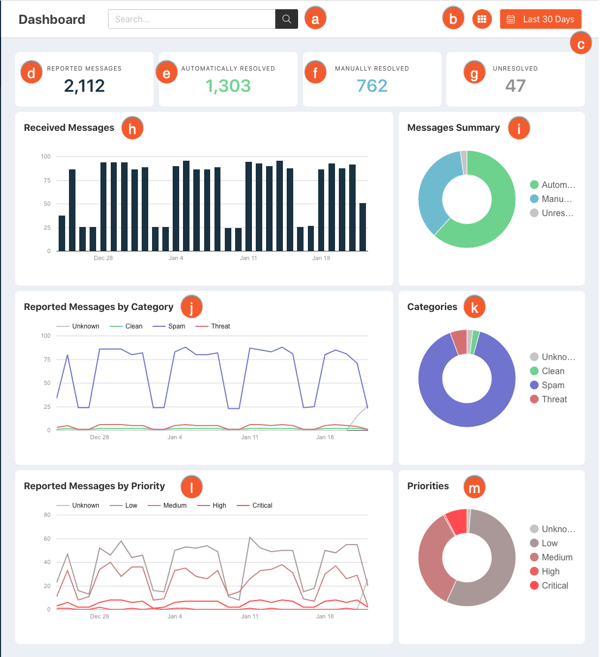
Some G2 reviewers mention that configuring phishing campaigns and reporting workflows can require some upfront planning, particularly for organizations managing multiple training programs or simulations. While the platform offers flexibility in how campaigns and workflows are structured, teams may need to spend time aligning configurations with their specific security processes during the initial setup. Once users take the effort of configuring this, many find the workflows easy to manage and adapt over time.
A few reviewers also note that in environments with very high volumes of user-reported phishing emails, there can occasionally be slight delays during analysis or processing. While this doesn't typically disrupt overall response workflows, organizations operating at a larger scale may want to monitor processing performance as part of their rollout. In most cases, teams still report that the platform handles day-to-day phishing volumes reliably.
On the whole, KnowBe4 PhishER earns its place among the best incident response tools because it helps security teams turn employee-reported phishing attempts into a structured response workflow. Instead of manually reviewing every suspicious email, teams can triage threats faster, coordinate investigations in one place, and remove malicious messages across the organization before they cause larger incidents. If your organization receives large volumes of phishing reports and wants to streamline how those emails are analyzed and resolved, this tool is a strong fit.
"PhishER provides a good platform for users to report potential phishing emails. As an admin, it provides a safe location to review those reported emails and ways to handle those. You can integrate several platforms with it to make it more powerful."
- KnowBe4 PhishER / PhishER Plus review, Jason H.
"The search feature is a bit rigid, and I would like more flexible options for how to filter through thousands of reported emails, PhishRIP queries, and similar items."
- KnowBe4 PhishER / PhishER Plus review, Mark B.
Want more anti-phishing email security solutions? Check out G2's best cloud email security platforms.
G2 rating: 4.4/5
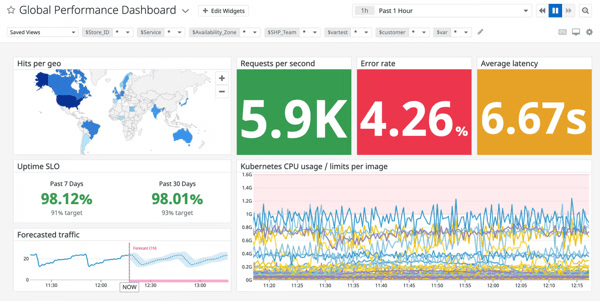
With one of the largest market presences for incident management tools, Datadog brings monitoring and observability as its core capabilities. Many teams use it to detect and respond to operational and security incidents across their infrastructure. From the review patterns I analyzed, its biggest strength is the ability to give teams a centralized, real-time view of system activity, which makes it easier to identify issues and investigate incidents quickly.
One theme that comes up repeatedly in the reviews is visibility across infrastructure. Users frequently highlight how Datadog helps them monitor applications, servers, and services from a single platform. This centralized visibility makes it easier for teams to detect abnormal behavior early and investigate incidents without switching between multiple monitoring tools.
That visibility is reflected in strong investigation capabilities on G2, with incident logs at 93% and incident reports at 90%, indicating that teams rely on the platform to analyze events and maintain clear records during incident investigations. This centralized view also makes the platform very easy to use, and it's not a surprise that it gets ease of use at 86%.
Another pattern I noticed in the dataset is how often users mention real-time monitoring and alerting. Reviewers describe Datadog's dashboards and alerting capabilities as helpful for identifying performance issues and suspicious activity as soon as they occur. For incident response teams, this helps reduce the time it takes to detect and start investigating incidents. G2 Data reinforces this strength with incident alerts rated at 93%, highlighting the platform's ability to notify teams quickly when abnormal activity occurs.
Dashboards and visualizations also appear frequently in positive feedback. Many users say the platform's dashboards make it easier to understand system behavior and pinpoint the source of issues quickly. When teams are troubleshooting incidents under pressure, having clear visual insights into logs, metrics, and system performance helps speed up investigation workflows.
I've noticed that praise for integration flexibility is a commonly mentioned benefit. Reviewers note that Datadog connects with a wide range of tools and services, allowing teams to bring together data from across their stack. This helps streamline monitoring and supports more efficient incident investigation without needing to manually correlate data from multiple sources.
Going through the review data, the main highlight I see is resource usage at 87%, which helps teams understand how infrastructure activity changes during incidents and supports deeper root cause analysis. General satisfaction indicators also reflect strong product reliability, with Datadog meeting requirements at 92% approval from G2 users.
Several G2 reviewers mention that Datadog's pricing can increase as usage expands, especially in environments with many services, integrations, or monitored resources. Teams adopting the platform at scale may want to keep a close eye on usage patterns and optimize configurations to manage costs effectively. That said, many users still find that the value aligns well with the depth of monitoring and insights provided.
Some reviewers also point out that initial setup and configuration can take time, particularly when setting up dashboards, alerts, and integrations across multiple systems. Because the platform is highly customizable, teams may need to invest effort during implementation to fine-tune monitoring and alerting. Once configured, however, users generally report smoother operations and more efficient monitoring workflows.
In practice, Datadog stands as a strong contender in the incident response space. It helps teams detect issues early and investigate incidents using a unified view of system activity. Instead of piecing together information from multiple monitoring tools, teams can monitor infrastructure, track anomalies, and respond to incidents from one platform. If your organization needs strong observability and monitoring capabilities to detect and respond to infrastructure incidents quickly, Datadog is a strong option.
"I like the concept overall, the system that tracks every data point your applications provide, and you can collect and analyze it in a single space. It basically allows you to find the root cause of issues much faster, as you are able to correlate data from different sources."
- Datadog review, Emilio G.
"In our current context, as our infrastructure or application footprint grows, storage costs increase proportionally and can become a major expense. If we need to retain data for extended periods, expect those costs to rise even further."
- Datadog review, Prasanth K.
Related: Looking for something to help you with compliance? Check out the best security compliance software on G2.
G2 rating: 4.7/5
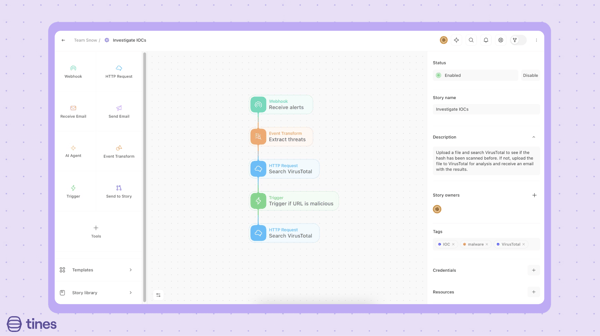
Tines is a security orchestration and automation platform designed to help security teams automate complex workflows across their security tools. From the review patterns in the dataset, its biggest strength is giving teams the flexibility to design and automate incident response processes that match their specific security operations workflows.
What stood out to me most in the reviews is how frequently users highlight the platform's workflow flexibility. Many reviewers mention that Tines enables them to build powerful, customized automation workflows that connect different parts of their security stack. This flexibility allows teams to automate investigation steps, alert handling, and response actions. This is reflected in G2 Data, with workflow management rated at 93% and resolution guidance at 93%, indicating strong support for structured and consistent response processes.
Ease of use is another major theme that appears consistently across the dataset. Users often describe the platform as intuitive, especially with its visual, low-code workflow builder. Automation workflows are notorious for being complex, but the interface helps simplify the process of building and managing them. Satisfaction metrics reinforce this, with ease of use at 95%, ease of admin at 94%, and ease of setup at 94%, suggesting that teams can adopt and manage the platform without significant operational friction.
Customer support is one of the strongest positive signals in the reviews. Many users specifically call out the responsiveness and helpfulness of the support team, often mentioning that they are quick to assist with troubleshooting, onboarding, and workflow design. This is backed by quality of support at 97% and ease of doing business at 99%, highlighting a consistently strong customer experience.
Documentation is another area where I consistently see positive feedback. Reviewers appreciate the clarity and depth of the documentation, noting that it makes it easier to understand how to build workflows and integrate the platform with other tools. For teams implementing automation for the first time, strong documentation plays an important role in reducing the learning curve and accelerating adoption.
Users mention that Tines connects well with a wide range of tools, allowing them to bring different systems together into a single automated workflow. This supports centralized actions and avoids switching between platforms during investigations. G2 Data also supports its effectiveness in handling incidents, with incident logs at 93% and incident reports at 88%, helping teams maintain visibility and track activity across workflows. By automating repetitive tasks and standardizing workflows, teams are able to save time and focus more on higher-priority security activities.
According to some G2 reviewers, there can be a learning curve when first building automation workflows, especially for teams that are new to orchestration platforms. Designing and refining workflows may take some time initially as users get familiar with the platform's capabilities. Over time, however, many users report that the flexibility becomes a significant advantage.
Some reviewers also mention that organizations planning to expand automation across multiple teams or workflows may want to review licensing and pricing considerations carefully as their usage grows. This is especially relevant for organizations scaling automation across larger security environments. That said, many teams still find that the platform delivers strong value through the efficiency gains it provides.
For teams that need it, Tines earns its place among the best incident response tools because it helps security teams automate and orchestrate response workflows across their entire security stack. Instead of manually coordinating investigation steps between multiple tools, teams can design automated processes that handle routine tasks and accelerate response times. If your organization is looking for a flexible platform to automate incident response workflows and reduce manual security operations work, Tines is a strong option.
“I use Tines to automate workflow and streamline repetitive processes efficiently. It eliminates manual, repetitive tasks and reduces errors by automating workflows, saving time and improving efficiency. I like how easy it is to build powerful automations without coding, while still having the flexibility to handle complex workflows. The initial setup of Tines was straightforward for my team.”
- Tines review, Hitesh J.
“There’s a learning curve, and the pricing can be a concern. Debugging also feels complex at times, and I’ve run into the “blank canvas” problem when getting started. It does give you a lot of control, but that control comes with added complexity.”
- Tines review, Ragini Y.
G2 rating: 4.8/5
Torq AI SOC Platform is a security automation platform designed to help security teams orchestrate and automate incident response workflows across their security stack. From the patterns I saw in the review dataset, its biggest value lies in helping teams automate repetitive security tasks and streamline response processes that would otherwise require significant manual work.
What stood out to me most in the reviews is how often users praise its automation capabilities. Many reviewers highlight how Torq allows security teams to automate routine security tasks such as alert enrichment, triage, and response actions. This reduces manual workload and repetitive operational work for teams dealing with high alert volumes. G2 ratings strongly support this, with resolution automation at 91% and resolution guidance at 90%, indicating consistent and reliable execution of response workflows.
Adding to features that help reduce time and workload is Torq's workflow orchestration. Reviewers often mention the ability to build structured automation playbooks that connect different tools and define how incidents should be handled. This helps teams standardize their response processes and ensures consistency across investigations. G2 Data reinforces this with workflow management at 96%, highlighting strong support for organizing and executing response workflows.
In terms of detecting threats, I've read how it helps teams gain visibility into potential threats and security issues. By providing this data in a centralized workflow, it makes it easier to understand what's happening across the environment. These insights are especially valuable to identify suspicious activity, prioritize what needs attention, and act on it before things escalate.
Another theme that appears consistently across reviews is the flexibility of integrations. Users frequently mention how Torq connects with a wide range of security tools, making it easier to centralize incident response actions across multiple platforms. Instead of jumping between tools to investigate or remediate an incident, security teams can orchestrate those actions from a single workflow.
Reviewers often describe the platform as intuitive and highlight how the workflow builder helps teams design automated processes without needing deep development expertise. Satisfaction metrics reinforce this experience, with ease of use at 94%, ease of admin at 96%, and ease of setup at 95%, suggesting that teams can deploy and manage automation workflows without excessive operational overhead.
This combination of workflow automation, integrations, and usability makes Torq particularly valuable for organizations trying to reduce alert fatigue and accelerate response times. It earns strong vendor experience signals, with 97% of users saying it meets requirements and 100% confirming it is easy to do business with.
Some G2 reviewers mention that building and refining automation workflows can involve a learning curve, particularly for teams that are new to orchestration platforms. Designing more advanced workflows may require additional training as users get familiar with how different components connect and operate. However, as teams gain experience, many users report that the platform becomes more intuitive and easier to work with.
A few reviewers also note that setting up integrations across multiple tools can require some initial configuration effort, especially in more complex environments. Connecting different systems and aligning them within workflows may take planning and time during the implementation phase. Once these integrations are in place, though, teams often benefit from more streamlined and centralized operations.
Taken together, Torq's AI-driven approach to incident response helps security teams transform manual response workflows into automated processes. For organizations looking to reduce investigation time, automate repetitive security tasks, and coordinate incident response across multiple tools, Torq provides a flexible and scalable approach. If your organization is focused on building automated incident response workflows and reducing manual security operations work, this tool is a strong fit.
"I really like Torq's integration capability, as it allows for native integration with multiple platforms, making it possible to create more complex workflows and improving operational efficiency. I also appreciate its ease of use; the learning curve is quick, and it is really easy to work with."
- Torq review, Orlando M.
"Probably you may need to train some of the team members on how to use its advanced features and customize quality reports."
- Torq review, Silvester M.
G2 rating: 4.5/5
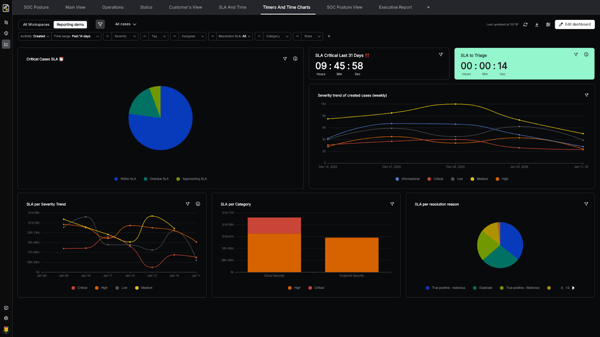
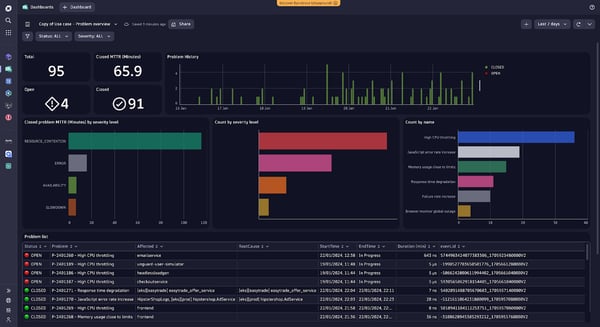
What stood out to me about Dynatrace is how it turns observability and monitoring into visually informative dashboards. Its core functionality is to help organizations detect, analyze, and respond to performance and security incidents across their infrastructure.
From the review patterns I analyzed, a theme that appears consistently in the reviews is deep visibility into systems and applications. Users frequently highlight how Dynatrace provides a clear view of infrastructure, services, and dependencies, helping teams understand how different components interact. This level of visibility makes it easier to identify where issues originate and how they impact overall system performance. G2 supports this with incident logs at 87% and incident reports at 86%.
Another major strength is real-time monitoring and alerting. Reviewers often mention how the platform continuously monitors systems and surfaces issues as they occur. This allows teams to detect anomalies quickly and begin investigating incidents without delay, which is critical in reducing response time. G2 Data reinforces this with incident alerts at 90%, indicating strong satisfaction with how the platform notifies teams of abnormal behavior.
Root cause analysis and debugging are another standout capability. Many users point out how Dynatrace helps them quickly identify the source of issues without needing extensive manual investigation. By automatically analyzing system behavior and dependencies, the platform reduces troubleshooting effort and helps teams resolve problems more efficiently. This is reflected in resource usage at 90% and resolution guidance at 83%, which support deeper analysis and structured investigation workflows.
Dashboards and data visualization also come up frequently in the reviews. Users appreciate how the platform presents complex data in a clear and structured way, making it easier to interpret performance metrics and investigate incidents. These visual insights help teams understand system behavior without relying on multiple tools and support faster decision-making during incident response.
Ease of use (86% approval) is a recurring theme in the dataset, with many reviewers noting that, once they become familiar with it, the interface is intuitive and helps them navigate and analyze data more effectively.
I'd also call out the overall customer experience and reliability reflected in G2 Data. Dynatrace scores quality of support at 91% and meets requirements at 90%, along with ease of admin at 88% and ease of setup at 86%. These satisfaction indicators suggest that once implemented, teams are able to rely on the platform for consistent monitoring and incident investigation across their environments.
Some G2 reviewers mention that initial setup and implementation can require careful planning, particularly in larger or more complex environments. Configuring monitoring across multiple systems and services may take time during the early stages of deployment. Once implemented, however, many users report that the platform provides consistent and reliable visibility.
Some G2 reviewers also mention that pricing can increase as usage expands, particularly in environments with broader monitoring coverage. As teams scale their implementation across more services and systems, costs may require closer tracking and optimization. That said, many users still find the platform's depth of visibility and analysis capabilities justifies the investment over time.
What stands out most is that Dynatrace comes across as a solid and reliable incident response tool for organizations. If your organization needs deep visibility into infrastructure and application performance to detect and investigate incidents quickly, Dynatrace is a strong option.
"I use Dynatrace to support IT teams by simplifying the end-to-end capability around monitoring, which reduces the complexity of fragmented data by providing a single pane of glass. I appreciate the depth and breadth of the supported technologies and the way it standardizes the visualizations of data."
- Dynatrace review, Keith S.
"The only downside is that Dynatrace's pricing can be a bit on the higher side, especially for smaller teams or businesses just getting started. Additionally, while the platform is feature-rich, it can take some time to fully leverage all its capabilities."
- Dynatrace review, Karan S.
If you're still exploring options beyond the tools reviewed above, here are a few more strong contenders worth checking out.
Got more questions on incident response tools? Find the answers below.
Affordable incident response tools for SMBs typically focus on automation and simplified workflows without requiring large SOC teams. Platforms like Cynet and CYREBRO are often considered suitable for smaller organizations because they combine monitoring, threat detection, and incident response in a single platform, reducing the need for multiple security tools.
Platforms that include automated remediation and response playbooks tend to provide the fastest containment. Tools such as Torq and Tines help security teams automate actions like isolating systems, blocking malicious activity, and triggering response workflows, allowing threats to be contained more quickly.
Enterprise teams often look for platforms that integrate incident response with broader security operations. ServiceNow Security Operations is commonly used by large organizations because it combines incident response workflows, case management, and integration with IT service management processes.
Tools that centralize incident tracking and analytics provide the most detailed investigation reports. Resolver is known for offering strong documentation, reporting, and investigation workflows that help security teams analyze incidents and produce compliance-ready reports.
Security automation and orchestration platforms often integrate directly with SIEM tools. Solutions like Tines and Torq allow security teams to connect alerts from SIEM systems and automate investigation and response workflows across multiple security tools.
Platforms that provide centralized workflows and case management are typically best for coordinating incident response. ServiceNow Security Operations helps organizations manage security incidents through structured workflows, task assignments, and collaboration between teams.
Many incident response platforms integrate with threat intelligence feeds to enrich alerts with additional context. Tools like Dynatrace and Datadog combine monitoring and analytics with threat insights to help teams understand anomalies and investigate incidents faster.
Incident response tools that offer strong infrastructure visibility and integrations work well across hybrid environments. Platforms such as Datadog and Dynatrace allow teams to monitor and investigate incidents across on-premises systems, cloud environments, and containerized infrastructure.
AI-driven detection capabilities help security teams identify anomalies and prioritize threats more efficiently. Dynatrace is known for using AI-assisted analysis to detect abnormal behavior and help teams quickly identify the root cause of incidents.
Automation-first security platforms are best suited for automated remediation workflows. Torq and Tines allow teams to build automated response playbooks that trigger remediation actions, helping reduce manual investigation and response tasks.
Incident response tools don't replace your security team. They make your response process faster, clearer, and more repeatable. The best platforms reduce alert noise, automate repetitive tasks, and give analysts the visibility they need to investigate incidents quickly before they escalate.
What stood out most in G2 review patterns is how different "best" looks depending on the source of your incident pressure. If phishing reports overwhelm your team, KnowBe4 PhishER streamlines triage and remediation. If infrastructure visibility is the priority, Datadog and Dynatrace help teams detect anomalies and find root causes quickly. And if manual investigation and alert fatigue are slowing your SOC down, automation-first platforms like Torq and Tines help scale response without adding more analysts.
A good next step would be to map your most common incident types, test tools that integrate with your existing security stack, and prioritize automation that can shorten investigation and remediation time. As security environments grow more complex, incident response platforms are also evolving quickly, with AI-driven detection and automated remediation becoming a core part of modern SOC workflows.
Looking for tools that offer comprehensive threat intelligence features? Check out our list of the best threat intelligence software on G2 now!


Recently updatedSummer 2026 Grid® Report · Published May 26, 2026 This guide was last...
 by Disha G
I've reviewed enough G2 data on cloud infrastructure to know that the best cloud data security...
 by Disha C

All businesses inevitably face a security incident.
 by Sagar Joshi