When the forecast breaks during budget season, finance doesn't get to blame the tool. Finding the best FP&A software for your team is the decision that determines whether planning runs clean or compounds into rework. The wrong one creates version confusion, weakens forecast confidence, and adds friction when finance needs answers fast.
For CFOs, financial planning and analysis (FP&A) leaders, and senior finance partners, the planning tool you choose doesn't just shape workflows; it shapes whether your numbers hold up when it matters most. Spreadsheet-driven models strain under scenario pressure and cross-team inputs. And when planning logic fragments across corporate finance, business units, and executive leadership, reversing that is costly and slow.
My conclusions come from reading reviews written by FP&A teams on how they actually run forecasts, close cycles, and defend numbers under pressure, and pattern analysis across large volumes of those reviews, not isolated opinions. Strong platforms distinguish themselves through model governance, scenario reliability, and their ability to scale planning beyond a single team.
In this guide, I map tools to real planning problems.
*These FP&A platforms are top ranked in G2s Winter Grid Report. I’ve highlighted where each tool stands out and included pricing context to help you evaluate the right fit for your team, complexity, and budget.
FP&A software helps finance groups turn fragmented budgets, forecasts, and actuals into a planning workflow the business can act on. The right platform helps teams understand what is driving performance, how assumptions are shifting, and where decisions begin to matter. Without that structure, planning turns into reconciliation instead of insight.
What I've found is that the strongest FP&A platforms go far beyond static budgeting. They show why a variance exists, which levers are moving it, how scenarios compare, and what needs attention next. This value is not limited to large financial organizations. G2 Data shows adoption spread across small teams, mid-market companies, and enterprises. Each relies on these tools to bring consistency to planning and confidence to reporting.
The global FP&A software market was valued at around $3.88 billion in 2023 and is projected to reach roughly $13.43 billion by 2031, reflecting how broadly automation and continuous planning are replacing manual cycles across finance functions.
Ultimately, good FP&A software gives teams what finance workflows depend on. Visibility into performance, predictability in planning cycles, and confidence that the numbers guiding decisions are consistent and defensible. When that foundation holds, finance can focus on steering the business instead of defending the math.
I started by narrowing the field using G2’s Grid Reports, which reflect user satisfaction and adoption across smaller organizations, mid-sized companies, and large enterprises in the FP&A category.
Next, I applied AI-driven analysis to a large set of verified user reviews to identify recurring signals about what actually matters in financial planning environments. These signals included model flexibility, forecast change management, scenario analysis, version discipline, audit readiness, cross-functional collaboration, spreadsheet dependency, and performance during budgeting and reforecast cycles. This process made it easier to distinguish platforms that support clear decision-making from those that tend to slow teams as planning complexity increases.
Because I have not personally tested every platform, I validated these insights through discussions with finance leaders and FP&A practitioners who operate these tools in live planning environments. Their input helped confirm where review sentiment translated into day-to-day impact. All screenshots and product references used here come from vendor listings and publicly available documentation.
After reviewing thousands of G2 user reviews, studying how finance organizations run planning and forecasting cycles, and speaking with FP&A leaders, finance managers, and analysts, the same themes surfaced repeatedly. Here is what I prioritized when evaluating the best FP&A software:
Based on these criteria, I narrowed the list to FP&A platforms that consistently support planning accuracy, operational visibility, and the ability to scale as financial complexity grows.
Below, you will find authentic user feedback from the FP&A Software category. To be included in this category, a platform must:
This data was sourced from G2 in 2026. Some reviews may have been edited for clarity.
In organizations where planning extends beyond budgeting into daily operations, IBM Planning Analytics consistently shows up. Enterprise teams dominate usage, with mid-market adoption appearing primarily where financial models and reporting requirements are already sophisticated.
One of the clearest strengths is the depth of its core planning capabilities. IBM planning analytics earns 94% for planning and 93% for extended planning on G2, reinforcing how frequently teams rely on it for rolling forecasts, multi-entity budgeting, and long-range scenario analysis. Reviewers consistently describe using the platform to manage planning processes that would be difficult to maintain accurately in spreadsheet-only workflows.
Real-time data handling is another area where the platform stands out. With real-time data updates rated at 92%, teams highlight the ability to work with live numbers during forecasting cycles rather than static snapshots. This becomes especially valuable in environments where assumptions change quickly, and finance needs immediate visibility into downstream impacts.
The TM1 modeling engine is repeatedly cited as a differentiator. Finance teams describe building custom business rules that stay consistent across regions, products, and business units, reducing reliance on manual calculations. That modeling flexibility allows organizations to encode logic once and apply it reliably across planning, forecasting, and reporting processes.
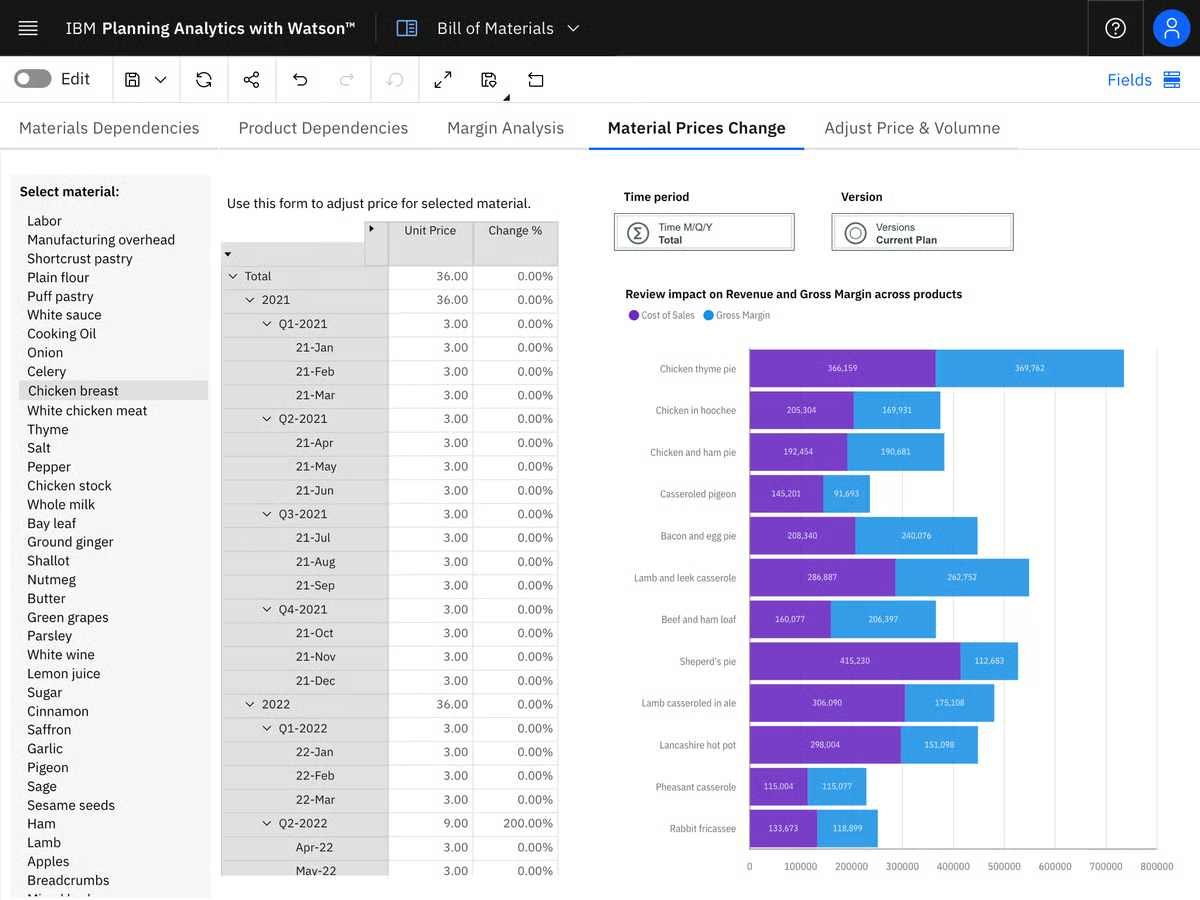
Excel-native workflows play a major role in adoption, particularly among finance professionals. I’ve seen reviewers frequently mention the Excel add-in as a reason the platform fits naturally into existing processes, allowing users to work inside familiar spreadsheets while pulling live data from the planning system. Updating forecasts during meetings and avoiding offline rebuilds helps shorten planning cycles and reduce follow-up work.
Governance and control are also central to the platform’s appeal. Teams point to centralized data management, strong permissioning, and consistent business rules as reasons they move planning out of fragmented spreadsheets. This structure supports cleaner handoffs between departments and improves confidence in consolidated outputs across large organizations.
Governance and control are also central to the platform's appeal. Teams using IBM Planning Analytics report tighter control over planning processes, fewer calculation errors, and faster forecast cycles once models are established. Many also highlight the shift from siloed tools to a single FP&A system that scales as organizational complexity increases. This structure supports cleaner handoffs between departments, improves confidence in consolidated outputs, and gives teams tighter control over planning processes
IBM Planning Analytics carries a level of depth and structural complexity that goes beyond what lighter FP&A workflows typically require. Smaller teams or those without dedicated FP&A specialists feel this most, particularly during initial model setup and ongoing configuration as planning needs evolve. That same depth is what makes the platform reliable at scale, and finance teams operating in complex, multi-entity environments tend to find the investment in setup pays off steadily over time.
Building and maintaining sophisticated TM1 models also benefits from dedicated ownership. While the engine offers significant flexibility, teams without prior TM1 experience rely on FP&A specialists or technical support during initial setup and ongoing optimization, particularly as models grow in complexity. For organizations with the right expertise in place, this structure enables more controlled and scalable planning over time.
IBM Planning Analytics is a strong fit for finance teams operating in large, multi-entity environments where planning accuracy and governance matter as much as speed. If your organization relies on Excel but needs a more controlled, real-time planning backbone to support complex forecasts and scenarios, this platform remains one of the most established options in the FP&A category based on how users describe it on G2.
"I appreciate IBM Planning Analytics for its powerful scenario modeling and forecasting engine, which is perfect for dealing with the volatility in our glass, ceramics, and concrete manufacturing business. It allows us to build multiple what‑if models quickly to evaluate risks and adjust plans in real time, transforming how we anticipate cost changes and stabilize margins. Another feature I like is how it unifies financial and operational planning into one system. Unlike spreadsheets, IBM Planning Analytics integrates manufacturing volumes, supply chain plans, procurement expenses, and revenue forecasts seamlessly, eliminating mismatched data and ensuring our plans reflect our actual plant capacity and operational constraints.”
- IBM Planning Analytics review, Tressa T.
“One of the biggest drawbacks is the steep learning curve, especially for non-finance users such as project managers and department leads. Many of our colleagues only need to enter project budget data or review forecasts, but they find the interface overly technical and unintuitive. Simple tasks often require guidance from the finance team, which slows down adoption and creates extra support work. The user interface itself feels somewhat dated and lacks modern, user-friendly design. Navigation can be confusing, with too many clicks needed to access commonly used reports or input screens. Mobile usability is also limited, making it inconvenient for staff working on-site with clients or away from their desks.”
- IBM Planning Analytics review, Peter P.
FP&A is only as strong as its inputs, compare the best ERP software that feeds your planning models.
What stands out about Anaplan is how it is adopted by organizations where planning spans finance, operations, and go-to-market teams. It’s designed for environments dealing with scale, interdependencies, and frequent change rather than static budgeting cycles. That focus shows up clearly in how teams describe using the platform to coordinate decisions across functions instead of managing isolated financial models.
Connected planning sits at the core of how Anaplan is used. G2 feature scores for planning (95%), forecasting (94%), and budgeting (93%) all rate above category averages, reflecting how financial models are built to stay linked across functions rather than managed in isolation. Inputs from sales, operations, and supply chain feed into shared models, which cuts reconciliation work and keeps FP&A focused on outcomes rather than version control.
Performance at scale is another consistently highlighted strength. Reviewers describe the platform as fast and responsive, even when handling large datasets and complex calculations, assuming models are structured thoughtfully. This responsiveness makes rolling forecasts and frequent re-plans workable without slowing down planning cycles.
Model flexibility plays a major role in how teams use Anaplan. FP&A teams can build highly specific business logic while keeping structures extensible as planning needs evolve. G2 users frequently highlight how easily numbers can be traced back to their source assumptions, shifting discussions away from data disputes and toward evaluating business considerations.
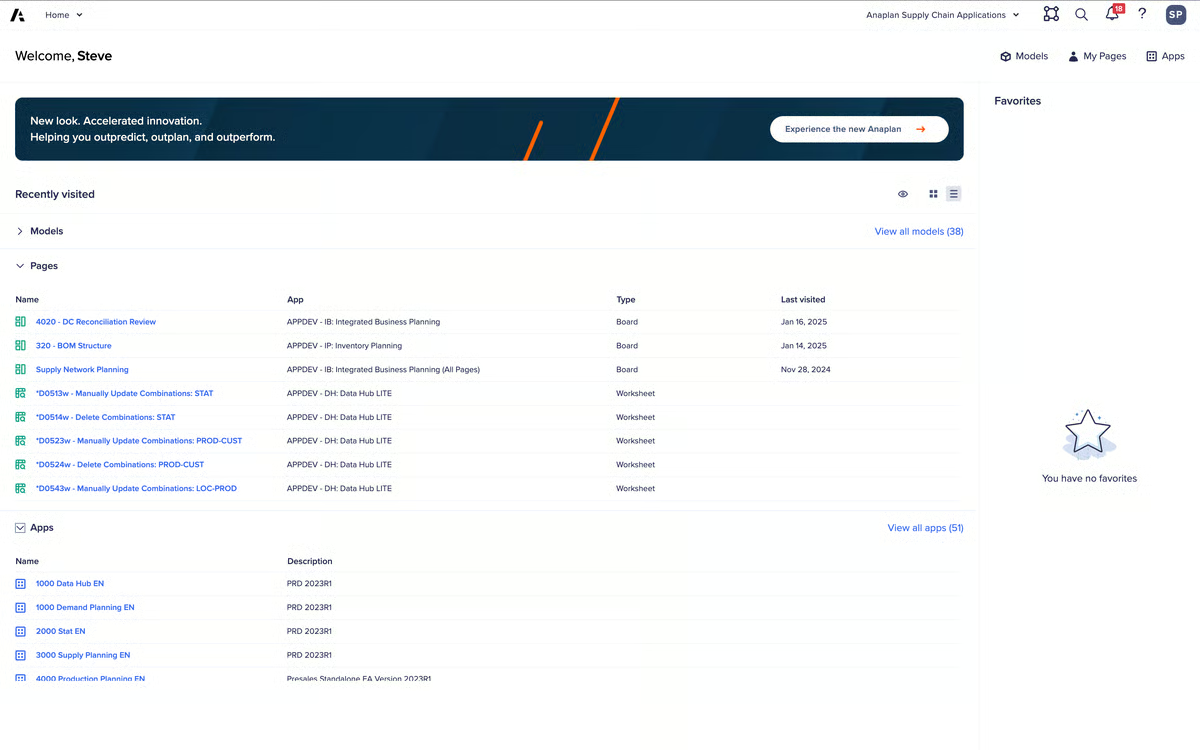
Transparency and traceability reinforce Anaplan’s role as a shared system of record. Changes to drivers, assumptions, or inputs remain visible across connected models, which helps finance leaders explain variance and forecast movement with confidence. This clarity supports stronger alignment when planning decisions span multiple departments.
The platform’s cloud-based architecture supports broad participation without sacrificing control. Native integrations, APIs, and tools like Anaplan Connect make it feasible to bring ERP and operational data into planning workflows, while role-based access controls allow business owners to contribute directly. Many teams describe this as a shift toward distributed input with centralized financial oversight.
Anaplan shifts model ownership away from IT and toward finance and sales teams directly. Changes to assumptions, drivers, and logic can be made without raising IT tickets or waiting on development queues. Teams describe this as a meaningful reduction in bottlenecks during active planning cycles. The low-code environment also means finance teams can customize terminology, workflows, and outputs to match their specific planning context without technical intervention.
Anaplan's wide range of modeling approaches means teams need upfront coordination to design structures that scale cleanly across functions. Organizations without mature planning processes or dedicated model owners feel this most during initial build and configuration. That same flexibility is what allows complex, cross-functional planning to run reliably once structures are established.
Its workspace-based pricing reflects an enterprise orientation that works well for broad, interconnected planning processes. Teams with narrower FP&A needs or limited cross-functional scope may find it harder to justify the investment at full scale. For organizations that do operate at that scale, the pricing model aligns closely with the value the platform delivers across functions.
Overall, Anaplan remains a strong option for organizations that treat planning as a connected, cross-functional discipline. For finance teams that need fast, transparent models capable of handling complexity without breaking alignment, it continues to stand out as a dependable FP&A backbone based on how users describe it on G2.
"The multi-dimensional planning capabilities help us design and develop complex solutions, and they also provide valuable analytical insights through various NUX features. REST API integration helps automate data loads, which in turn improves data quality and overall performance.”
- Anaplan review, Nikhil G.
"I find issues with insufficient model design and poor maintenance of browser network. There's also a need to restart my machine and re-authenticate into Anaplan, which can be frustrating. Balancing data with security to ensure scalability also seems to be a challenge. Additionally, while Anaplan is highly flexible, there's a high learning curve.”
- Anaplan review, Leonard B.
Struggling to explain forecast gaps? Learn how to calculate variance and uncover what’s really driving performance.
Workiva is built for finance environments where precision and coordination matter more than speed alone. The platform is commonly used by teams operating inside recurring close, reporting, and audit cycles, where accuracy and accountability take priority over rapid experimentation. That emphasis shapes how finance teams interact with the product day to day.
Teams describe greater confidence in collaborative reporting because changes in Workiva remain visible and traceable. Linked data across reports, live updates, and embedded version control allows teams to see exactly where work stands at any moment. Reviewers consistently describe fewer handoffs, clearer ownership, and greater confidence that changes flow correctly through connected documents.
Financial statements, footnotes, and supporting schedules remain connected rather than copied across files. This structure reduces duplication and lowers the risk of inconsistencies, especially during close and regulatory reporting when accuracy is most critical.
Process transparency is another area where Workiva performs strongly. Built-in dashboards surface task status, dependencies, and bottlenecks across finance, accounting, and compliance teams. Users frequently connect this visibility to faster close cycles, fewer late-stage surprises, and smoother coordination during SEC and SOX reporting.
Connections with systems such as NetSuite, Workday, and general ledger sources reduce manual data transfers and reconciliation work. Over time, this helps shift finance effort away from validation and toward analysis and review.
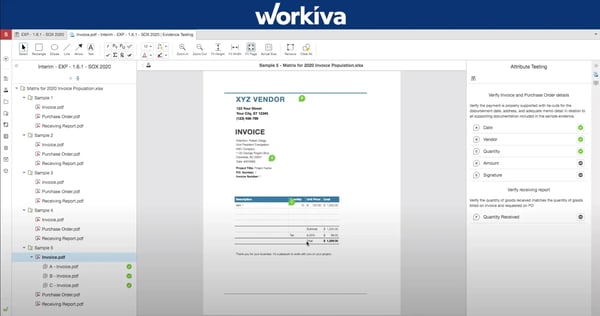
Workiva's audit trail is a practical operational tool, not just a compliance checkbox. Every change is logged, and finance leads can see exactly which team member is causing a delay in closing the books without sending a single email. That level of accountability reduces the informal coordination work that typically fills the gaps in close cycles.
AI-assisted reporting features add a growing source of efficiency for teams managing high volumes of recurring reports. Teams describe meaningful time savings during internal and external reporting cycles, with automated steps replacing manual effort that previously consumed close capacity. Over a full reporting cycle, those gains compound into a measurable reduction in routine finance work.
Workiva holds particularly strong ratings for Collaboration (95%), Real-Time Data Updates (94%), and Version Control (94%), all well above category averages. Adoption also skews toward structured environments, with 46% enterprise and 37% mid-market usage.
Budgeting and forecasting in Workiva follow a more governed structure, which can feel less flexible for teams that rely on rapid, exploratory scenario modeling. Finance teams working in fast-moving environments, where assumptions shift frequently, notice this most. That same governed structure is what supports consistency and auditability across regulated reporting cycles.
Pricing and configuration are managed through administrative processes rather than self-serve controls, which adds coordination overhead during setup and ongoing changes. Teams without dedicated admin resources or implementation support feel this most in the early stages of deployment. For organizations operating inside compliance-driven finance workflows, that structure provides the control and process rigidity that regulated reporting typically requires.
Workiva fits finance teams that treat accuracy, auditability, and collaboration as foundational requirements. By replacing fragmented spreadsheets with a connected reporting environment, it supports predictable execution during high-stakes close and compliance cycles. For organizations operating in regulated or multi-stakeholder finance environments, Workiva provides a level of structure and confidence that manual workflows struggle to sustain.
“I like that Workiva makes it simple to update filings from period to period and streamlines the SEC filing process. I appreciate the good service from our reps whenever we've had questions about new offerings. The .docx importer we recently used was a big time-saver for attaching agreements to our filings. I also find it easier to turn around our filings quickly with features like rolling forward reports."
- Workiva review, Mike C.
"Some workflows feel limited,particularly when multiple reviewers are involved. The UI can also feel a bit crowded at times, which makes it harder to focus on the plus side, the templates save me a lot of time when I’m doing repeat reporting.”
- Workiva review, Joseph C.
Scaling beyond FP&A? Explore the best corporate performance management software for unified planning and consolidation.
Vena is designed for finance teams that want to scale planning without abandoning Excel. Instead of replacing spreadsheets, it formalizes how teams already budget, forecast, and report by storing data centrally in the cloud while preserving familiar Excel-based workflows. This turns individual files into a shared planning system without forcing a complete change in how finance teams work.
Budgeting, planning, and reporting all score above 93% on G2, outperforming category averages. In practice, teams rely on Vena to automate annual budgets, refresh rolling forecasts, and generate monthly management reports with significantly less manual upkeep.
Dynamic model expansion, multidimensional structures, and cascading reports allow financial views to update automatically as assumptions change. Reviewers often describe this as a major reduction in maintenance effort compared to managing complex Excel models manually.
Because stakeholders interact through Excel-based templates, budget owners and department leads engage more comfortably with forecasts and actuals. This lowers friction during planning cycles while keeping finance in control of data structure, permissions, and validation.
Reviewers often describe governance as a key factor in how Vena supports planning at scale. Clear audit trails, role-based permissions, and process tracking help finance teams monitor forecast completion and budgeting adherence without relying on email follow-ups. Many organizations describe Vena as a reliable single source of truth rather than a collection of disconnected models.
Scenario modeling and drill-down capabilities give finance teams a clearer view of what sits behind summary numbers. Teams describe building multiple forecast scenarios and tracing figures from high-level financial statements down to the transactional level without leaving the planning environment. That depth supports more grounded conversations during budget reviews and variance discussions.
Customer support and implementation assistance receive consistent praise across Vena G2 reviews. Teams describe support as accessible and responsive throughout both initial rollout and ongoing use, with help available when integrations or new modules are introduced. For organizations expanding into additional planning workflows over time, that continuity of support reduces the risk of stalling mid-implementation.
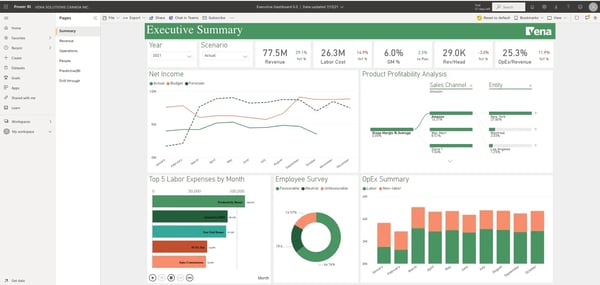
Vena's initial rollout requires dedicated implementation support and expert calibration, which means teams cannot expect a straightforward self-serve setup. That investment in setup is what allows Vena to scale cleanly as planning complexity grows, supporting durable models rather than ones that need frequent rebuilding.
Operating outside the Microsoft ecosystem can mean some workflows require additional adjustment to fit non-Microsoft environments. Teams running primarily on Mac or Google Workspace notice this most when navigating integration and template-based planning features. For organizations already embedded in Microsoft tools, the alignment supports a smoother and more consistent planning experience overall.
Overall, Vena aligns well with finance teams that want stronger control and scalability while continuing to work in Excel. By combining familiar interfaces with centralized governance and automation, it supports more reliable planning without forcing teams into entirely new workflows. For organizations looking to professionalize FP&A while preserving flexibility, Vena offers a practical and dependable path forward.
“I like that Vena is very user-friendly and has an Excel-based look to it. The Excel feature makes it easy to learn quickly and also allows me to interchange data between Vena and Excel. The initial setup was fairly easy thanks to a very good implementation team.”
- Vena review, Christopher M. L.
“Sometimes I feel that if we have to make the changes, the process can be sometimes quite extensive. The sense that we have to go and do the mapping and change the things inside the model structure, which we are not accustomed to. And since we have an accounting and finance background, anything technical in there, like changes to the versioning model or the data model or the model structure, does not come naturally to us. So, if that could be improved, Vena will become unmatched."
- Vena review, Lakshya B.
OneStream is typically adopted by finance teams when spreadsheets, point solutions, or legacy consolidation tools start to strain under growing entity counts, ERP diversity, or reporting demands. It is designed for environments where financial management needs to remain structured and governed as complexity increases. That context explains why the platform is positioned for scale rather than lightweight FP&A use cases.
Despite the breadth of functionality, teams describe the platform as approachable to work with. Reviews often reference straightforward administration and minimal reliance on coding to build usable financial models. Consolidations across large entity structures run efficiently, and extensible dimensionality allows finance teams to align reporting structures with how the business actually operates.
G2 ratings for integration align with feedback around pulling information from multiple ERPs and general ledger systems, including Microsoft Dynamics 365. Bringing data into a single financial model reduces reconciliation effort and supports both consolidated reporting and detailed analysis without relying on parallel systems.
The platform’s marketplace model supports gradual expansion as requirements evolve. Teams can introduce additional capabilities over time instead of committing to a fixed feature set upfront. Reviews often connect this approach to operational savings, particularly once planning, forecasting, consolidation, and reporting processes are standardized within a single system.
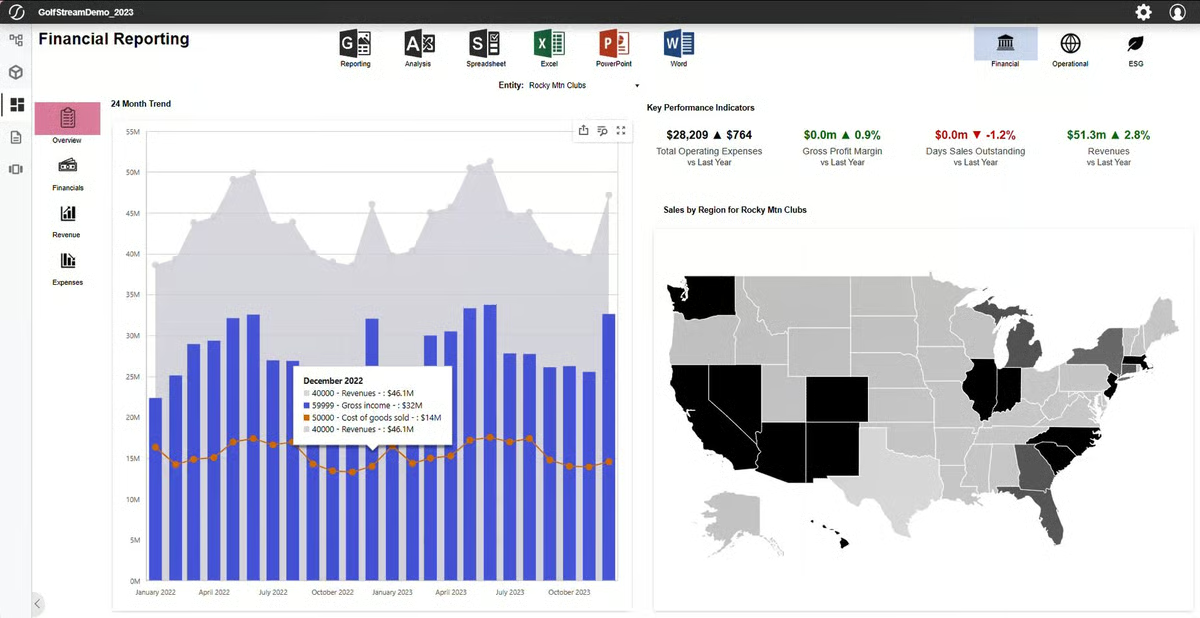
Budgeting and reporting workflows are used heavily across customer environments. G2 ratings place both capabilities near the top of the FP&A category, reflecting how consistently teams rely on OneStream as a system of record. Centralizing these processes shifts effort away from collecting inputs and toward evaluating outcomes and scenarios.
Finance teams describe QuickViews as a practical way to pull data directly without building full reports for every analysis request. Ad hoc data access sits within the same governed environment as consolidation and planning, so teams can answer one-off questions without stepping outside the platform or rebuilding queries from scratch. That self-serve access reduces the volume of reporting requests that would otherwise land on the finance systems' owners.
Pre-built solutions in the OneStream marketplace give finance teams a faster path to deploying specific capabilities without building from scratch. Teams can pull in ready-made components for use cases like account reconciliation or narrative reporting and adapt them to their environment. That reduces the time between deciding to expand and having something functional in production.
Dashboarding and visualization in OneStream are assembled through defined components rather than automated templates, which requires more deliberate setup for teams expecting visual-first layouts out of the box. Once configured, those same defined structures support the consistency and control that govern reporting environments across planning cycles.
Configuration, model management, and automation features require dedicated FP&A or finance systems ownership to get the most out of the platform. Smaller teams without that internal resource may need to plan for that responsibility before committing to a full rollout. For organizations with the right ownership in place, this approach supports long-term durability and model stability as complexity increases.
More than 70% of users come from enterprise organizations, reflecting its alignment with complex, multi-entity finance operations.
OneStream aligns with finance organizations managing consolidation, planning, and reporting inside a single governed architecture. Its balance of usability, extensible modeling, and centralized control supports long-term financial operations as complexity increases. For teams prioritizing accuracy, auditability, and model durability, it provides a stable foundation without introducing unnecessary friction.
"Possibility of creativity in terms of reporting requirements, connecting all departments to use ONE database despite often different needs. Perspective on using AI is fantastic, and management is really looking forward to exploring it.”
- OneStream - Unified EPM review, Vincent B.
"I think there are some things where you may need a bit of a developer mindset to execute, but it's been continually improving with the new tools and resources given, like Genesis to help build dashboarding for someone like me in finance, which decreases barriers to development.”
- OneStream - Unified EPM review, Minhhieu N.
Datarails is designed for finance teams that continue to run planning and reporting in Excel but need more structure around how data is managed, consolidated, and governed.
The platform fits naturally into existing finance workflows because it does not require teams to abandon Excel. Instead, it layers control and automation around familiar models. High feature ratings for Version Control (93%) and Custom Reporting (92%) align closely with user feedback around fewer file conflicts, clearer ownership, and more predictable close cycles. Reports stay aligned across contributors, reducing the time spent reconciling versions or validating inputs.
G2 users frequently describe pulling financial data from multiple QuickBooks Online instances, payroll systems like Gusto, and legacy accounting tools into a single reporting environment. This approach allows finance teams to centralize reporting without replacing their underlying accounting stack, which is especially valuable when ERP migration is not a priority.
Financial communication also improves once reporting is centralized. Dashboards and storyboards help translate detailed Excel-based models into views that business stakeholders can understand without oversimplifying the data. Finance teams retain the ability to drill into underlying assumptions, supporting clearer variance analysis, budget reviews, and recurring performance discussions.
Experienced Excel users tend to move quickly once the platform is configured. Teams with strong familiarity in formulas, pivots, and financial modeling report less repetitive consolidation work over time and greater confidence during budgeting and month-end cycles. As structures stabilize, reporting becomes more repeatable and less dependent on manual intervention.
Advanced reporting logic and multi-condition formulas in Datarails require upfront configuration, which can slow teams accustomed to quick, one-off spreadsheet adjustments outside a governed structure. That same structured approach is what supports consistency and reporting reliability across recurring close and budgeting cycles.
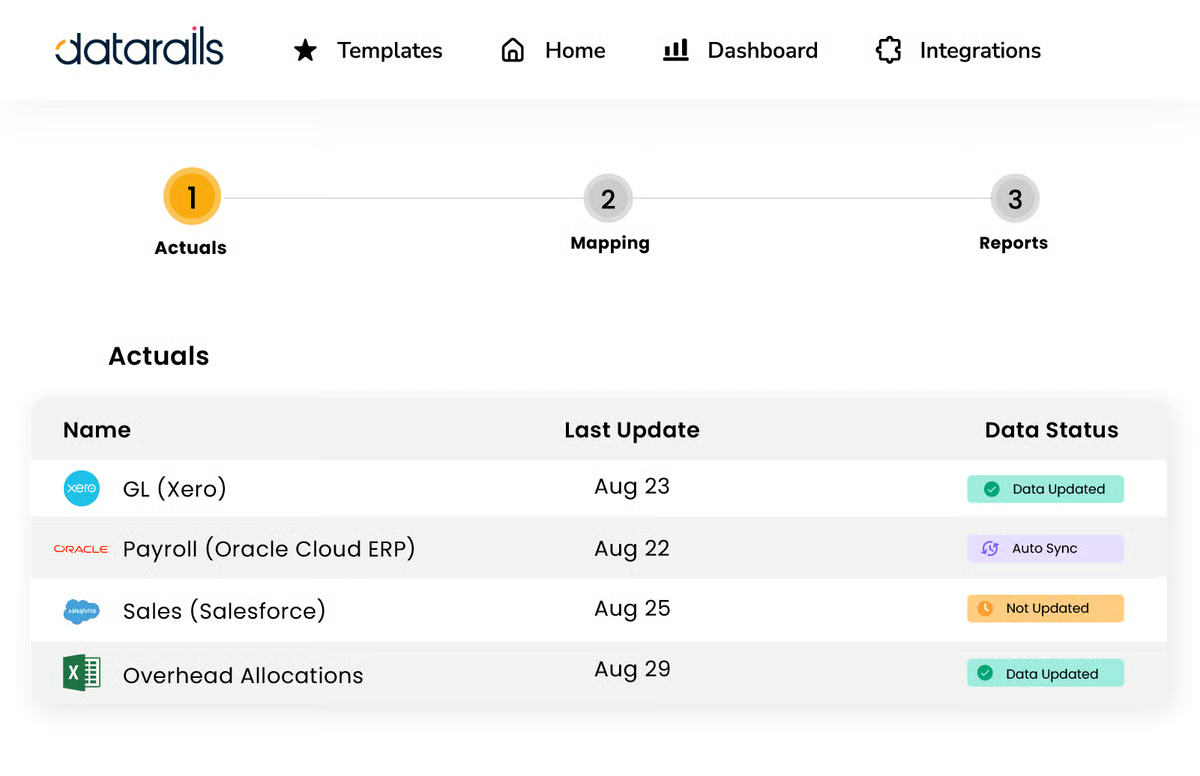
Proactive planning guidance and system-driven decision frameworks sit outside what the platform is designed to deliver, with the core focus remaining on consolidation and reporting rather than prescriptive FP&A workflows. For finance teams that value consolidation accuracy and reporting control over prescriptive guidance, that focused scope remains a practical and well-defined strength.
Overall, Datarails supports finance teams looking to scale FP&A without stepping away from Excel. Based on consistent review patterns, it delivers meaningful gains in data accuracy, reporting confidence, and operational efficiency. For organizations that want centralized control and automation while keeping spreadsheets at the core of their planning process, Datarails remains a practical and well-aligned choice.
“The dynamic reporting. Being able to just refresh a report and have the figures update and new accounts appear.”
- Datarails review, Rhys M.
“If your data infrastructure isn’t set up or maintained properly, it can create a lot of confusion within the team. That often means spending extra time searching for the right metrics and, in the worst case, reporting the wrong numbers. It’s up to our team to keep the mapping airtight; otherwise, it can quickly turn into a headache when you have to go back and rework the data structure."
- Datarails review, Edward B.
Planful is built for finance teams that operate within structured planning cycles and rely on consistency across budgeting, forecasting, reporting, and consolidation. Reviews describe it as a system that brings order to recurring FP&A workflows, helping teams move out of fragmented spreadsheets while keeping financial discipline intact. Planning templates and predefined structures make scenario modeling feel intentional rather than improvised, which supports broader participation without diluting control.
Financial data from multiple sources is stored in one environment, making it easier to access, adjust, and explain across planning cycles. Users frequently describe budgeting and reporting setups as predictable and stable, reducing the need for parallel Excel files and repeated validation. This consistency helps teams compare metrics within a single model instead of reconciling across disconnected workbooks.
Multi-entity consolidation is tightly integrated into the platform’s planning structure. Reviews repeatedly reference multi-entity rollups that remain dependable as data volumes grow, with fewer manual adjustments required during close or forecast updates. Finance teams managing complex organizational structures describe consolidation performance as a key reason Planful replaces legacy tools that struggle under similar demands.
Reporting scores 90%, exceeding the FP&A category average, while Budgeting (86%) and Forecasting (85%) remain closely aligned. These workflows anchor every planning cycle, and the consistency of ratings reflects reliable execution rather than experimental feature expansion. Finance teams describe confidence in recurring outputs as more valuable than constant interface change.
Cross-team collaboration improves as planning scales. Multiple contributors can work in parallel within shared models, reducing version conflicts and late-stage reconciliation. Automated report distribution and centralized ownership allow finance teams to spend more time reviewing outcomes and less time coordinating files or follow-ups.
ERP integration, particularly with systems like NetSuite, is described as reliable and straightforward to maintain. Data flows into Planful's planning environment without requiring heavy middleware or manual intervention, which keeps actuals current across budgeting and forecasting cycles. For finance teams managing integrations across multiple source systems, that reliability reduces a common point of failure in recurring planning workflows.
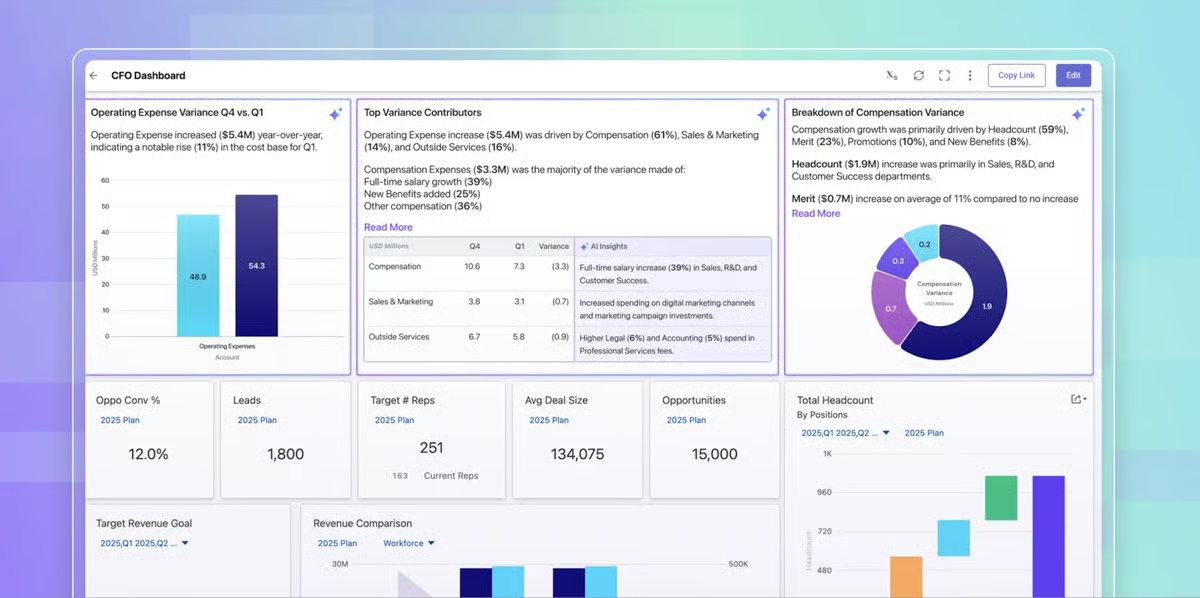
Template processing and report generation slow down for highly detailed scenarios, requiring teams to time updates carefully during peak forecasting periods. Dashboard design favors functional clarity over presentation flexibility, which can feel restrictive for teams seeking highly customized visuals. That functional focus keeps standardized reporting consistent and reliable across planning cycles.
Advanced configurations become more involved as usage deepens, with product enhancements following broader release cycles rather than rapid self-serve changes. Teams without a dedicated FP&A administrator feel this most as models and reporting structures grow, though this approach supports long-term platform stability and predictable behavior.
Taken together, Planful supports finance teams that prioritize consistency, control, and repeatable execution across planning and reporting. Based on review patterns and feature performance, it fits organizations that value dependable consolidation, structured workflows, and scalable FP&A operations over visual experimentation or lightweight planning tools.
“I like Planful because of its ease of use and customizable platform. It's a great help that support is available if needed. I find that setting up various forecasting scenarios and comparing variances is easy with Planful. The structured planning it provides is also very beneficial for my work.”
- Planful review, Marlena K.
“Security and internal controls could be a bit better. Planful is more finance and FP&A focused and it would helpful to have more attention to be given to more accounting functions. I am not sure if that is an impact of our implementation or if it is a limitation of Planful though.”
- Planful review, Ben W.
|
Software
|
G2 Rating
|
Free plan
|
Ideal for
|
|
IBM Planning Analytics
|
4.4/5
|
No
|
Large teams running complex, Excel-driven FP&A models
|
|
Anaplan
|
4.6/5
|
No
|
Enterprise connected planning across finance and operations
|
|
Workiva
|
4.5/5
|
No
|
Regulated financial reporting with audit-ready collaboration
|
|
Vena
|
4.5/5
|
No
|
Excel-centric FP&A with centralized governance
|
|
OneStream – Unified EPM
|
4.6/5
|
No
|
Unified enterprise planning, consolidation, and reporting
|
|
Datarails
|
4.6/5
|
No
|
Excel-based FP&A with automated consolidation
|
|
Planful
|
4.3/5
|
No
|
Scalable budgeting, forecasting, and consolidation
|
*These FP&A software products are top-rated in their category, based on G2’s 2026 Winter Grid Report. All offer custom pricing tiers and demos on request.
Got more questions? G2 has the answers!
If your planning workflows are deeply spreadsheet-driven and speed matters more than rigid structure, Excel-extended platforms will feel familiar and easier to adopt. For organizations managing multiple business units, currencies, or complex allocations, fully modeled platforms tend to provide stronger control, consistency, and scalability across planning cycles.
Tools that layer automation and governance on top of existing spreadsheet workflows usually show faster time to value. They reduce manual consolidation, version confusion, and rework without forcing a complete process redesign, which matters for lean finance teams with limited implementation capacity.
The best FP&A software depends on planning complexity, team size, and how tightly finance connects with the rest of the business. Platforms like Anaplan and OneStream suit enterprise environments with cross-functional planning demands, while Vena and Datarails work well for teams that want to scale without leaving Excel. For SaaS-focused finance teams, Mosaic offers structured metrics and faster setup. The strongest choice is the one that fits how your team actually models, collaborates, and reports.
Platforms with structured input workflows, clear ownership, and audit trails perform best in cross-functional environments. These reduce back-and-forth during budget cycles and limit reconciliation work when sales, operations, or department heads contribute data.
IBM Planning Analytics and Anaplan are consistently rated highest for scenario modeling on G2, with both supporting driver-based logic and multi-scenario comparison across connected models. Planful and Prophix also handle forecasting well within structured planning cycles. The deciding factor is whether your scenarios need to connect across functions or stay within a single financial model.
Multi-entity SaaS environments need consolidation that holds up across currencies, entities, and reporting standards without manual rollups. OneStream and IBM Planning Analytics handle complex, multi-entity consolidation at scale. Anaplan supports connected planning across finance, sales, and operations, which suits SaaS businesses with cross-functional dependencies. For mid-market SaaS teams that want structured metrics without enterprise overhead, Mosaic offers a faster path to visibility.
Auditability, role-based access, data consistency, and performance during peak planning cycles matter most. Tools that look flexible in demos but strain during budget season often create downstream risk at the leadership level.
Startups and smaller finance teams typically get the fastest value from platforms that automate consolidation and reporting without requiring heavy implementation. Datarails and Mosaic both target this segment, layering structure on top of existing spreadsheets or accounting systems. Solver also fits smaller teams that want flexible Excel-based reporting with centralized data. The priority for cost-conscious teams should be reducing manual close and forecast effort first, then expanding into more advanced planning as the team grows.
Real-time executive dashboards depend on how current the underlying data stays and how easily finance can shape views for leadership. Mosaic scores well here with canvas-based reports and real-time data updates rated 94% on G2. Workiva supports dashboard visibility across close and compliance workflows, while Datarails translates Excel-based models into storyboard views for business stakeholders. The key is whether dashboards pull from a governed, centralized data layer rather than static exports.
Timelines vary based on model complexity, data sources, and how much existing planning logic needs to migrate. Lighter platforms like Mosaic and Datarails can be operational within weeks for teams with clean data and focused use cases. Mid-range tools like Vena and Planful typically require a few months of guided implementation. Enterprise platforms like Anaplan, OneStream, and IBM Planning Analytics involve longer rollouts, often spanning several months, especially when models span multiple entities and functions. Staged rollouts that let teams run spreadsheets in parallel tend to lower adoption risk.
Hybrid businesses need planning that accommodates different revenue models, cost structures, and operational drivers within the same environment. Anaplan's connected modeling supports this well, allowing finance to build logic for both recurring product revenue and variable services revenue without maintaining separate models. Planful and Vena also handle multi-segment budgeting where planning assumptions differ across business lines. The right fit depends on whether your segments share enough structure to consolidate cleanly or need distinct planning workflows.
Aligning FP&A with OKRs requires planning tools that connect financial targets to operational drivers and make progress visible across teams. Anaplan supports this through connected models that link financial plans to sales, operations, and go-to-market inputs. Mosaic helps smaller teams track SaaS KPIs alongside financial plans in real time. Workiva adds value when alignment needs to carry through into governed reporting and board-level visibility. The common thread is choosing a platform where financial outcomes and business objectives live in the same planning layer.
Workiva leads here with audit-ready reporting, SEC and XBRL compliance support, and version control rated 94% on G2. Every change is logged with clear attribution, which makes close cycles and regulatory filings more defensible. OneStream and Vena also provide strong governance controls, with role-based permissions and centralized data management that support auditability across complex planning environments. For teams where compliance is non-negotiable, the deciding factor is whether the platform's audit trail extends across all connected reporting workflows or only covers individual planning modules.
Mid-sized companies typically need more structure than spreadsheets can sustain but without the implementation weight of full enterprise platforms. Vena fits this well by extending Excel with centralized governance, and Planful offers end-to-end FP&A workflows designed for growing finance teams. Datarails works for teams that want automated consolidation without abandoning their existing Excel models. Solver is another strong option for mid-market teams focused on flexible financial reporting. The right choice usually comes down to whether the team prioritizes familiar spreadsheet workflows or a more structured, template-driven planning environment.
If consolidation, close, and planning are tightly linked, unified platforms reduce handoffs and reconciliation. If planning is the primary bottleneck, a focused FP&A tool can deliver faster impact without adding system overhead.
FP&A decisions rarely fail all at once. They surface through missed assumptions, slow replans, and growing uncertainty around which numbers can be trusted. Over time, those gaps compound. Teams spend more effort reconciling versions, defending logic, and rebuilding models than shaping forward-looking insight. At scale, that drag becomes structural and hard to unwind.
What separates strong outcomes is how well the system supports planning under real pressure. When models are governed, changes are traceable, and scenarios can be tested without breaking trust; finance stays in control of the narrative. Cognitive load drops because teams know which version is right and how quickly they can respond. When those guardrails are weak, manual work creeps in, timelines slip, and confidence erodes across leadership.
The best FP&A software is the one that fits how your finance team models, collaborates, and scales planning under pressure. If a platform improves forecast confidence without adding process friction, it is likely the right long-term fit.
Want stronger financial oversight with less audit risk? Explore leading financial audit software on G2 to improve compliance and keep reviews audit-ready.


In the world of corporate bonds, risk management is everything.
 by Harshita Tewari

Recently updatedSummer 2026 Grid® Report · Published May 26, 2026 This guide was last...
 by Yashwathy Marudhachalam

I’ve worked closely with finance and accounting teams to understand their operational...
/DarshayitaThakur-OrangeBG.webp) by Darshayita Thakur
by Darshayita Thakur