


Feedback management tool that integrates workflows and organizes ideas for product execution. ($39/month)
When customer feedback lives in disconnected surveys, Slack threads, and support tickets, revenue leaks quietly. High-risk accounts churn before you see the warning signs, product decisions rely on partial data, and executives lack a clear view of what’s actually driving retention. That’s why many enterprise leaders are actively evaluating the best enterprise feedback management software — not as a CX upgrade, but as a safeguard against preventable churn and misaligned decision-making.
The stakes are rising fast. 77% of consumers view brands more favorably if they seek out and apply customer feedback. At the same time, PwC’s 2025 Customer Experience Survey found 70% of executives say customer expectations are evolving faster than their company can adapt, reinforcing that real-time feedback and responsive action are vital for enterprise competitiveness.
When expectations shift rapidly around personalization, speed, and seamless experiences, delayed insights create a widening gap between what customers want and what organizations deliver — impacting revenue, retention, and brand perception. If feedback is reviewed weeks after an interaction or buried across disconnected systems, teams miss the opportunity to course-correct in the moment.
To make the process of finding the right feedback management tool stress-free, I evaluated the best enterprise feedback management tools, shortlisting the top nine based on G2 user reviews. I focused on tools with the best data analysis, ease of setup, AI automation, and other essential features for scale feedback analysis.
Feedback management tool that integrates workflows and organizes ideas for product execution. ($39/month)
*Based on G2's Winter 2026 Grid Reports, these enterprise feedback management software are top-rated in their category. I’ve added the starting price of their paid plan where available, along with their standout features for easy comparison.
I don’t see feedback management as just something we do after an interaction anymore. Today, companies need to be collecting, understanding, and acting on feedback continuously from customers, employees, and digital channels. When that feedback lives in different tools or gets stuck in static reports, insights come too late, leading you to make decisions without the full picture.
The enterprise feedback management market is expected to grow from $1.88 billion in 2024 to $3.56 billion by 2029, indicating that more organizations are investing in systems that can handle feedback in real time and at scale. Manual approaches just can’t keep up with enterprise needs anymore.
Because of that, modern feedback management platforms are becoming essential. They help me and other users bring all feedback into one place, automate analysis, and deliver actionable insights faster to continuously improve experiences consistently across the organization.
I looked at G2’s Winter Grid Report 2026 to create my shortlist based on the G2 score, which is determined based on customer satisfaction, market presence, and user reviews.
Next, I analysed patterns in G2 review data for all the tools by using AI, looking at key points like ease of setup, features, user experience, and friction while using the dashboard to understand what aspects of the software stood out and where there were shortcomings in the user experience.
I also looked at the respective vendor documentation to understand specific capabilities that were unique to the product. The screenshots in the article were taken from the G2 product pages or vendor documentation.
When I started comparing enterprise feedback management tools, I wanted to understand what actually works for large, fast-moving teams. This is why I focused on how easily each platform fits into real workflows, scales across teams, and helps turn customer feedback into actions that genuinely improve the customer experience.
After evaluating 20 different enterprise feedback management products, I narrowed it down to the 9 best solutions that earned a spot in this listicle based on real usability, scalability, and impact.
The list below contains genuine user reviews from the Enterprise Feedback Management software category page. To be included in this category, a solution must:
*This data was pulled from G2 in 2026-2025. Some reviews may have been edited for clarity.
G2 rating: 4.4/5
Salesforce Service Cloud is best known as a powerful CRM that helps teams manage customer relationships all in one place. Service Cloud also adds a feedback management layer, making it easy for support and CX teams to collect customer feedback directly from service interactions, track sentiment across the customer journey, and connect those insights back to cases and customer records without ever leaving Salesforce.
Feedback insights can be directly embedded into automated workflows — whether routing cases based on sentiment, escalating low CSAT scores, or triggering follow-up tasks for account managers. This tight connection between feedback and workflow automation ensures customer insights don’t just sit in dashboards but actively drive operational action.
The AI Survey Generation feature further strengthens the platform’s value. Enterprises can quickly create surveys tailored to different audiences or industries, saving time and ensuring feedback programs are relevant and well-structured from the start. As a result, launching and scaling feedback initiatives becomes far more efficient and less reliant on manual effort.
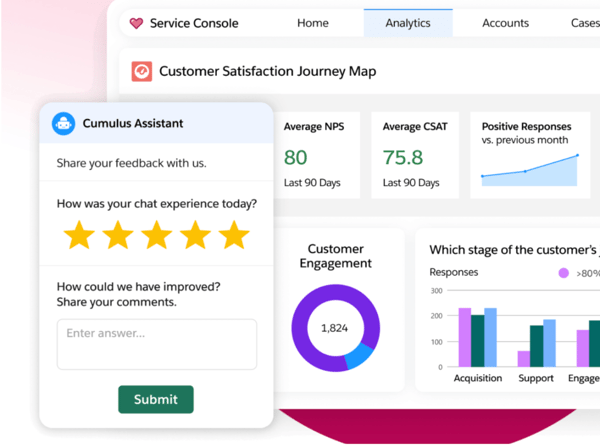
Another strong advantage, in my view, is AI Survey Translation. Supporting 18 languages makes it much easier for global organizations to run consistent voice of the customer (VoC) programs across regions while still delivering localized survey experiences. This is especially valuable for enterprises that need standardized reporting across international markets.
I especially like how AI Survey Summarisation reduces manual analysis. The ability to instantly extract trends from individual surveys or entire datasets helps teams move faster. These insights can automatically update CRM records, trigger cases, or feed into dashboards, something that likely contributes to the strong 89% real-time analysis rating by G2 users. This automation turns feedback into actionable intelligence rather than static data.
Dynamic surveys are another major pro. Questions can adapt in real time based on responses, which makes it easier to scale CSAT and NPS measurement across channels while keeping the survey experience more personalized and efficient. I believe this flexibility also helps improve response quality and completion rates.
Salesforce Service Cloud’s approach to compliance and data privacy as a significant strength. It provides vendor-ready security documentation, support for DPIAs, and audit posture resources for enterprise businesses. The inclusion of data omission and privacy-first data capture also gives confidence that users’ personal data is protected and safeguarded. For organizations operating under strict regulatory requirements, this level of compliance support is a critical differentiator. In terms of satisfaction ratings, Salesforce Service Cloud scores 86% for quality of support, and 88% say they would recommend it to others.
While Salesforce Service Cloud is an incredibly powerful platform, G2 reviewers mention complexity and a learning curve at first. There are many features, settings, and configuration options, which means even simple tasks can take more steps than expected and often require admin or technical expertise. That said, once the system is properly configured and users are trained, it becomes very stable and flexible, allowing teams to tailor workflows, automation, and reporting exactly to their needs.
Another challenge is the overall cost, as licensing fees and feature-based add-ons can increase quickly, especially as teams scale or require advanced functionality. However, the investment often reflects the depth of capabilities available, and for organizations that fully leverage the platform, Service Cloud can deliver strong long-term value.
Overall, while Salesforce Service Cloud requires time, resources, and planning to implement effectively, it remains a scalable solution for teams that need enterprise-level service management.
“What I like most about Salesforce Service Cloud is how smoothly it brings customer information, cases, and communication into one place. It helps me respond faster and stay organized without jumping between different tools. The automation and workflow features also save a lot of time, especially when handling repeated tasks or follow-ups.”
- Salesforce Service Cloud review, Shahrukh K.
“I find that setting up Salesforce Service Cloud is always somewhat difficult. It's not exactly the most straightforward solution to set up. Everyone has different needs and configurations, which usually require a hefty amount of resources to implement and integrate the relevant components. It is crucial to have people with the relevant technical skills and capabilities. Additionally, I would love to see improvements in implementation and quicker time to value. Simplification of the process would enhance my experience significantly.”
- Salesforce Service Cloud, Alexander R.
Related: Interested in exploring other survey tools? Read the listicle on the best survey tools on our G2 learning platform.
G2 rating: 4.4/5
HubSpot Service Hub is an AI-powered, omnichannel customer support platform that helps teams manage tickets, conversations, and customer relationships at scale while staying connected to marketing and sales data.
What stands out to me is how naturally feedback management fits into everyday service operations. Enterprises can easily deploy CSAT, NPS, and CES surveys at key moments in the customer journey and monitor results in real time. This seamless integration into existing workflows ensures feedback collection feels like a built-in process rather than an added task for service teams.
I saw a lot of praise from users for the service analytics and feedback dashboards, which help teams quickly understand customer sentiment and performance trends. That real-time visibility aligns well with the strong 90% quality of support and 91% ease of doing business with ratings in the data. Having immediate access to actionable insights allows teams to respond proactively and continuously refine the customer experience.
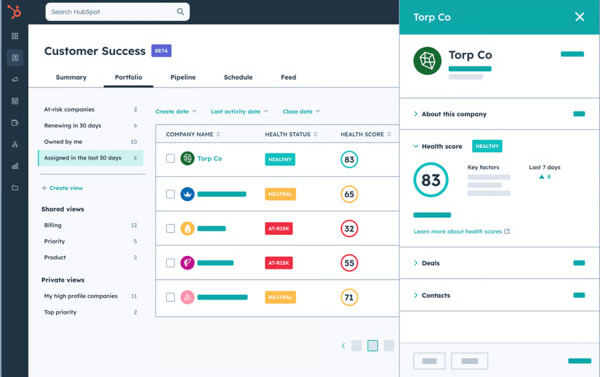
The platform shines in usability. With 88% ease of use and admin, enterprise teams can manage global feedback programs without excessive setup. Multi-language surveys, customizable templates, and native integrations with the broader tech stack make it easier to scale VoC initiatives across regions. This balance of flexibility and simplicity enables organizations to expand their programs confidently without adding operational complexity.
Another major strength is how effectively the platform centralizes customer interactions. Multiple users highlight how contacts, tickets, conversations, notes, and communication history are stored in one place, making it easier for teams to stay aligned and respond efficiently. The structured ticketing system, with status tracking and priorities, ensures that no request slips through the cracks and that follow-ups are handled consistently.
Automation is consistently praised as a standout capability. From routing leads based on region to auto-assigning tickets, sending follow-up emails, and updating statuses, the system reduces repetitive manual tasks and streamlines workflows. Users note that this not only saves time but also improves consistency and efficiency across service operations. By automating routine processes, teams can focus more on delivering personalized support rather than managing administrative work.
According to G2 reviews, while HubSpot is very intuitive and easy to implement, it can feel limiting as support operations scale. Basic ticketing, automation, and reporting work well out of the box, but more advanced service analytics or multi-team routing can require compromises. But this simplicity makes the platform approachable, agents ramp up quickly, training is minimal, and teams can start delivering value fast
Another challenge is scaling beyond core support use cases. As ticket volumes grow or service structures become more layered, certain enterprise-level capabilities like granular permissions, advanced routing, or deeply customized processes may not be as flexible as expected. Still, HubSpot’s unified ecosystem is a major strength, keeping service tightly connected with CRM, sales, and marketing data for better alignment and visibility.
Overall, I see HubSpot Service Hub as a strong choice for enterprises that want scalable feedback management tightly integrated with customer support, marketing, and sales data.
“We use the surveys all the time. Super simple to design, deploy, and display results.”
- HubSpot Service Hub review, Dr. Ronaldo C.
“Some advanced features can be a bit complex to set up without support, and certain customizations are limited unless you're on a higher-tier plan.”
- HubSpot Service Hub review, Deborah H.
Related: Read more on VOC Analytics and how it helps businesses with Feedback Management on G2’s Learning Hub.
G2 rating: 4.9/5
Glassbox is a digital experience analytics platform that helps organizations improve customer experience through deep, data-driven insights into real user behavior. By capturing and analyzing web and mobile interactions in real time, it enables teams to see exactly how customers navigate digital journeys, where they encounter friction, and what impacts conversions and retention.
What stands out most to me is the Augmented Journey Map™, which acts as a launchpad for analyzing real customer journeys across web and mobile. It visualizes the full customer experience and surfaces the issues that truly impact conversions, retention, and revenue. This makes it easier for teams to prioritize fixes that drive measurable business outcomes.
I really like how CX Listen reframes feedback management. Because the majority of customers never complete surveys, Glassbox uses AI to analyze behavioral signals from real user interactions, capturing insights from the silent majority. This provides enterprises with a far more accurate and comprehensive understanding of customer sentiment and friction across digital journeys.
According to G2 Data, feedback Collection earns a 100% rating — it’s passive, continuous, and incredibly rich in insight. Instead of interrupting users with forms or pop-ups, Glassbox gathers behavioral data in real time, delivering ongoing visibility into experience gaps and performance issues without disrupting the customer journey. I think this non-intrusive approach allows teams to uncover authentic user behavior while maintaining a seamless digital experience.
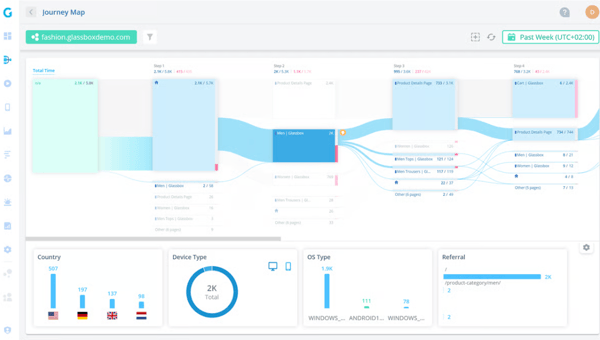
Glassbox also receives 100% scores across setup, administration, requirements, and support, highlighting its operational strength. This level of reliability is especially important for organizations operating in complex, regulated environments such as financial services, insurance, and retail, where compliance, security, and scalability are critical. To me, these perfect scores reinforce its position as a platform built to meet enterprise-grade expectations without compromising stability or performance.
For organizations evaluating top tools for real-time feedback analytics, Glassbox stands out by capturing web and mobile interactions as they happen and immediately surfacing friction points. By fast-tracking issue identification and resolution, it empowers teams to optimize digital experiences faster and with greater confidence.
Glassbox is a powerful analytics platform with extensive data depth and configuration capabilities. For some users, particularly those without a technical background, the breadth of features can require an initial learning period. Over time, however, many find that the level of insight and visibility the platform provides justifies the ramp-up, and responsive customer support helps facilitate a smoother onboarding experience.
Performance and data accessibility are also mentioned in G2 reviews. Slow session loading and limited data retention can disrupt analysis, but when the platform is functioning as expected, Glassbox provides detailed session replays and behavioral insights that help teams quickly identify issues and improve digital experiences.
Overall, I see Glassbox as a best-in-class solution for enterprises that want to move beyond traditional surveys and truly understand customer experience. It excels at turning behavioral feedback into prioritized, revenue-backed actions.
“Glassbox allows me to see exactly what the users saw. There's no more guessing or trying to blindly replicate an issue.”
- Glassbox review, Zach W.
“One limitation is that it only allows you to review three months of data.”
- Glassbox review, Rosel G.
Related: Interested in exploring other software management tools. Here’s a rundown of the top test management tools.
G2 rating: 4.8/5
On reviewing Simplesat and looking at G2 user feedback, it comes across as a clean, friendly, and highly usable feedback management platform that prioritizes action over complexity.
One of the most consistently highlighted strengths of Simplesat is its exceptionally responsive support team. G2 ratings indicate device responsiveness at 95%, which means surveys perform seamlessly across desktop and mobile devices. While chat begins with an AI bot, users emphasize how quickly they’re connected to knowledgeable human agents who take the time to fully understand complex issues. Reviews frequently mention patient, thorough troubleshooting, especially around integrations with fast, effective resolutions that reinforce trust in the platform.
Ease of implementation is another recurring theme. Users consistently describe setup as straightforward, with surveys and integrations launched quickly and without unnecessary technical friction. Survey deployment 94% exceeds the category average 89%, showing users find it easy and efficient to launch surveys. Whether deploying NPS and CSAT surveys or connecting to platforms like HubSpot and other support tools, teams are able to get up and running with minimal effort.
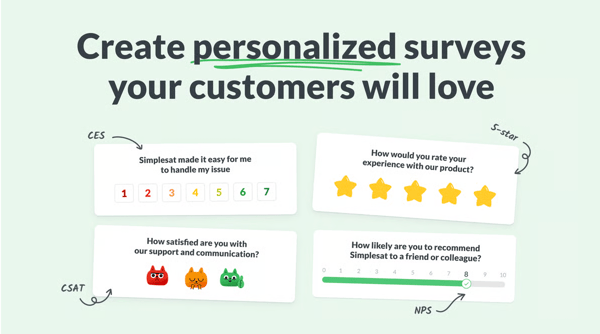
The platform’s user-friendly interface further strengthens adoption. Many users highlight how intuitive and easy it is to navigate, allowing them to manage surveys, feedback, and integrations without getting lost or relying heavily on support. The clean design supports efficiency while adapting well to different workflows.
Centralized and organized feedback visibility also stands out. Users appreciate being able to see star ratings, identify which agent handled each interaction, and review detailed customer comments in one place. This structured view makes it easier to monitor performance, identify improvement opportunities, and maintain accountability across teams.
Support quality remains a consistent advantage beyond initial setup. Users frequently mention quick resolutions, prompt modifications when needed, and an overall proactive approach that minimizes downtime and keeps operations running smoothly. For SimpleSat specifically, I see this as a major differentiator for MSPs and service-driven teams that can’t afford disruptions in their feedback workflows.
Finally, the ability to set up alerts and route feedback into other tools enhances executive visibility. Their trigger alerts specifically have a rating of 94% due to strong performance in helping teams act quickly on customer feedback. By pushing customer sentiment into leadership dashboards or collaboration platforms, Simplesat ensures that feedback reaches decision-makers quickly and remains actionable at every level of the organization.
One thing G2 users have noticed with Simplesat is that access to certain advanced features, such as SSO or expanded capabilities, depends on the pricing tier. While this can require an upgrade as teams grow, the core functionality remains strong and reliable, and the pricing structure is still reasonable compared to many alternatives.
Another area for improvement is around integrations and customization. Some integrations can require occasional re-authentication, and branding or configuration changes don’t always apply automatically. However, these are relatively minor friction points, and Simplesat’s ease of use and highly responsive support team help ensure the platform continues to work well for day-to-day feedback collection.
Overall, I see Simplesat as a strong choice for enterprises that want colorful branded surveys, clear insights, real-time alerts, and an easy way to turn feedback into action. It delivers a smooth, effective feedback experience that teams actually enjoy using.
“Easy to use platform. Extremely responsive Customer service! (Thank you as always Angelika!) When features are not available, the customer service/customer success team is quick to include them on their roadmap and bring them to life. Love that their team is dedicated to customer success!”
- Simplesat review, William L.
“I find the integration with other platforms, like Zendesk, problematic. It isn't seamless, as the integration sometimes disconnects, requiring me to log in again, which disrupts my workflow.”
- Simplesat review, Rainel M.
G2 rating: 4.4/5
Aha! stands out as a highly structured, enterprise-grade platform designed to transform customer feedback into actionable product strategy. Rather than treating feedback as a passive collection exercise, it positions insights as a core driver of roadmap direction, ensuring product decisions are grounded in validated demand. Their ease of doing business rating is at 97%, which exceeds the category average 94%, indicating a strong vendor partnership.
One of its strongest advantages is how deeply feedback is embedded into product planning. Their feedback collection is rated 99% — significantly above the category average 92%, making it a standout strength. Instead of existing in a separate tool or spreadsheet, customer input becomes part of the structured planning process, influencing prioritization and long-term product vision. I find that this integration helps product leaders make roadmap decisions with greater confidence and transparency.
Aha! Ideas makes it easy to collect customer requests, track voting trends, and measure demand at scale. This structured approach helps product teams quantify interest, identify recurring themes, and validate which features or improvements will have the greatest impact. This reduces guesswork and helps teams focus resources on initiatives that truly resonate with users.
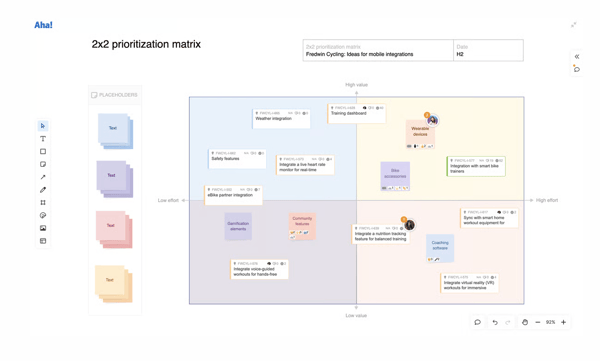
Feedback flows directly into roadmaps, initiatives, and development workflows. By connecting insights to execution, teams can prioritize work based on real customer impact rather than assumptions, reducing misalignment between strategy and delivery. I think this direct connection strengthens accountability and ensures that the customer voice is reflected in shipped features.
The broader ecosystem, including Aha! Discovery for customer interviews, whiteboards for innovation sessions, and knowledge management for documentation ensure feedback informs every stage of the product lifecycle. From early research to ideation and execution, insights remain connected and visible. To me, this end-to-end visibility prevents valuable context from getting lost as projects move from concept to launch.
The idea portal functionality encourages collaborative brainstorming while allowing customers and internal teams to submit and vote on suggestions. This transparency helps organizations build community engagement while gaining clearer visibility into what matters most to users. I believe this openness also strengthens trust by showing customers that their ideas are heard and considered.
Aha! organizes customer and employee feedback within a structured product workflow, making information easy to access and act on. By centralizing data in an organized system, teams can quickly surface relevant insights and maintain alignment across product, engineering, and leadership. I see this centralization as a key driver of cross-functional collaboration and more consistent product outcomes. Real-time analysis is at 93%, enabling teams to make timely, data-informed decisions.
G2 users have said that customization and reporting can feel rigid once you hit enterprise-scale complexity. Adapting reports or workflows to very specific internal processes can take extra effort or require workarounds. That said, I also see why Aha! favors consistency over flexibility. The standardized structure helps enterprises maintain clean data, alignment across teams, and clear traceability from feedback to roadmap decisions
Some users mention that advanced views and workflows like Gantt charts, automations, or complex planning setups can feel less intuitive at first. This complexity often comes from the depth of functionality Aha! offers, and once teams are familiar with the system, they benefit from powerful, structured workflows that support long-term planning and cross-team alignment.
Overall, I see Aha! as an excellent choice for enterprises that want robust feedback collection and transparent prioritization between customer voice and product strategy.
“Very easy to set up, customize to your workflow and taxonomy, and integrate with other tools your organization already uses. Customer Support is Excellent. I have been working with Peter Whisenant, and he has been instrumental in my selection of tools and decision to go with Aha!”
- Aha! review, Olga C.
“I would have to be really nitpicky to find something I don't like about Aha. If there is anything, it is just that the product has gotten so mature that there are a lot of settings, and it takes some time to learn. That is true of most mature platforms, so it's hard to complain about it!”
- Aha! review, Anna M.
G2 rating: 4.4/5
UserTesting stands out for its strong qualitative depth, centered on capturing feedback from real people in real contexts. Instead of relying solely on numerical scores, the platform records video, voice, and behavioral responses, giving enterprises a richer understanding of customer experiences.
One of its biggest advantages is its ability to explain the “why” behind customer behavior. By observing how participants think, react, and navigate experiences, teams gain insight into motivations, friction points, and decision drivers that traditional surveys often miss. I think this qualitative depth makes UserTesting especially valuable for product and UX teams that need context, not just metrics.
The platform is also built to support enterprise-scale research. With an AI-driven engine, a global participant network, and access to expert-led services, organizations can run ongoing feedback programs without rebuilding processes each time. In my view, this scalability allows teams to embed research into continuous product development rather than treating it as a one-off activity.
System reliability and ease of setup further reinforce its enterprise readiness. Strong G2 scores for system monitoring 93% and setup 90% suggest the platform performs consistently and can be implemented efficiently across teams. I believe this reliability is critical for enterprises running time-sensitive studies tied to product launches or campaign rollouts.
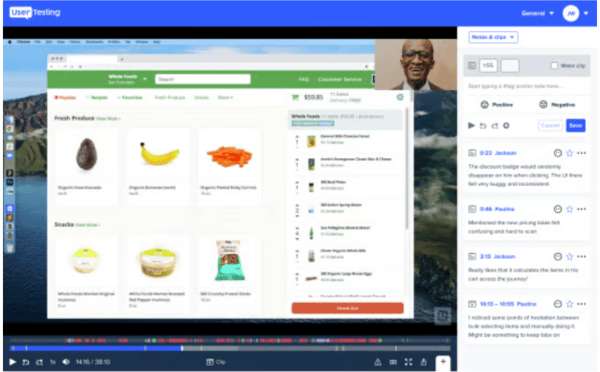
UserTesting supports both moderated and unmoderated testing, giving enterprises flexibility in how they gather insights. Teams can run fast validation studies for messaging or UX changes, or conduct in-depth, interview-style sessions for more strategic initiatives. To me, this flexibility ensures organizations can match research methods to business priorities without switching platforms.
The platform enables feedback to become part of continuous decision-making rather than a one-time research effort. By making it easier to test, validate, and iterate regularly, UserTesting helps embed customer insight directly into product, marketing, and experience strategies.
One challenge I’ve noticed users have experienced with UserTesting is maintaining consistent participant quality. While the platform offers access to a large and diverse participant pool, some responses can feel rushed or misaligned with study requirements. That said, with the right screening and moderation, UserTesting still enables teams to collect valuable insights quickly and at scale.
One consideration is the platform’s complexity, as the interface can be challenging for newer users, but with familiarity, it becomes a powerful and highly capable tool for managing and analyzing feedback effectively.
Overall, I see UserTesting as a best-fit solution for enterprises that value depth of insight over surface-level metrics. It’s not a lightweight survey tool, but for organizations serious about understanding customer behavior, reducing friction, and building a customer-obsessed culture, it delivers insight that’s hard to replicate.
“The thing I like best about UserTesting is how quickly and conveniently I can reach our customers and get feedback so that we can quickly make decisions and move on with product development.”
- User Testing review, Lucas L.
“I wish there were a built-in feature to synthesize information a bit easier to make data collection from user interviews more seamless.”
- User Testing review, Mikaela B.
G2 rating: 4.5/5
I see Kapture CX as a platform that’s built less like a traditional feedback tool and more like an operational intelligence layer for customer experience. It’s clearly designed for enterprises that want feedback to drive action immediately. With an ease of use of 94%, it’s indicative that users find the platform intuitive and easy to navigate.
Instead of storing insights for later review, the system enables teams to respond quickly, reducing the lag between identifying an issue and implementing improvements. Feedback is woven directly into day-to-day support workflows. This embedded approach ensures that insights are captured within live interactions rather than relying solely on periodic surveys or manual QA reviews.
Kapture CX provides a centralized, unified platform for managing customer interactions across channels. Multiple reviews emphasize how email, chat, social media, calls, and even app-triggered SOS tickets flow into a single dashboard. This consolidation reduces silos, improves visibility, and ensures no customer query falls through the cracks.
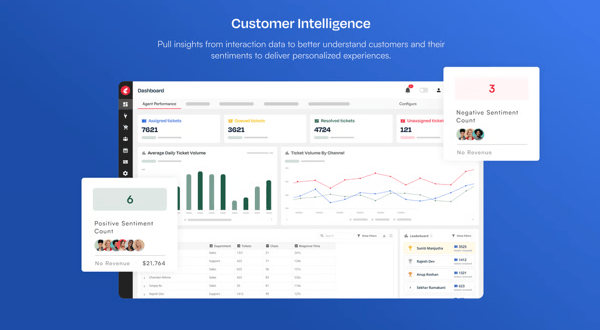
Ease of implementation and usability also stand out consistently in user feedback. Reviews frequently mention the intuitive interface, smooth onboarding process, and quick initial setup. Agents can adopt the system rapidly, and teams benefit from reliable performance and streamlined workflows without a steep learning curve.
The platform evaluates every call, chat, and customer interaction in real time. This continuous monitoring increases visibility across support operations and minimizes blind spots in performance tracking. The level of real-time oversight helps teams catch issues early before they impact customer satisfaction at scale. Their great to do business with rating is 95%, which exceeds the category average 94%, reflecting strong customer relationships and positive vendor experience.
For Kapture CX specifically, this means supervisors can track agent adherence, tone, resolution quality, and escalation risks as conversations unfold rather than after the fact. In my view, this proactive visibility strengthens quality assurance programs, supports faster coaching interventions, and reduces the likelihood of repeat issues affecting multiple customers.
AI Agents actively scan conversations, identify patterns, and surface specific fixes. By pinpointing areas of friction automatically, teams can resolve issues faster and reduce the time spent manually reviewing interactions. The automation allows support leaders to focus more on strategy and coaching rather than spending hours analyzing transcripts.
Customer insights are directly mapped to operational metrics such as AHT, FCR, and deflection. This tight connection between feedback and performance outcomes makes it easier for enterprise leaders to link CX improvements to measurable business impact and prioritize initiatives that deliver tangible results. I think this direct alignment strengthens executive buy-in and supports data-driven decision-making across the organization.
One challenge G2 users have experienced with Kapture CX is performance during peak usage. When call volumes are high or multiple tickets and modules are in use, the system can occasionally lag or take longer to load. While this can disrupt workflows at busy times, it feels more like a scalability and optimization issue than a core product limitation.
G2 reviewers also talk about a learning curve. With multiple integrations, AI workflows, and customization options, getting everything tuned just right can take effort — especially in complex enterprise environments. But that upfront investment is what allows the platform to orchestrate automation across systems instead of operating in isolation.
95% of users rate it 4 or 5 stars, which reinforces overall product reliability and customer satisfaction at scale. I’d describe Kapture CX as a serious platform for organizations that want feedback to fuel execution.
“I like the simple and neat UI of Kapture CX. The integration of all channels into a complete omni-channel solution is a big plus, as it allows our entire CX to be handled in a single window, which is time-saving for our agents and provides faster resolution to customers. The transition from CRM 360 to Kapture CX was smooth and easy.”
- KaptureCX review, Jegan G.
“There’s not much to dislike, but the platform could be a bit faster and smoother while switching between tickets. Some features also take a few extra steps to access, so a more streamlined interface would make the overall experience even better.”
- Kapture CX review, Akshay D.
G2 rating: 4.5/5
Nicereply comes across as a purpose-built platform for teams that want to collect more feedback, faster, without introducing friction into existing workflows. G2 user sentiment suggests the platform is designed to increase response volume while keeping processes streamlined. Users have rated it a 92% for reliable setup experience, suggesting onboarding is smooth and straightforward.
One of its biggest strengths is how naturally it fits into everyday customer interactions. Rather than relying solely on standalone surveys, feedback is embedded directly into the flow of communication, making it feel like a seamless extension of support conversations. I find that this approach makes customers more likely to respond because it doesn’t interrupt their experience. It also helps teams capture feedback while the interaction is still fresh in the customer’s mind. It meets requirements rated by 91% for G2 users, showing the platform consistently delivers on core expectations.
Technicians can quickly view their own ratings and read customer comments tied directly to their service interactions. This level of transparency fosters a strong sense of ownership and accountability, while also recognizing great work in real time. Rather than serving as just another metric, feedback becomes a powerful coaching tool and source of motivation that encourages teams to continuously improve.
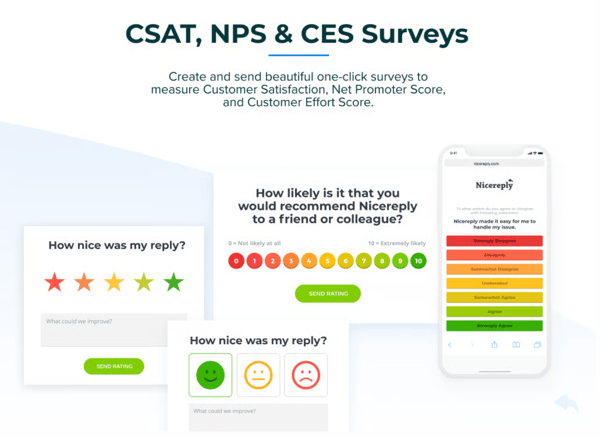
The platform supports multiple feedback channels, including in-signature surveys, post-resolution emails, website pop-ups, and shareable survey links. This flexibility helps teams meet customers where they already are, increasing visibility and accessibility. This omnichannel approach is especially valuable for enterprises serving diverse customer bases with different communication preferences. It also allows organizations to test and optimize which channels drive the highest engagement.
This embedded approach helps address common enterprise challenges such as low response rates, delayed feedback cycles, and survey fatigue. By making feedback lightweight and contextual, teams can gather insights more consistently and in real time. This creates a steady stream of actionable data instead of sporadic, one-off survey results. It also allows leaders to spot trends earlier and act before small issues grow into larger problems.
Survey configuration is flexible without being overwhelming. Teams can adjust wording, select different rating scales, and add follow-up questions to capture more relevant and actionable insights when needed. I appreciate that this balance keeps the platform adaptable while still being easy to manage. It gives teams control over the feedback experience without requiring deep technical expertise. Nicereply has a strong ease of use, 95% – above the category average 92%, indicating users find the platform intuitive and easy to navigate.
CRM integrations further strengthen the workflow. Customer and agent data sync automatically, ensuring feedback is tied to the right interactions and reducing the need for manual data entry or reconciliation. I see this as a major time-saver for service teams who want accurate reporting without extra administrative work. It also improves data accuracy, which makes performance tracking and coaching more reliable.
One challenge G2 users have experienced is ensuring feedback remains unbiased. Responses can sometimes lean toward extremes, which can make insights harder to interpret. However, the ease of use encourages high response rates, and introducing additional rating criteria would help add useful context without complicating the experience.
Another area for improvement is customization. While the platform works smoothly and is easy to deploy, survey visuals, branding options, and reporting categories feel somewhat limited. Even so, its simplicity allows teams to collect feedback consistently, and adding flexibility would only enhance an already dependable solution.
Overall, I see Nicereply as a strong choice for enterprises that want high response rates, minimal setup, and actionable feedback embedded directly into customer conversations.
“Nicereply has been providing us an instant Customer feedback. In the recent 2022
Customer Happiness Awards, we were recognized as the Top#1 in Customer Satisfaction. :)”
- Nicereply review, Verified User in Information Technology and Services.
“The only drawback I’ve noticed is that the customization options, while robust, can be a bit overwhelming for new users who might need a more simplified setup process.”
- Nicereply review, Andrew A.
G2 rating: 4.8/5
SmileBack is a customer feedback management platform that helps B2B and SaaS companies capture, analyze, and act on real-time feedback. It turns customer insights into clear, actionable data to improve satisfaction and retention.
I find that it is tightly aligned with how MSP service teams actually operate. With a 97% G2 score for “meets requirements,” G2 feedback suggests the platform fits naturally into MSP workflows rather than forcing teams to adapt their processes around the tool. To me, that level of alignment reduces friction during adoption and helps teams see value faster without overhauling their existing processes.
Ease of use stands out as a major strength, with a 98% G2 score. The platform feels intuitive in day-to-day use, making adoption smooth for technicians and service teams without adding operational friction. I think this kind of usability is critical for busy teams that need to focus on resolving tickets quickly rather than learning a complicated system.
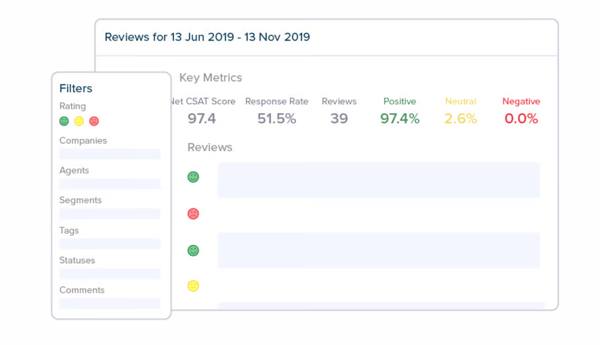
Administrative simplicity is another advantage, reflected in a 96% ease-of-admin G2 rating. MSP leaders can configure and manage the platform without unnecessary complexity, which is especially important in fast-paced service environments. I believe this makes it easier for leadership to maintain control and scalability without needing dedicated technical resources to manage the system.
Feedback collection is effortless at scale. One-click CSAT and NPS surveys automatically trigger at ticket closure, project milestones, or key service interactions, ensuring consistent outreach without manual effort. I like that this automation helps teams gather reliable feedback consistently without adding extra tasks to their already busy workflows.
Importantly, this automation doesn’t add extra work for technicians. Feedback requests are embedded directly into the service workflow, allowing clients to respond instantly while teams stay focused on delivering support. The seamless integration helps maintain productivity while still keeping customer feedback at the center of service improvement.
Real-time insight further strengthens the platform’s value. With 96% for real-time analysis and 95% for both trigger alerts and real-time action, teams can identify dissatisfaction immediately, respond before issues escalate, and coach technicians proactively to reduce account-level risk. This immediacy turns feedback into a preventative tool rather than a reactive report.
SmileBack is designed specifically for MSPs, rather than for broad, cross-industry enterprise feedback programs. This narrow focus may limit its flexibility and scalability for organizations outside the MSP space; however, the same clear positioning focuses it to deliver strong, tailored performance for the audience it serves.
While the templated reports provide clear day-to-day visibility, larger MSPs managing multiple clients or service tiers may want more advanced comparisons or deeper analytics. That said, because of the simplicity, the results are clean and easy to present without overwhelming stakeholders, which helps keep conversations focused and productive.
I see SmileBack as a strong choice for MSPs that want high response rates, instant visibility, and automated follow-up tied directly to service delivery.
“I like how easy it is to set up. I have helped a lot of partners implement SmileBack, and it doesn't take much time at all. I also like the automations to create a ticket when a negative survey is received.”
- Smileback review, Cassie K.
“Not much, maybe more reporting options if I have to say anything.”
- Smileback review, Eileen W.
Need more clarity on EFM? Read these FAQs.
Enterprise Feedback Management is an enterprise-level tool used by companies to identify challenges in the customer journey experience.
This works by creating custom surveys, analytics, AI insights, and behaviour data so teams within an organization can take action on things using the right data. Prioritize customer feedback and make decisions on future product releases.
EFM platforms can be powerful, but they often come with trade-offs. They tend to be expensive and complex to implement, require time and internal ownership to turn feedback into action, and can overwhelm teams with large volumes of data if prioritization isn’t well defined.
HubSpot Service Hub and Simplesat are great picks. They offer customized templates with standard surveys and easy-to-manage dashboards so you can create your ideal survey for customers.
Kapture CX positions itself as an AI-driven feedback intelligence platform, highlighting capabilities like sentiment analysis, theme detection, and KPI scoring across both structured and unstructured customer feedback.
Glassbox offers the Glassbox Insights Assistant (GIA), an AI assistant built to quickly surface actionable insights. With a strong enterprise-grade security posture, it’s well-suited for teams that want natural workflows without compromising compliance or data governance.
If you’re looking for a single, “best-in-class” enterprise platform from this shortlist, Salesforce Service Cloud with Feedback Management stands out as the most comprehensive option. It’s purpose-built to run surveys, operationalize feedback as an ongoing process, and tightly connect insights back to the customer lifecycle and service operations, making it a strong, end-to-end enterprise solution.
Aha! excels when decision-making is about transforming feedback into clear, prioritized roadmap items, moving ideas smoothly from collection and triage into validated features and work plans.
UserTesting is strongest when decisions hinge on rapid learning and evidence. Its analytics and visualizations are designed to help teams quickly interpret research insights and make informed, confident decisions based on real user feedback.
Your users are already giving you free data about what’s working and what’s not. The key is knowing how to use it. With the right feedback management tools, you can follow your customers’ needs and improve faster than your competitors.
One major trend I’m seeing is the move away from basic survey tools toward fully connected feedback systems. Today’s enterprise teams want platforms that link customer sentiment directly to their CRM, product data, and service workflows. Success is no longer just about getting more survey responses — it’s about acting on feedback quickly and using it to guide daily decisions across CX, product, and revenue teams.
The fastest-growing companies are using AI-powered EFM tools to lower churn, improve CSAT scores, and spot upsell opportunities hidden in customer feedback. If you’re comparing your options, look closely at how leading EFM platforms handle AI features, integrations, and data privacy. The right tool won’t just collect feedback; it will help you turn it into real business results.
Turn user feedback into better product decisions. Browse the best 7-user research software and pick the platform that helps you understand your users faster.


Customer experience leaders in tech and SaaS companies collect feedback from surveys, product...
.png) by Tanuja Bahirat
by Tanuja Bahirat

Recently updatedSummer 2026 Grid® Report · Published May 26, 2026 This guide was last...
 by Alveena Ali

I evaluated eight of the best service desk softwareplatforms to identify the solutions that...
 by Washija Kazim