

This guide was last updated on April 29, 2026. A newer report has since been published. The tools below reflect the scores from G2's Summer 2026 Grid® Report.
Based on verified G2 reviews and the latest Grid® placement.
*Liked and disliked highlights are summarized from verified G2 user reviews.
The tools below have also been exhaustively tested and evaluated, and continue to hold their place among the best Digital Adoption Platforms on G2.
As a content marketer, I don’t manage IT rollouts or build training programs. Still, I’ve interviewed enough digital transformation leads and read enough adoption horror stories to know one thing: buying software is the easy part. Getting people to actually use it? That’s the uphill battle.
Whether it’s an internal tool your team barely touches or a customer-facing product that needs better onboarding, the best digital adoption platform (DAP) bridges that painful gap between “login” and “aha!” moment. And in a world where AI is reshaping enterprise software faster than most teams can keep up, that bridge matters more than ever. If you've ever wondered why your new CRM rollout stalled three months in, or why support tickets keep flooding in for features users "should know by now," you're not alone, and a DAP is likely the missing piece.
In this guide, I’ll walk you through the best digital adoption platforms available today, including Whatfix, WalkMe, Userpilot, UserGuiding, and Tango, based on my market research, user feedback, and what real teams need to drive adoption at scale. Whether you're in IT, L&D, product, or ops, this list is designed to help you find the DAP that fits your workflows, users, and goals.
Because adoption shouldn’t be an afterthought, it should be the strategy.
*These are the top-rated products in the digital adoption platform software category, according to the G2 Spring 2026 Grid Report. I have mentioned the starting price of their paid plans for easy comparison wherever applicable.
When I started exploring digital adoption platforms (DAPs), it quickly became clear how essential they are. Most companies invest in great software, but teams often struggle to use those tools to their full potential. A DAP solves that by guiding users inside the app itself, making onboarding, training, and day-to-day tasks easier and more efficient.
Think of it like an in-app GPS. Instead of forcing users to rely on static help docs or endless Slack threads, a DAP walks them through processes in real time. Whether it’s setting up a CRM or navigating complex HR systems, it empowers users to get things done without frustration.
As I compared the best DAPs, a few traits stood out: ease of use, robust analytics, and deep integration across your tech stack. The top platforms let teams build flows quickly, track usage and drop-off points, and support users across multiple tools, all without heavy dev resources.
In my view, the best DAPs don’t just train; they drive adoption and deliver real ROI. They help teams move faster, reduce support costs, and finally unlock the full value of their software.
I kicked off my research by looking into G2’s category rankings for digital adoption platforms, filtering for tools with consistently high satisfaction scores and a solid volume of reviews.
From there, I evaluated each product’s feature set, paying close attention to in-app guidance options, customization flexibility, analytics depth, and how easily they integrated with other tools like Salesforce, Workday, and Microsoft 365.
I also looked at usability, how intuitive the builder was for non-technical teams, and compared pricing tiers to see which tools truly delivered value for the cost. I further used AI to summarize and analyze review content across G2. This helped me spot patterns like where users felt setup took too long, or where a tool nailed contextual guidance without overwhelming the interface.
Since I couldn’t personally test these tools, I consulted professionals with hands-on experience and validated their insights using verified G2 reviews. The screenshots featured in this article may be a mix of those obtained from the vendor’s G2 page or from publicly available materials.
When evaluating the best digital adoption platforms, I focused on real functionality, flexibility, and user experience. Because if a tool doesn’t support both admins and end users, it’s not worth the investment. Here’s what I prioritized in my review:
After researching 20+ tools, I narrowed it down to the 5 best digital adoption platforms. While none check every single box, each one stands out for what it does best and offers a strong, well-rounded feature set.
The list below contains genuine user reviews from the Digital Adoption Platform software category. To be included in this category, a solution must:
*This data was pulled from G2 in 2026. Some reviews may have been edited for clarity.
The global digital adoption platform market is valued at $1.59 billion in 2026 and projected to nearly triple to $4.37 billion by 2034, as organizations race to close the gap between software investment and actual usage.
What impressed me most about Whatfix was how well it balances enterprise-grade functionality with personalized support. It scores 4.6 out of 5 on G2, holds Leader status in the grid report, and has built a reputation that goes well beyond tooltips and walkthroughs.
/Whatfix.webp?width=600&height=431&name=Whatfix.webp)
What stood out to me in user feedback was how much value teams place on the platform’s analytics. You can track everything from flow completion and smart tip views to self-help engagement and task-level drop-offs, giving teams a clear, actionable picture of where users are thriving and where they're still struggling. This is especially valuable for large organizations managing multiple onboarding programs across different teams, tools, and geographies.
Beyond analytics, Whatfix covers the full adoption lifecycle in a way few platforms do. Its no-code authoring lets non-technical teams create flows, smart tips, pop-ups, and self-help widgets without touching a line of code. What makes this more compelling in 2026 is the addition of AI Quick Capture, a feature that has meaningfully changed the content creation workload for large organizations. G2 reviewers from enterprise deployments note that the AI Quick Read summary saves users an average of 10 minutes per support question, and with thousands of employees, that time adds up fast.
What consistently comes through in G2 reviews and what sets Whatfix apart from most DAPs is the quality of its support team. Reviewers don't just mention support as a nice-to-have; they describe it as a core part of how they got value from the platform. According to G2 data, 97% of Whatfix users rated quality of support positively, the highest satisfaction score of any feature on the platform.
Content maintenance is worth planning for. When the underlying application updates its UI, which happens frequently with modern SaaS tools, existing walkthroughs can break and need to be rebuilt and retested. Teams managing large content libraries across multiple apps should factor in this ongoing upkeep as part of their evaluation. That said, Whatfix's AI Quick Capture significantly reduces the effort involved in recreating content, and the dedicated customer success team is consistently available to help teams work through maintenance challenges as they arise.
Overall, G2 sentiment positions Whatfix as one of the most capable enterprise DAPs available today. It's not the fastest platform to get started with, but for organizations that need depth in analytics, AI-powered guidance, simulation training, and support, it consistently delivers. If I were building an adoption program for a complex enterprise rollout, Whatfix would be my first call.
"The AI Quick Capture process has expanded the number of internal employees who can create content quickly. The AI Quick Read summary has also been impactful for our end users. When the summary is available, which is about 90% of the time right now, users are saving an average of 10 minutes per question. With 6,500 employees, that time adds up fast and helps people complete other tasks while also being available for our customers in the moment. The migration process was handled very well, and the team was highly competent, even when working through challenging lower-environment problems."
- WhatFix Review, Kate S.
"The setup and maintenance can be time-consuming, especially when frequent application updates require walkthroughs to be rebuilt and retested. Complex dynamic business processes are sometimes difficult to model using standard linear walkthroughs."
- WhatFix Review, James M.
Explore the best customer success software to drive retention, boost adoption, and support your users at every stage of their journey.
WalkMe really does what the name promises, it walks users through everything, step by step. From everything I’ve researched and based on extensive user feedback, it’s clear why WalkMe has become a go-to digital adoption platform for enterprises. It scores an impressive 4.5/5 on G2, with 92% of reviewers praising its text bubble walkthroughs for guiding users effectively in-app.
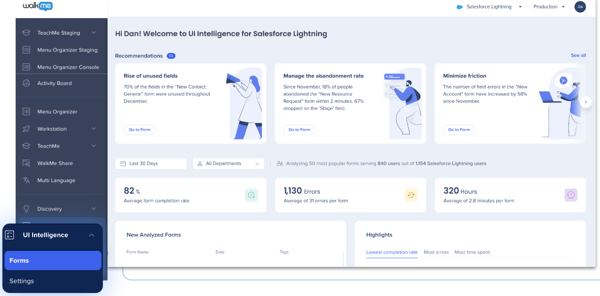
What stood out to me first is how WalkMe stays with users as they move between applications. Employees don't just get guidance inside one tool; they get contextual help across their entire tech stack, whether they're in Salesforce, Workday, ServiceNow, or a custom-built app. Several G2 reviewers describe this "always on" presence as a core reason WalkMe delivers consistent value across large, decentralized organizations where employees rely on dozens of systems daily.
From an analytics perspective, WalkMe goes deeper than most DAPs in this list. Steps Analysis and hesitation heatmaps give teams a granular view of exactly where users pause, backtrack, or abandon a process, not just where they drop off. Combined with strong segmentation capabilities, this lets organizations build targeted interventions based on real behavioral signals.
WalkMe has also meaningfully expanded its platform in recent months. Learning Arc embeds personalized training courses and assessments directly into the applications employees use daily, removing the need to route staff to a separate LMS. Its AI-powered Surveys now support branching logic and visual dashboards, making in-app feedback collection substantially more flexible. For organizations running SAP at their core, WalkMe's native embedding across S/4HANA, SuccessFactors, and Ariba means guidance works within the SAP interface without additional setup or compatibility workarounds.
Running WalkMe across large-scale applications with many simultaneously active assets can introduce noticeable performance lag. G2 reviewers note that page load times take a hit when the application is already resource-intensive, which can affect the end-user experience. It is not a blocker for most deployments, and WalkMe's continued investment in performance optimization shows the team takes this seriously. Teams with heavy, asset-rich environments are best served by stress-testing in a staged setup before full rollout.
WalkMe is one of the most capable and battle-tested DAPs available today, and its deepening integration within the SAP ecosystem makes it especially compelling for organizations already running SAP at scale. For enterprises that need an adoption layer that travels with users across their entire software landscape, it is hard to find a stronger option.
"WalkMe stands out for its robust digital adoption capabilities and overall flexibility. Being able to build highly customizable in-app guidance, paired with strong analytics and segmentation, helps us proactively support users and tackle adoption challenges at scale. It also integrates smoothly into complex enterprise environments, making it easier to standardize processes and reduce user errors."
- WalkMe Review, Rohith N.
"WalkMe does a great job of making the creation of content easy. The maintenance, even with Deep UI and AI capabilities, remains difficult. This can vary depending on the application it is applied to."
- WalkMe Review, James M.
On a budget? Explore the top free digital adoption platform options.
Userpilot stood out to me as one of the strongest digital adoption platforms out there, especially for product-led growth teams that want to create personalized onboarding and in-app experiences without relying on engineering. It also holds the highest satisfaction score of any product in the Spring 2026 DAP Grid Report, which tells you something about how consistently it delivers on its core promise.
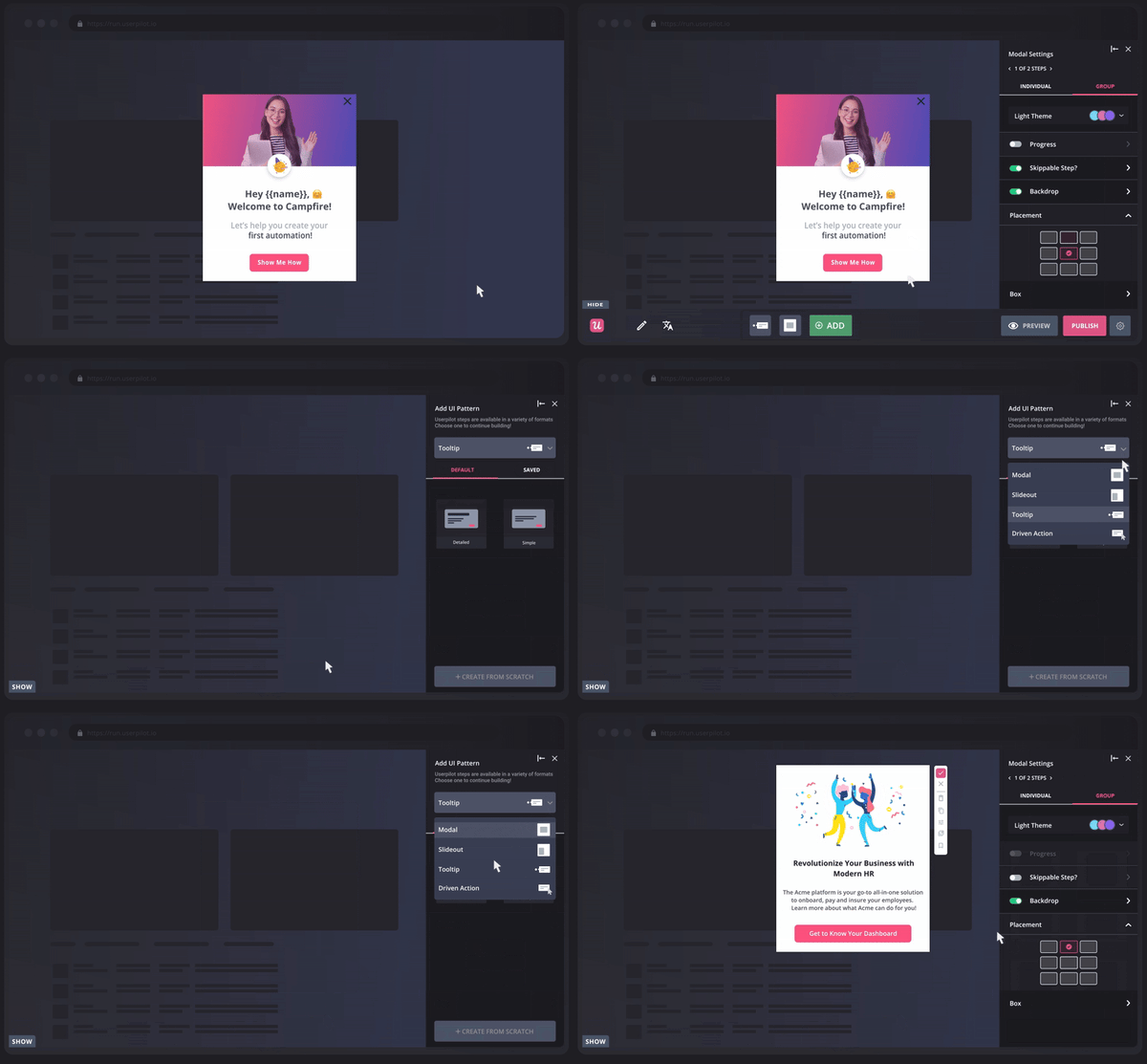
What I kept seeing across recent G2 reviews is how quickly teams go from installation to a live onboarding flow. The no-code builder is genuinely accessible for non-technical users -- product managers, customer success teams, and marketers build and iterate on flows without pulling in a single developer. Several reviewers specifically switched to Userpilot from other DAPs because the core use case felt faster and less cumbersome here than anywhere else they'd tried.
The behavioral user segmentation is where Userpilot earns its strongest praise. Teams can target experiences based on specific in-app actions, lifecycle stage, role, and custom attributes, making guidance feel genuinely personalized rather than one-size-fits-all. Reviewers consistently point to this as the feature that most directly moved their activation and retention metrics.
What also sets Userpilot apart at this price point is having product analytics, session replay, and in-app guidance all in one platform. Most teams evaluating DAPs end up cobbling together separate tools for each. With Userpilot, you can track funnel completion and feature adoption alongside session recordings to see exactly where users hesitate or get stuck, without switching platforms.
The analytics are genuinely useful, but the reporting layer has limits. Data export workflows can be clunky, and dashboard customization doesn't go deep enough for teams with complex reporting needs. Some reviewers describe building workarounds to get the exact data slices they want. For most product teams though, the built-in dashboards cover daily needs without issue, and the team has been consistently releasing improvements in this area.
Overall, Userpilot strikes a strong balance between speed, depth, and value. I'd recommend it to any product team that wants to launch onboarding experiences fast, iterate based on real behavioral data, and do all of it without engineering dependency.
"Userpilot has been a game changer for how I manage product experience and user onboarding. What I really love is having everything centralized from building in-app flows (modals, tooltips, checklists) to tracking user behavior and engagement all in one place. The dashboard and analytics features are especially strong. I can easily create and customize dashboards to monitor feature adoption, user interactions, and onboarding performance without needing external tools."
- Userpilot Review, Lorena S.
"I think Userpilot could improve by offering more advanced analytics and reporting customization. Also, it could perform more smoothly when managing complex onboarding flows with many user segments. Adding deeper analytics insights and better performance optimization for large projects would make it easier to track user behavior accurately and manage complex onboarding experiences more efficiently."
- Userpilot Review, Abdulwahab I.
If Userpilot caught your attention, chances are you're thinking beyond onboarding and into how your product itself drives growth. Learn everything about product-led growth and how to implement it for your SaaS product.
UserGuiding struck me as one of those tools that quietly does a lot of heavy lifting, especially when it comes to simplifying user onboarding and support. UserGuiding scores a strong 4.7 out of 5 on G2, with users praising its intuitive, no-code setup for creating in-app guides, walkthroughs, and tooltips with ease.
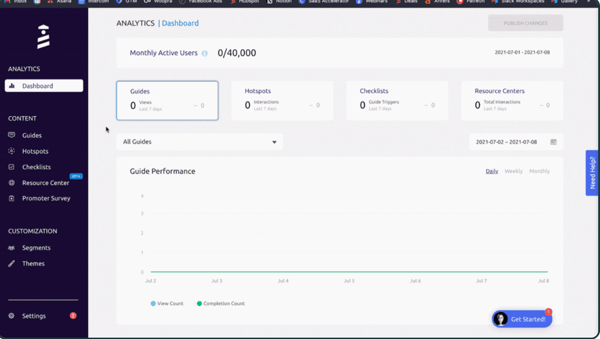
After reading through dozens of reviews, one thing became clear: users consistently love how easy it is to get started. Whether it’s building tooltips, interactive product tours, or onboarding checklists, most people describe the platform as intuitive and fast to learn. I saw multiple mentions of how it helped teams reduce support requests and improve user self-sufficiency without adding more strain on developers.
What I also appreciate is how much UserGuiding packs into one platform. The Resource Center gives users a self-serve hub inside the product, the Product Updates page lets you announce new releases in-app, and the AI Assistant, launched in 2025, lets users get answers conversationally without raising a support ticket. I rarely see three distinct use cases handled this cleanly in a single tool at this tier.
The NPS and in-app feedback experience is another highlight for me. I can see who received a survey, who responded, and what their score was, all from the same dashboard, without jumping between tools.
Where I'd flag caution is the analytics on lower-tier plans. Teams needing cohort analysis or detailed path reporting will likely need an external tool alongside it. For teams focused on guiding users rather than deep behavioral analysis though, I don't see this as a dealbreaker.
If someone on my team asked for a tool to get onboarding live fast with predictable costs, UserGuiding is where I'd point them. It doesn't try to do everything, and that focus is exactly what makes it work.
"I use UserGuiding to create configuration guides for my customers on our portal, and it saves a lot of time and cost for our engineers because we don't have to join calls with each and every customer to help them with configuration. I really like the ease of setup and how smoothly it works. The support agent on the portal is very helpful too! To create a guide, all I need to do is add URL details, triggers, and templates, and I can train any of my team members on creating guides in less than 10 minutes and get the job done. The initial setup took around 30 minutes, which I find reasonable."
- UserGuiding Review, Srinivas N.
"Sometimes visual customization could be more flexible, and some more complex flows end up requiring manual adjustments. I also miss more in-depth reports to understand in detail the impacts of the guides and user behavior."
- UserGuiding Review, Jessica A.
Support tickets are often a symptom of gaps in your onboarding, not a problem on their own. Read our guide on how AI is reshaping customer self-service to see how teams are closing those gaps before users even need to ask.
Tango is the most distinct tool on this list, and intentionally so. What draws me to it is simple: where most DAPs ask you to build guidance from scratch, Tango starts with what you already do and turns it into a guide before you've even finished the task.
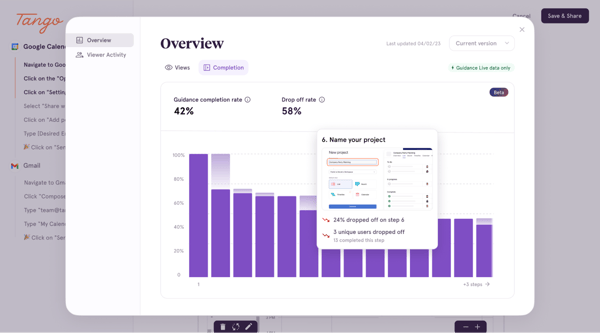
What immediately stands out to me is how Tango generates a complete guide from a single click-through. You install the Chrome extension, run through any process once, and it automatically captures every step with screenshots and action labels. No manual screenshots, no formatting, no writing. Reviewers consistently say it cuts their SOP and training documentation time by hours each week.
What I also find particularly compelling is Follow Mode. It converts any guide into a floating, interactive walkthrough that overlays the application as users complete real tasks, turning passive documentation into active guided learning. Several reviewers credit it directly with improving onboarding completion rates and reducing support ticket volume.
Tango also solves something I see teams struggle with constantly: documentation that goes stale. Guides live at a shareable link that always reflects the latest version, so when a process changes, everyone accessing that link sees the update automatically. Recent upgrades have added AI voice transcription, video, and branching improvements, giving teams more flexibility in how they deliver guidance.
That said, branding and annotation controls are limited for teams needing highly polished or white-labelled outputs. Most guides are ready to share as-is, but specific brand requirements may need some post-export editing. The core auto-capture experience remains strong regardless, and for most teams, the out-of-the-box output is more than good enough.
Overall, I'd point Tango to any team that has been putting off process documentation because it always felt too manual, too time-consuming, or too dependent on the right person being available. It's the tool I'd reach for first if my team needed to standardize SOPs fast, onboard new hires without scheduling calls, or simply stop answering the same "how do I do this" question twice.
"I use Tango software to instantly create easy-to-follow guides and automate processes, which saves a significant amount of time on training, support, and documentation. I love how it automatically captures clicks, screenshots, and steps as I work, and then makes them shareable, editable, and exportable, which is really useful for onboarding, SOPs, and boosting software adoption. I also appreciate that the initial setup for the core documentation features is very straightforward, often taking just a minute or two to install and start using, especially with the free extension."
- Tango Review, Aryan K.
"The biggest limitation for me is the lack of more advanced screenshot editing. I’d like greater control over annotations, the ability to blur sensitive information, and an easier way to rearrange steps within the platform. When I need more polished documentation, I sometimes have to export everything and make a few small edits in another tool."
- Tango Review, Asif K.
Still struggling before users even reach adoption?
Explore the best client onboarding software to fix gaps earlier in the journey.
Have more questions? Find the answers below.
A digital adoption platform is a type of software that helps users learn, navigate, and use digital tools more effectively. It overlays in-app guidance, like tooltips, walkthroughs, and checklists, on top of software applications to support onboarding, training, and ongoing engagement. In 2026, the best DAPs also incorporate AI-powered content creation, behavioral analytics, and simulation-based training to help organizations drive adoption at scale.
Digital adoption software helps reduce onboarding time, improve feature adoption, lower support ticket volume, and increase productivity across teams. It's especially valuable for organizations with complex tools, frequent software rollouts, or distributed teams where consistent training is hard to deliver at scale.
Unlike static onboarding documents or external training sessions, DAPs provide contextual, real-time guidance directly inside the software. This makes learning feel more intuitive and personalized based on the user's behavior and role. The best platforms in 2026 also offer session replay, behavioral analytics, and pre-production simulation environments, capabilities that go well beyond what any traditional onboarding tool can offer.
Look for no-code content creation, robust analytics, user segmentation, in-app surveys, and integration capabilities with tools like Salesforce, HubSpot, or Workday. In 2026, AI-powered content creation and flow maintenance have become important differentiators. Platforms that can auto-generate or auto-update guidance when the underlying application changes reduce a significant ongoing maintenance burden.
Digital adoption platforms are commonly used by product, customer success, HR, L&D, IT, and operations teams. They're ideal for companies scaling software training, managing complex enterprise platforms, rolling out new tools across large workforces, or looking to improve the user experience across multiple applications without heavy developer involvement.
Customer success teams use DAPs to proactively guide users through key features, reduce churn, and ensure customers realize the full value of the software. Features like NPS surveys, in-app messaging, and behavioral analytics help tailor outreach and support efforts. Userpilot, for example, lets teams flag low NPS scores in real time and route at-risk accounts to customer success before they churn.
According to the G2 Spring 2026 Grid Report, the leading DAPs are Whatfix, WalkMe, Userpilot, UserGuiding, and Tango. Each platform offers distinct strengths, from Whatfix's AI-native enterprise suite and WalkMe's SAP-native cross-app guidance to Userpilot's behavioral analytics, UserGuiding's fast affordable onboarding, and Tango's instant workflow documentation.
For small businesses, UserGuiding is a strong fit thanks to its transparent MAU-based pricing, fast no-code setup, and core onboarding features that don't require technical resources. Its Starter plan begins at $174/mo billed annually, and most teams are live with their first guide within hours. Tango is also worth considering for very lean teams, its free plan covers individual workflow documentation needs and the Pro plan starts at just $26/user/mo.
Whatfix and WalkMe are frequently highlighted as leading choices for maximizing software ROI. Whatfix's AI-powered guidance, analytics, and simulation training help enterprises reduce support costs and accelerate time-to-proficiency across complex application rollouts. WalkMe's cross-app, always-on guidance ensures employees fully utilize the tools organizations have invested in, including native integration across the SAP ecosystem for organizations running S/4HANA or SuccessFactors.
Tech companies often rely on Userpilot and UserGuiding. Userpilot is widely used by SaaS product and growth teams for its behavioral segmentation, no-code flow builder, session replay, and in-app NPS capabilities, all in one platform. UserGuiding suits earlier-stage tech teams that need a fast, affordable way to guide users through their product without engineering dependency.
For SaaS businesses, Userpilot and UserGuiding stand out for their intuitive, no-code design. Both platforms allow product teams to launch onboarding tours, tooltips, and checklists without developer support. Tango is also a strong option for SaaS teams that want to document and share internal processes quickly, its auto-capture feature turns any workflow into a shareable guide in seconds.
Whatfix is a strong option for enterprise customer onboarding, offering scalable in-app guidance, role-based segmentation, and dedicated support for complex deployments. Userpilot also excels here, giving SaaS teams the ability to create personalized, behavior-triggered onboarding experiences that guide customers to their first value moment faster. For teams that also need to document onboarding processes for internal teams and support staff, Tango adds a useful complementary layer.
WalkMe is well-suited for internal employee training, particularly for organizations running complex enterprise software. Its Learning Arc feature embeds personalized courses and assessments directly into the applications employees use daily, removing the need to route staff to a separate LMS. Whatfix is another strong choice, with its Mirror simulation environment allowing employees to practice in a risk-free replica of the live application before go-live, ideal for compliance-heavy or high-stakes software rollouts.
Enterprises most commonly turn to Whatfix and WalkMe. Whatfix leads the Spring 2026 G2 Grid with its AI-native DAP suite, enterprise-grade analytics, simulation training, and the highest support satisfaction rating in the category. WalkMe offers the deepest integration within the SAP ecosystem and an always-on, cross-application guidance layer that follows users across their entire software stack.
Userpilot is a standout for engagement, combining behavioral segmentation, in-app messaging, product analytics, and session replay to help teams understand how users interact with their product and act on that data in real time. UserGuiding also ranks highly, with its AI Assistant providing conversational self-service support that keeps users engaged and reduces support dependency as product complexity grows.
WalkMe helps enterprises reduce tech friction by guiding employees step-by-step through complex systems across their entire application landscape, minimizing errors and support requests regardless of which tool they're using. For smaller teams, UserGuiding is highly effective, its lightweight setup and in-app checklists remove the most common onboarding roadblocks without heavy implementation effort or developer involvement.
Whatfix and Tango are both well-suited for cloud-based tool adoption. Whatfix delivers scalable, AI-powered in-app guidance across web, desktop, and mobile applications, with no dependency on the ISV ecosystem, making it a strong fit for organizations running mixed cloud environments. Tango complements cloud adoption by turning any web-based workflow into an instantly shareable, always-current guide, helping distributed teams stay aligned on processes as cloud tools and their interfaces evolve.
Based on user reviews, Whatfix and WalkMe are the most trusted choices for operations teams managing software at scale. Reviewers point to Whatfix's high support satisfaction (97% rated quality of support positively) and WalkMe's always-on, cross-application guidance that keeps users supported across the many systems ops teams oversee daily.
For reducing implementation time and ensuring user adoption, UserGuiding and Tango stand out. UserGuiding scores 4.7 on G2, with most teams live with their first guide within hours, and Tango generates a complete walkthrough from a single click-through, so guidance goes live almost immediately while still driving real adoption.
Whatfix and Userpilot show strong signs of sustained adoption after rollout. Reviewers credit Whatfix's analytics and dedicated customer success team with keeping programs healthy over time, while Userpilot's behavioral segmentation and session replay help teams keep iterating on flows so adoption holds rather than fading once onboarding ends.
According to user reviews from successful deployments, Whatfix and WalkMe are the most reliable at enterprise scale. Reviewers describe Whatfix (4.6 on G2) as dependable across multiple onboarding programs, and WalkMe (4.5 on G2) as battle-tested for complex, multi-app environments, with both backed by responsive support during scaling.
Teams evaluating on real user implementation feedback tend to favor Userpilot and UserGuiding for speed and ease, and Whatfix and WalkMe for depth in complex rollouts. Reviewers consistently highlight fast time-to-live guides with the first two and richer analytics and support with the latter two, so the best fit depends on deployment complexity.
For setup speed and ongoing support, UserGuiding and Whatfix rate highest in reviews. UserGuiding is praised for a fast, no-code setup that gets teams live within hours, while Whatfix earns the category's strongest support satisfaction, with 97% of users rating quality of support positively.
Tango offers a Chrome extension that captures workflows and, through Follow Mode, overlays real-time in-context guidance as users complete tasks. Whatfix, WalkMe, UserGuiding, and Userpilot deliver similar in-app guidance through their own overlays, providing tooltips, walkthroughs, and prompts inside the application while users work.
Whatfix, WalkMe, and Userpilot generate the usage insights teams need to measure feature rollout effectiveness. Reviewers highlight Whatfix's flow completion and drop-off tracking, WalkMe's Steps Analysis and hesitation heatmaps, and Userpilot's combined product analytics and session replay for seeing exactly where users adopt or stall on new features.
WalkMe and Whatfix guide users through new system features in-app without requiring extensive training. Reviewers describe step-by-step walkthroughs and contextual help that surface guidance at the moment of need, reducing the reliance on formal training sessions or static help docs when features change.
For teams prioritizing quick implementation, UserGuiding and Tango are the best fits. UserGuiding's no-code setup gets most teams to their first live guide within hours, and Tango's auto-capture turns a single walkthrough into a shareable guide in seconds, both without engineering dependency.
After digging into the top digital adoption platforms, one thing became crystal clear: success doesn’t come from just buying the tool. It comes from actually using it. One of the most common things I heard from DAP users is that you only see results when teams fully commit to building, testing, and iterating inside the platform.
Even the best DAP won’t succeed without internal buy-in. If your product team is building guides, your support team is relying on analytics, and no one’s talking to each other, you’re going to end up with a very fancy layer no one fully uses.
My advice? Start with a clear use case, involve the teams who’ll own it day to day, and treat your DAP rollout like a product launch, not just a plug-and-play purchase. When you get it right, a digital adoption platform gets you less friction, faster onboarding, and insight into exactly where users need support.
So, choose wisely, align early, and may the flows be with you.
Want to take your product adoption strategy even further? Check out G2’s guide to unlocking customer-led growth with reviews and learn how real user feedback can fuel smarter decisions across onboarding, enablement, and beyond.


Recently updatedSummer 2026 Grid® Report · Published May 26, 2026 The tools below reflect...
.png) by Tanuja Bahirat
by Tanuja Bahirat

Recently updatedSummer 2026 Grid® Report · Published May 26, 2026 This guide was last...
 by Yashwathy Marudhachalam

Recently updatedSummer 2026 Grid® Report · Published May 26, 2026 The 10 best Bot...
by Tanuja Bahirat