Most nonprofits don't lose donors because of poor fundraising. They lose them because the data that should support the relationship gets buried across tools that don't connect, and by the time a lapsed donor surfaces in a report, the window to re-engage has already closed.
That's the operational risk pushing development and fundraising leaders to look for the best CRM for nonprofits more seriously than ever. The global nonprofit CRM market is projected to grow from USD 846 million in 2025 to over USD 1,170 million by 2034, reflecting how seriously organizations are taking donor continuity as a revenue problem, not just a technology one.
Across G2 user reviews, stronger platforms stand out through deep donor data, reliable automation, clear reporting, and the ability to adapt to different fundraising models. Weaker tools tend to appear as rigid databases that require manual reconciliation and offer limited visibility across campaigns. Over time, these gaps affect day-to-day work, weaken donor relationships, consume staff time, and leave organizations carrying growing data debt.
In this guide, I focus on the core problem clusters nonprofits are solving with CRM adoption. Across reviews, Givebutter is commonly picked for fast campaign execution and peer-to-peer fundraising. Raiser's Edge NXT tends to surface for organizations prioritizing advanced analytics and complex donor segmentation. Bloomerang CRM is frequently chosen by teams focused on retention and relationship tracking. Donorbox appears as a fit for lean teams centered on straightforward donation flows, while Salesforce Nonprofit Cloud shows up where customization and integrations drive decision making. The goal is to cut through overlap and help you identify which platforms align with how your nonprofit actually operates.
*These nonprofit CRM platforms are top-rated in their category based on G2’s 2025 Winter Grid® Report. I’ve included their strengths and ideal use cases to help you choose the right platform for your organization’s needs.
Nonprofit CRM software unifies donor records, event participation, volunteer engagement, and fundraising data into a structured, usable platform. The right platform helps nonprofits understand relationships, track engagement over time, and coordinate outreach while maintaining context and continuity.
What I’ve found is that the best nonprofit CRMs go beyond basic contact management. They show me who a donor is, how they’ve interacted with the organization, which campaigns they’ve responded to, and what actions should come next.
G2 Data shows adoption is spread across small organizations, mid-sized nonprofits, and large institutions alike. Many teams can get started quickly, which matters when staff capacity is limited and every hour counts toward mission impact rather than admin work.
Ultimately, good nonprofit CRM software delivers what nonprofit teams need most: visibility into supporter relationships, consistency in fundraising and engagement workflows, and the confidence that no donor, volunteer, or opportunity is falling through the cracks.
I used G2’s Grid Reports to shortlist leading nonprofit CRM platforms based on verified user satisfaction scores and market presence across small nonprofits, mid-sized organizations, and large institutions.
I then used AI to analyze hundreds of verified G2 reviews. I pulled out recurring feedback around what matters most in real nonprofit workflows: donor and constituent management, fundraising and donation tracking, event and volunteer coordination, reporting depth, ease of use for non-technical staff, integrations with email and accounting tools, and how well teams collaborate across development, marketing, and finance. This helped me distinguish tools that genuinely support mission-driven work from those that add operational friction.
Since I haven’t personally used every platform listed, I cross-checked these findings with insights from nonprofit professionals, including fundraising and development staff, marketing and communications teams, event managers, finance staff, operations leads, and CRM administrators, who actively rely on these tools day to day.
All visuals and product references in this article are sourced from G2 vendor listings and publicly available product documentation.
After looking at G2 user reviews, studying nonprofit operational workflows, and speaking with fundraising leaders, program managers, finance teams, and nonprofit ops professionals, the same themes kept recurring. Here’s what I prioritized when evaluating the best CRM for Nonprofits:
Based on these criteria, I filtered down the tools that consistently support nonprofit teams with clarity, efficiency, and long-term reliability. The strongest systems align closely with how your team already works, rather than forcing change for the sake of features.
Below, you’ll find authentic user reviews from the CRM for Nonprofits category. To appear in this category, a tool must:
This data was pulled from G2 in 2026. Some reviews may have been edited for clarity.
Givebutter positions itself as a fundraising and donor management platform built for small nonprofits running fast-moving, community-led campaigns.
Building campaigns in Givebutter is fast and requires no technical overhead. Donation forms, embedded widgets, ticket sales, silent auctions, and dedicated landing pages all sit within the same interface. G2 reviews describe moving from setup to a live campaign in minutes, with visual campaign pages that present funding requests in a way that connects with donors. Teams running peer-to-peer fundraising and ticketed events describe managing the full cycle without switching platforms.
Dashboards surface donation activity, campaign progress, and giving trends without requiring configuration. Multiple campaigns can be monitored simultaneously, and donor lists can be exported and sorted by amount or other criteria. The analytics tools allow month-over-month comparisons, and reviews note real-time tracking during active fundraising as particularly useful. Teams stay oriented without manual checks or separate reporting tools.
Instant personalized thank-you emails are among the most frequently mentioned features across G2 reviews. Teams describe replying to donations immediately, referencing personal details, and building relationships from the first contribution. Built-in email tools support mass outreach, open tracking, and donor segmentation without leaving the platform. Organizations previously relying on separate email tools describe consolidating into Givebutter as a meaningful reduction in day-to-day complexity.
Staff with no technical background describe getting campaigns live without tutorials, coding knowledge, or IT support. The interface is clean enough for new users to navigate confidently on first use, and donors report the same experience on the giving side. Training resources, bootcamps, and live chat support accelerate onboarding without extended setup cycles. This accessibility shows up repeatedly as the primary reason organizations switched from more complex platforms.
Donor profiles consolidate giving history, personal notes, photos, social media links, and multi-channel contribution records in one place. Teams track cash, check, ACH, credit card, and PayPal donations from a single system, reducing fragmentation across payment types. The platform generates tax contribution letters automatically, which reviewers describe as saving significant administrative time each January. Visibility into which campaigns drove the most giving helps teams make more informed fundraising decisions over time.
Support is fast, accessible, and staffed by people who follow through on complex requests. Live chat, email, and phone options are frequently referenced, with several reviews noting same-session resolution of issues. The team actively incorporates user feedback into product updates, giving organizations confidence that raised concerns translate into real changes. For small nonprofits without dedicated operations staff, this responsiveness keeps fundraising running without disruption.
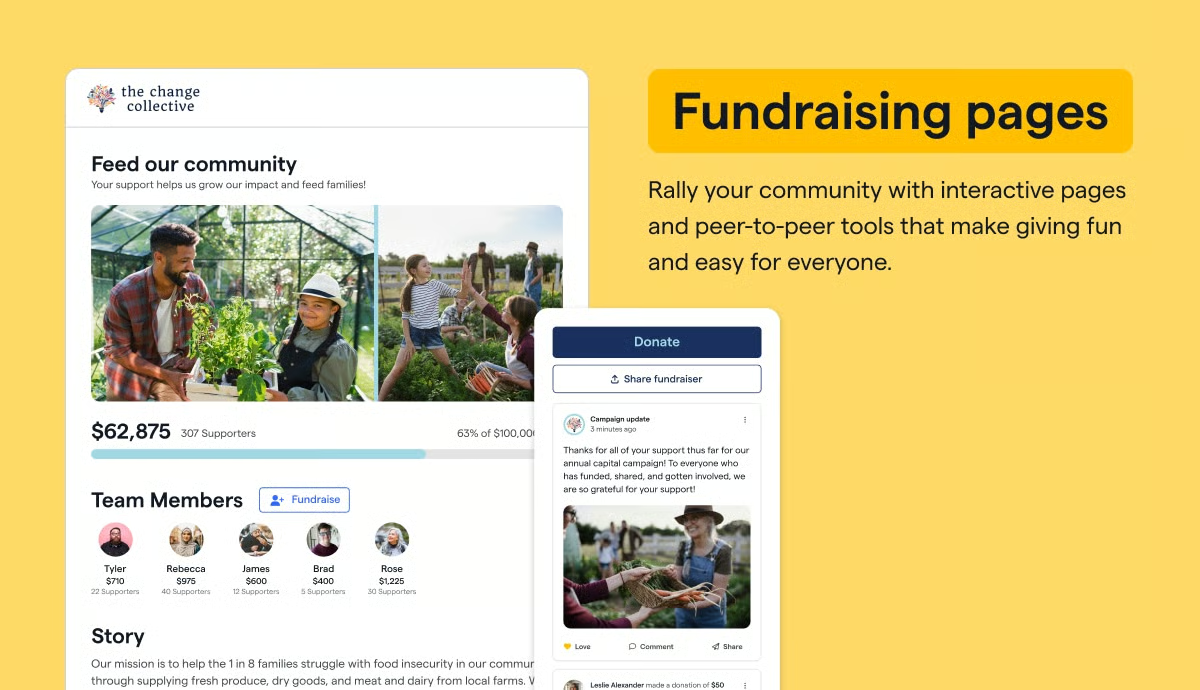
Givebutter is designed primarily around fundraising execution, donor engagement, and communication workflows. As a result, teams with active grant pipelines or more complex back-office automation needs may find these areas less developed. This focus helps keep the platform straightforward, with core fundraising and donor communication tools remaining consistently well-rated and easy to manage day to day.
Givebutter connects with a defined set of commonly used tools rather than a broad integration ecosystem. Teams running more complex or highly customized tech stacks may find the available integrations narrower than their needs. However, this approach keeps the platform accessible and quick to adopt, helping teams launch and manage campaigns without heavy technical setup.
Overall, Givebutter aligns well with small nonprofits and community-led organizations that prioritize speed, donor relationships, and straightforward fundraising workflows. Its usability and communication tools, supported by consistently high satisfaction scores, help teams stay focused on campaigns and supporter engagement rather than system administration.
“I love the humor with all the butter puns in Givebutter; it's my favorite thing and never fails to make me smile. The ability to reply instantly to donations with a personalized email is incredibly valuable, as it allows me to thank donors personally and begin building a relationship with them by acknowledging their contributions and sharing personal touches, such as mentioning where we met. The picture option added to donor profiles is fantastic, as it helps the staff, including me, remember the names and faces of donors, so we can recognize them later and further connect with them during events. I appreciate the flexibility to add extra information to a donor's profile, which helps in enhancing the personalized connection by integrating social media links and more personal details.”
- Givebutter review, Catherine H.
“I dislike that Givebutter requires frequent reconnection of our login, which can be inconvenient. It often needs reverification, causing interruptions in our workflow.”
- Givebutter review, Eric L.
Managing donors is only part of the picture; here’s how better volunteer management helps nonprofits keep supporter engagement connected.
Raiser’s Edge NXT functions as a centralized fundraising and constituent management system within nonprofit organizations. It is commonly used as a primary system for managing donor records, fundraising activity, events, and reporting in one place.
Constituent management forms the foundation of how teams work inside the platform. Donor history, relationships, and engagement context are brought together in a single view, which helps staff understand supporter activity without moving between systems. This centralized structure supports consistency when managing communications, fundraising, and reporting with limited time.
Donation processing, event management, registrations, and outreach tools are designed around real fundraising use cases rather than generic CRM patterns. Frontline fundraisers are able to access accurate information directly, reducing reliance on back-office teams for routine reporting.
Data centralization plays a key role in how organizations use Raiser’s Edge NXT. Teams describe relying on it as a system of record that keeps fundraising, constituent data, and event activity connected. This reduces fragmentation and helps organizations maintain continuity as programs and campaigns evolve over time.
Usage data reflects the platform’s role as a core system for small and mid-sized nonprofits. According to G2 Data, 48% of users come from small organizations and 47% from mid-market teams, with limited enterprise adoption. This distribution aligns with teams using the platform to consolidate fundraising and reporting rather than stitching together multiple specialized tools.
More advanced functionality becomes accessible as teams spend more time in the system. The Database View exposes deeper reporting options and underlying data structures that experienced users rely on for analysis and planning. For organizations willing to invest in learning the platform, this depth supports more informed fundraising decisions.
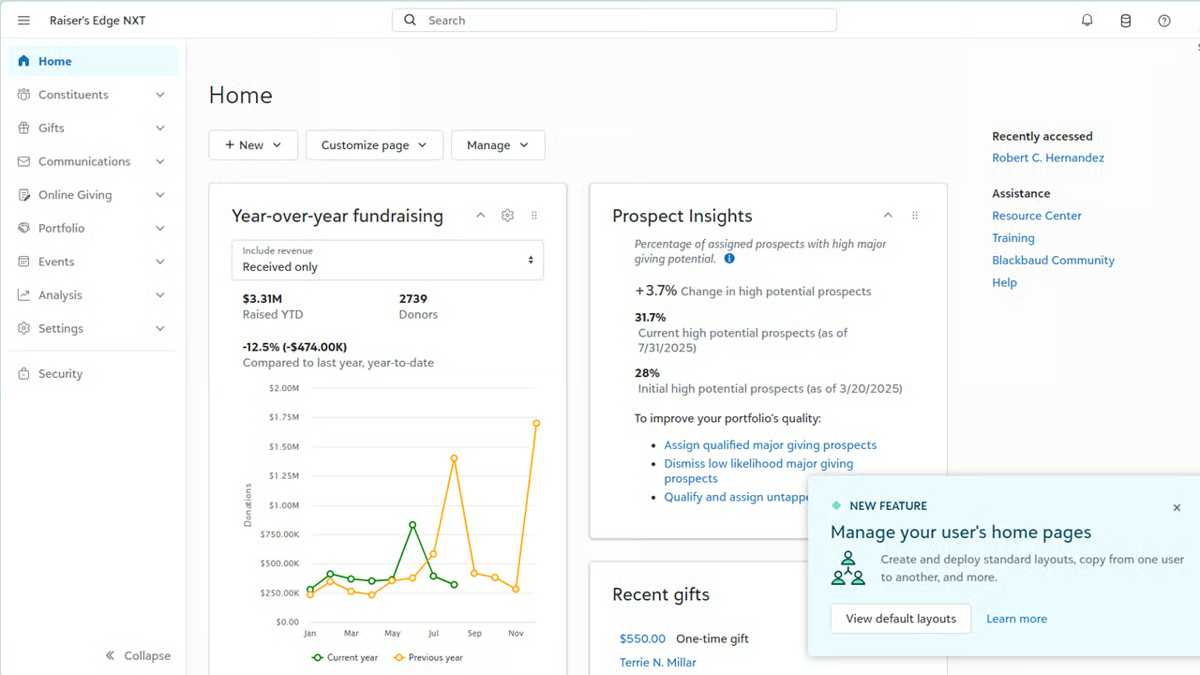
Raiser's Edge NXT functions as a single source of truth across fundraising teams, reducing reliance on spreadsheets and institutional memory. Centralized records keep giving history, communication logs, event attendance, and volunteer activity in one unified profile. This continuity holds up through staff turnover, keeping operations stable without depending on any one person's knowledge. Teams describe moving from inconsistent cross-team tracking to reliable, real-time visibility into donor engagement.
Prospect research and portfolio management tools help frontline fundraisers use their time more deliberately. Built-in prospect insights surface prompts for prospecting and stewardship tasks, reducing the guesswork involved in prioritizing outreach. Integration with Outlook allows interactions to be logged directly, which improves coordination across development teams. Reviews describe non-technical staff accessing segmented donor lists and engagement data without needing IT support or complex queries.
Getting up to speed inside Raiser's Edge NXT involves navigating a system with significant configuration depth and a broad feature set. Teams that prefer a guided, step-by-step onboarding experience may find the initial period more involved than with lighter platforms. The same depth that extends onboarding ultimately supports detailed long-term control over fundraising, constituent management, and reporting.
Deeper reporting and advanced data tasks are housed in the Database View, which operates distinctly from the updated everyday interface. Teams that work primarily in the newer interface may need to move between views to complete certain back-end tasks. The database view itself gives experienced users access to extensive analytical depth that the streamlined interface is not designed to expose.
Raiser’s Edge NXT is positioned as a long-term operational system for nonprofits that need centralized fundraising and constituent management. For organizations prepared to grow into its depth and use it as a core system of record, it continues to function as a dependable backbone for managing donor relationships and fundraising activity.
"I like that the system is very flexible and has so many features... I am always finding new ways to find new information about my constituents and members. I really love the database view because it gives you the full "menu" of options... a little overwhelming at first, but once you learn how to navigate all the menus and the fields, it is a very powerful tool and necessary for effective fundraising.”
- Raiser’s Edge NXT review, Emily G.
"At the moment, the transition to a unified view has been progressing more slowly than we expected, with features being integrated gradually rather than all at once. Still, we understand that everything will be available soon, and we're looking forward to seeing it all come together.”
- Raiser’s Edge NXT review, Joseph S.
If finance visibility matters as much as fundraising data, compare the best accounting software for cleaner reporting and reconciliation.
Bloomerang CRM is a nonprofit CRM organized around a constituent-centric data model that links donor records, giving history, and engagement activity into a single system.
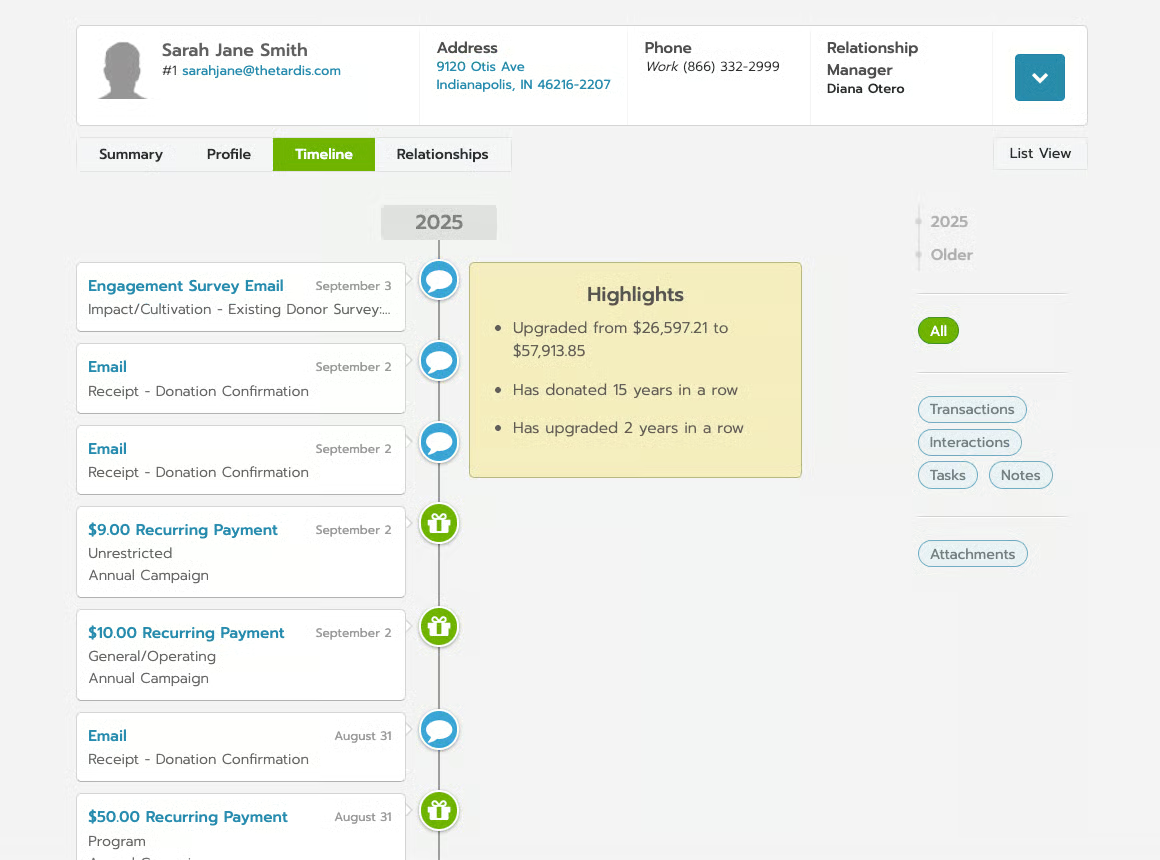
Donor profiles sit at the center of fundraising operations, allowing teams to manage contributions, communication history, and reporting from one unified record. This structure keeps day-to-day fundraising work anchored to the donor context rather than spread across disconnected tools.
The constituent-centric data model supports how nonprofit teams manage routine development work. Adding donors, recording gifts, and tracking interactions follow a consistent flow, which reduces operational overhead compared to multi-module systems. Reporting and stewardship activities draw from the same underlying data, helping teams maintain continuity across fundraising and communications.
Bloomerang presents donor data, correspondence records, and contribution histories in a cohesive structure. Team members gain immediate context when engaging with supporters, which supports more informed conversations and follow-ups. Reporting outputs are readable and accessible without requiring specialized technical skills.
The platform supports coordination across common nonprofit roles. Fundraisers, marketers, and administrators work within the same environment, keeping campaigns, donor segmentation, and volunteer-related activity connected. This shared workspace reduces tool switching and helps collaboration remain consistent across teams. According to G2 user reviews, 85% of reviewers come from small nonprofits and 15% from mid-market organizations. This reinforces its strong fit for small teams managing multiple responsibilities within a single platform.
Reporting tools are often described as quick, flexible, and accessible to users without technical expertise. Teams pull donor giving history, engagement trends, and campaign snapshots without building complex queries. The dashboard provides a single view of new donors, lapsed donors, and donors at risk, giving development staff and executive directors immediate visibility into retention health. Year-over-year comparisons by month help organizations track fundraising momentum.
Automation workflows reduce the manual coordination that small nonprofit teams cannot afford to sustain. Journey automations handle new donor onboarding and outreach triggers without staff intervention. G2 reviews describe this connected setup as particularly valuable for single-person development teams managing multiple functions simultaneously.
Customer support and onboarding are consistently described as responsive and thorough. The implementation process is structured and guided, with teams reporting a smooth transition even when migrating from complex legacy systems such as Raiser's Edge. Free training sessions, webinars, and a responsive chat feature help staff build confidence quickly. G2 users note that the Bloomerang team actively incorporates user feedback into product updates, which reinforces long-term trust in the platform.
The depth of automation and integration in Bloomerang is more limited compared to platforms built for complex workflow orchestration. Teams that need multi-step automation, conditional logic, or API-driven integrations may find these capabilities less central, while the streamlined approach keeps daily operations clear and accessible without dedicated system administration.
Bloomerang’s sales and POS functionality support donation entry and basic transaction tracking. Organizations that manage merchandise sales, multiple revenue streams, or detailed point-of-sale reporting may find this area more scoped, while core donation and fundraising transactions align well with everyday nonprofit operations.
Overall, Bloomerang brings fundraising, communication, and stewardship into a single, coherent workflow for nonprofits that want relationship data to remain central. For organizations prioritizing usability, clarity, and operational consistency, it offers a balanced CRM that aligns well with everyday nonprofit fundraising needs.
“Bloomerang is phenomenal. I find the platform to be intuitive and user-friendly. I like the ease of adding constituents one-by-one, running reports, adding notes to constituent profiles, and updating addresses, as well as the convenience of the dashboard. Their customer service is also incredible."
- Bloomerang review, Zoe V.
"It can be a bit pricey to upgrade if you want to do more than donor management and data entry. Would be nice to be able to add one-off features like text blasts to donors without having to upgrade the entire package.”
- Bloomerang review, Andrew W.
For nonprofits focused on campaigns and mobilization, understanding public advocacy can help connect outreach strategy with action.
Donorbox came up repeatedly when looking at tools used by small nonprofits and grassroots campaigns, and its market profile reflects that focus. With a G2 Market Presence of 61, an overall G2 Score of 73, and a G2 Satisfaction Score of 84, the platform shows steady adoption within a specific segment rather than broad market coverage.
Rated 90% on G2, the fundraising feature performs well above category averages and aligns with how organizations use Donorbox to launch campaigns quickly. Users describe donation flows as clear and reliable, helping teams focus on collecting contributions rather than managing setup complexity.
Dashboards support straightforward tracking of fundraising activity. With an 88% G2 rating, dashboards surface essential metrics without unnecessary configuration. This allows teams to monitor campaign progress and donation volume without navigating dense reporting environments.
Rated at 87% on G2, reporting feature supports exporting transaction data and reviewing donation trends without additional tooling. Reporting tools perform consistently for small-team needs. G2 Users frequently mention that reports are easy to generate and usable without technical expertise.
The platform is designed for quick setup and minimal overhead. Creating donation forms, launching campaigns, automating receipts, and managing recurring donations follow a simple flow. Options to embed forms directly into websites or use Donorbox-hosted pages help organizations start fundraising without development work or long onboarding cycles.
Day-to-day workflows remain accessible as teams scale modestly. Dashboards focus on commonly used information, while actions like inviting team members or exporting data feel consistent and predictable. Support is also mentioned positively, with users noting responsive assistance and clear guidance when needed.
International fundraising support adds practical flexibility. G2 users point to multi-currency and international donation capabilities as helpful for organizations with donors across regions. This allows small nonprofits to extend their reach without adding complexity to their fundraising setup.
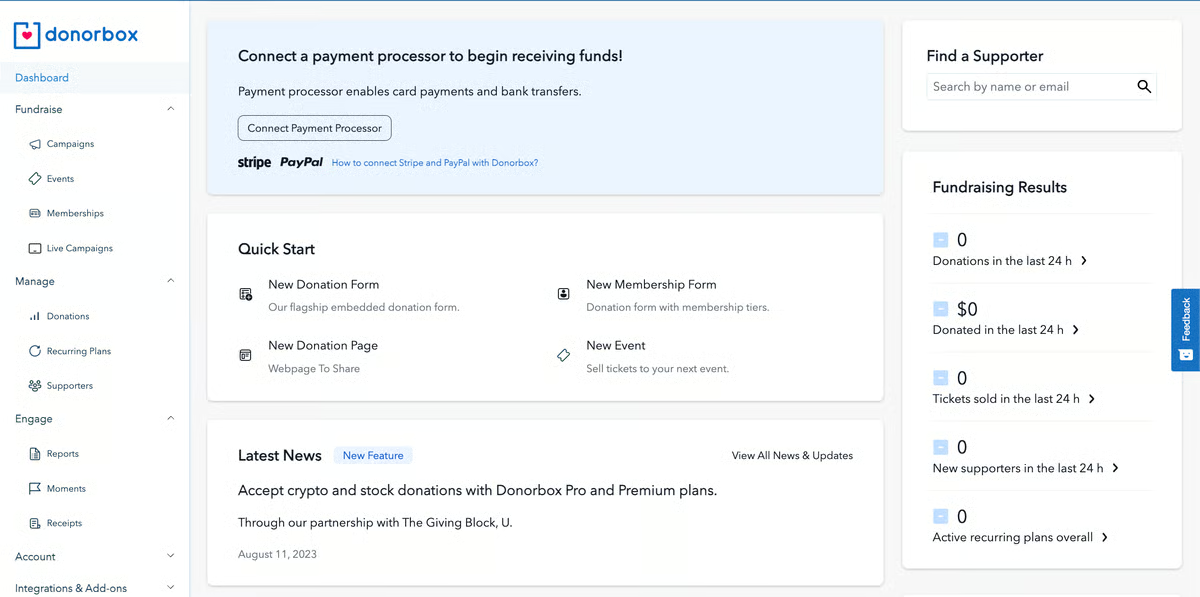
Donor management and CRM functionality within Donorbox are built for simplicity. Accessing donor histories and exports is straightforward, but advanced filtering, highly segmented constituent lists, and detailed relationship tracking require more manual steps as data volumes grow. The platform's fundraising and donation workflows remain the clear priority, and G2 reviewers consistently describe these as reliable and easy to use.
Kiosk mode and certain campaign features are structured around frequent, ongoing fundraising activity. Organizations that run campaigns only occasionally throughout the year, or rely mainly on one-off events without a recurring cadence, may find these features less aligned with how they actually operate. The broader donation form and campaign tools work well outside of kiosk contexts, keeping core fundraising accessible regardless of event frequency.
Ultimately, Donorbox remains closely aligned with small nonprofits and independent fundraisers that value accessibility and speed. Its focus on clear fundraising workflows, dependable reporting, and easy setup supports organizations that want online giving to remain simple and effective without introducing operational complexity.
“I use Donorbox to raise funds for Ethical Seafood Research and launch a monthly giving program. I appreciate how it makes it easy to accept international donations in multiple currencies in a streamlined way. I can easily create new campaigns and donation forms, and automatically send receipts. I really like that Donorbox doesn't have any onboarding costs, making it very accessible for small nonprofits.”
- Donorbox review, Katherine L.
“Perhaps the next big thing for Donorbox should be to add a few more of the restricted countries, in other words, to whitelist some of the 'not allowed' nations.”
- Donorbox review, Duncan C.
DonorPerfect operates as a shared system for fundraising, communications, and donor tracking within smaller nonprofit teams. It is not positioned as an enterprise CRM, and that focus shows in how quickly teams adapt to using it. With 78% of users coming from small organizations, 21% from mid-market teams, and 1% from enterprise, the platform aligns closely with lean teams that rely on their database as part of daily operations.
Core donor relationship management is central to how teams use DonorPerfect. Constituent profiles are among its highest-rated features on G2, organizing donor histories, giving patterns, and engagement details in a way that supports segmentation and follow-ups. This structure helps teams manage retention and recurring giving without added complexity.
Communication workflows remain closely connected to donor data. Integrations with tools like Constant Contact and Givecloud are frequently referenced, especially by teams that rely on email and online donations as primary channels. G2 users describe a smoother connection between donor records, outreach, and contributions, which reduces manual coordination.
Customization supports varied fundraising needs without making the system rigid. Custom fields, reporting options, and tools for events and major gifts allow organizations to tailor workflows to their programs. Many users note clearer donor tracking and more efficient fundraising after moving from spreadsheets or legacy systems.
Reporting tools are flexible and accessible without technical expertise. Teams build custom reports for board meetings, donor trend analysis, and fund tracking without relying on external tools or manual processes. The report builder covers gift types, donor histories, and campaign performance in a structure that staff describe as intuitive after minimal time in the system. Reviews note that accurate reporting across multiple funds has become a reliable part of daily operations.
Customer support is frequently described as knowledgeable, responsive, and genuinely invested in helping organizations succeed. Phone, chat, and onboarding assistance are all referenced positively, with several reviews noting that issues are resolved within the same interaction. Training resources, including walkthrough guides, webinars, and live sessions, help new staff get productive quickly without formal onboarding programs. For teams transitioning from legacy systems or spreadsheets, this support makes the shift considerably smoother.
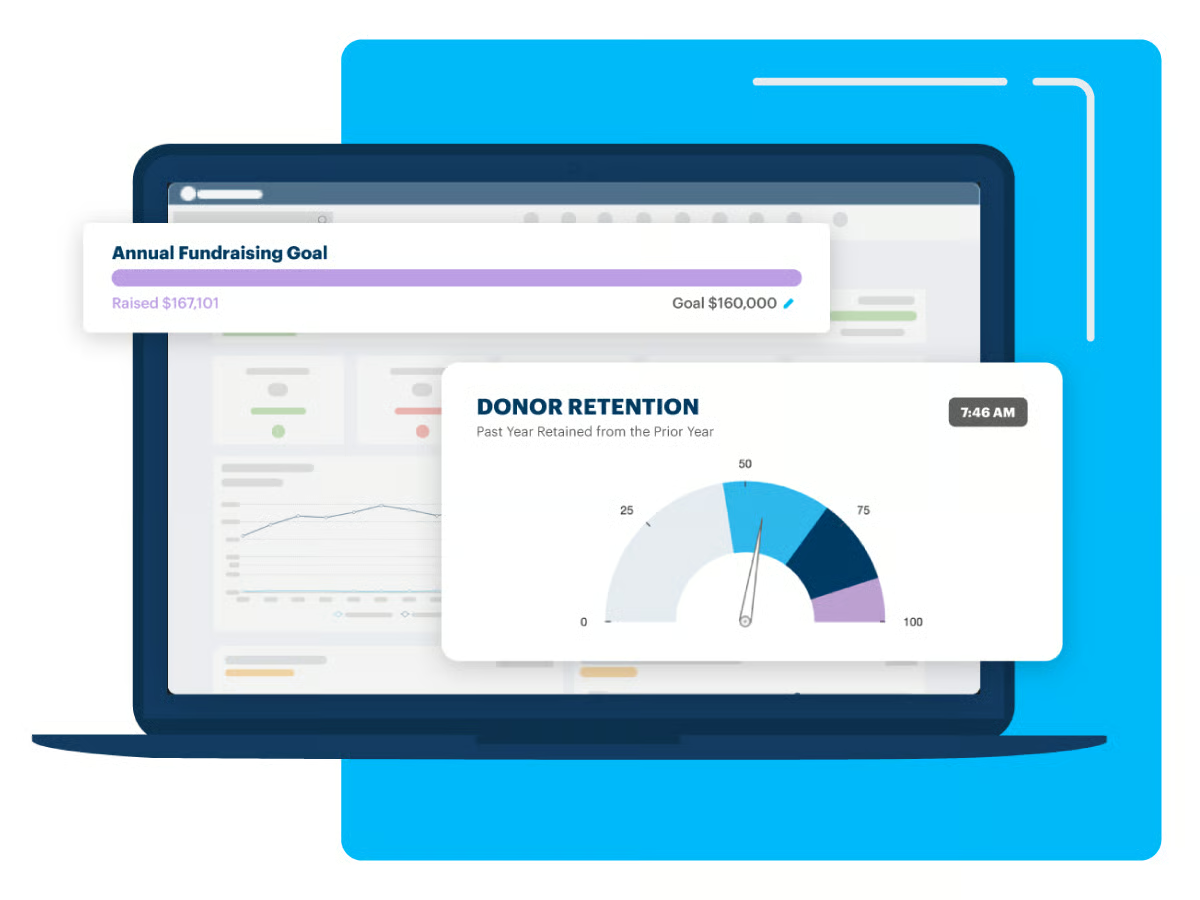
DonorPerfect functions as an organizational knowledge base over time. The ability to attach documents, log notes, flag gifts, and categorize donor interactions builds a record that holds up through staff turnover. G2 reviews describe the system becoming more valuable the more data is entered, supporting continuity across development teams as organizations grow. End-of-year tax receipt generation and QuickBooks integration are frequently cited as time-saving functions that reduce administrative load during high-pressure periods.
DonorPerfect's reporting framework operates within its own structure and terminology. Teams migrating from more standardized platforms like Salesforce may need time to adjust to how reports are built and organized within the system. Once familiar with the framework, the same flexibility supports customized reporting across varied fundraising programs and donor segments.
Workflows inside DonorPerfect prioritize operational reliability over visual presentation. The interface covers core fundraising and donor management needs consistently, but teams that expect polished UI design or highly visual dashboards will find the experience more utilitarian. The platform's data accuracy, structured workflows, and daily consistency are where G2 reviewers describe it performing reliably over time.
DonorPerfect fits organizations seeking a donor-centric CRM grounded in practical fundraising workflows. Its emphasis on relationship clarity, communication, and operational consistency continues to resonate with small nonprofits that value reliability and strong donor insight over enterprise-scale breadth.
“Navigating the platform is straightforward, and it offers all the features you need at a much lower cost. The customer support team is excellent and consistently responsive. Beyond what is included with DonorPerfect, the integration of Constant Contact and Givecloud has been especially valuable, as we use these tools regularly. My colleague and I access the database daily. We have also recently started using SimpleTix, which has proven to be an effective solution for our ticketing requirements.”
- DonorPerfect Review, Knox M.
"There’s very little we dislike about DonorPerfect. The only aspect we would consider changing is the peer-to-peer fundraising pages, but aside from that, we’re quite satisfied.”
- DonorPerfect review, Brittany S.
Neon CRM positions itself as a practical database for nonprofits that need structure without enterprise-level overhead. G2 Data shows a G2 Market Presence of 69, an overall G2 Score of 67, and a G2 Satisfaction Score of 65, reflecting a platform focused on consistency and operational stability rather than aggressive feature expansion.
Fundraising is rated at 85% on G2, above category averages, and supports routine tasks like entering donations and maintaining donor histories in a predictable flow. This helps teams manage contributions without adding process friction.
Constituent profiles provide a clear, organized view of donor information. Also rated at 85% on G2, profiles combine notes, giving history, and attachments such as checks, invoices, or correspondence in one place. This structure supports easy reference and reduces reliance on external systems.
Dashboards help teams stay oriented around daily activity. With an 84% G2 rating, dashboards surface relevant fundraising and engagement data without requiring customization-heavy setup. Teams can monitor progress and status quickly during ongoing campaigns.
Customer support is frequently mentioned in positive terms. Users describe support interactions as prompt and hands-on, which is especially important for small teams without dedicated technical resources. This support experience helps organizations resolve issues quickly and maintain momentum.
Automation supports routine donor management tasks. Features like automated reminders for expiring credit cards reduce manual follow-ups and help maintain recurring giving. These workflows allow staff to stay focused on donor relationships rather than administrative cleanup.
Built-in communication tools keep outreach connected to donor data. Teams can design newsletters, select audiences, send campaigns, and review engagement analytics within the same system. This integrated approach supports consistent messaging without exporting data to separate tools.
Neon CRM's reporting is built around standardized nonprofit views rather than open-ended custom reporting. Teams accustomed to highly configurable, cross-object reporting from enterprise CRM environments may need time to adjust to this more structured approach. The consistency this model provides means reports are reliable and accessible without requiring technical expertise to build or maintain.
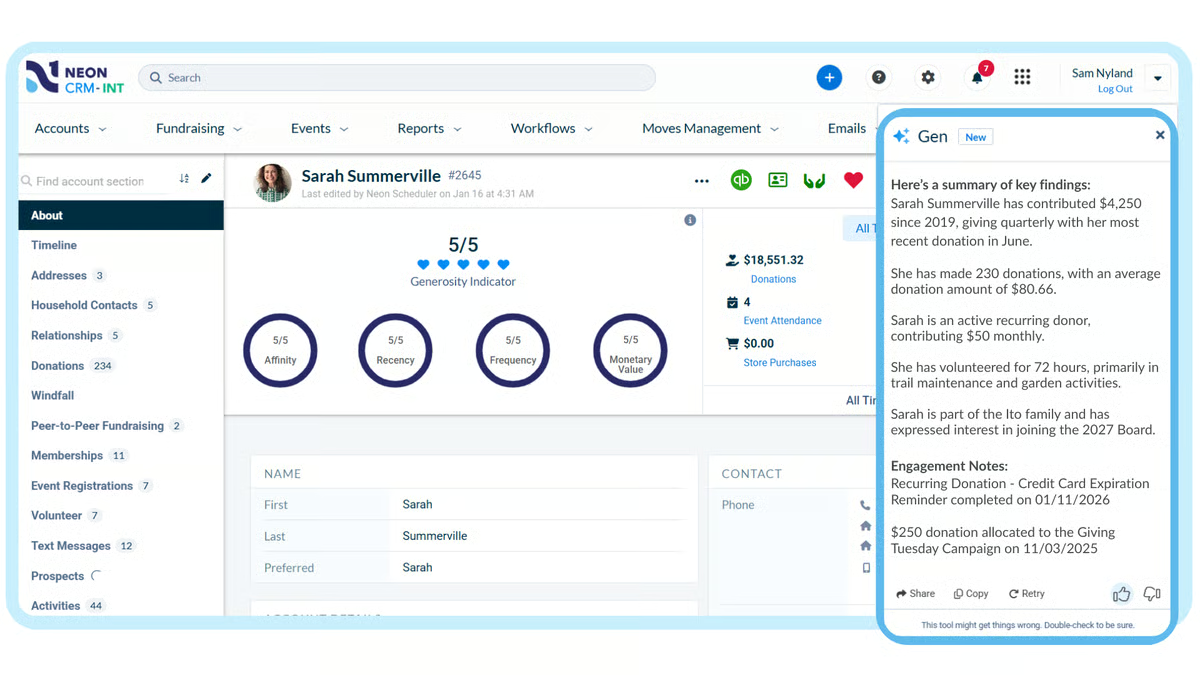
Constituent data modeling in Neon CRM is streamlined for common nonprofit scenarios. Complex household relationships, multiple addresses, or layered constituent structures receive less extensive handling than in some legacy enterprise systems. The streamlined model keeps data entry straightforward and reduces the administrative overhead that more complex configurations typically introduce.
Neon CRM fits nonprofits seeking a dependable all-in-one system for fundraising, donor management, and communications. Its strengths in fundraising workflows, constituent organization, automation, and customer support reinforce daily reliability for small teams. For organizations that value clarity, consistency, and structured processes over deep customization, Neon CRM aligns well with its intended audience.
“I truly appreciate the opportunity to have a lot of options automated, saving our small team a lot of time from having to do some repetitiveness or spend a lot of time doing tasks that can easily be automated by the system.”
- Neon CRM review, Lauren H.S.
“While the platform is very comprehensive, I sometimes find that certain tasks are not as intuitive as I would prefer. Nevertheless, the training resources and knowledge base are excellent, allowing me to easily find the answers I need without having to reach out to the company directly.”
- Neon CRM review, Chelsea M.
Zeffy is built around cost sensitivity and operational simplicity, which aligns closely with how small nonprofits adopt it. The platform centers on affordability and predictable functionality for small teams that want fundraising tools without ongoing cost pressure.
The zero-fee model shapes how nonprofits evaluate Zeffy from the outset. Organizations are able to retain 100% of donated funds, removing transaction fees from everyday fundraising operations. For schools and community groups with limited budgets, this simplifies financial planning and reduces internal trade-offs around platform expenses.
Donor-facing transparency supports a straightforward giving experience. Donors can contribute knowing their funds go directly to the organization rather than being partially absorbed by processing fees. This clarity supports trust and reduces the need for additional explanation during campaigns, especially for community-driven fundraising efforts.
Core fundraising and communication workflows are well aligned with small-team needs. Donor communications (95%), fundraising tools (94%), and email marketing (92%) all score well above category averages on G2. Reviews consistently describe launching campaigns, managing memberships, selling event tickets, and sending newsletters from a single interface without added setup complexity.
The platform’s design supports ease of use across different roles within an organization. Volunteers, board members, and staff are able to navigate key workflows with minimal guidance, which helps distribute operational tasks more evenly. Several G2 reviewers mention consolidating multiple disconnected tools into Zeffy, reducing administrative effort while maintaining professional donor-facing pages.
Weekly direct deposits, live workshops, and proactive product updates show up repeatedly across reviews, with support staff described as responsive and thorough, resolving issues within the same interaction. Several organizations note that feedback submitted through the platform's forum has translated directly into product changes, reinforcing long-term confidence in the platform. For volunteer-run teams without dedicated operations staff, this responsiveness keeps campaigns running without disruption.
Automated receipts, end-of-year donor summaries, and tax documentation are handled within the platform without manual effort. Teams describe exportable donor lists, automatic 501(c)(3) receipts, and year-end contribution reports as functions that remove significant administrative load, while weekly direct deposits add financial transparency that reviews contrast favorably against platforms that hold funds until manually triggered.
Reporting and export tools in Zeffy are designed around common nonprofit tracking needs rather than deeply customized datasets. Organizations that require merged, cross-referenced data exports or highly tailored reporting structures will find more manual organization required after pulling data. That said, the standard reporting covers day-to-day campaign tracking reliably and is consistently described as easy to use without technical expertise.
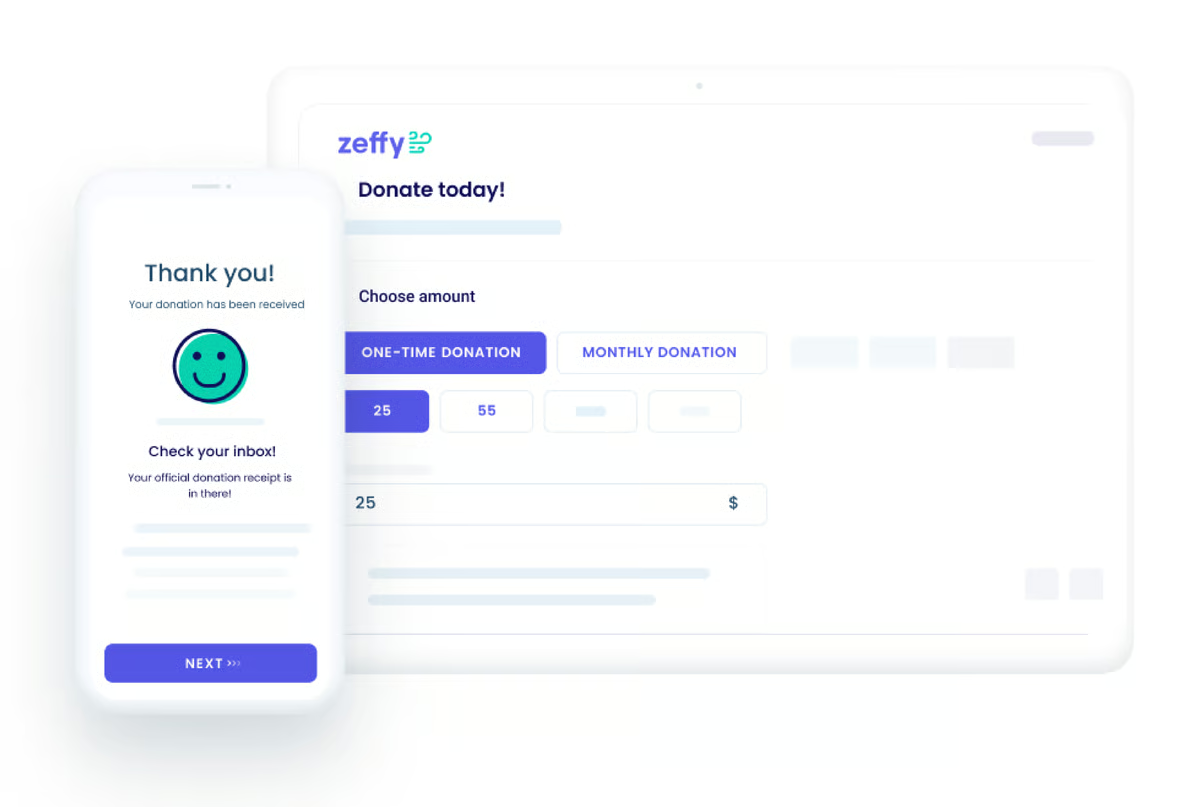
Zeffy's integrations are concentrated on its core fundraising, donor management, and communication workflows. Teams with broader marketing stacks or tools that operate outside this scope will likely continue running those tools alongside Zeffy rather than replacing them. However, the focused platform design is frequently cited as a key reason small nonprofits adopt and stay with the platform quickly.
Zeffy fits small nonprofits and schools that want to maximize retained funds while keeping fundraising and communication workflows simple and predictable. Its zero-fee structure, strong donor communications, and accessible design support organizations that prioritize transparency, ease of use, and financial efficiency over expansive CRM depth.
“I love that Zeffy is free for our nonprofit school, which is a huge benefit since every penny counts for us. The reporting features are excellent, making it easy to track multiple campaigns from various donors simultaneously. I truly appreciate the user-friendly interface that the design team has crafted, making it simple to launch and monitor the progress of campaigns. It's much more suited to our needs compared to other tools like Venmo. Additionally, the initial setup was extremely easy.”
- Zeffy review, Audie A.
“I dislike that there isn't a way to quickly add a campaign or record a donation without assigning it to a campaign. We receive donations regularly that aren't for a specific event or fundraiser. We should be able to record those to a donor's profile without having to input or make up a campaign to do it. I would love additional email templates and pop-ups on the sides of the templates that explain how to operate the template. There is a learning curve to tailoring a template.”
- Zeffy review, Carrie L.
Salesforce Nonprofit Cloud is designed for nonprofits that need a single data foundation to coordinate fundraising, programs, and volunteers as operations grow in scale and complexity. The platform is positioned for teams prepared to invest in structured implementation and ongoing system management rather than quick deployment.
Dashboards and reporting both score 89% on G2, exceeding category averages and supporting consistent oversight across fundraising, programs, and volunteer activity. Teams describe being able to monitor multiple operational areas from a single system once data is consolidated.
Reporting supports complex nonprofit environments with multiple initiatives running in parallel. Reviews highlight reliable access to donation data, volunteer activity, and program performance without relying on separate systems. This consistency is especially useful for organizations managing diverse funding sources or benefit types.
Program management capabilities support operational nuance at scale. Users reference configuring program structures, benefits, and transactions in ways that reflect how their organizations actually operate. This flexibility helps nonprofits avoid forcing mission-driven work into rigid templates, particularly when managing multiple programs simultaneously.
Task delegation supports structured ownership as teams grow. Rated at 89% on G2, task management helps distribute responsibilities across fundraising, program delivery, and volunteer coordination. This becomes increasingly valuable for mid-sized organizations where accountability and role clarity are needed to keep operations aligned.
The platform’s data model supports consistency across overlapping roles and relationships. Donors, volunteers, and beneficiaries can be managed within the same data foundation, which improves coordination across teams. This structure reinforces the platform’s strengths in reporting accuracy and cross-functional visibility.
The first ten licenses are free, giving organizations a meaningful window to evaluate the platform before committing to full investment. G2 reviews describe this as a practical starting point for smaller nonprofits weighing the cost of enterprise CRM infrastructure. The broader ecosystem supports integrations across departments including development, programs, and research, keeping cross-functional data connected without requiring separate tools for each team.
With 64% of users from small nonprofits and nearly a third from mid-market organizations, Salesforce Nonprofit Cloud draws a broader spread of adopters than most tools in this category.
Salesforce Nonprofit Cloud's depth and configuration architecture suit teams comfortable with structured CRM environments. Organizations transitioning from simpler nonprofit platforms or lighter tools may need time to adjust to the system's data model, terminology, and workflow logic before it feels intuitive. Teams that invest in structured implementation, though, gain a long-term operational foundation that supports fundraising, programs, and reporting in a single system.
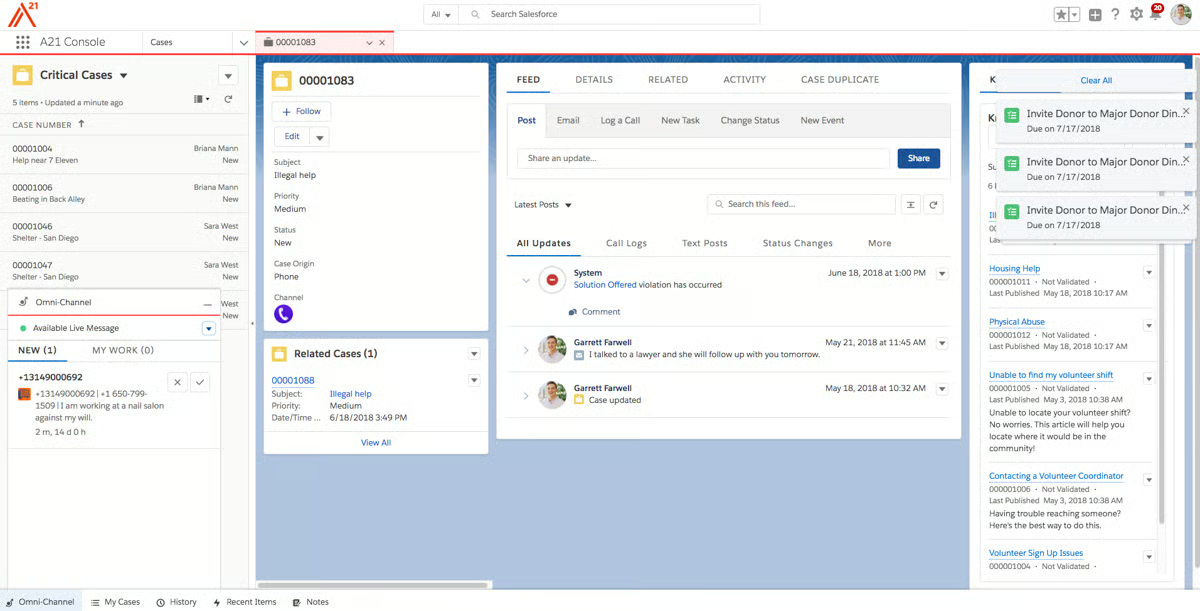
Email marketing and donor communications are designed to support CRM tracking and data integrity rather than function as a dedicated outreach platform. Teams that run high-frequency, design-led marketing campaigns may find these features more operationally focused than marketing-specialized. Still, the coherence this brings across fundraising, programs, and constituent records supports reporting accuracy and cross-functional visibility over time.
Ultimately, Salesforce Nonprofit Cloud functions as a long-term operational system rather than a quick-start fundraising solution. Its strengths in visibility, program management, task coordination, and data consistency support nonprofits that expect their operations and accountability requirements to grow over time. For organizations prepared to invest in structure and ongoing system ownership, it serves as a durable, mission-aligned infrastructure at the center of nonprofit operations.
“Salesforce Nonprofit Cloud (NPC) is a powerful CRM platform designed specifically for nonprofits. Program management apps have a lot of features that can streamline programs, benefits types, disbursements, and gift transactions. We can edit all features to the app depending on our program.”
- Salesforce Nonprofit Cloud review, Sridevi A.
“It does that sometimes to get the hang of it since it is slightly different from other SF products.”
- Salesforce Nonprofit Cloud review, Julio E. R.
Glue Up is designed for associations and membership-driven organizations that want events, communications, and relationship management to run from a single system.
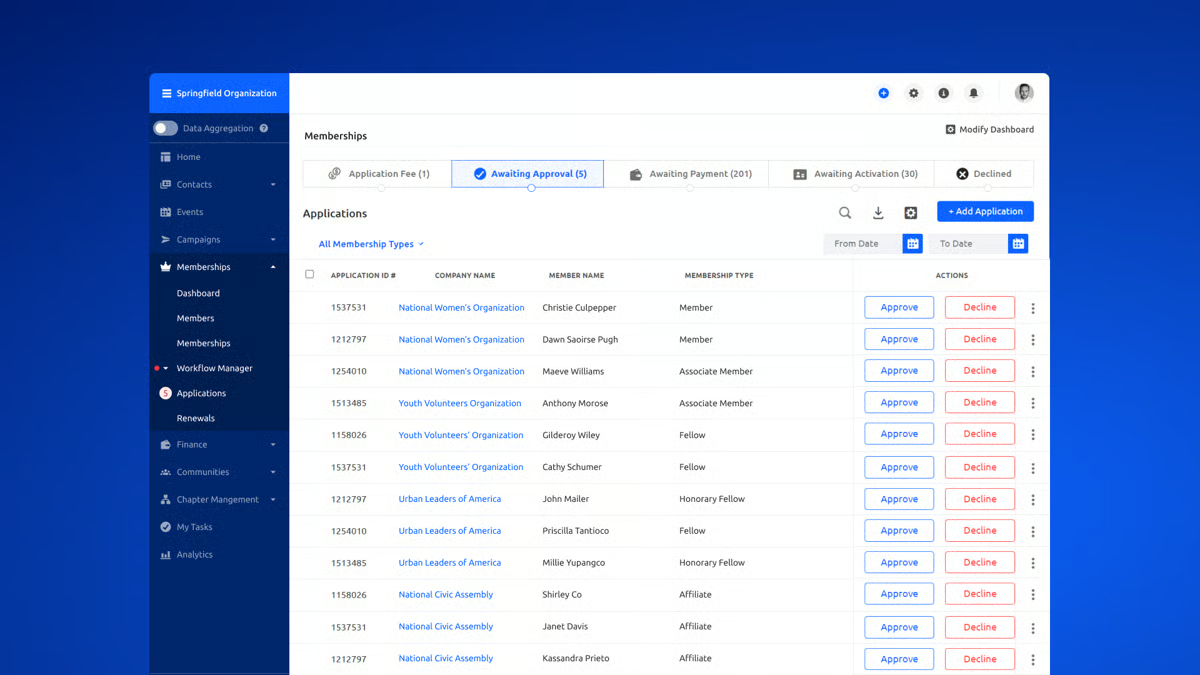
Email marketing and campaign execution are the main strengths of Glue Up. Email marketing is rated at 94% on G2, and campaign management at 91%. Reviews describe segmenting member lists, running targeted outreach, and managing event communications from one system, which helps keep messaging consistent across campaigns.
The online portal supports member engagement and self-service. Rated at 87% on G2, the portal allows members to register for events, manage profiles, and access shared resources without administrative back-and-forth. This reduces manual coordination for staff while keeping member interactions centralized.
Support and onboarding play a meaningful role in adoption. Users frequently describe the onboarding experience as guided and patient, with explanations that work across varying comfort levels with software. This support helps teams transition confidently when replacing multiple tools at once.
An overall G2 Score of 63, G2 Satisfaction Score of 67, and G2 Market Presence of 59 align with how teams describe dependable execution rather than specialized enterprise depth. The platform’s traction mirrors its focus on associations managing events and communications regularly.
Member records in Glue Up consolidate contact details, event attendance, payment history, and engagement levels in one place, removing the need to cross-reference separate systems. Reviews describe this as particularly valuable for secretariat teams managing large member bases, where responding quickly to individual needs depends on having accurate, up-to-date information at hand.
Memberships, events, email campaigns, invoicing, and payments running from a single environment remove the coordination overhead of managing disconnected tools. Teams describe a measurable reduction in manual workload after consolidating onto the platform, with automation handling renewals and event follow-ups while keeping member data consistent without manual reconciliation. Organizations previously relying on spreadsheets and multiple platforms describe the shift as a significant operational improvement.
Event and membership outcomes are closely tied to the platform’s design. Teams describe clearer insight into attendance trends, registrations, invoicing, and sponsorships within a single workflow. Features like CPD tracking, event apps, and year-round community access support organizations that run frequent events or certification programs.
Creating and editing content within Glue Up follows structured workflows built around platform consistency. Teams migrating from simpler, more freeform tools may need time to become comfortable with the platform's internal logic before tasks feel fully natural. The onboarding support is frequently described as patient and thorough, which helps teams build confidence in the platform's workflows during the transition.
The Knowledge Library is designed around content sharing and access rather than visual presentation. Organizations that rely on polished, visually rich resource hubs may find the design more function-focused than they prefer. Still, for teams whose primary use is content distribution and member access, the feature works reliably without requiring additional configuration or design work.
Glue Up aligns best with small associations, chambers, and membership-based organizations that want a unified system for managing relationships, events, and communications. Its value is strongest for teams that prioritize engagement, email campaigns, and operational consolidation over heavy enterprise customization..
“The system is very user-friendly. We have been using it actively, and things have been working so smoothly compared to our previous system. The support team is geared up and always available to help. Set-up is super easy, and modules are so well thought out. Modules integrate seamlessly as well.”
- Glue Up review, Mark A.
“While Glue Up is much better than the system we left, it needs to fix a few more kinks before it is perfect. I have had to adjust our way of doing business to adapt to Glue Up's way of doing business.”
- Glue Up review, Joelle W.
NationBuilder is positioned for advocacy groups, nonprofits, and community-led organizations that need multiple functions to operate together without heavy technical overhead. It combines CRM, website management, email marketing, and payment processing into a single system, reducing reliance on disconnected tools.
CRM records, websites, email campaigns, and fundraising tools operate from a shared system, allowing constituent data to flow directly into unified profiles. This structure helps small teams avoid duplicating work across platforms while keeping supporter information consistent.
Speed of execution supports time-sensitive campaigns. Teams describe launching websites, forms, newsletters, and fundraising flows quickly, which matters in advocacy and grassroots contexts where timelines are tight. Unified constituent records allow engagement data to update automatically as supporters interact across channels.
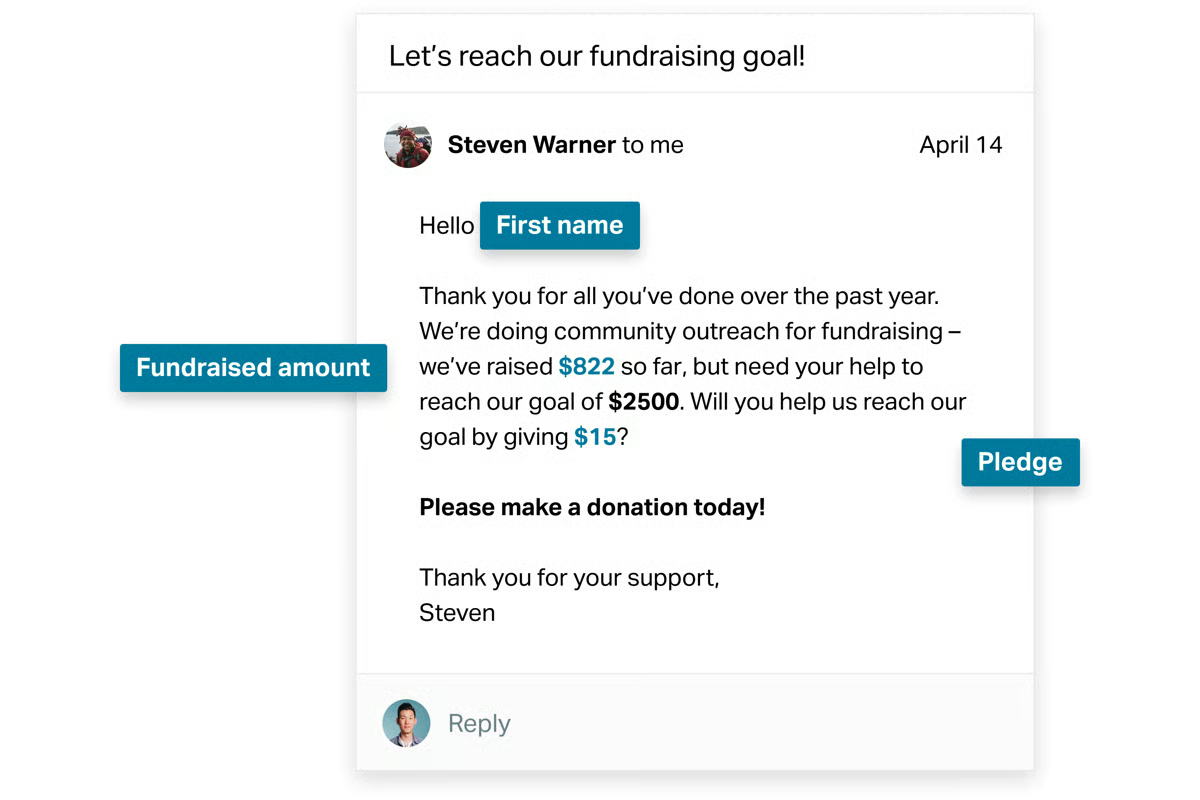
Email marketing is the platform’s strongest-rated capability. With a 91% G2 rating, it performs well above category averages and supports filtering supporters and sending targeted communications with minimal setup. This aligns closely with voter outreach, membership updates, and supporter mobilization workflows.
Campaign management reinforces coordinated outreach. Rated at 85% on G2, campaign tools support organizing actions, communications, and fundraising around shared objectives. Teams rely on this structure to keep messaging and engagement aligned across multiple initiatives.
Action pages help organizations turn supporter interest into direct participation, covering petitions, event registrations, and advocacy actions that feed engagement data back into constituent profiles automatically. G2 reviews describe this as particularly valuable for grassroots organizations where mobilizing supporters quickly around specific issues is a core operational need, with the tight connection to the CRM keeping supporter activity visible without manual data entry.
Dedicated account management is referenced positively by long-term and enterprise users, with organizations describing regular check-ins with assigned representatives who provide practical guidance on getting more from the platform. The support team is described as responsive when issues arise, helping teams maintain campaign momentum without extended downtime. For organizations running time-sensitive advocacy or outreach campaigns, this level of access reduces the risk of disruption at critical moments.
G2 Data reflects steady adoption among small, action-oriented organizations. An overall G2 Score of 63, G2 Satisfaction Score of 60, and G2 Market Presence of 67 align with a platform focused on breadth, accessibility, and dependable execution rather than deep specialization in any single module.
Grant management sits outside NationBuilder's design focus. Teams that need detailed grant administration, financial tracking, or back-office grant workflows will find that those capabilities are not part of the platform's core scope. Still, the platform's strengths in email marketing, constituent profiles, and campaign coordination are consistently well-rated and align closely with how advocacy and mobilization-focused organizations operate.
Administrative tasks such as complex searches and batch updates involve more steps than in some dedicated CRM tools. Teams new to integrated CRM environments may find that certain back-end workflows require a settling-in period before they feel fully intuitive. Even so, outreach, supporter engagement, and campaign coordination run smoothly day to day once teams establish their working patterns within the system.
Overall, NationBuilder continues to serve organizations that prioritize speed, cohesion, and relationship-driven engagement. Its strength lies in keeping outreach, fundraising, and supporter data connected within a single system. For small nonprofits, advocacy groups, and political organizations that value execution and centralized coordination over deep operational specialization, NationBuilder remains closely aligned with how they work.
"The filter feature and the email blast feature are both incredibly easy to set up and very powerful to use."
-NationBuilder review, Melanie B.
“Sometimes searches and batch updates are clunky. Social media sharing has lagged behind current trends. Podcasting and RSS would be helpful. Instead of relying on custom code, more popular features should be more quickly integrated.”
- NationBuilder review, Dan A.
|
Software |
G2 rating |
Free plan |
Ideal for |
|
Givebutter |
4.7/5 |
Yes. Free to use; platform funded by optional donor tips; payment processing fees apply. |
All-in-one fundraising, donations, and lightweight donor CRM |
|
Raiser’s Edge NXT |
3.9/5 |
No |
Large nonprofits with complex fundraising operations |
|
Bloomerang CRM |
4.7/5 |
No. Free trial available |
Donor retention and relationship-focused fundraising |
|
Donorbox |
4.6/5 |
Yes. Free standard plan with per-donation platform fees |
Fast donation setup and recurring giving |
|
DonorPerfect |
4.4/5 |
No. Demo available |
Fundraising automation and donor reporting |
|
Neon CRM |
4.3/5 |
No. Free trial available |
Managing donations, events, and memberships together |
|
Zeffy |
4.9/5 |
Yes. Free to use; funded by optional donor contributions |
Fee-sensitive nonprofits that want a free fundraising platform |
|
Salesforce Nonprofit Cloud |
4.1/5 |
No |
Enterprise-grade customization and scalability |
|
Glue Up |
4.5/5 |
No |
Membership-driven nonprofits and event-led engagement |
|
NationBuilder |
4.2/5 |
No. Free trial available |
Advocacy, community organizing, and supporter mobilization |
*These nonprofit CRM products are top-rated in their category based on G2’s 2026 Grid® Report. Pricing availability varies by vendor, with some publishing prices publicly and others providing pricing only through inquiries.
Got more questions? G2 has the answers!
If donor stewardship and clean fundraising reporting are central, Bloomerang or DonorPerfect tend to surface as stronger options. For nonprofits running complex programs, multi-entity structures, or heavy integrations, Salesforce Nonprofit Cloud is more commonly selected for its flexibility and long-term scalability.
Givebutter and Donorbox are often picked by smaller teams looking to modernize fundraising without heavy setup. Review patterns suggest faster onboarding, fewer administrative dependencies, and a shorter time to live campaigns compared to enterprise platforms.
Yes. Tools like Glue Up frequently appear in reviews from nonprofits that run conferences, galas, or membership programs. These platforms emphasize event registration, attendee management, and engagement tracking alongside core CRM functionality.
Bloomerang CRM consistently shows up for organizations prioritizing long-term donor relationships, retention, and engagement history. Reviews often highlight visibility into donor interactions rather than just donation totals.
Some can. NationBuilder is commonly chosen by advocacy-focused organizations that need supporter mobilization, communications, and campaign coordination alongside basic CRM capabilities. It tends to show up where engagement goes beyond donations.
Very. Finance teams often surface issues when CRMs lack reliable reporting, export control, or audit clarity. DonorPerfect and Salesforce Nonprofit Cloud are frequently mentioned for more structured reporting and data consistency across teams.
Fundraising-first tools prioritize donations, forms, and speed of engagement. All-in-one platforms focus on cross-team alignment, permissions, and long-term data governance. The distinction usually shows up in flexibility versus simplicity.
Most platforms support CSV imports, but the real challenge lies in data cleanup and structural decisions. Lighter tools reduce upfront friction, while enterprise systems require more planning before teams see value.
Salesforce Nonprofit Cloud consistently appears in reviews from larger organizations planning for multi-year growth, deeper integrations, and custom workflows. It is typically chosen when scale and governance matter more than speed.
That depends on risk tolerance. Teams focused on immediate fundraising momentum often favor ease of use. Organizations planning complex operations tend to accept setup overhead in exchange for control and durability.
If there’s one takeaway from researching the best CRM for nonprofits, it’s how much these systems influence everyday operations. The right platform brings consistency to donor and constituent records, improves visibility across fundraising activity, and gives teams shared context they can rely on. Over time, that consistency reduces reporting effort, limits data gaps, and helps organizations manage relationships with more intention.
Whether you’re a small nonprofit setting up structured donor outreach, a growing organization managing campaigns, events, memberships, and reporting at once, or a large institution working under tighter governance and compliance requirements, there’s a CRM built for that scale of work. As expectations around transparency, accuracy, and stewardship increase, relying on scattered tools or manual processes becomes harder to sustain.
So the decision comes down to fit rather than feature volume. Choose the CRM that matches how your nonprofit operates, how information moves between teams, and how decisions are actually made. In nonprofit work, steady progress comes from having one dependable system that supports relationships and helps the mission move forward with confidence.
Want to take your nonprofit operations further? Explore G2’s best non-profit software products to see how fundraising, engagement, and operations tools support nonprofits.


Too many nonprofits mistake activity for impact. They send newsletters, host events, and log...
.png) by Devyani Mehta
by Devyani Mehta

After years of working with nonprofits, I’ve seen how challenging it can be to run a...
by Devyani Mehta

Recently updatedSummer 2026 Grid® Report · published May 26, 2026 This guide was last...
by Devyani Mehta