


Every content team has the same problem. You’re constantly finding articles, posts, and ideas, but deciding what’s actually worth sharing takes more time than finding them. The best content curation software helps turn that noise into something you can trust and publish consistently.
I have seen this gap across content teams. There are too many inputs, unclear priorities, and no clear path from discovery to publishing. The market is growing from $655.8 million in 2024 to over $1.1 billion by 2030, showing how central these tools have become.
When the tool doesn’t match how teams actually work, problems show up quickly. Irrelevant content increases, approvals slow down, and publishing gets fragmented. Over time, this makes execution harder and reduces confidence in what gets shared.
I analyzed G2 reviews and real workflows to understand where these tools help and where they fall short. In this guide, I map the shortlist to specific use cases. ContentStudio is strong for discovery and scheduling. Walls.io fits live social walls. Juicer works for simple embedding. Tagshop.ai supports shoppable UGC. BuzzSumo is best for trend tracking and validation. Here are the content curation tools that consistently stand out based on how teams actually use them.
*These content curation software tools are top-rated in their category based on G2's latest Winter Grid Report 2026 and market reputation. I've included their strengths and ideal use cases to help you choose the right solution for your team's workflows.
What stands out in stronger content curation platforms is how they reduce judgment fatigue. They help surface relevant content, filter out noise, and add context so teams understand why a piece is worth sharing. Whether that means spotting emerging topics, organizing curated assets by theme, or maintaining consistency across social, newsletters, and websites, the best tools replace clutter with signal.
This is not restricted to large-scale content operations. G2 review data indicates that adoption is widespread among small teams, mid-market organizations, and enterprises. Social teams utilize curation to remain current, marketing teams depend on it to keep their publishing schedule consistent, and brand teams rely on it to sustain relevance at scale. Most platforms are built to seamlessly integrate into existing workflows, minimizing friction by avoiding additional management layers.
I started by using G2’s Winter Grid Report 2026 of content curation software, 2026, to shortlist leading content curation platforms based on real user satisfaction scores and market presence across small teams, mid-market companies, and enterprises.
From there, I analyzed hundreds of verified G2 reviews to surface recurring patterns around what actually matters in day-to-day content workflows. That included factors like discovery quality, relevance filtering, editorial control, publishing efficiency, collaboration across contributors, and how well curated content flows into social, web, and campaign execution.
I used AI to analyze patterns across verified G2 reviews and identify consistent strengths, limitations, and use cases across tools. The screenshots, visuals, and product references included here are sourced directly from G2 vendor listings and publicly available product documentation to ensure accuracy and transparency.
Based on thousands of G2 user reviews, real content workflows, and feedback from content marketers, social teams, brand managers, and editorial leads, consistent patterns emerged. Here’s what I considered when assessing content curation software:
Based on these criteria, I narrowed the list to platforms that consistently reduce noise, support editorial judgment, and fit how content actually moves through modern workflows. Not every solution excels in every area. The right choice depends on whether your priority is discovery quality, editorial consistency, collaboration, or distribution efficiency. What matters most is choosing a tool that aligns with how content curation really happens inside your team, not how the category is positioned.
Below, you’ll find authentic user feedback from the content curation software category. To appear in this category, a tool must:
This data was pulled from G2 in 2026. Some reviews may have been edited for clarity.
RELAYTO, rated 4.7/5 on G2, is commonly chosen by marketing, sales enablement, and communications teams that need to turn existing documents and presentations into interactive, web-based experiences without relying on design tools. G2 review analysis shows it is commonly evaluated by teams aiming to keep curated content engaging, current, and easy to reuse across audiences.
G2 review data shows RELAYTO is primarily used to organize and repackage static assets into interactive content hubs. Teams curate existing PDFs and slide decks into structured experiences that feel more navigable and intentional. This supports clearer storytelling and helps curated content stay relevant beyond a single use case.
SEO is rated at 100% on G2, reinforcing how curated content is surfaced as shareable, indexable web experiences. This approach supports discoverability and long-term reuse across campaigns, libraries, and audience segments. For content curation teams, this reduces friction between creation and distribution.
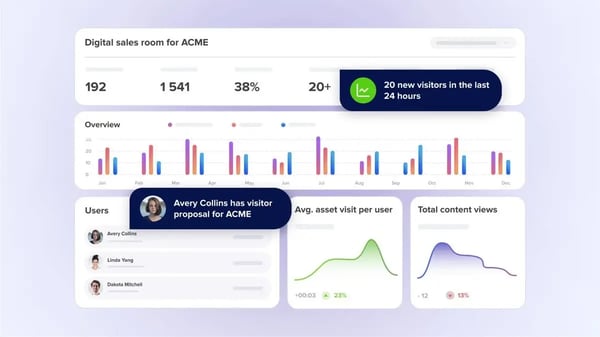
Analytics and Reporting score 98%, reflecting RELAYTO’s ability to show how audiences interact with curated content. G2 review patterns highlight visibility into views, engagement depth, and consumption flow. These insights help teams assess which curated assets resonate and where attention drops off, supporting ongoing refinement.
Multimedia Support is also rated at 98%, aligning with feedback about blending text, visuals, video, and data in a single experience. This allows curated content to move beyond static presentation formats. Teams can assemble varied content types into cohesive narratives without custom development.
I saw that the G2 user reviews frequently reference layout and branding flexibility as part of RELAYTO’s value. Fonts, colors, and structural elements can be adjusted to match brand standards or audience needs. This flexibility supports curated content that feels tailored, while avoiding reliance on dedicated design tools.
RELAYTO supports collaborative workflows by allowing teams to update individual sections without rebuilding entire experiences. Curated libraries and modular updates make it easier to maintain content freshness. This structure helps distributed teams manage shared assets while keeping presentation quality consistent.
RELAYTO's depth of customization means first-time users typically spend some time exploring features before settling into a consistent workflow. I did see that teams with less hands-on setup time may find that the initial orientation takes longer than expected. Free video walkthroughs are available from the start, and most users describe the platform as feeling natural once they have worked through the early exploration period.
Supporting features such as Query Builder, Email Marketing, and Content Sources are functional and reliable for standard needs. Teams looking for deeper specialization in these areas, particularly those with advanced email workflows or complex source filtering, may find them less central to what the platform does best. RELAYTO's core strength remains in the content experience layer, where its highest-rated capabilities are clearly focused.
RELAYTO remains a strong fit for content curation teams that need to modernize how documents, presentations, and knowledge assets are experienced. Its ability to publish SEO-ready, multimedia-rich content with clear engagement visibility sets it apart from file-based tools, making it especially relevant for marketing, sales enablement, and communications teams focused on impact and reuse rather than one-off delivery.
“I really like how easy it is to turn regular slides into professional, interactive pages. The design looks clean, the interface is smooth, and I can quickly customize fonts, colors, and layouts. It definitely saves time and makes my work look more polished.”
- RELAYTO review, Ming Z.
“What I dislike about RELAYTO AI is that, even though it’s powerful, it can feel a bit restrictive when I want more advanced customization. You end up relying on the platform’s templates and overall structure, so if you’re trying to create something highly tailored or more unconventional in design, it can start to feel limiting.”
- RELAYTO review, Davinder S.
BuzzSumo, rated 4.5/5 on G2, is a research and intelligence platform designed to help content marketers and editorial teams understand what content performs before investing in creation. Its core focus is on surfacing engagement data, trends, and competitive benchmarks across articles, social platforms, and influencers. It operates as an upstream decision layer for content strategy. What stood out to me across the G2 review analysis was how often BuzzSumo came up as the tool teams rely on to validate ideas and take some of the guesswork out of content planning.
G2 review data highlights BuzzSumo’s strength in aggregating performance data across a wide range of content sources, reflected in its 93% rating for Content Sources. Teams rely on this breadth to compare topics, headlines, and formats without scanning multiple platforms manually. Engagement indicators such as shares and interactions provide concrete evidence rather than assumptions. This supports faster validation during the ideation phase.
Content Suggestions, rated at 93%, play a central role in translating discovery into actionable ideas. Teams can identify patterns in what already resonates within a niche. This shortens research cycles and reduces trial-and-error planning. The emphasis stays on observable performance.
What stood out to me in the G2 reviews was how often competitor analysis and influencer discovery surfaced as real strengths. Being able to see which competitors’ content continues to earn engagement gives teams a more grounded way to benchmark their own goals. Seeing which competitors' content performs well helps teams set realistic benchmarks, while influencer data adds context around reach and amplification within specific niches.
Trending feeds and alerts allow teams to monitor shifts in interest across industries and topics. Rather than reacting after trends peak, teams can observe momentum as it builds. Filtering options help narrow focus to relevant themes instead of broad noise. This capability is especially relevant for teams managing time-sensitive content calendars.
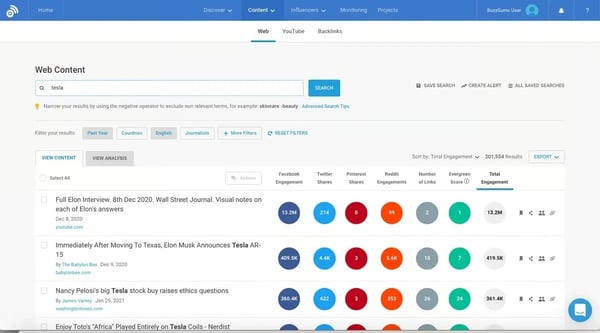
BuzzSumo brings multiple research activities into a single environment, allowing teams to analyze articles, track backlinks, and review performance metrics without switching tools. This consolidation reduces fragmentation during strategy work and supports a more structured approach to content research. It is particularly useful for teams that treat research as a repeatable process. These capabilities are reflected in its 93% rating for Content Management.
Some advanced capabilities, such as extended historical data and more granular filtering, are tied to higher-tier plans. This structure aligns well with teams that treat BuzzSumo as a core research system, but may influence how smaller teams approach long-term usage. The platform remains functional at lower tiers, though depth increases with scale.
Integrations (86%) are rated solidly, though the platform is designed around research and analysis rather than cross-functional execution or deep workflow integrations. Teams expecting extensive in-platform collaboration or seamless handoffs into execution tools may rely on complementary systems. The interface prioritizes analysis and reporting over shared workflows. This design choice fits research-centric use cases more than cross-functional execution.
Overall, BuzzSumo stands out as a research-first content curation platform for teams that want evidence before execution. Its ability to surface high-performing content and engagement metrics makes it especially relevant for content marketers and editorial teams working in fast-moving industries.
“The best thing I like about this software is that it is easy to use, and most of the content marketing tools are available under a single software, like keyword research, content research, build your funnel, how to to content marketing, and more.”
- BuzzSumo review, Pawan K.
“The interface can be overwhelming at first because of the many data points.”
- BuzzSumo review, Anurag G.
User-generated content often introduces risk when displayed live, and Walls.io is built to manage that risk through structured curation. The platform focuses on aggregating content, applying moderation rules, and presenting it consistently across websites and events. G2 reviews commonly reference its role as a backend layer. This makes it a practical fit for live or campaign-driven contexts where content changes frequently.
Walls.io’s strongest value lies in aggregating social content into a single, continuously updated feed. Social Media is its highest-rated feature at 90%, showing consistent performance across live and embedded environments. G2 review data highlights dependable ingestion from multiple networks without frequent intervention. This reliability supports ongoing campaigns and events where curated content must remain current.
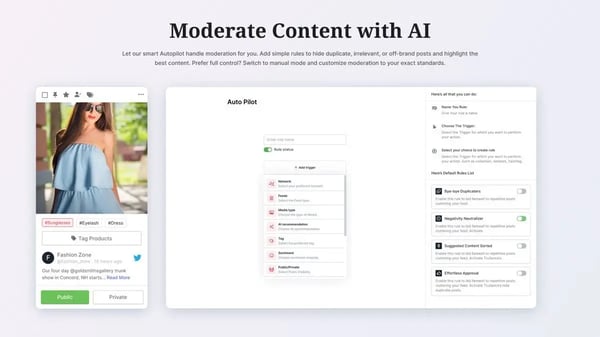
Moderation workflows are designed to filter, approve, and control content before it reaches public surfaces. Language filters, approval queues, and content rules reduce ongoing monitoring effort. For teams curating live or audience-generated content, this lowers operational risk without slowing down publishing velocity. The result is curated content that stays aligned with brand and compliance expectations.
Customization is rated at 89%, indicating flexibility in how curated content is presented. Layout controls, visual styling, and accessibility-aware formats allow content walls to match brand systems. This makes Walls.io suitable for organizations that treat curated content as part of their primary digital experience. The platform emphasizes consistency over experimental design.
Direct posting enables participation without requiring a social media account. This broadens who can contribute content, particularly in internal, regulated, or event-based contexts. From a content curation perspective, this expands the pool of usable submissions while keeping moderation centralized. It also reduces reliance on third-party social platforms for engagement.
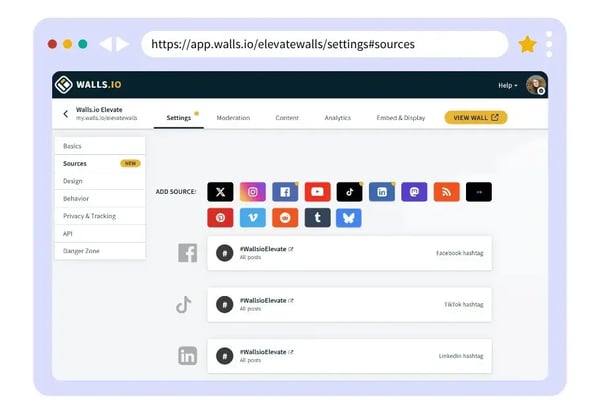
Analytics and Reporting score 89%, suggesting that Walls.io goes beyond display and into measurement. Engagement data helps teams understand which curated content drives interaction across channels. Rather than treating content walls as static visuals, teams can evaluate participation and performance trends. This supports more deliberate use of UGC within campaigns.
Walls.io enables teams to collect content once and distribute it across websites, events, internal communications, and digital signage. This reduces duplication and manual handling of assets. Curated content becomes part of a repeatable workflow. The platform functions as a hub.
The pricing structure is better aligned with teams running ongoing or high-visibility curation, which can feel less practical for teams managing one-off campaigns or infrequent content displays. From what I’ve seen, teams that can’t compromise on content quality or brand safety will find the platform’s reliability, moderation depth, and compliance controls worth the investment.
The range of integrations and configuration options means teams may spend additional time exploring capabilities upfront, particularly if they expect a minimal setup workflow with predefined defaults. Once familiar with the platform, day-to-day management is straightforward, and the configuration effort stabilizes quickly.
All in all, Walls.io fits well in industries where user-generated content is public-facing and time-sensitive, such as events, marketing, and internal communications. The platform balances aggregation, moderation, and presentation without adding more work. Its high Social Media feature rating reinforces its role as a reliable backbone for curated content workflows.
“While there are cheaper tools out there, none of them give me the same confidence around brand safety, GDPR compliance, and accessibility. The built-in moderation tools, language filters, and accessibility-friendly layouts mean I don’t have to worry about something slipping through during a high-stakes event. Hosting in the EU and offering DPAs is another huge plus for us, since legal and IT security always ask about those details.”
“With so many integrations available, it takes a little digging to discover everything that’s possible. More pre-built recipes would be nice, though once you know what’s there, it’s powerful.”
- Walls.io review, Sivan M.
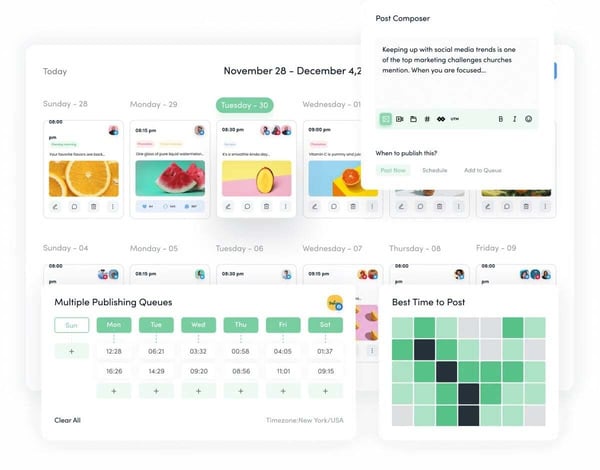
ContentStudio brings content discovery, scheduling, and social publishing into one workflow, making it a practical fit for small teams that need consistent output without juggling multiple tools. G2 review analysis shows the product is designed to centralize workflows that often sit across separate tools, particularly for teams managing consistent content output. Its focus remains on automation, scheduling discipline, and visibility rather than one-off publishing. This positions it as a coordination layer for ongoing content operations.
ContentStudio, rated 4.6/5 on G2, is a platform that performs reliably in day-to-day use. It functions as a workflow stabilizer for teams managing consistent social and content publishing output.
G2 review data suggests ContentStudio is commonly used to connect content discovery directly with publishing workflows. Teams can curate, plan, and schedule content from a single environment, reducing handoffs between tools. This consolidation supports a consistent posting cadence and lowers coordination overhead across social channels.
Automation features are embedded across scheduling and content pipelines rather than treated as optional add-ons. This structure supports recurring campaigns and evergreen content strategies with limited manual intervention. The consequence is reduced maintenance effort for teams managing frequent or multi-channel publishing.
G2 user feedback consistently points to an interface optimized for routine use. Navigation and configuration are described as straightforward, supporting faster onboarding and repeat execution. This favors teams prioritizing operational consistency over experimental or highly customized setups. What I noticed across ContentStudio reviews is that RSS feed integration comes up as a practical daily driver rather than a secondary feature. Reviewers describe using it to stay current across niches without switching tabs, which keeps discovery and scheduling in the same motion.
Analytics and reporting are rated at 100%, indicating confidence in day-to-day performance visibility. Reporting focuses on clear progress tracking and outcome review. For content teams, this supports fast check-ins and ongoing optimization without adding reporting complexity.
SEO also scores 100%, indicating the platform’s relevance beyond social scheduling alone. Content discovery and planning are aligned with search-driven themes, helping teams repurpose curated content more strategically. This supports content marketing workflows that extend beyond short-term social engagement.
Multimedia Support earns a 100% rating, reflecting stable handling of varied content formats. This matters for teams publishing mixed media across multiple platforms. The experience supports modern feed requirements without introducing format-specific friction.
 Email Marketing capabilities are rated at 78%, which can make it less convenient for teams that rely on email as a primary channel, as those workflows may require additional tools to stay fully integrated. For teams focused primarily on social and content scheduling, this gap rarely affects day-to-day workflows.
Content Suggestions and the Query Builder (both 86%) provide functional discovery support, though teams seeking highly customized recommendation logic or advanced query construction may find the approach more standardized. The platform's core scheduling, automation, and analytics capabilities stay strong regardless of how discovery is configured.
ContentStudio works best in environments where content curation, automation, and visibility must work together daily. Strong G2 ratings across SEO, analytics, and multimedia reinforce its positioning as a dependable operational layer for content-driven teams.
"I find ContentStudio incredibly easy to use, which is a major plus, especially when managing multiple social media profiles. I love the scheduling feature, as it enhances efficiency by streamlining the process of planning and publishing content across different platforms. The ability to link all relevant social media accounts simplifies the management task significantly, relieving my social media manager from the burden of dealing with multiple credentials."
- ContentStudio review, Nichole M.
"There are still a few rough edges as far as UI/UX, but the tool is SO much better than other more widely recognized tools.”
- ContentStudio review, Dennis L.
UpContent helps teams source, organize, and distribute third-party content across blogs, websites, and social channels. G2 reviews position it as a practical choice for teams using curated articles to support thought leadership, SEO, and ongoing engagement, with a clear focus on relevance, structure, and guided onboarding. UpContent, rated 4.4/5 on G2, with adoption led by 79% small businesses, positioning the platform as a strong fit for its core audience.
G2 user reviews highlight strong control over how content is sourced and filtered, with Customization rated at 90% on G2. Teams are able to define topics, keywords, and source criteria with precision, which helps reduce reliance on broad or generic feeds. Content streams can be aligned to specific industries, regions, or thematic priorities. This level of control supports consistent publishing while preserving a clear editorial and brand focus.
G2 review feedback points to consistent performance in sourcing external articles, with Blogs/Websites functionality rated at 89% on G2. The aggregated content is often described as timely and relevant, helping teams generate ideas. The platform acts as a curated discovery layer. This approach aligns well with content curation strategies that rely on sharing high-quality third-party articles.
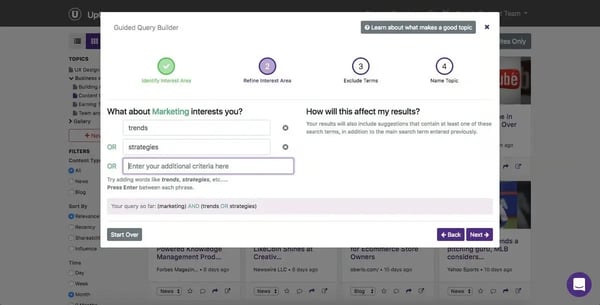
Content Management is also rated at 89%, reinforcing how material can be organized, filtered, and reviewed efficiently. G2 review patterns highlight sorting by relevance or publication date as a practical daily workflow. This structure supports teams managing multiple topics or audiences simultaneously. It reduces time spent searching, bookmarking, or manually categorizing content.
Onboarding and support are consistently cited as strengths. G2 users describe clear setup guidance and responsive communication during early use. This hands-on approach appears to reduce ramp-up time, particularly for smaller teams without dedicated content operations staff. It positions the platform as accessible rather than technically demanding.
Beyond surfacing new articles, G2 reviews point to value in retrieving older but still relevant content. This is especially noted for research-oriented topics where historical context matters. The ability to revisit evergreen material broadens the platform’s role beyond day-to-day posting. It supports longer-term content planning and trend awareness.
What I found across UpContent reviews is that older content retrieval is treated as a feature rather than a workaround. Reviewers describe finding relevant articles on topics like AI that are not current but are still exactly what they needed, which is a different kind of value from tools built around recency alone.
UpContent is commonly used to sustain regular publishing without the cost or effort of manual research. G2 review data links its usage to thought leadership and keyword-driven visibility rather than campaign-heavy marketing.
The platform’s mobile experience is more functional than optimized, which may suit desktop-first workflows but can feel limiting for teams that manage content primarily on mobile devices. The desktop interface itself is well-organized and fully functional for all core curation tasks.
Content relevance depends on how well topics and keywords are configured at the outset. Teams that invest time refining their inputs early on get a well-targeted stream, but those expecting accurate results from minimal setup may need to iterate before the feed aligns with their standards. The UpContent team is known for responsive onboarding support, which helps teams work through that calibration faster.
Within the content curation category, UpContent differentiates itself by emphasizing relevance, control, and curated discovery over scale-driven automation. Its 90% customization rating reinforces its value for teams that need content streams aligned to specific industries and themes. For small and growing organizations focused on thought leadership and SEO consistency, it remains a dependable and well-matched solution.
“The best part of UpContent thus far has been the clear and authentic communication. It has been so easy to talk with Scott and everyone on the UpContent team. I've always received timely responses, and all my questions are answered thoroughly and with care. The onboarding process has been clear and easy, and we have had Scott walk our company through every step.”
- UpContent review, Renee S.
"Formaking up content work properly we need to create a new keywords for our business so that relevant articles can be found and used during the sales process. Also I found that sometime this software provides articles which are irrelevant and noncredible so all the content should be veryfied if downloaded through upcontent."
- UpContent review, Abhijeet K.
Taggbox brings together social and user-generated content from multiple platforms into one workspace, making it a practical fit for marketing, community, and education teams that need consistent UGC display without heavy setup. G2 review analysis indicates the platform is typically evaluated for streamlining authentic content curation. The product emphasizes speed to launch, ease of use, and consistent presentation. Teams typically assess the platform when they need clear engagement visibility without introducing additional operational overhead.
G2 user reviews consistently point to straightforward onboarding and minimal setup steps before content can go live. Teams typically describe getting curated walls or embeds running quickly without relying on technical specialists. This supports reliable day-to-day use with low maintenance overhead, which is especially important for ongoing content curation.
What I noticed across Taggbox reviews is that the plug and play framing is not marketing language. Reviewers describe getting widgets live across Wix and Weebly sites without writing a line of code, and the feeds loading cleanly on every one. That kind of consistency across builder platforms is harder to deliver than it sounds
Taggbox functions as a centralized aggregation layer for social content, allowing teams to pull posts, feeds, and reels from multiple platforms into a single workspace. G2 review data points to reduced manual collection and fewer fragmented workflows. Content Sources performance remains strong, reflected in its 95% G2 feature rating.
Collaboration capabilities are frequently referenced in G2 reviews as enabling shared review and approval workflows. Teams can moderate content together, ensuring relevance and brand alignment before publishing. This structure works well for content curation scenarios where multiple stakeholders need oversight but prefer lightweight coordination over formal editorial systems.
Social Media features score 93% on G2, aligning with feedback around how curated content is visually presented. G2 reviews describe social walls and widgets that help surface authentic participation and activity. This makes the platform effective for websites, events, or community pages where credibility and engagement matter.
G2 reviews consistently mention the support experience. Teams note quick responses and guided issue resolution when questions arise. This responsiveness helps reduce operational friction once curated content is live, which is particularly valuable in public-facing displays where reliability matters.
Taggbox is often described as cost-accessible compared to other content curation tools. This pricing profile supports sustained use across websites, campaigns, or academic environments without requiring large budget commitments. It aligns well with teams that want consistent curation.
Standard templates and layout options cover most common use cases, supporting consistent and quick deployment. Teams operating within strict design systems or requiring highly tailored visual structures may look for additional flexibility. Customization is rated at 88% on G2, and the platform's responsive support team is available to assist when specific adjustments fall outside the standard options.
The platform centers primarily on content display rather than campaign orchestration or deep analytical querying. For teams that prioritize data-driven segmentation or advanced reporting, this emphasis may shape evaluation. The platform’s Query Builder at 89% ratings reflect this focused scope, which suits teams whose primary need is surfacing and presenting authentic content rather than running complex campaigns.
Taggbox remains best for marketing, community, and education teams that rely on curated social content to drive trust and engagement. Its strength in aggregating content from multiple sources and presenting it in a clean, manageable format supports consistent visibility without operational overhead.
“I had an amazing experience with the Taggbox team; they are true leaders in the UGC space and incredibly supportive. Their design suggestions, which were tailored specifically for our brand after reviewing our store, were especially valuable and made a real difference."
- Taggbox review, Dhanushya f.
"While Taggbox works really well overall for me, the customization options for some widgets could be more flexible.”
- Taggbox review, Nithin M.
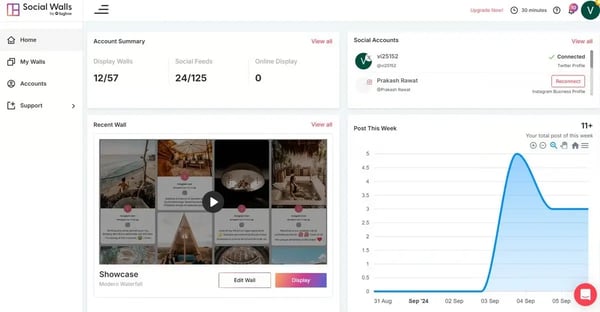
Social Walls helps event and experiential teams aggregate and display user-generated content across screens and digital touchpoints, making it a practical fit for conferences, brand activations, and live audience engagement. The emphasis is on surfacing timely social activity, not on creating or managing original content.
Real-time social content aggregation is highlighted in G2 reviews. Social Media functionality is rated at 99%, aligning with feedback around pulling live posts from platforms such as Instagram and Facebook into a single curated stream. Teams commonly use this to surface attendee participation as it happens, which supports continuous engagement during events. The immediacy of updates helps maintain relevance without manual refresh cycles.
G2 review data points to flexible theming, layout control, and branding alignment that allow curated content to visually match event or brand environments. This level of control is particularly useful in high-visibility settings where presentation quality matters. The ability to adjust visuals without deep technical intervention supports faster iteration during live campaigns.
Content management capabilities score highly at 96%, reflecting how teams organize and moderate aggregated posts. G2 reviews suggest value in having all event-related UGC centralized, reducing the need to monitor multiple social platforms independently. This structure supports cleaner moderation workflows and clearer oversight during active events. It also helps teams maintain consistency in what is displayed publicly.
Ease of use is noted as an operational benefit. G2 review feedback frequently references straightforward setup flows that allow teams to get a wall live without extended onboarding. This supports faster deployment in time-bound scenarios such as conferences or pop-up events. The interface appears optimized for execution.
Support responsiveness is a practical strength of the platform, particularly during setup and live usage. Quick access to hands-on assistance helps teams manage time-sensitive event environments where delays are highly visible. This level of availability reduces operational risk when the social wall is part of a live, audience-facing experience.
What I found across Social Walls reviews is that setup speed keeps coming up as a genuine surprise. Reviewers describe going from account creation to a live wall in minutes, which matters most in event contexts where the technical setup is the last thing anyone wants to be debugging on the day.
Displaying attendee posts on shared screens directly increases participation during events. Seeing their content featured encourages attendees to post and engage more actively, creating a self-sustaining interaction loop.
For teams new to social wall tools, initial configuration may require some ramp-up. The platform offers a broad set of options, which can take time to navigate for first-time users. This tends to matter most during early setup rather than ongoing use, particularly for teams unfamiliar with moderation rules or feed logic. The support team is consistently described as hands-on and available, which helps teams move through the initial configuration without delays.
Some reviews note brief service interruptions or refresh-related behavior during live usage. While these instances appear to be addressed quickly, they are most relevant for environments that depend on uninterrupted on-screen continuity. This consideration primarily applies to high-stakes, always-on displays.
Meets Requirements is rated 99% on G2, the highest in its category, indicating strong alignment between what the platform delivers and what event-led teams actually need.
For teams operating in event-led environments such as conferences, exhibitions, and brand activations, Social Walls continues to serve a clear purpose. Its strength lies in turning audience-generated social content into a shared, visible experience that sustains participation throughout live moments.
“Nykaaland was WOW, we used the social wall to showcase the audience on our wall. The best part attendees really enjoyed was that it is very easy to use the tool, and we appreciate our customer success manager, Thakur, who helped us to achieve our goal in the event.
Overall, an amazing UGC platform. Thank you, social walls, team."
- Social Walls Review, Saurabh P.
"There is no such issue I faced, but if I have to give one, I think they should add a login button on their homepage. I tried to access my account on another system and found it difficult to log in. Thanks to our CSM Thakur Pratap, who was always there for us.”
- Social Walls review, Nadz R.
Tagshop.ai helps brand and marketing teams collect, organize, and activate user-generated content across websites and campaigns, making it a practical fit for teams that want shoppable UGC displays without heavy technical setup. Tagshop.ai, rated 4.9/5 on G2, delivers reliable performance for its intended audience of brand and ecommerce teams focused on UGC-driven content and conversion.
G2 review data consistently points to Tagshop.ai’s ability to pull UGC from multiple social channels and centralize it in one workspace. This reduces manual collection and keeps content libraries current without repeated sourcing effort. Teams can rely on a steady flow of curated material. The result is a more consistent presence of social proof across owned channels.
Social Media is at 97%, among the highest-rated feature areas, indicating how effectively the platform curates posts into usable formats. Content can be filtered, approved, and displayed without disrupting existing workflows. This supports brands that want to surface authentic customer voices while maintaining editorial control. The emphasis remains on reuse and visibility rather than raw content creation.
Customization scores align with how teams adapt curated galleries to match brand and layout requirements. Visual themes and layout controls allow UGC to feel embedded rather than bolted on. This matters for content teams focused on consistency across pages and campaigns.
The Query Builder enables structured sorting of curated content based on attributes such as products, campaigns, or engagement signals. Instead of displaying content in bulk, teams can surface what is contextually relevant. This supports targeted storytelling and merchandising use cases. It also helps prevent content libraries from becoming unstructured archives, as reflected in its G2 feature rating at 97%
Tagshop.ai is frequently used to manage reviews and video testimonials alongside social posts. Bringing these formats together simplifies moderation and reuse. Content teams benefit from having proof points in one system rather than spread across tools. This improves consistency in how trust and credibility appear across touchpoints.
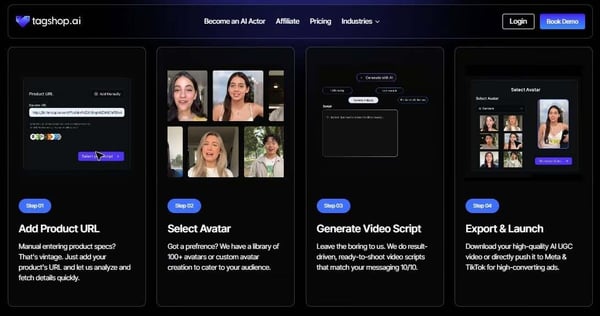
Usability themes in G2 reviews highlight that the platform does not require deep technical expertise to operate. Setup and daily curation tasks remain straightforward, which reduces maintenance overhead, suported by its Ease of Use 96% . This supports faster adoption in smaller teams where roles overlap. Support responsiveness further reinforces operational reliability during rollout and iteration.
What stood out to me in the Tagshop.ai reviews is the AI Twin feature. Users describe ease of running multiple campaigns at once with the same brand face without booking a single shoot, which removes a coordination dependency that most teams do not realize is slowing them down until it is gone.
Rendering and live content updates can take additional time during certain workflows, which may be more noticeable for teams running rapid content rotations. Teams planning ahead and working within scheduled curation cycles will find this less of a constraint. Standard gallery displays update reliably and perform consistently for planned campaigns.
Gallery customization and in-dashboard analytics cover core needs, though teams with highly specific layout requirements or advanced reporting expectations may find the options more standardized. However, features remain fully functional, keeping the core use case intact.
Tagshop.ai aligns best with teams that center their content strategy around user-generated and social content. Its highest-rated social media capabilities reinforce its role as a curation-first platform.
“Tagshop AI is a working AI tool for me and the best alternative to hiring content creators, especially when you are looking to scale quickly without burning large budgets. It allows us to generate high-quality UGC style videos within a few minutes, just by using a product link or by uploading an image. It is eliminating the need for costly influencer collaborations. Also, facilitating AB testing of the different product videos for different campaigns.”
- Tagshop.ai review, Sumit S.
“It would be great to see more customization options for gallery layouts and deeper analytics features within the dashboard. Occasionally, there is a slight delay in content updates reflecting live on the site.”
- Tagshop.ai review, Kartik B.
Juicer helps teams manage distributed social content showcase posts directly on their own digital sites, bypassing native social platforms. As a presentation-first tool in content curation, it highlights visual consistency, simple embedding, and automated updates. Juicer specializes in curating and displaying third-party social content in a controlled, branded way. Its main benefit is making social feeds functional and accessible outside native platforms.
Juicer, rated 4.5/5 on G2, delivers consistent usability and reliable performance after setup, with a focused fit for low-maintenance content aggregation.
Juicer supports blog and website embedding at a high level, with this capability rated at 95%. G2 review analysis shows teams embedding curated social feeds directly into marketing pages, career sites, and event hubs without disrupting performance or layout. The feeds adapt well across desktop and mobile, which makes them suitable for public-facing use. This aligns well with content curation needs where visibility and presentation matter.
Juicer allows teams to customize layouts, colors, and visual styles so curated social content aligns with existing brand guidelines. This helps feeds blend naturally into websites rather than appearing externally embedded. G2 review data reflects strong confidence in this area, with customization rated at 95%. The flexibility supports consistent presentation across multiple pages or campaign-specific surfaces.
Content management capabilities, rated at 93%, reinforce Juicer’s low-maintenance positioning. Once feeds are configured, content updates automatically as new posts are published on connected platforms. Built-in moderation tools allow teams to approve or filter posts as needed, which helps maintain relevance and brand safety. G2 review data suggests this balance reduces ongoing oversight without sacrificing control.
Juicer is commonly described as a “run-and-maintain” solution within content curation workflows. Automatic updates, multi-platform integrations, and simple dashboards mean teams do not need to actively manage feeds day to day. This reliability is particularly useful for departments that want curated content to stay current without assigning ownership to a dedicated role. The result is steady content freshness with manageable effort.
Curated feeds allow audiences without social media accounts to view posts that would otherwise be locked behind platform logins. This expands reach for employer branding, internal communications, and informational pages. In content curation terms, it helps organizations repurpose social activity into broader distribution channels.

Support responsiveness and onboarding experience also stand out in review analysis. Initial setup is typically described as quick, even on custom-designed sites, and support interactions are reported as timely and practical. For smaller teams without in-house development resources, this reduces deployment risk. The overall experience supports fast time-to-value.
What I kept finding across Juicer reviews is that pricing relative to channel count is what keeps smaller teams on the platform long term. Reviewers describe getting more channel connections at a lower price than comparable tools, which for a team managing several client feeds is the number that actually decides the shortlist
Content filtering relies on hashtag-based aggregation, which means irrelevant posts can occasionally surface and require manual moderation before publishing. Teams running tightly scoped campaigns with strict content standards should plan for a regular review step in their workflow. The built-in moderation tools make this manageable, and most teams find it takes only a few minutes to clear a feed before it goes live.
Analytics, reporting, and collaboration features are designed around core visibility rather than advanced performance tracking or multi-user editorial workflows. Teams that need detailed reporting views or shared approval workflows may handle those tasks outside Juicer. For most teams using Juicer as an embedded display layer, the available visibility is sufficient for day-to-day oversight.
All in all, Juicer fits best for small and mid-sized teams that want curated social content to live directly on their websites without ongoing maintenance. Its strength in website embedding and customization supports a consistent, branded presentation across campaigns and pages. For content curation use cases where visibility and ease of upkeep matter more than advanced analytics, Juicer remains a practical and reliable choice.
“I like Juicer for its social media blocks and designs, which provide a nice layout that can be integrated into our websites. Also, the initial setup of Juicer was too easy, making it convenient and hassle-free to get started.”
- Juicer review, Hasan F.
“I wish I could refine hashtag connections even further by narrowing down specific users to avoid. Sometimes it will pull in irrelevant content, and it's hard to figure out why it's filtering it in.”
- Juicer review, Erin S.
|
Software |
G2 rating |
Free plan |
Best for |
|
RELAYTO |
4.7/5 |
Yes |
Interactive content hubs, curated storytelling, and audience engagement tracking |
|
BuzzSumo |
4.5/5 |
Yes |
Content research, trend tracking, and topic validation |
|
ContentStudio |
4.6/5 |
No (Free trial available) |
Content discovery, social scheduling, and multi-channel publishing |
|
Taggbox |
4.8/5 |
Yes |
UGC collection, moderation, and social proof display |
|
Walls.io |
4.8/5 |
Yes |
Live social aggregation, moderation, and event wall display |
|
UpContent |
4.4/5 |
No (Free trial available) |
Third-party article discovery, relevance filtering, and thought leadership publishing |
|
Social Walls |
4.8/5 |
No |
Social content aggregation, live display, and on-site event engagement |
|
Tagshop.ai |
4.9/5 |
Yes |
UGC curation, shoppable galleries, and ecommerce conversion display |
|
Juicer |
4.5/5 |
Yes |
Social feed aggregation, website embedding, and automated content updates |
*These content curation software platforms consistently surface as leading options in the category based on aggregated G2 review patterns and Grid-style evaluations. Most offer free plans or trials alongside paid tiers, with depth and flexibility varying by curation workflow, distribution needs, and team maturity.
Got more questions? G2 has the answers!
Tools like BuzzSumo and UpContent are strongest for discovering and organizing industry-relevant content. BuzzSumo excels at surfacing high-performing topics and trends using engagement data. UpContent focuses on relevance through keyword- and source-based filtering.
Look for how clearly a platform supports shared visibility, approvals, and ownership. Tools such as ContentStudio, RELAYTO, and Taggbox perform well because they centralize workflows and reduce side-channel coordination. Reviews consistently show that friction appears when teams must export content or rely on external tools to collaborate.
UpContent stands out for precise topic, keyword, and source filtering, allowing teams to shape highly relevant content streams. BuzzSumo also performs well here, using filters around performance signals, competitors, and timeframes. Strong tagging and filtering matter most when teams manage multiple audiences or industries simultaneously.
Platforms like ContentStudio and Juicer integrate directly with social channels, enabling curated content to move into publishing workflows without rework. ContentStudio emphasizes social scheduling.
Focus on how transparent and controllable the recommendations are. UpContent uses AI to rank relevance based on defined topics and keywords, while ContentStudio applies automation within discovery and scheduling workflows. Reviews show that tools work best when AI assists judgment rather than replacing editorial decision-making.
Enterprise teams should prioritize moderation controls, predictable workflows, integrations, and governance. Tools like Walls.io and RELAYTO support structured curation, brand control, and reuse across channels. Consistency under scale matters more than raw feature breadth in larger environments.
Look beyond surface metrics and focus on whether analytics inform decisions. RELAYTO, BuzzSumo, and Walls.io provide insight into engagement depth, performance patterns, or interaction trends. Reviews suggest analytics are most valuable when they help teams refine what they curate, not just report activity.
RELAYTO, Tagshop.ai, and Walls.io are strong options for building reusable, branded content collections. They allow teams to organize curated assets into structured libraries, hubs, or galleries that can be updated without rebuilding from scratch. This supports long-term reuse rather than one-off publishing.
Ask whether discovery, review, and approvals can happen outside desktop workflows. Many tools, including UpContent and BuzzSumo, are more desktop-centric, which works for planned curation but can limit on-the-go use. Browser extensions and mobile usability matter most for teams curating content continuously.
Pay attention to setup time, onboarding support, and how quickly teams see value. Tools like Juicer, Taggbox, and ContentStudio consistently surface as easy to deploy with minimal training. Reviews show adoption drops quickly when tools introduce extra workflows instead of replacing existing ones.
Choosing content curation software is less about adding functionality and more about deciding how content decisions happen every day. In mature teams, curation becomes an operating layer that shapes what gets attention, shared, or ignored. When that layer works, teams move with confidence. When it doesn’t, friction spreads across approvals, publishing, and relevance.
In real workflows, the difference rarely comes down to features. It comes down to decision clarity. Strong platforms make choices easier, shorten handoffs, and create predictable paths from discovery to distribution. Weak ones fragment judgment, introduce parallel workflows, and push teams toward manual checks and side conversations. Over time, those small inefficiencies compound into slower execution and inconsistent brand outputs.
The impact of this choice is usually gradual. Poor fit bends behavior quietly, encouraging either rushed publishing or unnecessary slowdown just to stay aligned. The right fit reinforces good habits, supports shared standards, and protects relevance as volume grows. When the software aligns with how your team actually works, it stops feeling like a tool and starts functioning as infrastructure.
Already curating content, but not sure which platform helps you publish it consistently? Explore the best social media management tools on G2 to find platforms that handle scheduling, publishing, and performance tracking across channels.


#G2Fireside Twitter chat took to discussing content and data this last week.
 by Anastasia Masters

I tested several tools, and based on my findings, the best AI content detectors are...
 by Sudipto Paul

Digital media has redefined 'content marketing'!
 by Vibhooti Kayastha