


This guide was last updated on April 14, 2026. A newer report has since been published. The tools below reflect the scores from G2's Summer 2026 Grid® Report.
Based on verified G2 reviews and the latest Grid® placement.
*Liked and disliked highlights are summarized from verified G2 user reviews.
The tools below have also been exhaustively tested and evaluated, and continue to hold their place among the best budgeting and forecasting software on G2.
Finance teams today are expected to do far more than build an annual budget. As I reviewed tools on G2, one thing became clear: CFOs, FP&A leaders, and finance teams now need to run rolling forecasts, model scenarios in uncertain markets, and align financial plans across multiple departments. When these processes rely on disconnected spreadsheets, planning quickly becomes slow, error-prone, and difficult to scale.
That’s where the best budgeting and forecasting software becomes critical. In my research across G2’s Budgeting and Forecasting category, I saw how these platforms centralize financial data, automate planning workflows, and make scenario modeling easier as assumptions change.
In this guide, I analyzed top-rated tools on G2 to identify the seven budgeting and forecasting platforms that stand out in 2026 and explain how to choose the right solution for your organization.
|
Best budgeting and forecasting tool
|
G2 rating
|
Best for
|
Standout feature
|
Pricing
|
|
Anaplan
|
4.6/5
|
Best for enterprise and mid-market teams
|
Real-time, multi-dimensional driver-based modeling that connects finance, sales, supply chain, and workforce planning inside a single, continuously updating planning engine.
|
Custom pricing
|
|
IBM Planning Analytics
|
4.4/5
|
Best for high-performance financial modeling
|
High-performance TM1 cube engine that enables fast, multidimensional financial modeling and scenario analysis at enterprise scale.
|
Starting at $18/month
|
|
Vena
|
4.5/5
|
Best for mid-market finance teams that want structured planning without leaving Excel
|
Excel-native planning with centralized governance, version control, and workflow automation layered behind familiar spreadsheets.
|
Available upon request
|
|
Planful
|
4.3/5
|
Best for finance-led consolidation and forecasting
|
Integrated financial consolidation and forecasting that unifies close, reporting, and planning within one controlled finance environment.
|
Available upon request
|
|
Workiva
|
4.5/5
|
Best for collaborative financial reporting
|
Live data linking across spreadsheets, reports, and disclosures that automatically syncs updates everywhere financial data appears.
|
Available upon request
|
|
LiveFlow
|
4.9/5
|
Best for real-time QuickBooks reporting
|
Real-time QuickBooks-to-Google Sheets sync that automatically refreshes financial reports without manual exports or reconciliation.
|
Custom pricing
|
|
Datarails
|
4.6/5
|
Best for finance teams that want to keep Excel but centralize FP&A
|
Centralized FP&A automation built on top of existing Excel models, eliminating manual consolidation while preserving spreadsheet flexibility.
|
Custom pricing
|
*These budgeting and forecasting software tools are top-rated in their category, according to G2's Winter 2026 Grid Report. Most of these tools offer custom or quote-based pricing. I’ve added monthly rates only where vendors publish them.
Budgeting and forecasting software has become a core system for modern finance teams. From what I’ve seen while reviewing tools on G2, what was once managed through disconnected spreadsheets is now handled through centralized platforms that automate calculations, structure workflows, and improve visibility across planning cycles.
These tools help organizations move beyond static budgeting by enabling scenario modeling, rolling forecasts, variance analysis, and multi-entity consolidation. In my analysis of budgeting and forecasting platforms, reducing manual reconciliation and version-control issues consistently ranks among the biggest advantages, helping finance teams plan more collaboratively, accurately, and scalably.
The market momentum reflects this shift. The budgeting software market has reached $1.65 billion in 2025 and is projected to grow to $2.27 billion by 2030, at a 6.6% CAGR. This steady growth highlights how organizations are investing in automation to modernize financial processes and strengthen decision-making.
Finance teams evaluating tools often look for capabilities beyond basic budgeting. I also analyzed solutions that stand out as the best budgeting platforms for multi-department collaboration, the best software for combining budgeting with performance tracking, and the top-rated tools for scenario planning and analysis, since these capabilities often determine how well a planning system supports real-world financial decision-making.
“I'm putting together a list of top-rated tools that help finance teams, department heads, and executives align on budgets, forecasts, and spending plans.”
Read full thread →To build this list, I analyzed top-rated platforms in G2’s Budgeting and Forecasting category and examined how verified users describe them across ratings, Grid placements, and detailed reviews. Instead of relying only on overall scores, I used AI-assisted review analysis to identify consistent themes around implementation effort, reporting flexibility, Excel integration, collaboration, pricing, and scalability. Because budgeting tools vary by company size and financial complexity, I focused on practical factors that matter in real FP&A workflows, such as how easy it is to build and maintain models, manage approvals, integrate with ERP systems, and run scenario planning without breaking logic.
I also prioritized recurring reviewer feedback, both positive and critical, to separate marketing claims from real-world experience.
Screenshots included are vendor-provided G2 images or publicly available UI visuals and do not imply direct hands-on testing.
As I evaluated platforms in the budgeting and forecasting space, one pattern stood out: the strongest tools don’t just calculate numbers, they create structure around how planning actually happens. The right platform brings discipline to budgeting cycles, improves visibility across departments, and allows finance teams to adjust quickly when assumptions change.
To finalize this list, I reviewed 20+ Budgeting and Forecasting Software in G2’s category rankings and narrowed it down to seven that consistently performed well across verified reviews, feature depth, and real-world finance use cases. The criteria below reflect what I prioritized and why each factor matters when selecting a planning platform.
Some tools are ideal for Excel-centric finance teams, others excel in enterprise consolidation, and some focus on lightweight, real-time reporting. The goal of this list is to highlight the trade-offs so you can choose a solution that aligns with your financial complexity, team structure, and long-term growth plans.
This list features platforms from G2’s Budgeting and Forecasting category. To be included in this category, the solution must
*This data was pulled from G2 in 2026. Some reviews may have been edited for clarity.
If there’s one thing Anaplan consistently nails for budgeting and forecasting, it’s the way it lets you build a single, flexible planning model that multiple teams can actually use without living in a spreadsheet maze.
What stands out immediately is its flexibility in building driver-based forecasts that connect finance with sales, supply chain, and workforce planning. Instead of locking teams into rigid templates or once-a-year spreadsheet cycles, Anaplan lets organizations design models around their actual business drivers, continuously adjust assumptions, and see changes flow through the entire plan in real time. This adaptability is frequently highlighted in G2 reviews, particularly by teams managing complex revenue forecasts, headcount strategies, and operational cost structures.
Where it really earns its reputation is in modeling depth. The platform handles multi-dimensional data, layered calculations, and detailed scenario analysis without forcing teams into rigid templates. For FP&A groups running sophisticated forecasts, the ability to structure logic around how the business actually operates is a big advantage. According to G2 Data, Anaplan scores 89% for meeting requirements, which aligns with how often users describe it as capable of supporting real-world planning complexity.
The real-time calculation engine is another major strength. When assumptions change, models update quickly, which makes scenario planning far more practical. Instead of rebuilding formulas or reconciling versions, teams can test multiple scenarios and evaluate outcomes inside the same system. That responsiveness is especially valuable during rolling forecasts or volatile planning cycles.
Scalability also plays a major role in its positioning. The platform’s architecture allows organizations to expand from smaller use cases to broader enterprise implementations without rebuilding from scratch. That “build once, expand over time” flexibility makes it well-suited for companies that expect their planning complexity to grow.
Collaboration across functions also plays a meaningful role in why teams adopt it. Anaplan supports broad participation in planning processes, which helps finance coordinate with business units instead of consolidating dozens of disconnected files. With a 92% likelihood to recommend on G2, it’s clear that many teams feel confident using it as a shared planning backbone. This capability is one reason Anaplan is often considered among the best budgeting platforms for multi-department collaboration, since finance, operations, and leadership teams can contribute to the same connected planning models without relying on separate spreadsheets.
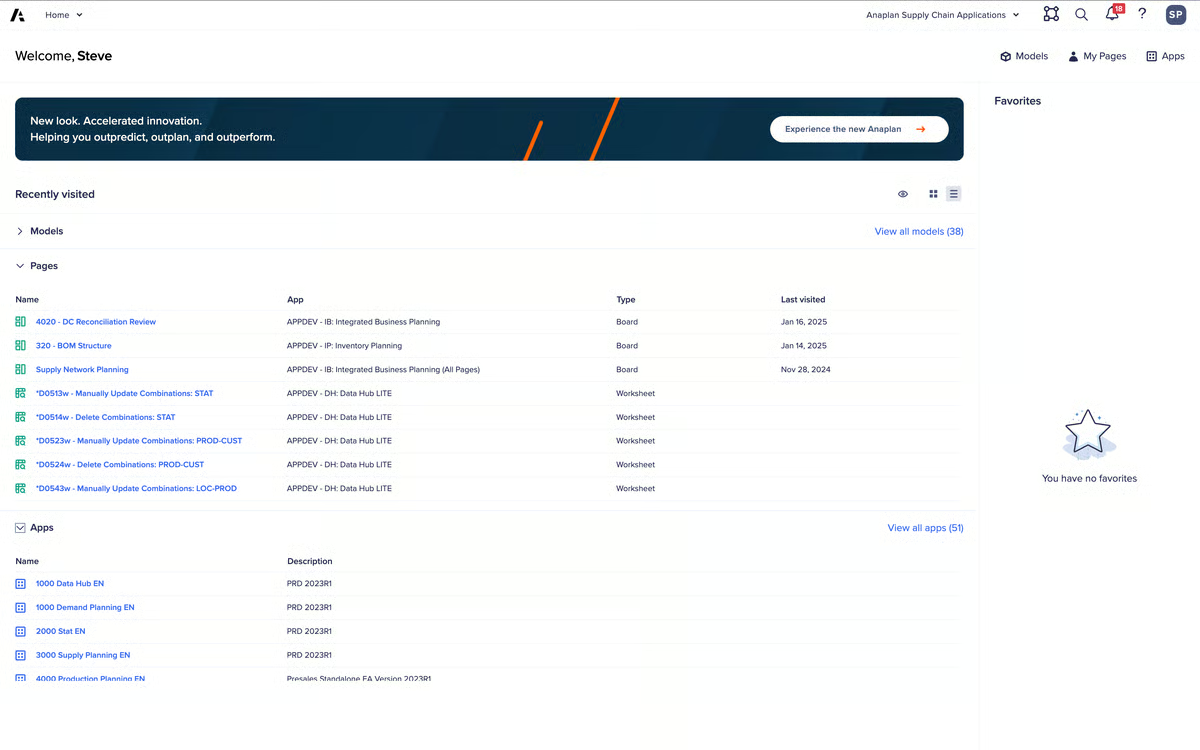
Integration supports this connected planning vision, but it’s best understood as enterprise-grade rather than plug-and-play. Anaplan offers API connectivity, database and BI integrations, and its Anaplan Data Orchestrator (ADO) to support structured data flows and real-time updates. In environments with proper implementation of ownership, this enables centralized data management and consistent model inputs across systems. The capability is strong, but it shines most when teams treat integration as part of a broader architecture rather than a quick configuration step.
Based on G2 reviews I looked at, Anaplan does come with a learning curve, especially for teams building large, multi-dimensional models. That said, its modeling flexibility stands out as a major strength once users get comfortable with the platform. Organizations that invest in experienced model builders or structured enablement tend to unlock much more value, while smaller teams looking for lightweight, plug-and-play budgeting tools may find it more advanced than they need.
I also noticed a few reviewers mention that performance can slow down when models become very large or when many users are working simultaneously. High data volumes, complex calculations, and heavy concurrent activity can sometimes lead to longer refresh times or queued processes, so teams planning enterprise-scale deployments should design models thoughtfully to keep performance smooth. That said, once models are well-structured, many teams report stable performance even at scale.
Overall, Anaplan is strongest when budgeting and forecasting are treated as connected, driver-based processes that span departments. If your goal is to move beyond spreadsheets and support sophisticated, scalable planning across the business, it delivers the structure and power to do that confidently.
“The flexibility of the platform and its calculation engine are the biggest strengths. Anaplan allows you to model complex business logic in a transparent, scalable way without relying on traditional code, which makes it easier to iterate quickly as requirements change. I also really value the dimensional modeling approach and the ability to connect planning across multiple functions in a single platform. From a model builder perspective, the ecosystem (UX, ALM, integrations, community, and enablement resources) makes it easier to maintain governance.”
- Anaplan review, Shaivya K.
“Implementing Anaplan and maintaining the tool need high costs and a strong level of expertise. The complex models also need additional support when it comes to ongoing maintenance and day-to-day management.”
- Anaplan review, Samantha L.
Planning beyond annual forecasts? This guide walks through how to build a structured event budget step by step, helping you apply budgeting principles to real-world initiatives.
What makes IBM Planning Analytics different is its TM1 engine. Everything about the platform centers on speed and multidimensional cube modeling. It’s built to process large, complex financial structures quickly, as evidenced by its performance with detailed forecasts, layered allocations, or multi-entity consolidations.
The modeling depth is structural. Finance teams can build driver-based forecasts across multiple dimensions without breaking formulas every planning cycle. The cube architecture supports granular slicing across regions, departments, time periods, and scenarios, which is why it consistently scores 89% for meeting requirements on G2. It’s built for organizations that need financial precision, not just budget tracking. That multidimensional structure is also why it frequently appears among top-rated tools for scenario planning and analysis, particularly for finance teams running complex forecasting models.
Performance is another area where it stands out. The engine recalculates quickly even with large datasets, which makes scenario testing practical rather than painful. When planning cycles demand constant iteration, that responsiveness matters. It’s one of the reasons adoption numbers are strong, with 76% user adoption reported on G2.
IBM Planning Analytics earns points for blending enterprise planning with familiar workflows. Its Excel integration remains a major part of its appeal. Finance teams can operate within structured, governed models while still leveraging spreadsheet interfaces they’re comfortable with. That balance between control and familiarity reduces friction during rollout.
The platform’s long-term viability is another strength. Users consistently express confidence in IBM’s roadmap and continued investment in the product, signaling that the platform is evolving rather than stagnating. That forward momentum gives finance teams reassurance that their planning environment will continue to modernize and expand alongside changing business needs.
The tool further distinguishes itself through strong return on investment. G2 Data reflects an estimated 7-month payback period, which is relatively fast for enterprise planning software. That timeline, paired with strong adoption, reinforces the idea that teams are not only implementing it but extracting measurable value from it within the first year.
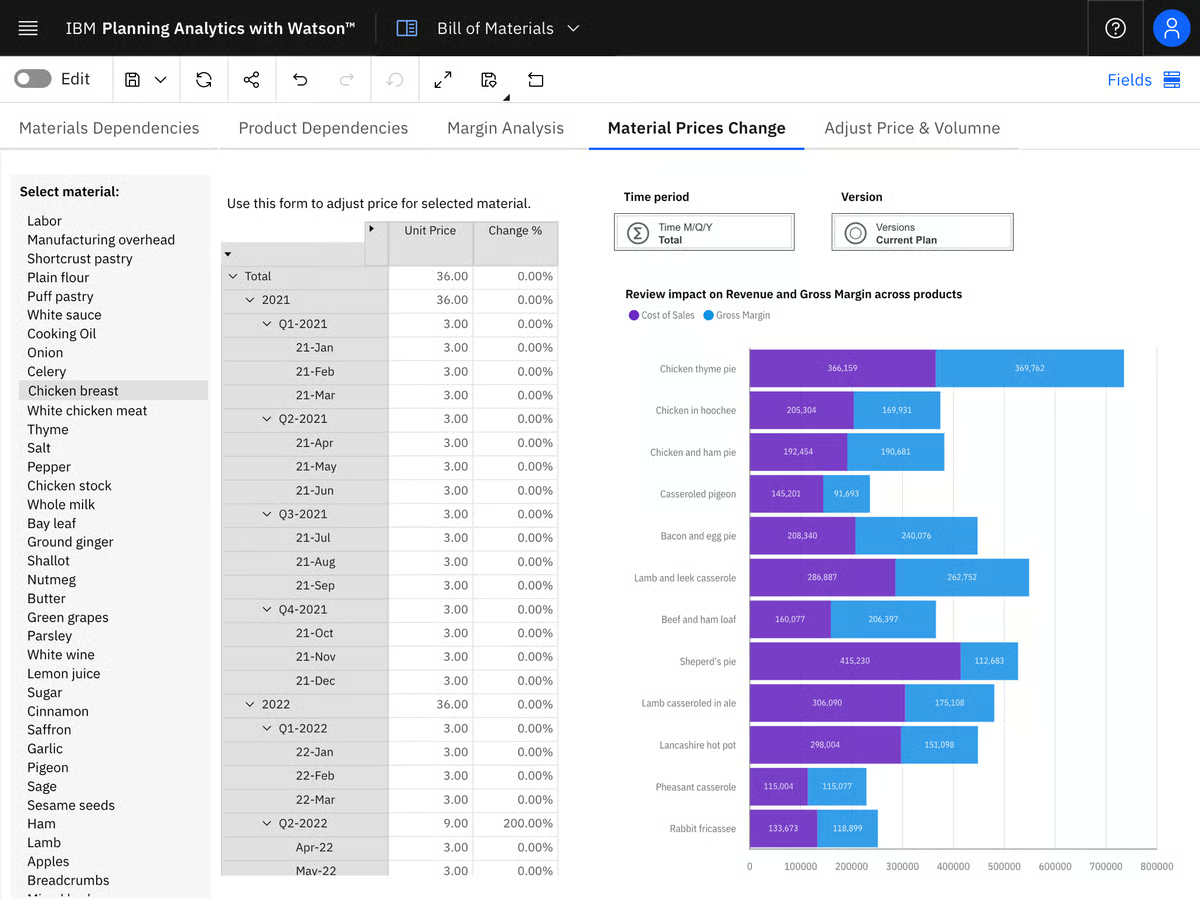
IBM Planning Analytics offers powerful financial modeling and analytical depth, which many finance teams rely on for complex planning environments. However, the interface can feel somewhat dated compared to newer planning tools, and several users mention that parts of the TM1 Web and workspace experience can be less intuitive. Teams familiar with technical financial systems generally adapt quickly, but newer users may need some time to get comfortable navigating it.
The platform’s performance and enterprise-grade infrastructure are also widely valued, particularly for large-scale financial models. That said, this level of capability comes with higher pricing, which some reviewers note may be difficult to justify for smaller organizations or teams with simpler budgeting needs. For enterprises running complex planning environments, though, the investment tends to align better with the value delivered.
Ultimately, IBM Planning Analytics feels purpose-built for finance organizations that prioritize performance, structure, and analytical control. If your budgeting and forecasting environment demands scale, speed, and cube-based precision, and you want ROI visibility within months, it’s a platform that earns serious consideration.
“I use IBM Planning Analytics for budgeting, forecasting, and finance consolidation. It really helps me consolidate figures and manage data and security. I love that it enables multiple users to work at the same time. There are endless possibilities with it, and I haven't faced a problem yet that we can't solve. I value the ability to make applications that work for both advanced users and day-to-day tasks. It replaced multiple worksheets and automated a lot of previous manual work. The initial setup was easy.”
- IBM Planning Analytics review, Morten F.
“So the licensing cost is a bit too much. It can be reduced. Also, they got it, like, in the new app interface for their workspaces, which feels a bit flashy.”
- IBM Planning Analytics review, Daniel M.
Budgeting and forecasting look different for smaller organizations. Explore practical financial planning strategies designed specifically for small business growth.
Vena’s defining strength is how it turns Excel into a governed, centralized planning system. Instead of forcing finance teams to abandon spreadsheets, it builds around them, adding workflow, controls, and a cloud database behind the scenes. That familiar front end paired with structured back-end control is what makes it feel different from heavier modeling platforms.
The Excel-native experience is clearly central to why teams adopt it. Reviewers consistently highlight how natural it feels to continue working inside spreadsheets while benefiting from version control, audit trails, and centralized data. That balance between familiarity and structure helps reduce resistance during rollout, especially for finance teams deeply embedded in Excel workflows. With 91% of users saying it meets requirements and 92% rating ease of doing business positively, the data reinforces that it delivers on its core promise.
Workflow and process control are another major theme. Vena isn’t just about number entry; it formalizes budgeting cycles with approvals, task tracking, and accountability built in. That helps organizations replace email chains and disconnected files with a coordinated planning process. Because of these structured approval capabilities, Vena is often considered one of the top tools for automating budget approval workflows, especially for mid-market finance teams managing collaborative planning cycles.
Data consolidation and reporting also stand out. Vena centralizes financial data so teams can generate consistent reports without manually stitching together spreadsheets. The ability to create standardized templates while maintaining control over inputs is frequently praised. It supports scenario planning and rolling forecasts within that structured environment, making it easier to iterate without losing data integrity.
Support and partnership come up repeatedly in G2 feedback. With 94% product direction scores, users express confidence not only in current functionality but in the vendor’s roadmap and responsiveness. That ongoing relationship matters when finance teams are modernizing processes that affect the entire organization.
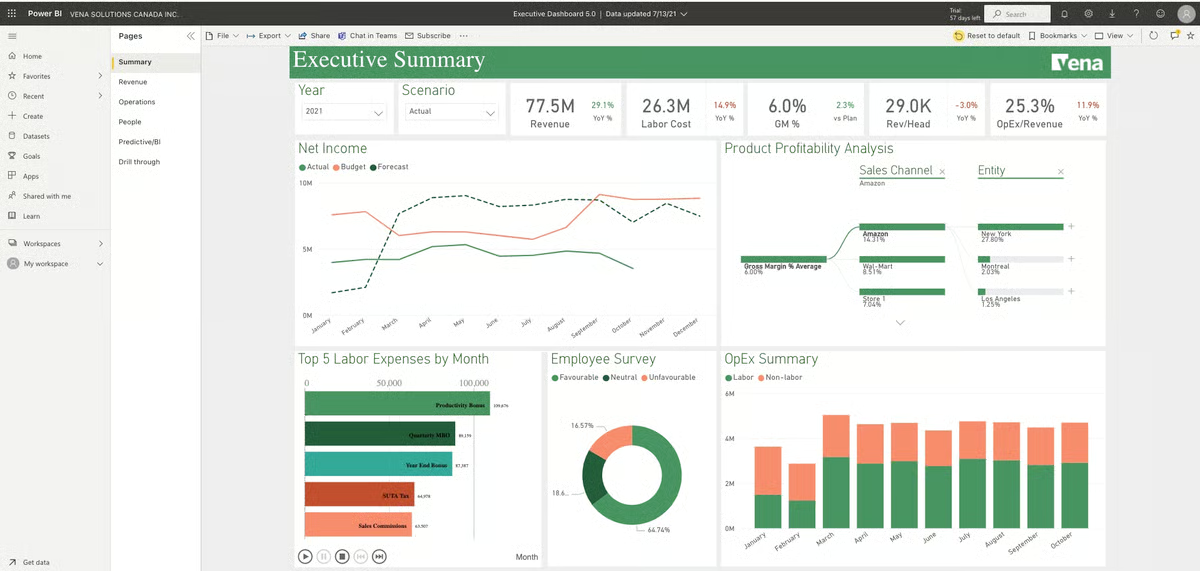
Adoption metrics further reinforce its practicality. G2 reflects an average user adoption rate of 63% and an estimated 20-month payback period. While ROI may not be immediate, users who commit to implementation appear to build sustainable processes that finance teams continue using over time. Its customer distribution also shows strong traction in mid-market organizations, where structure and control are often needed, but full enterprise-scale complexity isn’t required.
Another strength that comes through in reviews is how Vena improves data accuracy and control across planning processes. Users frequently mention built-in validation checks, controlled input structures, and audit trails that help ensure financial data remains consistent and reliable. Instead of relying on loosely managed spreadsheets, teams can track changes, reduce errors, and maintain confidence in their numbers throughout budgeting and forecasting cycles.
It performs well for structured budgeting and reporting, particularly for mid-market finance teams running coordinated planning cycles. However, some reviewers note that performance can slow down when models grow larger or when multiple users work in the system at the same time. For teams managing moderate data volumes, the experience remains smooth, but heavier environments may require more careful model design.
Vena’s Excel-native approach is also one of its biggest advantages because it allows finance teams to keep familiar spreadsheet workflows. That said, configuring advanced workflows, templates, and more complex models can take time to learn. Organizations that invest in training or dedicated admins tend to get the most value from the platform.
Ultimately, Vena feels purpose-built for finance teams that want to keep Excel at the center of budgeting and forecasting while adding governance, collaboration, and centralized control. If your goal is to formalize planning without retraining your entire organization on a new interface, it delivers a practical balance of familiarity and structure.
“I use Vena daily in my work, and I find it very user-friendly. It has been a great help to both our Operations and Finance teams. We use it to house all of our month-end Excel sheets that we use for input and uploads that integrate with our Accounting software, as well as for our budget process, and all of our financial reporting on all levels. It was very easy to implement with our Operations team, and customer support was always there if we ran into problems. I value the fact that we have all of our reporting in one place.”
- Vena review, Renee D.
“The one and only challenge that I faced while working with Vena was its setup because initially the user interface was too complex and we did not understand anything, so the complete setup was done with the help of YouTube tutorials, and even the professional financial team was not able to do the complete setup.”
- Vena review, Sourabh K.
Still relying on incremental budgeting? Learn how this traditional approach works, where it falls short, and when it may limit more dynamic forecasting strategies.
What stands out most about Planful is how it brings financial consolidation and planning into one controlled system. Instead of separating close, reporting, and forecasting into disconnected tools, Planful ties them together so finance teams can manage the full cycle in a single environment.
The consolidation capability is a core strength. Finance teams highlight how it supports multi-entity structures, intercompany eliminations, and structured close processes without relying on manual spreadsheets. That foundation matters because forecasting becomes more reliable when actuals are governed properly. With 91% of users saying it meets requirements and 91% likelihood to recommend, the feedback suggests it delivers consistently for core finance use cases.
Planful also earns recognition for improving process discipline. Budget cycles, monthly forecasts, and reporting workflows can be standardized rather than coordinated via email and file sharing. Reviewers frequently describe stronger version control, clearer accountability, and better visibility across the planning process. The ability to formalize timelines and approvals helps finance teams reduce back-and-forth while keeping stakeholders aligned.
Integration is another area where Planful gets strong marks. Reviewers frequently mention smooth connections with Excel and ERP systems, which make it easier to centralize financial data and keep reports up to date without relying on manual uploads or spreadsheet maintenance. That connected data flow helps finance teams spend less time pulling numbers together and more time analyzing results.
Reporting and analytics are another consistent theme. Users appreciate the ability to generate structured reports directly from centralized data without rebuilding logic every cycle. Dashboards and financial reporting tools help leadership access current performance data quickly, which supports ongoing forecasting and scenario adjustments. That accessibility likely contributes to its 94% product direction score and 92% quality of support rating, indicating confidence both in the roadmap and in vendor responsiveness.
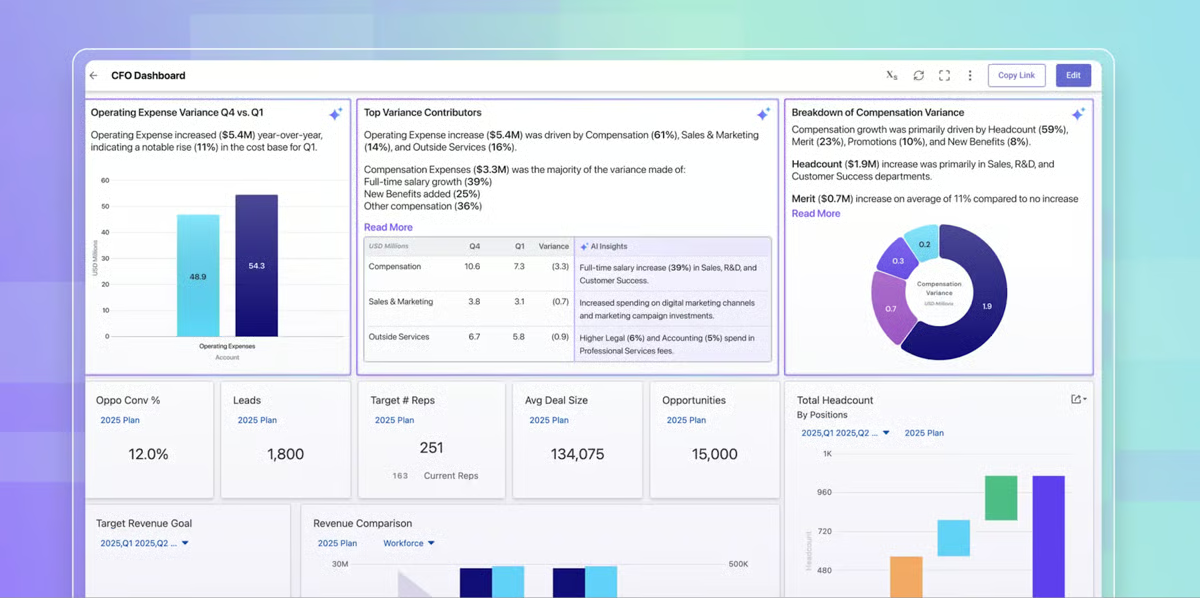
Because planning and reporting are tightly connected, Planful is often viewed as one of the best software solutions for combining budgeting with performance tracking, helping finance teams monitor results while updating forecasts.
Ease of doing business and vendor partnership also appear as strengths. With 92% ease of doing business and 92% support ratings, finance teams often describe positive experiences working with Planful during implementation and ongoing use. That relationship element becomes important when planning systems are embedded deeply into financial operations.
Based on G2 reviews, I get the sense that Planful works well for structured financial planning and consolidation, but teams that need heavy customization in templates, hierarchies, or dashboards may find the platform requires additional configuration to match very specific workflows. Several reviewers note that tailoring reporting structures or adjusting planning models can take time to implement, and built-in templates or dashboard options sometimes feel limited without further setup.
I also notice repeated mentions of performance challenges when working with large reports or complex planning models. Users say the platform handles multi-entity environments well, but processing large datasets, running complex calculations, or loading detailed reports can occasionally slow the system down, which may affect time-sensitive forecasting or reporting cycles.
For finance teams looking to replace spreadsheet-driven consolidation with a centralized, process-driven system, Planful delivers the control and consistency needed to run forecasting cycles with confidence.
“I like being able to use workforce planning within Planful for budgeting, along with consolidations. It’s helpful to have these capabilities in one place when I’m working through the budgeting process.”
- Planful review, Adil A.
“At the moment, we are having an issue with the amount of time it takes Planful to process data and run through template processing. It is making it difficult to update our forecast/budgets in a timely manner, as well as making the process to update and make changes long and arduous.”
- Planful review, Hunter B.
What defines Workiva in budgeting and forecasting is its connected reporting environment. At its core, it links data across spreadsheets, reports, and disclosures so updates flow automatically wherever those numbers appear. That live data connection changes how finance teams manage planning outputs, especially when forecasts, board decks, and regulatory reports all rely on the same underlying figures.
The linking capability is where most of the value sits. Instead of manually updating multiple files every time assumptions shift, teams can connect source data to narrative reports, financial statements, and forecast summaries. When the underlying data changes, linked content updates across documents. That structure reduces version confusion and lowers the risk of reporting errors during planning cycles. It’s likely one reason Workiva holds a 93% likelihood to recommend and a 100% product direction score on G2, signaling strong confidence in both functionality and roadmap.
Collaboration is another consistent strength. Workiva allows multiple stakeholders to work in the same environment with controlled permissions, comments, and tracked revisions. For budgeting processes that involve finance, accounting, and executive leadership, the shared workspace simplifies coordination. The platform’s 93% ease of doing business rating and 92% quality of support reflect that many teams feel well-supported during implementation and ongoing use.
That shared environment also makes Workiva a strong fit among the best cloud-based budgeting and forecasting solutions for organizations that prioritize collaboration, governance, and centralized reporting.
Governance and auditability also stand out. Workiva maintains a clear history of changes, user actions, and data sources, which is especially important when forecasts feed into external reporting or compliance requirements. That controlled transparency supports finance teams operating in regulated or publicly accountable environments.
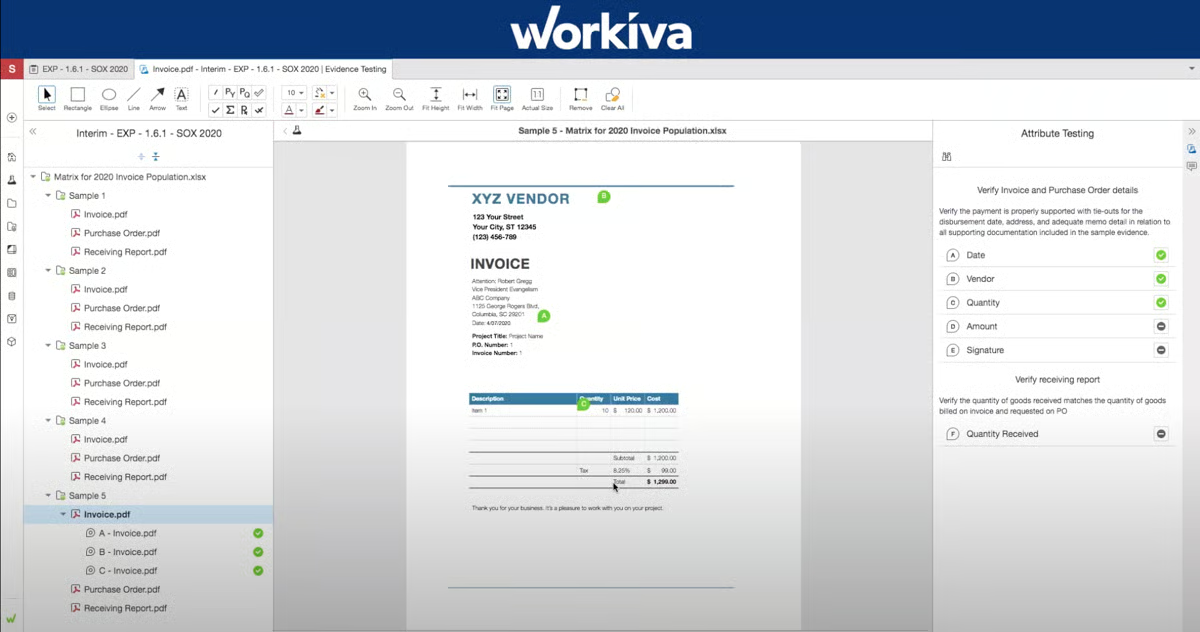
Data integration and centralization are additional themes. Workiva connects to source systems and consolidates data within its reporting structure, helping ensure planning outputs are tied to consistent information. While it may not position itself primarily as a deep modeling engine, its strength lies in keeping financial data synchronized across operational and disclosure contexts.
Workiva’s connected reporting environment keeps financial data synchronized across reports and disclosures, but multiple users note that its spreadsheet and document tools don’t fully match the depth of Microsoft Excel and Word. Reviewers frequently mention limitations around advanced formulas, pivot tables, formatting controls, and certain keyboard shortcuts. While these gaps don’t prevent teams from completing reporting tasks, they can require workarounds for users who expect full Microsoft-level functionality in a web-based reporting environment.
The platform is feature-rich, but that depth comes with a learning curve. Multiple reviewers mention that new or infrequent users can find the interface overwhelming at first, particularly when configuring workflows, permissions, or advanced reports. Initial setup and implementation may require dedicated time, structured training, or external support to ensure the platform is configured properly. Once established, usability improves, but organizations should expect an upfront investment in onboarding and process alignment.
Workiva ultimately feels built for finance teams that treat reporting accuracy and collaboration as non-negotiable. When forecasts, disclosures, and executive reports all need to stay aligned without manual reconciliation, its connected environment provides a dependable foundation.
“What I like about Workiva for audit management is how it turns a normally stressful, paperwork-heavy process into something surprisingly smooth. It centralizes all audit evidence, documentation, and findings in one platform, so you don’t waste time chasing files or reconciling spreadsheets. Real-time collaboration, automated workflows, and built-in audit trails make it easy to track progress, ensure compliance, and keep everyone on the same page, basically turning audits from a headache into a well-orchestrated, almost satisfying process.”
- Workiva review, Cajetan C.
“While Workiva is a powerful platform, one area that can be challenging is the initial learning curve. Because the system offers many advanced features and capabilities, new users may require time and training to become fully comfortable and productive.”
- Workiva review, Trevor K.
The defining feature of LiveFlow is its ability to sync QuickBooks data into Google Sheets in real time, removing the need for recurring manual updates. Its core strength is the direct integration with QuickBooks, automatically syncing accounting data into spreadsheets so reports update without manual exports or copy-pasting. For finance teams that already live in Sheets, that live connection changes how forecasting and reporting feel day to day.
The QuickBooks integration is the centerpiece. Reviewers repeatedly highlight how easy it is to connect accounts and start pulling in real-time financial data. Instead of exporting trial balances or manually refreshing reports, LiveFlow keeps numbers up to date inside existing spreadsheet models. That direct sync reduces version errors and cuts down the time spent reconciling data. It’s likely part of why LiveFlow holds a 98% likelihood to recommend and a 99% quality of support rating on G2.
Beyond QuickBooks syncing, many reviewers highlight LiveFlow’s ability to handle multi-entity consolidations, management reporting separation, and structured financial statement generation. Users frequently mention using it for consolidations, budgeting across entities, and preparing standardized financial statements inside Google Sheets. For growing businesses managing multiple subsidiaries or locations, this adds meaningful structure to financial oversight without moving into a heavy enterprise CPM system.
Another consistent theme is speed. Teams mention how quickly they can generate financial statements, board-ready reports, and forecasting views once the integration is in place. Because the data refreshes automatically, recurring monthly reporting becomes less of a manual exercise. The automation layer feels lightweight but effective, especially for small and mid-sized finance teams that want faster turnaround without adopting a heavy enterprise system.
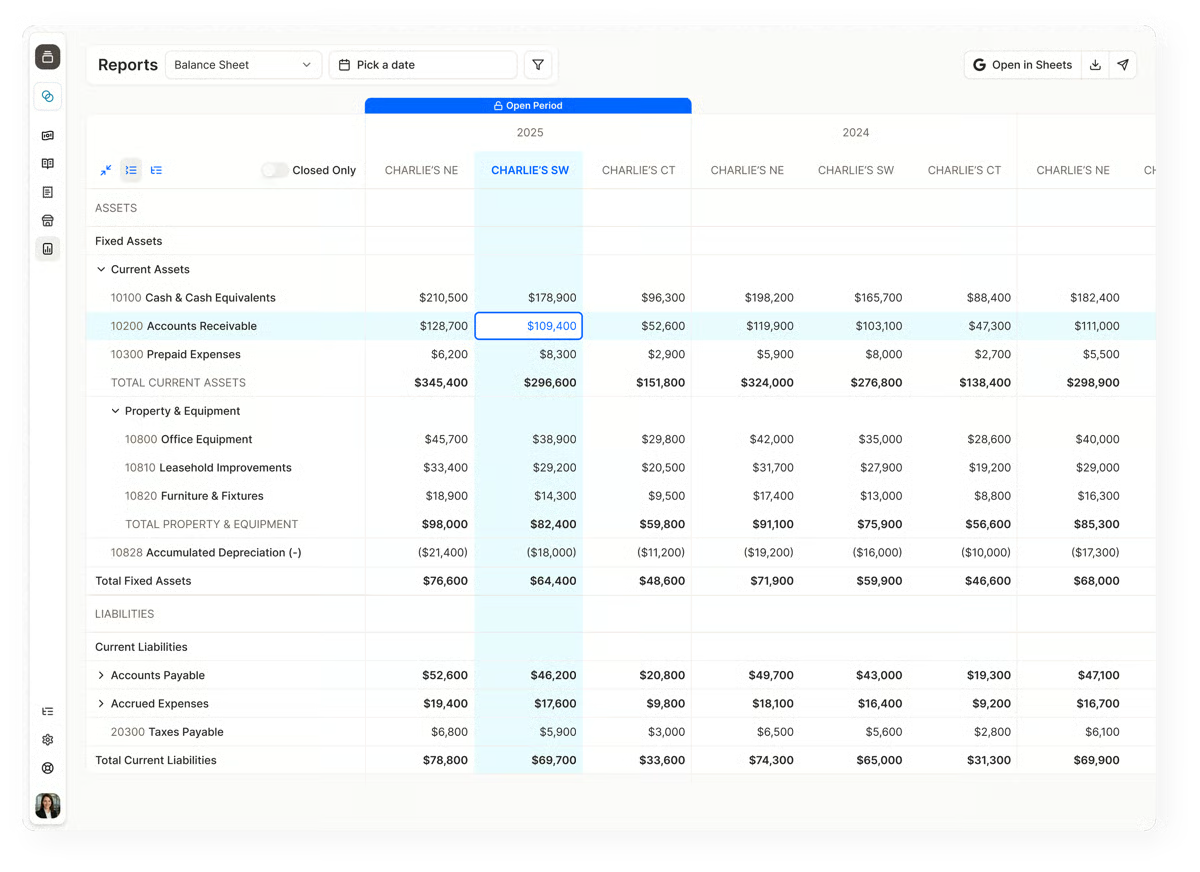
Several reviewers specifically mention using LiveFlow to maintain live forecasts, rolling projections, and up-to-date cash flow tracking tied directly to accounting data. Because financial results update automatically from the accounting system, forecast models stay aligned with real performance without manual data entry. This makes ongoing financial planning and cash flow monitoring more dynamic, especially for CFOs and finance teams that need current visibility rather than static monthly snapshots.
Because forecasts update automatically alongside accounting data, LiveFlow is frequently used as one of the top tools for creating rolling financial forecasts, particularly for teams already operating inside Google Sheets.
Customer support appears repeatedly as a differentiator. Many users describe responsive, hands-on support during setup and troubleshooting. With near-perfect ratings in support and strong product direction confidence, there’s a clear pattern of satisfaction beyond just the product features themselves.
Pricing is one of the most commonly mentioned drawbacks of LiveFlow, especially for smaller teams that only need a limited set of features. Several reviewers also note that capabilities like dashboards, consolidations, or budgeting modules may come at an additional cost. That said, LiveFlow delivers real-time automation and streamlined reporting that many users say saves meaningful time each month, which can make the platform a stronger fit for teams planning to use a broader set of its reporting and automation features.
The platform excels at syncing QuickBooks data into Google Sheets and reducing manual reporting effort. However, several users mention limitations around reporting flexibility, including requests for more customizable dashboards, additional built-in report templates, and greater control over report layouts. These gaps may require some teams to build reports manually in Sheets, particularly if they need highly customized reporting formats.
LiveFlow is best suited for finance teams that rely on QuickBooks and Google Sheets for reporting and forecasting and want real-time data without manual exports. It works particularly well for startups, SMBs, and accounting firms that prioritize fast, spreadsheet-based financial reporting.
“The most impactful part of LiveFlow is the automated, real-time data sync. In the past, our financial reporting was always lagging. By the time we manually pulled reports from QuickBooks into Google Sheets, the data was already several days old. Especially when we're waiting for a third-party team to reconcile our account.”
- LiveFlow review, Jessica E.
“I hope they add the ability to run a QuickBooks Online canned year-over-year report. The Year to Date and Month to Date reports in QuickBooks Online are reports we use very extensively, and currently, a prior year report and a current year report have to be combined into one report to view the year-over-year comparisons. This is cumbersome and time-consuming. Adding the year-over-year comparison report to the available report selections would save us even more time. The price point is a little high.”
- LiveFlow review, McKay S.
Datarails is built around one core idea: let finance teams keep working in Excel while centralizing and automating everything behind the scenes. Instead of replacing spreadsheets, it layers a structured FP&A platform on top of them, syncing data, managing versions, and consolidating reports without forcing teams to abandon familiar models.
The Excel-native approach is clearly its anchor. Reviewers repeatedly highlight that they can continue using their existing spreadsheets while Datarails connects them into a centralized system. That reduces disruption during implementation and makes adoption smoother, especially for teams deeply invested in Excel-based forecasting. According to G2 Data, 93% likelihood to recommend and 90% of users saying it meets requirements, the feedback reflects strong satisfaction with that hybrid model.
Automation and consolidation are another consistent theme. Users frequently describe how Datarails pulls data from multiple entities and systems into one environment, streamlining monthly reporting and reducing manual copy-paste work. Multi-entity consolidation, automated data refreshes, and structured reporting processes come up repeatedly in the reviews. For mid-market organizations in particular, the ability to centralize data without rebuilding models from scratch is a major operational upgrade.
This automation layer also helps position Datarails among the best cloud-based budgeting and forecasting solutions for Excel-driven finance teams that want centralized FP&A processes without rebuilding their existing models.
Reporting flexibility is also well supported in the feedback. Finance teams can build custom dashboards and management reports while maintaining granular control inside Excel. Instead of rigid templates, Datarails supports tailored financial reporting structures that evolve with the business. That flexibility likely contributes to its 97% product direction score on G2, suggesting confidence in how the platform continues to develop.
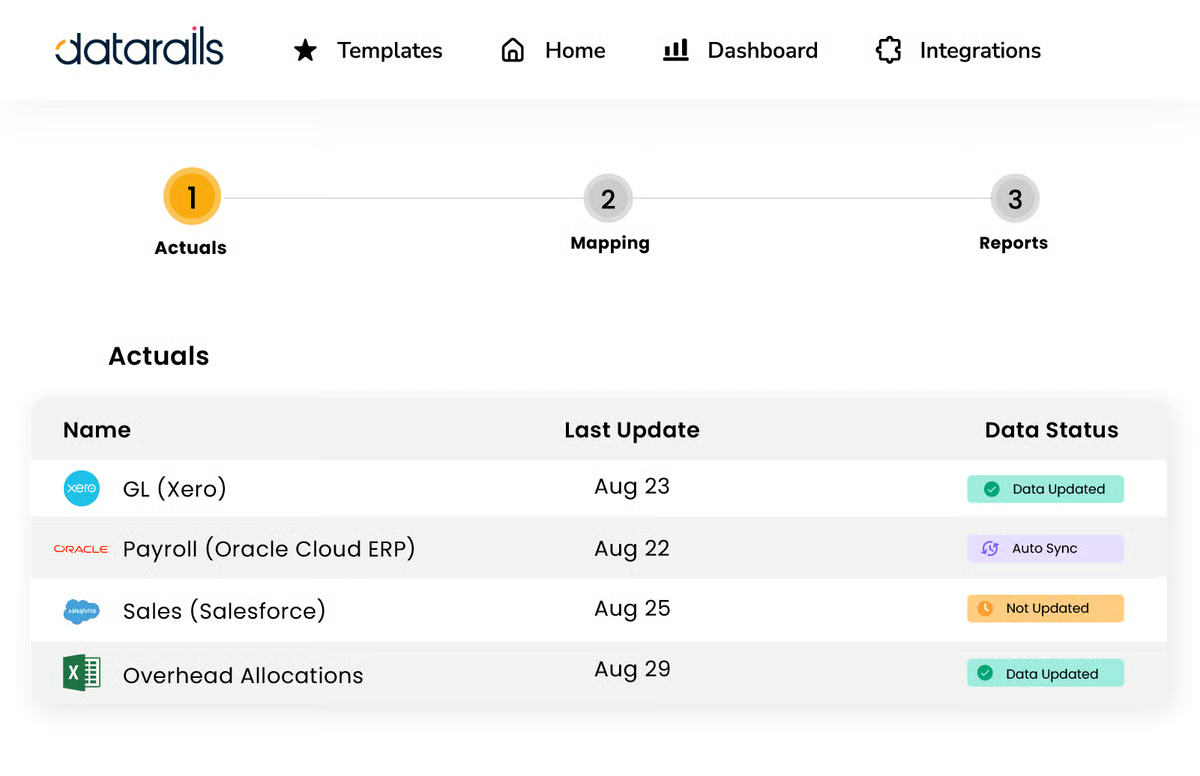
Collaboration and version control appear frequently as strengths. Because spreadsheets are connected to a governed system, teams avoid confusion over file versions and outdated numbers. Reviewers mention improved visibility across stakeholders and clearer audit trails during budgeting cycles. This structured layer helps reduce errors while preserving the flexibility finance teams expect.
Customer support is another area that frequently appears in user feedback. With a 94% quality of support rating on G2, many users describe responsive onboarding and ongoing assistance. For finance teams implementing a system that touches forecasting, reporting, and consolidation, that partnership plays a meaningful role in long-term success.
Datarails’ mid-market focus is also reflected in its customer distribution, with 73% of users coming from mid-sized organizations. The platform is clearly positioned for growing companies that need structured FP&A processes but aren’t ready to abandon Excel entirely.
Datarails gives finance teams a structured reporting layer while still letting them work inside Excel, which many users find practical for day-to-day FP&A. However, some reviewers note that certain advanced reporting features and dynamic behaviors can feel less flexible than expected. Teams building highly customized reports may occasionally need workarounds.
The platform is also valued for how it connects existing spreadsheet models into a centralized planning system. That said, several users mention that the initial setup can take time, especially when integrating complex or messy Excel files. Organizations that start with cleaner models and defined processes tend to experience smoother implementations.
Datarails ultimately feels tailored for finance departments that want automation and governance without rewriting years of spreadsheet logic. When Excel is central to budgeting and forecasting but manual consolidation is slowing things down, it provides a structured way forward.
“The product makes my monthly processes a lot easier. I hold management account meetings once a month, and it allows me to pull numbers from the system with ease. We have just gone through our budget process using Datarails, and it has been one of the easiest processes. Everything gets consolidated automatically, and we can review the figures very easily, which makes things a lot more seamless. I also like how the older versions of the files are all hosted on the platform, which means if there's a mistake, you can roll back the file very easily.”
- Datarails review, Amari S.
“The UX sometimes gets glitchy when utilizing the 'Storyboards' narrative tool if you don't size or format the visuals to the board's native architecture.”
- Datarails review, Stephen C.
Have more questions? Find more answers below.
There is no fully free enterprise-grade budgeting and forecasting software. Tools like platforms, such as IBM Planning Analytics and LiveFlow, may offer free trials, but long-term budgeting and forecasting typically require a paid, scalable solution.
For small businesses, the best options are:
These tools balance usability, scalability, and cost better than heavy enterprise platforms.
There is no single “best” tool for every organization.
The best choice depends on company size, complexity, and integration needs.
Budgeting software is used to create a financial plan for a fixed period, typically an annual budget that outlines expected revenue, expenses, and targets. Forecasting software, on the other hand, continuously updates financial projections based on real-time data, performance trends, and changing business assumptions.
Finance teams commonly use:
These tools allow continuous updates instead of static annual planning.
Budgeting and forecasting tools centralize financial data, automate calculations, and enable scenario modeling to improve accuracy and speed. They help teams consolidate information faster, collaborate more effectively across departments, and reduce errors commonly caused by manual spreadsheets.
For cash flow forecasting:
The best tool depends on modeling complexity and integration requirements.
Forecasting typically informs budgeting.
Organizations often:
Modern tools like Planful, Anaplan, and IBM Planning Analytics allow both to run continuously rather than sequentially.
Top FP&A (Financial Planning & Analysis) software includes:
The best FP&A software depends on modeling depth, integration needs, and company size.
Several budgeting and forecasting platforms integrate directly with ERP systems to pull financial data automatically. Tools like Vena, Planful, Datarails, and Anaplan connect with ERP platforms such as Microsoft Dynamics, NetSuite, and SAP, helping finance teams sync operational and financial data for more accurate planning.
For large enterprises, platforms like Anaplan and IBM Planning Analytics are widely used because they support complex financial models, scenario planning, and large-scale data analysis. These tools help enterprise teams handle multidimensional datasets and build advanced forecasts.
Platforms like Workiva, Vena, and Datarails provide real-time variance reporting by automatically linking financial data and updating reports when source data changes. This helps finance teams quickly compare actuals vs. budget and identify performance gaps.
Tools like Anaplan, IBM Planning Analytics, and Planful support zero-based budgeting by allowing teams to rebuild budgets from scratch using driver-based models, scenario planning, and detailed cost analysis. This approach helps organizations justify every expense rather than relying on historical budgets.
If there’s one thing that stands out after reviewing these tools, it’s that the best budgeting and forecasting software depends entirely on your organization’s complexity, growth stage, and financial goals. There isn’t a single platform that wins for everyone, and that’s a good thing.
If you need enterprise-grade scenario modeling and scale, Anaplan or IBM Planning Analytics are powerful choices. If your team lives in Excel but wants more structure and control, Vena or Datarails may feel like a natural evolution. For finance-led consolidation and disciplined forecasting, Planful stands out. If collaborative reporting and connected disclosures matter most, Workiva delivers strong governance. And if you’re looking for real-time syncing with accounting tools in a lighter environment, LiveFlow is worth exploring.
Ultimately, the right solution is the one that aligns with how your finance team operates today, and where it needs to go tomorrow.
Take your planning a step further by learning how to build a structured event budget that aligns with your broader financial forecasts.


When the forecast breaks during budget season, finance doesn't get to blame the tool. Finding...
 by Disha C

Corporate Performance Management (CPM)
I’ve always been fascinated by the power of data.
.png) by Tanuja Bahirat
by Tanuja Bahirat

If you’re leading a sales or revenue team, you already know how quickly planning breaks down,...
by Tanuja Bahirat