

Antivirus software is one of those decisions that feels done once it's deployed. Then six months later, analysts are drowning in alerts they can't prioritize, a legitimate tool keeps getting quarantined, and nobody's quite sure when it started.
I went through hundreds of verified G2 reviews to find the best antivirus software that holds up past the first quarter. The patterns I was looking for weren't in the feature lists. They were in what teams describe after months of real use.
For this guide, I evaluated 9 antivirus software using G2's Winter 2026 Grid® Report and AI-assisted review analysis, cross-validated with IT administrators and security teams running these platforms in production. ESET PROTECT for ML-driven endpoint protection. Sophos Endpoint for ransomware-focused prevention with centralized control. ThreatDown for cost-effective EDR with optional managed detection. CrowdStrike Falcon for large-scale enterprise threat prevention. Check Point Harmony Endpoint for unified endpoint and zero-trust enforcement. Microsoft Defender for Endpoint for Microsoft-native environments. Kaspersky AntiVirus for traditional malware protection with low system impact. SentinelOne for autonomous AI-driven endpoint response. FortiClient for Fortinet-centric endpoint and access control.
*These antivirus solutions are top-rated in their category based on G2’s Winter Grid® Report 2026. I’ve included their strengths and ideal use cases to help you choose the right option for your needs.
What I consistently see in stronger antivirus platforms is a move beyond signature-based protection. The best tools surface behavioral patterns, flag abnormal activity early, and give security teams context around severity and exposure. Whether it is identifying ransomware before encryption starts, isolating compromised endpoints, or reducing alert noise through smarter prioritization, effective antivirus software creates signal instead of panic.
Many teams rely on antivirus software as their first line of defense, especially in hybrid and remote environments where device sprawl is the norm. Faster deployment and centralized visibility reduce reaction time when incidents occur.
A good antivirus software for you would deliver clear visibility into active threats, predictable response workflows, and confidence that critical endpoints are protected. When those elements are missing, risk does not stay contained. It drifts, leaks, and compounds in ways that are expensive to reverse.
I used G2’s Winter Grid Report 2026 to shortlist the top antivirus software based on real user satisfaction scores and market presence across small, mid-market, and enterprise teams.
I then used AI to analyze hundreds of verified G2 reviews and extracted recurring feedback patterns around what matters most in real-world security operations. This included threat detection accuracy, false-positive rates, endpoint performance impact, ease of deployment, policy management, response speed, and integration with broader security stacks such as endpoint detection and response (EDR), security information and event management (SIEM), and identity tools. This helped me separate antivirus platforms that actively reduce risk from those that add alert noise or operational friction.
Since I haven’t personally used every antivirus product covered, I validated these findings against insights from IT administrators, security teams, and MSPs who rely on these tools in production environments. The visuals and product references included in this article are sourced from G2 vendor listings and publicly available product documentation.
After reviewing a large volume of G2 user reviews, studying real-world endpoint security operating models, and speaking with IT administrators, security operations center (SOC) teams, MSPs, and security leadership, the same themes kept recurring. Here’s what I prioritized when evaluating the best antivirus software:
I focused on antivirus solutions that consistently give security teams the visibility and control they need. Since every organization has different priorities, the right choice comes down to finding a tool that fits your environment and security workflow, and not just one that performs well on paper.
Below, you’ll find authentic user reviews from the Antivirus Software category. To appear in this category, a tool must:
This data was pulled from G2 in 2026. Some reviews may have been edited for clarity.
When I analyzed the G2 review data, ESET PROTECT consistently stood out for one reason: it delivers strong endpoint protection without adding operational complexity. Reviewers repeatedly highlighted its stability, lightweight performance, and centralized management capabilities, making it easier for IT and security teams to maintain visibility across endpoints without creating additional administrative burden.
What impressed me most was how often users described ESET PROTECT as a platform that simply works in the background. Rather than demanding constant attention, it provides reliable threat detection, clear policy management, and broad endpoint coverage while fitting naturally into day-to-day security operations. For organizations looking for effective protection with minimal friction, ESET PROTECT emerged as one of the most dependable options in my analysis.
Its firewall capabilities score 92% on G2, and reviewer accounts back that number up in practice. Inbound and outbound traffic stays controlled without disrupting routine connectivity. The protection runs in the background, keeping access stable while blocking unauthorized entry. It contributes to a secure operating environment without requiring constant manual oversight or generating friction for end users during normal workloads.
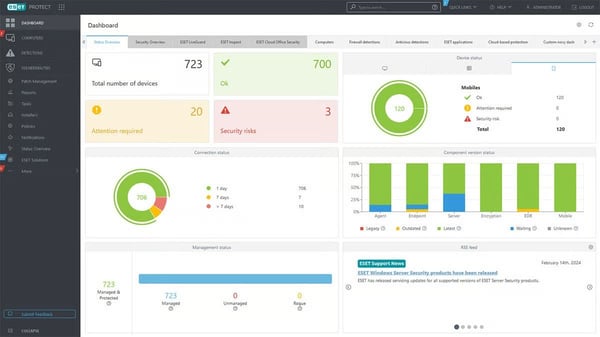
Vulnerability and patch management sit inside the same console used for threat monitoring. For your team, this means identifying missing updates and closing exposure gaps without switching between separate security and patch tools. G2 reviewers describe endpoint posture management staying consolidated in one place, reducing the operational overhead that comes from juggling multiple platforms to maintain basic security hygiene across devices.
Malware detection and endpoint intelligence both score 92% on G2, and the review patterns around those numbers are consistent. The platform surfaces behavioral signals, flags abnormal activity early, and gives security teams context around severity and exposure. Scanning and background processing stay lightweight, allowing protection to run without noticeable system slowdown across standard business devices and mixed hardware environments.
One thing that kept surfacing for me across the review data was how often administrators described the centralized console as genuinely reducing manual effort. Policy deployment, device oversight, and threat response all operate from a single interface. G2 reviewers consistently reference easier navigation and less time spent on repetitive tasks, which matters for IT teams maintaining consistency across large numbers of endpoints.
G2 reviewers flag that native reporting is structured around standard endpoint security visibility rather than deeply customizable outputs. Teams preparing formal audit reports or executive summaries will find the native dashboards more standardized than their specific needs require. Day-to-day monitoring and alert tracking remain consistently clear and actionable, giving security teams a well-supported view of endpoint status without additional configuration overhead.
Some users note that advanced policy configuration involves settings nested deeper within the console, which adds time during the first-time setup of complex or layered policies. Administrators new to the platform may need patience working through the initial configuration. Once setup is complete, policy enforcement across endpoints remains stable and consistent, with protection maintaining full coverage without requiring ongoing manual adjustment or repeated intervention.
I've come to see ESET PROTECT as a high-confidence security foundation built around clarity, consistency, and low operational friction. The combination of strong detection, centralized control, and minimal performance impact aligns well with mid-market organizations and lean IT teams. I'd recommend it for any team prioritizing protection that fits naturally into daily operations rather than one that demands constant attention to stay effective.
I use ESET PROTECT for software and device protection as it safeguards files and folders, and scans them for threats. It ensures a stable and reliable Internet connection. One of the best benefits is that it protects my device from threats and viruses with its antivirus and advanced threat analysis tool. It effectively blocks viruses and unauthorized access. The initial setup is straightforward and doesn't require technical skills. Everything works fine and well. I am very satisfied with ESET PROTECT's functionality and performance, especially compared to previous security solutions.”
- ESET PROTECT review, Samuel G.
“ESET PROTECT reporting feels fairly basic when I’m trying to present security insights to leadership. I often end up exporting the data and then reworking it manually to make it usable.”
-ESET PROTECT review, Sergio S.
Tip: Businesses track this sales metric to see how quickly they are moving customers down the pipeline.
Ask anyone who has run endpoint security across a distributed environment, and Sophos Endpoint comes up fast. The G2 review data shows a platform built around consistent threat prevention, centralized administration, and ransomware defense, all delivered through one operating surface. If your environment spans remote teams and multiple device types, the review patterns here point to a solution that holds enforcement steady without fragmenting security operations across tools.
I'd put endpoint intelligence at 95% on G2 as the figure worth anchoring to first. That score reflects how clearly teams can follow threat activity across endpoints without stitching data together from multiple systems. Root cause information is accessible within the same interface, shortening investigation cycles and giving security teams the context they need to act with confidence during active response situations.
I've seen system isolation described consistently across G2 reviews as one of the most operationally valuable containment controls available. Compromised endpoints get segmented immediately, while the rest of the environment keeps running. That approach limits exposure during live incidents without forcing wider network shutdowns or halting business operations, which is exactly the kind of containment behavior that reduces blast radius under real pressure.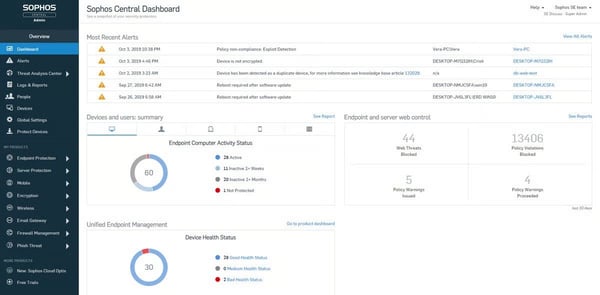
The number that stuck with me was malware detection at 95% on G2. Ransomware payloads, malicious email attachments, and exploit-based attacks get intercepted early in execution, before lateral movement occurs. G2 reviewers describe threats being blocked before any damage registers, which reduces both recovery effort and the operational disruption that typically follows a security incident across a multi-endpoint environment.
What you get through Sophos Central is consistent policy enforcement across every endpoint, whether devices are on-site or connecting remotely. Security policies, web filtering rules, and application controls are deployed from one console without requiring repeated configuration per location. G2 reviewers describe the platform going live quickly and remaining manageable from that point forward, keeping security enforcement stable as environments grow and distributed teams expand.
Antivirus protection, ransomware rollback, web filtering, and device control in one platform removes a significant layer of operational complexity. G2 reviewers describe covering core endpoint security needs without expanding their tool stack. Administration stays simpler, integration overhead drops, and security operations stay more streamlined when teams stop coordinating between separate products to achieve coverage that one platform already provides.
A recurring theme in feedback is that alert outputs surface threat signals clearly but don't always include a direct remediation path. Security teams working through less familiar alert types may need additional time researching next actions or consulting documentation. Detection and threat visibility remain reliable and accurate throughout, giving teams a clear picture of endpoint activity even when the response path requires independent judgment to complete.
G2 reviewers flag that reporting formats feel more standardized than some compliance or executive-level use cases require. Security leaders preparing condensed, risk-prioritized outputs tend to notice this most. Day-to-day monitoring and threat tracking stay clear and well-supported within the native reporting, covering the operational visibility that security teams rely on without requiring supplemental tooling for routine endpoint management and alert review.
Overall, Sophos Endpoint delivers consistent threat prevention, strong containment controls, and centralized visibility without fragmenting security operations. I'd point to the combination of detection accuracy and administrative clarity as what makes Sophos Endpoint worth serious consideration, particularly where you need enforcement to stay consistent without constant manual intervention.
“I really like the advanced threat protection and how it uses AI and deep Learning to catch new malware. The ransomware rollback feature is a lifesaver, and the root cause analysis makes investigations easier. The dashboard is clean and simple, and having everything in one place saves time. It is easy to deploy. and easy to integrate.”
- Sophos Endpoint review, Himanshu V.
“The main downside is that updates and scans occasionally slow down older systems. For those new to the software, the initial setup and policy configuration might seem somewhat complicated. Furthermore, while the pricing is a bit higher than some alternatives, I believe the level of protection provided makes it worthwhile.”
- Sophos Endpoint review, Jagan P.
Tip: Businesses track this sales metric to see how quickly they are moving customers down the pipeline.
Honestly, ThreatDown is one of the more practically structured platforms in this category for teams managing high endpoint volumes. The G2 review data shows antivirus protection sitting alongside DNS filtering, email security, patch management, and endpoint detection in a single operating surface. Endpoints across customers or locations report into one interface, keeping day-to-day security work focused on visibility and action rather than constant tool switching.
I've watched the same pattern surface repeatedly across ThreatDown reviews: threats stopped before they progress. Ransomware attempts, malicious downloads, and exploit-driven activity get intercepted early in the execution chain. Early blocking reduces the cleanup required after incidents and limits disruption when security events occur across multiple endpoints simultaneously, which matters most in managed service provider (MSP) environments managing high device volumes.
Security validation scores 92% on G2, which reflects how reliably teams can confirm protections are active across their environment. For your security team, this means checking endpoint status quickly across customers or sites without manual verification, catching misconfigurations or inactive protections before they become active risks rather than discovering gaps only after an incident has already occurred.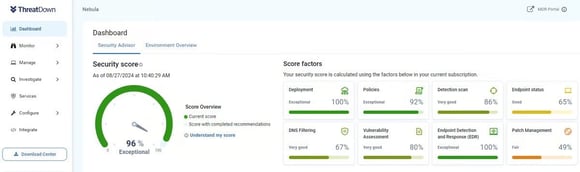
Where I've seen ThreatDown shine is in compliance-related enforcement, where the platform scores 92% on G2. Standardized policies apply consistently, even when managing customers with different requirements. Coverage stays aligned as endpoint counts grow, without rebuilding configurations repeatedly, which keeps compliance posture manageable across diverse client environments without generating the kind of overhead that scales poorly with device volume.
The OneView portal is where the operational clarity of this platform becomes most visible. Endpoint health surfaces across multiple locations in a single view, with devices falling out of compliance or requiring action prioritized automatically. G2 reviewers describe logging in and seeing exactly what needs attention without searching for it, reducing the time spent identifying issues before actually resolving them across distributed environments.
I'd highlight layered protection handled within one platform as the defining operational advantage here. DNS filtering, content filtering, email security, patch management, and endpoint monitoring are all managed together without spreading workflows across vendors. G2 reviewers describe covering a wide range of security needs without juggling multiple tools, reducing operational overhead, and simplifying the oversight that comes with managing security across high device volumes.
Reviewer accounts consistently mention that blocking behavior can be aggressive depending on how policies are configured, occasionally flagging legitimate software in stricter setups. Teams managing environments with specialized applications may need to review and adjust policy thresholds during initial deployment. Protection reliability across standard endpoint environments stays strong, with threats intercepted early and endpoints remaining under consistent enforcement throughout normal operations.
A pattern across G2 feedback points to interface navigation requiring familiarization, particularly for administrators new to the platform. Certain menu items are not always placed where users expect them, which adds time during initial configuration. Once teams develop familiarity with the console layout, daily management across multiple clients or locations runs efficiently, with endpoint monitoring staying clear and well-organized throughout routine security operations.
If your team prioritizes layered coverage, centralized oversight, and consistent enforcement without enterprise-level complexity, ThreatDown is built around exactly that operational model. Small businesses and MSPs managing high endpoint volumes make up the core of its user base for good reason. I've seen this platform deliver dependable, practical security coverage across the review data, with visibility and response staying coherent even as device counts scale.
“ I like how ThreatDown keeps our users safe. The content filtering, DNS filtering, and email filtering features are valuable to us. It was very easy to set up ThreatDown and get it installed on our users and have it report back to us. We're very happy with it.”
- ThreatDown review, Stacey M.
" One area that could be improved in ThreatDown is the initial setup and configuration process, which can feel a bit complex for new users ."
- ThreatDown review, Kostas M.
CrowdStrike Falcon Endpoint Protection Platform is built for environments where endpoint security functions as a continuous detection and response operation, and the G2 review data reflects that clearly. Protection runs through a cloud-native model that analyzes endpoint behavior in real time through a single lightweight agent streaming activity to the Falcon console, where investigation and response decisions get made without delay.
If you're running an environment where unknown threats are as much a concern as known ones, the 96% malware detection score on G2 carries real weight. Ransomware, fileless attacks, and zero-day behavior get detected based on how processes behave rather than static signatures. That approach closes blind spots common in legacy antivirus tools and shortens the window between execution and containment significantly.
I've tracked system isolation scoring 94% on G2, and the reviewer accounts behind that number are consistent and specific. Devices get isolated from the network with a single action while maintaining connectivity to the Falcon console, preventing lateral movement without cutting off investigation access. Response work continues without broader disruption, which keeps containment fast and investigation intact at the same time.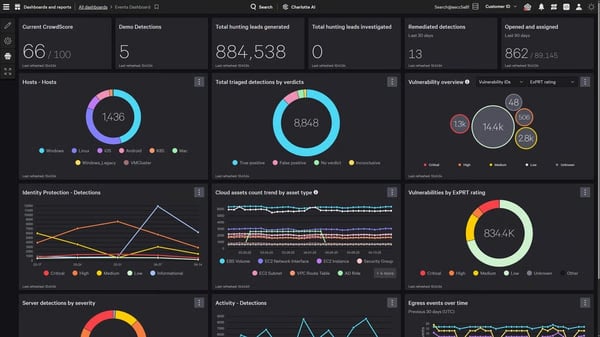
The investigative visibility available inside Falcon is where the platform genuinely separates itself from lighter endpoint tools. Attacks get reconstructed step by step from a unified event view, reducing the need to correlate logs across multiple platforms. G2 reviewers describe faster decision-making during incidents because the full picture is already assembled, rather than pieced together manually under pressure from fragmented data sources.
One thing worth noting from the review data is how consistently endpoint performance stability gets praised despite the depth of protection running underneath. The lightweight agent design keeps CPU and memory impact minimal compared to traditional antivirus or multi-agent EDR setups. Updates are deployed centrally through the cloud without forcing device reboots, allowing large-scale deployment without disrupting end users or scheduling downtime across distributed environments.
I'd describe the integration model as one of Falcon's more underappreciated operational strengths. Security operations teams connect endpoint telemetry directly into security information, and event management (SIEM) and security orchestration, automation, and response (SOAR) platforms, ticketing systems, and threat intelligence feeds without manual extraction. G2 reviewers in larger environments describe this as keeping investigation and response unified across the full security stack, rather than treating endpoint data as siloed from the tools that depend on it.
The console and query-driven workflows reflect the platform's depth as a full EDR environment rather than a basic endpoint tool. Teams new to advanced EDR platforms may need additional time to become comfortable with the interface and investigation views. Once that familiarity is established, G2 reviewers describe investigation and containment workflows as supporting fast, confident response at enterprise scale — with the ability to reconstruct attacks, isolate endpoints, and triage incidents from a single console without switching tools.
Feedback across G2 reviews points to premium pricing as a consideration that requires careful evaluation, particularly for teams with simpler security needs or tighter budgets where advanced visibility modules beyond the base license add meaningful cost. For enterprise security teams where detection depth and rapid containment are operational priorities, the core capabilities hold up consistently under real-world pressure at scale.
I've analyzed the review data across this category carefully, and CrowdStrike Falcon sits in a distinct tier for organizations treating endpoint security as an active investigative function. Behavioral detection is deep, containment is rapid, and visibility scales across large environments without degrading. I'd place this firmly in the consideration set for any enterprise team where response precision and detection depth are non-negotiable operational requirements.
“It is real-time threat detection using AI and machine learning. It provides strong visibility across all endpoints, works without taking down systems, and helps detect and respond to threats quickly from a single cloud-based console.”
- CrowdStrike Falcon Endpoint Protection Platform Cloud review, Akash Y.
“It can be difficult to use for new users because of its complex interface. Some features require advanced knowledge to configure properly, and alert tuning can take time.”
- CrowdStrike Falcon Endpoint Protection Platform Cloud review, Rutuja M.
If your team needs endpoint protection that enforces consistently across on-site and remote devices without constant oversight, Check Point Harmony Endpoint is built around exactly that requirement. The G2 review data frames it around stable policy enforcement, real-time threat prevention, and centralized control, all managed through a single console where devices stay governed under the same rules regardless of where users are working.
I've seen behavioral prevention described across G2 reviews as one of Harmony Endpoint's most operationally meaningful strengths. Phishing attempts, exploit activity, and suspicious behavior get blocked through behavioral analysis before files fully execute. Coverage improves against evolving attack techniques because the platform relies on how activity behaves rather than static signatures, which keeps alert volume under control while detection accuracy stays high.
The review data made one thing clear to me: performance stability during everyday operation is where this platform earns consistent trust from its users. The agent runs quietly in the background, with real-time protection and scanning showing minimal impact on system responsiveness under normal use. G2 reviewers point to this as supporting wider deployment without triggering user pushback or generating productivity concerns across the environment.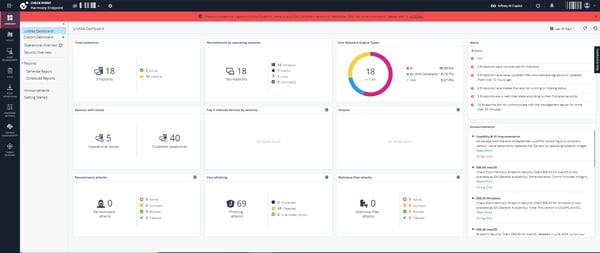
I'd single out compliance capabilities, scoring 91% on G2, as particularly relevant for teams managing both office systems and remote devices. The same security standards apply across locations without repeated configuration, keeping posture consistent as users move between networks. G2 reviewers frequently describe this enforcement consistency as one of the clearest day-to-day operational advantages, especially in environments where remote work has expanded device sprawl significantly.
The firewall scores 91% on G2, and that number reflects something meaningful in practice. Endpoint-level firewall enforcement extends network rules directly to devices operating outside traditional network boundaries. G2 reviewers describe closer alignment between endpoint behavior and existing firewall policies, which matters most for roaming users connecting from untrusted networks where perimeter controls alone are no longer sufficient to maintain a consistent security posture.
I kept returning to one pattern in the G2 feedback: ransomware, malicious files, and suspicious processes blocked during execution rather than after damage occurs. Early intervention limits the spread and reduces the remediation work required across endpoints. That prevention-first model means security teams spend less time cleaning up after incidents and more time maintaining forward-looking control over the environment, which compounds positively over time.
What your endpoints get here is antivirus, EDR, encryption, and data loss prevention (DLP) consolidated into one lightweight agent, rather than spread across multiple tools. G2 reviewers describe antivirus, ransomware defense, behavioral analysis, USB control, and disk encryption, all enforced from one centralized console. This consolidation makes security easier to manage, simplifies policy control, and reduces the day-to-day workload for IT teams.
Some reviewers on G2 mention that initial configuration takes time, depending on policy depth, with alert tuning and rule setup requiring meaningful upfront attention before the platform runs at its best. Once that initial configuration is complete, the platform runs consistently and requires minimal day-to-day intervention, maintaining effective protection across endpoints without needing repeated manual adjustment.
G2 feedback points to reporting flexibility feeling more structured than fully customizable, which surfaces most when preparing simplified summaries for non-technical stakeholders. For operational threat tracking and endpoint visibility, the available reporting remains clear and sufficient for routine security management, covering the day-to-day monitoring needs that security teams depend on without requiring supplemental tooling.
I've come across very few platforms in this category that enforce consistently across on-site and remote environments with minimal daily intervention required. Threat blocking is early, policy control is centralized, and the agent footprint stays light. I'd recommend this for teams that need protection to stay consistent across a distributed workforce without constant manual oversight.
“It works in the background without slowing the system. It also blocks threats in real time and gives clear alerts whenever something suspicious appears. The overall detection rate is very high, and it gives me confidence that all endpoints are protected.”
- Check Point Harmony Endpoint review, Naresh K.
“I think that some alerts need a bit of tuning, the policy setup can take some time at first, and the reporting could be more flexible.”
- Check Point Harmony Endpoint review, Pedro L.
One thing the G2 data kept reinforcing for me is how often Microsoft Defender for Endpoint gets adopted by default rather than through an active buying decision. It arrives bundled with Windows, activates quickly, and connects directly to the Microsoft Defender portal alongside email, identity, and cloud security. For many organizations, endpoint protection becomes part of the environment simply because the Microsoft stack is already running.
I'd frame the Defender portal as the operational core of what makes this platform genuinely useful in Windows-heavy environments. Endpoint activity, alerts, and policy application across devices all surface in one place. Teams managing large Windows estates describe onboarding new machines as incremental rather than disruptive, with devices appearing automatically once enrolled, reducing the need to manage multiple consoles or coordinate between separate tools.
What you gain through endpoint intelligence, rated 90% on G2, is investigative context that shortens triage cycles without requiring external tooling. Device timelines, process activity, and alert correlations are accessible directly inside the Defender portal. In environments managing thousands of endpoints, that built-in context reduces reliance on supplemental platforms for basic investigation work, keeping analyst workflows contained within one interface throughout routine security operations.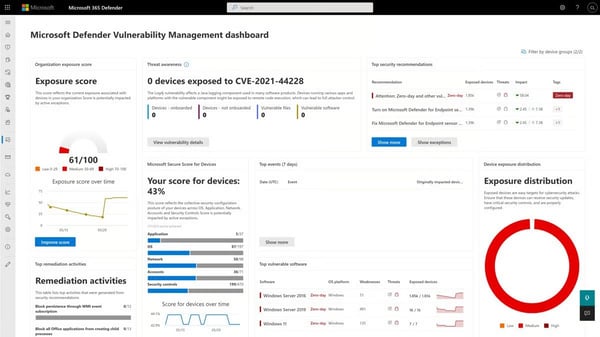
Detection holds up reliably across the threat types that matter most in everyday enterprise operations. Phishing payloads, commodity malware, and suspicious scripts get caught early, often before users notice abnormal behavior. G2 reviewers describe this as consistent rather than aggressive, handling common threats well enough to prevent broader spread across the environment without generating the kind of alert noise that slows security teams down.
For your Windows environment specifically, firewall capabilities stay aligned with the broader Windows security model, keeping traffic control consistent across endpoints already governed by Microsoft policies. Endpoint controls stay in sync without introducing separate rule sets or enforcement layers on top of existing infrastructure, which matters for teams standardized on Windows, where adding complexity to a working security model creates more risk than it resolves.
I'd call the Intune pairing one of the more practically valuable integration points in this platform's ecosystem. Pairing Defender for Endpoint with Intune links device compliance status directly to resource access decisions, restricting network or application access for endpoints falling outside defined security baselines. G2 reviewers describe this connection between endpoint health and access control as supporting a more consistent security posture across managed devices without separate identity tooling.
G2 reviewers point to alert volume as a genuine operational challenge, with limited severity grouping and coarse whitelisting making prioritization difficult inside the native console. For teams already running a SIEM, this integrates naturally into existing workflows. Investigation context and device timeline visibility inside the Defender portal remain clear and structured, giving analysts a solid foundation for triage and root cause analysis throughout active investigations.
A consistent theme in G2 feedback is that advanced customization feels more limited than standalone EDR platforms, which reflects how Defender is designed as part of the Microsoft stack rather than as a standalone tool. For organizations operating within the Microsoft ecosystem, native integration across Microsoft 365, Intune, and Defender services keeps endpoint coverage embedded and consistently enforced across the full stack without additional agents or policy layers.
I'll be direct: this platform earns its place through availability, integration depth, and scale rather than through customization flexibility or advanced EDR capability. In organizations already invested in Microsoft 365, Intune, and Defender services, endpoint protection becomes an embedded layer that handles coverage reliably. I'd position this as the strongest choice for Windows-centric environments where seamless stack integration outweighs the need for deeper standalone EDR configuration.
"It comes built-in with your Microsoft Windows OS, so no need for additional program installation. Not only that, but it has also become one of the most preferred endpoints for the users as it detects the threats very quickly.”
- Microsoft Defender for Endpoint review, Waqas F.
“I find challenges with third-party integration on non-Microsoft platforms. Additionally, the licensing complexity and limitations in centralized management are areas that I believe need improvement.”
- Microsoft Defender for Endpoint review, Naresh C.
Quiet protection earns trust over time, and that is precisely what Kaspersky AntiVirus delivers, according to the G2 review data. The platform prioritizes stable, uninterrupted endpoint protection that runs in the background without demanding user attention. Threats get identified and blocked before they interfere with system activity, and the emphasis throughout stays on keeping machines protected during normal use without generating constant alerts or interruptions.
I've spent time with the scan reliability data across Kaspersky reviews, and the pattern is remarkably consistent. Scanning covers files, web activity, and network behavior continuously, with threats identified and blocked before they interfere with normal system activity. G2 reviewers describe long periods of use without infections, which reflects how effectively the platform handles everyday threat exposure without requiring reactive cleanup or manual intervention afterward.
Security validation scoring 93% on G2 caught my attention as a figure that reflects genuine operational confidence rather than a marketing claim. Threats get confirmed and reported accurately once blocked, reinforcing trust that the software is working even when it stays completely out of sight. That reliability becomes especially meaningful in environments where security needs to run autonomously without requiring regular manual checks to verify coverage.
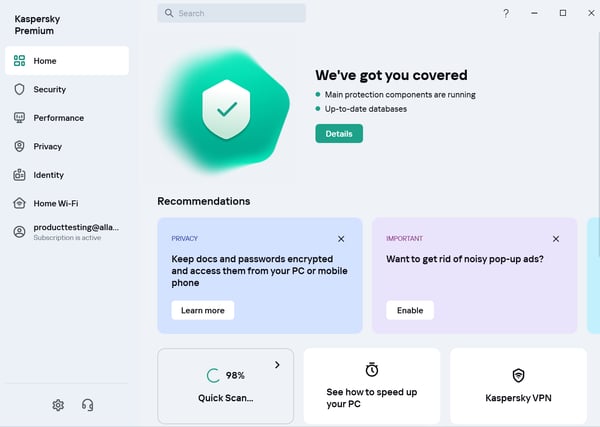
I'd draw attention to endpoint intelligence, also scoring 93% on G2, as the capability that keeps users informed without overwhelming the interface. File activity, real-time monitoring, and web scanning operate together in a way that surfaces relevant information while avoiding unnecessary complexity. G2 reviewers describe this balance as supporting environments where users want reassurance rather than constant decision-making around security events during everyday work.
The lightweight footprint is where Kaspersky's operational practicality becomes most tangible. Background scans and updates are complete without noticeable disruption, which is especially relevant for older hardware or machines running multiple applications simultaneously. G2 reviewers consistently describe protection remaining enabled continuously without impacting productivity, making it a practical fit for environments where hardware refresh cycles lag behind security requirements.
For your team's day-to-day operations, scan scheduling, web protection, and update controls are accessible through a clear interface that avoids clutter entirely. G2 reviewers mention adjusting basic settings or reviewing scan results without needing technical expertise. That accessibility supports broader adoption across non-specialist environments, keeping protection consistently enabled across users who would otherwise disable security tools that feel too complex to manage confidently.
Several G2 reviewers mention that pop-up notifications can feel persistent during update cycles or when files are flagged as suspicious but are known to be safe. Users encountering frequent alerts for routine activity may find adjusting notification settings worthwhile early in deployment. Once those preferences are configured, background protection runs quietly and reliably without unnecessary disruptions throughout normal endpoint operations.
A consistent note across G2 feedback is that licensing and renewal details require closer attention than some comparable products, particularly for teams comparing cost against bundled or free alternatives. Consistent detection accuracy and low-impact background protection across everyday endpoint environments remain the capabilities G2 reviewers return to most, with threats handled automatically and devices staying responsive regardless of hardware age or workload demands.
If you're evaluating antivirus software primarily for reliable background protection with minimal system impact, Kaspersky AntiVirus delivers on that requirement consistently across the review data. Its emphasis on quiet operation, dependable protection, and manageable administration keeps it relevant for users who value consistency over complexity. For environments seeking straightforward endpoint security that runs in the background, it remains a familiar and dependable option.
"User interface and system performance are very good. Strong Malware detection. It provides real-time protection against Malware threats, and Cans files and websites for potential Risk, and offers advanced detection and removal capabilities."
- Kaspersky Antivirus review, Md. Naimullah A.
“What I don't like about Kaspersky AntiVirus is that sometimes its notifications can be a bit persistent, especially when there are pending updates or certain files it detects as suspicious, but I know are safe. I would also like the renewal process to be clearer, as the subscription system can be confusing if you're not very attentive.”
- Kaspersky Antivirus review, Nestor G.
Tip: Businesses track this sales metric to see how quickly they are moving customers down the pipeline.
SentinelOne earned its place on this list for its strong focus on autonomous threat detection and response. The G2 review data consistently highlights its ability to identify, investigate, and contain threats with minimal analyst involvement, while giving security teams the visibility needed to respond quickly and confidently. For organizations operating at scale, that combination of automation and control stands out repeatedly across user feedback.
I've followed SentinelOne's detection and containment scores closely across the review data, and system isolation holding 94% on G2 stands out as a figure backed by specific operational accounts. Affected endpoints get isolated within seconds while visibility for investigation stays intact, limiting lateral movement without forcing system shutdowns. That combination of speed and preserved access is what makes containment genuinely useful during active incidents.
What struck me about the investigation workflow capability is how consistently G2 reviewers describe it as reducing guesswork during active response. Endpoint intelligence scores 92% on G2, with incident timelines presenting a step-by-step view of how threats execute, move, and persist. The storyline view gets referenced repeatedly as making root cause analysis accessible rather than leaving analysts reacting to isolated alerts without broader context around them.
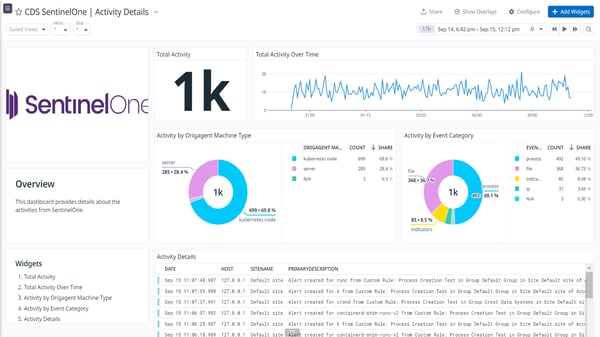
For your security team's investigation workflows, ransomware rollback is the capability that changes recovery from a multi-day effort into a contained operational event. Affected systems revert to a pre-infection state directly, reducing recovery time and operational disruption significantly. G2 reviewers describe this as the difference between containing an incident and spending days rebuilding systems from scratch, which compounds positively across environments with high endpoint volumes.
Deployment speed surfaces as a consistent operational advantage across the SentinelOne review data. Agents deploy through RMM tools or scripts without extended downtime, and the management console provides centralized oversight across endpoints, servers, and workloads once installation is complete. G2 reviewers describe the transition from deployment to active monitoring as fast and straightforward, with protection becoming operational before extended setup windows create coverage gaps.
Broad integrations with SIEM and SOAR platforms, threat intelligence feeds, and managed detection services let endpoint telemetry flow into existing workflows without manual extraction. G2 reviewers in larger environments describe this as keeping investigation and response unified across the full security stack rather than siloed at the endpoint layer.
G2 reviewers who are new to EDR note that the depth of dashboards and investigation views reflects a full-scale platform rather than a lightweight antivirus, and the interface takes additional time to navigate confidently when working through complex investigation workflows. Once teams develop familiarity, the console supports daily security monitoring and incident response with clarity and efficiency throughout routine operations.
Across reviewer accounts on G2, alert volume and classification granularity require tuning in active environments to prevent lower-severity informational alerts from competing with higher-priority incidents. Teams that invest time in alert configuration during initial deployment report detection signals staying actionable and well-focused on genuine threats, with background noise reduced to a level that keeps analyst attention directed where it matters most.
I'll say plainly: few platforms in this category match SentinelOne's combination of autonomous detection, deep investigative visibility, and ransomware rollback across a unified endpoint estate. The behavioral detection is precise, containment is fast, and the integration model supports complex security operations without adding friction. I'd put SentinelOne at the top of the consideration set for security programs, prioritizing control, resilience, and response capability at a genuine scale.
"Best thing in SentinelOne is autonomous threat detection and response. Single unified console for endpoint, identity, and cloud security. User-friendly console — you can easily manage all assets and deploy a policy. Single policy for Windows, Mac, and Linux, with auto-response: one-click kill and quarantine, remediation, and the best feature: one-click rollback. Rollback feature helps you revert the impact of ransomware in an attack condition."
- SentinelOne review, Sahil K.
“Just a little complicated if you are new to the platform, and some advanced options are hidden for the extra licensing, which will increase the cost, and no readymade templates, customization is not easy.”
- SentinelOne review, Harshul S.
For teams already running Fortinet infrastructure, FortiClient is less a standalone antivirus purchase and more a natural extension of the security model already in place. The G2 review data frames it consistently as an endpoint control surface that ties devices, users, and remote access into one unified security posture, with VPN connectivity, endpoint protection, and device control all running through a single lightweight agent.
I've looked closely at device control across the FortiClient review data, and the 97% score on G2 is the highest in this category roundup by a meaningful margin. Teams managing USB drives, external storage, and peripheral access control this directly from the endpoint, which surfaces repeatedly in environments handling sensitive data, where removable media represents as much operational risk as malware exposure.
The firewall rating is where I'd start when explaining FortiClient's value to a security leader evaluating endpoint controls. Scoring 96% on G2, endpoint-level firewall enforcement complements perimeter controls and blocks unwanted traffic even when devices operate outside the corporate network. G2 reviewers describe this as especially valuable for remote and hybrid work, where endpoints connect regularly from untrusted networks beyond the reach of perimeter defenses.
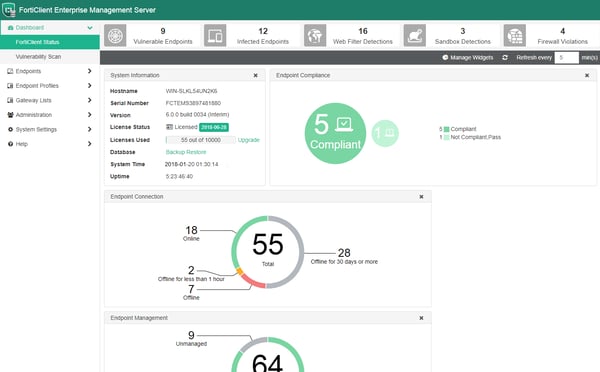
Security validation scoring 96% on G2 reflects a prevention-first operational philosophy that runs through the entire platform. Unpatched software, outdated configurations, and exposure gaps surface directly to administrators before they become active risks. G2 reviewers describe this visibility as supporting proactive remediation rather than reactive cleanup, which matters particularly in environments managing large device fleets where manual posture checks create coverage gaps between audit cycles.
What your remote workforce gains here is secure access that combines SSL and IPsec VPN support with endpoint protection inside one agent rather than requiring multiple tools to manage separately. G2 reviewers describe VPN reliability as one of FortiClient's most consistently praised operational strengths, with mobile users, travelers, and distributed teams maintaining enforced security automatically without additional configuration requirements on the user side.
Zero trust network access (ZTNA) support moves beyond traditional VPN connectivity to control access at the application level, which matters for teams managing granular remote access policies. Teams use ZTNA alongside conventional VPN to segment access based on device posture and user identity, reducing exposure from full network entry for remote users. G2 reviewers describe that flexibility supporting more granular access control without requiring a separate agent or additional tooling.
G2 reviewers managing older hardware flag that scan and update processes can be more resource-intensive on lower-spec devices, with temporary performance slowdowns during full scans or update cycles worth anticipating during initial deployment planning. Outside those periods, real-time protection, VPN enforcement, and device control run reliably during normal operation, keeping endpoints governed and access controlled without visible overhead between scan cycles.
A noted pattern in G2 feedback is that configuration feels most intuitive within an existing Fortinet environment, with teams deploying outside that ecosystem needing additional time to navigate certain setup steps confidently. In environments already running FortiGate and other Fortinet infrastructure, integration and management stay smooth, well-connected, and consistently described by reviewers as one of the platform's clearest operational strengths.
I've worked through enough endpoint reviews in this category to say that FortiClient occupies a distinct and well-defined position. VPN integration, device control, and firewall enforcement running through one lightweight agent make it operationally coherent in a way that general-purpose antivirus tools rarely match. I'd recommend FortiClient for any organization treating endpoint protection as part of a broader network security strategy, particularly within an established Fortinet environment.
"What I like most about FortiClient is how smoothly it combines ease of use with strong security features, so day-to-day protection feels seamless instead of burdensome. The implementation is straightforward, and it integrates well with existing systems, which means I spend less time configuring settings and more time focusing on working securely. Its broad set of features — from VPN to endpoint protection — has been reliable for frequent use, and customer support is responsive whenever I need guidance. Overall, it comes across as a tool built to fit naturally into real-world workflows without adding unnecessary complexity."
- FortiClient review, Dharmik V.
“What I dislike most is the lack of user-friendly diagnostics when a connection fails. When the ZTNA or VPN tunnels drop, the error codes are often too cryptic for an average user to solve without opening a ticket with the IT helpdesk.”
- FortiClient review, Alejandro A.
|
Software |
G2 Rating |
Free plan |
Best for |
|
ESET PROTECT |
4.6 / 5 |
No |
Multilayered enterprise endpoint protection with machine-learning threat detection |
|
Sophos Endpoint |
4.7 / 5 |
No |
Ransomware-focused endpoint security with centralized policy control |
|
ThreatDown |
4.6 / 5 |
No |
Cost-effective EDR with optional managed detection services |
|
CrowdStrike Falcon Endpoint Protection Platform |
4.6 / 5 |
No |
Cloud-native endpoint protection for large and distributed enterprises |
|
Check Point Harmony Endpoint |
4.5 / 5 |
No |
Unified endpoint and zero-trust security within Check Point ecosystems |
|
Microsoft Defender for Endpoint |
4.4 / 5 |
No |
Microsoft-native endpoint protection for M365-centric organizations |
|
Kaspersky AntiVirus |
4.4 / 5 |
No |
Traditional antivirus protection for baseline malware defense needs |
|
SentinelOne |
4.7 / 5 |
No |
AI-driven autonomous endpoint detection and response |
|
FortiClient |
4.4 / 5 |
No |
Endpoint access control and VPN management for Fortinet environments |
*These antivirus solutions are top-rated in their category based on aggregated user feedback reflected in G2’s Winter Grid® Report 2026. Most are offered through subscription-based or enterprise licensing models, with trials or demos available on request.
Got more questions? G2 has the answers!
CrowdStrike Falcon Endpoint Protection Platform and SentinelOne are frequently cited in reviews for comprehensive real-time protection that relies on behavioral analysis instead of signatures alone. ESET PROTECT and Kaspersky AntiVirus are also commonly mentioned for consistent blocking of known and emerging malware with reliable baseline coverage across endpoints.
Users typically evaluate performance by looking at CPU, memory, and disk usage during real-time protection, scheduled scans, and updates. Reviews often highlight ESET PROTECT and Microsoft Defender for Endpoint for maintaining low system impact in everyday use. FortiClient is also considered when teams want lightweight endpoint protection paired with network security controls.
Phishing and web protection are often assessed through URL filtering accuracy and browser-level controls. Review patterns show Check Point Harmony Endpoint and Sophos Endpoint performing well at blocking malicious links, credential theft pages, and drive-by downloads before they reach users. These tools are commonly chosen in environments with high email and web exposure.
SentinelOne is frequently referenced for ransomware rollback and automated remediation capabilities that help restore systems after encryption attempts. CrowdStrike Falcon Endpoint Protection Platform is also noted for detecting ransomware behavior early and isolating endpoints to limit spread, reducing reliance on full system recovery.
Teams usually look for consistent policy enforcement and visibility across operating systems. Reviews suggest Sophos Endpoint and ESET PROTECT are often selected for mixed-device environments. Microsoft Defender for Endpoint is commonly chosen in Windows-centric organizations that also need expanded coverage for macOS and mobile platforms.
Enterprise teams prioritize centralized management, scalable policy control, and strong response workflows. Reviews emphasize the importance of visibility across thousands of endpoints, rapid containment actions, and integration with security operations. CrowdStrike Falcon Endpoint Protection Platform and Check Point Harmony Endpoint are frequently evaluated with these requirements in mind.
Automatic updates are evaluated by how frequently intelligence is refreshed and how reliably updates deploy without disruption. Kaspersky AntiVirus is frequently noted for dependable background updates with minimal disruption. ESET PROTECT is also referenced for stable, predictable update cycles that don't introduce instability across managed endpoints.
Centralized dashboards, reporting, and policy visibility are critical for larger teams. Microsoft Defender for Endpoint and ESET PROTECT are commonly referenced for unified endpoint views and reporting clarity. Sophos Endpoint is often chosen when teams want management tightly connected to broader security tooling.
Buyers typically ask about response times for critical incidents, escalation paths, and access to security expertise. Reviews suggest enterprise-focused tools like CrowdStrike Falcon Endpoint Protection Platform and SentinelOne are evaluated closely on how responsive support teams are during active security events.
Independent lab results are often used as a validation layer rather than a final decision factor. ESET PROTECT and Kaspersky AntiVirus are frequently referenced for strong detection performance across standard lab evaluations. Teams usually combine these results with real-world G2 review feedback and operational fit before making a final decision.
Antivirus software is ultimately tested during active security incidents, not during evaluation. When endpoints are already compromised, and response windows are tight, gaps in detection accuracy, response capability, and visibility surface quickly. The difference between tools that simply block known malware and those that meaningfully reduce risk becomes clear in how fast teams can contain threats, restore systems, and limit disruption across the environment.
Across user review patterns, effective antivirus software consistently brings structure to incident response. Teams can see which endpoints are affected, what actions have already been taken, and where intervention is still required. When tools fall short, response becomes fragmented. Alerts lack context, ownership drifts across teams, and remediation stretches longer than necessary, increasing both operational cost and fatigue inside security and IT functions.
In real environments, antivirus software earns its value by reducing uncertainty during high-pressure moments. Some organizations need deeper detection and automated remediation to operate at scale, while others prioritize predictable performance, simpler management, or tight system integration. This guide is designed to help you make those trade-offs intentionally, grounded in how these tools behave once deployed, so antivirus software stabilizes operations instead of becoming another variable during incidents.
Want to expand beyond antivirus software? Explore G2’s best security software products covering threat protection, endpoint defense, malware prevention, and attack detection.


Malware, viruses, Trojans, ransomware — the threats targeting PCs are everywhere.
.png) by Devyani Mehta
by Devyani Mehta

I evaluated 20+ tools to find the 7 best EDR software in 2026. These include Sophos Endpoint,...
 by Soundarya Jayaraman
When researching the top MDR providers, I kept seeing the same names come up: Sophos MDR,...
by Soundarya Jayaraman