I evaluated 20+ tools to find the eight best free social media monitoring software solutions. These are Agorapulse, Brand24, Eclincher, Hootsuite, Mention, Sendible, Sprinklr Social, and Sprout Social.
I’ve sat through enough missed brand crises and brand mentions slipping through the cracks to know that not all free social media listening tools are built the same. The social listening tool your team runs on shapes far more of the strategy than most people acknowledge. Most free plans or free trials sound compelling until your team needs real-time sentiment data during a campaign launch, or a client asks why a competitor mention slipped by undetected.
For this guide, I reviewed the top products in G2's social media listening tools category page and evaluated each on what it actually delivers for free or during a trial, how it holds up for marketing-specific workflows, and exactly where each free tier ends.
Here’s what I found about the best free social media listening tools for marketing teams in 2026.
*Tools are listed alphabetically. These tools offer free trials, free forever options, or freemium models.
Here's a side-by-side look at free plan limits and pricing before diving into the full reviews.
| Tool | G2 Rating | What the free plan or trial covers | Paid Starts At |
| Agorapulse | 4.5/5 ⭐ |
|
$79/user/month (annual) |
| Brand24 | 4.6/5 ⭐ |
|
$79/month (Individual) |
| Eclincher | 4.6/5 ⭐ |
|
$149/month (Standard, 2 users) |
| Hootsuite | 4.3/5 ⭐ |
|
$99/user/month |
| Mention | 4.3/5 ⭐ |
|
$599/month (Company Plan) |
| Sendible | 4.5/5 ⭐ |
|
$29/month (Creator) |
| Sprinklr Social | 4.1/5 ⭐ |
|
$249/user/month |
| Sprout Social | 4.4/5 ⭐ |
|
$79/seat/month |
*All pricing details mentioned in this article are based on publicly available data at the time of publication and are subject to change.
Marketing teams today are tracking conversations across more channels than ever. Social listening isn't just a nice-to-have for brand managers — it shapes campaign strategy, competitive intelligence, and crisis response. Picking the wrong tool means flying blind right when it matters most.
I started with G2's social media listening tools category page, which lists tools that offer free plans, free trials, or freemium models. From there, I took the top products as they appear on the page and evaluated each one on what it actually gives marketing teams for free, how well each holds up under real campaign and monitoring workflows, and exactly where each free tier ends.
I cross-referenced verified G2 user reviews filtered to small business marketing and advertising teams for each tool to understand real-world patterns beyond my own evaluation — what marketing teams consistently value, what catches them off guard over time, and how the free plan holds up in practice. G2 review data referenced throughout was pulled in 2026. Some reviews have been lightly edited for clarity.
The screenshots featured in this article may be a mix of those taken from the vendor's G2 page or from publicly available materials.
Evaluating eight listening platforms back to back makes certain things clear that a feature table can't communicate. Here's what I actually paid attention to:
To be included on this list, a tool must:
*This data was pulled from G2 in 2026. Some reviews may have been edited for clarity.
Agorapulse stands apart from most tools on this list in one specific way: it actually has a free plan, not just a trial. One user, three profiles, and a functional inbox, it's not expensive, but it's real, and for a solo marketing manager or a small team exploring the platform, it's a genuine on-ramp.
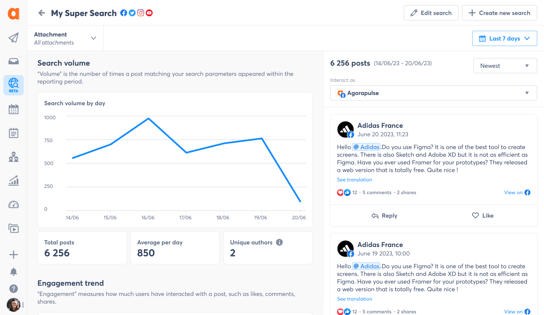
What I noticed when evaluating Agorapulse in a marketing context is how clean the inbox experience is. Comments, DMs, and mentions from every connected channel land in one place, and you can categorize, assign, and respond without navigating between platforms. For small agency teams managing communities for multiple clients, that centralization saves genuine time each day, and the reporting layer surfaces client-ready data without requiring manual assembly.
The free plan covers light use — a single brand or a test setup. Once you're managing multiple client profiles or need approval workflows, the Standard plan at $79/user/month (billed annually) is the next step. The per-user pricing model means costs scale directly with team size, so model your headcount before committing.
"What I like best about Agorapulse is how everything is centralized in one place, making daily management much easier. The moderation features allow us to categorize incoming messages, which helps qualify conversations and adds valuable KPIs for client reporting. It's intuitive, easy to use, great for sharing calendars with clients, offers clear analytics, and the customer support team is always responsive and helpful."
- Agorapulse Review, Marketing Agency User
Best for: Small marketing agencies that want a functional free entry point, strong inbox management, and responsive support without the complexity of enterprise-tier tools.
Not ideal for: Teams that need deep social listening as a primary capability. Agorapulse's listening is functional but not the platform's core strength — pure-play monitoring tools on this list go deeper for that use case.
"Every time another account user logged in, you were bumped off the screen and no previous work was saved. There's also no feed view of content."
- Agorapulse Review, Small Business User
Brand24 is one of the highest-rated tools on this list for a reason that stands out clearly once you start using it: it makes brand monitoring feel genuinely manageable rather than overwhelming.
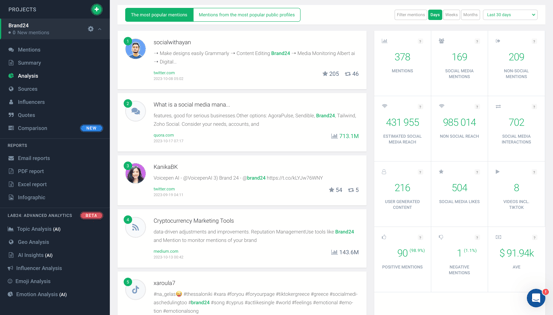
The setup is fast, most reviewers describe being up and running within minutes of signing up, tracking real mentions without extended configuration. The dashboard surfaces brand mentions across social media, news, blogs, forums, review sites, and podcasts in a clean interface that G2 users consistently describe as one of the more intuitive in this category. And the AI assistant, which can drill into coverage and customize reports for clients, is a feature small agency marketing teams in particular find reduces their reporting workload in practical, measurable ways.
The Individual plan at $79/month covers one brand, basic keyword tracking, and standard monitoring volume — suited for solo marketing managers or small business owners monitoring a single brand. The Team plan at $149/month is where most small marketing agencies land, unlocking unlimited team members and broader keyword coverage. Real-time update frequency (vs. 12-hour refresh on the Individual plan) kicks in at higher tiers and matters significantly for teams doing campaign monitoring or PR crisis management.
"B24 is easy to set up, easy to use, and pulls all the key insights I need to make brand and PR/marketing decisions. I love the AI Assistant for drilling down into coverage and customising reports for clients."
- Brand24 Review, Small Business User
Best for: Marketing and PR teams that need reliable, real-time brand monitoring across a wide range of sources, with AI-powered reporting that translates raw mention data into client-ready insights.
Not ideal for: Teams that need publishing and engagement tools in the same platform — Brand24 is a dedicated monitoring tool and does not handle post scheduling or social inbox management.
"Sometimes the sentiment analysis isn't fully accurate, especially with more nuanced or contextual mentions. More advanced filtering options — like easier exclusion of irrelevant mentions, improved keyword precision, and smarter grouping of similar results — would make the tool more efficient in daily use."
- Brand24 Review, Small Business User
Want a dedicated brand monitoring comparison? See the best media monitoring tools on G2 for a broader view across listening and reputation management.
Eclincher sits at an interesting intersection that no other tool on this list occupies: social media publishing, brand monitoring, and local SEO management, all from one platform. For marketing teams working with local businesses or multi-location brands, that combination is genuinely rare and practically valuable.
The platform covers the full social management spectrum, scheduling, a visual content calendar, a unified inbox, AI-generated captions, and analytics, alongside web and social listening and local listings management that keeps business information consistent across directories and supports local SEO rankings. G2 reviewers who've used it for clients in local-dependent industries report meaningful reductions in cost-per-click on paid campaigns as a direct result of the Google Business Profile posting and SEO optimization features.
The Standard plan at $149/month covers 2 users and 10 social profiles — a reasonable entry point for small marketing teams managing a handful of brands. The Professional plan at $349/month expands profiles and user seats for growing agencies. Local SEO and listings management are available across plans, which is the differentiator that justifies the entry price for teams with local-heavy client portfolios.
"I greatly appreciate the Local SEO module, which is extremely effective and efficient. It helps me improve the SEO of the businesses I work with, and we have seen a reduction in cost per click of 20 to 50% on our media campaigns thanks to the addition of posts on Google My Business."
- Eclincher Review, Marketing Agency User
Best for: Marketing agencies working with local or multi-location clients, where combining social publishing, brand monitoring, and local SEO in a single platform reduces tool sprawl and drives measurable campaign results.
Not ideal for: Teams that only need social scheduling and basic analytics. At $149/month, Eclincher's value is concentrated in its local SEO and monitoring capabilities, a lighter, cheaper tool is the better call if those features aren't relevant to your clients.
"I don't feel that all the mentions are listed during the scan."
- Eclincher Review, Marketing Agency User
Hootsuite is the closest thing the social media management space has to a household name, and for agency marketing teams juggling multiple client accounts across multiple platforms, that reputation is backed by genuine utility.
What struck me most when evaluating Hootsuite from a marketing team perspective is how much of the daily workflow, scheduling, listening, analytics, and team collaboration lives in a single interface without requiring constant platform-switching. The content calendar makes it straightforward to plan a month of cross-platform content in a single session, and the analytics layer provides the kind of performance data marketing teams need for client reporting without building custom dashboards from scratch.
The 30-day trial is long enough for most agency teams to run a real campaign and test the full workflow. Once it ends, the Standard plan at $99/user/month covers scheduling, basic analytics, and AI features for teams managing multiple client accounts. The jump is meaningful, but G2 reviewers working in agencies consistently describe it as justified when you factor in the time saved across a month of multi-client social management.
"As a marketing agency managing social media for multiple clients, Hootsuite saves us an enormous amount of time. The ability to schedule, monitor, and report across all accounts from one dashboard is invaluable. The analytics are by far the highlight for me, Hootsuite's reporting is the most comprehensive and presentation-ready I've come across. We pull client reports directly from the platform, which cuts hours off our workflow every month."
- Hootsuite Review, Verified Marketing Agency User
Best for: Marketing agencies and multi-client social teams that need a centralized hub for scheduling, monitoring, and presentation-ready reporting across numerous client accounts.
Not ideal for: Solo marketers or very small teams where the per-user pricing at $99/month is difficult to justify for basic scheduling needs. Lighter, cheaper tools exist for single-brand workflows.
"I do like the social listening feature, it's useful to understand what people are actually saying about a brand, but it just gives basic features in the team plan. For more deep insight, you're pushed to upgrade. That cost is too much for us."
- Hootsuite Review, Marketing Agency User
Looking at more options for managing client social accounts? See the full best social media management software guide on G2 for a broader comparison across free and paid tools.
Mention has made a deliberate pivot in 2026. After retiring its publishing and engagement features in January 2026, the platform now focuses entirely on what it does best: monitoring brand and competitor conversations across social media, news, blogs, forums, and podcasts.

That focus matters for a specific kind of marketing team — one where brand intelligence, PR monitoring, and competitive tracking are the primary workflow rather than scheduling and publishing. Mention crawls over a billion sources and delivers alerts close to real-time, which for PR teams and brand managers makes the difference between catching a potential crisis early and finding out about it after it's already spread.
The Company Plan at $599/month is a meaningful investment, but it's positioned for teams that need serious brand intelligence — broad source coverage, sentiment analysis, competitor tracking, and sharable reports — rather than basic social monitoring. Teams that also need publishing will need to pair it with a separate tool like Agorapulse, which Mention now formally partners with for that use case.
"Alerts come in almost immediately when something is published. For PR, brand monitoring, or crisis situations, speed actually matters, and Mention does this part well without weird delays."
- Mention Review, Small Business User
Best for: PR and brand intelligence teams that need serious cross-source listening coverage and near-real-time alerts, and who don't need publishing or engagement tools built into the same platform.
Not ideal for: Small marketing teams with limited budgets — at $599/month, Mention is now firmly positioned as a tool for mid-market or enterprise brand intelligence workflows, not for entry-level monitoring needs.
"Out of the box, you'll get many irrelevant mentions. Common words, similar brand names, or weak context matches slip through. You have to spend time cleaning things up, otherwise it's just alert fatigue."
- Mention Review, Small Business User
Sendible was designed specifically with agencies in mind, and it shows from the first time you use the compose box. The ability to build posts, preview them by platform, and adapt captions for each network without leaving a single window is the kind of workflow optimization that saves meaningful time for marketing teams handling multiple clients simultaneously.

What struck me during evaluation was the depth of the agency-facing features even at the entry tier. The Priority Inbox consolidates comments, mentions, and DMs across all connected accounts. The scheduling tools include optimal timing suggestions and bulk import for teams that need to plan weeks of content in advance. And at $29/month for the Creator plan, it's the most accessible starting price among the paid tools on this list by a significant margin.
The Creator plan at $29/month covers a single user and six social profiles — ideal for a solo marketing manager or freelancer. The Traction plan at $89/month adds four users and 24 profiles, which is where small agency teams typically land. White-label reporting and client-approval workflows become available at higher tiers.
"I appreciate Sendible's user-friendly platform that outperforms others like Meta Business Suite and Buffer. It's easy to navigate when scheduling numerous posts across different platforms. Unlike its competitors, everything is easy to find and easy to schedule, and it was easy for me to learn."
- Sendible Review, Small Business User
Best for: Agency marketing teams that need a cost-effective platform for scheduling and inbox management across many client profiles, with the option to scale into white-label reporting as the client roster grows.
Not ideal for: Teams that need deep social listening or brand monitoring as a primary workflow — Sendible's listening capabilities are functional but not its core focus.
"Sometimes the connection to the social media accounts goes down so the post fails. I wish I could see all posts in one view — the calendar view is confusing at times."
- Sendible Review, Small Business User
Managing content for multiple clients? See the best social media management tools for agencies on G2.
Sprinklr Social operates at a different scale than most tools on this list. It's designed for marketing organizations that are coordinating campaigns, publishing, listening, employee advocacy, and influencer activity across dozens of digital and social channels simultaneously — and where unified control over all of that from one platform isn't a convenience, it's a requirement.

What stood out during my evaluation is how fully Sprinklr integrates campaign-level thinking into the publishing workflow. Scheduling posts is only one layer — the platform ties those posts to campaigns, tracks performance across owned and paid, and surfaces AI-generated insights that connect social activity to broader business outcomes. For large marketing teams accustomed to pulling reports from four or five different places, that consolidation is significant.
The Self-Serve Social plan at $249/user/month is Sprinklr's entry point after the trial. That price positions it clearly for enterprise or mid-market marketing teams rather than small businesses. If your team is managing one or two brands across a handful of channels, a lighter tool will serve you better at significantly lower cost. Sprinklr's value scales with the complexity of the operation it's managing.
"What I like best about Sprinklr Social is how it brings all our social channels into one unified platform. It's very effective for collaboration across teams and makes managing large-scale social engagement much more seamless."
- Sprinklr Social Review, Small Business User
Best for: Enterprise and large mid-market marketing teams that need a single platform for managing campaigns, publishing, listening, and analytics across 35+ channels with compliance controls built in.
Not ideal for: Small teams or solo marketers. At $249/user/month, Sprinklr is priced for organizational scale, and its feature depth can add complexity that smaller teams don't need or have the bandwidth to configure.
"The dashboard can be overwhelming due to the variety of features and options. Filtering and sorting is at times more steps than anticipated. Although the features are robust, they can make me slow down if not navigated correctly."
- Sprinklr Social Review, Small Business User
Evaluating enterprise-grade social tools? See the full UCaaS platforms comparison on G2 for unified communication options at scale.
Sprout Social shows up in more G2 reviews from small marketing agencies as an all-day workflow tool than almost any other platform on this list — and the reason becomes clear quickly once you're inside it.

The Smart Inbox is the feature that tends to convert skeptics. Rather than having to check Facebook for comments, Instagram for DMs, and X for mentions separately, everything lands in a single stream that a marketing team can monitor, assign, and respond to from one place. For agencies managing multiple client brands simultaneously, that consolidation alone changes the shape of a workday. The analytics layer is similarly cohesive — cross-platform performance data, competitor benchmarks, and presentation-ready reports all surface from a single view.
The Essentials plan at $79/seat/month covers basic publishing and analytics. The upgrade to Standard ($199/seat/month) becomes relevant when teams need cross-platform competitor reporting, more advanced analytics, and the full Smart Inbox. Social Listening is a separate paid add-on regardless of plan tier — a fact worth understanding before the trial ends.
"What I appreciate most about Sprout Social is how it streamlines my entire social media workflow. The ability to manage multiple client accounts from a single dashboard is invaluable — it saves me countless hours of logging in and out of different platforms. The scheduling functionality is incredibly intuitive, and the analytics features are really helpful for tracking performance and demonstrating ROI to clients."
- Sprout Social Review, Independent Marketing Consultant
Best for: Marketing agencies and multi-brand teams that need a polished, integrated platform for inbox management, scheduling, and client-ready analytics from a single dashboard.
Not ideal for: Budget-conscious small teams or solo marketers. At $199/seat/month for Standard, cost scales sharply as the team grows — and social listening is priced separately on top of the base plan.
"I think there's a lot going on within Sprout Social. There's a lot of different features, and I think it's more for someone at a higher level. If there was an option for people who are just starting out or smaller, with fewer-features packages, then it'd be great — because I'm not going to be able to use Sprout Social when I open my own business because of the price."
- Sprout Social Review, Small Business Marketing User
Free plans and trials work best for marketing teams in an early evaluation phase, solo managers assessing whether a tool fits their workflow, or small agencies testing before committing budget. The ceiling shows up at different points depending on the tool — mention volume, real-time alert speed, keyword limits, team seats, and client-ready reporting are the most common upgrade triggers across this list.
Three triggers appear consistently across all eight tools. First, monitoring volume: most free tiers or entry plans cap how many mentions you can track monthly, and active campaigns generate spikes that exceed those caps quickly. Second, alert speed: real-time monitoring is frequently locked behind paid tiers — 12-hour delays on entry plans can mean a crisis is already escalating by the time your team sees it. Third, reporting depth: client-ready sentiment reports, competitor benchmarks, and shareable dashboards that marketing teams actually need for stakeholder communication are almost always premium features. The trial periods across this list range from 14 to 30 days — long enough to run a real campaign, identify which of these limits you'll hit, and make a confident decision before spending a dollar.
Have more questions? Find more answers below.
Brand24 stands out for dedicated listening with a 14-day free trial, real-time alerts, and a clean AI reporting layer that marketing and PR teams find immediately practical. For teams that also need publishing alongside listening, Hootsuite's 30-day trial covers both workflows in one platform. Agorapulse is the only tool on this list with a genuine free plan, limited to one user and three profiles, but real rather than time-gated.
Agorapulse is the only tool on this list with a permanent free tier, covering one user and three social profiles with basic inbox and scheduling features. Every other tool on this list offers a free trial period, ranging from 14 days (Sendible, Brand24, Eclincher) to 30 days (Hootsuite, Sprout Social, Agorapulse's full Advanced trial), after which a paid subscription is required.
Yes, for a limited time. Most tools on this list offer free trials that include real monitoring capabilities with real data. Agorapulse's free plan allows ongoing monitoring at a small scale. For sustained, professional-grade monitoring of multiple keywords or brands, a paid plan is necessary, but the trials on this list are generous enough to evaluate actual campaign performance before committing.
Social media management covers publishing, scheduling, and engagement, what you send out and how you respond. Social media listening covers monitoring, tracking what's being said about your brand, competitors, and industry across the web and social channels, typically including sentiment analysis and share-of-voice metrics. Several tools on this list, including Hootsuite, Sprout Social, and Agorapulse, combine both. Others, like Brand24 and Mention, focus purely on listening.
For most small and mid-market marketing teams, Brand24 is the more accessible choice, faster to set up, a 14-day free trial, and plans starting at $79/month. Mention shifted to an enterprise-only model in 2025 with a single Company Plan at $599/month, making it more appropriate for large organizations with serious brand intelligence needs. Both offer broad source coverage and real-time alerts, but the pricing and positioning are now significantly different.
Hootsuite and Sprout Social are the strongest all-in-one options for agencies, with multi-account management, client reporting, and team workflows built into their core plans. Sendible is worth evaluating for cost-sensitive agencies, its per-plan rather than per-seat pricing at entry tiers makes it significantly cheaper for small teams. Brand24 is the right call if your agency specifically offers brand monitoring or reputation management as a service to clients.
Hootsuite and Sprout Social both offer 30-day free trials, the longest on this list. Agorapulse also offers 30 days on the Advanced plan, extendable in two stages. Brand24, Sendible, and Eclincher offer 14-day trials. None of these trials require a credit card, which makes the longer trials genuinely low-risk for marketing teams that want to run a real campaign before committing to a subscription.
Alert speed matters most for teams doing PR, crisis management, or time-sensitive campaign monitoring, verify whether the tool offers real-time updates or has refresh delays on free and entry tiers. Source breadth beyond major social networks (news, blogs, forums, review sites) matters for comprehensive brand coverage. Sentiment analysis quality determines whether you get signal or noise. And client-ready reporting determines whether the insights you find can be presented to stakeholders without hours of manual reformatting.
Sendible at $29/month is the lowest entry price among paid tools on this list, with a 14-day free trial and no credit card required. Brand24's Individual plan at $79/month offers strong monitoring depth for a single brand. For teams that genuinely need a free tier rather than just a trial, Agorapulse's free plan is the only real option — one user, three profiles, and functional inbox and scheduling features at no ongoing cost.
No, social listening is a separate paid add-on in Sprout Social, not included in the base Essentials, Standard, or Professional plans. It's one of the most frequently cited surprises among new users who started the trial specifically to evaluate the listening feature. If listening is your primary need, either price the add-on before committing or evaluate a dedicated listening tool like Brand24 or Mention alongside Sprout's core platform.
Probably not at the current entry price of $249/user/month. Sprinklr's value is concentrated at organizational scale, large marketing teams managing 35+ channels, coordinating global campaigns, or operating in regulated industries with strict compliance requirements. For small marketing teams, Hootsuite, Sprout Social, or Agorapulse deliver most of the daily workflow at a fraction of the cost.
Most marketing teams spend too long evaluating tools and not enough time actually testing them under real conditions. The right social listening tool isn't the one with the longest feature matrix, it's the one that surfaces the conversations your team actually needs to act on, at a speed and price that fits how you work day to day.
If you're missing mentions, start with an alert-speed problem. If your reporting takes hours to assemble, that's your upgrade trigger. If the free trial covers what you need, there's no reason to rush the decision. Run your actual monitoring setup, real keywords, real brands, real campaigns, for the full trial period. You'll know within a week whether the tool earns its cost.
Building out your full marketing stack? See how the right social media management software fits alongside your listening setup to cover the full workflow from monitoring to publishing.


Your customers are talking about your brand right now, on Twitter, Reddit, LinkedIn,...
.png) by Devyani Mehta
by Devyani Mehta

Here’s the thing most blog posts won’t say: a lot of “top-rated” social media management tools...
 by Harshita Tewari

Sprout Social, Birdeye, and Hootsuite are the best social media management tools for...
/DarshayitaThakur-OrangeBG.webp) by Darshayita Thakur
by Darshayita Thakur