Industry forecasts indicate that nearly 90% of conferences and large events now rely on the best mobile event apps to manage communication and engagement across the event lifecycle.
When teams prioritize feature lists over execution reliability, issues surface fast, fragmented workflows, lower engagement, confused attendees, and rising operational overhead. A weak platform choice doesn’t just affect one event; it compounds cost and delivery risk across every event that follows.
Strong tools tend to reduce coordination friction, keep attendees oriented, and surface engagement data without manual recovery work. Mediocre ones introduce latency, content drift, or fragile workflows during peak moments. Review patterns suggest a poor fit breaks trust fast. One missed update compounds into confusion, support load, and sponsor dissatisfaction that cannot be recovered mid-event.
In this guide, I separate Mobile Event Apps category by the problems teams are actually solving. Across reviews, Whova is commonly picked for community engagement and networking density. Cvent Attendee Hub shows up for teams prioritizing enterprise registration and compliance. EventMobi is often chosen where content control and agenda management matter. SpotMe appears with teams focused on branded, high-touch experiences. Airmeet is commonly selected for interactive virtual sessions. The goal is clear, decisive fit.
10 best mobile event apps for 2026: My top picks
- Whova: Best for community-driven conferences with strong attendee networking
Agenda management, in-app messaging, and attendee matchmaking are commonly highlighted for engagement-heavy events. (Pricing is available on request; quotes based on event size and features)
- Cvent Attendee Hub: Best for enterprise events with deep integration Centralized attendee experience tied closely to registration, scheduling, and broader event infrastructure used by large organizations. (Pricing is available on request)
- Webex Events & Webinars: Best for organizations using Webex
Virtual and hybrid event delivery integrated with Webex meetings is commonly chosen where IT alignment and consistency matter. (Pricing is available on request)
- Guidebook: Best for content-first events that prioritize agenda clarity
Clean schedules, session details, and sponsor listings for conferences focused on information delivery. (Paid plans start at $1,999 for small events, with higher tiers and custom options)
- vFairs: Best for virtual and hybrid events with exhibitor-heavy formats
Virtual booths, sponsor visibility, and structured attendee navigation show up repeatedly for online-first events. (Pricing is available on request; quote-based depending on event scope and format)
- SpotMe: Best for high-touch branded event experiences
Advanced customization, engagement features, and controlled experiences are commonly referenced for corporate and flagship events. (Pricing is available on request)
- EventMobi: Best for onsite coordination and multi-day conferences
Session management, live updates, and attendee communication for in-person events with operational complexity. (Paid plans start around $3,000 per event or via annual plans; final pricing varies by features and scale)
- Eventbase: Best for large-scale branded experiences and consumer-facing events
Custom design and scalability frequently appear in reviews tied to major brand activations and public events. (Pricing is available on request; custom enterprise quotes)
- Airmeet: Best for interactive virtual events and live audience participation
Networking lounges, live sessions, and audience interaction for community-focused virtual formats. (Free trial available; Premium Webinar plans start at about $167/month; managed plans are custom quoted)
- Accelevents: Best for flexible event setups across in-person, virtual, and hybrid
Ticketing, agenda tools, and exhibitor management are often mentioned for teams running mixed-format events. (Paid plan starts from about $7,000 for a single event)
*These mobile event apps are top-rated in their category based on recent G2 Winter Grid Reports.
10 best mobile event apps software I recommend
Mobile event apps sit at the center of everything that happens during an event. They bring schedules, speakers, sponsors, messaging, and engagement into one place that attendees actually interact with. The right app doesn’t just display information; it helps teams coordinate changes, guide attendee behavior, and keep the experience coherent even when plans shift on the fly.
What I’ve found is that the best mobile event apps go beyond static agendas. They help organizers manage live updates, drive participation, and reduce confusion when sessions move, speakers change, or announcements need to reach everyone fast. Whether it’s keeping attendees oriented, helping exhibitors capture leads, or giving organizers visibility into engagement, strong platforms minimize reactive fixes during the moments that matter most.
This isn’t limited to large conferences. G2 data shows adoption spread across small events, mid-sized conferences, and large enterprise programs. Teams running single-day meetups and global multi-day events alike rely on mobile event apps to keep communication centralized and execution predictable. Most platforms are designed to be deployed quickly, which matters when timelines are tight and event teams are already stretched.
At the end of the day, a good mobile event app gives teams what live events demand: shared visibility, controlled communication, and confidence that attendees, sponsors, and staff stay aligned from check-in to close-out.
How did I find and evaluate the best mobile event apps?
I started by using G2’s Grid Reports to shortlist mobile event apps based on real user satisfaction scores and market presence across small events, mid-sized conferences, and large enterprise programs.
Next, I analyzed aggregated patterns across hundreds of verified G2 user reviews to understand what actually matters during live events. The feedback clustered around things like agenda management, attendee communication, networking quality, exhibitor support, ease of setup, and how well apps hold up when schedules change or engagement spikes. This helped separate platforms that reduce operational friction during events from those that add overhead once things go live.
I haven’t worked directly with every tool on this list, but my evaluation is grounded in consistent review patterns with workflow insights from event managers, exhibitors, and teams responsible for running in-person, virtual, and hybrid events. The product visuals and references included here are sourced from G2 vendor listings and publicly available documentation.
What makes the best mobile event apps worth it: my criteria
After analyzing a large volume of user reviews and spending time close to how events are actually planned and executed, the same patterns kept surfacing. My evaluation comes from recurring signals across reviews and workflow exposure from event managers, exhibitors, and internal teams responsible for making events run smoothly. Here’s what I prioritized when evaluating the best mobile event apps.
- Reliability during live execution, not just planning: The strongest mobile event apps perform when the event is already in motion. Reviews consistently point out that issues rarely appear during setup; they surface when sessions overlap, speakers run late, or thousands of attendees open the app at once. Tools that stay stable during these moments reduce panic and prevent teams from falling back on manual fixes.
- Agenda management that stays in sync: A mobile event app becomes the source of truth once attendees arrive. I prioritized platforms that make it easy to update agendas, session details, and speakers without delays or inconsistencies. When schedule changes don’t propagate cleanly, confusion spreads fast, and staff end up answering the same questions repeatedly.
- Clear, controlled attendee communication: Effective apps help teams communicate quickly without overwhelming attendees. Reviews repeatedly highlight the importance of targeted notifications, announcements, and reminders that feel intentional. Tools that lack control over messaging cadence tend to create noise, which leads users to mute notifications and miss critical updates.
- Engagement that supports the event’s goals: Not all engagement is useful. I looked for apps where engagement features reinforce what the event is trying to achieve, whether that’s networking, session participation, or sponsor interaction. Review patterns show that gimmicky features may attract initial attention, but often see a sharp drop-off after day one.
- Exhibitor and sponsor visibility that delivers value: For many events, exhibitors and sponsors are key stakeholders. The best mobile event apps provide clear ways to surface booths, promote sessions, and capture interest. Reviews suggest that sponsor tools work best when they’re well integrated into the app, and that clear, accessible lead data supports smoother post-event workflows.
- Ease of setup for non-technical teams: Event teams rarely have time for long onboarding cycles. I prioritized tools that reviewers describe as easy to configure and manage without heavy technical support. Platforms that require constant vendor intervention or complex configuration tend to slow teams down during already compressed timelines.
- Scalability across formats and event sizes: Strong mobile event apps adapt as needs change. Reviews frequently mention problems when tools that work for small events struggle with multi-day schedules, hybrid audiences, or enterprise-scale programs. Flexibility here reduces the need to switch platforms as events grow or formats evolve.
- Post-event continuity and follow-through: Events don’t end when the final session closes. I looked for apps that preserve content, attendee connections, and engagement data for post-event use. Review patterns consistently show the value of being able to extend conversations, share recordings, and support follow-up without starting from scratch.
Based on these criteria, I filtered down platforms that consistently reduce operational friction during live events while supporting engagement and coordination at scale. No single mobile event app excels in every scenario. The right choice depends on whether your priority is attendee engagement, sponsor value, operational control, or scalability across event formats.
Below, you’ll find authentic user reviews from the Mobile Event Apps category. To appear in this category, a tool must:
- Offer a mobile-first experience for event attendees
- Support agenda and session-level content management
- Enable attendee communication or engagement during events
- Be designed for in-person, virtual, or hybrid event workflows
This data was pulled from G2 in 2026. Some reviews may have been edited for clarity.
1. Whova: Best for community-driven conferences with strong attendee networking
Whova come up frequently in reviews of mobile event apps that are meant to live in attendees’ pockets throughout an event, not just during registration. Digging into the G2 Data and user feedback, it became clear why it’s so widely adopted. Whova is built around one central idea: keeping everything about an event accessible, current, and connected through a single mobile experience.
Whova effectively brings structure to busy, information-heavy events. Agendas, schedules, announcements, networking tools, and exhibitor interactions all sit in one app, which reduces the need for constant email updates or separate tools. This helps attendees stay oriented and focused.
Reviewers consistently describe how the app makes large events feel easier to navigate, especially when schedules change or sessions overlap. That sense of clarity shows up in G2 ratings too, with event agendas and schedules earning a 98% satisfaction.
Attendee engagement is another area where Whova stands out among mobile event apps. Networking features are rated at 96%, and users frequently highlight how quickly they can connect with others through attendee lists and meet-up tools. I noticed a recurring theme in reviews: Whova helps break down the anonymity of large conferences. Instead of feeling like one person in a crowd, attendees feel more included and able to participate meaningfully, which is exactly what many organizers want from a mobile-first event experience.
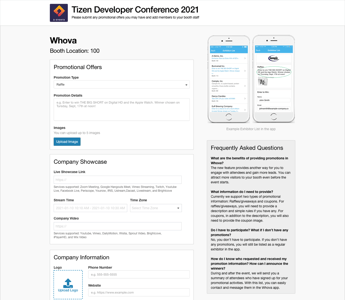
From an operational perspective, Whova also delivers clear benefits. Vendors mention that the app helps them manage leads and stay aligned with event schedules, while organizers value the ability to push updates directly to attendees as plans evolve. Real-time changes to sessions, rooms, or timing are reflected immediately in the app, which helps events maintain flow without adding confusion. This focus on coordination and communication contributes to Whova’s high overall. G2 satisfaction score of 97.
With a G2 market presence score of 80, the user base reflects Whova’s practical, engagement-focused positioning. Around 44% of customers are small businesses, with another 36% from mid-market organizations, pointing to strong appeal for teams that want an event app that’s easy to adopt and reliable in day-to-day use. At the same time, 19% of users come from enterprise organizations, indicating the platform also scales well for larger, multi-day events with more complex logistics.
There are a few areas where Whova’s priorities become clear. While features like floor plans, maps, and social media integrations are rated at a solid 93%, they are not central to the platform’s core experience. Teams running large, venue-heavy events may find visual navigation less emphasized, and organizations focused on external social amplification may need to supplement Whova with additional tools. Whova remains strongest around schedules, real-time updates, and attendee networking rather than visual wayfinding or broad promotion.
A small number of users note that navigation between sections follows a structured flow designed to handle dense event content. While this helps keep agendas, updates, and networking tools clearly organized, it may require a short familiarization period for attendees navigating frequently between multiple sections during tightly scheduled events.
All in all, Whova feels purpose-built for conferences and events where participation, communication, and attendee connection matter most. Its consistently high ratings for agendas and networking reinforce that focus, supported by an overall G2 score of 89. For community-driven events, Whova stands out to me as a reliable option for keeping attendees informed, engaged, and connected throughout the experience.
What I like about Whova:
- The entire event experience lives in one app, reducing email reliance and keeping agendas, updates, and announcements easy to follow.
- Networking is treated as a core feature, with attendee discovery, meet-ups, and reminders that make large events feel more approachable.
What G2 users like about Whova:
“Whova is fairly intuitive and easy to navigate, which makes a big difference during busy events. I especially appreciate that each session has a dedicated place for Q&A, note-taking, and chatting with other attendees. Having all event documents in one place is very convenient, and the event guide helps keep everything organized.”
- Whova review, Shannon S.
What I dislike about Whova:
- Navigation prioritizes information density, which works well for large agendas but can take brief familiarization for attendees who prefer minimal flows.
- Maps and social integrations are functional, which may feel secondary for visually or socially driven events.
What G2 users dislike about Whova:
“The amount of notifications made it difficult to know when a notification was from someone trying to make contact or just an announcement from the app developer or a “canned” message from the event directors. It became difficult to navigate person to person discussions.”
- Whova review, Brian G.
Planning beyond the app experience? Explore G2’s guide to the best event management platforms for handling registration, logistics, and execution at scale.
2. Cvent Attendee Hub: Best for enterprise events with deep integration
Among tools that sit directly in attendees’ pockets during an event, Cvent Attendee Hub consistently comes up in conversations around scale and operational control. It’s built for events where the mobile experience isn’t just a nice-to-have, but the primary way attendees navigate agendas, sessions, and on-site logistics. Its strong presence on G2, including an overall G2 score of 84, G2 satisfaction score of 84 and near-top G2 market presence of 99, reflects how widely it’s used for complex, multi-session programs.
Cvent Attendee Hub focuses on giving attendees a clear, centralized mobile experience. Agendas, session details, speakers, maps, and live updates all live inside one app, which reduces the need for organizers to jump between tools. This matters most when programs change frequently. Updates made on the backend reflect immediately in the app, so attendees aren’t left chasing outdated schedules or announcements.
Where the app really shines is agenda management. Features around event agendas and schedules are among its highest-rated on G2 (88%), and that shows up clearly in user feedback. The ability to categorize sessions by track is especially valuable for multi-track conferences. Attendees can filter sessions that matter to them, while organizers maintain a clean, structured program even as complexity increases. Floor plans and maps (87%) also play a big role here, helping attendees navigate large venues without relying on printed materials or external links.
The backend is described as straightforward once you get familiar with it. Several reviewers mention that after spending a day learning the system, managing sessions, speakers, and updates becomes predictable and efficient.
Gamification features add another layer of engagement, which many teams use to encourage participation across longer or hybrid events rather than treating the app as a static agenda viewer.
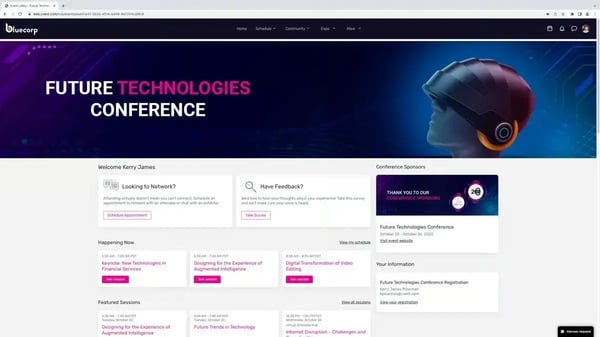
Cvent Attendee Hub’s user base also reflects its positioning. Adoption is strongest in the mid-market (44%) and enterprise segment (24%), according to G2 Data, which makes sense given how structured the platform is. It’s built for teams running recurring events, global programs, or hybrid formats where registration, session management, and attendee engagement need to operate together in a single mobile experience.
The way the platform is structured directly influences how teams approach setup and configuration. Features like gamification and language settings are built for repeatable, large-scale programs, so smaller or one-off events may need extra upfront configuration, though this setup supports smoother execution and consistency as event programs expand over time.
The platform also operates within clearly defined parameters, favoring consistency and standardization over open-ended customization. This approach aligns well with organizations that prioritize predictable execution across multiple events, while teams seeking a more lightweight or experimental mobile app experience may notice those boundaries more clearly.
Cvent Attendee Hub stands out as a mobile event app built for clarity, coordination, and scale. Despite the additional setup that comes with a feature-rich platform, its strengths in agenda management, session organization, and real-time updates make it a strong fit for enterprise and mid-market teams running complex, high-attendance events where structure isn’t optional, it’s essential.
What I like about Cvent Attendee Hub:
- It centralizes the full attendee experience in a single app, bringing agendas, session tracks, speakers, maps, and live updates together so attendees stay oriented as programs change.
- Agenda and session management is consistently reliable, with track-based filtering and real-time updates that help attendees follow complex, multi-day schedules without hunting for information.
What G2 users like about Cvent Attendee Hub:
“I genuinely appreciate the user-friendly experience that Cvent Attendee Hub offers, which makes navigation within the platform exceptionally easy and straightforward. The features available on the platform enhance the overall usability, making my tasks more efficient. I also find the gamification feature particularly engaging, as it adds an element of fun and motivation to the events managed through this software. These elements contribute to a seamless experience for organizing global events, which is of significant importance to me.”
- Cvent Attendee Hub, Damla B.
What I dislike about Cvent Attendee Hub:
- Advanced features like gamification or multilingual setup require upfront configuration.
- Customization follows established patterns within the platform. This supports consistency across events while limiting highly open-ended or experimental app designs.
What G2 users dislike about Cvent Attendee Hub:
“CVENT is very functional. The downside is that it does not integrate effectively with software outside of Cvent, and while it is aesthetically very customizable, it is difficult to customize the more functional elements to meet our needs.”
- Cvent Attendee Hub, Melissa F.
3. Webex Events & Webinars: Best for organizations using Webex
Webex Events & Webinars built for structured, repeatable event programs rather than one-off virtual sessions. It’s a platform consistently associated with teams that want their events to feel organized, branded, and consistent across touchpoints, especially when a mobile app is central to the attendee experience rather than an afterthought.
It centralizes the attendee experience inside a single mobile hub. Registration details, live streams, session content, announcements, and community interactions all live in one place, which reduces the need for attendees to juggle multiple tools.
G2 reviewers frequently mention how this helped them move away from repetitive monthly sessions and instead create a more durable education and community experience. The ability to deliver a customized, branded event app comes up often as a turning point for teams trying to differentiate their events and elevate how they’re perceived.
Webex Events supports hybrid and on-site coordination alongside virtual delivery. Organizers highlight using the platform not just for streaming sessions but also for registration management, real-time updates, and attendee guidance during in-person conferences. This dual-purpose capability makes the mobile app feel like an operational companion for live events, helping teams keep attendees informed while maintaining a consistent experience across physical and digital touchpoints.
From a market perspective, that positioning is reflected clearly in the data. Webex Events holds an overall strong G2 score of 84, G2 Satisfaction Score of 78, and backed by a G2 Market Presence Score of 90, which signals sustained adoption and visibility in this category. Its user base is also well distributed: 57% small businesses, 28% mid-market organizations, and 15% enterprises. That mix suggests it’s flexible enough for smaller teams while still meeting the expectations of larger, more complex event programs.
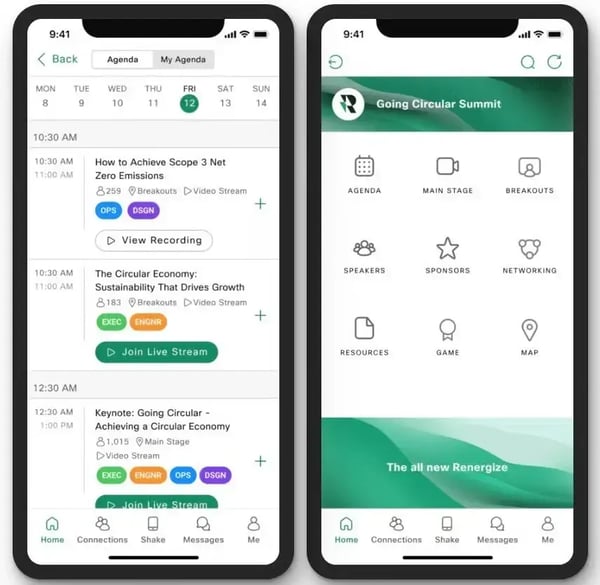
Engagement and communication are also clear strengths. Reviews repeatedly praise features like targeted announcements, where organizers can send different messages to different ticket types without fragmenting the overall experience. That kind of segmentation is especially valuable for conferences, member programs, and internal-plus-external events.
On the attendee side, feedback consistently points to the mobile app being easy to download and navigate, which is table stakes for this category but not always executed well.
Support quality is another area where Webex Events earns steady recognition. Reviewers often call out knowledgeable, responsive chat support, which matters when events are live, and timing leaves little room for trial and error. Combined with the platform’s wide range of configurable elements, it feels designed for teams that treat events as an operational capability rather than a side project.
That same depth of functionality introduces a few practical considerations to be aware of. The backend offers extensive configuration options, which work well for teams that value control and customization, but may require additional ramp-up time for those expecting a lighter setup.
Calendar workflows rely on manual additions, which can be a factor for organizations managing dynamic schedules across systems. However, it aligns with organizations that manage schedules centrally rather than through automatic syncing.
Taken as a whole, Webex Events & Webinars comes across as a mobile event app built for consistency, scale, and control. It’s particularly well-suited for organizations running recurring, content-rich events or operating within the broader Webex ecosystem. Despite the setup considerations, the depth of customization and centralized mobile experience position it as a platform for with well-run, professional event programs.
What I like about Webex Events & Webinars:
- The full event experience is centralized in one app, combining registration details, live streams, session content, announcements, and community interactions.
- Communication tools support targeted messaging, helping organizers send relevant updates to specific attendee groups without overwhelming everyone.
What G2 users like about Webex Events & Webinars:
“The offering is very comprehensive as to what ideas and elements can be included in the event app/webpage. For the most part, end users seem to find it easy to navigate. The chat support is excellent and very knowledgeable.”
- Webex Event & Webinars review, Karis A.
What I dislike about Webex Events & Webinars:
- Backend configuration offers deep control but may require extra time for teams expecting a more guided setup.
- Some workflows, like calendar management, rely on manual updates, and attendees who don’t regularly use Webex may need a short adjustment period.
What G2 users dislike about Webex Events & Webinars:
"I hope in the future that I can assign speakers to multiple rooms and link them to the sessions that they are speaking at. That was the one feature that seemed to be missing from the app."
- Webex Events & Webinars review, Amanda M.
4. Guidebook: Best for content-first events that prioritize agenda clarity
Guidebook is positioned as an on-site event platform built around clarity and dependability rather than feature sprawl. It holds a strong G2 satisfaction score of 90, which stands out within the mobile event apps category. Review patterns consistently point to reliability and confidence during live event execution.
Guidebook focuses on enabling teams to publish and update mobile event apps without rebuilding or redeployments. Agendas, session details, speaker profiles, venue maps, and announcements live in one place and can be updated instantly during live events. Reviewers frequently highlight how valuable this flexibility is when schedules shift or last-minute changes need to go live quickly.
Ease of use is another area where Guidebook performs well. G2 reviews repeatedly mention fast edits during live events and a straightforward publishing experience that doesn’t require deep technical expertise. This is reinforced by highly responsive customer support, which reviewers note is especially helpful when updates need to be made under time pressure.
Looking at its G2 market presence score of 66, Guidebook sits comfortably in the mid-market of this category, and its user distribution explains why. 48% of customers are small businesses, 32% come from mid-market organizations, and 19% are enterprise users. That mix reflects a platform designed to be approachable for smaller teams while still supporting larger conferences.
Where Guidebook performs strongest is in core event navigation. On G2, event agendas and schedules are rated at 90%, making them the highest-scoring feature. Floor plans and maps follow at 84%, reinforcing how effectively the app helps attendees move between sessions and venues during multi-track or multi-room events.
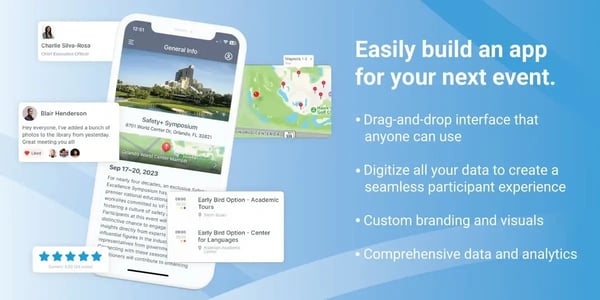
Guidebook also includes built-in metrics that help organizers understand app usage and attendee engagement. Reviewers often mention being able to monitor activity without relying on external analytics tools. This aligns well with teams that want operational visibility into how attendees interact with event content rather than advanced or exploratory analytics.
Attendee interaction tools are present but more structured in nature. On G2, attendee networking is rated at 78% and attendee surveys at 80%, reflecting dependable but guided interaction flows. Events that prioritize advanced matchmaking or highly exploratory engagement may find these tools less flexible, though reviewers note the structured approach works well for programs focused on guided interactions, scheduled sessions, and streamlined attendee journeys.
Review feedback suggests that some interactive elements, such as polling, may require a brief adjustment period, particularly for teams supporting Android users. This tends to matter most for events that rely heavily on frequent in-app engagement, while for simpler interaction needs, the experience remains straightforward.
Taken together, Guidebook stands out as a dependable mobile event app for keeping attendees informed and oriented throughout an event. With strong satisfaction scores, a clear small-to-mid-market footprint, and top-rated agendas and maps, it’s a solid fit for conferences where schedules, navigation, and real-time updates matter most.
What I like about Guidebook:
- It keeps the attendee experience centered on the essentials, bringing agendas, session details, and venue maps into one app that’s easy to update as events evolve.
- Setup and day-of management are easy and dependable, with quick updates, basic engagement metrics, and responsive support that help teams run multi-day events with confidence.
What G2 users like about Guidebook:
“I find the process of creating new apps within Guidebook confusing at times. When attempting to create multiple apps throughout the year, particularly over multiple years, there's a lack of clarity and direction. This confusion is exacerbated by the issue that older branded apps don't seamlessly transition to new branded apps. For our users who have previously downloaded apps, the old apps still appear, which causes further confusion.”
- Guidebook review, Samuel B.
What I dislike about Guidebook:
- Networking and surveys follow structured interaction models, which suit agenda-driven events but offer less flexibility for open-ended matchmaking.
- Some interactive features, like polling, may need brief familiarization, especially on Android and in high-engagement events.
What G2 users dislike about Guidebook:
“I think the option to copy the schedule is something that would be helpful. Additionally, there are times where the platform could be more inclusive and intuitive.”
- Guidebook review, Aiyana D.
Running hybrid or online-first programs too? See G2’s picks for the best virtual event platforms to support engagement beyond in-person events.
5. vFairs: Best for virtual and hybrid events with exhibitor-heavy formats
vFairs emphasizes execution and operational consistency over experimental interaction models. It’s designed for events where the mobile app needs to support real operational needs, helping attendees navigate the event, enabling exhibitors to capture leads, and giving organizers confidence that the experience will run as planned.
vFairs is designed to give attendees and exhibitors a clear, guided experience through the mobile app. Instead of treating the app as an add-on, it becomes the central touchpoint for agendas, floor navigation, lead capture, and post-event follow-up. That’s reflected in how users talk about it: the app is easy to use, the workflows are predictable, and there’s very little friction once an event goes live.
One of vFairs’ strongest areas is how it handles event structure inside the app. G2 data shows particularly high satisfaction with event agendas and schedules (93%) and floor plans and maps (92%), and that lines up with what reviewers describe in practice. Attendees can quickly understand where to go and what’s happening next, while vendors can focus on conversations rather than logistics. For trade shows, expos, and supplier-driven events, that clarity directly impacts engagement and lead capture.
Another recurring theme across reviews is support. vFairs users consistently highlight how responsive and involved the team is during setup and execution. From onboarding vendors to training suppliers and troubleshooting during the event, that level of service reduces the operational burden on internal teams.
For small and mid-sized organizations, which make up the majority of vFairs’ user base, this support layer is a meaningful part of the value, not just a nice-to-have. That execution-first focus is also reflected in G2 data.
The mobile app plays a clear role in smoothing registration, enabling on-site and in-app lead capture, and supporting follow-up after the event. Users point to post-event reporting as a key outcome, especially for suppliers who rely on captured leads to justify event ROI. The ability to pair the app with a custom event website and automated communications further reinforces vFairs’ role as more than just a show-day tool.
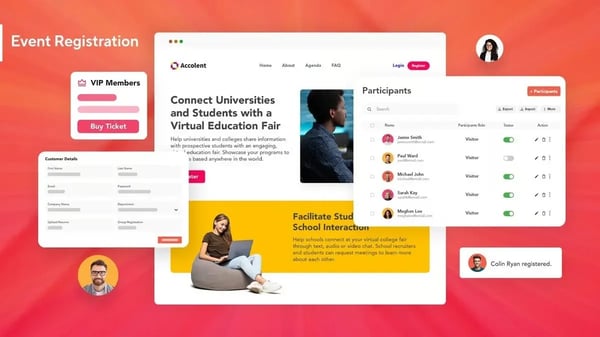
There are a few considerations to keep in mind depending on how teams plan to use the app. Reporting is structured around standard event metrics commonly used in trade shows and expos, which works well for most use cases, though teams looking to slice data in very specific or unconventional ways may need additional time to interpret certain reports. In some cases, data clarity is also influenced by how consistently attendees and vendors complete forms or use the app during the event.
A small number of reviewers note that certain add-on services, such as on-site device rentals, sit at a premium. Feedback suggests these extras are typically worthwhile for events that depend on managed hardware and hands-on support, where the added investment supports smoother setup and delivery.
vFairs is well-suited for mobile events where navigation, lead capture, and operational support matter more than experimental engagement features. With a solid overall G2 score of 74 and strong adoption among small and mid-market teams, it delivers dependable execution, especially for vendor-heavy events where the mobile app needs to work without becoming another thing to manage.
What I like about vFairs:
- The mobile app acts as the event’s central hub, bringing agendas, floor maps, and exhibitor interactions into one clear experience.
- Hands-on support extends into live events, with exhibitor training and real-time coordination that help teams run vendor-heavy programs smoothly.
What G2 users like about vFairs:
“Vfairs was a great tool for our Foodcentric event, which hosted over 150 suppliers/brokers and over 1,000 attendees. Our suppliers thought the app was extremely easy to use for lead captures during the show, and the post-event reporting was exactly what they were looking for. Hamda was excellent to work with and took great care of us during the planning process. Candice did a great job training our suppliers/brokers, and team on how to use the app.”
- vFairs review, Kara T.
What I dislike about vFairs:
- Post-event reporting focuses on standard metrics, making high-level review easy but limiting customized analysis.
- Managed services are premium add-ons, suited to turnkey events but less relevant for app-based or BYOD-focused teams.
What G2 users dislike about vFairs:
“Admittedly, we encountered a few bugs during the process, but no software is perfect all the time, and sometimes, the connectivity in our building exacerbated the issue.”
- vFairs review, Sarah C.
6. SpotMe: Best for high-touch branded event experiences
SpotMe surfaces quickly when teams look beyond basic agenda and check-in tools toward mobile event apps that support high-visibility, customer-facing programs. It appears most often in enterprise-led environments, a pattern that shows up clearly in its adoption profile. More than half of SpotMe’s users (56%) come from enterprise, alongside 28% from mid-market teams and 16% from small businesses. That mix points to a platform shaped around scale, operational consistency, and structured execution for complex event programs.
SpotMe treats the event app as an extension of the broader event ecosystem, not a standalone tool. The mobile app experience is designed to unify live, hybrid, and in-person programs into a single, navigable interface. Attendees can move easily between agendas, sessions, and interactive elements, which is reflected in its highest-rated feature on G2: event agendas and schedules (94%). For multi-session or multi-day events, clarity plays a big role in keeping engagement high without adding friction.
Another area where SpotMe performs especially well is engagement during live moments. Features like in-app surveys and polling are consistently highlighted by users, with attendee surveys rated at 90%. This supports real-time interaction during sessions and workshops while still feeding structured feedback back to organizers.
Reviews frequently mention of the Live app being reliable during high-visibility events, where smooth execution matters more than experimentation. This focus on stability supports large-scale programs where smooth delivery directly impacts attendee experience.
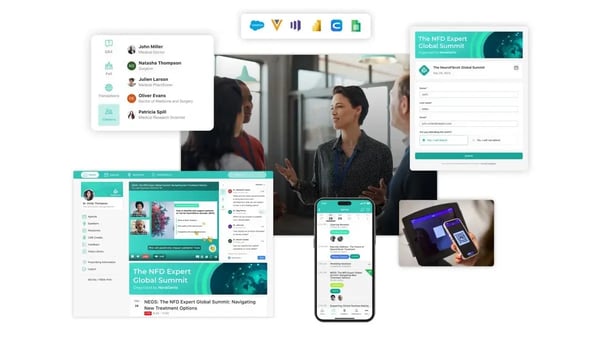
SpotMe’s integration capabilities further reinforce its enterprise positioning. Users repeatedly point to its ability to connect with CRM systems, making it easier to track which customers attended which events and what content they interacted with. That connection between the mobile event app and downstream systems helps teams maintain continuity before, during, and after an event, rather than treating engagement data as an isolated output.
Support is another defining aspect of the SpotMe experience. Many reviews emphasize the hands-on involvement of the SpotMe team across setup, launch, and post-event phases. From configuring the app to actively managing it during live programs, this operational partnership reduces risk during complex events and allows internal teams to stay focused on delivery rather than troubleshooting.
SpotMe also stands out for its flexibility in app customization. Reviewers frequently mention being able to configure specific pages and tailor content layouts to match different audience needs, including running multiple agenda versions within the same event. This level of customization allows teams to adapt the app to complex programs without fragmenting the attendee experience.
Some G2 reviewers mention that certain web app settings, such as data export formats, are structured to align with standardized enterprise workflows. That approach supports consistency at scale, though teams with very specific reporting preferences may need to adapt to SpotMe’s formats.
Others point out that highly interactive use cases, like small workshops with frequent live polls, may require more deliberate coordination, especially when sessions are not tightly integrated into presentation flows. This reflects SpotMe’s focus on managed, structured events rather than lightweight, self-run formats.
All in all, SpotMe aligns well with organizations that treat events as a core customer engagement channel. Its strengths in agenda clarity, live interaction, enterprise integrations, and execution reliability make it a strong fit for teams running complex, repeatable programs. For enterprise-led event strategies, it continues to stand out within the mobile event apps category.
What I like about SpotMe:
- The SpotMe app is central to the event experience, keeping agendas, sessions, and live interactions easy to follow during complex, multi-session programs.
- It integrates well with enterprise workflows, using CRM connections and strong live-event support to link attendee engagement with broader customer and stakeholder journeys.
What G2 users like about SpotMe:
"Interactive app to ensure a unified and seamless integration of our events with customers. Easy to access and to navigate. It's integrated with our CRM, so we can automatically see our customers that have attended the events and the content they've interacted with.”
- SpotMe review, Adrián F.
What I dislike about SpotMe:
- Configuration and exports follow standardized enterprise patterns, supporting governance but limiting highly bespoke reporting.
- Highly interactive formats work best with coordinated setup, making the platform less oriented toward informal or self-managed events.
What G2 users dislike about SpotMe:
“Some restrictions in web app settings, but little things that we were able to manage. Such as exporting data formats.”
- SpotMe review, Luca P.
7. EventMobi: Best for onsite coordination and multi-day conferences
EventMobi is commonly associated with conferences and educational events where the mobile app’s primary job is to keep attendees informed, oriented, and on schedule. It’s positioned very clearly as a mobile event app that centralizes agendas, session details, maps, documents, and updates in one place, rather than trying to compete on social engagement or gamification.
One of EventMobi’s strongest areas is agenda management, which sits at the center of the app experience. On G2, event agendas and schedules are rated at 94%, reflecting how heavily teams rely on this feature. This focus helps attendees stay on time while giving organizers a direct channel to communicate updates through notifications instead of printed materials or scattered emails.
The platform also supports complex, multi-track programs where attendees need fast orientation across sessions. Clear agenda structures make it easier to follow dense schedules over multiple days without relying on external calendars. For content-heavy conferences, this reduces confusion and keeps flow steady.
Another strength is how accessible the platform feels during setup. Many reviewers describe the initial build as straightforward, supported by a hands-on onboarding team that walks organizers through configuration and page creation. Building custom pages for additional event information, speaker bios, documents, or venue details feels intentionally simple.
EventMobi also supports effective on-site navigation. Floor plans and maps are rated at 87% on G2, reinforcing the app’s role as a practical companion for large venues. Combined with centralized documents and venue details, this helps attendees move confidently between rooms and sessions.
Notifications are easy to send and manage, which matters during live events where timing is critical. Organizers use them to communicate last-minute changes, reminders, and logistical updates without relying on scattered emails. This reinforces the app’s value as a single source of truth during multi-day programs.
EventMobi also benefits teams that want most event workflows handled inside a single mobile app. Reviewers often mention being able to manage session content, documents, attendee communication, basic engagement tools, and back-end configuration without relying on multiple systems. This all-in-one structure saves time for organizers and reduces complexity for attendees who only need one app throughout the event.
The user mix also reflects this focus. While 55% come from small businesses, 23% are enterprise organizations, and 20% mid-market businesses, as per G2 data, suggesting it’s often chosen for structured events that need consistency and reliability rather than experimentation. It’s commonly used for conventions and association-led programs where reducing printed materials and keeping information centralized is a priority.
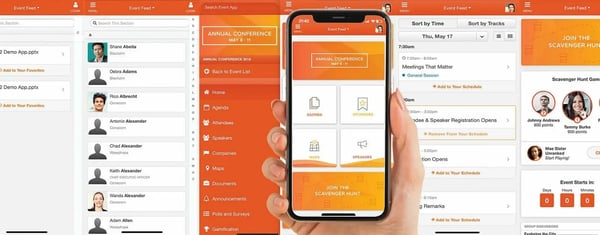
A few structural nuances are worth keeping in mind, largely connected to how the platform approaches agenda organization. Sessions are typically arranged alphabetically, which aligns well with straightforward programs but can require additional planning for events with tightly sequenced or interdependent sessions. In those scenarios, some teams note that this structure requires additional planning for tightly sequenced sessions.
Engagement features like attendee networking and social media integrations follow a utility-first design, which may feel streamlined for highly social or matchmaking-heavy events, though G2 reviewers note this simplicity supports reliable connection, easy sharing, and lower coordination overhead for programs focused on structured interaction rather than exploratory networking.
EventMobi’s positioning is also reflected in its G2 profile, with a G2 Satisfaction Score of 62, G2 Market Presence of 65, and an overall G2 Score of 63. Together, these scores point to steady fit in the category for organizers who value reliability and clarity over experimentation. The small-business-heavy user mix further supports its role in structured, information-first events.
All in all, EventMobi fits organizers who prioritize clarity, communication, and dependable agenda delivery in a mobile event app. Its strengths in agenda management, navigation, onboarding, and notifications align well with educational conferences, conventions, and multi-day programs. For teams focused on keeping attendees informed and on schedule, it remains a reliable choice within the mobile event apps category.
What I like about EventMobi:
- The mobile app keeps agendas and schedules front and center, making multi-session programs easy to manage and reducing reliance on printed or scattered communications.
- Setup feels approachable and well-supported, with responsive customer support helping teams launch agendas, custom pages, and notifications quickly.
What G2 users like about EventMobi:
"I use EventMobi to centralize event information and manage the agenda for large educational and networking events, and I really appreciate that it allows us to keep all our event information in one place, which reduces waste with printed agendas. They have excellent customer service and are responsive to feedback. We mostly use the agenda and notifications, and I also like building out custom pages with additional event information for attendees. The initial setup was super easy, as their team walked us through all the steps and even assisted with the initial building."
- EventMobi review, Danielle P.
What I dislike about EventMobi:
- Agenda organization follows a standardized structure, which works for clear programs but may need extra coordination for tightly sequenced sessions.
- Networking and social features are functional, making the platform better suited to content-led rather than networking-heavy events.
What G2 users dislike about EventMobi:
“I found that we had difficulty trying to customize the app with our own icon for attendees. The branding of the app remained EventMobi, which was not what we desired. Additionally, the initial setup of EventMobi required a bit of patience. As it was our first experience setting up such an app, it was somewhat challenging.”
- EventMobi review, Kathy T.
8. Eventbase: Best for large-scale branded experiences and consumer-facing events
Eventbase is most often associated with large conferences and consumer-facing events where the mobile app is expected to reflect the professionalism and scale of the overall experience. It is typically used in settings where the app is a visible extension of the event brand rather than a lightweight utility. This positioning frames Eventbase as a platform built for polished, high-stakes environments.
That focus is reflected in its G2 profile. Eventbase holds an overall G2 score of 59, with G2 satisfaction score of 60 and G2 market presence of 58, and its audience skews heavily toward enterprise; about 71% of reviewers come from organizations with more than 1,000 employees. Only a small portion of usage comes from small businesses, which reinforces that the platform is built with large-scale events in mind rather than quick, low-effort deployments.
One of Eventbase’s strongest areas is agenda clarity and session organization. On G2, event agendas and schedules are rated at 93%, reflecting how consistently reviewers mention structure and clarity during busy, multi-day programs. This reliability helps attendees stay oriented while supporting organizers managing complex schedules at scale.
Eventbase also performs well as a feedback and engagement channel. Attendee surveys are rated at 86% on G2, positioning the app as a dependable way to collect structured input before, during, and after events. For enterprise teams, this supports continuous improvement without introducing separate tools.
The service model behind Eventbase is frequently cited as a differentiator. G2 reviewers consistently highlight responsive account managers and producers who stay involved across implementation, onboarding, and post-event phases. This level of support matters for organizations coordinating across vendors and managing large, visible programs.
Integration with established event systems is another clear strength. Eventbase is often mentioned alongside platforms like Cvent for registration and A2Z for expo hall management. These integrations allow the mobile app to fit cleanly into existing event stacks rather than forcing workflow changes.
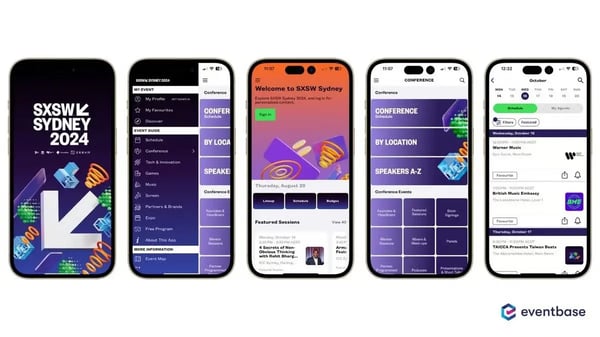
Eventbase is also associated with strong attendee adoption. Many teams report high app download rates and repeat usage across annual events, suggesting the app becomes a familiar and trusted touchpoint. This consistency reinforces its role as part of the event experience rather than a one-off add-on.
Its enterprise orientation is further reflected in how organizations use the app year after year. Reviewers often describe Eventbase as a long-term investment in event quality, especially for branded conferences where attendee expectations are high. That repeat adoption signals confidence in both the platform and the experience it delivers.
Pricing is one area where fit becomes more apparent. Reviews frequently note that Eventbase’s cost aligns with its enterprise focus and service-heavy delivery model. For smaller teams or low-effort events, that structure may feel heavier than necessary.
Some attendees mention navigation can take time to get used to when many capabilities are enabled simultaneously, though reviewers note this depth supports feature-rich event experiences where having multiple tools in one place reduces switching and keeps engagement centralized.
Taken together, Eventbase is best suited for enterprise conferences and consumer-facing events where the mobile app is expected to operate at scale and reflect the professionalism of the brand. Its strengths in agenda clarity, surveys, integrations, service support, and repeat adoption align well with organizations treating the app as a core experience layer. For teams investing in long-term event quality rather than quick deployments, Eventbase remains a strong fit within the mobile event apps category.
What I like about Eventbase:
- The Eventbase app is treated as a core part of the event, with well-organized agendas that help attendees stay oriented during large, multi-day conferences.
- Customer support stands out, with responsive account teams that reduce coordination effort for complex, enterprise-scale events.
What G2 users like about EventMobi:
"We've been using Eventbase for our user conference, JNUC, for a few years. It's really been a game changer compared to the mobile app we were using before. Everything from planning through onsite experience was really well organized making it an overall great experience for our team. And bonus, our attendees really love the app too! We have a high download/user rate and the survey results are always very high for mobile apps. Definitely a component to our user conference that we don't see going away any time soon!"
- Eventbase review, Amanda O.
What I like about Eventbase:
- Pricing reflects an enterprise service model, which may feel heavy for teams seeking a self-serve or budget-focused option.
- The feature set is broad by design, so first-time users may need brief orientation when multiple capabilities are enabled.
What G2 users like about Eventbase:
“I'd like to see a smoother integration with RainFocus - it's not terrible, but there is some room for improvement. The price, but this also goes along the lines of "you pay for what you get, so I can't really call this a dislike.”
- Eventbase review, Deanna K.
9. Airmeet: Best for interactive virtual events and live audience participation
Airmeet is shaped by the needs of teams running webinars, workshops, and conference-style events where coordination and attendee flow matter.
Airmeet combines agendas, session management, speaker coordination, branding, and attendee interaction into a single mobile-friendly experience. That consolidation is important for organizers who don’t want attendees bouncing between multiple tools. It also helps maintain continuity for attendees as they move between sessions, networking spaces, and event updates within the same app.
Its branding controls are frequently noted as a strength; event pages, session layouts, and speaker spaces can all be presented in a way that feels consistent and intentional, which many reviewers call out as a differentiator. This consistency helps organizers carry their brand through registration, live sessions, and attendee interactions without visual breaks.
Where Airmeet clearly excels is networking. On G2, attendee networking is rated at 96%, making it one of the highest-scoring features on the platform. Tools like virtual tables and live video conversations allow attendees to move freely between discussions, replicating the fluid, conversational feel of in-person events.
Event agendas and schedules follow closely at 94%, reinforcing how easy it is for attendees to navigate multi-session programs directly from the app. This clarity supports smoother movement between sessions without relying on external links or separate calendars. It also helps attendees stay oriented as sessions overlap or change throughout the event.
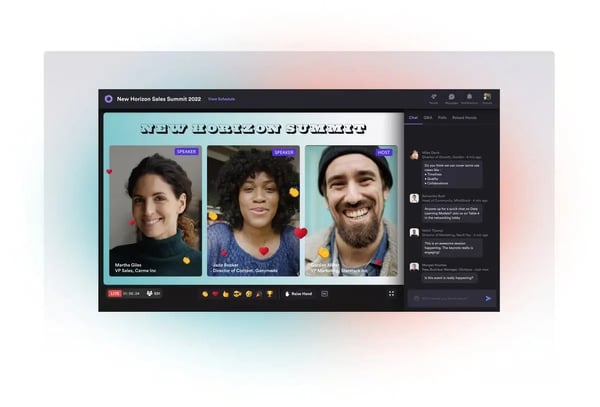
Usage data also helps explain Airmeet’s design choices. About 61% of its users come from small businesses, with 25% from mid-market organizations and 14% from enterprises, according to G2 data. That mix suggests a platform optimized for teams that need flexibility, running webinars, workshops, or conference-style events, without heavy infrastructure.
Airmeet stands out as a mobile event app designed for networking-led virtual events. Its engagement tools, particularly its highly rated networking features, align well with teams looking to create more conversational, conference-style experiences within a structured virtual format.
G2 reviewers frequently mention how Airmeet supports multiple sessions within a single event and enables smoother collaboration with panelists during preparation and live delivery.
Airmeet’s live-video-first design aligns best with environments that support stable, high-quality connectivity. For attendees joining from lower-bandwidth environments, that emphasis on interactivity may require stronger setups, though reviewers highlight this design enables richer live participation, smoother video sessions, and more immersive audience engagement when connectivity conditions are met.
In addition, the platform is built to accommodate varied event needs, which can involve a short orientation period for first-time users as they explore the available modules. For many teams, this trade-off supports greater flexibility as event requirements evolve.
Overall, Airmeet is a strong fit for teams running networking-led webinars, workshops, or conference-style virtual events. For organizations that need a mobile event app supporting multi-session programs and real-time attendee interaction, it stands out as a structured, conversation-focused option.
What I like about Airmeet:
- Airmeet prioritizes real interaction over passive viewing. Features like virtual tables and live video conversations make networking feel natural, which is why attendee networking scores so highly on G2.
- Airmeet brings agendas, sessions, speakers, and branding together in one mobile event app. Managing multi-session events and collaborating with panelists feels structured and cohesive rather than fragmented.
What G2 users like about Airmeet:
"What I like most is the networking feature, being able to move between virtual tables and have real-time video chats gives it a unique, conference-like feel. It replicates the in-person experience better than most other platforms."
- Airmeet review, Cristian C.
What I dislike about Airmeet:
- The video-first experience works best with strong connectivity and modern devices, which supports polished, real-time events but can be limited in lower-bandwidth environments.
- A broad feature set comes standard, which supports complex events but may take time to navigate for teams used to simpler webinar tools.
What G2 users dislike about Airmeet:
“Airmeet is simple and easy to use. It's great how it simplifies all registration steps for participants without any hassle. The templates are great and always simplify the start and subsequent steps.”
- Airmeet review, Andrea F.
10. Accelevents: Best for flexible event setups across in-person, virtual, and hybrid
Accelevents is built around live execution, with a clear emphasis on structure, timing, and coordination once events are underway. Its design reflects the realities of managing attendee flow, session transitions, and on-site logistics rather than extensive pre-event configuration. This makes the platform especially relevant during high-activity moments when predictability matters most.
One of Accelevents’ strongest advantages is how clearly it handles agendas and session flow. On G2, event agendas and schedules are rated at 95%, reflecting how reliably attendees can orient themselves during live events. That clarity helps reduce confusion during busy schedules and supports smoother movement between sessions.
Day-to-day event operations remain easy to manage even during peak activity. Core tasks such as accessing agendas, monitoring sessions, and tracking attendee participation stay intuitive under pressure. Reviewers consistently describe the interface as operationally clear, which becomes especially valuable once events move into live execution.
On-site operations are another place where Accelevents consistently comes through. Registration, check-in, and badge printing are tightly integrated into a single system, helping teams manage entry points efficiently. Keeping attendee data centralized reduces repetitive work and supports faster issue resolution during live events.
Unified attendee tracking further strengthens its operational focus. Reviewers frequently mention the ability to connect registrations, session participation, and survey responses within one workflow. This reduces manual reconciliation and allows teams to stay focused on engagement rather than administrative cleanup.
Networking capabilities also contribute to its role as a companion app throughout the event lifecycle. On G2, attendee networking is rated at 89%, supporting basic connection and interaction during sessions and breaks. While not positioned as a social-first platform, these tools help sustain engagement across in-person, virtual, and hybrid formats.
Real-time support during live events is a consistent strength noted in reviews. Users frequently highlight fast response times via chat or hotline, including assistance while events are actively running. This availability helps teams resolve issues quickly, reduce inbound attendee questions, and keep live sessions running smoothly under pressure.
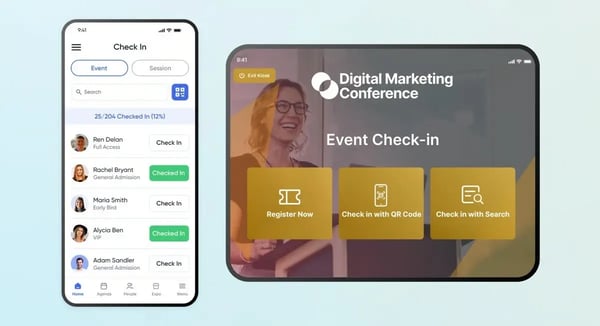
On G2, Accelevents presents a measured profile, with a G2 satisfaction score of 55, G2 market presence of 52, and an overall G2 score of 53. Its user distribution further clarifies where it fits best: 55% of customers come from small businesses, 39% from mid-market teams, and 6% from enterprise organizations. Together, that data aligns with how reviewers describe the platform, intuitive, operationally clear, and dependable under event-day pressure.
Some reviewers note that the mobile experience is optimized around essential workflows. This keeps interactions focused and predictable, though teams that prefer to manage frequent, detailed updates entirely from a phone may find the experience more structured by design.
Customization follows a similar philosophy. Accelevents supports consistent layouts that streamline setup and reduce risk during live events. For teams with highly specific branding or layout needs, this approach may feel more constrained, yet the predefined structure helps teams launch faster and keep the event experience uniform across sessions and audiences.
All in all, Accelevents is best suited for organizers who prioritize smooth execution over experimentation. Its strengths in agendas, on-site logistics, unified tracking, and operational clarity make it a dependable choice for small and mid-sized teams running live events. For organizations focused on keeping events running cleanly from check-in through follow-up, it remains a solid fit within the mobile event apps category.
What I like about Accelevents:
- The platform stays operationally focused during live events, making it easy to move between schedules, sessions, and attendee views without friction.
- Onsite workflows are tightly integrated, with registration, check-in, badge printing, and attendee data managed in one system.
What G2 users like about Accelevents:
"I researched several different providers and landed on Accelevents as the best value for overall features and customization. The entire team is amazing, with exceptional response time via chat support. I was able to customize anything I needed for implementation, and the system was user-friendly. I have used this at two full events and will use it again for another this September (2025).
One of the biggest bonuses and reasons for picking Accelevents was their integration with Square for credit card processing (everyone else used Stripe). We also utilized the integration with our new HubSpot system.
As a person who uses multiple systems and has many years of experience, I most appreciate the constant improvements made by the team. You can tell Marvin takes great pride in his product and knows things can always be improved. And they do it regularly!"
- Accelevents review, Amy K.
What I dislike about Accelevents:
- The experience focuses on core event-day actions, which supports reliability but offers less depth for detailed configuration on mobile.
- Customization and analytics are standardized, limiting flexibility for bespoke branding or analysis.
What G2 users dislike about Accelevents:
“The only hiccup we had when using Accelevents was the software not syncing and working in harmony with our badge printers. We figured out a workaround and made it work-- all with the help of Accelevents' amazing customer support team. They worked tirelessly for months to address our situation and try to help us figure it out. In the end, the software just didn't like the model of badge printer we were using.”
- Accelevents review, Kara Z.
Comparison of the Best Mobile Event Apps
|
Software
|
G2 rating
|
Free plan
|
Ideal for
|
|
Whova
|
4.8/5
|
No public free tier
|
Networking, agenda, and engagement at community-driven conferences
|
|
Cvent Attendee Hub
|
4.3/5
|
No free tier (enterprise quote)
|
Enterprise events with structured agendas and integrations
|
|
Webex Events & Webinars
|
4.6/5
|
Trial/demo may be available
|
Hybrid and virtual events, especially for teams already in the Webex ecosystem
|
|
Guidebook
|
4.4/5
|
No free tier
|
Content-first, agenda-driven conferences and organized schedules
|
|
vFairs
|
4.7/5
|
No free tier (quote)
|
Virtual and hybrid events with exhibitor focus
|
|
SpotMe
|
4.7/5
|
No free tier
|
Branded, high-engagement live/hybrid experiences (enterprise)
|
|
EventMobi
|
4.6/5
|
No free tier
|
On-site coordination and multi-day conference workflows (event operations)
|
|
Eventbase
|
4.8/5
|
No free tier
|
Large-scale branded experiences and complex event apps
|
|
Airmeet
|
4.6/5
|
Free trial available
|
Interactive virtual events and audience participation
|
|
Accelevents
|
4.7/5
|
No free tier (quote)
|
Flexible event setup for in-person, virtual, and hybrid workflows
|
*These mobile event apps are top-rated in their category, based on G2’s 2025 Winter Grid® Report. All offer custom pricing tiers and demos on request.
Best mobile event apps: Frequently asked questions (FAQs)
Got more questions? G2 has the answers!
Q1. Which mobile event app is best if my event's success depends heavily on attendee networking?
If networking is a core outcome, Whova and Airmeet stand out. Whova performs especially well for in-person and hybrid conferences where attendee matchmaking, messaging, and meetups drive value. Airmeet is better suited for virtual-first events where live video networking and spontaneous conversations are essential.
Q2. Which mobile event app is most reliable during live event execution?
Platforms like Cvent Attendee Hub, EventMobi, and Accelevents consistently show strong performance under live pressure. Reviews highlight their stability when schedules change, sessions overlap, or large volumes of attendees access the app simultaneously, critical for multi-day or high-attendance events.
Q3. What’s the best option for enterprise events with complex agendas and integrations?
Cvent Attendee Hub and SpotMe are best aligned with enterprise requirements. They support structured agendas, track-based sessions, CRM integrations, and standardized workflows, making them a strong fit for global, recurring, or compliance-heavy event programs.
Q4. Which mobile event app delivers the most value for exhibitor- or sponsor-heavy events?
For expos, trade shows, and sponsor-driven formats, vFairs is the most purpose-built option. Its mobile app supports clear floor navigation, exhibitor visibility, lead capture, and post-event reporting, all of which directly impact sponsor ROI.
Q5. Which mobile event app is easiest to set up for small or lean event teams?
Teams with limited technical resources often gravitate toward Guidebook, EventMobi, and Accelevents. These platforms are frequently described as straightforward to configure, with responsive support and minimal dependency on ongoing vendor intervention during the event.
Q6. If branding and experience quality matter most, which app should I choose?
For high-touch, branded experiences, such as flagship conferences or customer events, SpotMe and Eventbase are strong contenders. Both emphasize polished attendee experiences, controlled environments, and hands-on vendor support that aligns with premium brand expectations.
Q7. Which mobile event app works best for multi-day, content-heavy conferences?
Guidebook, EventMobi, and Cvent Attendee Hub perform particularly well for agenda-driven, multi-day programs. Their strengths lie in schedule clarity, real-time updates, and reliable navigation rather than experimental engagement features.
Q8. Are there good mobile event apps for hybrid events without switching platforms?
Yes. vFairs, Accelevents, and Webex Events & Webinars are commonly used for hybrid formats. They allow teams to manage in-person and virtual attendees within a single ecosystem, reducing fragmentation across tools.
Q9. Which mobile event app scales best as events grow year over year?
Platforms like Cvent Attendee Hub, SpotMe, and Eventbase are often chosen by organizations that run recurring or expanding programs. Their structured configuration, integrations, and support models reduce the need to switch tools as event complexity increases.
Q10. How should I decide between two top-rated mobile event apps?
The decision usually comes down to event priorities, not feature count:
- Choose Whova or Airmeet if engagement and networking drive success
- Choose Cvent or SpotMe if structure, governance, and scale matter most
- Choose vFairs if exhibitor outcomes are central
- Choose EventMobi or Guidebook if agenda clarity and ease of use are critical
The best mobile event app is the one that reduces friction during live execution, not the one that looks most impressive in a demo.
Execution, not just experience
Mobile event apps shape how events function minute to minute, not how they read on a feature list. When the platform fits the workflow, teams spend less time fixing issues and more time guiding experiences. Communication holds, updates land cleanly, and engagement data is captured without recovery work. When the fit is wrong, friction surfaces fast, confused attendees, manual workarounds, and pressure at moments that cannot pause.
I treat this as an operating model decision. The right platform reduces cognitive load for staff and participants, letting teams operate with confidence under live conditions. That reliability compounds over time. Processes become repeatable, sponsor reporting stabilizes, and post-event analysis supports planning instead of reconstruction. Poor choices compound the opposite way, embedding risk into every cycle.
The safest path is to choose based on the problems the app must absorb, not the features it promises. Focus on where coordination breaks, attention fragments, and data is lost. When the fit is right, the platform becomes an invisible layer you can rely on to run events cleanly and predictably over time.
Want cleaner event execution? Explore top-rated event planning software on G2 and reduce last-minute chaos.





.png)
.png)
