/DarshayitaThakur-OrangeBG.webp?width=400&height=150&name=DarshayitaThakur-OrangeBG.webp)


The eight best design systems software for 2026 are Canva, Visme, zeroheight, UXPin, InVision, Frontify, CampaignDrive by Pica9, and Picmaker. I finalized this list after evaluating G2 Data and reviews.
Design systems have been part of almost every product and marketing workflow I’ve worked on as a content specialist. I’ve collaborated closely with app and web design teams, and the challenge of keeping designs consistent while moving fast keeps coming up. Without the right system in place, teams end up duplicating components, fixing inconsistencies late, or struggling to align design and development.
That’s where the best design systems software makes a real difference. The right platform helps teams scale design decisions, streamline collaboration, and reduce the back-and-forth that slows product delivery. But choosing the right tool isn’t always straightforward. Some focus on documentation, others on prototyping, and some on brand consistency or content creation, and the differences matter more than they seem on the surface.
To find what actually works, I evaluated 20+ tools using G2 Data, product documentation, and real user feedback to understand how these platforms perform in everyday workflows. I looked at how well they support documentation, collaboration, design-to-development alignment, brand management, and scalability across teams.
Canva: Best for creating on-brand visual content quickly across teams
Combines drag-and-drop simplicity, broad content workflows, and strong brand tools to help teams produce polished assets fast. ($42.55/person/year)
Visme: Best for creating interactive, business-ready visual content
Stands out for presentation-grade templates, branded content control, and interactive features built for reports, decks, and marketing materials. ($12.25/person/month)
zeroheight: Best for turning design systems into a shared source of truth
Excels at making design system documentation accessible, organized, and easy to share across design, product, and engineering teams. ($49/editor/month)
UXPin: Best for creating high-fidelity prototypes that align with development
Provides realistic prototyping, stronger design-to-development continuity, and workflows that support system-driven product design. ($29/month)
InVision: Best for turning static screens into collaborative, high-fidelity prototypes
Helps teams move from mockups to clickable prototypes with feedback, sharing, and animation tools built into the review process. ($89/month)
Frontify: Best for centralizing brand guidelines and assets to keep teams aligned
Brings brand governance, asset management, and guideline publishing together in one structured platform for growing teams. (Custom pricing)
CampaignDrive by Pica9: Best for scaling on-brand local marketing across distributed teams
Makes localized marketing easier by letting distributed teams customize approved assets while staying within brand guardrails. ($20/user/location/month)
Picmaker: Best for creating fast, on-brand graphics with AI-assisted workflows
Offers quick design creation through beginner-friendly editing, varied templates, and AI-powered creative variations for everyday content. ($6/month)
*These design systems software are top-rated in their category, according to G2's 2026 Spring Grid Report. I’ve added their pricing details to help make the decision easier.
Design systems software is becoming a more established buying category as teams look for better ways to manage components, document standards, and keep design, development, and brand work aligned. That growth is showing up in the broader market, too. Business Research Insights estimates the design systems software market will grow to $0.87 billion by 2035.
What also stood out to me is that this is a category where buyer expectations are already high. According to G2’s satisfaction scores, users of top design systems software average at 92% likelihood to recommend, 89% meet requirements, 92% quality of support, 90% ease of setup, 91% ease of use. That tells me buyers are not just looking for documentation or asset storage alone, they expect these tools to be usable, supportable, and scalable across real team workflows.
After evaluating 20+ tools, the eight design system platforms below are the ones I’d recommend for 2026 because each brings a distinct strength to the way modern teams build, manage, and scale design systems.
To build this list, I started with G2’s Spring 2026 Grid® Report for design systems software to create a shortlist, using market presence and category relevance as my guide. This helped narrow down tools that are widely adopted and actively used across different types of teams.
From there, I evaluated each platform on how effectively it supports component and asset management, documentation, collaboration, integrations, governance, usability, and scalability. I also looked at how well each tool fits real-world workflows, including design-to-development handoff, brand consistency, prototyping, and maintaining a reliable source of truth.
I also used AI to analyze verified G2 reviews, focusing on what users consistently value, where they face challenges, and how each tool performs in day-to-day use.
The screenshots featured in this article come from G2 vendor listings, satisfaction reports, and publicly available product documentation.
After reviewing G2 reviews and looking at how design, product, and engineering teams actually work together, a few evaluation themes stood out consistently. Here’s what I focused on when evaluating the best design systems software:
The list below contains genuine user reviews from the Design Systems Software category page. To be included in this category, a solution must:
*This data was pulled from G2 in 2026. Some reviews may have been edited for clarity.
I use Canva for everyday work, creating presentations, infographics, blog visuals, and more while maintaining brand consistency. It was no surprise to see my evaluation being supported by G2 reviews. Users agree that Canva is their go-to for turning ideas into polished, brand-ready assets without slowing the team down. According to G2 Data, Canva is used by 73% small businesses and 26% mid-market teams.
Canva stands out first for how easy it is to use. Its drag-and-drop interface makes the platform approachable for people who need polished visual content without relying on traditional design software. I find that this ease of use is one of Canva’s biggest advantages because it lowers the barrier to entry for marketers, founders, educators, and cross-functional teams that want to create professional-looking assets quickly.
What impressed me most was how broad the workflow coverage is. Canva spans docs, whiteboards, presentations, video, websites, print, and more inside its Visual Suite. That matters because design work rarely happens in isolation. I can see why teams use it to move from brainstorming to production in one place instead of bouncing between separate tools for planning, designing, presenting, and publishing.
Reviewers repeatedly call out how useful it is to save logos, colors, layouts, and reusable assets. Canva’s own product pages reinforce that with Brand Kit, brand templates, and approval-oriented team workflows. For marketing and content teams in particular, that makes Canva feel less like a design app and more like a system for producing repeatable branded output at scale.
Another strength I’d highlight is collaboration. Canva supports real-time cursors, comments, task assignment, and link-based sharing, and G2 reviewers consistently mention how easy it is to work across teams without needing everyone to be a trained designer. That combination makes a difference when multiple stakeholders need to contribute to decks, campaigns, social creatives, or internal materials without turning the process into a handoff bottleneck.
I found Canva’s AI layer especially relevant for a modern design systems conversation because it helps teams create faster without starting from scratch every time. Features like Magic Design, Magic Write, Magic Media, Magic Switch, and AI-assisted editing tools give users a quicker path from rough idea to usable first draft. What I like here is that these tools seem built to support day-to-day content production, resizing, translation, editing, and repurposing, not just one-off experimentation.
Another strength worth calling out is Canva’s template experience. G2 Data supports this, with Canva scoring 95% user satisfaction for design templates and 93% for template usage, showing that users value both the quality and practicality of its prebuilt assets. For teams creating recurring content across presentations, social posts, blog visuals, and marketing materials, that template depth helps reduce blank-page work while keeping output polished and consistent.
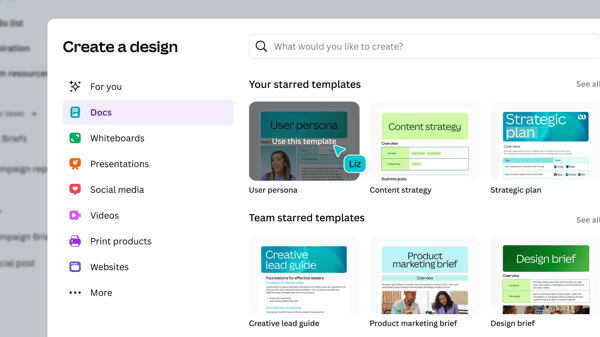
Canva works well when the priority is speed, collaboration, and brand-aligned content creation, though teams building highly intricate, precision-heavy visual systems may pair it with more specialized design software for advanced vector control, detailed layering, or deeper customization. Even then, according to G2 reviewers, Canva remains a strong fit for most everyday creative operations because it handles the bulk of recurring design work with far less effort.
Some G2 reviewers note that premium templates, assets, and advanced capabilities become more valuable once they move into paid tiers. Still, the core experience appears to deliver substantial value for teams that want an approachable, multi-format platform for producing professional content quickly and consistently.
Based on my personal experience and evaluation of G2 reviews, Canva’s drag-and-drop editor, large template library, and support for everything from social posts to presentations and videos make the design system feel especially well-suited for teams that need speed, consistency, and a low barrier to execution.
"Canva is incredibly user-friendly and comes with a huge library of ready-made templates for almost anything, from social media posts to professional presentations. Even if you’re not a graphic designer, you can still create polished, high-quality visuals with ease thanks to its simple drag-and-drop tools."
- Canva review, Ali H.
"One thing I don’t like about Canva is that many good elements and templates are only available in the paid version. Also, sometimes the app can lag a bit when working on heavy designs or with slow internet. More offline functionality would make it even better."
- Canva review, Tanish G.
Learn how teams without formal design backgrounds are using Canva to create high-quality visuals at scale.
Visme is used by teams that want polished visual content with more structure around branding, presentation, and reporting workflows.
Based on my evaluation, one of Visme’s clearest strengths is how approachable it feels for non-designers. Visme gets a 93% G2 user satisfaction score for its ease of use. Reviewers consistently describe the editor as intuitive, easy to navigate, and quick to pick up, even when they are creating professional-looking assets without formal design experience. That ease matters because Visme seems built to help teams move from rough ideas to presentation-ready content without requiring the learning curve of more design-heavy software.
Another major advantage I noted is the quality and relevance of its template library. Users repeatedly mention the breadth of built-in templates for presentations, infographics, reports, brochures, one-pagers, social content, and marketing materials, and several reviewers call out how useful those templates are for getting started quickly without building every asset from scratch.
Visme’s reusable asset experience also adds to its value beyond the template library. G2 Data supports this, with Visme scoring 92% for asset performance, which reflects how well teams can work with visual elements, branded materials, and reusable content once a project is underway.
Visme also appears especially strong for brand consistency. G2 reviewers highlight the ability to store logos, fonts, and other brand assets so teams can keep marketing materials aligned with company guidelines. In this way, Visme helps centralize approved assets and lock in brand rules. For teams producing recurring client-facing or internal materials, Visme provides a more governed feel than a simple design tool.
Reviewers mention that it is easy to edit and approve assets across teams and departments, and Visme also supports collaboration, comments, permissions, workflow approvals, and audit visibility. That combination is valuable for organizations where marketing, sales, leadership, or operations all need to contribute to the same deck or document without losing control over what gets published.
Reviewers mention analytics features that help track engagement and understand how audiences interact with content, alongside Visme’s strength in creating interactive presentations, clickable infographics, and embeddable assets. This makes it well-suited for teams that want visual content to go beyond static design and support more engaging audience experiences.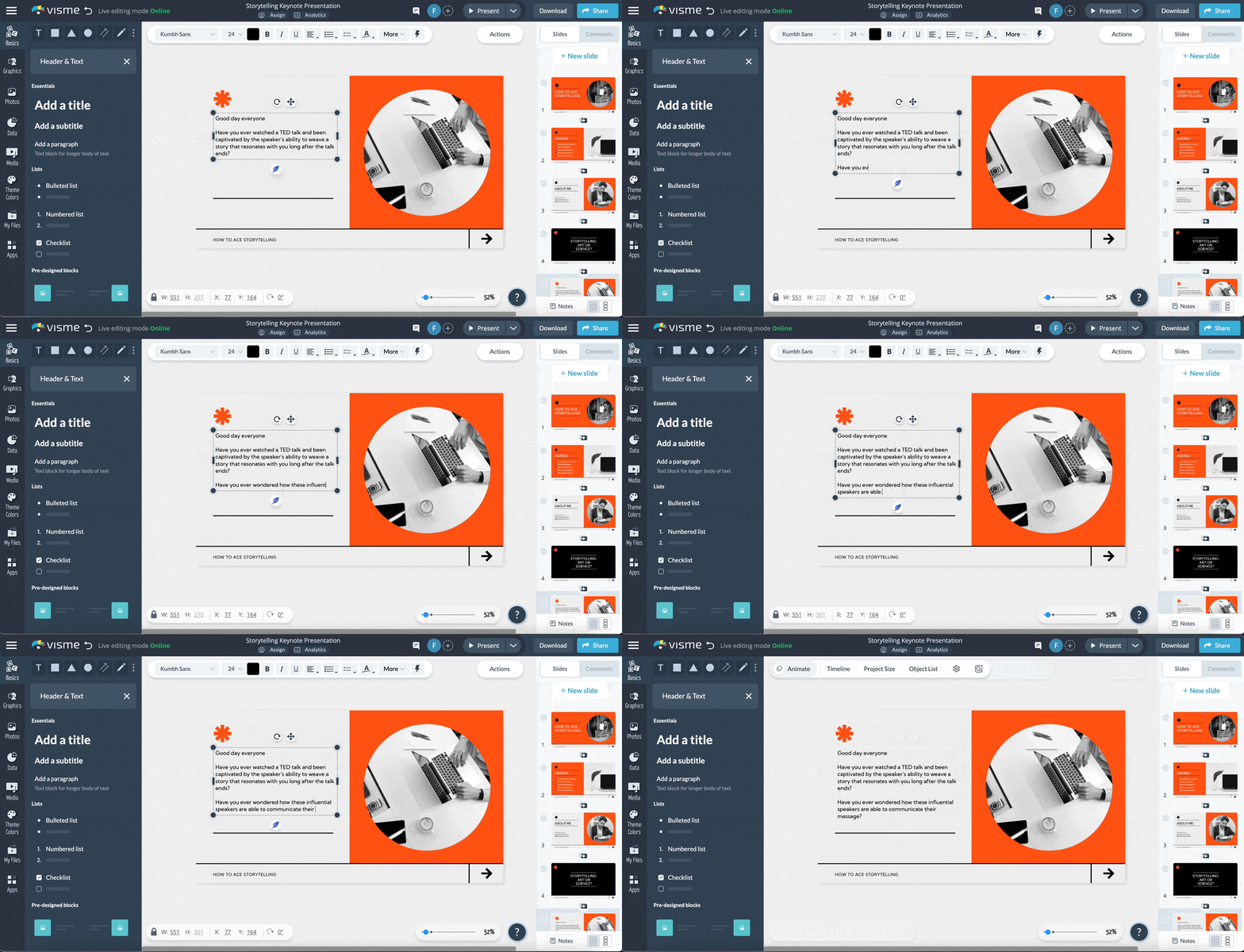
Some G2 feedback suggests there is still room for these features to expand further for teams that want more advanced AI-assisted workflows built directly into the platform. That said, reviewers still consistently highlight the platform’s ease of use, strong templates, and business-ready content creation experience, which keeps it valuable for teams focused on producing polished visual assets efficiently.
Visme can be glitchy at times, particularly during heavier editing sessions or when working with more complex interactive elements, which can occasionally interrupt momentum. Even so, the broader review pattern remains positive, with G2 users continuing to value the platform for its accessible design experience.
Overall, based on G2 reviews, Visme stands out as a well-rounded platform for teams that want to create professional, on-brand visual content with a mix of ease, structure, and interactivity.
"I like how chart creation in Visme is super easy. Adding and changing text, and moving text blocks around is really straightforward. I also appreciate how easy it is to work with color coding. Creating charts with Visme is simple, and I love how I can easily switch from pie charts to columns, adding or removing elements as needed. Setting up Visme was super easy, which really helped get things started without hassle."
- Visme review, Ryusei H.
"As the platform grows, it would be great to see more incentives for consistent customers and increased selection of graphics."
- Visme review, Debra R.
If you’re looking to build a consistent and memorable brand across every touchpoint, explore how visual branding can help you create stronger, more recognizable experiences.
According to G2 Data, zeroheight is used by 79% of enterprise teams. It is well-suited for teams that want to document, scale, and share their design system in a way that feels usable beyond just design. zeroheight is also the best software for maintaining a single source of truth in design and code.
I observed that zeroheight stands out for its ease of use. G2 reviewers repeatedly describe it as straightforward to learn, simple to implement, and easy to maintain over time, which is especially important for teams that want to document their design system without adding heavy operational overhead. According to G2 Data, it also scores 92% for its ease of use.
Reviewers also consistently call out how smoothly zeroheight connects Figma files to documentation, making it easier to bring components, tokens, and design decisions into a shared system without as much manual duplication. That connection matters because it helps teams keep documentation closer to the source of truth and reduces the friction that often comes with updating design system content across multiple tools.
zeroheight earns praise for simplifying the documentation process for design systems. G2 feedback repeatedly frames it as a central place for guidelines, reusable components, and system knowledge, helping teams move away from scattered documentation and toward something more structured and scalable. For organizations trying to make their design system easier to understand and easier to adopt, that simplification appears to be one of the platform’s clearest benefits.
Another clear advantage is its intuitive interface combined with useful customization options. Users describe the platform as easy to navigate while still offering flexibility around styling, layouts, templates, and documentation structure. That balance makes zeroheight feel well suited for teams that want their system documentation to be both easy to manage internally and polished enough to reflect their brand and organizational preferences.
The platform’s excellent customer support comes through clearly in reviews. Users describe the zeroheight team as responsive, helpful, and genuinely invested in helping customers succeed, which can make a real difference for teams building or scaling a design system program. In a category where rollout, governance, and adoption often need ongoing guidance, that level of support adds practical value beyond the product itself.
Design quality is also a notable differentiator in the reviews. zeroheight helps teams create documentation that looks clean, professional, and visually engaging with relatively little effort. That matters because design system documentation is more effective when people actually want to use it, and zeroheight seems to help teams present system guidance in a way that feels credible, organized, and aligned with the quality expected from mature design organizations.
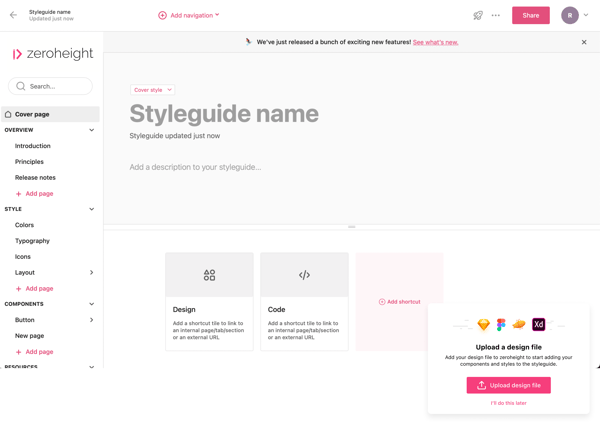
According to G2 reviewers, while zeroheight works well for documenting and scaling design systems, some teams managing very large libraries may notice slower performance as documentation grows more complex. That said, its overall structure, ease of upkeep, and strong integration with design workflows still make it a valuable choice for teams that want a centralized and polished system hub.
Some users mention that navigation can take a bit more configuration to feel fully intuitive for both builders and end users. Even so, teams still value the platform for simplifying documentation and giving them a more organized way to share design guidance across the business.
Overall, based on G2 reviews, zeroheight stands out as a purpose-built platform for teams that want to make their design system easier to document, easier to access, and easier to scale across the organization.
"We use Zeroheight as a documentation platform for our multi-brand design system. The tool meets our need for centralization well, with convenient Figma integration and easy accessibility for all stakeholders (design, dev, product, business). Simple to grasp and implement, thanks to the good number of features available. The customer support is responsive and efficient.”
- zeroheight review, Héloïse C.
"Here are two dislikes:
1. Performance Issues with Large Libraries: When managing very large design systems, the platform can become slower.
2. Offline Access: No strong offline mode, which can be a limitation for some workflows."
- zeroheight review, Veronika W.
UXPin is well-known for interactive prototyping, design systems, and developer handoff, with a workflow that feels closer to actual product building than traditional image-based design tools.
UXPin stands out for its collaboration features. G2 reviewers specifically highlight the feedback loop, comments, and sharing capabilities as strengths, while UXPin also emphasizes commenting, tagging, assigning feedback, and resolving comments directly on prototypes. That makes it easier for teams to keep collaboration tied to the work itself instead of spreading feedback across separate tools and threads.
Ease of use is another clear advantage. Reviewers repeatedly describe UXPin as easy to understand and relatively simple to work with, especially when moving from wireframes into more advanced prototypes. That accessibility matters because the platform offers meaningful depth without making the learning curve feel unnecessarily heavy for teams that want to get started quickly. It also scores 93% for its ease of setup, according to G2 Data.
I factored in feedback that specifically points to an interface that helps users create and edit prototypes with less friction, which supports more efficient day-to-day work. For teams evaluating tools in this category, usability can make a big difference because it helps keep attention on the product experience being designed rather than on the mechanics of the tool itself.
UXPin receives praise for its quick prototyping. Reviewers mention moving from wireframes to functional prototypes efficiently, and UXPin positions the platform around building interactive prototypes faster with more realism. That makes it especially useful for teams that need to validate concepts, test flows, and iterate without spending unnecessary time recreating the same ideas across disconnected stages.
The design system supports seamless teamwork and clearer communication with stakeholders. The prototypes are easy to share and comment on, and UXPin’s sharing tools are built to let teams control access to comments, specs, and documentation for different audiences. That makes the platform especially useful when product ideas need to be reviewed not only by designers, but also by clients, developers, and internal stakeholders who need context without extra back-and-forth.
Based on my evaluation, high-fidelity prototyping is one of UXPin’s strongest differentiators. Reviewers like its ability to create functional, high-fidelity, testable prototypes, and UXPin reinforces that positioning by emphasizing prototypes that better reflect the final product experience and support smoother developer collaboration. That level of realism is valuable because it helps teams gather more grounded feedback.
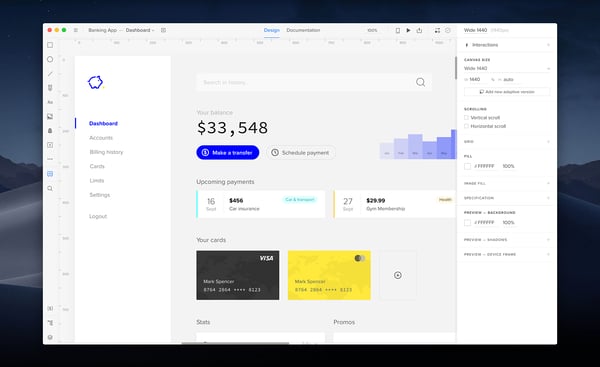
While UXPin is well-suited for building detailed, high-fidelity prototypes, some users note occasional performance issues as projects become larger or more interaction-heavy. That said, many reviewers still value the platform for the realism of its prototypes and the depth it brings to design workflows, especially when fidelity matters more than lightweight speed.
UXPin offers a more code-aware approach to prototyping, though some users mention that its commands and workflows can feel less familiar at first compared with tools like Figma or Sketch. Even so, that difference is also part of what makes UXPin useful for teams that want prototypes, documentation, and developer alignment to feel more connected in one environment.
Overall, its strengths in interactivity, shareability, system consistency, and documentation make it especially useful for organizations that need design work to be both polished and implementation-aware.
"Through this tool, we can create interactive prototypes that can be shared with our clients, along with a phone frame. That's pretty cool. UXPin is quite close to what happens in actual web development. It has been a great experience so far. With the tool, I was able to execute extremely successful projects and create remarkable digital products."
- UXPin review, Neel L.
"I'd love to be able to export the data in more formats for greater integrations."
- UXPin review, Eric C.
Based on my evaluation, InVision is used by teams that want prototyping, feedback, and handoff to happen in one shared workflow rather than across disconnected tools.
I observed that InVision is easy to use and gets a satisfaction score of 88% for this from G2 users. Reviewers describe the platform as intuitive enough to work with without needing special skills. That matters because prototyping tools often become harder to adopt as they add more features, but InVision appears to keep the core experience approachable for teams that want to move quickly from concept to clickable output.
Invision also receives praise for its collaboration abilities. Users mention sharing prototypes, gathering feedback, using comments, and keeping the discussion close to the work itself rather than spreading it across email threads or meetings. For teams that need product, design, and stakeholder input to stay aligned around the same prototype, that collaborative layer looks especially valuable.
The platform’s integration with Sketch is also a meaningful differentiator. Reviewers echo that connection by highlighting how the platform helps take designs created elsewhere and turn them into interactive webpages or live prototypes. Workflow efficiency is important because it reduces friction between design creation and review, rather than forcing teams to rebuild work just to make it presentable.
InVision also earns credit for streamlining the prototyping process itself. Using Invision, static sketches become living documents that are easier to compare, review, and iterate on. This is where InVision feels especially useful for teams that want prototypes to function as a working part of decision-making, not just as visual placeholders before development starts.
Auto Layout is one of the product’s notable positives. In practice, that kind of capability matters because it helps teams manage layout consistency and adapt screens more efficiently as prototypes evolve, especially when they are iterating quickly across different views or components.
Creativity and animation are also part of InVision’s appeal. Reviewers specifically mention timeline and gesture tools that help them craft transitions and make mockups feel more vibrant. InVision provides rich, interactive prototypes rather than static screen previews. For teams presenting concepts to clients or internal stakeholders, adding movement and realism can make feedback more grounded and useful.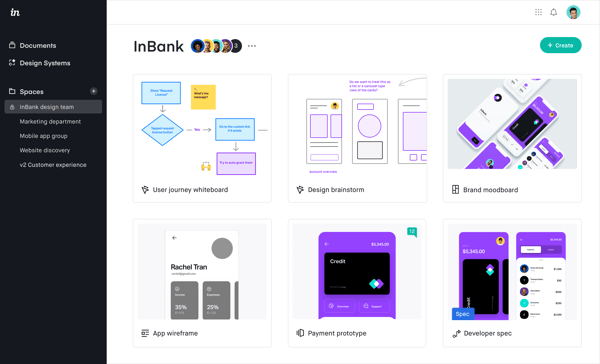
While InVision is used for collaborative prototyping and interactive review workflows, some users note that comment management can feel harder to navigate as discussion threads build up or projects become busier. Even so, the broader review pattern still points to strong value for teams that want feedback, comparison, and prototype sharing in one place rather than spread across separate tools and channels.
Some reviewers also mention that the platform can feel a bit overwhelming at first or that certain linking workflows could feel more familiar when coming from adjacent design tools. That said, reviewers still consistently describe InVision as intuitive once teams get oriented, and its strengths in interactive prototyping, collaboration, and workflow continuity continue to make it a compelling option.
Overall, based on my evaluation, InVision stands out as a collaboration-first prototyping platform that helps teams turn mockups into interactive experiences, gather feedback in context, and move design conversations forward with more clarity.
"InVision has become our creative command room—easy to dive into any mockup, check layers, styles, and specs, and let InVision auto-generate code. The timeline and gesture tools help us craft transitions, and even mood boards feel vibrant with real-time comments and votes."
- InVision review, Verified User in Media Production.
"One thing I’d tweak is comment management—when threads pile up, everything scatters, and we end up chasing conversation trails to find context."
- InVision review, Verified User in Media Production.
Frontify enables teams that need one place to manage brand guidelines, templates, and assets without relying on scattered files or outdated documents.
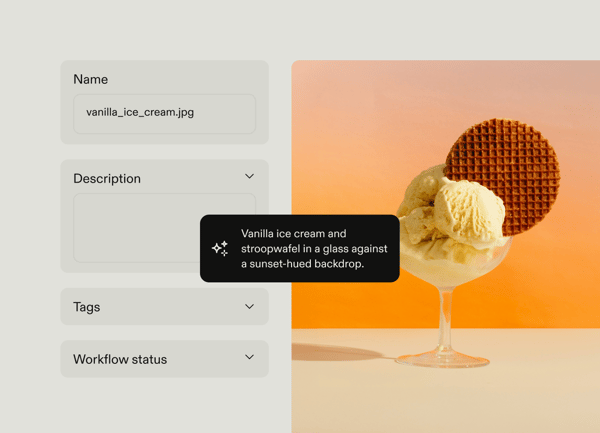
Frontify performs especially well as a central hub for brand guidelines and assets. Reviewers consistently mention storing logos, templates, images, and brand documentation in one easy-to-access space, while also using it as a shared source of truth across projects and teams. For organizations that have outgrown static PDFs and disconnected folders, centralization appears to be one of Frontify’s biggest benefits.
I noted users repeatedly call out the clean visual layout, straightforward navigation, and accessible presentation of guidelines and assets, which makes the platform easier to adopt across different functions. That matters because brand platforms create more value when marketers, designers, and non-design teams can all find what they need without a heavy learning curve or constant admin support.
Frontify offers excellent customer support, and reviewers describe the team as fast to respond and helpful when questions come up. In a category where teams often need help with setup, governance, and ongoing platform management, that kind of responsiveness adds practical value beyond the software itself and makes the platform easier to roll out with confidence.
Another major strength is how well Frontify supports branding consistency. Users can keep internal and external teams aligned on approved visuals, messaging, formats, and usage, which is especially valuable when many people contribute to branded output. From a buyer's perspective, this makes Frontify feel less like a simple asset repository and more like a governance layer for making sure brand standards are actually followed in day-to-day work.
I paid attention to the platform’s digital asset management feature. It makes assets easier to organize, find, share, and reuse across projects. Reviewers mention using it to assemble campaign toolkits, surface approved materials quickly, and give teams a more efficient way to work with brand-approved content. Operational clarity reduces duplication, shortens search time, and makes it easier for teams to move faster without sacrificing control over what gets used.
I noted that Frontify also performs well on collaboration, with G2 Data showing an 85% user satisfaction score in this area. This aligns with G2 reviewers who describe the platform as helpful for keeping brand, marketing, and creative teams working from the same approved guidelines and assets.
While Frontify gives teams a centralized place to manage brand guidelines and assets, some G2 reviewers note that parts of the experience can feel less intuitive in practice, especially when navigating page-building or admin workflows. That said, many still find value in the platform’s ability to bring structure and consistency to brand management once teams are familiar with how it is set up.
Some reviewers also mention that customization can feel more limited in certain areas than expected, particularly when teams want more flexible control over templates, layouts, or page-level styling. Even so, Frontify continues to work well for organizations that prioritize having a clear, centralized brand system over highly bespoke configuration in every part of the experience.
Overall, based on my evaluation, Frontify stands out as a strong platform for teams that want to centralize brand guidelines, organize assets, and maintain brand consistency at scale, with a user-friendly experience and support structure that make it especially valuable for growing brand operations.
"At BSI, we use Frontify as our central platform for managing Brand and Marketing assets. I love how easy it is to find, share, and use brand-approved assets across different projects. The visual interface is clean with accessible guidelines and editable formats. It really helps in storing and organising logos, templates, images, and brand guidelines in one easy-to-access space."
- Frontify review, Verified User in International Trade and Development.
"There are a few issues we have found. There are new parts of Frontify being added all the time, so sometimes existing ways of working become broken because of that, and we have to figure out a different way of doing this. The custom/template feature sometimes has issues, and we have run into several complaints from people who say that things occasionally stop working."
- Frontify review, Olivia H.
Want a better way to organize, manage, and distribute your brand assets at scale? Explore the best digital asset management software.
CampaignDrive by Pica9 is used by brands that need to deliver approved marketing materials across franchises, locations, or local teams without losing control over brand standards.
I noted that this design system supports brand consistency at scale. Reviewers consistently highlight that local teams can access on-brand materials, personalize them where appropriate, and still stay within approved brand guardrails. For multi-location businesses and franchise models, that kind of structure is especially important because it helps ensure every market-facing asset feels consistent while still allowing room for local relevance.
The platform also seems especially effective at reducing manual work for internal creative and marketing teams. Several reviewers point to time savings as a major benefit, noting that materials no longer need to be customized by hand or routed through the central team for every request. Instead, users can create or finalize collateral independently within approved parameters.
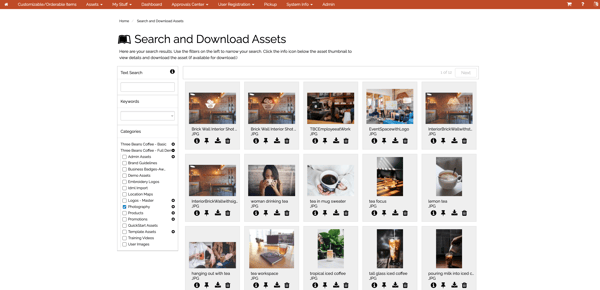
Campaign Drive’s template-driven content creation is another recurring strength. Teams have access to a broad set of templates, categories, and reusable assets for flyers, rack cards, business cards, landing pages, and other local marketing needs. That ready-to-use structure helps users move faster because they are not starting from scratch every time. It also supports consistency in output quality, which is especially useful for brands that want local execution to feel polished even when users have limited design experience.
The platform is easy to navigate, simple to work with, and approachable for regular business users. That matters in a distributed brand environment because local teams often need to move quickly without relying on constant support from central marketing. CampaignDrive appears to reduce that friction by making it easier for users to find what they need, edit approved assets, and complete everyday marketing tasks with less effort.
I observed that it provides strong customer support. The Pica9 team earns praise from reviewers for being responsive, knowledgeable, and helpful when questions or issues come up. In several cases, support appears to play an active role in helping users troubleshoot problems, speed up access, or work around platform limitations. Platforms like this are often tied to ongoing brand operations, and responsive help can make a meaningful difference in adoption and day-to-day usability.
CampaignDrive supports a broader localized marketing workflow beyond simple asset storage. According to G2 Data, users provide a satisfaction score of 90% to CampaignDrive for its workflow management. Reviewers mention ordering materials, accessing reports, hosting landing pages, and working with print-related processes in a way that keeps execution organized. This gives the platform a more operational feel, since it helps teams not only create localized materials but also manage how those materials are distributed and used across campaigns.
Some reviewers mention that performance can vary depending on the complexity of the item or workflow, with slower loading, more time-consuming build steps, or occasional content update delays affecting efficiency in heavier-use scenarios. That said, users still consistently value the platform for the time it saves, the support it provides, and the way it helps local teams create on-brand materials.
CampaignDrive works especially well for brands that want to scale local marketing while protecting brand consistency, though some reviewers note that certain workflows can take time to learn at first, particularly for users less familiar with structured asset management tools or multi-step setup processes. Even so, the broader feedback still points to strong value once teams are up and running, especially for organizations that benefit from repeatable, governed marketing execution across many users or locations.
Overall, based on G2 reviews, CampaignDrive by Pica9 stands out as a strong choice for organizations that need to scale brand-compliant local marketing efficiently across distributed teams.
"What I like best about CampaignDrive is how efficient it is for creating marketing collateral across multiple campaigns. I use it consistently on a monthly basis, and the platform is generally very user-friendly. It makes it easy to stay on brand while producing materials quickly without having to rely on our internal Creative team. On top of that, the support from the Pica9 team is exceptional—they’re responsive, knowledgeable, and always willing to go the extra mile to help us succeed. It truly feels like a collaborative partnership."
- CampaignDrive by Pica9 review, Catherine B.
"The least helpful aspect is that the platform can have a bit of a learning curve for new users, especially those less familiar with digital asset management tools. Some of the workflows can feel a little confusing at first until you get used to how the system is structured. As for downsides, loading and building new materials can be time-consuming depending on the complexity of the printed item."
- CampaignDrive by Pica9 review, Verified User in Hospital & Health Care.
Looking to bring more structure, visibility, and control to your marketing workflows? Explore the best marketing resource management software.
Creators who want to produce polished social media graphics quickly without relying on complex design software choose Picmaker. According to G2 Data, it is used by 64% small businesses and 36% mid-market teams.
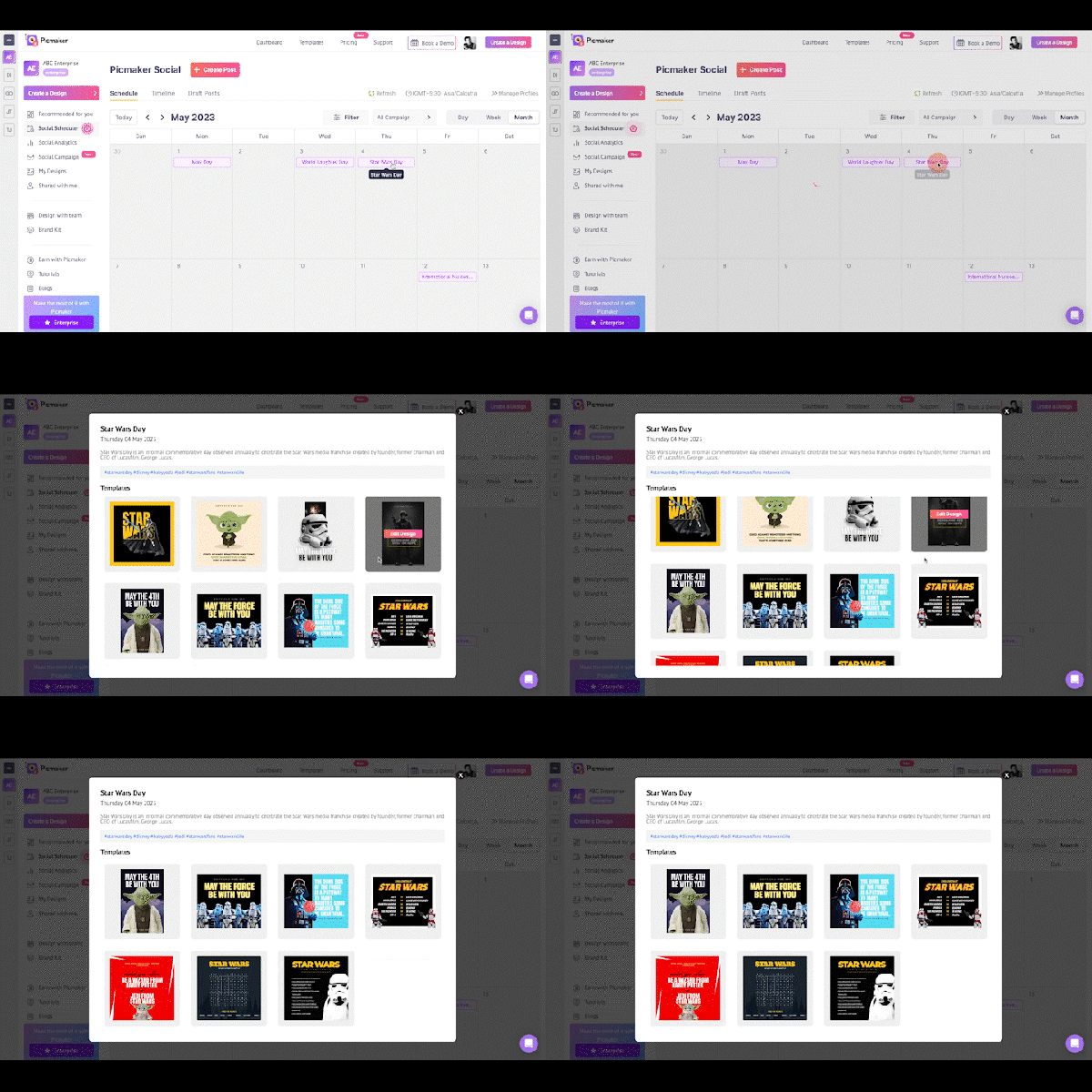
I noted that users praise the variety of Picmaker’s template library. Reviewers consistently mention the large selection of ready-made templates across use cases like marketing, sales, social media, education, and small businesses. For users creating repeat content across channels, that template depth helps shorten production time and makes it easier to start with something polished instead of beginning from a blank canvas every time.
Picmaker also appears especially strong for on-brand creation. Its brand kit lets users store logos, fonts, color palettes, and even favorite templates, which helps reduce repetitive setup work and makes branded output easier to maintain. For teams producing recurring visual content, that gives Picmaker more structure than a basic design editor because it supports consistency as well as speed.
Reviewers repeatedly highlight the platform’s user-friendly experience, noting that it helps even beginners create professional-looking designs quickly. I think this matters because design tools in this category are most useful when they reduce friction rather than add to it, and Picmaker seems to do that well by making common design tasks feel approachable for users without deep design expertise.
Picmaker’s AI-assisted design workflow and MAD button is a helpful feature, and the platform positions it as a one-click way to switch colors, typography, backgrounds, and images to generate fresh variations quickly. That is especially useful for social content teams that need multiple creative options fast, since it helps users explore alternatives without manually rebuilding the same design in different styles.
Collaboration and sharing are other notable advantages. Multi-dimensional sharing, and view or edit access through shared links, enhance the platform’s efficiency for collaborative content workflows. For teams working across creators, marketers, and approvers, this helps keep reviews and distribution more organized inside the same environment.
According to G2 Data, Picmaker gets a satisfaction score of 96% for its design templates, 96% for its dashboard, and 93% for collaboration functionalities, and 90% for its dashboard. These ratings are in accordance with what I noted G2 reviewers praise about the design system software.
While Picmaker works well for fast, template-led design creation, some G2 reviewers note that certain categories, premium template selection, or creative options can feel narrower when teams want deeper variety for more specialized use cases. Even so, the broader feedback still points to strong value for users who prioritize speed, simplicity, and dependable everyday content production over exhaustive design depth.
Picmaker stands out as a practical design platform for teams that want to create branded social content quickly, collaborate easily, and produce polished visuals without a steep learning curve.
"It has a huge template for the YouTube thumbnail section and is easy to customize. The customer support is super quick to help the users."
- Picmaker review, Pradeep K.
"Picmaker has nothing at all to be disliked. One area where I think the platform could use some improvement is the photo filter selection."
- Picmaker review, Snehal B.
How to measure the ROI of implementing a design system platform?
Measuring the return on investment of any design system software comes down to comparing the cost of building and maintaining your design system with the efficiency, speed, and consistency it brings across teams.
Focus on these key indicators:
Got more questions? G2 has got the answers.
Canva and Frontify stand out most for unified, on-brand experiences across multiple content types and teams. zeroheight is also a strong example where the design system itself becomes a shared source of truth across functions.
zeroheight, UXPin, and Frontify are the clearest examples in this list. Their positioning is closely tied to documentation, governance, reusable components, and system-level consistency rather than one-off design creation.
For scale, zeroheight and Frontify look strongest because both are built around system documentation, shared standards, and cross-team adoption. CampaignDrive by Pica9 also stands out for scaling controlled brand execution across distributed teams.
UXPin leans closest to development workflows through high-fidelity prototyping, documentation, and design-system alignment. zeroheight also fits well where engineers need accessible, centralized guidance.
Frontify and zeroheight come across as the strongest for governance, especially around centralizing standards, documentation, and controlled usage. UXPin also deserves mention for reusable systems and tighter design-to-development continuity.
zeroheight is the clearest fit for polished, well-documented systems, with Frontify close behind for structured brand and guideline management. Canva also stands out for polished consistency, though its strength is broader creative workflow coverage rather than documentation alone.
It depends on the goal. Bigger product teams often lead on scale and governance, while smaller B2B SaaS companies can be more focused and usable. Tools like zeroheight, Frontify, and UXPin show that smaller specialized vendors can be excellent at design system execution.
Based on my evaluation, the best design systems give designers, developers, and brand stakeholders a shared foundation for consistency, reuse, and faster decision-making. The strongest platforms in this list stand out for different reasons, whether that is documentation, governance, prototyping, brand control, or localized execution.
Some are better suited for documenting and scaling system knowledge across teams, while others are stronger for high-fidelity prototyping, brand consistency, or fast asset creation. The right choice depends on what your team needs most. It can be a centralized source of truth, tighter design-to-development alignment, easier brand management, or a faster way to produce consistent visual content at scale.
Once your design system is easier to document, adopt, and maintain, teams can spend less time recreating patterns and resolving inconsistencies and more time improving product experiences.
Looking to keep your logos, templates, and brand materials organized in one place? Explore top brand asset management software to find the right solution.
/DarshayitaThakur-OrangeBG.webp)

A few years ago, while juggling multiple roles at a startup, I found myself designing posters,...
 by Harshita Tewari

Capturing moments or creating them? The power is in your hands Capturing and sharing images...
.png) by Devyani Mehta
by Devyani Mehta